

14 Best Employee Experience Platforms of 2026 (Tested)
We tested 38 platforms to find the best employee experience tools for engagement, retention, and real adoption.











The best employee experience platform turns employee feedback into manager action. After piloting 38 employee experience tools across healthcare, tech, and professional services companies, that single capability separates platforms that drive real change from ones that become expensive shelfware six months after launch. If you're dealing with disengaged employees, surprise resignations, or feedback that disappears into a survey black hole, an employee experience platform can help address these issues.
Driven from experience as former HR operators who implemented employee experience systems firsthand, we spent dozens of hours running live pilots with HR teams, interviewing employees actively using each platform, and stress-testing integrations with the HRIS systems most mid-size companies already run. This guide tells you which platforms actually changed employee behavior and retention outcomes, which looked better in the demo than in real deployment, and how to match an employee experience tool to the specific problem your team needs to solve first.
To select the best employee experience platforms, we vetted each tool based on four capabilities: communication and collaboration, culture and engagement, employee development, and analytics.
- Communication and collaboration: How employees communicate and collaborate can make or break the employee experience. To facilitate and empower connection, we prioritized tools with capabilities like company-wide announcements, team collaboration, document sharing, and virtual meetings to make connection productive and easy.
- Culture and engagement: We evaluated peer-to-peer recognition systems, pulse surveys, and community-building tools. The best employee experience platform uses these features to measure engagement and reinforce workplace culture, though results depend on how well teams actually use them.
- Employee development: We assessed whether employee experience platforms integrate with learning management systems or include built-in learning features. Platforms that connect development to the employee journey show stronger engagement outcomes.
- Progress analytics: We prioritized tools with clear reporting on survey responses, engagement trends, and workforce metrics. The ability to track employee experience over time, identify problem areas, and measure improvement is what separates effective platforms from ones that generate data without action.
We are thorough in our research and only recommend effective products. To learn more about our methods, check out this article on how we evaluate HR tech vendors.


Bonusly

While Bonusly doesn’t offer built-in tools for employee learning, it excels at reinforcing the foundations of a strong employee experience by making recognition and engagement habitual, visible, and tied to values. In our tech tests, automated milestone celebrations, real-time feedback, smart 1:1s, performance recaps, and goals proved effective in helping teams feel seen and connected, especially in hybrid and distributed settings.
PROS
- Peer-to-peer recognition is fun, social, and easy to embed in daily work.
- Supports global teams with multilingual UI and international reward catalog.
- Strong integrations with HRIS, Slack, Teams, and communication tools.
- AI-powered recognition insights and real-time feedback (Organization tier).
- Built-in tools for milestone celebrations and company-wide announcements.
- Intuitive user interface.
- Available in German, English, French, and Spanish.
- Supports Android and iOS.
- Discounts for nonprofit and education organizations.
- 14-day, full-featured free trial.
CONS
- No built-in LMS or support for employee learning and development.
- Deeper analytics and feedback tools locked behind higher-tier plans.
- Reporting lacks depth compared to full EX platforms.
- Analytics and reporting features are relatively underdeveloped.
- The reward catalog lacks in-person experiences and physical goods.
- All our plans are billed annually, and the vendor no longer discloses their pricing.
Bonusly brings energy and ease to employee experience by making recognition a daily, visible practice. Its peer-to-peer recognition system creates a social feed of appreciation that reinforces values, highlights wins, and fosters inclusion across departments. We like that recognition can include hashtags, emojis, GIFs, and points, while automated milestone celebrations ensure birthdays, anniversaries, and onboarding moments never go unnoticed.
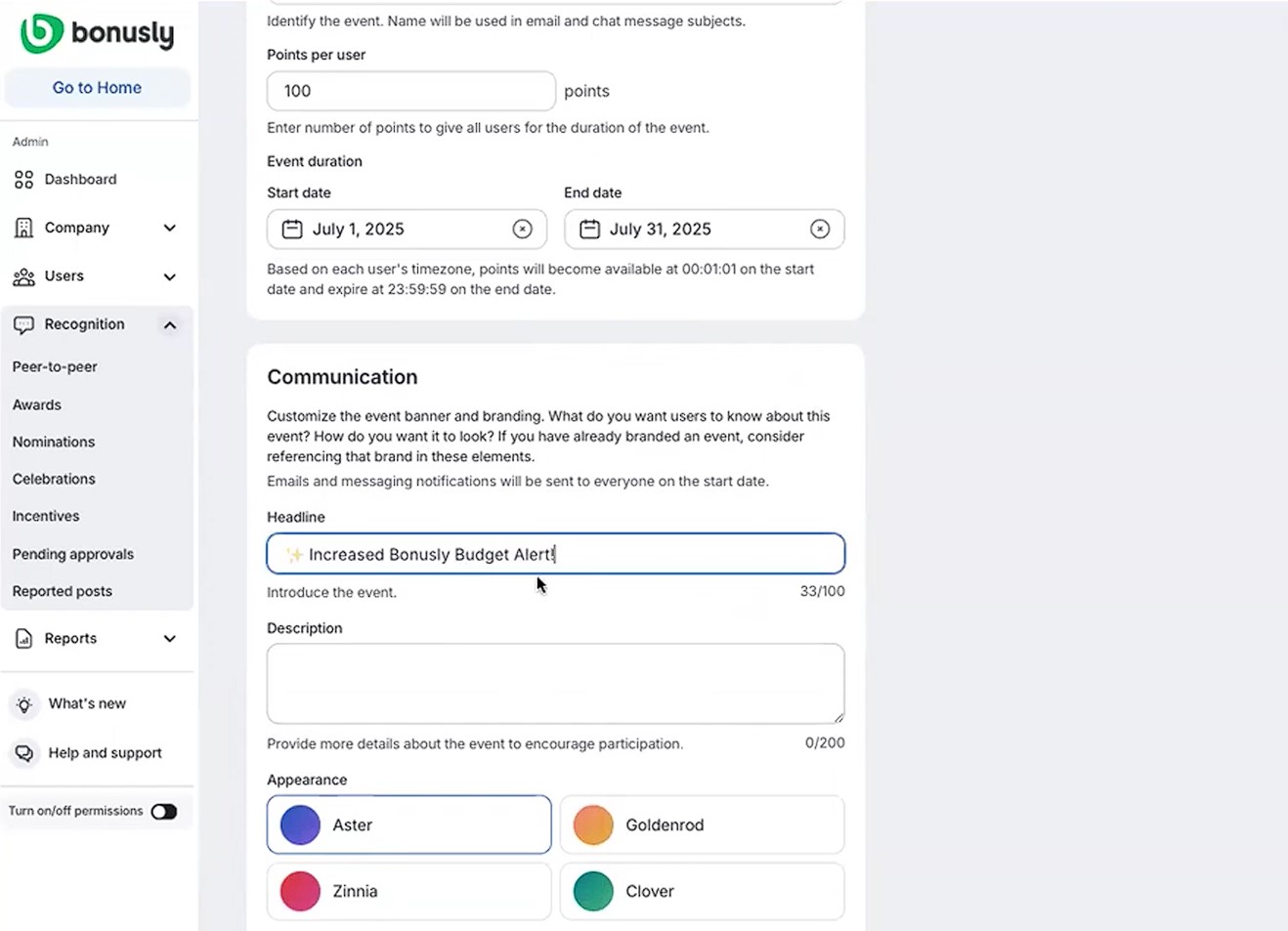
For company-wide communication, Bonusly’s Organization tier offers automated milestone celebrations and internal announcements, giving managers tools to reinforce moments that matter without needing a separate comms platform.
We also saw strong support for engagement and belonging. Custom awards, team pages, and a global rewards catalog help reinforce values while giving employees tangible motivation. The platform integrates with Slack, Microsoft Teams, and popular HRIS systems, making it easy to embed recognition into daily workflows.
Recent updates expanded admin controls, strengthened provisioning, and, importantly, introduced AI-powered recognition analysis, smart 1:1s, performance recaps, and real-time feedback. Although analytics require buy-in to the highest-priced plan and remain more directional than deep, they give HR and managers valuable signals on engagement and culture health.
When it comes to employee development, however, Bonusly is limited, as there’s no built-in learning management system (LMS) or integration with enterprise LMS platforms.
Progress analytics also leaves room for improvement. While Bonusly does offer insights into recognition trends and engagement participation, it lacks the depth we’ve seen in EX-focused platforms that offer segmentation by team, location, or tenure. The new AI analysis tools are promising, but as we mentioned earlier, they're pretty high-level and work best for catching overall trends rather than making deep strategic decisions.
Bonusly Key Features:
- Peer-to-peer recognition with hashtags, emojis, GIFs and points
- Automated milestone celebrations for birthdays, anniversaries and onboarding
- Internal announcements and company-wide communication tools
- Custom awards and team pages tied to company values
- Global rewards catalog with tangible employee incentives
- AI-powered recognition analysis and performance recaps
- Smart 1:1s and real-time feedback tools
- Native integration with Slack, MS Teams and popular HRIS systems
Bonusly has over 3,400 customers to date.
Bonusly provides three straightforward pricing tiers:
- Free: Costs $0 for up to 8 users and includes core recognition and basic 1:1 features.
- Team: Priced at $3 per user monthly or $30 per user annually. This plan adds the complete suite of habit-building tools for managers and expanding teams.
- Organization: Custom pricing upon request. This tier unlocks advanced analytics, more profound integrations, and the enterprise controls required by larger organizations.

Best For
Bonusly is best for mid-sized to large companies that want to make recognition the foundation of employee experience.


Bonusly is ideal for hourly, non-exempt workforce populations; these folks are engaged and thrive off the recognition. Management applauds this valuable tool and its support of teams and people across capabilities, departments and projects. Bonusly is also used as a means to donate to different charities. The reporting feature is helpful to understanding employee engagement.
Bonusly offers diverse opportunities to acknowledge and commend team contributions in a meaningful and impactful way. The UI is quite easy to navigate and integration with Slack makes it so easy to send "fun recognition" to colleagues. The ability to utilize Bonusly across the globe is also a great benefit.
I've used Bonusly with different organizations over the years. Bonusly absolutely achieves collaboration across teams/departments. It is a great way for peers to give kudos to each other via Slack (or other integrated platforms, as needed). I have multi-generational teams including Boomers to Gen Z-ers. Team members enjoy the ease of use, and the ability to recognize their teammates any time, day or night, and the ability to make it fun by adding memes, GIFs etc. to their posts.
The rewards are limited; not a lot of variety in gift cards. The need for a message and a mandatory hashtag can seem redundant and inconvenient. Automatic reminders to users to redeem points before they expire should be a standard feature. Additional choices for international employees would definitely be welcome!
Bonusly is a great platform for daily recognition. I don't feel that Bonusly can truly compete with platforms such as Snappy, which offer more impactful gifts. Organizations truly do need both as an opportunity for keeping teammates and colleagues engaged.
- Integrations are important, especially with Slack or any main workplace communication tool.
- Reporting is pivotal to determining how to best use peer recognition tools within the workplace.
- Having a functional, easy-to-use dashboard is a must-have, as is the ability to customize based on business needs.
Bonusly's possibilities for integrations and mobility is constantly evolving, as are the rewards and charitable donation options.
Bonusly is excellent for remote and global workforces, as well as hourly and entry-level employees and their managers. Bonusly is a successful tool in any sector of industry; as it is a universal tool that encourages peer recognition, appreciation, rewards and charitable giving.
I believe Bonusly to be a beneficial tool for any organization/sector of industry.

ThriveSparrow
We picked ThriveSparrow because it nails both engagement and recognition—key pillars for a thriving workplace culture. Its customizable pulse surveys, AI-driven insights, and kudos feature stood out in our testing, making it easier for companies to understand their employees' sentiments, build genuine connections, and quickly act on feedback.
PROS
- Highly customizable pulse surveys for ongoing feedback.
- AI-driven sentiment analysis surfaces key employee concerns quickly.
- Action Plans feature ensures feedback leads to tangible changes.
- Easy-to-use kudos tool promotes peer recognition and engagement.
- Integrates smoothly with Slack and MS Teams for better accessibility.
- Offers deep customization, allowing full control over survey questions, rating scales, and visibility settings.
- AI-powered sentiment analysis categorizes qualitative responses into key themes and presents insights in a visually digestible format.
- Granular data filtering by department, tenure, or location for precise trend analysis.
- Transparent pricing starting at $2 per user per month.
- Strong integration capabilities.
CONS
- No dedicated mobile app for managers and HR.
- Some HR system integrations may come with additional costs.
- Employee feedback and engagement data doesn’t auto-connect with the OKR module, which could limit development plan insights.
- Some integrations may require an additional cost.
- No dedicated mobile app for admins.
- As a relatively new product, ThriveSparrow may not have the experience of more established vendors.
After testing ThriveSparrow, we found the employee experience tool delivers on its core promise: making employee feedback collection easy and insightful. It’s especially valuable for companies serious about culture-building and continuous engagement.
We liked how the platform made gathering honest, regular feedback both convenient and effective. Instead of old-school, annual surveys, ThriveSparrow offers recurring pulse surveys that you can automate weekly, monthly, or quarterly. During our testing, we found plenty of pre-built survey templates, but what really stood out was how simple it was to customize just about everything—from the questions asked to how anonymous responses were. Distribution was easy too, whether via Slack, MS Teams, email, or even SMS.
The best part, though, was the native AI-driven sentiment analysis. In our test, the system quickly sorted through open-ended responses and highlighted key themes like leadership and communication. It also visualized the data in a heat map, allowing us to pinpoint problem areas easily without drowning in data. This feature was incredibly practical, especially compared to other tools we’ve tested, which often leave you struggling to make sense of feedback.
ThriveSparrow’s employee recognition and rewards module felt intuitive and natural. We had no trouble giving shout-outs and celebrating achievements with peers. Plus, this peer-to-peer kudos tool integrates directly with Slack and MS Teams, so if your team already uses either of these communication tools, they can easily celebrate small achievements or helpful gestures without leaving their usual workflow.

Similar to other robust recognition platforms, with ThriveSparrow, employees can accumulate points through recognition, which they can later redeem for rewards via a built-in marketplace. And it’s nice to see that this marketplace could be customized by location and include automated fulfillment, as it’s going to save HR great adm” or “Take a Day Off” to add a personal touch to recognition programs.
However, our biggest gripe about this platform is that while the AI-driven Personal Development Plans are impressive, they currently use only performance review data and don’t incorporate OKR data. This means the development recommendations might not fully reflect an employee's progress or struggles related to their actual goals.
Additionally, we found that while employees could easily respond to surveys on mobile through Slack or Teams, HR and managers are limited to managing insights strictly from desktop. The same limitation applies to the recognition module: employees can send kudos through mobile-friendly Slack or Teams integrations, but reviewing or managing recognition data is only possible through the desktop platform.
We appreciated ThriveSparrow’s transparent pricing, but we initially thought they didn’t offer a free trial because it wasn’t clearly mentioned on their site. Thankfully, a quick Google search for "ThriveSparrow free trial" led us directly to their 14-day trial sign-up form. Another thing we'd suggest checking with the vendor upfront is integration costs, since some might come with extra fees depending on your contract.
ThriveSparrow Key Features:
- Recurring pulse surveys with weekly, monthly or quarterly automation
- Customizable survey templates with configurable anonymity settings
- Multi-channel survey distribution via Slack, MS Teams, email and SMS
- AI-driven sentiment analysis with heat map visualization
- Peer-to-peer kudos and recognition integrated with Slack and MS Teams
- Points-based rewards redeemable via built-in marketplace
- Location-based marketplace customization with automated fulfillment
- AI-driven personal development plans based on performance review data
Some of ThriveSparrow's customers include Ikea, Tropicana, Infosys, and Honda.
ThriveSparrow offers a range of pricing plans to suit various organizational needs, each billed annually:
- Engage: $3 per employee per month.
- Kudos: $2 per employee per month.
- Performance: $5 per employee per month.
- Goals (OKRs): $3 per employee per month.
Best For
Organizations aiming to boost employee experience through continuous employee feedback, AI-driven insights, and integrated recognition programs.

Leapsome
We loved how Leapsome combines people development, engagement, and performance enablement into one cohesive platform. The AI-assisted feedback, eNPS tracking, recognition, 1:1s, and development goals were helpful during our demo testing. Plus, the fact that Leapsome encourages cultural adoption through smart workflows and community-building elements sets it apart from competitors.
PROS
- Built-in AI assistant improves feedback quality and promotes skill-based recognition.
- Engagement surveys come with best-practice templates and automated eNPS tracking.
- Instant Feedback with customizable badges and public praise walls supports real-time recognition.
- Strong meeting tools promote better 1:1s with shared agendas and tracked action items.
- Adoption workflows and “challenge weeks” drive internal momentum and cultural buy-in.
- Fully multilingual platform interface available in 32+ languages.
- Aggregated competency dashboards help visualize culture trends by team or org.
- Leapsome is quite feature-rich; the platform packs modules for employee onboarding, learning management, engagement, performance management, goals tracking and much more.
- The majority of users find Leapsome’s UI to be friendly and easy to navigate.
- There are lots of third party integrations options to choose from, including Slack, which many users appreciate.
- The platform has transparent pricing, and you only pay for the modules you need.
CONS
- All contracts require a minimum one-year term.
- Customer Success support is gated behind a minimum annual spend of $6,000.
- Not built for enterprise-level workforce planning or predictive analytics.
- There is currently no way to post or upload an image or file into your feedback.
- Since Leapsome can do so many things, you may need some time to get used to it. The implementation process can also take some time.
- There currently isn’t a mobile app that users can download and access Leapsome quickly on-the-go.
- Free 14-day trials are available but you need to book a demo with the sales team first to sign up for one; you can’t do so on your own.
If you’re looking to build a modern, feedback-driven culture, Leapsome delivers one of the most complete employee experience platforms we’ve seen for global SMBs.
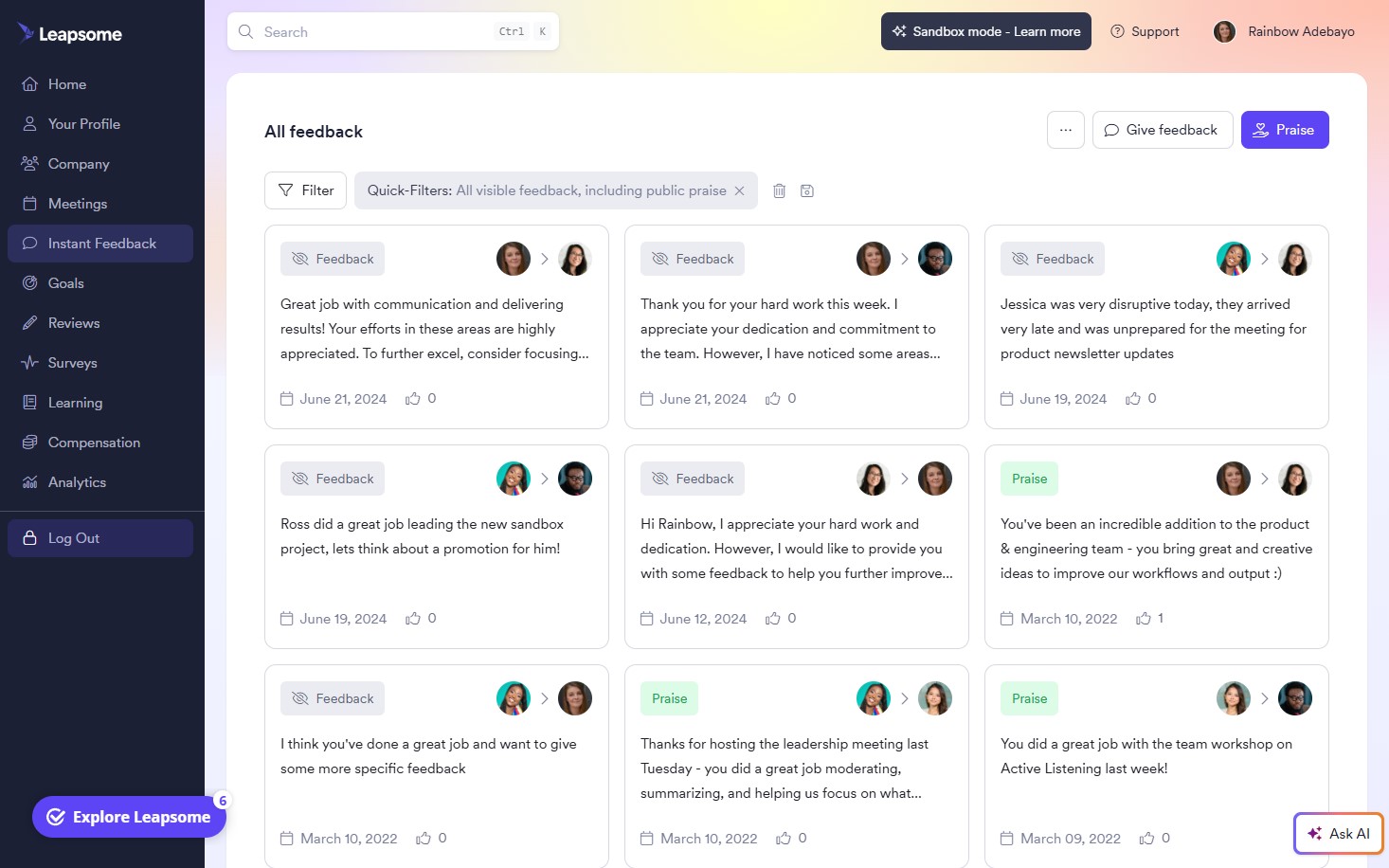
What impressed us most is how well its modules reinforce one another across engagement, feedback, and growth. Admins can launch recurring engagement surveys using research-backed templates, track eNPS over time, and uncover trends around culture and manager effectiveness through AI-enhanced analysis. All of this is easy to automate and measure via Leapsome’s survey dashboards.
From there, companies can layer on features like Instant Feedback to promote real-time recognition and coaching. Employees can offer praise tied to skills or company values, assign badges such as “Teamwork” or “Time Management,” and share public feedback via Slack or an in-office Praise Wall. Feedback is always attributed, and visibility rules are configurable, reflecting Leapsome’s commitment to enabling open, actionable conversations. Managers and employees can then track feedback trends in personal dashboards or the companywide Analytics tab. Meanwhile, the built-in AI co-pilot improves written feedback by checking grammar, suggesting phrasing, and helping surface development themes.
We also appreciated Leapsome’s structured rollout approach. The Adoption Challenge workflow walks teams through a four-week launch plan, nudging users to give feedback, run more effective 1:1s, and participate in Q&A boards. For growing teams without a formal change management lead, this kind of support can make or break implementation success.
That said, we’re not a fan of Leapsome’s one-year contract commitment. As a small team ourselves, we understand this could be quite a blocker for those seeking to start small or only activate select modules, such as surveys or feedback.
The lack of a mobile app may also be a consideration for companies with deskless or distributed teams. While the browser-based mobile version is fully functional, some users may miss the ease and discoverability of native mobile notifications. Lastly, while Customer Success, as several users have noted, is very helpful, it’s a shame that it’s only available to customers with a minimum annual spending of $6,000.
Leapsome Key Features:
- Recurring engagement surveys with eNPS tracking
- AI-enhanced survey analysis for culture and manager trends
- Real-time recognition tied to skills and company values
- Badges and public praise via Slack or in-office Praise Wall
- Configurable feedback visibility and attribution
- Personal and company-wide feedback dashboards
- AI co-pilot for written feedback improvement
- Structured four-week team adoption workflow
- 1:1 meeting tools with coaching nudges and Q&A boards
1,500+ companies, including Neurons Lab, Bob W, and Jina AI.
Leapsome’s pricing is customized, with a required minimum contract term of one year and a minimum annual spend of $6,000. A free trial is offered.
Best For
Small to mid-sized global companies (typically 50-250 employees) that want to build a feedback-driven culture using structured engagement tools, real-time recognition, and AI-assisted feedback.

MeBeBot
MeBeBot combines AI chatbots for quick question answering, pulse surveys to gather timely feedback, analytics for insights, and seamless integration into Slack, Teams, SharePoint to engage employees in their daily workflow.
PROS
- AI chatbot for 24/7 support and quick access to company knowledge
- It is easy to create pulse surveys to gather timely feedback
- Analytics and dashboards provide visibility into conversations and engagement
- Its conversational interface improves the employee experience
- Managers get custom insights from ToolBot
- Support is now offered in multiple languages
- No-code tool, easy to maintain. The customer portal makes it very straightforward to find and edit your knowledge base and keep the chatbot up to date.
- If an area of your knowledge center is in the works, we found it simple to set up placeholders for the entire topic.
- SOC-certified for data privacy
- 4-6 weeks implementation
- API availability
CONS
- No free trial or free plan.
- No mobile app for on-the-go access.
- Mainly helpful for companies that use Slack and/or Teams.
- Not a good match for companies with less than 250 employees
- Mainly aimed for companies that use Slack and/or Teams
- No multi-lingual support at the moment

MeBeBot is all about improving workplace communication, engagement, and culture. At its core is an AI-powered chatbot that provides employees with quick access to company knowledge, policies, and HR information. Employees can ask questions in natural language via chat and get answers instantly 24/7.
Beyond the chatbot, MeBeBot offers several capabilities to enhance the employee experience. Its pulse surveys allow you to gather feedback from employees in real time through simple conversational questionnaires. The surveys can be targeted and results analyzed to take action on emerging issues. For managers, MeBeBot has a dedicated ToolBot that provides coaching and tips personalized to the manager's team and challenges.
On the analytics side, MeBeBot gives administrators visibility into conversational metrics to optimize knowledge management. Features like conversation volume, response times, and topics analysis help improve the self-service experience. For reporting, MeBeBot offers live dashboards tracking utilization, user satisfaction, and content gaps.
From an integration standpoint, MeBeBot is designed as an app for Slack, Microsoft Teams, and SharePoint. This places support and engagement directly in the flow of work. The platform also offers APIs for customization and integration with HRIS, ITSM, and other workplace systems.
MeBeBot Key Features:
- AI chatbot for instant 24/7 access to HR knowledge and company policies
- Pulse surveys with real-time feedback and conversational questionnaires
- Targeted survey results with actionable trend analysis
- Dedicated manager ToolBot with personalized coaching and tips
- Conversation analytics for knowledge management optimization
- Live dashboards tracking utilization, satisfaction and content gaps
- Native integration with Slack, Microsoft Teams and SharePoint
- API support for HRIS, ITSM and workplace system integrations
Ziff Davis, HireVue, Abrigo, CrowdStreet, Terminal, Massage Envy
MeBeBot is sold as an annual SaaS subscription license. The average pricing is $2.00-$5.00 per employee per month (tiered, based on the number of employees), and $250-1,000 per month for an AI Portal license. There are no implementation fees.
There’s no free trial, but employers interested in the tool should ask about the MeBeBot paid pilot program.
Best For
Growing companies, particularly in technology, finance, consulting, or similar industries.

Empuls
Empuls offers a suite of tools to connect with employees, seek their feedback, and provide incentives to improve the employee experience. For instance, you can leverage eNPS surveys, lifecycle surveys, and engagement surveys for feedback, as well as recognize their efforts with greetings and rewards.
PROS
- Empuls features a modern UI that’s easy to navigate. They also offer plenty of self-help articles to help you get started.
- The platform is quite comprehensive, with tools covering employee communication, engagement surveys, recognition, rewards, and analytics.
- Employees are able to participate in surveys on the go with the help of Empuls’ mobile app available on both iOS and Android devices.
- Their affordable and tiered pricing ensures different size companies can try out the tool and scale up or down as needed. They also offer a 30-day free trial that anyone can sign up for.
CONS
- A few users find the options for rewards rather limited. Several of them are specifically wishing for the inclusion of more Amazon gift cards viable in their countries.
- Employees cannot share their points with each other at this time.
- Once you assign a sub-domain, you cannot change it later.
- Several users have experienced performance speed issues with Empuls’ mobile app.

Empuls' Employee Experience Software allows organizations to quickly identify and address key areas for improvement based on employee feedback. The built-in social intranet facilitates open communication, and can also be used to celebrate achievements, stay informed about company news, take part in social activities at the office, and collaborate on different projects. You can also show your appreciation for your employees by sending them virtual greeting cards, rewards and gifts when they reach important milestones.
Empuls Key Features:
- Social intranet for open communication and company news
- Peer recognition with virtual greeting cards, rewards and gifts
- Milestone celebrations and achievement recognition
- Employee surveys and feedback tools
- Polls and quizzes for engagement
- Reports and analytics on employee engagement
- Multi-currency rewards and white labeling on higher-tier plans
Empuls has over 1000 global customers, including Prodevans, Bahwan Cybertek, Magzter, FCA India Automobiles Private Limited, KPIT, Quixy, and more.
Empuls offers three pricing plans. Here are the prices if you choose to pay annually:
- Starter: This plan costs $20/year per employee. It offers features, including rewards and recognition, employee surveys and feedback, social intranet, and reports and analytics.
- Proficient: This plan costs $50/year per employee. It offers features, including white labeling, polls & quizzes, customer support, and everything that is in the Starter plan.
- Enterprise: This is a custom plan that offers everything from Proficient plan, plus custom HRMS integration, multi-region deployment, multi-currency payoffs, and dedicated customer success manager.
Best For
Empuls is a versatile employee experience software tool that caters to businesses of all sizes. However, it is particularly well-suited for small to medium-sized businesses aiming to foster a people-first environment.
Motivosity
Motivosity has been expanding its focus to become an employee recognition and experience platform that can easily work for teams from 50 to 5,000. It encompasses a complete recognition tool encompassing internal communication, awards, rewards, insights, and a way to run all your programs in one place.
PROS
- It’s a very complete tool from the get-go, with its core module (Community and Connection) offering a very wide array of features.
- Then, expansions of the tool are available as separately priced add-ons, letting you manage employee rewards, wellness programs, employee engagement surveys, and analytics from the same tool.
- Has a social media feel that makes it intuitive to use.
- Motivosity is very transparent about their pricing and what you get with each module.
- Factoring all of the above, Motivosity is quite a good deal if you consider all the workflows it can handle for that price point.
- Employees can access this system from their phones, desktop, and apps they are in at work such as Teams/Slack
- One platform that combines rewards, recognition, employee engagement, and more
- Built in reporting with insights around potential attrition, most recognized employees, managers that need coaching, etc.
CONS
- Although it’s improved over the years, we find the UI to be a bit heavy on the cognitive side. The platform does do a lot, so it can be a bit overwhelming when you first lay eyes on it. That being said, it doesn’t seem to stop people from using the tool, as 96% of employees use the system at least once a month.
- When it comes to rewards, these are limited to the dollar-based kind, it doesn’t support point-based systems.
- Only has dollar (not points) based rewards. Their research shows dollars is more effective, but many companies want points.
- Some users claimed sometimes it can be a bit buggy connecting to Slack to notify people that an appreciation came through.
- It would have broadened the number of gift card options for users to choose from.
- There could have been an easier way to integrate the software with swag stores. For now, you have to transfer funds to a card and then link that card with the swag store, which slows down a bit the process to cash in funds.

Motivosity is probably one of the most complete employee experience products out there. What started as a rewards and recognition tool, can now handle most aspects of what you would call employee experience. It makes sense for a company that, from the start, has made it its mission to help people be happier at work.
This expansion has been impressive to witness over the years, as we’ve been familiar with the tool since early on in their journey and have had several demos over the years. Our most recent one included a tour of the whole suite, starting from the communications hub but also going through the rewards and recognition module, which is more complete than ever and is now offered as an add-on.
Then, there are employee insights, which feature many types of surveys and metrics you can use to get an idea of how people feel and behave in the workplace. Although it can feel like too much at first, given the many options that you can point and click to, the UI is always improving. It’s also fairly easy to figure out once you locate the workflow you’re after. It also helps that you won’t start alone since implementation support is included with each plan.
Motivosity Key Features:
- Peer-to-peer rewards and recognition module
- Communications hub for company-wide engagement
- Employee insights with multi-format surveys and workplace metrics
- Engagement analytics and behavioral trend tracking
- Implementation support included with all plans
Motivosity proudly serves a diverse range of esteemed customers, including Instructure, the University of Michigan, Cotopaxi, HealthEquity, DF Credit Union, and WGU among others.
Motivosity’s core product of Recognition and Rewards is $4 per employee per month. This includes all of their tools for internal communication, rewards, awards, milestones, social connection features, etc. For a comprehensive list of features included in each pricing option, refer to Motivosity's dedicated pricing page.
Best For
Motivosity is a versatile employee experience tool that caters to organizations of all sizes, from startups to large enterprises. Its strength lies in serving SMBs and mid-market companies. Their sweet spot is in the 75-750 headcount range, but they have customers from 25 employees to 25,000 employees.

I use Motivosity on a daily basis, as it is a part of my routine and habit. Here are some key workflows I use it for:
Every morning, I check the social feed to see the recognitions that my colleagues and managers have sent and received. I like to read the comments and reactions, and join the conversation by adding my own.
Throughout the day, I send and receive recognitions, points, and badges for the work that I do and the work that others do. I try to align the recognitions with our core values and goals, and be specific and sincere in my messages.
Every week, I redeem my points for gift cards, perks, or donations. I like to treat myself or others with something that I or they enjoy, or support a cause that is cared about.
Every month, I review the analytics and reports that Motivosity provides. I like to see the impact of recognition on my performance, engagement, and retention. I also like to see the trends, patterns, and insights of the recognition and rewards activities.

Some of the main reasons why I like Motivosity are:
It helps me feel appreciated and valued by my colleagues and managers for my work and contributions.
It allows me to redeem my points for gift cards, perks, or donations that I enjoy or care about.
It integrates with my other tools such as Slack, Microsoft Teams, and ADP making it easy to access and use.
My organization bought Motivosity because we wanted to improve our employee engagement and retention. We had a problem with low morale, high turnover, and lack of recognition among our staff. We needed a tool that could help us create a culture of appreciation and motivation in our workplace.
I have personally used Motivosity for about six months, and I have seen a positive change in our workplace culture. I feel more appreciated and valued by my colleagues and managers. I also enjoy recognizing and rewarding others for their work. I think Motivosity is a great employee engagement platform that helps us achieve our goals and grow as a team.
Some of the main ways that Motivosity can improve or I wish it were different are:
It could offer a free trial for the upper tiers, so that potential customers can evaluate the features and benefits of the platform before purchasing.
It could improve the Android app, so that it is more stable and reliable, and has the same functionality and user experience as the iOS app.
It could provide more direct support options, such as chat, phone, or email so that customers can get faster and better assistance for their questions, issues, or feedback.
Motivosity is different from its competitors in a couple of ways. Here are some of the main differences and how it stacks up:
Motivosity has a unique feature called MVTV, which is a live stream of recognition that can be displayed on TVs, monitors, or screensavers. This feature enhances the visibility and impact of recognition in the workplace. I have not seen this feature in any other platform, and I think it is a great way to celebrate and inspire employees.
Motivosity has a flat pricing model that charges per user per month regardless of the number of users. This makes it easy to budget and scale the platform as the organization grows. Most of the other platforms have tiered pricing models that charge different rates based on the number of users or features. I prefer Motivosity's pricing model because it is affordable, transparent, and easy to use.
Employee engagement software is a type of tool that helps organizations measure and improve the engagement and satisfaction of their employees. When buying this type of tool, people should think about the following criteria:
The tool should offer features and functionality that match the organization's goals and needs for employee engagement. The tool should also be easy to use, customize, and scale.
It should have a high user adoption and feedback rate which means that most of the employees who are invited to use the tool actually use it regularly and provide feedback on their experience. This indicates that the tool is engaging, fun, and valuable for the employee.
Lastly, the tool should have a transparent and affordable pricing model that fits the organization's budget and expectations. The tool should demonstrate a clear and positive return on investment (ROI), which means that the tool helps the organization achieve its desired outcomes, such as improved performance, retention, and culture.
I have noticed two ways in which Motivosity has changed or evolved over time to meet users needs:
It has introduced new features and functionality to enhance the user experience and provide more value to the customers. For example, some of the recent additions are MVTV, a live stream of recognitions that can be displayed a number of ways; ThanksMatters Card which is a Visa card that allows users to use their Motivosity Bucks anywhere Visa is accepted; and 1 on 1's, a tool that helps managers and employees have effective and meaningful conversations.
Motivosity has expanded the integrations and partnerships to make it easier for users to access and use the platform from different platforms and tools. For example, some of the recent integrations and partnerships are Microsoft Teams, a chat and collaboration tool that allows users to send and receive recognitions, points and badges from within the app; Covver, a swag provider that allows users to redeem their points for branded merchandise; and Sweeteners, a perk provider that allows users to redeem their points for discounts and deals.
Motivosity is suitable for teams of all sizes, from small startups to large enterprises, across various industries and sectors. It is especially beneficial for remote or hybrid teams, as it helps them stay connected, engaged, and motivated.
Motivosity might not be a good fit for users or organizations that:
Prefer more customization and flexibility for the recognition and rewards features, such as creating their own badges, points, or gift cards.
Require more direct support or contact options from the Motivosity team, such as chat, phone, or email, for their questions, issues, or feedback.

Reward Gateway
Reward Gateway helps you build a tailored employee experience platform. Their implementation team will help you design a strategy that is unique to your business. Fancy an employee recognition system? You can get that and much more.
PROS
- Remarkably good customer support due to their 24/7 help desk team and multiple communication channels
- Varied rewards including products from Amazon, customizable ecards, and experiences
- You can purchase modules separately if you prefer it
CONS
- No free trial
- The “Reward Gateway for Small Business” version is only available for companies in the UK and Australia

Reward Gateway is very well respected in the employee experience space. Through an engaging peer-to-peer recognition program, you’ll allow your employees to celebrate the wins with each other. As its name suggests, Reward Gateway offers many types of rewards for peer and managerial recognition, including gift vouchers and cashback offers.
Reward Gateway Key Features:
- Peer-to-peer recognition with gift vouchers, cashback and Amazon rewards
- Customizable ecards for milestone and values-based recognition
- Modular platform with separately purchasable feature modules
- 24/7 help desk with multiple support channels
- Tailored implementation with dedicated strategy support
- Samsung
- Orbis
- Five Star Bank
Each of Reward Gateway’s solutions are available for standalone purchase. However, price is not publicly available, so you must contact a sales representative. If you’re a UK or AU user, the company offers a Reward Gateway for Small Business plan which is £6 per employee per month.
Best For
Companies of any size will find a use case in at least one Reward Gateway module.
I used Reward Gateway primarily to send and approve peer recognition, track point balances, and monitor how managers were using recognition with their teams.
The peer-to-peer function was the most frequently used feature; we encouraged managers to regularly award points to their direct reports and highlight great work as it happened. I also used the platform to redeem my own points and review the catalog of options, which employees really enjoyed.
One memorable moment was when a hiring manager awarded me 20 points after I placed a difficult-to-fill candidate—a small gesture, but very meaningful.
Overall, my usage focused on maintaining engagement, encouraging consistent recognition, and keeping the program active across all departments.
- The peer-to-peer recognition feature made appreciation easy, fast, and genuinely uplifting for teams.
- The platform is simple and intuitive, so employees at all levels could use it without training.
- It created real excitement around recognition, especially when managers consistently used their points with their teams.
We implemented Reward Gateway at Penn Veterinary Supply because we wanted a simple, user-friendly recognition platform that encouraged day-to-day appreciation, not just formal milestone awards.
The biggest appeal was the peer-to-peer recognition feature, which empowered employees to award points to each other without needing manager approval. It created a culture of spontaneous gratitude and helped reinforce positive behaviors in real time.
I personally used Reward Gateway for several years, and it quickly became part of our regular communication rhythm. It was not the most complex or robust platform, but it solved exactly what we needed: easy recognition, accessible rewards, and a central place where everyone could celebrate wins.
- The interface is fairly basic compared to larger recognition platforms.
- Reporting and analytics were limited, so measuring long-term engagement trends required manual tracking.
- The reward catalog was solid but not as extensive as some competing systems.
Reward Gateway stands out from competitors because its peer-to-peer functionality is front and center rather than buried behind complicated workflows.
Some platforms focus heavily on corporate-sponsored awards or milestone automation, but Reward Gateway excels at encouraging frequent, informal recognition. It is much simpler and more lightweight than larger systems like Awardco or Workhuman, which can feel overwhelming for smaller organizations.
If you want a platform that gets employees recognizing each other immediately with very little setup, Reward Gateway is one of the easiest options to adopt.
When selecting a recognition platform, ease of use is essential, since employees are less likely to participate if the system feels complicated.
Consider how important peer recognition is to your culture, since some tools prioritize manager-driven programs instead. Integration needs matter as well; if you want automation or detailed reporting, confirm that the platform supports it.
Finally, evaluate whether the reward catalog aligns with what employees actually value, since that drives ongoing engagement.
Reward Gateway has gradually improved its interface and expanded its reward redemption options. Over time, additional customization and communication features were introduced to help HR teams promote recognition programs more effectively.
While it remains simpler than many larger platforms, it has become more polished and user-friendly. The most notable change is how it now supports more structured engagement campaigns, not just casual appreciation.
Reward Gateway is a strong option for small to mid-sized organizations seeking a simple, accessible recognition program with a minimal learning curve. It works well in cultures that encourage peer-to-peer appreciation and where managers need quick tools to reinforce positive behaviors.
It is not an ideal choice for large enterprises that require advanced analytics, complex workflows, or multiple HR system integrations. Organizations that rely on milestone automation, detailed reporting, or a highly curated rewards catalog may find Reward Gateway too limited.

WorkTango
WorkTango's employee experience software includes goals, OKRs, recognition, conversations, employee surveys, feedback, and Incentives. Use this all-in-one tool to elevate your employee experience and by extension, company culture.
PROS
- Worktango has a simple and intuitive interface available in 9 languages.
- Robust dashboards and reporting fuel near real-time insights that are easily accessible to admins.
- Users appreciate the wide selection of reward options including: gift cards, charitable donations, physical items, swag, travel and more.
- Simple implementation with ongoing and on-demand training sessions.
- Create custom incentives to reinforce your company’s objectives, programs, core values, or any positive actions.
- WorkTango’s research-backed and statistically validated assessments, or create your own.
- Unlimited surveys available in English, Spanish, Chinese, French, German, Italian, Japanese, Portuguese, and Korean.
- You can add modules as you go and these will be charged on a prorated basis.
CONS
- Billing can only be done annually.
- All plans require a minimum commitment of 12 months.
- Free trials aren't available at this time.
- Billing is only done annually and all plans require a minimum agreement for a 24-month subscription (see our FAQs for more and their pricing page for full details).
- Several users have complained about the rewards redeeming process being not very intuitive.

If you want it all, WorkTango has it. People teams can leverage all of WorkTango's functionality to build a healthy employee experience. While it can be a challenge to have your employees adopt new software, WorkTango has tools to engage employees at all levels of your organization to drive platform adoption and engagement. Employees who actively use the WorkTango Recognition & Rewards platform stay at their company 2.8 years longer on average than inactive employees.
WorkTango Key Features:
- Public and private recognition in any direction with or without reward points
- Company-wide social activity feed for peer recognition
- Automated milestone recognition for birthdays and work anniversaries
- Wide rewards catalog including gift cards, donations, swag and travel
- Custom incentives tied to company values and objectives
- Unlimited surveys in 20+ languages with research-backed templates
- Robust real-time dashboards and reporting for admins
1000+ organizations have used WorkTango, including Kia Motors, HUB International and Rexall.
WorkTango's pricing isn't disclosed upfront. To get an estimate based on your business size and needs, we recommend scheduling a demo with their Sales team
Best For
Although WorkTango can be used by companies of any size, it is worth noting that small and medium-sized businesses make up the majority of their customer base.

We use WorkTango daily, monthly, quarterly, and yearly. I find it most effective on a quarterly and yearly basis for performance tracking and rewarding. This tool is also beneficial during project integration, helping to focus and reward employees on specific tasks. For daily and monthly use, it can be applied for more immediate recognition and rewards.
This program's key attribute is its ability to recognize not only employees but also peer-to-peer recognition and reward.
These types of programs are especially useful for remote workers, as those in the office still get to be rewarded with special days, days off, etc. This is a way to reward those who are not able to participate in those times with the other employees who may not be remote.
Lastly, I think the automation aspect of this reward program is a great attribute. I say this because in the world of business, sometimes an employee's time of service can become 2nd sting to other things happening in the company.
However the need to look at why your business is running smoothly is due to the employees keeping your business afloat. So to be able to reward them on a yearly basis when their time of service comes about can be key in keeping those employees engaged and looking forward to the year ahead.
Our organization purchased WorkTango to monitor employee performance, recognize hard work, survey employees, and implement their feedback. It allows us to survey employees about ideas and workplace issues, then integrate their input into our company’s operations. Recognizing employees who excel and ensuring they are aware of their contributions was a key factor in choosing this product. Additionally, tracking employee performance and rewarding it through this tool has been invaluable. I have been using this tool for several months.
There are few cons to this program overall. The analytics could be improved, though this is a common issue with many programs. This tool is primarily a recognition tool rather than an analytics tool.
WorkTango offers more peer-to-peer recognition options than most competitors, which is valuable for building company and employee rapport.
If you need a peer-to-peer recognition program, this is an excellent choice. It’s also suitable for measuring employee performance. However, if you need extensive analytical features, you may need to look elsewhere.
WorkTango has improved its analytics features, though there is still room for enhancement in this area.
WorkTango is ideal for established companies looking to encourage employee progress and development.
Start up companies and those looking for a quick tool to reward their employees may not benefit as much from WorkTango.
Kudos
We chose Kudos for two key reasons: its culture dashboard provides HR teams with a real-time view of engagement signals they typically have to chase across multiple tools, and its in-platform rewards and recognition make employees feel seen in meaningful ways. These features stood out in testing as practical, easy to use, and tightly aligned with how teams actually experience work.
PROS
- Recognition tied to company values and rewardable with points.
- Custom rewards catalog: mix gift cards, swag, experiences, donations, and more.
- Culture dashboards show morale, loyalty, and recognition reach.
- Sentiment and pulse surveys provide low-friction employee feedback.
- AI-generated summaries help turn feedback into leadership-ready reports.
- Multilingual and mobile-accessible.
- Recognition messages can include redeemable points, making appreciation both meaningful and actionable.
- Admins can offer gift cards, merchandise, experiences, donations, or company swag tailored by location, team, or budget.
- Combines data on morale, recognition, churn, and loyalty into a digestible culture score.
- Pulse Surveys automatically generate executive summaries, saving HR time and improving visibility.
- SOC 2 Type II and ISO 27001 certifications make Kudos viable for enterprise buyers.
- The platform is available in 11+ languages with regional reward options.
CONS
- No free trial is available.
- Admin setup requires hands-on configuration and may take time to learn without onboarding support.
- Mobile apps receive 3.2/5 ratings from users and haven’t been updated since mid-2024.
- Culture dashboards rely heavily on recognition participation to stay accurate.
- Only Admins can launch surveys; managers lack self-service feedback tools.
- No free trial or sandbox, so buyers must book a demo to access the platform.
- Average app store ratings of 3.2/5 and hasn’t been updated since mid-2024.
- Requires upfront configuration, making it not ideal for teams without internal admin capacity.
- If employees don’t use the recognition system regularly, culture insights lose depth.
There are a lot of tools trying to “own” employee experience right now, usually by bundling surveys, recognition, and engagement data into one dashboard. Kudos leans into that trend, but with a narrower, more focused pitch: it features a highly configurable recognition-and-rewards system where employees can give shoutouts tied to core values and, optionally, award points that can be redeemed in a built-in rewards storefront.
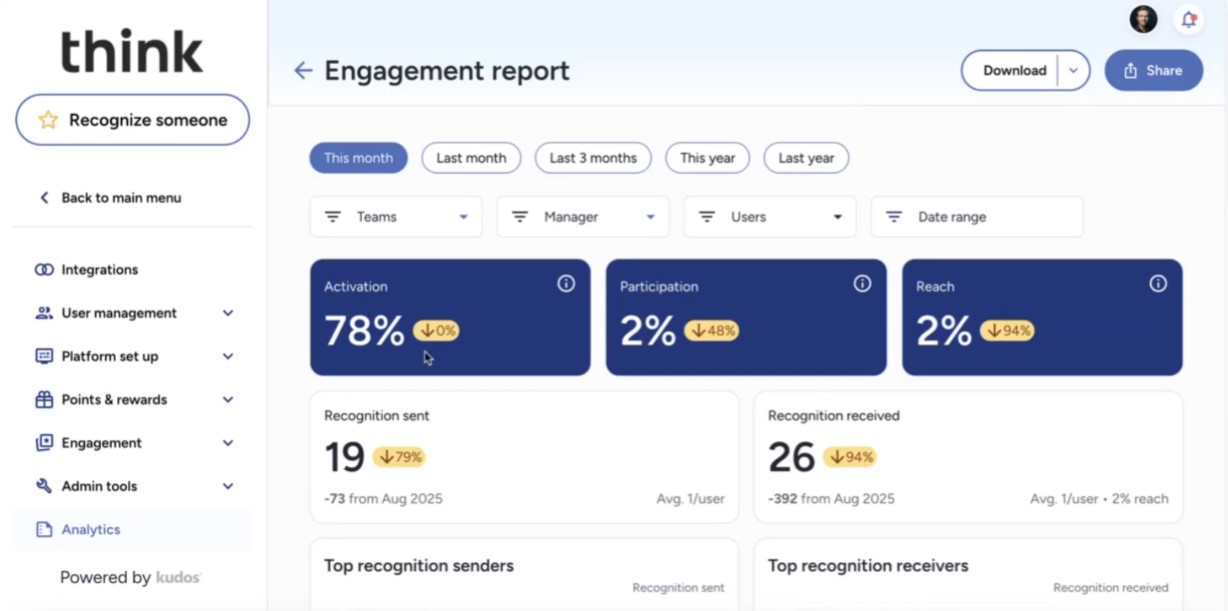
Compared to earlier platform versions we’ve tested over the year, the most recent one stood out not because of the dashboards or analytics (though those are solid), but because everything is so visible. Recognition messages tied to company values show up front and center. Kudos automatically highlights birthdays, anniversaries, and peer praise, making the platform feel more like a shared space rather than a management tool. And from our experience, it felt pleasantly natural to engage with.
As for rewards, employees can browse a company-branded catalog that includes digital gift cards, branded swag, charitable donations, experiences, and even custom rewards uploaded by HR. We didn’t test the full redemption flow live, but the demo walked us through how admins can define reward types, upload their own items, and restrict access based on user groups or budgets. That kind of control is especially valuable for larger orgs with region-specific teams or varied employee preferences.
Beyond recognition and rewards, Kudos also folds in lightweight feedback tools. We tested the Sentiment Survey, a simple once-a-month check-in where employees rate how they feel using emojis. These responses are anonymous and feed into a Sentiment Dashboard that tracks morale over time. Paired with activity and recognition data, this gives admins a pretty decent sense of cultural health without sending long surveys.
We didn’t get to test Pulse Surveys firsthand, but users confirmed they support eNPS, open text, and Likert scale questions, all of which can be filtered by department or location. Survey results feed into the Culture Insights Dashboard, which aggregates morale, churn, loyalty, and recognition trends into a single monthly view. Recently, the new AI-generated executive summary feature was introduced to present findings in a presentation-ready format, allowing HR teams to avoid the hassle of doing this manually.
However, the fact that survey creation is admin-only limits flexibility for teams who want to check in on their own terms. And while the web platform feels modern, we noticed that the mobile apps haven’t been updated since mid-2024, which might explain their lukewarm 3.2/5 user ratings. Also, since much of the dashboard data relies on recognition participation, companies that don’t invest in that part of the platform won’t get the full picture.
Kudos Key Features:
- Values-tied recognition with optional points and company-wide visibility
- Automated milestone highlights for birthdays and anniversaries
- Branded rewards catalog with gift cards, swag, donations and custom items
- Admin controls for reward types, budgets and user group restrictions
- Monthly sentiment surveys with anonymous emoji-based check-ins
- Sentiment dashboard for tracking morale trends over time
- Pulse surveys supporting eNPS, open text and Likert scale questions
- Culture Insights Dashboard aggregating morale, churn and recognition trends
- AI-generated executive summaries of survey findings
ATCO, Bulgari, Arch Insurance, KidsPeace
Kudos starts at $3.25 per user per month for teams with at least 500 employees. Final pricing varies based on users and contract length.
Best For
Kudos suits companies with over 500 employees, aiming to build a culture-led employee experience with configurable recognition and rewards.

We use the points to issue to team members. Team members can then send points to each other as a show of appreciation. This can be for providing good ideas during a meeting or helping out on a project. Employees can use the earned points for rewards like gift cards. We also use the awards feature for different company and department recognition across the board.
I like the awards feature because you can customize the categories to the company. The platform is easy to use and navigate, which makes the learning curve manageable. Recognition can be sent with or without points, so it doesn't limit employees in showing gratitude.
The client bought Kudos because they wanted a different way of recognizing and incentivizing team members. There wasn't a clear method for recognizing employees. We were also looking to find motivating initiatives to make recognition a part of the everyday culture. Kudos allowed collaboration and gratitude to be easy not only from a company standpoint but also by allowing team members to shout out to each other. We have a mixture of remote and on-site teams, so the platform makes it easy to navigate recognition.
I dislike that points expire after a certain period. I know it is to encourage giving recognition, but we also don't want to force it. The pulse survey feature is a bit limited in customization and analysis. Besides those two issues, I have no other cons.
I think they have really put time into ensuring the experience is top-tier. The platform structure compared to some of the others is what sold the company.
What do you want out of your recognition program? How do you want it to align with or enhance your culture? It's not just about points and getting rewards; it is about the specific outcomes you're hoping to see.
I am not sure, as I only used it for a brief period.
A medium or big sized company that want to reward and recognize their employees will find Kudos to be a good fit.
A startup or a small company that doesn't have an intentional plan around recognition will not get the most out of Kudos.

Workvivo
Promoting workplace camaraderie is at the heart of Workvivo. It does it by allowing employees to recognize their coworkers' achievements by nominating them for awards. Employees can also provide feedback, share news and events, and add comments, kudos, and shout-outs.
PROS
- Workvivo integrates with the top payroll, HR, and communication apps like Slack, MS Teams, Zoom, etc. This makes it easy to connect with your team from within Workvivo's dashboard.
- Workvivo lets you share more than just text. You can share pictures, videos, and other media to enhance your personal and work events. It's like social media for organizations!
- According to online reviews and feedback, Workvivo offers excellent customer support. The company is always eager to make enhancements to its product, and they factor in suggestions from users on how to enhance the tool.
CONS
- Workvivo's desktop version doesn't support emojis, while the Android app doesn't support pictures. Because of this, you might have to alternate between using both apps for a single response.
- There is a chance that the mobile app of Workvivo will run slowly or lag at times. A user mentioned that some features of the app don't work at all, which is something that the technical team should work on fixing.
- Workvivo frequently sends emails notifying users about every single comment and activity in the campaign, which can be annoying for users. Some users complained that they do not need to receive notifications for every single comment and activity.

Workvivo facilitates two-way conversations and helps capture an organization’s pulse with polls and surveys. There’s a personalized activity feed that helps employees to interact with colleagues through posts, shoutouts, articles, etc. With the news and events features, you can share the latest company news and upcoming events – ensuring employees never miss an update again.
Workvivo helps employees feel they’re on the same team by connecting them to the company’s goals and values. Individual and team achievements can be recognized publicly using shoutouts, promoting peer recognition and rewarding achievements. There’s also a “people directory” that allows you to connect with colleagues across different teams and locations.
Workvivo Key Features:
- Personalized activity feed with posts, shoutouts and articles
- Two-way communication with polls and surveys for pulse capture
- Company news and events broadcasting
- Public shoutouts for individual and team recognition tied to values
- Peer recognition and achievement rewards
- People directory for cross-team and cross-location connections
Workvivo's client list includes Kent, Amazon, Mercedes Benz, Stanford, and many other big names from diverse industries.
Workvivo offers custom pricing plans. We suggest you get in touch with their sales team for a price quote and to get answers to any questions you may have about the platform.
Best For
Workvivo is a great tool for companies looking to increase communication and productivity in their office with an intranet. Ideally, if you are a mid-sized company, you might find that Workvivo is right for you.

eloomi
Eloomi packs several tools that can help you deliver great employee experiences. You can use the platform’s onboarding module to transition new employees seamlessly into your team, boost productivity with 1:1 reviews, and build a healthy and positive company culture with continuous feedback surveys, rewards, and recognition features.
PROS
- Eloomi is easy to use and navigate, even for non-tech-savvy employees.
- Users praised Eloomi's responsive and helpful customer support team.
- It is simple and fast to create new courses and programs and upload custom content in Eloomi.
- Eloomi can be customized to match an organization's brand and tailored to different departments.
- Eloomi is quite comprehensive, with modules for onboarding, training/learning, performance management, employee engagement, and recognition.
- The platform comes with a library of ready-to-use templates to help you create online training faster. It also has a mobile app for your employees to access training materials on the go.
- Their surveys are customizable and private, helping you get specific and honest feedback from employees.
- You can request other members of the organization to provide feedback on certain skills of employees.
- You can make use of Eloomi’s micro-sized online training content to prevent overwhelming onboarding experiences.
CONS
- Some users experienced minor bugs or glitches, though these were typically fixed quickly.
- The reporting feature is limited in scope and customization.
- The setup process can involve a learning curve and some features like appraisals lack self-serve support docs.
- Eloomi’s pricing isn’t transparent and there are no free trials yet.
- Because of the sheer number of features Eloomi offers, there’s a steeper learning curve for the average user to get the hang of the platform and understand it to its fullest.
- A few users reported experiencing bugs and speed issues when generating reports, especially ones with a large volume of data, but have noted that Eloomi’s customer support team is quick to resolve such issues.
- The platform’s pricing isn’t transparent and free trials aren’t available at this time.

Eloomi provides managers with a host of tools to deliver great employee experiences. These tools streamline coaching, mentorship, learning path creation for quick onboarding, training programs delivery, and survey design and deployment for employee feedback. It also provides in-depth analytics and insights so you can see exactly how your employees are engaging with your initiatives and what areas need improvement. In addition, you can encourage goal achievement by adding points, rewards, and certificates.
Eloomi Key Features:
- Manager coaching and mentorship tools
- Learning path creation for onboarding and training delivery
- Survey design and deployment for employee feedback
- In-depth analytics and engagement insights
- Points, rewards and certificates for goal achievement
Eloomi’s customer list includes BONUS Vorsorgekasse AG, Breakout Games, Carne Group, ElectricBrands, Nufarm, Domino’s, and more.
Eloomi offers custom pricing, so the best way to find out how much it costs is to request a demo.
Best For
Eloomi works well for HR leaders at mid-sized and large businesses. It’s especially suitable for those who want a platform that can tackle employee experience with a sharp focus on learning and skills development.

The client uses Eloomi to monitor team skills, leverage skills more efficiently across teams, track progress in upskilling and reskilling, and identify talent needs within the development and product teams. They also use Eloomi to identify high-potential employees and support their development.
Additional Uses:
- Custom Learning Programs: Design and implement learning paths tailored to employee needs, covering skill development, leadership training, industry certifications, and product knowledge.
- Goal Setting and Tracking: Leverage performance management tools to set individual, team, and organizational goals, with real-time tracking of progress and performance metrics to ensure accountability and transparency.
- Personalized Learning Paths: Provide employees with personalized learning experiences to help them grow in their current roles and prepare for future opportunities, enhancing engagement by showing a clear commitment to their development.

- Ease of use for both administrators and employees.
- AI functions generate a critical framework for training programs.
- Integration with existing platforms is seamless, and it includes performance management, collaboration tools, reporting, and data analytics.
I evaluated this platform for a client who made the purchase. The client needed a tool to support employee development and client learning for their rapidly growing business. Additionally, the platform needed to have API integration, analytics, and skills intelligence as they prepared to implement strategic workforce planning.
Pain Points:
- Decentralized and fragmented learning platforms
- Limited employee engagement in career mobility through learning and development
- Challenges with onboarding new employees— inconsistency and misalignment of expectations
- Lack of tracking and oversight for skills aligned with regulations and compliance for individual roles
- Lacks customization options and deeper analytics in reporting, which could be helpful as the company scales.
- The integration options work for the company now, but they will likely outgrow these in the next two years and need to look for new options.
- The cost is relatively high, which could prompt the company to consider alternative tools in the future.
We also evaluated Docebo, but at the time, AI capabilities were less of a priority for the client. I believe Docebo could be a future opportunity for the client, as I have recommended it for clients seeking stronger analytics and AI-driven capabilities.
My client’s top three priorities when looking for a similar tool are user experience, integration, and ramp-up time. Cost is also critical, as my clients are scaling startups accountable to investors, which means they need to get the most value for their spending.
Eloomi has expanded its integration options and improved its mobile experience, significantly enhancing the user experience. However, the cost remains a factor, driving a stronger need for the platform to increase its value, which it appears to be doing.
Eloomi is ideal for professional services, tech startups, and SMEs.
Eloomi may not be suitable for large enterprises with complex HR needs.

Mo
Mo packs an impressive range of vouchers that can be shared as rewards to delight and appreciate employees. The platform is also available in 12 languages and growing, making it ideal for companies with distributed, multilingual employees.
PROS
- User interface is clean and intuitive across devices.
- Users highly rate the platform’s varied range of reward vouchers.
- Available in 12 languages so far and the team is actively working on adding more.
- Transparent, budget-friendly pricing with no extra rewards fees.
- Free onboarding and implementation assistance for all users.
- Well-developed mobile apps.
- UI is easy to navigate, and users seem to appreciate the varied choice of gift cards they can offer through the platform.
- Transparent pricing starting from $2.25/user/month with no rewards fees.
- Free onboarding and implementation support for all users.
- Robust and feature-rich mobile applications.
- Available in 12 languages and growing.
CONS
- No HRIS integration in Base plan. Potential fee for Slack, Microsoft Teams integrations.
- Customer support is only offered between 9 AM - 5 PM GMT.
- Free trials and free plans are not available as of yet.
- HRIS integration absent in Base plan. Possible implementation fee for Slack and Microsoft Teams integrations.
- The customer support hours are limited to weekdays, 9 AM - 5 PM GMT.

Mo's platform is designed to enhance employee morale and minimize turnover. It features Moments and Boosts, which help you acknowledge and celebrate your team members’ achievements either individually or in a group. The platform gives you the flexibility to reward employees either with vouchers redeemable at various stores like Amazon, ASOS, and John Lewis, or with customized rewards tailored specifically for each team member. In addition to rewards given by managers, Mo empowers employees to participate in the process with peer-to-peer nominations of deserving individuals for awards or recognition.
To make rewards and recognition even easier, Mo recently launched “Assistant”, a tool that gives you quick recommendations on actions you can take to further drive engagement, a summary of recent Moments, an overview of your team’s reward budget, and more.
Mo Key Features:
- Moments and Boosts for individual and group achievement recognition
- Peer-to-peer nominations for awards and recognition
- Voucher rewards redeemable at Amazon, ASOS, John Lewis and more
- Customizable rewards tailored to individual team members
- AI-powered Assistant for engagement recommendations and team insights
- Budget tracking and recent recognition activity overview
- Advanced reporting and analytics on recognition and engagement
- Third-party platform integrations on higher-tier plans
SGN, The O2, NHS, Aspen, William Hill, and SHL are some of Mo’s 58k users.
Mo’s offering is available over three plans. When billed annually, the pricing for each plan is as follows:
- Appreciate: This plan is designed for small teams who are new to recognition software. It costs $2.25 per user per month and includes features that allow you to acknowledge achievements, celebrate birthdays, anniversaries, and more.
- Engage: Priced at $4.5 per user per month, this plan includes everything in the Appreciate plan and additional features such as the ability to nominate individuals for awards, grant rewards, access advanced reporting and insights, and integrate with third-party platforms.
- Transform: Tailored for large companies, the Transform plan has personalized pricing. It encompasses all the features available in the other plans, along with rewards and recognition program design, advanced security measures, premium support, and implementation services.
Best For
Companies of all sizes can benefit from Mo’s offering, but we think its feature set supports SMBs best.

Workday Peakon
Workday Peakon uses journey mapping to improve employee experience and retention. The platform is most used by growing companies and enterprises to collect employee data at every stage of their employment, get insights to uncover reasons for employee turnover, and forecast attrition risk in real-time.
PROS
- Anonymous feedback encourages honesty.
- Supports over 20 languages.
- Built-in analytics track performance and compare it to market data.
- Provides data-driven insights and action plans for better engagement.
- Scalable pricing options fit various business sizes.
- Integrates with several business systems for easy data collection.
- Customer support is available 24/7.
- Workday Peakon keeps feedback anonymous, which allows employees to give their opinion without fear of reprisal.
- Surveys are easy to navigate, and employees can answer as many questions as they like from the survey—and skip over any that they don’t want to answer.
- Based on responses, Workday Peakon offers suggestions on what you can do to improve employee experience.
CONS
- No custom reports; relies on pre-built options.
- Navigation can be difficult when searching for employee profiles.
- Analytics and reporting features can be overwhelming for small teams.
- Pricing is not transparent, and a free trial is unavailable.
- Peakon doesn't come with the ability to create custom reports. It does, however, offer a variety of pre-built reports that you can use.
- A few users shared that it can be hard to navigate Peakon and find employee profiles at times.
- The platform’s pricing isn’t transparent and there aren’t free trials at this time.
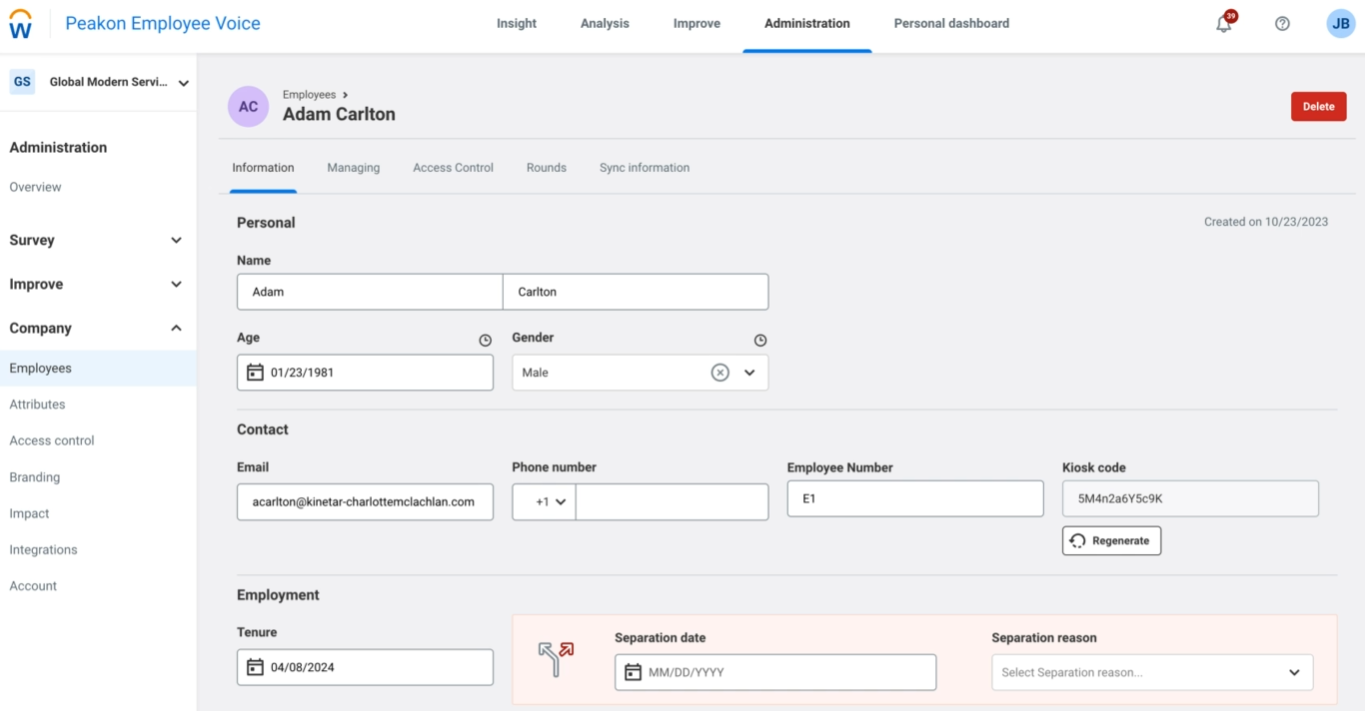
Workday Peakon is a solid solution for growing companies and enterprises to get insights into employee responses and get actionable plans they can work on to improve the employee experience.
The first thing that caught our eyes was the feedback tools. We heard several employee users share that the surveys enable them to be honest without revealing their identities. As a multinational team, we appreciate that Workday Peakon is accessible in 20 different languages.
Another thing we like about Workday Peakon is its analytics capability. The platform is able to make sense of gathered employee responses quite well. It’s worth noting, though, that while the survey tools, analytics, and suggestions can give enterprises the power to dig deep into what’s going on with their teams and what they can change for the better, these tools can be too much for early-stage businesses and such, won’t get the same results. Benchmarking is another cool tool: it provides analytics on how a team has performed over time and compares it to market data. This could be an advantage for businesses to pinpoint and work on areas that need improvement before it’s too late. Workday Peakon’s customer service is available 24/7 and is highly rated for being customer-oriented.
With that said, we found it hard to have fully custom reports with Workday Peakon. While, for the most part, accessing the platform is straightforward, some users found it hard to find employee profiles. Lastly, the pricing of the platform isn’t fixed and free trials are not available at this time.
Workday Peakon Key Features:
- Anonymous employee surveys accessible in 20 languages
- AI-driven analytics for actionable insights from employee feedback
- Benchmarking tools comparing team performance against market data
- Engagement trend tracking over time
- Actionable improvement recommendations based on survey data
- 24/7 customer support
EasyJet, Verizon, Nando's, Pret, Capgemini.
Workday Peakon has an undisclosed pricing structure, so you must contact a sales representative for specific costs.
Best For
Workday Peakon is best suited for growing companies and enterprises looking to drive employee engagement and improve their workplace culture.

Spring Health
Spring Health is a mental healthcare software that takes a holistic approach to improve employee wellness. It asks employees a few simple questions and in turn provides personalized care.
PROS
- Spring Health leverages machine learning and data-based insights to tailor-make mental health plans for each employee.
- It assigns a dedicated Care Navigator to guide each team member's wellness journey.
- Spring Health uses data-driven insights and machine learning models to create a personalized mental healthcare plan for every individual
- Spring Health provides every member with a Care Navigator who walks you through your healthcare plan, answers any questions, helps you schedule your therapy sessions, and acts as a guide in your mental wellness journey.
- Now supports over 20 languages.
CONS
- Spring Health’s services can only be accessed if your employer has paid for a subscription.
- The platform is currently only available in English.
- You cannot access Spring Health’s services unless your employer has paid for them.

Spring Health melds clinically-proven tech with world-class mental health providers to give your employees the best mental health experience possible. Customers receive personalized support, which means that a custom mental health program is built for your company’s and individual employees’ needs.
Spring Health Key Features:
- Clinically-proven personalized mental health programs
- Company-wide and individual employee mental health support
- Custom mental health program design per organization
- TED
- Whole Foods
- Instacart
- Gap
The first 10 sessions every calendar year are free for employees. Afterwards, sessions are covered by insurance. For employer costs, contact Spring Health or talk to your benefits administrator.
Best For
Any company looking to enhance employee experience by providing mental health resources.

We used Spring Health for the initial setup and then continued to use it weekly for updates and check-ins with employees. Each time we hired a new employee, we used the tool to help them set up their account.
We also held monthly mental health meetings, which were recommended by Spring Health and provided through their website. We offered one-on-one sessions with employees who needed additional support.
Spring Health assisted with setting up all the necessary resources to support our employees, which helped create a more caring workplace environment.
- They help leaders grow, build on their strengths, and model positive behaviors at work.
- They offer an on-demand HR command center, which provides easy access to HR resources when needed.
- They provide support for employees and families with resources aimed at reducing mental health stigma.
We wanted to find a health benefits program for our employees that offered not only medical coverage but also strong mental health options. We were facing a decline in employee retention due to burnout and other mental health concerns, whether work-related or personal, so we wanted to support our staff in addressing these issues.
The key benefit of using a platform like this is that it shows employees they are valued and supported. We were referred to Spring Health by a sister company and decided to try it. We used the platform for over a year before switching to a different provider that was more cost-effective.
- Customer support for our employees was inadequate, as many had to come to HR for assistance with unresolved concerns.
- Employees reported poor video quality during sessions, often experiencing frequent disconnections.
- There were recurring billing issues, with employees claiming they were charged for sessions that should have been covered under their plan.
- Spring Health works well for employers, but its service to individual clients is lacking.
- Many employees reported poor experiences, although the issues were typically resolved quickly once the company intervened.
- Other platforms may offer better client support, but as a company, we were treated well by Spring Health.
- Price is a top consideration.
- Company needs must also be clearly identified and prioritized.
- When selecting a tool like this, finding one that meets both budget and organizational needs is ideal.
- In some cases, a compromise may be necessary.
Spring Health has improved video accessibility for sessions to better meet user needs. Customer service for clients and patients still requires significant improvement. Clients and patients should be the primary focus for this type of service.
Spring Health is best suited for medium to large organizations due to its pricing.
It is not well-suited for startups or small businesses because the cost is relatively high.
What is an Employee Experience Platform?
A digital employee experience platform is designed to enhance company culture by integrating tools for feedback, recognition, communication, learning, and well-being into a single system. Its main goal is to boost engagement, productivity, and satisfaction by streamlining processes, facilitating communication, and offering resources for personal and professional growth.
Employee Experience Software Features
The best employee experience app provides a variety of tools specializing in engagement, rewards, recognition, wellness, learning and development, and performance management.
- Pulse surveys: Most employee experience management platforms offer pulse surveys as a core feature. These engagement surveys help you gather in-depth, real-time feedback from employees on aspects of their work experience, including job satisfaction, workplace environment, and organizational culture. The vendors on this list offer templates, automation, and customizable employee survey features to improve the HR team’s efficiency and user experience.
- Rewards and recognition: Numerous statistics1 show that when employees feel appreciated, they tend to be more productive and stay longer. Several vendors on our shortlist focus on experience through employee rewards and recognition. These features enable you to foster a culture of appreciation by acknowledging your employees in various tangible and verbal ways (recognition words, non-money incentives, informal recognition, and virtual gifts are a few examples).
- Social media-style activity feeds: To help employers build a high-performing workforce, many of the vendors on this list engage employees through newsfeeds similar to Facebook or X/Twitter. These enable team members to share their thoughts or recognize each other for achievements, while employers can share news and updates.
- Training and coaching: Growth is an important aspect of employee experience. A few vendors on this list offer training and coaching programs to provide employees with chances to learn and connect with leadership to benefit their long-term careers.
- Wellness: Employee wellness, whether mental, physical, or financial, is extremely important to maintaining psychological safety in the workplace. Many tools in this space can help you provide resources on mental and financial wellness, create challenges to reach certain physical health goals, and more.
- Analytics and reporting: The best-in-class experience management platforms provide real-time reporting and analytics, enabling you to identify actionable insights and trends in employee sentiment and optimize your engagement initiatives accordingly.
- Integration with HR Systems: Top employee experience apps often integrates with popular HR software ecosystems and team comms apps such as Slack and Microsoft Teams. This integration allows for seamless data flow, reducing manual data entry and ensuring a comprehensive view of the employee experience across different touchpoints.

Employee Experience Software Benefits
Leveraging top employee experience tools is key to boosting employee satisfaction and overall experience, which in turn leads to higher retention rates and a stronger employer brand.
- Increased employee experience: Obviously, some of the core features of employee experience management software, such as surveys and chat/social walls, by nature, lead to improved employee experience. Not only do these tools enable employees to communicate with each other and their managers easily, but they also give employees a safe space to submit feedback for improvement anonymously for leadership’s attention.
- Improved employee satisfaction: All of the tools under the employee experience category are designed to boost employee satisfaction. Surveys make employees feel heard; rewards and recognition ideas make employees feel appreciated; wellness resources and initiatives make employees feel cared for, and training/coaching tools make employees feel invested. All of the above means higher employee happiness and satisfaction, and data2 show that satisfied employees are motivated to perform consistently better.
- Better retention rates: Studies on employee recognition found that employees who like their workplace, feel appreciated for what they do, and have the potential to grow in their careers are more likely to stick around longer. Employee experience app focuses on those areas, helping you see where your company is failing so you can make improvements before it's too late.
- Positive word-of-mouth (employer branding): What do your former employees say about you? Are your current employees referring people from their networks to open roles? If your employee experience initiative is working, you should hear nothing but positive things, and as a result, you will see more people want to apply to work for you.

How Much Does Employee Experience App Cost?
Employee experience platforms charge subscription-based pricing per user per month, with the software price per user tends to range from $2 to $10, depending on the features needed. Additional fees may also apply for on-demand services, such as software implementation, employee training, platform customization, dedicated account management, and contract cancellation.
Another thing to consider is whether the vendor has a minimum price commitment policy. Some employee experience management solutions have a minimum spend requirement to subscribe to certain plans, often their best-value ones.
Common Mistakes to Avoid When Choosing Employee Experience Software
- Over-reliance on software: Software isn’t a miracle worker. If the problem lies in your workplace culture, you’ll need to do more than sign a contract with a tech vendor. Diagnose the issue below the surface, then devise a strategy to address it and use tech solutions to help.
- Not defining your goals: Similar to the previous bullet, you won’t accomplish much if you don’t have a firm idea of what you’re trying to achieve. Find your problem, then set a few goals along the way to measure the success of your efforts.
- Not measuring employee data: Goals have to be measurable so you can track success. Make sure you use KPIs like retention rate or employee satisfaction to recognize the difference your employee experience software makes.
- Not integrating across your tech stack: As HR becomes more data-centric, the more you know about using HR analytics, the better. Using data from all of your systems creates a holistic view of your organization. Make sure they’re all cleanly integrated for easy access.
What to Ask in Employee Experience Software Demo
Here we share some key questions to help you compare different options and arrive at the best employee experience software possible.
- What is the data on how your software has helped employee attrition?
- Can you walk us through the employee portal and admin side of the platform?
- How does the platform help us tailor surveys, dashboards, and user interfaces to align with our brand and specific requirements?
- What’s the implementation process like?
- What kind of self-service support options do you provide?
- Does it integrate with my existing tech stack? And for how much?
- How do you handle data security and privacy?
- What sets your employee experience software apart from other solutions in the market?
- How much does your product cost for my team size and requirements?
- What features or improvements do you plan on rolling out in the near future?

FAQs
What makes a good employee experience software?
The best employee experience tools should improve your workforce's experience while also delivering value to your business. The ultimate aim of this end-to-end solution is to drive employee satisfaction. Employees who are happier in their day-to-day work are more likely to stay with your company longer and tend to be more productive, too. On a technical level, top employee experience platforms should also be user-friendly, scalable, and customizable so you can derive the most value.
Who benefits most from using an employee experience platform?
Employee experience platforms are especially useful for distributed, growing, and frontline teams; companies focused on employee retention and data-driven engagement for informed decision-making; and organizations seeking better visibility into employee sentiment without relying on fragmented tools or manual surveys.
How do employee experience platforms enhance workplace culture?
Employee experience platforms improve workplace culture by standardizing feedback, recognition, communication, and goal alignment. They help organizations reinforce values, increase engagement, and surface employee issues earlier through consistent, structured interactions.
What core features should I expect from an employee experience platform?
Most employee experience platforms include some combination of employee surveys, performance reviews, feedback workflows, milestones and accomplishments, messaging, real-time insights, industry benchmarking tools, and integrations. The exact functions vary by vendor and target company size.
What integrations should employee experience platforms support?
Employee experience platforms should integrate with key HRIS systems such as Workday, BambooHR, and ADP to sync employee data. Common integrations also include Slack or Microsoft Teams, Google Workspace, learning platforms, performance tools, and benefits or wellness software to reduce manual work and fit into daily workflows.
Best Employee Experience Platforms By Category
Most employee experience platforms cover more than one area, but not every team needs an all-in-one solution. If you’re looking to focus on one specific part of the employee experience, these categories can help narrow your search:
- Employee engagement tools: Measure sentiment, collect feedback, and track engagement over time. Some of the best options we found are Workleap, Leapsom, and Lattice.
- Employee financial wellness programs: Help employees manage pay, budgeting, savings, and financial stress. Key vendors include Enrich, Your Money Line, and Chime Workplace.
- Employee assistance programs (EAPs): Provide confidential support for personal, legal, or financial challenges. Modern Health and SpringHealth are some of our best picks.
- Employee rewards programs: Incentivize participation and performance with tangible perks or points-based rewards. We’ve tested and really liked what C.A. Short Company, Bonusly, and Achievers have to offer.
- Employee recognition tools: Enable peer-to-peer and manager-led recognition tied to company values. Bucketlist, Nectar, and Awardco are our top choices.
- Learning management systems: Improve employee experience through skills development and continuous learning. Prominent platforms include Deel, Absorb, and Leapsome.
- Performance management platforms: Support goal-setting, feedback cycles, and growth conversations. Trakstar and Small Improvements are our favorites.
Sources
About the Author


About Us

- Our goal at SSR is to help HR and recruiting teams to find and buy the right software for their needs.
- Our site is free to use as some vendors will pay us for web traffic.
- SSR lists all companies we feel are top vendors - not just those who pay us - in our comprehensive directories full of the advice needed to make the right purchase decision for your HR team.


