

Best Employee Engagement Tools We've Tested (2026)
A thorough review and comparison of best employee engagement companies, their pricing, product enhancements, and more. Read on to get all the juicy details.









The best employee engagement software helps organizations collect employee feedback, monitor engagement metrics, and take targeted actions to enhance workplace satisfaction, retention, and overall performance. This tool typically includes surveys, real-time analytics, and communication features to drive continuous improvement in employee experience.
We demoed over 80 employee engagement companies in the past five years and put them through our rigorous tests to find those that truly deliver. Whether you’re looking to measure employee engagement from scratch or seeking to upgrade your existing tools, this guide helps you compare top solutions tailored to different needs, team sizes, and budgets.
We’ve conducted 80+ of software demos and tested 40+ platforms to date, evaluating each option on three factors: ease and anonymity of use, reporting and analytics, and automation.
- Ease and anonymity of use: The best employee engagement companies make it easy for employees to take surveys and share their feedback regularly from different devices. Tools that integrate with collaboration/communications apps such as Slack and MS Teams scored particularly high in our selection process. We’ve also spent extra time looking for tools with anonymity settings, which ensure you’re getting the most honest and actionable feedback from your employees.
- Reporting and analytics: Top vendors provide capable tools for measuring employee engagement. Particularly, they should allow you to track engagement metrics, identify trends, and gain insights into employee sentiment. Reports can be generated to measure progress, spot areas of concern, and inform decision-making.
- Automation: We only select staff engagement apps that support a scheduled cadence for collecting employee feedback and seamless automation processes that disseminate that information to HR teams and execs through email and/or dashboards.
And we simply reassess them from time to time. Usually every quarter, our tech editors run the software demos and technique assessments again to evaluate how well our picks are performing, whether any vendors no longer make sense or new ones might be worth considering, and if any information and data need refreshing.
To further ensure we select the most effective engagement apps, we leverage a blend of insights from product demonstrations, candid user feedback, the expertise of industry leaders, and the extensive experience of our in-house team. We are proud to have invited significant voices in the field:
- Mallory Herrin: As the CEO and Principal HR Consultant of HerrinHR, Mallory brings over 18 years of HR expertise and holds dual certifications from HRCI and SHRM. Renowned as a thought leader, she consistently contributes innovative ideas that shape the industry.
- Tracie Marie: A passionate partner and leader, Tracie is dedicated to delivering outstanding experiences and results. With nearly 30 years of extensive HR experience across various sectors, including start-ups and corporate giants, she possesses deep knowledge in Talent Acquisition and Communications, making her insights invaluable.
- Christina Moran: A licensed Industrial/Organizational Psychologist, Dr. Moran is part of the leadership team at ThenDesign Architecture. Known for her energy and strategic mindset, she has a proven track record in enhancing people leadership, streamlining business operations, and driving organizational effectiveness, along with expertise in marketing and international account management.
We also want to extend our thanks to the HR professionals who took the time to share their candid experiences with the tools featured in this guide. Special thanks to Balana Bell M.S., Retail Operations Manager at Ulta Beauty, Connor Peterson, Sr. Associate of Technology Modernization at Grant Thornton (US), Amir Hussain, Manager of Talent Acquisition at ACL Digital, Janice Paulsen, Senior People Partner at Competitive Capabilities International, Eliza Gabriël, People Expert at Power-Team.be, Laurie Brewer, CEO of Glow Up Consulting, Mhyrynde N., People, Culture, and Planet Champion at Mellanni, Jake Harter, Sr. Consultant, Talent Management at Bellevue Partners, and others who contributed insights, even if we can’t mention everyone by name here.
This multi-faceted evaluation process prioritizes what we believe is best for our readers. For an in-depth look at how we do that, read this article about our editorial standards.


WorkTango

WorkTango helps you measure engagement and collect actionable feedback easily and confidentially. You can leverage its real-time dashboards and analytics to understand employee sentiment, empower managers to act, and drive positive organizational change.
PROS
- You can run unlimited surveys, available in over 20 languages including English, Spanish, Chinese, French, German, Italian, Japanese, Portuguese, and Korean.
- You can use WorkTango’s research-backed and statistically validated assessments, or create your own.
- Anonymous Conversations enable managers to acknowledge and respond to open-text survey comments while protecting employee anonymity.
- You can compare your engagement survey results to internal and external benchmarks.
- Open-text responses can be summarized with Natural Language Processing (NLP). It can also bring the most used terms front and center in a word cloud.
- Unlimited surveys available in English, Spanish, Chinese, French, German, Italian, Japanese, Portuguese, and Korean.
- You can add modules as you go and these will be charged on a prorated basis.
CONS
- There isn’t a monthly billing option. You have to pay by year.
- All plans require a minimum commitment of 12 months.
- Free trials aren't available at this time.
- Billing is only done annually and all plans require a minimum agreement for a 24-month subscription (see our FAQs for more and their pricing page for full details).
- Several users have complained about the rewards redeeming process being not very intuitive.
WorkTango’s Surveys & Insights module is all about helping businesses measure and improve employee engagement. We like that users can customize and deploy an unlimited number of surveys to gather feedback across the entire employee lifecycle. Survey creation is made even easier with WorkTango’s library of expert-designed questions, ready to be used as needed.
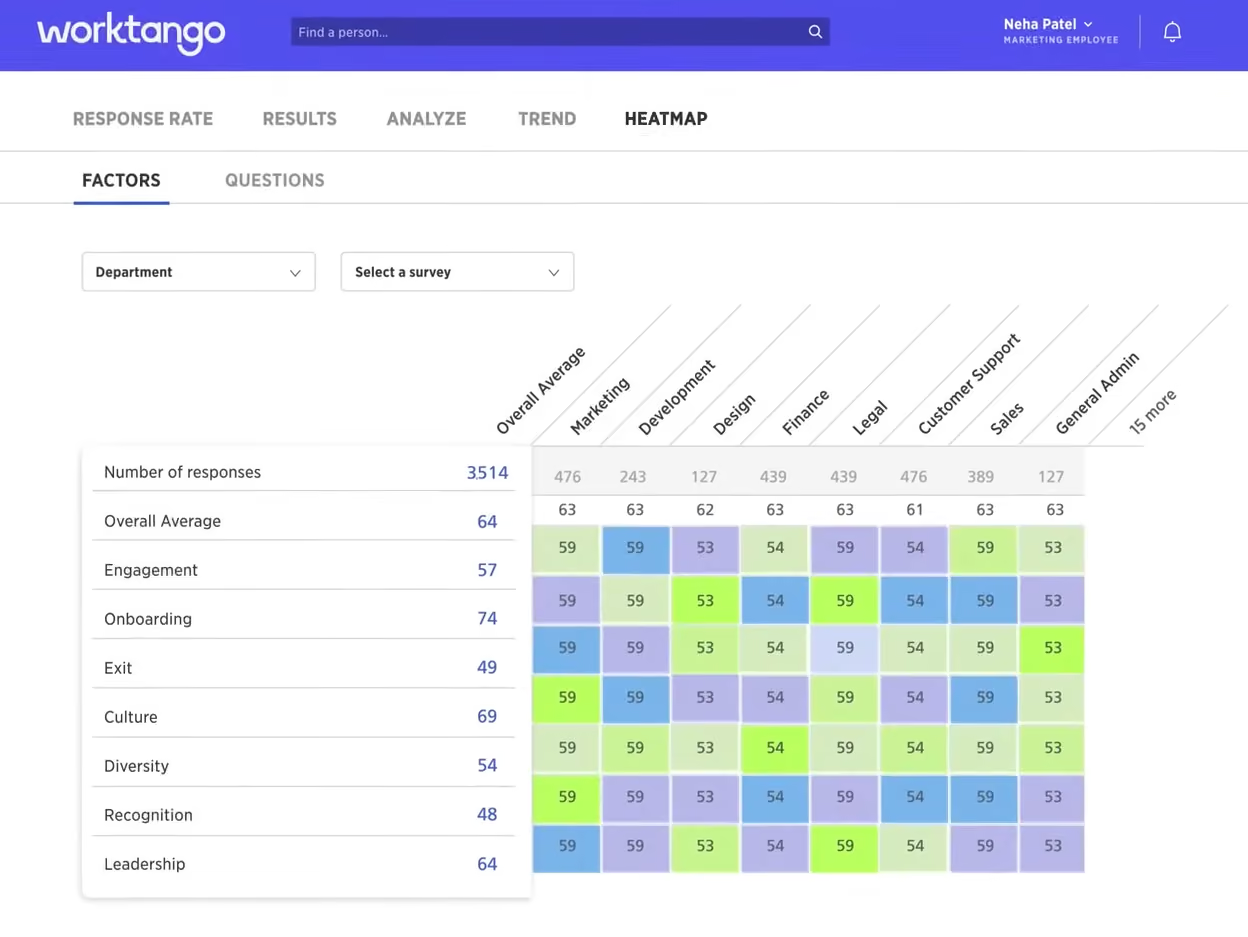
Once responses are collected, WorkTango's dashboards and reporting features kick in. The sophisticated analytics help identify key themes and trends from both quantitative data and open-ended comments. Features like the Sentiment Cloud summarize the overall positive and negative sentiment within employee feedback, while easy benchmarking shows how your company compares to other players in your industry. These insights are presented through highly visual, easy-to-grasp dashboards tailored to different roles.
But WorkTango isn't just about measuring engagement. The software offers predictive recommendations and suggested actions based on survey results. Leaders can then turn these recommendations into accountable action plans with progress tracking. For developing leaders' capabilities, WorkTango even suggests relevant learning resources to build skills in areas needing improvement.
However, we must admit that the employee engagement software’s interface can feel like a lot at first, especially for teams new to analytics-heavy platforms. And buyers should know upfront: all plans require a 12-month commitment, billed annually. There’s no monthly billing or free trial. That makes it harder for smaller companies to test-drive before making the leap.
WorkTango Key Features:
- Unlimited customizable surveys across the full employee lifecycle
- Expert-designed survey question library
- Sentiment Cloud for positive and negative feedback trend analysis
- Industry benchmarking for engagement comparison
- Role-tailored visual dashboards and reporting
- Predictive recommendations and suggested actions from survey results
- Accountable action plans with progress tracking
- Learning resource suggestions for leader development
Over 1,000 companies use Worktango’s solutions, including Kia Motors, HUB International, Rexall, and Accruent.
WorkTango starts at about $8,000 per year with an annual commitment.

Best For
Mid-sized to large companies.


My company uses WorkTango on a monthly basis. We use WorkTango to track employee recognition and create surveys to retain top talent. I share the information we receive from WorkTango with management, and it is used to create incentive programs and salary increases throughout the year. In the upcoming fiscal year, our company will be utilizing WorkTango 100%. I highly recommend WorkTango for other organizations that are trying to retain and recognize employees.
- The customer service is awesome.
- The WorkTango team always takes the time to help and find different ways to utilize the software.
- Employees love that they can give feedback on their peers and receive incentives.
My company purchased WorkTango because we wanted to implement a recognition and rewards program for employees. Prior to purchasing WorkTango, it was cumbersome and tedious to recognize employees who were going above and beyond, using paper forms and spreadsheets. WorkTango has made the process easier, and we can now get feedback. We have been using WorkTango for three years and have noticed an increase in employee engagement and retention.
We have been using Worktango for 3 years and have noticed an increase of employee engagement and retention.
Not much to dislike. We love working with WorkTango.
I have not used similar programs to WorkTango.
The criteria a company should consider when buying this program would be how to retain employees and what incentives can be put in place. This is a win for both the company and employees if implemented well.
WorkTango has evolved to become more user-friendly and has introduced features that have significantly increased employee satisfaction. The platform has adapted to better meet the needs of both employees and administrators, enhancing its effectiveness in recognizing and retaining talent.
WorkTango is particularly well-suited for mid-size to large companies that need a robust platform for employee recognition and rewards.
WorkTango may not be the best fit for very small companies that have simpler employee recognition needs.

Assembly
Assembly’s platform helps companies automate a host of employee engagement and recognition processes through customizable templates and workflows - eliminating manual effort and ensuring consistency.
PROS
- The platform is easy to use and customize.
- The pricing is transparent and affordable. There’s also a free plan you can sign up for without a demo.
- Make your own rewards and even set up a points system with automated incentives.
- Explore the platform for free, no need for a credit card or demo
- Great set of features for the price point
- Make your own rewards and even set up a points system with automated incentives
- You have the option to go with a month-to-month plan or a long-term contract. For the latter, you can reach out to their team for a custom deal if it’s a larger team. However, keep in mind that the minimum agreement is 12 months.
CONS
- A few users noted needing more control over their notifications to avoid notification overload.
- Coins and points do expire, so sometimes they’ll expire by the end of the month before you can use them, although you get more the next period.
- SSO is only included with some plans. For others, it can be purchased as an add-on.
- Coins and points do expire, so sometimes they’ll expire by the end of the month before you can use them, although you get more the next period.
- SSO is only included with some plans. For others, it can be purchased as an add-on.
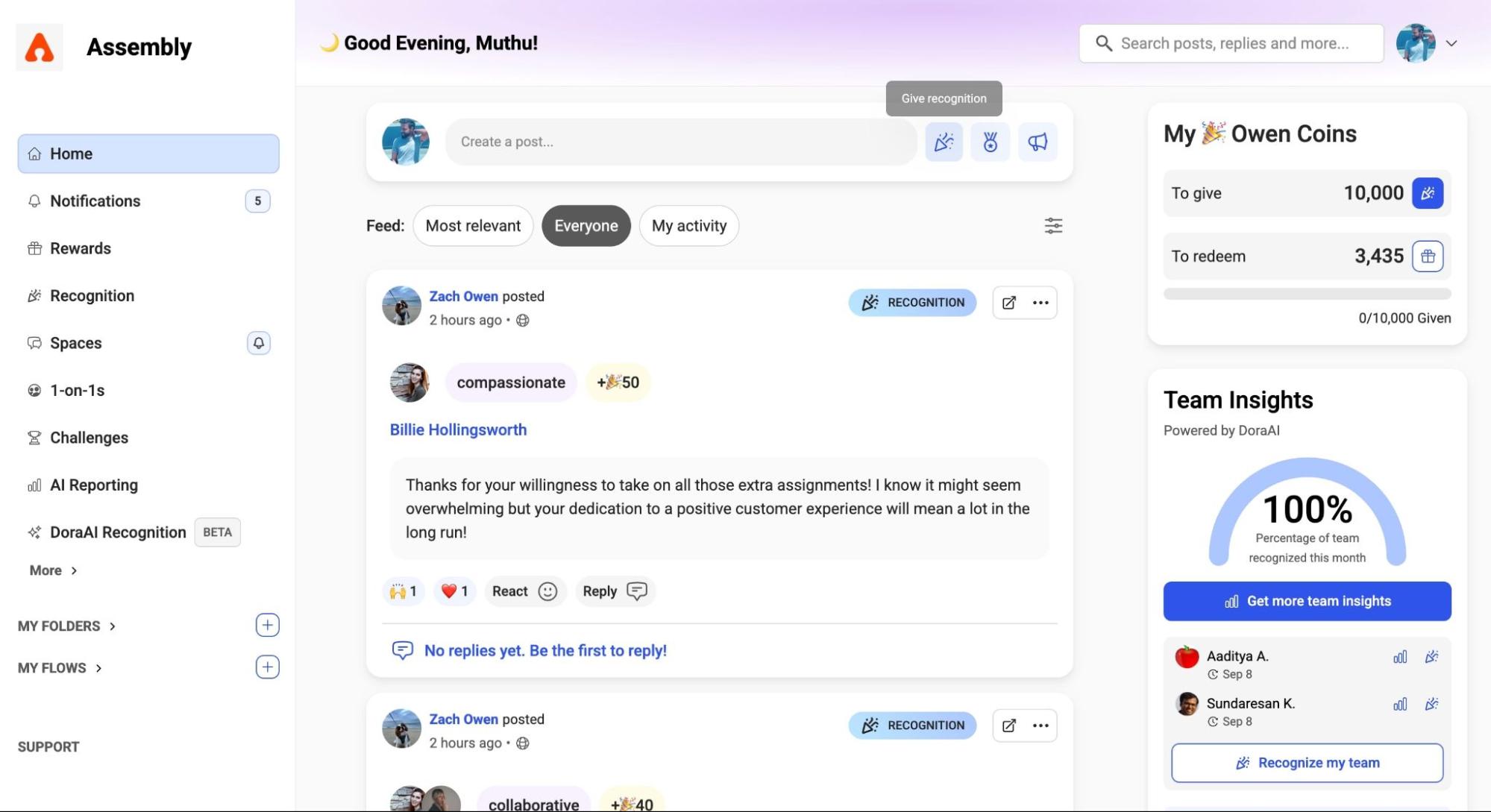
Assembly originally started as an employee rewards product but rapidly evolved into a comprehensive platform that facilitates employee listening, recognition, and collaboration. With the help of its customizable workflows and templates, and also the fact that the platform is now part of Quantum Workplace, companies large and small are able to celebrate their employees’ achievements, drive engagement among their teams, and streamline their daily operations.
Among the key workflows Assembly offers is one dedicated to engagement surveys. Designed to provide a comprehensive understanding of employee sentiments, this workflow lets you craft concise surveys, collect actionable feedback, and establish a consistent benchmark for measuring engagement over time. Another valuable workflow is centered around employee recognition. Whether it's acknowledging exceptional work, celebrating milestones, or simply expressing gratitude, the Recognition workflow can help you convey heartfelt recognition effortlessly.
Assembly also facilitates transparency and open communication through its Executive Updates and News Feed workflows. These features allow executives to share strategic decisions, company milestones, and important announcements, keeping employees informed and fostering a sense of connection to the organization's goals and successes.
There’s a lot to like about Assembly’s platform; it is user-friendly, customizable and affordable. There’s lots of other workflows you can customize and deploy within as well. If you’re an SMB looking for a flexible and budget-friendly employee engagement platform, we think Assembly is worth checking out.
Assembly Key Features:
- Customizable engagement survey workflows with benchmarking
- Recognition workflows for milestones, achievements and peer appreciation
- Executive Updates and News Feed for company-wide transparency
- Rewards and recognition with points-based system
- Collaborative workflows for daily operations and team engagement
- Customizable templates for recognition, surveys and announcements
Over 4,000 companies use Assembly’s solutions, including Coca-Cola, Quest Nutrition, Nesco Resource, HelloTech, and Amazon.
Assembly pricing starts at $3 per user per month.
Best For
Small and mid-size businesses across different verticals can benefit from Assembly’s solutions.

Assembly is such a fantastic platform for sharing gratitude with your colleagues, across the organization as a whole, as well as internally and externally between departments. It is straightforward, easy, and fun to use! This tool is especially good for nurturing culture across a remote team. The integration with Slack makes it seamless for the team to use and engage with, and Assembly engages senior leadership with ease.
Simple, fast platform. Easy set-up and free trial version prior to transition to paid version. Easy implementation and great reporting options and support.
In the age of remote, work-from-home, and hybrid models, and all of the inherent challenges it presents, Assembly has allowed us to continue to celebrate business culture and monetize the value of success within our organization. We are able to easily recognize team members and their accomplishments so that those ambiguous moments can become tangible for the entire company to see. Acknowledgements of birthdays, anniversaries, work anniversaries etc. are seamlessly built in, never to be forgotten or overlooked. Coins can be exchanged for gifts, donated to charity, traded in for company-branded gifts, or cashed in for rewards. Our engagement rate is over 90% on the Assembly platform and we are very excited to see how they can continue to evolve its value proposition.
Coins expire if not used in time. UX could be more user-friendly. Larger tiered allotments would be a great improvement.
When considering any employee recognition platform, functionality and reporting should always be heavily weighted in the final decision. Recognition platforms go hand-in-hand with engagement surveys; some platforms do not offer this feature or offer. Limited version of this feature. Mobility and accessibility are primary concerns, especially where remote and global teams exist. Also, goal/challenge creation, tracking and attainment features are wonderful enhancements to include.
There have been consistent upgrades to the platform and Assembly is very open to feedback and suggestions.
Assembly is ideal for small and mid-market organizations.
Assembly would not be a good fit for large/enterprise organizations.

ThriveSparrow
ThriveSparrow stood out as an employee engagement tool with solid AI-driven insights, flexible survey distribution, and strong integration capabilities throughout our tech tests. Its recurring pulse surveys, sentiment analysis, and structured action plans are a big help for HR teams to gather and act on employee feedback efficiently.
PROS
- Highly customizable pulse surveys with pre-built templates and flexible anonymity settings.
- AI-powered sentiment analysis auto-categorizes employee feedback and highlights key concerns.
- Heat map visualization makes it easy to track engagement trends by department, location, or tenure.
- Action Plans help HR teams document, assign, and track engagement initiatives.
- Strong integration options with HRMS platforms and API support.
- Offers deep customization, allowing full control over survey questions, rating scales, and visibility settings.
- AI-powered sentiment analysis categorizes qualitative responses into key themes and presents insights in a visually digestible format.
- Granular data filtering by department, tenure, or location for precise trend analysis.
- Transparent pricing starting at $2 per user per month.
- Strong integration capabilities.
CONS
- Some integrations may incur additional costs.
- On-the-go usability is not yet available for HR users.
- Relatively new to the market so may lack experience compared to more established competitors.
- Some integrations may require an additional cost.
- No dedicated mobile app for admins.
- As a relatively new product, ThriveSparrow may not have the experience of more established vendors.
ThriveSparrow’s employee engagement tool offers a highly customizable, AI-powered approach to gathering and acting on employee feedback.
During testing, we found its survey system particularly well-designed, featuring pre-built templates for engagement, leadership, and culture, along with flexible customization options. Organizations can adjust anonymity settings, select distribution channels (Slack, MS Teams, email, SMS), and automate check-ins on a weekly, monthly, or quarterly basis—whatever suits them best.
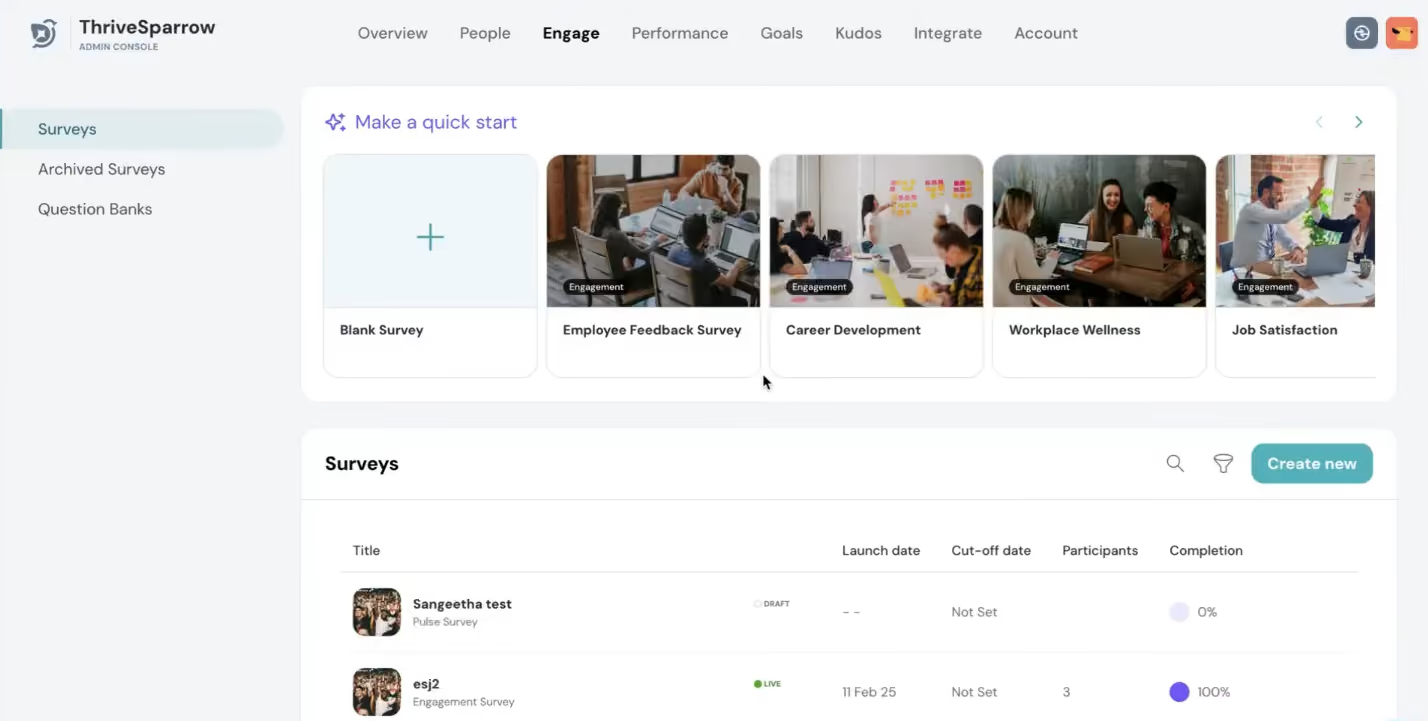
One of our favorite features is its AI-powered sentiment analysis, which processes open-ended responses and categorizes them into key themes like leadership, communication, and workload. In our test, negative feedback on “management style” was automatically flagged, helping us quickly pinpoint leadership concerns. The heat map visualization made it easy to spot trends by department, location, or tenure, a functionality that compares well with platforms like Quantum Workplace, which also offers AI-driven sentiment tracking.
For organizations that struggle to turn feedback into action, the Action Plans feature provides a structured approach to engagement efforts. We tested this by setting up a plan to improve leadership communication, assigning tasks to managers, and setting deadlines. The system tracked action items in an interactive dashboard, making it easy to monitor progress and ensure accountability.
However, ThriveSparrow is relatively new in the market, (founded in February 2020), which may mean they might not have the same level of experience as more established companies such as TerryBerry (1918) or Quantum Workplace (2002).
Another thing we noticed is that ThriveSparrow actually does offer a free trial, but it wasn't immediately clear from their pricing page. We only found it after doing a quick search for “ThriveSparrow free trial” on Google, which led us right to their sign-up form. Also, it's worth mentioning that some integrations might cost extra, depending on your contract, so definitely double-check that before signing up.
Lastly, while employees can easily complete surveys on mobile devices, on-the-go usability is not available for HR users just yet. They still get to rely on a desktop to access the engagement dashboard.
ThriveSparrow's client list includes major companies such as Tropicana, Tesla, and Ikea, though the total number of companies using the software remains undisclosed.
ThriveSparrow's Engage module costs $3 per employee per month, billed annually. It includes automated survey scheduling, multilingual support, AI-driven text insights with sentiment analysis, action plans, and eNPS analytics.
Best For
ThriveSparrow is a strong choice for companies looking for deep employee engagement analytics, flexible survey distribution, and structured action planning.

Bonusly
Bonusly offers a modern, accessible solution for turning employee engagement into an everyday habit. It offers employees points, GIFs, and shoutouts in a company-wide feed to recognize peers. Managers benefit from recognition activity as a signal of what’s working across teams, making it easier to celebrate wins, reinforce values, and keep employees engaged.
PROS
- Modern, easy-to-use UI that’s available in multiple languages.
- Employees can recognize one another with GIFs, points, and more.
- Its social-media-style spreads recognition across teams/departments.
- 1,200+ gift card options in 200+ countries, plus physical donations and prepaid cards.
- There’s a freemium version (up to 8 users) and a 14-day free trial to test the waters.
- Intuitive user interface.
- Available in German, English, French, and Spanish.
- Supports Android and iOS.
- Discounts for nonprofit and education organizations.
- 14-day, full-featured free trial.
CONS
- The rewards catalog lacks experiential options and is focused on gift cards and physical gifts instead.
- Employees outside the U.S. have reward caps and fewer options.
- Some users report bugs with user imports, redemptions, or platform downtime.
- Analytics and reporting features are relatively underdeveloped.
- The reward catalog lacks in-person experiences and physical goods.
- All our plans are billed annually, and the vendor no longer discloses their pricing.
Bonusly remains a top pick for organizations serious about building everyday employee engagement through peer recognition. We revisited the platform recently and found a well-rounded tool that blends fun, flexibility, and automation to boost morale, promote visibility, and make appreciation part of the employee experience.

At its core, Bonusly turns recognition into a habit. Employees award points to coworkers using emojis, hashtags, and shoutouts, which show up in a company-wide feed. That feed, visible across teams, creates a daily rhythm of public praise that supports culture and engagement beyond annual reviews or manager check-ins.
Redeeming those points is easy, too. Bonusly offers over 1,200 gift cards in more than 200 countries, plus options to donate to nonprofits, redeem via PayPal or prepaid Visa, or cash in for company swag through AXOMO. You can even add custom experiences like “Lunch with the CEO” or “extra PTO” under the HR admin user.
Recent updates make Bonusly even more employee engagement-friendly. The Slack and Microsoft Teams integrations now support instant recognition with one-click messages, previews, and real-time feedback loops. Admins gained more control over recognition budgets and content moderation, down to restricting certain emojis or hashtags. We also appreciated the improved support for provisioning and the growing list of integrations with platforms like Paylocity, Rippling, and Workday.
For hybrid and global teams, Bonusly has made strides in accessibility. The mobile experience now supports dark mode, and screen reader compatibility has improved. Still, some global users report a more limited reward catalog and stricter redemption thresholds outside the U.S.
We’d also like to see Bonusly push its analytics capabilities further. While you can monitor high-level engagement trends, deeper reporting feels somewhat basic compared to platforms with advanced engagement dashboards.
Bonusly Key Features:
- Peer-to-peer recognition with points, emojis, hashtags and company-wide feed
- Rewards catalog with 1,200+ gift cards across 200+ countries
- Nonprofit donations, PayPal, prepaid Visa and custom reward options
- Custom experiences like extra PTO or executive lunches via HR admin
- One-click recognition via Slack and Microsoft Teams integrations
- Admin controls for recognition budgets and content moderation
- Automated milestone and anniversary celebrations
- Mobile app with dark mode and screen reader support
Among Bonusly’s 3000+ customers are Hulu, InVision, SurveyMonkey, Headspace, and more.
Bonusly's three annual subscription tiers are Free ($0 for up to 8 users with core recognition), Team ($3 per user per month or $30 annually, with additional habit-building tools), and Organization (custom pricing).
Recent updates have made Bonusly feel even more intuitive and customizable. Now, with Slack and Microsoft Teams integrations, you can give recognition with just one click and see real-time previews. Admins also gained new controls to customize recognition policies, and provisioning tools have been improved, too. On the integration front, HRIS connectors now include more options like Rippling, Paylocity, and Workday.
Additional recent updates focus on strengthening the habits that make teams successful. Bonusly now includes structured 1:1s with shared agendas, lightweight check-ins that keep everyone aligned, and automated performance recaps that surface contributions across weeks and months, not just what’s most recent.
Best For
Bonusly is best for mid-sized to large companies that want to boost employee engagement with peer recognition, real-time visibility, and flexible global rewards.

One of the most effective ways to use Bonusly is by tying it directly to company values. Attaching values to recognition helps reinforce what they look like in action. The tool also gamifies recognition, allowing employees to reward each other in a fun and engaging way.
Employees could redeem their points for rewards, donate to nonprofits, or even support coworkers in times of need—for example, we once set up a special donation fund when an employee's dog required expensive veterinary care. This flexibility made Bonusly a powerful tool for fostering both engagement and community support.
- It's easy to set up and use.
- Employees loved using it, and it was the most widely adopted recognition tool I’ve seen in my career.
- It provided visibility into employees' contributions, which was especially valuable in a remote work environment.
I administered Bonusly for over two years as our primary reward and recognition tool. We used it to celebrate employees, provide positive feedback, and reinforce company values and culture. As a predominantly remote company, we relied on Bonusly to foster connection and encourage behaviors we wanted to see more often.
Full disclosure: I worked for Bonusly when we used it, but I left the company two years ago. One of the reasons we implemented it was to "dog food" the tool—using our own product to better understand its impact.
- I wished it had broader functionality, so we didn’t need separate tools for other recognition-related needs.
- The reporting capabilities were limited, missing opportunities to provide deeper insights into employee engagement.
- They introduced an engagement survey tool, but it couldn't compete with more established solutions in that space.
Bonusly was extremely easy to use and integrate into workflows, especially for companies that rely on Slack. While other HR tools include recognition features, Bonusly’s gamification made it more engaging and widely used. However, it could be a harder sell to executives since some competing platforms bundle recognition with other HR functions.
Think about your goals and how your team works. Avoid traditional mindsets that limit recognition to managers or leadership—peer-to-peer recognition can be just as impactful. Consider how a tool like Bonusly can help amplify your culture and reinforce company values in a meaningful way.
Bonusly has always excelled at core recognition but struggled to expand its functionality beyond that. Recent updates suggest they are working on additional features, and I’m curious to see how those develop. If they continue to evolve, it could become an even stronger tool, particularly for smaller companies.
Bonusly works well for companies of any size, from small teams of five to large enterprises with 15,000 employees.
If a company does not prioritize employee recognition or struggles with engagement, Bonusly may not be the right fit. Without an existing culture of appreciation, adoption and impact would likely be limited.
.png)
Deel
While Deel is best known for global payroll, they have expanded into a comprehensive system enabling HR teams to manage and engage international employees and contractors.
PROS
- Core HR, engagement, Goals & OKRs, performance reviews, LMS, AI-assisted career frameworks, and personalized development plans are all included in one module.
- You can offer employee benefits through Deel Benefits, as well as other perks such as discounts at known service providers.
- Slack integration allows the creation and deployment of pulse surveys to increase engagement.
- Getting paid through Deel is fast and easy. Payments arrive on time without delays.
- Deel's interface has a modern design and is fairly easy to navigate.
- Users praised Deel's customer support for being responsive and quick to resolve issues.
- Deel HR is completely free to use.
- Excellent 24/7 customer service with fast onboarding (2-3 days) and local payroll experts in each jurisdiction.
- Seamless integration with platforms like QuickBooks, BambooHR, and Greenhouse, plus custom integration options.
- User-friendly, self-service features enable quick setup; identity verification often takes under 24 hours.
- Automated invoices simplify payments, provided they're in English.
CONS
- Pulse surveys are offered through the Slack plug-in, and aren’t built into Deel.
- The HR offering isn’t as developed as specialized HRIS/HCM solutions.
- Deel's fees and exchange rates are high compared to other platforms.
- The 30-day withdrawal deadline is inconvenient; many users would prefer for Deel to function as a wallet.
- There currently isn’t a mobile app for Deel; users can only access it through the web version.
- Despite being a global platform, Deel’s debit card feature is only available in a few countries.
- You can’t edit some of Deel’s contract clauses.
- Key features like onboarding automation are add-ons, which may increase costs.
- Limited flexibility in modifying contracts or service agreements; changes often require an addendum.
- Invoices cannot be generated in languages other than English.

Accessible via Deel HR, Develop is where you get access to not only engagement features but also Core HR, plus Goals & OKRs, performance review cycles, a learning management system, AI-assisted career frameworks, and personalized development plans.
Integrations like Slack make employee engagement initiatives accessible right within familiar workflows. Pulse surveys delivered via Slack see higher response rates. Surveys can also create interest-based Slack groups to connect employees around shared hobbies/topics beyond work projects.
It's impressive to see the employee experience capabilities Deel has built out, considering the company started by solving a different need - global payroll. The focus on relationships, networking, and engagement really caters to the needs of distributed, remote-first teams.
Deel Develop Key Features:
- Pulse surveys with Slack integration for higher response rates
- Interest-based Slack groups for employee connection beyond work
- Goals and OKRs tracking
- Performance review cycles
- Learning management system
- AI-assisted career frameworks
- Personalized development plans
Over 40,000 businesses globally have used Deel, including Nike, Shopify, Redbull, and Zapier.
Deel HR’s Develop is priced at $22 per employee per month.
Best For
Companies of all sizes can use Deel’s solutions to pay employees on time, offer benefits and engage them, wherever they may be.

We used Deel as a payment processor for our international employees. The system is customizable to pay contractors on a weekly, bi-weekly or semi-monthly basis. We were able to pay some contractors weekly, and another group semi-monthly. The system also allows for you to submit payments on behalf of the contractor or out of their usual payroll cycle in an off-cycle payroll. Reimbursements could be paid out by the use of the off-cycle payroll. They could be paid immediately after approval by the admin or included in the next payroll cycle run.

I liked the customization of contracts. I liked that our contractors could manage their funds after they were available. It was very easy to get help and a solution through their chat feature or by phone with a representative.
We were in search of an international HRIS tool to employ our international contractors and full employees temporarily. We chose Deel due to the ease of onboarding, customization, and 0 dollar up front cost to onboard our international contractors. We used the platform on a weekly basis to onboard and pay our contractors for 6 months. I especially liked that once a contract ended we could still pay out hours via an off-cycle payroll. This was helpful if a contractor missed a timesheet submission deadline. Another benefit to the platform that our contractors favored was the ability to withdraw their funds in their currency of choice; or split payments into various currencies. Once timesheets were approved and processed from an administrative perspective, funds were available, in most cases within 24hrs to the contractors Deel account.
As we were considering hiring international employees we could only do so by paying upfront cost before onboarding them, this was not ideal for us. I did not like that I couldn't set a semi-monthly rate for a few of our contractors. Onboarding manager wasn't easy to reach for quick questions when onboarding contractors.
The management fees were lower and contractors had more control over their funds.
If you are hiring contractors or employees and how many. Have a solid understanding of what countries they are located in, as this affects the management fee. Also, management fees are paid each payroll, which could get costly, so be sure the contractor or employee is aware of their pay schedule.
We only used this tool for about 6 months and did not see any significant changes during that time.
Remote first companies with employees or contractors across the world.
None
AdvantageClub.ai
If you need a mobile-friendly, feature-rich solution that goes beyond basic surveys to actively measure and improve employee sentiment, AdvantageClub.ai is worth considering—just be prepared for some hands-on vendor support and a potentially higher price point.
PROS
- Full-featured web platform with a mobile app covering benefits, wellness, and more.
- Smooth integrations with HRIS, LMS, Slack, Teams, and other workplace tools.
- Real-time sentiment tracking with Mood-O-Meter and Polls for instant feedback.
- Advanced survey and quiz tools with branching logic and AI-driven personalization.
- AI-powered engagement nudges to encourage participation and feedback.
- AI-powered messaging feature streamlines the process of giving and receiving recognition.
- Extensive global rewards marketplace with 10,000+ brands across 100+ countries.
- Flex-Benefits program allows employees to customize how they use perks.
- AI-driven engagement assistant (ADVA) nudges employees to stay active in recognition programs.
- Seamless integrations with HRMS, Slack, Teams, and Outlook for workflow automation.
CONS
- Undisclosed pricing, no free trial.
- Can be expensive for budget-conscious teams.
- Analytics and reporting tools require vendor support for full customization.
- No public pricing. No self-service free trial.
- Instead of self-configuration, users may require additional support to leverage the power of analytics and dashboard features fully.
We tested AdvantageClub.ai’s employee engagement product, and it quickly became clear that it offers a robust suite of features designed to enhance employee participation, well-being, and feedback collection.
Our experiences with the web and mobile apps were both enjoyable. While the former offers a full range of features, the latter holds its own, covering everything from corporate benefits and wellness to dining, education, gyms, entertainment, and more. We especially liked how we could filter savings and offers based on relevance and location right in the app. This made it so convenient to access key benefits on the go.

Another thing we always prioritize when assessing staff engagement tools is integration capabilities, and on this front, AdvantageClub.ai didn’t disappoint. It integrates with nearly every HRIS, LMS, and communication app we’ve known, which is a nice touch to ensure employee participation and easy data sharing across your company’s existing tools.
For those curious about this software’s real-time employee sentiment features, it has plenty to offer. The Mood-O-Meter instantly gauges employee well-being, while Polls provide an open and transparent way to gather feedback.
And we loved that for more structured engagement, there are interactive quizzes and survey tools, which support various question types, randomized answer choices (to reduce bias), and even branching logic for personalized survey experiences. This AI-driven approach allows each participant to follow a tailored survey path based on their responses, which truly sets AdvantageClub.ai apart from competitors.
However, despite its abundant features, AdvantageClub.ai isn’t very affordable, especially for teams on a budget. We’re also not fans of its pricing approach: it’s undisclosed with no free trial offered.
Additionally, while the analytics and reporting tools are robust, we found that fully leveraging them often requires extra support from the vendor. Customizing dashboards and interpreting engagement trends might take some learning, especially for teams that aren’t as data-savvy.
1,000+ companies, including TARGET, EY, Concentrix, and BCG.
AdvantageClub.ai has custom pricing only, and no free trial is offered.
Best For
AdvantageClub.ai is best for large enterprises and mid-sized companies, especially those with a global workforce, looking for a highly customizable employee recognition platform with a vast rewards marketplace and AI-driven automation to boost engagement.

Lattice
Throughout our tech tests, the platform stood out as a flexible employee engagement platform that had a good balance between robust survey design and actionable analytics. The recent addition of an AI-driven action planning tool is also a nice touch, making it a strong option for companies serious about turning employee feedback into meaningful change.
PROS
- Fully customizable engagement surveys with skip logic and tailored anonymity settings.
- Extensive question banks validated with academic and real-world data.
- Advanced anonymity protection options, including group-level threshold enforcement.
- AI-powered comment summarization and key driver analysis (requires eNPS).
- Historical data uploads allow continuity with past engagement tools.
- Rich segmentation and filtering, including custom fields like tenure or parental status.
- Strong post-survey workflows with built-in action plan tracking and pulse survey follow-ups.
- Lattice allows managers to record their 1:1 meetings with employees in real time. That way, both parties can go back later and revisit what was discussed during the meeting – as well as make sure nothing gets lost in translation!
- The platform has a host of tools supporting employee development and performance-based compensation setting, which isn’t common for the average performance management product.
- Review templates and survey questions are among several things that can be customized to ensure you’re getting relevant data.
CONS
- No free trial, and the minimum annual spend is $4,000.
- Survey end dates must be closed manually by admins.
- Mobile apps haven’t been updated since Q1 2024 and lack functionality for admins
- Reporting exports (e.g., PPT) are limited to agree/disagree questions only.
- Custom reports sometimes require external manipulation for large datasets.
- Starting at $11 per person per month, Lattice’s pricing is on the expensive side compared to competitors.
- The platform is feature-rich, which is great but also means that it takes some time for the average user to get acclimated with it.
- The available selection of third-party integrations is rather limited, with a few users complaining that their HRIS isn’t covered. That said, Lattice does have an open API that allows users to plug-in other third party tools.
Lattice’s engagement suite lets you build everything from onboarding to engagement to exit surveys using their validated templates or your own fully customized question sets.
You can tweak anonymity settings, apply skip logic, and automate recurring surveys, making Lattice a versatile tool for HR teams ready to get serious about feedback. If you’ve used platforms like Leapsome or Culture Amp, you’ll find Lattice offers similar survey-building control, but with added options for importing historical survey data and configuring group-level anonymity thresholds.
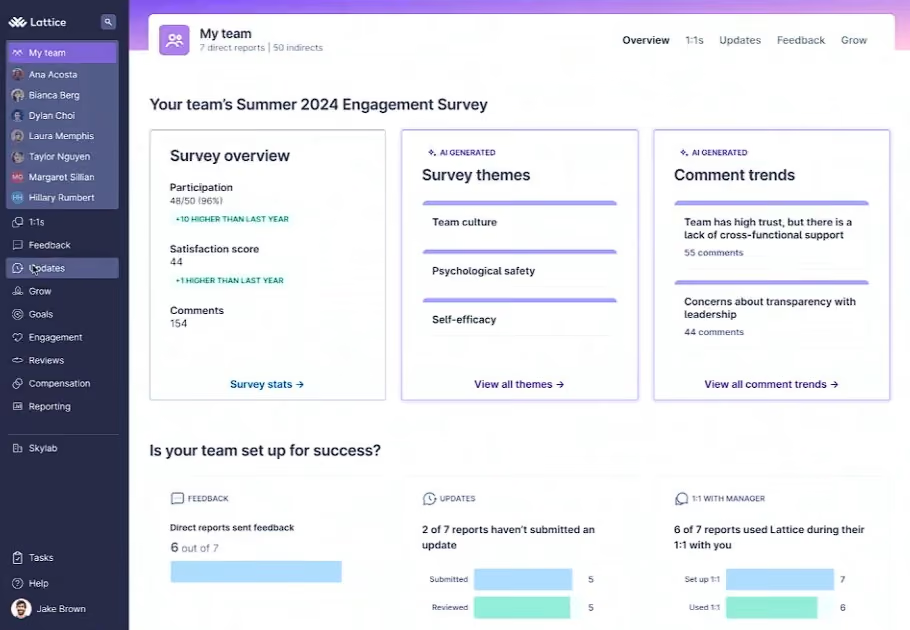
One nice feature is Lattice’s analytics engine. With this feature, you can filter data by tenure, location, department, or custom fields, such as manager or parental status. The heatmap view helps you visualize engagement trends across the org, while the AI Insights tool summarizes open-text feedback into common themes (think sentiment scores around “leadership,” “growth,” or “workload.”) It’s a feature we’ve seen work well in ThriveSparrow and Leapsome, but in Lattice’s case, you’ll need to have eNPS enabled to unlock the complete driver analysis.
Where Lattice lags is the user experience. The HR admin app is surprisingly limited, with key tasks like managing surveys or reviewing dashboards still desktop-only. Compared to mobile-first tools we’ve evaluated like Connecteam or Mo, Lattice feels somewhat dated in this regard.
We also noticed that survey exports to PowerPoint are restricted to agree/disagree formats only, which may frustrate teams that rely on more complex reporting. And unlike Motivosity or Workleap, there’s no self-serve free trial, meaning you’ll need to book a demo to get started.
Although we appreciate that the action plan tool helps turn insights into accountability by assigning follow-ups and pulse check-ins, some managers we surveyed find the UI clunky when toggling between survey data, goals, and performance reviews. For example, a few have requested a side-by-side comparison view for self versus manager feedback—something other platforms, such as Leapsome, already include.
Lattice Key Features:
- Onboarding, engagement and exit surveys with validated and custom templates
- Configurable anonymity settings, skip logic and recurring survey automation
- Historical survey data import and group-level anonymity thresholds
- Engagement analytics filterable by tenure, location, department and custom fields
- Heatmap visualization for org-wide engagement trends
- AI Insights for open-text sentiment analysis and theme summarization
- eNPS with full driver analysis
- Action plans with follow-up assignments and pulse check-ins
5,000+ companies, including Olo, Strike Graph, Cutover, and Sendle.
Lattice’s Engagement module is available as an add-on for $4 per user per month, billed annually. It requires the core Talent Management suite ($11 per user per month), totaling $15 monthly. There are no setup fees, but a $4,000 annual contract minimum applies.
Best For
Mid-sized to enterprise organizations (75+ employees) seeking a unified and scalable solution for surveys, performance, growth, compensation, and HRIS.

We typically use Lattice once a year for annual reviews. There are other components to Lattice but we haven’t utilized them. It has been hard to get managers on board. And we are also a small company. But with reviews for employees it is very easy to use
The ease of submission and completing review forms is A+. The ease of onboarding the software was great. There really are great elements to it but it isn’t utilized enough with my company at this time. Adding and removing employees is also very simple
It’s been about two years since we bought Lattice. I shopped around and had a demo with them. We needed a way to streamline annual reviews and found this to be the best at the time. It has helped for a quick review process but I have been asked to shop around again. Not sure what will happen moving forward.
Wish there was a cheaper option for just reviews and not all the add ons. As well as the ability to pause membership or maybe only have it be monthly and not annually. We don’t need it all year but understand that is not a great business model for them
I have not used others but we needed something that would incorporate many companies into one where there was crossover of management and employees
How useful it will be. Who will be using it and if it will be utilized to its full potential
I have not experienced many changes for the use case that we use it for
One that has strong management eager to grow and develop their employees
A very large organization but get overwhelmed by the interface and use of it.
Nectar
Nectar’s employee engagement module doesn’t try to be everything at once. Instead, it focuses on doing the essentials well: collecting employee feedback, protecting anonymity, and making participation easy. If you're part of an HR team trying to run meaningful surveys without getting buried in complexity, this platform has real appeal.
PROS
- Survey builder supports multiple question types with intuitive drag-and-drop customization.
- HR teams can send surveys to individuals or groups, with bulk resend and direct link options.
- Admins can assign Nectar Points to incentivize participation, with automatic reward cost estimates.
- Analytics include completion rates, drop-off data, and question-level insights once thresholds are met.
- Surveys are anonymous by default, with optional name disclosure for open-response questions.
- Regularly introduces new features and enhancements to its products.
- Volume discounts available for organizations with 500+ employees.
- You pay for the rewards that are claimed. Points and allowances that remain unused won’t cost you a dime.
CONS
- While you can add custom questions to eNPS, the first two standard, original eNPS questions are not editable.
- As a newer product, Engage lacks the advanced features and integrations of more mature platforms.
- Engage is only offered within the highest-priced tier or as a separate module with undisclosed pricing and no available free trial.
- The priced plans are not available to start off as a self-service process. You’d have to book a demo and pay to access some of the premium features.
- The rewards selection could feel limited to some teams, especially those looking for more experiences in offer.
- No longer offer a free plan.
Simple to launch, easy to complete, and designed to protect employee anonymity, Nectar’s survey tool is a strong choice for HR teams seeking actionable feedback without overengineering the process.

After testing several options each month for the last five years, Nectar Engage has quickly become one of our favorite tools for gathering employee feedback. It is not trying to compete with enterprise-level engagement platforms but focuses on the basics: customizable surveys, flexible delivery, privacy-first data handling, and lightweight reporting that is easy to act on.
The survey builder feels intuitive. We were able to create a pulse survey in just a few minutes using a combination of question types, including multiple-choice options, Likert scales, sliders, and open-ended responses. The drag-and-drop question editor made it simple to reorganize the flow, and we liked the ability to make certain questions optional or required depending on the context.
Sending the survey was just as flexible. You can deliver it to the whole company, individual teams, or select users. There is also a bulk resend option, which helped us nudge people who had not responded. For hybrid or frontline workers, you can share a direct link to the survey, although users do need to be logged into Nectar and in the correct workspace for it to work properly.
What also stood out to us was the incentive model. Nectar lets you assign points for survey completion, and it even estimates the total reward cost if everyone participates. This allows you to kill two birds with one stone: to drive up response rates without managing incentives in a separate tool.
The analytics dashboard is clear and useful. We could easily track total responses, completion rates, drop-off rates, and average time to complete. Once the minimum threshold is met (three for most question types and five for open-ended questions), you can unlock question-level data and see departmental breakdowns. That response minimum might feel restrictive, but it is designed to protect anonymity, which is essential if you want honest feedback.
Of course, there are a few drawbacks to be aware of. The first two questions in the eNPS survey template cannot be edited, which somewhat limits companies' flexibility to tailor their wording or scoring system. However, you can add additional questions to the eNPS survey that will be sent out. Additionally, while Engage does its job well, it is a newer module within the Nectar platform and does not yet offer some of the more advanced features found in tools like Culture Amp or Lattice.
It’s also worth mentioning that Nectar Engage is not included in every plan but is bundled with the highest-priced plan. It is available as an add-on to recognition, not as a standalone product, with pricing not publicly listed and no free trial, so you'll need to contact sales to get started.
Nectar Key Features:
- Customizable pulse surveys with multiple-choice, Likert, slider and open-ended questions
- Flexible delivery to whole company, teams or individual users
- Bulk survey resend for improved response rates
- Points-based incentives for survey completion
- Anonymous responses with configurable minimum thresholds
- Analytics dashboard tracking responses, completion and drop-off rates
- Departmental breakdowns unlocked at response thresholds
- eNPS survey template with additional custom question support
1,500+ companies, including Redfin, Golden State Warriors, Major League Baseball, and SHRM.
Nectar Engage is available through Nectar’s highest-tier Culture Suite plan or as an add-on to recognition. Pricing is not publicly listed and there is no free trial, so the best path forward is to request a custom demo and quote.
Best For
If you're already using Nectar for recognition and rewards, or you're looking for a reliable, privacy-focused way to survey your team, Engage is an excellent place to start.

We have managers give recognition at least once a week. Employees use it to get items with their points. They also like to have another way to communicate with each other.
We like the user-friendly platform. They have great customer service. Our employees are able to use their points towards stuff they enjoy.
We purchased it to engage employees and give recognition. We love the idea of employees giving positive feedback to each other. Our employees wanted to be able to give each other recognition as well. We used it for 2.5 years.
Nectar took a while to implement. Our employees would like to see additional / new options to purchase with points. Notifications to employees didn’t always work.
They are very similar to competitors. Their gift selection seems smaller then others.
Consider time of implementation. Make sure that your team uses it on a regular basis. Give incentives for employees to give each other recognition.
They are always making updates to improve. They have improved the overall design of the app.
Larger companies that aren’t able to recognize and acknowledge every employee all the time.
Small companies that interact every day.

Pebb
Pebb is a user-friendly platform that gets the fundamentals of employee engagement right. The free tier offers unlimited chat history, a practical knowledge library, lightweight clubs, and multilingual support, making it one of the obvious choices for budget-conscious teams.
PROS
CONS
For teams looking for a straightforward hub for daily communication and knowledge sharing, we’ve found that Pebb delivers solid value, especially for organizations that don't need or cannot justify more complex HR tech.
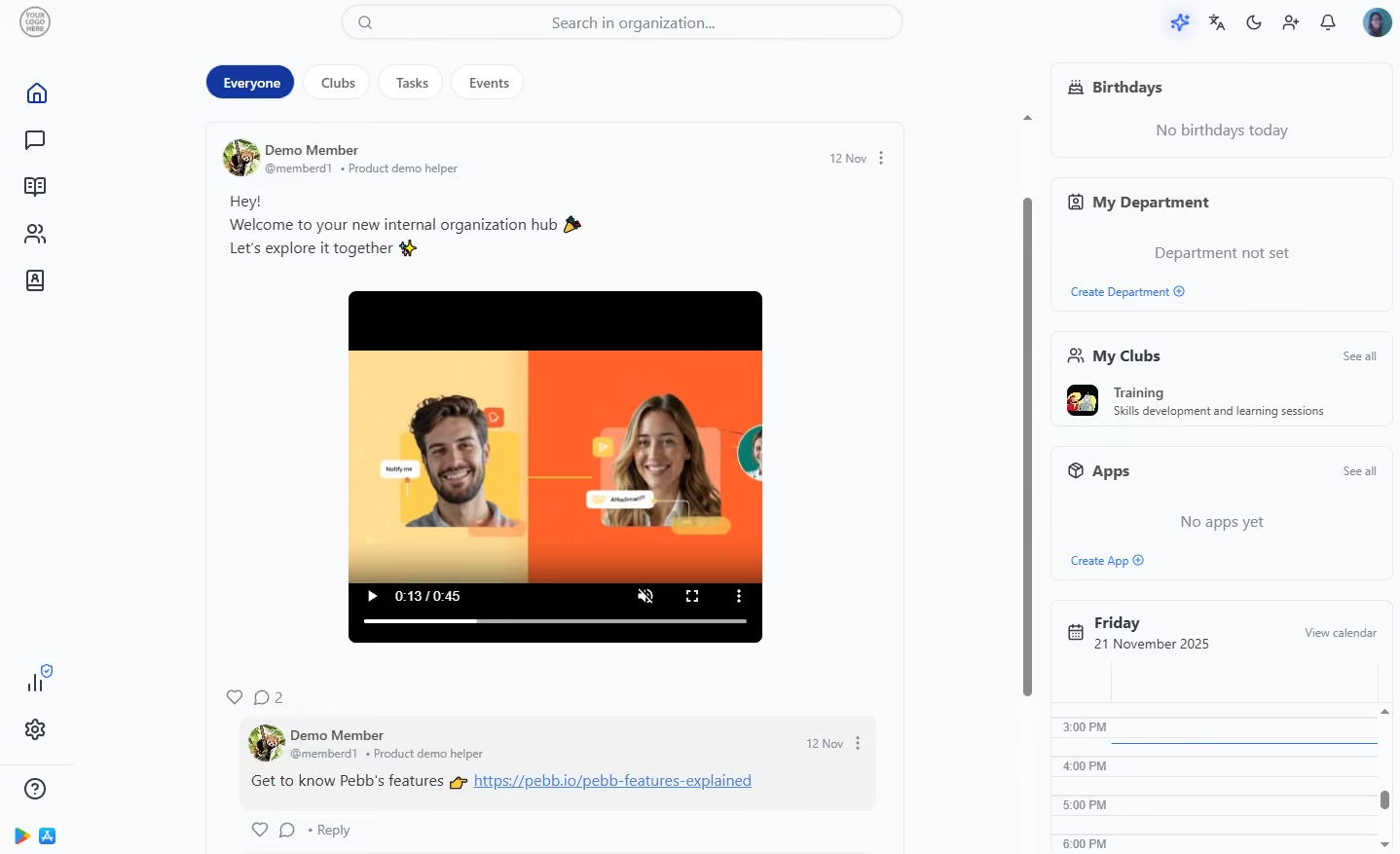
In our testing, Pebb consistently stood out for its simplicity. Real-time chat, company-wide announcements, searchable profiles, and centralized file storage all worked reliably and required minimal setup.
We also liked Pebb’s mobile app design because it feels like mainstream social platforms, which helps drive adoption across distributed workforces. Plus, one-on-one and group chats, voice and video calls, @mentions, polls, and lightweight clubs give teams multiple ways to stay connected without exchanging personal contact details. Admin controls such as role management, post scheduling, and content visibility are straightforward and do not require IT involvement.
Unlike many engagement tools that reserve core features for paid plans, Pebb offers a usable free tier. It is expectedly basic, with no integrations, no polls, and fewer post controls, but teams still get unlimited chat, access to the knowledge library, tasks, and basic sharing features. This, in our opinion, is quite a great starting point already for teams exploring whether an internal communication hub will stick.
However, Pebb’s limitations become clear once you move beyond day-to-day communication. Unlike established brands like Lattice and Leapsome, Pebb falls short in engagement surveys and sentiment analysis. Though polls are fine for quick checks, they certainly can’t replace a dedicated employee feedback system. Compared with platforms such as ThriveSparrow or AdvantageClub, the absence of AI features is also noticeable.
Pebb Key Features:
- Real-time one-on-one and group chat with @mentions
- Company-wide announcements with post scheduling and visibility controls
- Voice and video calls within the platform
- Searchable employee profiles and people directory
- Centralized file storage and knowledge library
- Polls for quick team feedback
- Interest-based clubs for community building
- Mobile app designed for distributed and deskless workforces
- Free tier with unlimited chat, knowledge library and task management
Starbucks, Dave and Busters, Biggby coffee, porchlight group, The Fat Duck Restaurant
Pebb offers a free plan with unlimited Work Chat, News feed, posts, likes, Knowledge Library, Calendar, Apps, Clubs, Tasks, and multi-language support. Premium is $4/user/month with no setup fees.
Best For
Pebb is an excellent option for small, budget-minded businesses with distributed or deskless teams. It also provides a free internal chat and communication app for teams that only need basic engagement features.
Achievers
Achievers stands out for its consistently high adoption rates and measurable impact on engagement, backed by years of iteration in large, global organizations. It’s one of the few platforms that doesn’t just offer recognition features but ties them directly to business outcomes like retention, participation, and performance.
PROS
- Proven impact on engagement, retention, and participation across large enterprises.
- Strong emphasis on frequent, meaningful recognition (not just rewards).
- Global rewards marketplace with Concierge service for flexible fulfillment.
- No-markup pricing model for better cost transparency.
- Highly configurable for global teams (33 languages supported).
- Deep integrations with enterprise tools like Workday, Microsoft Teams, Slack.
- Robust analytics and reporting with export capabilities to BI tools.
- Global reward fulfillment via localized vendor partnerships.
- The concierge redemption option lets employees choose virtually any legal reward.
- Swag, gift cards, cash-like options, and experiences available in a single platform.
- Budget controls and compliance tools support enterprise-wide reward governance.
- Highly flexible catalog that adjusts based on location, language, and user permissions.
- Native integrations with Workday, Slack, Outlook, and several other enterprise platforms.
CONS
- Designed primarily for enterprises (typically 500+ employees); not a practical fit for small teams or startups.
- Undisclosed pricing, no free trial.
- Can feel complex if you only need lightweight recognition features.
- Reward catalogs vary by region, with some users wishing for more variety.
- Some users noted that the redemption layout could be confusing, or they experienced difficulty locating specific reward items.
- Targeting organizations with 500+ employees, Achievers may be too costly for smaller companies.
Our top pick for enterprise employee engagement, Achievers checks most of the boxes we look for: strong adoption, flexible recognition tools, deep integrations, and a rewards system that works globally without adding unnecessary friction.
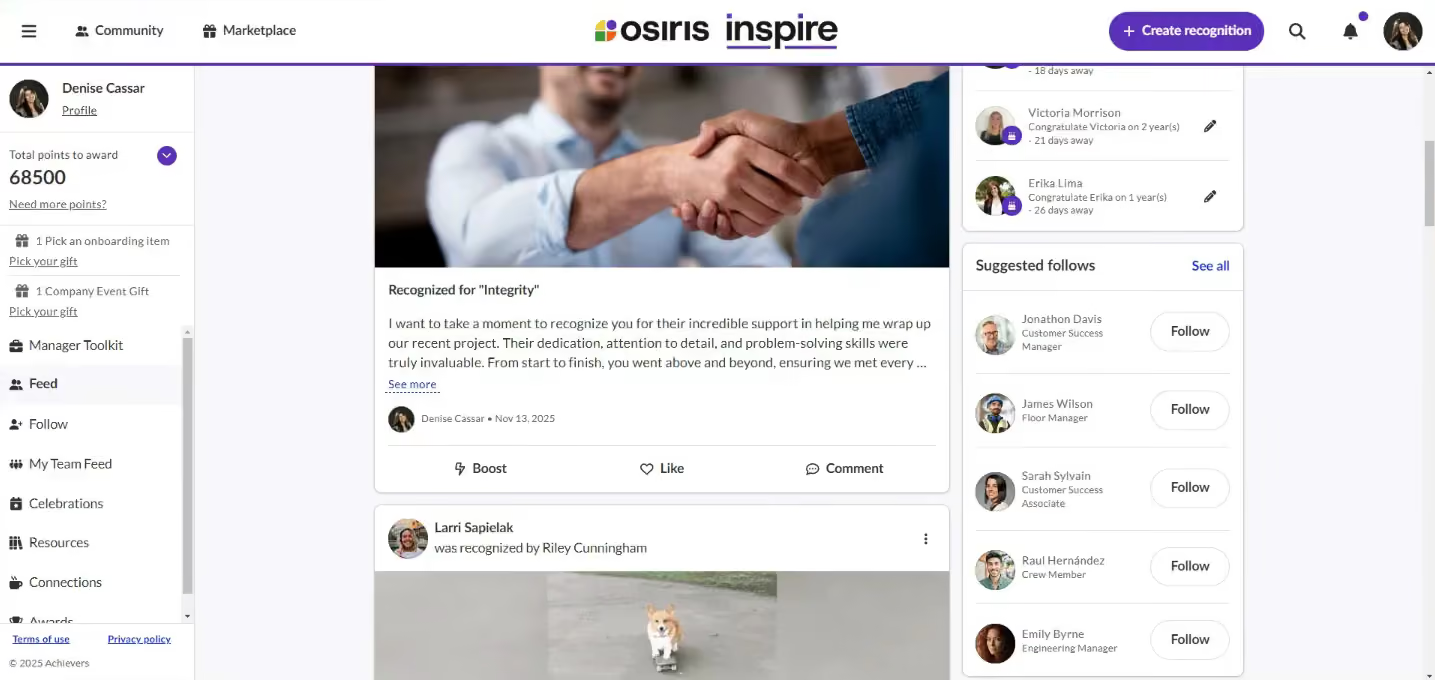
In our review of customer rollouts, what stood out was how the platform fits into day-to-day work. Recognition can happen inside tools like Microsoft Teams and Slack, rather than in a separate app. In one example we looked at, about 10% of recognitions were sent through Teams within the first month which is the kind of early usage many tools struggle to achieve.
We also liked that the recognition system is set up in a way that does not rely heavily on rewards. Across the programs we reviewed, most recognition was non-monetary, which tends to feel less transactional and more aligned with how teams reinforce behavior.
As we surveyed multiple users for their take on this engagement product, many brought up the Manager Toolkit, which they found to be really helpful for keeping things moving. It provides managers with an easy-to-understand view of their team's activity and reminds them to recognize people or mark important milestones.
Customization is another area where Achievers does well. You can set up different rules and structures by team, region, or role, and the platform supports multiple languages with built-in translation. For larger organizations, that makes it easier to run a single program without forcing every team into the same setup.
Reporting is solid. We liked how easy it was to see participation levels and recognition trends, and exporting that data into tools like Tableau or PowerBI is straightforward.
The main drawback, however, is scope. Achievers is built for larger organizations, and it shows. Smaller teams or companies looking for a simple recognition tool may find it more than they need, both in terms of features and the effort required to run it.
Achievers Key Features:
- Recognition integrated directly into Microsoft Teams and Slack
- Non-monetary and monetary recognition with flexible program structures
- Manager Toolkit for team activity visibility and milestone reminders
- Customizable recognition rules by team, region and role
- Multi-language support with built-in translation
- Global rewards system with minimal friction
- Participation and recognition trend reporting
- Native exports to Tableau and Power BI
Bon Secours Mercy Health, Schneider Electric, Scotiabank, General Motors, ATB Financial.
Achievers uses custom pricing based on company size and requirements.
Best For
Large, global organizations that want to drive measurable engagement through frequent recognition and deeply integrated workflows.

CultureMonkey
We picked CultureMonkey because of how effectively it reaches employees beyond the corporate office. Its multilingual survey capabilities, broad distribution channels, manager-focused analytics, and action-planning tools make it particularly compelling for organizations with large frontline or geographically dispersed workforces.
PROS
- Surveys in 100+ languages with editable machine translations
- Reaches frontline employees via QR codes, WhatsApp, SMS, kiosks, Slack, Teams and email
- Heatmap reporting across managers, locations, departments and business units
- AskCooper AI assistant for natural language exploration of survey results
- Manager dashboards with built-in action tracking for post-survey follow-through
- Highly responsive and hands-on customer support
- Surveys in 100+ languages with editable machine translations
- Reaches frontline employees via QR codes, WhatsApp, SMS, kiosks, Slack, Teams and email
- Heatmap reporting across managers, locations, departments and business units
- AskCooper AI assistant for natural language exploration of survey results
- Manager dashboards with built-in action tracking for post-survey follow-through
- Highly responsive and hands-on customer support
CONS
- No public pricing. No free trial without a sales conversation
- Complexity may exceed the needs of small organizations
- Limited flexibility when filtering historical survey data
- Advanced reporting may still require external BI tools
- No public pricing. No free trial without a sales conversation
- Complexity may exceed the needs of small organizations
- Limited flexibility when filtering historical survey data
- Advanced reporting may still require external BI tools
CultureMonkey's survey delivery options were among the most extensive we've encountered. In addition to email, organizations can distribute surveys through Microsoft Teams, Slack, WhatsApp, SMS, QR codes, kiosks, and mobile devices. For companies with frontline workers, manufacturing staff, healthcare employees, retail associates, or logistics teams, this flexibility could solve a challenge that many engagement platforms struggle with.
Multilingual support is another area where CultureMonkey appears particularly strong. The platform currently supports more than 100 languages, and during the demonstration, survey translations were generated within seconds and could then be manually edited to reflect company-specific terminology.
Regarding analytics, CultureMonkey emphasizes accessibility over complexity. We liked that the platform organizes results into interactive heatmaps that automatically reflect organizational hierarchies, which, in testing, enabled us to quickly drill into engagement scores by department, manager, location, and team structure. This visual approach should appeal to HR leaders who want actionable insights without spending hours building reports.

The walkthrough also introduced us to AskCooper, the platform's AI assistant, whom users can ask questions such as which managers have the lowest engagement scores or what practices distinguish top-performing teams. The assistant then surfaces relevant findings and recommendations. While organizations should still validate important decisions against underlying data, the feature could make engagement analytics more accessible to non-technical stakeholders.
CultureMonkey also seems to place greater emphasis on post-survey action. Survey insights can be converted into action plans with assigned owners, deadlines, collaborators, and progress tracking. The experience felt closer to a lightweight project management system than a traditional engagement platform. We can see this being particularly valuable for larger organizations that struggle to ensure accountability after engagement surveys are completed.
Manager enablement is another recurring theme throughout the product. Dedicated manager dashboards provide team-level engagement data, benchmark comparisons, trend analysis, and suggested areas of focus. Combined with lifecycle surveys covering onboarding, milestone check-ins, and employee exits, managers receive a more complete picture of employee experience than a single annual engagement survey can provide.
That said, CultureMonkey is unlikely to be the best fit for every organization. Small businesses looking for a simple survey tool may find the platform more sophisticated than they need. Buyers should also note that pricing is only available through the sales process and that some advanced reporting requirements may still require integrations with business intelligence platforms such as Power BI or Tableau.
Yahoo, Emirates Flight Catering, United Bank, G&J Pepsi, Robertshaw, DP World, and Bausch Health.
Custom pricing based on organization size and requirements.
Best For
Enterprise and mid-market organizations with distributed, multilingual, or frontline-heavy workforces that need to gather feedback at scale.

ClearCo
ClearCo's unified talent platform is a connected system that manages everything from hiring to compensation, eliminating the need to juggle separate tools for recruiting, performance, and learning. By allowing information to flow seamlessly, it reduces repetitive work and offers a clearer, data-driven experience for employees, managers, and leaders alike.
PROS
- ClearCo offers a host of HR solutions that work well with another. You can choose the solution you need or combine them all to have a comprehensive talent management platform in your stack.
- The majority of users find ClearCo’s interface to be quite intuitive and easy to navigate.
- Many users have highly rated ClearCo’s support team for speed and quality of response. Several users have also reported a smooth implementation experience.
- ClearCo offers a host of talent solutions that work well with one another. You can choose the solution you need or combine them all to have a comprehensive talent management platform in your stack.
- The majority of users find ClearCo’s interface to be quite intuitive and easy to navigate.
- Many users have highly rated ClearCo’s support team for speed and quality of response. Several users have also reported a smooth implementation experience.
CONS
- ClearCo’s pricing is not readily available on their website. You also can’t create a trial account on your own from the website and have to go through the sales team for more info.
- Some users felt that the reporting feature is limited in customizations.
- According to a few users, the candidate search function doesn’t always bring up the correct candidate(s) and could use some improvement.
- ClearCo doesn’t currently have a mobile app, but the platform is well optimized for mobile use both for hiring managers and candidates.
- ClearCo’s pricing is not readily available on their website. You also can’t create a trial account on your own from the website and have to go through the sales team for more info.
- Some users felt that the reporting feature is limited in customizations.
- According to a few users, the candidate search function doesn’t always bring up the correct candidate(s) and could use some improvement.
- ClearCo doesn’t currently have a mobile app, but the platform is well optimized for mobile use both for hiring managers and candidates.

ClearCo's employee engagement solution can take care of everything from recognition and celebrations to goal-planning and real-time feedback. It is also a mobile-friendly and multilingual tool. Their survey tool is particularly powerful, with template reviews that are proven to work and you can choose or create your own from.
Another thing we like about this vendor is their excellent customer service and the wideness of their offer. With their platform, you can choose to use only one or a few modules or use one of their tools for each stage of the employee lifecycle.
ClearCo Key Features:
- Recognition and milestone celebration tools
- Goal planning and real-time feedback
- Customizable and template-based survey tools
- Modular platform adaptable to each stage of the employee lifecycle
- Mobile-friendly and multilingual interface
ExxonMobil, Mitsubishi Electric, Yates Construction, JC Penney, and Lake Charles Memorial Health System.
ClearCo’s employee engagement tool is packaged within its ClearGrow module. There’s no way to buy it alone.
Best For
ClearCo is best suited for companies looking for a complete employee engagement solution and also get their ATS, onboarding tool, or many types of HR software from the same vendor.

We primarily utilize ClearCo for our new hire paperwork. My team often received feedback that the paperwork significantly slowed down the onboarding experience for candidates.
After reviewing other available options, we chose ClearCo because it allowed us to digitize our paperwork. This streamlined our processes and improved the candidate experience by reducing the time spent on forms.
We use the tool regularly as part of every new hire onboarding, and it's become a core part of our workflow.
- It is very user-friendly, and every team member, despite our small size, quickly became comfortable with it.
- The tracking feature allows us to see exactly where each new hire is in the onboarding process.
- It makes it easy to digitize paperwork and streamline the onboarding process.
ClearCo was a tool I used early in my HR career. The company I was working for had implemented ClearCo to streamline the onboarding process for our employees. My team went from managing the paperwork ourselves—making sure everything was filled out correctly, etc.—to utilizing a tool like ClearCo, which reduced our time spent on paperwork and allowed us to focus on the employee onboarding experience.
It helped us increase accuracy, reduce administrative workload, and improve the overall process. I personally used the tool for over a year during this period.
- I wish the tracking feature included built-in communication options to connect with candidates about their progress.
- It would be helpful if there were more customization options for different types of forms.
- Sometimes, system updates can affect saved templates, which can require rework.
ClearCo stands out for how user-friendly it is—not just for administrators but also for candidates. Compared to other tools I’ve used, it requires less training and is quicker to implement across teams.
If you're looking to improve the candidate experience and digitize paperwork, ClearCo is a strong option. It’s user-friendly and cost-efficient, making it accessible for teams of any size.
ClearCo has evolved by expanding its services beyond onboarding to include performance management and more. It continues to grow based on user feedback, adapting to meet a range of HR needs.
ClearCo works well for all types of organizations—from startups to mid-size and large companies. It helps improve both the employee experience and internal administrative processes.
ClearCo can be utilized by any organization or user looking to improve HR processes.
Motivosity
Motivosity’s product is changing every time we see it! We like that their employee Net Promoter Score survey (eNPS) goes out on the cadence you choose, and their feature-rich tools combine community, recognition, and rewards, and employee engagement insights.
PROS
- Easy to use for both employees and managers.
- Employees can access this system from their phones, desktops, and apps they use at work, such as Teams/Slack.
- Free implementation support is included in all plans.
- Premium support: Help desk, help site, community site, training videos, quarterly QBRs with a dedicated Customer Success rep (for large customers) in every product.
- The average administrator spends 43 minutes per month in this system.
- Robust analytics to measure the impact of their platform, as well as measure employee sentiment
- eNPS surveys, template surveys, plus build your own surveys.
- Employees can access this system from their phones, desktop, and apps they are in at work such as Teams/Slack
- One platform that combines rewards, recognition, employee engagement, and more
- Built in reporting with insights around potential attrition, most recognized employees, managers that need coaching, etc.
CONS
- Only has dollar (not points) based rewards. Their research shows that dollars are more effective, but many companies want points.
- Doesn’t allow for as many rules regarding who can give what dollars to whom (for example, a team member could theoretically give 100% of their rewards to a friend each month).
- Only has dollar (not points) based rewards. Their research shows dollars is more effective, but many companies want points.
- Some users claimed sometimes it can be a bit buggy connecting to Slack to notify people that an appreciation came through.
- It would have broadened the number of gift card options for users to choose from.
- There could have been an easier way to integrate the software with swag stores. For now, you have to transfer funds to a card and then link that card with the swag store, which slows down a bit the process to cash in funds.
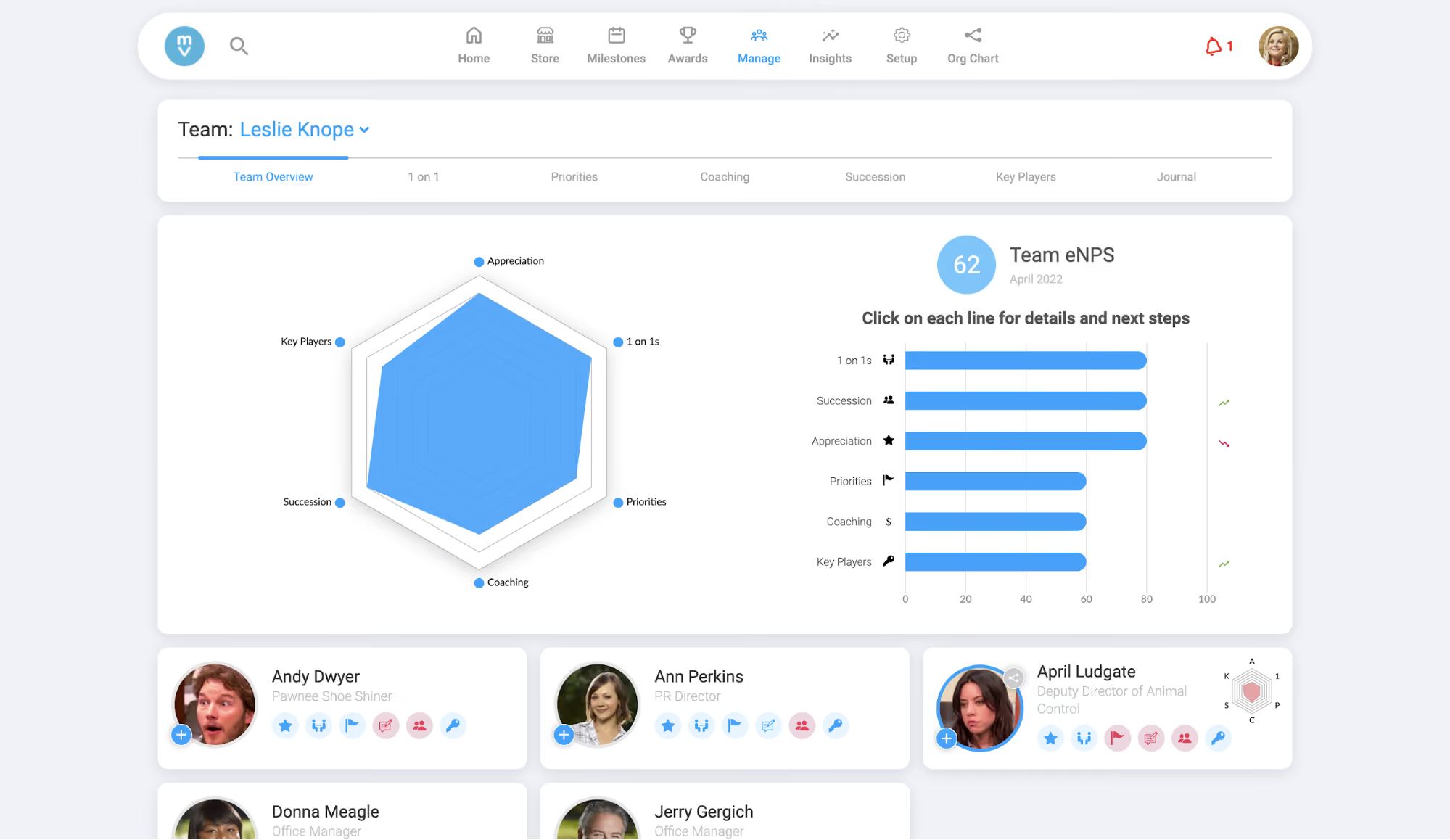
Motivosity product’s philosophy is that engagement and recognition should come from the bottom up, not from the top down, which explains why the software is designed to be simple for employees to access via their mobile devices, Slack/Teams, and also easy to use with an interface that looks like a social platform vs. enterprise software.
Motivosity’s solution is based on three pillars: Building Community, Employee Recognition, and Manager Relationships. The platform enables employees to interact with their entire team via a Facebook-like social feed and recognize and reward peers for a job well done, while managers engage with their team members, see where their employees are going above and beyond, and understand and track employee engagement.
What’s also great about Motivosity is that it’s scalable. Users can upgrade plans and add additional products or team members as they grow.
With Motivosity, all recognition rewards are backed by real incentives: every employee is given a small monthly dollar budget to reward peers. This approach aligns with Motivosity’s own internal research, which suggests that dollar rewards are more meaningful, but it also means that it may not be the best fit for those who prefer points-based systems.
Another trade-off is reward governance. Employees receive a monthly budget to reward others, but the platform lacks controls over who can reward whom or how often. While this open structure promotes trust, it also invites “reward cliques” unless companies put internal policies in place.
Motivosity Key Features:
- Social feed for company-wide peer recognition and interaction
- Dollar-based monthly peer reward budget for recognition
- Manager tools for team engagement tracking and recognition visibility
- Employee recognition tied to community building and company values
- Mobile-friendly interface accessible via Slack and Microsoft Teams
- Scalable plans with modular product add-ons
Instructure, University of Michigan, WGU, Cotopaxi, HealthEquity, DF Credit Union.
Motivosity costs $4 per person per month for the Recognition & Rewards package and $2 per person per month for the Employee Insights product.
Best For
Movitosity works best for mid-market (75-750 employees) companies prioritizing culture, peer feedback, and fast implementation—not rigid reward systems or enterprise-grade surveys.

We had used Motivosity to promote events in the community. We also used it to facilitate Employee Giving (i.e. Hurricane Maria in Puerto Rico several years ago). During the pandemic, it was leveraged especially to lean into our Employee Resource Groups. We used it to focus on specific dates on the calendar, such as Veteran's Day, Juneteenth, and International Women's Day. We also used this platform to encourage Employees to take the Employee Experience Survey.
Clean Interface. Multi-faceted and easy-to-use
Our organization bought Motivosity as part of our strategy for Corporate Social Responsibility. A discovery from our Employee Experience survey showed that there was an interest in our employees who wanted to give back to the community.
The interface is easy to use. The benefits of the platform include multiple functions such as global connection and employee giving. I used this Motivosity for close to a year.
I don't have anything negative to see about Motivosity.
I would say that Motivosity offers multiple streams to help support Employee Engagement.
Executives should think about the company culture. Does the culture support employees taking on projects and missions for CSR projects? Also, from a Technical standpoint, is it easy to integrate with their current systems?
I would say Motivosity has made our needs, and it has stayed the same.
For-profit corporations and/or organizations with many employees.
Small non-profit companies with small margins.

Workleap
Workleap is a thoughtful, feedback-first platform that supports people managers in building trust, surfacing concerns, and celebrating wins. While not the most fully featured tool for recognition or goal tracking, it’s an excellent choice for organizations looking to elevate engagement through better conversations, smarter feedback loops, and ongoing team development.
PROS
- Weekly, biweekly, or monthly Pulse Surveys deliver real-time engagement signals with zero setup.
- Anonymous feedback channels promote honesty while giving managers safe, structured response tools.
- “Good Vibes” recognition feature encourages peer-to-peer appreciation across public and private channels.
- Team Insights and Boosting Metrics highlight areas with the greatest potential for impact.
- Built-in 1-on-1 agendas and follow-ups help operationalize feedback into action.
- Custom survey options allow HR teams to explore targeted topics beyond standard metrics.
- Workleap is easy to use and has a free plan that a team of up to 10 users can use.
- To ensure that feedback is truely anonymous, without the manager, or anyone with higher access being able guess who submitted what response, a minimum of 5 responses need to be sent in before the survey manager is able to access the anonymous feedback.
- The platform has a feature for peer-to-peer recognition, giving your employees the ability to praise one another for outstanding work.
CONS
- Resetting or adjusting OKRs has some limitations, some users noted.
- Some users found the 1-on-1 templates and scheduling clunky.
- No free plan available.
- Some users have reported that Slack integration sometimes malfunctions.
- Workleap does not include a complete performance management solution among their offerings. They have an OKR tool that lets you set goals but there isn’t a mechanism in place to track thos
- e goals or conduct performance reviews.
- There currently isn’t a mobile app that managers and employees can use on the go.
Workleap’s employee engagement platform (Officevibe) is designed to help managers collect feedback, strengthen team connection, and take meaningful action. After reviewing its core features like Pulse Surveys, Good Vibes recognition, anonymous feedback, and 1-on-1 tools, we found that Officevibe offers a well-rounded solution for teams that want to stay in sync and continuously improve.
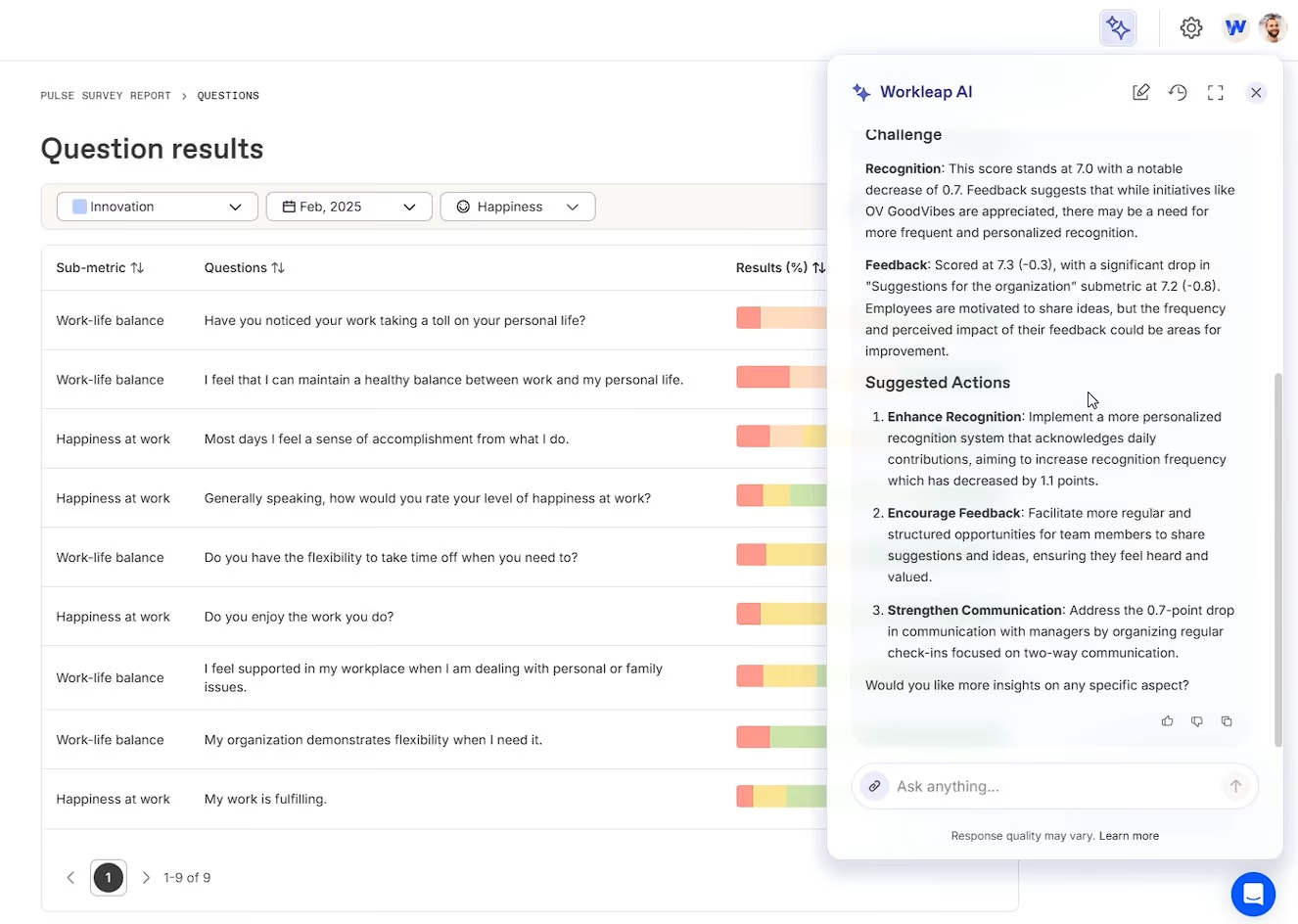
Pulse Surveys are at the heart of the platform. These short, recurring surveys measure how employees feel across ten engagement drivers and deliver real-time insights to managers. Responses are anonymous, which encourages honesty, and the system highlights trends through Boosting Metrics and suggested follow-up actions. For busy managers or those new to people leadership, we liked that the platform provides coaching prompts and conversation starters to make it easier to respond effectively.
Workleap also promotes peer recognition through its Good Vibes feature. Employees can send appreciation messages to colleagues using customizable digital cards that reflect your company’s values. Managers can track recognition trends, and admins can tailor the system to fit cultural goals. By default, recognition is private, but companies can adjust this to make positive feedback more visible across teams.
The 1-on-1 tool provides shared agendas, action tracking, and archived notes to support regular check-ins. While the structure is helpful, we found that editing OKRs or updating meeting notes was not always intuitive. Some users reported that the experience feels disjointed when switching between 1-on-1s and survey insights, which may limit the flow between feedback and follow-up.
For HR teams, Officevibe includes team dashboards, survey filters, and exportable reports. You can run custom surveys to explore specific topics and share results with managers to drive alignment. Just note that visibility is limited if participation is too low, since anonymity is preserved by design. Scores become reliable after five weeks, and written feedback is only shown when enough responses are collected, which makes sense.
Workleap Key Features:
- Recurring pulse surveys across ten engagement drivers with real-time insights
- Anonymous feedback with trend tracking and suggested follow-up actions
- Manager coaching prompts and conversation starters
- Peer recognition via customizable Good Vibes digital cards tied to company values
- Configurable recognition visibility from private to company-wide
- 1:1 tool with shared agendas, action tracking and archived notes
- Custom surveys for targeted topic exploration
- Team dashboards, survey filters and exportable reports
WeTransfer, Dyson, Bose, PayScale, and Trivago are some of 70,000 Workleap customers.
Workleap Engagement, available through its Officevibe plan, is priced at $5 per user per month, requiring a minimum of 10 users, and its core features encompass a comprehensive suite for measuring and improving employee experience, including engagement surveys, continuous feedback, and recognition via "Good Vibes," all complemented by AI-powered reporting, analysis, and suggested actions.
Best For
Overall, Workleap is a good fit for organizations that want to build trust, foster real-time feedback, and give managers lightweight tools to lead more effectively.

I used Workleap every two weeks to review feedback from pulse/employee engagement surveys, identifying organizational strengths and areas needing improvement. It helped determine our NPS score, branding us as an employer of choice, and understanding employee referral likelihood. KPIs were set for performance reviews, allowing managers and employees to provide feedback and track career development. I set up 1:1 meetings with discussion topics, enabling prepared and productive sessions. Managers and employees could set goals and track project or task completion and progress.
The pulse/employee engagement surveys effectively assess overall satisfaction and identify improvement areas, aiding proactive staff retention.
Anonymous pulse surveys encourage honest feedback and higher participation rates.
Tracking performance and reporting within one system supports staff development and accountability, with goal setting and milestone tracking enhancing manageability and achievability.
My company wanted to enhance its culture and obtain more frequent feedback from staff. Workleap was utilized to track employee feedback through engagement surveys, build on employee satisfaction, and manage performance reviews quarterly. It also allowed managers to set up monthly 1:1 sessions with employees to drive engagement, check on well-being, and discuss performance goals. Workleap combines these functions into one system. I used Workleap for six months.
I had no cons with this tool
I have not encountered another system that tracks performance and surveys on one platform, which is a significant advantage of Workleap.
Workleap offers many capabilities, including pulse surveys, employee engagement, 1:1 meetings, and performance management, all in one platform with robust reporting and data analysis functions. It is an excellent communication tool for engaging with employees, building transparency, and understanding both positive and negative feedback. This fosters a high-performing and positive work culture. The surveys are concise, primarily ratings-based, minimizing time commitment and maximizing valuable feedback. The reporting data is also beneficial for sharing insights with executives.
The functionality and usage remained consistent during the six months I used the tool.
Workleap is suitable for organizations of any size or industry. It is a valuable tool for HR departments to enhance retention, engagement, and company culture. Its user-friendly interface makes it accessible to employees at all levels.
I believe Workleap would be beneficial for all organizations.

Mo
Mo drives morale and engagement through its easy-to-understand rewards system, peer nominations, and an AI Assistant that ensures appreciation never falls through the cracks.
PROS
- User-friendly UI with a wide range of vouchers available.
- System auto-nudges employees to recognize achievements if recognition is overdue.
- Reasonable pricing with no rewards fees.
- Free onboarding and implementation support.
- Users can access the platform in 12 languages.
- Android and iOS mobile apps are available for on-the-go access.
- UI is easy to navigate, and users seem to appreciate the varied choice of gift cards they can offer through the platform.
- Transparent pricing starting from $2.25/user/month with no rewards fees.
- Free onboarding and implementation support for all users.
- Robust and feature-rich mobile applications.
- Available in 12 languages and growing.
CONS
- Base plan does not offer HRIS integration. Additional implementation fees may apply for Slack and Microsoft Teams integrations.
- The availability of customer support is limited to weekdays from 9 AM to 5 PM GMT.
- There aren’t free trials or free plans that you can sign up for at this time.
- HRIS integration absent in Base plan. Possible implementation fee for Slack and Microsoft Teams integrations.
- The customer support hours are limited to weekdays, 9 AM - 5 PM GMT.
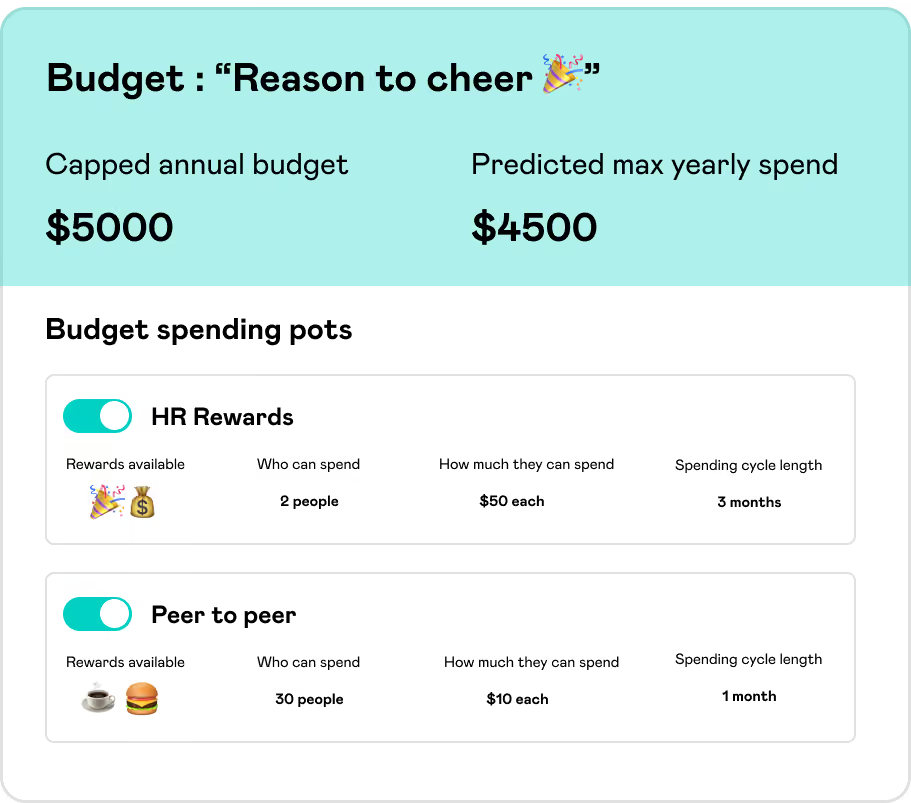
Mo’s platform takes on employee engagement through meaningful rewards and recognition. At its core, you’ll find Moments and Boosts - which are simple yet effective features engineered to fuel morale. Managers can easily create Moments to praise team or individual accomplishments, pairing the shout-outs with gift cards or custom rewards. Boosts, on the other hand, are automations that ensure day-to-day kudos are never forgotten.
We appreciate Mo’s attention to different preferences through its varied and customizable reward options. We also like how straightforward their rewards program is; if a user puts in $5 to recognize someone, the recipient gets $5 to redeem. Having a clear dollar value to rewards is great for a few reasons: it’s simpler for users to understand (as opposed to confusing point-based systems), and it also makes budget tracking infinitely easier.
Mo also promotes inclusiveness in its peer-to-peer nomination features, which give employees the ability to actively recognize one another. This not only makes employees feel more empowered but also contributes to a positive and supportive company culture.
To complement its core offering, Mo recently introduced its AI-powered Assistant tool, which provides customized recommendations on actions leaders can take to boost engagement further. For example, it will automatically remind managers of upcoming employee milestones like birthdays and work anniversaries. Or if someone hasn’t given praise to a deserving co-worker in a while, the Assistant will gently prompt them to send some appreciation.
However, we were disappointed to learn that Slack and Microsoft Teams integrations may require additional implementation fees. HRIS integration isn’t included in the base plan either, which could be a blocker for teams looking to sync data automatically.
Customer support also comes with caveats: it’s only available during UK business hours (9 a.m. to 5 p.m. GMT, weekdays only). Take note, North American-based users, because that’s going to be a considerable gap for you guys, especially those who may need help outside of those windows.
Finally, Mo doesn’t currently offer a free plan or trial. That means you’ll need to commit before getting hands-on with the product—something to keep in mind if you’re comparing multiple tools.
Mo Key Features:
- Moments for individual and team recognition with gift cards and custom rewards
- Boosts for automated day-to-day recognition and milestone reminders
- Peer-to-peer nomination and recognition tools
- AI-powered Assistant for personalized engagement recommendations
- Automated manager prompts for birthdays and work anniversaries
Mo counts over 58,000 users using its platform, including SGN, The O2, NHS, Aspen, William Hill, and SHL.
Mo’s pricing starts at $2.25 per user per month. More specifically, the employee engagement tool offers 3 plans: Appreciate at $2.25/user/month for basic recognition, Engage at $4.5/user/month adding awards and advanced reporting, and Transform with custom pricing for large companies including full features, program design, and premium support.
Best For
Mo is suitable for companies of all sizes looking to drive employee engagement through rewards and recognition.

We use Mo every day across my remit which is back office Operations. We have roughly 1100/1200 people on the platform and an average of 1500 moments shared on it a month. The key processes we use it for are:
- P2P points scheme - We give everyone in the departments a small financial amount at the start of each month. They can't spend it on themselves, they can only give it to colleagues when sharing moments. It encourages them to recognize each other for things like training, help with a tricky problem or account, support as a friend/colleague, advice or generally being a good egg. This is the most popular activity we use Mo for and has the biggest impact on the shift in culture and engagement.
- All leadership groups have additional ad-hoc pots that they can reward from which focus more on performance-based recognition.
- We use the platform for our quarterly awards. The award categories are sent out and everyone nominates their colleagues for different awards. Last month we had 283 nominations from a department of 400. It's then easy to shortlist and pick winners there. The winners can then be celebrated through Moments on Mo, and rewarded at the same time. It's also 1 click of a button to then send out the nominations to every nominee for each award category.
- More recently we've started using Boosts which are automated triggers set once a week, in line with our agile sprint work. They prompt people to celebrate their weekly wins in a shared setting for everyone to engage with. This also makes it much easier for senior leadership to have a presence on the platform when their time is so limited. We also use it for the start of the week's focusses and goals to keep everyone connected on our objectives.
- As the budget master I then also use the platform for any additional ad-hoc activity I run such as monthly non-performance-based incentives to further build our culture and connect people.
- I don't know if I'm allowed to share how much has been cashed in by our colleagues at the inhouse store in Mo over the last 2 years but suffice to say it's an astounding figure and all of it is people saving up what they receive from various things and spending it on exactly what they want as the store is so extensive. It gives them autonomy and choice and makes it really easy which they love. It's been particularly appreciated during the cost of living crisis to go towards supermarket shops or school shoes from Clarks, house renovations from B&Q, as well as AirBnB staycations and so, so much more.
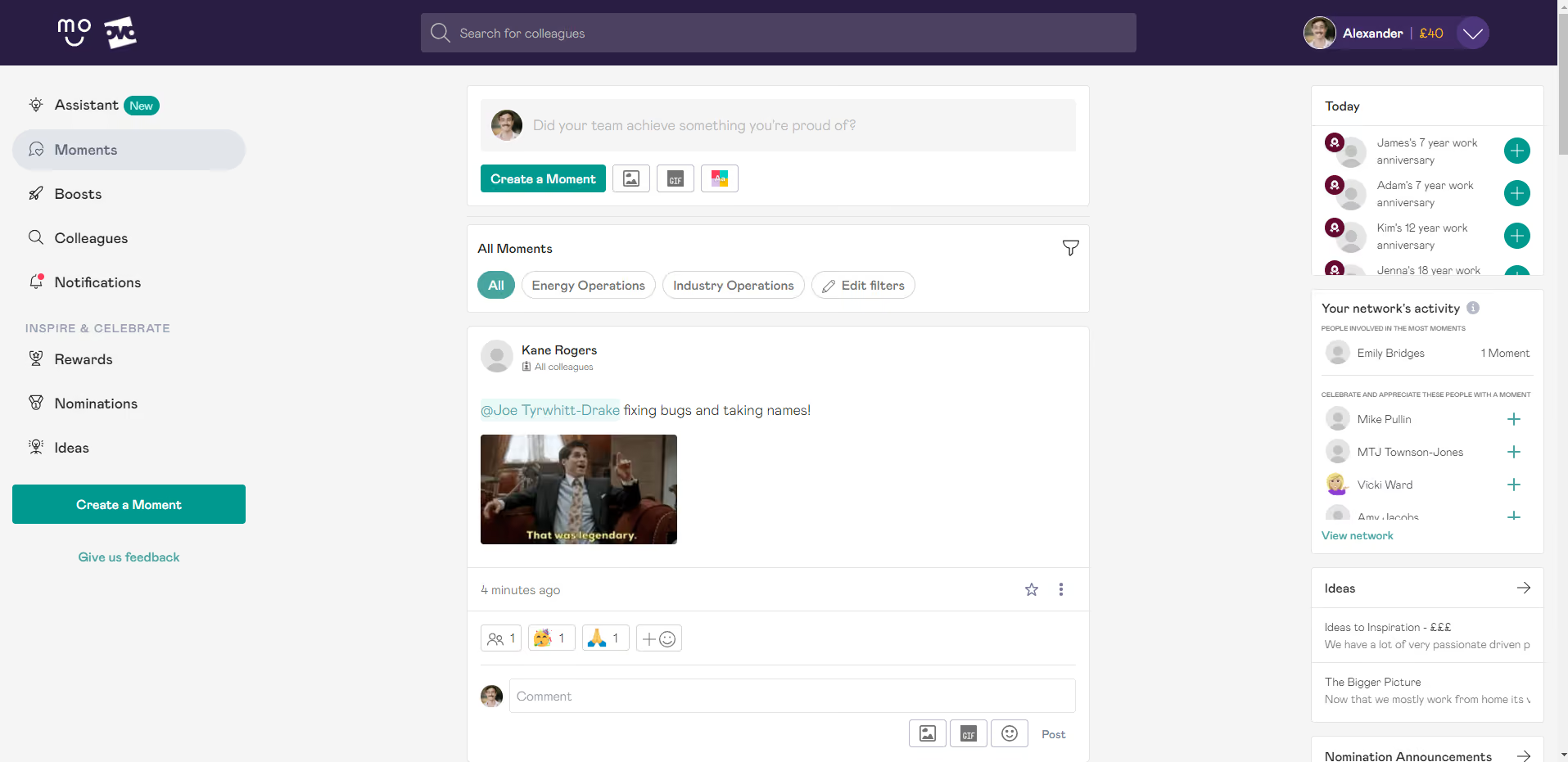
- It saves me SO MUCH TIME!
- It's so simple to use and for other people to pick up
- Its use grows organically once people start using it
- The variety of the store gives our people huge autonomy and variety
- It makes rewarding easy and fun
- It helps drive a positive culture, a culture of recognition and appreciation
- I love just how much everyone else loves it
- The team that works there is so helpful and works with you to always deliver improvements
- It continues to deliver extra value, we're always finding new ways to get more out of it.
- It's made my life a million times easier. I could never go back.
We initially bought it to automate the plethora of manual processes that I was trying to execute manually myself beforehand. This includes managing the general reward and recognition schemes, all nomination processes, awarding, and the peer-to-peer R&R scheme we ran. All purchasing of vouchers, prizes, etc in a hybrid world which requires getting people's addresses, etc.
This range of activities took up almost all of my time and left very little to work on bigger strategic projects. It couldn't continue.
Mo automated all these processes, for example sending out the nominations sent in for our quarterly awards to each nominee. This took the best part of a day to manually send all of these emails for every nomination. Now it takes no more than 30 seconds, I click one button for each category and they all go out. This is a time saving that is replicated across multiple processes and has completely changed the scope of what my role can deliver because of the time it saves.
However, the real value has come since then. With my free time, I've been able to develop our use of Mo to be the centerpiece that everything is built around. We've learned much further on the peer-to-peer scheme and the overarching objectives of engagement are about bridging the gap and connecting people to feel part of a team where community is our culture and fun is in our DNA. Mo allows us to drive this culture shift, connecting people all over the country through positive interactions on the platform, strengthening working relationships and our sense of broader identity. We've been using it for 2 years now, and are averaging 1500 moments shared on the platform a month (each being a recognition, thank you, or award) with c1100 users. It's helped drive a 1.9 increase in our engagement score in Peakon in 1 year.
- I really can't call out things I dislike. The only feedback I get is:
- You can't edit a moment once you've sent it (but I understand why that's the case).
It wraps everything up into one easy-to-use and comprehensive platform. At the same time, it's not cluttered with useless extras. The service you get for the price is extremely good, the customer service is exceptional and the team is an absolute pleasure to work with.
It was the only platform I found that facilitated the peer-to-peer scheme I was running. I was able to completely replicate the model in Mo but have the entire thing automated. Nothing else allowed that level of autonomy for the user but control for the admin too. The store is extremely comprehensive too which makes a massive difference. Others were good but the Mo one is bang on with variety and caters to a wide range of preferences. Once or twice at the start, I had people ask if other stores could be added but I've never had it since.
The Boost functionality and how it helps support our agile ways of working has been a real leap forward and their manager assistant is a really helpful tool for our leadership population. It seems as time goes on, the more and more we can align how we work and what we do to utilize the platform to support us.
Think about what you really need, and what problem are you directly trying to solve. That's the first question. The second is what's possible. My view shifted so much once we got Mo to all these other possibilities that I hadn't considered before. Ask the what-if questions, challenge what you are doing, and think what would be the dream scenario. Also, think of it from a bigger cultural piece. What attitudes, behaviors, and cultures are you wanting to drive within your business and what's going to best support you in doing that. Also, does it automate for you? The more it automates, the more time you have to dig deeper into the bigger issues/questions.
Since we started using it 2 years ago. It introduced the Boost function and the manager's assistance. These two upgrades more specifically target the leadership population as we/they'd identified that they were the harder population to get engaged with the platform. These upgrades build in routine and simple triggers which are easy for leaders to respond to. The assistant also gives all the key information you need in one easy place (budgets, team activity, etc) but also great in-house articles to get people thinking about management approaches with a more modern and progressive approach which I know has been really well received.
I would say a more modern organization or one that wants to modernize. It's probably not good for a traditional working environment so much. It works for big businesses and small businesses too. Its functionality allows you to manage the view in a way that means you can scale as large as you like and not lose the personal touch it offers.
As explained above, a traditional working organization that doesn't really want to modernize in how it treats its employees or thinks about things like culture and engagement.

Connecteam
Connecteam’s platform is mobile-first, user-friendly, and packed with tools to drive engagement, including surveys, polls, rewards, recognition, chat, news feed, skills development courses, and much more.
PROS
- Connecteam’s platform is user-friendly and mobile-first, designed with deskless workers in mind.
- The platform covers a wide range of features for team management, communication, training, and engagement.
- The pricing of all modules is transparent, with free plans for small businesses.
- There’s a 14-day free trial you can sign up for, no credit card is needed.
- One of the only fully-mobile HR tech tools for deskless workers
- Very adequately-priced for all it entails, SMB-friendly
- Quite open to feedback, having implemented user suggestions as features in the past.
CONS
- May require a learning curve due to extensive features.
- Some essential features are locked behind the higher pricing tiers.
- Surveys are part of the communication hub; rewards, recognition, and training are in the HR & skills hub. Full use of all modules may require subscriptions to both hubs.
- In the communication hub, the app offers no confirmation that messages were sent and/or seen.
- Certain features that some teams consider essential, such as GPS-tracking, are only available in the higher-tier pricing plans.
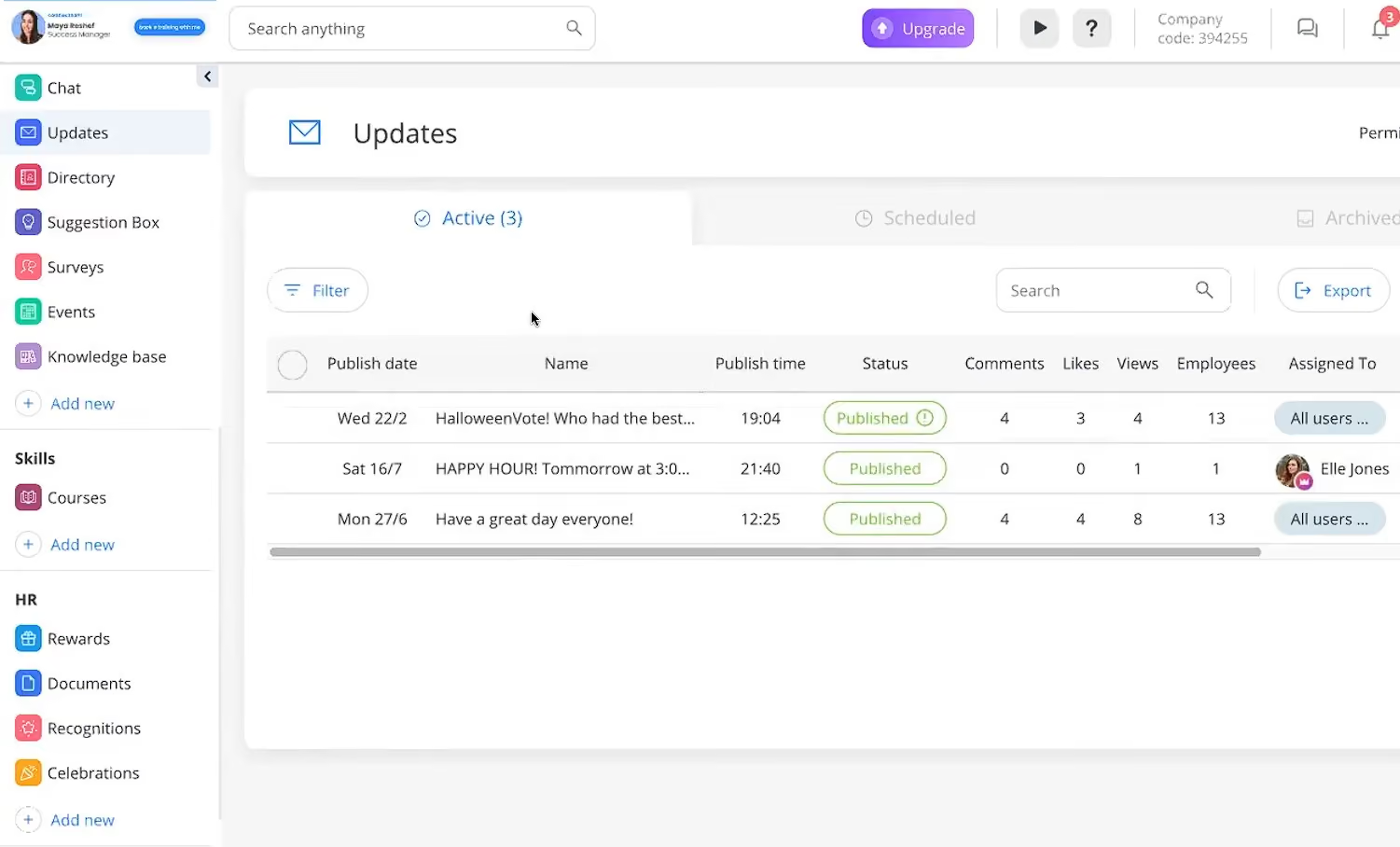
Connecteam offers a comprehensive suite of employee-centric tools that cover communication, training, recognition, and operations in a mobile-friendly format, designed for deskless teams. After trialing the platform, we found a lot to like, especially for organizations looking to connect and engage employees on the go.
Let’s start with the Communication Hub. The surveys and live polls functionality allows you to quickly collect input from your team, whether it’s feedback on a new policy or pulse-checking morale. The Updates module is another strong point. It provides managers with a streamlined way to share company news, best practices, or shout-outs, ensuring frontline staff stay informed in real-time.
Another thing that excited us about Connecteam is its commitment to recognition, which is not often seen in deskless workforce platforms. Managers can use built-in tools to highlight top performers, celebrate birthdays and work anniversaries, and issue digital rewards and shout-outs. This helps reinforce positive behavior and foster a culture of appreciation even in highly distributed workforces.
Connecteam also supports professional growth with features that span the employee lifecycle, from digital onboarding to mobile-first training courses. Employees can complete skill modules from their phones, access SOPs, and keep up with certifications through a centralized knowledge hub. This all-in-one approach helps boost productivity and engagement while reducing administrative burden.
Beyond engagement, this vendor also offers task and shift scheduling tools for day-to-day ops. Managers can assign work based on availability, approve time-off requests, and promote team events to build camaraderie. Consulting some HR professionals who have been using these features, one trend we noticed was that Connecteam is quite popular among teams working in retail, logistics, hospitality, and other mobile-first industries.
One anticipated drawback of this employee engagement platform, however, is that it can take time to fully get the hang of it due to its breadth of features. Connecteam is divided into multiple hubs (Communication, HR & Skills, Operations), allowing it to accommodate different scales. However, that also means that if you opt for just surveys, training, and recognition, you may end up paying more than one hub subscription with a few features unnecessarily plugged in.
Connecteam Key Features:
- Mobile-first surveys and live polls for real-time team feedback
- Updates module for company news, best practices and shoutouts
- Built-in recognition tools for top performers, birthdays and anniversaries
- Digital rewards and shoutouts for distributed workforce engagement
- Digital onboarding and mobile-first training courses
- Centralized knowledge hub for SOPs and certifications
- Task and shift scheduling with time-off approval
- Team event promotion for community building
Connecteam is used by 36,000+ businesses, including Subway, Hilton, and Volvo.
Connecteam offers three hubs: Operations, Communications, and HR & Skills. Each hub has various plans from $29 to $99 per month for 30 users, and a free plan for under 10 users.
Best For
Connecteam’s employee engagement tool is best for companies with mobile or deskless workforces looking to centralize communication, training, and engagement in a single platform.

We use Connecteam for task management. Employees are assigned daily/weekly tasks based on their roles. With Connecteam, all employees are working toward the bigger goal, one person at a time. The app is also a great communication platform for celebrating birthdays, anniversaries, and accomplishments.
Three major pros Connecteam offers are task management, community, and timekeeping. Connecteam’s task management tools empower each employee to give their best. The communication tools are a great asset to the company’s culture. Connecteam’s timekeeping functions make scheduling less time-consuming.
Before moving the organization to Connecteam, basic employee functions were on different systems. Timekeeping and workload checklists were all in paper form, taking up valuable space. Connecteam helped create operational excellence. Now, supervisors can delegate workloads to employees without physical paperwork to confirm completion. Employees are now eager to post photos of their completed tasks. Timekeeping has also become much easier. We have used Connecteam for over a year.
The biggest con could be app usage for employees who are not comfortable with technology or mobile apps. This is no fault of Connecteam, but inactive users can slow down operational progress. Using a mobile device can also be a distraction for some employees. From an HR perspective, auto-scheduling is generally helpful, but in some cases, employees' schedules can change weekly or biweekly, which requires extra time to ensure schedules are correct.
Compared to other systems I have used at different companies, Connecteam offers much more ease for users. It also has fewer problems with maintenance and malfunctions.
When buying this tool, I think people should consider operational excellence. Companies should also think about the diversity of their team and whether employees will be open to using the app. In addition to gaining employee buy-in for using this software, buyers should also review the price point to ensure they are comfortable using it within their business. Lastly, potential buyers should ensure that a person or team is in place to explore all the functions to get full use of the app.
The access to the helpdesk and training videos for using the app has greatly met the needs of both the users and employees.
This tool is great for businesses that focus on operational excellence or operational standards. Operational size doesn’t matter because the app is multifunctional. Larger organizations may need to use more of the app’s functions.
Organizations where physical paperwork is required, or where phone service or usage is limited.
Small Improvements
We picked Small Improvements because they take a focused, low-friction approach to engagement. Their strongest differentiator is how well 1:1s, feedback, praise, reviews, and lightweight surveys work together to improve manager-employee alignment without overwhelming admins or end users.
PROS
- Extremely easy to use for both employees and admins, with a minimalist design that supports adoption.
- Strong 1:1 meeting tools with talking points, action items, meeting templates, and calendar sync.
- Helpful resources inside reviews pull in prior 1:1s, praise, goals, 360 feedback, and past reviews for better context.
- Praise and anytime feedback tools make recognition and lightweight feedback more continuous.
- 30-day free trial is more generous than many competitors.
- Feature-selection controls let admins simplify the interface and roll out only the modules they want employees to use.
- Exceptionally easy to use, with minimal training needed for admins and employees.
- A flexible feature set supports Performance Reviews, one-on-one meetings, continuous feedback, Objectives, and Praise.
- New Manager Activation Score and post-1:1 ratings help identify and support struggling managers.
- The AI Writing Assistant enhances feedback quality without compromising the human touch.
- Lightweight and customizable exports for reporting needs
- Broad integrations with HRIS and tools like BambooHR, Personio, Namely, Kallidus, Workday, Google Calendar, Outlook, and Slack streamline implementation.
CONS
- Pulse Surveys are still being overhauled, so the engagement survey experience appears less mature than some competitors.
- Only Elevate plan customers can customize survey questions; Grow customers are limited to pre-built templates.
- Pulse Surveys currently do not send automated reminders, which may hurt participation rates.
- Not ideal for enterprises needing advanced analytics or compliance-heavy workflows.
- Some niche integrations may be missing, and minimum pricing applies on higher-tier plans.
- Limited analytics and reporting compared to more enterprise-focused solutions.
- No standalone module purchasing; bundled pricing only.
- The current cascading objective setup is still under development (expected Q3 2025).
- Some customers note that the system lacks advanced customization for complex organizations.
- 360 feedback cycles allow only one questionnaire per cycle, limiting advanced workflows.
Small Improvements stands out by keeping employee engagement simple. During the demo, what impressed us most was how intentionally focused the platform felt. Rather than packing in a long list of disconnected features, they center the product around strengthening alignment between managers and direct reports. That design philosophy shows up throughout the platform, especially in the way reviews, 1:1 meetings, praise, objectives, feedback, and surveys connect to one another.
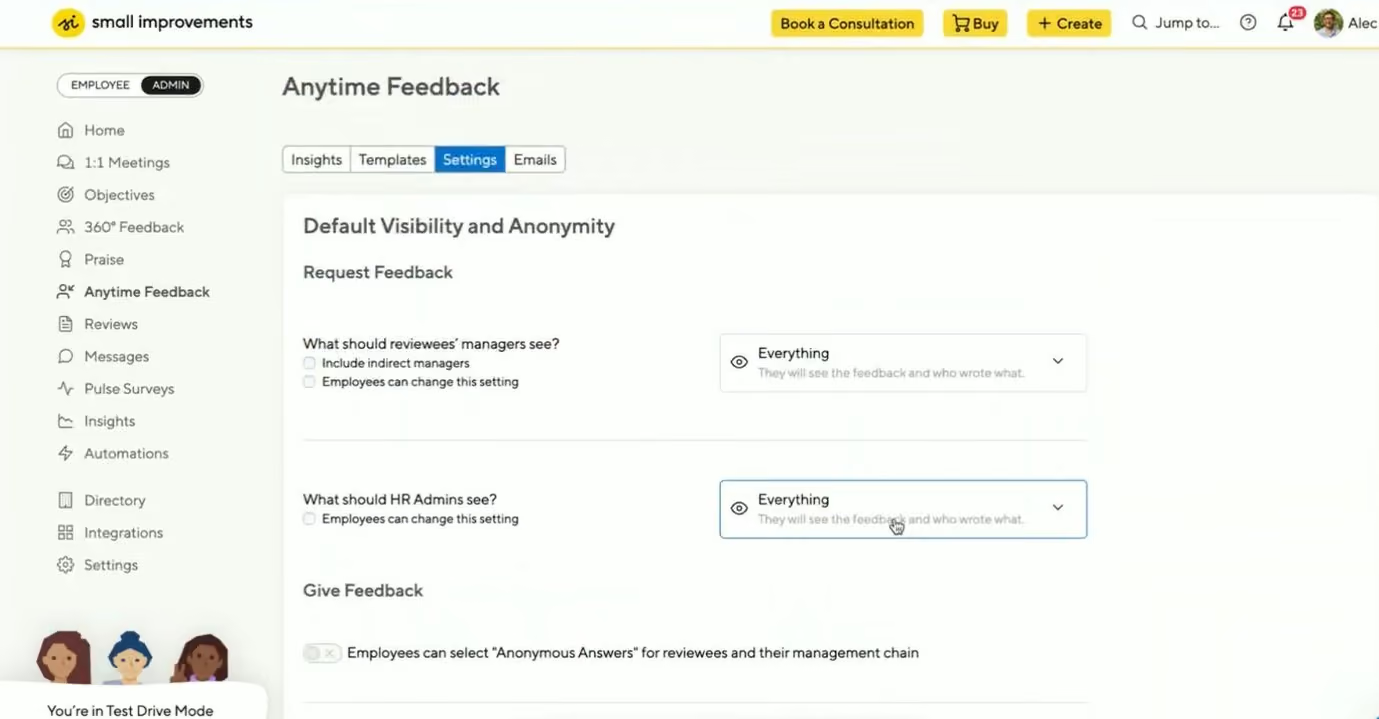
The 1:1 meeting module was one of our favorite parts of the demo. Both managers and employees can add talking points before meetings, track action items across conversations, attach notes, and use templates to guide recurring discussions. We also liked that meetings sync from Google Calendar or Outlook into the platform, rather than forcing managers to recreate them manually. In practice, this makes Small Improvements useful not just for formal review cycles, but for ongoing engagement habits that happen week to week.
The review experience is also thoughtfully designed. Managers can see self-reflections, past reviews, 360 feedback, goals, and praise in one place through the helpful resources panel. That gives them more context when preparing feedback and helps tie engagement to actual employee development over time. We also liked the AI writing support because it appears to function more like a writing improver than a content generator, which feels more practical for managers who want help sharpening feedback without outsourcing the thinking.
For broader engagement, Small Improvements includes Praise, Anytime Feedback, and Pulse Surveys. Praise is especially flexible, with customizable badges that can reflect company values or internal culture. Anytime Feedback also has useful automation options, such as triggering feedback requests based on milestones like new-hire check-ins. These tools make engagement feel continuous rather than limited to annual or quarterly review cycles.
That said, the survey side is not as strong as the rest of the product right now. Pulse Surveys are undergoing a major overhaul, and some limitations are notable. Survey question customization is restricted to Elevate customers, Grow customers are limited to templates, and automated reminders are not currently available for Pulse Surveys. The platform also appears less suited for enterprises that need deep analytics, more advanced engagement reporting, or compliance-heavy processes. Still, for teams that value ease of use and manager-led engagement over complexity, Small Improvements is a compelling option.
Small Improvements Key Features:
- 1:1 meeting module with shared talking points, action items and templates
- Google Calendar and Outlook sync for meeting management
- Performance reviews with self-reflections, 360 feedback and goals in one view
- AI writing support for sharpening manager feedback
- Customizable praise badges tied to company values
- Anytime Feedback with milestone-triggered automation
- Pulse surveys for continuous engagement measurement
- Objectives tracking connected to feedback and review cycles
Dashlane, Binance, Zapier, Soundcloud
Small Improvements offers three pricing tiers, all including a 30-day free trial:
- Launch: $3 per user per month (minimum 20 users)
- Grow: $6 per user per month (minimum 20 users)
- Elevate: $9 per user per month (minimum 30 users, requires annual billing totaling $5,400 per year)
Best For
Small and mid-sized organizations that want a simple, manager-driven engagement platform centered on 1:1s, feedback, praise, and reviews rather than advanced survey analytics.

Leapsome
Leapsome remains one of our top picks due to its AI-enabled manager assistant, centralized feedback workflows, and multilingual support, plus strong guidance for enterprise onboarding.
PROS
- Unified inbox consolidates survey responses, reviews, and feedback for faster action.
- AI-powered assistant helps managers draft reviews and respond to feedback.
- The platform supports 32 languages and offers support in English and German.
- Free 14-day trial available with no credit card required.
- Psychologist-backed survey templates and flexible customization options.
- Advanced segmentation and sentiment analysis reveal actionable insights.
- Leapsome is quite feature-rich; the platform packs modules for employee onboarding, learning management, engagement, performance management, goals tracking and much more.
- The majority of users find Leapsome’s UI to be friendly and easy to navigate.
- There are lots of third party integrations options to choose from, including Slack, which many users appreciate.
- The platform has transparent pricing, and you only pay for the modules you need.
CONS
- Hands-on Customer Success support is limited to customers with $6,000+ annual contracts.
Pricing is not transparent and depends on several factors, including contract length and modules. - No ability to upload images or files in feedback or survey responses.
- Wide feature set means a moderate learning curve and longer implementation timeline.
- No dedicated mobile app for managers or admins.
- There is currently no way to post or upload an image or file into your feedback.
- Since Leapsome can do so many things, you may need some time to get used to it. The implementation process can also take some time.
- There currently isn’t a mobile app that users can download and access Leapsome quickly on-the-go.
- Free 14-day trials are available but you need to book a demo with the sales team first to sign up for one; you can’t do so on your own.
Leapsome has long been known for its rich feature set covering engagement surveys, performance management, learning, and goal tracking. But in our most recent hands-on review, it was the August 2025 product updates, particularly the Unified Inbox and AI-powered Manager Assistant, that really stood out.
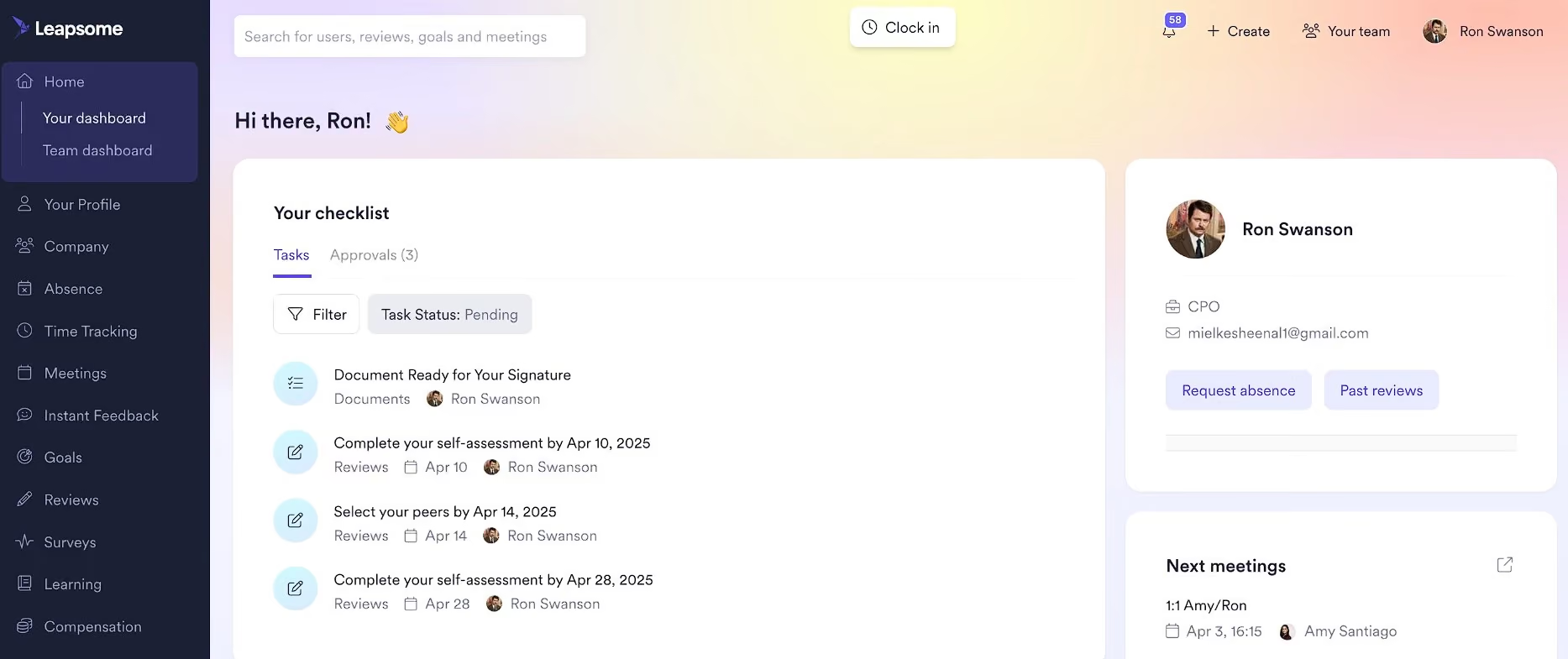
The unified inbox brings clarity and efficiency to manager workflows. Instead of switching between modules, all feedback, reviews, and survey responses now arrive in one centralized place. It significantly cut down time-to-action in our testing. Meanwhile, the new AI assistant helped generate quality drafts for review feedback and pulse survey replies, which is a welcome aid for people managers balancing high-volume work.
Beyond the AI and UX improvements, Leapsome still excels at data-driven engagement. Users can segment survey results by team, location, or tenure, then use sentiment analysis to track patterns and performance correlations. Optional anonymous follow-ups help managers understand underlying issues and build psychological safety.
One major differentiator we noted is Leapsome’s multilingual reach. With the engagement tool available in 32 languages and support offered in both English and German, it’s a good fit for global organizations. Their Success Center is filled with how-to guides, videos, and best practices. It’s also available to all users, regardless of contract size.
However, hands-on help from the Customer Success team is only provided to customers on annual contracts of $6,000 or more. For smaller teams, this paywall can feel limiting.
Another point to consider is pricing. While it starts at $7 per user per month, the final cost depends on your company's size, contract length, and selected modules. Special rates are available for startups and NGOs, but you’ll need to speak with the sales team to find out if you qualify. Also, although Leapsome now offers a free 14-day trial with no credit card required, it’s only available after you’ve gone through a demo with sales.
Leapsome Key Features:
- Unified inbox consolidating feedback, reviews and survey responses
- AI-powered Manager Assistant for review feedback and survey reply drafts
- Engagement surveys segmented by team, location and tenure
- Sentiment analysis with performance correlation tracking
- Anonymous follow-up options for psychological safety
- Pulse surveys with eNPS tracking and trend analysis
- Peer recognition tied to company values with public praise feed
- Platform available in 32 languages; support available in English and German
Over 1,500 companies use Leapsome, including Mercedes Benz, Spotify, Trivago, Eventim, and Babbel.
Starts at $7 per user per month with annual billing, varying based on employee count, contract length (minimum 1 year), and modules, with special rates for startups and NGOs. A $6,000+ annual contract is required for Customer Success, and a 14-day free trial is available after a demo without a credit card.
Best For
Mid-sized to large global organizations that want to unify engagement, feedback, and performance under one analytics-driven platform.
We use Leapsome daily as a comprehensive tool for managing performance and increasing employee engagement. It is especially helpful for the leadership and HR teams, allowing us to align personal goals with the company's broader objectives through OKRs and goal management. The platform supports performance reviews, 360-degree feedback, and real-time feedback, which help enhance communication and development. Leapsome’s customizable features make processes like surveys and one-on-one meetings more efficient by allowing us to adapt the platform to our needs. Overall, Leapsome has streamlined how we engage with and support employees.
- Leapsome’s user-friendly design makes it easy to recognize colleagues and boost morale with positive feedback.
- The platform functions as both a learning management system and an organizer for meetings, reviews, and surveys.
- It’s intuitive and quickly adopted by employees, improving morale by encouraging shared feedback and appreciation.
My organization adopted Leapsome to centralize and improve multiple HR functions within a single platform. We wanted a solution that could integrate goal-setting, OKRs, performance reviews, employee learning, and engagement into a cohesive system. Leapsome’s all-in-one design has been key in enabling streamlined performance tracking and employee development. It has also helped promote better communication and engagement with features like 360-degree feedback, surveys, and recognition tools. I have personally used Leapsome for two years, and it has consistently proven valuable to our team.
- The platform’s workflows could be better optimized for smoother use.
- The UI/UX for completing a learning path could be improved to provide a more seamless experience.
- Some internal management processes still rely on outdated methods.
Leapsome differentiates itself with customizable performance and 360° reviews that are straightforward to use. It supports goal alignment and tracking across the organization, fostering transparency and accountability.
Through employee engagement surveys, it provides insights into company culture that help in strategic decision-making. Leapsome also encourages a culture of continuous growth with real-time feedback and praise.
These features create a holistic approach to performance management, employee development, and engagement that stands out from competitors.
I recommend researching the platform’s functions to ensure it aligns with your organizational needs. Leapsome offers many valuable features, though some may require further development.
Leapsome has remained relatively consistent, though there is room for further updates to meet evolving user requirements.
The platform’s versatility makes it suitable for various types of organizations and industries.
Currently, I believe Leapsome could be beneficial for almost any organization looking to streamline HR functions.
C.A. Short Company
C.A. Short Company does not include traditional employee engagement features such as pulse surveys or sentiment analysis, but its recognition workflows are robust, and its fulfillment services offer an excellent level of customization to help companies foster morale and appreciation across distributed teams.
PROS
- Comprehensive recognition features, including peer-to-peer points, e-cards, and on-the-spot recognition.
- Custom reward fulfillment, with in-house kitting and international shipping for branded employee gifts.
- Dedicated account managers, implementation support, and executive sponsorship for every client.
- Automated recognition campaigns for anniversaries, birthdays, and key milestones.
- The rewards and recognition programs are coded to fully match each customer’s needs.
- Combines digital (peer-to-peer eCards, social feed-style recognition) and physical recognition (on-the-spot recognition cards.)
- Dedicated account managers, customer service reps, and an implementation team.
CONS
- No employee survey functionality or direct employee feedback mechanisms.
- Reporting and analytics rely on external Power BI dashboards rather than built-in real-time insights.
- Interface feels dated compared to modern competitors like Nectar or Guusto.
- The UI is not as modern as some competitors.
- Changes to the system require communication with support rather than self-service configurations.
- Reporting relies on Power BI rather than being embedded within the platform.
CA Short is better described as a recognition and rewards solution rather than a true employee engagement platform by modern standards. While recognition is a key pillar of engagement, the system does not collect or analyze employee feedback via surveys. That said, it excels in what it does offer: formal, informal, and day-to-day recognition.
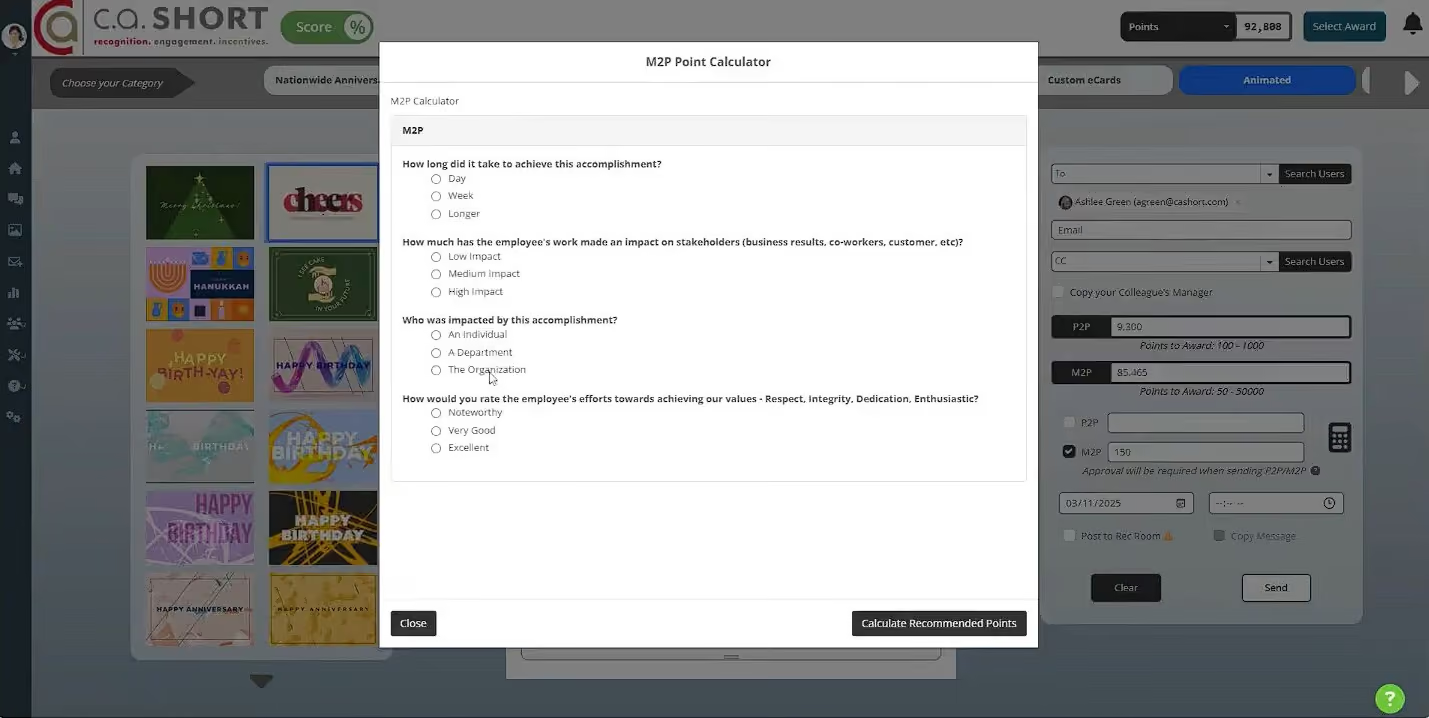
As a manager user, we could send personalized e-cards (with or without points), and employees could then redeem points for rewards ranging from branded company merchandise to event tickets. The platform’s on-the-spot recognition cards add a tangible, face-to-face element, while automated campaigns ensure timely acknowledgment of milestones, such as work anniversaries or onboarding.
We particularly liked the custom kitting and fulfillment services, which are not offered by all. For example, onboarding packages or milestone gifts can be curated, branded, and shipped internationally with no added customs hassle.
The company’s “white glove” approach also deserves a shout-out. Every client gets a dedicated account manager, customer service rep, and even an executive sponsor to ensure the program is built for long-term success. Rather than just handing over software, this vendor partners with clients to design recognition strategies that fit their culture. For organizations that want more than a self-service tool, this level of support is hard to beat.
As much as we appreciate C.A. Short, we can’t escape the fact that it lacks employee survey features, sentiment analysis, or anonymous feedback collection, all of which are now standard in many engagement platforms. Consequently, the platform can’t offer the same insights into employee sentiment or workplace trends that pulse surveys and analytics do, so teams looking to measure engagement holistically would need to pair it with another tool. Further, while C.A. Short enables admin users to create and download custom reports, it currently doesn’t house these analytics natively but requires integration with Power BI.
Compared to modern competitors like Nectar or Guusto, we also felt that C.A. Short’s interface could use an update. The good news is, UI enhancements are already on the vendor’s roadmap. We’ll be sure to keep you informed and watch for any improvements.
C.A. Short Company Key Features:
- Formal, informal and day-to-day recognition tools
- Personalized e-cards with optional points redemption
- Rewards catalog including branded merchandise and event tickets
- On-the-spot recognition cards for face-to-face acknowledgment
- Automated milestone campaigns for anniversaries and onboarding
- Custom kitting and international fulfillment for onboarding and milestone gifts
- Dedicated account manager, customer service rep and executive sponsor
- Custom reporting with Power BI integration
Penske, Sysco, and Old Dominion Freight Line are among C.A. Short Company's clients.
Pricing is fully custom.
Best For
Enterprises that prioritize recognition and reward programs over direct employee feedback collection.
Other Employee Engagement Platforms Worth Considering
- EngageRocket: For UK enterprises wanting advisory depth with technology backbone. This platform fills a gap that pure SaaS and consulting firms both miss—it pairs enterprise-grade engagement capabilities with in-house people science and HR consulting to ensure insights translate into actual strategy. It serves UK organizations of 1K+ well, with the kind of market depth that comes from long-standing relationships in that region. The drawback is its US presence remains limited, and the feature set makes it overkill for most SMBs looking for something lightweight.
- Matter: For blending employee engagement into Slack or Teams. During testing, we liked how surveys appeared directly in chat, no extra logins or forgotten links. Response rates climbed quickly, helped by Matter coins that reward participation and convert into gift cards or charitable giving. The library of 100 culture questions kept things varied, though we wished we had more control over customizing them.
- Profit.co: For connecting engagement insights directly to goals. When we paired pulse surveys with quarterly objectives, we could see engagement trends shift alongside progress. The surveys launch quickly, remain anonymous by default, and capture more detail than expected. The dashboards highlight meaningful insights without overwhelming us. There is a brief learning curve, but once we settled in, the link between goals and sentiment felt unusually clear.
- Quantum Workplace: For advanced, validated engagement analytics. We found the research-backed questions and benchmarking against thousands of other companies especially helpful because they gave our data meaningful context. The AI-powered comment analysis handled tone accurately, even with mixed feedback. Navigation took some getting used to and the recognition feed looked dated, but the depth of insight made up for it.
- Reward Gateway: For enterprise-level engagement measurement capabilities. We ran its four-question Engaged Index and watched how the results pinpointed turnover risks. The data connected neatly to retention metrics, which made follow-up conversations easy. Reporting takes a few extra clicks, and smaller teams outside the UK, Australia, or Ireland can’t use the light version.
- Culture Amp: For science-backed survey design and analytics. With more than 40 templates developed by organizational psychologists, we received benchmarked insights almost immediately. The heatmaps and Retention Insights tool helped us identify at-risk groups quickly. The platform took about a week to learn, but once we did, it translated survey results into meaningful next steps better than most options we have tried.
- Kudos: For teams that want peer recognition to drive daily engagement. In testing, we found that employees responded more to its peer-to-peer recognition cards than to traditional emails or shoutouts. The Culture Accelerator campaigns let HR reinforce core values through real activity, not slogans. The only drawbacks were occasional lag when redeeming rewards and monthly point caps that felt tight.
- Empuls: For consolidating team feedback, recognition, and communication. We liked being able to send a quick pulse survey, post results, and follow up with shoutouts, all without switching tools. The analytics tied engagement scores neatly to performance data, helping us see which departments needed attention. The mobile app handled surveys well, though reports took longer to load.
- Assembly: For SMB-centered, flexible engagement workflows. We set up an engagement workflow in minutes, complete with automated milestone reminders and lightweight surveys. Customizing the templates was simple, and the free plan was surprisingly generous. Points expire monthly, and notifications can stack up, but Assembly’s flexibility makes it easy to keep engagement running on autopilot.
- Eletive: For personalized survey experiences. Its AI adjusts survey questions based on each person’s previous responses, which made our follow-up surveys feel unexpectedly personal. The insights were rich and actionable, and we appreciated the nudge suggestions rooted in behavioral science. The limitation is that its AI only analyzes English text, and extra features like 360 feedback come at a premium.
- Terryberry: For mid-market teams blending wellness, recognition, and engagement. Over the course of a month-long trial, we saw how pulse survey scores improved when paired with its wellness challenges, as employees seemed to like seeing their progress reflected in both steps and sentiment. The analytics clearly connected recognition activity to retention patterns. The interface is simple rather than modern, but the system may be an overkill to small businesses.
- AdvantageClub.ai: For AI-forward organizations. The Mood-O-Meter captured fluctuations in team sentiment with accuracy, and the adaptive surveys shifted based on earlier responses boosts the surveyee experience. The mobile app bundled engagement, wellness, and local perks effectively, although customization often requires vendor support.
Benefits of Employee Engagement Tools
Employee engagement software can benefit organizations in several ways: it provides employees with a safe space to share feedback, simplifies the launch of expert-backed surveys, delivers real-time sentiment insights, enables ongoing culture monitoring, and integrates tools for recognition and performance.
- Give Employees a Voice with Anonymous Feedback Tools: Employee engagement software provides an outlet for employees to anonymously share their honest opinions, voice out any concerns about the workplace and work culture, and propose suggestions for improvement. When employees feel heard and their feedback is taken into account, it leads to less turnover and higher productivity.
- Launch Expert-Designed Engagement Surveys in Minutes: There’s no need to reinvent the wheel. The best employee engagement platforms are built on solid research, which often includes input from industrial-organizational (IO) psychology experts. They also often come with a host of ready-made survey templates you can deploy in minutes, with recommendations on what to ask, when to ask it, and how often.
- Turn Feedback into Insights with Real-Time Sentiment Analysis: One problem with traditional employee engagement surveys is that they can take a long time to analyze all the feedback gathered. A lot of what is uncovered relates broadly to the employee experience but lacks actionable next steps. The best employee engagement tools can analyze feedback as it comes and give you a comprehensive understanding of employee sentiments, preferences, and areas for improvement.
- Monitor Workplace Culture Health with Continuous Pulse Checks: Most employee engagement platforms use pulse surveys to gather small amounts of data in frequent intervals. These surveys ask only one or two questions, keeping the pressure low and the response rate high. By providing quick insights and enabling immediate actions, continuous feedback supports agile transformation. This approach is key to driving successful, sustained change and fostering a dynamic culture of adaptability and engagement.
- Go Beyond Feedback: Oftentimes, employee engagement platforms bundle up their offerings with other solutions in the employee experience tech space, such as employee recognition and performance management software. Having all of these tools integrated into one platform reduces tech fatigue for your team and is easy on your budget, too.
Common Mistakes When Buying and Using Employee Engagement Platforms
When buying and using employee engagement tools, common mistakes include believing the software alone will resolve deep-seated cultural issues, expecting immediate acceptance from employees, underestimating the necessary setup time, and rushing the overall implementation process.
- Expecting Software to Solve Cultural Problems: To be effective, the platform must work alongside a distinctive, authentic, and appreciative work culture. The software can supplement your efforts, but it won't “fix” company-wide problems with engagement. Employee engagement experts Mallory Herrin and Tracie Marie agree here, and Marie's experience has borne this out. She reminds us in no uncertain terms that engagement software cannot replace the power of a human connection.
- Assuming Quick Employee Buy-In: Affecting a company-wide change will take time. Simply put, inspiring behavioral change is difficult. After working in an environment that could have been more attentive to their engagement, employees are sometimes distrustful of initiatives that promise brighter days. The process of winning over the skeptics can’t happen overnight, but it can happen. The right time to start, whether with engagement software or other means, is now.
- Overlooking Integration and Setup Time: Like the plodding, uphill struggle of behavior change, implementing a new HR tool can also be painfully sluggish. To make it as easy as possible, choose a platform with an open API and/or partnerships with tools you already use. Consider your HR tech stack and daily communication tools: Both must be seamlessly connected to your new tool to ensure a seamless transition.
- Rolling Out Too Much Too Soon: Be conservative and methodical about your rollout game plan. Some vendors offer assistance with this process, but if yours doesn't (or you choose not to follow it), you can orchestrate a successful rollout with good planning and reasonable expectations. From our experience, creating a schedule with a regular cadence that introduces features slowly is best. We’ve also found it helpful to take feedback from departments across the organization about the rollout order: the insight of your leadership and individual contributors is a massive asset.
The Business Case Behind Employee Engagement Software
Employee engagement apps provide organizations with measurable visibility into employee sentiment, cultural health, and areas that need improvement, enabling proactive decision-making. For HR and People teams, the return is clear: higher productivity, lower attrition costs, and a workplace culture that retains top talent.
- Identify Problems Before They Escalate: Engagement tools allow you to continuously monitor employee sentiment through pulse surveys, feedback loops, and trend analysis. This early visibility enables HR leaders to identify issues such as burnout, team misalignment, or poor management practices before they turn into resignations or disengagement.
- Improve Productivity Through Data-Driven Action: When employees feel heard and supported, performance improves. Platforms that connect feedback with initiatives, such as recognition or development programs, create a loop where insights directly inform action, leading to higher engagement and improved outcomes.
We’ve designed this Excel-based calculator to help you calculate the basic return on investment (ROI) from using the best employee engagement solutions. Also, check out our HR Tech ROI calculators page for deeper analysis and benchmarking tools.
Key Features of Employee Engagement Software
Key employee engagement software features include employee surveys and feedback, recognition and daily engagement, goals and performance, communication and collaboration, and analytics and reporting.
- Surveys and Feedback: Employee surveys are a fundamental capability of employee engagement software. These include pulse surveys for regular sentiment check-ins, eNPS (Employee Net Promoter Score) surveys to measure loyalty and satisfaction, and more in-depth annual or quarterly surveys. Good survey builders make it easy for HR teams to craft customized question sets while choosing from preset expert-validated templates. They often come with automation to ensure surveys reach the right employees at the right time and reminders to increase completion rates. Anonymity settings, in most cases, if not all, are included to protect respondent identity while helping teams gather more honest feedback.
- Recognition and Daily Engagement: These features make it easy for peers and managers to acknowledge contributions in real time, whether through quick shout-outs, points-based systems, or rewards programs. Beyond recognition, many employee engagement tools incorporate activity feeds and dashboards that display updates, milestones, and upcoming check-ins. These daily touchpoints are particularly helpful in reinforcing connection and engagement across remote teams.
- Goals and Performance: Employee engagement software often includes goal setting, one-on-one meeting support, coaching tools, and performance reviews. By tracking progress against defined objectives, organizations can align individual contributions with company strategy while giving employees clarity on expectations.
- Communication and Collaboration: Many platforms also provide built-in spaces for collaboration. These can range from chat boards and community groups to virtual hubs that encourage connection around both work and shared interests. By giving employees clear channels for updates, discussions, and social interaction, the software helps build organizational culture and transparency. In hybrid and remote workplaces, these tools replicate the informal connections of in-office environments and strengthen team cohesion.
- Analytics and Reporting: Real-time analytics track metrics like eNPS, satisfaction, and participation rates, allowing HR teams to spot issues quickly. Advanced reporting lets administrators segment results by team, location, or demographic group to identify trends and areas for improvement. Many platforms also allow automated report generation and easy export to PDF or CSV, making it simple to share findings with leadership and track progress over time.
How Much Does Employee Engagement Software Cost?
Most engagement platforms use a per-user, per-month model, with pricing that typically ranges from $2 to $20 per employee. A handful of vendors also offer flat annual packages, usually starting around $4,500 to $8,000 per year.
At the low end, entry-level subscriptions provided by vendors like Mo, Assembly, ThriveSparrow, or Matter fall in the $2-$5 per employee per month (PEPM) range. Mid-tier offerings such as Leapsome, Workleap, Profit.co, or Reward Gateway average around $6-$8 PEPM. For more advanced capabilities, enterprise solutions like Quantum Workplace, WorkTango, or Culture Amp often require annual billing that can be around $7,500 on average. Additionally, many providers offer 14-30 day free trials, and some, such as Matter or Connecteam for under 10 users, include a free plan.
Apart from subscription fees, however, you should also be aware of minimum commitments. For example, Lattice applies a $4,000 annual minimum, Kudos requires at least 500 users, and Culture Amp starts at $4,500 annually with yearly billing only.
To give you an idea, a 250-person company should expect to spend $15,000-$20,000 annually for a solid mid-tier tool, while organizations with over 1,000 employees often cross $60,000-$100,000 annually unless they choose a flat-fee vendor. Small teams can still start for just a few hundred dollars per year, but growing companies should budget in the low five figures, and enterprises should plan for a six-figure annual investment if they want advanced analytics and global features.
Questions to Ask in Demos with Vendors
- How does your platform measure and track employee engagement? What metrics and analytics does it provide?
- How customizable are the surveys and feedback tools? Can I tailor questions and flows to my organization's specific needs?
- What methods does the platform use to gather employee feedback (e.g., surveys, pulse polls, open text, etc.)?
- Does your system integrate with our current HRIS, payroll, or other platforms?
- What types of participation tracking does it offer (e.g., survey response rates, event attendance, etc.)?
- What kinds of real-time feedback capabilities does it have? Can employees provide input anytime?
- What types of employee segmentation and filtering options are available? Can I analyze data by role, team, location, etc.?
- How are the results and data visualized? What dashboards, reports, and insights can I access as an administrator?
- Does your platform provide employee engagement action plan templates and tools and follow-up workflows based on feedback results?
- How do you ensure data security and compliance with regulations? What is your security and privacy protocol?
- What type of support, training, and account management do you provide?
- Can you explain the implementation process? How long does rollout typically take?
- What are the pricing models available? Are there options to scale up or down as needed?
- Can I see a demo tailored to our specific use cases and needs?
Employee Engagement Software FAQs
What is employee engagement software?
Employee engagement software is a digital platform that helps organizations measure, track, and improve how employees feel about their work. These tools often include surveys, recognition features, communication hubs, and analytics dashboards to improve satisfaction, retention, and performance.
What is the difference between employee engagement and employee recognition?
Employee engagement describes the overall motivation, commitment, and connection employees feel toward their work and organization. Employee recognition refers to programs or tools that acknowledge and reward contributions, which is one of the ways companies build stronger engagement.
What is the leading employee engagement tool?
The leading employee engagement platforms include Motivosity, Bonusly, ThriveSparrow, and Leapsome. Each platform specializes in different areas, such as surveys, recognition, or communication, and the best choice depends on the company's size, budget, and goals.
Which employee engagement software is best for small businesses?
Matter, Assembly, and Connecteam are some of the employee engagement platforms designed with small businesses in mind.
How much does employee engagement software cost?
Employee engagement software pricing usually ranges from $2 to $5 per employee per month for smaller tools. Enterprise platforms often have annual minimums starting at around $4,000 to $5,000 or require a minimum of a few hundred users. Most vendors follow a per-employee pricing model and provide custom quotes based on company size and features.
What features should I look for in employee engagement software?
The best employee engagement software offers an easy-to-use interface, activity feeds or dashboards for daily interaction, employee surveys for feedback, goal and performance tracking, peer recognition, and collaborative spaces. It’s also recommended to look for platforms that provide analytics, customization, and integrations to fit your workflows.
How do companies use employee engagement software?
Companies use employee engagement software to collect employee feedback, monitor engagement levels, and identify problem areas. HR teams use it for surveys and retention strategies, while managers use it for recognition, coaching, and team check-ins.
When is the best time to use employee engagement software?
The best time to implement employee engagement software is when an organization sees early signs of disengagement, such as declining productivity or rising turnover. Companies also adopt these tools during periods of growth or change to strengthen communication and support employee experience. As our community expert, Christina Moran, advises, it’s less about company size and more about need: “The right time is when the software can clearly enhance performance, simplify HR efforts, and improve the employee experience.”
What is a good measure of employee engagement?
A good measure of employee engagement combines survey feedback, participation rates, turnover data, and productivity trends. High engagement is reflected in strong morale, alignment with company goals, and consistent discretionary effort from employees.
Final Advice on Buying Employee Engagement Software
There are no silver bullets when it comes to tackling disengaged employees and understanding what's really happening in your business. However, having an employee engagement platform in place can help you engage your remote workers as well as your in-office ones.
Given that companies using employee engagement gamification are seven times more profitable than those that don't, you may also want to figure out ways to add gamification to your employee engagement programs.
Last but not least, providing proper training for your managers and teams is crucial for creating a culture of appreciation in your workplace. The following session can be a great starting point:
- The Hidden Drivers of Wellbeing at Work (That Most Companies Ignore). Invited speaker: Melissa Segal, CEO and founder of the workplace culture training company InterHuman Solutions
- Why the Simple Things Matter Most for Workplace Well-Being. Invited speaker: Jillian Bernstein, Coach and founder of the human resources consulting and wellness programming company The Wellness Extension
About the Author


About Us

- Our goal at SSR is to help HR and recruiting teams to find and buy the right software for their needs.
- Our site is free to use as some vendors will pay us for web traffic.
- SSR lists all companies we feel are top vendors - not just those who pay us - in our comprehensive directories full of the advice needed to make the right purchase decision for your HR team.


.avif)