


As the all-in-one platform for deskless employees, Connecteam covers communication, scheduling, task management, core HR, and more. It works to connect unanchored workers at small and large companies alike with an extremely easy-to-use mobile app.
Ratings
Ease of Use
Best For
Key Differentiator
Price
Free Trial
PROS
- One of the only fully-mobile HR tech tools for deskless workers
- Very adequately-priced for all it entails, SMB-friendly
- Quite open to feedback, having implemented user suggestions as features in the past.
CONS
- In the communication hub, the app offers no confirmation that messages were sent and/or seen.
- Certain features that some teams consider essential, such as GPS-tracking, are only available in the higher-tier pricing plans.

Need Help? Talk to an HR Software Advisor!
Tell us more about your company & an HR Software Advisor will help you find the right software





Deskless workers have been somewhat neglected in terms of technology. Often, people that work in factories, security, cleaning, field services, or construction, don’t have a computer. In some cases, they might not even have an email address that they’re willing to use for work.
However, they do have a smartphone. So, when trying to build a one-stop-shop for all things HR-related for these types of workers, the folks at Connecteam decided to make it all about the mobile app.
This makes it super simple for a worker to get onboarded, for instance. All they have to do is download the app, they can make an account with their phone number if they don’t have an email, and they’re set within minutes.
Using the app, they can quickly and easily do all the administrative work required of them. That’s where they can get their schedule, sign forms, request time off, talk to their manager or other team members, get rewards, and much more.
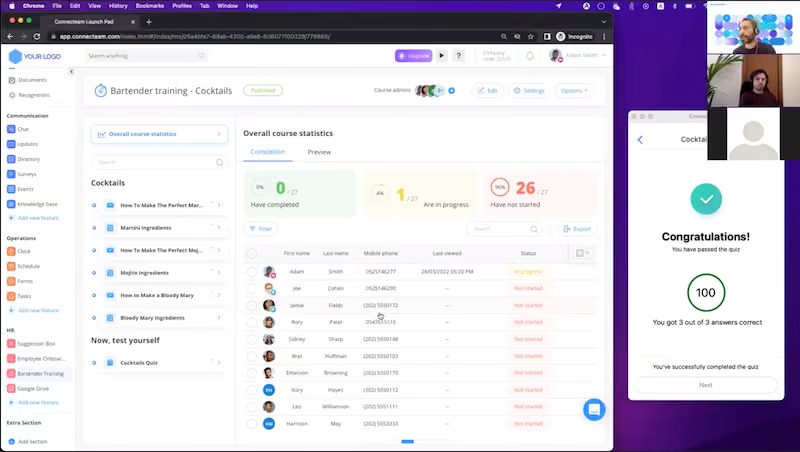
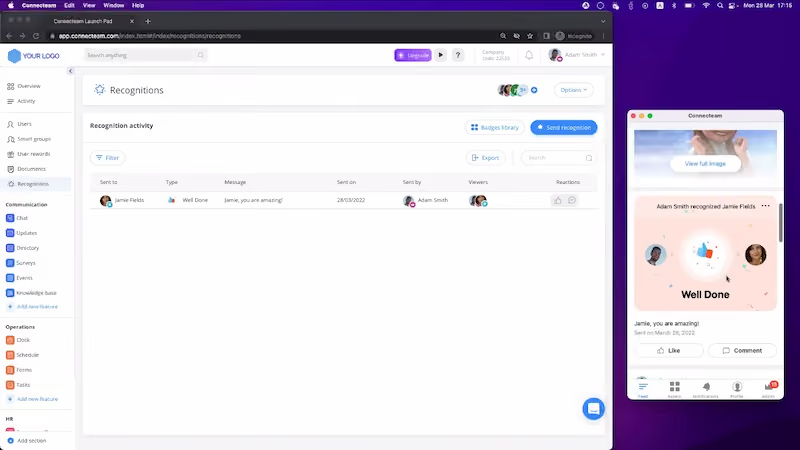
After spending time understanding the product in-depth through an online demo, and talking to their head of sales, Alon Boneh, we were able to see most of the main workflows performed from the HR dashboard on desktop. At the same time, we could see how they are displayed in the mobile app in real time. This makes it much easier to understand what the experience is like and verify that it is indeed simple, intuitive, and fast, for both the manager and the deskless worker.
Also, the app is customizable and very adaptive. For instance, if you only want the communication and scheduling features, you can remove the other ones; paying only for what you use. This sets Connecteam apart from other vendors in the workforce management and HR software space. For employees, it also makes it less cognitively demanding, since you only show them the features you want to use.


We use Connecteam timekeeping, scheduling, and timesheet reviews/approvals. The timekeeping is nice because our staff is able to clock in and out with their mobile device.
Same thing with the scheduling tool: it's very easy to notify the entire team of a new shift that is open for someone to take, and a team member can easily accept it all on their mobile app.
The timesheets are easy to read and edit. I do wish there were a message feature within the timesheets that allows me to quickly send a note without having to leave the timesheet view and go to the chat tab.
- I like the timekeeping solutions within Connecteam. I find the mobile clock in/out features to be very easy, and I really appreciate the geo-fencing options to remind staff to clock out if they have left their work location.
- The scheduling features are especially helpful, particularly the ability to send a team-wide notification inviting employees to claim an open shift. This makes it easier to fill schedule gaps quickly and efficiently.
- I like the chat offerings within Connecteam as well. The ability to create small groups or to message the entire team is handy for various reasons.
Our team consists of several remote staff who needed one centralized place for our timekeeping and scheduling needs. We previously used a spreadsheet for scheduling shifts, but that became very difficult when people would want to switch shifts or make simple changes.
Connecteam was chosen for its centralized team messenger, scheduling, and timekeeping offerings. We have used it for just over a year, and it's been a good addition to the company. I don't think that it's a perfect solution, but it's good for what we need it for.
- Adding a user is very clunky and not user-friendly. My new hires never receive any invite in their email, and it's constantly a struggle to get them onboarded.
- When fixing timesheets, it can be very difficult to make adjustments if the shift goes into the next day. It's almost impossible to fix without having to completely delete the shift and re-enter.
- I think nearly $1,000/year is too much for the solutions we use.
It's very mobile-friendly compared to other solutions like Homebase or BambooHR. Onboarding new employees is not as easy as it is with other systems. I prefer Homebase's scheduling and timekeeping offerings, and I suggest BambooHR for overall HRIS system needs.
If possible, I recommend evaluating a few HRIS platforms through free trials to determine whether a single system can meet your organization's needs.
While Connecteam is ok at scheduling, timekeeping, and team communication, it is not a comprehensive HRIS for organizations that need strong HR support, payroll processing, benefit administration, and employee records management.
Relying on multiple systems can increase administrative complexity and software costs, especially for smaller teams.
Connecteam has added more workforce management solutions within its platform. It now has more onboarding and digital form offerings for handbooks, policies, etc. to be digitally signed.
A small, remote workforce is an ideal organization for Connecteam.
Connecteam wouldn't be the right fit for large corporations that have big HR needs like benefit administration and payroll processing solutions.

I use Connecteam to schedule shifts, manage requests for days off, and allow team members to make schedule changes without requiring my direct involvement. It helps reduce back-and-forth communication and keeps the scheduling process more transparent.
Team members can access their schedules in real time, which limits confusion. It simplifies coordination and allows more autonomy for the team. Overall, it helps ensure shifts are covered with fewer administrative tasks for management.
- Connecteam makes managing schedules simple and efficient.
- Team members always have access to their schedules, which improves visibility and communication.
- It’s easy to keep track of hours and see who is working and when.
This tool is paid for by our corporate office, Pyramid Global, and is used across all properties. I have personally used it for a year and a half, while the company has been using it for approximately four years.
It was introduced to address issues related to managing printed schedules, such as team members trading shifts without notifying others, schedule changes going unnoticed, and general confusion.
These problems caused inefficiencies and miscommunication. Scheduling apps like this one are a significant improvement over the old printed methods.
- Occasionally, Connecteam loads the previous week's schedule, which confuses team members.
- Access permissions sometimes change without any action on my part—for example, a few weeks ago, the team was suddenly blocked from switching shifts, and it took 45 minutes to fix.
- Customer support response times can be slow, sometimes taking hours.
- I haven’t used many tools at the management level, but one limitation of Connecteam is that you cannot clock in or out within it.
- I’ve used another app for field work that included this feature, which was useful.
- Connecteam is primarily focused on scheduling and does not include payroll or time-tracking tools.
If you're looking for a simple, low-cost, stand-alone solution strictly for employee scheduling, Connecteam works well.
In the year and a half I’ve used Connecteam, I have not noticed any significant changes or updates to its functionality.
Connecteam is a good app for almost any team that only needs a basic scheduling solution.
Connecteam is not suitable for organizations that require a combined payroll and scheduling solution.

I track my employees' clock-ins and clock-outs, ensuring they are accurately clocked in at the correct locations and jobsites. Employees forget to clock in often, and checking live data makes correcting this in real time very easy.
The geofencing feature on Connecteam helps with employee accountability. I also like using the Quick Tasks feature for setting up benefit milestones for new hires. It's easy to overlook a 90-day review or PTO deposit, but Quick Tasks helps me stay organized.

I like that Connecteam makes communication easy for our team. PTO requests go straight to the manager, and the forms are easy to use. I appreciate how user-friendly the app is. Some of my staff are older, but the app’s ease of use makes training simple.
Shift Requests are a convenient way for employees to request overtime, and this feature has helped us save money on overtime.
We decided to use Connecteam to track employee timesheets and their PTO. We were having trouble managing timesheets and vacation approvals previously. Connecteam has helped us save on overtime expenses. It has also improved transparency on available PTO for our employees. I have used Connecteam for 8 months.
The company setup and onboarding on Connecteam were difficult. The built-in AI chatbot helped me get through the process, but it could have been easier.
I wish Connecteam integrated with QuickBooks, which is where I run my payroll. It would be helpful if I could download my timesheet data into QuickBooks.
I also wish Connecteam had more reporting features.
Connecteam stood out from its competitors. We use their free version for 10 employees or fewer, which was a major selling point to upper management. None of the competition offers a free version.
If you have 10 employees or fewer, this is a great platform to explore. Connecteam includes everything you need for job scheduling, timesheet tracking, and PTO management.
I haven't noticed many changes since starting in January. I also haven't had any needs that the platform doesn't already meet.
Any business with multiple employees, multiple schedules, or benefits to manage will find Connecteam helpful.
For small companies that are only managing one schedule or have just a couple of employees, Connecteam may offer more than they need.
While its pricing is SMB-friendly, most of their customers are currently in North America. Hence, small business owners in other parts of the world with lower budgets might find their higher-tiered prices a bit steep.
Nike, Herbalife, Billabong, Footlocker, Mason Construction, American Eagle, McDonald’s, and many more.
- Employee scheduling: Create schedules and manage shifts and share them instantly with your team, who will get them to the palm of their hand. Vacation days, availability, a time-clock, and overtime are also available.
- Checklists & forms: Non-desk workers and field managers can also use Connecteam to fill out required forms, go through checklists, sign documents, and track the status of tasks in an intuitive and paperless manner.
- Rewards & recognition: HR and other team members can send badges to recognize deskless employees, which can be made visible to their team or the entire company. You can choose from ready-made badges or make your own within the platform. As for rewards, they have Connecteam tokens that can be exchanged for products or gift cards in a variety of countries.
Connecteam also has capabilities for:
- Real-time reports
- Live chat
- Task management
- Employee directory
- Surveys
- Knowledge base
- Events
- Training
- Quizzes
- Employee timeline
Quickbooks Payroll, Google Calendar, Dropbox
Connecteam’s pricing can range from free-for-life to up to $159 per month. Final numbers will vary depending on the number of users and modules you choose. To give you an idea, here’s an overview of each plan within the operations module:
Connecteam’s payment structure is fixed for the first 50 employees you add. Once you add more, there would be an extra payment of $1.5 per additional employee per month.
These pricing options are yearly, where you save 18%, but you can also opt for month-to-month payments. They also offer enterprise pricing with more features and a personal account manager. Each paid plan also has the option of a 14-day free trial.
Connecteam is used by SMBs with up to 200 employees, as well as Mid-market business with up to 3,000 team members. What all these clients of theirs have in common is that they want a workforce management tool for their low-tech, deskless employees, without needing IT intervention. Industries served span from healthcare, manufacturing, and security to dog walkers and fitness services.
The idea behind Connecteam was to make it a self-explanatory product: easy to implement, requiring no IT and no training, making it ‘dead simple’ to implement and adopt. You can certainly schedule a demo or ask for training, but you can also sign up for the free trial and play with the tool yourself.
On the frontline worker side, as we’ve mentioned, it’s as easy as downloading the app from an SMS or email link, using their phone number or an email as the user to make an account, and they’re ready to go.
The folks at Connecteam are proud to have a big in-house customer success department; currently about one third of their company is in CS. They frequently run demos, suggest best practices, and make sure that their customers are listened to.
Also, despite being based mostly in Tel Aviv, they’ve made a conscious decision to have offices in North America and even have some of their customer support representatives work EST-compatible hours from Israel.
Officially based in NYC, but founded in Israel, Connecteam’s mission is to provide managers in business of varied types with the right tools for communicating, operating, and engaging with their frontline workforce.
Led by company founder Amir Nehemia, Connecteam first saw the massive opportunity for a communications app for frontline workers by noticing that only 20% of the world’s workforce is estimated to perform their tasks at a desk.
Seeing most companies in HR Tech focus almost exclusively on these traditional types of office workers, Amir and his team asked themselves, “what about the other 80%?”. Hence, Connecteam was created.
While many other companies have picked up on this trend, Connecteam stands out for capitalizing on another trend; offering many tools in the same platform. Having modules for communications, operations, and HR, it is perhaps this aspect that has made them one of the top tech companies catering to unanchored workers. As of early 2022, they are valued at around $800M.
Company HQ
New York, NY
Number of Employees
180+
Year Founded
2014
Amount Raised
Last raised $120M in Series C investing. Backed by Stripes, Insight Partners, and other VC firms.
FAQ
Who uses Connecteam?
- Connecteam is used by companies with a high percentage of deskless workers and who need a solid mobile app to run their operations, communications, and HR processes. Over 20,000 businesses have chosen them for this, in over 79 countries, and in industries like retail, security, cleaning, hospitality, construction, field services, and many more. Some notable names include Nike, Footlocker, and McDonald’s.
How long has Connecteam been around?
- The company was founded in 2014 and has been growing steadily ever since, currently valued at over $800M.
Where are Connecteam based?
- Although they were founded in Israel and still have a good percentage of their employees there, the official company headquarters are now in New York City.
About SSR

We spend hundreds of hours researching the best HR and recruiting software so you don’t have to. We never take money from vendors during our research phase and rely heavily on practitioners and experts to help us recommend the right software. However we may earn a small fee if you click on vendor links on this page.

