26 Best Performance Management Systems We’ve Tested in 2026
Looking for the best software to facilitate your upcoming performance appraisal this Q4? You’ve come to the right place.









Performance appraisal software is designed to align employee performance with company goals via structured project-based reviews, goal tracking, and real-time peer feedback. The best performance management system combines performance reviews, OKRs, employee engagement, and compensation into a single hub. Many now also embed AI to better support managers with feedback suggestions and management coaching.
Gathering insights from Tracie Marie, CEO of Hire Incentive, and our in-house HR experts Phil Strazzulla and Rodrigo Vázquez-Mellado, along with our independent software assessments based on thorough tests and demos of each products, we’ve comprise this guide to the top performance management tools, which includes vendors like Deel, Betterworks, and Teamflect.
To select the best performance management software, our editorial team attended demos with dozens of vendors, gathered user feedback, and consulted field experts. We’ve also looked into the feature sets of each of these platforms and we think the most important features to look for are scheduled performance reviews, continuous feedback and coaching, goal setting/tracking, and integration capabilities.
- Scheduled performance reviews with custom frequency: Instead of doing performance reviews annually, the best platforms in this space help you schedule and conduct them as frequently as your team needs, so improvement is continuous and you aren’t overwhelmed with a year’s worth of performance data.
- Continuous feedback and coaching: We’ve looked into how each platform enables managers to give feedback and coaching to their teams. Features like automated check-ins, 1:1 meetings, and text feedback through notes ensure they’re on top of things, identifying blockers early on and realigning team members as needed.
- Goal setting and progress tracking: We examined how performance management platforms handle goal-setting and progress tracking. Clear objectives and measurement mechanisms ensure meaningful progress. The tools on this list stood out for us because they let you see and track individual and team objectives side by side, integrated into your existing calendar. This offers a clear view of progress at any scale and across time.
- Integrations: Great performance management software facilitates employee learning and development, either through built-in modules or by integrating with the top learning management systems. This empowers employees to enhance existing skills and acquire new ones, benefiting both their careers and your company.
For more details on our software vetting and selection methodology, check out our editorial guidelines.


.png)
Deel

While Deel is best known for global payroll, they have expanded into a comprehensive system encompassing HR, employee development, as well as performance management features.
PROS
- Deel features a clean and modern interface that most people can quickly get the hang of using.
- You can effortlessly run 360-degree reviews to gather holistic and unbiased feedback from all corners of your company.
- Users praised Deel's customer support for being responsive and quick to resolve issues.
- Excellent 24/7 customer service with fast onboarding (2-3 days) and local payroll experts in each jurisdiction.
- Seamless integration with platforms like QuickBooks, BambooHR, and Greenhouse, plus custom integration options.
- User-friendly, self-service features enable quick setup; identity verification often takes under 24 hours.
- Automated invoices simplify payments, provided they're in English.
CONS
- Not the cheapest performance management system out there.
- The HR offering isn’t as developed as specialized HRIS/HCM solutions.
- Deel currently doesn’t have a mobile app - only a web version.
- Key features like onboarding automation are add-ons, which may increase costs.
- Limited flexibility in modifying contracts or service agreements; changes often require an addendum.
- Invoices cannot be generated in languages other than English.
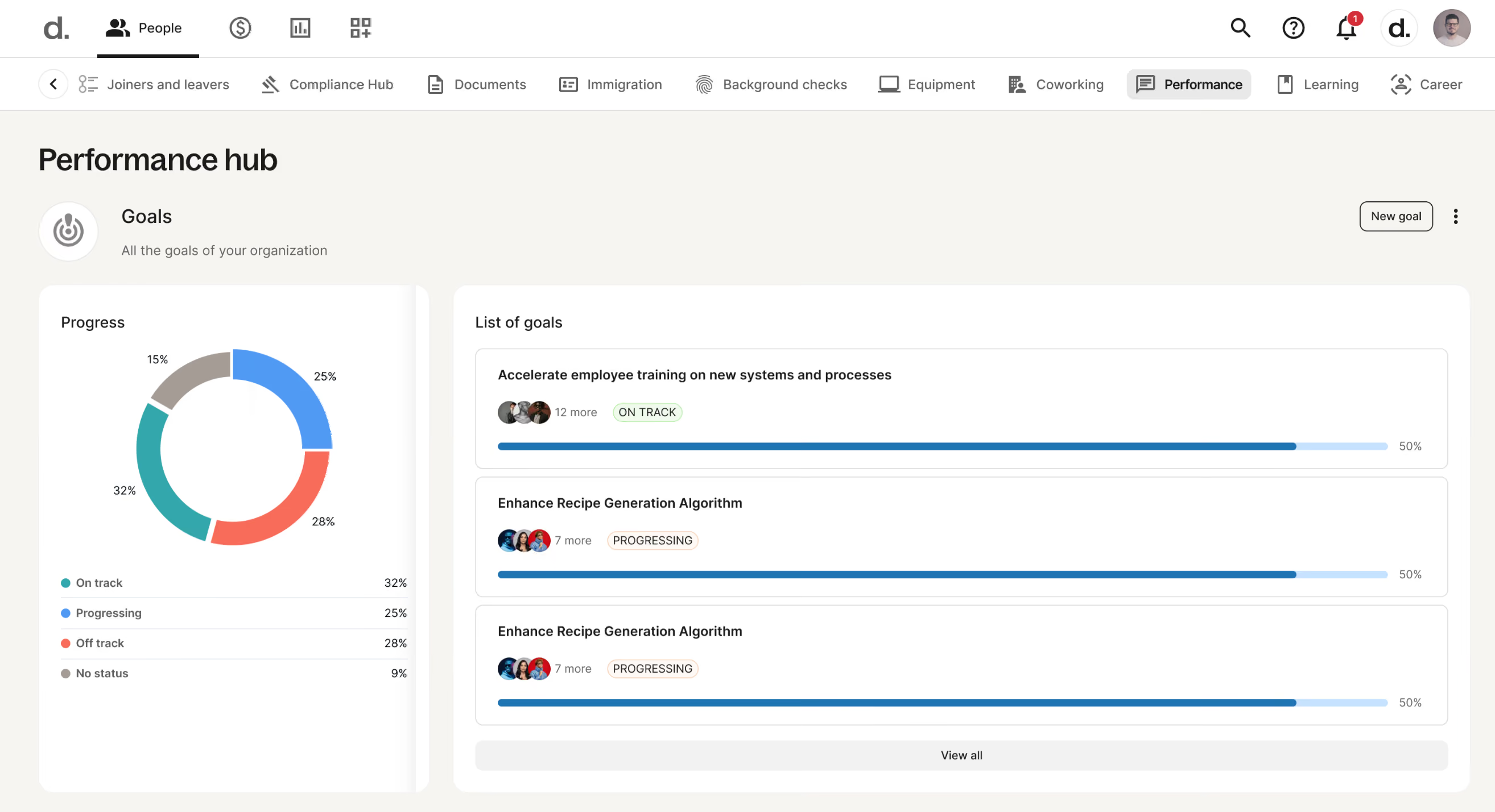
Deel has come a long way from its origins as a global payroll tech provider; their platform now offers comprehensive modules for HR, employee learning and development, as well as performance management, which is what we’re having a look at in this review.
The performance management offering is included in Deel’s HR under the Develop module. Depending on the feedback you want to collect, you can choose from and deploy up to four types of performance reviews: Self Review, Manager Feedback, Team Feedback, and Peer Feedback. You can also combine two, three, or run all four review types at the same time to gather holistic feedback and adjust the frequency of any review type so you don’t have to remember to manually run it each time.
Complementing the performance review cycles are the Goals and OKRs features, which enable alignment between individual, team, and company objectives. You can seamlessly link the goals you create with performance reviews. You can also address skill gaps with targeted training via the embedded learning management system in the Develop module.
Deel's AI-assisted career frameworks are also worth highlighting. Designed with transparency and growth in mind, this tool facilitates the creation of detailed career-pathing frameworks for various roles/levels to help employees visualize their potential trajectory within the organization.
All in all, it’s been great seeing Deel’s platform expand so quickly and thoughtfully into a holistic HR suite, with modules covering various aspects of the employee lifecycle. If you’re in the market for an integrated solution combining payroll, people management, and analytics, Deel is definitely worth checking out.
Over 40k companies use Deel including Nike, Shopify, Redbull, and Zapier.
The performance management tool can be accessed via one of the following modules within Deel’s HR, depending on your needs:
- Develop ($22/employee/month): Core HR, Goals & OKRs, performance reviews, LMS, AI career frameworks, development plans, and engagement surveys.
- Recruit & Develop ($30/employee/month): Core HR, Recruit, and Develop.
- Full HR Solution ($56/employee/month): Core HR, Recruit, Develop, compensation cycles & bands, headcount forecasting, and anonymous reporting.

Best For
Deel is a great choice for companies seeking an integrated solution for payroll, HR, and performance management.


We used Deel for global recruitment when we were looking to expand our company overseas. We also used the record keeping for employee files within Deel.
The payroll processing was something we considered using, but ultimately we kept our ADP payroll to avoid too much software change in the HR department.
We would have had to switch payroll to Deel if we had global employment, but we never ended up going in that direction. We also used the succession planning/Org Chart features within Deel.
- Deel had a smooth, streamlined onboarding solution that improved our new hires' preboarding and onboarding experiences.
- Global reach and compliance.
- Our Account Manager made the implementation and team adoption very easy and pain-free.
We adopted Deel in 2024, and we used it for almost a year before we shifted to a different solution. We were preparing to expand our company globally but ended up going in a different direction for our growth.
Deel was a great global workforce management option, and we enjoyed working with it for the most part. It was ideal for centralizing our HR records, payroll processes, hiring workflows, etc. It was particularly great for hiring global candidates.
- Very expensive for what we used it for.
- The platform could be slow to load and was not very mobile-friendly.
- I assumed that Deel had more hiring/recruitment solutions built into the system, but we had to keep our other ATS, something we had not expected when we initially signed our contract.
It is strong with the complexities that come with a global workforce. I think it's the best in its class for global workforce management solutions. The onboarding platform for new hires was impressive and still beats any other I have seen!
If your workforce is global, then I think Deel should be a consideration, but if you only have employees in a single country, I would point you in a different direction, like Rippling. You are paying for the global knowledge and reach that Deel provides. Also think about your tech stack when thinking about Deel. You will still need an ATS.
Deel provided a free tier for small to mid-sized businesses around the year that we began using it. I have recommended Deel to several small companies because the free model offers quite a few solutions. This was a great win and a smart strategy for Deel, in my opinion.
Small businesses can dabble in using Deel, but I truly think large global businesses are the ideal client for this software.
Non-global, small companies do not need Deel.
Betterworks
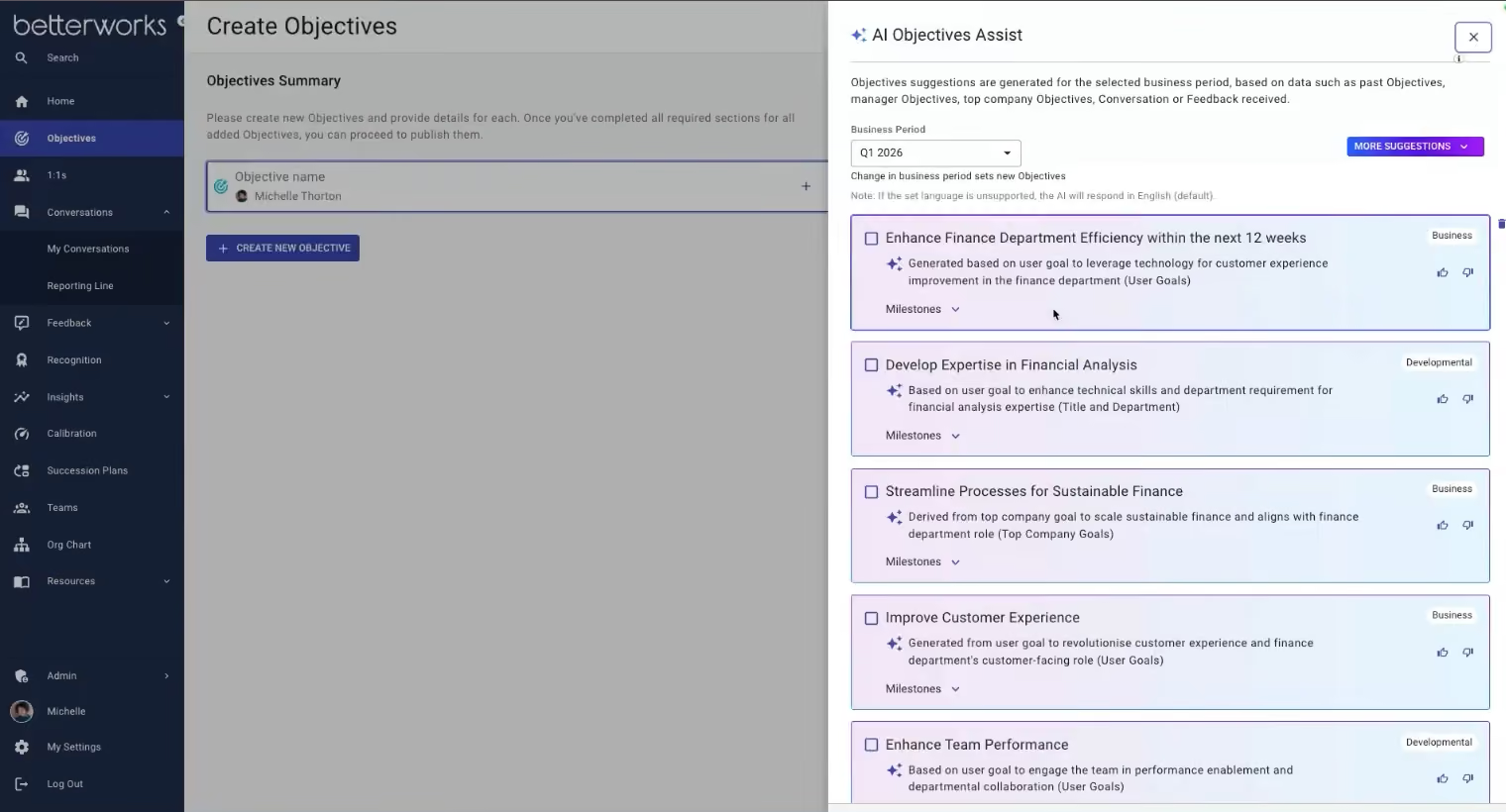
Betterworks is commonly used by large teams thanks to its ability to unite strategic goal alignment, continuous feedback, employee growth, and learning within a single workflow. Visual goal mapping, regular check-ins, AI-driven objective recommendations, and talent development tools were our favorites during testing for making it easy to align daily operations with long-term business strategy.
PROS
- Anytime Conversations support ongoing check-ins, coaching, and career discussions.
- Strategic alignment visualizations connect employee goals with company objectives.
- In-the-flow-of-work tools bring goals, feedback, and 1:1s into everyday platforms.
- AI-powered goal suggestions help employees create goals using performance and business context.
- Calibration enhancements give admins more control over performance calibration cycles and reporting.
- BetterWorks helps you get the performance data you need, whenever you need it. You can calibrate the system to your standards and objectives – annually, quarterly, monthly, or on demand – or choose from a wide selection of filters to get exactly the information you want.
- There are a few features in place that can help you uncover hidden biases and uphold your commitment to diversity, equity, and inclusion. For example, you can learn if talent decisions – such as promotions – are impacting certain employee populations unfairly.
- The platform is fairly easy to use with built-in analytics that help you understand how well you are doing toward achieving your goals.
CONS
- Filtering isn’t in the best shape, leading to confusion as users navigate between individual and team goals.
- Its price tag makes it not friendly to budget-minded teams.
- It can be difficult to know which goals are active, because the label ‘Active’ is set as the default.
- Betterworks offers considerable integration options with third-party solutions, but its main focus is on sending and receiving employee information between systems.
- Some users may find the Goals and OKR module overwhelming due to the sheer number of features, buttons, and options available. For example, a user complains that there's no need for three separate modules: Goals, Conversation, and Appreciation. The user should be able to click on a Goal and immediately start a conversation with the manager about it.
Betterworks takes a continuous approach to performance management, with the strongest parts of the experience centered on keeping goals, feedback, and performance conversations active throughout the year. Anytime Conversations are a good example. Rather than forcing every performance discussion into a predetermined review cycle, managers and employees can initiate check-ins or career discussions when needed. Templates and embedded coaching guidance provide additional structure, which can help managers have more productive conversations without waiting for a formal review period.
The platform also places considerable emphasis on aligning individual performance with organizational priorities. Strategic Alignment Visualizations allow employees to see how their goals relate to departmental and company-wide objectives. This gives employees more context around their goals and makes it easier to understand how their individual work contributes to larger business priorities.
Those seeking to get employees and managers to use one system for OKRs, communications, and performance will love Betterworks' in-the-flow-of-work integration approach. Through its sidebar experience, users can work with goals, feedback, and one-to-one discussions from platforms such as Outlook, Teams, Slack, and Gmail.
The AI is also mindfully designed to streamline and contextualize goal creation. Instead of starting with an empty field and figuring out what an appropriate goal should look like, employees and managers can have this AI suggest starting points based on information already available in the platform.
However, teams should weigh those capabilities against the reported goal-filtering issues and pricing considerations, particularly if they are operating with a tighter software budget.
Hulu, Kroger, FedEx, Udemy, Posadas, University of Phoenix.
Betterworks offers three pricing tiers:
- Performance: $8 per user/month
- Performance + Talent Intelligence: $9 per user/month
- Enterprise: Custom pricing tailored to your organization
Best For
Organizations (midsize or larger) looking for a robust performance management system centered on goals, feedback, 1:1s, coaching, and strategic alignment.

I primarily use Betterworks for team building. It is helpful in tracking progress toward goals. Betterworks has helped the team in strategizing improvements across the organization. The service also allows for feedback between staff. It also has a very helpful scoring system for employees.
Betterworks is great for building team collaboration. It has a well developed information hub. Betterworks also has a mobile app that is popular with employees.
Betterworks was purchased to streamline collaboration among the team. It is primarily used in employee goal setting across the organization. It provides team members with the ability to recognize and congratulate each other on accomplished goals. It integrates with multiple systems that we use. I have used Betterworks for 1 year.
It is very expensive and not suitable for small teams. It also has issues with integration across several systems that we use. Customer service isn’t super responsive.
There are other more cost effective and less buggy tools to use. However, its goal setting capabilities are impressive.
Betterworks is built for teams that are 1000+. It is an investment at its price point. I have run into technical issues and had issues with customer service occasionally.
They have added features to be more competitive and updated their goal setting capabilities.
Betterworks is good for large organizations with a large budget and someone to keep track of interface issues.
It is not a good fit for organizations with a small budget or those that can manage their OKRs on their own.

Teamflect
Teamflect is built for companies that use Microsoft Teams as their primary workspace. That unique design decision makes it an appealing solution for organizations looking to centralize performance workflows in one familiar environment.
PROS
- Operates entirely inside Microsoft Teams; no separate login or interface required.
- Supports 30/60/90-day onboarding reviews, quarterly cycles, and exit interviews, and more with customizable templates.
- Pulls in real-time data like OKRs, 360 feedback, survey scores, and development plans into review workflows.
- Includes nine-box talent grid for potential vs. performance mapping.
- Enterprise-grade reporting and analytics via Power BI Connector for deep workforce insights.
- Operates entirely inside Microsoft Teams; no separate login or interface required.
- Supports 30/60/90-day onboarding reviews, quarterly cycles, and exit interviews, and more with customizable templates.
- Pulls in real-time data like OKRs, 360 feedback, survey scores, and development plans into review workflows.
- Includes nine-box talent grid for potential vs. performance mapping.
- Enterprise-grade reporting and analytics via Power BI Connector for deep workforce insights.
CONS
- No support for payroll, benefits, or core HRIS.
- While data is real-time with an API integration, in Power BI, it’s refreshed every 3 to 5 hours, meaning insights may not always reflect the most current information.
- Best value is limited to Teams-centric companies; not usable as a standalone platform.
- No support for payroll, benefits, or core HRIS.
- While data is real-time with an API integration, in Power BI, it’s refreshed every 3 to 5 hours, meaning insights may not always reflect the most current information.
- Best value is limited to Teams-centric companies; not usable as a standalone platform.
We included Teamflect in this list because of its accessible UX, solid review and goal-setting workflows, and thoughtful attention to employee development tools like the nine-box grid. Also, the focus on offering performance management inside Microsoft Teams makes it a compelling case for consolidating goal-setting, reviews, surveys, and employee recognition in one workflow.

The pleasant experience during our testing was how little context switching was required. Managers could initiate performance reviews directly within a Teams channel or meeting, pull in goal completion data and feedback in real time, and even conduct nine-box grid analyses without opening a browser tab.
The review templates are comprehensive out of the box, supporting everything from onboarding reviews to annual evaluations. We liked that performance data could be enriched by survey scores, OKR progress, and 360-degree feedback. These integrations create a more holistic view of an employee’s performance without requiring manual data entry.
Another feature that’s easy to overlook yet genuinely useful is the built-in recognition system. With customizable badges and live announcements via Teams chat or channels, we found it easy to foster ongoing engagement across teams. This can be especially helpful in remote or hybrid environments where recognition is often an afterthought.
When accessed through the API and Power BI connector, reporting becomes much more powerful with custom dashboards and multi-dimensional data. You can explore everything from performance trends and goal completion rates to engagement metrics and talent distribution. While data is real-time with an API integration, keep in mind that in Power BI, it’s refreshed every 3 to 5 hours. As a result, the insights may not always reflect the most up-to-date information. And while survey features are included and work well, they do not yet offer the kind of advanced questionnaire logic and benchmarking options found in top dedicated employee engagement platforms.
In short, Teamflect isn’t trying to be an all-in-one HR suite, and that’s okay. But companies with more complex talent needs and those without a strong Microsoft Teams footprint likely won’t benefit from its design choices.
Securitas, DHL, Nevada County, Invacare, Roberto Cavalli, Meyer Werft, Espyr
Teamflect offers a free Starter plan (up to 10 users), an Essential plan ($7/user/month, with analytics and premium support), and a Professional plan ($11/user/month, with talent management and advanced integrations). Nonprofits get up to a 60% discount on annual contracts. Essential and Professional plans have 30-day free trials.
Best For
Teamflect works best for organizations with 50 to several thousand employees who utilize Microsoft Teams, thanks to its strong Teams-native performance management capabilities.

Trakstar
Trakstar is notable for adding learning management capabilities to its performance management suite. We love that they didn’t stop there and have integrated employee engagement and succession planning features.
PROS
- User-friendly for employees and administrators.
- Responsive live support.
- Extensive knowledge base and video tutorials.
- The automated feature helps schedule reviews on a routine basis.
- Provides unlimited storage.
CONS
- Does not provide reports that show progress over time.
- No free trial or free version.
- Undisclosed pricing.
- Doesn’t have a mobile app.
- May take a while to complete the setup.
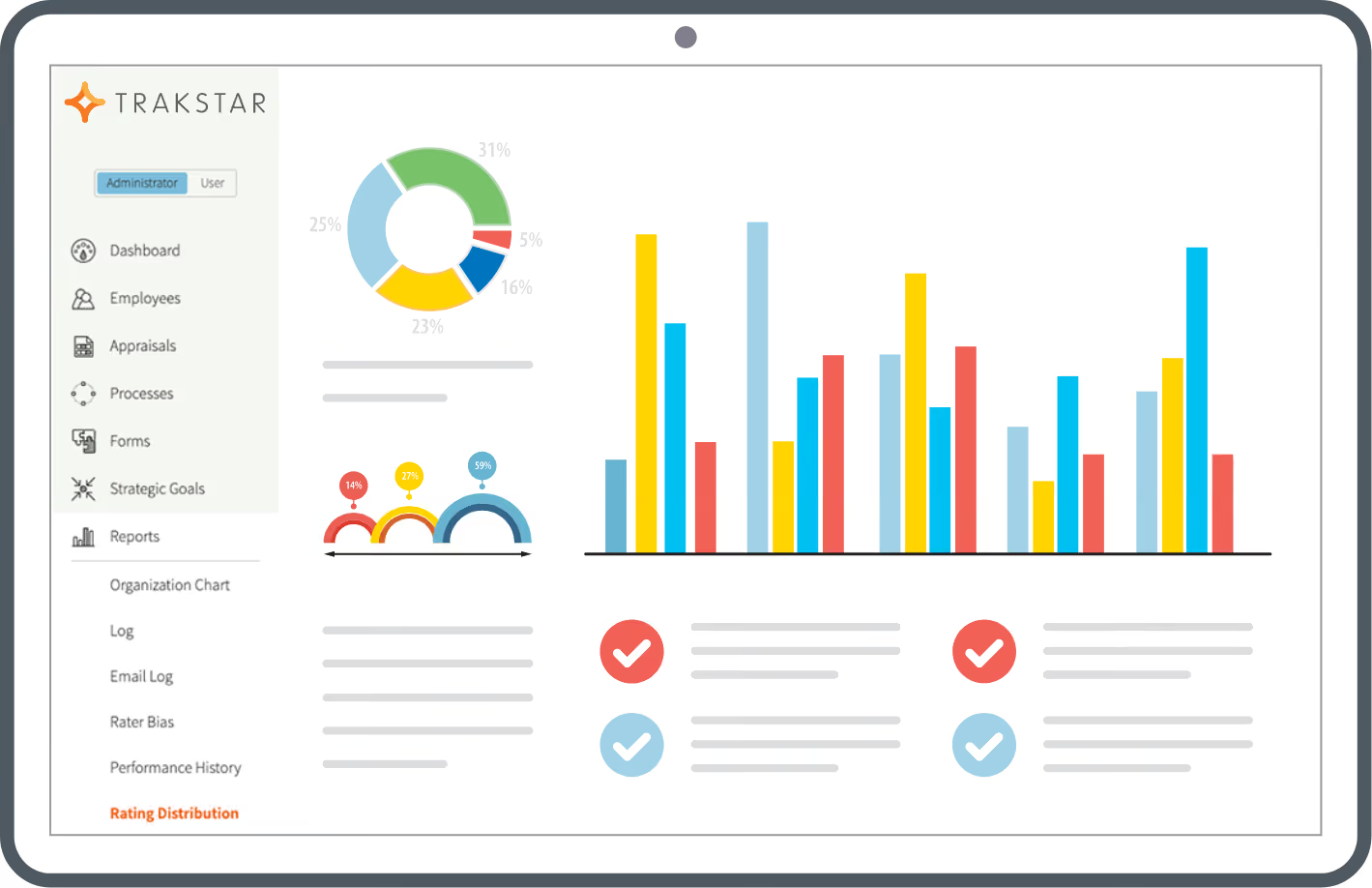
Trakstar’s performance management solution (Trakstar Perform) allows companies to deploy performance reviews, set goals, and monitor results in real-time. The platform also has learning management, employee engagement, and succession planning capabilities.
Users can customize performance evaluations, import users, design forms, and configure workflows to fit their organization. The 360-degree feedback feature allows managers to control who can access it and request feedback from people inside and outside the team. The 9-box grid is another highlight in Trakstar's succession planning module, which ties in nicely with the performance management one, providing insights into employee performance and potential for advancing within the organization.
Charles River, Beta Calco, Task Rabbit, Chemline, Minsterbank.
The pricing of Trakstar’s plans and services isn’t disclosed on their site. You have to demo with the vendor to get a price quote.
Best For
Organizations looking to track performance at the individual and team levels via a ratings-based review format.

With my last employer, I used Trakstar regularly as part of our performance management and employee development workflows.
I primarily used it to facilitate performance reviews, track employee goals, and manage 360-degree feedback sessions. These workflows allowed us to centralize data, monitor progress on key objectives, and provide consistent, constructive feedback to employees.
Another key workflow was using Trakstar’s analytics to identify trends in performance and engagement, which helped inform strategic decisions about training and workforce development.
The last time I used Trakstar was about three months ago, and it proved valuable in streamlining these HR processes while enhancing transparency and accountability within the team.
- Trakstar makes performance management simple by offering an intuitive platform for setting goals, tracking progress, and conducting reviews efficiently.
- The 360-degree feedback feature provides a well-rounded view of employee performance, ensuring input from multiple perspectives to support development.
- Its analytics and reporting tools deliver actionable insights that help identify trends, improve decision-making, and align employee objectives with organizational goals.
When we implemented Trakstar, our organization sought to address significant challenges in managing employee performance and development. We needed a centralized system to streamline performance reviews, track employee goals, and gather consistent feedback across the organization.
Prior to adopting Trakstar, these processes were fragmented and lacked transparency, making it difficult to drive meaningful employee development.
- Trakstar’s interface, while functional, could be more visually modern and customizable to enhance user experience.
- The system occasionally requires additional manual inputs, especially when integrating with other HR tools, which can be time-consuming.
- Reporting capabilities, though helpful, sometimes lack advanced customization options for more specific or complex analytics needs.
Trakstar distinguishes itself from competitors by offering a user-friendly interface and robust performance management features, including goal setting, 360-degree feedback, and comprehensive analytics.
Unlike integrated Human Resource Information Systems (HRIS) such as ADP, Trakstar operates as a standalone platform, which may necessitate additional steps for data synchronization and process alignment.
Organizations seeking a seamless, all-in-one HR solution might prefer integrated systems like ADP, which consolidate performance management with other HR functions, reducing the need for multiple platforms and streamlining workflows.
When purchasing a performance management tool like Trakstar, organizations should consider integration capabilities to ensure it works seamlessly with existing HRIS systems, avoiding the inefficiencies of using multiple platforms.
User-friendliness is another critical factor; the tool should be intuitive and easy to adopt for both HR teams and employees. Customization options are essential to tailor workflows, reviews, and reports to fit the unique needs of the organization.
Scalability and support services offered by the vendor should be evaluated to ensure the tool can grow with your organization and provide adequate assistance during implementation and ongoing use.
Thoroughly evaluating these criteria can help align the tool with long-term strategic goals.
When evaluating Trakstar for a project, I noted its evolution from a performance management tool to a more comprehensive talent management platform with hiring, learning, and analytics capabilities.
While it offers valuable features such as enhanced reporting and integrations, I prefer systems like ADP that are fully integrated with an HRIS, streamlining workflows and reducing manual processes.
Trakstar’s recent updates show it is responsive to user needs, but its standalone nature may not align with my preference for efficiency across all HR functions.
Trakstar is a great fit for startups and very small organizations.
Trakstar is not a good fit for large companies and enterprises.

Rippling
Rippling performance management tool is super adaptable. You can tweak it to fit pretty much any review type you're into: peer, upward, downward, self-reviews, and even milestone ones where you set the condition, and the system will auto-proceed the review with the right staff.
PROS
- One platform for performance, payroll, benefits, and HR.
- Supports peer reviews, downward reviews, upward reviews, and self-reviews.
- Assign employees to your cycle in bulk and add targeted questions using attributes.
- Calibrate groups for consistent ratings and objective managers.
- All-in-one platform for employee management + PEO services offered, and even a suite of other IT products
- With 500 integrations, it’s very likely that they integrate with other key tools from your tech stack.
- Operates globally with any currency
- Workflow automation
- Analytics opportunities
- Provides a holistic view of company outflows—headcount costs included
CONS
- Requires a minimum commitment of one year.
- Although Rippling has been around since 2016, the Performance product is new to the market compared to dedicated tools like Workleap, Culture Amp, and Lattice.
- Payment on a per-user basis means you may have to pay for performance for all employees, including independent contractors.
- Total buy-in to Rippling is essential
- Very SMB-oriented, in case you’re a larger company.
- New features tend to be buggy in ways that tech teams are not accustomed to fixing

Rippling can handle different kinds of reviews, be it peer reviews, upward reviews, downward reviews, or self-reviews. Our favorite, though, is milestone reviews. This feature lets you determine the condition, such as when the employee's start date is 30 days, and the system will automatically give them the type of review you have set.
For those having to manage the performance ratings of multi-group teams through spreadsheets, you won’t want to go back after you try out Rippling. The in-app role-based permissions enable you to set up who can do what. Based on that setting, the system makes sure only appropriate managers can access their team's ratings and compensation— fully automated.
Other than performance, Rippling can handle pretty much any other HR process: time and attendance, surveys, benefits, and payroll. More importantly, everything you input into this platform syncs up across the board. This means if you pick up another one of their products, it just gets it - all your data is right there and ready to go.
That said, Rippling isn't the best choice if you're after a seasonal vendor in this space. In fact, its performance module has only been around since fall 2023.
On another note, Rippling’s price is not exactly budget-friendly. There's no monthly subscription option, so you'll have to pay a considerable amount of money to get things started. To be fair, though, they do sometimes offer a free trial (for example, there’s one running until Oct 31, 2024) for those wanting to test the waters before buying.
16,000+ companies, including Five Guys, Crumble, and Sword.
Rippling's pricing is quote-based and starts at $8 per month per user.
Best For
Teams seeking to migrate all of their HR processes, including performance management, into one platform.

I personally used Rippling as a recruiter, primarily as my ATS system. It also provided a company directory within the platform, which was very helpful. I no longer work for the company that uses Rippling, but the tool was seamless and easy to use.
The ATS workflow was simple and user-friendly—you could view applications, reject or move candidates forward, email them, and send job offers with just a few clicks. I mainly used it for recruiting and the job offer process. My colleague used it for onboarding.
I liked how user-friendly Rippling is. Another major advantage is that it’s an all-in-one platform. It simplifies workflows and makes tasks easy to complete.
They needed an ATS system for hiring. The company bought Rippling, which was helpful because it's not just an ATS—it has many features that benefited the business. They had Rippling before I started, so I assume it’s been more than a year and a half.
We liked that Rippling is an all-in-one platform, handling HR, recruiting (ATS), employee spend, and payroll. This provided a single solution for the business instead of requiring separate platforms. It was easy to manage everything in one place with Rippling.
I didn’t immediately notice anything I disliked about Rippling. The cost might be a concern, though it starts at $8 per employee, which isn’t very expensive unless the company is large. I didn’t pay for Rippling myself, as the company covered the cost.
Rippling stands out by being an all-in-one platform, while many ATS systems only focus on recruiting. It offers capabilities that most other tools do not.
It depends on what the buyer is looking for. I liked it from the ATS perspective—if someone needs a user-friendly, easy-to-use product, this works well with little to no learning curve. Buyers should also consider the cost of managing multiple platforms and whether Rippling makes sense for their business model.
I don’t have much insight there. I used it primarily as an ATS, so I'm not sure when new features were added or what those features are.
I would recommend Rippling to anyone who needs an ATS system for hiring. I can’t speak to the other features, as I only used it on the recruiting side. My HR and payroll teams also used Rippling and mentioned that they found it easy to use.
Rippling may not be a good fit for someone who doesn’t need an ATS or payroll solution. For example, a solo business owner might not need a tool like this.

Bonusly
We like that instead of relying on static reviews, Bonusly uses recognition activity as a real-time performance signal that managers can act on. With connected 1:1s, AI-driven performance recaps, easy goal tracking, and shared feedback tools, the platform helps managers replace infrequent reviews with continuous performance conversations that keep teams engaged, aligned, and improving.
PROS
- Connected1:1s that support weekly, bi-weekly, or monthly check-ins.
- Smart agendas that proactively recommend agenda topics, follow-ups, recognition, and feedback.
- Manager notifications that connect with Slack, MS Teams, and email for real-time visibility and nudges.
- Goal setting available within 1:1s for lightweight progress tracking.
- Automatically syncs employee data from leading HRIS platforms.
- Intuitive user interface.
- Available in German, English, French, and Spanish.
- Supports Android and iOS.
- Discounts for nonprofit and education organizations.
- 14-day, full-featured free trial.
CONS
- No structured review cycles, calibration, or performance ratings.
- No native integration with LMS or support for development planning.
- Performance analytics are limited to high-level conversation tracking.
- Analytics and reporting features are relatively underdeveloped.
- The reward catalog lacks in-person experiences and physical goods.
- All our plans are billed annually, and the vendor no longer discloses their pricing.
Bonusly’s performance management module is designed to make guidance ongoing, human, and rooted in recognition, which we recommend for teams looking to layer continuous performance into a recognition-first platform. On par with other vendors we’ve listed here, this platform effectively captures daily success signals through recognition and provides managers with easy-to-use performance tools to act on them.

One of Bonusly’s strengths is its customizable 1:1 scheduling. Managers can set up recurring check-ins, co-create agendas, and capture shared notes. These features help shift teams away from infrequent, high-pressure reviews and toward continuous performance conversations that are easy to document and revisit. We also like that recognition data, AI-driven prompts, and goal progress flow directly into these conversations, as this can give managers much-needed context to coach more effectively.
Proven in our testing, Bonusly handled continuous feedback and coaching quite well. Its 1:1s pull in prior recognition and note, making it easier to course-correct and reduce bias and blank-slate reviews. The experience is streamlined, especially when paired with Slack or Teams integrations that allow for real-time nudges and recognition between check-ins.
Additionally, goals can be documented and tracked inside 1:1s, giving managers and employees a shared source of truth. However, we can’t overlook the fact that there’s no centralized goal dashboard or structured OKR alignment for managers to take advantage of. Thus, if you need visual tracking across team and individual goals or the ability to roll goals up to company-wide initiatives, Bonusly may fall short.
From an integration standpoint, Bonusly does well with core HR tools. It syncs with Rippling, Workday, Paylocity, and others to keep employee data current. It also connects to Slack and Teams to surface performance discussions inside your daily workflow. However, the platform doesn’t currently integrate natively with any LMS tools, nor does it offer built-in features for formal development planning and career pathing.
Bonusly serves 3,400+ customers, including Workday, Baxter, and Headspace.
Bonusly offers three simple plans:
- Free ($0 forever for up to 8 users, including core recognition and basic 1:1s)
- Team ($3/user/month or $30/user/annually, adding full habit-building features for managers and growing teams)
- Organization custom pricing.
Best For
Bonusly’s performance features are best for companies that want to layer a lightweight continuous performance into a recognition-first platform.

We created a slack channel so you can see who is receiving points every day. I give out points to coworkers about 5x a month until my allotted amount is used up. You can easily integrate with slack, use the browser, or the app. Anytime someone helps me out, I send a few points over to say thank you!
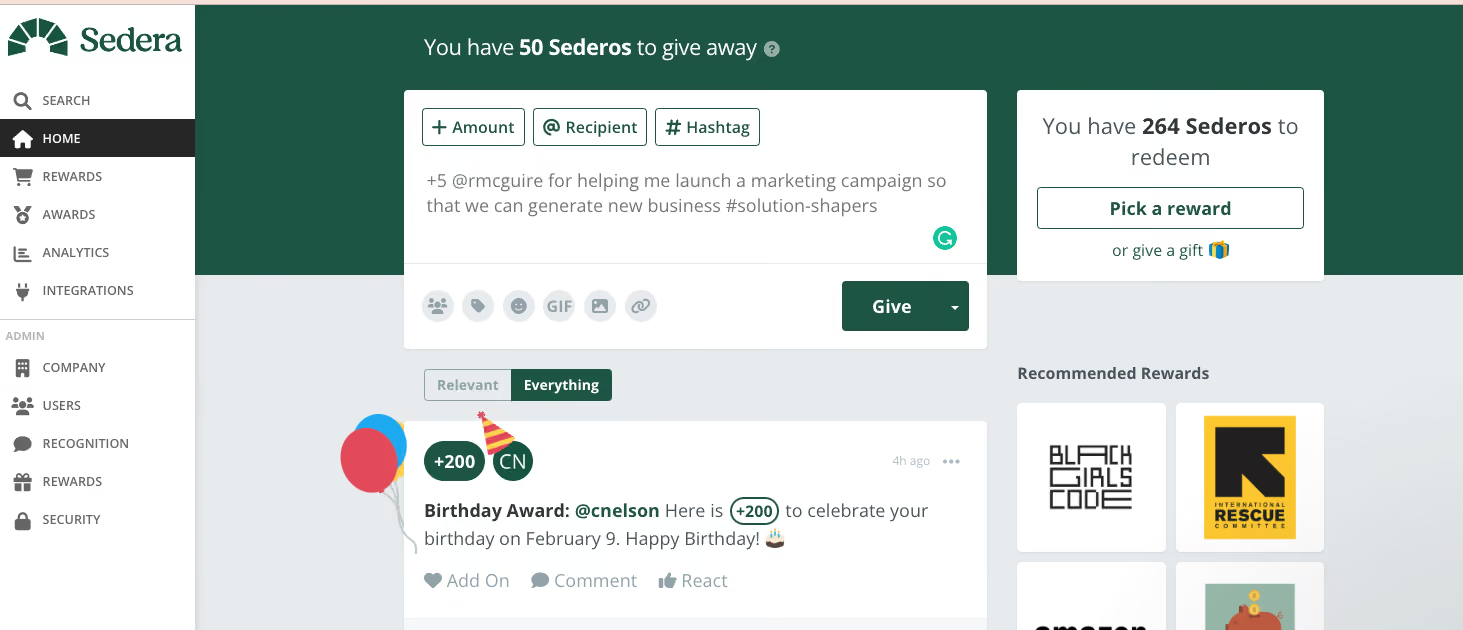
I like that I can recognize coworkers that help me out and that the whole company will see it. I also like that I can get a sense of what each department is working on and with. It allows you to see all that is being done in the company, not just the specific people you work with. Lastly, you can redeem your points for cash prizes which is a great benefit. It is a great engagement tool for the company!
Since going fully remote, our company struggled with building culture and engagement. We also wanted a way to show recognition for all the hard work being done on a daily basis. We started using Bonusly 6 months ago and have had a fantastic experience so far. Bonusly allows our team to stay engaged, have fun with each other, see the different projects going on all over the company, and feel valued for their work. It's easy to use and does exactly what we were wanting.
I really don't have any complaints about Bonusly. The Slack integration could use some slight improvements but nothing major. I have not found an auto-billing setting that would save me some time. There could be more email reminders to employees who are not engaging on Bonusly.
They have a competitive price, easy set-up, great customer service, an easy-to-use website, and awesome options for prizes to redeem your points for.
Be sure to budget for the subscription and points you want to give out. You will want to make sure your employees have an easy way to access it. It works well for us because everyone is working on their laptop all day. Decide if you want to give out cash rewards or experiences.
We have added more prizes to it and incorporated them into all of our cultural events. Anytime we want to reward someone or give a prize - we use Bonusly!
Companies that work primarily on a computer. Can be for in-person or remote settings.
Employees that do not have desk jobs would most likely not use it as much since they do not have easy assess to the website.

Workstory
WorkStory stood out to us for taking a truly modern, smart, and low-lift approach to performance management. Instead of asking people to fill out a form once a year, the system continuously collects feedback from tools teams already use— such as Slack, Teams, Webex, and email—and compounds that input into monthly summaries and fully written end-of-year performance reviews. Like their name suggests, this continuous cycle leads to performance reviews that truly capture the story of a person’s year at work, while saving HR and managers hundreds of hours.
PROS
- Continuous feedback collection embedded in Slack, MS Teams, and Webex
- One-click AI-powered review drafts save hours for managers
- Monthly summaries help employees reflect and prep for 1:1s
- Customizable competencies and templates configured with white-glove onboarding
- Flexible rollout options with a responsive, hands-on support team
- Strong customer satisfaction for ease of use and value
- Continuous feedback collection embedded in Slack, MS Teams, and Webex
- One-click AI-powered review drafts save hours for managers
- Monthly summaries help employees reflect and prep for 1:1s
- Customizable competencies and templates configured with white-glove onboarding
- Flexible rollout options with a responsive, hands-on support team
- Strong customer satisfaction for ease of use and value
CONS
- Their novel approach may prove challenging for some teams, particularly because it necessitates team members being connected through mobile apps or desktops.
- Some users report a learning curve around dashboard navigation and locating past review assignments.
- Limited branding customization compared to legacy vendors
- Currently lacks deep HRIS integrations, though API access is available
- Their novel approach may prove challenging for some teams, particularly because it necessitates team members being connected through mobile apps or desktops.
- Some users report a learning curve around dashboard navigation and locating past review assignments.
- Limited branding customization compared to legacy vendors
- Currently lacks deep HRIS integrations, though API access is available
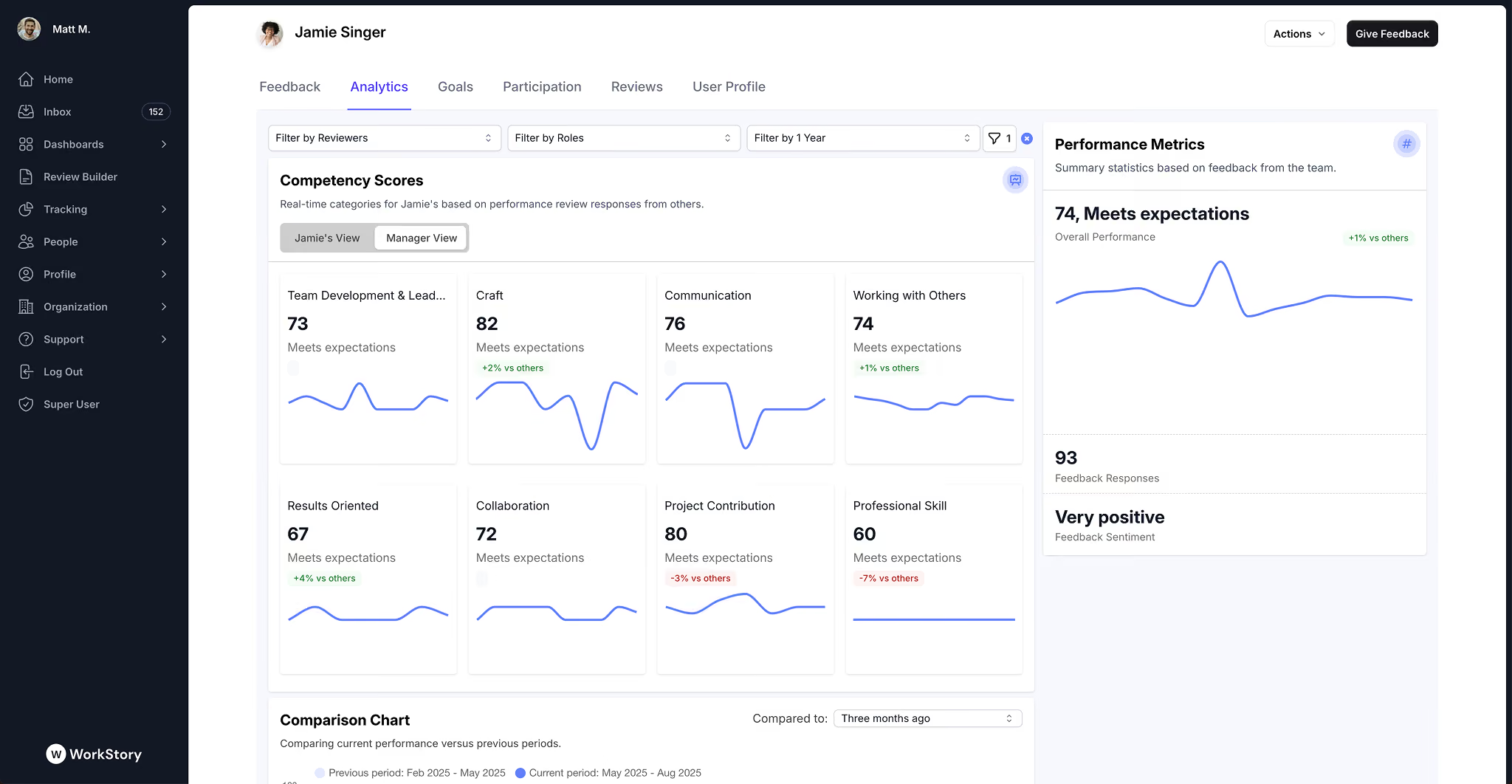
If your team sometimes feels like once-a-year reviews are like getting your teeth cleaned—a nuisance to go through, but necessary—WorkStory offers a compelling alternative. Designed for modern, people-first teams, WorkStory automates the collection of performance feedback by having teammates answer one quick question periodically, within the team communication apps you already use. This information is ingested by their AI throughout the year, allowing you to generate review summaries monthly or at the end of the year, based on feedback that was provided in real time.
We demoed the platform and were especially impressed by its deep integration into day-to-day workflows. Team members can prompt for feedback, give recognition, and complete reviews directly from Slack or Teams—no new logins, no extra clicks. This makes it far more likely for peer feedback to happen continuously instead of being rushed at review time. It’s also more illustrative of an employee’s yearly progress, since insights and metrics were provided when they were fresh, instead of being conjured up from memory at the end of the year.
The product’s crown jewel is the AI-powered “One-Click Review” feature. With one button, managers can generate a full review draft based on feedback, goal completion, and recent check-ins. These drafts are contextually written and competency-aligned—far from the generic outputs we’ve seen in other tools.
WorkStory also stands out for how quickly it can be implemented. During onboarding, the team helps configure competencies, templates, and workflows, meaning most organizations are up and running in days—not weeks. The pricing is also refreshingly simple and transparent.
That said, WorkStory isn’t for everyone. It’s a forward-thinking solution, and requires that teams approach it with an open mind, willing to adapt to a different style of feedback-giving and performance reviews. If you are looking for visual customization or multi-layer approval chains, you might find it a bit lean. Also, a few users flagged UI quirks and email fatigue during onboarding, but the vendor appears responsive to feedback and is iterating quickly.
For companies that truly care about talent development and want to move beyond stale annual reviews, WorkStory offers one of the fastest paths to modernizing your process—without sacrificing quality or requiring heavy admin lift.
Notable customers include Joele Frank, GoMetro, ET Group, TRICO, Enerflo, Tether, and Strang Design.
- Quarterly Plan: $11/user/month + $250 one-time onboarding
- Annual Plan: $9.35/user/month (15% discount) + $250 one-time onboarding
- Free Trial: Two-week trial with guided onboarding
Best For
WorkStory is ideal for small to mid-sized (25-250 headcounts) feedback-driven companies seeking a lightweight, low-maintenance performance management solution embedded into communication tools like Slack or MS Teams.

Engagedly
Most platforms either excel at reviews (Lattice, 15Five), learning (Cornerstone, Docebo), or recognition (Bonusly), but rarely all three. Engagedly's approach of combining them under a unified employee dashboard is distinctive enough to warrant evaluation. The addition of Marissa, an AI assistant embedded into managers' workflows, signals an attempt to reduce the administrative friction managers face during review cycles.
PROS
- Marissa AI assistant drafts feedback and interview questions for manager review and editing
- Auto-fetch of employee goals and Individual Development Plans into review forms
- 9-box calibration matrix for performance and leadership potential rating normalization
- Integrated learning platform with course recommendations tied to review insights
- Employee resolution process allowing staff to request clarification on ratings before finalization
- Analytics tracking review cycle progress across stages: assign template, shared review, review visible, HR review, sign-off
- Engagedly's 360/multi-rater feedback and real-time feedback features allow users flexibility in providing and receiving feedback. This applies to the manager to employee feedback as well as employee-to-employee feedback.
- Goal setting and tracking features for individual, team, and business goals allow for comprehensive goal management and monitoring.
- Customization allows administrators to create custom rules, calculations, tools, and more that fit their organization and its objectives.
- E-learning platform promotes collaborative as well as individual learning for employees which results in a more knowledgeable and effective workforce.
CONS
- Subpar mobile app user ratings.
- No algorithmic attrition-risk detection; platform tracks exit data and turnover patterns only
- Engagement-performance correlation requires manual dataset comparison
- Feedback text analysis uses GenAI assistance rather than dedicated NLP for bias or sentiment detection
- 31 total integrations, with only 10 covering payroll and HR systems
- Some users have reported a steep learning curve that takes some time to get used to.
- Many users found the reporting system to be lacking. While it functions, it could do with a few improvements to provide a much more seamless reporting process though it seems Engagedly's team is currently working on this.
- Several users found documentation on the product to be lacking. This being improved could assist with the steep learning curve.
We like how Engagedly surfaces everything in a personalized dashboard: pending review actions, goals, learning recommendations, and peer recognition all coexist. Owing to this design choice, employers benefit from getting seamless context throughout the review process with minimal effort. Specifically, when a manager opens an employee's review, goals and Individual Development Plans auto-fetch into the form. This removes manual attachment or reference of IDPs while ensuring nothing gets overlooked.
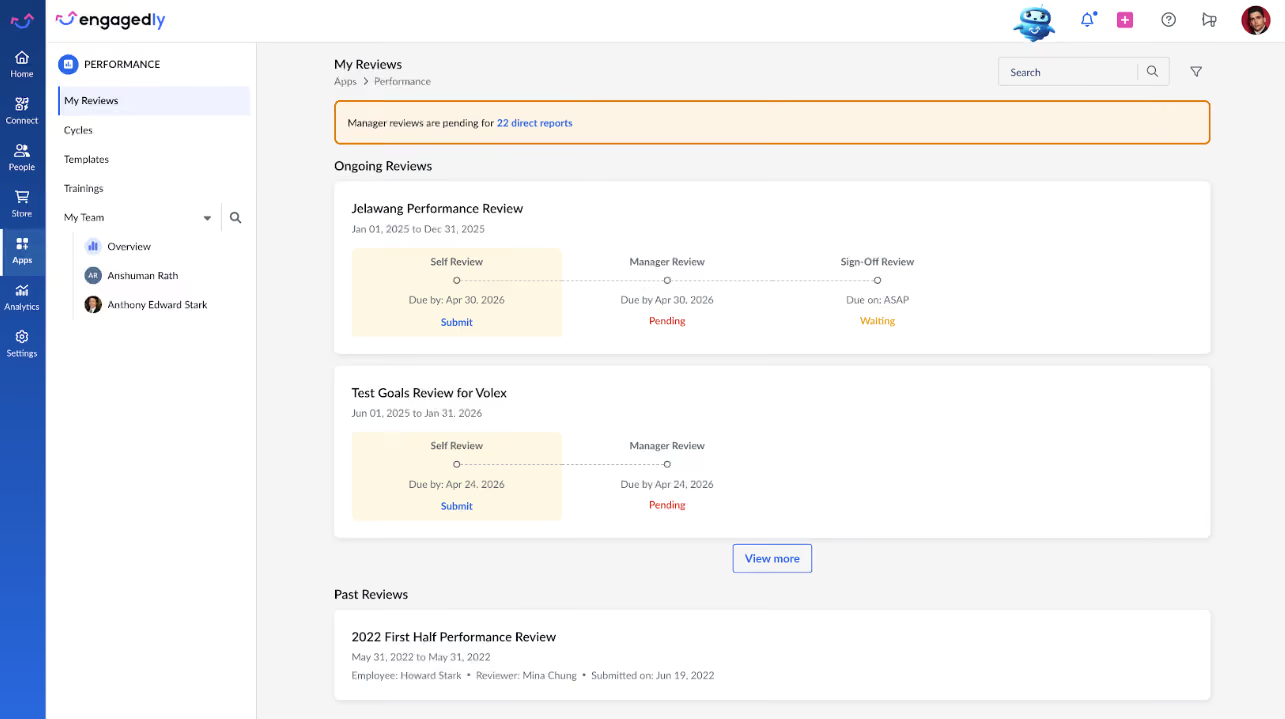
Moreover, because learning is tied directly to reviews, if your organization maintains a learning library in Engagedly, you can suggest training, employees can self-enroll, and development flows from the review conversation rather than as a separate HR request. Employees also have a formal way to challenge ratings: if they disagree with a manager's assessment, they can request a resolution before the review is finalized. Not all mid-market platforms offer this protection.
Marissa, the AI assistant, proved to be pretty handy for draft feedback summaries and interview questions, although it lacks advanced capabilities such as scanning submitted feedback for demographic language, unconscious bias, or sentiment imbalance.
The analytics provide clear visibility into review cycle progress (which stage each manager is in, completion rates by department, and time spent per stage). The 9-box calibration matrix lets teams adjust individual ratings or normalize bulk groups, which is essential when reviews show rating inflation in one department versus another.
Exit data and turnover patterns in historical data are also tracked, yet we notice that there’s no predictive modeling to flag individual attrition risks. Also, if you want to see which teams have high engagement but low performance (or vice versa), you’ll have to extract both datasets and cross-reference them yourself, as Engagedly doesn't automate this analysis.
We don’t find the mobile and integration capabilities very reliable. The mobile app has a mediocre rating. Engagedly offers 31 connectors total, 10 of which are payroll/HRIS — acceptable, but far from impressive.
Custom pricing.
Best For
Engagedly works when your priority is unifying reviews, learning, and recognition in one place and your tech stack is relatively simple. It falters when you need predictive people analytics, mobile-first workflows, or deep integration with enterprise HR systems.
Small Improvements
Small Improvements delivers an easy-to-use performance management system that prioritizes meaningful interactions between managers and employees, supported by customizable features and thoughtful AI enhancements.
PROS
- Exceptionally easy to use, with minimal training needed for admins and employees.
- A flexible feature set supports Performance Reviews, one-on-one meetings, continuous feedback, cascading objectives, and praise.
- New Manager Activation Score and post-1:1 ratings help identify and support struggling managers.
- The AI Writing Assistant enhances feedback quality without compromising the human touch.
- Lightweight and customizable exports for reporting needs
- Broad integrations with HRIS and tools like BambooHR, Personio, Namely, Kallidus, Workday, Google Calendar, Outlook, and Slack streamline implementation.
- Exceptionally easy to use, with minimal training needed for admins and employees.
- A flexible feature set supports Performance Reviews, one-on-one meetings, continuous feedback, Objectives, and Praise.
- New Manager Activation Score and post-1:1 ratings help identify and support struggling managers.
- The AI Writing Assistant enhances feedback quality without compromising the human touch.
- Lightweight and customizable exports for reporting needs
- Broad integrations with HRIS and tools like BambooHR, Personio, Namely, Kallidus, Workday, Google Calendar, Outlook, and Slack streamline implementation.
CONS
- Limited analytics and reporting compared to more enterprise-focused solutions.
- No standalone module purchasing; bundled pricing only.
- Some customers note that the system lacks advanced customization for complex organizations.
- 360 feedback cycles allow only one questionnaire per cycle, limiting advanced workflows.
- Limited analytics and reporting compared to more enterprise-focused solutions.
- No standalone module purchasing; bundled pricing only.
- The current cascading objective setup is still under development (expected Q3 2025).
- Some customers note that the system lacks advanced customization for complex organizations.
- 360 feedback cycles allow only one questionnaire per cycle, limiting advanced workflows.
Founded in 2011, Small Improvements has carved out a niche as a minimalist, highly usable performance management tool. Unlike heavy enterprise systems, it focuses on essential features done well: structured reviews, feedback, 1:1 meetings, and lightweight goal setting.
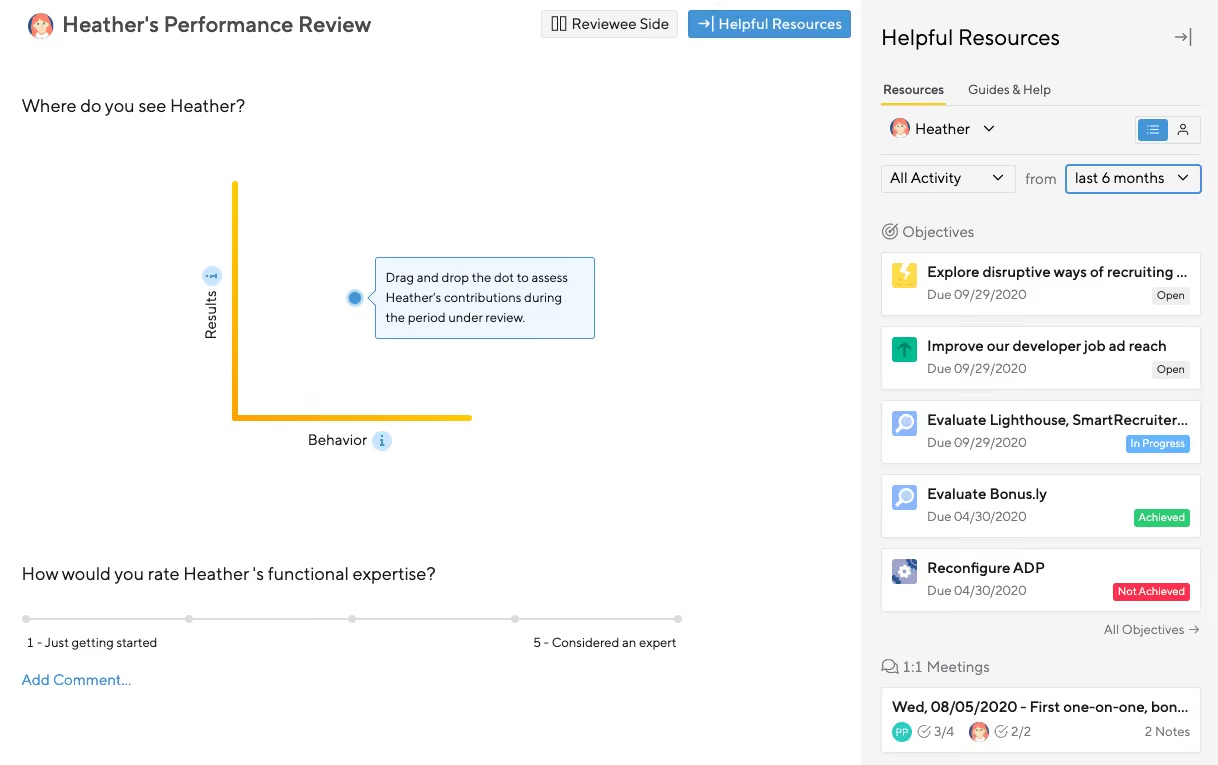
When we ran through a performance review cycle in Small Improvements, we were impressed by the intuitive workflow. We set up a customizable questionnaire, asked employees to complete their self-reflections first, and then reviewed their input as managers. The helpful resources panel gave us quick access to past reviews, 360 feedback, goals, and praise, offering a complete context before writing feedback. We found the AI Writing Assistant especially useful here, not generating feedback from scratch but refining our phrasing for clarity and constructiveness.
We also tested the 1:1 meeting setup. After sharing performance feedback, we easily scheduled a follow-up meeting directly in the platform, pulling in key talking points from the review. We appreciated that both the manager and employee could add action items, which stayed visible until resolved — a thoughtful way to maintain accountability between meetings. Syncing meetings from our calendar (we used Google Calendar, but Outlook works too) into the platform ensured we stayed organized without double-booking or skipping critical follow-ups.
Additionally, we explored the Objectives feature by creating a goal for a direct report, assigning key results, and setting deadlines. While currently focused on individual objectives, the recently-launched Cascading Objectives rollout promises to connect these goals across teams and departments, aligning individual efforts with broader company priorities.
Although Small Improvements isn’t built for companies needing deep analytics or complex workflows, it shines for teams that want to foster continuous development in a straightforward, human-centered way.
Notable customers include Duolingo, Zapier, SoundCloud, and several SaaS, tech, and service organizations.
Pricing starts at:
- Launch Plan ($3/user/month): Performance Reviews, Praise, HRIS integrations.
- Grow Plan ($6/user/month): Adds 1:1 Meetings, Objectives, 360 Feedback, and productivity integrations (Slack, calendar).
- Elevate Plan ($9/user/month): Adds advanced customizations, weighted objectives, insights, and early access to features.
Small Improvements prioritizes new product growth while keeping their core mission in mind:
Making teams thrive with healthy feedback. Over the past two years, Small Improvements has implemented several enhancements to support managers and employees in championing feedback, including an AI Writing and Summary Assistant, Pulse/Engagement Surveys, and a range of automations to facilitate continuous feedback. Their new feature, Cascading Objectives, launched in Q3 2025, allows individuals and teams to better understand how their goals align with overall company goals.
Best For
Small to midsize businesses looking for an easy-to-adopt, flexible performance management system without the overhead of enterprise platforms.

Workleap
Workleap Performance stood out for its intelligent approach to review cycle management. Its structured yet flexible review builder, AI-powered sentiment analysis, and robust automation tools bring clarity and efficiency to an often tedious HR process. We were especially impressed by its ability to integrate feedback from multiple sources (e.g., Slack, Confluence, manager notes) and deliver coherent, context-aware review drafts.
PROS
- AI-powered review assistant drafts summaries and narratives using real manager data sources.
- Review cycles support self, peer, and manager reviews with editable structures and deadlines.
- 12 research-backed performance themes drive consistency and insight across reviews.
- Built-in goal tracking with personalized suggestions and structured roll-up reporting.
- Supports English and French with AI-assisted translation for bilingual reviews.
- Configurable answer visibility settings and peer review anonymity enhance feedback trust.
- Workleap is easy to use and has a free plan that a team of up to 10 users can use.
- To ensure that feedback is truely anonymous, without the manager, or anyone with higher access being able guess who submitted what response, a minimum of 5 responses need to be sent in before the survey manager is able to access the anonymous feedback.
- The platform has a feature for peer-to-peer recognition, giving your employees the ability to praise one another for outstanding work.
CONS
- No free plan available.
- Adjustments to OKRs and 1:1s are not very intuitive to use.
- Customer support is limited to Monday-Friday ET work hours, which can be challenging for international or distributed teams needing off-hours assistance.
- Some users have reported that Slack integration sometimes malfunctions.
- Workleap does not include a complete performance management solution among their offerings. They have an OKR tool that lets you set goals but there isn’t a mechanism in place to track thos
- e goals or conduct performance reviews.
- There currently isn’t a mobile app that managers and employees can use on the go.
Workleap’s Performance add-on brings a smart balance of structure and flexibility to performance management, especially for growing teams that want to move beyond annual reviews. One of the things we liked most during testing was how easy it was to create review cycles tailored to our cadence and goals. Whether that meant biannual, quarterly, or more continuous feedback, the system adapted well.
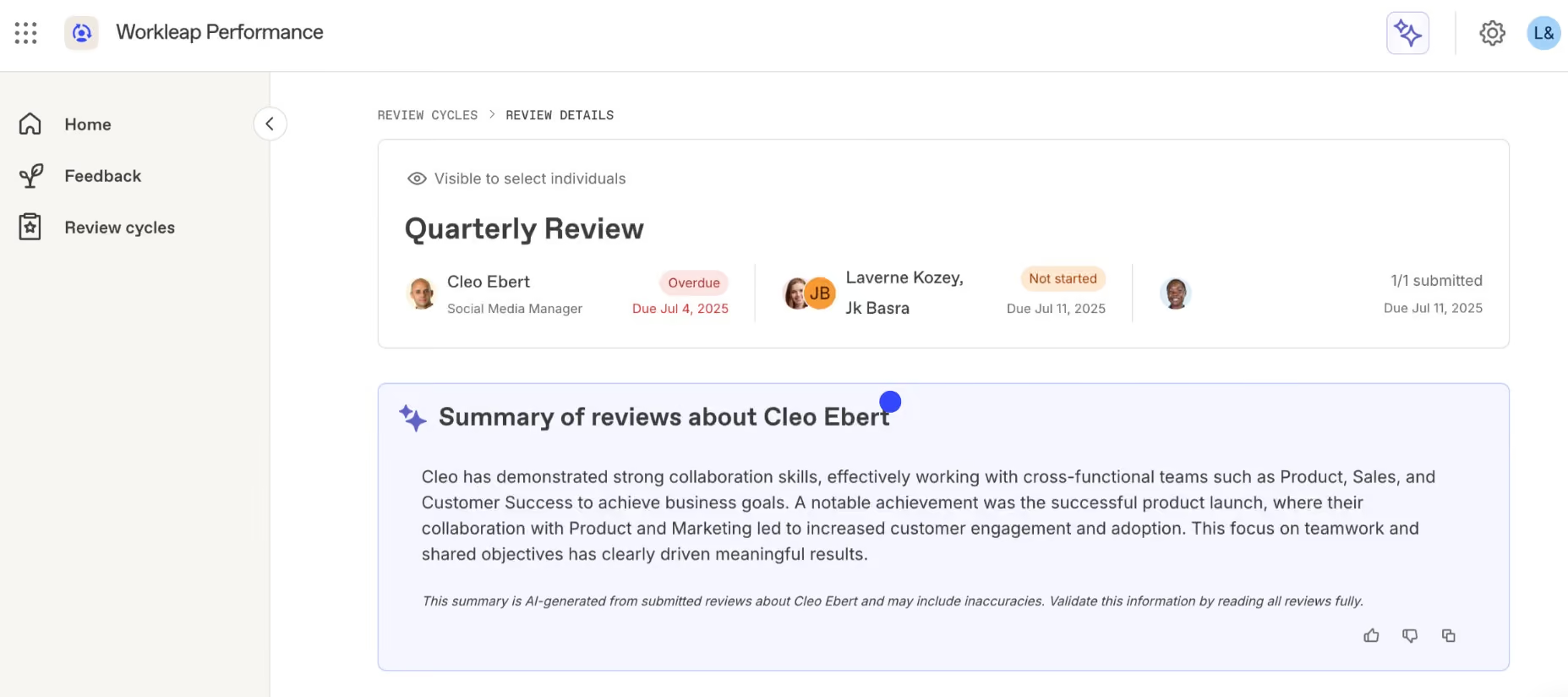
Each review cycle lets you include self, peer, and manager reviews. Workleap makes it easy to customize questions, set up deadlines, and define visibility settings per question. We appreciated being able to edit reviews after the due date, which many tools restrict. Once a cycle is complete, you can lock it to preserve the integrity of your data.
Where Workleap really stands out is in its AI-powered writing support. After uploading prior reviews, Slack threads, or manager notes, the platform pulled in relevant context and surfaced performance patterns across 12 research-backed themes, including clarity, accountability, and communication. This helped managers create thoughtful, well-rounded reviews, even when working with team members they interact with less frequently.
We also tested the goal-tracking module, which includes AI-suggested goals and alignment tools. While functional, we found that adjusting OKRs or editing 1:1 notes was not as intuitive as we expected. These features worked, but the setup process felt clunky at times.
Another consideration is customer support, which is only available Monday through Friday, 9 a.m. to 5 p.m. Eastern Time. That can be limiting for distributed or international teams who may need help outside of standard U.S. hours.
Lastly, keep in mind that the performance module doesn't offer a free plan. You can sign up for free, but you'll need to upgrade to a paid plan to access all its features.
70,000+ companies, including Trivago, Dyson, and PayScale.
Workleap starts at $4,999 for Standard. Pro starts at $11,999, while Enterprise pricing is custom for organizations with 250+ employees.
Best For
Workleap is a good option for medium and large-sized organizations that want structured, repeatable review processes supported by research-based insights and AI automation.

I use Workleap several days a week. I am the admin of the tool for our organization, so I am the one who manages teams and adds new employees to the program. We use the tool to report on each manager's team, as well as on department ratings, and all-company ratings. We also use the tool to send out any company-wide surveys, including our yearly Employee Engagement survey. Team members engage regularly with Good Vibes recognition.
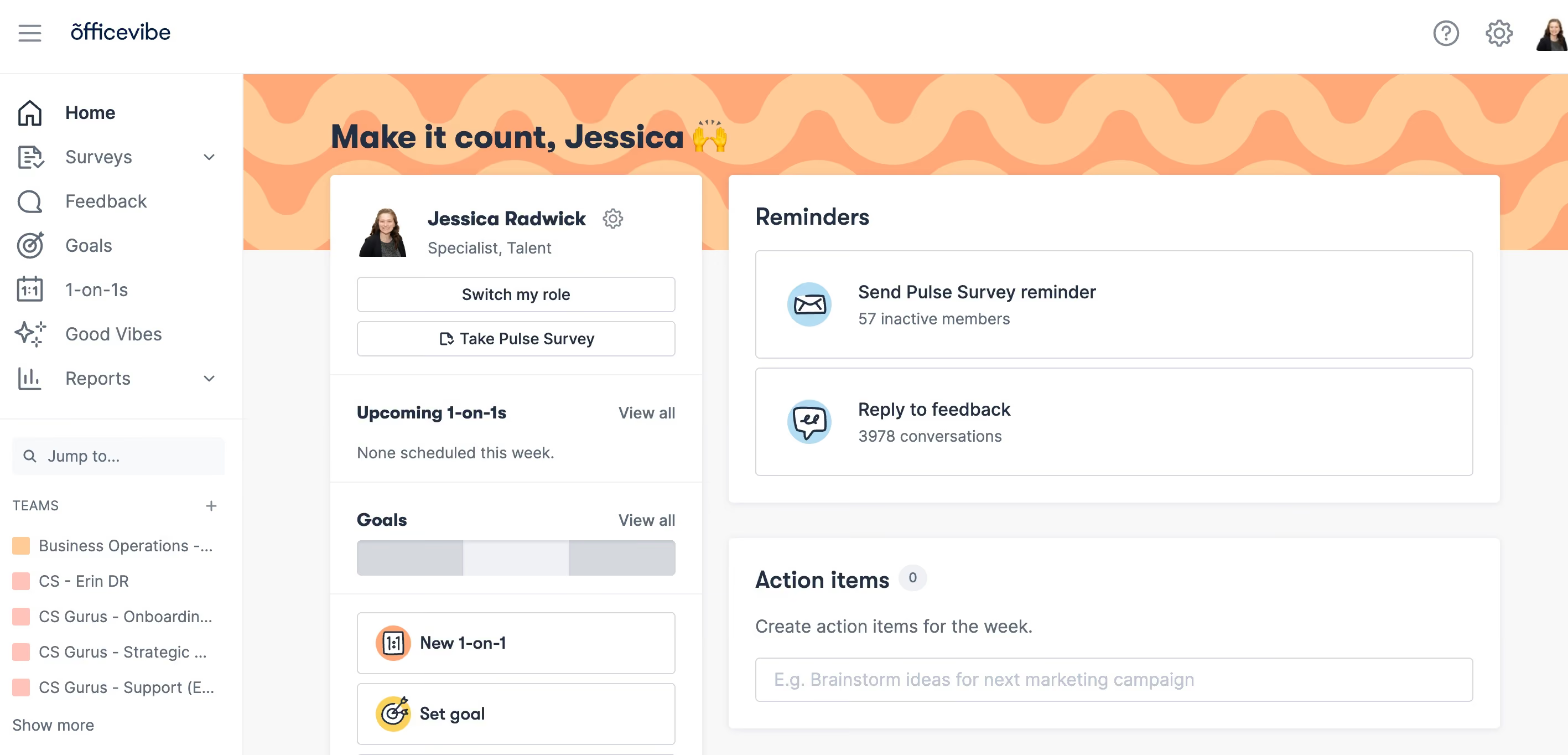
- It allows you to build as many teams as you would like.
- It is clear on its anonymity policy so that team members feel comfortable sharing honest feedback.
- It allows you to conduct custom surveys on any topic.
We bought this tool for our organization because we take employee feedback very seriously. We have been using the tool for 3 years. I have been using it as a regular employee for 2 years and as an HR professional (admin of the tool) for 1 year. It allows you to get regular feedback (at whatever frequency you prefer) and allows you to put team members into teams so that managers can get team-specific feedback. It also allows you to give "Good Vibes" so that any team member can provide recognition to their peers.
- It does not have a Performance Management feature, which other similar tools do. For the price point, I would expect more features.
- It does not have industry benchmark data for specific questions, which is something our ELT was hoping to see.
- It currently does not integrate with our HRIS, which I mostly fault to the HRIS but it means I have to manually add all of our members and put them on teams.
I have not personally used comparable tools but I have done demos with others. I think this tool is very clear (more so than competitors) on its anonymity policy which is very important to our employees. I also think Good Vibes is a fairly unique feature that our team heavily uses and appreciates.
People should consider what features they need the tool to have. This tool does not have performance management, which is something that many similar tools do. They should also consider pricepoint. Workleap is a high price point for the limited number of features. Overall, I think it is a great tool, just hard to justify the price considering it is lacking a crucial feature (performance management) that we will need soon.
Workleap has launched new features throughout our time using it and I know it is currently working on others. Good Vibes was a feature that was added due to requests, and it has been a great addition to the tool. It also has an amazing Customer Support system, where you can answer your own questions or if you can't, they are very prompt at responding.
It is very good for large organizations that want specific team feedback. It is also good for teams that have a large budget for employee engagement metrics.
It is probably not a good fit for a small company or a start-up due to its price point. However, I do think any company could benefit from the tool.

Leapsome
Leapsome is highly flexible; you can quickly set up your review process from the performance management software’s best-practice templates and frameworks or customize everything — from questions to timelines and anonymity settings.
PROS
- The user-centric design makes the platform easy to navigate.
- Integrates personalized learning and compensation management into the performance management system
- The Praise functionality allows users to give credit publicly
- Users found the training videos and articles comprehensive and helpful.
- Great meeting features: reminders, drag-and-drop talking points, tag meeting participants in relevant talking points, and shared and private notes.
- Available in Chinese, Dutch, English, French, German, Italian, Japanese, Korean, Polish, Portuguese, Russian, Spanish, and Swedish. Surveys can be translated into 19 languages.
- There’s no setup fee.
- A free trial is available for 14 days.
- Leapsome is quite feature-rich; the platform packs modules for employee onboarding, learning management, engagement, performance management, goals tracking and much more.
- The majority of users find Leapsome’s UI to be friendly and easy to navigate.
- There are lots of third party integrations options to choose from, including Slack, which many users appreciate.
- The platform has transparent pricing, and you only pay for the modules you need.
CONS
- Doesn’t have a mobile app
- Some users found it annoying not to be able to use the keyboard but to use the mouse when switching to the next questions or entering scores.
- A few users integrating Leapsome with Google Meets encountered sync issues when changing a meeting or schedule.
- The org chart isn’t very easy to navigate with multiple layers and can’t be filtered by role.
- Sometimes automatic emotion detection can misdetect positive feedback as negative if it contains "negative" words.
- The customer success team is available to customers with an annual contract of US$6,000 or more only.
- There is currently no way to post or upload an image or file into your feedback.
- Since Leapsome can do so many things, you may need some time to get used to it. The implementation process can also take some time.
- There currently isn’t a mobile app that users can download and access Leapsome quickly on-the-go.
- Free 14-day trials are available but you need to book a demo with the sales team first to sign up for one; you can’t do so on your own.
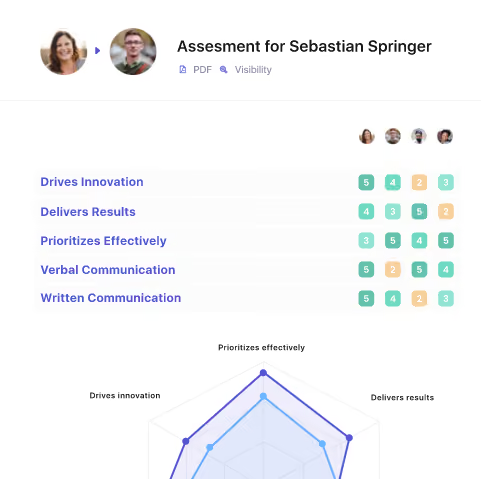
Leapsome allows companies to measure employee performance across all critical skills and competencies. Through the platform, you can customize and run simple performance reviews, agile project reviews, 360° reviews, and anonymous leadership reviews — all of which are easy to access and complete. The gathered employee data is actionable and linked to learning and development.
Leapsome's platform offers a range of features to support ongoing learning and development, regular feedback and recognition, and structured performance reviews. Employee users appreciate that the performance management software enables them to collaborate with the manager on setting and tracking goals, get regular feedback and recognition from my colleagues, and gain insights into their performance and how it aligns with the company's objectives.
Mercedes Benz, Spotify, Trivago, Eventim, Babbel, Plus Dental
- Leapsome’s pricing depends on the number of your employees, the modules you want to use, and the length of your contract.
- Its modular pricing starts from $8 per user per month when billed annually. To get a detailed quote, contact Leapsome’s sales team.
- You can also test out Leapsome free of charge for a full 14 days with no credit card required.
Best For
Leapsome’s multilingualism makes it suitable for teams across different continents. However, with its current pricing and customer service, the performance management software is best for mid-market businesses.

ClearCo
ClearCompany offers a holistic approach to performance management, taking employee recognition and satisfaction evaluation into account. The UI is easy to use, and users have had a lot of positive things to say about ClearCompany’s setup process and customer service.
PROS
- Great customizable review cycles.
- Users find the UI quite intuitive and easy to navigate.
- Highly rated for speed and helpful customer support.
- Smooth implementation experience and integration process.
- Offers an API available for use.
- Supports ten languages.
- ClearCo offers a host of talent solutions that work well with one another. You can choose the solution you need or combine them all to have a comprehensive talent management platform in your stack.
- The majority of users find ClearCo’s interface to be quite intuitive and easy to navigate.
- Many users have highly rated ClearCo’s support team for speed and quality of response. Several users have also reported a smooth implementation experience.
CONS
- Undisclosed pricing
- No free plans or free trials
- The reporting feature, according to some users, is limited in customizations
- The search function doesn’t always bring up the correct results
- No mobile app, but the platform is well-optimized for mobile use
- ClearCo’s pricing is not readily available on their website. You also can’t create a trial account on your own from the website and have to go through the sales team for more info.
- Some users felt that the reporting feature is limited in customizations.
- According to a few users, the candidate search function doesn’t always bring up the correct candidate(s) and could use some improvement.
- ClearCo doesn’t currently have a mobile app, but the platform is well optimized for mobile use both for hiring managers and candidates.
.avif)
ClearCompany’s performance management solution comes with a wealth of features that foster a meaningful and transparent experience for your entire team. Users can choose to organize employee performance reviews annually, bi-annually, or quarterly — the frequency that works best for them. The platform’s customizations and pre-built templates allow managers to create a personalized and actionable review experience in less time.
Employee users like that they can do the reviews on their mobile devices and in the language they want. ClearCompany also incorporates goal-planning tools within its performance management product so employers can measure employee satisfaction with continuous feedback loops, employee surveys, and anonymous polls. As a cherry on top, the performance management software even provides features like shoutouts and celebrations to recognize high performers.
Goodwill, Aveda Institute, and Chick-fil-A are some of 2500+ ClearCompany’s customers.
- It has two pricing plans for different types of businesses. The modular access plan lets users purchase certain modules individually, while the platform access plan offers all modules within ClearCompany’s suite.
- ClearCompany’s pricing isn't detailed on their site. According to a few users, however, it can start from $7 per employee per month. For the exact quote, you need to contact their team.
Best For
Midsize businesses and large companies looking for customizable performance review rollout.
I used ClearCo to send data of new hires to our HRIS system via an API integration. This eliminated the manual process required to transfer applicant data. I also used it to manage and move applications through the hiring pipeline, from new applicants to eventually hired employees.
- Easy integrations.
- Robust management tools.
- Intuitive and user-friendly interface.
We used ClearCo for its talent management solutions, specifically its applicant tracking system. Its platform integrated seamlessly with our HRIS system. It allowed us to attract, retain, and develop top talent while aligning employee goals with company objectives. Its analytics and automation features improved efficiency, driving better decision-making.
The main issues we aimed to solve were inefficient recruitment processes, cumbersome manual transfers to our HRIS system, and the lack of automated management tools. Personally, I have used it for a year and a half.
- Limited functionality compared to advanced tools.
- Better recruiting tools are available in the market.
- Lack of integration with some popular job posting platforms.
This is a great starter tool with basic functionalities. It meets the needs of small businesses but lacks the scalability and advanced features needed for long-term use in growing organizations.
Price is an important consideration, as ClearCo is relatively affordable. Evaluate how robust a system you require—while it offers good basic functionalities, other tools may provide more advanced options.
Last year, they released about 11 new integrations, focusing on streamlining recruitment and enhancing candidate experiences. Like many companies, they incorporated AI-assisted tools for crafting job descriptions, candidate emails, and offer letters, enabling recruiters to communicate more efficiently.
Additionally, ClearCo expanded its performance management capabilities by introducing features like enhanced 1:1 workspaces, facilitating better collaboration and feedback between managers and employees.
- Small Organizations: Companies with 1–10 employees benefit from ClearCo's scalability and ability to integrate with existing HR systems, helping manage workflows efficiently.
- Industries with High-Volume Hiring Needs: Retail, healthcare, hospitality, and similar sectors use ClearCo’s applicant tracking and onboarding features to streamline hiring and reduce time-to-hire.
- Organizations Focused on Goal Alignment: ClearCo’s tools for performance management, goal tracking, and employee engagement are ideal for businesses looking to align individual and team objectives with company goals.
- Large Businesses with Extensive HR Needs: Organizations with over 150 employees may find ClearCo’s features insufficient for their HR requirements.
- Non-Budget-Conscious Organizations: Businesses with larger budgets may find more robust offerings compared to ClearCo.
- Companies Without Dedicated HR Staff: ClearCo’s tools and analytics require users familiar with HR processes, which may be challenging for organizations without HR professionals.
- Industries with Unique HR Needs: Organizations with highly customized HR processes may find ClearCo less adaptable than desired.

Lattice
Lattice helps managers form a well-rounded approach to performance management, packing reviews, OKRs, goal management, and engagement in single, enterprise-ready platform.
PROS
- Has a modern design
- Helps you conduct 1-on-1s and reviews smoothly and in an organized manner
- Allows you to keep track of all meetings’ agendas, action items, and shared notes
- It’s quick and easy to see people directory and org structure
- Seamless integration with Slack and Google Workspace
- Lattice allows managers to record their 1:1 meetings with employees in real time. That way, both parties can go back later and revisit what was discussed during the meeting – as well as make sure nothing gets lost in translation!
- The platform has a host of tools supporting employee development and performance-based compensation setting, which isn’t common for the average performance management product.
- Review templates and survey questions are among several things that can be customized to ensure you’re getting relevant data.
CONS
- Updating OKRs is not the easiest. The goal view resets as users add or update a goal.
- Doesn’t have the option to do the feedback/suggestion box anonymously yet
- Sometimes it's not always intuitive when it comes to looking back at old reviews or adding someone to a survey.
- The mobile app has very limited functionality.
- Starting at $11 per person per month, Lattice’s pricing is on the expensive side compared to competitors.
- The platform is feature-rich, which is great but also means that it takes some time for the average user to get acclimated with it.
- The available selection of third-party integrations is rather limited, with a few users complaining that their HRIS isn’t covered. That said, Lattice does have an open API that allows users to plug-in other third party tools.

Lattice’s performance management solution provides managers and HR teams with a comprehensive view of their organization. It features highly customizable reviews, with built-in tools to help users automate review cycles. Engagement is also taken into account, with users having the option to give feedback and appreciation privately or publicly (on integration apps like Slack or Teams), and request feedback from people both inside and outside the company.
Furthermore, the Updates feature connects employees and managers on progress and roadblocks. There’s also a mobile app available on both iOS and Google Play stores, but it has limited functionality compared to the web-based version.
Lattice has over 2,000 customers, including Reddit, Slack, and Asana.
Lattice pricing is very flexible:
- Performance Management costs $8 per person/month
- OKRs & Goals costs $8 per person/month
- Performance management plus OKRs & Goals costs $11 per person/month
- Performance plus OKRs & Goals plus Engagement costs $15 per person/month
- Performance plus OKRs & Goals plus Grow (targeting employee growth and development) costs $15 per person/month
- Performance plus OKRs & Goals plus Compensation (linking performance and compensation) costs $17 per person/month
- Enterprise plan has custom pricing
Best For
Growing teams looking for a platform that combines surveys, performance management, feedback, and goals will benefit most from the scalability and feature wealth of Lattice’s offerings.

Key workflows that Lattice supports in our organization include performance reviews, goal setting, feedback and recognition, engagement surveys, and career development. Lattice allows us to create development plans for employees and help them map out their career paths.
Engagement surveys help us understand employee sentiment and identify areas for improvement. Recognition and continuous feedback promote regular, meaningful communication among team members. Goal setting provides a structured platform for both individual and team objectives.
Lastly, performance reviews allow employees to track their progress and receive feedback from managers and peers.
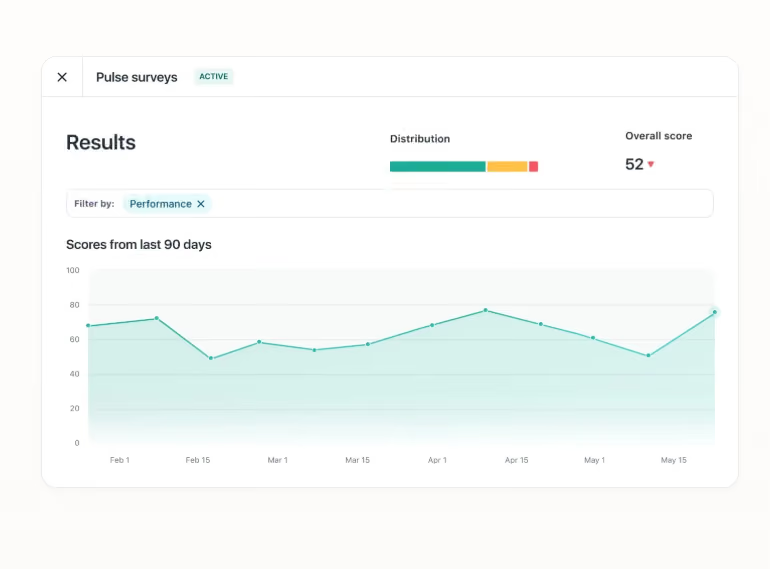
The biggest takeaways for me are the user-friendly interface, real-time feedback, and insights into employee engagement.
Lattice is easy to navigate, making it easy to train staff and leaders on the functionality of the platform.
In relation to real-time feedback, it enables stronger communication within teams. Lastly, the engagement survey tools offer insight into employee sentiment and morale.
My organization decided to purchase Lattice to enhance our employee performance management and engagement processes. The goal was for the platform to facilitate continuous feedback, goal setting, and performance reviews in a structured way. We believed this tool would help promote a culture of transparency and communication.
We have been using Lattice for two years. Since implementing Lattice, we have improved our ability to track employee performance and align it with both individual goals and organizational objectives.
Three cons regarding Lattice are the mobile platform, the reporting features, and the pricing structure.
The pricing structure for smaller organizations could be challenging, as it is not inexpensive. The mobile platform isn't as intuitive as the desktop version, so there are opportunities of improvement.
Lastly, the reporting features are at face value and don't have a drill-down option to gain more insight into the analytics.
What sets Lattice apart from its competitors is that it integrates multiple HR processes into a single platform. I’m able to use Lattice to manage performance, employee engagement, and career development in one place, which offers strong overall value.
When considering Lattice, it’s important to evaluate integration capabilities with payroll, HRIS systems, and communication tools to ensure a smooth transition. Some competitors may have limitations in this area. Organizations should also assess the level of customization needed to fully leverage the tool’s value.
Lattice has introduced enhanced features that provide users with greater access and flexibility, demonstrating a strong commitment to user feedback. These updates have helped Lattice maintain its position as a leader in the space.
Lattice is well suited to mid-sized and large organizations that need a comprehensive platform for managing multiple HR functions.
Lattice may not be a good fit for small teams with basic HR needs.

WorkTango
WorkTango (formerly Kazoo) achieves the right balance of comprehensiveness and simplicity. The platform combines surveys, performance reviews, goals, and recognition and rewards, driving engagement and helping everyone stay aligned with team-level and business-wide objectives.
PROS
- Available in English, Spanish, Chinese, French, German, Italian, Japanese, Portuguese, and Korean.
- Simple implementation process with training sessions available.
- Supports anonymous surveys.
- Straightforward UI that’s easy to navigate.
- The mobile app has undergone significant improvements, offering more built-in features and enhanced performance.
- Flexibility — users can buy the modules they need then add more as they go.
- Unlimited surveys available in English, Spanish, Chinese, French, German, Italian, Japanese, Portuguese, and Korean.
- You can add modules as you go and these will be charged on a prorated basis.
CONS
- Billing is only done annually; all plans require a minimum agreement for a 24-month subscription.
- There isn’t a free trial or free plan.
- Billing is only done annually and all plans require a minimum agreement for a 24-month subscription (see our FAQs for more and their pricing page for full details).
- Several users have complained about the rewards redeeming process being not very intuitive.
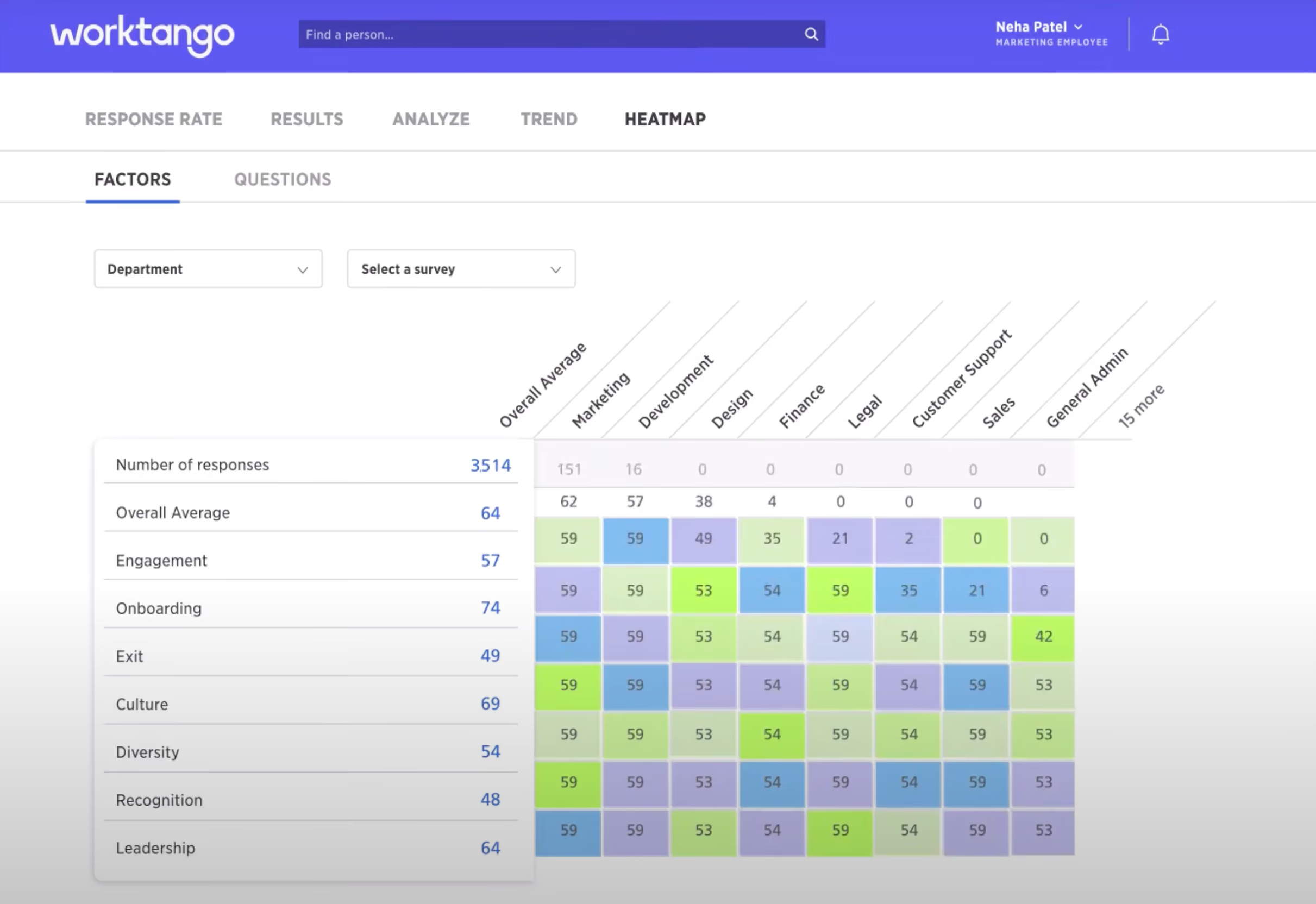
WorkTango combines continuous performance management, employee recognition, rewards, and surveys into one platform to help businesses improve employee experience and, by extension, company culture.
One aspect that stood out to us is its three-pronged approach, which seamlessly connects the Survey and Insights, Goals and Feedback, and Recognition and Rewards modules. This allows users to easily share data across all three areas and ensures that individual goals align with their overall business objectives.
The platform's Surveys and Insights features have proven to be invaluable. We appreciate the ability to create surveys using pre-built templates or customize our own, gaining valuable feedback from employees, including anonymous responses. WorkTango's ability to analyze this feedback data and provide actionable suggestions is also highly praised by users as it helps them address areas of concern more effectively.
WorkTango offers a user-friendly interface, and we like that the mobile app has undergone significant improvement, offering enhanced performance and more built-in features. Additionally, the availability of training sessions has made the implementation process a lot simpler, ensuring a smooth transition for their organizations.
1000 organizations, including Allianz, Hitachi, Kia Motors, and Patagonia.
The pricing of WorkTango's modules depends on your business size and needs. Contact their sales team for an estimate.
Best For
While the majority of WorkTango’s customers are in tech, FSI, healthcare, and business services, the software can work great for mid-sized to large businesses, US-based or otherwise, across most industries.

I use this platform for exit interviews on a quarterly basis, 1-4 times a month. The platform securely stores employee responses and provides quick feedback and insights. It also provides recommendations based on the responses. It removes barriers to gauging satisfaction and engagement by providing real-time data and feedback. The feedback is specific and action-oriented.
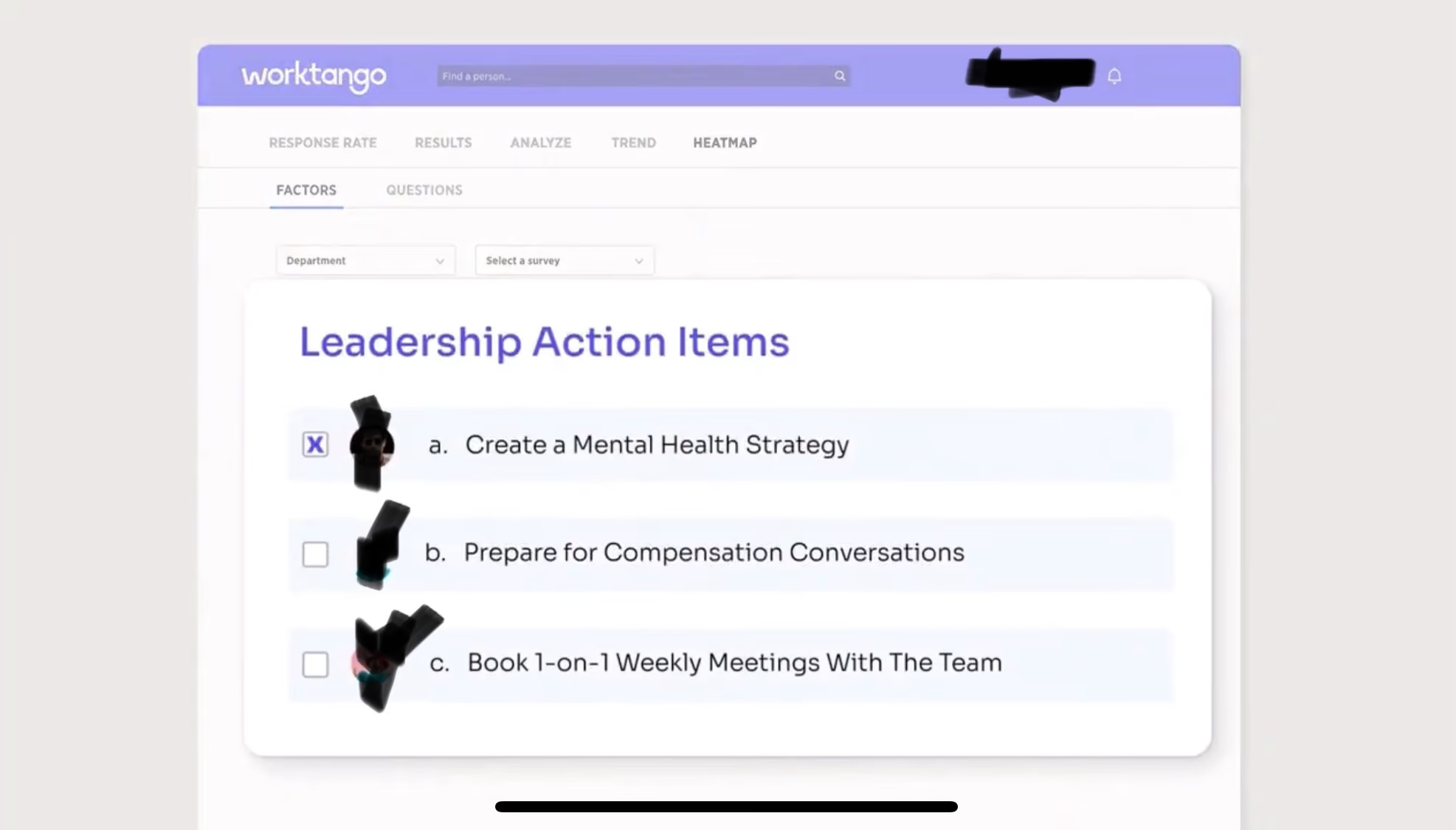
I like the anonymity, which protects against skewed data. I appreciate the responsive recommended actions, and I value the efficiency and speed of the real-time data.
My company needed to review projected turnover for succession planning, so we turned to WorkTango to conduct anonymous employee stay interviews and surveys. We have been using it for two years, and it is a fantastic tool. The anonymity feature allows the employer to engage in feedback with the surveyed employees. I highly recommend this tool to other HR professionals.
The number of emails received from WorkTango is annoying. The visualization aspect could be improved for less savvy data interpreters. Compiling reports can be difficult.
Compared to other platforms, I like that it is cloud-based and that training can be done online. This makes the service more accessible.
Before purchasing, you should consider how often the tool will be used. Is your workforce large enough to receive accurate data and a sufficient sample size? Does your entire workforce have access to a computer?
Customer service now offers a live chat service to respond more quickly to complaints.
WorkTango is good for midsized to larger organizations.
I don’t think a smaller organization could benefit from WorkTango because of the price. A smaller or free survey service might be more suitable.

ChartHop
We like that ChartHop is constantly evolving. It started as an org chart tool and has gradually expanded into a flexible platform for performance management, employee engagement, DEI, and people planning/analytics. Its performance module stands out for blending scheduled reviews, real-time feedback, and external business metrics into one environment.
PROS
- Highly configurable performance review cycles with granular workflows, templates, and access controls.
- Alpha-stage calibrations view provides a dedicated space to compare and normalize ratings before finalizing.
- Mobile app supports completing reviews, surveys, and tasks across devices; start on desktop, finish on mobile.
- Integrates external business metrics (e.g., Salesforce revenue) directly into reviews and coaching conversations.
- AI summarizes open-text feedback while preserving access to raw responses for transparency.
- Strong analytics and reporting, including historical performance records and progress tracking.
- Open API plus HRIS and ATS integrations for richer performance insights.
- Integrates performance reviews with live business data (e.g., Salesforce) for more objective conversations.
- AI summaries distill open-text feedback; calibration (alpha) helps normalize ratings before finalizing.
- Strong analytics with historical “time travel,” drill-downs, and customizable dashboards.
- Compensation: run salary/bonus/equity cycles with contextual org + performance data and visual comp letters.
- Headcount planning: visual scenarios, side-by-side comparisons, and AI-generated draft plans.
- Open API; HRIS/ATS/payroll integrations; role-based access for sensitive data.
- Mobile app supports completing reviews, surveys, and tasks across devices.
CONS
- Assistance with creating custom document templates is limited to six per customer.
- Steep learning curve for new users due to frequent feature additions.
- Onboarding can take 2 to 3 months. No longer offers a free plan.
- When org charts or other visualizations get very large, the UI can become buggy.
- Learning curve can be steep due to frequent feature additions and configuration depth.
- Onboarding typically takes weeks to 2–3 months for multi-module rollouts.
- UI can lag with very large org charts or complex visualizations.
- Assisted help for custom templates capped at six per customer.
- Free plan discontinued; $9,000 annual minimum on paid plans.
ChartHop’s approach to performance management is rooted in flexibility and integration. From the demo, it was clear that reviews can be tailored by department, role, or location, with admins setting their own schedules, templates, and approval flows. Large-scale review cycles benefit from AI-generated summaries that distill trends from hundreds of responses while keeping the full qualitative data accessible.

One of the newest additions is the mobile app, which now extends performance workflows beyond the desktop. You can start a review in the office and finish it on the go, though it’s still early in its lifecycle and could benefit from more mobile-first features. The recently introduced calibrations view (currently in Alpha) adds another layer, allowing managers to compare ratings side-by-side, spot scoring inconsistencies, and finalize fairer outcomes.
But perhaps, where ChartHop differentiates most is in how it incorporates business performance metrics into the review process. For example, sales teams’ performance conversations can pull in live Salesforce data alongside manager feedback to ensure a more objective and data-backed dialogue. Goal tracking is also strengthened by the ability to link KPIs from other systems directly into reviews.
Integration capabilities are strong, with an open API, HRIS/ATS connections, and payroll sync. If you’re a global team like we are, you’ll like the new multi-language support, which is now available in both the web and mobile app.
That said, we figure new users can find ChartHop overwhelming. As a result of regular product updates, the learning curve can be steep to get a full grasp of how new capabilities fit into existing workflows.
Implementation-wise, this platform is not ideal for those looking for a lightning-fast process. In fact, onboarding can stretch to two or three months before everyone is fully up to speed.
In terms of usability, according to some verified users we spoke to, the UI can at times struggle under the weight of very large org charts or complex visualizations.
While none of these issues are deal-breakers for most mid-sized companies, they do mean teams should budget time and resources for adoption, training, and occasional workarounds.
Sequoia, Plaid, Locus, InVision, BetterCloud
ChartHop provides two plans:
- Core Modules Plan: $8/employee/month for the first module, $4/employee/month for additional modules, with a $9,000 annual minimum. Includes HRIS, Compensation, Headcount Planning, Performance, and Engagement modules. Implementation fees apply.
- Basic Plan: $2/employee/month, no minimum or implementation fees. Includes org charts and employee data.
Best For
Mid-sized organizations and global teams wanting performance management tied directly to analytics, planning, and business metrics.
Charthop was primarily used for its org chart functionality. It pretty much replaced the org chart module within our HRIS system. We were able to upload a file exported from our HRIS to build a variety of org charts. We were working on the integration between the two platforms. We were also exploring Charthop's other capabilities like Headcount Planning and Engagement.
Charthop was user-friendly and intuitive making it easy to navigate. Charthop was flexible in that one could build many different org chart versions and permission them based on who needed access to them. Charthop also allowed for customizable fields within the system to meet the needs of your business.
Charthop was a tool we used at a previous company for about 1-2 years. It helped us create and easily maintain organizational charts throughout the company. The HRIS system we used did not have strong org chart capabilities. Making changes was very cumbersome and clunky, and downloading them was impossible. Charthop allowed us to create several different org chart versions while allowing us permission access as needed.
I don't recall having any concerns with Charthop as it was a very good solution for our team and company.
Similar tools to Charthop were not as customizable and limited in how we could use the tool. We tried other tools but decided to go with Charthop in the end.
When looking for an org chart tool, think about how many people in your organization will need to access the charts you develop. If talent planning, you'll want to keep certain charts confidential and hidden from certain users. Also, think about other tools you could bundle with this feature in the long run so that the system can be used to solve more than one problem for your company.
I'm unaware of the evolution of this product.
Charthop is good for HR teams in companies.
A very small and flat organization may not benefit from this tool if multiple org charts were not needed.

ThriveSparrow
We loved ThriveSparrow for its deep customization, robust reporting, and AI-powered development planning. The ability to tailor performance reviews with custom competencies, weighted scoring, and flexible visibility settings ensured fair evaluations. Plus, the AI and reporting features made it easier to track performance trends and foster employee growth.
PROS
- Highly customizable performance reviews with flexible competency frameworks, question sets, and visibility settings.
- AI-powered Personal Development Plan generates structured employee growth plans based on review data.
- Robust reporting with individual and group performance insights for leadership evaluations.
- Integrated OKR module for aligning individual, team, and company-wide goals.
- A weighted scoring system reduces bias in employee evaluations.
- Offers deep customization, allowing full control over survey questions, rating scales, and visibility settings.
- AI-powered sentiment analysis categorizes qualitative responses into key themes and presents insights in a visually digestible format.
- Granular data filtering by department, tenure, or location for precise trend analysis.
- Transparent pricing starting at $2 per user per month.
- Strong integration capabilities.
CONS
- Extra charges may apply for some integrations.
- No dedicated mobile app for admin users.
- Goal data does not directly connect to performance reviews, which could limit development plan insights.
- Some integrations may require an additional cost.
- No dedicated mobile app for admins.
- As a relatively new product, ThriveSparrow may not have the experience of more established vendors.
ThriveSparrow’s performance management software offers a highly customizable approach to employee reviews, goal-setting, and continuous feedback.

To see how ThriveSparrow handles performance, we tested its review-building capabilities by creating a performance review from scratch instead of relying on its pre-built question banks. It quickly became clear how flexible and easy the tool was to use.
We had full control over competency frameworks, question sets, and review workflows. The same level of flexibility applied to visibility settings—ensuring that managers, peers, and direct reports only saw relevant questions—a level of customization we don’t always see in competing tools. The scoring framework was another plus. It enabled weighted scoring at both the competency and question levels to help employers limit bias in their performance reviews.
We’re also pleased with the detailed individual and group performance insights the reporting features offer. During testing, the AI-powered Personal Development Plan (PDP) auto-generated development plans based on performance review data. We could create structured growth plans for employees, which covered insights into competency trends, areas for improvement, and recommended action steps.
The group reporting function also proved useful for leadership evaluations, allowing department heads to assess overall team performance and track trends over time. Compared to competitors like Lattice and Leapsome, we think ThriveSparrow either meets or beats them in terms of customization within performance reporting.
ThriveSparrow brings together performance management, goal-setting, and tracking into one OKR module. Employees and managers can align individual, team, and company-wide goals while monitoring progress within a structured framework.
However, our one complaint is that it does not yet connect goal data directly to performance reviews, meaning development plans rely solely on review feedback rather than OKR progress.
Another limitation is the absence of a mobile app for performance tracking. Although the platform integrates well with Slack and MS Teams, enabling employees to complete performance reviews within these tools, HR teams and managers do not have the same mobile accessibility.
Ikea, Siemens, and Tropicana are among the companies that have used ThriveSparrow.
ThriveSparrow’s performance module costs $5 per employee per month when billed annually.
Best For
Organizations looking for a highly adaptable review and reporting system will find ThriveSparrow’s performance management tool valuable.

I use ThriveSparrow daily to collect feedback and address internal tickets, integrating it with live chat tools for real-time interactions. This tool allows us to measure and visualize feedback effectively. I also prepare reports based on the collected feedback to share with relevant departments for review, which informs future training and improvements. Additionally, I export data from ThriveSparrow in XML format to other tools, enhancing our data management processes.
The user interface of ThriveSparrow is straightforward, making navigation simple. The customer support provided is world-class, offering timely and effective assistance whenever needed. Furthermore, the pricing structure is reasonable, making it accessible for businesses of any size.
Our organization purchased ThriveSparrow to better understand client needs and improve service delivery. Previously, gauging employees' opinions on our services and work culture was challenging, especially since we wanted to maintain anonymity in feedback collection. Survey Sparrow has enabled us to gather this feedback discreetly by distributing surveys via links. Additionally, we've integrated the tool with Zendesk to manage internal tickets, which helps us serve both clients and improve our workplace culture. I have been using this tool for three years.
Certain integrations within ThriveSparrow do not function as expected. The tool lacks support for collecting feedback via widgets, relying solely on links. Additionally, the limited payment methods available do not adequately serve our geographical location.
ThriveSparrow has maintained stable pricing since we first adopted it, unlike competitors who frequently increase their fees annually. This consistency makes budgeting easier and ensures we can continue using the tool without financial strain.
Potential buyers should consider the long-term cost implications of this tool to ensure it aligns with their expected return on investment. The limited integrations with other commonly used HR tools might also make ThriveSparrow less suitable for some organizations, so evaluating compatibility with existing systems is crucial.
Since its implementation, ThriveSparrow has undergone significant improvements, particularly in its user interface, which has been streamlined and enhanced for better user experience.
Survey Sparrow is particularly well-suited for human resource managers looking to gather and analyze employee feedback efficiently.
This tool may not be ideal for support operators, as it lacks certain functionalities tailored to optimizing support operations and real-time interaction management.
PerformYard
Sharply focused on the performance management software niche, PerformYard is best known for being flexible and feature-rich. They also stand out for constantly rolling out new features based on customer feedback.
PROS
- Covers nearly all the bases of performance management
- Regularly incorporates new features based on customer feedback
- Supports Single Sign-On
- Highly customizable in terms of content
- High focus on flexibility within performance management, they can handle a myriad of approaches to PM, adapting to your current strategy.
- The PerformYard team constantly listens to their clients, incorporating new features based on their feedback and suggestions.
CONS
- Focuses exclusively on the North American market
- Not the most intuitive tool for new users
- Little lengthy in some processes to get where you need to be
- Some of the action-to-do descriptions for performance evaluation lack clarity on what to do and what the next steps are.
- Lacks features to auto-transfer data from HRIS to PerformYard
- As of mid-2022 at least, PerformYard are mainly focused on the North American market, so for businesses in other geographies and with non-English speaking team members, it wouldn’t be the best fit.

PerformYard’s flexible performance management system helps managers and employees stay on top of areas for improvement and track success. Its unique goal management feature allows each team member to define and track their goals, tying them to business objectives and facilitating collaboration.
Performance reviews and check-ins offer customizable content templates, while continuous feedback helps recognize accomplishments, document performance, and track notes. The platform's customer service receives positive feedback, with dedicated success managers guiding users. However, some users feel uncertain about the next steps after completing their evaluation due to the complexity automation features.
Blue Nile, The Catholic University of America, Eggstrategy, College Track, Metro Credit Union, Friedman LLP.
PerformYard has two plans. When billed annually, they cost as follows:
- Professional: $5-10 per employee per month with access to performance reviews, goal management, continuous feedback, 360s, and peer evaluation tools. It also comes with dedicated customer success management, knowledge base access, and phone or email support.
- Enterprise: Custom pricing and unlocks additional perks to what’s in the Professional plan, including senior-lead customer success management, enhanced on-boarding/training, custom implementation, data integrations, custom single sign-on (SAML), custom service level agreement, additional document storage.
Best For
PerformYard is best suited for organizations (both for-profit and nonprofit) between 30 to 2,000 employees in the United States.

We use PerformYard regularly, with managers and team members logging in several times a month to set new goals, add updates, and share feedback. It has become our go-to platform for performance reviews and is also where we document one-on-one conversations, track progress on development plans, and ensure everyone knows where they stand.
Managers can quickly record notes from coaching sessions, while employees can easily check in on their own progress and see how their work aligns with their goals and the team’s direction. PerformYard helps us keep everything organized and transparent, which boosts accountability and ensures alignment across the organization.
- PerformYard offers a high level of customization, allowing the organization to tailor the performance management process to its specific needs.
- The platform is user-friendly and easy to learn for employees at all levels.
- PerformYard enables ongoing feedback for employees, fostering a workplace culture of development and continuous improvement.
My organization chose PerformYard because we needed a better way to stay on top of employee performance and streamline how we manage goal-setting and reviews.
Before PerformYard, it was challenging to track everyone’s progress and ensure feedback was delivered consistently, often leaving employees unclear about how they were performing. This tool has been transformative, providing a straightforward way to keep goals visible, track progress, and make feedback an ongoing process rather than a once-a-year event.
We’ve been using PerformYard for over a year, and it has noticeably improved how connected our team feels to their personal goals and the broader objectives of our organization.
- PerformYard does not easily integrate with other HRIS programs, which limits its utility in more complex tech environments.
- The lack of a mobile app restricts employees from accessing the system flexibly on the go.
- The tool could benefit from more data-driven reporting features to provide managers with enhanced capabilities for analyzing employee performance.
Compared to Lattice, PerformYard offers more robust customization options and is notably more user-friendly. Specifically, the platform allows organizations to customize performance reviews to align with their unique requirements.
When considering PerformYard, organizations should evaluate whether the software integrates with existing HRIS or other tools containing employee data, such as UKG Ready. It’s also important to assess the level of customer support and training offered by PerformYard to ensure smooth adoption and ongoing use.
PerformYard has improved over time by enhancing its ability to implement continuous feedback and coaching through more customizable templates.
PerformYard is ideal for small organizations that require customization and for newer organizations building their performance management processes.
PerformYard is less suitable for larger organizations with established HRIS software that requires integration, as it does not easily connect with other platforms.

Culture Amp
Culture Amp's Performance Management solution has caught the attention of thousands of businesses with its helpful customer service and science-backed reviews and surveys. Recent AI additions push it further. AI Coach gives managers on-demand coaching and help drafting reviews. A new MCP connection brings Culture Amp data into assistants like Claude and ChatGPT. Both are still early, though, and buyers should weigh the data-handling and access details before relying on them.
PROS
- A simple interface makes the platform easy to navigate.
- Supports continuous performance management with check-ins, 1-on-1s, goals, and 360 feedback.
- Calibration tools help keep reviews consistent and fair.
- AI Coach drafts balanced performance reviews from existing feedback and helps managers role-play difficult conversations.
- MCP integration brings goals, ratings, and 1-on-1 notes into Claude and ChatGPT, using existing permissions.
- Skills Coach delivers bite-sized manager training via Slack, Teams, or email.
- Recommendations are backed by people science research.
- Responsive, knowledgeable customer support.
- People science team
- Tons of engagement surveys
CONS
- AI Coach relies on a third-party AI model, and its drafted reviews still need careful editing.
- MCP access is new, by registration only, and limited to existing customers.
- Mobile app is limited compared to the web version.
- Integration options are quite limited.
- Undisclosed, annual-only billing with no free plan or trial.
- Their people science plus offering is not available for very small companies
- Enterprise clients might find that they lack some of the integrations and customizations a bigger team needs.
Culture Amp offers a full range of tools to improve employee experience. These include performance check-ins and reviews (Perform), coaching and development plans (Develop), and engagement surveys (Engage). The Perform module is newer than Engage. Unlike traditional once-a-year reviews, Culture Amp supports continuous performance management through more frequent check-ins and feedback.
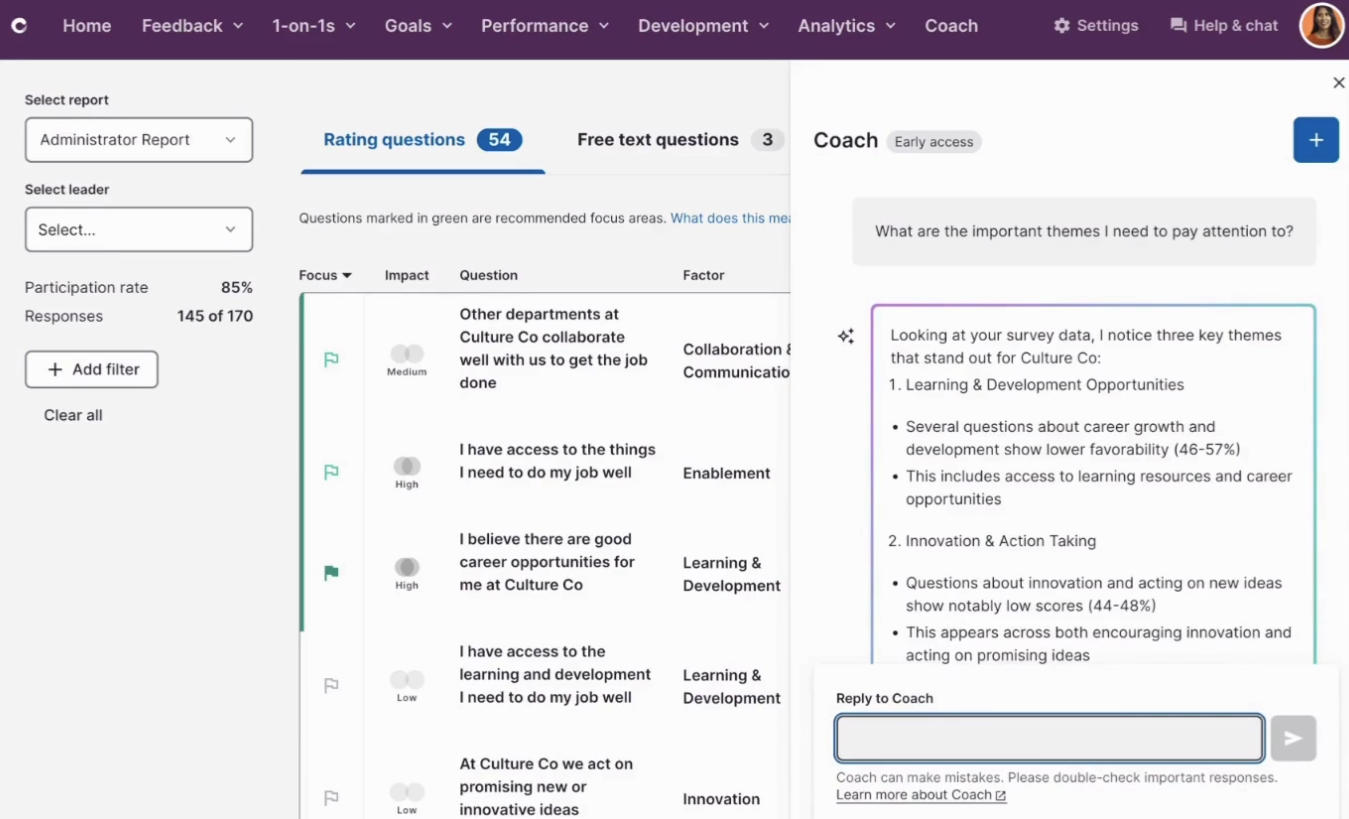
The platform also streamlines 360-degree feedback, integrating peer and multi-rater reviews for a comprehensive view of performance. Calibration helps keep evaluations consistent and fair across the organization. Culture Amp's people analytics and reporting provide reliable insights for talent management and development planning.
Compared with the previous round of our evaluation, the biggest recent change is AI. AI Coach works across Engage and Perform. It turns survey results into focus areas and action plans, helps managers prepare for and practice tough conversations, and drafts performance reviews from existing feedback data. Culture Amp grounds it in more than a decade of its own research and 1.6 billion data points.
The Culture Amp MCP goes a step further by bringing this data into the AI tools employees already use. A manager can ask Claude or ChatGPT to prepare them for a 1-on-1 using engagement trends, goals, and past meeting notes, without exporting anything. Both features show promise, but they're early. AI Coach depends on a third-party model, and MCP access is currently by registration only. Teams should evaluate them in practice rather than on marketing alone.
Culture Amp is used by 6,000+ companies, including Nasdaq, McDonald's, Coles, Foundry, and WisdomTree.
Customers can choose individual modules (Employee Engagement, Employee Development, or Performance Management) or combine all three in one plan. Pricing depends on the modules you buy and the size of your team.
Best For
Companies with 200 to 1,000+ employees around the world and across industries. The new AI features are best suited to organizations that want to provide managers with more coaching support and already use AI assistants like Claude or ChatGPT in their daily work.

The product was used primarily for goal planning and performance reviews. We also used the tool to conduct engagement surveys. These workflows were embedded in our quarterly planning and annual review cycles.
Managers and employees regularly interacted with the tool to update goals and provide feedback. The survey features enabled us to collect and analyze employee sentiment at key intervals.
For goal setting and performance reviews, it was extremely easy to set goals for employees and allow them to set their own. The performance reviews were very easy to create and allowed for employee, peer, and manager feedback.
All processes within the review were simple and secure. The engagement survey process was also easy and produced reports with extensive data cuts, which helped management understand employee sentiment and trends.
We used CultureAmp from 2022 to 2024. We purchased the tool primarily for performance reviews and goal planning. Before implementing the tool, we did not have a formalized approach to performance management.
CultureAmp helped us establish structured processes and ensured consistency across departments. It also provided a centralized platform for tracking and evaluating performance, which improved transparency and alignment.
The price was significant. It was difficult to justify based on our employee population. There was no room for negotiation with the company, so we did not renew due to cost concerns.
When we transitioned off CultureAmp, we received a data dump with very little context, which made it difficult to use the data outside of the software.
Compared to the tool we currently use within our HRIS, CultureAmp was much more visually appealing. The engagement surveys also provided significantly more data cuts than we can generate with our current option.
The price is significant. If you decide to transition off CultureAmp, they will provide no assistance and only offer a data dump in an Excel spreadsheet. This makes it impossible to recreate anything stored in the tool.
During the time we used CultureAmp, I did not notice much evolution.
Small to mid-size companies can benefit from CultureAmp.
Larger organizations would likely benefit from a performance module integrated within the HRIS, so CultureAmp won’t be a good fit for them.
Motivosity
Motivosity’s Manager Development module offers an interesting approach to performance management. It’s offered as an add-on within the broader employee experience tool, with features that are great to help your managers be better leaders.
PROS
- If you go with Motivosity, you get an employee experience tool on top of the performance management module. You can also upgrade your plan to get parts of the tool like rewards & recognition and employee insights.
- All plans include free implementation support for a seamless onboarding experience.
- Premium support offers comprehensive assistance, including a help desk, community site, training videos, and quarterly QBRs with a dedicated Customer Success representative (for large customers).
- Administrators spend an average of only 43 minutes per month in the system.
- Their 1:1 tool is quite unique. It incorporates coaching prompts generated by AI, designed to help managers develop a better relationship with their direct reports.
- Employees can access this system from their phones, desktop, and apps they are in at work such as Teams/Slack
- One platform that combines rewards, recognition, employee engagement, and more
- Built in reporting with insights around potential attrition, most recognized employees, managers that need coaching, etc.
CONS
- As mentioned before, the Manager Development module is offered only as an add-on. This means you’d have to purchase the Community and Connection tool which starts at $2 per employee per month, and then add another $2 to the final price for the single add-on.
- Since it’s offered within such a big tool, with so many workflows, some of the basic performance management features, such as 1:1s and coaching, can feel less intuitive when you compare them to performance management-focused solutions.
- The goal tracking feature (Priorities) is more team-oriented, lacking individual goal mapping for tracking progress on both team OKRs and individual goals.
- Only has dollar (not points) based rewards. Their research shows dollars is more effective, but many companies want points.
- Some users claimed sometimes it can be a bit buggy connecting to Slack to notify people that an appreciation came through.
- It would have broadened the number of gift card options for users to choose from.
- There could have been an easier way to integrate the software with swag stores. For now, you have to transfer funds to a card and then link that card with the swag store, which slows down a bit the process to cash in funds.

Although originally an employee experience rewards tool, Motivosity has been expanding steadily into other areas of employee experience. With the idea of offering a holistic approach to the fine-tuning of people’s work experience, they’ve added several new modules since we first came across the tool a couple of years ago.
One of these modules is called “Manager Development”, and we recently got to see a demo of it. This module is worth checking out because it puts a unique spin on some of the standard performance management features; like 1:1s, priority alignment, succession planning, and task tracking. Motivosity’s approach to performance management is all about bringing out leadership qualities in each employee through continuous 360° feedback. This is why it makes sense for the module to be offered within a tool that’s aimed at nurturing your company’s cultural heartbeat.
For example, instead of leaving it at quarterly 1:1s or even just a yearly performance review, the platform encourages managers to schedule regular coaching sessions with their direct reports. Motivosity also gathers and provides insights about how they are perceived by their team members and offers novel features like journaling, and preparation prompts for 1:1s delivered by generative AI.
Motivosity serves a range of customers, including Instructure, the University of Michigan, WGU, Cotopaxi, and HealthEquity.
Motivosity offers their core product, Community and Connection, for $2 per employee per month. The other modules (Manager Development, Rewards, and Insights) are offered as optional additions, on top of this starting kit. You can see a full list of the features they include on Motivosity’s pricing page.
Best For
Motivosity, seen as an employee experience tool, is a good bet for organizations of all kinds of sizes, from 10-person startups to large enterprises with 10,000 employees. However, it’s best suited for mid-market and small companies that want to have a single hub for their employee experience needs, instead of, let’s say, a start-up that only wants a performance management tool.

Motivosity was primarily used for its core strength: employee engagement. It became part of my day-to-day activities related to employee-focused initiatives and was especially relevant in departments like sales, account management, and customer service.
Since I was involved in the implementation and used the platform for only about three months, I wasn’t able to explore many of its advanced features. Nonetheless, it played a role in supporting engagement strategies and cultural initiatives during that time.
- Motivosity has an easy-to-use interface with a minimal learning curve.
- Its employee rewards features generally meet the needs of small to medium-sized businesses.
- The platform is excellent for building a more connected culture, especially across multiple work sites.
I used Motivosity in a previous organization, though only for a short period. Before that, we were primarily relying on a manual approach for employee rewards and needed a better system to streamline and scale our efforts.
For a small enterprise, Motivosity is an effective tool for fostering connectivity, and it provides clear benefits for companies aiming to prioritize employee rewards, culture, and automated engagement.
Our research focused on balancing cost and features, and we evaluated alternatives like Awardco and Kudoboard. Being a Utah-based company, the organization also leaned toward choosing a vendor located in Utah.
- Enterprise platforms like Workday often include built-in functionality that covers a majority of what Motivosity offers.
- Beyond its basic features, adopting more advanced functionalities can be confusing.
- The reporting tools feel clunky and are not very intuitive to manage.
Motivosity stands out for small to medium-sized businesses that don’t already have an integrated tool for rewards, connectivity, and culture. It delivers these features on a smaller budget compared to more comprehensive platforms. Having used both, I would choose Motivosity for a smaller organization with multiple locations looking for a straightforward solution to support employee engagement.
- Cost vs. Value: Determine how much you're willing to invest and which features are essential.
- Feature Prioritization: Consider how important tools like gamified “Motivosity Bucks” are to your organization.
- ROI Potential: Evaluate whether your business, especially in roles like sales or account management, would benefit from increased motivation and productivity driven by a tool like this.
Unfortunately, I can’t speak to this, as my experience with the platform was limited.
It’s well-suited for sales teams or any role that benefits from a structured system for recognition and motivation. It’s also a strong option for companies beginning to develop their employee engagement programs.
Motivosity may not be a good fit for large or complex organizations that require advanced, horizontally integrated systems. These companies often need custom solutions that go beyond what Motivosity offers. Alternatively, such organizations could pair Motivosity with other tools to fill those gaps.
What is a Performance Management System and How Has it Evolved?
A performance management system is designed to help organizations set goals, track progress, gather feedback, and evaluate employee performance in line with business objectives. It replaces manual processes, like spreadsheets and once-a-year review meetings, with automated workflows, real-time feedback, and data-driven insights. The result is a continuous cycle of improvement for both employees and the organization.
A modern performance management system today does four jobs:
- Tracking goals, OKRs, and check-ins to help managers spot problems early.
- Making priorities and expectations clear, so employees know what matters most.
- Turning feedback and performance data into insights for development, staffing, and talent planning.
- Keeping a documented record that supports fair, defensible pay and promotion decisions.
The shift from periodic to continuous is the defining change in the category. Traditional appraisals relied on manual, supervisor-led evaluations, which were widely criticized for bias, limited transparency, and infrequent feedback. KPIs, balanced scorecards, and 360-degree feedback improved things, but these methods still struggled to make sense of large amounts of performance data (Kulkarni et al., 2026). Research found that digital tools have shifted performance measurement from backward-looking, periodic analysis to continuous, real-time monitoring (Cosa & Torelli, 2024). Companies are following suit. A third of organizations now run quarterly reviews, and 12% run them monthly, a threefold increase since 2025 (Lattice, 2027).
We have also witnessed how AI is reshaping the field. Most vendors now embed AI into their platforms that can analyze written feedback, flag skill gaps, recommend targeted training, and predict risks such as turnover (Kulkarni et al., 2026). Many also help managers draft reviews (Lattice, 2027). AI coaches extend coaching, once reserved for senior leaders and high-potential employees, to the whole workforce on demand (Kulkarni et al., 2026). Some platforms now connect performance data directly to general-purpose assistants like Claude and ChatGPT.
Adoption is moving quickly. HR use of enterprise platforms with embedded AI jumped from 31% to 44% in a year, and 58% of HR leaders now use productivity tools with AI features (Lattice, 2027). Most HR leaders are comfortable letting AI draft reviews or summarize notes.
Nevertheless, far fewer want it influencing who gets promoted or paid more (Lattice, 2027). Generative AI can produce confident but fabricated information, and biased training data can skew people's decisions, so researchers recommend treating AI output as a starting point to be verified by trained professionals (Aguinis et al., 2024). AI systems can also over-weight what's easy to measure while missing qualities like creativity and emotional intelligence. Employees may distrust evaluations they don't understand (Kulkarni et al., 2026). Digital tools thus work best when paired with skilled human oversight (Cosa & Torelli, 2024).
Benefits of Performance Management Software
A performance management system cuts administrative work for HR, gives managers the time and data to coach fairly, and gives employees clear expectations and regular feedback that help them grow.
- For HR teams, the platform streamlines administrative tasks like reviews and goal tracking, and surfaces insights that help drive retention and productivity. HR needs that relief. Given that 55% of HR professionals considered leaving the profession this year, citing feeling undervalued (39%), operating in crisis mode (35%), and pressure and burnout (34%) (Lattice, 2027), giving them manageable workloads and the tools they need to do the job (Kristinsson et al., 2024). Software also helps HR answer leadership's growing demand for proof: 51% of HR professionals say they're under pressure to quantify manager effectiveness with data (Lattice, 2027).
- For managers, performance management software provides tools to coach teams effectively, align priorities, and recognize contributions while reducing performance bias and guesswork. Time is the biggest obstacle. In the US, 70% of HR leaders say time constraints are the main reason managers struggle to deliver more one-on-ones, updates, and feedback (Lattice, 2027). Automated scheduling, templated check-ins, and AI-summarized feedback give managers back some of that time. Because the data is in one place, managers can base performance conversations on documented evidence of an employee's contributions rather than impressions or memory (Kulkarni et al., 2026).
- For employees, the software fosters transparency, growth, and engagement by making expectations clear and feedback actionable. Regular feedback replaces the long wait for an annual verdict, and AI-powered coaching can extend development support to every employee, not just senior leaders and high-potential employees (Kulkarni et al., 2026). How the system evaluates people matters too. Modern tools with appraisals designed to focus on specific outcomes and new competencies encourage innovative work behavior, whereas traditionally rigid, formal evaluations tend to stifle it (Curzi et al., 2019).
According to our contributor Tracie Maire, who has used performance management tools for team sizes from 25 to 3,000, the tool can benefit teams of any size. She notes that the right time to start using one isn't based on headcount. Instead, factors specific to your business, your culture, and your structure determine the right time to buy.
An Anecdotal Performance Management Software Primer
Performance management software is like an employee analytics flashlight. Whether taking it all in from a distance or closely examining a single element, illumination can help HR and business leaders observe and interpret the entire scope of company activities.
I saw the impact this tool could have on my career early on. I was consulting for a bootstrapped startup, helping them identify areas where they could reduce spending. It was a young company, so its recordkeeping could have been better. By chance, one of the founders had a beta version of a performance management platform she’d been asked to test drive. So we thought, why not? Nobody expected what would happen next.
The software uncovered overspending in multiple areas, including unused software and hardware expenses that were four times higher than necessary. We also found operational redundancies and costly oversights.
It’s ironic that the free performance management software saved the day, but it really did!
This anecdote illustrates an important point. What we were slowly uncovering with hours of work, the platform captured at a glance. This is the magic of performance management tools. The ability to comprehend all the moving parts, from the whole org to a tiny element, can rapidly empower improvement at any scale.
Not only can these platforms drive significant, systemic overhauls across departments, but they can also work on the individual level. They can provide the context and perspective to help employees understand their role within the larger organization, which can lead to improved performance.
Performance Review Software Key Features
Performance management software's most commonly used features are check-ins, workflow automation, development plans, and integration.
1. Integrations
Though more of a characteristic than a feature, software that integrates natively with your existing HRIS is crucial for maximizing productivity and reducing operational costs. This helps minimize the need for manual data entry, avoids potential data errors, and allows for a smooth workflow between different systems. In short, easy integration saves time and resources and provides for a more effective and streamlined operation.
2. Check-ins
Employees want and deserve frequent check-ins with managers. Comprehensive annual reviews have their place, too, but OKR-driven 1:1s and regular check-ins keep employees engaged and focused. They can be an opportunity to teach skills that improve performance.
3. Automation and Workflows
Look for a tool with integrated automation options from top to bottom—one must-have feature: automated 1:1s with templated questions and built-in scheduling. Integrations with your other HR tech and team collaboration tools like Slack and Outlook are also critical.
4. Annual Employee Evaluations
The awkward yearly review is quickly becoming a thing of the past (hooray!), but that doesn't mean employee evaluations have disappeared completely; they've simply evolved.
When choosing your software, take a hard look at how the tool streamlines and improves this part of your talent management strategy. Ideally, the tool will ensure the year’s worth of 1:1s and check-ins have been purposefully designed to lead to a meaningful, comprehensive retrospective. The best among the best will also curate a well-informed vision of the future.
5. Development Plans
Look for a platform with features focused on helping your workforce develop skills to meet company and personal goals. At a minimum, the system must track OKRs to ensure development is headed in the right general direction. On the other end of the spectrum (and, usually, price range), we’ve seen companies reap massive benefits from platforms with built-in learning management tools. The more specific the educational material, the better.
About half of our team (all dignified HR professionals, mind you) scoffed at this and said something like, “Okay, we’ll just take the company jet to meet with the dignitaries from the Learning Management Department of the Performance Management Software most small businesses can barely afford.” Point taken, fellow pros. There are not many options for SMBs who want good performance management software. But keep this in mind: while much of what I’ve discussed is specific to (game-changing) software, much of what I hope to get across are tactics that can be deployed for the low price of free-ninety-nine.
For example, here are three things that zero dollars can buy you:
Performance Management System Best Practices
Performance management software can be used for conducting 1:1 meetings, setting and tracking objectives and key results (OKRs), facilitating performance reviews, and providing a complete picture of employee performance through analytics and feedback.
1:1 meetings
Make the most of these critical interactions by using a tool to fold them into your Big Picture strategy. Performance management software can help managers and employees collaborate to create (and actually stick to!) an agenda and a regular schedule. They can review notes from past meetings, use pre-built conversation starters, and tie 1:1s back to goals and feedback. From either side of the manager or direct report line, I agree: 1:1s with purpose enhance productivity. But in my experience, that’s not all they can do.
When I worked in HR, a new manager approached me for support. He was overwhelmed by his new responsibilities, so I suggested that he use the company's performance management software, particularly structured 1:1s, as a training tool. I encouraged him to look for insights into goal-setting, targeted feedback, productivity measurement, and data analysis. He incorporated these strategies into his fledgling management philosophy, his confidence grew, and he became a well-respected member of leadership.
OKRs
Most performance management software contains a goal-setting feature that allows businesses to list their OKRs and record progress toward them.
Goal setting cuts an unambiguous path between an output (whether individual or division-wide) and the organization’s goals. The benefits of clarity around a central purpose and the ability to track progress toward it are conspicuously missing in many organizations, often due to the effect of information silos.
Performance Reviews
Many need help remembering what happened last week, let alone any details from six months ago!
The right platform can facilitate meaningful conversations that stand the test of time. Statistics show that 85% of employees are likely to seriously think about quitting following an unfair performance review. By implementing structure, cadence, and documentation, companies can avoid the two worst types of performance evaluations. First, the rushed, scattershot, far-too-general-to-be-useful type, and the second, the rushed, narrow, we-can’t-remember-last-week-let-alone-details-from-six-months-ago type.
Employee Performance Management
From onboarding to 360-degree feedback and regular check-ins, modern performance management systems provide managers with a complete picture of employee performance. It creates and monitors measurements for productivity and illuminates the connection between daily activities and long-term company goals.
I’ve seen this from both the direct report and the manager's side. While the benefits are not as easy and obvious as the focused 1:1s (more on that later), a well-managed review cycle can be transformative.
People Analytics
Fluent in both process and people, these platforms generate high-value analyses that can illuminate the relationship between the two. Insights on using the platform, the need for more training, adherence to OKRs, and the formalization of 1:1s are abundant.
Common Pitfalls of Performance Review Solutions
Now that you know what it can do, let’s look at a few common mistakes companies make in buying, implementing, and capturing the value of this tool.
Limited Product Suite
Some vendors offer stripped-down suites with limited capabilities or single features a la carte. Though they are often more affordable, they should be avoided.
We recommend a feature-rich product with supplemental offerings you can use now or deploy in the future. Your long-term people strategy should always be top of mind, especially when shopping for a tool deeply embedded in a worker's daily activities.
For example, if you plan to roll out an employee recognition program initiative in the next 18 months, a performance management platform that lacks this feature is a bad choice.
Culture Change Catastrophe
A common mistake to avoid is inadequate planning for this tool's impact on company culture.
I’ve seen things get ugly when this kind of tech is applied at the wrong time or with the wrong message. What do I mean by “ugly”? Ugly is what happens when the effect of buying and implementing new software is net negative, either in terms of ROI or in terms of employee engagement.
The topic of worker productivity is well-studied and notoriously complex. The U.S. has a long-established history of laws and institutions created to protect workers’ rights, but a persistent sense of threat remains. Some believe the best interests of workers and the scrutiny of their output are at odds.
While I’m not suggesting that using performance management software requires a company-wide curriculum on the comprehensive history of labor relations, you should be aware that adopting a tool that monitors your workers’ daily activities may cause alarm. Keep reading for our recommendations on handling this, but first, let’s survey the landscape.
If you’re shopping for an enterprise-level tool, the culture change process will be part of the package you buy. In most cases, you’ll have access to a professional change management team to help with messaging and implementation. However, if you are like us and most other small businesses, you can’t afford Deloitte! So focus on what you can control: the message and how you deliver it.
While a white-glove consultancy service may not be your thing, you do have distinguished, dependable, and highly skilled messengers at your disposal: your human resources team.
A known and trusted entity, HR has a tremendous advantage over a consultancy: they are the architects of your culture. No team is more well-suited to bring people on board (literally and figuratively) with enthusiasm and solidarity.
Pro tip: Focus on the development aspects of the tool. Advocate for a frame of mind that sees the implementation primarily as a means to develop each employee’s strengths. To this end, integrations with tools that manage incentives like bonuses, rewards, and recognition can be helpful to the cause.
When I used the words “get ugly” earlier, it was because this critical element was overlooked or under-resourced.
Misguided Compensation Alignment
Are YOU ready to question one of the foundational elements of modern capitalism? Sorry if I caught you off guard, but here we go!
Compensation is often tied directly to an individual’s achievement of Objectives and Key Results (OKRs). It follows that a person who meets 100% of their OKRs has earned their keep by doing 100% of the job they were asked to do. This makes sense until you consider how one might measure and reward accomplishments that exceed expectations.
The solution: OKRs should only be 60-70% attainable.
The space between 60-70% and 100% is the domain of discretionary effort, and that should be made clear to your employees as you roll out your very OKR-focused program. Let your team know that their compensation and achievement of OKRs are not directly proportional, and support them in the counterintuitive task of creating goals that they won’t meet 30%-40% of the time.
When I’ve laid this out to the various teams I’ve worked with, truthfully, only about half of the minds are blown. The other half have MBAs or have otherwise acquired business acumen that made them immune to the effects of this news.
Rushing the Roll Out
Avoid whiplash going zero to sixty with your rollout: don’t redline your implementation! 1:1 meetings with OKRs are an excellent place to start. If possible, you can pace yourself as you shift to a new program by finding a solution that overlaps with your current system. The same is true if you’re starting from scratch. Avoid the temptation to do too much, too fast.
How do I know this? This advice comes straight from the headlines of the team's real-world experience at Select Software Reviews. In other words, been there, done that: rushed it, regretted it.
I once witnessed a performance management software rollout tank because it was both rushed and scatter-shot. The tool's promise was squandered by pushing too hard: the training was minimal, the expectations needed to be more attainable, and the integration needed to be more robust. The company lost thousands of dollars and invaluable measures of trust from the workers.
You should schedule one to four months per module and dedicate copious resources to education for managers and employees. It’s essential to be patient when asking people to change their behavior. With a thoughtful, phased rollout, you’ll give your team time to adjust and the software the chance to justify itself.
Adding Another Login
If you choose a tool that requires your team to log in to anything other than what they already do, you’ve chosen the wrong tool. Many factors contribute to workplace stress, and extraneous tools can be counted among their ranks. Fortunately, many of these systems are built with an open API and integrations in mind.
Your platform should provide seamless integration with email, internal comms tools like Slack, project management tools like Jira, and any other virtual environments where you will likely find your team. Well-integrated tools increase the chances of high engagement and bottom-line impact.
Here’s some water cooler gossip: unless your team is using a password management system, like it 100% definitely should all of the time, one of the best ways to introduce security threats to your company is to tempt people to reuse passwords by giving them too many things to log into.
Misaligned Goals
Employees will instinctively set OKRs that are directly related to company goals, but sometimes this needs to be corrected.
For example, if an organization aims to cut costs, you can expect to find this item listed among individuals’ OKRs.
But here’s another true story from one of our HR pros who was an eyewitness to this misalignment pitfall: following what they thought was the direction of the company, a person from the marketing team included “cut costs” among their OKRs. Somehow, nobody noticed. The sun didn’t crash into the Earth. Still, heaps of time were wasted scrutinizing transactions to cut costs when the company's needs would have been better served by this person spending on initiatives that support creativity and innovation.
The key to goal alignment is education. When structuring OKRs, individuals must be supported by managers who, in turn, were well supported when learning how to educate their direct reports.
Other Performance Management Vendors Worth Considering
- Factorial: SMB-centered, flexible performance review software
- Quantum Workplace: Performance management with strong engagement component
- Peoplebox: Great for linking performance reviews with goals planning
- Cloverleaf: AI coaching based on talent data, assessments, and workplace context
- Synergita: Automation-powered performance, OKRs, and employee appraisals
- eloomi: For connecting performance with employee feedback and LMS
- Profit.co: Performance reviews integrated with OKRs and task management
Questions to Ask in a Demo
Ask these questions to each company you speak to. Do your research beforehand, but have these in your back pocket.
- What is your product roadmap? How do employee engagement, recognition, and rewards fit into that vision?
- How does your solution integrate with my existing HRIS or HRMS?
- How does this tool integrate with our project management software?
- What is your change management playbook? How will you help our employees and managers transition to this solution?
- Do you have recommendations for the rollout? Which modules go first, and why?
- If I’m already doing OKRs and 1:1s, how much time will this save my team?
- Is this solution designed for specific types of organizations? Is it best for small businesses, enterprise/knowledge workers, retail, remote teams, etc.?
- Can I export the data to cross-reference with other KPIs kept in other systems? Which systems?
- How does the annual performance review process work?
- How does the tool navigate systematic reviews?
FAQs
What does an employee performance system do?
Examples of what an employee performance tool can do include but are not limited to scheduling and scoring performance reviews, measuring OKRs and goals, scheduling check-ins, and analyzing employee data.
What benefits does corporate performance management software provide?
Increased retention, a better understanding of your organization, easy tracking of performance data, and increased employee engagement.
What are the primary performance management software features?
As mentioned above, check-ins, workflow automation, annual evaluations, and development plans are standard features, but integration is the feature that stands out.
References
Aguinis, H., Beltran, J. R., & Cope, A. (2024). How to use generative AI as a human resource management assistant. Organizational Dynamics, 53(1), Article 101029. https://doi.org/10.1016/j.orgdyn.2024.101029
Cosa, M., & Torelli, R. (2024). Digital transformation and flexible performance management: A systematic literature review of the evolution of performance measurement systems. Global Journal of Flexible Systems Management, 25(3). https://doi.org/10.1007/s40171-024-00409-9
Curzi, Y., Fabbri, T., Scapolan, A. C., & Boscolo, S. (2019). Performance appraisal and innovative behavior in the digital era. Frontiers in Psychology, 10, Article 1659. https://doi.org/10.3389/fpsyg.2019.01659
Kristinsson, K., Gudmundsdottir, S., & Sigmarsdottir, E. B. (2024). When the caregivers need care: The silent stress of human resources work. Administrative Sciences, 14(11), Article 284. https://doi.org/10.3390/admsci14110284
Kulkarni, M., Rao, G. S., Shastri, A., & Gaikwad, V. (2026). Artificial intelligence in human resource management: Transforming workforce strategy. Mahto Publications. https://www.researchgate.net/publication/408247707_Artificial_Intelligence_in
_Human_Resource_Management_Transforming_Workforce_Strategy
Lattice. (2026). 2027 state of people strategy report. https://lattice.com/state-of-people-strategy/2027
About the Author


About Us

- Our goal at SSR is to help HR and recruiting teams to find and buy the right software for their needs.
- Our site is free to use as some vendors will pay us for web traffic.
- SSR lists all companies we feel are top vendors - not just those who pay us - in our comprehensive directories full of the advice needed to make the right purchase decision for your HR team.