

Best Global Payroll Software in 2026: Compared by Experts
The best international payroll providers of 2026 include Multiplier, Deel, Lano, Remote, PapayaGlobal, and ADP. Get pricing, feature breakdowns & comparisons, and more below.











Choosing the right global payroll provider can make or break your international expansion. With the right software, it’s easier for HR teams to pay and support employees across borders while staying aligned with local payroll rules, tax requirements, and reporting obligations.
This guide is built for HR leaders evaluating global payroll solutions for distributed or international teams. We rank the top global payroll solutions for 2026, based on hands-on testing, HR practitioner feedback, and real-world performance across different company sizes and regions.
Below, you'll find detailed reviews of each provider, including Deel, Multiplier, Rippling, ADP, Remote, and Papaya Global, with honest assessments of their strengths, limitations, and ideal use cases. We also cover pricing breakdowns, demo questions to ask vendors, and the key pitfalls HR teams encounter when switching global payroll companies.
To find the best global payroll providers, we demo dozens of products every year and stay in constant communication with our community of HR and payroll experts.
The featured global payroll companies all score consistently highly on usability, pricing, flexibility, track record, and customer support. We also prioritized providers that integrate well with existing HR tech stacks and make it easy to switch plans or migrate data.
- Usability: Intuitive workflows and dashboards that simplify multicountry payroll.
- Pricing: Options for every budget, from SMB to enterprise.
- Flexibility: Support for contractors, full-time employees, EOR, and PEO models.
- Track Record: Proven growth and positive user feedback over time.
- Customer Support: Responsive help, ideally with local expertise in key markets.
- Integrations: Native connections to HRIS, accounting, and other HR tools.
More payroll guides:


.png)
Deel

Deel can manage payroll compliance in 150+ countries and has a notably easy-to-use interface, using one platform for all countries.
PROS
- 24/7 customer support with a rapid response time of 1.25 minutes and quick onboarding within 2-3 days.
- Deel HR is free for all company sizes.
- Integration with 100+ HR platforms natively; APIs are also available.
- User friendly with self service features and identity verification usually within 24 hours.
- Automated invoicing for payments in English.
- Excellent 24/7 customer service with fast onboarding (2-3 days) and local payroll experts in each jurisdiction.
- Seamless integration with platforms like QuickBooks, BambooHR, and Greenhouse, plus custom integration options.
- User-friendly, self-service features enable quick setup; identity verification often takes under 24 hours.
- Automated invoices simplify payments, provided they're in English.
CONS
- Key features like onboarding automation are add-ons, which may increase costs.
- Limited flexibility in modifying contracts or service agreements; changes often require an addendum.
- Invoices cannot be generated in languages other than English.
- Key features like onboarding automation are add-ons, which may increase costs.
- Limited flexibility in modifying contracts or service agreements; changes often require an addendum.
- Invoices cannot be generated in languages other than English.
With Deel, companies can hire employees in a multitude of countries without it getting messy. From the same dashboard, you can manage international payroll, benefits, taxes, and compliance in over 150 countries.

Deel was one of the first companies to offer global payroll as their primary service. Their composite of contractor and freelancer management + EOR and PEO capabilities, as well as their sleek design, made them stand out early in the category's history.
Nowadays, they’re also notable for having expanded their tool quite a bit, adding Core HR capabilities to their platform. Other newer Deel features include immigration support, background checks, and their Shield module, devised to protect you against compliance issues.
Deel has been used by over 35,000 companies worldwide. Some of them are Brex, Google, and HomeLight.
Starts at $29 per employee/month.
As a new product, Deel has changed a lot since its inception. Its newest offering, DeelHR, allows companies to complete most of their HR operations tasks in Deel.

Best For
Companies, big or small, who wish to stay compliant when hiring people in multiple countries can make good use of Deel. The vendor is also great for those who wish for an EOR / contractor management balance.


In HR, I begin by generating an onboarding packet once I receive confirmation that an offer has been accepted. This includes creating a worker profile with the new hire’s job title, pay rate, location, and start date. We either create a new profile or contract that incorporates completed onboarding forms, including benefits enrollment and PTO information.
Once the profile is complete, we use Deel to send a team notification to welcome the new hire and provide onboarding reminders. After the employee is fully onboarded, the system validates their information to confirm that all required documentation has been received and properly stored.
- I appreciate the accessibility of functions such as payroll, onboarding, and the ability to have Deel set up our employer entity in multiple locations while remaining compliant.
- The communication features within the Deel system allow for easy updates across teams.
- The tool streamlines complex HR and payroll processes into a unified platform.
We purchased Deel to support employees across multiple states and countries. It was a significant benefit to have the Deel team set up our company’s legal entity within a state without requiring our Finance team to pause and complete the registration themselves. This was a major advantage for us.
Deel also simplified our onboarding process, enabling us to expedite onboarding efficiently while providing a seamless experience for both the employer and the new hire. Additionally, we leveraged the payroll functionalities, which added further value.
These capabilities made the system a worthwhile investment for our organization.
- The site is not particularly user-friendly for new users.
- We occasionally encounter glitches and system errors.
- There have been instances where forms were difficult to locate, causing confusion.
- Errors in invoices and contracts have also occurred, sometimes stalling operations despite our ability to work through them.
One area where Deel stands out is its combination of contract management, global payroll, HRIS, and other functions within a single platform. Its capacity to support international clients is a major advantage, allowing companies to grow globally without having to navigate the complexities of international payroll and compliance independently.
Many competitors lack this feature or the ability to register companies in multiple states or countries, which can otherwise delay business operations by weeks as finance teams handle all necessary paperwork and state-specific procedures.
Compliance and international support are key criteria to evaluate. Even if an employer doesn't have international employees at the time of implementation, the option to add this functionality later can be extremely beneficial.
Comprehensive support for onboarding, payroll, and compliance is not available in all systems, so these factors should play a critical role when selecting a new HRIS system.
It appears that Deel has enhanced its automation workflows and now includes functionality to track paid time off requests.
Deel is well-suited for mid-sized to large organizations with an international presence. It’s also a strong option for large companies with smaller HR or Finance teams. The platform’s flexibility and scalable support provide considerable benefits in these scenarios.
While smaller companies can use Deel, there may be more cost-effective solutions tailored to their specific needs.
Deel may not be ideal for small organizations without employees in multiple states or countries. It also might not serve organizations well if they don't plan to use the tool for payroll or require features like performance management.
Paycom
Paycom is a sound option for U.S.-based companies managing international payroll that want to automate and consolidate their payroll process as they expand. The platform processes payroll natively in the U.S., Canada, Ireland, Mexico, and the U.K., while offering non-native payroll options across more than 190 countries and in multiple languages.
PROS
- Supports payroll in the U.S., Canada, Ireland, Mexico, and the UK.
- Consolidates domestic and supported international payroll into one platform.
- Connects global payroll with broader HR and employee data.
- Automates HR tasks and decisions across 190+ countries through Global HCM.
- Single-database architecture helps ensure consistent employee data across systems.
- Proprietary HR, payroll, time, and learning tools run on one database.
- Strong employee self-service tools for managing personal, payroll, benefits, and time-off information.
- Single database keeps employee data consistent across HR and payroll workflows.
- Deep HR and payroll integration enables automation across the employee life cycle.
- Broad automation reduces manual work across everyday HR processes.
CONS
- Native payroll processing is limited to the U.S., Canada, Ireland, Mexico, and the UK.
- Global payroll capabilities may require working with multiple underlying providers.
- Pricing is undisclosed, with no free trial offered.
- Pricing can be high compared with more focused HRIS options.
- Reporting can be complex and cumbersome for administrators to customize.
- Requires customers to run payroll with Paycom to access the HR suite.
- Limited flexibility for organizations that rely on external integrations.
Paycom processes payroll natively in the U.S., Canada, Ireland, Mexico, and the UK, while processing payroll for countries outside of this scope requires working with a third-party partner. This architecture makes Paycom most practical for U.S.-based organizations with employees in those specific markets. Rather than adopting a separate payroll platform, existing customers can extend their Paycom environment into these countries while keeping HR data and payroll workflows connected.
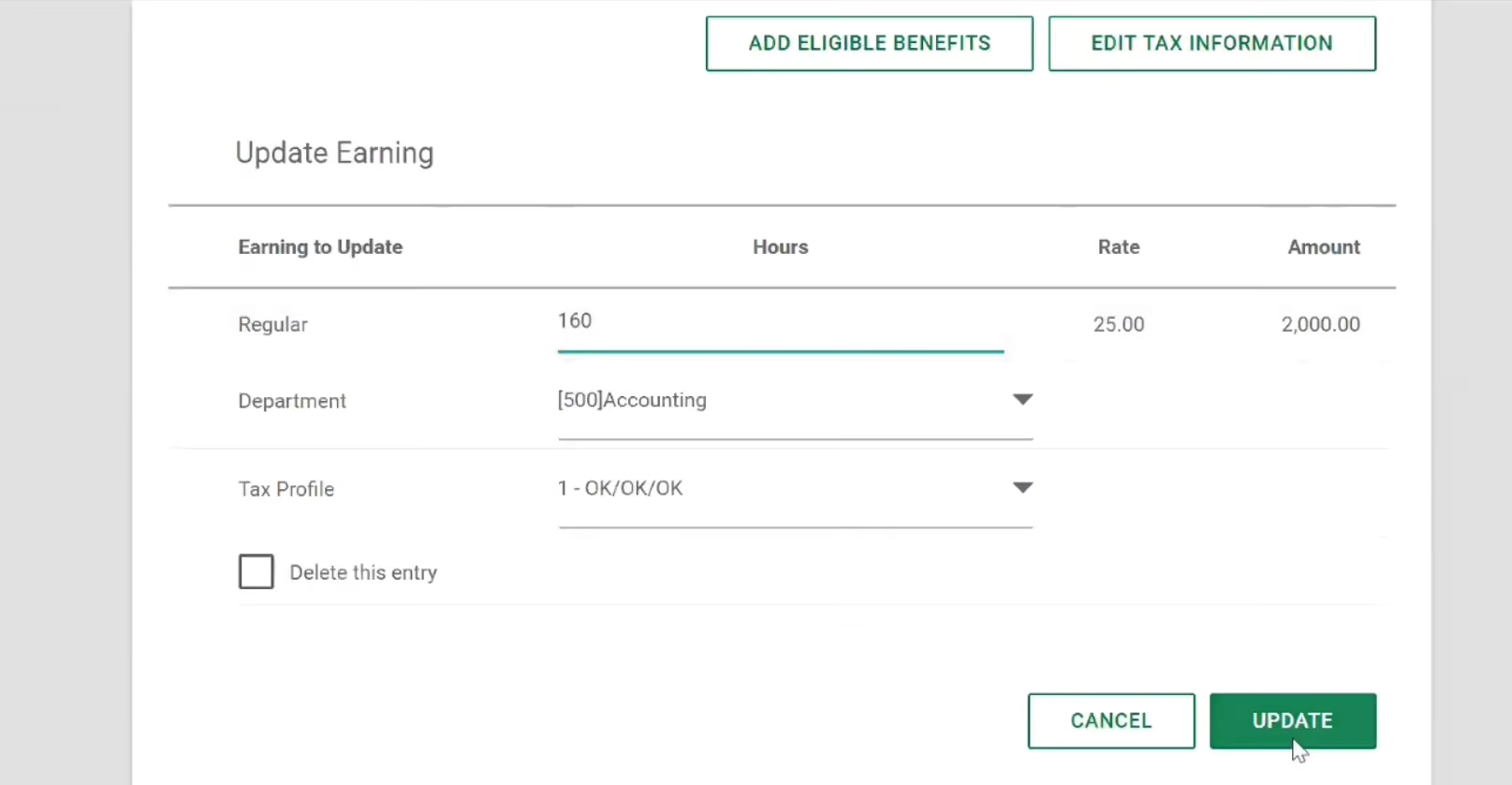
The broader Global HCM platform does provide a unified environment for managing international employees, including onboarding, talent development, workforce administration, and compliance-related processes.
However, as the vendor confirmed, customers cannot buy Global HCM without running payroll with Paycom. Based on our evaluation, this requirement makes the platform a tougher sell for companies seeking a flexible global payroll add-on or looking to preserve an existing U.S. payroll system.
Custom pricing.
Best For
U.S.-based companies with international payroll needs in specific markets, especially those prioritizing an integrated system for both HR and payroll.

I use Paycom for posting jobs, payroll, tax accountability, ATS, and resume scorecards. It has helped us optimize a lot of the admin stuff and maintain records better. When posting jobs, it offers a diverse list of places where we can post the positions that are free, at cost and college job boards which can be helpful for small firms with tight budgets. It helps us with tax compliance and kinda helps us project how many candidates we are going to seek in certain geographical areas. The ATS, helps us keep our collection of resumes to a minimum so that we can eliminate repeats.
I love that we were able to use Paycom for our specific needs. I feel that Paycom understands the small business and mid-size business needs. Paycom listens to their customers and are always seeking to make their product better!
We purchased Paycom 5 years ago and have been using it since. We were using an outdated product for payroll that didn’t offer a diverse use across the board in terms of add-ons. The ATS system worked well with a tool called Job Scan, this helped reduce people applying for several positions with the same resume. Now that most small and large companies have employees in other states, Paycom has the info to keep the taxes aligned. Self Service was also a main factor; we needed a tool that would allow employees to be able to access their information so that our small staff wasn’t constantly having to field the calls for things like W-2s that should be easily accessible.
I wish there was more product training at a lower cost. Every time we get a new admin we have to pay for additional training. I would like to see more add-ons like the other companies who wanted our business. More computability with the old Deltek software that we were using so that the change over was smoother.
Paycom is different from the competitors because the customer service is phenomenal! They listen to the customer!
When buying a payroll tool, the first thing I would recommend is analyzing your company’s needs. I believe assessing how the employees use the product is important in making the decision as well!
Over the years, Paycom has made the software more user-friendly, introduced communities, and improved mobile support.
Paycom is great for small to midsize businesses
Paycom would not be good for an engineering firm because of the way the hours are billed!

Multiplier
Multiplier tackles global payroll by operating its own employment entities across major markets. This means direct control over how payroll, local taxes, and compliance are processed. For organizations processing payroll in multiple currencies and jurisdictions, this architectural approach reduces execution delays and embeds compliance logic into the platform itself.
PROS
- Payroll processing across 150+ countries with automated local compliance built into the platform—no manual coordination or external intermediaries slowing down payment cycles
- Multi-currency payroll and payment processing with tax and regulatory changes encoded directly into the system logic, reducing manual intervention
- Unified payroll dashboard consolidates employee records, salary data, deductions, and benefits administration across all geographies in a single view
- Direct entity ownership means faster payroll cycle times compared to platforms that coordinate through reseller networks or third-party providers
- Employees access real-time payslip visibility, tax withholding details, and benefits information through self-service portals, reducing HR support burden for payroll inquiries
- Multi-currency payments in local currencies
- Multi-lingual contracts made instantly
- Compliance, payroll, onboarding, and timesheets, all in one platform
CONS
- Integration options are currently limited, with Multiplier only integrating with BambooHR, Workday, Personio, and HiBob for HCM-type tools. However, they are actively working on expanding their integrations.
- Customers have expressed a desire for more customization options, particularly in relation to contract clauses and leave types, to better align with their specific needs.
- Some users have reported experiencing slow response times from the customer support team.
- Limited integrations. As of Summer 2024, Multiplier only integrates with BambooHR, Personio, Workday, and HiBob for HCM-type tools, although they are working on adding more.

Multiplier's payroll engine is built around direct entity control across markets. Rather than routing payroll execution through third-party provider networks, Multiplier processes payroll directly from its own entities in each jurisdiction. This way, tax changes, currency fluctuations, and compliance updates hit the system faster because they're hardcoded into the platform's logic rather than handled asynchronously by external partners.
For payroll operations, you get a consolidated hub: employee records, salary configurations, deductions, withholdings, and benefits all live in one place across all your countries. You can run payroll in 150+ countries using multiple currencies, with local compliance automatically applied. Multiplier generates and maintains contracts adapted to each jurisdiction's requirements, which reduces back-and-forth with legal teams during setup.
For employees, the system provides transparency into what they're earning and keeping. Payslips, tax withholdings, benefits deductions, and bonus accruals are all visible in real time, reducing the volume of payroll-related support tickets for your HR team.
The downsides center on integration and customization. Integration is limited to BambooHR, Workday, Personio, and HiBob, so if you use other HRIS platforms, you may need to build API bridges or manage dual data entry. Customization options for contract structures and leave policies are also a bit constrained, which can be problematic if your payroll involves non-standard arrangements or heavily localized benefit structures. Additionally, some users have reported that support response times lag when dealing with complex compliance issues.
Amazon, Fusion, Graphisoft, ServiceNow, Linklaters, and Korn Ferry are a few of the companies that use Multiplier’s global employment solution.
Multiplier’s standalone global payroll starts at $20/employee/month. Other plans include 'Hire Employees' (from $400/month for automated contracts, multi-country payroll, and benefits) and 'Pay Freelancers' (from $40/month for contracts, multi-currency payments, and benefits). Employee insurance is priced separately from $20/employee/month.
Since 2024, Multiplier has expanded its offering to include a full HRIS module, broadening its positioning beyond standalone payroll and EOR into integrated workforce management.
Best For
Companies with distributed workforces and contractors running payroll that prioritize speed, compliance accuracy, and direct entity control.

We use Multiplier to onboard new hires outside our home country, collect documents, and generate locally compliant employment or contractor agreements.
Every month, we also use it to run payroll for our international employees and process payments for contractors, all from a single dashboard. Managers submit changes such as salary updates or terminations in Multiplier, and HR reviews and approves them before each cycle.
We also pull standard reports for finance from Multiplier to reconcile costs by country and team. For our distributed workforce, Multiplier effectively serves as the core system we rely on for global hiring and payments.
- Multiplier makes it easy to hire and pay people in multiple countries from one platform, reducing the need for vendor management.
- The onboarding and contract flows are clear, so HR, managers, and new hires know exactly what to do without unnecessary back-and-forth.
- The platform handles local compliance, currencies, and payroll rules, which reduces the time we spend checking with external experts.
We bought Multiplier when we started hiring outside our home location and needed a simple way to stay compliant without opening entities in every new country.
We already had a mix of employees and contractors but had been handling contracts, invoices, and payments on varying timelines and in multiple currencies. I had seen the platform in a previous role, so I knew onboarding was straightforward and the pricing made sense for a growing team.
We have now used Multiplier for almost three years, and it has become the default way we hire and pay people according to their location.
- The pricing feels a bit high compared to the level of service provided.
- The reporting system offers limited customization options.
- The response time for resolving errors or requests could be faster.
Compared with similar vendors, Multiplier’s new hire onboarding time is very fast. In many cases, a new hire can start within a week, whereas other providers typically take a minimum of two weeks.
Start by mapping out your requirements and identifying which services or modules you need. Check which countries Multiplier has its own entities in, and which rely on external partners.
Ask specific questions to confirm the tool can support your use cases, especially if your needs are unique or span multiple regions.
Multiplier has steadily added more HR features over time. I remember when I first explored EOR/PEO options, the platform focused primarily on global payroll.
Now it offers a broader range of services. For example, it can now assist with providing equipment to new hires, which was not available before.
Multiplier is a strong option for small to mid-sized organizations looking to expand internationally without setting up local entities. It works well for companies that want a fast, compliant way to hire and pay talent globally.
Multiplier may not be a good fit for very large companies that require extensive customization. Organizations that operate solely in one country may also find limited value in using the platform.

Native Teams
Native Teams impressed us with one of the most flexible and affordable global payroll lineups we’ve seen. Starting at as little as $19 per month, this platform supports payroll for all types of workers, from full-time employees to freelancers and gig workers.
PROS
- Affordable, distinct global payroll plans tailored to EOR, contractor, and gig workers.
- Payroll available in 95+ countries, with localized tax support.
- Built-in wallets and multi-currency payouts with optional employee cards.
- Automated workflows for salary updates, bonuses, absences, and expense reimbursement.
- Mobility and visa services are bundled into the payroll dashboard for EOR customers.
- Good range of EOR services with compliant contracts, payroll, benefits, and visa support.
- Pricing is half the typical EOR rate, and a free trial is offered.
- Built-in wallet and debit card for employees, with 1% cashback on balances.
- Contracts are bilingual and can be partially customized with legal team review.
- Visa and mobility support embedded in-platform for 20+ countries.
- Automated workflows for bonuses, tax allowances, and leave tracking.
CONS
- Fewer countries are supported compared to some competitors.
- Integrations with HRIS and Zapier are still on the roadmap.
- Lacks compensation benchmarking or pay analytics tools.
- The user interface and onboarding process can be more user-friendly.
- User interface lacks polish, and navigation can feel unintuitive.
- Onboarding can be slow, especially when syncing legal documentation.
- No HRIS integrations or open API (planned for 2026).
- Does not offer compensation benchmarking or planning tools.
If you're building a global team with a mix of employment types and need a simple, cost-effective payroll tool to match, Native Teams is well worth exploring.

Our first impression of this employer of record is that it is built for flexibility. Instead of bundling payroll into one monolithic product, Native Teams separates it into four clear plans based on employment type: Employer of Record, Contractor Pay, Gig Pay, and Contractor of Record. This modular approach gives companies far more control over costs and compliance.
Better yet, the pricing is fairly affordable to most teams. In particular, if you're hiring full-time employees abroad, the EOR plan starts at just $99 per month, which is the lowest we've seen in the category. For independent contractors, Contractor Pay begins at just $19 per month, while those paying gig workers or short-term freelancers at scale can opt for Gig Pay or Contractor of Record, depending on how hands-on they need to be with tax and compliance.
In our demo, we tested payroll flows for the EOR worker type. Adding bonuses, changing salaries, or submitting expenses was easy thanks to the automation. The payroll dashboard was insightful with data on country-specific tax breaks, vacation schedules, and details of what gross-to-net salary costs actually look like.
We also liked the digital wallet and Mastercard Native Teams offered to its clients’ employees and contractors, as these individuals can receive payments in multiple currencies and earn 1% cashback on balances. It’s not something we see often from competitors.
However, Native Teams’ country coverage (95+ countries) is still short of vendors like Deel, Remote, and Rippling (100+ countries). Furthermore, given that this EOR provider is working on HRIS integrations and Zapier support, finance and HR teams may have to rely on manual exports or custom workarounds for now.
Semos Cloud, Mad Head Games, Kaiko Systems, inDrive, Dolce & Gabbana beauty
Native Teams offers four payroll options:
- Employer of Record (EOR): Starts at $99/month per employee.
- Contractor Pay: Starts at $19/month per contractor.
- Gig Pay: Custom pricing.
- Contractor of Record: $99/month per contractor.
Best For
Native Teams is best for startups and lean global teams needing flexible, affordable payroll across multiple worker types.

Papaya Global
Papaya Global made our list of best global payroll software providers for enabling distributed teams to legally auto-pay contractors and employees in 160+ countries while making sure their data is protected by leading security and compliance software.
PROS
- Papaya’s full-service payroll guaranteed payouts in 72 hours in over 160 countries.
- It has a straightforward pricing system with a 60-day money-back guarantee if you are unsatisfied with the platform’s performance.
- Offers a dedicated customer success manager or global payroll expert in your time zone who assists you in the local timezone and language. You also get access to their in-house specialists on global employment in 160 countries without extra fees.
- The latest starter monthly fee for the full-service payroll plan has dropped to $12 per employee (the previous one was $20).
- Provides four individual solutions (data and insights, supplemental benefits & immigration support, payment services, and employee data management) at an affordable starter price.
- Papaya Global packs the EOR services you need to do global payroll and employment compliantly in over 160 countries.
- Automated payments in over 100 currencies, 80 of them directly to the worker's bank account through its global banking partners.
- Dedicated customer support providing locations-specific knowledge regarding employment and payroll.
- End-to-end payroll guaranteed payouts in 72 hours.
- Offers four standalone solutions: data and insights, supplemental benefits & immigration support, payment services, and employee data management, making the platform more affordable and scalable.
CONS
- Lacks local entities in the countries where it sells services. We found no information regarding its tax penalty guarantee either.
- Doesn’t offer a free trial or free plan.
- There are a few additional fees, including a set-up fee per location, an onboarding fee, a cycle fee per employee, and a year-end fee for tax filing. There’s also a required deposit (refundable).
- There aren’t many existing integrations, but you can use the platform’s pre-built APIs, SFTP, and custom API integrations for free.
- No free trial or free plan.
- Doesn’t own entities in all the countries it serves. The platform forms relationships with existing local in-country partners to handle employment in a specific region on the client’s behalf.
- BI analytics reports and global immigration services cost additional fees.
- Charges extra fees for setup, onboarding, employee cycle, and tax filing. Also requires a refundable deposit.
- Built-in integration options aren’t very robust. However, the platform does offer pre-built APIs, SFTP, and custom API integrations for free.

Papaya Global is loved by several users we have talked to and also by our editorial team. It is one of a few vendors that provide a straightforward pricing point (no one likes hidden fee surprises!), a solid set of HR tools, robust BI analytics reporting, and in-country customer support.
We appreciate how the platform has kept both employers and staff in mind when developing its HR tools. As an employer, Papaya Global gives you access to payroll, payments, and workforce analytics in one unified platform. The global payroll software provides automated payments in local currency, country-tailored benefit packages, pay slips in the languages of employees across over 160 countries, and AI-based engines to audit invoices for payment accuracy. Papaya Global backs you with in-house benefits experts who advise you on the soundest plans for specific locations without costing you extra. As an employee, there is a self-service portal you can easily access and navigate through. You can find onboarding documents there, request time off, check your docs, and review payslips. The newly launched mobile app (February 2023) will soon allow you to do these things, plus access payment calendars, bank details, and company announcements on the go.
Papaya Global’s global equity management is another thing that sets it apart from other payroll software. With this tool, you can offer equity to employees as part of their compensation, regardless of their location. As we mentioned earlier, the platform does a great job of providing advanced analytics reporting. By "advanced," we mean that you can access dynamic and visual insights into not just payroll, but also HR, billing, and admin data.
However, there are a few things you should keep in mind when considering Papaya Global as your global payroll software. First and foremost, Papaya Global does not own any local entity where it provides services. The platform relies entirely on its third-party local partners. While its pricing is transparent, there are additional costs besides the plan’s price, including a set-up fee per location, onboarding fee, cycle fee per employee, year-end fee for tax filing, and refundable deposit. It is worth getting in touch with Papaya Global’s team to get a full quote for your specific requirements to evaluate the platform further.
Microsoft, Intel, Toyota, Wix, Fiverr, Johnson & Johnson, Deezer
Papaya Global has just added four standalone services to its offerings besides the three plans:
- Full-Service Payroll service: It starts from $20 per employee per month, depending on your operation. It includes its advanced payroll platform, embedded payments, global partner network, and employee portal.
- Payroll Platform License service: Starting from $20 per employee per location, it is for businesses that need to upgrade their payroll and payments tech without replacing the current payroll partners.
- Data and Insights Platform License service: Starting from $150 per employee per month, it includes tools for real-time analytics on payroll costs and headcount.
- Payments-as-a-Service service: Starting from $3 per employee per month, it provides an embedded platform designed for workforce payment.
- Global EOR plan: This plan is between $770 and $1000 per employee per month and lets you manage all your EOR locations on one platform.
- Contractor Management & IC Compliance plan: Particular services are outsourced to a domestic or foreign contractor for periods of rapid growth and the need to reduce labor costs. This plan starts at $25 per employee per pay cycle.
- Payroll Intelligence Suite plan: This plan lets you consolidate all workforce and payroll data from all your operations into a single dashboard, priced at $250 for an annual plan or $320 quarterly per location.
Best For
Those that want to automate global payroll in countries where they have entities can benefit from Papaya Global. The platform is also a go-to payroll software for businesses whose international hires (employees, contractors) are based within Papaya Global’s country coverage.

I worked with PapayaGlobal for about two years in total, weekly. Mostly, I used the HR workflows because I am an HR consultant, and we were setting up mini HR offices globally. Employee onboarding was, of course, a big one. The integration with Workday was perfect. Uploading documents and organizing was straightforward. What I personally found invaluable were the compliance tools and local experience. This boosted my profile as well because I was learning through using the system.
Customer service is exceptional; you really feel that they are part of your team. I also loved the guarantees of local compliance, which created great trust with our in-house auditors. The ability to see the big picture of our workforce globally was also crucial, as it provided a great understanding of the workforce map and enabled strategic moves on the people side of things.
I was setting up PapayaGlobal for one of my previous clients. The reason we needed a tool like this was that we wanted to hire talent from different countries. Previously, we bypassed this by hiring on a "contractor agreement," but we really wanted employees, not contractors. While managing paperwork for EU candidates was somewhat easier, when it came to hires from outside the EU, it was a bit of a nightmare. Our HR team had to learn local employment laws, and we even contacted local lawyers to send us an empty contract so we could be fully compliant. These were the pains that the service greatly alleviated. We saved a lot of time, and audits were less stressful. We used it for about two years, but then the business took another direction.
It took a long time to learn the navigation through the platform; you really need to invest time to learn everything—you cannot just jump in with no training. Sometimes the screen would not load properly; words were overlapping, and it took some reloads for it to work, which was disappointing for a service that charges so much. We also had some issues with invoices; it was not clear how to manage them, but customer service helped with that.
Compliance support and global presence are the main reasons we chose PapayaGlobal. Another key factor is the customer service, which was consistently excellent. I also enjoyed the real-time access to analytics, which was helpful in following trends and monitoring important metrics globally.
First, consider the cost and how the pricing is structured to determine how much value a company can derive from the service at the agreed price point. Another important factor is access to real people who can guide the onboarding and integration with existing tools, which was commendable. Additionally, global access to local labor laws is perhaps the biggest consideration.
PapayaGlobal has evolved, but I believe other platforms have caught up and may be more attractive in their pricing.
PapayaGlobal is great for rapidly scaling businesses that need support in managing a multinational workforce.
PapayaGlobal is excessive for startups and scaleups with a simple payroll structure, or for those who work only with digital nomads, for example. Ensure you actually need all the services within the platform to make it worth the investment.

Rippling
Rippling stands out from other global payroll companies because it handles every aspect of the payment process. Very few global payroll companies directly administer all of the steps needed to pay employees across the globe.
PROS
- Nested within HRIS
- Hire, pay, and manage people under a single system of record
- All-in-one platform for employee management + PEO services offered, and even a suite of other IT products
- With 500 integrations, it’s very likely that they integrate with other key tools from your tech stack.
- Operates globally with any currency
- Workflow automation
- Analytics opportunities
- Provides a holistic view of company outflows—headcount costs included
CONS
- Not advisable for very small companies with slow growth
- While you can buy a base tier and add payroll, the real “magic” of this system requires total immersion in the Rippling environment
- Total buy-in to Rippling is essential
- Very SMB-oriented, in case you’re a larger company.
- New features tend to be buggy in ways that tech teams are not accustomed to fixing

Rippling went the extra mile on their global payroll product. They solved a business problem better and before anyone else in their weight class. At this point in their growth, they are agile enough to move quickly, but have just enough mass and inertia to put thousands of hours of labor into doing a complex thing right.
As we pointed out before, Rippling’s global payroll suite stands out from other global payroll companies because it handles every aspect of the payment process; from tracking hours to calculating and filing taxes. Very few global payroll companies directly administer these kinds of steps while also offering a full HRMS to plug it with.
With the exception of payroll titans like Workday, most businesses offering global payroll services are actually “aggregators” of other businesses– they arrange connections between an array of third-party vendors who are unified under one company name. This has some serious drawbacks. Like a game of telephone, a lot can be lost in translation as data is passed from one entity to another.
Built-in is better. This feature’s proximity to the HRIS means the integration process is simple. According to Rippling, it takes “about 90 seconds” to set up an employee for global payroll if you’re already using Rippling. Being built-in also results in seamless access across all dimensions of employee information.
Best For
Rippling was primarily used for recruitment, with some use for onboarding since the number of employees being hired was still relatively small. The ATS and onboarding systems integrated seamlessly, allowing for an efficient workflow.
The tool was predominantly utilized during recruitment, where its dashboards and customizable recruitment processes proved especially helpful. Rippling's features significantly simplified the hiring process.
The hiring process was transparent and straightforward. I found Rippling's dashboard particularly helpful and user-friendly. The onboarding process became significantly easier, and the smooth integration between the systems was a major advantage.
I was working with a start-up where everything related to resume management, onboarding, and offboarding was done manually. Payroll was managed through QuickBooks.
Rippling was introduced because there were plans to expand the workforce, creating a need for a system that could streamline and organize processes efficiently without consuming too much time.
Rippling proved useful as it offered both an applicant tracking system (ATS) and tools for onboarding and offboarding. It also includes payroll options that can be leveraged in the future.
I felt that the customer service could be improved. The pricing was a bit high for our budget, but the company went ahead with the purchase based on positive reviews. After implementation, we realized that the payroll system might not be the best option for our future needs.
The company chose Rippling because of its positive reviews. I would prefer a system that includes an integrated payroll system in the future so everything can be managed in one place.
It is important to plan how the company will use the system in advance. Pricing should also be carefully considered, especially if expansion plans are uncertain, as was the case with the company I worked for.
I haven’t used it long enough to observe any evolution. It appeared to be the same during my time using it.
This tool is ideal for companies transitioning from manual processes in recruitment and onboarding to automation. I am unsure about its suitability for other features or use cases.
It might not be suitable for companies that don’t plan to expand significantly. In such cases, the onboarding, offboarding, and recruitment portal features may not provide much value.

ADP
ADP GlobalView is the solution for international payroll from one of the most reputable and long-standing companies in the space.
PROS
- Native, all-in-one technology suite for recruitment, payroll, and compliance.
- 17 RPO service centers in 14 countries and provide services in 42 different languages.
- Dedicated team of AIRS-certified recruiting professionals.
CONS
- Technology options outside ADP’s dedicated HR tools are limited.
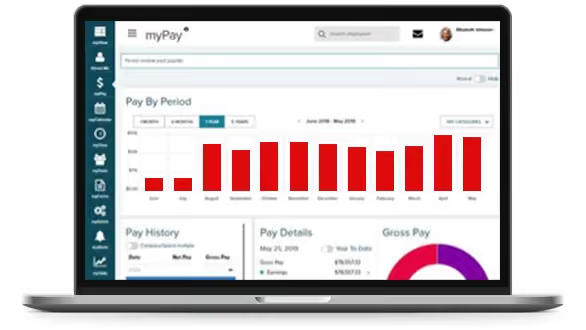
If you intend to manage global payroll for thousands of employees, ADP’s GlobalView should be on your list of vendors to consider. The payroll giant has put together a solution that’s specific to big businesses, providing them with a single system to unify all global employee payroll data while letting you stay compliant.
For this product, ADP also operates with local experts. You can process payroll yourself, or outsource most of the back office payroll functions to ADP’s team. Finally, GlobalView works only in 40 countries, but it can be combined with ADP Celergo to extend their coverage to up to 140 nations.
Among others, ADP’s global payroll solution is used by the likes of PayPal.
Like with most ADP products, pricing details aren’t available online, since they’ll likely provide a custom quote once you request and have a demo.
Best For
Large enterprises that want a single place from where to manage an international workforce.

I managed payroll, processed employee benefits, tracked time and attendance, and handled talent management functions. ADP's interface allowed me to easily navigate and input relevant data. This helped streamline day-to-day tasks.
Additionally, the reporting features helped me generate valuable insights into workforce analytics and compliance. Overall, ADP served as a comprehensive tool that supports our organization in various HR management aspects.

- I appreciate ADP's user-friendly interface to simplify complex HR processes.
- ADP's robust reporting capabilities provide valuable insights for strategic decision-making.
- The scalability of ADP allows seamless adaptation to the evolving needs of our growing organization.
One of the primary reasons ADP was selected was its reputation as a reliable HR solution provider. The platform is known for its ability to streamline payroll processes, manage employee benefits effectively, and ensure compliance with changing regulations.
Additionally, ADP's scalability was a crucial factor. It accommodated the evolving needs of our workforce and provided the flexibility to handle increased employee numbers.
- I find occasional glitches in the user interface of ADP frustrating.
- The limitations in customization options can be restrictive for our specific needs.
- There's a concern about potential increased costs as our organization grows with the continued use of ADP.
ADP user-friendly interface makes HR tasks more accessible for our team, and the reporting features provide insights into workforce analytics. Also, the customer support from ADP has been consistently responsive and helpful.
Consider the tool's functionality to ensure it aligns with your HR needs, evaluate scalability for future growth, and assess integration capabilities with existing systems. You will need to scrutinize compliance, security, and the total cost of ownership. Additionally, research the vendor's reputation, inquire about the product's upgrade plans, and take advantage of trial periods to assess real-world performance before making a final decision.
ADP has evolved to meet user needs by enhancing its user interface and expanding its features to address a broader range of HR requirements. This would include payroll processing, benefits administration, and talent management. ADP's scalability has improved, accommodating the diverse needs of both small businesses and large enterprises. The platform's increased integration capabilities enable seamless connectivity with other systems, enhancing overall workflow. Over time, ADP has embraced mobile accessibility, allowing users to manage HR tasks remotely, reflecting its adaptability to changing work dynamics.
In my experience ADP is adaptable to the specific needs of growing companies. It is an excellent choice for users seeking a comprehensive HR solution, encompassing payroll processing, benefits administration, time and attendance tracking, and talent management. The platform is beneficial for those who prioritize user-friendly interfaces that require robust compliance features and reliable customer support. ADP is a valuable and supportive HR management solution.
ADP may not be an ideal fit for very small businesses with basic HR needs. Its comprehensive features may be more robust than necessary. Additionally, companies with an existing HR software system that is deeply ingrained in their processes may face challenges transitioning to ADP. Highly specialized industries with unique HR requirements might also find ADP less tailored to their specific needs.

Dayforce
Dayforce Global Payroll stands out for bringing payroll, HR, and benefits into a single system for global enterprises. We love how it puts the processing, compliance, and local expertise all onto one platform, which makes managing payroll across many countries much less complicated.
PROS
- Payroll coverage across 200+ countries and territories supports global scale.
- Built-in compliance tools and local experts help manage regulatory complexity.
- Unified system improves visibility into global payroll data and reporting.
- Continuous calculation reduces manual work and improves payroll accuracy.
- Payroll coverage across 200+ countries and territories supports global scale.
- Built-in compliance tools and local experts help manage regulatory complexity.
- Unified system improves visibility into global payroll data and reporting.
- Continuous calculation reduces manual work and improves payroll accuracy.
CONS
- Likely too complex for smaller teams or companies with limited global footprint.
- Pricing is not transparent and may be high compared to simpler payroll tools.
- In countries where payroll is partner-delivered rather than native, reporting consistency and issue resolution may vary.
- Likely too complex for smaller teams or companies with limited global footprint.
- Pricing is not transparent and may be high compared to simpler payroll tools.
- In countries where payroll is partner-delivered rather than native, reporting consistency and issue resolution may vary.

The first thing we noticed about Dayforce Global Payroll is that it is rooted in payroll rather than expanding into it. Dayforce originally entered the market with a cloud-native payroll engine designed to address the limitations of legacy batch processing, a design that still shapes how the platform operates today. This foundation gives Dayforce a more mature and purpose-built approach to global payroll.
With coverage spanning more than 200 countries and territories, it is designed to handle the scale and complexity of multinational payroll without relying on fragmented systems. Instead, payroll processing, data, and reporting are all managed within a single platform.
What makes this especially notable is its continuous calculation engine. Unlike traditional payroll systems that rely on periodic batch runs, Dayforce calculates payroll in real time as data changes. We think many teams will find this particularly valuable, as it reduces the need for manual adjustments and provides better visibility into payroll outcomes before finalization. This approach directly addresses many of the accuracy and compliance challenges associated with older payroll models.
Compliance is also deeply embedded in the platform. Dayforce combines automated rules with support from local payroll professionals, which helps explain why it is highly regarded by users for a standardized, controlled payroll environment. Organizations can consolidate multiple payroll systems into a single system, streamline data flows between HR and payroll, and reduce manual effort. Access to global reporting further supports this by giving teams a clearer, real-time view of payroll data across regions.
However, this depth comes with tradeoffs. Dayforce is not designed for quick deployment, and implementations often require a structured, phased rollout. While this supports long-term consistency, it may not suit companies looking for a fast or lightweight solution. Furthermore, Dayforce natively processes payroll in over 20 countries, with the remaining coverage delivered through vetted in-country partners. The experience is unified through the platform, but buyers should clarify which model applies to their specific countries during evaluation.
We also found that the platform is best aligned with larger organizations. Its enterprise-level capabilities and operational model may feel like more than smaller teams need, especially if they manage payroll in only a few countries.
Spirit AeroSystems, Caleres, and Costa Coffee.
Undisclosed.
Best For
Multinational corporations seeking an end-to-end platform to manage payroll as they scale their global operations.

As an HR leader working in the COE, I used Dayforce as an administrator. I had access to add and remove reports, run reports for North America, Canada, and Mexico, and control benefits administration - including open enrollment, life event changes, reconciliations, etc. I used Dayforce as the main HRIS for the company I was employed in at the time.
I loved that the platform reached our global audience and that our employees could manage their own data in the system. I also liked the reporting functions and how easy it was to make benefit changes in the system from an administrative view.
We chose Dayforce because it was one of the only systems that had the global support we needed. We needed a robust system that would allow our employees to manage their data in the US, EMEA, Canada and Mexico, as well as hone into reporting functions easily for our COE. I used Dayforce for almost 4 years, managing benefits, reporting, and employee data. I trained my team how to use it, so they could emulate this training at their respective locations.
Dayforce is not the most user-friendly interface. It is not impossible to use, but for anyone who struggles with tech, it can be a challenge. Companies with large populations may also find it easy to get analysis paralysis, as all of the reports can be overwhelming and hard to sort through. Lastly, it only gets easier with practice, so if you are not on this platform often it will not get easier to navigate. One truly must familiarize themselves with it in order to understand how to navigate it.
What sets Dayforce apart is its global capability and reporting functionality. I have yet to come across another platform that can store the amount of data this can and pull it together in the same way Dayforce can.
The size and location of their organization/employees, data analytics, user interface and price.
I think they are trying to make a dashboard more user-friendly but otherwise, I think they know their strength and lean into that.
Large global organizations
Small businesses operating on a local scale.

Pebl
We picked Pebl because it runs most of its payroll itself, not through partners. More precisely, the platform employs 90% of the employees it supports through its own entities. Among the global payroll providers we’ve compared, few pair that much entity ownership with a list price this low.
PROS
- Most employees are paid by a Pebl-owned entity, so a payroll error has one accountable party, not a partner chain.
- Pebl's fee ($399) undercuts Deel ($599) and Remote ($699), and it can’t rise during a worker’s 12-month term, so finance can budget the year without surprise increases.
- Employees can be paid via ACH, wire, bank account, or digital wallet, reducing failed payouts in countries with weak cross-border banking.
- Invoices follow each country’s payroll cycle, with true-ups.
- Support is regional rather than outsourced. Each client gets an account manager in their time zone who speaks their language, backed by local HR experts and 24/7 coverage.
- Competitive flat-rate pricing at $399/month.
- Strong service and support during relocation or contractor conversion.
- Handles payroll, benefits, and compliance locally.
- Includes visa and work permit assistance.
CONS
- Offboarding requires 90 days’ notice, and leaving before the 12-month term ends makes all remaining fees due at once.
- You won’t know a hire’s full upfront cost until Pebl sets the deposit. It’s decided case by case using salary, payment history, and your company’s credit score, so newer or cash-light companies may pay more upfront.
- If a worker’s bonus or commission tops $50,000 in one month, you must pay Pebl that amount before payroll runs, instead of on the normal invoice.
- Pebl is an EOR only, with no HRIS, IT, or broader HR tech bundle, so you’ll need a separate HR system alongside it.
- Limited integration options compared to some other EOR platforms.
- Occasional bugs in the user dashboard.
- Some redundant steps in the onboarding process.
We found Pebl to be one of the best-value ways to pay employees in countries where you have no legal entity, but not a platform for consolidating payroll across your whole company. One org we consulted, a cybersecurity training firm with about 700 employees across roughly 25 countries, had been debating whether to set up entities in more countries. Its HR lead chose Pebl instead. Pebl now employs the company’s 50 workers in countries where it has no entity, while the other 650 are based where the company has its own entities and stay on its own payroll and HR system. In our experience, that’s the right way to think about Pebl. It’s a compliance tool for the edges of your global workforce.
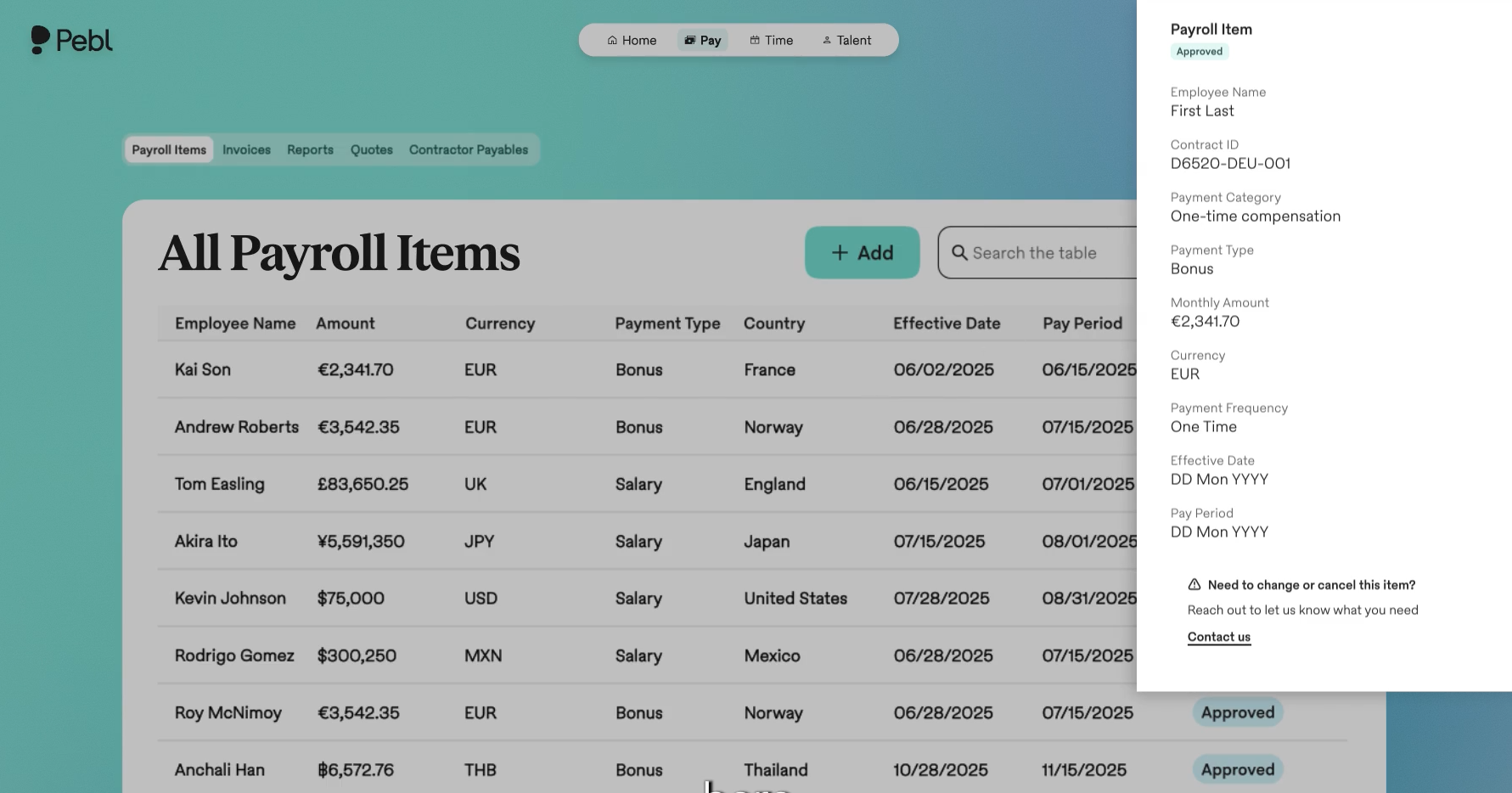
In a Q3 2026 demo, we walked through onboarding a sample hire in France. Building the offer, generating a locally compliant contract, and sending the invite took about 15 minutes, and the dashboard showed the full monthly employer cost, including statutory contributions, before we confirmed the hire. The company we advised used it the same way, starting in Canada, adding Sweden, and keeping Mexico ready for when a hire came up, with fees charged per worker rather than per country. From there, Pebl acts as the legal employer and handles payroll calculations, statutory remittances, and payments, so you never run payroll in those countries yourself. You fund Pebl’s invoices, which follow each country’s payroll cycle, including weekly, and true up hours actually worked. Plan for one gap. Although the workers are technically Pebl employees, the company still keeps them in its own HRIS so leadership can report on headcount and payroll costs across the whole business.
Since late 2025, Pebl has launched Alfie, an AI assistant that can search payroll data and route support questions at no extra cost. The platform has also added crypto-ready payroll in response to demand from clients’ employees, plus token equity support, so companies can grant employees abroad digital ownership without local entities.
At $399 per employee per month, Pebl costs $200 less than Deel or Remote and $300 less than Oyster. That saves $2,400 per employee per year vs. Deel or Remote (33% less) and $3,600 vs. Oyster (43% less). Multiplier, at $459 billed annually or $499 monthly, is the closest rival, and Pebl still saves $720 to $1,200 per employee per year (13% to 20% less). For a group the size of the one we saw in practice, around 35 workers, that’s roughly $84,000 a year less than Deel.
Pebl has its own entity in about 90% of its country coverage, which is a good figure given its fee. It doesn’t publish which countries belong to the remaining 10%, though. If you’d rather your workers be employed and paid by a Pebl entity than by a local affiliate or in-country partner, ask Pebl before you sign.
Where Pebl falls short, particularly for smaller companies, is flexibility. From our review of Pebl’s published EOR terms of service last updated in October 2026, the 90-day offboarding notice starts on the first day of the month after Pebl receives it, so a mid-month decision can mean nearly four months of fees. If a worker resigns or is let go before their term ends, the remaining fees for that term become due immediately, with no refund or proration, whether the exit is the company’s decision or the worker’s. The only exceptions are an uncured breach by Pebl or a termination by Pebl without cause. Keep this in mind, especially if a large portion of your team experiences high turnover or has unpredictable tenure.
Honeywell, AB InBev, Linksys, Crunchbase, Betterment, Anaplan, Consensys
Starts at $399 per employee per month.
Best For
Companies that need affordable, accountable payroll for a few dozen employees in countries where they have no entity, and that already have an HR system and payroll setup for everyone else. It’s one of the best-value EOR payroll options we’ve evaluated for stable, long-term hires, but only commit a role to it if you’re confident it will last its full term. If you need one platform to run payroll and HR for your whole global workforce, look at Rippling or Remote instead.

Remote
Remote global payroll software enables employers to hire and pay contractors and employees in locations around the world. They also offer IP protection, data security, 24/7 localized customer service, and ample platform customization.
PROS
- Flat fee structure. No deposit is required (conditions apply), and there is no extra charge for benefits administration.
- Mobile apps are user-friendly and frequently updated.
- 24/7 local support via email and live chat.
- Equity-based compensation available.
- Helpful HR tools and global employment guidelines are free to access via Remote’s website.
- Fast and compliant payroll in 170+ countries.
- Live chat support with local payroll experts.
- Flexible, localized benefit packages.
- Flat-rate pricing structure, no deposits or hidden fees.
- Mobile app streamlines expense reimbursement with autofill from receipt photos.
CONS
- It may be out of reach for small teams with limited budgets.
- Only supports direct deposit and wire transfers, and no off-cycle pay runs.
- No phone support is available.
- Doesn’t have a free trial.
- Redundant for organizations solely recruiting within the U.S.
- Help center documentation isn’t easiest to understand.

Remote is one of our top picks for global payroll solutions.
Remote offers localized payroll services, handling benefits administration, payroll processing, and contractor payments. Customers can run payroll on their own entities or hire through Remote’s entities in 60+ countries, with Remote as the single provider for both.
As an Employer of Record (EOR), Remote handles employment's administrative and legal aspects, like payroll processing, benefits administration, tax, and legal compliance. For those who have handled tasks like these close to home, it’s not difficult to imagine how profoundly complicated and error-prone global payroll is. With the help of Remote, companies can focus on doing their actual work, whatever that may be, rather than learning the intricacies of payroll across the planet.
Loom, GitLab, DoorDash, HelloFresh, Workato, Semrush, Teamway
Remote’s Global Payroll is priced at $50 per employee per month.
Best For
Great pick for either remote-first businesses or those with distributed workforces.

We use Remote to maintain and track payroll and PTO for our international hires.
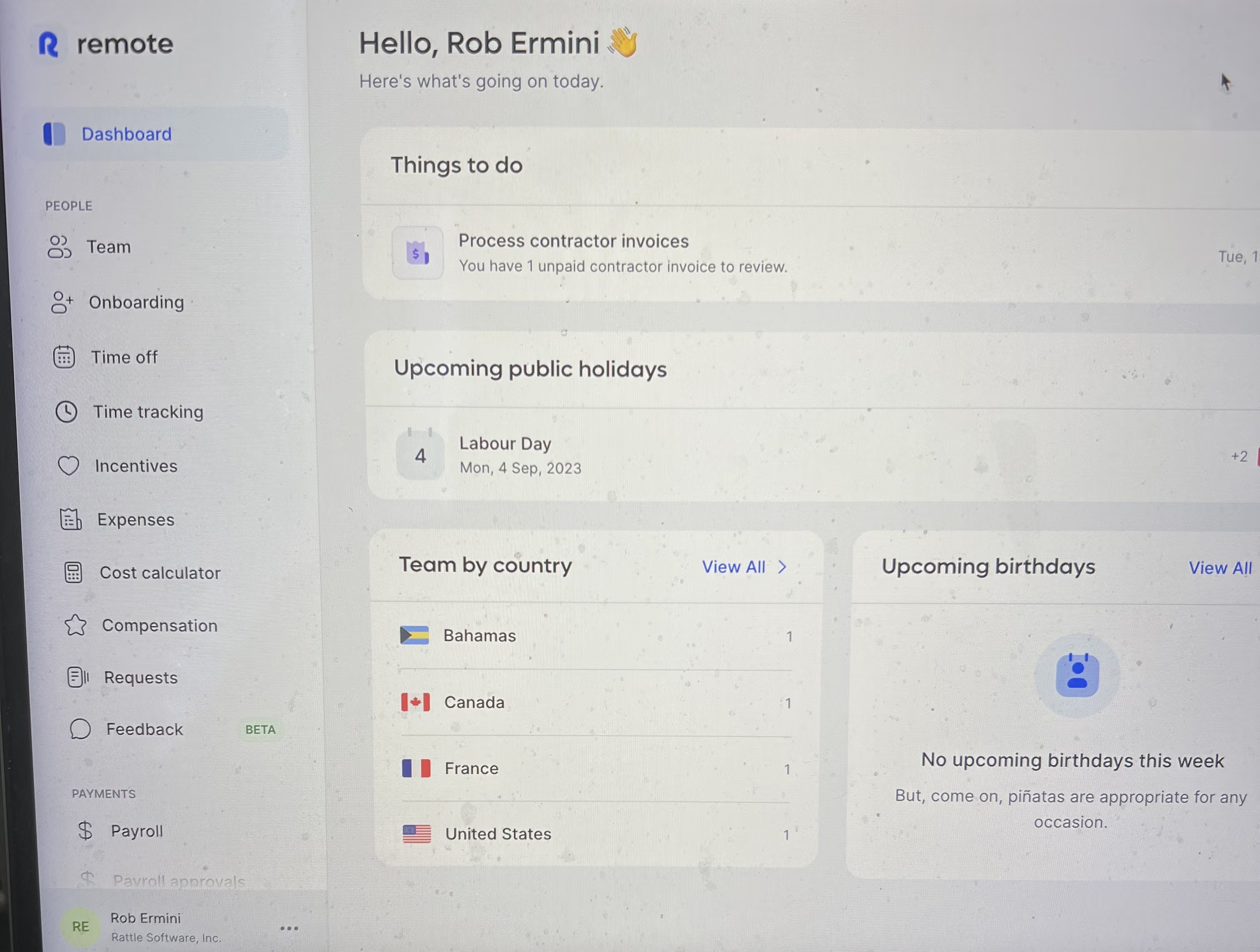
- Very organized to track international payroll and PTO.
- User friendly for both hiring manager and employee.
- Great dashboard and easy to navigate.
We made international hires. Remote provided a safe space for us to negotiate, track and provide timely payments to our international employees. Remote provides similar HR/Payroll usage as another in-house system for example like TriNet.
- If you’re unfamiliar with international payroll processing, it can be confusing.
- Invoices need to be attended to so employees do not miss timely payouts.
- Benefits and policies can be different country to country.
Remote is the only platform I have used for international hiring purposes.
- What does the hiring manager and employee need access to regarding payroll, benefits and HR purposes when hiring internationally.
- Confirmation that Remote can support the respective country you are hiring someone
I’ve used Remote for about 6 months now and it’s worked like a charm. They provide a great customer support team that is responsive and knowledgeable about everything related to hiring and payroll policies with respect to regions and countries.
Companies that are looking to expand hiring internationally.
This tool would not be a fit for departments outside of talent acquisition, payroll and/or HR. Remote is primarily used for hiring and tracking invoices of international hires. It would not make sense for someone in sales, marketing or CS to ever use remote.

G-P
G‑P helps companies hire, pay, and manage workers in 180+ countries without setting up entities, handling everything from EOR and contractor payments to payroll taxes and compliance. The G‑P Meridian platform and AI assistant G‑P Gia bring automation and clarity to cross-border employment, making it easier for teams to grow internationally with confidence.
PROS
- Centralized payroll, HR, and compliance in 180+ countries
- G‑P Gia automates contract creation and HR workflows
- Supports full-time employees, part-timers, and contractors
- Strong legal and regulatory coverage with in-house experts
- Scales well with mid-sized and enterprise teams
- Their G-P Meridian platform is heavily focused on the EOR space, but it’s offered in several plans that can cater to varying needs, even those that might only need to hire people as contractors.
- Using their tool also implies access to a team of HR and legal professionals with significant experience in each country they operate in.
- Their UX has evolved continuously and gotten more intuitive and modern each time we delve into the product.
CONS
- Contract editing requires the Meridian Prime plan
- Add-ons like IT support and equity management increase total cost
- No free trial; demo required to explore functionality
- Customizing a contract is only possible with the G-P Meridian Prime plan.
- Features like background checks, equity management, and IT equipment— to name a few— are only available as add-ons.
- There is no way to try out the software product unless you sign up for a demo and request a proposal.
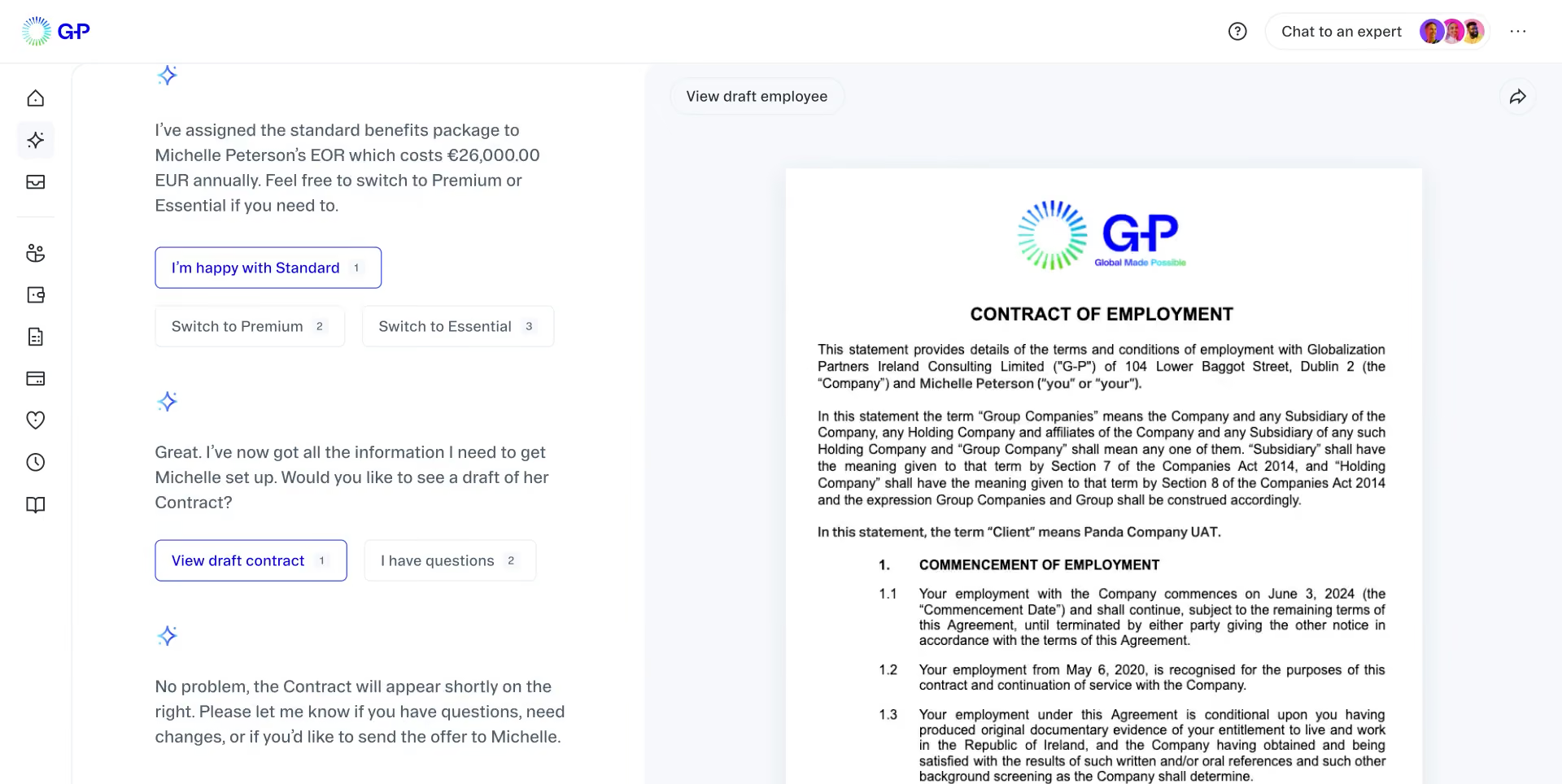
G‑P (formerly Globalization Partners) is a global payroll and employment platform that enables businesses to hire and pay contractors, freelancers, or full-time employees in over 180 countries. The company pairs software with local HR, tax, and legal infrastructure, helping users stay compliant without the need to set up foreign subsidiaries.
Their G‑P Meridian platform covers everything from localized payroll to benefits, expense reimbursements, onboarding, and offboarding. G‑P Gia, their AI assistant, simplifies contract creation, country-specific labor law guidance, and employee inquiries. This makes G‑P particularly helpful for companies entering unfamiliar regions or scaling quickly across borders.
G‑P isn’t the lowest-cost provider and doesn’t offer a free trial, but its ability to cover nearly any employment model—EOR, contractors, or freelancers—within one platform makes it a strong choice for teams that prioritize compliance and scale.
Used by thousands of global companies, including Zoom and Zeeto.
Pricing is not publicly listed and depends on country, employee type, and service tier. A custom quote is provided after a demo.
Since our last review, G‑P has launched G‑P Gia, an AI assistant that supports hiring workflows, generates compliant contracts, and answers labor law questions. The G‑P Meridian platform also added expanded contractor support, expense tracking, and better visibility across multi-country payroll and HR tasks.
Best For
Teams hiring across multiple countries that need one platform for paying contractors, full-timers, and freelancers—without the complexity of local entity setup.
As a managing partner in HR, we use G-P daily. They handle all the compliance issues and make sure we don’t trip over local labor laws. They also manage payroll, ensuring everyone gets paid on time (we had issues with local banks before). Onboarding new hires has sped up considerably. We can now focus on strategic tasks instead of drowning in busy work.
G-P handles the time zone issues for us, making scheduling easy. Their platform provides updates on local holidays, so we never accidentally plan important meetings on a day off in another country. Their customer support is truly great, especially when we're dealing with urgent issues. They offer localized perks, like specific benefits that resonate with employees in different regions.
We jumped on board with G-P two years ago because we were overwhelmed by the chaos of hiring from different countries. The headaches of local labor laws and juggling international payroll were driving us crazy. G-P handled all the tricky aspects of global employment for us. They took care of compliance, payroll, and benefits, which saved us from countless sleepless nights. Thanks to them, we could manage more work with a smaller HR team, making everything more efficient. Now, we can focus on growing our team without getting bogged down in the details of international HR.
One downside is that their services can be pricey, especially for smaller companies or startups. It is expensive for us as well, and we intend to shop around. Another issue was that the platform's integrations with our existing HR systems were not as smooth as we hoped, causing some delays. Additionally, the customization options for reports and dashboards are limited, which can be frustrating when we need specific data.
I found the international payroll services quite good, which are always tricky. Other competitors advertise local entities that handle things seamlessly, but that was not always the case. Here, they truly are professional. The customer service is not just fast and lovely but also capable of solving issues, even at 7 PM on a Friday. Time zone and local holiday coordination make managing an international workforce easier.
When buying a tool like G-P, consider how well it handles compliance with local labor laws to avoid legal headaches. Look at the platform's ability to manage international payroll. Check the level of customer support—having not just quick but knowledgeable help can save you from a lot of stress. Also, think about how user-friendly the platform is and whether it integrates smoothly with your existing HR systems.
Over the last two years, G-P has introduced new features. Aside from the tool that helps us keep track of local holidays, they've improved their language support, making it easier for teams who speak different languages to get help and navigate the platform. Another addition is their cultural tips feature, which offers insights into local customs and etiquette—handy for building better relationships with our international team members.
It's perfect for mid-sized businesses and large enterprises that need to manage international employees. Startups with global ambitions will also benefit, especially if they want to hire talent from anywhere on the planet.
G-P might not be the best fit for tiny startups or small businesses with tight budgets who aren’t planning to go global anytime soon. If your hiring is all local and you don’t need to deal with international labor laws, you don't really need them.

Oyster
Among several global payrolls in the market, Oyster stands out for being flexible enough to manage payroll in over 120 currencies while integrating features for expense reimbursement, time-off request, and bonuses.
PROS
- Oyster’s global payroll supports salary payouts in over 120 currencies.
- You can sign up to explore the platform, help docs, and HR tools, only paying when you hire someone.
- Provides transparent flat rates for employees and contractors and a tool that can quickly calculate potential costs and risks of hiring in a new country.
- Whether your employees are in one country or 100, Oyster can accommodate them accordingly, and this is a feature few platforms can boast of.
- Helpful customer support and help center. Thorough guidance on global employment (available for only the highest-priced plan, though).
- Intuitive: The platform is easy to navigate and makes logical sense.
- competitively priced: The flat rate for employees and contractors makes cost comparisons simple, and is competitive in the market.
- Targeted for a remote workforce: Whether your employees are in one country or 100, Oyster can accommodate them accordingly, and this is a feature few platforms can boast.
CONS
- There may be some salary delays in transfers.
- Only supports bank transfers for payments.
- Monthly pricing varies by where the employees are based.
- Slight delays in processing times for payments in the local currency are somewhat common.
- Immediate communication via phone support is not an option, but they do offer live support via Zoom when necessary.
- An initial security deposit is necessary to begin the engagement and is refundable.
- The platform lacks native time-tracking functionality and provides only an in-app tool for managing time off.
- If you’re looking to co-employ your employees and partially outsource HR responsibilities, Oyster isn’t for you. They are more akin to employer of record services (EOR) than a Professional Employer Organizations (PEO).

Among several options in the space, Oyster is flexible enough to manage payroll in multiple currencies and locations globally and has integrated features for expense reimbursement for traveling employees. Running payroll on Oyster was easy. We could process both employee and contractor payroll in one platform and choose the preferred currency and payroll frequency (monthly/bimonthly), depending on country payroll regulations. We’re also happy with its simplicity in managing tax withholding and accounting. While Oyster did well in ensuring employees working under different currencies are paid correctly and compliantly, we wished to see more withdrawal options in the platform rather than just bank transfers.
Oyster is one of a few vendors that can accommodate teams hiring people in over 180 countries. The platform also provides a self-service portal where employees can request time off and reimbursements. We liked that each time one submitted a request, we instantly saw it in Oyster’s admin dashboard, highlighted under the Requiring Attention section. Related tools like the cost calculator, global recruitment guides, and invoice management were placed right in the dashboard, making it easier to access and get the needed help.
Some of Oyster's customers are Juno, Demodesk, Chili Piper, Quora, Wagestream, Impala, and Grover.
Oyster has three pricing plans:
- Contractor: It starts at $29 per contractor per month and includes hiring contractors in 180+ countries, drafting, editing, signing compliant contracts, processing invoices, and paying contractors in 120+ currencies.
- Employee: The plan starts at $499 per employee per month when billed annually and includes features for hiring full-timers in 120+ countries with compliance and liability coverage, automation, IP protection, global payroll, expenses, allowances, and bonuses in 120+ countries.
- Scale: The plan has custom pricing and includes a discounted rate, dedicated client service, and support to navigate global employment and bulk hiring.
- Local benefits plans are provided as add-ons for Employee and Scale plans.
- You can create an account, explore the platform, and access Oyster’s HR tools and resources for free. You’ll only pay once you’ve engaged a team member.
- Discounts are available for nonprofits and businesses hiring refugees.
Their country offering always tends to expand, and the same can be said for their integrations with other software. While they started out fairly limited in the latter regard, they've been working hard to make their product able to talk to other HR tools. Some of the recent integrations include Slack, Greenhouse, Personio, Workday, Expensify, HiBob, Okta, BambooHR HRIS, NetSuite, and BambooHR's ATS.
Best For
Distributed teams whose current and future contractors, employees, or both are based in countries listed on Oyster’s 120+ country coverage. Nonprofits and businesses looking to hire refugees in countries where Oyster has local entities would also benefit from the platform’s special discounts.

I use Oyster regularly to manage our global workforce. It simplifies onboarding by providing structured workflows for new hires in different countries. The platform also handles payroll across multiple currencies, ensuring employees are paid accurately and on time.
We rely on it for administering localized benefits and for staying compliant with international labor laws. Customer support is responsive, and the built-in analytics help us track workforce trends and needs.
- Oyster provides strong global compliance and employment expertise.
- The international onboarding process is fast and efficient.
- Payroll management across different currencies is reliable and flexible.
- The benefits administration tools help attract and retain global talent.
- The platform includes useful analytics and reporting.
- Customer support is responsive and knowledgeable.
- The product evolves based on user feedback.
Our organization was expanding globally and needed help navigating international compliance and employment regulations. With a small HR team of just three people, we lacked the in-house expertise to manage international hiring effectively.
Oyster helped us solve those challenges with a platform that covers global compliance, onboarding, payroll, and benefits. It gave us the support we needed without having to hire additional staff.
The company has been using Oyster for over a year, and it has become an essential part of our HR operations.
- The cost can be high, especially for smaller companies.
- Integration options with other HR or business tools are limited.
- Time tracking and performance features are basic.
- Customization options are minimal.
- Learning and development tools are underdeveloped.
- Absence management is limited compared to specialized platforms.
- The mobile app lacks some functionality available on desktop.
- Document management features are very basic.
I haven’t used other tools like this before, so I can’t directly compare it with competitors.
When choosing a tool like Oyster, consider your specific HR needs and how well the platform addresses them. Budget is important, but you should also think about how the tool integrates with your current systems. For us, compatibility with our existing setup was key. Be clear on the problems you're trying to solve so the solution aligns with your goals.
We have only used Oyster for about a year, so I’m not sure if any significant changes were made to the platform.
Oyster is well-suited for global or fast-growing companies, especially in industries like manufacturing, where international hiring is common.
Oyster may not be a good fit for smaller organizations that don’t need extensive HR support or global capabilities.
.avif)
Atlas HXM
Atlas is an EOR and HR services-focused global payroll provider. They work well for teams of all sizes and offer a good combination of in-house expertise and a functional tech platform.
PROS
- Hire people through direct EOR entities in 160+ countries.
- They are a services-focused company with the tech to back it. For example, with the help of a locally-versed expert to guide you through the process, you can onboard employees and process their payroll in any of the 160+ countries they cover – and it can all be done online.
- Strong focus on compliance: regulations, taxes, local labor laws, etc.
- Atlas has legal entities in over 160 countries. They’ll help you take care of employee onboarding and payroll processing in any of those countries, eliminating the need to engage any local service providers.
- The platform simplifies how you hire, manage and pay employees and contractors abroad, without needing to set up an operation where they are located.
- Atlas helps you stay compliant with local labor laws and frees you from employer liability.
CONS
- Some users noted communication with support can be tricky. An individual expert (or one representing a small team) may be involved in addressing compliance issues specific to a geographic region. Though this has been reported to slow the process, our reviews suggest ongoing improvements.
- No native integrations, but they do have API
- Atlas currently doesn’t offer global managed payroll for non-employer of record (EoR) clients; so if your company doesn't need Atlas to take on from you as EoR, but need to use Atlas' global payroll services, you can't do so at this time. Do note though that the team at Atlas is planning to offer this service next year.
- Atlas currently has limited prebuilt integration modules but they do offer API access for users to plug in third-party tools.
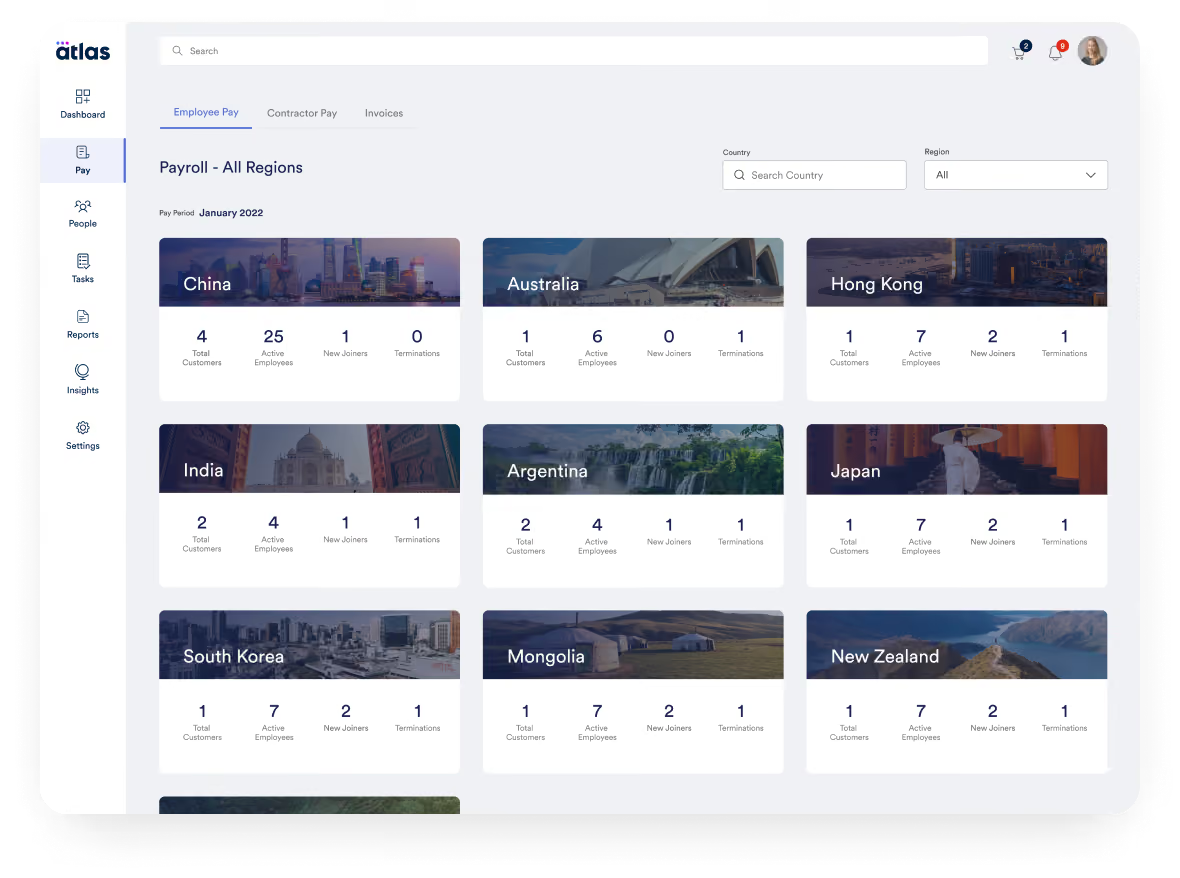
Atlas is a comprehensive global payroll and direct employer of record (EOR) solution that empowers businesses to hire and compensate talent across the globe effortlessly. We’ve seen a demo of Atlas and tried the tool, finding them a solid company to entrust with your legal employer responsibilities.
What does this mean? We found that Atlas can dependably manage most of the operations aspects of the employee life cycle, for several employees, in several countries, from a single platform.
Atlas is used by over a thousand companies, including Toyota, CACI, Bath & Body Works, Coupa, PAE, and Namely.
- Essential: For $99 per month, this plan encompasses features and services that help users navigate the labor & employment laws in over 160 countries (+50 US States), manage employee lifecycle, compliance information between countries, be compliant with their accounting for travel and business expenses, receive personalized notifications, as well as have moderate access to expert insights and HR templates (which are priced separately).
- Premium: For $149 per month, this plan packs everything in the Essentials plan, plus compliance audit interactive checks, people analytics and planning features as well as dedicated account management.
- Enterprise: The pricing of this plan varies according to the number of purchased licenses and customer needs. You can reach out to Atlas’ Sales team for a custom price quote.
Add-ons:
- Contractor Pay: Starting at $49 per contractor per month
- Employer of Record: $595 per employee per month
- Visa & Mobility Sponsorship: Starting at $2,500 per visa
Best For
Companies of all sizes would find an ally in Atlas, but it’s especially good for those looking for a service-oriented offering rather than a DIY, employee-driven, self-service platform.

We used Atlas HXM as our Employer of Record (EOR). It was used as a payroll and global HR database for records. Atlas was our company's legal employer. Atlas acted as a liaison for our HR department, connecting and assisting us with global compliance questions and needs. It is compliance-focused.
I liked the reliable customer-centric focus of the Atlas team. I could count on their compliance and global regulatory guidance. I liked the cost-benefit.
We used Atlas HXM for three years. My company had cross-border employees, both inside and outside of the US. A pain point for them was maintaining one database, one source of truth for their employee records, and needing the flexibility to hire people quickly in new global regions. The key benefit of Atlas was that they were the employer of record, which was better than a PEO, saving me a lot of time setting up employer and other tax-related accounts. It is a good system and an alternative to the big players who are only interested in the bottom line. Customer-focused system.
It lacks flexibility in customized functionality. They could improve their customer support response time (but it wasn't bad considering the time zone differential). They could reduce costs or provide more incentives for smaller businesses or startups.
I have used many similar tools. Atlas HXM is truly a global provider! From Western to Eastern Europe, they are everywhere! I preferred this system over others because I could rely on them consistently in areas of global rules and regulations I was unfamiliar with.
Are you in need of a global employer of record for your business? How many countries do you have employees in? Do you struggle to keep current with global compliance at your company?
I haven't seen many changes, but since they are small, I assume evolution will happen quickly.
Global entities with cross-border employees.
An organization not wanting an EOR.
Other Global Payroll Software Worth Considering
- Lano: Lano’s international payroll services are quite flexible, since you can integrate them with existing payroll and HR systems or use them as a stand-alone solution. However, the company’s headquarters and support team working hours make it less suitable for companies outside the EMEA region. Additionally, the lack of a mobile app limits accessibility for users who need on-the-go solutions.
- Workday: A popular workforce solution that covers both HR and payroll, catering to multinational enterprise needs. It is particularly well suited for those frequently involved in M&A. The drawbacks, besides prohibitive pricing and complex setup, include the UX/UI, which has been criticized by users of both the web and mobile versions.
Why Work With a Global Payroll Provider
Global payroll software helps companies pay international employees and contractors accurately and compliantly from a single platform, covering cross-border taxes, benefits, currencies, and employment models such as EOR, contractors, and localized payroll, while reducing admin work and risk.
- Global payroll providers let you pay employees and contractors across borders while staying compliant with local tax laws, benefits requirements, and labor regulations in each country. Instead of juggling separate vendors in every market, you get a single platform to manage multicountry payroll from one dashboard.
- The best global payroll companies handle currency conversion automatically, offer localized benefits packages, and file taxes on your behalf—including mandatory contributions like social security, benefits insurance, and retirement funds. This eliminates the logistical overhead of managing multiple regional providers and reduces the compliance risk that comes with scattered data.
- For HR teams, this means less manual work and fewer errors. For employees, it means being paid in their local currency and receiving the benefits they expect.
Key Considerations & Pitfalls of Multi-Country Payroll
Before selecting a global payroll provider, make sure you've addressed these common pitfalls that derail multicountry payroll implementations:
- Understand local employment laws. Delegating to a provider doesn't mean ignoring compliance. Familiarize yourself with international HR requirements in each country where you hire—it helps with budgeting, contractor-vs-employee decisions, and risk management.
- Calculate total cost of ownership. Compare the cost of a global payroll solution against managing separate providers per country. Factor in small business payroll or enterprise payroll alternatives, potential fines for non-compliance, and churn from employees who don't receive proper benefits.
- Don't overload HR. International payroll is a cross-functional project. Involve finance and leadership early—and prioritize providers with strong payroll automation and tax filing features to free up HR bandwidth.
- Vet data protection practices. If you hire in GDPR-regulated markets, confirm your global payroll provider's data handling policies meet local requirements—and ask what safeguards go beyond legal minimums.
The Evolution of Global Payroll Technology
Global payroll technology has advanced rapidly, with AI, earned wage access, and HR integration reshaping how providers operate. Here's what's changing:
- AI-powered compliance. Leading global payroll companies now use AI to automate tax calculations, flag filing deadlines, and surface compliance risks. Some platforms, like Borderless, offer chat-based agents that answer country-specific tax questions on demand.
- Earned wage access. Earned Wage Access (EWA) lets employees access earned compensation before payday—improving financial wellness and reducing reliance on predatory lending.
- Payroll + HR convergence. With 94% of business leaders wanting payroll integrated across HR systems, providers like Deel and Remote now bundle full HRIS functionality—onboarding, time tracking, org charts, and expense management—alongside multicountry payroll.
Global Payroll Provider Pricing: What to Expect
Global payroll provider pricing typically falls into four models. Understanding which model fits your needs will help you compare vendors and forecast costs accurately. For a deeper dive, see our full guide on payroll software pricing.
Per Employee, Per Month (PEPM)
Most global payroll companies charge a flat monthly fee per worker, with separate rates for EOR employees and contractors.
- Deel: $599/month for EOR employees; $49/month for contractors (free contractor management on some plans)
- Multiplier: $400/month for EOR employees; $40/month for contractors
- Remote: $599/month for EOR employees (annual); $699/month (month-to-month); $29/month for contractors
- Native Teams: $99/month for EOR employees; $19/month for contractors
- Oyster: $599–$699/month for EOR employees; $29/month for contractors
Tiered Subscription Plans
Some providers offer tiered plans with bundled features at each level—useful if you want predictable costs as you scale.
- Atlas: $99/month (Essential), $149/month (Premium), custom pricing (Enterprise)
- Lano: €20/month for contractors; €600/month for EOR; €30/month for multi-country payroll (minimum 5 employees)
Modular / Pay-Per-Feature
A few global payroll solutions let you pay only for the modules you need, which can reduce costs if you don't require full EOR services.
- Rippling: Starts at $8/user/month; total cost depends on modules selected (payroll, HR, IT, etc.)
- Papaya Global: $20–$100/month for payroll; $770/month for EOR; $25/pay cycle for contractor management
Custom / Enterprise Quotes
Larger organizations or those with complex multicountry payroll needs typically negotiate custom pricing based on headcount, countries, and service level.
- ADP GlobalView: Custom quotes based on employee volume and country coverage
- Workday: Enterprise pricing; contact for quote
- G-P (Globalization Partners): Custom pricing based on services and regions
Key Components: What Global Payroll Solutions Include
The key components of global payroll solutions enable you to do much more than simply pay people internationally. Global employment services, contractor payment services, and localized payroll services are the core functions that leading global payroll providers offer—each covering different international hiring scenarios.
Global Employment Services (EOR)
Global employment services let you hire full-time employees in countries where you don't have a legal entity. The global payroll provider acts as the Employer of Record, handling compliance, payroll, benefits, and tax filings on your behalf. This model works well for teams hiring as few as one person or scaling across multiple markets without setting up local subsidiaries.
Contractor Payment Services
Contractor payment services handle payments to freelancers and independent workers while ensuring digital nomad compliance in each jurisdiction. The provider manages contracts, invoicing, and local tax requirements—reducing misclassification risk. Many global payroll companies also offer this alongside EOR, letting you manage both worker types from one platform.
Localized Payroll Services
Localized payroll services are for companies that already have legal entities abroad but need help running compliant payroll in those markets. The provider handles tax filings, statutory benefits, and local reporting—similar to a domestic payroll provider, but consolidated across countries. This model gives you more control while offloading the operational complexity.
Most multicountry payroll providers offer a mix of these services, letting you choose different models for different countries based on your needs. If you're unsure whether you'll stick with contractors or eventually move to EOR, prioritize providers that offer flexibility across all three.
Demo Questions: What To Ask To International Payroll Companies
As with any software purchase, once you select 2-3 options for your global payroll provider, you should try each of them, likely through a demo and maybe even by doing a free trial. With both scenarios, it’s a good idea to step into the process with a list of the critical questions you need to answer.
To put this list together, you should consult each stakeholder within your team, including remote employees and contractors overseas. This list should reflect your unique business needs when it comes to employing people in different countries, but we’ve put together a basic list to get you started:
- Which countries do we need payroll in, or do we plan on needing payroll in, and in which of those do we need the full service, such as EOR?
- What kind of benefits would I like to offer to my global workforce?
- What are the key features I want to try out and validate?
- What kind of workflows are possible and maybe automated?
- What tax regulations should we be concerned with if we hire in X or Y country?
- How will this solution fit into the rest of my tech stack and therefore what integrations do I need?
- How will others in the organization use this solution?
- How can this tool improve the experience of our workers?
- What would make me or my coworkers nervous about switching our current processes to this platform?
- How is employee data kept safe if trusted by this vendor?
- What conclusions can I draw about the quality of customer support? Is there a help center? Are the support articles clear and easy to read?
- How will this solution fit our current plans for global expansion?
Alternatives to Global Payroll Software
We’ll now expand into one of the points we touched upon above— what are your alternatives if you decide that global payroll software is not the way to go for you just yet? Mainly, these are the two following:
- Global payroll services: Most of the vendors we mentioned offer a combination of payroll services and payroll software tools to manage and keep track of them. But of course, you could also opt for partnering with a company and letting them take care of it themselves. This requires you to get more familiar with each kind of payroll service and the fees they charge. It will also require much more direct communication with those payroll professionals.
- Money transfer companies: The other option is to just solve the issue of an international money transfer. Suppose your contractors overseas are okay with handling taxes & benefits themselves. In that case, this can be a less costly and time-consuming option, particularly helpful while you figure out what to do in the long term.
Global Payroll FAQs
How do global payroll providers handle compliance?
Global payroll providers maintain compliance by tracking tax rates, labor laws, and statutory benefit requirements in each country they cover. The best providers use AI-powered systems that automatically update when regulations change—critical in 2026, when tax authorities in many jurisdictions now receive payroll data in real time. Look for providers with local legal entities (not just third-party partnerships) and documented audit trails for every calculation.
What's the difference between global payroll software and multicountry payroll solutions?
The terms are often used interchangeably, but there's a subtle distinction. "Global payroll software" typically refers to platforms that help you manage payroll across borders and are often bundled with EOR, contractor payments, and HR tools. "Multicountry payroll solutions" (as Gartner terms it) emphasizes consolidated reporting and unified data across multiple regional payroll providers. In practice, most leading global payroll providers offer both capabilities: operational payroll processing and cross-border visibility.
Native, EOR, or partner network: how do these models differ?
Native vendors run their own payroll system in each country; partner-network vendors route payroll through local bureaus or partners rather than processing it themselves; and hybrid vendors combine the two.
Although partner networks enable rapid expansion across many countries, having data move through multiple systems slows and complicates troubleshooting. In contrast, native processors manage issues end-to-end with a single point of contact, but their geographic footprint is narrower.
EOR vs. owning an entity: which costs less?
It depends on headcount.
- EOR often runs $599–$699 per employee per month, though some do offer a fundamental service option at around half of this range
- Owned-entity payroll starts at $29-$50 per employee per month, plus entity setup costs (roughly $25K-$35K to establish and $40K-$60K per year to maintain per our internal data). The crossover point is typically 8-12 employees per country, beyond which owning an entity tends to be cheaper.
Does pricing increase after signing?
Unfortunately yes. Our interviews with users indicate a 5% to 7% annual increase is expected, so it’s worth checking and capping in the contract before signing.
Can EOR and owned-entity payroll run on one platform?
On some platforms, yes. Scaling companies typically use EOR where they lack an entity and payroll where they have one, on a single system, so a country can convert from EOR to an owned entity without re-onboarding or a second vendor. Make sure you verify this before signing, since switching platforms later means a data migration.
Who is liable for filing errors?
This depends on the model.
- EOR: The EOR is the legal employer and carries liability for misclassification or filing errors.
- Owned-entity payroll: the vendor supports compliance but does not assume liability; the client company remains responsible.
We recommend not simply trusting a vendor's broad claim of "handling compliance." Securing a written statement of liability will provide far better protection.
About the Author


About Us

- Our goal at SSR is to help HR and recruiting teams to find and buy the right software for their needs.
- Our site is free to use as some vendors will pay us for web traffic.
- SSR lists all companies we feel are top vendors - not just those who pay us - in our comprehensive directories full of the advice needed to make the right purchase decision for your HR team.


