

The 7 Best Trucking Payroll Software Vendors in 2026
The best trucking payroll software, tested by in-house HR tech experts at SSR. Find pricing info, feature breakdowns, advice on product demos and more below.








Running payroll in the trucking industry can be different than in most other fields. Since drivers can sometimes be compensated by the mile or load instead of getting a weekly or monthly paycheck, having the right payroll software can be key to saving time and headaches for HR.
While some of these solutions are geared specifically toward trucking companies, others are general payroll providers whose solutions adapt to the needs of any trucking business. Some are general bookkeeping tools, while others are full-on trucking management systems.
If you’re looking for a software solution that can run driver payroll, we’re confident that you’ll find at least a couple of these options to your liking. These are the best trucking payroll software vendors as of Q1 2025.
To identify the few companies that would make sense to recommend as trucking payroll software vendors, we talked to business owners and HR professionals at trucking companies of various sizes, mainly in the US. We leveraged our years of experience in the payroll space, engaging in conversations with each product team and some of their trucking clients.
Our final selection was guided mainly by vendors’ performance across three critical criteria: trucking-friendly payroll features, ease of use, and customer support.
- Trucking-Friendly Payroll Features: Naturally, we placed significant emphasis on payroll software that caters to the unique needs of trucking companies. The chosen solutions may provide specialized functionalities such as driver pay calculations, per diem tracking, compliance with Hours of Service (HOS) regulations, and seamless integration with fleet management systems.
- Ease of Use: User-friendliness is paramount for efficient payroll management within the fast-paced trucking industry. We focused on software solutions that prioritize intuitive interfaces and straightforward workflows.
- Customer Support: We prioritized the payroll software vendors who are well known for their reliable assistance. The chosen solutions are very customer-centric, striving for uninterrupted payroll operations and timely issue resolution.
Our selection process also prioritized tools boasting a contemporary user experience (UX) and streamlined workflows that effortlessly guide both payroll managers and trucking business owners. To gain deeper insights into our methodology, delve into our comprehensive criteria for evaluating HR tech vendors.
Related HR Software Categories


Paylocity

Paylocity’s payroll solution, being designed for medium-sized businesses in the US, has also been enhanced via user input to be compatible with the trucking and logistics industry. As with the rest of the suite, Paylocity offers such companies automation and compliance tools that simplify payroll for fleets of all sizes. It supports complex pay structures such as mileage-based and per diem pay while seamlessly integrating with broader HR and time-tracking modules.
PROS
- Supports industry-specific payroll structures, including mileage-based, hourly, and per diem pay.
- Built-in compliance features help companies adhere to US regulations.
- Mobile accessibility allows drivers to check pay stubs, log hours, and submit expenses on the go.
- Seamless integration with fleet management and accounting systems.
- Dedicated customer support team familiar with trucking industry needs.
- Scalable to accommodate both small and large fleets.
- Paylocity’s customer support is highly rated for always being available to answer questions.
- Global payroll support for 100+ countries.
- Provides free and unlimited training modules on the website.
- Paylocity’s mobile app has a good UI and functionality
- The tool is easy to use for both employees and employers.
- Has 350+ pre-built integrations.
CONS
- Custom reporting capabilities could be more robust for larger trucking companies.
- Pricing may be a concern for smaller fleets with limited budgets.
- Limited support for multilingual teams, as assistance is primarily in English.
- Initial setup may take longer due to industry-specific payroll configurations
- Not as compatible with trucking companies outside the US.
- Undisclosed pricing.
- It doesn’t have a free trial or free plan.
- Support is available in English only.
- It isn’t the best solution for remote teams looking for a tool to manage payroll and benefits for their contractors.
As one of the leading HR and payroll providers in the industry, Paylocity has expanded its offerings to cater to trucking and logistics companies. The biggest strength of this payroll tool is its ability to handle trucking-specific needs within a broader world-class HCM suit. In other words, while Paylocity is not a company 100% specialized in software for the trucking industry, they have adapted some parts of their multi-sector tool to serve companies. For example, their payroll tool lets you pay drivers by the mile, integrate per diem pay, and manage overtime based on local compliance rules.
As with the rest of Paylocity’s ecosystem, a standout aspect is its mobile-friendly design. Within the trucking use case, this allows drivers to access their payroll details wherever they may roam. The ability to log hours, submit expenses, and receive pay alerts directly from the app helps simplify payroll management for both drivers and administrators.
We also looked into Paylocity’s compliance tools and found them particularly useful for trucking companies trying to stay ahead of ever-changing federal and state regulations. However, while payroll processing was smooth, custom reporting required additional steps to extract and analyze complex payroll data.
Despite these minor challenges, Paylocity remains an excellent choice for trucking companies needing a payroll solution that simplifies driver payments, integrates with fleet management tools, and ensures compliance— all while placing a myriad of core HR workflows within a comfortable reach.
Paylocity serves over 40,000 companies, including transportation and logistics firms like Beemac Trucking and High Road Inc. (they have use cases for both of them on their website).
As with all of Paylocity’s products, pricing is custom and varies based on the size and needs of each company.

Best For
Trucking and logistics companies in the US seeking a payroll tool that accommodates industry-specific pay structures, regulatory compliance, and mobile accessibility for drivers; within a larger HCM suite.


As a Recruiter I was mainly using it as an ATS. I used to create job postings and it would integrate to different career sites and job boards. The interested candidates filled the application form in paylocity itself which made things easier for me to get more details (phone number, email address) about them.
I used to schedule phone screens, video interviews with the candidate texting feature in paylocity. I could upload interview notes on paylocity in realtime to get feedback from other colleagues on the candidate.
There are several workflow features- Creating and sending the Offer letter, conducting reference checks and background checks. The last feature was onboarding the candidate and changing them to an employee in the system. The best feature was that the payroll team could take things further from my part by tracking their time worked, in and out punches and then depositing money in their account.
Its employee onboarding workflow is really smooth and user friendly for the recruiter. It helps in automating, creation and distribution of onboarding tasks and training materials.
I could regularly track completion of new hire paperwork, such as tax forms, I9 etc before their start date and coordinate with them if they haven't completed.
Another major advantage of paylocity is its payroll processing workflow. It calculates employee wages, deductions, and taxes based on pay rules and regulations and generates pay stubs. If an organization has a more hourly/contract based employees then this tool is apt for them.
Employees clock in and out through that system and then it integrates time and attendance data with payroll for accurate wage calculations.
When I joined, the organization was already using Paylocity as their HRIS system. I have used Paylocity for the entire tenure when I was working at Stars, around 5 months. Paylocity not only has ATS features but it also is a comprehensive HR and payroll management software. This was the main reason that the CEO of the company shifted from another tool to Paylocity as he wanted one tool which can manage Recruiting as well as Payroll.
In the organization, 90% of the employees are hourly employees. Paylocity helps manage employee attendance, track hours worked, and handle time-off requests. It offers various methods for clocking in/out, tracks leave balances, and integrates with payroll for accurate and efficient time tracking. This was the major key benefit of this tool.
Paylocity isn't quite user friendly, it has a lot of complex features. It makes it harder for people who are new to HRIS systems to adapt to Paylocity.
Its mobile app is also not at all user friendly, freezes when I want to clock in and out for the day. For a better experience it is always better to be on the desktop.
Its integration with different job boards and career sites isn't quite wide. It has limited reach and if you want to reach out to a wider pool of candidates by posting a job it charges extra money which is not cost effective.
Paylocity offers a comprehensive suite of HR and payroll management tools in a single platform. It combines various functionalities, including payroll processing, benefits administration, time and attendance tracking, performance management, and more. This integrated approach allows organizations to streamline their HR and payroll processes and reduce the need for multiple software solutions. As a recruiter, I would prefer another tool over Paylocity but from an organization's point of view, this is a good investment where HR and payroll management tool is in a single platform.
The organization's needs and priorities and ensure if it aligns with their HR and payroll requirements. Also, the cost is a major factor, if the organization isn't in need of payroll software then it's better to consider other options as Paylocity sometimes can be a little expensive. Paylocity offers Payroll Processing Workflow, Employee Onboarding Workflow, and Time and Attendance Workflow.
If the organization is specifically looking for these then Paylocity is a great investment. Also if the organization has more hourly/contract workers rather than full-time employees then Paylocity is a great tool.
No significant changes since I started using the tool.
Paylocity is a great tool for hourly/contract-based employees who has to daily punch in and punch out for their work hours. So it is mainly ideal for an organization that has nonexempt employees rather than exempt employees.
For smaller organizations, it probably won't be a good fit because Paylocity is a little complex with a lot of advanced features. It doesn't make sense to invest that much for a smaller organization.

ADP
An affordable payroll solution from one of the top names in this type of software, used by thousands of organizations.
PROS
- Native, all-in-one technology suite for recruitment, payroll, and compliance.
- 17 RPO service centers in 14 countries and provide services in 42 different languages.
- Dedicated team of AIRS-certified recruiting professionals.
CONS
- Technology options outside ADP’s dedicated HR tools are limited.

As what is probably the best-known company in the payroll services space, it’s no surprise that ADP has an offering that could adapt to the trucking industry. Although not made specifically for trucking companies, ADP Run is their simple, fast, and affordable payroll solution for SMBs. It is used by nearly 700,000 organizations.
They strive to make the payroll process effortless, so you have more time to run the other parts of your business. You can do payroll and tax filing in just a few easy steps, pay employees by check, direct deposit, or paycard, and it’s all doable from either the phone, the web, or their mobile app. One thing to note, however, is that they lack trucking-specific features like being able to pay drivers by the mile.
Should you run into any snags with the rest of their offering, ADP has 24/7 customer support from a team of payroll experts. They can also manage health insurance for truckers in all 50 US states. It is also worth mentioning that ADP does have other products for larger businesses, and not just for payroll, so they can certainly grow with you.
Best For

I use ADP weekly to provide employees with resources they might need. It could be for a pay stub, to calculate how much they make in 2 weeks, or to check their right to work. I especially like the feature that links to e-verify. That has been very helpful to us. We also use ADP for benefits and open enrollment. I also often point employees or former employees to the tool for self-service options.
I like that our data sits in one place - makes it easier to find. I especially like the link to e-verify, that brings me peace of mind. I also enjoy the way the user experience is set up for the pay profile.
I was not a part of the organization when they decided to begin using ADP. My understanding is, we were using a PEO, and decided to move in-house utilizing the ADP tool. It's been great for payroll and for onboarding employees. I have used it for 2.5 years at this organization within HR, and as a user at other companies. ADP has been great for managing benefits, employee pay statements, etc. It is nice to have a system that employees can self-serve.
I am not sure if I am unaware or if we just haven't done this, but I wish ADP linked to our HRIS. It has been difficult to enter manual data and an integration would be helpful. Sometimes, I also feel like the user experience as a whole is a bit wonky. It is not always the most intuitive tool to use.
I have not really used other competitors, so I can't speak to this question.
Consider integrations with your HRIS and how that would work - how manual would your processes be? Ask yourself how open enrollment could benefit from this tool. Additionally, consider how employees would find the user experience. Consider which options you will utilize and how you will communicate about them. Also, talk to ADP about what their customer service setup will look like for your organization, what will the level of support be?
The e-verify feature has been a big one. It’s been great to have that functionality for our business.
I'd say a mid to large but imagine it is good for smaller organizations, too. Large-size organizations can benefit from having data in one place.
I am not sure smaller organizations could afford the tool and get the use they would need out of it.

Gusto
Gusto's powerful payroll software makes it easy to pay contractors, including contract drivers, whether they operate within the U.S. or globally. While it can accommodate businesses of any size, it is particularly well-suited for small to medium-sized companies.
PROS
- Gusto supports payments for domestic and international contractors.
- Supports online signatures, automatic deductions, and automated tax filing.
- Flexible payroll schedules and unlimited pay runs.
- Unlimited contractor payments in the U.S.
- Responsive customer support.
- Transparent pricing. No long-term contract is required.
- Free account setup.
- The dashboard feature keeps tabs on compliance tasks
- The hiring and onboarding sequence is nicely streamlined between HR and the new hire
- Post-offer, pre-start tasks are made easy with integrations like CorpNet (state tax set up) Checkr (background checks)
- Easy payroll for U.S.-based W-2 folks, domestic, and international contractors
- Person-to-person phone support, email, and other customer service resources
- The business model is responsive to customer needs
CONS
- While it’s one of the best payroll tools around, it’s not built specifically for the trucking industry and might lack features for this market.
- No built-in accounting tool for earnings and expenses monitoring.
- The 'Simple' tier plan lacks in-built time tracking and online signature features, necessitating third-party integrations.
- Premium plan or Plus plan with add-ons offer features like federal/state compliance alerts and broker/health insurance plan integration, not available with the Simple plan.
- No provision for a free trial.
- Gusto can support payments for international contractors, but not employees
- No native accounting feature to keep earning and spending under the same roof
- Analytics dashboard is simplistic

Gusto offers unlimited contractor payments in the U.S., ensuring hassle-free processing. With features like online signatures, automated tax filing, and flexible payroll options, it is a convenient and efficient solution for managing trucking payroll.
The platform's automatic deductions streamline benefits administration, while person-to-person support and licensed benefits advisors ensure excellent customer service.
Gusto's transparent pricing, responsive business model, and free account setup make it an attractive choice for small to medium size trucking businesses.
Note that the platform lacks a native accounting feature for tracking earnings and spending, and advanced features, like time tracking and online signatures, are only available through third-party integrations.
Additionally, the analytics dashboard is simplistic, and federal/state compliance alerts and broker/health insurance integration are only included with the Premium plan, or as add-ons with lower-tier plans.
This is a good tool for trucking businesses seeking efficient payroll management.
Gusto serves over 400,000 businesses nationwide, including companies in the transportation and logistics sectors.
Gusto provides payroll software for trucking companies with optional HR add-ons. Pricing tiers are: Simple ($49/month + $6/employee), Plus ($80/month + $12/employee), and Premium ($180/month + $22/employee). HR Resources and Priority Support are available add-ons for Simple and Plus plans. A Contractor Only plan is $35/month.
Best For
Gusto offers robust payroll software for contractor drivers within the U.S., and the ideal business size is small to medium.

I'm an HR Generalist, so I mainly use Gusto to add new hires, update salaries, and ensure that payroll is correct. I also use Gusto to disperse employee documents for signature/acknowledgment (Employee Handbook) and to store employment documentation (offer paperwork, background checks, etc.). Others on my team use it to run payroll and enroll in state tax registration.

I love their customer service, they always have an answer for you and make my job so much easier. The interface is fantastic, and the design is very appealing, which is a huge factor for someone that uses it quite often. I also really like the admin dashboard, Gusto will list outstanding tasks with their deadlines and will prompt you with helpful information to finish the task.
My company is a portfolio company for High Alpha Innovation. Gusto is the go-to HRIS for all portfolio companies. We have been using it since we started in 2020 and have even used it for one of our own portfolio companies. Gusto is a very easy-to-use tool that has fantastic customer support. When you're working for a start-up, you don't want to spend a long time on payroll and Gusto really helps with that. It's also very easy to set up a new instance of Gusto for a company - it took like two hours and was a painless experience due to Gusto's interface.
Sometimes the outstanding tasks aren't accurate, we recently had tasks pop up for an employee that has been gone for two years. This is very specific, but I wish that you could make some employee documents private to employees, all the documents you upload are automatically public and don't give you an option. I dislike their benefits -- we ran a quote before and it took a few weeks to get back the quote and it was incredibly expensive.
The only similar tool I've used is a PEO called Justworks. I'm not sure if it's a fair comparison, since PEOs pretty much do everything for you. I will say, it was nice that you could set up Gusto in a day and run payroll the next day if needed. For Justworks, you have to wait until the system start date, which can be weeks later.
I think that customer service is a huge buying criteria, especially if you have an inexperienced team. It's invaluable to have experts that you can call or chat with at any time. Cost is definitely a big factor that differs from organization to organization. It's sometimes worth it to pay a little bit more to make your life easier and that's what we've found with Gusto. Lastly, I think that it's important to have an easy-to-use system for both HR and employees. Payroll is VERY important which makes it vital to have a system that is easy to comprehend.
Gusto has become more well-rounded over the years. Last year, they added performance reviews into the mix. It's definitely not perfect and not very customizable, but it's a free add-on, which can be a huge value to organizations that don't have performance management built out.
Small to mid-sized organizations. I think it could work for a small start-up, but would be better for slightly more mature organizations.
Gusto would not be good for a small startup that doesn't have someone with HR experience on its team. Definitely would recommend a PEO over Gusto.

QuickBooks
Quickbooks is one of the highly-trusted names in financial tracking, payroll, expense reports, and even time and attendance software for small businesses.
PROS
- Unlimited pay runs, auto full-service payroll, and same-day deposits included.
- Supports unscheduled payrolls and automatic year-end tax filings.
- Reminders for tax readiness provided.
- Pricing transparency. 30-day free trial available.
CONS
- No employer app.
- More expensive than some competitors like Patriot.
- Limited third-party integrations.
- No global payroll features.

As one of the most popular payroll and accounting software in the world, QuickBooks’ offering for the trucking industry fits the niche particularly well. More than 10,000 transportation SMBs use the product to manage labor costs, tackle payroll tax calculations, track time, and much more.
The QuickBooks accounting platform can help to provide same-day direct deposits to drivers, manage health benefits & workers comp, create customizable payroll reports, generate stubs, and much more. Payroll can be automated along with taxes and forms, almost in a set-it-and-forget-it manner.
The main benefit of QuickBooks in relation to trucking companies is that it’s got built-in time tracking, letting you account for every hour worked and then approve payroll when ready. Additionally, it helps that QuickBooks is a fuller accounting solution, so you can manage all your finances in one place.
Best For

First and foremost, we utilize the invoicing functionality to create and send professional invoices to our clients. This feature allows us to track payments, send reminders, and easily manage our accounts receivable.
In addition, QuickBooks helps us with tax tracking by enabling us to categorize income and expenses appropriately, making tax preparation more efficient. This feature ensures that we have accurate records and can easily generate reports for tax purposes.
Another important aspect of our QuickBooks usage is the mileage and expense tracking. We utilize the built-in tools to record and categorize our business-related mileage and expenses, ensuring that we have a comprehensive record for reimbursement or tax deductions.
The reporting capabilities are vital to our organization as well. We leverage the various reporting options available to gain insights into our financial performance, monitor cash flow, track profitability, and make informed business decisions based on real-time data.
Finally, QuickBooks serves as our central hub for transaction tracking. We record and categorize all our financial transactions, including sales, purchases, and payments, in order to maintain accurate and up-to-date financial records.

- QuickBooks integrates seamlessly with other business tools and software
- It allows us to customize our needs and only pay for what we use
- It integrates with other vendors to help us streamline processes
I have used it for almost 3 years and tried different versions. I chose QuickBooks because it provides a user-friendly interface, comprehensive features, industry recognition, seamless integration capabilities, and scalability options—all of which contribute to efficient financial management and supports the organization's needs.
It is easy to switch between versions as business needs change (add or remove payroll option, etc). One of the primary reasons we selected QuickBooks is its widespread adoption and industry recognition. QuickBooks is widely regarded as a leading accounting software solution, trusted by millions of businesses worldwide. This reputation reassured us of its reliability and stability.
It offers scalable options that can accommodate our organization's growth and evolving needs. As we expand, QuickBooks provides the flexibility to add additional features or upgrade to more advanced versions to support our changing requirements, ensuring long-term viability for our financial management system.
- There are so many versions and it's hard to find directions for the one that we use at that time
- It is nearly impossible to talk to a human being
- During the sales process they will give you as much attention as you need but as soon as you are in, you are pretty much on your own
- Quickbooks offers many different options and they will cater to your business needs (just make sure you do your due diligence at the beginning before they close the deal)
- EVERYONE knows about Quickbooks so it's easy to use and clients have no problem paying you via QB
- However, many other similar tools will offer live support or even a dedicated account manager. Even though it may cost a little more but this might be a dealbreaker to some businesses.
- Know exactly what you need it to do for you and clearly specify it during the sales process. Make sure you do not overpay for something you will not use
- Make sure you stay within budget and pay attention to special pricing as most plans will offer discounted costs but only for the first few months.
- Check that your bank and other third-party vendors will integrate with QB. While a lot of them do, not all.
They evolve all the time by adding new versions to accommodate everyone's needs (last time I checked there were 45).
Small to Medium, independent contractors, startups.
This helps us explain it better to readers of the review, and proves you are a customer of the product with access to the tool
Truckbase
Truckbase is a fully-fledged trucking dispatch software product made specifically for long-haul carriers. While payroll is handled via integrations, the platform offers dispatching, invoicing, settlements, truck tracking, and more.
PROS
- AI-powered load importer eliminates data entry.
- Seamless ELD integrations for truck tracking.
- User-friendly interface requires minimal training.
- Customized, hands-on onboarding.
- Exceptional customer service and support.
- AI-powered load importer eliminates data entry.
- Seamless ELD integrations for truck tracking.
- User-friendly interface requires minimal training.
- Customized, hands-on onboarding.
- Exceptional customer service and support.
CONS
- No built-in accounting and payroll module. There is a driver pay and settlements module, but it’s mostly to feed data into a seconday payroll tool or manual process.
- Not suitable for fleets with fewer than 10 trucks.
- Not a good fit for service shippers or pure brokers since they focus on carriers.
- Limited mobile phone access.
- No free trial is offered, only a money-back guarantee.
- No built-in accounting and payroll module. There is a driver pay and settlements module, but it’s mostly to feed data into a seconday payroll tool or manual process.
- Not suitable for fleets with fewer than 10 trucks.
- Not a good fit for service shippers or pure brokers since they focus on carriers.
- Limited mobile phone access.
- No free trial is offered, only a money-back guarantee.
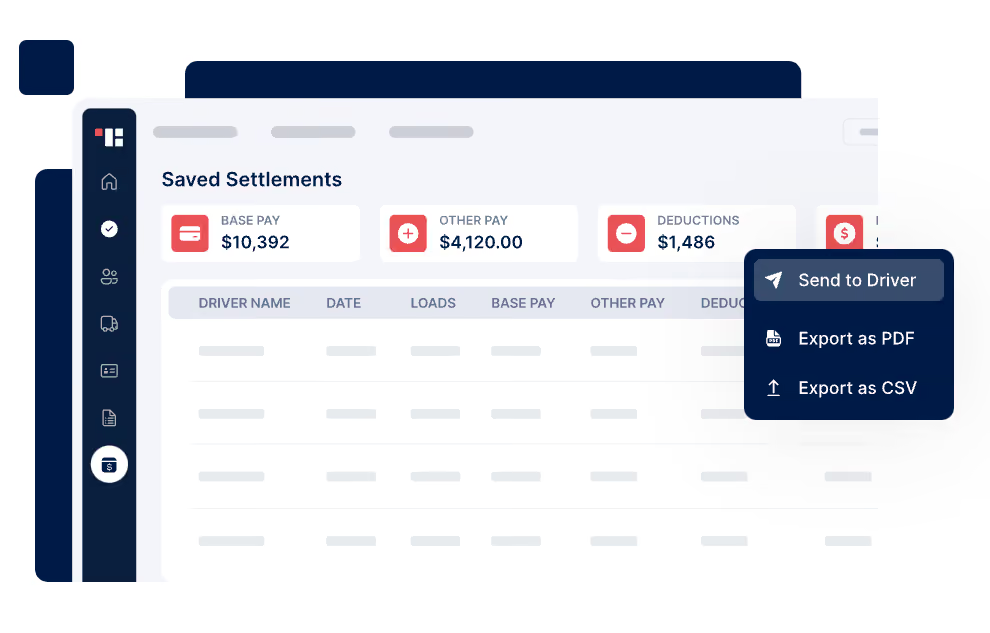
Truckbase is a comprehensive trucking dispatch software designed specifically for over-the-road (OTR) carriers. While not able to handle payroll natively (you have to set up an integration), the platform excels in providing a unified suite of services, including dispatching, invoicing, settlements, truck tracking, and EDI integrations. They're the only dedicated trucking software company that we know of that’s doing so much to leverage AI, so that’s why we include them on this page despite the payroll drawback.
To give you an example, a standout feature of Truckbase is its AI-powered load importer, which significantly reduces manual data entry, a common pain point for many trucking companies. Additionally, the platform’s real-time ELD integrations offer live truck tracking, enhancing visibility and reducing the need for check calls. This is particularly useful for companies managing medium to large fleets where real-time data is crucial for operational efficiency.
One of Truckbase's most significant strengths is its ease of use. Unlike competing solutions that often require extensive training, Truckbase’s intuitive design allows users to become proficient quickly. This user-friendly approach is complemented by its highly praised customer support, which offers customized and hands-on onboarding to ensure a smooth transition and continuous support.
Again, Truckbase has its limitations. Its major drawback, at least for the context of this page, is that it cannot handle payroll within the platform. You have to set up an integration with another provider, but the platform is crucial in ensuring the right amounts and extra compensation owed to drivers based on mileage, stops, or rates.
Truckbase is currently used at companies like Herlache Truck Lines, Package Runner, Z Brothers, Nica's Freight, among many others.
Pricing for Truckbase is not publicly disclosed and is usually quoted based on individual company needs. Prospective users are encouraged to book a demo to review the options and get a tailored pricing quote.
Since we first encountered Truckbase, they recently refined the AI model to read new rate cons. They also launched truck-level P&L reporting for seamless revenue and cost tracking with the tool. Further, the platform integrates with over 30 ELDs for live tracking and automated updates, eliminating check calls.
Best For
Truckbase is best suited for medium to large OTR carrier companies with over 10 trucks looking for an all-in-one dispatch and operations management solution that offers AI features and seamless integrations. As expressed before, it’s also only suitable if you’re willing to use it in tandem with a payroll tool of your choice, which we hear is an excellent combo for large trucking companies.

Axon Software
As a fully-fledged trucking management system, Axon offers real-time and meaningful information that is instantly updated across every area of the business.
PROS
CONS

This Canadian company has been doing trucking software exclusively for decades, boasting a trucking accounting software tool that can help to increase cash flow and staff retention. It aids in saving time for fleet owners by streamlining payroll, settlement processes, accounts receivables, payables, invoicing, and other recurring financial tasks.
While it’s not the most modern-looking solution out there, Axon Software is notable for its real-time approach to the handling of trucking data. Information entered into the system automatically updates your dispatch, driver pay, fuel management, fleet maintenance, accounting, routing, and billing.
Best For

Axis TMS
Axis is a trucking command center with all the features you'd need to run a trucking business smoothly, although payroll is offered as an add-on.
PROS
CONS

Axis is a trucking management system which claims to have all the tools you’d need to run such a business. Their trucking software features includes a driver mobile app, a billing module, carrier functionalities, maintenance management, an IFTA add-on, and brokerage.
As for trucking payroll, Axis does it as an add-on. You can run payroll weekly, bi-weekly, or monthly, and do auto-recurring or amortized deductions. Their systems also lets owner operators choose between paying drivers by the mile, load, or hour.
Lastly, Axis is also notable for being the only vendor on this list that does hardware for trucking as well as software. They sell tablets for truck drivers, dash cameras, asset trackers, and sensors.
Best For
TruckLogics
Up-and-coming vendor in the trucking payroll space, with years of experience on pure trucking management software.
PROS
CONS
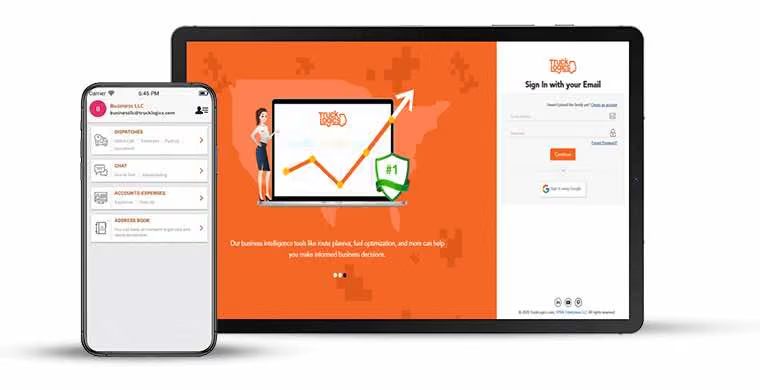
As a trucking management software company, it makes sense that TruckLogics has a part of their product made specially to pay contractor drivers. While not fully available yet, the system will be integrating with PayWow in order to offer a specialized trucking payroll solution within their platform. If you’re not convinced by the vendors above, this one might be worth keeping an eye on, or getting in touch with.
Best For
Final Advice on Buying Trucking Payroll Software
The main question with picking out trucking payroll software is whether to go with a full trucking management system, or pick a payroll-focused solution and integrate it with what you already use.
On the one hand, you’d get a myriad of trucking features and specialized support, but on the other you’d get a more modern solution with better UX and far more payroll & HR features.
Our advice here would be to make a list of the 3-5 key features that you need and see which vendors from this list fulfill all of them. If you’re leaning towards a payroll-focused vendor, it’s just a matter of making sure they integrate well with your other software.
The best way to make sure of these two factors, is to get a demo with the vendors that you shortlist. Then, show up to that with a detailed set of questions from you and your team, take notes, and don’t be afraid to take control of the demo or even request a trial of the solution.
It could be a lengthy process, but in the long run, considering all the man hours and tedious tasks that it will save you, it will certainly be worth it.
About the Author


About Us

- Our goal at SSR is to help HR and recruiting teams to find and buy the right software for their needs.
- Our site is free to use as some vendors will pay us for web traffic.
- SSR lists all companies we feel are top vendors - not just those who pay us - in our comprehensive directories full of the advice needed to make the right purchase decision for your HR team.


