11 Best HR Software Platforms in 2026: Reviewed & Compared
Our HR tech experts demoed dozens of HR software platforms and researched many more to find the best tools on the market. Find pricing info, screenshots, pros & cons, and more below.









The best human resources (HR) software helps you tackle a range of people-related processes, from talent acquisition (TA), leave management, and onboarding to employee benefits, payroll, time and attendance, predictive analytics, and workforce planning.
With such a broad scope, the HR software market is highly competitive. But finding the right platform for you shouldn’t be a nightmare.
In this guide, you’ll learn everything you need to know to make an informed decision. I’ll review the top platforms, plus discuss HR software features, costs, benefits, pitfalls, product demos, and implementation best practices.
To choose the best HR software, I met with vendors for product demos and asked tough questions based on user research statistics, expert feedback from HR thought leaders, and my own hands-on product testing. Plus, my 6+ years in HR managing payroll, benefits, compliance, and onboarding have given me keen insight into the features HR professionals actually need.
Because of HR software’s broad scope, I focused on all-in-one systems that handle core HR processes, like payroll, benefits, time-tracking, and document management, for businesses of various sizes. Some platforms that might not cover core functions but have unique use cases made it into my honorary mentions.
I evaluated more than 20 platforms and narrowed them down to my top 10, looking closely at each system’s scalability, integration, self-service functionality, compliance and security, and total cost.
- Scalability: I tested each HR software system’s capacity to handle rapidly growing teams by evaluating features such as single sign-on, enterprise system integration, batch processing, and HR automation.
- HR Software Integration: Each of my top picks integrates with other critical business platforms, such as payroll, accounting, talent management, or recruitment software, to ensure seamless data sharing.
- Reporting and Analytics: My top HR software picks feature robust reporting and analytics capabilities that deliver actionable insights into employee data and HR metrics, such as employee growth and retention.
- Employee Self-Service: I examined each HR system for the quality of its self-service functionality. These critical HR features empower employees to access and update their information, request time off, view pay stubs, and participate in performance management processes.
- Data Security: It is crucial that HR software vendors undergo regular audits, such as SOC 2 Type 2. In addition to verifying that these measures were in place to protect sensitive employee data, I reviewed each platform’s approach to compliance with relevant employment laws and data protection regulations.
- Total Cost of Ownership: It is important to understand the overall cost of implementing and maintaining an HR system, including licensing fees, customization, training, and ongoing support.
Finally, I combined the product scores submitted to our site by readers like you with the scores on third-party review sites to determine each vendor’s popularity, user, and overall ratings. These provide a snapshot of each platform’s capabilities for quick comparison.
For more about how expert SelectSoftware Reviews writers and I review HR software, check out How We Assess HR Tech.


.png)
Deel

Deel HR offers a simple, effective HRIS for remote and international teams that need a way to compensate their employees, and a system for record-keeping.
PROS
- Offers a single system for paying employees and contractors in over 150 countries.
- Provides 100% in-house support from local country experts, with a first response time of just 1.25 minutes.
- Features APIs and native integrations with over 100 popular HR tools.
- Employee experience features such as 1:1's and pulse surveys.
- Excellent 24/7 customer service with fast onboarding (2-3 days) and local payroll experts in each jurisdiction.
- Seamless integration with platforms like QuickBooks, BambooHR, and Greenhouse, plus custom integration options.
- User-friendly, self-service features enable quick setup; identity verification often takes under 24 hours.
- Automated invoices simplify payments, provided they're in English.
CONS
- Not the best option for teams on a budget that don't hire internationally.
- Deel HR is relatively new and lacks many features found in BambooHR, Bob, and other established solutions.

- Key features like onboarding automation are add-ons, which may increase costs.
- Limited flexibility in modifying contracts or service agreements; changes often require an addendum.
- Invoices cannot be generated in languages other than English.
I added Deel HR to this page for their global focus and simplicity. The majority of their features are geared toward small and mid-market companies just entering the international space. Their core platform, Deel HR, serves as the hub for all of their HR processes, with the option to add global payroll functionality.
This is actually relatively new. In my previous Deel demos, they used separate interfaces to manage HR processes and EOR payroll, which made it a pain to toggle between the two. This was because Deel Hire's EOR came before their HR platform release, but as they continued to add more HR-focused features, the interface consolidated into a global HR & payroll hub.
Today, Deel still shines the brightest when it comes to managing a distributed team. Their new compensation module provides salary data from 150+ countries to create fair and competitive wage ranges for global employees. The IT module lets you send remote workers office equipment worldwide, including managing device returns and resets for offboarding. And they even offer unique support for contingent workforces, like more than 15 flexible payment options (including cryptocurrency).
All of this makes managing international teams significantly easier than piecing together multiple vendors. That said, Deel has room to grow to rival competitors like Rippling for process automation or Bob for employee experience. But they remain the ideal platform for global, smaller, and cost-conscious companies looking to establish or expand their international presence.
40,000+ companies, including Makerpad, Andela, and Brex.
Deel HR starts at $5 per month.

Best For
Deel HR is best for remote-first companies with global HR (and payroll) needs.


I used Deel regularly—at a minimum weekly, and more heavily around payment cycles. Most of my day-to-day use was tied to contractor onboarding and ongoing pay management, so I was on the platform anytime we added a new international contractor or needed to update an agreement.
The main workflow involved creating or sending out contractor agreements, confirming that the person completed their profile and payment details, and routing invoices or payment requests through an approval step before payouts.
During pay periods, I used it to review amounts, confirm currencies, and validate that everything matched what was approved, especially when there were changes such as bonus payments, rate adjustments, or one-off reimbursements.
I used Deel for basic recordkeeping as well, including pulling contract details, reviewing payment history, and exporting data when finance needed reconciliation or reporting.
Overall, it was less of a daily HRIS login tool for me and more of a core operational system we depended on to keep global contractor payments clean, consistent, and on time.
It makes paying international contractors straightforward and predictable, especially when dealing with different currencies and banking formats.
The onboarding flow is clean, so contractors can enter their details and documents themselves without my team chasing them in email threads.
Approvals and payment tracking are easy to manage in one place, which reduces mistakes and helps finance reconcile faster.
Contracts, invoices, and payment history stay organized inside the platform, so I’m not digging through folders or spreadsheets when questions come up.
We bought Deel because we needed a reliable way to pay international contractors without turning every pay cycle into a mini compliance project.
Before Deel, we were juggling wires, invoices, random payment platforms, and constant back-and-forth about banking details, currency conversions, and whether we were collecting the right documentation.
The biggest pain point was consistency — we needed one place where contractors could onboard, submit what they needed, and get paid on time in their local currency without our team reinventing the process every month.
Deel reduced risk by creating a more structured workflow around contracts and payments, so we weren’t relying on someone’s spreadsheet to keep everything straight.
The key benefit for us was speed and control: we could add contractors quickly, manage approvals, and run payments with far fewer surprises, especially as the contractor headcount grew across multiple countries.
I personally used Deel for two years, and during that time, it became the system we relied on whenever we brought on or paid someone outside the U.S.
Reporting and exports are adequate for basic needs, but they are not always as flexible as finance teams want when specific breakdowns are required.
The cost was somewhat high compared to tools like Gusto.
Deel was fine for global contractor pay, but if I had the choice, I’d prefer Gusto because it’s more intuitive for U.S. payroll/HR and feels like less of a system to manage
Cost would be a big one to consider. Other than that, contractor pay was straightforward. I didn't use it for tax paying individuals.
I am not sure, as I have not used it recently.
Deel is great for small businesses with growing remote teams. Teams with limited benefits to manage that need a simple way to process contractor payments.
Deel is not good for large organizations with complex system demands from employees.

Paylocity
Paylocity offers a wide range of modules for the entire employee lifecycle. Although it markets itself as supporting all business sizes, its strong focus on automation, customization, and compliance — plus a higher starting price, according to user reports — makes it a better fit for midsize companies with more than 300 employees.
PROS
- Highly rated mobile app scoring 4.8 on Apple App Store and 4.7 on Google Play, above most HR apps we've evaluated.
- On-demand pay is fully handled, with employees accessing earned wages early and Paylocity running the calculations and reporting itself.
- Built for complex U.S. payroll, with managed garnishment services and general ledger mapping included standard, often an add-on elsewhere.
- Paylocity’s customer support is highly rated for always being available to answer questions.
- Global payroll support for 100+ countries.
- Provides free and unlimited training modules on the website.
- Paylocity’s mobile app has a good UI and functionality
- The tool is easy to use for both employees and employers.
- Has 350+ pre-built integrations.
CONS
- Unintuitive interface, with some actions taking multiple clicks across modules and pop-ups; new users typically need training.
- Limited self-service configuration, with workflows like benefits enrollment requiring Paylocity's support team rather than self-service setup.
- Two separate systems for global payroll, requiring toggling between Paylocity and partner Blue Marble, adding time despite aggregated reporting.
- Undisclosed pricing.
- It doesn’t have a free trial or free plan.
- Support is available in English only.
- It isn’t the best solution for remote teams looking for a tool to manage payroll and benefits for their contractors.
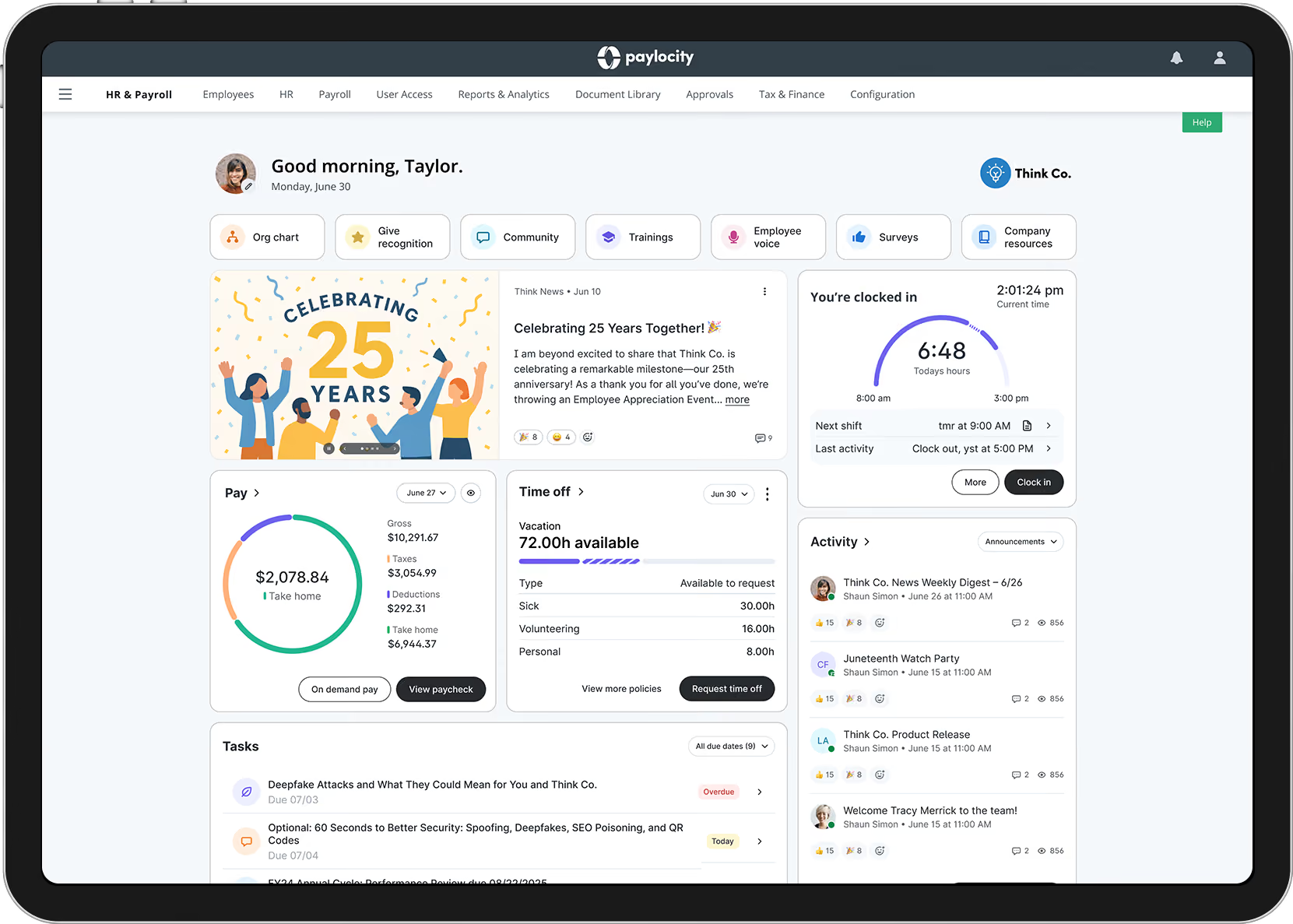
Paylocity simplifies the management of employees, documents, and processes. One of the key strengths of their HR software is the ability to streamline information collection and task completion across various users and workspaces. Whether it's confirming employee addresses, collecting proof of certification, or managing employee onboarding, Paylocity makes it easy to automate and centralize these processes.
Midsize companies will appreciate Paylocity’s support for employee recruitment and retention. You can effectively manage your scaling workforce demands with an internal ATS that allows you to take bulk actions, such as mass text communications.
Their self-service and community modules also function as central hubs where employees can communicate and collaborate with coworkers, complete tasks, stay updated on company news, and access resources and pay stubs. I find this especially useful for wide-scale system adoption since employees don't need to be platform experts to access the information they need.
As for managers and HR professionals, they have full visibility into employee data at the position and seat level, can easily configure new positions, assign required skills and certifications, predict vacancies, and manage budget changes.
Paylocity also takes compliance seriously, with a dashboard that provides quick access to work authorizations, EEO and FLSA compliance data, and industry news. And if you need extra support, Paylocity's HR Edge service provides expert resources, including an account manager, to help you minimize risk and implement best practices.
Finally, you can use Paylocity's robust reporting and analytics capabilities to gain a deeper understanding of your workforce. With real-time, visualized data, you can monitor key metrics, identify trends, optimize your HR strategies, and drive business success.
Paylocity serves more than 41,000 companies, including the Lincoln Park Zoo, Scrub Daddy, and Buena Vista Business Services.
Although Paylocity does not disclose pricing, third-party sources indicate it ranges from $17 to $32 PEPM. Pricing depends on what modules you require from its HR, Finance, and IT suites.
Best For
Paylocity is best for medium-sized companies that need support managing their growing teams and complex pay processes.

Paylocity’s primary purpose for us was processing payroll for multiple-state locations biweekly. We also used the system to onboard new employees once or twice a month.
Additionally, Paylocity helped us register new states whenever necessary. I used Paylocity daily to review employee information and update data. Every two weeks, I ran reports in Paylocity for accounting purposes.
The onboarding team was excellent and provided the support we needed to ensure a smooth transition. Paylocity simplified state registrations, saving the HR team a significant amount of time. Payroll accuracy was consistent, and we could rely on payroll being processed correctly and on time.
Paylocity was chosen because we needed a multi-state payroll provider, and it had the best reviews for accuracy in processing Pennsylvania payroll. We also required a provider to handle state registrations, and Paylocity offered this service.
Accuracy for Pennsylvania payroll was critical due to the extensive attention to detail and knowledge of complex local laws it requires. My first organization used Paylocity for two years, and my last organization used it for one year. Personally, I have used it for a total of three years.
Some of the most recent changes made the platform harder to use than it was before. The HRIS side of Paylocity was less user-friendly than I would have liked. Many self-service solutions were provided, and customer support could have been more helpful.
I have used other systems, and payroll accuracy was the key difference between Paylocity and tools like Zenefits. I would recommend Paylocity over any other system I have used.
When buying a payroll tool, it’s essential to consider the states or countries you need payroll services for and the provider’s accuracy in complying with state, local, or international payroll laws. It’s also important to evaluate the cost per employee or pay run and any additional charges, such as fees for same-day pay runs.
I believe some of Paylocity’s recent changes are holding users back. Reporting is not as straightforward as it used to be, making it confusing to locate reports or other information. The user interface could be improved to make it more intuitive.
Paylocity is ideal for multi-state organizations that need to maintain payroll compliance across all states.
Paylocity may not be a good fit for very small organizations operating in only one state.
HiBob
Bob is a global HR software platform that provides customizable features to streamline HR processes, including advanced functions such as compensation and workforce planning. But Bob particularly stands out for its focus on employee experience — from its funky, colorful interface reminiscent of 1970s disco, to employee recognition and interest groups that foster workplace connection. Bob is well-suited for most SMBs, but if your goal is to manage HR processes and improve platform adoption and engagement with employees, I recommend Bob. It's both fun to use and a powerful tool to manage people processes.
PROS
- U.S. and UK payroll support, processing payroll for both directly within Bob without a third-party integration.
- Intranet features letting teams post announcements, welcome new hires, and celebrate employee wins from Bob's homepage.
- HR ticketing that lets employees anonymously report issues and track case status.
- Predictive analytics using signals like tenure, team turnover, and career development to flag attrition risk before it happens.
- They have tons of modules, which makes them a real one-stop shop. Beyond Core HR, they have modules for most things People Ops-related.
- Bob is a fast-growing company and their product looks the part, as it has one of the sleekest-looking platforms in the HRMS space right now.
- Their payroll hub allows you to connect all your payroll systems, which works great if you want to pay people in multiple locations without switching providers.
CONS
- Limited customer service options, with support available only via chatbot and email.
- Undisclosed pricing, requiring a sales call for a custom quote.

- Customer support is only offered via a chatbot and email.
- As to implementation, several users commented that they felt there could be more attention via personal walkthroughs provided at the beginning. Many had to resort to reading documentation and watching videos or just figuring things out by themselves.
- Pricing is only custom and available upon request, so you can’t just sign up, pay, and start using the tool.
HiBob is an interesting contender in the HR software space. Its philosophy is to put the employee first, and you can see that in how easy its HR platform, Bob, is to use. For example, I can send "kudos" to staff directly from Bob's homepage. Bob’s default settings also let employees customize their public profiles to showcase their gender pronouns, hobbies, and "superpowers."
But one of my favorite features, which I haven't seen any other HR software system emulate, is the “Club View” function on organization charts. With it, I can sort employees by their hobbies or interests, making it easier to connect with like-minded peers. This is great for global or remote teams where direct engagement with coworkers is challenging.
Forward-thinking HR departments interested in improving employee experience will like Bob. It offers essential tools, including onboarding, time-tracking, payroll, time-off management, surveys, benefits administration, and performance management.
HiBob has more than 4,400 customers worldwide, including SmartRecruiters, Fiverr, and VaynerMedia.
Undisclosded.
Best For
Bob is best suited for SMBs prioritizing employee experience in their HRIS.

We use HiBob HRIS everyday as all of the employee info is stored in there. We used it for creating key reports, onboarding, offboarding, internal communications, and kudos. Once you're in the system, you have the capability to set up workflows to automate which is helpful. For onboarding, we had it integrated into our ATS which was Jobvite. Overall it was pretty seamless and easy to use.
- Bob was a fun and engaging HRIS that employees really enjoyed.
- It allowed a lot of interaction within the platform, and for people to get to know each other better.
- There was a surprising amount of customizability you could get from the system.
I used HiBob HRIS between 2019-2020. We unfortunately had to move off of BambooHR, and HiBob was the next best platform for our company of 250+ employees. During my time, we'd used it for about 1 year. It's a very people and engagement oriented HRIS that encourages a lot of opportunities to celebrate each other, interact around any announcements, and is very culture focused. The key benefit it provided was a culturally engaging HRIS that employees enjoyed using once they were trained on it.
- It had a lot of bugs and the server can be slow at times. Hopefully this issue has resolved over time.
- It's not an all-in-one platform, they encourage you to partner with other best in class payroll, time keeping, etc. systems.
- The UI looked great, but the UX was a bit clunky. For almost all processes, there was a lot of click through that had to be made and the experience was not very user friendly.
Bob excels at creating a people first and culture centric HRIS which most do not do. At most it's where you check for your payroll. However, we got a lot of great positive feedback around the platform itself. Around HR Processes though, they seemed to still be growing in functionality at the time (2019). They are integrated with a lot of the major brands / companies around payroll, timekeeping, etc. so it makes it easy to use across platforms.
- All-In-One Platform: If you're looking for an all in one platform, this won't be the best fit. However, if you're looking for a good culturally engaging HRIS this would be a good option!
- Onboarding -> Payroll -> Offboarding Workflow: It's important to think about where you're starting your employment/ onboarding workflow since it's not an all in one system. To avoid double work / entry, it's very important to map out where you want to include what data and how you can transfer that across platforms.
Bob was very hands-on and interactive throughout the implementation, training process. They've got an aggressive and extensive roadmap which is exciting. They receive feedback very well, and it was exciting to grow alongside the company and system because we did see things change rapidly within the system for the better.
I think Bob is best for <500 employee companies. It would also probably be better for companies who have a majority of salaried employees vs. hourly non-exempt. And also for a company that wants to use the best in class platforms for various parts of the people experience.
Bob would not be great if you're looking for an all-in-one HR platform. If you use your HRIS for timekeeping and time off tracking, it also may not be the best fit. Larger organizations may have a hard time using Bob.

BambooHR
BambooHR has been a go-to HR solution for small- and medium-sized businesses (SMBs) for years, with modules covering nearly every HR process — from hiring to payroll, benefits, time tracking, and performance management. BambooHR stands out to me for its plug-and-play HR workflows, pre-built reports, and easily navigable interface that requires little training.
PROS
- Flexible pricing, with volume and bundling discounts as needs grow, plus a 7-day free trial.
- Simple user interface, with a newer navigation side panel that speeds up training and improves adoption.
- Global support, with EOR services powered by Remote allowing hiring and payment in more than 90 countries without leaving BambooHR.
- Company branding, letting you update interface colors and logos to match your company's guidelines.
- Flexible packaging and custom pricing is the way they roll. You can pick out one or two packages and pick other modules as add-ons based on your needs.
- Very simple and straightforward tool, easy to use.
CONS
- Limited support times, available only 6 AM to 6 PM MT, Monday through Friday.
- Critical functions reserved as add-ons, including U.S. payroll, benefits administration, and time-tracking.
- Reliance on partnerships, with HR compliance, EOR, and training handled through third-party integrations rather than native features.
- Payroll is only available for US-based employees
- Customer support is only offered during US business hours.
- Some modules like time tracking, performance management, and surveys are only available as add-ons.
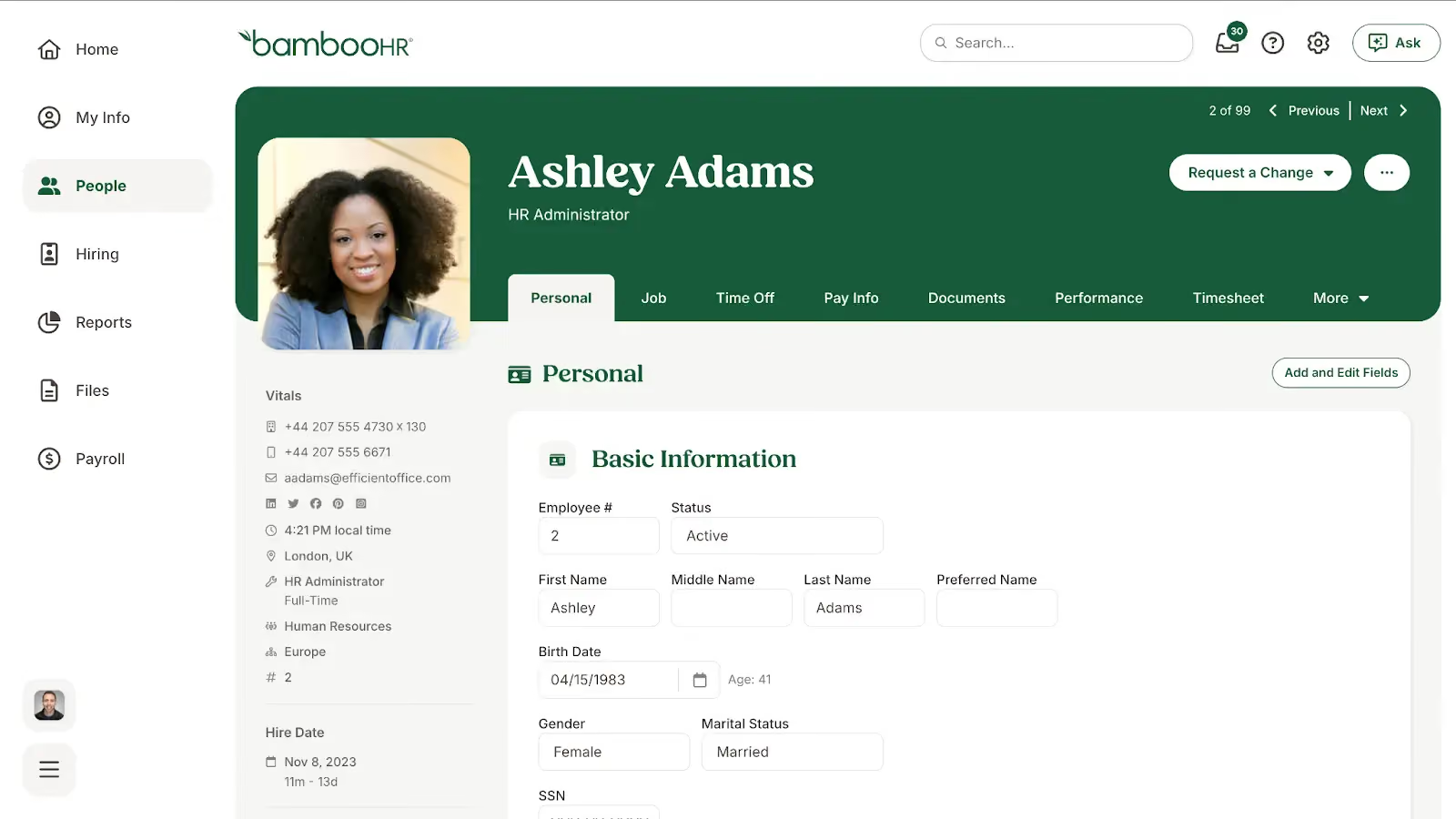
BambooHR has made it to my shortlist for many years for its simple interface, modules that support the entire employee lifecycle, and easy-to-build HR workflows.
Aside from core HR functions like an applicant tracking system (ATS), leave management, employee records, and a company calendar, they also have performance management, benefits administration, and payroll available as add-ons. But what I particularly like about BambooHR is that it continues to innovate on these core HR functions while keeping its SMB user base in mind.
For example, within the last year, it underwent a major interface overhaul with the addition of a left-side navigation menu, similar to other HR platforms like Rippling and Gusto. This makes it even easier for new users to learn the platform as it mimics popular social media platforms — especially helpful if you struggle with platform adoption among your employees.
They also added a new AI assistant, EOR services, and compensation benchmarking in 2025. While I like the new AI assistant for quick access to data and policy insights with source citations, BambooHR's in-app HR benchmarks are particularly exciting and a novelty for small-business-focused HR platforms.
With them, I can compare compensation, turnover, and eNPS against peers by company size, industry, and location. This helps me make strategic decisions like addressing pay equity gaps or improving onboarding when turnover spikes, without relying on third-party sources like SHRM or the Bureau of Labor Statistics. Only ADP in my shortlist offers similar benchmarking capabilities.
But BambooHR does have its flaws. For one, its benchmarks are based on the anonymized data of its 34,000+ customers, a far cry from ADP's more than 1.1 million customers, making them less accurate overall.
For another, creating your own workflows, such as new hire onboarding, continues to use a guided walkthrough. This is perfect for HR software newbies but can be frustrating for companies that want more advanced customization, like initiating tasks through integrated apps like Slack. If you need that workflow configurability, look to Rippling or monday.com instead.
BambooHR has 34,000+ customers, including names like MasterClass, Bitcoin.com, and ZipRecruiter.
BambooHR offers three per-employee, per-month plans: Core ($10) for core HR features like employee records, hiring, time off tracking, and compliance tools; Pro ($17), which adds performance management and employee engagement features; and Elite ($25), which includes compensation management, advanced analytics, HR benchmarks, and premium services. Volume and nonprofit discounts are available.
BambooHR also offers add-ons such as Time Tracking, Payroll, and Benefits Administration (US only), as well as Employer of Record services via Remote. A 15% bundle discount applies to Payroll and Benefits Administration for US-based employees only.
Note: BambooHR’s 7-day free trial allows you to try everything in its Elite plan, plus its Benefits Administration add-on. If you’d like to see their time-tracking, payroll, and EOR add-ons in action, you can request a free demo.
Best For
BambooHR is best for US-based growing businesses..
At my former company, I used BambooHR for payroll functions and streamlining those processes. Overall, BambooHR caused more issues than it solved. The reporting and timekeeping features were very helpful, though. Benefits workflows ran smoothly and supported enrollment effectively. Tax filing was made simpler through the system.
I appreciated that BambooHR handled tracking well. The automation of some enrollment and setup processes was helpful. Lastly, it has a clean interface and is visually appealing.
I previously used BambooHR in another role for about two years. BambooHR was implemented to assist with onboarding, offboarding, and general reporting. Tracking and reporting workflows were the most useful to us at the time.
Payroll was not very functional, and it was difficult to get in touch with customer service. There were strong advantages in the reporting features, but the payroll issues outweighed those benefits.
I did not like the payroll functions, and they caused some issues. The BambooHR service team was not as responsive as we would have liked. Prices were higher than some competitors for the package we received, and most features were add-ons.
Implementation was smooth, and there were no major issues when starting with BambooHR.
Company size should be considered carefully. Prices can increase significantly and become difficult to manage if the company is too big or too small. Midsized organizations are the best fit. Companies that need currency conversion should avoid BambooHR, as this function is lacking.
BambooHR’s compliance updates are frequent and remain aligned with regulations.
Midsized companies needing process automation will find BambooHR a great fit.
Large international companies will not benefit a lot from BambooHR.

Rippling
Rippling is an all-in-one HR platform with an intuitive design and thoughtful UX that handles everything from onboarding to offboarding. It's long been on my shortlist simply for its powerful, no-code automation tools that let you streamline complex HR processes across multiple HR modules, such as payroll and performance management. It also offers EOR, professional employee organization (PEO), and HR services — all of which you can turn on or off as your business scales. This, along with its IT device and inventory management for remote teams, makes Rippling the strongest option if your business needs are rapidly evolving and you want to stay on one platform as you grow.
PROS
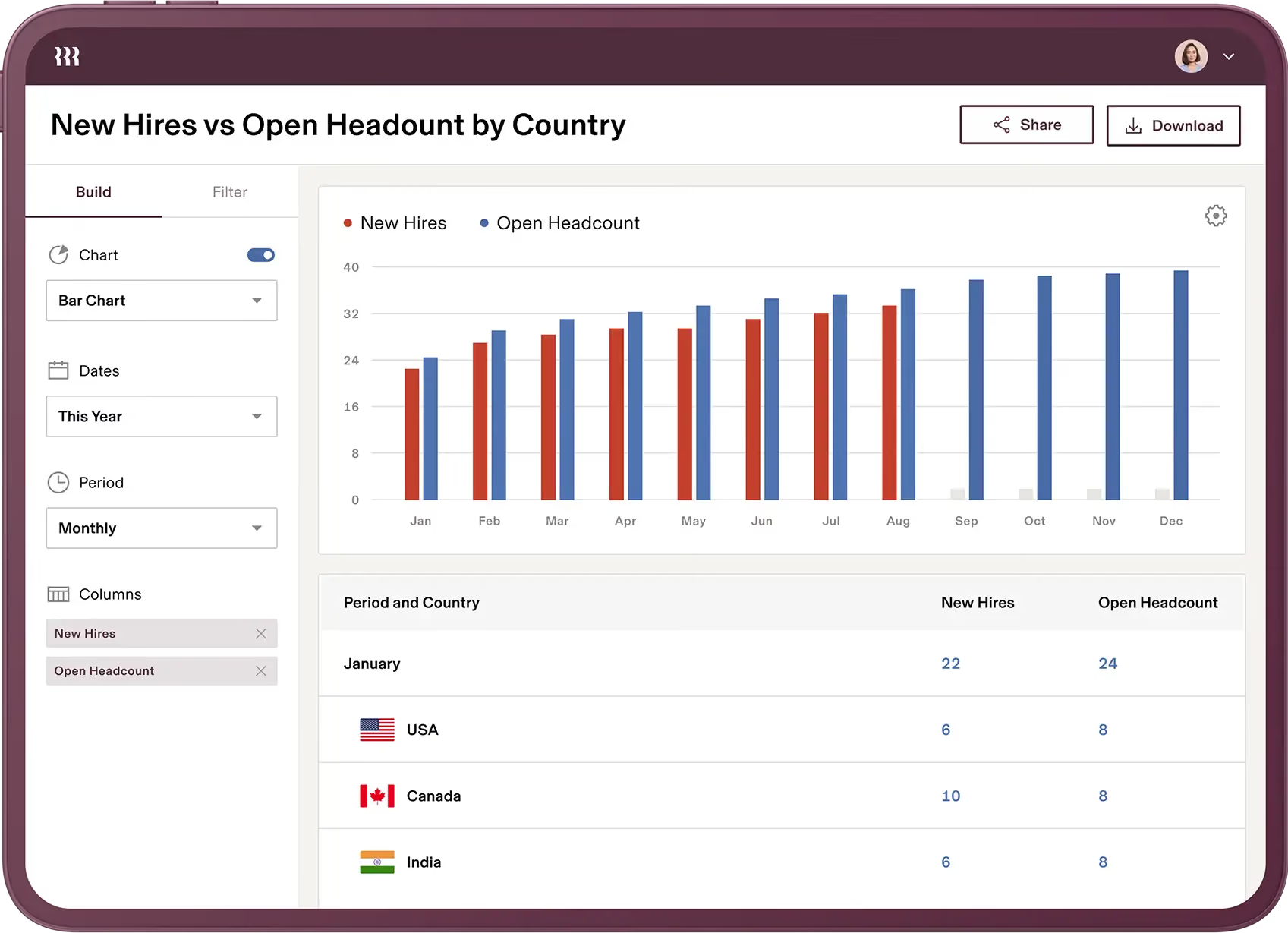
- Advanced reports and data visualizations, using Excel-like formulas to combine data from multiple HR modules in real time for a macro view of people operations.
- 600+ integrations, connecting Rippling to your existing tech stack and reducing the need to switch platforms.
- No-code automations and apps, letting you build workflows and tools that connect modules within and outside Rippling.
- Native, purpose-built features, with HR functionality built directly into the system rather than added through acquisitions or third-party partnerships.
- All-in-one platform for employee management + PEO services offered, and even a suite of other IT products
- With 500 integrations, it’s very likely that they integrate with other key tools from your tech stack.
- Operates globally with any currency
- Workflow automation
- Analytics opportunities
- Provides a holistic view of company outflows—headcount costs included
CONS
- Minimal AI tools, with no AI assistant trained on company data yet, unlike competitors such as BambooHR, UKG, and ADP.
- Limited tech support, available only during business hours and without phone support.
- Lack of feature refinement, as rapid releases sometimes lead to buggy workflows, crashes, or freezing.
- Total buy-in to Rippling is essential
- Very SMB-oriented, in case you’re a larger company.
- New features tend to be buggy in ways that tech teams are not accustomed to fixing
Rippling is a popular human capital management (HCM) system that helps SMBs manage HR and IT processes in a single platform.
Rippling focuses heavily on automation tools to free HR teams from repetitive manual tasks, such as self-service onboarding and benefits enrollment. Using simple if-then statements, I can build surprisingly complex workflows, from adding non-discretionary bonuses to employee paychecks once they satisfy the necessary criteria to sending task reminders through Slack.
I even built my own workers' compensation (WC) injury workflow that sends WC tasks to an injured employee's direct manager when I enter an injury date in the employee’s profile.
While I have yet to test it, Rippling now offers tools to build your own internal app using Rippling data and automated workflows so that you can create even more individualized processes. The company also plans to release tools to make custom integrations for even more powerful data flow between applications.
This kind of customization, alongside support for increasingly complex HR needs such as global payroll, headcount planning, and employee travel management, makes Rippling the best option for fast-growing companies. All of Rippling's products operate on the same platform, meaning you retain access to your employee data regardless of whether you grow, shrink, add new locations, or acquire new ones.
Rippling serves more than 20,000 companies, including Blaze Pizza, Taskrabbit, Anthropic, and Forbes Advisor.
All customers must purchase Rippling’s base platform, Rippling Platform, which starts at $40 plus $8 PEPM. You can then add on modules from the following suites:
- HCM: HR modules including U.S. and global payroll, benefits administration, time and attendance, performance management, scheduling, chat, and recruiting.
- IT: IT modules including identity and access, device, and inventory management.
- Spend: Finance modules including corporate cards, bill pay, and expense management.
Best For
Rippling works best for fast-growing SMBs looking to leverage automated HR workflows in their HRIS.

I use Rippling primarily for payroll and benefits administration for both U.S. and global employees. It serves as our core platform for managing payments across employment types, including employees and contractors.
The tool is used regularly for processing payroll cycles and ensuring compliance with benefit offerings. I also rely on Rippling to handle employee records and tax documentation. It has become central to our HR operations.

- It is excellent for handling EOR, contractor, and employee payrolls in a single system.
- The platform is relatively easy for employees to navigate.
- Customer service is responsive and helpful when issues arise.
I originally purchased Rippling to serve as an Employer of Record (EOR) for international employees. I later migrated our HRIS to Rippling for U.S.-based employees as well. I have used Rippling for EOR functions since 2023 and for U.S. employees since early 2024.
One of the key benefits is the ability to pay both international and domestic employees through a single system. This has simplified payroll operations and improved overall administrative efficiency.
- The integration process was lengthy and difficult; our rep moved to a different country during implementation, delaying the hiring of two international employees by two months.
- There was an attempt to increase our negotiated monthly cost, though they honored the original rate once I provided documentation.
- Benefit integration is more manual than expected unless an additional service is purchased, which we do not currently find cost-effective.
Rippling offers a broad range of features and services in one platform. While its coverage is impressive, I would prefer to see more included functionality without additional fees.
If the goal is primarily payroll, Rippling is a strong option. If you need a fully comprehensive HRIS, there are other platforms that offer more robust features.
Rippling has added more countries to its EOR program and continues to expand device and IT services. The system has become more user-friendly, and its add-on services support the goal of an all-in-one solution, although these come at an additional cost.
Rippling is well-suited for small to mid-sized organizations with 10 to 150 employees.
It is not ideal for larger organizations, as its reporting tools and overall system capacity may fall short of their needs.

Gusto
Gusto's small-business-friendly interface makes it especially approachable for startups and new businesses. It features step-by-step workflows to build strong HR habits and complete process-heavy tasks, such as payroll and performance reviews. I'm particularly impressed by how Gusto keeps its small-business customer base in mind as its product offerings expand. Instead of being weighed down by additional features (something I think many vendors occasionally struggle with) Gusto keeps simplicity its guiding principle. This means features complement rather than complicate its existing interface, so you can navigate new modules like scheduling without much training — a huge win for ease of use.
PROS
- Affordable, transparent pricing, with contractor-only plans starting at $35 plus $6 per worker per month and the Simple plan at $49 plus $6 PEPM, undercut only by OnPay in this round-up.
- Gusto-brokered benefits, offering employee medical, dental, and vision insurance at no cost beyond premiums.
- Plug-and-play features, letting you complete processes like onboarding and payroll in a few clicks after guided implementation, without lengthy setup.
- The dashboard feature keeps tabs on compliance tasks
- The hiring and onboarding sequence is nicely streamlined between HR and the new hire
- Post-offer, pre-start tasks are made easy with integrations like CorpNet (state tax set up) Checkr (background checks)
- Easy payroll for U.S.-based W-2 folks, domestic, and international contractors
- Person-to-person phone support, email, and other customer service resources
- The business model is responsive to customer needs
CONS
- Limited customization options, with out-of-the-box workflows that require adjusting your processes to Gusto's rather than the reverse, and more complex needs often requiring third-party integrations.
- Basic reporting, covering standard payroll and workforce reports but lacking advanced analytics like data visualizations or cross-module comparisons.

- Gusto can support payments for international contractors, but not employees
- No native accounting feature to keep earning and spending under the same roof
- Analytics dashboard is simplistic
Gusto began as a payroll-focused platform for small businesses but has evolved into an all-in-one HR solution supporting benefits, recruiting, performance management, and compliance training. With EOR services through its Remote partnership and money management features like invoicing and bill pay, startups can run most of their business operations in one place.
The platform walks you through payroll setup, helps you register your business in various states, and provides in-app assistance to resolve government notices. Features like Gusto-brokered benefits, labor law poster compliance, a solopreneur subscription plan, tax credits, and a payroll line of credit give you the right level of support regardless of your company's size or structure — critical when you don't yet have resources for a dedicated HR employee.
That said, Gusto likely won't be your long-term platform if your business grows beyond 300 employees. The system lacks the automations, analytics, and configuration options needed for complex processes like candidate relationship management, succession planning, and multi-entity management. You'll eventually need to graduate to more robust platforms like Paylocity or Rippling. But for startups and new companies expecting limited growth, Gusto is a stellar option to consider.
Gusto services about 400,000 companies, mostly small, local businesses in the U.S. Examples include Rise Marketing, Little Fish Accounting, and Arklign Laboratories.
Gusto offers three primary tiers: Simple, Plus, and Premium:
- Simple: $49 plus $6 PEPM; includes single-state payroll, PTO management, and employee database.
- Plus: $80 plus $12 PEPM; includes everything in Simple plus multi-state payroll and time tracking.
- Premium: $180 plus $22 PEPM; includes everything in Plus, plus performance and compensation management and priority support.
It also offers additional Contractor Only, Solopreneur, and EOR plans:
- Contractor Only: $35 plus $6 PEPM.*
- Solopreneur: $49 plus $6 PEPM; includes S Corp compliance features.
- Gusto Global: $699 PEPM.**
Gusto offers a host of other add-ons and services, including global contractor payments, same-day pay, and workers’ compensation plans.
* New contractor-only plan customers pay a discount rate of $0 plus $6 PEPM for the first 6 months.
Best For
Gusto is best for startups and new businesses with limited growth plans.

We process payroll semi-monthly, so we use Gusto at least 24 times a year. Occasionally, I log in to update benefits information, such as 401k contributions. It's convenient to store employee documents digitally, eliminating the need for paper files. Gusto is set up to automatically calculate and deduct 401k contributions, including our 25% match up to the maximum. Additionally, it automatically transfers these funds directly to our provider, so I don't have to worry about making separate payments.
The interface is user-friendly. Benefits deductions are seamlessly integrated with payroll processing. I appreciate how support tickets are efficiently tracked within Gusto.
Our small business needed a cost-effective payroll solution, and Gusto provided an affordable option. We've been using it for just under a year to manage payroll for our two employees. We also needed a solution for direct 401k deductions from our payroll, which has allowed us to save on taxes with pre-tax deductions.
I am not pleased that the support team seems to be outsourced outside of the USA, which occasionally makes me question the accuracy of the information provided. Also, I wish I didn't have to use one of their partners to integrate our 401k plan.
Gusto's interface is superior to many competitors with its ease of use and straightforward setup. It intuitively understands my needs without requiring setup in multiple areas to achieve the desired functionality.
Gusto might not be ideal for larger companies. It can be challenging to manage frequent payroll changes due to the platform's complexity in this area.
Since I am relatively new to using Gusto, I am not familiar with its historical changes or updates.
Gusto is very well-suited for small businesses with fewer than 20 employees.
Companies with more than 50 employees or those with frequent payroll changes may find Gusto less accommodating.
.avif)
Netchex
Netchex combines core HR, payroll, time and attendance, performance management, reporting, and employee self-service in one platform. The system's emphasis on mobile accessibility and payroll-integrated processes further strengthens its value proposition for domestic firms managing distributed, hourly staffing models.
PROS
- Mobile-first employee tools make self-service practical for deskless workers.
- Payroll workflows surface time, PTO, approvals, and employee changes in one place.
- Custom and natural-language reporting can turn HR questions into usable data quickly.
- AskHR AI can answer policy questions and take actions such as submitting PTO requests.
- Performance management includes goals, reviews, one-on-ones, and AI coaching.
- Grows with your team: With Netchex, it’s very easy to opt for a new plan and keep all your data in the same place even if you outgrow your current pricing plan. Other vendors require a switch to a new service in that kind of event.
- Dedicated support team: Netchex are note-worthy for their award-winning and often lauded customer service. It’s all US-based and provided in real-time through email, live chat, and phone calls.
- Pre-payroll reports: Allows for critical error checks before submission.
- Flexible payroll grid: Easy to make changes or correct errors on the fly.
- Versatile payment options: Includes paper checks, direct deposit, and pay cards.
CONS
- HR functionality appears closely organized around payroll workflows rather than an HR-first architecture.
- The platform is primarily designed for U.S. hourly and salaried workforces, limiting its usefulness for global teams.
- Some of the most ambitious AI capabilities, including Mesh Teammates, were presented as early-stage technology rather than mature functionality.
- The breadth of payroll and HR functionality may be more than smaller teams need.
- Requirement of payroll: Users must use the payroll module to access other functionalities, so it wouldn’t work as stand-alone HR software.
- No free trial: Potential users can't test the software without committing to a purchase. The demo with a sales rep is the closest thing.
Netchex takes a noticeably payroll-centered approach to HR. During our demo, the vendor started with payroll and showed how their "On Screen Payroll" consolidates timecard issues, PTO requests, approvals, new-hire paperwork, employee changes, and other items that can affect payroll. That architecture makes sense for employers where HR administration ultimately feeds payroll, particularly multi-location businesses with hourly and deskless workers.
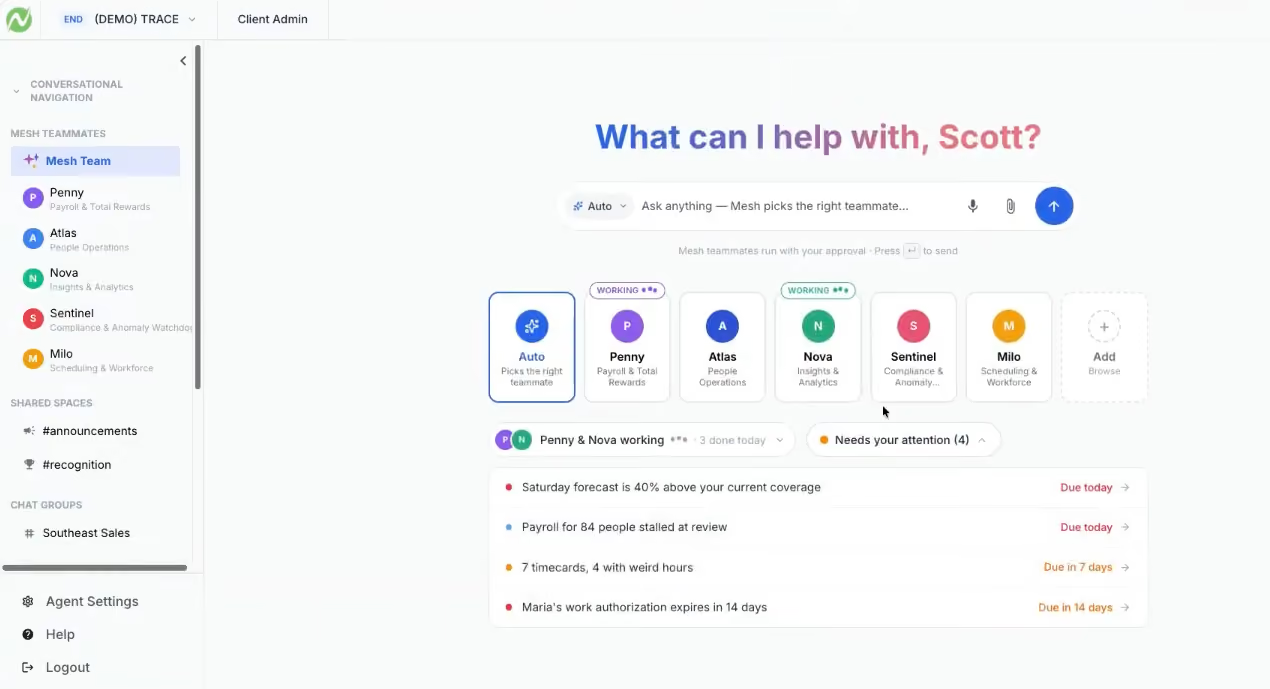
The mobile experience offered is well-crafted. We like how it enables employees to correct missed punches, receive notifications, request PTO, access pay information, and interact with HR tools without needing to sit at a computer. The platform also offers self-service for profiles and documents, digital acknowledgments, policy access, and an AI-powered AskHR assistant that uses company documents and employee-specific platform data to answer questions. From our testing, the assistant could answer a PTO-balance question and submit a vacation request rather than simply returning information.
Reporting is equally good. Netchex provides customizable reports, historical views of employee data, natural-language report generation, and pre-built analytics for areas such as turnover and overtime. We liked that users can ask a question in plain English and receive the requested output, rather than having to build a report from scratch.
One particularly interesting development recently is Mesh AI HR Teammates, which Netchex positions as AI agents that can monitor workflows, surface issues, answer questions, and eventually take actions on behalf of administrators and employees. The preview included Penny for payroll and time, Atlas for people operations, Nova for analytics, Sentinel for compliance, and Milo for employee assistance. However, during our demo, the Mesh functionality was described as being in an early beta stage, with the first live customer rollout targeted for the first half of 2027. We would therefore treat this as an important roadmap development rather than a reason to buy Netchex based on functionality available today.
The main drawback is the product's orientation. Netchex has a comprehensive suite of HR capabilities, including employee records, document management, compliance, certifications, compensation benchmarking, performance management, and self-service. However, our experience with the product made clear that payroll remains the center of gravity, which is a distinction from HR-first platforms. We also wouldn't recommend Netchex for organizations that need robust global HR capabilities, as the platform is built around U.S. workforces.
7,500+ organizations, including Xpressdocs, BK Corrosion, Regal Hospitality, and The Colony ER Hospital.
Quote-based, per-employee-per-month pricing model.
Best For
Netchex is best suited to U.S.-based, multi-location employers with hourly or deskless workers that want their HRIS connected to payroll and workforce administration.

MHR People First
MHR's People First tackles the biggest problem with HR software: nobody logs in unless they have to. The default landing page is a LinkedIn-style social feed with posts, peer recognition, polls, communities, and policy management, giving employees a reason to open the platform daily. Underneath sits a solid core HR system with employee profiles, self-service, org charts, audit trails, and reporting, with optional modules for learning, performance, recruitment, and more.
PROS
- Social engagement layer (recognition, polls, communities, policy distribution) turns the HR system into a daily-use platform, not a payslip viewer.
- Employee self-service covers address changes, benefits info, terms of employment, and bank details with sensitive fields hidden behind privacy clicks.
- WCAG 2.2 compliant with ongoing accessibility testing through UX teams and local charities.
- Modular architecture lets you start with core HR and add learning, performance, or recruitment only when ready.
- US compliance covers FMLA, ADA, COBRA, HIPAA, I-9, and E-Verify.
- Modular architecture lets you start with core HRM (profiles, org chart, audit, insights) and add only the modules you need.
- AI-powered performance check-ins suggest talking points based on prior conversations and department-level sentiment analysis.
- Includes a 90,000-course learning library alongside a full LXP with SCORM support and CPD credit tracking.
- WCAG 2.2 compliant, with ongoing accessibility testing through UX teams and local charities.
- US compliance covers FMLA, ADA, COBRA, HIPAA, I-9, and E-Verify.
CONS
- No native payroll; MHR relies on third-party partners including ADP for the US market.
- Review footprint on G2 and Capterra is thin compared to BambooHR or Rippling, limiting peer validation for prospective buyers.
- MHR has been operating in the US for at least 18 months but is still expanding. State-specific support depth is worth discussing during a demo.
- The UI is functional and powerful but looks dated compared to newer HR platforms.
- No native payroll; MHR relies on third-party partners including ADP for the US market.
- Review footprint on G2 and Capterra is thin compared to incumbents like BambooHR or Rippling, so peer validation is limited.
- MHR has operated fully in the US for at least 18 months, but they are still in expansion. State-specific constraints may still exist for some teams and it’s worth discussing during a demo.
- The UI is functional and powerful, but looks dated compared to newer entrants in the HRMS space.
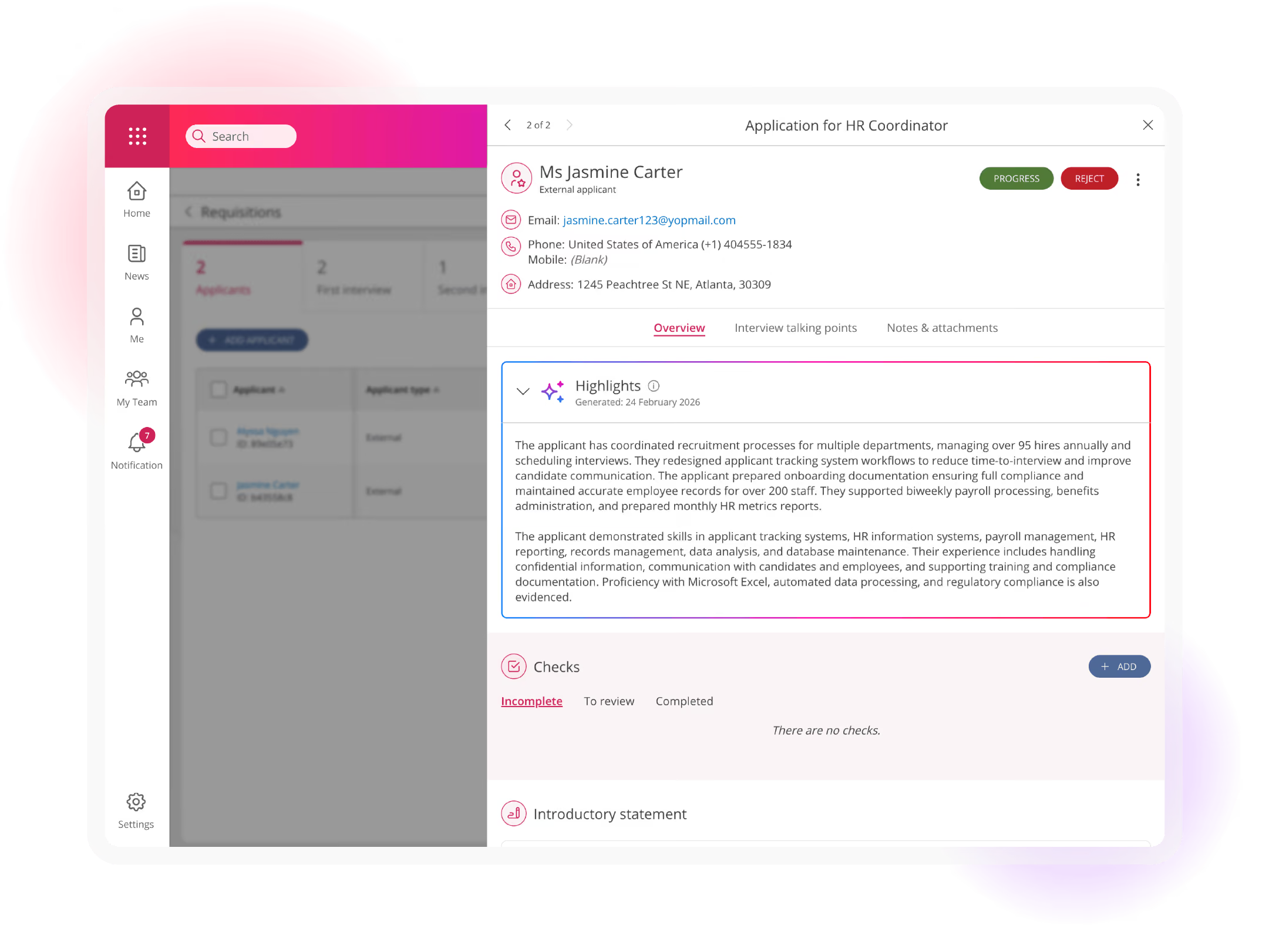
MHR has been building HR software since 1984, and People First is their cloud-native platform aimed at mid-market organizations of 100 to 2,000 employees. We demoed it with their solutions team and came away focused on one thing: the adoption angle.
Most HR software struggles with the same problem. You buy it, you roll it out, and employees only log in when they need a payslip or have to update their address. People First tries to break that cycle by making the landing page a social feed. Employees post updates, recognize colleagues with tags like "collaboration" or "leadership" that feed into dashboards, vote in polls, and join interest-based communities. MHR says this is the most-used feature on their own internal instance. Unlike BambooHR or Rippling, where engagement tools are secondary, People First makes social features the front door.
The core HR underneath is solid. Self-service lets employees manage personal info, view terms of employment, and access benefits, with sensitive fields hidden for privacy. Every action is fully audited. Background checks can run before a new hire's first day. The org chart is built in, saving teams from buying a separate tool.
Where it falls short: payroll is third-party only (they integrate with ADP in the US), the UI feels slightly behind tools like Rippling, and MHR's customer base still skews toward the UK despite genuine US investment (Atlanta office, FMLA/COBRA/HIPAA compliance). Still, for HR teams whose biggest challenge is getting employees to actually use the system, People First offers a genuinely different and considerable approach.
The Salvation Army, Revlon, LG, Skechers USA, The National Gallery, and Priory Healthcare.
MHR offers custom pricing based on organization size and module selection. Core HRM (engagement, profiles, org chart, audit, insights) is the required foundation. Additional modules for learning, performance, recruitment, absence management, and onboarding are priced individually.
MHR has operated since 1984. People First is their modern, cloud-native offering. Recent development has focused on AI across performance check-ins, recruitment matching, and content filtering, plus US market expansion with FMLA, COBRA, HIPAA, and I-9 compliance enhanced via actual presence in the country— an Atlanta office.
Best For
Mid-market organizations (100 to 2,000 employees) whose biggest HR software challenge is adoption, and who want a system employees will engage with beyond payslips.
UKG
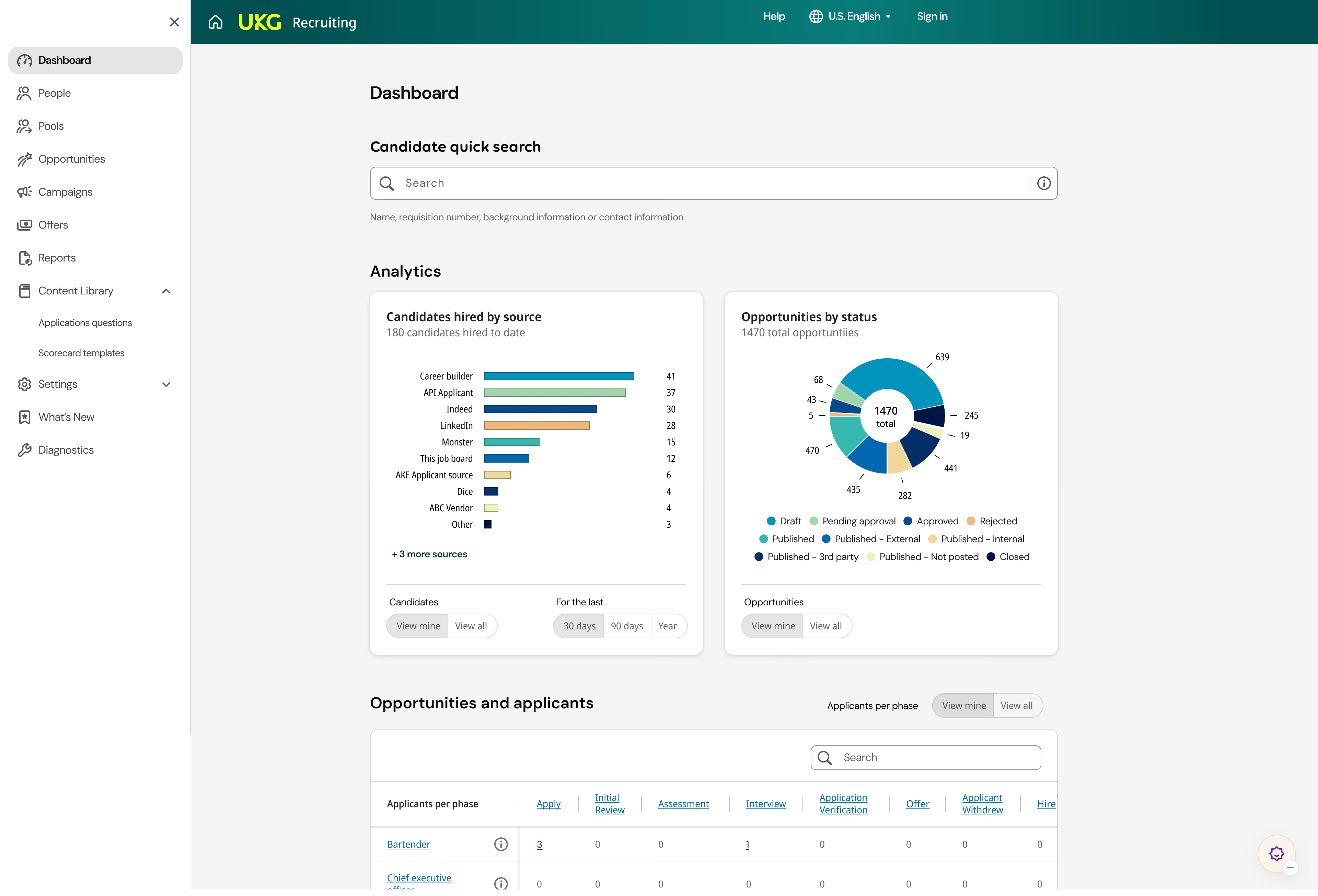
If you need detailed people reports, quick access to critical data, and customizable dashboards, UKG's HR software is for you. I picked it for its exceptional platform and HR process customization capabilities. Beyond simply adding your company logo, you can customize which modules you access from its tabs, drag and drop widgets to create your own at-a-glance dashboards, and adjust permissions to collaborate across teams with shared views.
PROS
- Advanced search and filter tools, with global search pulling up saved reports or employee data across modules for quicker access.
- UKG Bryte AI assistant that produces reports, automates scheduling, and addresses pay errors within a natural conversation.
- Industry-specific add-ons, such as Roster Cloud for casino resorts or TeleStaff Cloud for public safety staffing, to meet specialized needs.
- Super robust product, packing years of experience with HCM and Workforce Management technology
- Since they offer UKG Pro for HRMS and UKG Ready for workforce management, you could arrive at a combination of products that suits many of your HR needs from the same set of tools.
CONS
- Steep learning curve, often requiring multiple training sessions to ensure widespread, effective use.
- Expensive, with modular pricing that may be too costly for small teams.
- Long implementation, with setup often taking several months when migrating to UKG.
- Compared to newer tools, UKG Pro and UKG Ready tend to miss a unique selling point or a specific focus on a certain type of business. While they work great for bigger companies in all sorts of industries, very niche operations might have a hard time adapting to the tool.
- Similarly, UKG offers many solutions under one umbrella, so it's not the best fit if you're looking for only a handful of specific use cases.
UKG is the result of a merger between Ultimate Software and Kronos Incorporated. It offers two HR technology solutions: UKG Pro and UKG Ready. Here, I focus on UKG Ready, which is geared toward growing midsize businesses.
UKG is best for process-heavy HR teams that want the ability to personalize how they get HR work done. UKG accommodates different working styles by enabling complex processes that other HR platforms with predetermined workflows cannot support, such as accident reporting or succession plans. This adaptability, coupled with the reliable support from the UKG Community, is the characteristic that impressed me the most.
Speaking of, the UKG Community feature offers a massive repository of information and insights drawn from the questions and answers of other users. It also allows users to seek assistance and interact with other current platform users— extremely handy when you want to learn new capabilities or troubleshoot issues without contacting customer support.
Admin users will appreciate the fine-grained control over user access, which strengthens data security through permissions for different individuals and user groups.
Yet UKG’s high configurability and option-saturated screens make it challenging to set up properly, especially if you're migrating data and workflows to the platform. I don't recommend UKG as your first HR software solution, as new users will find it exceedingly complex. But if you're growing and need varying workflows and data reports to support multiple entities, locations, or worker types, UKG is a great option.
UKG has more than 80,000 customers, including MGM Grand, Belle Tire, and The Salvation Army.
Custom.
Best For
UKG is best for companies with 50+ employees and often complex HR needs that require a highly customizable HR system.

I use UKG to process payroll. As the payroll admin, I handle employee data storage and benefit enrollment through UKG. This year, I launched employee self-service benefit enrollment, allowing employees to manage their benefits directly through the platform.
I like the ease of the search feature in UKG. The knowledge center is very helpful. I appreciate how customizable the platform is.
UKG was selected before I joined the organization. From what I understand, the goal was to streamline processes and utilize an employee-facing platform. While the primary focus was on payroll, there was also an interest in electronic forms and digital onboarding of new hires. I have been using the software for one year. During that time, I have converted many processes to digital ones.
The interface is confusing and not very user-friendly. Processes such as checklists do not make sense. The integration with other platforms is lacking. Data cannot always be easily extracted from forms.
I feel other platforms like Rippling or ADP are more user-friendly. Their interfaces are more intuitive and less confusing. However, I do think UKG offers better support.
The biggest criterion is ease of use for the end user, which includes both administrators and employees. Integration, file feeds, and overall system ease are also important factors to consider. Make sure the tool can seamlessly integrate with existing systems and workflows.
I have not seen significant changes over the year I have been on the platform. There have been small rollouts, such as e-verify, which have been added to our account for free. These features are nice but not significantly impactful.
UKG is suitable for small but growing companies and entry-level HRIS users.
UKG may not be suitable for smaller organizations or those that are new to digital platforms.

ADP
If you're growing and need flexible support for unique business cases, ADP's Workforce Now HR software is a worthy consideration. It offers the largest selection of native solutions to handle the evolving needs of midsize businesses, including global payroll in more than 140 countries, benchmarks for strategic workforce planning, and even business advisory services. ADP also has one of the largest integration libraries on the HR software market, allowing you to connect accounting, business intelligence, and collaboration tools for a centralized system to handle all your people processes as you grow.
PROS
- Enormous product library, spanning HRIS/HCM/HRMS, global payroll, data analytics, contractor management, and financial wellness tools from one vendor.
- Advanced reporting, with benchmarking data and AI-generated insights covering turnover and headcount planning.
- HR outsourcing, offering PEO or managed services for payroll and benefits until you're ready to bring them in-house.
- ADP Assist, an AI assistant for natural-language navigation, report creation, and payroll processing, plus automating repetitive tasks.
- Native, all-in-one technology suite for recruitment, payroll, and compliance.
- 17 RPO service centers in 14 countries and provide services in 42 different languages.
- Dedicated team of AIRS-certified recruiting professionals.
CONS
- Legacy system, built from acquired businesses and ongoing updates to older software, leaving some workflows dated compared to newer platforms.
- Requires customization and training, including walkthroughs with ADP experts and workflow setup.
- Hidden fees, varying by business size, number of monthly payrolls, and payroll tax and reporting needs.

- Technology options outside ADP’s dedicated HR tools are limited.
ADP is an HR software vendor with more than 75 years of experience in HR solutions. It has a significant foothold on the U.S. HR software market, processing payroll for more than 42 million Americans. This means that, even if you’ve never used ADP, you likely know somebody who has.
As ADP’s mid-market option, ADP Workforce Now (ADP WFN) provides a balance of both pre-built and configurable HR workflows. It especially shines in the payroll department, allowing me to tackle complex payroll cadences, like multiple pay schedules and off-cycle pay runs, from the same screen. It even supports fluctuating workweeks, certified payroll, and employees with multiple pay rates.
I like ADP WFN's interface from the employee perspective, especially its mobile app. The ability to complete preboarding tasks from your phone, including taking and uploading pictures of I-9 documents and voided checks for direct deposits, eliminates the extra step of transferring images during desktop onboarding; a huge time saver.
Despite this, after multiple walkthroughs, I still find the admin interface busy and unintuitive. There's a lot of scrolling to access various features, such as reports on its HR dashboard page. Starting the onboarding or termination workflows for an employee requires more than two clicks, unlike the one-click buttons in Rippling's navigation pane.
Most of this stems from legacy functionality that ADP continues to upgrade and modernize. Its 2025 interface makeover offers a more accessible design with prominent buttons and contrasting colors, plus it adds its AI copilot, ADP Assist. With it, I can complete HR tasks, like building a report, within a natural conversation — a win if you need scalable, advanced customizations while retaining the ease of use of platforms like BambooHR.
ADP WFN’s primary market is small- to midsize businesses, with customers such as Four Seasons, Logicalis, and Smoothie King.
ADP WFN doesn’t disclose its pricing. You’ll need to contact its sales team for a custom quote. The quote depends on several factors, including the frequency of your payroll (weekly, biweekly, semi-monthly), number of employees, worker types (employees, contractors), subscription tier, add-ons, and support level.
You can choose from the following subscription tiers and add-ons:
- Select: Payroll, tax, HR tools, ADP Assist, Voice of the Employee, onboarding, digital recordkeeping.
- Plus: Everything in Select and benefits administration.
- Premium: Everything in Plus and workforce management.
- Add-ons: Talent acquisition, performance management, compensation management, HR assist, enhanced analytics, and learning management.
Best For
ADP Workforce Now is best for organizations experiencing/aniticipating growth/scalability.
Paycor
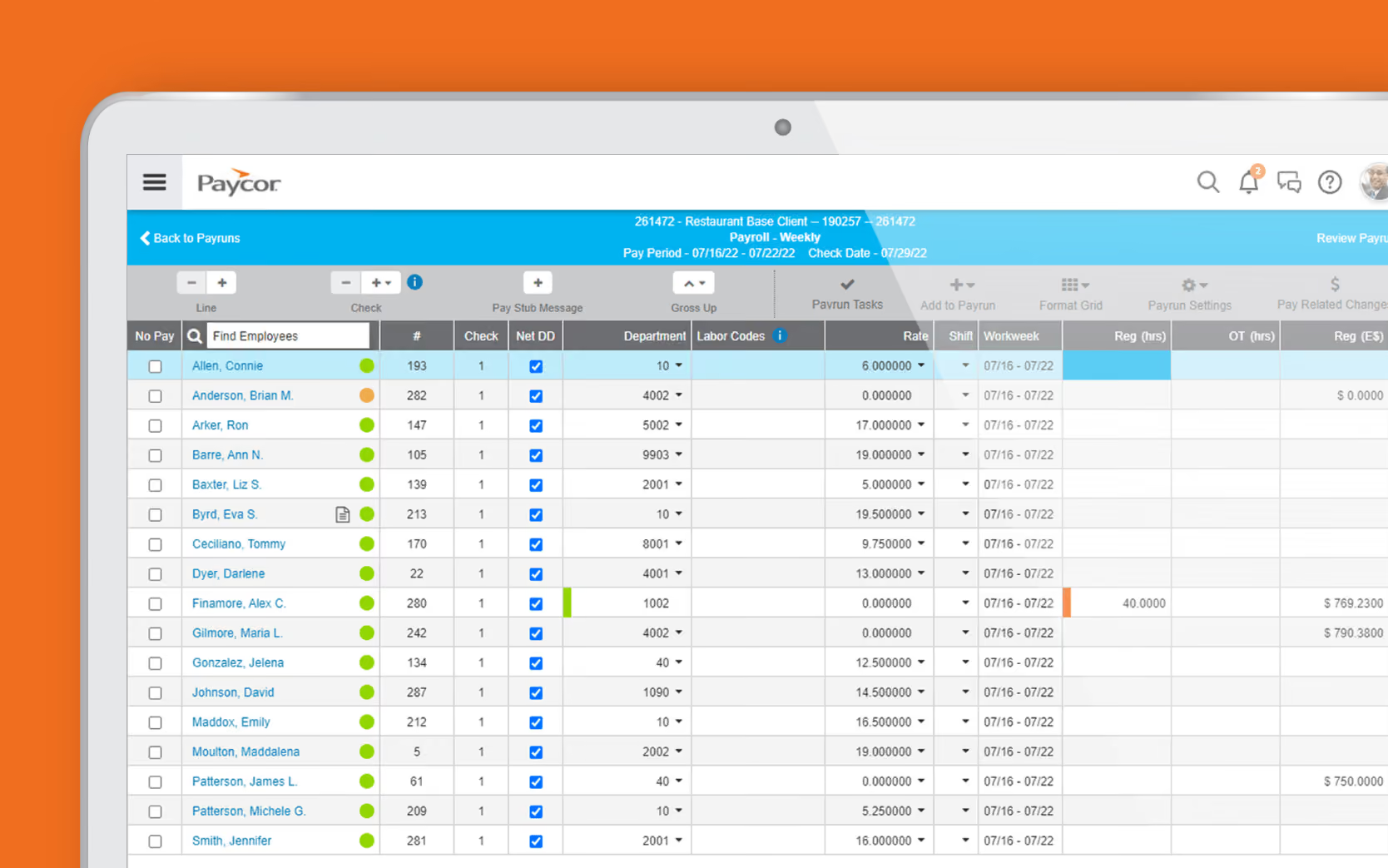
Paycor is a robust mid-market HR software for leaders at U.S.-based companies who want to save their teams time during payroll processing. In particular, their pay grid interface is great if you're looking for a more hands-on payroll experience that allows you to complete it faster (sometimes in just three clicks) and manage pay runs for multiple locations or pay schedules in one place.
PROS
- Payroll services covering check stuffing and delivery, garnishment services, payroll auto-run, employee paycards, and on-demand pay, useful for companies with frontline teams.
- Financial wellness tools giving employees earned wage access, budgeting tools, and financial learning and counseling to support better spending and saving habits.
- Frontline worker support through advanced time tracking (geofencing, on-premise time clocks, group punching), scheduling, and integrated workers' compensation.
- Paycor payroll solution and mobile app are both straightforward to use.
- Intuitive self-service employee portal.
- Offers multiple modules for small businesses and custom plans for teams with 50-1000 employees.
- Unlimited payrolls.
- Offers discounts frequently. Though not listed on their site, a free trial is available to those who contact the support team directly.
- On-demand pay is available for all plans.
- With the acquisition of the people development platform Verb, it has improved its employee learning experience.
CONS
- Core HR processes sold as add-ons, requiring extra payment for benefits administration, time-tracking, and scheduling.
- Legacy interface that feels dated compared to newer products, with non-payroll modules requiring more training to use effectively.
- Expensive for small teams, with the Basic plan starting higher than comparable solutions like Gusto or OnPay.
- Undisclosed pricing.
- Customer support is reported to be slow at times.
- It is not a good fit for teams with 1000+ employees or those requiring advanced customization to meet their unique requirements.
Paycor ticks all the boxes for the features we look for in HR software. The employee self-service portal is excellent; it makes tasks like reviewing or signing contracts or choosing benefits straightforward. Admin users are automatically informed about any updates to sensitive employee information.
While Paycor didn’t invent the wheel by offering mobile apps, their platform is well-built and well-liked. They make it easy to access payroll, time, attendance, and other HR features on the go.
Though large enterprises can use Paycor, its platform is best suited for SMBs to use alongside other core HR tools as they grow. Paycor offers multiple plans for companies with fewer than 50 employees, so whether you only need a payroll solution or a full HR suite, Paycor is a flexible option.
One of Paycor’s top features is its pay grid for payroll processing, which I found one of the easiest and most customizable, even compared to payroll-forward vendors like ADP and Paylocity.
True, it looks much like a fancier Excel spreadsheet, but I can get a macro view of payroll costs, along with in-app warnings, such as net pay shortfalls, to reduce the risk of errors. I can also see upcoming pay runs months in advance and make changes ahead of time, like entering year-end discretionary bonuses for the last payroll, so I don't forget them.
Despite this, Paycor’s HR modules outside of payroll lack the finesse of more modern alternatives like Rippling — mainly because Paycor adds these capabilities after company acquisitions. For example, Paycor Paths, their leadership development module, comes from their acquisition of the behavioral microlearning platform, Verb.
As a result, modules tend to have an inconsistent interface. Their performance management module, for example, is completely separate from the rest of its platform, with a new navigation panel and design compared to its payroll, benefits, and time-tracking modules. Not only does this create a disjointed experience, but it makes it harder to quickly find the information I need when moving between HR tasks.
Paycor has nearly 800,000 customers, including Wendy’s, Detroit Zoo, and the Cincinnati Bengals.
Paycor does not disclose its pricing, so you must contact its sales team for a quote. It offers two product tiers: one for small businesses with 50 or fewer employees and one for companies with 50–1000+ employees.
Within the small business product tier, you can choose from 4 subscription plans outlined below. Although not currently listed on its site, Paycor’s starter plan, Basic, used to cost $99 + $6 PEPM to give you an idea of costs.*
- Basic: Basic multi-state payroll and tax compliance.*
- Essential: Everything in Basic plus reporting, analytics, onboarding, PTO management, and basic recruiting.
- COR: Everything in Essential plus HR support center, 1:1 HR guidance, and expense management.
- Complete + ASO: Everything in COR plus advanced analytics, 401(k) plan administration, employee assistance program (EAP), and dedicated HR partner.
- Add-ons: Workers’ compensation, time and scheduling, benefits administration, and advanced recruiting.
* New Basic, Essential, Cor, and Complete + ASO plan customers get 50% off for the first 6 months.
The payroll titan Paychex has now acquired Paycor. Paycor's platform and services haven't changed as of this writing, but Paychex plans to expand its service offerings for Paycor customers.
Best For
Paycor is best for payroll management at U.S. companies with up to 1,000 employees.

As an HR consultant for a nonprofit organization, I used Paycor regularly to review and monitor the full HR process from start to finish. My goal was to make sure the system was supporting the organization's HR needs efficiently.
I used it to check employee records, onboarding workflows, and recruitment processes to ensure everything was aligned with the company's internal HR practices and business goals. I also reviewed payroll, taxes, and compliance information to make sure they followed labor laws and IRS requirements.
Another important part of my work was using Paycor's reporting tools to analyze HR data and prepare quarterly reports for the CEO. These reports helped evaluate progress in building the HR function, identify gaps, and recommend improvements.
For a company with around 32 employees, Paycor was a good fit to support their HR needs.
- The pricing was reasonable compared to other HR platforms we evaluated.
- The system is simple and easy to use, which makes it practical for small HR teams.
- The reporting tools are helpful for analyzing HR data and sharing insights with leadership.
I worked as an HR consultant for a nonprofit organization where I helped develop their HR function. As part of that work, I evaluated their HR software to make sure it was the right fit for their needs.
The company was already using Paycor, but I also researched and tested six to seven other HR platforms through demos and vendor meetings. After comparing the options, Paycor remained one of the top three choices, and the organization decided to continue using it.
The platform helps cover their needs such as managing payroll, employee records, recruitment, and HR reporting in one system, which improves efficiency and reduces administrative work.
Frankly, I cannot say there is something specific that I did not like about the platform based on my experience using it.
- Some advanced features, like deeper analytics, may take a little time for new users to fully understand.
- The mobile version could be improved, since most features work better on the desktop version.
- In some cases, the reporting tools could offer more flexibility for deeper HR data analysis.
Paycor stands out from competitors by offering an integrated HR platform where all modules are live and connected, which reduces the need to switch between separate systems.
Compared to ADP or Paychex, the interface feels more modern and easier to use for everyday HR tasks. I also like Paycor's reporting and analytics. They are clearer and more customizable, which makes tracking HR metrics much easier.
Some competitors have better mobile apps, but I find Paycor's desktop experience easier to use for complex tasks, which helps a lot in daily work.
For choosing an HR tool, consider the company size and budget to make sure it fits. For example, a company with 5 employees may not even need HR software in the beginning. Make sure it is easy to use.
Check that it can meet all your company's needs, like payroll, recruiting, time tracking, and benefits features, and that reporting is clear. Also, it should have reliable customer support.
I haven't followed all the changes closely, but from my experience, Paycor has grown from basic payroll into a full HR suite with self-service tools, better reporting, more integrated time-tracking and recruiting, and easier mobile access.
Paycor works well for small to mid-sized businesses that want HR, payroll, and time-tracking in one place. It is great for HR teams who want central reporting, employee self-service, and integrated recruiting without heavy IT support. It is easy to use and scales better than very basic tools.
Paycor isn't ideal for very large companies with complex HR needs or lots of custom workflows. The mobile app isn't the strongest, and if you need very advanced analytics or special industry modules, other tools might work better.

OnPay
OnPay is the most affordable platform on our shortlist, with a one-size-fits-all pricing model and no additional implementation or data migration fees. Their $49 + $6 PEPM price even includes multi-state payroll support, which rivals Gusto’s starter subscription plan. I also like that OnPay focuses primarily on small-business HR needs, providing federal, state, and local tax compliance, along with simple reports and an internal human resources information system (HRIS) for managing performance reviews, employee rosters, and internal communications.
PROS
- Small business HR tools included in the base price, covering e-signature, customizable offer letters, I-9 and W-4 forms, legal templates, and multi-state payroll.
- Specialized industry payroll support, handling unique needs like nonprofit tax exemptions and clergy tax exemptions for religious organizations.
- Support for multiple worker types, paying employees and contractors, remote or on-site, within the same payroll run.
- Free tax form handling for W-2 employees and 1099 contractors.
- Some HR services included within the plan at no additional cost.
- 30-day free trial available (starts after OnPay verification).
- Well-developed online help resources.
CONS
- No native accounting or time-tracking, requiring integration with platforms like QuickBooks Online, Xero, When I Work, or Deputy.
- Limited scalability, with a fixed feature set that may require migrating to a new platform for needs like paying international employees or contractors.
- Lacks advanced HR tools, with no AI assistants, automated payroll, or configurable reports, meaning more manual entry or third-party apps for complex processes.

- Poor functioned employee mobile app.
- Requires payment four days before payday for direct deposit.
- Doesn’t support automatic payroll.
- Customer support sometimes hard to reach.
OnPay is an excellent first-time HR software system for small businesses. It covers core HR processes, such as payroll and benefits, at simple, affordable pricing.
The standout features for me are its compensation and benefits management capabilities. You don't have to calculate state and federal taxes and withholdings; the platform will do it automatically in compliance with regulations.
I also didn’t encounter any issues during testing of OnPay’s payroll features. But even if I had, their tax accuracy guarantee means they’ll work with the tax agency and cover any penalties or fees to resolve the issue.
As for benefits tools, the platform is an excellent licensed health insurance broker and can help you select the right plans in all 50 states. I noticed some well-known names, such as Vestwell and Guideline, listed as OnPay's 401(k) providers if you need retirement benefits for your employees.
OnPay's HR features include e-signature, offer letter sending, customizable checklists, PTO management, and self-onboarding.. While this is a great pick for very small businesses, I wouldn’t recommend OnPay for companies with more than 100 employees. It will likely become too labor-intensive to maintain — even if they do market themselves as being able to manage more than 500 employees.
OnPay does not publicly disclose how many clients they have.
OnPay is best for small businesses that need affordable HR software.
Best For
OnPay is best for small businesses that need affordable HR software to handle essential HR, payroll, and benefits functions. It is especially helpful for agriculture businesses, churches, clergy, and nonprofits because of its special payroll services.

I use OnPay daily. The platform reduces the workload for my department, especially concerning taxes and payroll runs. It also provides in-depth reports on employee compensation, ensuring we stay updated on compensation compared to industry standards. The platform is very user-friendly and easy to teach to my colleagues in the department.
- It minimizes mistakes during payroll runs.
- It allows for unlimited payroll runs.
- I also appreciate the automated tax filings.
We were looking for software to help streamline our tax processes. OnPay offers an automated tax system that handles most of the work, and it also allows us to run unlimited payrolls. This feature was crucial for us since we have multiple shifts within our organization. With OnPay, we found that these two pain points became much more manageable. I have personally used this platform for over two years.
- I wish there was more flexibility in drilling down into specific reports.
- The company’s customer support could be better.
- The pricing structure could also use improvement.
The payroll runs and automated tax filings are two specific features that set OnPay apart from its competitors.
If you're facing increased payroll runs that add extra costs per month, I would certainly consider this platform for your organization. This feature handles most of the heavy lifting regarding payroll, saving you time and effort. The automated tax filings are also a significant benefit for any business looking to streamline this process, reducing the workload for your HR or Accounting/Finance departments.
From my experience, the overall customer service has improved significantly. Getting support when needed, even for simple questions, has become easier since I started using the platform.
OnPay is well-suited for any organization or industry, particularly small to medium-sized businesses.
Large corporations may not find OnPay the best fit.

Monday.com
Monday.com offers a versatile platform that can help HR teams elevate their processes. While it may not be your typical HR software, its customizable templates, helpful automation, built-in integrations, and collaboration features make it a valuable asset for optimizing all sorts of workflows and managing employees effectively.
PROS
- Monday.com offers a high degree of customization and automation, empowering HR teams to adapt the platform to their unique requirements.
- There are over 200 pre-made templates that can be used immediately for various processes, saving you time and effort.
- There’s a free plan for SMBs and startups that lets you access all existing templates, create up to 3 boards, and have unlimited documents.
- Free plan available, and affordable, scalable plans for small to midsize businesses
- Easy to learn and use
- Customizable dashboard
- Collaborative document creation with the ability to turn content in docs into tasks in projects with a few clicks
- Gamified progress tracking with visual celebrations for users
- Workflow automation for repetitive tasks
- Built-in communication tools reduce reliance on email
- Customized forms for in-house or client use that can be easily turned into projects
CONS
- It can take some time to learn and set up the Monday because it’s not your typical HR software but rather a versatile platform with multiple use cases, including HR.
- There currently aren’t any features for payroll or benefits administration.
- Users need to upgrade to the Standard plan to access integrations and automation features, which are key to getting the most out of the platform.
- 3+ users are required to get on any of the paid plans
- Limited storage on the Basic plan
- Could be too complex for simple project management needs
- No phone customer support
- Tracking different conversations can be difficult because of all the clutter

Though Monday.com isn’t your typical HR software with payroll processing and benefits admin features, their powerful and user-friendly platform can be adapted to various HR scenarios, thanks to its wide range of customizable templates and helpful automation. Whether it's managing the recruitment pipeline, onboarding new employees, conducting performance reviews, or tracking employee development, Monday.com gives you the flexibility to create workflows that fit your organization's unique processes. For those who don’t feel like creating things from scratch, there are several ready-to-use templates covering various aspects of employee management, from employee lifecycle packages and cross-company event planning to employee directories and time-off requests.
Another area where Monday.com differs from traditional HR software (but in a good way) is native project management. The platform's Kanban boards, Gantt charts, and calendar views facilitate seamless collaboration among team members and ensure that everyone is always on the same page, knowing who is responsible for what tasks and where each project stands. The customizable automations further streamline processes by automatically updating timelines, assigning tasks, sending notifications, and more.
We appreciate Monday.com’s emphasis on data visualization and reporting. Its customizable dashboards provide a high-level overview of HR pipelines and tasks, allowing you to quickly identify areas that require attention. You can also generate custom reports and analytics and share them with relevant stakeholders to make collaborative decisions.
If you’re an HR professional looking to streamline workflow management and enhance collaboration, we think Monday.com is worth checking. While it may not be a one-stop-shop for all HR functions, its flexibility, customization options, and user-friendly interface make it a valuable addition to any HR team's toolkit.
Monday.com’s customer list boasts big names like Lionsgate, Glossier, and Oxy.
Monday.com's free plan allows up to 2 users and 3 boards, while paid plans start at $9/month.
Best For
Monday.com HRIS is best for startups and small businesses due to its affordable pricing structure, which includes a free plan.
I was tasked with full-cycle recruiting (recruiting and onboarding) during my time with the client. I wrote the job postings, posted the jobs, reviewed talents, interviewed talents, and sent offers. So, I essentially used monday.com as an ATS (Applicant Tracking System) for the client. I created boards to track job postings and talent submissions. I also used status columns for each talent.
Solid visuals of project progress. Great automation features, which saved us time and reduced entry errors. Integrated well with other tools the client was using.
I used it for six months as a freelancer, and based on my knowledge, the client used monday.com because it's a cloud-based system that allowed for customizations and automation. I am unsure which software they used before that, but my conversations centered around the time it saved the client. I remember enjoying the time-tracking feature and how it integrated with other tools the client was already using.
Overwhelming at first, as there are many features. The learning curve is steep due to the extensive features.
I have used both Asana and Jira (currently use both), and the visuals are more appealing, and the integrations are more in-depth on monday.com. Also, the customization options cater to someone who likes more control over their work.
Consider the cost and how it will make your employees' jobs easier/save time.
I did not use it prior to this client, so I am unsure of the adaptations it has undergone. However, it is very relevant, so it appears to meet industry needs, as I enjoyed using it for my contract.
I think any organization can benefit from monday.com as its customizability and flexibility allow it to be used by various users and companies.
Monday.com is not good for non-tech-savvy users or small businesses, as it can be expensive.
Other HR Software Platforms Worth Considering
Several platforms didn’t quite make my top 10 list, but have unique features that cater to special business cases, making them worth mentioning. Check out my picks below:
Homebase: Best For Companies with Frontline Workers
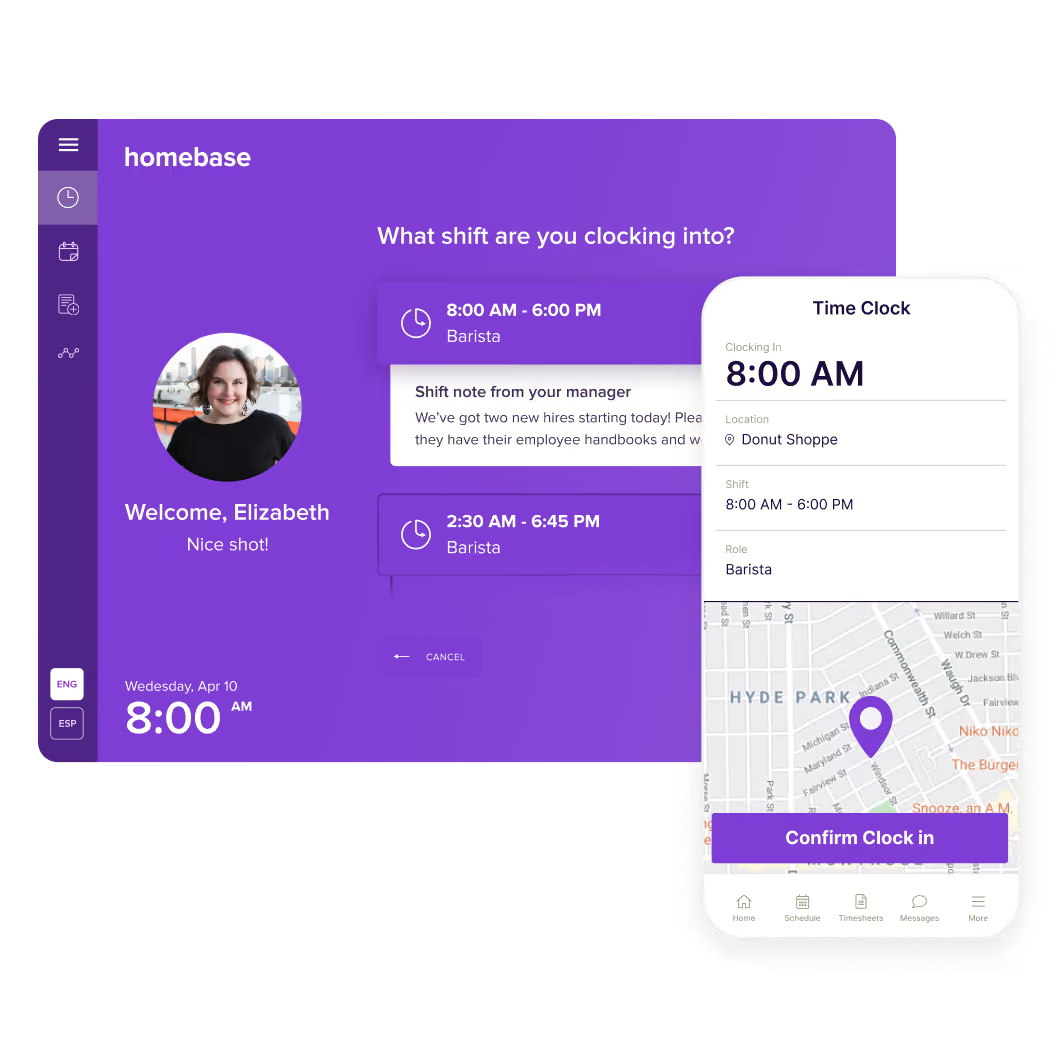
As far as small-business HR platforms go, Homebase is one of the top contenders for teams with a high percentage of frontline workers. It offers PTO management, scheduling, break waivers, and advanced time-tracking features, including photo sign-in PIN codes and geofencing to prevent buddy punching and time theft.
Since my last demo, Homebase has added AI assistants specifically designed to automate payroll, hiring, and scheduling processes. I especially liked its scheduling assistant, which saved me time by automatically generating first drafts of schedules and suggesting ways to resolve hour conflicts.
monday.com: Best For Team Collaboration

I’ll admit it: I’ve been a long-time skeptic of labeling monday.com an HR software system. As a project management platform, it lacks the built-in compliance, employee data protections, and HR-specific workflows you’d expect from comprehensive HR software suites.
But I can’t deny how powerful monday.com is for HR process management. I’ve used it for employee onboarding and managing HR documents. I can trigger onboarding tasks automatically based on a new hire’s role, level, or department, with assignments as detailed as mandatory training courses or manager-reviewed first projects.
The platform also offers HR templates for recruiting, performance reviews, and employee development, plus configurable, real-time report dashboards that rival platforms like Rippling.
I recommend monday.com for teams that need advanced automations and flexible workflows for HR tasks that require a lot of collaboration. Budget-strapped or one-person HR departments may also find it useful to manage their personnel database. Still, because it lacks native payroll, benefits, and compliance features, it works best as a supplemental HR tool and not your primary HR system.
Remote: Best For Global Payroll and EOR
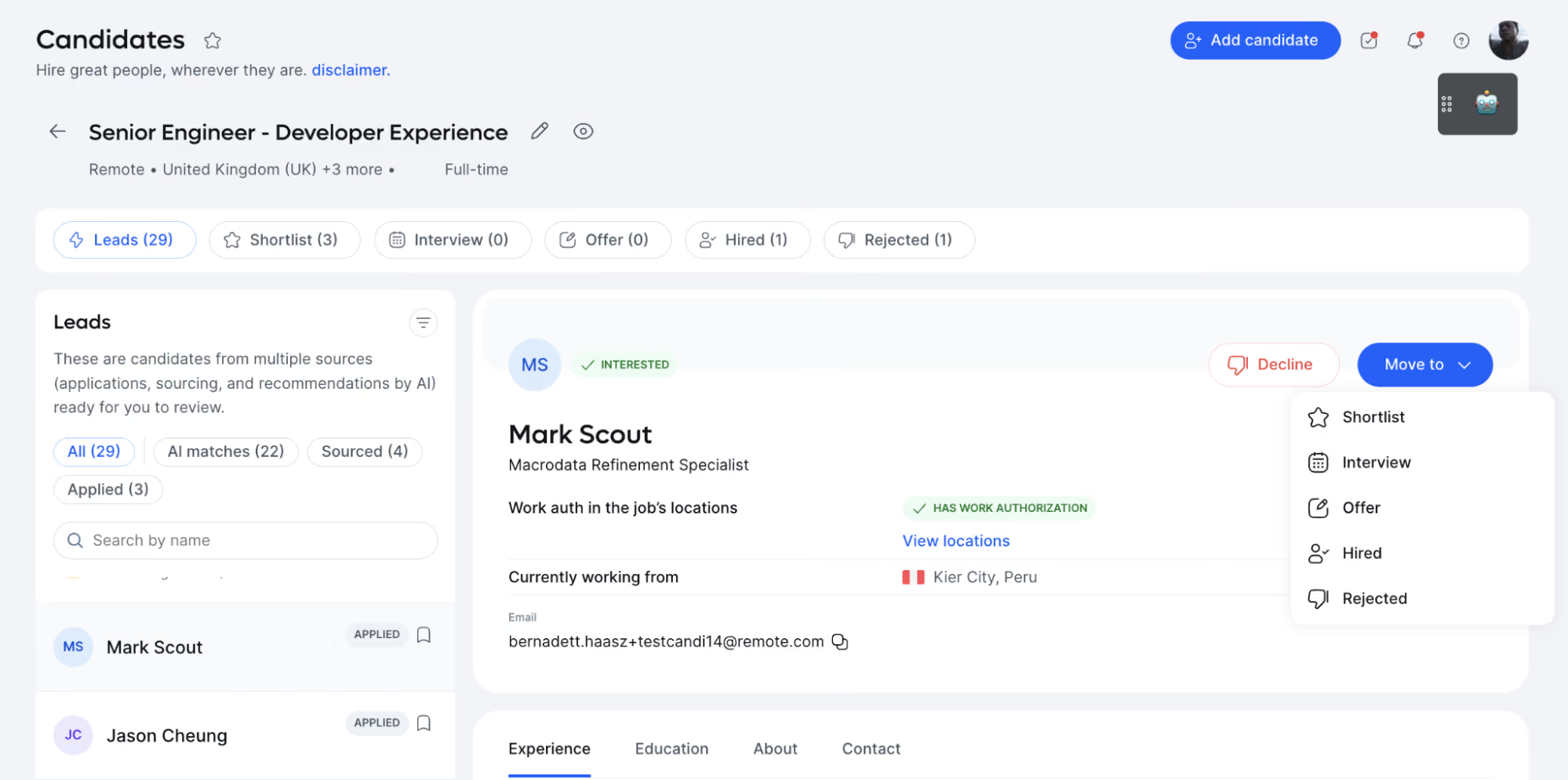
Remote is a global payroll and employer of record provider for hiring and paying teams in more than 90 countries. While it doesn’t support nearly as many countries as Deel, I find Remote’s core HRIS much easier to navigate, thanks to its side navigation panel.
Companies can hire through Remote’s legal entities or run payroll with Remote as the single provider responsible for both. For teams that want core HR records in the same place, Remote offers an HRIS module ($12 per employee per month when billed annually) for time off, org charts, and people data.
Does Your Company Actually Need HR Software?
While tiny businesses may be able to handle all of their employee information in spreadsheets, purpose-built HR software becomes increasingly essential as your business grows. If you’re still not sure if HR software is right for your business, here are some key signs that you should be thinking about implementing one:
- You Have More than 25 Employees: While 25 employees is not a rigid threshold (a startup with under 20 employees can still benefit from HR tools(1)), it is an excellent place to start thinking about using an HR software system. With more than 25 employees, keeping track of data becomes a chore, and at a certain point, it becomes impractical (and error-prone!) to manually enter and update all employee data.
- Many of Your Jobs Require Licensing or Certification: If you are in an industry where employees require up-to-date certifications for legal reasons, staying on top of the schedule is critical. HR software can streamline the process by setting up automated reminders when certificates are due to expire.
- You’re Growing Fast: Companies face changing legal requirements as they pass different size thresholds. Keeping up with the legal requirements of a growing company is much easier to do automatically with HR software than by hand in spreadsheets.
- You Want Your HR Team to Play a More Strategic Role: Having one easily searchable system that stores employee information, runs payroll, and handles benefits saves a lot of time for your HR team. It allows them to focus on more strategic projects for your business, like increasing employee engagement and retention or improving organizational culture.
- You Manage Hourly Employees: With hourly employees, you often have to track hours and manage changing schedules. This is another process that is made infinitely easier with HR software.
- You Need Custom Workforce Data Reports: As businesses become increasingly data-driven, accurate and readily available people analytics becomes more and more critical. Many HR software solutions have features that enable you to hone in on data-driven recruitment and gain better ideas of your company's health.
Key Benefits of HR Software
At SelectSoftware Reviews, we like to start with the “why?” behind any piece of software. With HR software, many assume that the answer is simple: it’s a must-have because a database that tracks your employee information is necessary.
In fact, buying HR software is not the no-brainer choice it’s made out to be. It is a major strategic decision that requires a lot of time, thought, and buy-in, and in some cases, it’s just not the right tool for the job. However, I’ve seen HR software systems offer tremendous benefits when adopted at the right time and place(2). Here are the key ones:
Save Time with Automation
By automating recurring tasks like benefits, payroll administration, new employee orientation, time tracking, and attendance management, HR software with a core human resources information system (HRIS) helps make tedious HR processes quick, simple, and less prone to error.
In fact, AI is reported to save time and boost productivity for nearly 9 in 10 HR teams, according to research(3).
Improve the Employee Experience
HR software doesn’t just benefit your business and bottom line. It’s also a direct asset for your employees. With a user-friendly employee portal, your employees can navigate benefits options easily, review and update personal information, manage requests for time off, and much more.
Employees who feel their employers’s onboarding software is effective are five times more likely to report high levels of engagement.
Employee Performance
Beyond simply reviewing conduct and achievements, your HR system can drive employee performance.
Performance reviews, engagement surveys, performance management capabilities, and customizable integrations with other tools can all be used to build culture and turn company values from ideas to action. Statistically, 72% of HR generalists engaging in self-service HR software reported a lighter workload.
Increase Compliance
If you are careful with the setup and initial data entry, HR software can significantly improve your business’s data accuracy and accessibility.
In addition to helping out in a pinch, data accuracy, and task automation support compliance year-round. Automation results in fewer human errors. Many vendors do a great job of staying on top of changes in laws and regulations, keeping you in the loop, and updating their products accordingly.
Better Organization
If a team’s starting point is pencil and paper, using an HR system will alleviate some data security risks and the hassle of sifting through physical files. For teams who have moved beyond the paper files to a patchwork of spreadsheets and other tools, buying a complete HR suite will help keep everything in the same place.
Stacey Richey (VP of People at Corvus Insurance, 18+ years in HR) shared her personal experience with this problem and how an HR software platform solved it.
Early on, her company used multiple tools for people processes: one tool for payroll, one for employee perks and benefits, one for talent development, one for performance management, etc. Does this sound familiar? She knew it was time for an all-in-one HR software system. First, she identified the needed features and set her team off with a head start and a list of non-negotiables.
The result: they identified the right tool for the right price, and today, they save hours each month by not having to switch from one app to another, build integrations, or transfer info.
Streamline the Hiring Process
Some HR software tools can also act as lightweight, small-business-oriented applicant tracking systems (ATS), and some have a full-fledged ATS built-in.
These features allow you to easily collect resumes, review candidate info, and speed up employee onboarding and training, providing new hires with a seamless transition into your company. Custom workflows also help ensure the onboarding process does not overlook key steps or necessary documents.
Business Intelligence
Analyzing data metrics becomes increasingly important as your business grows. By creating custom reports, your HR software system makes it easy for your HR team to analyze hiring costs, calculate turnover, and employee engagement, and ultimately use data to help inform business decisions.
Workforce Management
The top HR software platforms come from best-in-class HR technology companies. Progressive, forward-thinking HR departments can count on comprehensive HRIS, HCM, or HRMS (human resource management software) platforms for complete workforce management.
For example, employee engagement is sometimes built right into HRIS or HCM systems, along with intuitive employee onboarding, easy-to-access payroll and benefits, mobile first-time and attendance, and payroll management. This is done through a cloud-based service that automatically updates as new modules roll out.
Common Pitfalls When Buying and Using HR Software
Making mistakes is a great way to learn, but with this complex and expensive software, sometimes it’s best to learn from the missteps of others.
The best way to avoid buying the wrong HR software system is to ask the right questions. Keep this in mind as you start working with vendors — check out my suggested questions below, and take note of these shortcomings that are typical traits of bad HR software.
Lack of Employee Self-Service
If your HR software doesn’t allow employees to update their personal information or choose their own benefits plans, then it’s not saving your human resources team time. The tools that offer the greatest returns always include employee self-service capabilities.
Inability to integrate with other systems: If you want to save time with HR software, make sure it integrates with your current tech stack(4). Manually transferring data from one system to another is the exact opposite of saving time.
Take, for example, the integration of a standalone ATS. Though there are some exceptions, most HR software platforms don’t include an ATS that is sophisticated enough for high-volume hiring. Remember this as you shop: chances are good that your ATS and HR software system will be neighbors but not roommates. You can ensure they get along if you think ahead about integrations.
Lack of Data Accuracy
Your HR software is only as good as the data it stores. A system full of inaccurate data is useless and potentially hazardous, so make sure your HR system takes measures to ensure accuracy. This applies to data entered manually or via API from another HR software or recruiting solution — be sure that your HR software takes this step seriously.
Lack of Consideration of the Application’s Limits
The right HR software for a small business and/or a startup is not the right HR software for a 1000-employee company. Your company’s current size must be a major factor in your decision, and if your business is growing fast, you’ll want an HR system that can grow with it.
For very large teams, the options are relatively limited compared to what is available for small groups. This owes to the fact that the latest and greatest tech often comes from small, boundary-breaking startups that are too curious (and sometimes distractible) to focus on making incremental improvements to the feature set needed by enterprise-size organizations.
Incorrect or Rushed Implementation
Take your time. There are few things worse than technical debt, one of which is technical debt that results from preventable mistakes.
Do not rush the data transfer process when setting up a new HR software platform. If you cut corners, data will likely be entered or transferred incorrectly. Without a doubt, you will meet that data again during a frustrating and preventable moment when you discover you’ve entered the wrong pay rate or manager permissions.
It’s advisable to get a consultant if you can afford it. Someone who “has been there, done that” when transitioning data from one system to another can be advantageous. And, of course, if your new HR software comes with a ton of vendor support, use it all! Many companies offer tremendous support to their new clients to ensure a smooth implementation of their platform.
Non-user-Friendly Platform
HR software is only effective if employees actually use it. A poorly designed platform may generate net-negative productivity and net-positive frustration. Make sure your new system is designed for the humans who will use it: it must be easy on the eyes with good UX in all environments in which it will be used, whether an app, browser, or mobile web.
Insufficient Data Security
It will surprise nobody to read that a data breach on an HR software system is very, very bad. These platforms store scads of sensitive, personal employee information, so even a minor instance of compromised security could cause irreparable damage to your business.
Be cautious and methodical when setting up your system’s security measures — and remember the sometimes blurry difference between your HR pros and your IT pros. And one rule of thumb: be weary of vendors with fewer than 20 employees listed on LinkedIn.
Insufficient Planning
HR teams who have not sufficiently mapped out the process of installing and introducing their HR software system will face tremendous struggles getting their solution off the ground. To prevent this, your team should create a concrete timeline that outlines each implementation phase in great detail.
Communicate with the relevant set of employees/managers at each implementation stage. Ask and expect a lot of questions, and remember: no rushing!
Having led many HR software implementations, Richey has “been there, done that''. In her experience, she found that one of the biggest mistakes companies make is purchasing a product that works only for where they are today, with little thought of where they may be in the near or distant future.
“Think of all the possible changes your company might experience in the next five years and plan for that.” She shared. “You want a system that scales with the company to ensure you won't switch HRIS for a long time.”
Key Features of HR Software
A clever way to save money on buying an HR software platform is to think about your goals and codify them into an organized spreadsheet to make notes throughout your vetting process(5). It’s worth thinking through some of the key HR software features(6). Here are a few you’ll want to consider.
- Employee Self-Service Portal: Employee data management can be a lot of work for your HR department. The self-service function of many human resource management systems helps eliminate this challenge by enabling employees to view and edit their information, including benefits selection, time off, and more through a self-service portal.
- Time and Attendance Management: HR software simplifies tracking time off and planned and unplanned absences due to sickness, injury, maternity leave, or unauthorized leave.
- Onboarding Capability: While onboarding typically involves a lot of paperwork, with HR software, employees can complete much of the onboarding process electronically, including open enrollment. Most HR platforms even have electronic signature functionality, allowing employees to sign scanned documents that can be stored in the system.
- Custom Reporting: As HR increasingly relies on data and trends, it’s crucial to have a system that can create reports to help improve business decisions. A powerful people analytics system takes the manual labor out of preparing reports and replaces it with empirical evaluation speed, accuracy, and objectivity.
- Learning Management: Though a learning management system (LMS) may be baked into your HR software, it's much more likely that, like the ATS, you’ll use this tool as a standalone solution. Whether integrated or built-in, the LMS is critical for managing educational materials during employee onboarding and throughout the employee lifecycle.
- Employee Database: The employee database of an HR software platform allows you to store all employee records and information in a centralized location. The data is searchable, making finding details on employee salary and position, performance appraisal histories, disciplinary histories, and training records easier.
- Recruiting Functions: Many HR solutions allow you to air job postings, conduct interviews, store resumes, and transfer information when a new candidate is hired. While not all HR software systems have applicant tracking system features, they often allow native ATS integration so that you can transfer new-hire data to your system quickly and smoothly.
- Training and Development Management: Tracking employee training is essential, particularly in an industry where employees require specific certifications or licensing. HCM or HRMS platforms let you see what training employees need or want and helps you stay current on any required recertifications.
- Central Storage for Company Documents: As a centralized location for any information your employees might need, your HR software should be where employees can find HR policies, employee handbooks, emergency evacuation procedures, safety guidelines, and more.
- Benefits Administration: Your HR software should enable employees to enroll in health insurance, manage their 401(k), and track their benefits information. Many systems also offer payroll software and services to keep your employee benefits information auto-updated though often the payroll features cost extra.
- Compensation management: To reduce the risk of error when handling employee compensation, HR software systems often offer payroll functions. This allows you to handle many forms of incentive compensation, including salaries, paid time off, overtime pay, and bonus programs automatically.
HR Software Pricing
Pricing of HR software depends on the breadth of the feature set offered and the size of your organization(7).
- Typically, it is charged on a per-employee/per-month basis. You can find HR software that costs you $2/employee/month and solutions that run as high as $30/employee/month (plus additional fees for payroll and benefits, as well as extra modules for hiring and onboarding).
- As with many things in life, you get what you pay for. If you just need to check the box, a cheaper solution makes sense. Suppose you want to use your HR system as a tool for increasing employee engagement, retaining employees, and generally driving business value through human capital management. In that case, you’ll have to pay for one of the better solutions.
- Some vendors will also charge ancillary fees in addition to the recurring SaaS cost. Be aware that these add-ons can add up, and realize that you can often negotiate these fees much more easily than the recurring per employee/per month cost of the cloud-based solution. Setup, consulting, support, and software fees are all fair game for negotiation.
A quick note: SelectSoftware Reviews continuously crowdsources data on HR software pricing through a survey(8). We do this to increase transparency and help HR teams better understand their options. It's anonymous and takes only two minutes; anyone who helps the community by filling it out will get access to the entire data set.
How to Get Buy-In for New HR Software
Any time you manage a significant purchase for your business, internal stakeholders will be watching. In fact, part of the process of buying a new HR software platform is stakeholder management. You must justify your choices from start to finish, from vendor selection to HR tech buy-in to implementation.
Generating wholehearted stakeholder buy-in is particularly important because it is crucial to maximizing the solution's value. Identify these key stakeholders early and understand how to maintain their support.
Below is a brief overview of the various important stakeholders and advice for managing each.
Company Leadership
If you want your HR software to have the best chance for success, you’ll need to get CxO buy-in and continuous support from the top leaders at your company (9). To accomplish this, present the business case to them and carefully lay out the ROI your new HR software will drive.
Present your implementation plan and provide them with a detailed timeline. Throughout the life of the HR software, provide leaders with updates about how the system is meeting the goals laid out for it, and how you plan to stay on track to achieve future goals.
Human Resources
The rest of your HR team is one of the biggest stakeholders involved in the implementation and must not be overlooked. A successful solution will make HR functions much easier, and a failed solution will make them much, much more difficult. It is important to use their help to get this right.
Because they will lead in handling employee questions, issues, and possibly grievances with the system, make sure your people team feels good about the selection and is properly trained to use it.
Communicate to all human resources team members how a new HR system will change some employees’ duties, especially with the automation of tasks that they previously performed manually.
Benefits Brokers
Some of the HR professionals I talked to consider it essential to involve benefits brokers in the process. First, ensuring that the HR software vendors you're considering work with the benefits carriers you currently use are vital.
If they do not, part of your implementation process will include justifying to your employees why they are being forced to make a difficult change. In some (but not all) cases, a benefits broker can help with this.
Although keeping current benefits unchanged may narrow down and simplify your search from the start, brokers can be helpful to help navigate the notoriously tricky ins and outs of benefits and coverage. Finally, some benefit brokers have an internal HR software team you can partner with during the RFP (request for proposal) process.
Operations Team
Your operations team will be involved in the budgeting, reporting, and legal compliance of your HR software. They may also communicate with benefits management providers and external partners affected by your new system. Communicating with your operations team is crucial to their continued support of your HR solution.
IT Teams
Your tech teams will play an important role in helping implement and update new software, so involve them in the decision-making process to ensure they are comfortable with the technology and any security implications.
It may also be helpful to open a communication channel between the vendor’s tech people and your IT team, so if they do run into problems, you are already one step closer to a solution. If the system will require a lot of updates, especially if they are not the automatic, cloud-based type, make sure that your tech team is aware and prepared.
Employees
Every employee has a stake in the success or failure of your HR software. A successful, easy-to-use system is a massive benefit to workers.
At the same time, the success of your HR software is dependent on your employees using it correctly, so be sure to provide the necessary training and communicate the solution clearly and early. You should listen to your employees' feedback at every step of the road and take their complaints and concerns seriously.
Be sure to carefully explain the positive ways an HR platform will impact their day-to-day work and focus specifically on how the system will benefit them now and in the future.
Questions to Ask During Demos with HR Software Companies
The next step is working with vendors and doing demos. For this step, it’s essential to come prepared with questions that address the core needs of your organization from a functional standpoint, as well as the various items internal stakeholders are looking for (security, data migration, self-service portals, etc.).
Here are questions you should have in your back pocket to ensure your company's needs are met by the tool your vendor is selling.
- How will information be exchanged with carriers (for benefits)?
- How can we put important data into this system? (API, Excel spreadsheets, documents, other databases, and paper documents)
- Does it accommodate benefits carriers’ rules?
- Does it integrate with ATS/payroll system/any other systems you might have that impact workforce management?
- What built-in security measures does it contain?
- Does this solution have SSO (single sign-on) capabilities?
- Are there multiple authorization levels for different types of users?
- Is there a maximum number of employees it will support?
- What types of reporting capabilities does it have?
- Does it include features to help HR communicate with employees, like mass emails or sophisticated message filtering?
- How much technical training will be required?
- What kinds of technical support are provided?
- What recruiting capabilities are built in?
- Which HR processes will be automated?
Richey points out, “Demoing software can be painful, but it pays to go into the weeds for every single module.” When approaching a demo, Stacey likes to get a feel for what every workflow will feel like for her employees. She believes they must be getting a tool that makes their lives easier, and often, this commitment requires a trial version to test out the software after the demo.
How to Implement an HR Software System
Here are some best practices to help you ensure a successful HR software implementation.
- Fully commit: To take full advantage of the services your HR software offers, you must fully understand all of its features and how to use them. Get your data migrated into your new system quickly (but do not rush!) and dedicate time to get used to the new processes.
- Decide on an implementation team: It’s always wise to have a team that will take full responsibility for the rollout process of the product. This team should be in charge of communicating the new HR software to staff from different areas of the company so they’re equipped to take full ownership of the implementation process.
- Concentrate on adoption: To prevent poor adoption, ensure employees are aware of the new technology before you roll it out. It’s also essential to select a user-friendly HR system and provide the necessary training so all employees, from new hires to executives, feel comfortable using the technology.
- Seek support from the vendor: It’s unrealistic to rely entirely on the vendor to fix all your problems, but they can certainly be helpful in many cases. Understand in detail the support that will be offered, and get SLAs in place if you can.
- Be able to adapt: Being adaptable is always important for an HR team in many cases, including when implementing an HR software solution. If the roll-out lacks energy or employees are responding negatively to the system, you need to be ready to change your approach to set your HR software up for success.
HR Software FAQs
An HRIS is an employee management platform that allows HR teams to store and manage employee records. They generally include or integrate with standalone tools that offer core HR functions like payroll, performance reviews, and ATS. Almost all HR software systems have an HRIS at their center, functioning as their employee database management tool.
What does HRIS stand for?
HRIS stands for Human Resource Information System.
What does HCM stand for?
HCM stands for Human Capital Management.
What does HRMS stand for?
HRMS stands for Human Resource Management System.
What’s the difference between HRIS, HCM, and HRMS?
On the surface level, there isn’t a massive difference between HRIS, HCM, and HRMS. They are all comprehensive people management systems that help companies optimize their HR processes.
However, there can be some subtle differences between HRIS, HCM, and HRMS(10).
- An HRIS is an all-encompassing in-house software for managing people, procedures, and policies(11).
- An HCM has all the features of an HRIS but often includes talent management capabilities(12).
- An HRMS is an end-to-end system with all of the features of an HRIS and HCM but often includes payroll and time and labor management capabilities.
What are the different types of HR software?
There are many types of HR software, each addressing specific aspects of human resource management. While some tools do far more than what their label suggests, we group the ecosystem into the following main categories:
- HRIS/HRMS/HCM: Manages employee data, self-service portals, absence and PTO management, benefits administration, performance management, and recruitment tracking.
- ATS: Manages the recruitment process by organizing candidate information, tracking application statuses, and facilitating communication with applicants.
- Recruitment Software: Automates job postings across multiple platforms and track applicant responses, often integrating with ATS to build a pool of engaged talent and improve the candidate experience.
- Onboarding and Offboarding Software: Simplifies the integration of new employees into the organization and ensures smooth exits for departing staff.
- Learning Management System: Administers and tracks employee training programs, focusing on skills development and compliance training.
- Payroll Administration Software: Automates payroll calculations, tax compliance, and financial reporting.
- Performance Management Software: Monitors employee performance, sets objectives, and facilitates regular feedback to support development and organizational growth.
- Employee Benefits Administration Software: Manages employee benefits like health insurance and retirement plans, ensuring accurate enrollment and compliance with policies.
When should a company use an HR software system?
According to Danielle Jones (CEO of Pinnacle Consulting Services, 10+ years in business and HR), if an organization has at least one employee whose full-time job is to manage people systems and benefits administration, then it is time to start using an HR software system.
Sources
- What HR Tools Should I Use as a Startup? - SSR
- 10 Key Benefits of HR Software and Automating Your PeopleOps - SSR
- The Impact Effective HR Software Has on Business Success - SSR
- HRIS Integrations to Consider Before Updating your HR Tech Stack - SSR
- A Clever Way to Save Money on HR Software - SSR
- 9 Essential HRIS Software Features That Matter Most - SSR
- HR Software Pricing Guide: Complete Cost Breakdown for 2026 - SSR
- HR Tech Pricing Survey conducted by SSR
- HR’s Simple Trick to Get CXO Buy-In - SSR
- HRIS vs HCM vs HRMS, the Key Difference Explained - SSR
- HRIS Basics: How HR Software Delivers Intelligence from Hire to Retire - SSR
- HCM Software: Definition, Benefits, Examples, and Features - SSR
About the Author


About Us
- Our goal at SSR is to help HR and recruiting teams to find and buy the right software for their needs.
- Our site is free to use as some vendors will pay us for web traffic.
- SSR lists all companies we feel are top vendors - not just those who pay us - in our comprehensive directories full of the advice needed to make the right purchase decision for your HR team.


.avif)