

10+ Best Employee Management Software in 2026
Our experts reviewed and rated the best employee management tools on the market in 2024. Read on to learn about their capabilities, pros, cons, pricing, and more.









Employee management software solutions store and retrieve employee data, track time and attendance, manage leave requests, schedule shifts, monitor performance, and much more. When such tasks are automated, you can save money, boost productivity, and increase employee satisfaction whether you’re a small business or a large company.
Our expert researchers have compiled a curated list of the best employee management systems, including must-have features, key benefits, pricing info, and other considerations to help guide your selection process.
To choose the best employee management software, we conducted demos with vendors, sought the expertise of HR tech leaders, tested the products ourselves, and chatted with other end users. Factoring all that in, we think the features that make an employee management system stand out are easy onboarding and self-service, data management and security, and reporting and analytics.
- Easy onboarding and self-service: The best employee management systems provide a strategic onboarding process, including a self-service portal, to create a positive employee experience. New hires can quickly complete paperwork, access key documents, and learn company policies. There’s often an employee self-service portal too, enabling employees to access and update their personal information, view pay stubs, submit time-off requests, and more.
- Employee data management: This is perhaps the most important function of an employee management system, and getting it right is vital. Your employee management software should act as a centralized repository for storing and organizing employee information. It should also protect that information with a host of security measures such as authentication, role-based permissions, encryption, and compliance with data protection regulations.
- Reporting and analytics: We’ve looked for employee management tools with robust reporting and analytics capabilities. Besides pre-built reports, the best tools in this space let you customize your own and give you insights on various HR metrics, including employee turnover, attendance patterns, and performance trends and stats.
The above is just a summary of what our team does. If you want to learn more, we have a detailed guide explaining our editorial guidelines and review methodology.


Paylocity

Paylocity combines employee self-service, payroll, time tracking, recruiting, onboarding, performance management, and HR administration in one platform. Its broad workflow coverage makes it particularly compelling for mid-sized U.S. companies that want employees and managers to handle more HR tasks without relying on administrators.
PROS
- Employee self-service covers pay, time off, documents, personal information, and HR tasks.
- Mobile and desktop access supports time tracking, scheduling, onboarding, and employee self-service.
- Performance tools combine goals, feedback, journals, and formal performance reviews.
- Recruiting and onboarding connect hiring workflows with employee records and preboarding tasks.
- Payroll can combine recurring salary and deduction data with timekeeping information.
- Paylocity’s customer support is highly rated for always being available to answer questions.
- Global payroll support for 100+ countries.
- Provides free and unlimited training modules on the website.
- Paylocity’s mobile app has a good UI and functionality
- The tool is easy to use for both employees and employers.
- Has 350+ pre-built integrations.
CONS
- Pricing is not publicly disclosed, making total cost hard to assess before a sales conversation.
- The breadth of functionality may be more than smaller organizations need.
- International coverage is narrower than global-first vendors like Deel, though Paylocity does offer global payroll.
- Reporting in the time and attendance product may require spreadsheet-based analysis to create custom views.
- Undisclosed pricing.
- It doesn’t have a free trial or free plan.
- Support is available in English only.
- It isn’t the best solution for remote teams looking for a tool to manage payroll and benefits for their contractors.
We find it remarkable that Paylocity connects employee self-service, payroll, time tracking, recruiting, onboarding, performance management, and administrative tools through the same environment.
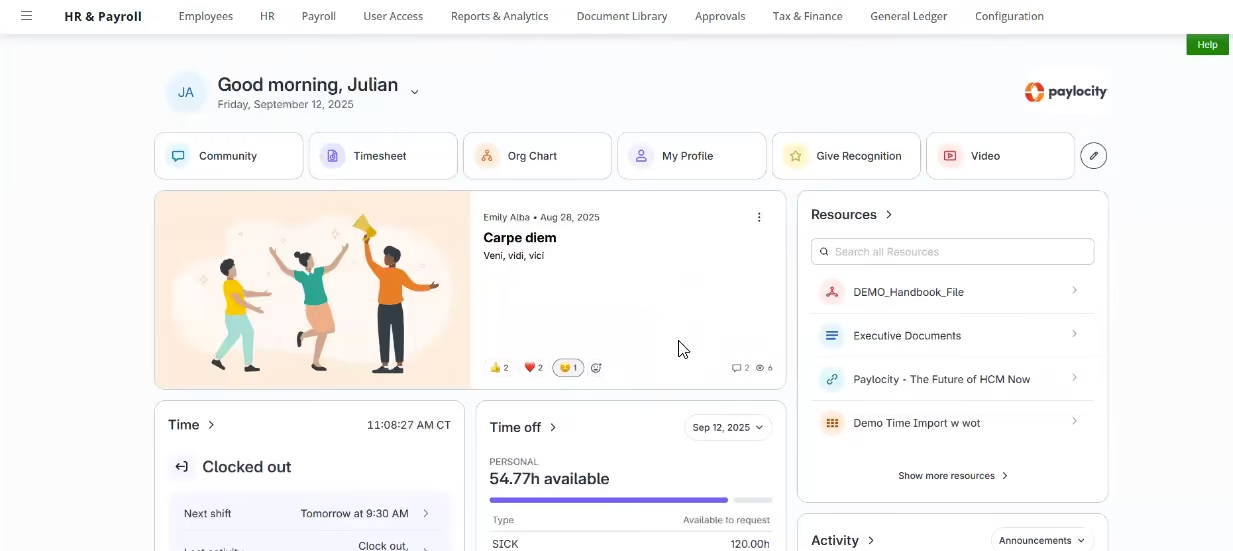
The employee homepage is the strongest part of the experience. Employees can view current and past pay, download pay stubs, check time-off balances, submit requests, complete tasks, access company resources, and find colleagues via an org chart and directory. They can also update addresses, emergency contacts, direct deposit, and tax details themselves, cutting the routine changes HR has to process.
In our last Paylocity demo, employees could access pay, time off, scheduling, clocking in and out, tasks, and onboarding on both phone and desktop. Time can be tagged to jobs or projects, allowing employers to allocate labor to specific work.
Performance management is comprehensive, combining employee journals, individual and team goals, feedback, and formal reviews. Journaling supports recurring check-ins, performance improvement plans, and general notes, while feedback can come from managers, direct reports, or peers.
Paylocity also offers recruiting with applicant tracking, job distribution, interview scheduling, and candidate lifecycle management, all tied to employee records and payroll, so payroll batches automatically pull salary, earnings, deductions, and timekeeping.
For smaller organizations, this breadth can add complexity and overhead versus more focused tools. The custom pricing model also limits cost evaluation before a formal sales process.
40,000+ organizations, including POLYWOOD, The Kennedy Group, and Hathaway Brown School.
Custom pricing.

Best For
Paylocity is best suited to mid-sized U.S. companies that want to bring payroll, HR, employee self-service, time tracking, recruiting, onboarding, and performance management together in one platform.


As an HR consultant, I don't directly process payroll or access employee data within Paylocity. My role involves working with clients to set up the system, configure workflows, and train them on using it effectively. I leverage Paylocity's features involving system configuration, data migration, reporting and analytics, and training and support. Overall, I use Paylocity behind the scenes to ensure a smooth HR experience for both the client and their employees.
I appreciate Paylocity's integrated platform – it eliminates data silos and saves a lot of time. The self-service portal empowers employees and frees up HR for strategic work. The reporting and analytics are fantastic, giving us data-driven insights into our workforce.
We decided to implement Paylocity after struggling with a cobbled-together HR system. Our old setup involved separate tools for payroll, benefits administration, and basic HR functions. This led to a lot of manual data entry and siloed information, making it a nightmare to track things and ensure accuracy. Paylocity's integrated platform solved these issues by providing a user-friendly, intuitive system that offers valuable insights into our workforce. Overall, Paylocity has been a great investment for my client, and I highly recommend it to any organization looking to streamline their HR operations.
While Paylocity is a great solution overall, its robust set of features can be overwhelming for small businesses or those new to the platform. The pricing might be cost-prohibitive for very small businesses with basic needs. Some specific HR needs might require additional customization or integrations, which can add complexity.
The biggest advantage is Paylocity's integrated platform. It shines in user experience with a clean and intuitive interface. Many competitors focus mainly on payroll and basic HR, but Paylocity offers strong talent management tools as well.
Paychex offers a wider range of pricing options, potentially better for smaller businesses, though user experience might not be as smooth. For very large companies, Workday HCM is a powerful option, but it can be expensive and complex to implement.
Choosing an HR tool requires careful consideration. First, identify your company's core needs – basic HR or comprehensive talent management. Then, prioritize user-friendliness for both HR and employees. Finally, factor in scalability, cost (including implementation and support), and robust security for employee data.
Paylocity has adapted to meet evolving user needs by focusing on mobile, enhancing talent management resources, and increasing AI integration.
Paylocity caters well to mid-sized businesses (50-200 employees) and organizations prioritizing user experience.
Paylocity might not be the ideal fit for businesses under 50 employees with highly customized needs and limited technical expertise.
.png)
Deel
We selected Deel HR due to its highly praised modular architecture and a robust, globally compliant employee portal that addresses complex international HR needs. Furthermore, the platform's practical analytics integrations, especially the Power BI connectivity, are excellent for users who require advanced, customized HR reporting capabilities.
PROS
- Modular pricing allows teams to scale HR features without reimplementation.
- Clean employee portal with strong self-service functionality.
- Built-in people analytics dashboards with API sync to Power BI.
- Slack and Teams plugins enhance HR workflow collaboration.
- Strong security framework including SSO, encryption, and monitoring.
- Integrates HR, payroll, and IT data under one system of record.
- Excellent 24/7 customer service with fast onboarding (2-3 days) and local payroll experts in each jurisdiction.
- Seamless integration with platforms like QuickBooks, BambooHR, and Greenhouse, plus custom integration options.
- User-friendly, self-service features enable quick setup; identity verification often takes under 24 hours.
- Automated invoices simplify payments, provided they're in English.
CONS
- Performance and development tools are bundled into higher-tier plans.
- Customization of analytics dashboards may require consulting support.
- Pricing increases quickly as modules are layered.
- Key features like onboarding automation are add-ons, which may increase costs.
- Limited flexibility in modifying contracts or service agreements; changes often require an addendum.
- Invoices cannot be generated in languages other than English.
What we liked most about Deel HR is that it’s built as a modular system that grows with you. You can start with Core HR and layer in recruiting, performance, or compensation tools when you’re ready, without migrating data or reimplementing the platform.
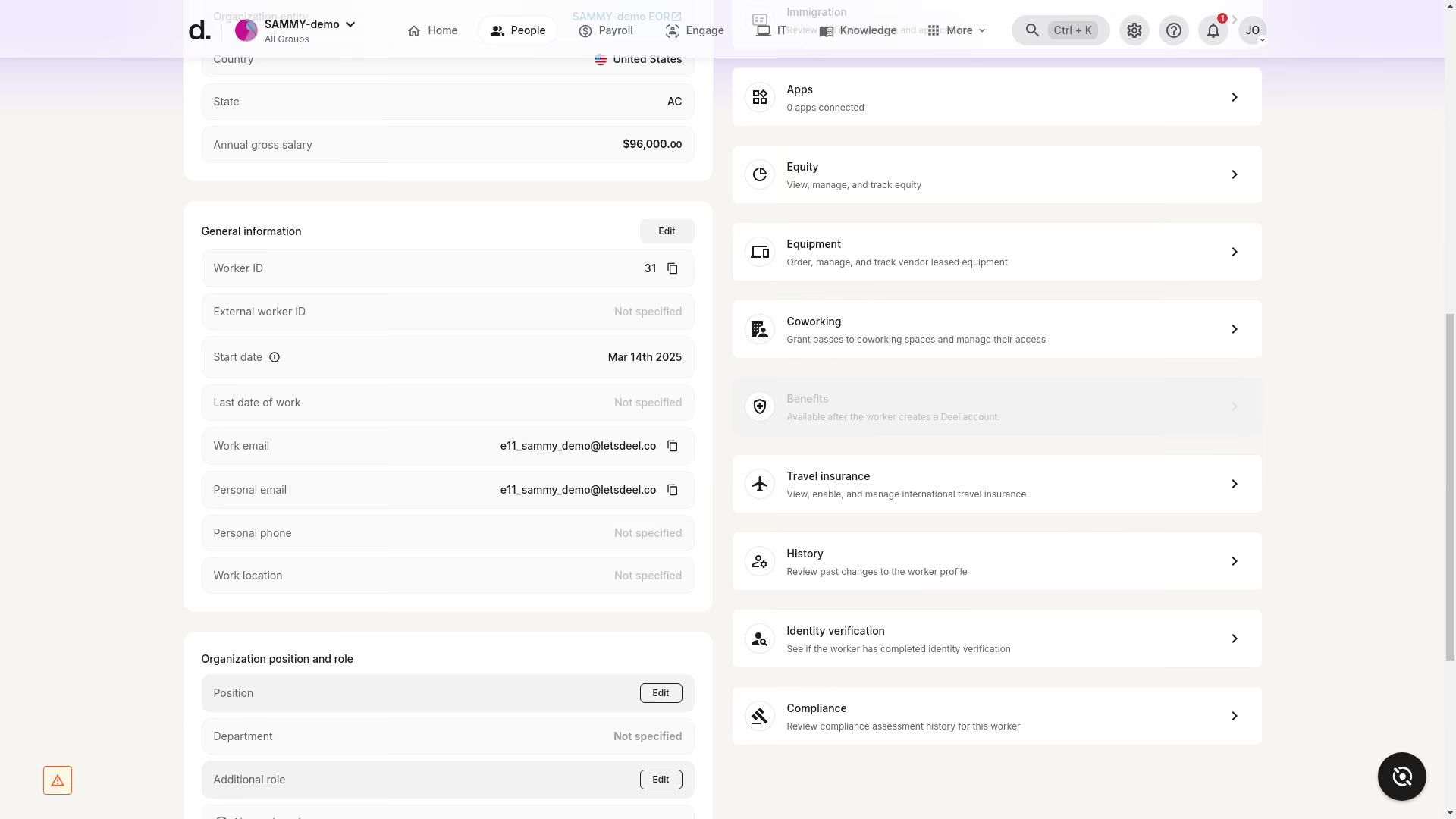
The employee portal apparently is where we landed first and where we ended up spending most of our time, since that’s usually where people management systems either succeed or fail. Luckily, Deel’s portal leans toward the former. The interface was clean both on our computer screens and smartphones. We also appreciated that multiple matters, such as personal updates, time-off requests, contract access, and pay stub retrieval, can be resolved directly in this portal without involving HR. Additionally, the collaboration software plugins help reduce the hassle of switching between platforms by surfacing notifications, such as time-off approvals and payroll, right inside Slack and Teams.
Another positive in our assessment is how Deel handles security controls. It's quite reassuring to see multiple layers in place, including encryption, secure storage, password management, and SSO. Plus, Deel’s recent partnership with Albert to provide cybersecurity training resources signals the vendor’s proactive stance on comprehensive operational risk management.
Analytics-wise, Deel HR’s lowest-priced module, Core HR, already includes people analytics dashboards. But what differentiates the platform is its ability to connect directly with Microsoft Power BI via API. Once integrated, live Deel data automatically feeds pre-configured KPI dashboards, which can be particularly convenient if you want workforce metrics embedded in executive reporting. Of course, it also means you need Power BI and may need to rely on HR Metrics for consulting support to configure advanced dashboards.
We appreciate that Deel’s structure is modular, with modules running on the same HR data foundation, so no migration is required as companies scale. Core HR starts at $5 per employee per month and includes foundational HRIS tools. Speaking from a remote startup perspective, this is a pretty good start for most SMBs. To be fair, though, the total cost can increase quickly once multiple modules are combined.
40,000+ companies, including Intuit, Canva, Ramp, and Klarna.
Deel HR provides its modules at various monthly per-employee costs: Core HR for $5, Recruit for $14, Develop for $22, the Recruit & Develop Bundle for $30, and the Full HR Solution, which includes all features plus advanced functions, for $56.
Best For
Globally distributed organizations.

BambooHR
With over 20,000 active clients and 1.8 million employee users, BambooHR is a top provider in the HR tech space. Their Employee Management features include time & attendance, leave requests, and employee wellbeing tools.
PROS
- Customizable packaging and flexible pricing options, allowing you to select one or two packages and add modules based on your specific requirements.
- Known for its simplicity and user-friendliness.
- Straightforward tool, easy to navigate and use.
- Flexible packaging and custom pricing is the way they roll. You can pick out one or two packages and pick other modules as add-ons based on your needs.
- Very simple and straightforward tool, easy to use.
CONS
- You can only run payroll for U.S.-based employees.
- Customer support is limited to U.S. workdays and business hours.
- Several modules such as time tracking, surveys, and performance management are available exclusively as add-ons, meaning you do need to pay more to use them.
- Payroll is only available for US-based employees
- Customer support is only offered during US business hours.
- Some modules like time tracking, performance management, and surveys are only available as add-ons.

Here’s a company that is a must-consider when it comes to various types of HR tech, including, of course, employee management systems. BambooHR is a well-known vendor in this space, with a host of HR tools to help companies manage employees throughout their lifecycle, from hiring and onboarding, to payroll and day-to-day management.Of course, employee management tools like time tracking and a performance module are available, but only offered as add-ons within one of the HRIS plans.
BambooHR has over 20,000 customers, including major companies such as the University of Maryland, Quora, Reddit, Universal Group, Asana, and Wistia.
BambooHR's per-employee, per-month pricing tiers for employee management are:
- Core ($10): Essential HR.
- Pro ($17): Core features plus performance and engagement.
- Elite ($25): Pro features plus compensation management, advanced analytics, and premium services.
Best For
BambooHR is great for companies wanting a customizable HR product with pricing tailored to their needs. It's especially popular with partial or fully remote teams.

I used it daily as the HR Data Manager for my company. We maintained employee records, processed new hire onboarding, managed time-off requests, and generated reports for compliance and analytics.
I supported employee performance review cycles and tracked employee changes. I also audited data on a quarterly basis. It served as the central source of HR data for the company.
- The user-friendly UI is intuitive and easy to navigate.
- The strong onboarding and self-service tools streamlined our processes and allowed employees to complete tasks that would have otherwise required HR support.
- Reporting was reliable for auditing and compliance purposes.
Our organization purchased BambooHR to consolidate our scattered HR processes into a single platform. We had previously been using static information sources like Excel and Word documents to house employee data, which caused inefficiencies and reporting errors.
I used the system throughout implementation and for a year afterward. It resolved many issues with data inconsistencies and improved tracking of employee data, onboarding, and performance.
- Customization was limited, as some modules like performance had restricted flexibility in fields, workflows, and integrations.
- The lack of pricing transparency was frustrating; we had to go through multiple discovery calls to get a price estimate.
- Analytics capabilities were basic and not very robust.
It is focused on small to mid-sized businesses and ease of use. Unlike larger systems like Workday, it is not overly complex or overpriced and requires much less administrative effort. It is generally API-friendly, and the customer service team is excellent.
Organizations should consider their growth plans to determine whether BambooHR meets their scalability needs. They should also consider their employee base and whether ease of use will be a critical factor.
The interface has become more intuitive, with improved mobile access and self-service options for managers and employees. The analytics tools have improved slightly as well.
Small to mid-sized organizations can benefit grealy from BambooHR.
Large, complex organizations will find it better to use more robust software.

Connecteam
As an all-in-one platform for deskless employees, Connecteam covers communication, scheduling, task management, core HR, and more. Its aim is to connect unanchored workers at small and large companies alike with an easy-to-use mobile app.
PROS
- Connecteam offers a user-friendly, mobile-first platform that’s tailored for deskless employees.
- With a variety of features for team management, communication, training, and engagement, the platform provides a comprehensive solution.
- Connecteam offers transparent pricing for all modules, including free plans for small businesses.
- A 14-day free trial without requiring a credit card allows potential users to test the platform's capabilities.
- One of the only fully-mobile HR tech tools for deskless workers
- Very adequately-priced for all it entails, SMB-friendly
- Quite open to feedback, having implemented user suggestions as features in the past.
CONS
- There’s a bit of a learning curve simply because of the many features there are on the platform.
- While the platform's scalability is commendable, several important features are only accessible on higher pricing plans.
- We would have liked to see more integration options with third-party tools such as calendar sync. Payroll integrations are also limited at this time to just Paychex, Xero, Gusto, and Quickbooks.
- In the communication hub, the app offers no confirmation that messages were sent and/or seen.
- Certain features that some teams consider essential, such as GPS-tracking, are only available in the higher-tier pricing plans.
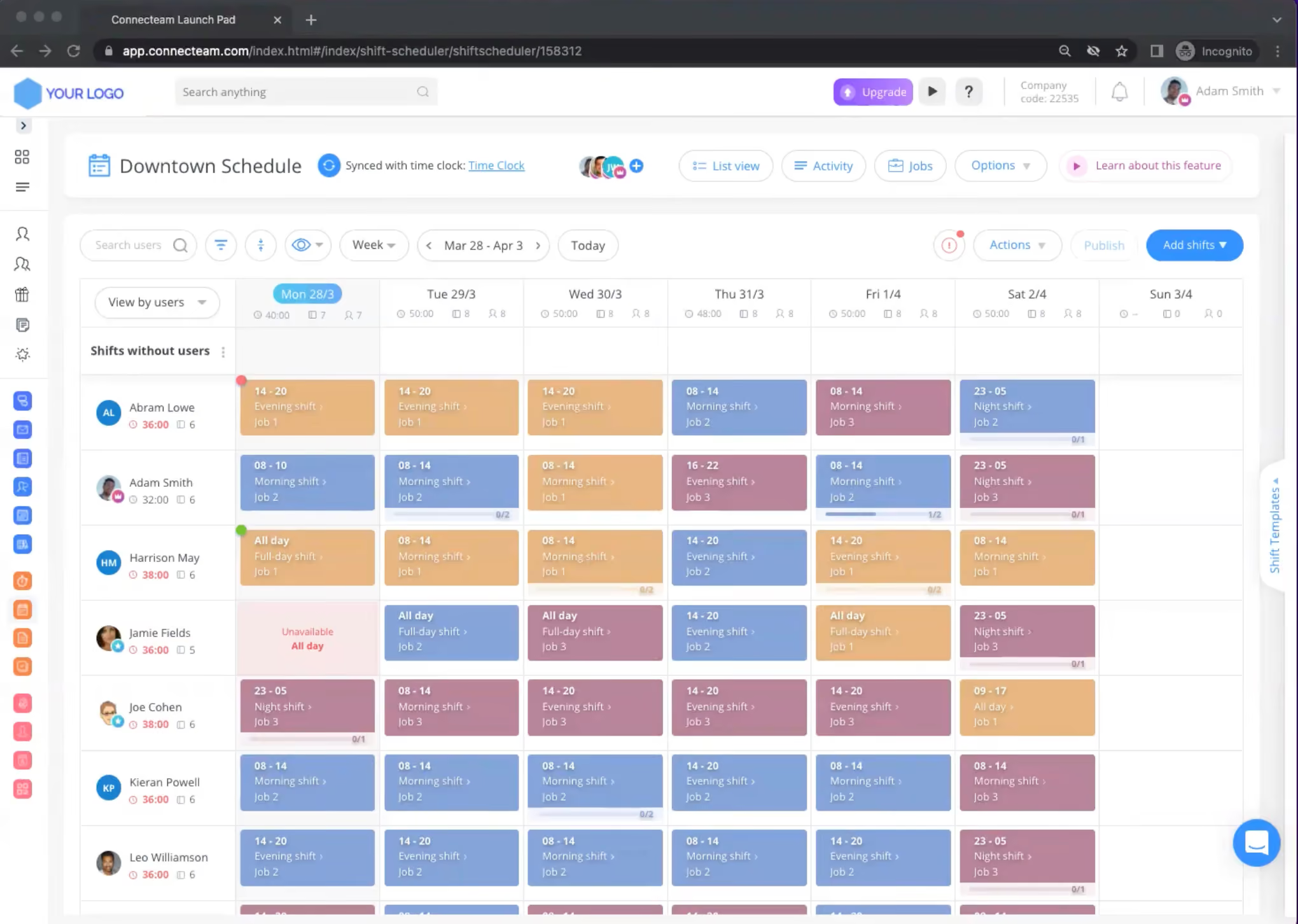
Connecteam offers comprehensive employee management software that stands out for its mobile-first approach - everything inside is built with non-desk workers in mind. We’ve had a tour of its HR & Skills hub and were particularly impressed by the training and onboarding features within. The software allows managers to create custom courses tailored to each position within the company, and these courses can be completed directly from employees’ mobile devices. The addition of quizzes ensures that trainees have a solid grasp of the material, while progress tracking provides managers with real-time insights into each employee's development.
Another notable feature is Connecteam's ability to digitize and centralize employee documentation. By gathering all paperwork in one secure location, the platform simplifies the onboarding process and ensures compliance with expiration date reminders for important documents and certifications. This not only saves time but also reduces the risk of regulatory issues.
Connecteam also excels in managing time off requests. Employees can easily submit absence requests through the app, while managers gain a clear overview of these requests and can effortlessly update balances. The software further simplifies the process by allowing the creation of policies for various types of absences and automating notifications to prevent compliance issues.
Recognizing and rewarding employees is yet another thing made easy with Connecteam's built-in features. Managers can publicly or privately acknowledge individual and team achievements, fostering a culture of appreciation. The platform also offers the ability to reward employees with their favorite gift cards, providing a tangible incentive for going above and beyond.
Lastly, Connecteam's employee lifecycle tracking is also worth highlighting. The timeline view provides a comprehensive picture of each employee's journey, from onboarding to performance reviews and salary raises. This information, along with the ability to attach related files to each event, empowers managers to make informed decisions based on a holistic understanding of their team members.
Over 35k businesses use Connecteam’s solutions, including Chick-fil-A, Ihop, and The UPS Store.
Connecteam’s pricing ranges from free-for-life to up to $99 per month for up to 30 users. The final amount will depend on how many users and modules you choose. Visit Connecteam’s pricing page for the full breakdown of each plan.
Best For
Companies of all sizes looking for a mobile-first employee management platform.

Gusto
SMBs can use Gusto to manage employees in all states, 1099 workers, and contractors worldwide. The platform offers full-service payroll, plus HR and benefits administration, at budget-friendly pricing.
PROS
- Premium plans give you access to workflows, performance reviews, and development resources.
- The UI is modern-looking and easy to use.
- Payroll deductions are automated.
- You can process payroll for U.S. W2 employees as well as domestic/international contractors.
- The customer support team is responsive both via phone and email.
- All plan users can reach out to Gusto’s team of licensed benefits advisors for help.
- Employees can access a self-service portal to check information and perform tasks on their own.
- The dashboard feature keeps tabs on compliance tasks
- The hiring and onboarding sequence is nicely streamlined between HR and the new hire
- Post-offer, pre-start tasks are made easy with integrations like CorpNet (state tax set up) Checkr (background checks)
- Easy payroll for U.S.-based W-2 folks, domestic, and international contractors
- Person-to-person phone support, email, and other customer service resources
- The business model is responsive to customer needs
CONS
- No international employee payroll, only contractors.
- No native accounting for financial tracking.
- The analytics dashboard is rather basic, compared to similar platforms.
- No native time tracking for the Simple plan.
- Compliance alerts and insurance integration can only be accessed by Premium plan users.
- No free plan or trial.
- Gusto can support payments for international contractors, but not employees
- No native accounting feature to keep earning and spending under the same roof
- Analytics dashboard is simplistic
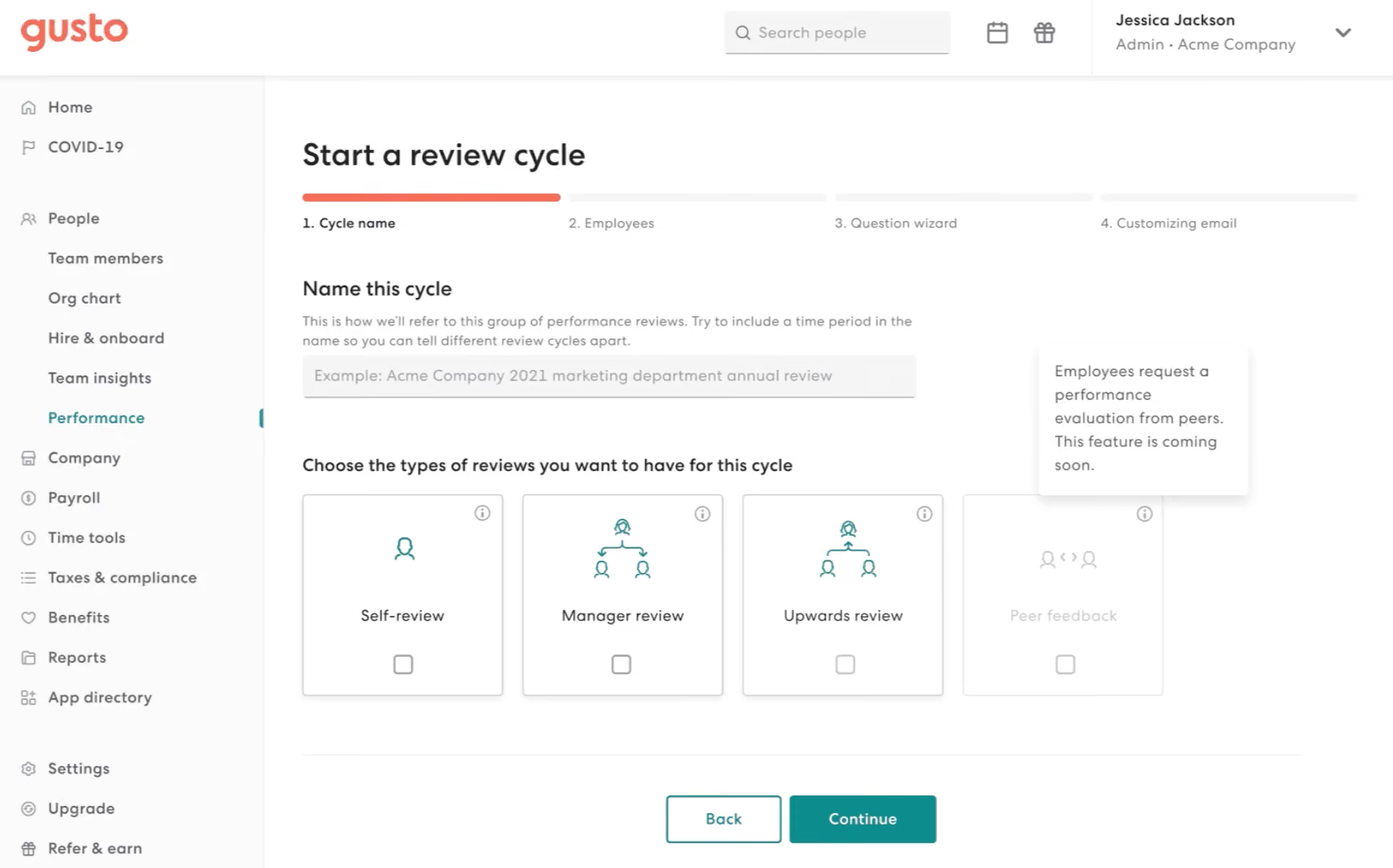
We have tested Gusto's employee management software and found it a comprehensive solution for SMBs. With the ability to manage employees across all states, 1099 workers, and contractors worldwide, Gusto offers full-service payroll, HR, and benefits administration at affordable prices.
The Premium plan (the highest tier) provides additional value with access to performance features like automated workflows, self-evaluations, manager reviews, and career development resources for better employee engagement and professional growth.
In addition to its functional capabilities, Gusto boasts an eye-catching interface that is visually appealing and user-friendly. Navigating through the platform is intuitive, making it easier for users to manage employee-related tasks efficiently.
We also found automatic payroll deductions and payroll services available for U.S.-based W-2 employees and domestic and international contractors. Gusto's employee self-service portal is also available, reducing administrative burdens and allowing employees to handle tasks independently.
However, we couldn’t help but notice Gusto doesn’t support payments for international employees. Native accounting for comprehensive financial tracking is missing. We also found that the Simple plan lacks several features, such as time tracking, compliance alerts, and broker integration. And regrettably, Gusto does not offer a free trial option.
Gusto supports over 400,000 businesses across the U.S., many of which rely on the platform for core HR workflows like employee onboarding, benefits management, time tracking, and compliance.
Gusto offers four pricing plans: Simple ($49/month + $6/employee) for core payroll, Plus ($80/month + $12/employee) for multi-state payroll and HR tools, Premium ($180/month + $22/employee) for the full HR suite and dedicated support, and Contractor Only ($35/month) for managing independent contractors. Add-ons HR Resources ($50 + $5 PEPM) and Priority Support ($30 + $3 PEPM) are available for Simple and Plus plans.
Best For
Gusto's basic plan is budget-friendly, making it accessible even for cash-strapped startups. The premium plan is highly recommended for companies that have the funds to invest in human capital, especially those with just one HR employee. The premium features are worthwhile for such companies.

With my current consulting client, we use Gusto for a few different workflows. We use it for payroll, sending offer letters, managing our 401K program as well as new employee onboarding. In previous companies I worked at, we used it for payroll. In my opinion, the greatest strength of this tool is running payroll. It’s super simple to use.
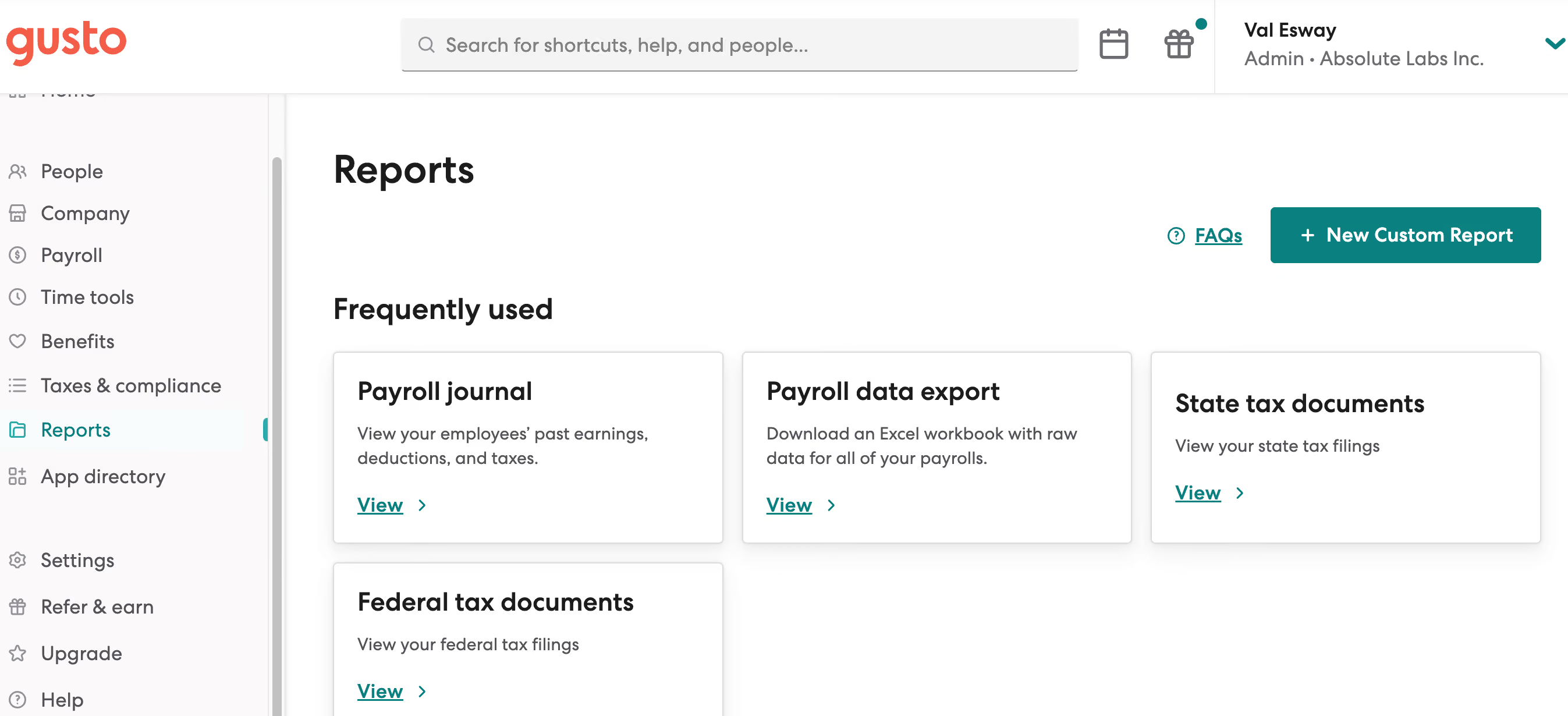
The ease of payroll and ability to have payroll run on auto-pilot is AWESOME. The customer service is friendly and for the most part quite efficient. The UI is pretty good compared to a lot of other platforms I've used.
We initially chose Gusto when the company was first established. We needed a simple payroll solution that would work for a company of our size, which at the time was just one W-2 employee on the payroll. We used the solution for about eight months before transitioning to a different solution that would allow us to manage payroll and offer benefits under one platform. Prior to that, I personally used the solution at another company for almost a year.
Since I also do freelance HR consulting, I am now working with a client who also uses Gusto. In this company, we use it for payroll, benefits management, and 401K.
Paying international contractors has been challenging in my experience. I'm not a huge fan of having the employees separated out by whether or not they are onboarded yet. I would rather see all employees with a status showing whether or not they have completed onboarding.
Payroll is a breeze! It's really one of the best tools I've used for payroll for a small company. The customer service is stellar.
Think about your long-term growth plans. I think Gusto is best for smaller companies. Think about whether or not you'll be paying contractors and especially international contractors because that can get complicated. And when you are first implementing the tool, do your best to have someone who understands the platform and how to best optimize it for your team do the set up.
I'm not sure but I do often see that they are rolling out beta features, which leads me to believe that they are always evolving to meet customer needs.
I think Gusto is best for small businesses, especially for small businesses that may not have a dedicated HR personnel. It's easy enough to use that the average business owner should be able to navigate it without too much trouble.
I think it may not be the best platform for larger orgs, especially for orgs with complicated pay needs, i.e. international contractors.

Leapsome
With easy onboarding, customizable performance reviews, employee training, recognition, and engagement features as well as OKRs setting and tracking, Leapsome has everything you need for you to manage your employees, listen to their feedback and keep them happy and productive.
PROS
- Leapsome offers a comprehensive range of features, including modules for employee onboarding, learning management, engagement, performance management, and goals tracking, among others.
- Users find Leapsome's user interface (UI) to be friendly and easy to navigate.
- The platform provides numerous third-party integration options, such as Slack, which users appreciate for enhanced connectivity.
- Leapsome's pricing is flexible, allowing users to pay only for the modules they require.
- Besides English, Leapsome is available in 12 additional languages, catering to a diverse user base.
- Leapsome is quite feature-rich; the platform packs modules for employee onboarding, learning management, engagement, performance management, goals tracking and much more.
- The majority of users find Leapsome’s UI to be friendly and easy to navigate.
- There are lots of third party integrations options to choose from, including Slack, which many users appreciate.
- The platform has transparent pricing, and you only pay for the modules you need.
CONS
- There currently isn’t a way to post or upload images or files within your feedback.
- Due to the platform's extensive capabilities, users may need some time to adapt to its various functionalities, and the implementation process can also be time-consuming.
- Leapsome currently lacks a dedicated mobile app, limiting on-the-go access for users.
- While a free 14-day trial is available, users need to schedule a demo with the sales team to sign up, as self-registration is not possible.
- There is currently no way to post or upload an image or file into your feedback.
- Since Leapsome can do so many things, you may need some time to get used to it. The implementation process can also take some time.
- There currently isn’t a mobile app that users can download and access Leapsome quickly on-the-go.
- Free 14-day trials are available but you need to book a demo with the sales team first to sign up for one; you can’t do so on your own.

Besides hosting your employee data, Leapsome gives you several tools to manage your employees, from performance tracking to sentiment analysis and skills development.
Managers can provide performance feedback to their team members either publicly or privately. The platform also enables peer-to-peer reviews and for employees to provide feedback back to their managers on what can be done to improve leadership styles and collaboration.
The employee engagement and training tools help you pay even more attention to the experience of your employees. You can routinely do surveys and pulse checks to gauge employee sentiment and take necessary actions to improve the workplace environment, while the training module helps you create and deliver learning content, unique to what skills your employees want to be better at.
Leapsome is used by many well-known companies, including Spotify, +Babbel, Unity, PayFit, Learnerbly, Modus Create, Spryker, DCMN, and more.
The pricing of Leapsome starts from $8 per user per month, which varies depending on the specific modules chosen. They also provide multi-module and volume discounts. For an exact estimate, we recommend that you contact Leapsome's Sales team directly.
Best For
Companies of all sizes can use Leapsome, though medium and large-sized companies are more likely to get the most value out of it.
We use Leapsome daily as a comprehensive tool for managing performance and increasing employee engagement. It is especially helpful for the leadership and HR teams, allowing us to align personal goals with the company's broader objectives through OKRs and goal management. The platform supports performance reviews, 360-degree feedback, and real-time feedback, which help enhance communication and development. Leapsome’s customizable features make processes like surveys and one-on-one meetings more efficient by allowing us to adapt the platform to our needs. Overall, Leapsome has streamlined how we engage with and support employees.
- Leapsome’s user-friendly design makes it easy to recognize colleagues and boost morale with positive feedback.
- The platform functions as both a learning management system and an organizer for meetings, reviews, and surveys.
- It’s intuitive and quickly adopted by employees, improving morale by encouraging shared feedback and appreciation.
My organization adopted Leapsome to centralize and improve multiple HR functions within a single platform. We wanted a solution that could integrate goal-setting, OKRs, performance reviews, employee learning, and engagement into a cohesive system. Leapsome’s all-in-one design has been key in enabling streamlined performance tracking and employee development. It has also helped promote better communication and engagement with features like 360-degree feedback, surveys, and recognition tools. I have personally used Leapsome for two years, and it has consistently proven valuable to our team.
- The platform’s workflows could be better optimized for smoother use.
- The UI/UX for completing a learning path could be improved to provide a more seamless experience.
- Some internal management processes still rely on outdated methods.
Leapsome differentiates itself with customizable performance and 360° reviews that are straightforward to use. It supports goal alignment and tracking across the organization, fostering transparency and accountability.
Through employee engagement surveys, it provides insights into company culture that help in strategic decision-making. Leapsome also encourages a culture of continuous growth with real-time feedback and praise.
These features create a holistic approach to performance management, employee development, and engagement that stands out from competitors.
I recommend researching the platform’s functions to ensure it aligns with your organizational needs. Leapsome offers many valuable features, though some may require further development.
Leapsome has remained relatively consistent, though there is room for further updates to meet evolving user requirements.
The platform’s versatility makes it suitable for various types of organizations and industries.
Currently, I believe Leapsome could be beneficial for almost any organization looking to streamline HR functions.
Workday
Workday is robust and quite comprehensive. It can cover all of your HR and payroll needs without needing to combine it with other tech solutions.
PROS
- Workday has an intuitive, easy-to-use interface that makes it simple for employees to navigate and find what they need.
- You can integrate Workday with an impressive number of HR systems and tools.
- Users appreciated that Workday consolidates HR information into a single system, eliminating the need to access multiple platforms.
- Customers can get the support they need from Workday’s community of users, or the support team via live chat and telephone.
- Accessible customer support from the community, live chat, and telephone.
- Compatible with 300 HR systems such as ERP/GL, CRM, HR, and PSA.
- Configurable dashboard with AI and ML-driven insights.
- Ability to maintain real-time alignment of budgets and workforce plans.
- SOC 2 Type 2 compliance.
CONS
- It can take a long time to initially set up and implement Workday (avg 4.5 months).
- The reporting functionality has room for improvement, particularly with regard to customization and search.
- Workday’s pricing is on the expensive side, making it less feasible for smaller companies.
- No free plan or free trial.
- Undisclosed pricing.
- No free trial for its talent management software.
- Time-consuming implementation period (average 4.5 months).
- Challenge navigating for first-time users may require training.
- Issues with logging in were reported by users.
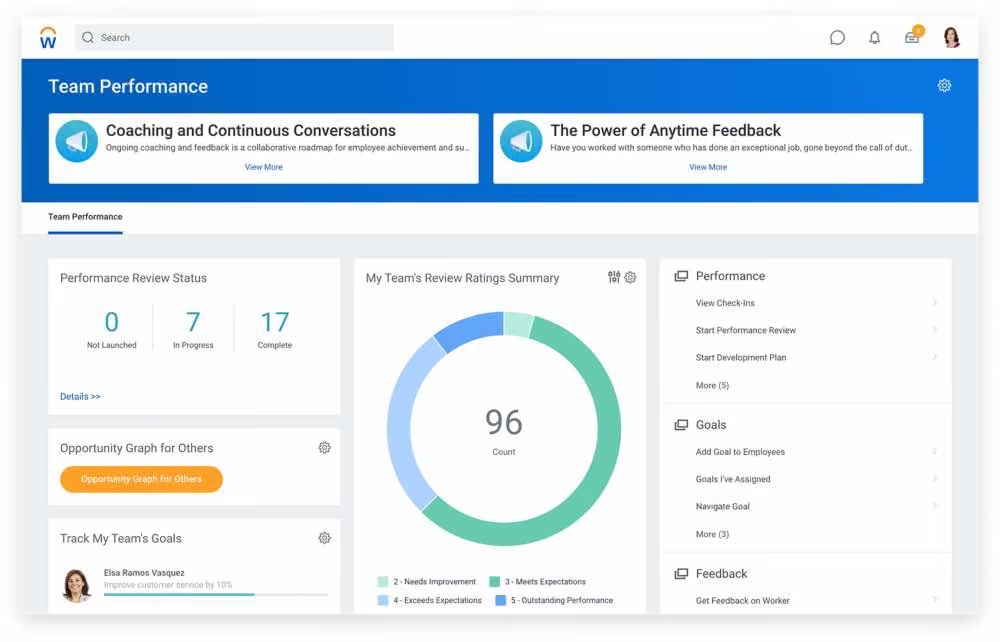
Despite mixed reviews on the user-friendliness of Workday from teams that have implemented it, it is still a robust provider of a wide range of Finance, HR, and Planning solutions, made specifically with enterprises in mind. So if you’re looking for an all-in-one solution that can easily scale, checks the necessary data compliance measures, and can be implemented across large global companies, Workday is worth checking out.
- Target
- Patagonia
- Bank of America
The pricing of Workday’s solutions isn’t disclosed on their website. Contact their sales team to get a custom quote.
Best For
Large-sized companies and enterprises.

I use Workday everyday. The key workflows I use Workday for are to manage all my open requisitions. I post jobs on Workday, disposition candidates and run daily reports on recruiting metrics per requisition. Workday does a good job with your dashboard. This screen will show all your open requisitions and any projects or timelines you choose to add. It is also very easy to add templates to Workday per requisition to help save time when you take action on a particular candidate. I initiate background checks, reference checks and offer letter proposals and submittals through Workday as well.
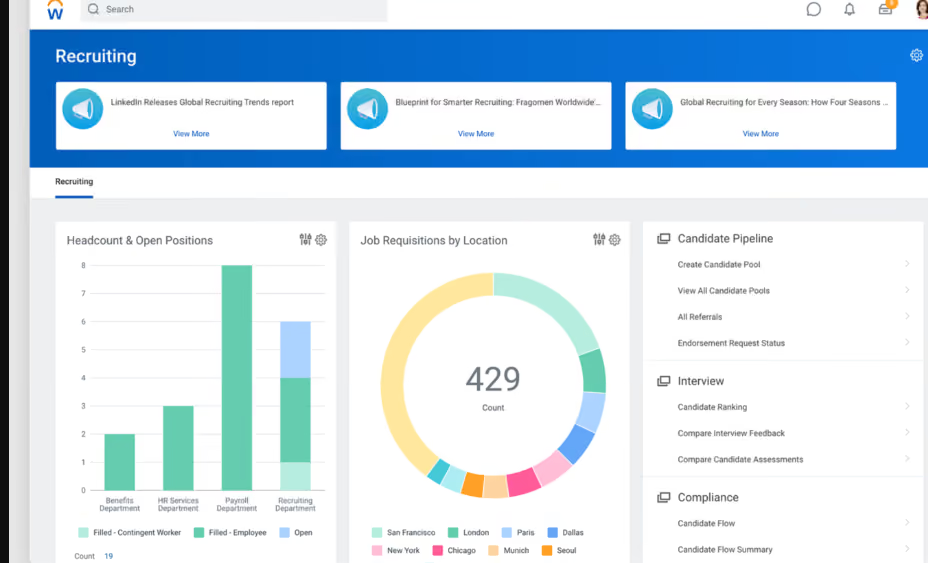
I like that Workday can be your one stop shop for all HR and recruiting needs. It is easily customizable to your organizations preferences. I love the reporting capabilities that Workday can provide. I also like the main screen user interface. I think it is very user friendly and easy to learn.
My organization implemented Workday for the reporting and metrics functionalities. Workday is so robust and can do so much, especially for a big organization like the one I am in. The key benefits are that you can personalize Workday to your company's needs. There are no shortages of capabilities and functions Workday can serve. If you want recruitment metrics and reports, Workday is your tool. I have used Workday personally for 5 years in 2 different organizations. Both companies needed better reporting metrics around hiring and Workday solved these needs.
Workday can be a lot! It offers so many functions that it can get overwhelming. I have had candidates who have not liked the Workday experience when applying for a position. Workday's customer service has been weak at times and has not been the easiest to deal with.
WorkDay has a great brand name. Some of the largest and most profitable companies in the world use Workday which I think speaks for the brand itself. Workday’s functionalities can do so much more than a lot of their competitors. I have used similar tools and Workday by far has the largest arsenal of functionalities. You can utilize anything you decide you want to utilize and can offer almost everything from an HR, Recruiting, and Benefits standpoint.
Workday can be expensive. You get what you are paying for. If you want a complex product as a one stop shop then I would recommend Workday. I would figure out what you want your Workday to function as within your organization.
Workday has continuously made adjustments to the user interface to make it more user friendly. More training is always offered to new capabilities that are added monthly.
Very big organizations who want a system that can do a lot of different things. If you are an organization who has a high requisition load, a need for high level reporting, Workday would be a great fit.
I think Workday would not be beneficial to smaller companies and startups. I think a lot of the key functionalities would not be used and it would be a waste of money for your organization.
UKG
From paying your employees to managing them, developing them, and everything in between, UKG is a robust HRMS suite that can cover all of your people management needs.
PROS
- Super robust product, packing years of experience with HCM and Workforce Management technology.
- Administrators can configure the visibility settings for managers, employees, and themselves.
- The Ultimate Community provides on-demand information about all UKG Pro products and their usage.
- The mobile app is available in the Apple and Android app stores.
- Offers UKG Pro for HRMS and UKG Ready for workforce management, you could arrive at a combination of products that suits many of your HR needs from the same set of tools.
- Super robust product, packing years of experience with HCM and Workforce Management technology
- Since they offer UKG Pro for HRMS and UKG Ready for workforce management, you could arrive at a combination of products that suits many of your HR needs from the same set of tools.
CONS
- Compared to newer tools, UKG Pro and UKG Ready have not configured their offering to work for smaller or niche teams.
- Employees can encounter log-in issues at times with the Android app.
- Not a very budget-friendly option for small businesses.
- Similarly, UKG offers many solutions under one umbrella, so it's not the best fit if you're looking for only a handful of specific use cases.
- Compared to newer tools, UKG Pro and UKG Ready tend to miss a unique selling point or a specific focus on a certain type of business. While they work great for bigger companies in all sorts of industries, very niche operations might have a hard time adapting to the tool.
- Similarly, UKG offers many solutions under one umbrella, so it's not the best fit if you're looking for only a handful of specific use cases.
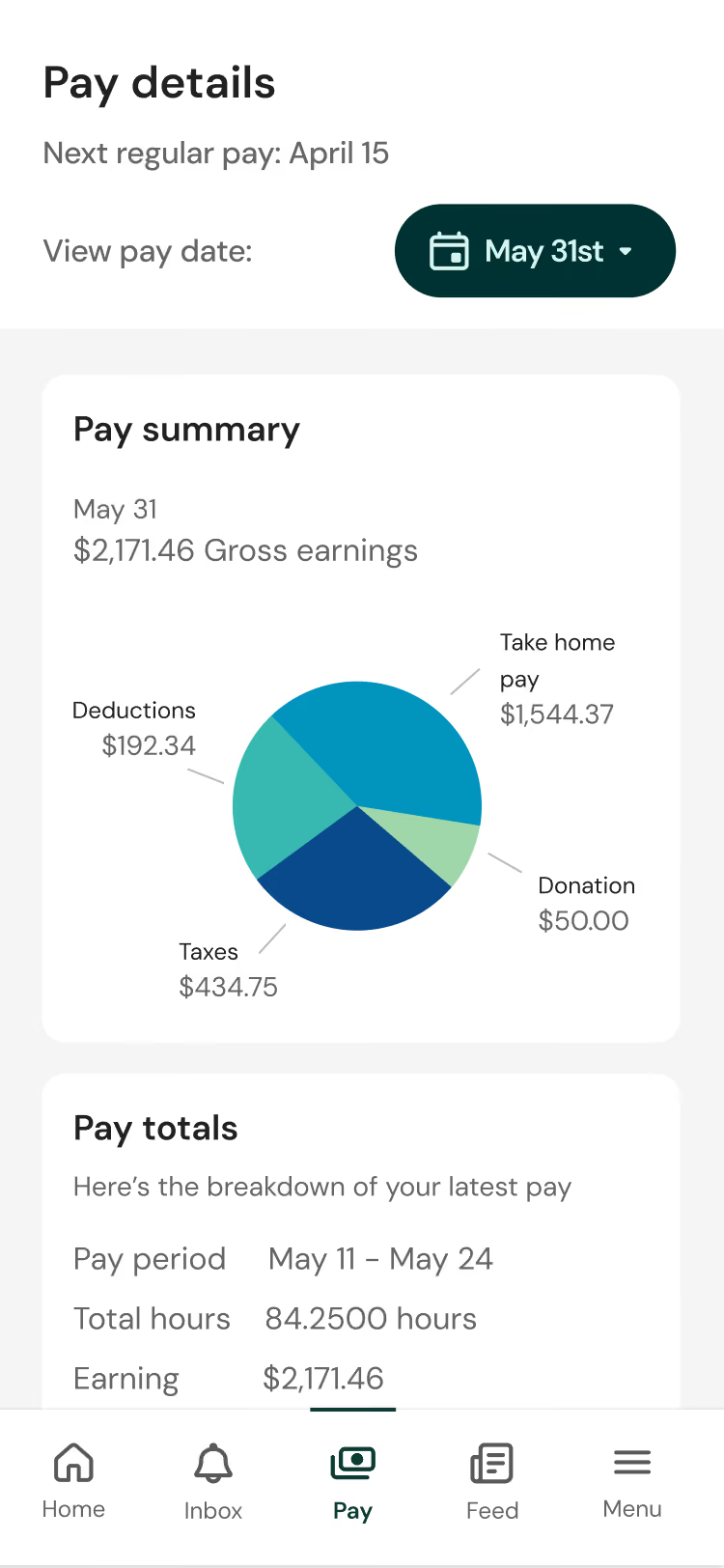
UKG Pro is a comprehensive employee management solution for midsize to large enterprise companies. HR departments at companies like MGM Grand and the Miami Dolphins use it to hire, onboard, pay, and manage employees. This all-in-one tool also features performance management, engagement, and succession planning, so it eliminates the need to purchase additional products to fulfill such needs separately.
UKG also offers UKG Ready, a workforce management solution developed with Kronos, a well-known time and attendance tool. This partnership adds time keeping, attendance, scheduling, and Affordable Care Act (ACA) compliance to the broader UKG offering.
Tesla, Marriott, Yamaha, Aramark, Puma, Sony Music, Samsung.
- Pricing for UKG Pro or Ready is not available on their website. However, it is usually on a per-employee-per-month basis, either billed annually or monthly.
- You’d need to contact a sales representative for an accurate quote.
- Our research has shown that licenses tend to start at around $600.00 per year for every 5 users.
Best For
UKG goes beyond payroll and offers a comprehensive suite of features tailored for enterprise-level organizations. Its robust capabilities serve as an exceptional payroll + HR solution, well suited for large teams with a global headcount, but also smaller businesses with over 50 employees.

I use UKG on a daily basis as part of my HR role. Most of the time I'm in the system reviewing or updating employee records, helping managers with job changes, and making sure everything is aligned before payroll closes. I also use it to track recruiting activity, like checking candidate status or supporting managers during the offer stage.
During performance review cycles, I spend more time in the talent management modules to review evaluations and ensure documentation is complete, since HR leads both the annual and mid-cycle review process in our organization.
Managers use it for approvals, time tracking, and accessing team information, so I often get pulled in to help with system questions or reporting needs. I also run reports for things like headcount, attrition, disciplinary action reports, and workforce trends to support leadership discussions.
Overall, UKG functions as our primary system of record, so it is part of most of my day-to-day work rather than something I log into occasionally.
One thing I like about UKG is that it brings employee records, payroll, recruiting, and talent processes into one system, so you're not constantly switching between platforms.
The reporting is also helpful, especially once it's set up properly. We've connected PowerBi to it, which has made it easier to pull HR data and build reports without starting from scratch each time.
Payroll being tied directly to core HR data has helped reduce errors, and it's been especially useful with a multi-state workforce where compliance can get complicated.
The recruiting workflow is fairly structured, which makes it easier to track where candidates are in the process and keep hiring managers aligned.
Once everything is configured properly, it works well as a system of record for managing the full employee lifecycle.
Our organization moved to UKG mainly to bring multiple HR processes into one system. Before that, we were using different tools for employee records, payroll, recruiting, and talent management, which made things harder to manage and sometimes led to inconsistencies in data.
We also just recently transitioned our timekeeping from Kronos to UKG in 2025 Q4, so part of the goal was to have everything more aligned in one place. There was a lot of manual coordination between systems before, especially between HR and payroll, so we were looking for something more centralized.
UKG helped reduce some of the back-and-forth and made it easier to access employee information without switching between platforms. Having employee data, recruiting, and performance information in one system has been helpful, especially when supporting managers or reviewing employee history.
Payroll has been more consistent since it ties directly to employee records, and reporting feels more reliable since everything is coming from the same system.
I've personally worked with UKG for more than 4 years in an HR role, using it regularly for employee records management, payroll coordination, recruiting oversight, and general support for talent-related processes.
The system can feel a bit complex at first, especially for managers who don't use it often or are new to it.
Some of the reporting works well once it's set up, but getting it exactly how you want can take extra configuration or support, which is why we ended up relying more on PowerBi for certain reports.
Implementation and initial set-up can take time, especially when you're working across multiple modules and trying to align everything.
Making updates or changes isn't always quick, since it sometimes involves working with support, which can slow things down depending on the request.
In my experience, UKG feels different from other HR systems because it brings core HR, payroll, recruiting, timekeeping, and talent into one place. In the past, we used tools that were strong in one area but required separate systems for everything else, which meant more manual work and sometimes mismatched data. With UKG, having one system of record made things more consistent and easier to manage across teams.
What I like is that once workflows are set up, things like payroll and employee record updates run more smoothly without needing to transfer data between systems. Some other tools we looked at had simpler interfaces, but they didn't offer the same level of integration across different HR functions.
When looking at tools like UKG, one of the first things to consider is whether it actually supports your core HR processes and has the modules you need without relying on too many add-ons.
Ease of use is also important, especially for managers and employees, since adoption tends to drop if the system feels hard to navigate. Reporting matters as well, because HR and leadership rely on that data for day-to-day decisions, and it should be easy to access without extra work.
It's also worth thinking about how the platform fits with your existing systems and whether it will scale as your organization grows.
Over time, I've seen UKG improve in ways that made it easier to use day to day for both HR and managers. Early on, some workflows felt a bit confusing, but over time the navigation got better and tasks like scheduling, payroll review, and updating employee records became more straightforward. Reporting also improved, and it became easier to pull information without having to export everything into spreadsheets.
I also noticed better integration between modules. For example, recruiting and onboarding data flows more smoothly into core HR and payroll than it used to, which reduced some of the manual steps we had before.
Mobile access and self-service features have also improved, making it easier for employees to check schedules, request time off, or update their personal information.
These updates came gradually, but over the time I've used the system, it has become more consistent and easier to work with overall.
UKG tends to be a good fit for medium to large organizations with more complex workforce needs, especially those managing a mix of hourly and salaried employees. It works well in environments where HR teams need one system to handle multiple functions like payroll, recruiting, and employee records rather than relying on separate tools.
From what I've seen, it's most valuable in companies that have resources to properly set up and maintain the system over time.
UKG may not be the best fit for smaller organizations with simple payroll and basic HR needs, since it offers more functionality than they may actually use.
For teams without a dedicated HR or system admin resource, the setup and ongoing management can feel a bit overwhelming. It may also not be ideal for organizations looking for a lightweight, quick-to-implement solution with minimal setup time.

15five
15Five’s Perform module comes with employee management tools to conduct performance reviews, check employees’ role clarity, identify strengths, and help them have a career vision. A unique thing managers can through this module is adjust employee scores in real-time during a calibration session.
PROS
- 15Five helps HR leaders run their performance programs from start to finish and make talent decisions based on a 360-degree view of each employee.
- With the help of visual dashboards, HR leaders can access colorful and easy-to-comprehend insights that will make their talent decisions easier.
- The platform is fairly easy to use, comes with a mobile app, has transparent pricing, as well as a 14-day free trial so users can try before they buy.
CONS
- Some users reported experiencing difficulty creating new objectives or connecting existing objectives to parent objectives in the objectives section.
- When you create an engagement survey using 15Five's template, you can only choose from a selection of pre-made categories rather than creating your own.
- The out of the box integration options are quite limited, and a Zapier integration used to be available but is now sunsetted. As an alternative, 15Five does have a public API for users to plug-in custom tools but that requires a bit more work.

15Five enables managers to have a better understanding of their team members through a host of tools for communication, performance tracking, and goal setting. For starters, managers conduct regular check-ins, performance reviews, and pulse surveys to stay informed about their team's progress and identify areas for improvement. They can also set goals, track progress towards those goals, and provide feedback to employees as needed, fueling a culture of continuous growth.
15Five’s customer base includes Hubspot, Spotify, American Red Cross, Clearbit, Pendo and more.
- Engage: $4 per user per month. Its features include Core engagement surveys, Topic-based assessments, Custom topic-based assessments, Filterable heatmap & analytics, Enterprise-grade security, an Action plan dashboard, and more.
- Perform: $8 per user per month. Its features include Performance reviews, 360º feedback, Talent Matrix, Data insights, Career Paths & Plans, and more.
- Focus: $8 per user per month. Its features include Goal setting with OKRs, OKR chart view, Data insights, Jira & Salesforce Integration, and more.
- Total Platform: $14 per user per month. Its features include everything in other plans, plus DPAs and security questionnaires.
Best For
15Five is a good bet for both growing companies and enterprises. It particularly benefits organizations seeking a holistic feedback system that ensures input from all employees throughout the company.

We use 15Five on a regular basis to support our employee engagement and performance management efforts. We have established a regular cadence of use, with weekly check-ins and quarterly goal-setting and progress reviews.
During weekly check-ins, employees share updates on their progress and any challenges they may be facing, while managers provide feedback, support, and recognition. This helps to keep everyone on track and fosters a culture of transparency and accountability within the organization.
We also use 15Five for regular one-on-one meetings between managers and employees, which are scheduled and tracked through the platform. This has made it easier to ensure that all employees are receiving the support and feedback they need to be successful in their roles.
The goal-setting and tracking features of 15Five are also key parts of our workflow. We set quarterly goals and track progress in real-time, allowing us to make adjustments and provide support as needed. This has helped to increase employee motivation and productivity, while also providing a clear framework for performance evaluation.
Finally, we use 15Five for feedback and recognition, which allows employees to receive feedback from their managers and peers, as well as gives them the opportunity to recognize their colleagues for their contributions. This has helped to foster a positive and collaborative culture within the organization.
Overall, 15Five has been an essential tool for supporting our employee engagement and performance management efforts. By using the platform regularly and leveraging its customizable features, we have been able to improve communication, transparency, and accountability across the organization.
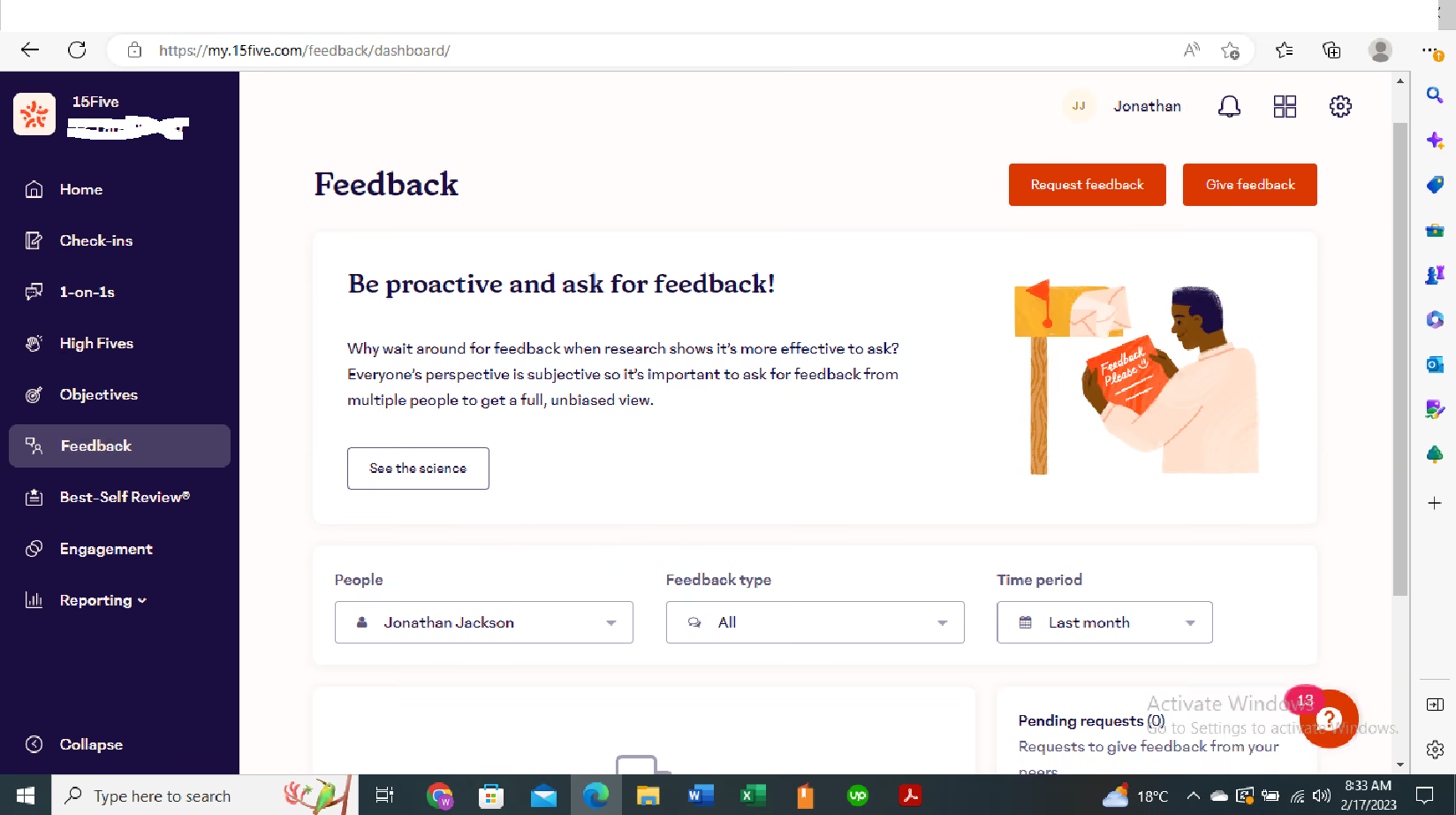
I like 15Five for the following reasons:
- Efficient and Effective Performance Management: With 15Five, it is easy to set and track goals, provide regular feedback, and recognize employee achievements, making the performance management process more efficient and effective.
- Improved Communication and Collaboration: 15Five provides a platform for employees to share their thoughts and ideas with managers, and for managers to communicate more effectively with their teams, leading to better collaboration and alignment.
- Analytics and Insights: The platform offers data and insights on employee engagement, satisfaction, and performance, allowing HR managers to make informed decisions and track progress over time.
Our organization decided to purchase 15Five for several reasons, primarily to address the pain points we were experiencing in the areas of employee engagement and performance management. We made the purchase in March 2021, and I have used it since then.
Specifically, we were struggling to keep track of employee goals, progress, and feedback in a streamlined and organized manner. This was leading to missed opportunities for recognition and development, as well as a lack of transparency between employees and their managers.
We were also facing challenges with regular check-ins and one-on-one meetings, as it was difficult to keep track of schedules and ensure that all employees were receiving the support and feedback they needed.
The key benefits of 15Five for our organization have been significant. With the platform, we are now able to track employee progress and provide feedback in real time, which has increased transparency and accountability across the organization. Regular check-ins and one-on-one meetings are now streamlined and easy to schedule, which has improved communication and support for our team.
Additionally, the platform's customizable features have allowed us to tailor the software to meet our specific needs, which has increased our efficiency and productivity. Overall, 15Five has been an invaluable tool for improving employee engagement, performance management, and organizational growth for our medium-sized organization.
While I find 15Five to be a valuable tool, there are a few areas where I feel it could improve:
- Limited Customization: While 15Five offers a range of features, the platform lacks the ability to fully customize certain features, such as the types of questions that can be asked in weekly check-ins, which may not meet the specific needs of all organizations.
- User Interface: Although the platform is easy to use overall, the user interface could benefit from some enhancements, such as more intuitive navigation, clearer labeling of features, and improved search functionality.
- Integrations: While 15Five offers some integrations with other HR tools, such as Slack and Zapier, I would like to see more options available to further streamline HR processes and improve overall efficiency.
I find that 15Five stands out from its competitors in several ways. Compared to similar tools, 15Five offers a more comprehensive platform for performance management, feedback, and employee engagement.
One of the key advantages of 15Five is its emphasis on regular check-ins and continuous feedback, which helps to foster a culture of open communication and transparency between managers and employees. The platform also offers a range of features for goal-setting, recognition, and feedback, all of which are essential components of a strong performance management program.
In terms of user experience, 15Five's platform is intuitive and easy to use, with a clean and modern design. It also offers a range of integrations with other HR tools, such as Slack and Zapier, which makes it easy to streamline HR processes and improve efficiency.
Compared to other tools I have used in the past, I find that 15Five is more user-friendly and offers more comprehensive features for performance management and employee engagement. I particularly appreciate the regular check-ins and the ability to track progress on goals over time, which helps to ensure that employees are aligned with organizational objectives and are continuously improving. Overall, I prefer 15Five because of its user-friendly interface, comprehensive features, and emphasis on regular feedback and communication.
I would recommend that people consider the following criteria when buying a performance management tool like 15Five:
- Features: Look for a tool that offers a range of features for goal-setting, performance tracking, feedback, and recognition, as well as any other specific needs that your organization may have. It's important to assess which features are most important to your organization and ensure the tool you choose has them.
- User Experience: It's important to choose a tool that is easy to use and navigate for both managers and employees. A good user experience can encourage adoption and regular usage, helping to maximize the tool's effectiveness and ROI.
- Customization: Look for a tool that allows for some degree of customization, such as the ability to add custom questions or fields, as this can help to tailor the tool to your organization's unique needs.
- Integrations: Consider whether the tool integrates with other HR software or systems that your organization uses, such as ATS or payroll software, as this can help to streamline HR processes and improve overall efficiency.
- Pricing: Finally, it's important to consider the cost of the tool and whether it fits within your organization's budget. While cost is an important factor, it's also important to remember that the tool you choose will have a significant impact on your organization's performance management processes, and investing in the right tool can yield significant ROI over time.
I have seen that 15Five has continuously evolved over time to meet the changing needs of its users. Some of the notable changes and improvements I have observed include:
- Increased Customization: 15Five has introduced more customization options for users over time, such as the ability to create custom questions, customize performance review cycles, and add custom fields.
- Enhanced Integrations: The platform has expanded its integrations with other HR software and systems, such as ATS and payroll software, to provide a more streamlined experience for users.
- Enhanced Analytics and Insights: 15Five has added more advanced analytics and insights over time, providing users with more data and insights into employee performance and engagement, as well as actionable recommendations for improving performance and engagement.
- Improved User Experience: The platform has made several improvements to the user experience over time, such as more intuitive navigation, clearer labeling of features, and improved search functionality, to make it easier for users to find what they need.
- Expanded Features: 15Five has expanded its features over time to provide users with more options for goal-setting, feedback, recognition, and more. For example, they have added features such as High Fives, Objectives, and 1-on-1s to further enhance the platform's capabilities.
Overall, I have seen that 15Five has continuously evolved and improved over time to meet the needs of its users, which has helped to make it a valuable tool for performance management and employee engagement in many organizations.
I would recommend the following types of organizations use 15five,
- Small to medium-sized businesses that want to establish a more formalized performance management process without adding significant administrative overhead.
- Remote or distributed teams that need a tool to facilitate regular check-ins, goal-setting, and progress tracking.
- Organizations that prioritize employee engagement and want to create a culture of continuous feedback and improvement.
- Companies that are experiencing rapid growth and need a scalable system to manage performance across a large number of employees.
- Human resources departments that want to streamline performance reviews and track employee development over time.
With my overall experience with 15five, these types of organizations would not be recommended to use 15five,
- Organizations that do not prioritize regular feedback and communication: If an organization does not value or prioritize regular check-ins and feedback, 15Five may not be the right tool. The success of the platform relies on consistent use and engagement from both managers and employees.
- Organizations with a highly rigid performance management process: Some companies have very structured performance management processes that are not easily customizable. In these cases, the flexibility of 15Five may not align with the organization's existing procedures.
- Small teams or individuals: While 15Five can be useful for small teams, it may not be the most cost-effective solution for very small organizations or individual users who do not require a platform for tracking and managing employee performance.
- Organizations with limited technology infrastructure: 15Five is a cloud-based platform, so organizations without reliable internet access or those that have strict data privacy requirements may not be able to use it.
- Companies in highly regulated industries: Organizations in highly regulated industries such as healthcare or finance may have specific compliance requirements that 15Five does not meet. In these cases, a more specialized solution may be necessary.

Namely
Namely powerful HR suite streamlines how you manage your people. It covers onboarding, attendance tracking, performance management, payroll, and benefits administration. It also provides valuable insights into market trends so you can stay competitive.
PROS
- Namely offers a user-friendly interface that allows seamless navigation of the platform, even with its extensive features.
- The employee onboarding module has an easy-to-use wizard, facilitating a smooth onboarding process for employees and new hires.
- Besides Namely’s payroll and benefits administration features, you can opt for their managed payroll and benefits administration services to reduce your team's workload even further.
- The majority of users are able to navigate Namely without any issues. They find the UI to be intuitive and clean, despite the fact that the platform has lots of features.
- Namely’s employee onboarding module gets a alot of praise from users. It features an easy-to-follow wizard, which helps new hires get on quickly and be clear on what they need to do.
- Besides the platform’s built in features for data management, recruiting, onboarding, time off tracking, payroll and benefits administration, there are also managed payroll and benefits administration services you can opt for to reduce the burden on your internal teams.
CONS
- Namely caters mainly to the U.S. market, which means it’s not quite suitable for organizations that need it to handle payroll and benefits for employees in other countries.
- If you’re looking for quick implementation, Namely may not be for you as on average, 6-8 weeks are needed to get your instance up and running.
- Currently, Namely lacks employee development features such as skills training, career pathing, and succession planning.
- Users should look into whether Namely is compatible with their existing benefits provider, as a few users have reported instances where Namely's team encouraged them to switch to providers with higher fees.
- Namely primarily operates in the U.S., which means if you’re looking for a global payroll and benefits provider, this platform isn’t for you.
- Though many praise the platform’s ease of use, it does take long to implement it. Namely’s own team says that an average implementation takes between 6-8 weeks.
- For a platform of Namely’s size, there currently aren’t any features that focus on employee development such as skill training, career pathing, succession planning etc.
- You’ll need to check beforehand if Namely can work with your existing benefits provider, if you have one. There have been a few reports (but not few enough to ignore) about Namely’s team convincing customers to change their benefits provider to providers that charged them more.
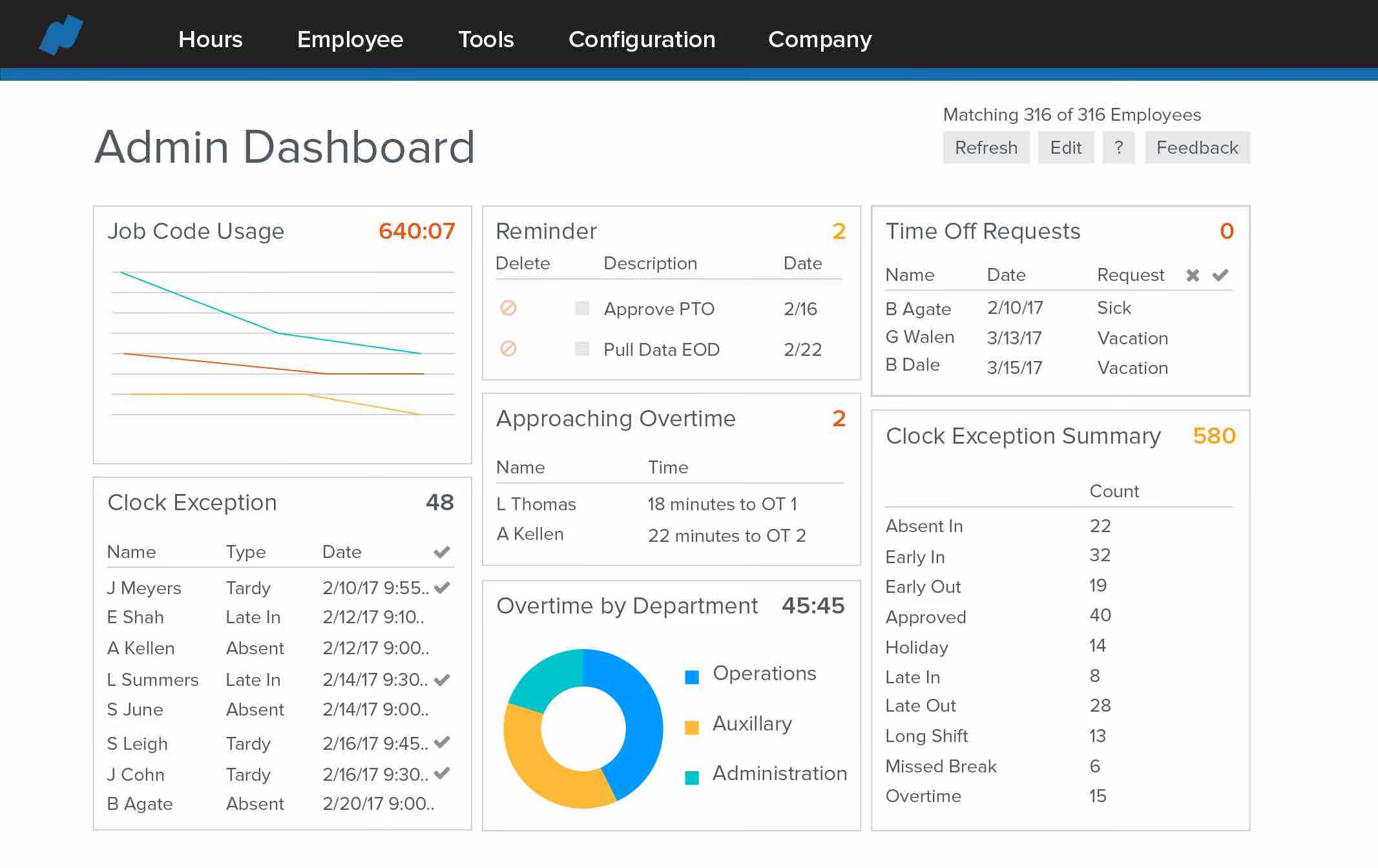
Namely offers a range of features to help you with day-to-day employee management. A fundamental one is employee profiles, which you can create from scratch or upload from existing sources. You can access these profiles whenever you need to view employee data, including personal details, job roles, performance history, and benefits information. Namely also packs payroll management capabilities, optimizing how you process payroll and helping you with calculations, tax filing, direct deposits, and more.
You can use Namely’s time and attendance tracking module to ensure accurate recording of work hours and payroll processing. You can stay on top of things even further with Namely’s performance management module, which can help you set goals, conduct evaluations, and provide feedback to employees among other things.
Namely is used by several growing companies including Greenhouse, Vita Coco, Life is Good, and OneLogin.
Custom pricing is available upon request of a demo. It will vary depending on which package you choose. They start with a basic HR package and then sell extensions or enhanced services for things like payroll solutions and employee benefits.
Best For
Mid-sized companies across different verticals will make the most out of Namely’s offering.

We used Namely primarily for departmental reporting, allowing each team to access the data they needed without complication. It was also our central platform for posting internal announcements, which helped keep communication streamlined across the organization.
Our non-exempt employees frequently used the timekeeping module, and they appreciated how easy it was to transfer between job roles within the system. From an HR perspective, managing payroll was straightforward, which saved us significant time during each payroll cycle.
Creating reports in Namely is straightforward, even for users with limited technical experience. The time and labor module is intuitive and easy to demonstrate to employees. The visibility and layout of the homepage make navigating the system fast and user-friendly.
I worked for a small FinTech company that used Namely. They picked Namely because it was an easy-to-use tool and was perfect for our business structure. We (the HR Team) liked how it was easy to enter new employees and update existing employees' information.
We also had a few nonexempt employees, so we used their timekeeping system, which was also simple. We also used announcements like our social media, so we didn't have to design an Intranet.
The system lacks innovation and hasn’t kept up with some newer HR platforms in terms of features and design. The interface feels a bit outdated, especially compared to more modern alternatives. Customer support was sometimes difficult to reach, which could be frustrating when time-sensitive issues arose.
Namely is a smaller and more simplified platform compared to other tools like UKG or ADP. It works well for small companies that need a streamlined system without too many bells and whistles. While I prefer UKG or ADP for their broader functionality and scalability, Namely stands out for being approachable and easy to manage for less complex HR operations.
When evaluating this kind of tool, it's important to consider the size and complexity of your organization. Namely works best for small businesses that don’t require highly advanced features or custom-coded reports. If you're expecting rapid growth or need to manage complex data, you may quickly outgrow it. Simplicity and ease of use should be top considerations if you're leaning toward Namely.
One noticeable improvement has been quicker service request response times. The company seems to have made an effort to address support speed, which enhances the overall user experience, especially during critical periods.
Namely is ideal for HR teams and general employees in small to mid-sized companies. It suits organizations that need an easy-to-use system without requiring extensive setup or ongoing technical support.
Namely is not well-suited for finance departments or organizations with complex financial and reporting needs. Larger enterprises that require deep integration and advanced functionalities may find it limiting.

kissflow
Kissflow Digital Workplace gives you all the tools you need to optimize, manage, and track all of your work. It has five core modules to handle any type of work that moves your way: processes, projects, cases, datasets, and collaboration.
PROS
CONS
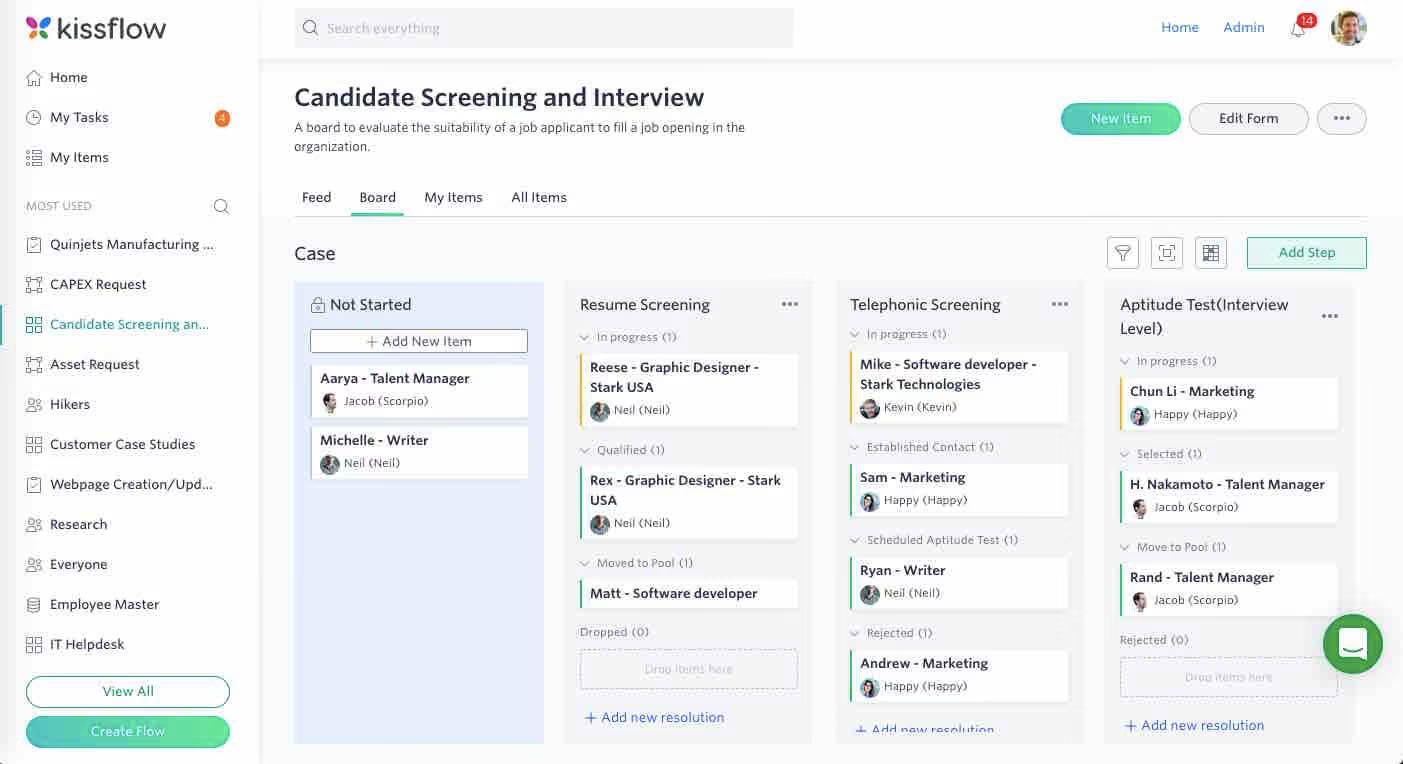
Kissflow is designed for both managers and their employees. It lets individuals know exactly what tasks are assigned to them and lets them track work as it moves along a flow. It allows team leaders to create and control codeless workflows and forms. It helps the entire organization digitize their work and creates an operational system of record to know the status of what work was completed.
- Domino’s
- Pepsi
- Sears
- Hubspot
- Casio
- Basic: $16/user/month (Starts at 10 Users)
- Advanced: $22/user/month (Starts at 10 Users)
- Fully Loaded: $30* /user/month (Starts at 50 Users)
Best For
Kissflow has plans for companies of different sizes.

Zoho People
Zoho People is a solution for HR teams looking for an affordable or even free workforce management tool. It administers core HR activities, like onboarding, time off management, attendance, performance, LMS, engagement, and database management. It also includes an employee self-service portal with security-conscious permission controls and more.
PROS
- Comprehensive core HR features consolidated in a single platform.
- Offers a wide array of integrations.
- Available in multiple languages, catering to users across the globe.
- Provides a free version and a free trial.
- All core HR features in a single dashboard
- Wide array of integrations
- User-friendly UI, constantly updated
- Available in multiple languages
CONS
- Some modules may lack the depth of comparable products. For example, some users found the payroll offering to be relatively basic.
- The mobile app does not mirror the features of the web version.
- The platform's responsiveness is unpredictable – users have reported occasional loading delays.
- Since they offer so many modules, some may be not as robust as other products that have been more specific about covering certain needs. For instance, some teams have found their payroll offering to be quite basic.
- Not all that’s available in the web platform is available in the app
- Some users reported that the platform can be slow to load every now and then.

Zoho People is a 360-degree HR solution that amazes us with its rich features. Depending on the plan purchased, users can get some or even all of their employee management needs covered, from onboarding and attendance management to time tracking, appraisals, and learning.
One standout feature is Cases. The feature lets users post their support questions under specific HR categories to receive prompt responses from assigned agents. It's a simple, effective, time-saving solution.
Zoho People features real-time access control. It allows administrators to assign access permissions for select members, promoting better collaboration while ensuring data security.
Another nice touch is Announcements: managers can use this to keep employees posted on company news using various content types, formatting options, and location-specific visibility.
In our testing, the self-service elements worked well in the Chrome browser. The web version contains numerous tools like employee records, leave requests, timesheets, and policy documents.
However, we did encounter some challenges with the mobile app. It occasionally lagged, particularly when using functions like check-ins and facial recognition. Additionally, certain tools, such as the payroll feature, are less fleshed out than in similar tools in this space.
ZPE Systems, Cloudfronts Technologies, Zomato, SpiceJet, Foresight CFO.
Zoho People is free for up to five users. After that, the platform offers four plans with the following pricing:
- Essential HR: $1.25/user/month billed annually.
- Professional: $2/user/month billed annually.
- Premium: $3/user/month billed annually.
- Enterprise: $4.5/user/month billed annually
Best For
This tool is particularly well-suited for SMBs who can make use of its multilingual capabilities.

We used the Recruitment workflow for talent acquisition. It integrated smoothly with HR workflows, enabling seamless cross-functional collaboration. We used Zoho People to attract talent, manage applications and resumes, conduct assessments and interviews, and track the pipeline through an intuitive user interface.
The data was easy to access and track. We appreciated the resume/application ranking feature, and the hand-off to HR onboarding was simple within the same system.
I appreciate the affordability—$13.50 per user per month for People Plus and HR Enterprise. Discounts are available if paid annually. Zoho offers a “Free for Life” plan for up to five users. The user interface and design are excellent: simple, clean, and easy to use.
I used Zoho People, including the Recruitment module, for one year. We needed a recruitment solution with automation, easy access to recruitment metrics and data, and improved efficiency in the hiring process. The user experience was excellent—simple and clean. Zoho People was easy to train the recruitment team on. It was both affordable and scalable.
The only negative I can think of for Zoho People is if we need to download a large amount of data it takes a long time for the data to download.
Zoho People offers easier customizations and better workflow automations compared to most systems. The reporting and dashboards are robust and highly customizable. The pricing is affordable and offers great value for the features included.
Zoho People is suitable for businesses of all sizes, especially those expecting growth, due to its scalability. It’s an affordable option for recruitment and HR needs. Zoho also offers additional tools such as Payroll, Employee Engagement, and Performance and Development to complement its core HR features.
Zoho People has continued to evolve by updating its platform to support recruitment teams effectively. It has scaled well as organizations grow. Zoho now includes additional offerings such as Payroll, Employee Engagement, and Performance and Development to further support HR functions.
Zoho People is a good fit for any company. The platform is scalable and includes many optional features to support a variety of HR workflows.
It may not be ideal for very large organizations with highly advanced analytics needs or extremely complex and unique HR processes requiring extensive customization.
Key Features of Employee Management Software
“Employee management” is an umbrella software category; hundreds of different HR management software solutions (HRMS) can be labeled under it. While that may be the case, the following are features you can safely expect from employee management software.
- Storing employee records: An employee management software effectively functions as your employee database. It stores employee information such as names, addresses, designations, salaries, and start dates. You can even store custom employee info such as skills, education, birthdays, emergency contact details, and more.
- Time and attendance tracking: Manually updating timesheets is a tedious task that’s time-consuming and almost impossible to perform without error. Incorrectly inputting employee time and attendance data leads to incorrect payroll. With the help of employee management software, you can cut down on human errors and ensure that your payroll is always accurate.
- Employee scheduling: Employee management software can help you schedule and move around shifts for your employees to ensure that the working hours of your business are sufficiently covered. Depending on what product you use, employees may also be allowed access to the same system to adjust availabilities and request shift changes.
- Employee self-service portal: Most employee management solutions provide employee self-service portals. Employees may use these portals to handle a number of human resources-related tasks that would otherwise require the attention of an HR employee. Most self-service portals allow employees to update personal details such as contact details, addresses, bank account info, and more. Some employee self-service portals also allow employees to put in time-off requests and adjust availabilities.
- Employee performance monitoring: Most employee management systems allow employers to define goals and productivity metrics and monitor employees’ progress towards those goals and metrics from a single dashboard. Accessing such data enables employers to make informed decisions that drive performance, e.g., identify where certain employees could use some training or if their skills are perhaps more suited for a different role.
- 3rd-party integrations: The majority of employee management software solutions offer integration options with your existing business tools, such as those for recruiting, payroll, enterprise resource planning (ERP), team collaboration, and more to extend the functionality of your software, have your data synchronized automatically and eliminate duplicated effort.
- Additional features: In addition to the above, some employee management systems may also carry features for applicant tracking, onboarding, payroll management, benefits administration, learning management, employee rewards, and employee recognition.
Common Mistakes Made When Buying Employee Management Software
You can easily make mistakes when choosing an employee management solution if you don’t carefully research and compare what’s available on the market while factoring in the needs and budget of your business. Here are a few mistakes you should avoid:
- Buying an all-in-one employee management software when all you need is one or two HR functions covered: For example, if you only need a system for performance management or attendance tracking, then buy a product that does just that. An all-in-one HR cloud can be quite costly if you’re not putting it to good use. We recommend that you always invest carefully and selectively to make the most out of your budget.
- Choosing an employee management system that isn’t scalable: Your business may see exponential growth within just a matter of months. It may also experience financial hardships, requiring you to downsize your team. No matter what the future holds for your business, you’ll definitely need your employee management software to grow or shrink accordingly.
- Not aligning internally with all departments that could benefit from an employee management system before buying one: Many top employee management systems offer features extending beyond your HR department’s scope. For example, employee management software can have project management capabilities, which means different managers across your company can use it to stay organized and keep track of their team members’ progress. It is also quite common for an employee management system to have payroll processing and benefits administration features, which are typically the responsibility of the finance department and not HR. Since other departments/managers can benefit from your employee management system, make sure you factor in their feedback in your product selection process.
- Making long-term commitments before thoroughly testing a solution: Most software vendors will offer discounts if you get into an annual contract. Some will even try to tempt you to get into a two-year commitment. While such deals can save you significant money over time, you should only commit to a vendor after thoroughly testing their software and verifying that it’s the one for you. Otherwise, you will end up going back and forth with them regarding their refund policy and likely incurring a considerable cancellation fee.
Pricing Models of Employee Management Software
The majority of employee management software vendors offer tiered pricing to accommodate different business needs and financial capabilities. Those tiers vary in features and either cost a flat monthly/annual subscription fee for an unlimited number of employees or have a per-employee-per-month pricing structure, which could cost anywhere between $1.25 - $30 per employee per month.
Do keep in mind that in all cases, additional fees may still apply for on-demand services such as product training, customization, compliance services, dedicated account management, and cancellation. Consult your selected employee management software vendor on the exact breakdown of their recurring fees as well as the pricing of all on-demand services that are billed separately.
Benefits of Using Employee Management Software
Using employee management software allows you to:
- Secure employee information: Paper files and spreadsheets are not a secure way to store sensitive employee data, as they could easily fall into the wrong hands. You can mitigate such risks by using an employee management system instead. The majority of employee management systems are highly secure, with measures such as data encryption and multi-factor authentication to keep your employees’ information safe at all times.
- Increase productivity: Using an employee management system helps you automate many processes that are otherwise quite tedious and take up a great deal of your team’s time. When different departments across your company aren’t manually dealing with employee data maintenance, time and attendance tracking, shift scheduling, and leave management, they’re able to reinvest that time in other tasks that contribute to your bottom line.
- Improve employee satisfaction: Good HR tech has an impact on employee experience and retention. When employees are managed through outdated channels and processes, it is easy for them to get frustrated and dissatisfied with your company. Employee management software gives your employees a channel to easily update their information, request time off, adjust their shifts, track their performance, communicate with you when needed, and much more - all in an effortless manner.
Questions to Ask During Your Employee Management Software Demos
As you’re researching different employee management software, we always recommend that you schedule demo sessions with the top vendors on your list to make sure their solution is compatible with the needs of your business. Here are a few questions you can ask during your demos:
- What HR functions does your software cover? Can your solution replace other products in my HR tech stack?
- Can you walk me through what employees see through their self-service portal (if any)?
- Does your platform feature Artificial Intelligence (AI) to automate certain processes?
- How easy is it to implement your solution, and would I be able to do it myself?
- What business solutions does your software integrate with?
- What metrics have you used to prove the effectiveness of your solution, and where can I see these in my analytics dashboard?
- What data protection laws are you compliant with?
- How much does the software cost for my team size?
- How will our pricing change as our team grows or shrinks?
- Will I be assigned a dedicated account manager?
- What are your Customer Support SLAs?
- Do you have a help center with articles and other documentation for self-service?
Implementing an Employee Management Software
Implementing employee management software is fairly easy, especially since the majority of them are cloud-based, delivered through a software-as-a-service (SaaS) infrastructure. Getting started with a cloud-based solution is relatively quick. Once you’ve purchased a subscription that meets your needs, you can create an account and start configuring it and importing your employee data.
On the other hand, some employee management software solutions are self-hosted (on-premise). Self-hosted solutions generally take longer to set up, and depending on your chosen vendor, you may need to consult them regarding their solutions’ compatibility with your current hardware and installation process or better yet, have them do the installation for you.
Note: Most of the vendors we’ve listed in this guide provide step-by-step video tutorials and help docs that assist customers in getting up and running quickly. For more information, you can reach out to your chosen vendor’s support team.
Employee Management Software FAQ
What is employee management software?
Employee management software allows companies to carry out different HR functions, including time and attendance tracking, new hire onboarding, shift scheduling, leave management, employee engagement, and performance management. It may also have features for payroll processing and benefits administration.
What should you look for in employee management software?
Besides making sure that employee management software covers the HR/finance functions that you need, see that it is user-friendly, scalable, can integrate with favorite products, and has an employee self-service portal.
Who needs employee management software?
All businesses, regardless of size and industry, can benefit from employee management software to streamline how they store employee information, onboard and offboard employees, as well as drive up employee engagement and performance.
Final Thoughts
No matter what industry you’re in and regardless of the size of your company, an employee management system is quite useful to streamline different functions across your HR department and beyond. All of the solutions we’ve listed in this guide would make a great addition to your tech stack. All you have to do is:
- Align with your HR, Finance, and other team managers regarding their needs and expectations before selecting a product;
- Carefully consider those needs as well as your budget and choose a product that meets them;
- Request a trial account to test the platform’s features first-hand;
- Schedule demo sessions with different vendors to get all of your questions answered.
About the Author


About Us

- Our goal at SSR is to help HR and recruiting teams to find and buy the right software for their needs.
- Our site is free to use as some vendors will pay us for web traffic.
- SSR lists all companies we feel are top vendors - not just those who pay us - in our comprehensive directories full of the advice needed to make the right purchase decision for your HR team.


