

10 Best Free HR Software for Startups & Small Businesses - 2026
Tested and compared 10 free HR software tools for small businesses with hands-on reviews, pricing breakdowns, and expert input to help you choose the right fit.








The best HR management software can be an efficiency booster for your company's day-to-day operations, whether it's for onboarding, payroll management, benefits administration, or time-off requests. Even better, they don't have to cost you anything.
We've thoroughly researched and compiled a list of the best free HR software, each of which offers either a free trial or a perpetual free plan highly suitable for most startups and small businesses.
This guide is the result of hands-on product testing, structured expert evaluation, and verified practitioner input. Following our editorial guidelines, we used a structured software assessment process that gathers and analyzes key product insights, including our own testing results and verified user feedback.
We evaluated more than 30 tools before arriving at the current list, scoring each across five criteria: payroll processing, recruitment and onboarding, performance reviews, employee management, and time-off management. Our real-world experience shows the first three matter most to teams actively seeking free HR software, so they carried the most weight in our rankings.
- Payroll Processing: Payroll is typically the first process growing teams need to automate. We assessed each tool's integration partners to evaluate compatibility with common HR software, such as timekeeping and attendance tools, compiled user feedback, and examined each platform's flexibility across payment types.
- Recruitment and Onboarding: Critical for growing companies, this feature was evaluated through expert consultation, integration testing against common HRIS, and employee experience simulations run by our user research team.
- Performance Reviews: Often underestimated by growing businesses, performance management was assessed by our HR experts on a pass/fail basis across goal setting, analytics and reporting, feedback and coaching, and overall UX/UI.
The following experts contributed directly to this process:
- Anh Nguyen, HR Tech Researcher and Editor, SelectSoftware Reviews (SSR): Anh has spent five years evaluating HR tech solutions at SSR. For this guide, she has directly tested Zoho People, Homebase, Monday.com, Deel, and Connecteam across review cycles since 2025, documenting hands-on observations that inform the detailed reviews of these tools. Her analysis has been cited by ERE Media, SmartRecruiters, and Recruiting Daily, among other industry publications.
- Karolina Kijowska, Head of People & Culture, PhotoAiD: With 11 years in HR and recruitment, Karolina has firsthand experience selecting and implementing HRMS tools for a fast-growing tech startup. She reviewed this guide to ensure the assessments reflect how free HR software actually performs for teams moving beyond spreadsheets for the first time.
- Shirley Borg, Head of HR, EnergyCasino: Shirley manages HR for 80+ employees at EnergyCasino and holds the HR Quality Mark from the Foundation for Human Resources Development (FHRD). She reviewed this guide from the perspective of an HR leader who needs free tools that are not just functional today but credible enough to build on as the team scales.
- Ryan Faber, SaaS Founder and Small Business Owner: Ryan has founded, scaled, and exited multiple software companies. He reviewed this guide as a small business owner who has navigated HR tooling decisions firsthand, bringing a founder's lens to the question of which free solutions genuinely serve resource-constrained teams.


Homebase

Homebase was built to manage hourly workers and keep track of their work. They're also used for hiring, onboarding, HR & compliance, health & safety checks, and labor cost controls.
PROS
- Separate dashboards for managers and employees
- Real-time communication features allow for schedule changes on the move
- Requesting and approving paid time off is easy
- Great scheduling templates help managers streamline work
- Separate dashboards for managers and employees
- Real-time communication features allow for schedule changes on the move
- Requesting and approving paid time off is easy
- Great scheduling templates help managers streamline work
CONS
- Limited third-party integration support
- Additional features are somewhat expensive
- Limited third-party integration support
- Additional features are somewhat expensive
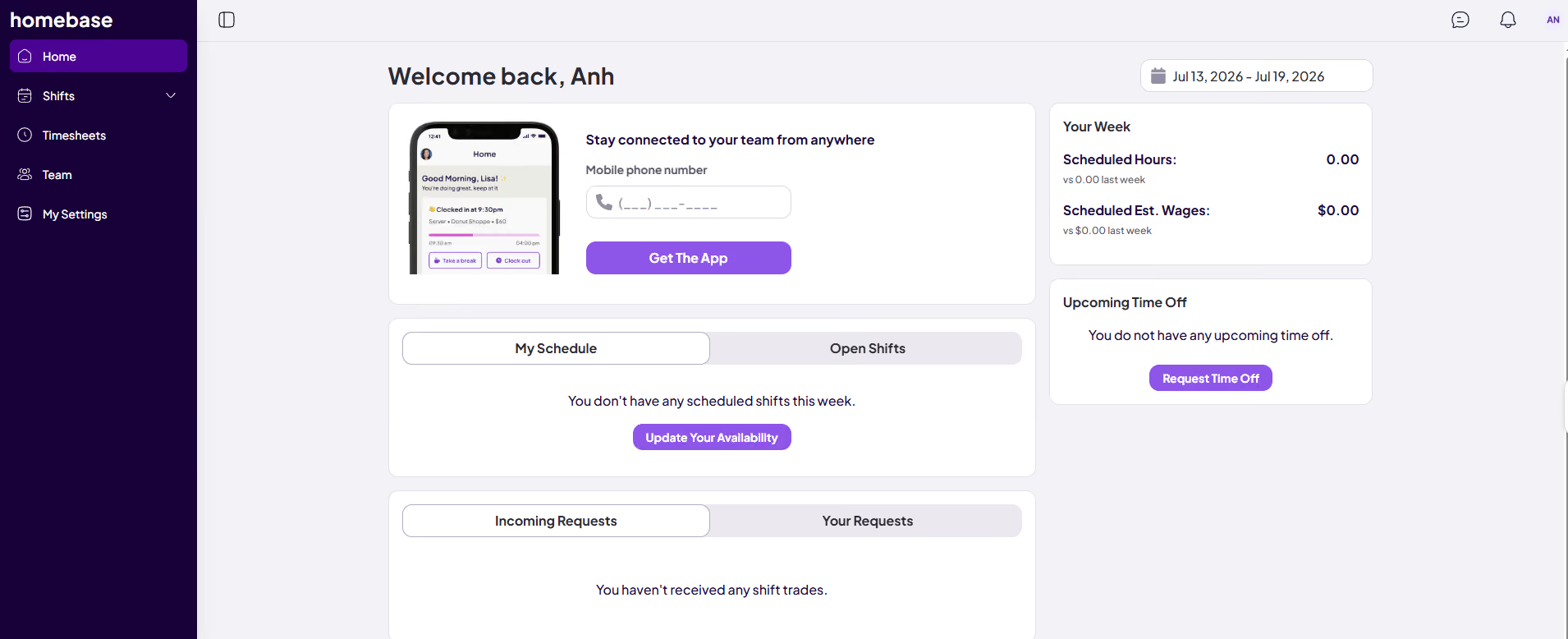
This is a comprehensive HR tool that specializes in hourly work. While their time tracking tools are quite refined, their free version also offers team messaging, an app for employees, a hiring tool, and integrations with POS & payroll software. Their basic plan is free for unlimited employees, as long as the team is limited to one location.
PokPok Restaurants, D'Amore's Pizza, Stella Taco, Blush Tea & Coffee, Legacy Farms
Homebase’s Basic plan is free for 1 location and up to 10 employees. The HR platform also offers a free 14-day trial across its paid plans.
Homebase’s recent product releases have been focused on moving the platform toward a semi-automated HR operations solution for hourly teams. Particularly, the company has rolled out an AI Hiring Assistant that can generate job descriptions, screen candidates through AI-led interviews, and pre-schedule interviews with top applicants. On the operations side, a Scheduling Assistant now builds and optimizes schedules automatically based on availability, work history, and time-off data, with conflict resolution handled in a few clicks.

Best For
Small businesses with hourly, shift-based teams at a single location.


We use Homebase daily for various parts of our business. The most frequently used tool is the scheduling system, which has made the task of team scheduling incredibly easy. The auto-scheduling option is wonderful.
We also use the time management tool to give our staff the ability to clock in and out via their mobile device. The time management is easily synced to our payroll system so timesheets are available when it comes time to process payroll.
The team chat feature has really been a hit with our team! We can quickly send out a team-wide notification about weather delays, upcoming holidays, and much more. Private conversations allow employees to communicate with their managers about late arrivals or questions about their schedule.
Labor forecasting has never been easier for us than after we started using Homebase. We are able to compare scheduled hours and actual hours each pay period to ensure our labor spend is on track with what we've budgeted for.
- The Homebase scheduling tool is remarkably easy and intuitive to use.
- The labor forecasting has been a helpful addition to our business to ensure we are staying within budget.
- The timekeeping within the mobile app is used daily by our staff and allows us to set up geo-fencing limits so staff are reminded to clock out if they leave our store and they are still clocked in.
Our business was expanding into a second retail location and we were in need of improving our scheduling and timekeeping systems.
We wanted an easy-to-use solution for our staff including the ability to clock in and out with their phone. The scheduling system needed to have shift switch capabilities for the staff as this was a major issue with our previous system and caused a lot of frustration when shifts were missed.
Homebase was the exact solution we were looking for! The app is easy to use for our employees and it has reduced the backend administrative burden significantly. Our timesheets and paid time off details have never been more accurate than after switching to Homebase!
- Homebase is expensive for a small business like ours.
- Customer service used to be excellent, but it's become more difficult to reach a human who is able to answer my question.
- It's intended for hourly staff more than salary, which can cause some scheduling confusion at times.
I have used similar scheduling and timekeeping tools, but I prefer Homebase over all of them. The fact that it syncs to my payroll system has reduced our payroll processing times while also decreasing the time entry errors.
I would consider the industry your business is in as well as the type of staff that makes up your team. Shift-dominant industries like retail and restaurants would benefit greatly from using Homebase based on the scheduling, timekeeping, and team communication tools offered.
Homebase added PTO and sick leave management tools several years ago, and it made a positive difference in the user experience.
Homebase is excellent for retail businesses and restaurant teams.
Large companies with multiple locations would not be a good fit for Homebase due to some approval workflow limitations. Salary-based staff like tech or consulting businesses also would not be a good fit because Homebase is really shift-scheduling focused.
Monday.com
Monday.com offers customizable templates, automations, and a user-friendly interface for streamlining HR workflows and employee management. While not a complete HR solution, its flexibility and collaboration features make it a valuable tool for HR teams looking to optimize their processes.
PROS
- Monday.com is highly customizable with automations that enable HR professionals to tailor the tool to their specific needs.
- There are already over 200 pre-built templates you can use right away for different processes.
- The free plan offers a range of beneficial features, such as unlimited documents, up to 3 boards, and access to the pre-designed templates mentioned above.
- Free plan available, and affordable, scalable plans for small to midsize businesses
- Easy to learn and use
- Customizable dashboard
- Collaborative document creation with the ability to turn content in docs into tasks in projects with a few clicks
- Gamified progress tracking with visual celebrations for users
- Workflow automation for repetitive tasks
- Built-in communication tools reduce reliance on email
- Customized forms for in-house or client use that can be easily turned into projects
CONS
- Since it is not a purpose-built HR system, users must invest additional effort to customize it to suit their HR needs.
- Requires a plan upgrade to access all the integrations and automation capabilities.
- 3+ users are required to get on any of the paid plans
- Limited storage on the Basic plan
- Could be too complex for simple project management needs
- No phone customer support
- Tracking different conversations can be difficult because of all the clutter
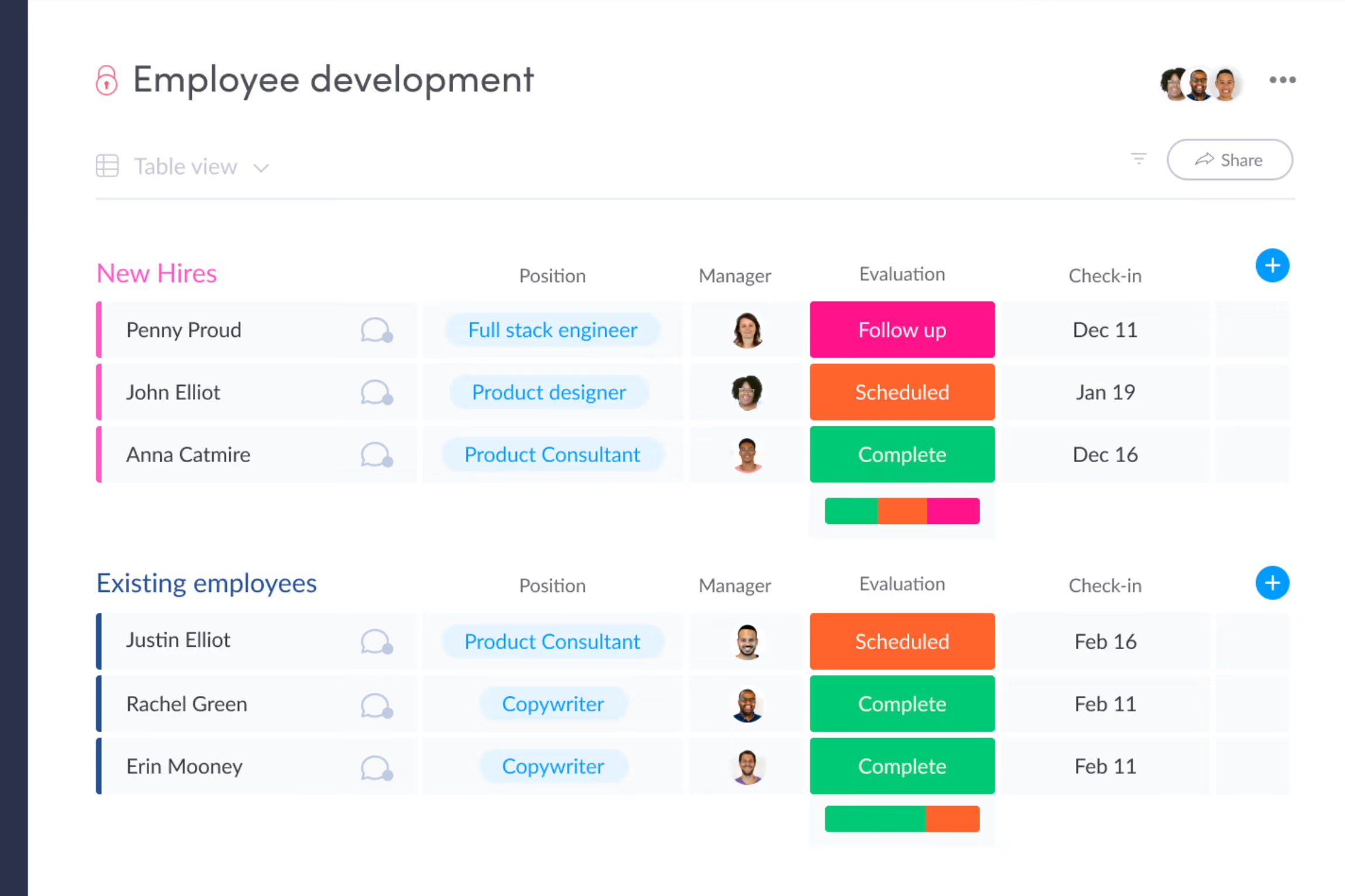
While Monday.com isn’t your typical HR software, it offers a range of customizable templates and automations that make it a compelling choice for HR teams looking to streamline their workflow and employee management processes. Among its key strengths is the ability to centralize and organize employee data. From recruitment pipelines to employee performance reviews, the platform provides a single, easy-to-navigate hub for all HR-related information. This centralization not only improves efficiency but also enhances visibility for HR teams to make decisions more effectively.
Another area where Monday.com shines is in its employee engagement features. The platform offers a set of HR templates designed to simplify the process of conducting employee surveys, such as well-being and engagement assessments. By automating these processes and keeping all collected information in one place, Monday.com helps HR teams stay on top of employee sentiment and take proactive steps to improve retention.
Collaboration is at the heart of Monday.com, and this is evident in its HR offering as well. The platform's boards and dashboards make it easy for team members to work together, manage tasks, and stay updated on progress. Customizable automations further streamline processes by ensuring that timelines are met and tasks are assigned without manual intervention.
While Monday.com may not offer the full suite of HR functions like payroll and benefits administration, it compensates with a wide range of templates that cover most other HR processes. From employee lifecycle packages to time off requests and HR service management, the platform's template library provides a solid foundation for HR teams to build upon.
The user-friendly interface and extensive customization options make Monday.com an attractive choice for organizations looking to complement their existing payroll software with a powerful HR workflow management solution. The platform's versatility extends beyond HR, with applications in project management, marketing, sales, and more, making it a valuable asset for businesses of all sizes.
Monday.com is used by 225,000+ companies including Lionsgate, Glossier, and Oxy.
Monday.com’s free tier includes 2 free seats, 3 boards, 2 docs, 200+ templates, and basic AI features. You can also try its Pro plan for 14 days for free.
Best For
Small teams that already use Monday.com for project management and want to consolidate HR workflows into the same platform rather than adopting a dedicated HR system.
I use Monday.com for organization across HR functions and the HR team. For example, we have a recruiting workspace that has our recruiting pipeline, candidates who are currently interviewing, offered, and then onboarded. Our onboarding tasks and sub-items help us ensure that everyone is getting the same seamless and thorough onboarding process. We also have a board for offboarding to ensure that we meet all legal requirements and get back our property, etc. These boards help ensure that every member of our HR team is running the same processes and timelines.
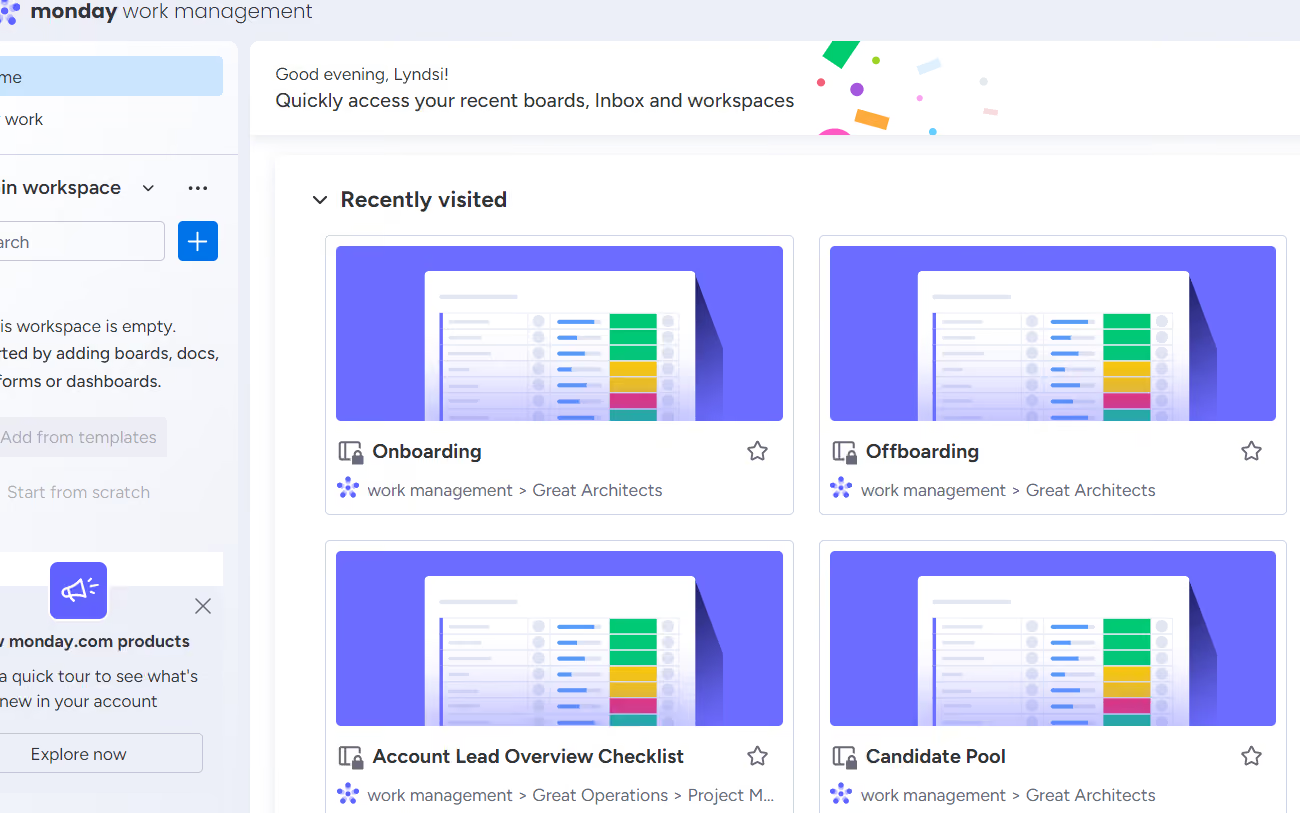
- I love that Monday.com helps us stay consistent and on-process.
- Monday.com has been easier to navigate and read than other project management boards. I can easily find comments for tasks and sub-items without them being hidden.
- Monday.com will alert me when I have items due or if a sub-item becomes available due to someone else completing their task.
I am not sure how long we have used Monday.com, but we have been using it since I started with Enterprise Blueprints as a client in 2023. Our organization uses Monday.com across several departments for consistency and organization. We have different workspaces for teams and activities such as onboarding, offboarding, client projects, background checks, and the hiring pipeline. We have one person in leadership who is in charge of connecting all the boards. It seems to be seamless, but it could get complicated if a lot of hands are involved and changing things around. It does take some training before being able to use it correctly.
- Monday.com is not easy to navigate and use without prior training. I can usually pick things up fairly quickly, but I did need help using this project management board. Once you are trained, it is easier to use.
- Changing things in items and sub-items can create a domino effect across boards and items that are connected. This can be a con if you make a mistake in changing an item.
- Although things are very easy to find (such as comments), they can be more difficult to set up compared to boards like Trello.
Monday.com is a basic board with little in the way of custom appearance, unlike Trello, where you can create board backgrounds and appearance. It functions differently than using "cards" and instead uses dynamic lists.
If you are thinking about using Monday.com, you should make sure you have someone open to the task of creating the items and sub-items and ensuring everything is connected and working together. This is not a board that can be used without putting in work to set things up. However, once it is set up, I think it functions better and easier than other PM boards.
I am not sure how Monday.com changed or evolved over time as we have only used the tool for short time.
Monday.com would be good for client service businesses that are small to medium. It could be good for IT businesses as well, though I know that there are more technological PM boards available.
Monday.com would not be good for an organization that does not have someone who could dedicate time to the initial setup and upkeep of the PM board.

Zoho People
Zoho People has a free plan that any business can sign up for. It is permanently free for up to five users, and provides essential tools such as a mobile app, employee database, and time off management. It has proven a solid starting point for many growing startups.
PROS
- Free plan includes essential HR features like employee data management and leave management.
- Available in multiple languages.
- All core HR features in a single dashboard
- Wide array of integrations
- User-friendly UI, constantly updated
- Available in multiple languages
CONS
- Free plan is limited to five users and 250MB of storage.
- The mobile app is occasionally buggy and slow to load.
- Since they offer so many modules, some may be not as robust as other products that have been more specific about covering certain needs. For instance, some teams have found their payroll offering to be quite basic.
- Not all that’s available in the web platform is available in the app
- Some users reported that the platform can be slow to load every now and then.

Zoho is a software company that makes everything from CRM to bookkeeping tools. The platform also offers a cloud-based HRMS that’s bound to check most boxes in any HR manager’s requirement list.
To test the product, we signed up for Zoho free plan and found that, while it has some limitations, it provides a strong set of basic features that are good for small business.
There is a five-user cap on the free plan (including one administrator), and storage is limited to 250MB. It includes basic HR functions like leave management and also some more exotic features like an AI chatbot.
“Zia” the chatbot, is a unique feature that helps employees find solutions to HR questions without requiring one-on-one help from an HR rep.
Employees simply ask a question, and the bot uses keywords to search the existing FAQs. If there are no matches, Zia automatically creates a new case that will be handled by an HR rep, and the database of FAQs grows.
Though the free plan features are basic, many users comment on the convenience of having multiple aspects of employee data available in one place. The mobile apps are also well-liked overall but are reported to lag occasionally.
However, 250MB of storage can be a deal-breaker for some teams. Additionally, customers on the free plan do not have access to 24/7 customer support, though they are offered support during normal business hours.
ZPE Systems, Cloudfronts Technologies, Zomato, SpiceJet, Foresight CFO.
Zoho People is free for up to five users. The platform also offers a free trial for those interested in exploring its paid plans further.
Best For
Startups with up to five employees that need a structured HR foundation — employee records, leave management, and a self-service portal — without committing to a paid plan before they've validated their hiring needs.

All of my team members are on Zoho. It starts with onboarding a candidate to our organization with the help of Zoho People, keeping the important documents, daily attendance, leave trackers, etc.
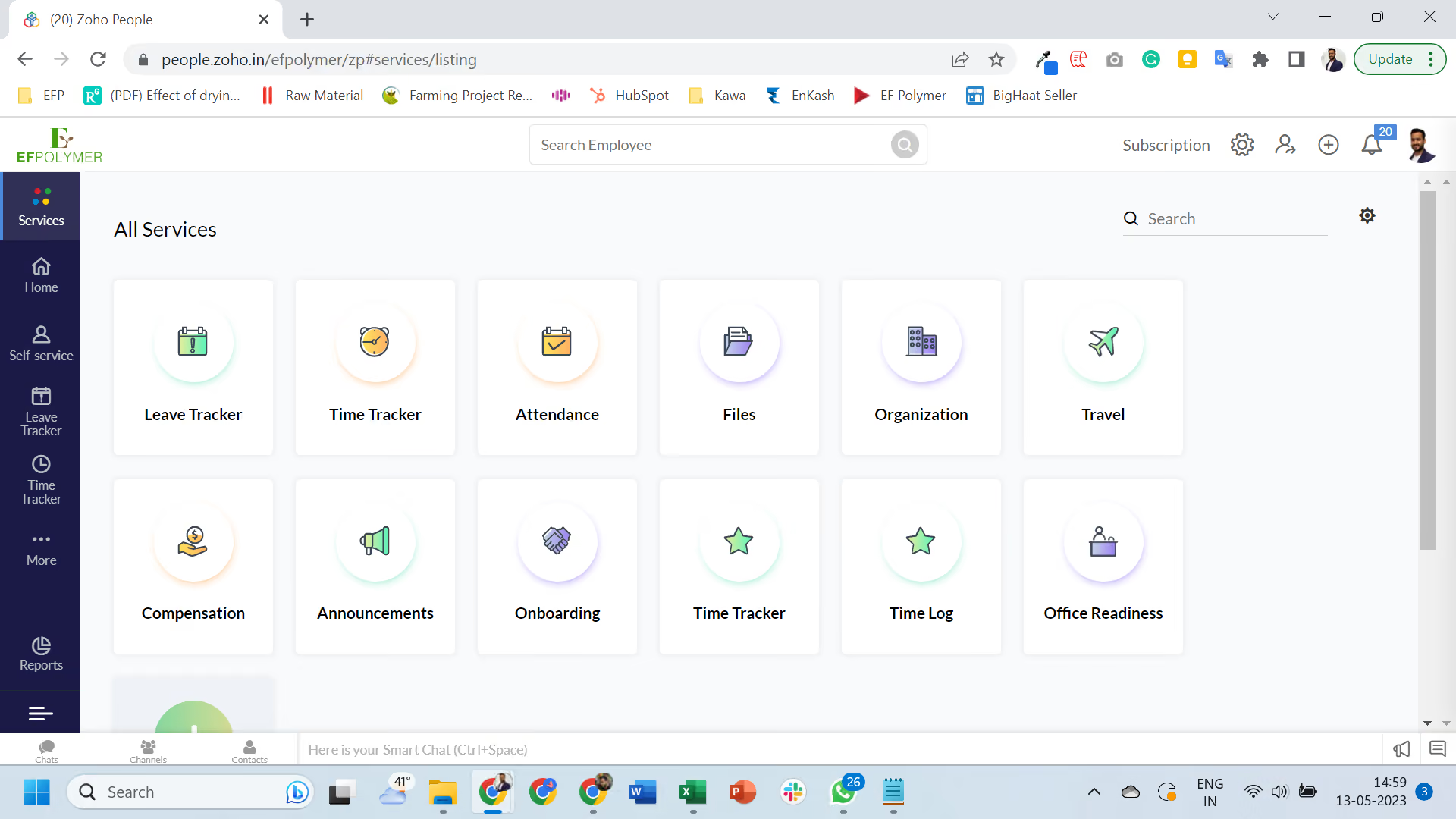
- I like the integration among the Zoho applications which makes life way easier.
- It also provides me with a wide range of features apart from attendance, leave, etc. so I keep trying new things.
- It was easy to set up; I didn't need to wait for an expert to set it up.
I just started my organization and wanted to keep records of their attendance, leaves, employee records, etc. I was using Zoho Books and was happy with that so I thought of trying Zoho People for HRMS. It has been nearly 3 years since I'm using Zoho People.
- There should be a few more integration options with other external software.
- The UI can be improved so interaction over the platform becomes easier.
- Sometimes changing the policies is difficult as quite a lot of things are interconnected.
I have used GreytHR and I found Zoho is quite advanced with a lot more features.
I think it all depends on someone's requirement but I think for startups and small-medium companies, keeping operations simple is key, we should not be wasting our time in dealing with bulky software. In this regard, Zoho People comes handy with the level of integration available within Zoho applications that can fulfill most of your organization's needs.
I have not seen Zoho People change a lot in the last 3 years since I started. There were some minor changes to the UI and some of the features which I found useful.
I think it is good for startups and organizations with remote teams etc. Also, if someone is using some of the other Zoho applications then I think it completely makes sense to use Zoho People.
I can’t think of an organization it wouldn’t be suitable for, but for a large organization, it might be difficult to align with Zoho People's predefined policies/structure.

Connecteam
If you’re tackling human resources with a high number of deskless employees, Connecteam is an essential tool to consider. Not only is it great for remote teams, it has a free version for small businesses.
PROS
- Stands out as one of the only fully-mobile HR tools for deskless workers in this category
- Well-priced, providing substantial value to the needs of SMBs
- Highly receptive to feedback, as evidenced by its track record of incorporating user suggestions as new features in the past
- One of the only fully-mobile HR tech tools for deskless workers
- Very adequately-priced for all it entails, SMB-friendly
- Quite open to feedback, having implemented user suggestions as features in the past.
CONS
- The communication hub lacks confirmation for sent and/or seen messages, leaving users uncertain about the status of their messages.
- Essential features like GPS tracking, valued by some teams, are only available in the higher-tier pricing plans.
- In the communication hub, the app offers no confirmation that messages were sent and/or seen.
- Certain features that some teams consider essential, such as GPS-tracking, are only available in the higher-tier pricing plans.
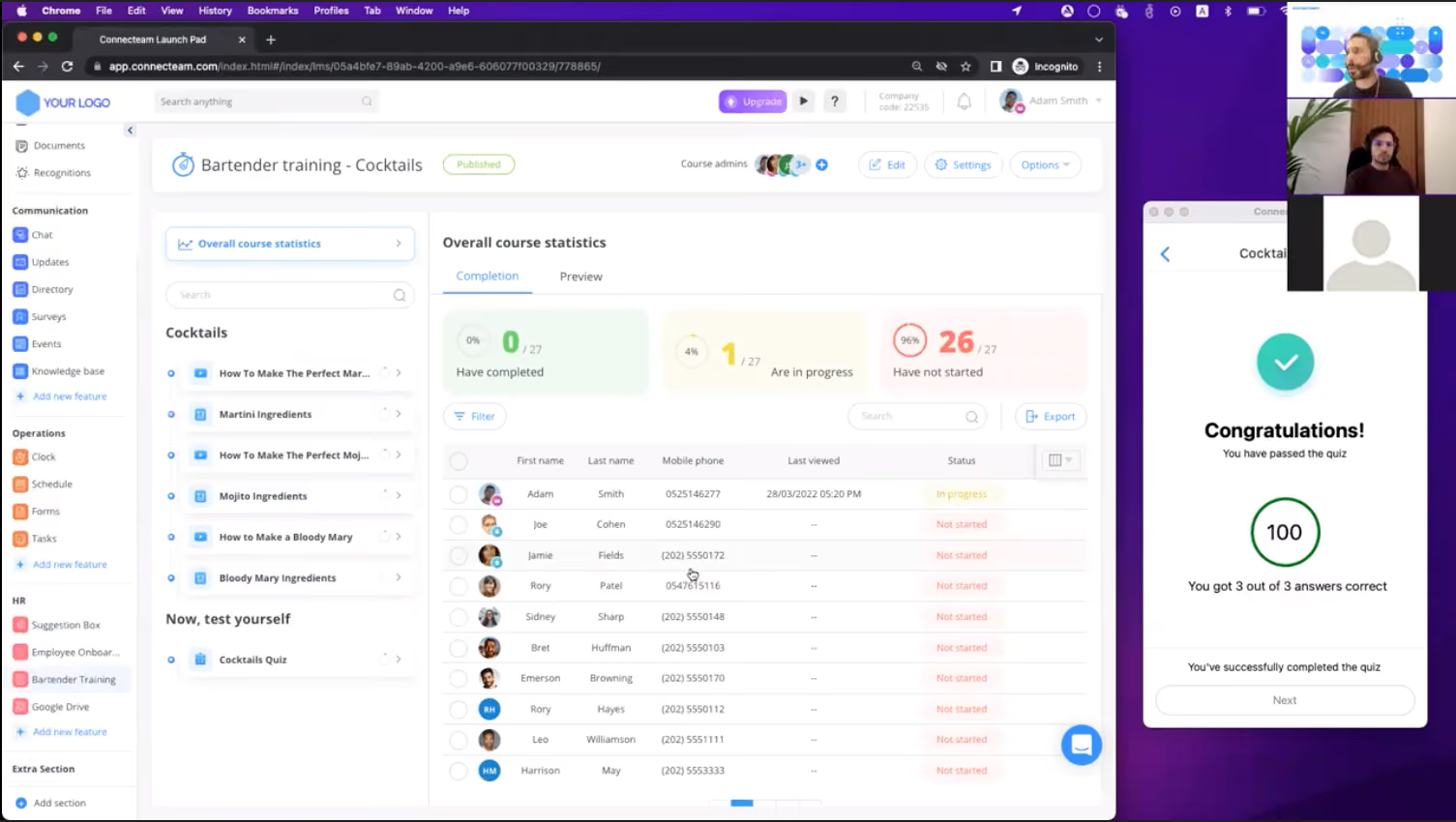
Established in 2014, Connecteam stands out as a leading HR app dedicated to deskless workers. Recognizing a significant portion of the global workforce is now remote, Connecteam seized the opportunity to address this underserved segment. While most HR management tools cater to white-collar employees, Connecteam saw the need to provide tailored solutions for deskless workers and has been filling this gap effectively over the years.
So, if you’re looking for a straightforward yet powerful and intuitive tool for managing employees that may not even have an email address (and has a free plan!) Connecteam is a tool you should demo.
From the Connecteam mobile app (iOS and Android), HR managers can handle tasks like staff scheduling, attendance management, timesheets, training, employee onboarding, and much more. Workers can interact with their side of this via their mobile devices as well, where they can create an account with nothing but a phone number.
Now, all this being said, Connecteam is a great tool for HR in general, used by many desk-based companies as well. For instance, among the users we interviewed for this piece, we had HR managers from a data migration company (Relokia), and an IT services firm (PhotoAiD).
Connecteam’s free plan allows up to 10 users and includes features such as a time clock, shift planning, checklists, and task and document management.
Also, each paid plan offers a 14-day free trial.
Best For
Businesses with up to 10 employees where most of the workforce is deskless or mobile.
Connecteam is a user-friendly software for managing employees, facilitating communication, and enhancing collaboration. It is especially valuable for businesses with many non-desk employees. Connecteam helped us streamline communication, improve daily operations, and develop professional skills. It allowed us to schedule shifts, monitor employee work hours, and send automated reminders. The software was accessible on both desktop and mobile platforms, allowing us to use it anytime, anywhere.
- One standout feature of Connecteam is its user-friendly design, offering various options to customize team collaboration.
- Users can easily upload their own documents and files from any device, making resource sharing simple.
- The intuitive interface allows you to manage your team from a single dashboard, where you can view the status of tasks at a glance, reducing miscommunication and boosting productivity.
- Tasks can be assigned directly from the dashboard, eliminating the need for additional communication methods.
I used Connecteam for three months while on contract with my previous employer. As of late 2024, I believe they are still using the platform. We chose Connecteam because it is a comprehensive employee app designed to streamline communication, optimize daily operations, and boost professional skills. It allowed us to schedule shifts, monitor employee work hours, and send automated reminders, all within a single platform.
- While Connecteam offers a flexible pricing structure, some users find frequent upgrade prompts frustrating.
- For smaller teams with fewer than 30 members, the pricing can be relatively high, which might discourage some users.
- The costs can add up depending on the desired features and team size, so businesses should carefully assess their needs and budget before committing to the platform.
Connecteam stands out for its ease of use, featuring an intuitive and user-friendly interface. The layout is clean, with clearly labeled tabs for each function, making navigation straightforward.
For example, team members can easily create individual profiles with personal information, promoting better collaboration and engagement within the organization. The app’s simplicity ensures that even users with limited technical skills can navigate it effectively, fostering team integration and productivity.
Connecteam offers a flexible pricing structure compared to other employee scheduling tools. The software includes three distinct hubs, each offering five unique plans: Free, Basic, Advanced, Expert, and Enterprise.
Pricing is fixed for the first 30 users, making it affordable for small teams, but as your team grows, additional charges apply. This tiered structure allows businesses to choose a plan that fits their needs while accommodating future growth.
Connecteam has evolved by empowering managers to automate business processes, allowing them to focus on growth strategies while helping employees enhance productivity, professionalism, and job satisfaction. By streamlining tasks and reducing administrative burdens, the platform creates a more engaged and efficient work environment, ultimately driving better results for the organization.
Connecteam is ideal for teams of 30-50 employees, especially those with non-desk workers who need streamlined communication and scheduling tools.
Connecteam may not be suitable for teams that frequently change personnel or those that constantly restructure their workflow, as it might be challenging to manage frequent adjustments.

Bitrix24
Bitrix24 is a hugely popular vendor with a massive array of tools for businesses and organizations. Some of their HR products are free, and for the same plan you can get several other business apps too.
PROS
- Messaging, tasks, video, docs, and CRM are all in one place.
- Auto-delete, polls, and AI assistant (CoPilot) enhance team comms.
- Dedicated zones to work with external partners or across departments.
- Quick task creation, Gantt/Kanban views, and workload tracking.
- Real-time co-editing, version control, and role-based access.
CONS
- Despite redesign, the dashboard can still feel crowded and overwhelming for new users.
- Bugs have been reported by some users.
- Configuring workflows and settings can be time-consuming.
- Many permissions are limited to super admins, reducing flexibility.

While not solely HR-focused, Bitrix24 is used by more than 8,000,000 organizations all over the world. Nevertheless, the free plan also adds countless other features from the other Bitrix products. While more of a collaboration SaaS platform with a massive variety of tools like CRM, project management, and even a website builder, Bitrix24 also offers a highly reliable and intuitive HR information system. As of 2021, it includes over 25 HR tools. From those, several such as company structure, employee directory, and company knowledge base are included in the free version for unlimited users.
Saigon Newport Corporation, Properters, Endelza International
Bitrix24’s free HR software is available on its website and provides users with 5GB of storage and unlimited seats. There are also 4 paid plans ranging from $49 to $399 per month for those interested.
Best For
Teams that need HR functions alongside a broader set of business tools — CRM, project management, document collaboration, and internal messaging — and want all of it under one free plan without stitching together multiple vendors.

I use Bitrix24 every day for task management and HR management, though the software offers other interesting features. It allows me to create, assign, and track tasks easily, improving productivity and collaboration. I also manage employee information such as personal details, employment history, and performance evaluations with Bitrix24.
Additionally, I track vacation time, sick leave, and other HR-related activities. Although Bitrix24 has many useful features, I focus on tasks and HR management, which have streamlined our daily operations. I continue to explore its capabilities to enhance our productivity and performance.
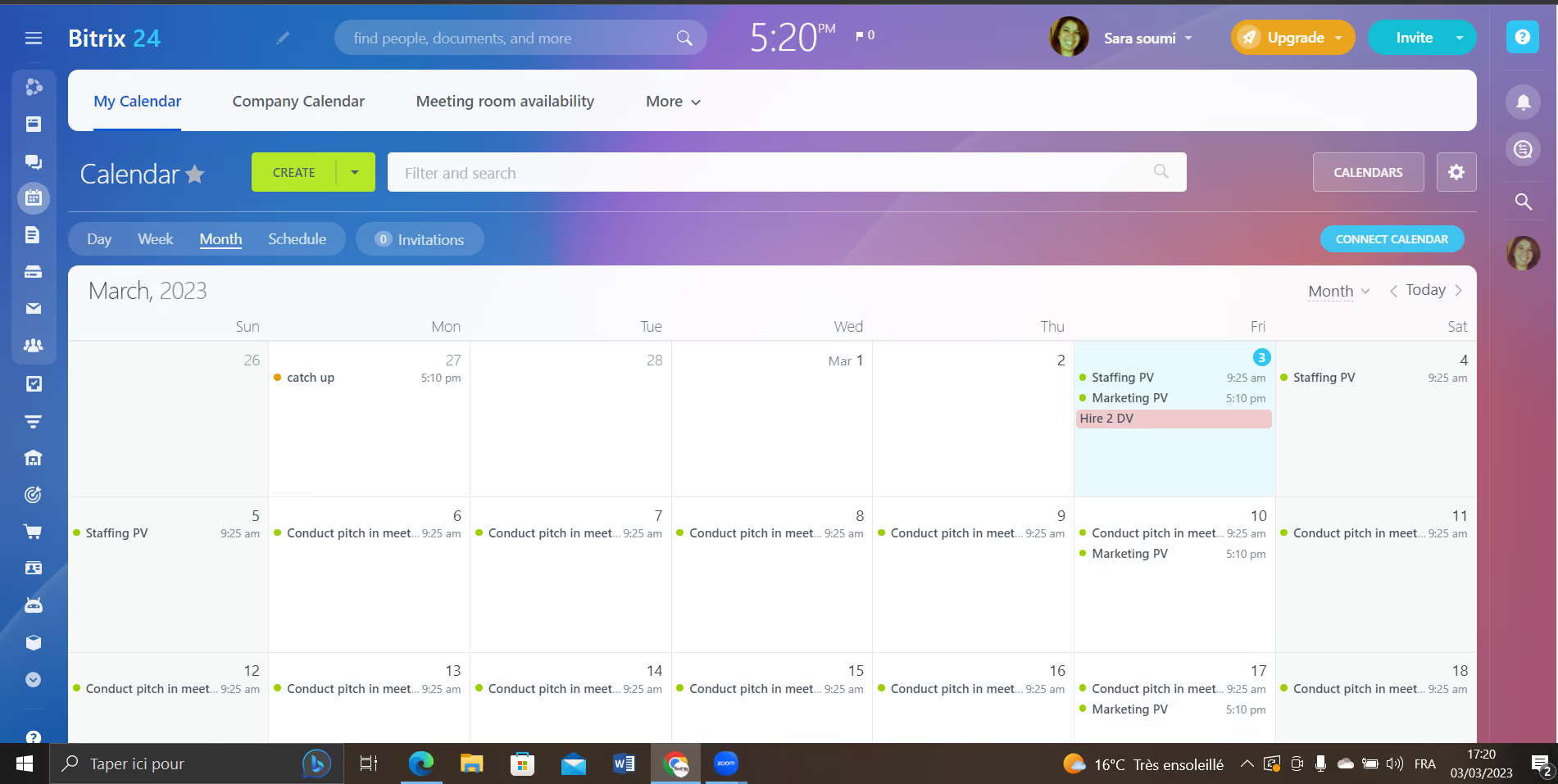
- Mobile friendly: Users can access Bitrix24 on the go through its mobile apps for iOS and Android devices.
- Diversity: Bitrix24 offers a wide range of features and tools, including project management, CRM, HR management, communication and collaboration, and more.
- Cost effective: Bitrix24 offers affordable pricing plans and also has a free version.
Our organization acquired Bitrix24 approximately three months ago as a complementary solution to our existing program. Due to some technical challenges, our previous program had been non-functional for an extended period, and we urgently needed a dependable tool to support our operations during that time.
After researching several alternatives, we opted for Bitrix24, impressed by its comprehensive functionality and intuitive interface. We were able to quickly create and manage tasks, projects, and communication channels, which were essential for effective collaboration within our team.
Although we have only been using Bitrix24 for a relatively short time, we have already noticed significant improvements in our workflow and productivity. We appreciate the platform's adaptability and flexibility, which enable us to tailor it to our particular requirements.
- Complex: New users may face a significant learning curve due to the complexity of the software.
- Integration: there might be restrictions on which apps can be integrated and the ease of integration.
- It could be restrictions on the extent of customization to tailor the platform according to your particular requirements.
Bitrix24 distinguishes itself from other similar tools in several ways. Its main strength lies in providing a comprehensive set of tools for project management, collaboration, communication, and customer relationship management, all in a single platform. This makes it an efficient and convenient solution for businesses and teams of all sizes.
Bitrix24 offers a unique social intranet feature, enabling team members to communicate and collaborate in a social media-like environment, which can be more engaging and intuitive than conventional project management tools.
Having used several project management and collaboration tools in the past, I can confidently say that Bitrix24 is one of the best. It offers a broad range of features and customization options, which can be tailored to suit the specific needs of my team.
When buying Bitrix24, it's essential to evaluate your team's needs, the level of complexity of your projects, the level of support and resources provided, and the cost. By considering these criteria, you can ensure that Bitrix24 is the right fit for your team and budget. Make sure to evaluate the pricing plans and compare them with other project management and collaboration tools to ensure that you are getting the best value for your money.
Bitrix24 has continuously improved its platform by introducing new features and functionalities to enhance its project management, collaboration, and communication capabilities. These improvements include advanced project management tools like Gantt charts, resource allocation, and time tracking, as well as collaboration features such as task assignments, file sharing, and team messaging. These upgrades have significantly strengthened Bitrix24's platform, making it a more complete and reliable solution for teams and businesses of all sizes.
Bitrix24 is an exceptional platform for teams and businesses that require a complete set of tools to manage their projects, enhance collaboration, facilitate communication, and maintain customer relationships. It is the perfect choice for organizations seeking an all-inclusive platform that can simplify their operations and boost their productivity. Additionally, Bitrix24's social intranet feature makes it an ideal solution for teams that prioritize engagement and collaboration among team members, enabling them to work seamlessly and efficiently
In some cases, larger enterprises may not find Bitrix24's customization options and integrations suitable for their specific needs. Due to its limitations, more specialized software solutions may be required to meet their unique requirements adequately.
Odoo
Oddo offers a massive variety of HR & business solutions that can cover many needs for a company. Plus, they do it in several languages.
PROS
CONS
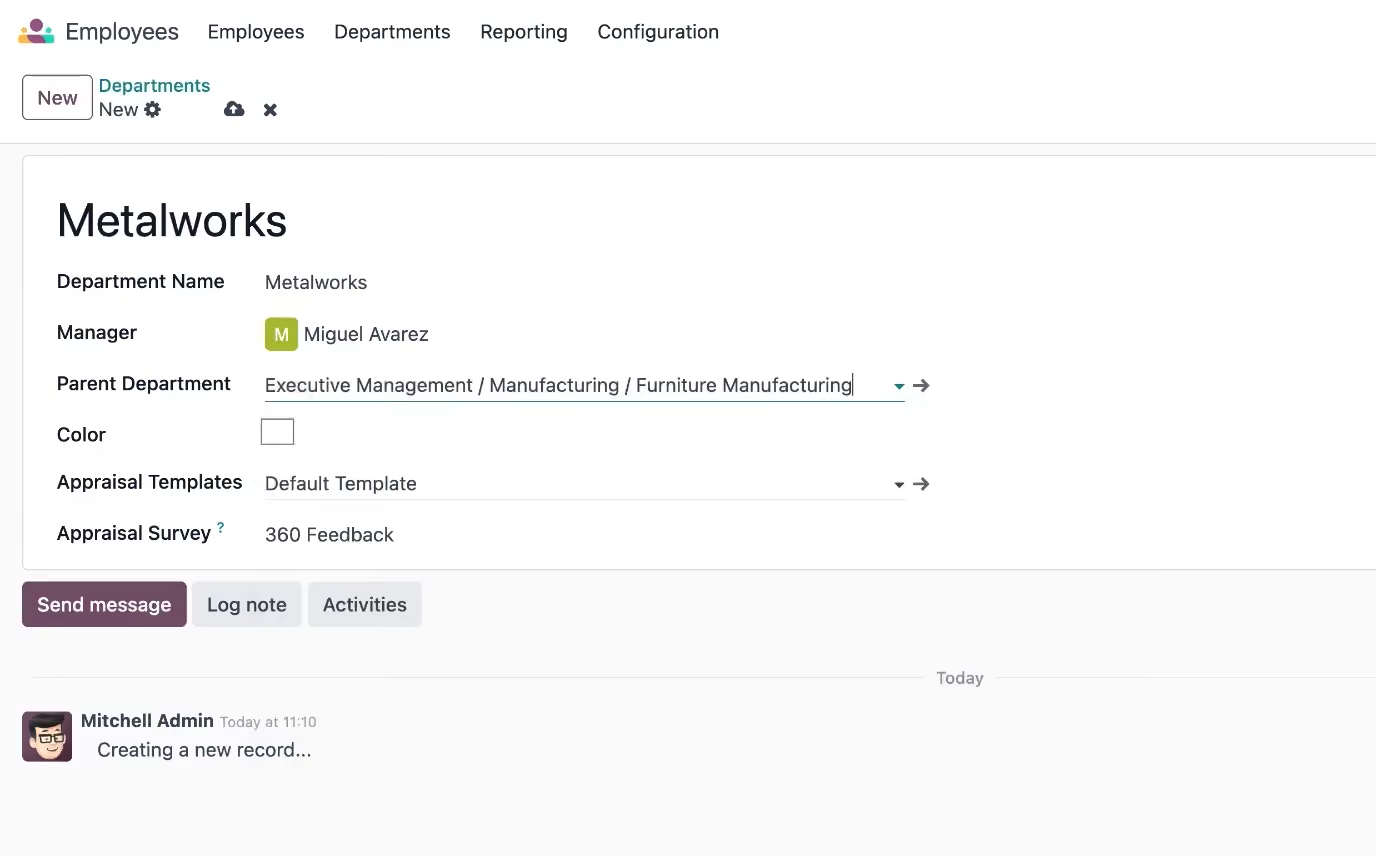
The interesting thing about Odoo is that they divide nearly all their feature offerings into stand-alone applications. Any of these is free for unlimited users and unlimited time until you either need more space or add another application. This is an excellent choice if you only need, say, time off tracking or a payroll app, and can be quite cost-friendly if you require only a few additional applications. It’s also comforting to know that, with Odoo, you only pay for what you use.
Odoo is used by companies like Southern Wine Group, BizTech College, and XB Press Buyer.
Odoo’s free plan doesn’t limit the number of users you can have. Its paid plans also come with free trial options.
Best For
Companies looking to fulfill a specific use case for free, or those that would like many of their business tech tools to come from the same vendor.

I primarily use Odoo to communicate with employees and access some of their HR information and pictures. The company I work for hopes to also use Odoo for scheduling, although this hasn't been set up yet. During our orientation call with Odoo representatives, we learned that we couldn't use the system for timekeeping because it did not possess the ability to use biometrics for identifying staff when clocking in and out of shifts.
We also had the intention of using Odoo for payroll, then learned that there are limitations with this software because Odoo will not record and file taxes on the employer's behalf. The only other function I use within Odoo is the "Sign" app, which allows me to send documents to employees that require a signature.
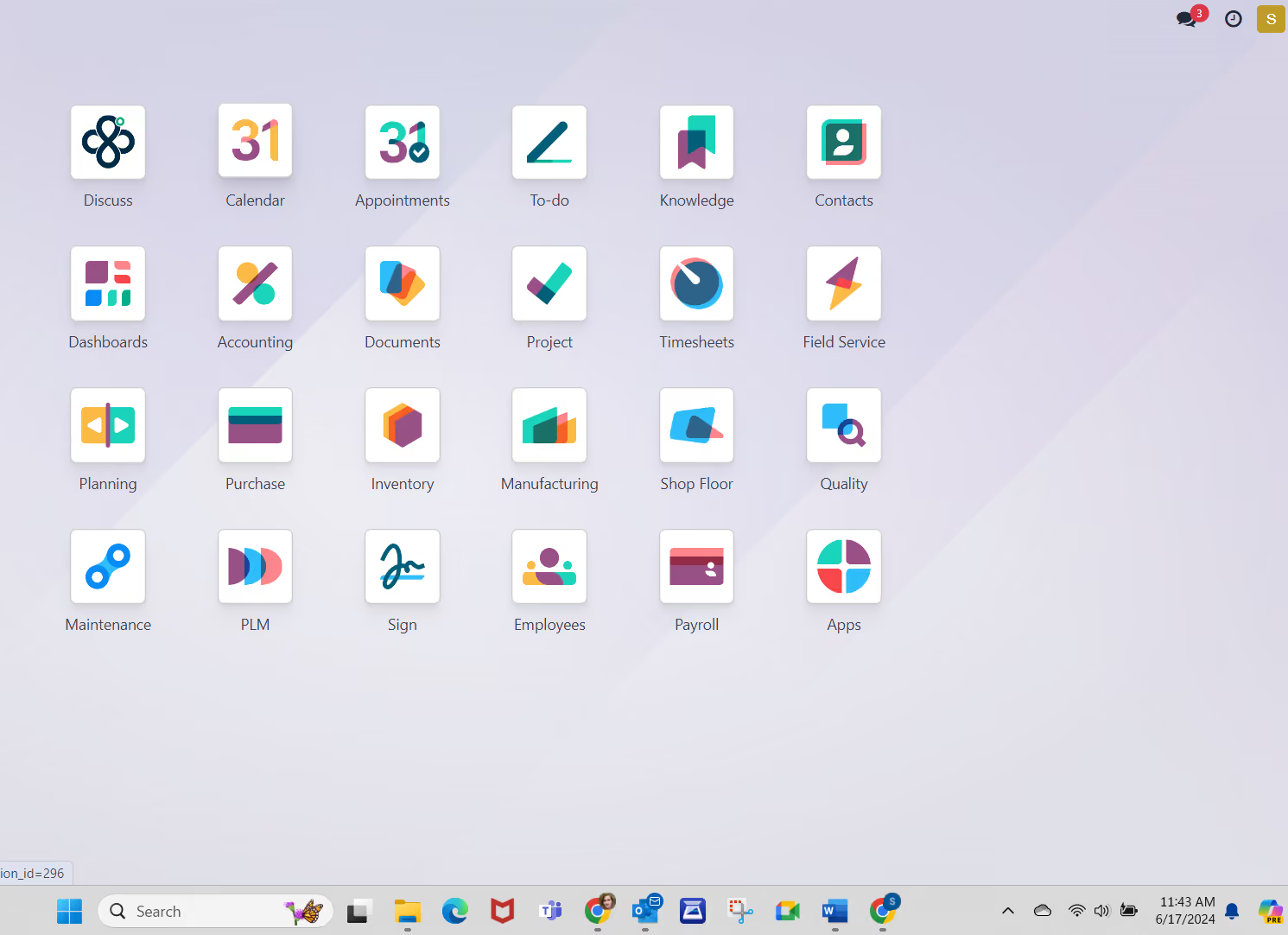
I like that it has the ability to consolidate multiple features/apps into one software program. I enjoy the "Discuss" feature, which essentially creates a company intranet allowing employees to communicate with others privately or with groups/departments. I also like that it allows me to send documents requiring a signature without having to use another external app, such as DocuSign.
My organization chose Odoo because it is an enterprise resource planning (ERP) software that promises to consolidate and automate several processes. I work for a manufacturing facility that produces food and beverage items, and the processes from creation to delivery of our products include many steps and a lot of paperwork to remain compliant with industry regulations.
We wanted a tool that could be used by several departments, including production, accounting, fulfillment, distribution, and HR. We were hoping we could use Odoo to house our timekeeping, scheduling, and payroll as well. I have been using Odoo for about three months.
I think it is a complex system that requires months of training before it can be fully functional. We cannot use it for payroll because it doesn't track and record tax payments and would require manual journal entries each time. I don't like that the timekeeping feature doesn't allow us to use biometrics (fingerprints via hardware device) when employees clock in and out of their shifts. Although it can integrate with several apps, these drawbacks keep me from recommending it as an HR solution.
Odoo has several functions that it offers to automate processes company-wide. I find the interface to be mostly user-friendly. There are some navigational difficulties when visiting one "app" and then returning to the dashboard, and their training videos could use some work. I find it about average as far as an ERP goes.
Identify exactly which processes you intend to utilize this service for and have a realistic implementation plan. If you're only using it for two or three processes, then a shorter training and implementation plan may work. If you have four or more processes you're looking to integrate, allow yourself and your team several months to meet with their implementation team and demo the trial software so that you can familiarize yourself with it before rolling it out to employees. Training is vital to understanding the full capabilities of the system.
They seem to have a lot of options for different processes that they say continually expand, such as inventory, appointments and to-do lists, project boards, discussion boards, manufacturing, shop floor, quality assurance, etc.
A mid to large-sized manufacturing facility that wants all employees using the same software to meet as many business needs as possible will find Odoo very useful.
Accounting and HR-based organizations will find it hard to get the most out of Odoo.
Orange HRM
OrangeHRM takes the time to understand your business and tends to be flexible enough to find an iteration of their solution that fits you. Their tools are used by thousands of users worldwide.
PROS
CONS
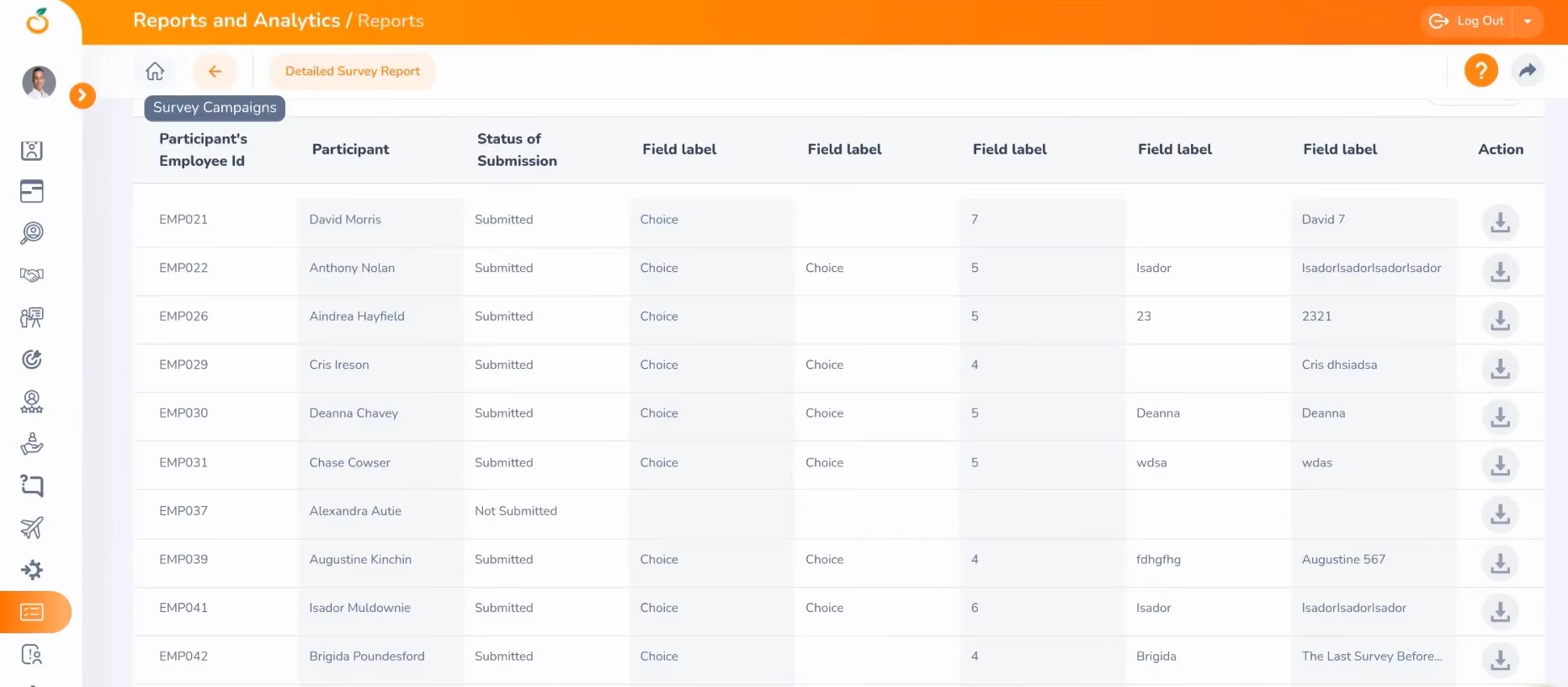
OrangeHRM is one of the most established names in open-source HR software, with a track record that includes universities, nonprofits, and global brands like Duke University and Red Hat. The free Starter edition covers core HR functions but notably excludes payroll integrations and onboarding workflows.
The catch with open-source is that you're responsible for hosting and maintaining your own servers, which means you'll need some in-house technical capacity. For organizations that have it, the payoff is full control over data and significant customization potential.
Thousands of companies use one version or another of OrangeHRM. Some remarkable names include Johnny Rockets, Duke University, and RedHat.
As an open-source HR solution, OrangeHRM Starter is free. Recently, the vendor also added a paid option, namely OrangeHRM Advanced, which offers a 30-day free trial and richer functionality and support service.
Best For
Sentrifugo
We love Sentrifugo because it is a fully-fledged open-source HRMS that's completely free, making it a good choice for small and medium-sized businesses.
PROS
CONS
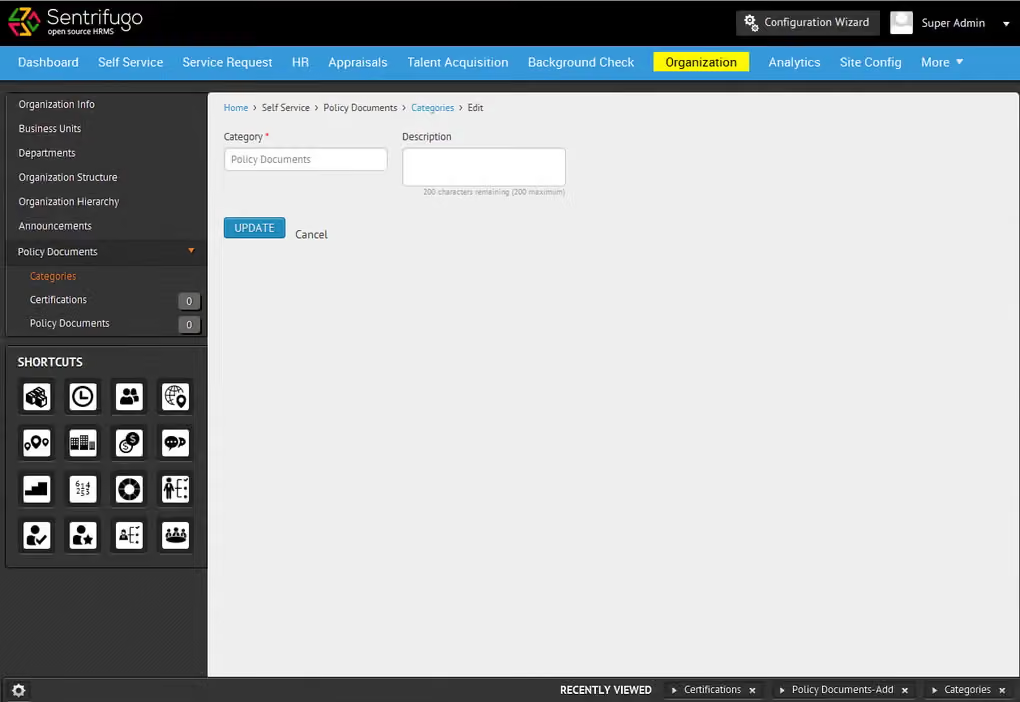
Like OrangeHRM, Sentrifugo is another fully open-source and free to use. Where it distinguishes itself is in the breadth of functionality it offers out of the box for small and medium businesses: it covers everything from appraisals and leave management to asset management and interview scheduling. The platform is also notably easy to configure relative to other open-source tools, with strong customization options that don't require deep developer involvement.
The main limitation is the same as any self-hosted solution: you own the infrastructure, which adds operational responsibility and removes the convenience of automatic updates or cloud backups that SaaS tools provide.
Sentrifugo is also an open-source HR solution, free to use.
Best For
SMBs that would like an open-source HRMS.
WebHR
WebHR is completely free for teams with 5 or fewer employees. A perk of this product is that if you decide to upgrade, you can do it on a per-module basis instead of buying a whole suite.
PROS
CONS
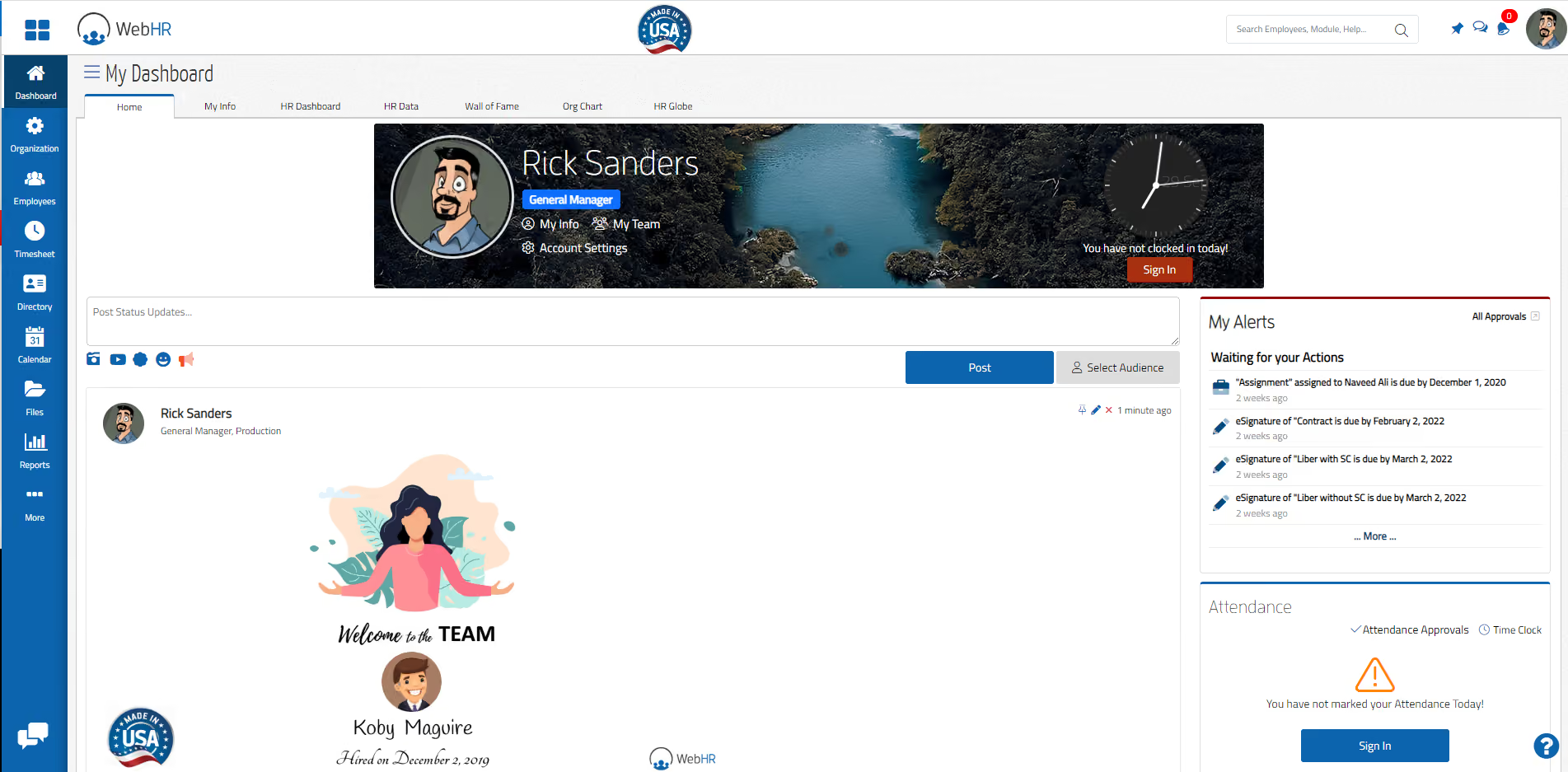
WebHR is free for teams of five or fewer employees and covers the basics: employee records, a built-in messenger, a discussion forum, and core HR administration. What makes it worth mentioning is its modular upgrade model. If and when you outgrow the free plan, you can add individual features like payroll or recruitment for as little as $1–2 per employee per month, rather than jumping to a full paid tier.
That said, WebHR no longer offers a perpetual free plan for new users; you can sign up for a trial. The interface is functional but dated, and the platform hasn't kept pace with the design standards of newer competitors. Worth a look if budget is the overriding constraint and your team is very small.
According to their website, some of the companies that use WebHR include Nissan, WaterAid, zameen.com, and Budget.
WebHR offers a free trial to help users explore basic features. Paid plans start at $2 per user per month.
Best For
Companies looking for a free tool that would like the option of upgrading at any time to be low-cost.

WebHR has plenty of convenient features. Firstly, we can download the HR manual for our reference through it. Furthermore, we may raise requests for staff loan, whistleblower, and hospitalization claims. WebHR also has an integrated chatbot which offers assistance in addressing a wide range of HR-related inquiries.
- We initiate requests on the WebHR portal and we are able to see the progress status, whether the requests were approved or pending; In short, we like its transparency.
- There is a chatbot where we can directly communicate with HR employees for guidance.
- The HR manual and all circulars are easily available and can be searched by text or date.
Earlier, our organization’s human resource department shared the updated HR manual via email. All queries by the employees were entertained through email as well. It was a hectic exercise as many follow-ups were needed and, sometimes, we lost track of the email threads. In order to overcome this, our organization transitioned to WebHR. The platform automated the requests initiated by the employees, while tracking the changes and approvals.
- Upgrades sometimes take 2 or 3 working days of downtime which is a hurdle for employees.
- Uploading the relevant PDF documents for case submission and approval takes time.
- WebHR isn’t the most user-friendly; new users do need some guidance on how to use it. Guide book needs to read out for fresh employee to use the web HR as it is not much user friendly.
Well, earlier we were using emails for all types of queries and approvals so we have not used any other software yet.
This is a good platform where employees and HR connect with each other and communicate easily.
It is very necessary for our organization with a large number of employees. Each of our needs and requests are important, and it is HR's duty to resolve them promptly.
I am associated with the banking industry and I believe it is good for banking and other industries as well.
I don't think any organization will dislike this platform as it improves alot of processes for employees and HR.
Pitfalls of Choosing Free HR Software Systems
Free HR software often looks like a cost-saving win upfront, but hidden limitations, upgrade pressure, and lower support can make it more restrictive—and costly—over time.
Choosing Based on “Free” Instead of Fit
Most free HR tools are designed as entry points into paid plans. As your team grows or your needs become more complex, you may be pushed to upgrade sooner than expected.
This can lead to an unplanned cost increase or a forced migration to a new system. Always review pricing tiers in advance and understand what triggers an upgrade (e.g., employee count, feature access).
Assuming “Free” Means Low Risk to Switch
Because there’s no upfront cost, teams often assume they can easily switch tools later. In reality, even free HR software requires time for setup, data migration, and employee adoption.
Switching systems can be disruptive, so it’s worth evaluating scalability from the start, even if you’re a small team today.
Overlooking Limitations in Support
Free plans often come with limited or no customer support, relying instead on help centers or community forums. This can become a major issue when you run into payroll errors, compliance questions, or technical bugs.
If support is critical to your team, check what level of assistance is included before committing.
Ignoring Data Security Tradeoffs
While many free HR tools offer solid security, others may cut corners or lack advanced compliance features (e.g., audit logs, permissions, certifications).
Since HR systems handle sensitive employee data, it’s essential to review security standards carefully, regardless of price.
Benefits and ROI of HR Software Solutions
The biggest advantage of free HR software is that it allows teams to streamline core HR processes without upfront investment, making it especially valuable for startups and small businesses.
Even with limited functionality, free tools can automate repetitive tasks like time-off tracking, employee record management, and basic reporting. This alone can save hours of manual work each week, giving HR teams more time to focus on higher-impact initiatives like employee experience and hiring.
Free HR software also lowers the barrier to entry for adopting better systems. Instead of managing everything in spreadsheets or email, teams can centralize data and build more consistent workflows early on, which reduces errors and improves organization.
In some cases, free plans include lightweight automation or AI features that help filter candidates or simplify administrative work. While not as advanced as paid tools, these features can still reduce time spent on manual screening and coordination.
Free HR Software: Pricing Models and Limitations
All of the software we’ve discussed here is completely free in some form or another. Some of them have a user cap of either 5 or 50 employees, while others have free versions or cost nothing because they are open source.
Below, you can compare each of these options according to their pricing model to see just how free are they, what’s their catch, and which one fits your needs:
- Deel lets you use its HRIS for free as long as you use its payroll services.
- Homebase’s basic plan is free for teams limited to one location and up to 20 employees.
- Bitrix24 is free for unlimited users, but limits the data storage to 5 GB.
- Zoho People offers a free plan with basic HR functions for up to 5 users.
- Odoo is free for one application, fees apply for additional apps.
- Orange HRM offers a free open-source edition available for both cloud and self-hosting, yet it lacks some key features like payroll integrations and on/offboarding.
- Connecteam offers several modules for free, including HR, but the number of users is limited to 10.
- BambooHR provides one of the best all-in-one HRIS available, but this vendor only offers a free trial instead of a free plan.
To get a more detailed look at the total cost of ownership for an HR software solution, take a look at our newest HRIS pricing report.
Key Features of Free HR Management Software
Common features that most free HR systems offer are employee management, performance management, payroll processing, onboarding, and time off management.
- Employee Management: At the core of most free HR software is a centralized employee database. This is where you store employee profiles, track job details, and manage documents. Many free tools also include basic self-service features, allowing employees to update their information or access records without HR involvement.
- Time Off and Attendance Tracking: One of the most common (and useful) features in free plans is leave management. Employees can request time off, managers can approve it, and HR gets a clear overview of schedules. Some tools also include simple attendance tracking or shared calendars.
- Basic Onboarding Workflows: Free HR management software often includes lightweight onboarding features such as checklists, document collection, and task assignment. While not highly customizable, these tools help standardize the onboarding experience for new hires.
- Performance and Feedback (Limited): Some free plans offer basic performance management, such as simple reviews or feedback tracking. However, more advanced features like continuous feedback, goal tracking, or analytics are usually reserved for paid tiers.
- Integrations (Often Limited): Integrations with payroll, accounting, or ATS may be available, but they’re often restricted or require an upgrade. In many cases, free HR tools handle core HR data while relying on external payroll systems or recruiting software.
How to Choose a Free HR System
We recommend you take advantage of our vendor shortlists to narrow down your options to 3-4 that you’ve found most likely to meet your HR needs. The next step would be to try them all and see for yourself which one works best. While most of the tools we’ve listed here are extremely easy to get started with (as in, just create an account and you can access most basic features), you could also request a live HR software demo from them, which you should. And when you do, make sure you’ve had a list of must-ask questions, such as:
- Which features do your free users like most? What are the limitations of your free plan?
- What are the sticking points that would make me or my colleagues apprehensive about transitioning to this platform?
- What are the available integrations, compliance and data security, and customer support?
Implementing Free HR Software
Once you select the right system, the HRIS implementation process will vary depending on its operation. If you’re talking about an open-source solution like OrangeHRM or Sentrifugo, the process will likely entail a lot of communication and collaboration with its team.
On the far other end of the intricacy spectrum, a cloud-based tool like Freshteam or SnapHRM gets you up and running within minutes. Each vendor page explains their particular process in much more detail, and many will call or email you shortly after you’ve set up an account or asked for a demo to address questions or solve any issues you might be having.
If you'd like to learn more about what to do after implementing a new HRIS, including proven processes and tips from an expert, we recently put together a brief guide to HR software post-implementation.
Free HR Case Management Software FAQs
What is free HR software?
Free HR software is a digital tool, often freemium or open-source, that automates key HR tasks (data, attendance, leave, onboarding) at no ongoing cost.
What is the best free HR software for small businesses?
The best options include Deel, Homebase, Zoho People, and Odoo. But if you’re seeking a top HR software solution for small businesses that offers a broader range of human resources features at a reasonable price, then HiBob, BambooHR, and Connecteam are top choices.
What is the best free HR software for non-profits?
Some of the best free HRIS options for non-profit organizations include OrangeHRM, Homebase, and TimeTrex.
Why use free HR software?
Reasons to use free HR software include: saving time with automation, improving employee experience, improving employee performance, increased compliance, better organization, streamlined hiring, better business intelligence, and workforce management.
What are some key features of free HR software?
Free HR software offers many key features, such as an employee self-service portal, time and attendance management, onboarding templates, customizable and real-time reporting, benefits administration systems, employee database, messaging, recruiting functionality, human resource development, company document storage, and compensation management.
How We Keep This Guide Current
The pricing information in this guide reflects the latest details confirmed directly from each vendor's website as of this update. Notable changes since our last review: Homebase's entry pricing increased from $14 to $24 per location per month; WebHR discontinued its free plan, with new users now limited to a trial before moving to a $2/month base plan; and Deel was removed from the featured list after discontinuing its free HRIS offering.
To ensure our reviews reflect real-world usage rather than just feature lists, we interviewed HR professionals with hands-on experience with the tools we're featuring. Their ratings and insights appear directly beneath each featured review. Contributors to this update include Alex Bryant, Lead Future of Work Consultant - Omega Forty Seven Consulting; Jess Tan, Recruiter - PRN Medical Staffing; Oksana Day, SHRM-CP, HR Manager - Corporate Settlement Solutions; Jessica Warren Briles, Accounting Controller - Northtech Machine LLC; Leonardo Revilla, HRIS Analyst - People Street; and Eric A. Ridenour, Employee Wellbeing Officer and Trainer - Pyramid Global Hospitality.
Final Advice on Free HR Management Software
There is no single best free HR software. The right tool depends entirely on how your team is structured, what problem you need to solve first, and how much complexity you can realistically manage at your current size. Here's where each tool on this list earns its place:
- Hourly or shift-based teams at a physical location: Homebase. If your employees clock in at a register or work scheduled shifts, Homebase handles that environment better than anything else on this list. Its scheduling, POS integrations, and real-time messaging were built specifically for this.
- Dispersed or deskless workforces: Connecteam. If your team works in the field and doesn't operate from a fixed location, Connecteam is the more practical choice. Employees can get set up with nothing but a phone number, which matters when a corporate email isn't part of the picture.
- Startups with five or fewer employees: Zoho People. At this stage, a clean employee database, leave management, and self-service access are genuinely all you need. Zoho's free plan covers that without a trial expiry pushing you toward a decision you're not ready to make.
- Project-based teams already using Monday.com: Monday.com. For agencies, consultancies, and product teams, HR workflows like onboarding checklists, time-off requests, and employee surveys fit naturally into Monday's existing structure. There's no reason to introduce a separate system until Monday's limitations become a real, recurring problem.
- Teams that need HR alongside CRM, messaging, and document management: Bitrix24. It bundles more than any other free option on this list, making it ideal for small teams managing multiple operational areas with limited resources.
- Organizations building a case for a paid HR system: BambooHR. If the goal is to understand what a full HRIS looks like before committing budget, BambooHR's trial is the most useful benchmark on this list. The gap between it and the free tools becomes clear quickly, which is often what a leadership conversation needs.
- Teams with one specific HR function to address: Odoo. If you need just leave tracking, payroll integration, or recruitment, Odoo is the only tool here that lets you activate a single module free for unlimited users.
Final tip: Before settling on a tool, test your top two or three choices against workflows you actually run. You’ll be surprised how a platform handles your team's real data and edge cases tells you more than any feature list will.
About the Author


About Us

- Our goal at SSR is to help HR and recruiting teams to find and buy the right software for their needs.
- Our site is free to use as some vendors will pay us for web traffic.
- SSR lists all companies we feel are top vendors - not just those who pay us - in our comprehensive directories full of the advice needed to make the right purchase decision for your HR team.


