

15 Best Platforms for Team Collaboration & Communication in 2026
Below you will find detailed reviews of the best team collaboration & communication apps from more than 40 tools we evaluated, along with a transparent look at how we arrived at these choices.









The best team communication apps keep your team aligned without drowning everyone in push notifications. Even a straightforward platform can replace scattered email threads with organized channels, make async updates visible to the whole team, and give remote and in-office employees an equal footing in day-to-day conversations. The more advanced tools layer in video calls, file sharing, workflow automation, and integrations that connect communication directly to the work being done.
We have tested more than 40 team communication tools to build this guide, from lightweight messaging apps to full-featured platforms that aim to replace email, meetings, and project tracking in one place. We have options for small businesses, remote-first teams, and large enterprises. The detailed reviews below are designed to help you figure out which solution fits and identify the right app for your needs.
We have tested more than 40 collaboration tools to build this guide, from lightweight messaging apps to full-featured platforms that aim to replace email, meetings, and project tracking in one place. We have options for small businesses, remote-first teams, and large enterprises. The detailed reviews below are designed to help you figure out which solution fits and identify the right app for your needs.
Ease of Use: We assessed each platform from both an admin and an end-user perspective. We set up new workspaces, invited team members, created channels, and ran through core communication workflows to measure how quickly someone unfamiliar with the tool could get up and running. Platforms that required extensive training or buried basic features behind complex menus consistently scored lower, regardless of how powerful they were under the hood.
Communication Capabilities: We tested the full range of communication features each platform offered — group messaging, direct messaging, threaded conversations, video calls, voice calls, and screen sharing. We paid close attention to how well each tool handled async communication alongside real-time interaction, since the best platforms serve both equally well rather than prioritizing one at the expense of the other.
Integration Options: We examined how well each tool connected with the workplace apps teams already rely on — email, Google Calendar, Slack, project management tools, and core business systems. We tested data flow between integrations, assessed whether connections required third-party connectors or native support, and noted where integrations felt bolted on rather than genuinely useful. Platforms with fragmented or unreliable integrations consistently performed worse in day-to-day workflow testing.
Security Features: We evaluated each platform's security posture against the standards dispersed teams with sensitive data actually need — SOC2 compliance, end-to-end encryption, role-based access controls, single sign-on support, and data backup and retrieval capabilities. Security mattered most when evaluating tools intended for industries like healthcare, legal, or financial services, where data handling requirements are non-negotiable.
While all four criteria shaped our recommendations, we placed the most weight on ease of use and communication capabilities, given their direct impact on daily team workflows. Integration depth and security were used as differentiators when platforms were otherwise comparable. For a closer look at how we evaluate software vendors, visit our full assessment methodology.


Connecteam

Connecteam has a host of features that make it easy for employees to chat, share files, and manage tasks, all with a user-friendly interface that works across devices. It also has a free plan that gives you full access to all of its 3 hubs: Operations, Communications, and HR & Skills.
PROS
- Unlimited admins, activity, and entries history across plans, including free plan.
- Several communication channels offered, including team chat, org directory, surveys, events, knowledge base, and updates and announcements.
- Uncluttered UI that works well on both browsers and mobile devices.
- Transparent pricing structure. Free trial and free plan available.
- One of the only fully-mobile HR tech tools for deskless workers
- Very adequately-priced for all it entails, SMB-friendly
- Quite open to feedback, having implemented user suggestions as features in the past.
CONS
- Limited native integration options. API available for Enterprise users only.
- HIPAA costs extra. Advanced security features like SSO, 2FA, and mobile app lock are only available for Enterprise users.
- In the communication hub, the app offers no confirmation that messages were sent and/or seen.
- Certain features that some teams consider essential, such as GPS-tracking, are only available in the higher-tier pricing plans.
One thing we noticed when vetting Connecteam is that this vendor has such a generous free plan. Interestingly, except for the part this plan only allows for 10 users at most, it actually offers more features than the paid plan Basic. So if your team is eligible for this freebie, we highly recommend you opt for it.

For bigger teams, especially those with deskless employees, Connecteam can still be a logical option in many ways. First is for its vast range of functionalities. Within Connecteam’s Communications hub, you get Updates – a social media-like communication network, Chat – where authorized users can send text messages privately, in groups, or company-wide, Directory – a digital phonebook for internal and external work contacts, Knowledge Base – the source of truth for all company resources, and Event – where you can invite, publish, and promote special team meetings.
Given the many features offered, a valid question is whether the user experience is still fine. Thankfully, unlike many other platforms we've tested that try to be jacks of all trades yet end up being masters of none, Connecteam has managed to provide classic quality: a clean interface that works well across devices and multiple ways for teams to communicate effectively without invading individuals' privacy.
Be warned, though, that this vendor may disappoint you when it comes to integration capabilities. As of this writing, it can natively connect to only a few payroll apps, while Enterprise is the one and only plan that has the platform’s API access.
Connecteam’s standard data security features are not half bad, with role-based access control, GDPR, ISO 27001, and SOC 2 included. But if you want advanced features like SSO, 2FA, and mobile app lock, you’ll also have to opt for the priciest plan – Enterprise.
36,000+ companies, including Plasson, Biggy Coffee, and EY.
Connecteam pricing starts at $29/mo billed annually for the first 30 users. There is a free plan for teams with 10 users at most. A free trial is also available on its website, no credit card is required.

Best For
SMBs seeking a simple yet versatile platform for work communication, operations, HR, and skills.

Jira
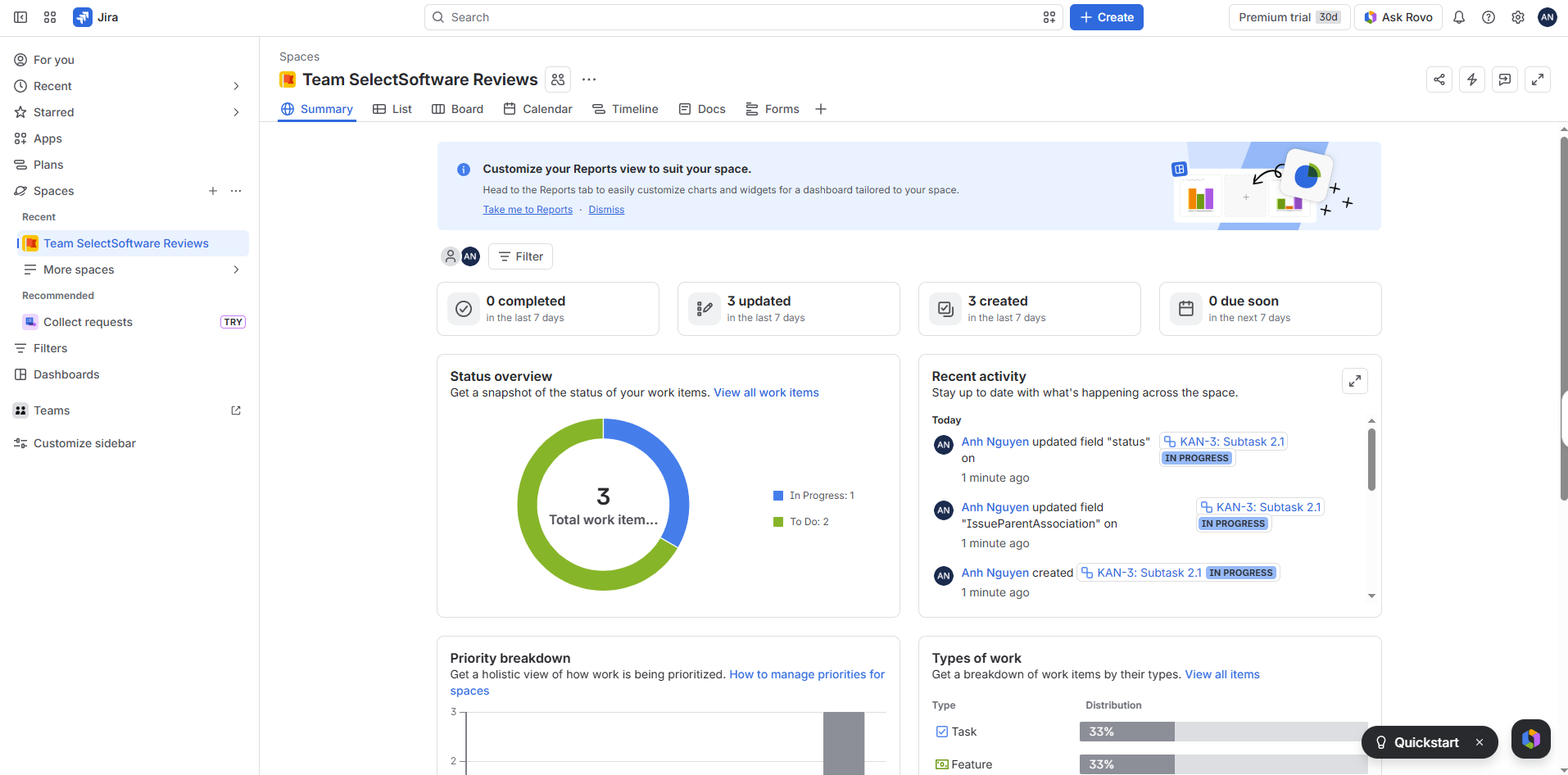
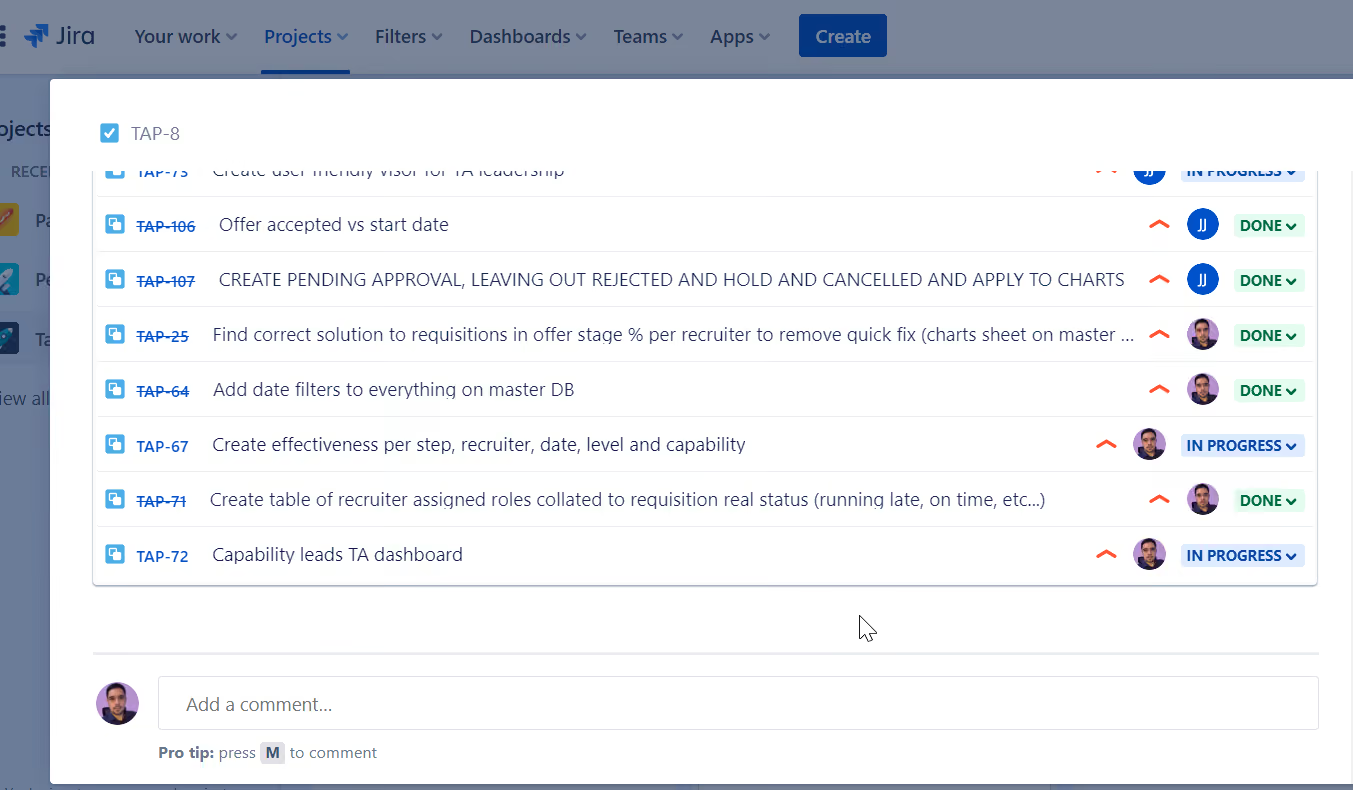
It’s easy to collaborate with teams via Jira’s visual boards. Create cards with multiple subtasks and set up task dependencies for collaboration on projects. All users can leave comments on each task to keep conversations relevant to each issue.
PROS
- The no-code workflow automation builder is accessible for all users, so you don’t have to be a programmer or developer to create easy solutions.
- Jira’s Kanban board is specifically designed for Agile style project management, but they’re flexible enough to work for any department.
- Agile teams can use Jira scrum templates to quickly set up sprints, saving you time from having to set them up manually. Simply fill in an epic with a user story and cards with your tasks.
- Advanced security features (SSO, 2FA, permissions, roles) make Jira one of the safest project management apps.
- Roadmaps give clear visibility on projects and task dependency for 50,000-foot views. They’re ideal for product development and management.
- While all project management apps typically offer integrations with popular software, Jira has more than 3,000 integrations and add-on options (more than industry standard) to make it easy to extend the functionality of the platform.
- The no-code workflow automation builder is accessible for all users, so you don’t have to be a programmer or developer to create easy solutions.
- Jira’s Kanban board is specifically designed for Agile style project management, but they’re flexible enough to work for any department.
- Agile teams can use Jira scrum templates to quickly set up sprints, saving you time from having to set them up manually. Simply fill in an epic with a user story and cards with your tasks.
- Advanced security features (SSO, 2FA, permissions, roles) make Jira one of the safest project management apps.
- Roadmaps give clear visibility on projects and task dependency for 50,000-foot views. They’re ideal for product development and management.
- While all project management apps typically offer integrations with popular software, Jira has more than 3,000 integrations (more than industry standard) to make it easy to extend the functionality of the platform.
CONS
- May be difficult to master the advanced features (roadmapping, dependencies, automation), especially for new users.
- You won’t find as many project views as other top-rated project management software, so don’t count on Gantt, calendar, or timeline views.
- Jira has much more expensive paid plans than other leading project management apps.
- Users report Jira isn’t the most intuitive platform at the beginning. Finding tags, fields, etc. can be difficult.
- May be difficult to master the advanced features (roadmapping, dependencies, automation), especially for new users.
- You won’t find as many project views as other top-rated project management software, so don’t count on Gantt, calendar, or timeline views.
- Jira has much more expensive paid plans than other leading project management apps.
- Users report Jira isn’t the most intuitive platform at the beginning. Finding tags, fields, etc. can be difficult.
The visual boards in the Jira platform are excellent for team collaboration because it’s easy to see who’s working on each task. You can click into any card to see subtasks, comments, and files attached to that one main task. Beyond the commenting system though, Jira isn’t set up for natural team collaboration.
To get a more seamless environment for team collaboration on Jira projects, you may find it necessary to integrate other apps, such as Slack or Confluence.
Some top-tier customers prefer Jira for product and project development, including Square, eBay, Pfizer, Cisco, and Visa.
Teams of up to 10 users can leverage Jira's free plan. The first paid option is priced at $9.05 monthly per user, with the rate decreasing as volume grows.
Jira tends to update its version once every couple years. There are multiple bug fixes throughout the year, but they typically come once per month. The latest release (Jira 9.6) dealt with a number of minor bugs, such as stories not linking to epics automatically, javascript errors related to fields, and duplicate values in fields.
The Jira devs also addressed multiple reports of lag in the platform during syncs, so they responded with various fixes. For example, crowd membership changes are now batched during syncs to improve the feature’s speed.
Best For
Jira is ideal for software development teams that prefer to use the Agile method of project management. Its plans work well for any size team given its high user limit.


Jira is useful for project and product management and is widely used in our company. We can manage projects in teams, and use several features such as: reports, kanban board, roadmaps, and scrum. We have some templates to use for each type of project which is useful It's possible to have projects managed by the company and by the team separately. I really like the feature with deadlines for tasks and comments that are visible among the team.
- Generate integration in the teams everyone can work on projects in a unified way.
- Workflow management of projects in a 100% online platform without the risk of losing the work.
- The possibility of viewing various projects of teams and sub-teams and the possibility of requesting participation voluntarily to participate in some tasks.
- Ease of monitoring of tasks and reports.
Our company acquired Jira to facilitate project management, have a broad integration of processes and ongoing projects, and give visibility to the team in a more practical way where all projects would be located in the same place.
- Jira is very broad and complex, new users can get lost to understand everything by themselves even though the interface is simple it is still a bit confusing at first. This could be improved.
- Jira is a platform with great reliability, a range of possibilities, and ways to manage projects. I believe it is a great highlight. Compared to others it is very complete.
- A highly prestigious tool on the market used by many top companies
- Necessity of team integration
- Tool that can be used online without the need for software installation
- To those who like to manage tasks in detail with reports and metrics.
Its interface has improved and is now cleaner, and easier to understand, including new features for project management and business project templates.
Dynamic users who like to participate in teamwork and manage group projects and who like current and modern tools.
Very traditional companies that are not technology oriented or that have in their team users that are familiar with tools totally different from Jira.
Monday.com
Not many project management apps offer functionality for so many types of businesses, ease of use, and affordability like Monday does. It also offers gamification for users, such as visual celebrations for completing a task, which makes it fun and motivating for everyone in your department or company to use.
PROS
- Free plan available, and affordable, scalable plans for small to midsize businesses
- Easy to learn and use
- Customizable dashboard
- Collaborative document creation with the ability to turn content in docs into tasks in projects with a few clicks
- Gamified progress tracking with visual celebrations for users
- Workflow automation for repetitive tasks
- Built-in communication tools reduce reliance on email
- Customized forms for in-house or client use that can be easily turned into projects
- Free plan available, and affordable, scalable plans for small to midsize businesses
- Easy to learn and use
- Customizable dashboard
- Collaborative document creation with the ability to turn content in docs into tasks in projects with a few clicks
- Gamified progress tracking with visual celebrations for users
- Workflow automation for repetitive tasks
- Built-in communication tools reduce reliance on email
- Customized forms for in-house or client use that can be easily turned into projects
CONS
- 3+ users are required to get on any of the paid plans
- Limited storage on the Basic plan
- Could be too complex for simple project management needs
- No phone customer support
- Tracking different conversations can be difficult because of all the clutter
- 3+ users are required to get on any of the paid plans
- Limited storage on the Basic plan
- Could be too complex for simple project management needs
- No phone customer support
- Tracking different conversations can be difficult because of all the clutter
Monday is an easy-to-use cloud-based project management system. The gamified progress tracking (colorful celebrations with each task you check off) makes work fun, and the collaborative and dynamic documents feature makes it easy to create projects from lists.
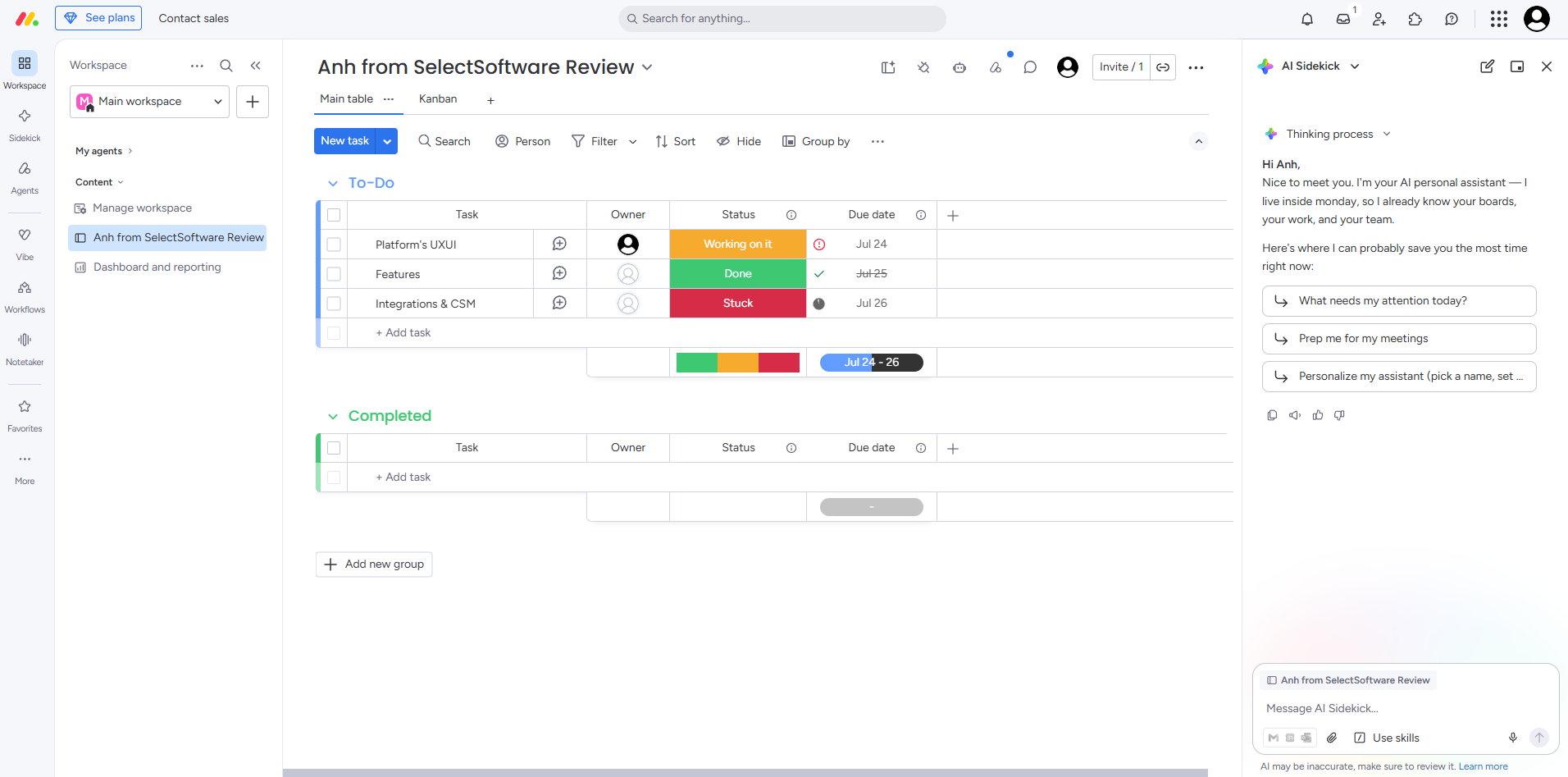
Depending on the plan you subscribe to, you have more than 10 different views of projects. Monday also lets you customize your dashboard, so you can see the data or projects most important to you. The drag-and-drop interface is intuitive and you can add or remove specific widgets for your needs.
More than 110,000 companies, including Hulu, Uber, and Coca-Cola.
Ranges from free to $22 per user, per month, billed annually, with a three-user minimum.
- Individual: $0 (up to 2 users)
- Basic: $10 per user, per month (billed annually; 3-user min)
- Standard: $13 per user, per month (billed annually; 3-user min)
- Pro: $22 per user, per month (billed annually; 3-user min)
- Enterprise: Custom pricing.
The most recent changes to Monday include a visual summary of WorkForms results (for a bird’s eye view of survey results), a new sub-item filter for dashboards (for quick drilling down of tasks), and forms are now available to use on the app.
Best For
Businesses prefer a project-centered team communication app.
We used Monday.com every day. All tasks were entered into the system along with deadlines and status updates. Once a task was completed, its status was updated, and if it wasn’t, it was highlighted for review.
Every day, I could check tasks and their approaching deadlines in a comprehensive manner. Additionally, I used the dashboard to monitor mandates from the client, such as ensuring a certain percentage of items were either completed or in progress at any given time.
As a freelancer, I was able to use it for free since I collaborated with just one other person. It is very user-friendly. The tool sends notifications, such as when a task is completed, which informs the task owner promptly. The dashboards helped me track my billings. I also liked the intuitive interface.
I was working as a freelancer and needed to collaborate with someone in a different time zone. Most of our meetings revolved around task lists and their statuses. While we could have used an Excel sheet for this, Monday.com provided dashboards that gave us an overall view beyond just task statuses.
It also made it easier to manage controls and permissions. The tool streamlined our workflow and enhanced collaboration.
The tool can be expensive if you have to pay for it. For me, it was free because only two members were working on it at a time. The customer service could be improved. It does not provide an offline availability option, which can be inconvenient.
This tool is better than sharing files and tracking tasks on Google Drive, as it offers more automation. I find Monday.com appealing because of its interface, ease of use, and the fact that it was free for my use case.
Be aware that the customer service may not meet expectations. Additionally, consider the pricing to ensure it aligns with your budget and requirements.
I have not used it long enough to comment on its evolution.
This tool is ideal for organizations with multiple people collaborating on various projects or for those working across different time zones. It is also beneficial for companies that need real-time updates and integration with other tools like email.
This tool may not be suitable for companies with limited budgets. Additionally, users need to be somewhat tech-savvy, as the customization options in Monday.com can be overwhelming. It’s essential to evaluate needs carefully before committing to it.
Proton
Proton Workspace bundles encrypted email, calendar, cloud storage, docs, sheets, video conferencing, VPN, and a password manager into a single subscription governed by Swiss privacy law. For small teams whose collaboration needs center on secure communication and file sharing rather than complex project management, it replaces multiple tools at a competitive price point, while ensuring not even Proton itself can access your data.
PROS
- Full productivity suite (Mail, Calendar, Drive, Docs, Sheets, Meet, VPN, Pass) in one subscription, eliminating the need for separate security tools.
- End-to-end, zero-knowledge encryption across all apps — ISO 27001 certified and SOC 2 Type II audited.
- Competitive pricing at $12.99/user/month (paid annually, $14.99 if going month by month) bundles VPN and password manager that competitors like Google Workspace charge extra for.
- 14-day free trial, plus a 30-day money-back guarantee.
- Easy Switch migration tool simplifies moving from Google Workspace or Microsoft 365.
- Full productivity suite (Mail, Calendar, Drive, Docs, Sheets, Meet, VPN, Pass) in one subscription, eliminating the need for separate security tools.
- End-to-end, zero-knowledge encryption across all apps — ISO 27001 certified and SOC 2 Type II audited.
- Competitive pricing at $12.99/user/month (paid annually, $14.99 if going month by month) bundles VPN and password manager that competitors like Google Workspace charge extra for.
- 14-day free trial, plus a 30-day money-back guarantee.
- Easy Switch migration tool simplifies moving from Google Workspace or Microsoft 365.
CONS
- Limited third-party integrations compared to Google Workspace or Microsoft 365 — a real constraint for teams reliant on CRMs, project management tools, or cross-platform calendar syncing.
- No native shared inbox feature; teams needing collaborative reply on shared addresses will need workarounds.
- Limited third-party integrations compared to Google Workspace or Microsoft 365 — a real constraint for teams reliant on CRMs, project management tools, or cross-platform calendar syncing.
- No native shared inbox feature; teams needing collaborative reply on shared addresses will need workarounds.
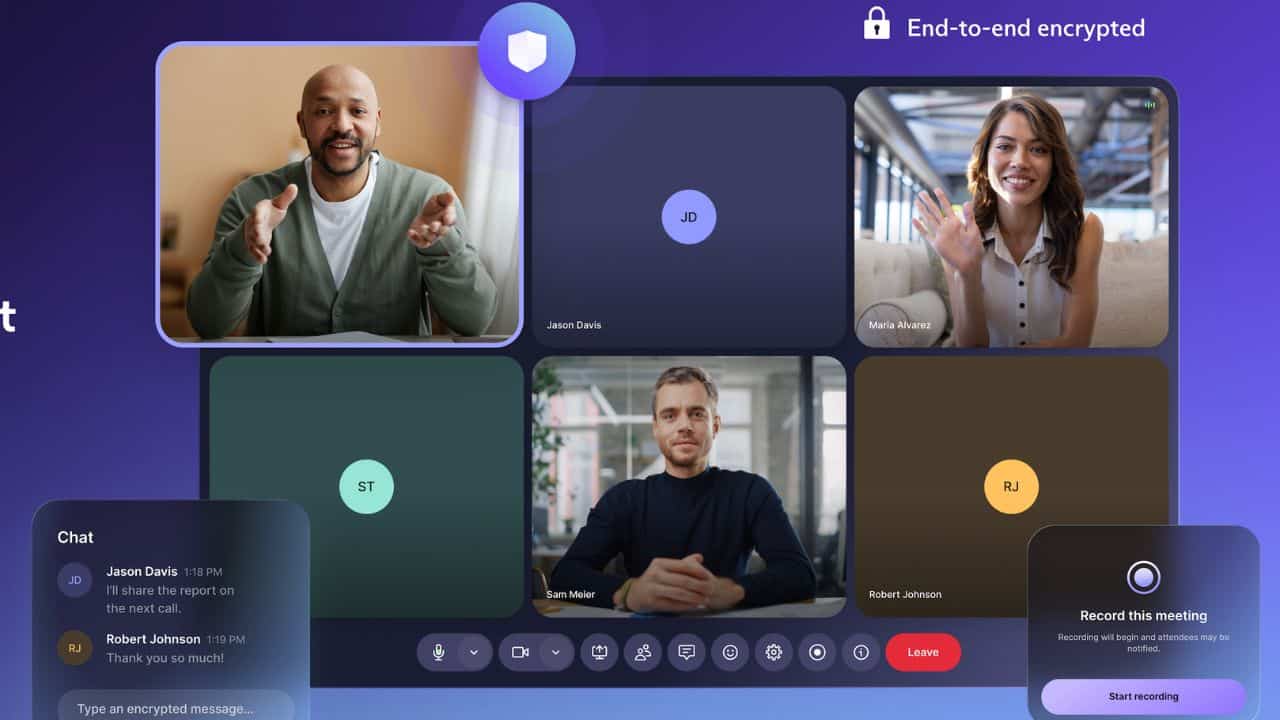
Proton Workspace is an unconventional pick for a team collaboration guide, but it earns its place for a specific buyer: the small business that needs foundational digital infrastructure: email, file storage, docs, video calls— and wants it locked down from the start.
What sets Proton apart from every other tool on this list is its encryption architecture. Unlike Google Workspace or Microsoft 365, where the provider can technically access your data, Proton uses zero-knowledge encryption; meaning the company itself cannot read your emails, files, or documents. For HR teams handling sensitive employee data, legal documents, or compensation details, that’s a meaningful differentiator, not just a marketing claim. The platform is ISO 27001 certified and SOC 2 Type II audited, which simplifies compliance with HIPAA, GDPR, and CCPA.
We explored the Workspace Standard plan, which covers Mail, Calendar, Drive (with Docs and Sheets), Meet, VPN, and Pass at $12.99/user/month. Compared to piecing together a Google Workspace subscription, a standalone VPN, and a team password manager, the bundled cost comes out lower. Proton has also never raised prices on existing customers; a rarity in SaaS.
That said, feedback from business users we consulted consistently flags the same limitation: integrations. One cybersecurity consultant who ran their company on Proton for over a year noted that calendars won’t sync with tools like Microsoft Teams or Salesforce, and that non-technical employees struggled with the workarounds. If your team lives in a SaaS stack— CRM, project management, shared calendars across platforms— Proton might create friction. Docs and Sheets, while functional for basic use, also lack the depth of Google’s equivalents. Other reviewers echo this: they praise the encryption and reliability but note the ecosystem is still maturing.
Proton Workspace works best for small, privacy-conscious teams. Think legal practices, healthcare consultancies, financial advisors, nonprofits, or early-stage startups where email, file sharing, and video calls cover 90% of collaboration needs.
Over 100,000 organizations use Proton’s business tools, ranging from small nonprofits to Fortune 500 companies and United Nations agencies, though specific client names are largely undisclosed.
Proton Workspace Standard costs $12.99/user/month (billed annually) or $14.99/month. Workspace Premium, which adds Lumo AI, 3 TB storage, and 250-participant meetings, costs $19.99/user/month (annual) or $24.99/month. Enterprise pricing is custom. All plans include a 14-day free trial.
Best For
Small to mid-sized businesses that prioritize data privacy and need a secure, all-in-one alternative to Google Workspace, provided they don’t rely heavily on third-party SaaS integrations.

Miro
Miro’s online collaboration tool that lets you start with a whiteboard and build your custom flowchart or mind maps with prebuilt shapes, sticky notes, markers, and other tools with all of your remote teammates. Then you can save those boards.
PROS
- No matter which plan you use, Miro allows you to invite an unlimited number of collaborators. High-tier plans let you invite guests to boards for viewing or approval.
- In addition to offering a free plan, Miro offers a range of paid plans that cost $8 to $16 per person, per month (billed annually).
- Miro is fairly intuitive to use, but if you have issues there are multiple guides and tutorial resources to help you. The drag-and-drop interface is easy to navigate, and the sidebar has easy to understand icons.
- All boards are editable, so you can create a board, save it, and revisit it later. All paid plans get an unlimited number of boards, too.
- Miro lets every user leave comments on elements of boards. Additionally there are video chat options and “smart meetings” that let you set up breakout brainstorming sessions and timers to keep everyone on task.
- No matter which plan you use, Miro allows you to invite an unlimited number of collaborators. High-tier plans let you invite guests to boards for viewing or approval.
- In addition to offering a free plan, Miro offers a range of paid plans that cost $8 to $16 per person, per month (billed annually).
- Miro is fairly intuitive to use, but if you have issues there are multiple guides to help you. The drag-and-drop interface is easy to navigate, and the sidebar has easy to understand icons.
- All boards are editable, so you can create a board, save it, and revisit it later. All paid plans get an unlimited number of boards, too.
- Miro lets every user leave comments on elements of boards. Additionally there are video chat options and “smart meetings” that let you set up breakout brainstorming sessions and timers to keep everyone on task.
CONS
- When several people use Miro at once, the system can get bogged down and laggy. This can create confusion among users when they’re all trying to click, add shapes, move, and create together.
- Although Miro makes it clear who commented, it isn’t always clear who created what or when. This could be problematic when revisiting a flow chart or diagram in the future.
- You get basic shapes on the low-tier plans, which works for creating simple designs. For developers and more complex diagramming, you’ll need to upgrade to a high tier plan to unlock specialized shapes.
- Despite Miro offering a free plan, the paid plans are a bit expensive especially for a small business on a tight budget.
- When several people use Miro at once, the system can get bogged down and laggy. This can create confusion among users when they’re all trying to click, add shapes, move, and create together.
- Although Miro makes it clear who commented, it isn’t always clear who created what or when. This could be problematic when revisiting a flow chart or diagram in the future.
- You get basic shapes on the low-tier plans, which works for creating simple designs. For developers and more complex diagramming, you’ll need to upgrade to a high tier plan to unlock specialized shapes.
- Despite Miro offering a free plan, the paid plans are a bit expensive especially for a small business on a tight budget.
What makes Miro unique to other team collaboration software is its interactive whiteboard. It replaces the in-person brainstorming sessions you may have had before when working in an office. Team up with all of your coworkers remotely for real-time communication and ideation. You can all work on the same board simultaneously using prebuilt templates, shapes, and frames to suit your project or map.

You can use the included video chat to connect with teammates as needed, run a “smart meeting” for collaborative brainstorming, or integrate other communication apps to share boards through software you already use.
Some of the biggest businesses use Miro for collaboration, including WalMart, Deloitte, Okta, Volvo, and Cisco.
Miro has four plans, including:
Free: Miro’s free plan gives you one workspace with three boards and access to more than 1,000 templates for flowcharts, workflows, agendas, and projects. It’s a good plan for freelancers or very small teams that don’t need advanced collaboration tools or support.
Starter: The Starter plan costs $8 per user, per month (billed annually) and includes more tools for remote team management and collaboration with outside users. It’s a great solution for small businesses and agencies that want built-in tools to help track project progress and meet with teammates via video.
Business: This is the plan you may want if you’re looking to run engaging and interactive meetings, build diagrams using prebuilt shapes, and get single sign-on access for all users for a more secure login process. This plan costs $16 per user, per month (billed annually).
Enterprise: The Enterprise plan from Miro gives you more security features, 24/7 support, and more admin management tools. There’s no pricing available publicly, so you should contact Miro directly for a custom quote.
Miro seems to update its platform weekly, so you can expect frequent bug fixes, template additions, and occasionally new features. In November 2022, Miro introduced a feature to allow you to loop presentations, so they’ll play continuously. They also added a feature for Jira users: You can turn Miro cards into Jira cards for easier product development.
In December 2022, Miro added more templates, including 90 templates built by community members. Just two months later, the Miro team added 70 more community templates. Several bugs were also fixed in this time, including improvements to search functions and performance,
Best For
Remote teams and companies of any size that need cloud-based whiteboard software for project collaboration.

We used Miro as both an internal collaboration tool as well as for interviews. Miro helped tremendously with product interviews as it is a familiar tool for many Product Designers and Product Managers. The ability to have a whiteboard element that was extremely easy and intuitive to use ensured that candidates didn't struggle too heavily during interviews to get their ideas across. Internally, Miro also acted as a whiteboard which helped massively for collaboration and engagement in presentations.
- Intuitive to use
- No permanent account required
- Beautiful UI/UX
We bought Miro for several reasons. First, it helped for internal team collaboration by providing an easy to use whiteboard while we all worked remotely. Second, it helped improve our candidate experience during product and engineering interviews. This was really important during COVID when candidates couldn't whiteboard in person. Lastly, it helped provide better engagement for collaboration during presentations. The fact that it was free was also a plus.
- Sometimes it can be a little difficult with guest accounts.
- The aspect ratio between different types of screens can mean super zoomed or very tiny content.
- Those are really it though.
I've liked using Lucidchart a bunch especially for building process workflows but I've found that Miro is easier to collaborate in.
- What are you intending to use it for?
- Will you be using it exclusively with internal stakeholders, external stakeholders, or both?
- If you plan to use it for interviewing, how difficult is it for people to pick up using it comfortably?
- If you plan to use it for interviewing, do your product/engineering teams want to use it?
- Product (Product Designers, Product Engineers, Product Marketers, Product Managers)
- Project Management Teams
- Engineering Teams (Software, Physical, etc)
- HRIS/ Recruiting Operations teams
Teams that don't need to collaborate with a whiteboard

Podio
The difference between Podio and a typical team collaboration app or Podio and project management software is that it’s totally customizable, from the dashboards to the apps you can create with little to no coding knowledge needed.
PROS
- Create your own apps in Podio with little to no code that fit your team’s specific needs
- Free plan doesn’t limit most features, but does limit users and number of items
- Includes contact management tools to serve as a lean CRM
- Podio includes a power dialer and phone system for its highest paid plan, which can eliminate your need for a separate voice over IP (VoIP) system
- Automated workflows are available for all paid plans, which are usually unavailable on low-priced plans on other productivity apps
- Create your own apps in Podio with little to no code that fit your team’s specific needs
- Free plan doesn’t limit most features, but does limit users and number of items
- Includes contact management tools to serve as a lean CRM
- Podio includes a power dialer and phone system for its highest paid plan, which can eliminate your need for a separate voice over IP (VoIP) system
- Automated workflows are available for all paid plans, which are usually unavailable on low-priced plans on other productivity apps
CONS
- Podio’s platform often crashes, has error messages, and glitches when creating a new app
- To continue using Plecto’s interactive sales dashboards after the first six months of your subscription, you must subscribe for Pletco at a steep monthly price
- It can be overwhelming to learn how to use Podio, but it’s easy to use once you master it
- Podio’s platform often crashes, has error messages, and glitches when creating a new app
- To continue using Plecto’s interactive sales dashboards after the first six months of your subscription, you must subscribe for Pletco at a steep monthly price
- It can be overwhelming to learn how to use Podio, but it’s easy to use once you master it
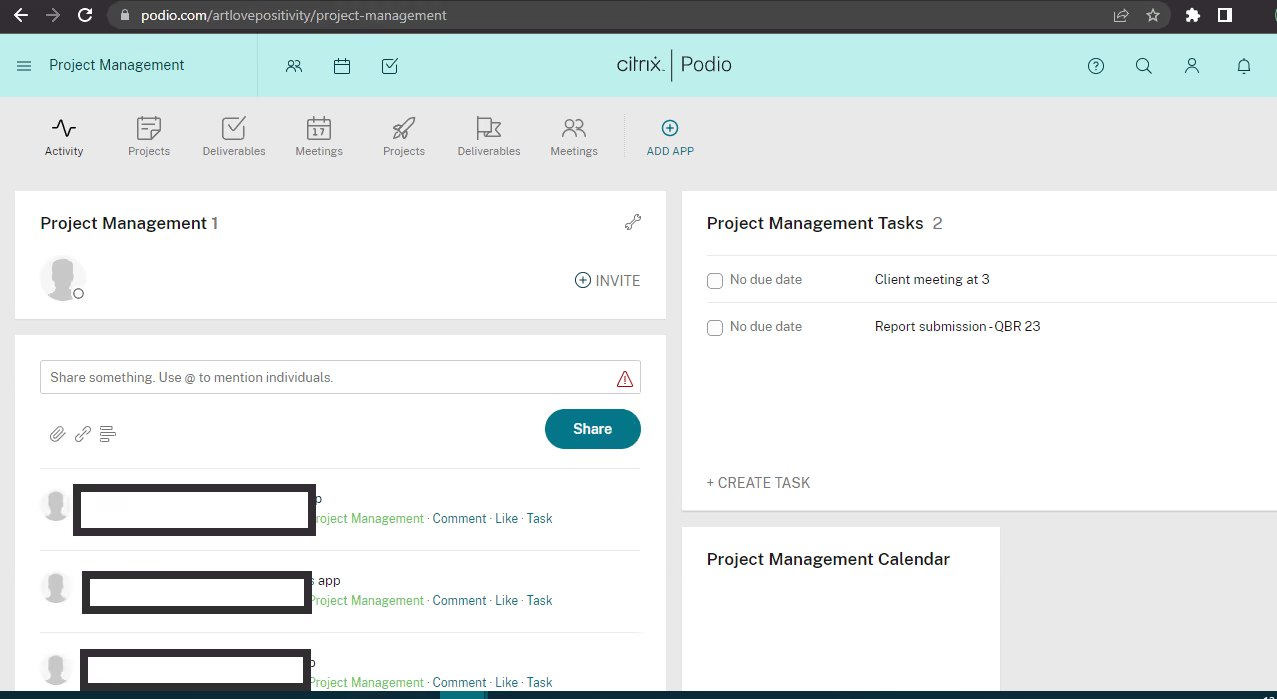
At first glance, Podio seems like a lean, easy-to-use collaboration tool with task management, calendars, and workspaces. However, it has built-in functionality for making apps you can create yourself with no coding necessary. Simply drag and drop elements you want in your app and click “done.” It’s a great way to organize projects, assign work, and access the finished products.

The activity stream, built-in team messaging, and commenting make it easy to see who’s working on what, when it’s due, and encourage conversation and collaboration. Podio offers an intuitive platform, but it does take a while to learn how to create apps and use the platform to its fullest potential.
Some of the biggest names in business use Podio, including Sony, NFL, Volvo, Sotheby’s, and Deloitee.
Podio offers three plans and an option for custom pricing for enterprises:
- Free: Podio’s free plan lets you share the collaboration platform with up to five people. It includes basics, such as task management and workspaces, but you’re limited to 100 items. It’s a good choice for a freelancer or small agency that’s just starting out.
- Plus: On this plan, you pay $11.20 per month, if paid annually, and you get access to most of the features, plus you can create an unlimited number of items. You’ll miss out on reporting functions and sales dashboards, though. This plan is a better pick for small startups that need to collaborate but don’t yet have a full-fledged sales department.
- Premium: For $19.20 per month, if paid annually, you get access to all of Podio’s features, including a power dialer and interactive sales dashboards via Plecto. However, the sales dashboards are only free for the first six months and the ongoing price will be $220 per month to $350 per month (with only 10 licenses included).
In 2022, Podio added a handful of new features, such as the ability to delete chat messages, user restrictions, and the current location feature on the iOS app. As for existing features, the team at Podio has plans to improve visual cues to calculation fields to give you insight into when it was updated and to improve table layouts in 2023, so it’s something you can expect within a few months.
Best For
Businesses with time to devote to customizing workspaces with the apps they need. It’s a good collaboration supplement to integrate with your project management software.

Multiple projects can be grouped under a single workspace, which is a great benefit for senior managers handling large teams. We can communicate with our teams using the same platform as it has great collaborative features such as chat, tagging, and sharing.
Podio offers an app to cover all our project management needs. It also allows us to create an app using existing templates, which is a feature not found elsewhere. The collaboration features make chats feel more like social media interactions rather than work-related communications, thanks to the beautiful UI. Project managers working on separate projects can create different workspaces with various apps and automated features.
We were searching for a Project Management application with automation features, and so far, Podio has met all our business needs such as collaboration, signatures, meetings, and scheduling jobs. The dashboard is quite intuitive, and as a project manager, I don't miss a thing now. I've been using it for more than a year.
There is a lack of documentation and tutorials available online, so you have to rely on webinars hosted by the support team or the help cards provided by the application. The upgrade plans start at $14 per month, which might be expensive for smaller businesses. The setup will likely require assistance from professionals; planning this in-house will be difficult.
We were looking for a project management tool with automation capabilities, and so far, Podio has assisted us with all of our business requirements, including task scheduling, meetings, communication, and signatures. Most other platforms don't offer all these capabilities in one place.
This is an exceptional tool for project managers and significantly reduces turnaround time, but the cost factor might be a hindrance if you are running on a budget.
Podio regularly updates to fix security flaws and bugs. Their template library is also refreshed quite frequently, and we get new app templates based on the current and trending UI designs.
Podio can be a great tool for large businesses.
Solo entrepreneurs and firms with very small teams may not benefit greatly from Podio with respect to the ROI they get paying for the tool.
Zoho Workplace
Zoho Workplace is a cost-effective, comprehensive suite of nine interlinked applications that streamline the way you create, collaborate, and communicate with your team.
PROS
- Unified communication hub for managing emails, calls, chats, calendars, and files.
- Zoho Mail offers customizable email views, options to prioritize new emails and threads.
- Zoho Cliq for instant messaging, calls, and communication audit capabilities.
- Option to mix and match plans per request (yearly subscriptions required).
- Clear pricing with free plan, free trial for the Professional plan, and refund policy.
- Multilingual UI and support.
- Unified communication hub for managing emails, calls, chats, calendars, and files.
- Zoho Mail offers customizable email views, options to prioritize new emails and threads.
- Zoho Cliq for instant messaging, calls, and communication audit capabilities.
- Option to mix and match plans per request (yearly subscriptions required).
- Clear pricing with free plan, free trial for the Professional plan, and refund policy.
- Multilingual UI and support.
CONS
- Free plan limited to 25MB attachments limit.
- Not the best fit for large enterprises.
- Occasional app stability issues reported.
- Free plan limited to 25MB attachments limit.
- Occasional app stability issues reported.
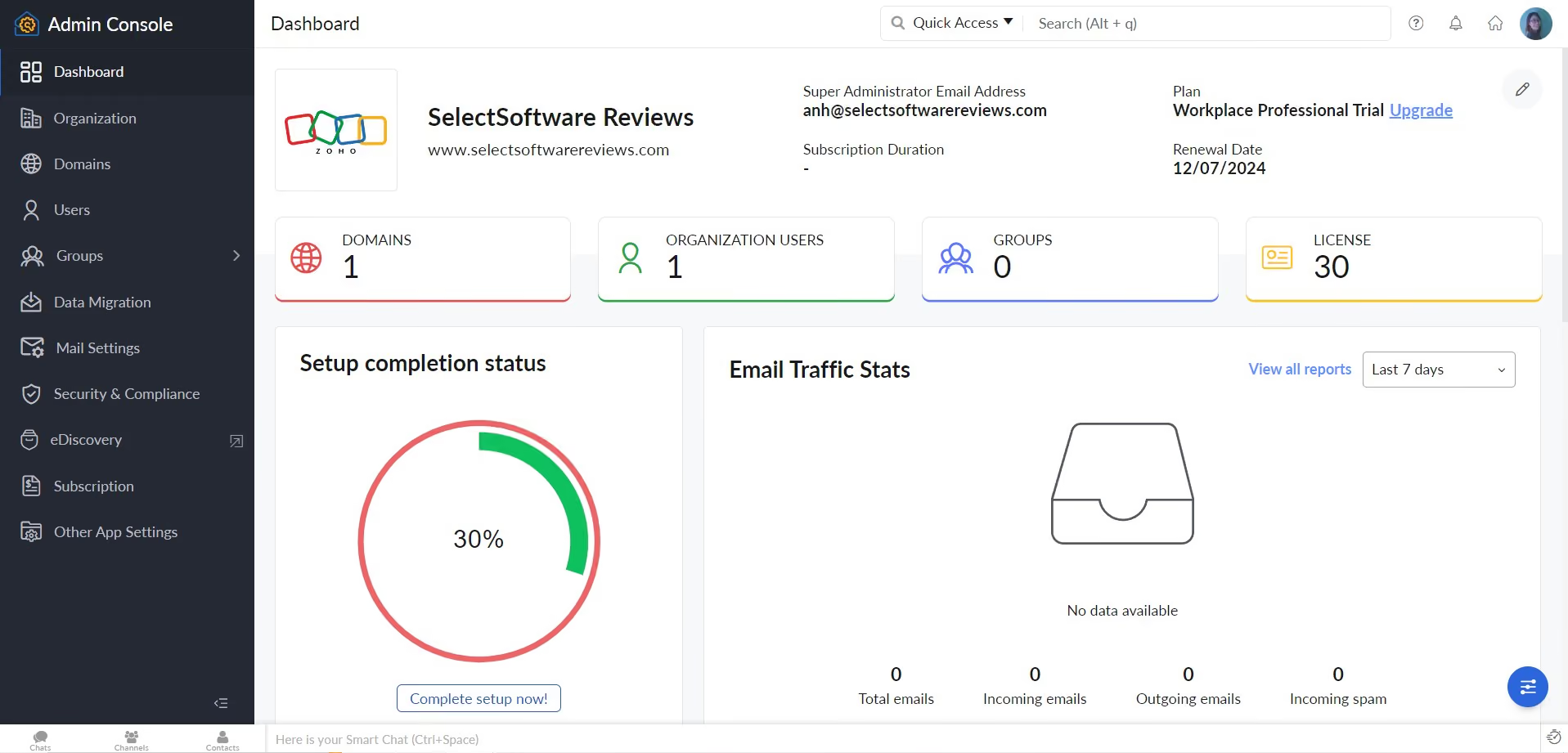
From the very first time we tested Zoho Workplace, we knew ease of use was one of its biggest strengths. This collaboration software has a modern, intuitive design, and a smart consolidated dashboard layout. It’s clean and personalizable and, during our testing, we found that presented data was updated instantly.
We are impressed by the range of features this platform offers. To date, Zoho Workplace comprises nine applications, ranging from email, calendar, and meetings to office suite, work drive, task management, and team chat. What's really impressive is how well these applications are integrated. Once you upload a file in one of the nine apps, for example, Zoho Workplace automatically syncs apps, so you don’t have to bother with manual reuploading.
Compared to popular solutions like Microsoft 365, Google Chat, and Google Workspace, Zoho Workplace has fewer advanced features and less stable apps. However, pricing-wise, this vendor provides comparable foundational tools at a much better rate.
While not advertised on the official site, Zoho Workplace does have a free version you can use after signing up for a free trial. This plan comes with 5 users, each equipped with 5GB of storage, which is not bad at all. The only part we dislike is that it allows for a mere 25MB of attachment storage.
Our biggest disappointment with this platform, though, is its mobile app. Many users have encountered glitches, especially during app log-ins. You should also be aware that Zoho Workplace is designed with SMB users in mind, so it may not be ideal for large enterprises.
300,000+ users from organizations like RiFF Studio, Midas Concept, and Simulation Lab.
Zoho Workplace has three paid plans: Mail only plan, Standard, and Professional, which cost $1, $3, and $6 per user per month billed annually, respectively. The platform also offers a free trial for the Professional plan and a free plan for those who don’t wish to upgrade to one of the platform’s three paid plans post free trial period.
Best For
Small businesses and those on a budget.

I used Zoho Workplace every day to create and share HR documents with the CEO, such as job descriptions, training program plans, and onboarding materials for new hires. After approval, we saved them in the HR section for daily use. I also used it for reports and internal tracking to support HR activities and keep information organized.
The pricing was reasonable, especially for a startup. Zoho Workplace was easy to use and didn't require much training. It helped with reports and keeping information organized.
The startup company I worked for had already purchased Zoho before I joined. I used Zoho Workplace and Zoho Books as part of my HR role for less than a year. My role was an 8-month project to help establish the core HR function.
We used Zoho Workplace and Zoho Books to integrate different parts of the business, making communication, documentation, and basic operations more organized and connected.
Because our sales team also used this tool, Zoho Workplace could feel limited in some advanced features, and the interface was not always as modern or intuitive as other tools. At times, integration between apps required extra steps, which could slow down the workflow.
Zoho Workplace is different because it offers an all-in-one suite at a more affordable price. Compared to competitors like Microsoft 365 or Google Workspace, it is simpler with fewer advanced features.
Ease of use, cost, integrations, scalability, and support are all worth considering before buying.
I don't have enough information on how Zoho Workplace has evolved over time, since I used it a while ago and haven't used it since. From what I've seen, tools like this generally continue to improve over time to better meet user needs.
Zoho Workplace could be very good for small businesses and startups that need a simple, affordable all-in-one tool for emails, docs, storage, communication, and reports.
Zoho Workplace may not be the best choice for mid to large-sized companies or teams that need advanced features and more complex workflows.

Bitrix24
We chose Bitrix24 for its ability to combine chat, project management, document collaboration, and CRM in a single, connected workspace. The platform appeals to businesses trying to avoid app overload by centralizing team tools in a single ecosystem. The redesigned Space+ interface improves usability, and its Messenger-first approach matches how today’s teams naturally begin work.
PROS
- Messaging, tasks, video, docs, and CRM are all in one place.
- Auto-delete, polls, and AI assistant (CoPilot) enhance team comms.
- Dedicated zones to work with external partners or across departments.
- Quick task creation, Gantt/Kanban views, and workload tracking.
- Real-time co-editing, version control, and role-based access.
- Messaging, tasks, video, docs, and CRM are all in one place.
- Auto-delete, polls, and AI assistant (CoPilot) enhance team comms.
- Dedicated zones to work with external partners or across departments.
- Quick task creation, Gantt/Kanban views, and workload tracking.
- Real-time co-editing, version control, and role-based access.
CONS
- Despite redesign, the dashboard can still feel crowded and overwhelming for new users.
- Some users have reported bugs, but support has responded promptly.
- Configuring workflows and settings can be time-consuming.
- Many permissions are limited to super admins, reducing flexibility.
- Despite redesign, the dashboard can still feel crowded and overwhelming for new users.
- Bugs have been reported by some users.
- Configuring workflows and settings can be time-consuming.
- Many permissions are limited to super admins, reducing flexibility.
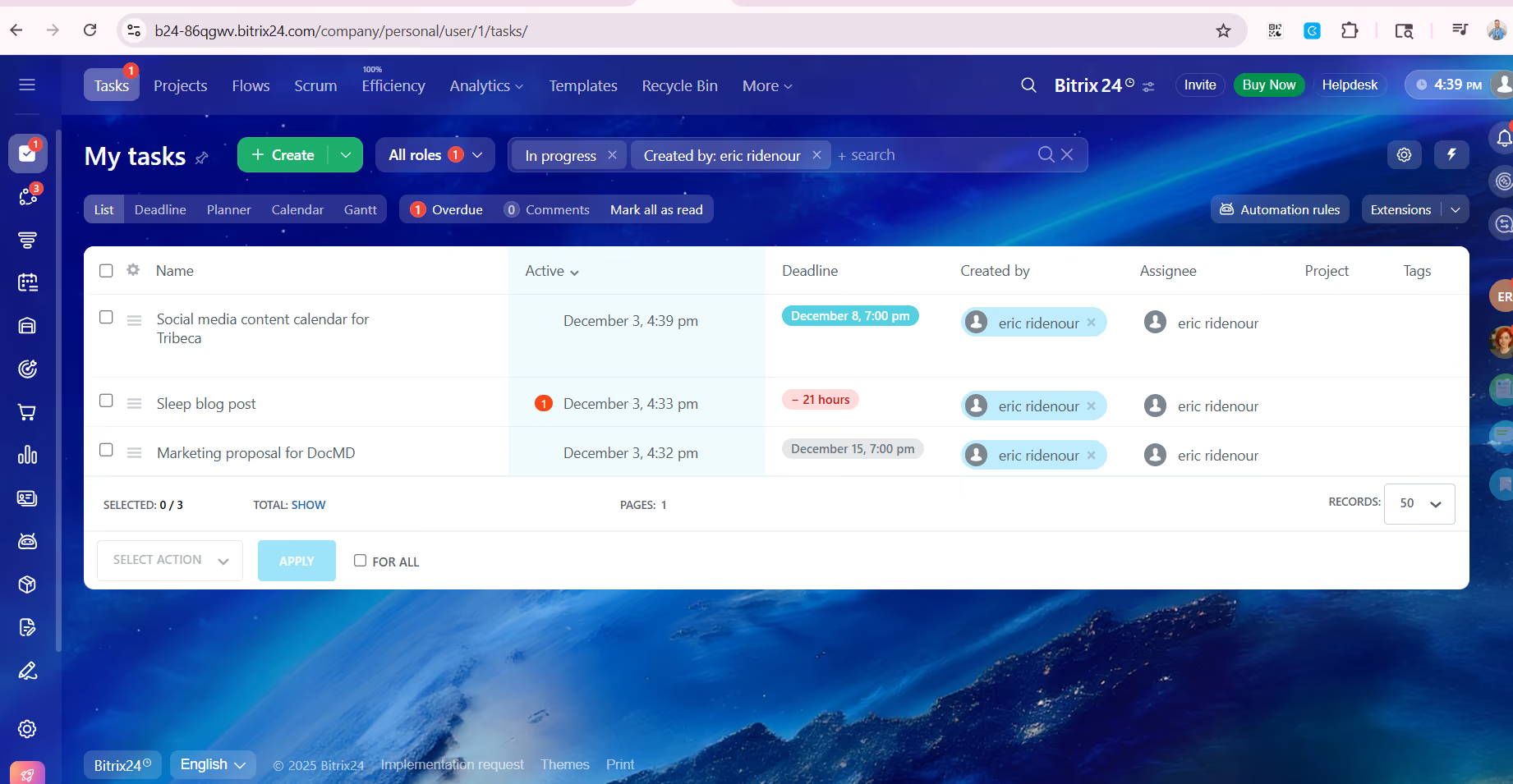
Bitrix24 has evolved into a true digital workspace by combining key collaboration tools that typically require separate platforms. In our demo, we explored the latest version of Bitrix24 and were particularly impressed by how closely integrated its core features have become.
Messenger is now the entry point for most users, and for good reason. It merges chat, tasks, calls, and CoPilot (Bitrix24's AI assistant) into a single screen. Conversations can easily evolve into tasks or meetings, and new hires are automatically added to department chats, streamlining onboarding. Features like polls and auto-deleting messages add utility for day-to-day work and confidential discussions alike.
The Feed acts as an internal social network for streamlined internal communication. It’s where company-wide announcements, file uploads, approvals, and status updates live. While some teams might not use it heavily, we found it useful for maintaining transparency and visibility across distributed departments.
Collabs stood out as one of the most flexible additions. These shared spaces are designed for external collaboration with partners, vendors, or freelancers. Inside a Collab, teams can chat, manage tasks, schedule meetings, and share files without giving full platform access. Calendar permissions, file access, and participant settings can all be adjusted per project or user.
Speaking of calendars, Bitrix24’s Calendar is deeply integrated across the platform. You can view department calendars, sync events from Collabs, and schedule team meetings without leaving the workspace. The ability to check participant availability or offer open slots is particularly helpful when coordinating across time zones.
The platform also includes Online Documents via Bitrix24.Docs. We tested collaborative editing with multiple users and appreciated the real-time updates, comment threads, and version history. Access controls at the file, folder, or drive level ensure the right people are always looped in. Additionally, Boards offer a visual layer, drag-and-drop workspace for task and project tracking. We liked how easily tasks could be created from Messenger or Collabs and added directly to a Board with full visibility.
Still, there’s no escaping the platform’s complexity. Bitrix24’s ambition to do everything means the interface can feel dense and cluttered. Even with the improved Space+ layout, many tools are hidden under layers of menus, making them hard to discover or use intuitively. This complexity can slow down onboarding, especially for users unfamiliar with enterprise collaboration software. In our experience, training or admin setup is essential before teams can take full advantage of the toolset.
Support also presents mixed results. While Bitrix24 offers a robust help center and extensive self-service content, some users we spoke with noted that real-time assistance is available only to account administrators or may be routed through certified Bitrix24 partners. As they shared, this has led to some delays when trying to troubleshoot or reconfigure parts of their workspace.
Used by over 15 million organizations worldwide, including ChoicePoint, PEGASUS, CIVICA, and ANYTIME FITNESS.
Bitrix24 offers five pricing tiers billed annually.
- Free includes unlimited users and core tools like tasks, CRM, and 5 GB storage.
- Basic is $49/month for 5 users with 24 GB storage and adds customer support and an online store.
- Standard at $99/month for 50 users includes marketing tools, online documents, and admin controls.
- Professional is $199/month for 100 users with advanced CRM, automation, HR, and sales intelligence.
- Enterprise starts at $399/month for 250+ users, scaling to 10,000, with 3 TB storage, multi-branch support, and full admin capabilities.
Bitrix24 has made major improvements with its recent release. The new interface is more focused and easier to navigate, with Messenger acting as the central hub where users can immediately chat, assign tasks, or schedule meetings. The layout now groups related tools together, cutting down on clutter.
Several other new features touch on collaboration. Cross-functional teams can now be formed directly in the system, making it easier to pull in contributors from different departments. The addition of Collabs allows companies to securely work with external partners, while the Collab calendar and chat ensure communication stays streamlined. New features like auto-deleting messages and chat-based polls also boost usability and security.
Bitrix24 Messenger now combines chat, video, tasks, and notifications in one window. Departments are automatically synced with channels, and new employees are onboarded into their teams' conversations right away. These updates reflect a clear push to make Bitrix24 more intuitive and collaboration-friendly compared to earlier versions.
Best For
Organizations valuing chat-based work collaboration.

I no longer use Bitrix24, but the main way we used it was for project management. It allowed us to create projects and set stages such as "to do," "in progress," and "completed," and to transfer or assign ownership to others on the team with ease.
I appreciated that we could store customer information, link multiple projects to a single customer, and track potential future jobs. We were also able to send emails directly from the platform and keep a complete communication history in one place. This helped improve organization and transparency across the team.
- I liked being able to expand and add more users without paying for additional seats.
- The complete email and call log was visible to the team without the need to be CC’d or to request updates.
- Email and phone call automation made follow-ups easier.
- The annual pricing discount was helpful, and when I wanted to upgrade, they offered to prorate the difference.
After reviewing and testing several other CRM solutions, Bitrix24 offered most of the features we needed at a reasonable price. It allowed us to grow a team without incurring additional costs for new users.
A large number of tools were accessible even at the entry-level plan. As I added team members, I didn’t have to pay for extra seats, and when we outgrew the free features, the upgrade cost was relatively low.
Before Bitrix24, other tools either lacked necessary functionality or were too expensive. Bitrix24 replaced three tools we had been using, and while it cost slightly more (about $5 per month), it was worth it to have everything centralized in one place.
- Customer service was slow to respond.
- Some features and functions were difficult to figure out without guidance.
- Occasionally, features would change without notice, and by the time an email explanation arrived, the change had already caused disruption.
At the time, it was the only CRM that met nearly all of my needs in one place. Trello, Monday, and similar tools lacked essential features. I was tired of managing multiple tools and dealing with unreliable integrations, which Bitrix24 helped eliminate.
Check the features offered and compare them to your specific needs at the current price point. Since then, specialized tools like Contractor+ have emerged that are better suited to certain industries, so research industry-specific options first.
Think about scalability, where your business will be in 1, 2, or 5 years, and whether the more advanced packages will meet your future requirements.
There have been changes since I used it. But I have noticed that if I need a CRM like Bitrix24 in the future, there are other tools that have made some quality improvements, and new tools have popped up. I wouldn't jump right back into it without researching.
Bitrix24 is great for sales and project management teams.
Bitrix24 isn't ideal for solo operators without a team. Other tools like HubSpot may be better suited for individual users or small-scale task management.
Flock
For team collaboration, Flock stands out by offering a reminder feature that lets you set up reminders for meetings for yourself and others. It also lets you create and manage mailing lists within the software, which is great for announcements or invites to guests and collaborators..
PROS
- Flock’s free plan is fairly generous. There’s no limit to users, messages, or one-on-one video calls
- Not all chat programs offer video conferencing, but Flock’s platform allows for one-on-one video calls and group video chats.
- You can expect standard collaboration tools from Flock, such as direct messaging, channels for specific topic chats, and file sharing. Video calls and voice notes also help you collaborate with teammates. One of the more unique tools Flock offers is built-in polling for getting consensus on topics or issues.
- Another unique tool built into Flock is a reminder setting. You can create a reminder for yourself about anything, such as to make a call, send an email, or finish a project. Also, tag a colleague or employee in the same reminder for meetings or video conferences, for example.
- Some plans allow you to set authentication requirements, such as SSO, or you can create a whitelist. You can also automate data backup and set permissions for who can create channels, invite guests, or send messages.
- Flock’s free plan is fairly generous. There’s no limit to users, messages, or one-on-one video calls
- Not all chat programs offer video conferencing, but Flock’s platform allows for one-on-one video calls and group video chats.
- You can expect standard collaboration tools from Flock, such as direct messaging, channels for specific topic chats, and file sharing. Video calls and voice notes also help you collaborate with teammates. One of the more unique tools Flock offers is built-in polling for getting consensus on topics or issues.
- Another unique tool built into Flock is a reminder setting. You can create a reminder for yourself about anything, such as to make a call, send an email, or finish a project. Also, tag a colleague or employee in the same reminder for meetings or video conferences, for example.
- Some plans allow you to set authentication requirements, such as SSO, or you can create a whitelist. You can also automate data backup and set permissions for who can create channels, invite guests, or send messages.
CONS
- If you’re familiar with Flock’s more popular competitors among team chat apps, you may find Flock hard to use at first. The interface isn’t instantly intuitive, so it may take a while to get used to the layout of tools.
- The free plan only lets you search up to 10,000 messages, which seems generous, but messages add up quickly.
- Flock lets you customize, search messages, and set your notifications in a few different ways, but it misses the mark when it comes to more advanced features. You can’t customize notifications much and there aren’t advanced filters for searches.
- If you’re familiar with Flock’s more popular competitors, you may find Flock hard to use at first. The interface isn’t instantly intuitive, so it may take a while to get used to the layout of tools.
- The free plan only lets you search up to 10,000 messages, which seems generous, but messages add up quickly.
- Flock lets you customize, search messages, and set your notifications in a few different ways, but it misses the mark when it comes to more advanced features. You can’t customize notifications much and there aren’t advanced filters for searches.
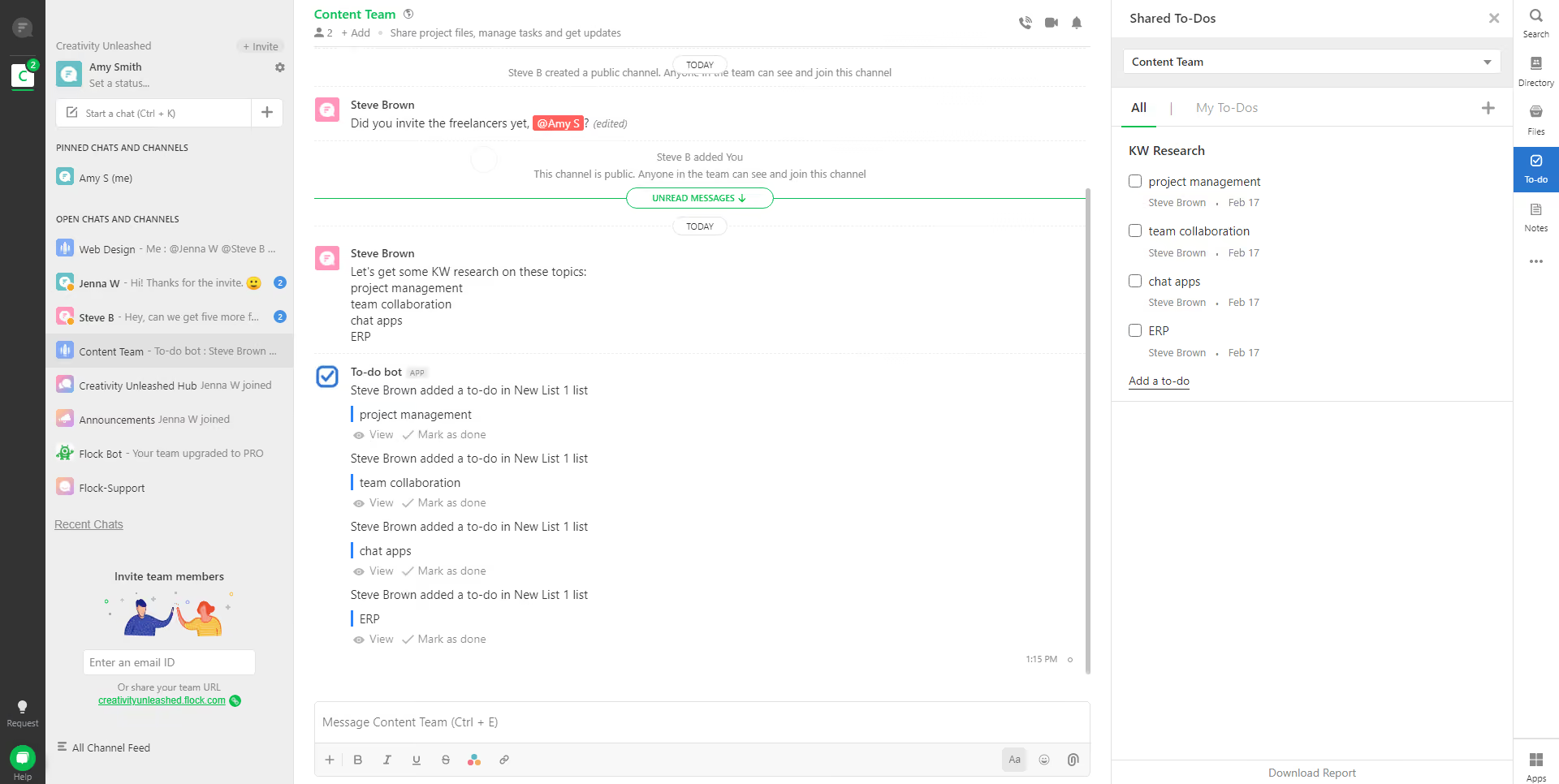
Flock is mostly a remote office chat application and team communication app with team collaboration tools. Send different types of messages, including one-on-one and group messages; create public and private channels; and set up minor projects in a channel. The to-do lists, polls, and reminders (that you can set up for yourself and others) combine to make Flock a great communication and work operating system.
Although Flock doesn’t include full-fledged project management features, it lets you store and share files with one or several people within the app. And like other collaboration software, Flock lets you integrate more than 50 other apps to add more functionality to the platform.
There are several big companies that use Flock for remote collaboration, including McDonald’s, Namecheap, Web.com, and Britannia.
There are three plans available from Flock:
- Free: The free plan from Flock is suitable for a small team that needs a simple chat app or messaging app. You get unlimited one-on-one and group chats, 10 public channels, and one-on-one video calls. Storage is limited to 5 GB overall, and you can only search up to 10,000 messages.
- Pro: When your business grows (20+ people) or you need more resources, you may want to upgrade to this plan that costs $4.50 per user, per month. Storage is increased to 10 GB per user and you get group video calls. Plus, there are no limits on your searchable messages.
- Enterprise: If your company is much larger, you may want to consider Flock’s Enterprise plan. All users get 20 GB of storage, single sign-on (SSO) is available, and you’ll get dedicated support. Contact Flock for a custom quote.
Flock provides updates to its app at least a couple times a year, and more if needed. Most updates have been devoted to bug fixes and optimization of features rather than release of new features. In 2021, Flock fixed multiple issues related to the interface, such as drag-and-drop sorting, management of notifications, and message interactions. In 2022, there were only two updates for bug fixes and optimization. Flock’s support team doesn’t go into detail in release notes about what issues they fixed.
Best For
Remote, distributed teams.
Slack
Slack sets itself apart from other team collaboration software by being fun to use, highly accessible for people with different audio and visual abilities, and for its numerous integration options.
PROS
- Slack offers a generous free plan with unlimited users, messages, and 10 integrations.
- The interface is immediately familiar to anyone who’s used a chat room.
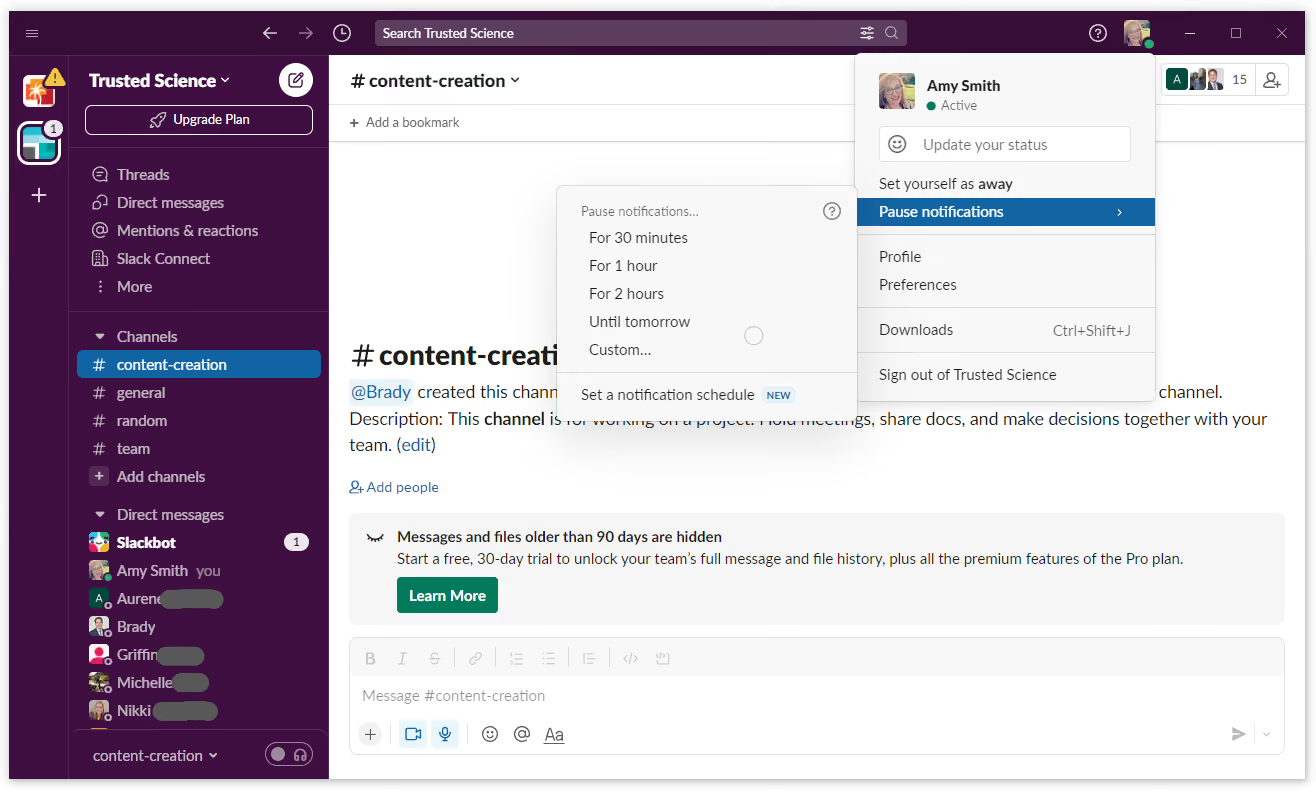
- Paid users can create various customizations, personalize the sidebar and notification preferences, and schedule notifications to minimize disruption.
- The advanced search filters allow users to quickly find the info they need.
- The recently launched Canvases feature allows users to store various documents within Slack, at arm’s reach.
- It has audio clips with automatic transcribing, dark mode, and an option to adjust text size.
- Lots of emojis and gifs. Users can even create custom emojis for their Slack workspace.
- Integrates with 2,500+ apps.
- Slack offers a lot for a free plan, including unlimited users and messages. You get 10 integrations on the free plan, which may be enough for freelancers or small businesses.
- Of all the team collaboration software options available, Slack is one of the easiest to learn and use. The interface is immediately familiar for anyone who’s used a chat room. You can easily access channels, direct messages, and figure out how to use all the tools because of the simple interface.
- On paid plans, you can customize your sidebar to include only what you want to see. You can customize your notifications and set up a notification schedule to minimize disruption.
- Slack makes it easy to find a specific message, file, or comment in a channel with advanced search filters. Rather than scroll through endless results pages, you can narrow your search focus to pinpoint what you need.
- Audio clips are a convenient way to get a message to someone, but Slack made sure to include automatic transcribing for better accessibility. There’s also a dark mode to make it easier to read text and you can adjust text size with a zoom function.
- Slack is known for providing a fun atmosphere for work through a variety of emojis and gifs (just paste a link into a channel or message). You can even create custom emojis for your Slack workspace.
CONS
- Can be a distraction from work.
- Free plan users won’t be able to access messages and files 90 days old or older.
- Can be laggy sometimes.
- Slack has a bad reputation for being distracting. There is a way to minimize the number of notifications you get, but even without active notifications, it can still be a distraction from work.
- Paid plan users don’t have to worry about decaying message history, but if you’re on the free plan, messages and files disappear after 90 days.
- Slack sometimes gets laggy or even freezes before restarting. Notifications aren’t all that reliable at times, too.
- Collaboration in Slack comes down to messaging, specific channel group chats, video conferencing, and file sharing. There is no way to work on documents or files with others in real time.
Slack is among the best team communication apps and most popular tools for business communication for numerous reasons. The most obvious one is its extensive integration list and easy-to-use communication features.
Slack supports more than 2,500 apps. Its integration ecosystem provides users with simplicity and versatility. As users, we can rest assured that our current apps will likely connect seamlessly with Slack.
We appreciate the inclusiveness and user-friendly nature of Slack's communication features. Users can send private messages, create group chats, and utilize dedicated channels for teams, topics, or custom categories. Sharing files, making announcements, and conducting audio or video calls are seamless, providing a comprehensive communication platform.
The search feature stands out, enabling users to retrieve important messages and essential information quickly. While free plan users can still utilize the search tool, their chat history only includes conversations from the past 90 days.
They offer four plans, and many of the users we interviewed said they started with Slack's free plan and upgraded as their team grew.
The platform can adjust integrations, support, and storage to fit its customers’ teams. However, depending on the integrations also means that it’s your responsibility to vet vendors, pay them, and sync them with Slack, which may not be ideal for teams looking for an all-inclusive suite with everything in-house.
Slack is well known among most of the corporate world, so it’s no surprise that it’s used by companies such as Uber, Target, Netflix, Expedia, and the U.S. Department of Veteran Affairs.
Slack offers four pricing plans:
- Free: unlimited users, 10 integrations, one workspace, and limited to one-on-one messages and video chats.
- Pro: costs $7.25 per person per month (billed annually) with unlimited access to message history and integrations.
- Business+: costs $15 per user per month (billed annually) and includes Pro features, plus single sign-on, channel posting permissions for all channels, and 24/7 support.
- Enterprise Grid: has a custom quote. Features include priority support, HIPAA compliance, and unlimited workspaces.
Slack makes improvements to the platform often. More than anything at this late stage in the game, Slack makes small quality-of-life tweaks and bug fixes. You can expect updates to Slack once or so per month, or as needed.
In 2022, Slack fixed an issue with notifications causing the app to stop responding and pushing through anyway, regardless of you turning them off at the system level. Slack devs also added the most common file extensions, so you don’t have to confirm each time you open a file. The team also made it easier to see YouTube videos when linked in Slack — you can view them in full screen mode now.
Best For
Growing businesses.

I use Slack to communicate with my team members. I also use it to "huddle" with individuals in my organization. As a communicator in HR, I utilize various channels of Slack to motivate our team around various initiatives. I also use external Slack channels to find resources to support my job. I love searching channels to see what resources I can find or if a topic that has been discussed before can be useful for a project I’m working on.
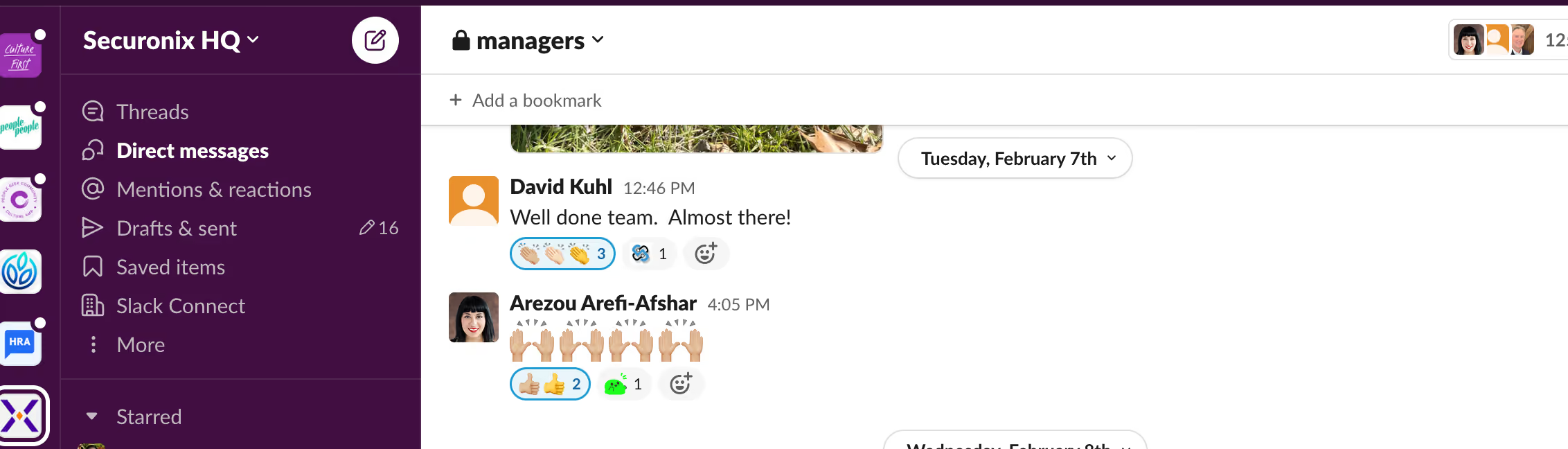
I love the channel feature in Slack - recently, I created a manager channel where I can communicate with our managers and it has been a huge hit. I love that Slack lets you create your own emojis, it can really help with engagement branding. I also like that Slack can be external and you can meet other individuals going through similar challenges.
I am not sure why our organization purchased Slack specifically. The tool has been here since I started with the company a little over 2 years ago. I believe we were trying to create cross-collaboration. It provides benefits to quickly collaborate, connect and call one another. I have personally used Slack for over 2 years.
Sometimes I am not sure who can view my messages, I wish that was a bit more clear. The at here feature can be difficult to understand who will receive the notification. I also sometimes fear my huddle is still on when I already hung up. I also wish slack was more easily integrated into my calendar and I didn’t manually have to update my status, but that’s probably something I could figure out on the back end or perhaps not something my organization currently leverages.
Slack is so much better than say, MS Teams. I used to use MS Teams and it was clunky and frustrating to use. I feel like it has a much better user experience and is more fun - especially with the little auto notes the tool sends.
Consider your culture, if "fun" is a part of it, Slack is for you. Consider what you are trying to accomplish - if collaboration is important, it's a great tool for that. I would also mention slack isn’t a replacement for Zoom. It has great functionality to huddle, but I think zoom has better functionality for setting up meetings. I would get slack for employee communication and last-minute meet-ups.
The emoji feature has been pretty cool - and huddle has changed the game, too, in my opinion. Both functionalities make it easy to use and make connection easier.
Large or mid-size orgs.
Smaller orgs might not benefit quite as much just because you might not need as many channels, but it could still be a good resource
Other Comms Apps Worth Considering
- Podio — Flexible work platform with communication built around custom workflows
- Wrike — Work management tool with solid communication and reporting features
- Trello — Visual project boards with lightweight communication capabilities
- Asana — Task management tool with structured team communication features
- Teamwork — Project management with built-in client communication tools
- ProofHub — Project communication tool for marketing and creative teams
Benefits and Drawbacks of Team Comms Apps
Benefits of team communication apps include faster information sharing, stronger remote collaboration, and a meaningful lift in day-to-day employee satisfaction.
- Faster communication and fewer bottlenecks: A good communication app gives your team a shared space to ask questions, share updates, and make decisions without waiting for the next meeting or digging through email threads. For cross-functional and remote teams especially, that accessibility removes friction that would otherwise slow work down across time zones and locations.
- Stronger collaboration across teams: Direct messaging, group channels, threaded conversations, and video calls give teams multiple ways to communicate depending on the context. The ability to search communication history is also underrated — being able to find a decision made three months ago in thirty seconds is something email simply cannot match.
- Lighter project coordination: While communication apps are not a replacement for dedicated project management software, features like shared boards, to-do lists, and status updates can handle basic coordination without requiring a separate tool. For smaller teams or simpler workflows, that built-in layer is often enough.
- Better employee experience: Outdated or fragmented communication channels frustrate employees and quietly erode team culture. Investing in a tool that makes it easier to reach colleagues, share knowledge, and stay informed has a measurable impact on satisfaction — particularly for remote and hybrid teams where informal communication does not happen naturally.
Potential drawbacks include notification overload, adoption challenges, and the risk of buying more than you need.
- Notification fatigue: The same features that make communication apps powerful can make them exhausting. Without clear norms around channel use, response expectations, and notification settings, these tools can create more interruptions than they eliminate. The platform will not fix this on its own — it requires deliberate team habits built around it.
- Uneven adoption: A communication app is only effective if everyone uses it consistently. Partial adoption — where some teams are active and others are not — creates information silos that are often worse than the problem the tool was meant to solve. Factor in change management time when evaluating any new platform.
- Overbuying on features: Many communication platforms bundle advanced capabilities like scrum boards, risk management, and CRM integrations that are genuinely useful for some teams and completely irrelevant for others. Before committing to an annual contract, test the product thoroughly against your actual workflows rather than the feature list on the vendor's website.
Team Communication Tool Pricing
When it comes to team communication app pricing, four factors tend to drive what you will actually pay: the number of users on your team, the features and integrations you need, the level of security and admin controls required, and whether you are on an annual or monthly contract.
Below are the estimated annual costs broken down by business size:
- Small teams (fewer than 50 employees): $500 to $3,000 per year. Free tiers from Slack, Zoho Workplace, Flock, and Connecteam cover the essentials for very small teams, while paid plans from Monday and Miro sit at the accessible end of the paid range.
- Mid-sized teams (50 to 250 employees): $3,000 to $15,000 per year. Platforms like Slack, Bitrix24, and Monday tend to deliver the best return at this size, particularly for teams that need strong integrations alongside core communication features.
- Large teams (250 to 1,000 employees): $15,000 to $50,000 per year. At this scale, enterprise-grade security, admin controls, and SSO support become the primary buying criteria rather than features alone.
- Enterprise (1,000+ employees): $50,000 and above, with pricing almost always negotiated directly with the vendor based on headcount, contract length, and customization requirements.
Most tools on this list follow a per-user per-month model, typically ranging from $4.50 for Flock's Pro plan to $24.99 for Asana's Business tier. Flat-rate plans like Bitrix24 and ProofHub are worth considering for larger teams since costs do not scale with headcount (ProofHub's Ultimate Control plan at $89 per month covers unlimited users, which is hard to beat at volume). Free plans are available from most tools we reviewed, including Slack, Jira, Monday, Asana, Trello, and Miro, though most cap storage, integrations, or team size at the free tier.
If you are a small business looking to keep costs down, these free team communication app options are worth considering before committing to a paid plan.
Key Features of Corporate Comms Apps
Team communication apps vary widely in feature depth, but the strongest platforms tend to excel across messaging, voice and video calls, file sharing, task management, notifications, user permissions, third-party integrations, and solid mobile access.
- Messaging and Channels: Organized messaging is the foundation every other feature is built on. The best platforms separate direct messages, group channels, and threaded replies so conversations stay focused and searchable rather than collapsing into a single noisy feed. Slack is the benchmark here, but tools like Flock and Bitrix24 handle channel-based messaging well at a fraction of the cost.
- Voice and Video Calls: Built-in calling removes the need to jump between tools every time a conversation needs to move off text. We looked for platforms that support one-on-one calls, group meetings, and screen sharing natively without routing you to a separate app. That said, teams with heavy video meeting needs will likely still want a dedicated conferencing tool alongside their communication app.
- File Sharing and Document Management: The ability to share and store files directly within conversations sounds basic, but implementation quality varies significantly across platforms. The best tools integrate with Google Drive, Dropbox, and OneDrive so files stay organized and findable long after the conversation that shared them has scrolled out of view. Without that integration layer, file sharing quickly becomes a graveyard of attachments nobody can locate.
- Task Management: Most communication apps now include task creation and assignment features, which reduce the friction between a conversation and the follow-through it requires. This is not a replacement for a dedicated project management tool like Asana or Jira, but for teams with straightforward workflows it can eliminate the need for a second platform entirely.
- Notifications and Reminders: Notification management is one of the most underrated features in this category and one of the most consequential for day-to-day team experience. The best platforms give users granular control over what they get notified for, by channel, keyword, time of day, and device. A tool that cannot be tuned this way tends to get muted entirely, which defeats the purpose of using it.
- User Administration and Permissions: As soon as a team includes freelancers, clients, or external vendors alongside full-time employees, access controls become essential. We prioritized platforms with role-based permissions, guest access, and user groups that make it straightforward to give the right people the right level of visibility without exposing sensitive information to everyone in the workspace.
- Third-Party Integrations: A communication app lives or dies by how well it connects to the rest of your stack. Native integrations with email, calendars, project management platforms, and CRMs are preferable to third-party connectors, which add cost and introduce points of failure. Slack leads the market here with thousands of native integrations, but platforms like Monday.com and Bitrix24 cover the most common connections well. An open API is worth prioritizing if your stack includes less common tools.
- Mobile Access: For frontline, deskless, and remote teams, mobile is a primary use case. All platforms on this list offer iOS and Android apps, but quality varies enough that we tested mobile performance specifically during our evaluation. Connecteam stood out for mobile-first design, while several other platforms (whom we disqualified) offered apps that felt like afterthoughts compared to their desktop experience.
How to Vet Team Communication Apps Before You Buy
Before you commit to a team communication app, make sure you have tested the mobile experience for frontline or remote users, confirmed that your most-used integrations work natively, looped in both IT for security and permissions requirements and everyday users for adoption fit, and stress-tested pricing at your current headcount and where you expect to be in twelve months.
- Know what you need before the demo. Map out the communication workflows your team relies on most before sitting down with any vendor. How are channels structured? How do remote and in-office employees stay in sync? Ask the vendor to demonstrate each workflow using a realistic scenario from your own team. This keeps the session grounded in your reality rather than the vendor's highlight reel.
- Ask to see what your employees will actually see. Most vendors open demos from the admin dashboard. Push past it. Ask them to walk you through onboarding a new team member, setting up notification preferences, and joining a channel from a mobile device. If those basic workflows feel clunky in a demo, they will feel worse in daily use.
- Test your integrations. Most tools on this list offer free plans or trials, which means there is no good reason to take a vendor's integration list at face value. Connect the tool to the apps your team actually uses, your calendar, your project management platform, your HR software, and verify that data flows cleanly without a third-party connector adding cost and complexity.
- Push on AI and automation claims. Most communication platforms now market AI features prominently. Ask specifically what the AI does, what data it draws on, and whether it has measurable impact on real team workflows. Vague answers here are a signal worth taking seriously.
- Clarify pricing at your current size and beyond. Per-user models like Slack and Asana are affordable for small teams but can become expensive as headcount grows. Flat-rate plans like Bitrix24 and ProofHub become more cost-effective at higher volumes. Run the numbers at your current size and at double it, and confirm whether any minimum commitment thresholds apply to the plan tier you are considering.
- Loop in IT and frontline users, not just managers. IT needs to verify that security requirements, SSO support, and admin controls meet your organization's standards. Frontline and deskless employees need to confirm the mobile experience works for how they operate day to day. A communication app that leadership loves but frontline teams abandon solves nothing.
Getting Started with Your Team Communication App
Most tools on this list are cloud-based and take minutes to set up technically. The harder part is adoption. Here is what successful rollouts tend to have in common:
Define your channel structure before you invite anyone. Teams that launch without agreed conventions for how channels are named, what belongs in each one, and when to use direct messages versus group channels end up with a cluttered workspace that people quietly stop using within weeks.
Start with a pilot group before a company-wide rollout. Pick a team that communicates frequently and represents a mix of technical and non-technical users. Their feedback will surface friction points that no demo ever revealed, and their buy-in makes broader adoption significantly easier to achieve.
Set notification norms on day one. Notification overload is the most common reason communication apps fail to stick. Agree as a team on expected response times, which channels warrant urgent attention, and how to use status settings so colleagues know when someone is unavailable.
For frontline or deskless teams, mobile onboarding deserves its own plan. Connecteam and Flock both offer strong mobile-first experiences, but even the best mobile app requires clear guidance on how field employees are expected to use it alongside their existing workflows.
Team Communication Tool FAQs
What is team communication software?
Team communication app is a shared digital space for your team to message, meet, and share files organized by channel or topic rather than cluttered email threads. The best platforms handle both real-time and async communication so teams stay aligned regardless of location or time zone.
What should I look for in a team communication app?
Five things matter most are:
- Ease of use for both admins and everyday users
- Mobile experience for remote or frontline employees
- Native integrations with your existing tools
- Notification controls that prevent constant interruption
- Pricing that stays manageable as your team grows
What is the difference between a communication app and a project management tool?
Communication apps center on messaging, calls, and file sharing. Project management tools center on tasks, timelines, and deliverables. Several tools on this list, including Monday, Jira, and Asana, cover both which are useful for reducing tool sprawl, but only if the communication features are strong enough to replace a dedicated messaging platform.
What is the best free team communication app?
Strong free options include:
- Miro: Unlimited users, three boards
- Flock: Unlimited messaging, up to 20 users
- Podio: Up to five users, basic task management
- Slack: Unlimited users, 90-day message history cap
- Trello: Unlimited users and cards, up to ten boards
- Teamwork: Up to five users
- Jira: Up to ten users
- Asana: Up to fifteen users
- Wrike: Unlimited users, limited active tasks
- Monday: Up to two users
What is the best team communication app for small businesses?
- General messaging and integrations: Slack
- Best value paid plan: Flock at $4.50 per user per month
- Budget-conscious teams using Zoho products: Zoho Workplace from $1 per user per month
- Frontline or deskless teams: Connecteam free for up to ten users
Are team communication apps secure enough for sensitive business data?
Most enterprise-grade tools on this list offer end-to-end encryption, SOC2 compliance, SSO, and role-based access controls. Proton is the strongest option for teams with strict privacy requirements. For healthcare, legal, or financial services organizations, confirm HIPAA or relevant regulatory compliance directly with the vendor before committing.
How long does it take to implement a team communication app?
Technically, under an hour for most cloud-based platforms. The harder challenge is adoption. Defining channel structure, notification norms, and usage expectations before launch leads to significantly faster and more consistent adoption.
Why You Should Trust Us
Huda Idris is the original researcher and author of this guide. Drawing on a master’s in Communications and over a decade of experience in workplace productivity, she evaluates platforms based on their capacity to improve team decision-making, streamline interactions, and enhance overall workflow.
The guide is now managed by Anh Nguyen, a senior HR tech researcher. Anh contributes practical, direct insights from her professional background in a hybrid tech recruitment agency and a remote software firm. Her daily use of these platforms as core infrastructure informs her rigorous evaluation of new market entrants and periodic vendor reassessments.
Two additional experts provide critical perspectives on purchasing and implementation:
- Laura Duane has directed numerous acquisitions of team communication software, navigating diverse organizational requirements and constraints to deploy effective solutions.
- Hibben Rothschild, founder of foundHR and fractional Head of People, offers specialized knowledge on how these platforms perform and scale across various corporate cultures and team structures.
This guide has been continuously refined since 2021 by analyzing new market entries and re-evaluating established software to ensure every recommendation remains aligned with our inclusion criteria.
Our findings are based on the direct testing of more than 40 team communication tools. Each solution listed here has completed at least one full evaluation, and most have undergone several rounds of comprehensive reassessment.
Independence is central to the SSR editorial process. We operate without vendor influence and strictly prohibit pay-to-play arrangements; software only receives our recommendation by proving its quality during testing.
About the Author


About Us

- Our goal at SSR is to help HR and recruiting teams to find and buy the right software for their needs.
- Our site is free to use as some vendors will pay us for web traffic.
- SSR lists all companies we feel are top vendors - not just those who pay us - in our comprehensive directories full of the advice needed to make the right purchase decision for your HR team.


