

10 Best Free HR Software for Startups & Small Businesses - 2026
Tested and compared 10 free HR software tools for small businesses with hands-on reviews, pricing breakdowns, and expert input to help you choose the right fit.








The best HR management software can be an efficiency booster for your company's day-to-day operations, whether it's for onboarding, payroll management, benefits administration, or time-off requests. Even better, they don't have to cost you anything.
We've thoroughly researched and compiled a list of the best free HR software, each of which offers either a free trial or a perpetual free plan highly suitable for most startups and small businesses.
This guide is the result of hands-on product testing, structured expert evaluation, and verified practitioner input. Following our editorial guidelines, we used a structured software assessment process that gathers and analyzes key product insights, including our own testing results and verified user feedback.
We evaluated more than 30 tools before arriving at the current list, scoring each across five criteria: payroll processing, recruitment and onboarding, performance reviews, employee management, and time-off management. Our real-world experience shows the first three matter most to teams actively seeking free HR software, so they carried the most weight in our rankings.
- Payroll Processing: Payroll is typically the first process growing teams need to automate. We assessed each tool's integration partners to evaluate compatibility with common HR software, such as timekeeping and attendance tools, compiled user feedback, and examined each platform's flexibility across payment types.
- Recruitment and Onboarding: Critical for growing companies, this feature was evaluated through expert consultation, integration testing against common HRIS, and employee experience simulations run by our user research team.
- Performance Reviews: Often underestimated by growing businesses, performance management was assessed by our HR experts on a pass/fail basis across goal setting, analytics and reporting, feedback and coaching, and overall UX/UI.
The following experts contributed directly to this process:
- Anh Nguyen, HR Tech Researcher and Editor, SelectSoftware Reviews (SSR): Anh has spent five years evaluating HR tech solutions at SSR. For this guide, she has directly tested Zoho People, Homebase, Monday.com, Deel, and Connecteam across review cycles since 2025, documenting hands-on observations that inform the detailed reviews of these tools. Her analysis has been cited by ERE Media, SmartRecruiters, and Recruiting Daily, among other industry publications.
- Karolina Kijowska, Head of People & Culture, PhotoAiD: With 11 years in HR and recruitment, Karolina has firsthand experience selecting and implementing HRMS tools for a fast-growing tech startup. She reviewed this guide to ensure the assessments reflect how free HR software actually performs for teams moving beyond spreadsheets for the first time.
- Shirley Borg, Head of HR, EnergyCasino: Shirley manages HR for 80+ employees at EnergyCasino and holds the HR Quality Mark from the Foundation for Human Resources Development (FHRD). She reviewed this guide from the perspective of an HR leader who needs free tools that are not just functional today but credible enough to build on as the team scales.
- Ryan Faber, SaaS Founder and Small Business Owner: Ryan has founded, scaled, and exited multiple software companies. He reviewed this guide as a small business owner who has navigated HR tooling decisions firsthand, bringing a founder's lens to the question of which free solutions genuinely serve resource-constrained teams.


Homebase

Homebase was built to manage hourly workers and keep track of their work. They're also used for hiring, onboarding, HR & compliance, health & safety checks, and labor cost controls.
PROS
- Separate dashboards for managers and employees
- Real-time communication features allow for schedule changes on the move
- Requesting and approving paid time off is easy
- Great scheduling templates help managers streamline work
- Separate dashboards for managers and employees
- Real-time communication features allow for schedule changes on the move
- Requesting and approving paid time off is easy
- Great scheduling templates help managers streamline work
CONS
- Limited third-party integration support
- Additional features are somewhat expensive
- Limited third-party integration support
- Additional features are somewhat expensive
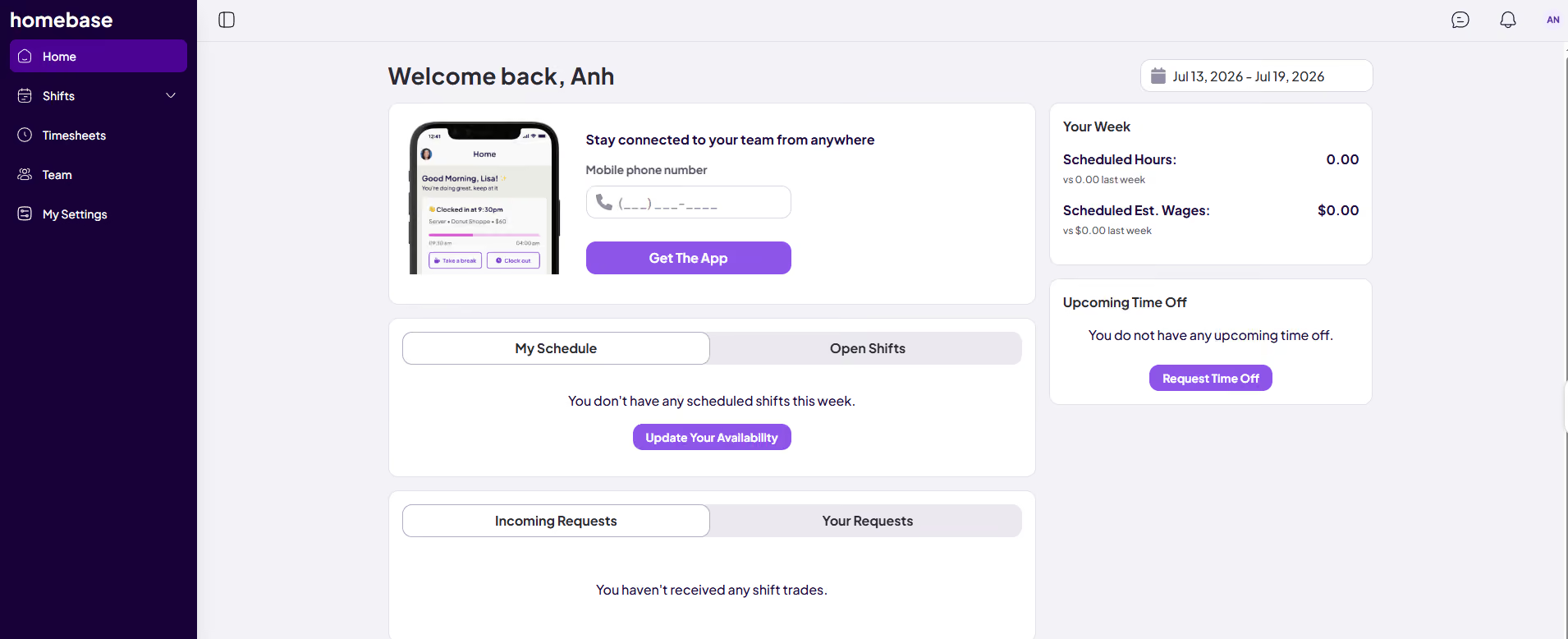
This is a comprehensive HR tool that specializes in hourly work. While their time tracking tools are quite refined, their free version also offers team messaging, an app for employees, a hiring tool, and integrations with POS & payroll software. Their basic plan is free for unlimited employees, as long as the team is limited to one location.
PokPok Restaurants, D'Amore's Pizza, Stella Taco, Blush Tea & Coffee, Legacy Farms
Homebase’s Basic plan is free for 1 location and up to 10 employees. The HR platform also offers a free 14-day trial across its paid plans.
Homebase’s recent product releases have been focused on moving the platform toward a semi-automated HR operations solution for hourly teams. Particularly, the company has rolled out an AI Hiring Assistant that can generate job descriptions, screen candidates through AI-led interviews, and pre-schedule interviews with top applicants. On the operations side, a Scheduling Assistant now builds and optimizes schedules automatically based on availability, work history, and time-off data, with conflict resolution handled in a few clicks.

Best For
Small businesses with hourly, shift-based teams at a single location.


You can use it on a website or an app. Overall, it is the same technique on the website or app. You sign into your company schedule and find your name. Once you find your name, you can click on start shift. When you want to take a break, there is an option for that too. Then you can log back in to end your shift.

It makes it easy to sign in anywhere. It is easy to track how many hours you worked. It is easy to guide through the website/app.
I used Homebase for about 3 years. One of the main reasons our company bought Homebase was because everyone kept forgetting to clock-in through a machine at work so our company wanted to make clock-ins more convenient. I liked it when we transitioned to it, we were able to clock-in whether we were in office or remote. It helped track everyone's work time accurately. It also sent in our hours to payroll according to the scheduled pay time.
Sometimes people still forget to clock in with the app. When I used it about 2 years ago, I wish it sent us notifications to remind us to clock-in or out. The platform does go down sometimes.
I like Homebase because it is made for everyone to use. It is extremely easy to navigate Homebase.
I have more pros than cons for Homebase. I highly suggest the platform. It is organized and easy to navigate.
It is easier for managers or bosses to manage employee hours through the dashboard. It has more visibility on who is on time and who is late.
Medical offices, small organizations, remote workers
Huge corporate offices with over 200+ employees
Monday.com
Monday.com offers customizable templates, automations, and a user-friendly interface for streamlining HR workflows and employee management. While not a complete HR solution, its flexibility and collaboration features make it a valuable tool for HR teams looking to optimize their processes.
PROS
- Monday.com is highly customizable with automations that enable HR professionals to tailor the tool to their specific needs.
- There are already over 200 pre-built templates you can use right away for different processes.
- The free plan offers a range of beneficial features, such as unlimited documents, up to 3 boards, and access to the pre-designed templates mentioned above.
- Free plan available, and affordable, scalable plans for small to midsize businesses
- Easy to learn and use
- Customizable dashboard
- Collaborative document creation with the ability to turn content in docs into tasks in projects with a few clicks
- Gamified progress tracking with visual celebrations for users
- Workflow automation for repetitive tasks
- Built-in communication tools reduce reliance on email
- Customized forms for in-house or client use that can be easily turned into projects
CONS
- Since it is not a purpose-built HR system, users must invest additional effort to customize it to suit their HR needs.
- Requires a plan upgrade to access all the integrations and automation capabilities.
- 3+ users are required to get on any of the paid plans
- Limited storage on the Basic plan
- Could be too complex for simple project management needs
- No phone customer support
- Tracking different conversations can be difficult because of all the clutter
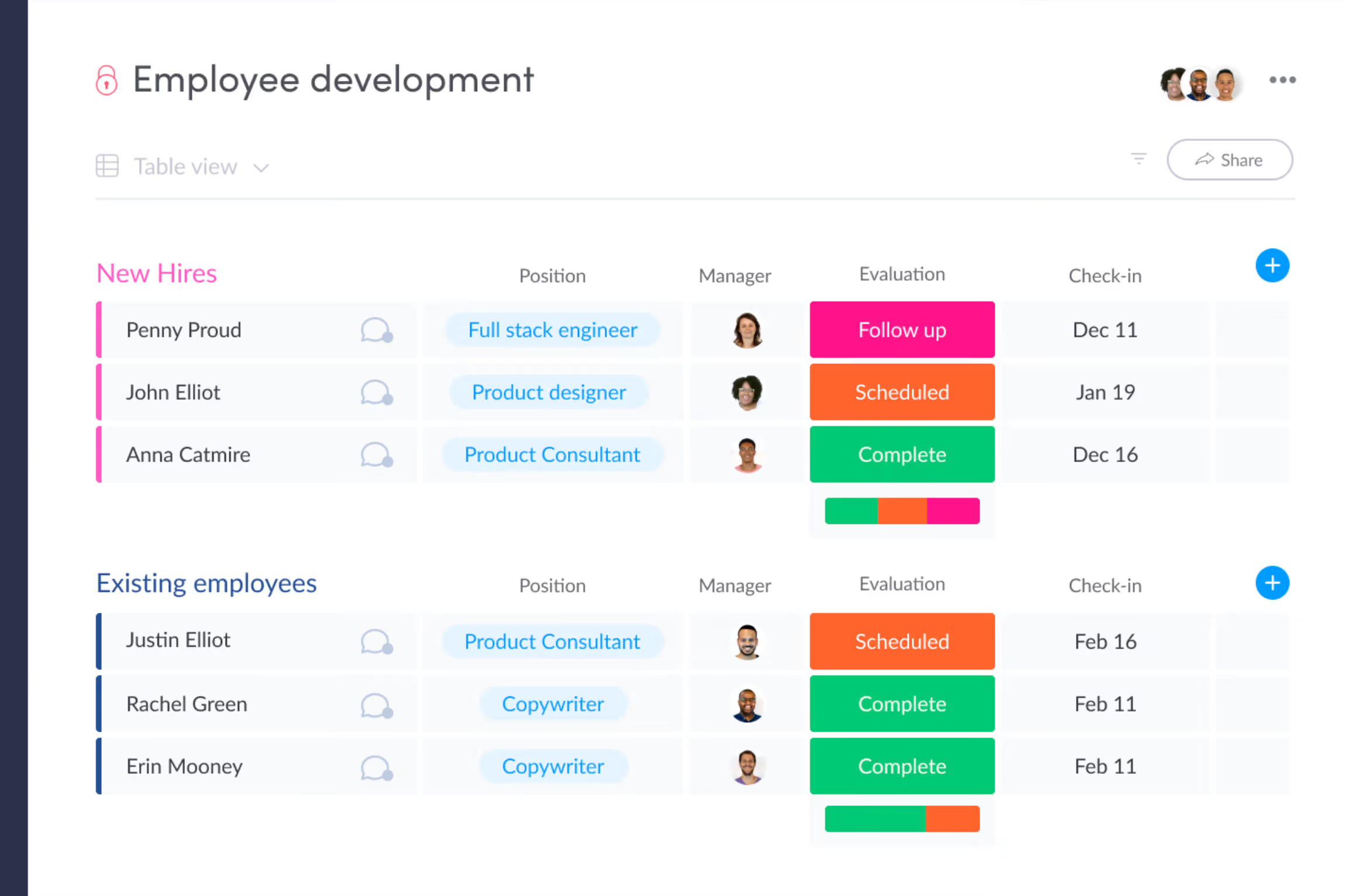
While Monday.com isn’t your typical HR software, it offers a range of customizable templates and automations that make it a compelling choice for HR teams looking to streamline their workflow and employee management processes. Among its key strengths is the ability to centralize and organize employee data. From recruitment pipelines to employee performance reviews, the platform provides a single, easy-to-navigate hub for all HR-related information. This centralization not only improves efficiency but also enhances visibility for HR teams to make decisions more effectively.
Another area where Monday.com shines is in its employee engagement features. The platform offers a set of HR templates designed to simplify the process of conducting employee surveys, such as well-being and engagement assessments. By automating these processes and keeping all collected information in one place, Monday.com helps HR teams stay on top of employee sentiment and take proactive steps to improve retention.
Collaboration is at the heart of Monday.com, and this is evident in its HR offering as well. The platform's boards and dashboards make it easy for team members to work together, manage tasks, and stay updated on progress. Customizable automations further streamline processes by ensuring that timelines are met and tasks are assigned without manual intervention.
While Monday.com may not offer the full suite of HR functions like payroll and benefits administration, it compensates with a wide range of templates that cover most other HR processes. From employee lifecycle packages to time off requests and HR service management, the platform's template library provides a solid foundation for HR teams to build upon.
The user-friendly interface and extensive customization options make Monday.com an attractive choice for organizations looking to complement their existing payroll software with a powerful HR workflow management solution. The platform's versatility extends beyond HR, with applications in project management, marketing, sales, and more, making it a valuable asset for businesses of all sizes.
Monday.com is used by 225,000+ companies including Lionsgate, Glossier, and Oxy.
Monday.com’s free tier includes 2 free seats, 3 boards, 2 docs, 200+ templates, and basic AI features. You can also try its Pro plan for 14 days for free.
Best For
Small teams that already use Monday.com for project management and want to consolidate HR workflows into the same platform rather than adopting a dedicated HR system.

I use Monday.com to track my personal tasks across multiple groupings. One grouping is for HCM project updates, another grouping is for future projects, and I also have groupings for my individual direct reports. Whenever something comes up that cannot be resolved right away, I add it to my tasks manually. I plan to add workflows via Microsoft Power Automate, which can scrape emails and identify key tasks to add to Monday.com. Once that workflow is up, I'll be able to manage my tasks more effectively with less manual input.

I enjoy the ease of use that Monday.com provides. The automation and multiple integrations allow adaptability with Monday.com. Additionally, it is easy to collaborate with teams over tasks.
I have used Monday.com for personal organizational management, as well as for my work. The hardest part of my job as a department leader was not only tracking my own priorities but also the priorities of my direct reports.
Monday.com offers an easy way to manage tasks, add priorities and deadlines, and even assign tasks to people outside of your subscription. Automations and AI are also available, making setting up new tasks and tracking them easy. I've been using Monday.com for about two years now, and I intend to keep using it for a long time to come.
Without expertise, it's hard to add custom fields to tasks that are easy to adjust. Another issue I have is that Monday.com can be tedious as you move between main groupings, and setting up default values has to be done manually. Finally, Monday.com doesn't offer as much customization as other task-tracking websites, such as Notion.
Monday.com is very easy to use compared to the competition, making it easy for new users to get set up and track things right away. The barrier to entry is very low.
Consider cost, as Monday.com will beat the competition in cost alone if you need a simple task-tracking solution. However, if you have specific business needs, you may want to consider functionality and ease of customization.
I have not used Monday.com long enough to see how it has evolved over time. It hasn't changed at all since I started.
Monday.com is great for individual use and small teams, not for larger organizational structures.
Large teams that need to manage multiple, complex workflows or individual users that want to pay for the additional features won’t find Monday.com to be a good fit.

Zoho People
Zoho People has a free plan that any business can sign up for. It is permanently free for up to five users, and provides essential tools such as a mobile app, employee database, and time off management. It has proven a solid starting point for many growing startups.
PROS
- Free plan includes essential HR features like employee data management and leave management.
- Available in multiple languages.
- All core HR features in a single dashboard
- Wide array of integrations
- User-friendly UI, constantly updated
- Available in multiple languages
CONS
- Free plan is limited to five users and 250MB of storage.
- The mobile app is occasionally buggy and slow to load.
- Since they offer so many modules, some may be not as robust as other products that have been more specific about covering certain needs. For instance, some teams have found their payroll offering to be quite basic.
- Not all that’s available in the web platform is available in the app
- Some users reported that the platform can be slow to load every now and then.

Zoho is a software company that makes everything from CRM to bookkeeping tools. The platform also offers a cloud-based HRMS that’s bound to check most boxes in any HR manager’s requirement list.
To test the product, we signed up for Zoho free plan and found that, while it has some limitations, it provides a strong set of basic features that are good for small business.
There is a five-user cap on the free plan (including one administrator), and storage is limited to 250MB. It includes basic HR functions like leave management and also some more exotic features like an AI chatbot.
“Zia” the chatbot, is a unique feature that helps employees find solutions to HR questions without requiring one-on-one help from an HR rep.
Employees simply ask a question, and the bot uses keywords to search the existing FAQs. If there are no matches, Zia automatically creates a new case that will be handled by an HR rep, and the database of FAQs grows.
Though the free plan features are basic, many users comment on the convenience of having multiple aspects of employee data available in one place. The mobile apps are also well-liked overall but are reported to lag occasionally.
However, 250MB of storage can be a deal-breaker for some teams. Additionally, customers on the free plan do not have access to 24/7 customer support, though they are offered support during normal business hours.
ZPE Systems, Cloudfronts Technologies, Zomato, SpiceJet, Foresight CFO.
Zoho People is free for up to five users. The platform also offers a free trial for those interested in exploring its paid plans further.
Best For
Startups with up to five employees that need a structured HR foundation — employee records, leave management, and a self-service portal — without committing to a paid plan before they've validated their hiring needs.

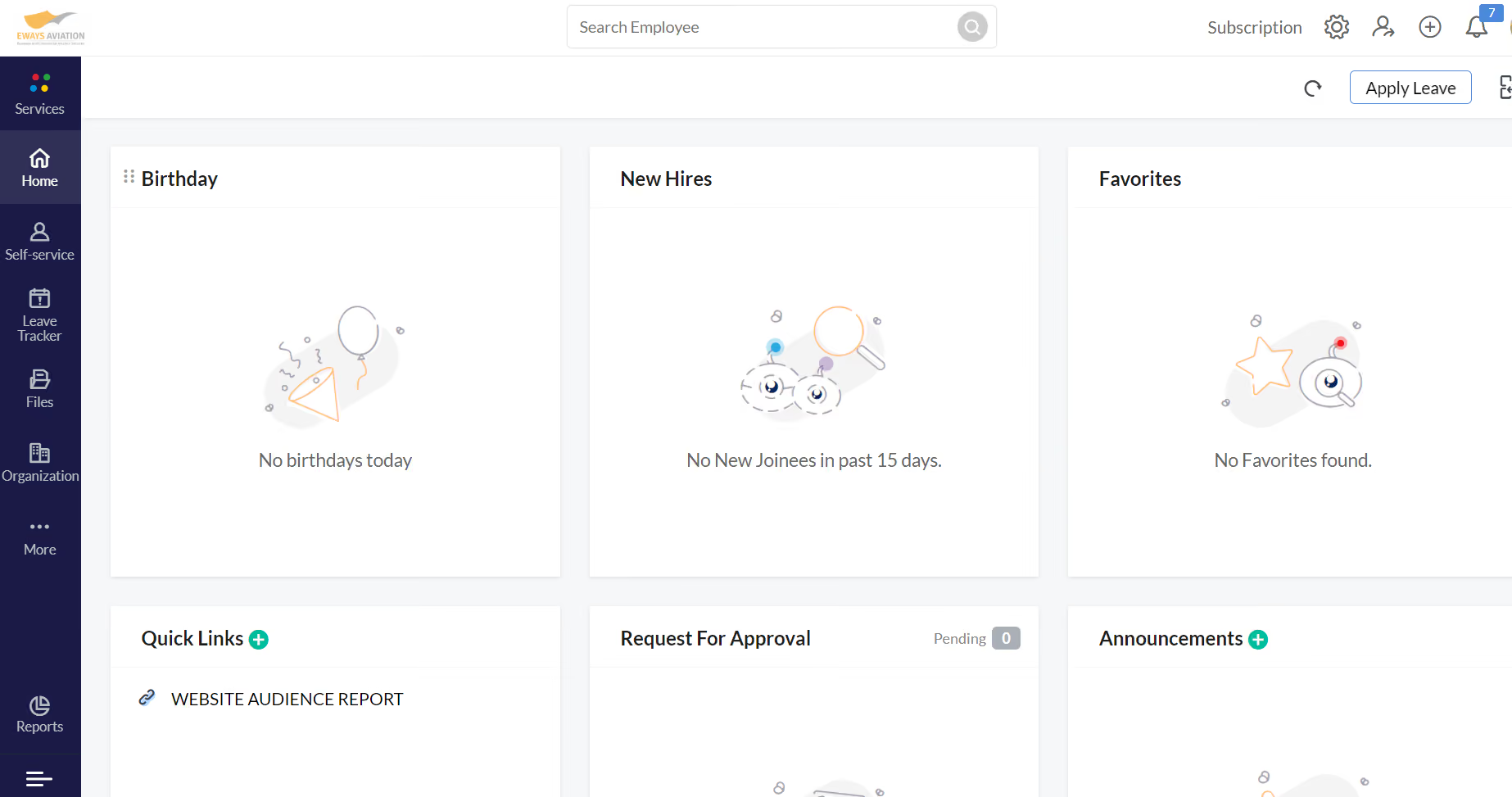
I use Zoho People for tracking time and leaves. Besides, it is great to chat with other team members. The platform includes an organizational chart, compensation, and training modules. It has great reporting features as well. I can easily check all my records, such as my pay stub for every month of the year, company employee list, and vacation schedule. etc.
It is affordable and user-friendly. The customer support that is available in the software is good and always active in responding to customers. The application is easy to use for most users. Zoho People is a great option for storing employee information and tracking time.
5 years ago our company started to use Zoho People to deliver exceptional digital HR experiences to our employees while managing the entire employee life cycle on a single platform. I like its simplicity and integration with other Zoho tools like Zoho Payroll, Zoho Books, Zoho Expenses, etc. I love that the request permission, approval, and tracking features are so helpful. I like that the interactive form builder allows us to create different forms that meet our needs and help our HR team.
Sometimes I run into difficulties in terms of data integration between other integrated programs. Zoho People software does not integrate with other similar applications. They only provide a limited number of administrators for Standard and Premium pricing plans. The system is cloud-based only and not flexible to use.
Zoho People comes with an employee portal, organization chart, self-service, performance appraisal, employee leaves management, and salary tool features. All the HR processes can be managed from a central location which can help users to save time and reduce costs. The software offers a fully-mobile self-service that can help employees to get easy access to their HR data from anywhere, anytime. It can help employees have better control over their work.
The price of the solution is low and most people can afford it. Customer support includes online and email user support. Easy to learn and use.
They offer cloud-based hosting, which means IT resources are retrieved through web-based tools and applications and you don't need to buy servers and additional hardware equipment.
It is very good for small and medium size companies.
It would be a bit challenging for big corporations as Zoho People doesn’t offer unlimited employee profile support.

Connecteam
If you’re tackling human resources with a high number of deskless employees, Connecteam is an essential tool to consider. Not only is it great for remote teams, it has a free version for small businesses.
PROS
- Stands out as one of the only fully-mobile HR tools for deskless workers in this category
- Well-priced, providing substantial value to the needs of SMBs
- Highly receptive to feedback, as evidenced by its track record of incorporating user suggestions as new features in the past
- One of the only fully-mobile HR tech tools for deskless workers
- Very adequately-priced for all it entails, SMB-friendly
- Quite open to feedback, having implemented user suggestions as features in the past.
CONS
- The communication hub lacks confirmation for sent and/or seen messages, leaving users uncertain about the status of their messages.
- Essential features like GPS tracking, valued by some teams, are only available in the higher-tier pricing plans.
- In the communication hub, the app offers no confirmation that messages were sent and/or seen.
- Certain features that some teams consider essential, such as GPS-tracking, are only available in the higher-tier pricing plans.
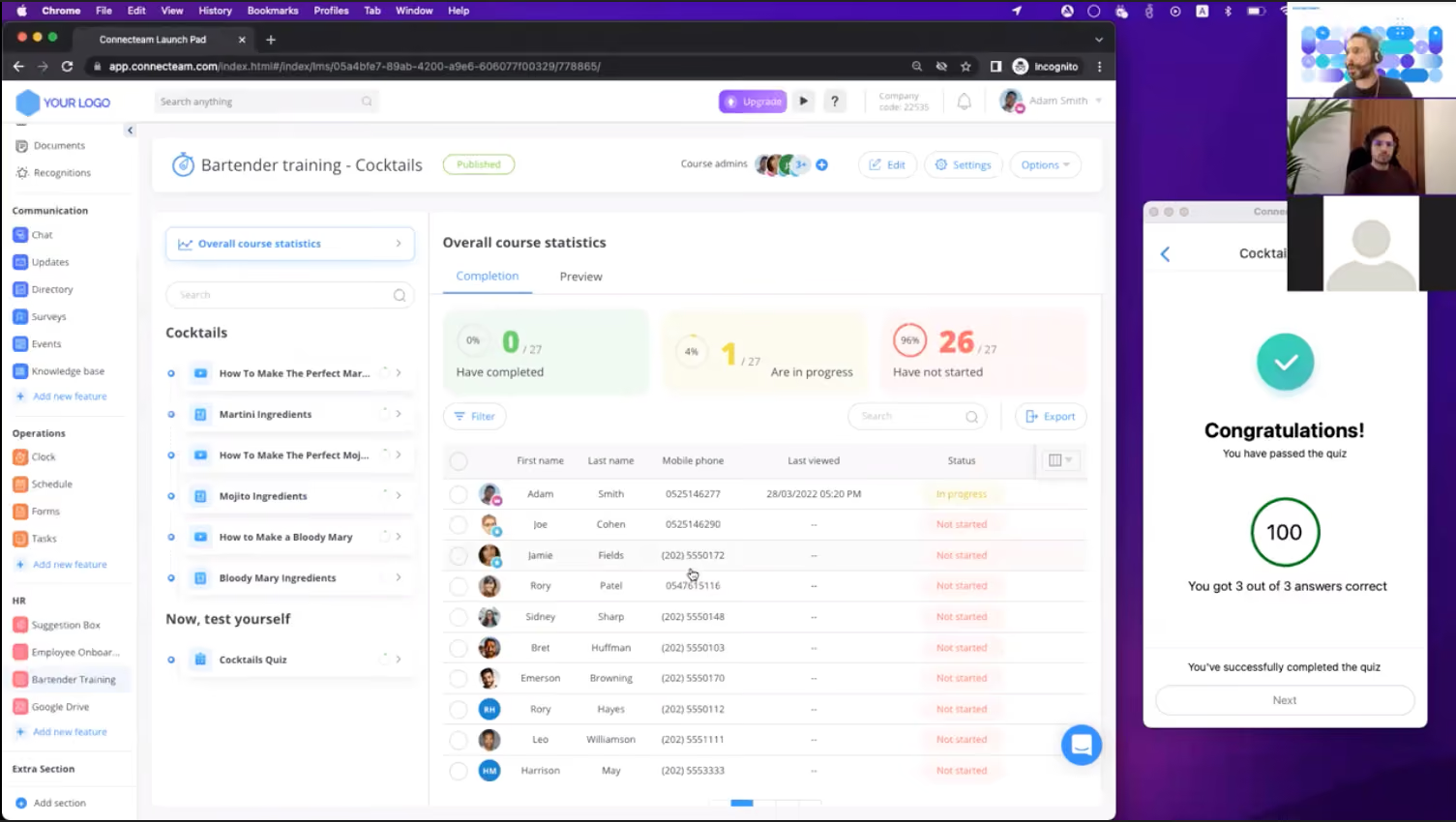
Established in 2014, Connecteam stands out as a leading HR app dedicated to deskless workers. Recognizing a significant portion of the global workforce is now remote, Connecteam seized the opportunity to address this underserved segment. While most HR management tools cater to white-collar employees, Connecteam saw the need to provide tailored solutions for deskless workers and has been filling this gap effectively over the years.
So, if you’re looking for a straightforward yet powerful and intuitive tool for managing employees that may not even have an email address (and has a free plan!) Connecteam is a tool you should demo.
From the Connecteam mobile app (iOS and Android), HR managers can handle tasks like staff scheduling, attendance management, timesheets, training, employee onboarding, and much more. Workers can interact with their side of this via their mobile devices as well, where they can create an account with nothing but a phone number.
Now, all this being said, Connecteam is a great tool for HR in general, used by many desk-based companies as well. For instance, among the users we interviewed for this piece, we had HR managers from a data migration company (Relokia), and an IT services firm (PhotoAiD).
Connecteam’s free plan allows up to 10 users and includes features such as a time clock, shift planning, checklists, and task and document management.
Also, each paid plan offers a 14-day free trial.
Best For
Businesses with up to 10 employees where most of the workforce is deskless or mobile.
We use Connecteam to monitor shift statuses and changes, how many hours employees were working a week, and to provide site-wide communications to our team. We've always leveraged the chat option to optimize employee engagement, the location during check-ins for quality assurance, and our financials.
I specifically do most of the report extractions to visualize how many employees are onsite per day directly and to support forecasted staffing plans.

I love the easy employee and administrator interface, so the training guidelines are easy. I value the reporting features, which make collecting data seamless. Also, Connecteam has an app, so it's useful for those who leverage their phones for timekeeping and the chat system for direct contact with employees.
We initially purchased Connecteam to assist with our onsite hourly personnel. Their export template aligned perfectly with our corporate timesheet system, Unanet, so it was a seamless integration to ensure our invoices were accurate for billing.
We used Connecteam for 3 years, leveraging the personnel allocated to each shift, the seamless check-in process, and the direct communication tool to reach onsite management on time. Since the onsite Program Managers weren't always next to their email, they could view the employees' questions and check-ins from their phones for fast turnarounds with responses.
The only con I could think of is that sometimes the site glitches, and their customer service team is overseas, so the timezones can result in delayed support.
It's very affordable, supportive of customer service, and easy to use. Monthly costs are not driven per license, and it's better with allocating funding or keeping on-site timesheets.
Connecteam is easy to integrate for employers who staff employees who are shift workers or hourly personnel working outside of the primary headquarters. It's best to implement it after a pay period so you can track the hours worked with the provided pay schedule.
Monitoring is also included, where you can track the employees' location when they're checking in to prevent any pay discrepancies. It's an amazing, user-friendly system to implement into a business.
Yes, Connecteam’s chat feature and app support have surely evolved. Their response time has been fast, fluid, and very supportive.
Small or large organizations, hourly workers, onsite personnel, and companies who staff shift workers can benefit from Connecteam.
I don't believe full-time staff workers would benefit much from Connecteam since they're exempt. There's not much need to track the personnel and their worksites.

Bitrix24
Bitrix24 is a hugely popular vendor with a massive array of tools for businesses and organizations. Some of their HR products are free, and for the same plan you can get several other business apps too.
PROS
- Messaging, tasks, video, docs, and CRM are all in one place.
- Auto-delete, polls, and AI assistant (CoPilot) enhance team comms.
- Dedicated zones to work with external partners or across departments.
- Quick task creation, Gantt/Kanban views, and workload tracking.
- Real-time co-editing, version control, and role-based access.
CONS
- Despite redesign, the dashboard can still feel crowded and overwhelming for new users.
- Bugs have been reported by some users.
- Configuring workflows and settings can be time-consuming.
- Many permissions are limited to super admins, reducing flexibility.

While not solely HR-focused, Bitrix24 is used by more than 8,000,000 organizations all over the world. Nevertheless, the free plan also adds countless other features from the other Bitrix products. While more of a collaboration SaaS platform with a massive variety of tools like CRM, project management, and even a website builder, Bitrix24 also offers a highly reliable and intuitive HR information system. As of 2021, it includes over 25 HR tools. From those, several such as company structure, employee directory, and company knowledge base are included in the free version for unlimited users.
Saigon Newport Corporation, Properters, Endelza International
Bitrix24’s free HR software is available on its website and provides users with 5GB of storage and unlimited seats. There are also 4 paid plans ranging from $49 to $399 per month for those interested.
Best For
Teams that need HR functions alongside a broader set of business tools — CRM, project management, document collaboration, and internal messaging — and want all of it under one free plan without stitching together multiple vendors.

I use Bitrix multiple times a week. Some of the key workflows I use it for include:
- Manage projects. We are able to create projects and assign them, set deadlines and be able to track the progress.
- Instant communication. It has various messaging tools such as video calls, instant messaging, and group chats so one can be able to see and respond to them quickly and at everyone's convenience.
- The document-sharing feature enables members to share various documents as well as being able to work on a single document with multiple team members simultaneously. This is by far the best feature for me!
- Customer Relationship Management (CRM) has made marketing processes easier and led to better customer relationships.
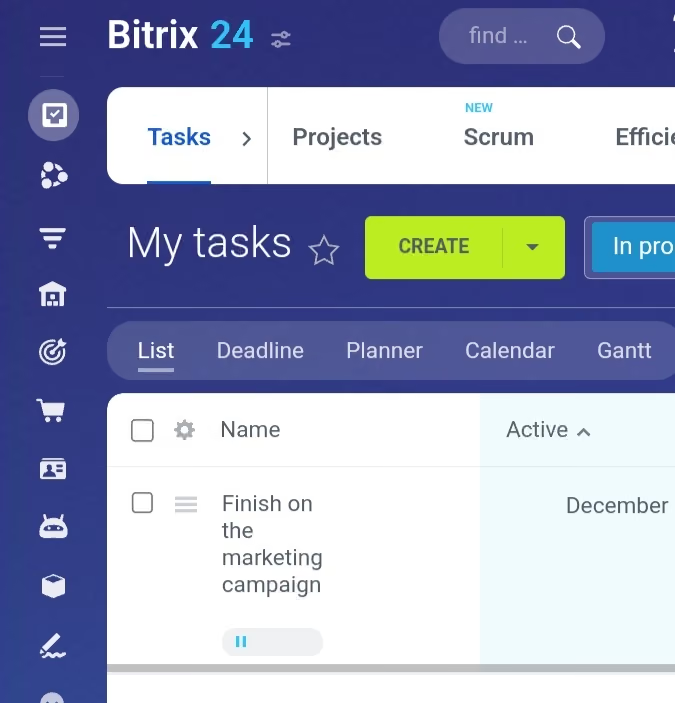
- Better communication through instant messaging, group chats, and video calls. One is in the loop of whatever is going on and gets updates quickly.
- Document sharing option. Every member can share a document, and other members can work on the same document simultaneously.
- Better collaboration. This can mainly be attributed to enhanced communication.
My company was mainly trying to solve issues in relation to collaboration and communication. This has led to increased productivity and improved efficiency. We are able to share documents and properly manage our projects better than before. The tools being offered have streamlined our operations a great deal. I have been using Bitrix for 1.5 years now.
- It can be a bit expensive compared to other similar tools out there. Having regular discounts would go a long way.
- Someone who's not familiar with it will have a really hard time navigating through it. A short introductory video of how it works would really help.
- Technical support varies with the different plans available, and this may cause agitation since the responses they are getting aren't necessarily the ones they're hoping for. I feel like the support should be the same regardless of the package one is using.
It has an inclusive tool where one can do product management, CRM and communication. This means that my organization wouldn't have to use different software to achieve the same results.
Pricing. Because there are different plans, one needs to be sure they get a plan that's within their budget.
Ease of use. One needs to make sure that learning how to use it wouldn't be a problem for its members and they'll navigate easily.
I can confidently say that the enhanced features have improved communication and productivity for its members.
Small-sized business, project management, and customer relationship management.
Organizations that don't rely on technology to carry out their operations.
Odoo
Oddo offers a massive variety of HR & business solutions that can cover many needs for a company. Plus, they do it in several languages.
PROS
CONS
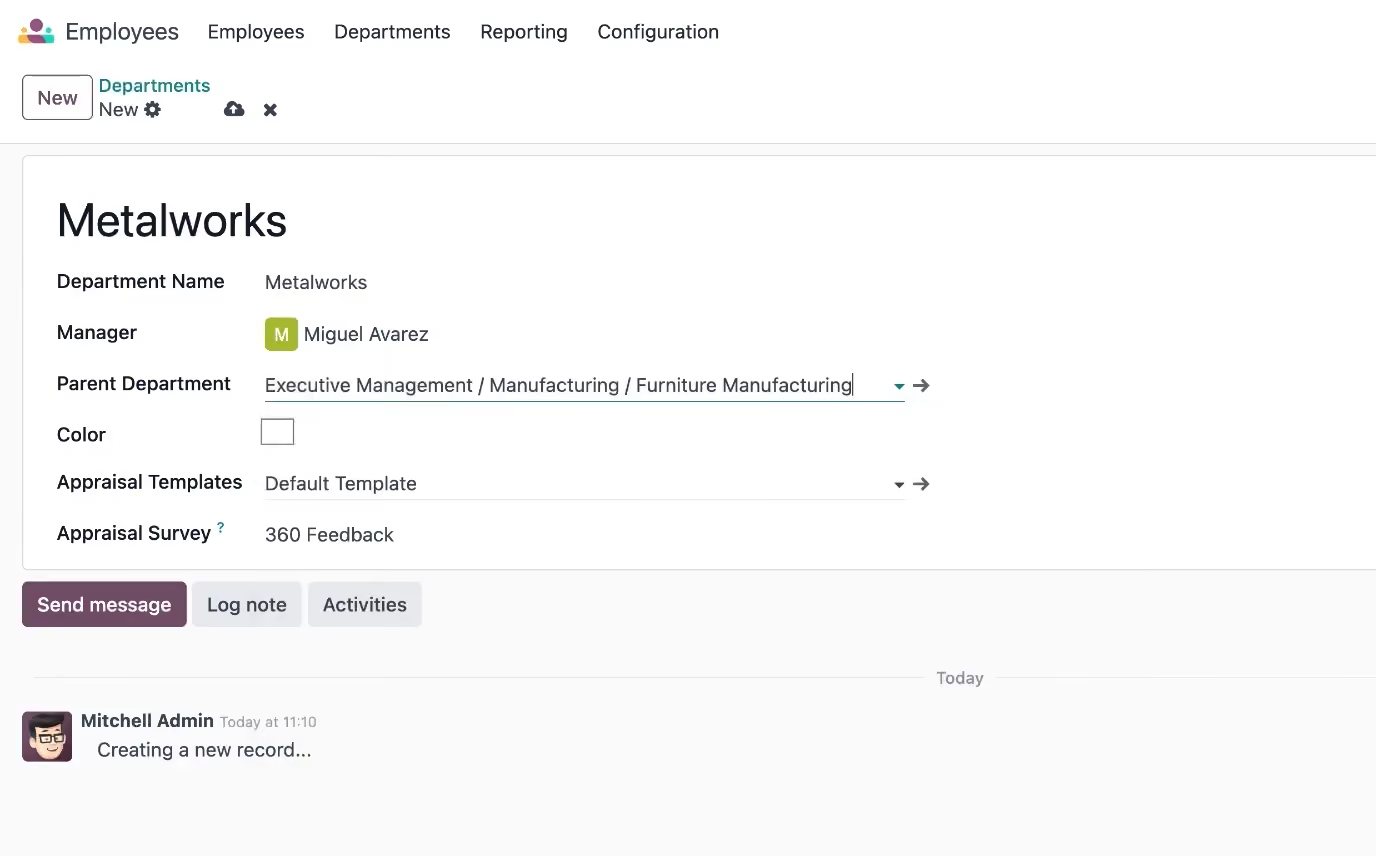
The interesting thing about Odoo is that they divide nearly all their feature offerings into stand-alone applications. Any of these is free for unlimited users and unlimited time until you either need more space or add another application. This is an excellent choice if you only need, say, time off tracking or a payroll app, and can be quite cost-friendly if you require only a few additional applications. It’s also comforting to know that, with Odoo, you only pay for what you use.
Odoo is used by companies like Southern Wine Group, BizTech College, and XB Press Buyer.
Odoo’s free plan doesn’t limit the number of users you can have. Its paid plans also come with free trial options.
Best For
Companies looking to fulfill a specific use case for free, or those that would like many of their business tech tools to come from the same vendor.

I primarily use Odoo to communicate with employees and access some of their HR information and pictures. The company I work for hopes to also use Odoo for scheduling, although this hasn't been set up yet. During our orientation call with Odoo representatives, we learned that we couldn't use the system for timekeeping because it did not possess the ability to use biometrics for identifying staff when clocking in and out of shifts.
We also had the intention of using Odoo for payroll, then learned that there are limitations with this software because Odoo will not record and file taxes on the employer's behalf. The only other function I use within Odoo is the "Sign" app, which allows me to send documents to employees that require a signature.
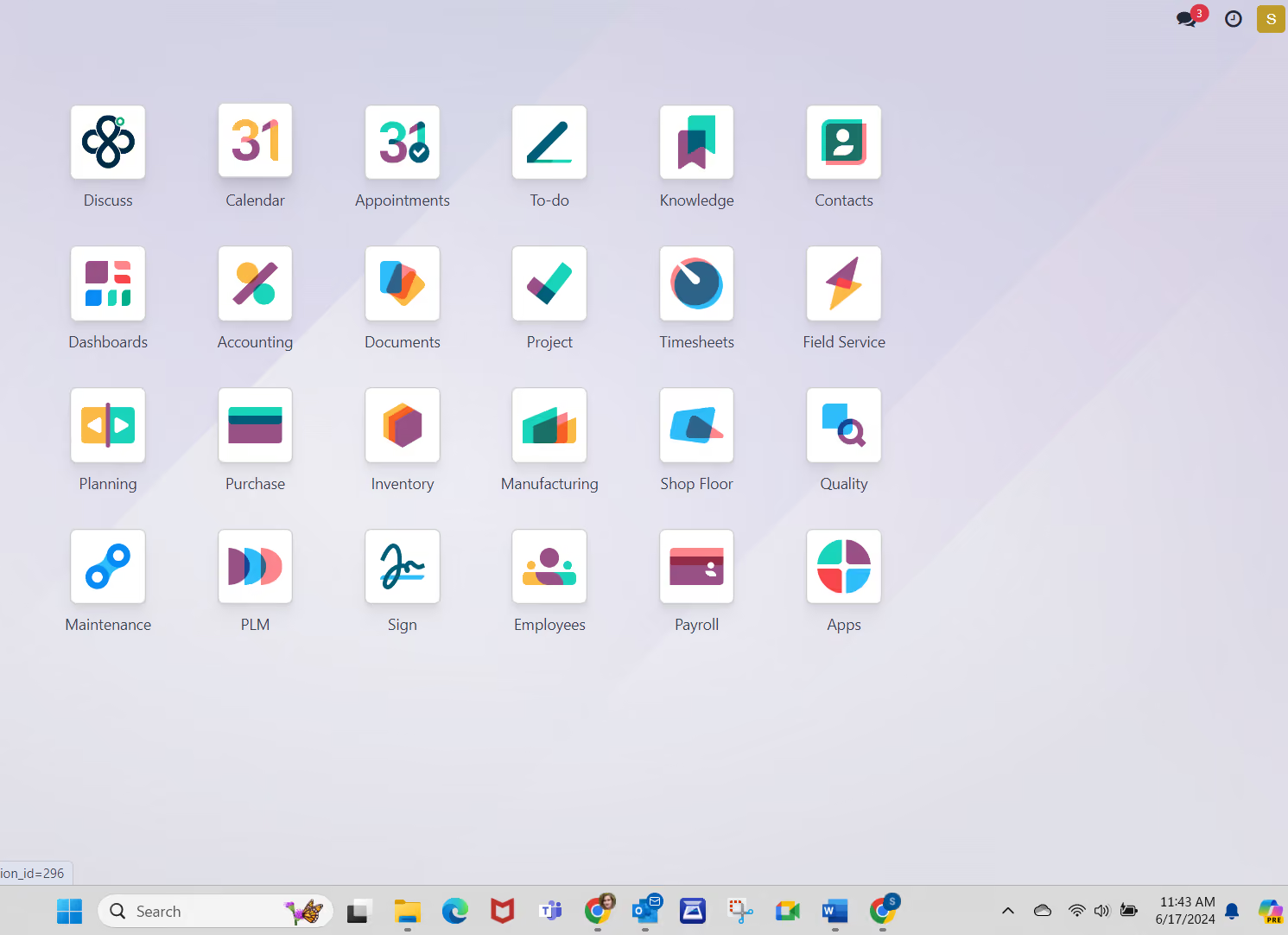
I like that it has the ability to consolidate multiple features/apps into one software program. I enjoy the "Discuss" feature, which essentially creates a company intranet allowing employees to communicate with others privately or with groups/departments. I also like that it allows me to send documents requiring a signature without having to use another external app, such as DocuSign.
My organization chose Odoo because it is an enterprise resource planning (ERP) software that promises to consolidate and automate several processes. I work for a manufacturing facility that produces food and beverage items, and the processes from creation to delivery of our products include many steps and a lot of paperwork to remain compliant with industry regulations.
We wanted a tool that could be used by several departments, including production, accounting, fulfillment, distribution, and HR. We were hoping we could use Odoo to house our timekeeping, scheduling, and payroll as well. I have been using Odoo for about three months.
I think it is a complex system that requires months of training before it can be fully functional. We cannot use it for payroll because it doesn't track and record tax payments and would require manual journal entries each time. I don't like that the timekeeping feature doesn't allow us to use biometrics (fingerprints via hardware device) when employees clock in and out of their shifts. Although it can integrate with several apps, these drawbacks keep me from recommending it as an HR solution.
Odoo has several functions that it offers to automate processes company-wide. I find the interface to be mostly user-friendly. There are some navigational difficulties when visiting one "app" and then returning to the dashboard, and their training videos could use some work. I find it about average as far as an ERP goes.
Identify exactly which processes you intend to utilize this service for and have a realistic implementation plan. If you're only using it for two or three processes, then a shorter training and implementation plan may work. If you have four or more processes you're looking to integrate, allow yourself and your team several months to meet with their implementation team and demo the trial software so that you can familiarize yourself with it before rolling it out to employees. Training is vital to understanding the full capabilities of the system.
They seem to have a lot of options for different processes that they say continually expand, such as inventory, appointments and to-do lists, project boards, discussion boards, manufacturing, shop floor, quality assurance, etc.
A mid to large-sized manufacturing facility that wants all employees using the same software to meet as many business needs as possible will find Odoo very useful.
Accounting and HR-based organizations will find it hard to get the most out of Odoo.
Orange HRM
OrangeHRM takes the time to understand your business and tends to be flexible enough to find an iteration of their solution that fits you. Their tools are used by thousands of users worldwide.
PROS
CONS
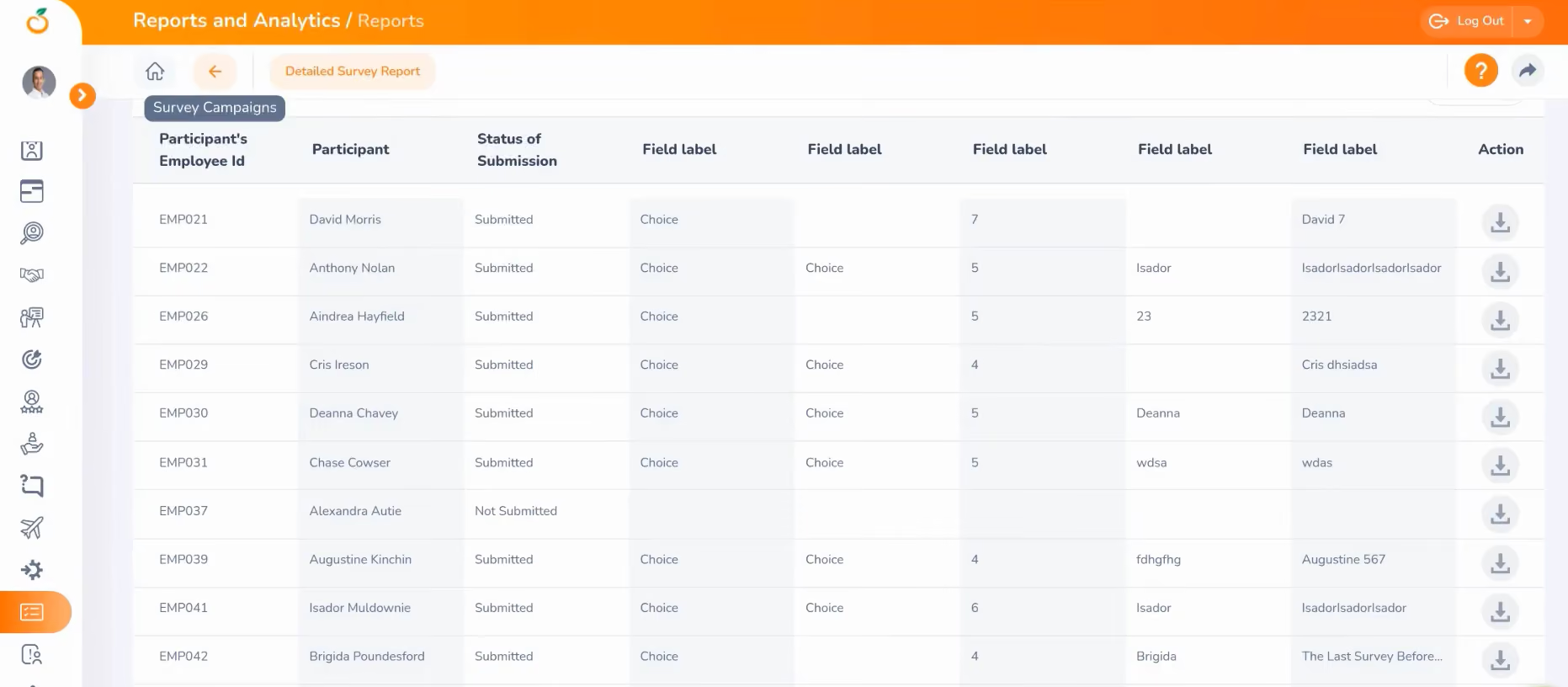
OrangeHRM is one of the most established names in open-source HR software, with a track record that includes universities, nonprofits, and global brands like Duke University and Red Hat. The free Starter edition covers core HR functions but notably excludes payroll integrations and onboarding workflows.
The catch with open-source is that you're responsible for hosting and maintaining your own servers, which means you'll need some in-house technical capacity. For organizations that have it, the payoff is full control over data and significant customization potential.
Thousands of companies use one version or another of OrangeHRM. Some remarkable names include Johnny Rockets, Duke University, and RedHat.
As an open-source HR solution, OrangeHRM Starter is free. Recently, the vendor also added a paid option, namely OrangeHRM Advanced, which offers a 30-day free trial and richer functionality and support service.
Best For
Sentrifugo
We love Sentrifugo because it is a fully-fledged open-source HRMS that's completely free, making it a good choice for small and medium-sized businesses.
PROS
CONS
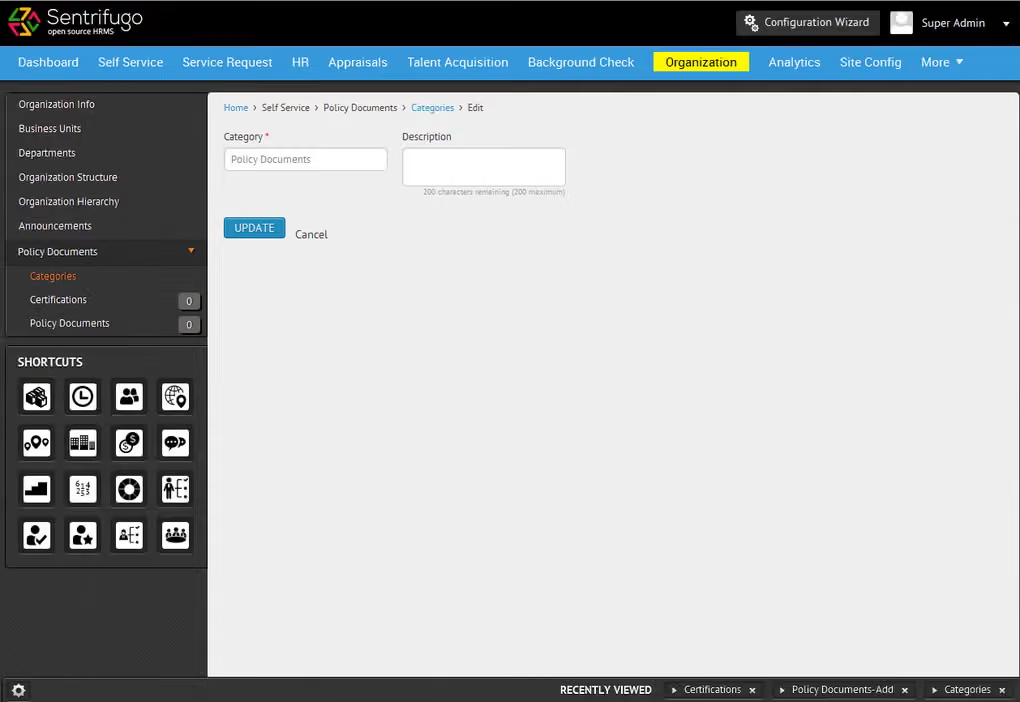
Like OrangeHRM, Sentrifugo is another fully open-source and free to use. Where it distinguishes itself is in the breadth of functionality it offers out of the box for small and medium businesses: it covers everything from appraisals and leave management to asset management and interview scheduling. The platform is also notably easy to configure relative to other open-source tools, with strong customization options that don't require deep developer involvement.
The main limitation is the same as any self-hosted solution: you own the infrastructure, which adds operational responsibility and removes the convenience of automatic updates or cloud backups that SaaS tools provide.
Sentrifugo is also an open-source HR solution, free to use.
Best For
SMBs that would like an open-source HRMS.
WebHR
WebHR is completely free for teams with 5 or fewer employees. A perk of this product is that if you decide to upgrade, you can do it on a per-module basis instead of buying a whole suite.
PROS
CONS
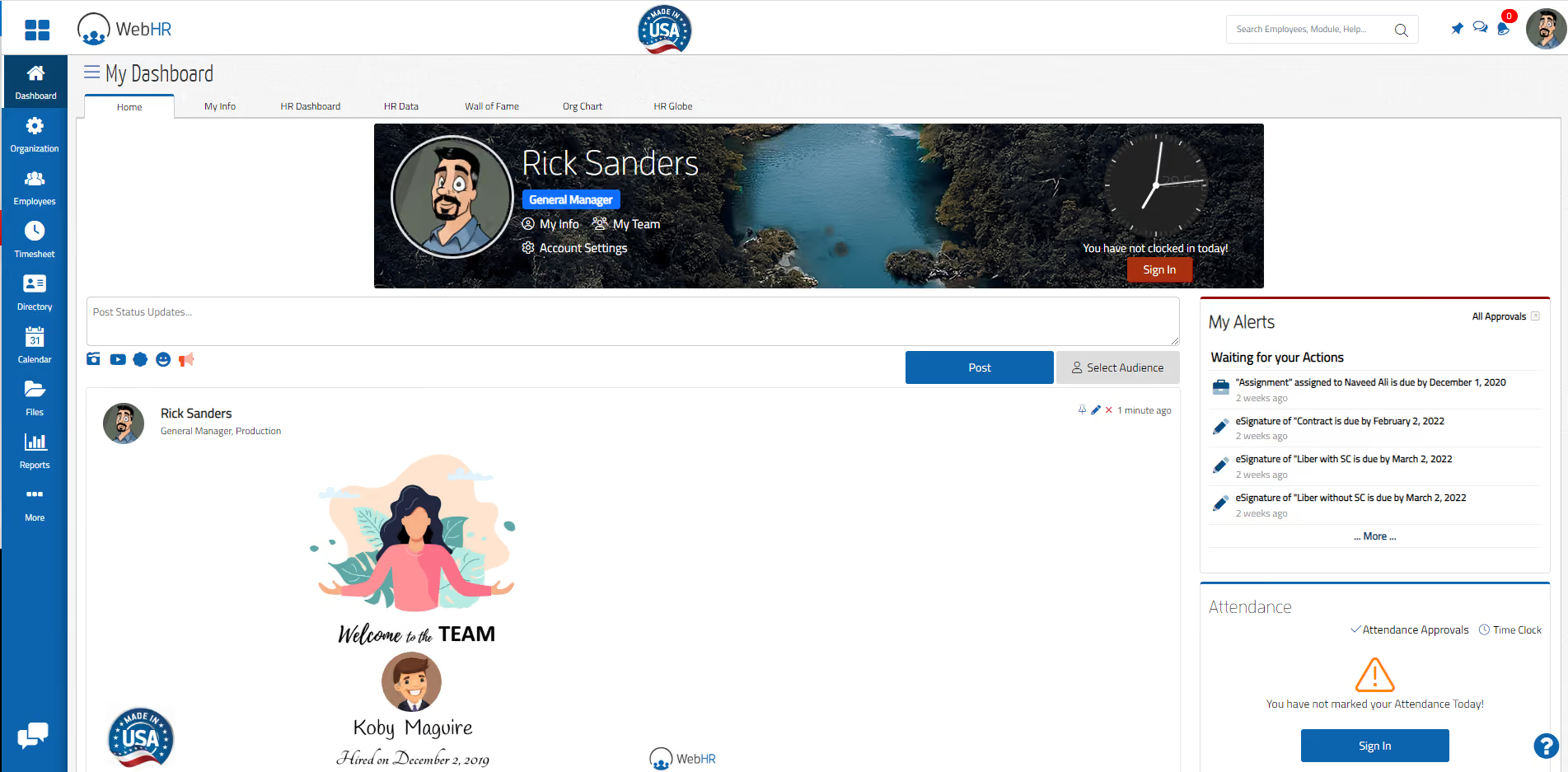
WebHR is free for teams of five or fewer employees and covers the basics: employee records, a built-in messenger, a discussion forum, and core HR administration. What makes it worth mentioning is its modular upgrade model. If and when you outgrow the free plan, you can add individual features like payroll or recruitment for as little as $1–2 per employee per month, rather than jumping to a full paid tier.
That said, WebHR no longer offers a perpetual free plan for new users; you can sign up for a trial. The interface is functional but dated, and the platform hasn't kept pace with the design standards of newer competitors. Worth a look if budget is the overriding constraint and your team is very small.
According to their website, some of the companies that use WebHR include Nissan, WaterAid, zameen.com, and Budget.
WebHR offers a free trial to help users explore basic features. Paid plans start at $2 per user per month.
Best For
Companies looking for a free tool that would like the option of upgrading at any time to be low-cost.

I use the WebHR to update/add/delete employee information related to job title / information / contract details / attendance time record / performance review etc. Onboarding and offboarding is easier now since we started using this tool.
- We can manage time and attendance records.
- We can manage onboarding and offboarding.
- We can manage the overall performance management of each employee.
Payroll, time and attendance, performance management, learning & development, recruitment - all of these were pain points that led us to buy this tool. Prior to WebHR, we were using excel sheets / doing manual work. I have been using this tool for the last 4 years.
- Limited report tracking and analysis.
- Limited customization.
- Occasionally, the system can be slow to respond.
The appealing quality of WebHR is that it can support the overall performance of each employee, both in small and large organizations.
From time to time, they roll out enhancements to their existing features.
There is no specific type of organization required to buy the WebHR. Any organization can buy this tool to enhance their overall performance and reduce manual work.
Small organizations with under 10 employees don’t need to buy this tool.
Pitfalls of Choosing Free HR Software Systems
Free HR software often looks like a cost-saving win upfront, but hidden limitations, upgrade pressure, and lower support can make it more restrictive—and costly—over time.
Choosing Based on “Free” Instead of Fit
Most free HR tools are designed as entry points into paid plans. As your team grows or your needs become more complex, you may be pushed to upgrade sooner than expected.
This can lead to an unplanned cost increase or a forced migration to a new system. Always review pricing tiers in advance and understand what triggers an upgrade (e.g., employee count, feature access).
Assuming “Free” Means Low Risk to Switch
Because there’s no upfront cost, teams often assume they can easily switch tools later. In reality, even free HR software requires time for setup, data migration, and employee adoption.
Switching systems can be disruptive, so it’s worth evaluating scalability from the start, even if you’re a small team today.
Overlooking Limitations in Support
Free plans often come with limited or no customer support, relying instead on help centers or community forums. This can become a major issue when you run into payroll errors, compliance questions, or technical bugs.
If support is critical to your team, check what level of assistance is included before committing.
Ignoring Data Security Tradeoffs
While many free HR tools offer solid security, others may cut corners or lack advanced compliance features (e.g., audit logs, permissions, certifications).
Since HR systems handle sensitive employee data, it’s essential to review security standards carefully, regardless of price.
Benefits and ROI of HR Software Solutions
The biggest advantage of free HR software is that it allows teams to streamline core HR processes without upfront investment, making it especially valuable for startups and small businesses.
Even with limited functionality, free tools can automate repetitive tasks like time-off tracking, employee record management, and basic reporting. This alone can save hours of manual work each week, giving HR teams more time to focus on higher-impact initiatives like employee experience and hiring.
Free HR software also lowers the barrier to entry for adopting better systems. Instead of managing everything in spreadsheets or email, teams can centralize data and build more consistent workflows early on, which reduces errors and improves organization.
In some cases, free plans include lightweight automation or AI features that help filter candidates or simplify administrative work. While not as advanced as paid tools, these features can still reduce time spent on manual screening and coordination.
Free HR Software: Pricing Models and Limitations
All of the software we’ve discussed here is completely free in some form or another. Some of them have a user cap of either 5 or 50 employees, while others have free versions or cost nothing because they are open source.
Below, you can compare each of these options according to their pricing model to see just how free are they, what’s their catch, and which one fits your needs:
- Deel lets you use its HRIS for free as long as you use its payroll services.
- Homebase’s basic plan is free for teams limited to one location and up to 20 employees.
- Bitrix24 is free for unlimited users, but limits the data storage to 5 GB.
- Zoho People offers a free plan with basic HR functions for up to 5 users.
- Odoo is free for one application, fees apply for additional apps.
- Orange HRM offers a free open-source edition available for both cloud and self-hosting, yet it lacks some key features like payroll integrations and on/offboarding.
- Connecteam offers several modules for free, including HR, but the number of users is limited to 10.
- BambooHR provides one of the best all-in-one HRIS available, but this vendor only offers a free trial instead of a free plan.
To get a more detailed look at the total cost of ownership for an HR software solution, take a look at our newest HRIS pricing report.
Key Features of Free HR Management Software
Common features that most free HR systems offer are employee management, performance management, payroll processing, onboarding, and time off management.
- Employee Management: At the core of most free HR software is a centralized employee database. This is where you store employee profiles, track job details, and manage documents. Many free tools also include basic self-service features, allowing employees to update their information or access records without HR involvement.
- Time Off and Attendance Tracking: One of the most common (and useful) features in free plans is leave management. Employees can request time off, managers can approve it, and HR gets a clear overview of schedules. Some tools also include simple attendance tracking or shared calendars.
- Basic Onboarding Workflows: Free HR management software often includes lightweight onboarding features such as checklists, document collection, and task assignment. While not highly customizable, these tools help standardize the onboarding experience for new hires.
- Performance and Feedback (Limited): Some free plans offer basic performance management, such as simple reviews or feedback tracking. However, more advanced features like continuous feedback, goal tracking, or analytics are usually reserved for paid tiers.
- Integrations (Often Limited): Integrations with payroll, accounting, or ATS may be available, but they’re often restricted or require an upgrade. In many cases, free HR tools handle core HR data while relying on external payroll systems or recruiting software.
How to Choose a Free HR System
We recommend you take advantage of our vendor shortlists to narrow down your options to 3-4 that you’ve found most likely to meet your HR needs. The next step would be to try them all and see for yourself which one works best. While most of the tools we’ve listed here are extremely easy to get started with (as in, just create an account and you can access most basic features), you could also request a live HR software demo from them, which you should. And when you do, make sure you’ve had a list of must-ask questions, such as:
- Which features do your free users like most? What are the limitations of your free plan?
- What are the sticking points that would make me or my colleagues apprehensive about transitioning to this platform?
- What are the available integrations, compliance and data security, and customer support?
Implementing Free HR Software
Once you select the right system, the HRIS implementation process will vary depending on its operation. If you’re talking about an open-source solution like OrangeHRM or Sentrifugo, the process will likely entail a lot of communication and collaboration with its team.
On the far other end of the intricacy spectrum, a cloud-based tool like Freshteam or SnapHRM gets you up and running within minutes. Each vendor page explains their particular process in much more detail, and many will call or email you shortly after you’ve set up an account or asked for a demo to address questions or solve any issues you might be having.
If you'd like to learn more about what to do after implementing a new HRIS, including proven processes and tips from an expert, we recently put together a brief guide to HR software post-implementation.
Free HR Case Management Software FAQs
What is free HR software?
Free HR software is a digital tool, often freemium or open-source, that automates key HR tasks (data, attendance, leave, onboarding) at no ongoing cost.
What is the best free HR software for small businesses?
The best options include Deel, Homebase, Zoho People, and Odoo. But if you’re seeking a top HR software solution for small businesses that offers a broader range of human resources features at a reasonable price, then HiBob, BambooHR, and Connecteam are top choices.
What is the best free HR software for non-profits?
Some of the best free HRIS options for non-profit organizations include OrangeHRM, Homebase, and TimeTrex.
Why use free HR software?
Reasons to use free HR software include: saving time with automation, improving employee experience, improving employee performance, increased compliance, better organization, streamlined hiring, better business intelligence, and workforce management.
What are some key features of free HR software?
Free HR software offers many key features, such as an employee self-service portal, time and attendance management, onboarding templates, customizable and real-time reporting, benefits administration systems, employee database, messaging, recruiting functionality, human resource development, company document storage, and compensation management.
How We Keep This Guide Current
The pricing information in this guide reflects the latest details confirmed directly from each vendor's website as of this update. Notable changes since our last review: Homebase's entry pricing increased from $14 to $24 per location per month; WebHR discontinued its free plan, with new users now limited to a trial before moving to a $2/month base plan; and Deel was removed from the featured list after discontinuing its free HRIS offering.
To ensure our reviews reflect real-world usage rather than just feature lists, we interviewed HR professionals with hands-on experience with the tools we're featuring. Their ratings and insights appear directly beneath each featured review. Contributors to this update include Alex Bryant, Lead Future of Work Consultant - Omega Forty Seven Consulting; Jess Tan, Recruiter - PRN Medical Staffing; Oksana Day, SHRM-CP, HR Manager - Corporate Settlement Solutions; Jessica Warren Briles, Accounting Controller - Northtech Machine LLC; Leonardo Revilla, HRIS Analyst - People Street; and Eric A. Ridenour, Employee Wellbeing Officer and Trainer - Pyramid Global Hospitality.
Final Advice on Free HR Management Software
There is no single best free HR software. The right tool depends entirely on how your team is structured, what problem you need to solve first, and how much complexity you can realistically manage at your current size. Here's where each tool on this list earns its place:
- Hourly or shift-based teams at a physical location: Homebase. If your employees clock in at a register or work scheduled shifts, Homebase handles that environment better than anything else on this list. Its scheduling, POS integrations, and real-time messaging were built specifically for this.
- Dispersed or deskless workforces: Connecteam. If your team works in the field and doesn't operate from a fixed location, Connecteam is the more practical choice. Employees can get set up with nothing but a phone number, which matters when a corporate email isn't part of the picture.
- Startups with five or fewer employees: Zoho People. At this stage, a clean employee database, leave management, and self-service access are genuinely all you need. Zoho's free plan covers that without a trial expiry pushing you toward a decision you're not ready to make.
- Project-based teams already using Monday.com: Monday.com. For agencies, consultancies, and product teams, HR workflows like onboarding checklists, time-off requests, and employee surveys fit naturally into Monday's existing structure. There's no reason to introduce a separate system until Monday's limitations become a real, recurring problem.
- Teams that need HR alongside CRM, messaging, and document management: Bitrix24. It bundles more than any other free option on this list, making it ideal for small teams managing multiple operational areas with limited resources.
- Organizations building a case for a paid HR system: BambooHR. If the goal is to understand what a full HRIS looks like before committing budget, BambooHR's trial is the most useful benchmark on this list. The gap between it and the free tools becomes clear quickly, which is often what a leadership conversation needs.
- Teams with one specific HR function to address: Odoo. If you need just leave tracking, payroll integration, or recruitment, Odoo is the only tool here that lets you activate a single module free for unlimited users.
Final tip: Before settling on a tool, test your top two or three choices against workflows you actually run. You’ll be surprised how a platform handles your team's real data and edge cases tells you more than any feature list will.
About the Author


About Us
- Our goal at SSR is to help HR and recruiting teams to find and buy the right software for their needs.
- Our site is free to use as some vendors will pay us for web traffic.
- SSR lists all companies we feel are top vendors - not just those who pay us - in our comprehensive directories full of the advice needed to make the right purchase decision for your HR team.


