

10+ Best Employee Management Software in 2026
Our experts reviewed and rated the best employee management tools on the market in 2024. Read on to learn about their capabilities, pros, cons, pricing, and more.









Employee management software solutions store and retrieve employee data, track time and attendance, manage leave requests, schedule shifts, monitor performance, and much more. When such tasks are automated, you can save money, boost productivity, and increase employee satisfaction whether you’re a small business or a large company.
Our expert researchers have compiled a curated list of the best employee management systems, including must-have features, key benefits, pricing info, and other considerations to help guide your selection process.
To choose the best employee management software, we conducted demos with vendors, sought the expertise of HR tech leaders, tested the products ourselves, and chatted with other end users. Factoring all that in, we think the features that make an employee management system stand out are easy onboarding and self-service, data management and security, and reporting and analytics.
- Easy onboarding and self-service: The best employee management systems provide a strategic onboarding process, including a self-service portal, to create a positive employee experience. New hires can quickly complete paperwork, access key documents, and learn company policies. There’s often an employee self-service portal too, enabling employees to access and update their personal information, view pay stubs, submit time-off requests, and more.
- Employee data management: This is perhaps the most important function of an employee management system, and getting it right is vital. Your employee management software should act as a centralized repository for storing and organizing employee information. It should also protect that information with a host of security measures such as authentication, role-based permissions, encryption, and compliance with data protection regulations.
- Reporting and analytics: We’ve looked for employee management tools with robust reporting and analytics capabilities. Besides pre-built reports, the best tools in this space let you customize your own and give you insights on various HR metrics, including employee turnover, attendance patterns, and performance trends and stats.
The above is just a summary of what our team does. If you want to learn more, we have a detailed guide explaining our editorial guidelines and review methodology.


.png)
Deel

We selected Deel HR due to its highly praised modular architecture and a robust, globally compliant employee portal that addresses complex international HR needs. Furthermore, the platform's practical analytics integrations, especially the Power BI connectivity, are excellent for users who require advanced, customized HR reporting capabilities.
PROS
- Modular pricing allows teams to scale HR features without reimplementation.
- Clean employee portal with strong self-service functionality.
- Built-in people analytics dashboards with API sync to Power BI.
- Slack and Teams plugins enhance HR workflow collaboration.
- Strong security framework including SSO, encryption, and monitoring.
- Integrates HR, payroll, and IT data under one system of record.
- Excellent 24/7 customer service with fast onboarding (2-3 days) and local payroll experts in each jurisdiction.
- Seamless integration with platforms like QuickBooks, BambooHR, and Greenhouse, plus custom integration options.
- User-friendly, self-service features enable quick setup; identity verification often takes under 24 hours.
- Automated invoices simplify payments, provided they're in English.
CONS
- Performance and development tools are bundled into higher-tier plans.
- Customization of analytics dashboards may require consulting support.
- Pricing increases quickly as modules are layered.
- Key features like onboarding automation are add-ons, which may increase costs.
- Limited flexibility in modifying contracts or service agreements; changes often require an addendum.
- Invoices cannot be generated in languages other than English.
What we liked most about Deel HR is that it’s built as a modular system that grows with you. You can start with Core HR and layer in recruiting, performance, or compensation tools when you’re ready, without migrating data or reimplementing the platform.
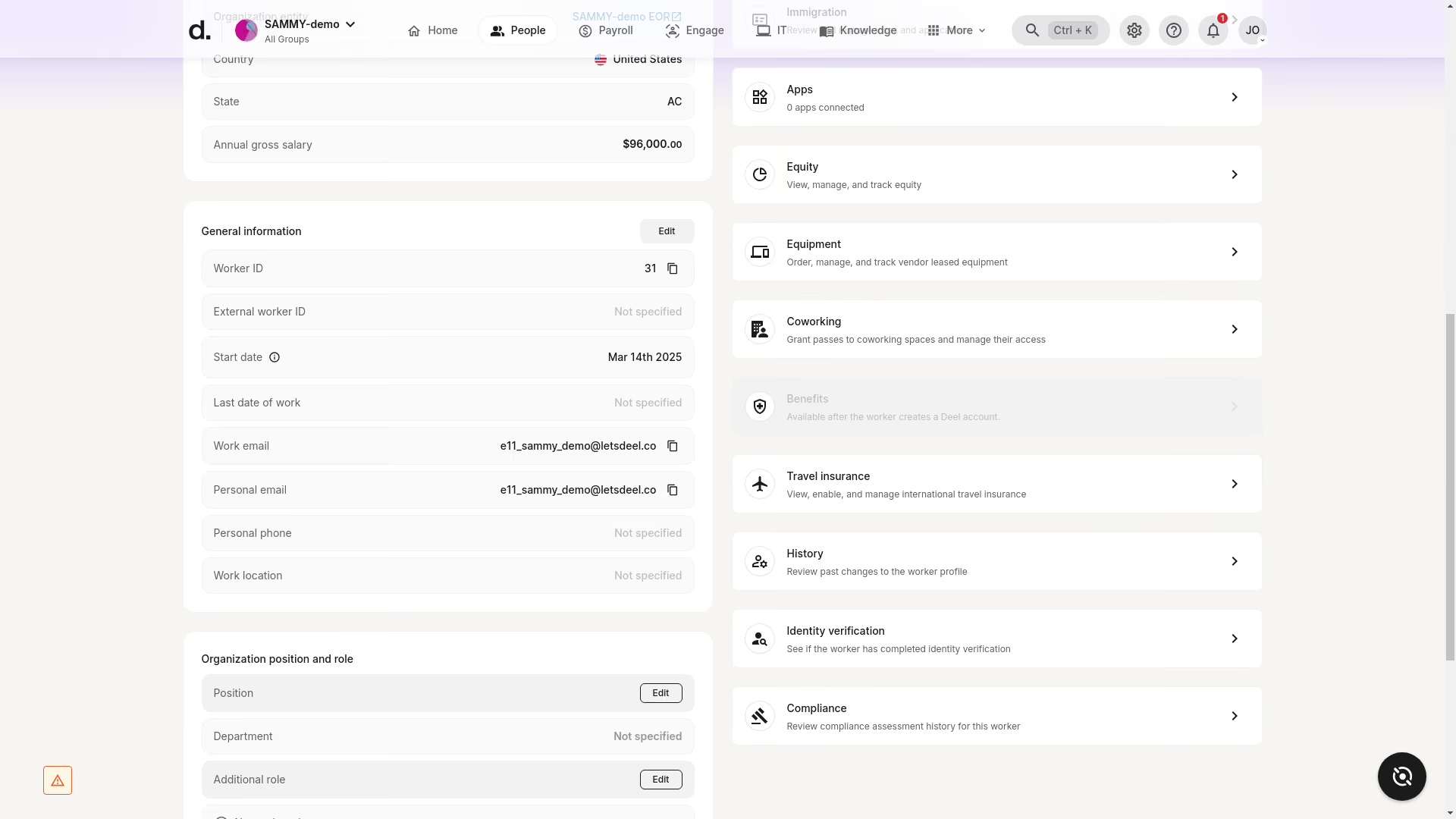
The employee portal apparently is where we landed first and where we ended up spending most of our time, since that’s usually where people management systems either succeed or fail. Luckily, Deel’s portal leans toward the former. The interface was clean both on our computer screens and smartphones. We also appreciated that multiple matters, such as personal updates, time-off requests, contract access, and pay stub retrieval, can be resolved directly in this portal without involving HR. Additionally, the collaboration software plugins help reduce the hassle of switching between platforms by surfacing notifications, such as time-off approvals and payroll, right inside Slack and Teams.
Another positive in our assessment is how Deel handles security controls. It's quite reassuring to see multiple layers in place, including encryption, secure storage, password management, and SSO. Plus, Deel’s recent partnership with Albert to provide cybersecurity training resources signals the vendor’s proactive stance on comprehensive operational risk management.
Analytics-wise, Deel HR’s lowest-priced module, Core HR, already includes people analytics dashboards. But what differentiates the platform is its ability to connect directly with Microsoft Power BI via API. Once integrated, live Deel data automatically feeds pre-configured KPI dashboards, which can be particularly convenient if you want workforce metrics embedded in executive reporting. Of course, it also means you need Power BI and may need to rely on HR Metrics for consulting support to configure advanced dashboards.
We appreciate that Deel’s structure is modular, with modules running on the same HR data foundation, so no migration is required as companies scale. Core HR starts at $5 per employee per month and includes foundational HRIS tools. Speaking from a remote startup perspective, this is a pretty good start for most SMBs. To be fair, though, the total cost can increase quickly once multiple modules are combined.
40,000+ companies, including Intuit, Canva, Ramp, and Klarna.
Deel HR provides its modules at various monthly per-employee costs: Core HR for $5, Recruit for $14, Develop for $22, the Recruit & Develop Bundle for $30, and the Full HR Solution, which includes all features plus advanced functions, for $56.

Best For
Globally distributed organizations.

Connecteam
As an all-in-one platform for deskless employees, Connecteam covers communication, scheduling, task management, core HR, and more. Its aim is to connect unanchored workers at small and large companies alike with an easy-to-use mobile app.
PROS
- Connecteam offers a user-friendly, mobile-first platform that’s tailored for deskless employees.
- With a variety of features for team management, communication, training, and engagement, the platform provides a comprehensive solution.
- Connecteam offers transparent pricing for all modules, including free plans for small businesses.
- A 14-day free trial without requiring a credit card allows potential users to test the platform's capabilities.
- One of the only fully-mobile HR tech tools for deskless workers
- Very adequately-priced for all it entails, SMB-friendly
- Quite open to feedback, having implemented user suggestions as features in the past.
CONS
- There’s a bit of a learning curve simply because of the many features there are on the platform.
- While the platform's scalability is commendable, several important features are only accessible on higher pricing plans.
- We would have liked to see more integration options with third-party tools such as calendar sync. Payroll integrations are also limited at this time to just Paychex, Xero, Gusto, and Quickbooks.
- In the communication hub, the app offers no confirmation that messages were sent and/or seen.
- Certain features that some teams consider essential, such as GPS-tracking, are only available in the higher-tier pricing plans.
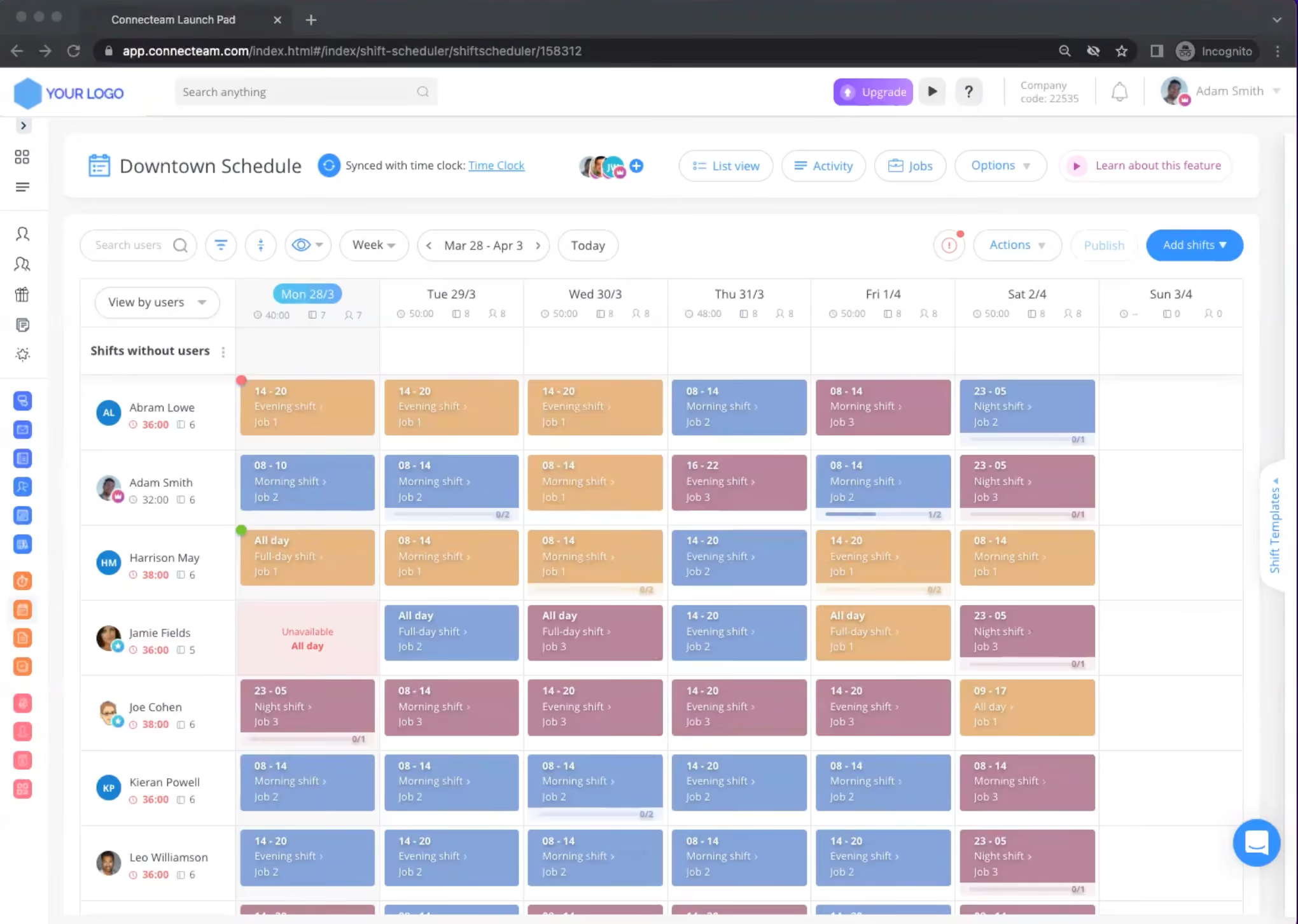
Connecteam offers comprehensive employee management software that stands out for its mobile-first approach - everything inside is built with non-desk workers in mind. We’ve had a tour of its HR & Skills hub and were particularly impressed by the training and onboarding features within. The software allows managers to create custom courses tailored to each position within the company, and these courses can be completed directly from employees’ mobile devices. The addition of quizzes ensures that trainees have a solid grasp of the material, while progress tracking provides managers with real-time insights into each employee's development.
Another notable feature is Connecteam's ability to digitize and centralize employee documentation. By gathering all paperwork in one secure location, the platform simplifies the onboarding process and ensures compliance with expiration date reminders for important documents and certifications. This not only saves time but also reduces the risk of regulatory issues.
Connecteam also excels in managing time off requests. Employees can easily submit absence requests through the app, while managers gain a clear overview of these requests and can effortlessly update balances. The software further simplifies the process by allowing the creation of policies for various types of absences and automating notifications to prevent compliance issues.
Recognizing and rewarding employees is yet another thing made easy with Connecteam's built-in features. Managers can publicly or privately acknowledge individual and team achievements, fostering a culture of appreciation. The platform also offers the ability to reward employees with their favorite gift cards, providing a tangible incentive for going above and beyond.
Lastly, Connecteam's employee lifecycle tracking is also worth highlighting. The timeline view provides a comprehensive picture of each employee's journey, from onboarding to performance reviews and salary raises. This information, along with the ability to attach related files to each event, empowers managers to make informed decisions based on a holistic understanding of their team members.
Over 35k businesses use Connecteam’s solutions, including Chick-fil-A, Ihop, and The UPS Store.
Connecteam’s pricing ranges from free-for-life to up to $99 per month for up to 30 users. The final amount will depend on how many users and modules you choose. Visit Connecteam’s pricing page for the full breakdown of each plan.
Best For
Companies of all sizes looking for a mobile-first employee management platform.

BambooHR
With over 20,000 active clients and 1.8 million employee users, BambooHR is a top provider in the HR tech space. Their Employee Management features include time & attendance, leave requests, and employee wellbeing tools.
PROS
- Customizable packaging and flexible pricing options, allowing you to select one or two packages and add modules based on your specific requirements.
- Known for its simplicity and user-friendliness.
- Straightforward tool, easy to navigate and use.
- Flexible packaging and custom pricing is the way they roll. You can pick out one or two packages and pick other modules as add-ons based on your needs.
- Very simple and straightforward tool, easy to use.
CONS
- You can only run payroll for U.S.-based employees.
- Customer support is limited to U.S. workdays and business hours.
- Several modules such as time tracking, surveys, and performance management are available exclusively as add-ons, meaning you do need to pay more to use them.
- Payroll is only available for US-based employees
- Customer support is only offered during US business hours.
- Some modules like time tracking, performance management, and surveys are only available as add-ons.

Here’s a company that is a must-consider when it comes to various types of HR tech, including, of course, employee management systems. BambooHR is a well-known vendor in this space, with a host of HR tools to help companies manage employees throughout their lifecycle, from hiring and onboarding, to payroll and day-to-day management.Of course, employee management tools like time tracking and a performance module are available, but only offered as add-ons within one of the HRIS plans.
BambooHR has over 20,000 customers, including major companies such as the University of Maryland, Quora, Reddit, Universal Group, Asana, and Wistia.
BambooHR's per-employee, per-month pricing tiers for employee management are:
- Core ($10): Essential HR.
- Pro ($17): Core features plus performance and engagement.
- Elite ($25): Pro features plus compensation management, advanced analytics, and premium services.
Best For
BambooHR is great for companies wanting a customizable HR product with pricing tailored to their needs. It's especially popular with partial or fully remote teams.


I used it primarily for hiring, such as uploading applicant information into the BambooHR system. I also used it to send required forms and onboarding documents to new employees. In addition, I assigned training modules for new hires to complete.
I accessed BambooHR almost daily, as it served as the central repository for all personnel records, removing the need for physical files.
Although payroll was not part of my responsibilities, I was responsible for entering accurate compensation details for both new and current employees, which BambooHR then communicated to payroll.
- It is easy to use.
- The layout is clear and intuitive.
- The system is simple and efficient for everyday HR tasks.
This was an organization where I worked as a consultant. They chose BambooHR because it was easy to use and provided a wide range of useful resources.
The organization aimed to streamline their HR processes, including employee onboarding and record-keeping. BambooHR offered centralized personnel file storage, eliminating the need for paper files. I personally used the tool during my time as a consultant with them.
I don’t have any specific complaints about the program. I did not encounter any issues while using it. There may be more features available, but I did not have the opportunity to explore them due to the limitations of my role.
Using BambooHR felt like a simplified version of PeopleSoft. I used PeopleSoft for years, and BambooHR was much easier to navigate. As mentioned earlier, I would have liked to explore more of its capabilities, but as a contracted employee, I used it according to the scope of my assignment.
Always compare different systems before purchasing. If I were part of a small company, I would choose BambooHR over ADP due to its cost, the information it provides, and its ease of use. It may have felt easier for me to use because I have experience with more complex systems.
I know the platform has continued to evolve, and I would be happy to use it again. I can’t speak to its most recent updates, as I have not used it recently.
BambooHR works well for small companies with fewer than 150 employees. They might not agree with me, but the system is simple and easy to use. The helpdesk also responds quickly, which makes it accessible even to users outside of HR.
The larger corporations may not find BambooHR robust enough for their needs.

Paylocity
Paylocity combines employee self-service, payroll, time tracking, recruiting, onboarding, performance management, and HR administration in one platform. Its broad workflow coverage makes it particularly compelling for mid-sized U.S. companies that want employees and managers to handle more HR tasks without relying on administrators.
PROS
- Employee self-service covers pay, time off, documents, personal information, and HR tasks.
- Mobile and desktop access supports time tracking, scheduling, onboarding, and employee self-service.
- Performance tools combine goals, feedback, journals, and formal performance reviews.
- Recruiting and onboarding connect hiring workflows with employee records and preboarding tasks.
- Payroll can combine recurring salary and deduction data with timekeeping information.
- Paylocity’s customer support is highly rated for always being available to answer questions.
- Global payroll support for 100+ countries.
- Provides free and unlimited training modules on the website.
- Paylocity’s mobile app has a good UI and functionality
- The tool is easy to use for both employees and employers.
- Has 350+ pre-built integrations.
CONS
- Pricing is not publicly disclosed, making total cost hard to assess before a sales conversation.
- The breadth of functionality may be more than smaller organizations need.
- International coverage is narrower than global-first vendors like Deel, though Paylocity does offer global payroll.
- Reporting in the time and attendance product may require spreadsheet-based analysis to create custom views.
- Undisclosed pricing.
- It doesn’t have a free trial or free plan.
- Support is available in English only.
- It isn’t the best solution for remote teams looking for a tool to manage payroll and benefits for their contractors.
We find it remarkable that Paylocity connects employee self-service, payroll, time tracking, recruiting, onboarding, performance management, and administrative tools through the same environment.
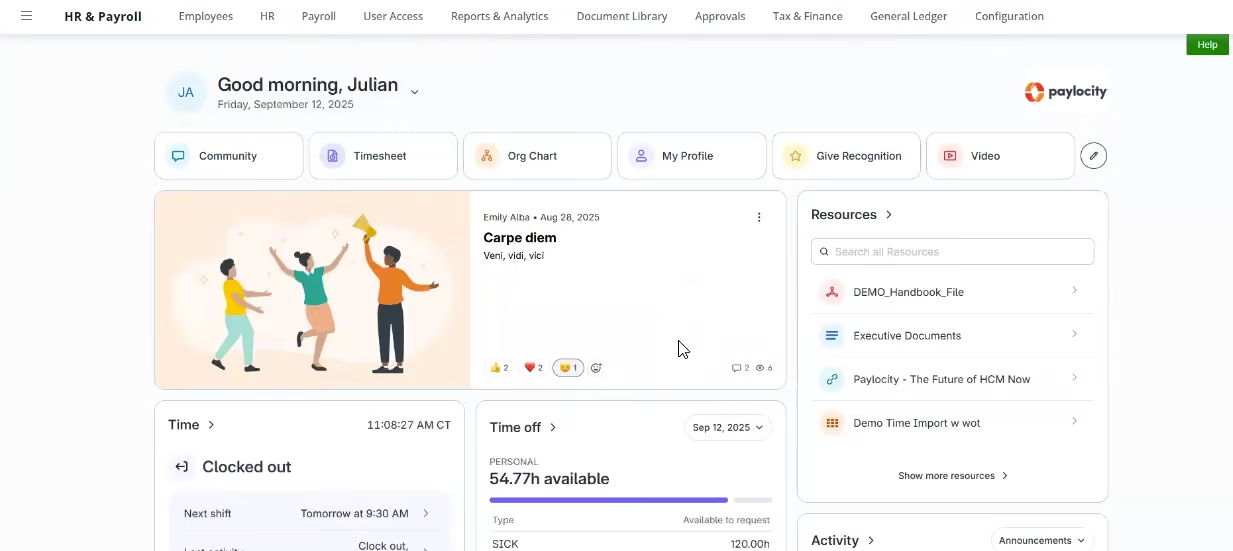
The employee homepage is the strongest part of the experience. Employees can view current and past pay, download pay stubs, check time-off balances, submit requests, complete tasks, access company resources, and find colleagues via an org chart and directory. They can also update addresses, emergency contacts, direct deposit, and tax details themselves, cutting the routine changes HR has to process.
In our last Paylocity demo, employees could access pay, time off, scheduling, clocking in and out, tasks, and onboarding on both phone and desktop. Time can be tagged to jobs or projects, allowing employers to allocate labor to specific work.
Performance management is comprehensive, combining employee journals, individual and team goals, feedback, and formal reviews. Journaling supports recurring check-ins, performance improvement plans, and general notes, while feedback can come from managers, direct reports, or peers.
Paylocity also offers recruiting with applicant tracking, job distribution, interview scheduling, and candidate lifecycle management, all tied to employee records and payroll, so payroll batches automatically pull salary, earnings, deductions, and timekeeping.
For smaller organizations, this breadth can add complexity and overhead versus more focused tools. The custom pricing model also limits cost evaluation before a formal sales process.
40,000+ organizations, including POLYWOOD, The Kennedy Group, and Hathaway Brown School.
Custom pricing.
Best For
Paylocity is best suited to mid-sized U.S. companies that want to bring payroll, HR, employee self-service, time tracking, recruiting, onboarding, and performance management together in one platform.

We use Paylocity for various purposes, such as payroll, onboarding, and managing employees' work hours and wages. Our payroll processing is done weekly. Each week, we review the hours reported by our employees in Paylocity to ensure that the final payment is accurate and make any necessary adjustments for deductions, such as child support, health insurance, paid time off, or pending payments.
The onboarding module is used once or twice per week, depending on the number of new employees. With the module, you can add an employee's basic information, employee earnings, PTO, deductions, and simultaneously send a candidate a link to access the Paylocity platform, where they can review and sign necessary documents such as policies, NDA, and handbooks. This helps us streamline the onboarding process, ensuring that new employees have all the required documents and knowledge for their first day of work.
- Their customer service is quick and easy to reach.
- You can integrate modules and customize them according to the company's needs.
- The payroll module integrates with the workforce time management module, allowing employees to clock in and out and generating reports for payments.
- They keep you informed about changes in federal and state employee laws, especially those related to taxes and changes that may affect your company's payroll.
We are a growing company and can no longer manage payroll manually. In 2020, we started using Paylocity. It has greatly improved the time it takes to process payroll and the accuracy of the payments, particularly for our hourly employees. Additionally, our onboarding was done manually. We spent a lot of time sending emails, attaching documents, and transcribing applicants' information into our system. This task could take a full day and did not allow the HR team to focus on other tasks.
To address this problem, the company decided to purchase the onboarding module. It helped us automate the process and save time. Now, on one platform, employees can authenticate, sign, and submit documents, as well as input their information. This has reduced the need for printing and handling physical documents. I have used Paylocity for the past four years, and I believe it is an excellent tool worth the investment.
- The platform is challenging to navigate.
- You still need to add information manually to the payroll, such as holiday pay.
- The employee clock-in and clock-out system sometimes freezes or stops working without reason, requiring a reinstallation of the app.
I have worked with several tools, most of which are similar, but the workforce time management module stands out. It effectively tracks employee hours worked daily and is simple to use. It also integrates seamlessly with the payroll module, offering an advantage that no other HR system provides.
If you are looking for an efficient HR system that you can customize according to the organization's needs, Paylocity is a great tool. Also, if you are looking for payroll software but know that you will need performance appraisal or another HR process in the future, Paylocity allows you to acquire and integrate more modules.
Paylocity continuously changes to offer a better experience to its customers, especially HR departments. When I started working with them, some processes were still manual, but over time, they improved and automated these processes, saving us time that we can now invest in other tasks.
Paylocity is a valuable tool for companies with hourly workers as it allows for easy tracking and control of their time.
Paylocity is an excellent tool for any organization. It is important to define the company's priorities to understand which modules are correct for the organization.

Gusto
SMBs can use Gusto to manage employees in all states, 1099 workers, and contractors worldwide. The platform offers full-service payroll, plus HR and benefits administration, at budget-friendly pricing.
PROS
- Premium plans give you access to workflows, performance reviews, and development resources.
- The UI is modern-looking and easy to use.
- Payroll deductions are automated.
- You can process payroll for U.S. W2 employees as well as domestic/international contractors.
- The customer support team is responsive both via phone and email.
- All plan users can reach out to Gusto’s team of licensed benefits advisors for help.
- Employees can access a self-service portal to check information and perform tasks on their own.
- The dashboard feature keeps tabs on compliance tasks
- The hiring and onboarding sequence is nicely streamlined between HR and the new hire
- Post-offer, pre-start tasks are made easy with integrations like CorpNet (state tax set up) Checkr (background checks)
- Easy payroll for U.S.-based W-2 folks, domestic, and international contractors
- Person-to-person phone support, email, and other customer service resources
- The business model is responsive to customer needs
CONS
- No international employee payroll, only contractors.
- No native accounting for financial tracking.
- The analytics dashboard is rather basic, compared to similar platforms.
- No native time tracking for the Simple plan.
- Compliance alerts and insurance integration can only be accessed by Premium plan users.
- No free plan or trial.
- Gusto can support payments for international contractors, but not employees
- No native accounting feature to keep earning and spending under the same roof
- Analytics dashboard is simplistic
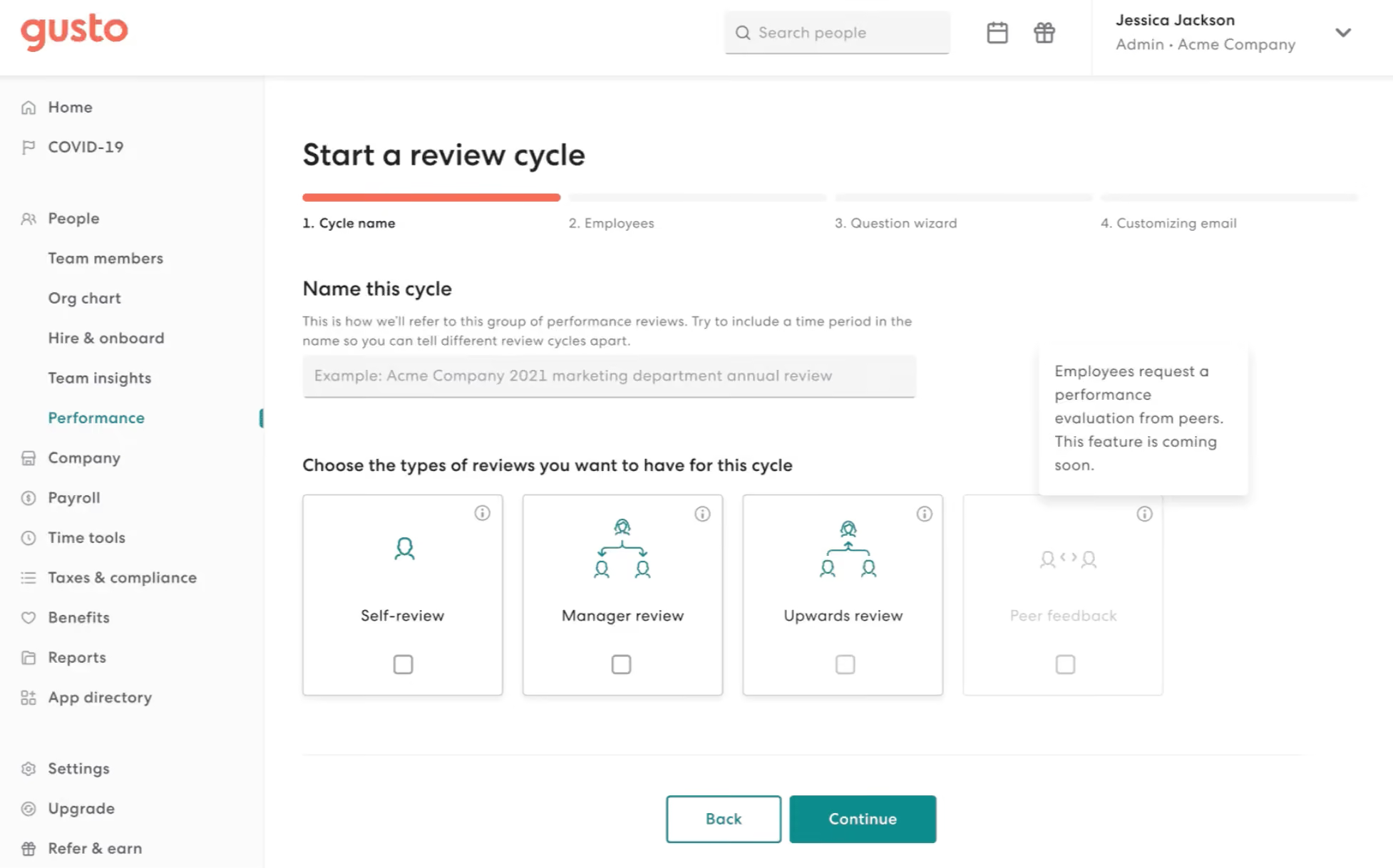
We have tested Gusto's employee management software and found it a comprehensive solution for SMBs. With the ability to manage employees across all states, 1099 workers, and contractors worldwide, Gusto offers full-service payroll, HR, and benefits administration at affordable prices.
The Premium plan (the highest tier) provides additional value with access to performance features like automated workflows, self-evaluations, manager reviews, and career development resources for better employee engagement and professional growth.
In addition to its functional capabilities, Gusto boasts an eye-catching interface that is visually appealing and user-friendly. Navigating through the platform is intuitive, making it easier for users to manage employee-related tasks efficiently.
We also found automatic payroll deductions and payroll services available for U.S.-based W-2 employees and domestic and international contractors. Gusto's employee self-service portal is also available, reducing administrative burdens and allowing employees to handle tasks independently.
However, we couldn’t help but notice Gusto doesn’t support payments for international employees. Native accounting for comprehensive financial tracking is missing. We also found that the Simple plan lacks several features, such as time tracking, compliance alerts, and broker integration. And regrettably, Gusto does not offer a free trial option.
Gusto supports over 400,000 businesses across the U.S., many of which rely on the platform for core HR workflows like employee onboarding, benefits management, time tracking, and compliance.
Gusto offers four pricing plans: Simple ($49/month + $6/employee) for core payroll, Plus ($80/month + $12/employee) for multi-state payroll and HR tools, Premium ($180/month + $22/employee) for the full HR suite and dedicated support, and Contractor Only ($35/month) for managing independent contractors. Add-ons HR Resources ($50 + $5 PEPM) and Priority Support ($30 + $3 PEPM) are available for Simple and Plus plans.
Best For
Gusto's basic plan is budget-friendly, making it accessible even for cash-strapped startups. The premium plan is highly recommended for companies that have the funds to invest in human capital, especially those with just one HR employee. The premium features are worthwhile for such companies.

I used payroll biweekly, then switched to weekly (payroll changes of this type are extremely well handled in their system). Annually, we update the employee handbook (which is automatically emailed/text-blasted to the employees for an electronic signature), semi-annually for all harassment/employee education (also via a partner listed in Gusto), as needed to onboard/terminate a new employee, and daily as needed to update employee records or pull reports for analysis.
The software is laid out very nicely, making it easy to find anything, and all employee documents are in one place. Reports are easy to find and customize. Their help desk is extremely knowledgeable. If they can't help you, it's elevated via a ticket system to an in-house engineer. Gusto is so user-friendly that an employee can learn what they need to know in minutes.
Gusto was purchased for a small company's payroll, HR management, and processes.
We needed to simplify payroll, become fully HR compliant, and organize processes (handbook, reviews, job descriptions, tax documentation, etc. for the team). HR at the time had worked with various large platforms that would not suit our needs because they were overly complicated with a cumbersome setup for a small company.
Combined with features we would never use, these platforms were an unworkable option. This led us to find a vendor specific to small businesses. A colleague of the owner suggested Gusto. After one demonstration, we decided to go with the full suite of offerings (Premium) but later reduced to Plus. Once you learn the features, you know what you can do without and save some money.
One problem we had, which Gusto was unable to solve at the time, was timekeeping. We added a timekeeping system that partners with Gusto for a seamless hourly staff payroll. There are lots of options listed within Gusto.
I've used the Gusto tool for four years. All our HR problems were solved. Gusto works perfectly for a small business (under 100 employees). Payroll is a snap. Managers approve their employees' time, it's filtered into the Gusto system, and ready for final approval/submission within minutes.
Additionally, you have a window to pull back payroll to make changes. All adjustments (healthcare, court-ordered payments, etc.) are easily set up via each employee, and changes can be made within seconds. Employees can update their personal or tax information right in their app, which is very convenient for them.
Gusto simplified the entire onboarding process, along with payroll, handbooks, employee reviews, etc. Gusto needs to add their own time clock system (if they haven't already), but their time clock partners work extremely well.
One last point, if you want to be very specific about which employee's information their manager is allowed to see, Gusto has levels of permissions for managers and employees built into the software.
It would be nice if they had a timekeeping system (that wasn't on the internet), reducing the need for another app. It would also be nice if Gusto had an applicant tracking system. PTO can be cumbersome to figure out on an accrual basis.
Gusto is by far the best payroll, HRIS software I've used mainly due to its simplicity and speed.
How many employees do you plan on running through the system? Payroll over 100 could be run better on a different platform. Understand what Gusto cannot do that you'll need to add on (timekeeping app, harassment training). What does your accounting firm do for you that Gusto can automate? 940/941 filings, tax setup for unemployment in each state.
I'm a fan of their customer service; however, many think they're too slow. Growing pains, Gusto's management will catch up. They've streamlined even more in the last four years.
The entire HR department and all managers with staff in small business can find Gusto to be a great fit.
Gusto is not suited for a company with a large number of employees. They gear their product to small businesses, and they're good at it.

Leapsome
With easy onboarding, customizable performance reviews, employee training, recognition, and engagement features as well as OKRs setting and tracking, Leapsome has everything you need for you to manage your employees, listen to their feedback and keep them happy and productive.
PROS
- Leapsome offers a comprehensive range of features, including modules for employee onboarding, learning management, engagement, performance management, and goals tracking, among others.
- Users find Leapsome's user interface (UI) to be friendly and easy to navigate.
- The platform provides numerous third-party integration options, such as Slack, which users appreciate for enhanced connectivity.
- Leapsome's pricing is flexible, allowing users to pay only for the modules they require.
- Besides English, Leapsome is available in 12 additional languages, catering to a diverse user base.
- Leapsome is quite feature-rich; the platform packs modules for employee onboarding, learning management, engagement, performance management, goals tracking and much more.
- The majority of users find Leapsome’s UI to be friendly and easy to navigate.
- There are lots of third party integrations options to choose from, including Slack, which many users appreciate.
- The platform has transparent pricing, and you only pay for the modules you need.
CONS
- There currently isn’t a way to post or upload images or files within your feedback.
- Due to the platform's extensive capabilities, users may need some time to adapt to its various functionalities, and the implementation process can also be time-consuming.
- Leapsome currently lacks a dedicated mobile app, limiting on-the-go access for users.
- While a free 14-day trial is available, users need to schedule a demo with the sales team to sign up, as self-registration is not possible.
- There is currently no way to post or upload an image or file into your feedback.
- Since Leapsome can do so many things, you may need some time to get used to it. The implementation process can also take some time.
- There currently isn’t a mobile app that users can download and access Leapsome quickly on-the-go.
- Free 14-day trials are available but you need to book a demo with the sales team first to sign up for one; you can’t do so on your own.

Besides hosting your employee data, Leapsome gives you several tools to manage your employees, from performance tracking to sentiment analysis and skills development.
Managers can provide performance feedback to their team members either publicly or privately. The platform also enables peer-to-peer reviews and for employees to provide feedback back to their managers on what can be done to improve leadership styles and collaboration.
The employee engagement and training tools help you pay even more attention to the experience of your employees. You can routinely do surveys and pulse checks to gauge employee sentiment and take necessary actions to improve the workplace environment, while the training module helps you create and deliver learning content, unique to what skills your employees want to be better at.
Leapsome is used by many well-known companies, including Spotify, +Babbel, Unity, PayFit, Learnerbly, Modus Create, Spryker, DCMN, and more.
The pricing of Leapsome starts from $8 per user per month, which varies depending on the specific modules chosen. They also provide multi-module and volume discounts. For an exact estimate, we recommend that you contact Leapsome's Sales team directly.
Best For
Companies of all sizes can use Leapsome, though medium and large-sized companies are more likely to get the most value out of it.

The tool has allowed them to create a cohesive performance management system, foster engagement, and support continuous learning and development, which are critical for building a high-performing organization. The client uses it for performance management, 360-degree feedback, employee engagement, pulse surveys, and onboarding of new employees.
The OKR functionality has increased collaboration and transparency, especially for remote teams. They leverage the data analytics and reporting modules for performance tracking, identifying training needs, and monitoring employee engagement and satisfaction. The client also uses Leapsome for employee recognition and rewards to increase retention.
The client appreciated the simple and intuitive interface, making it easy for both employees and managers to navigate. The platform’s design minimizes the learning curve, making it quick to adopt for teams of all sizes, which is a plus for a growing company.
The ability to integrate goal-setting (OKRs), continuous feedback, and performance reviews was highly valued. Another advantage was the ability to create custom review cycles, run 360-degree feedback, and effectively track performance.
Leapsome was purchased to streamline performance management, OKR tracking, and employee engagement. It allowed my client to align team and individual goals with the organization’s objectives through goal-setting frameworks like OKRs (Objectives and Key Results). It increased visibility and tracking to ensure that everyone was working toward measurable outcomes.
Leapsome provided customizable performance review cycles, including 360-degree feedback, continuous reviews, and self-assessments, which helped tailor reviews to organizational needs and culture. The ability to engage employees through surveys and gather real-time feedback was also a key selling point. The learning and development tools were valuable, although the client was using an existing tool at the time and had not yet begun leveraging this aspect of the platform.
There are limitations in customization for features like performance review templates and feedback processes, which could benefit from more flexibility. Companies with unique organizational structures or processes may find it challenging to tailor every aspect to their needs.
The learning curve for advanced features, such as custom analytics or deep performance tracking, can be difficult to fully grasp and utilize. The per-user pricing model and modular nature of the platform can become cost-prohibitive as the organization scales, which is interesting since scalability is also a pro, but the cost structure could be more considerate of hyper-growth companies.
Leapsome offers a modular approach, allowing companies to choose and pay only for the features they need, offering flexibility that many competitors lack. While some competitors provide all-in-one solutions that can be less customizable, Leapsome allows companies to avoid paying for unnecessary features.
Unlike many performance management platforms that emphasize periodic reviews, Leapsome strongly encourages a culture of continuous feedback and recognition, making it ideal for companies that prioritize ongoing development.
Competitors like Lattice and 15Five offer feedback options, but Leapsome’s seamless integration of real-time feedback and performance tracking helps embed feedback as a constant part of the employee experience.
Companies should clearly define the must-have versus nice-to-have features and consider how their future growth could impact their needs. Customization options for performance cycles, feedback, and surveys are essential.
Organizations should evaluate their data requirements, such as the need for deep data analysis versus standard performance, goal, and engagement tracking. Ease of use for both users and administrators, including integration with existing tools and the level of skill required for customization, should also be key considerations.
Leapsome initially focused on performance management and employee engagement. Over time, it expanded to include a full suite of tools covering goal setting (OKRs), continuous feedback, learning and development, and detailed reporting and analytics.
Recognizing that different companies have unique processes, Leapsome introduced greater customization options. Users can now tailor performance review cycles, feedback forms, and learning paths to meet their specific organizational needs.
Leapsome is ideal for tech companies and startups that are scaling, especially those with a feedback-rich culture. It’s also well-suited for medium-sized companies looking for scalability, as well as companies focused on learning and development and personal learning tracks for employees.
Leapsome may not be a good fit for budget-constrained small businesses. It is also not ideal for companies that are not interested in creating a culture of continuous feedback, or for highly hierarchical, traditional companies like those in banking. Industries with minimal need for data-driven HR decisions may not benefit from the platform’s extensive capabilities.
Workday
Workday is robust and quite comprehensive. It can cover all of your HR and payroll needs without needing to combine it with other tech solutions.
PROS
- Workday has an intuitive, easy-to-use interface that makes it simple for employees to navigate and find what they need.
- You can integrate Workday with an impressive number of HR systems and tools.
- Users appreciated that Workday consolidates HR information into a single system, eliminating the need to access multiple platforms.
- Customers can get the support they need from Workday’s community of users, or the support team via live chat and telephone.
- Accessible customer support from the community, live chat, and telephone.
- Compatible with 300 HR systems such as ERP/GL, CRM, HR, and PSA.
- Configurable dashboard with AI and ML-driven insights.
- Ability to maintain real-time alignment of budgets and workforce plans.
- SOC 2 Type 2 compliance.
CONS
- It can take a long time to initially set up and implement Workday (avg 4.5 months).
- The reporting functionality has room for improvement, particularly with regard to customization and search.
- Workday’s pricing is on the expensive side, making it less feasible for smaller companies.
- No free plan or free trial.
- Undisclosed pricing.
- No free trial for its talent management software.
- Time-consuming implementation period (average 4.5 months).
- Challenge navigating for first-time users may require training.
- Issues with logging in were reported by users.
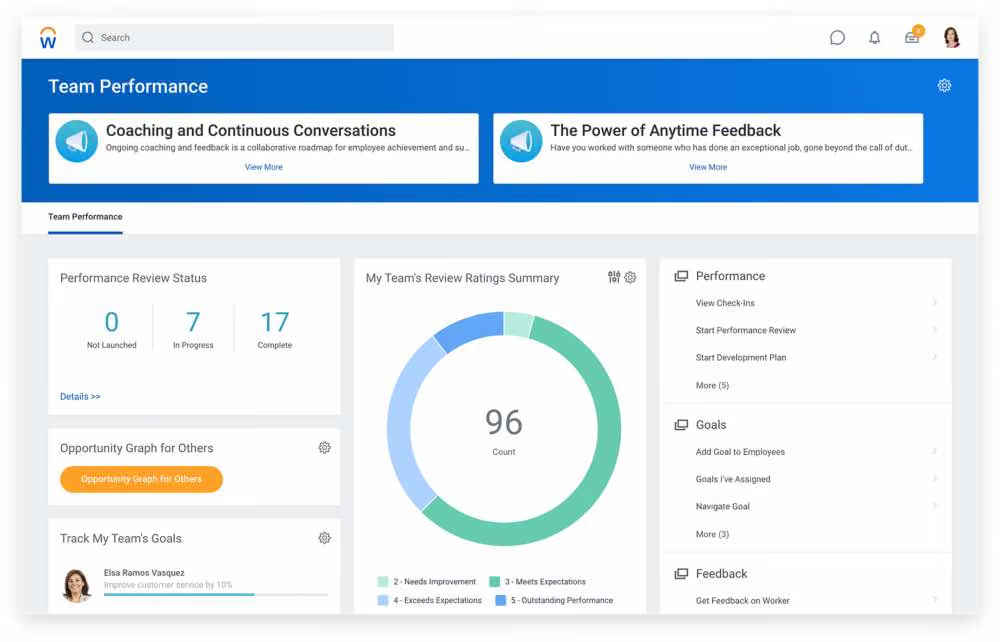
Despite mixed reviews on the user-friendliness of Workday from teams that have implemented it, it is still a robust provider of a wide range of Finance, HR, and Planning solutions, made specifically with enterprises in mind. So if you’re looking for an all-in-one solution that can easily scale, checks the necessary data compliance measures, and can be implemented across large global companies, Workday is worth checking out.
- Target
- Patagonia
- Bank of America
The pricing of Workday’s solutions isn’t disclosed on their website. Contact their sales team to get a custom quote.
Best For
Large-sized companies and enterprises.

I used it for recruiting, internal mobility, onboarding, and reporting. It was an excellent tool for internal mobility because it gave visibility into information like compensation, leveling, and performance reviews. This helped ensure that candidates had eligibility to apply to roles internally. The onboarding workflow was also very straightforward and configuring the to-do tasks was easy. Reporting took a little bit of time to learn and I would recommend taking the Learn Workday course if you have no experience with it because you will learn Workday's logic.
The ATS portion of Workday is a struggle. It is difficult to schedule candidates and build structured interviews.
Pros:
- The information you can get access to is extremely helpful
- The UI/UX is very clean
- All-in-one type solution
Workday was selected because it offered a comprehensive people solution. Instead of having different portals for compensation, performance management, recruiting, and people analytics, Workday allowed everything to live in one system of record. This reduced costs and ramp time in some ways because it allowed everyone to be in one place.
I've used it for a combined 2-2.5 years in my career in all facets from selection to design and then every day use for reporting and recruiting.
Cons:
- The Recruiting module for recruiters and recruiting coordinators is not intuitive and user friendly
- The Recruiting module for candidates is lengthy and miserable. It does a terrible job of parsing resumes
- Job management versus position management makes data funky in some instances (for example, if you were hired into a position, it can look like you hired your whole team unless you put in specific calculated fields)
- If you don't have the right access controls, it is borderline impossible to do your job effectively.
The Workday Recruiting Module (their ATS) is one of the most reviled in the Recruiting space. It doesn't compare well to other ATS like Greenhouse, Lever, or Ashby because the latter offers better functionality, controls, and ease of use.
- Ease of use. Workday has the ability to be so much but you have to know exactly what to look for and how to configure it.
- Implementation time. Workday requires a focused implementation and testing period. Without it, you will run into a number of problems. If you need to roll out something quickly, Workday isn't the tool for you.
It is difficult to tell because they release big updates every 6 months so requests for solutions might be forgotten by that point.
HR Business Partners, HR Operations, Finance, Compensation, and C-Suite
Recruiting, Analytics, Interviewers, Candidates
UKG
From paying your employees to managing them, developing them, and everything in between, UKG is a robust HRMS suite that can cover all of your people management needs.
PROS
- Super robust product, packing years of experience with HCM and Workforce Management technology.
- Administrators can configure the visibility settings for managers, employees, and themselves.
- The Ultimate Community provides on-demand information about all UKG Pro products and their usage.
- The mobile app is available in the Apple and Android app stores.
- Offers UKG Pro for HRMS and UKG Ready for workforce management, you could arrive at a combination of products that suits many of your HR needs from the same set of tools.
- Super robust product, packing years of experience with HCM and Workforce Management technology
- Since they offer UKG Pro for HRMS and UKG Ready for workforce management, you could arrive at a combination of products that suits many of your HR needs from the same set of tools.
CONS
- Compared to newer tools, UKG Pro and UKG Ready have not configured their offering to work for smaller or niche teams.
- Employees can encounter log-in issues at times with the Android app.
- Not a very budget-friendly option for small businesses.
- Similarly, UKG offers many solutions under one umbrella, so it's not the best fit if you're looking for only a handful of specific use cases.
- Compared to newer tools, UKG Pro and UKG Ready tend to miss a unique selling point or a specific focus on a certain type of business. While they work great for bigger companies in all sorts of industries, very niche operations might have a hard time adapting to the tool.
- Similarly, UKG offers many solutions under one umbrella, so it's not the best fit if you're looking for only a handful of specific use cases.
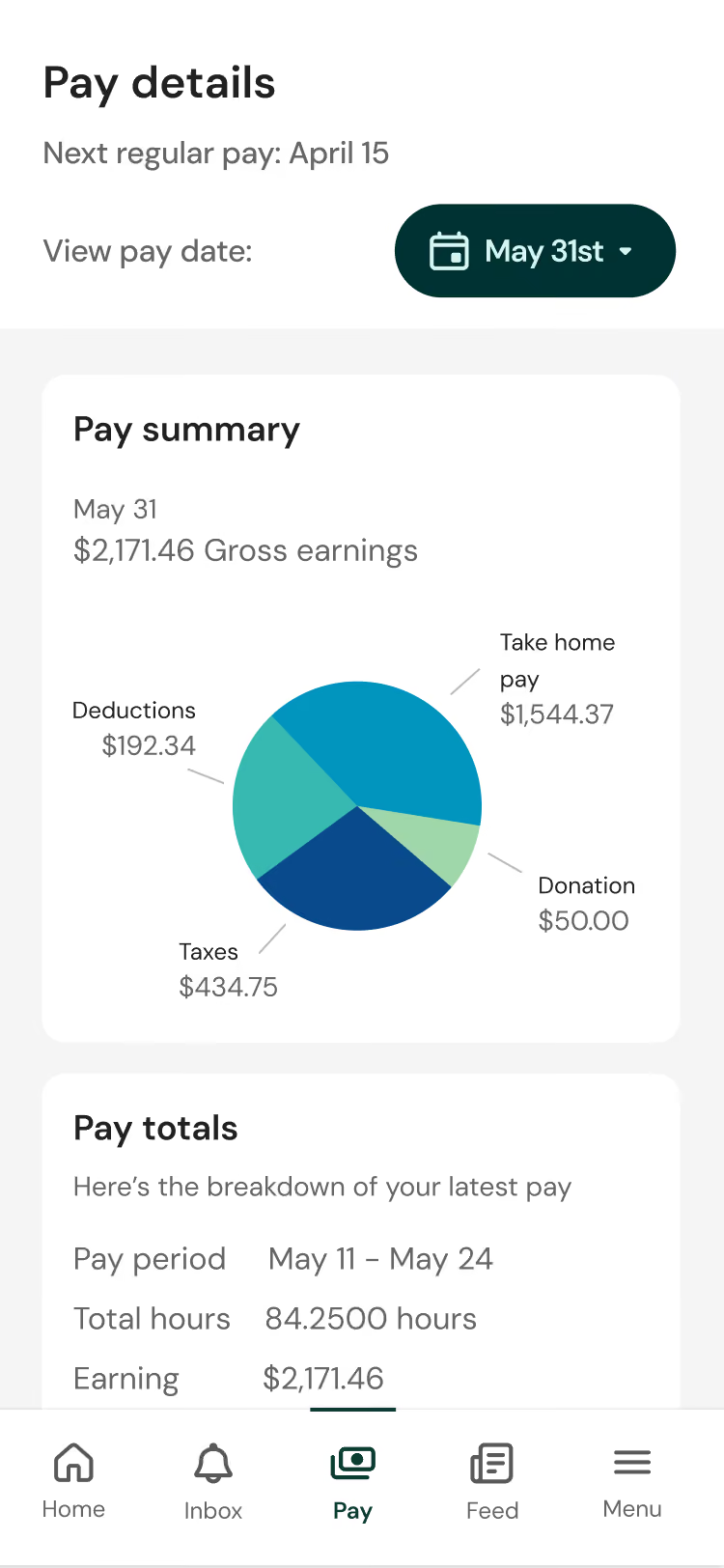
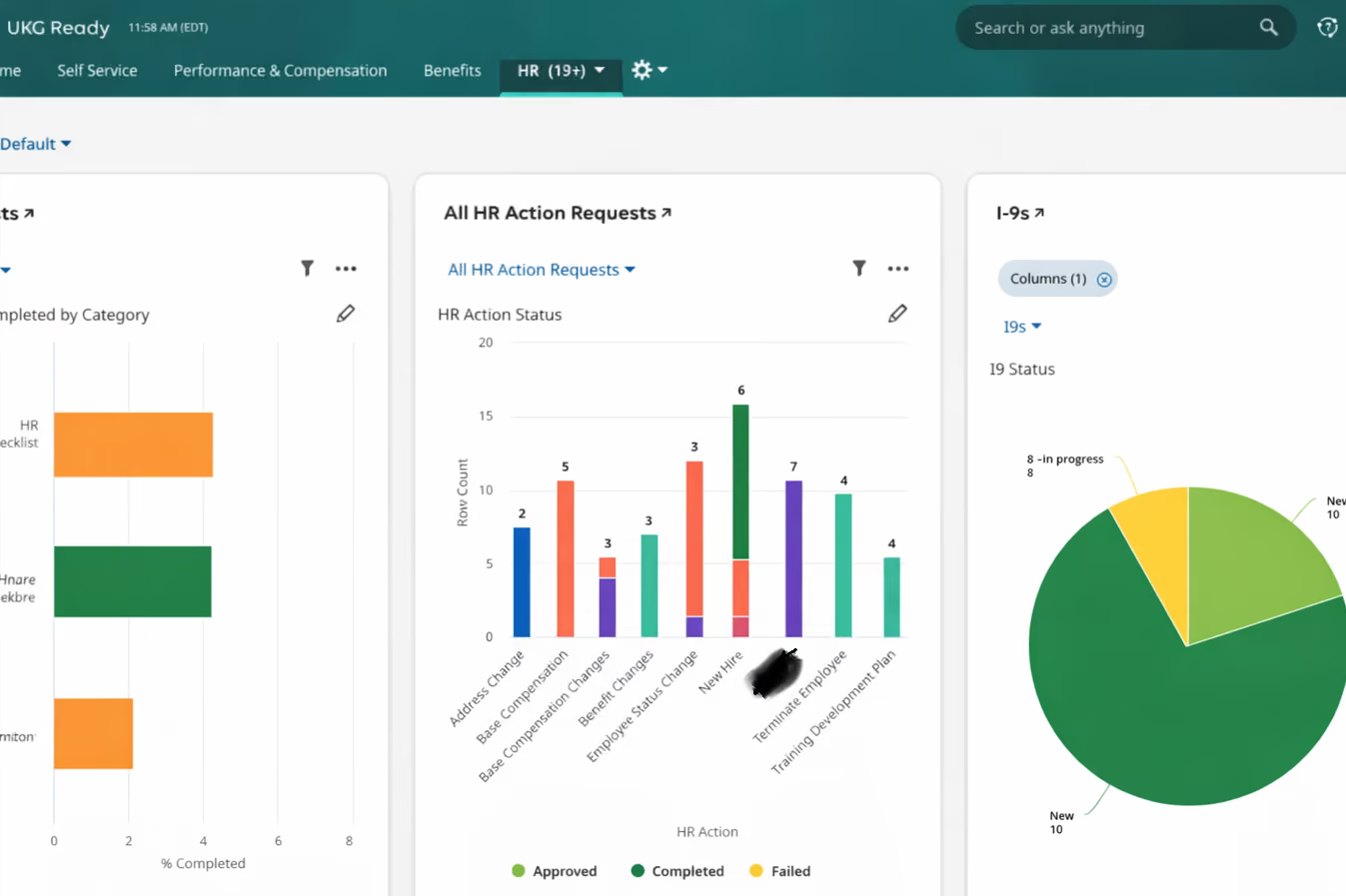
UKG Pro is a comprehensive employee management solution for midsize to large enterprise companies. HR departments at companies like MGM Grand and the Miami Dolphins use it to hire, onboard, pay, and manage employees. This all-in-one tool also features performance management, engagement, and succession planning, so it eliminates the need to purchase additional products to fulfill such needs separately.
UKG also offers UKG Ready, a workforce management solution developed with Kronos, a well-known time and attendance tool. This partnership adds time keeping, attendance, scheduling, and Affordable Care Act (ACA) compliance to the broader UKG offering.
Tesla, Marriott, Yamaha, Aramark, Puma, Sony Music, Samsung.
- Pricing for UKG Pro or Ready is not available on their website. However, it is usually on a per-employee-per-month basis, either billed annually or monthly.
- You’d need to contact a sales representative for an accurate quote.
- Our research has shown that licenses tend to start at around $600.00 per year for every 5 users.
Best For
UKG goes beyond payroll and offers a comprehensive suite of features tailored for enterprise-level organizations. Its robust capabilities serve as an exceptional payroll + HR solution, well suited for large teams with a global headcount, but also smaller businesses with over 50 employees.

As a consultant, I am involved on the front-end with the implementation of UKG products. For my most recent client, we implemented UKG Ready for time and attendance, payroll, performance management, reporting, and employee self-service. It was great to see a company go from spreadsheets, inefficient processes, and no data analytics to a solution for all.
I finished up working with the client and was able to hand off the administration without a large administrative burden on their team. Data analytics were able to identify trends and patterns where they didn't have that visibility before.
Best-in-class product that has the authority, reputation, and solution for a variety of clients. It doesn't matter how many employees you have; they have a solution to fit your budget and goals.
I also like the implementation process. It is seamless, and you are always supported by a very engaged UKG team.
I've used UKG off and on for years, even way back in 2017 when it was Kronos. As an HR Manager and now as a consultant, I've constantly recommended UKG as a product solution for companies looking to implement a quality, best-in-class HRIS.
UKG products are comprehensive solutions for payroll, time and attendance, performance management, and a very intuitive employee self-service. Many of my clients have transitioned to UKG because of the ease of use and scalability.
For my most recent client, they were not happy with all the platforms and wanted to consolidate into one. We implemented UKG Ready, which met their needs immediately.
For UKG Ready, I'd like to see more customization options when it comes to branding. Sometimes the software was a bit limited when it came to differentials, incentives, and other pay practices.
We had to do a few workarounds that took a minute to figure out how to make the system work for what we needed.
I could see how some clients were a bit sticker shocked when comparing similar vendor solutions. Though, those vendors did not have the reputation that UKG has.
UKG has been around for years. There always seems to be some startup company that tries to compete. Yes, there are cheaper solutions, but with UKG you have a brand reputation and best-in-class products.
UKG has a variety of products which can fit needs and budgets. Their customer service doesn't stop at implementation. It isn't a "hook, line, sinker" company. You are supported throughout your relationship with UKG, which I can't say the same for other newer companies.
Companies should have a list of their needs, wants, and wishes when they begin to engage with UKG. You would be surprised at how much UKG can do for your organization. Of course, you also need to have your budget set and understand that with any product implementation, there will be implementation costs.
It has gotten better since the merger. The solutions are comprehensive, and they have kept up with the times. They are always taking client feedback and implementing solutions based on that feedback.
From my experience, I have utilized UKG for a variety of healthcare organizations with multiple sites, complex schedules, and nuances. It was a great solution for this type of workforce.
I honestly can't say who wouldn't benefit from a UKG product. If anything, one without a clear idea of their budget and unrealistic expectations of what they can actually afford.

15five
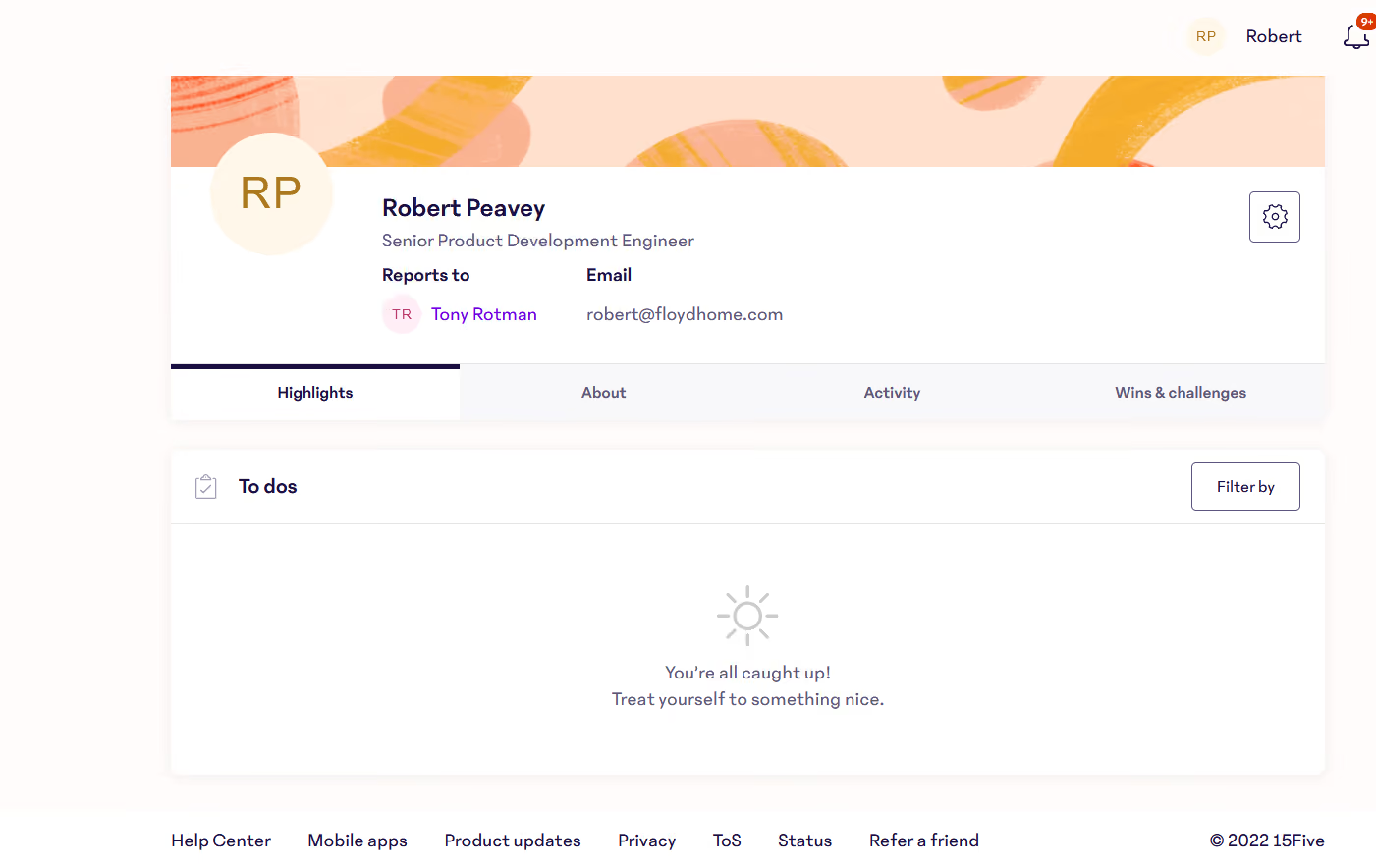
15Five’s Perform module comes with employee management tools to conduct performance reviews, check employees’ role clarity, identify strengths, and help them have a career vision. A unique thing managers can through this module is adjust employee scores in real-time during a calibration session.
PROS
- 15Five helps HR leaders run their performance programs from start to finish and make talent decisions based on a 360-degree view of each employee.
- With the help of visual dashboards, HR leaders can access colorful and easy-to-comprehend insights that will make their talent decisions easier.
- The platform is fairly easy to use, comes with a mobile app, has transparent pricing, as well as a 14-day free trial so users can try before they buy.
CONS
- Some users reported experiencing difficulty creating new objectives or connecting existing objectives to parent objectives in the objectives section.
- When you create an engagement survey using 15Five's template, you can only choose from a selection of pre-made categories rather than creating your own.
- The out of the box integration options are quite limited, and a Zapier integration used to be available but is now sunsetted. As an alternative, 15Five does have a public API for users to plug-in custom tools but that requires a bit more work.

15Five enables managers to have a better understanding of their team members through a host of tools for communication, performance tracking, and goal setting. For starters, managers conduct regular check-ins, performance reviews, and pulse surveys to stay informed about their team's progress and identify areas for improvement. They can also set goals, track progress towards those goals, and provide feedback to employees as needed, fueling a culture of continuous growth.
15Five’s customer base includes Hubspot, Spotify, American Red Cross, Clearbit, Pendo and more.
- Engage: $4 per user per month. Its features include Core engagement surveys, Topic-based assessments, Custom topic-based assessments, Filterable heatmap & analytics, Enterprise-grade security, an Action plan dashboard, and more.
- Perform: $8 per user per month. Its features include Performance reviews, 360º feedback, Talent Matrix, Data insights, Career Paths & Plans, and more.
- Focus: $8 per user per month. Its features include Goal setting with OKRs, OKR chart view, Data insights, Jira & Salesforce Integration, and more.
- Total Platform: $14 per user per month. Its features include everything in other plans, plus DPAs and security questionnaires.
Best For
15Five is a good bet for both growing companies and enterprises. It particularly benefits organizations seeking a holistic feedback system that ensures input from all employees throughout the company.

We use 15Five for Annual Performance Reviews, ongoing check-ins and 1:1s between managers and employees, manager training, and engagement. The robust offerings of 15Five allowed us to originally bring on the tool only for APRs. Over time, we saw the capabilities it had in other arenas. Mainly, we appreciate the tool for its ongoing, direct feedback methods. This allows managers to send and review feedback frequently and has it stored in one location for easy record keeping and reference.
- Ease of use and implementation (lots of CX support with onboarding).
- It is science and research-backed so you know the tool and approach are effective for your employees.
- Affordable and customizable to your team size and needs.
We originally purchased a subscription to 15Five in order to simplify and streamline the Annual Performance Review (APR) process. Employees, managers, and HR were facing tremendous time and administrative burdens when it came to the APR process and we wanted a place to facilitate a more comprehensive, timely, and meaningful experience. We also were looking for something to easily store and document all performance-related information and feedback. We've used the tool for just over one year.
Very few cons about this tool. It really is effective and affordable.
I prefer this tool to others for how easy and straightforward it is. Performance reviews don't need to be complicated, and 15Five has found a way to make it easy and fun.
What are the main needs of your team? How do you want reviews to be structured? What are your employees craving in terms of feedback, engagement, and training?
We have customized weekly check-in questions to fit each team specifically. We have run off-cycle reviews as needed. We have added managers who have high potential to the manager training.
Highly engaged teams. Small-medium sized businesses. Companies with high Gen Z and Millenial populations.
I think this tool might not be beneficial in environments that are not forward-thinking, progressive, or want to be on the cutting edge of employee development and performance.

Namely
Namely powerful HR suite streamlines how you manage your people. It covers onboarding, attendance tracking, performance management, payroll, and benefits administration. It also provides valuable insights into market trends so you can stay competitive.
PROS
- Namely offers a user-friendly interface that allows seamless navigation of the platform, even with its extensive features.
- The employee onboarding module has an easy-to-use wizard, facilitating a smooth onboarding process for employees and new hires.
- Besides Namely’s payroll and benefits administration features, you can opt for their managed payroll and benefits administration services to reduce your team's workload even further.
- The majority of users are able to navigate Namely without any issues. They find the UI to be intuitive and clean, despite the fact that the platform has lots of features.
- Namely’s employee onboarding module gets a alot of praise from users. It features an easy-to-follow wizard, which helps new hires get on quickly and be clear on what they need to do.
- Besides the platform’s built in features for data management, recruiting, onboarding, time off tracking, payroll and benefits administration, there are also managed payroll and benefits administration services you can opt for to reduce the burden on your internal teams.
CONS
- Namely caters mainly to the U.S. market, which means it’s not quite suitable for organizations that need it to handle payroll and benefits for employees in other countries.
- If you’re looking for quick implementation, Namely may not be for you as on average, 6-8 weeks are needed to get your instance up and running.
- Currently, Namely lacks employee development features such as skills training, career pathing, and succession planning.
- Users should look into whether Namely is compatible with their existing benefits provider, as a few users have reported instances where Namely's team encouraged them to switch to providers with higher fees.
- Namely primarily operates in the U.S., which means if you’re looking for a global payroll and benefits provider, this platform isn’t for you.
- Though many praise the platform’s ease of use, it does take long to implement it. Namely’s own team says that an average implementation takes between 6-8 weeks.
- For a platform of Namely’s size, there currently aren’t any features that focus on employee development such as skill training, career pathing, succession planning etc.
- You’ll need to check beforehand if Namely can work with your existing benefits provider, if you have one. There have been a few reports (but not few enough to ignore) about Namely’s team convincing customers to change their benefits provider to providers that charged them more.
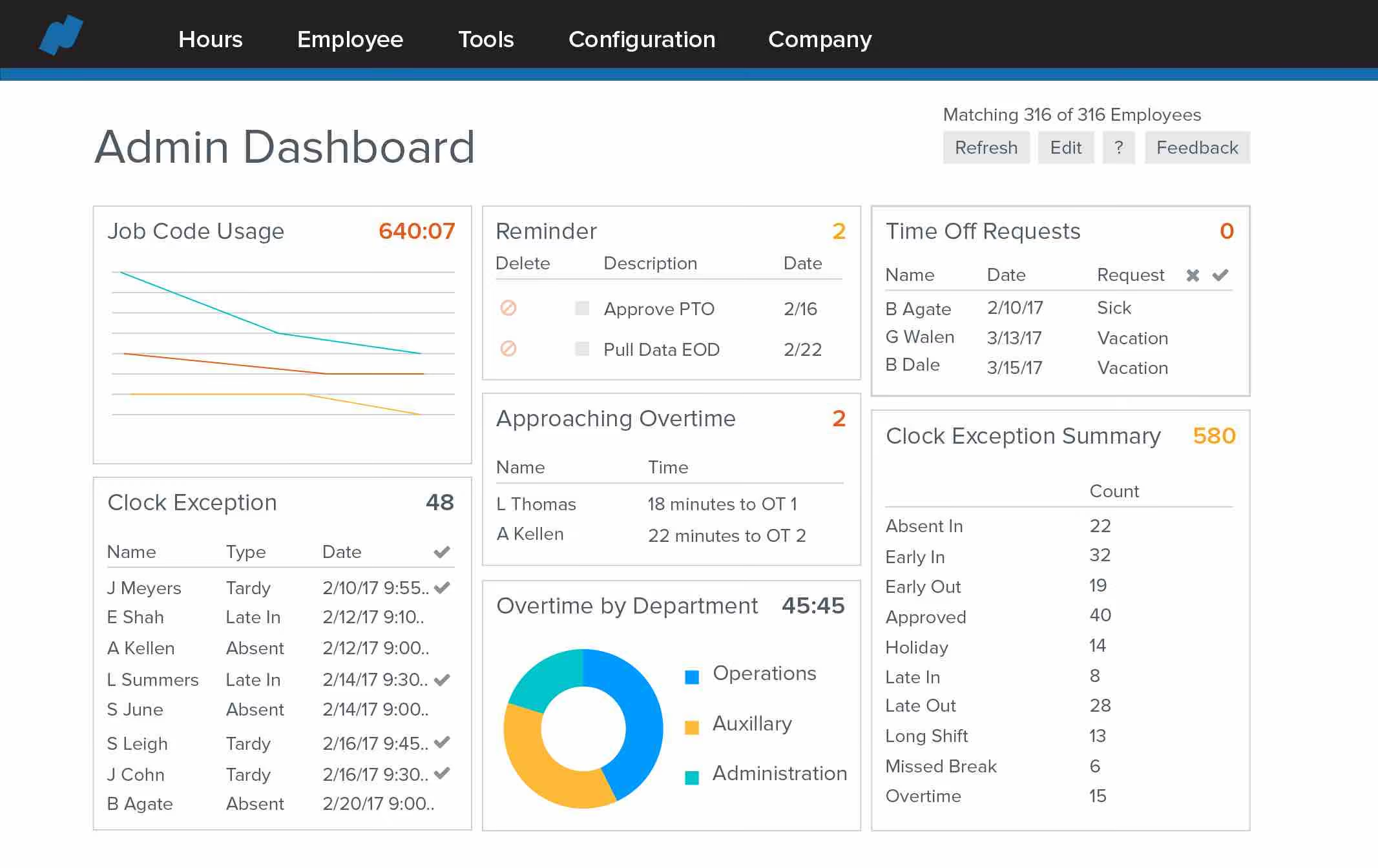
Namely offers a range of features to help you with day-to-day employee management. A fundamental one is employee profiles, which you can create from scratch or upload from existing sources. You can access these profiles whenever you need to view employee data, including personal details, job roles, performance history, and benefits information. Namely also packs payroll management capabilities, optimizing how you process payroll and helping you with calculations, tax filing, direct deposits, and more.
You can use Namely’s time and attendance tracking module to ensure accurate recording of work hours and payroll processing. You can stay on top of things even further with Namely’s performance management module, which can help you set goals, conduct evaluations, and provide feedback to employees among other things.
Namely is used by several growing companies including Greenhouse, Vita Coco, Life is Good, and OneLogin.
Custom pricing is available upon request of a demo. It will vary depending on which package you choose. They start with a basic HR package and then sell extensions or enhanced services for things like payroll solutions and employee benefits.
Best For
Mid-sized companies across different verticals will make the most out of Namely’s offering.

I used Namely regularly, primarily for onboarding processes, including e-verify. It streamlined new hire documentation, eliminating the need for paper forms. Employees found it intuitive and effective for timekeeping, which made adoption smoother.
I also relied on Namely to ensure HR compliance and oversee payroll, although the payroll specialist managed the day-to-day processing.
One challenge was entering direct deposit and tax form information, which initially created extra work for the HR team. However, I believe these issues have since been resolved, as this was several years ago.
I liked how easy it made onboarding new employees.
The ability to manage and store electronic files was a significant advantage.
The reporting dashboard was clear and helpful for monitoring key metrics.
Employees found it easy to access their paystubs and tax information.
The interface, with its social media-like design, was user-friendly and relatable for many employees.
I consulted with an organization for about one year and administered Namely. They were a small but growing business in need of an HR and payroll solution to manage their expanding workforce.
Namely was chosen because it met the needs of various types of organizations and had the flexibility to grow alongside the company as their requirements evolved. I appreciated the compliance features, which helped me stay on top of regulations and deadlines.
The tool was also within the budget approved by the CFO and addressed the needs of both the HR department and employees effectively.
When I first used it, the platform was new and had some glitches.
Payroll processing was initially difficult for the payroll specialist to adapt to.
Learning which reports were essential versus optional required more guidance than was provided.
I would have appreciated more hands-on support during the implementation phase.
The search function did not perform as effectively as I would have liked at the time.
Namely has a more modern and visually appealing interface compared to some competitors.
It promotes diversity and inclusion through its design and functionality.
Its scalable features are suitable for small to mid-sized companies, though larger organizations may need to explore alternatives.
Compared to tools like ADP or UKG, Namely is a more affordable option, though it may lack some of the advanced features those platforms offer.
While Rippling is a strong competitor, I prefer Namely’s design and user-friendly interface.
It’s important to have an experienced payroll person or request training to ensure smooth adoption, as Namely may not be as intuitive as other platforms like UKG or ADP.
Fully prepare questions for your implementation specialist to maximize the benefits of the tool.
Be aware of the states where your employees work, as compliance requirements can vary significantly.
Understand your organization’s growth plans to ensure the tool can scale with your business effectively.
Namely has added new features, including AI-powered tools, to improve functionality.
The interface has become more user-friendly, addressing previous concerns about the search and self-service features.
Employees now find it easier to access essential HR and payroll information.
I think Namely is great for small to mid-size organizations, but I remember it was a tool that scaled to a limit, and if you got too big, a different solution would be better. It possibly would be at the point a larger org could use them, but not sure they are there yet.
I know one of their main competitors is Rippling, so a user or organization should research both before making a decision. I’d also find out if there is a specific person to contact or just a generic number for questions. Over the years, I have been using many tools, and I personally like a particular person or team to work with.
Namely may not suit organizations that lack clarity about their HR and payroll needs or have no plan for automation.
It is also less suitable for businesses with low-level or non-technical HR or payroll staff who may struggle with implementation.
Companies accustomed to a single tool throughout their history may find transitioning to Namely challenging.

kissflow
Kissflow Digital Workplace gives you all the tools you need to optimize, manage, and track all of your work. It has five core modules to handle any type of work that moves your way: processes, projects, cases, datasets, and collaboration.
PROS
CONS
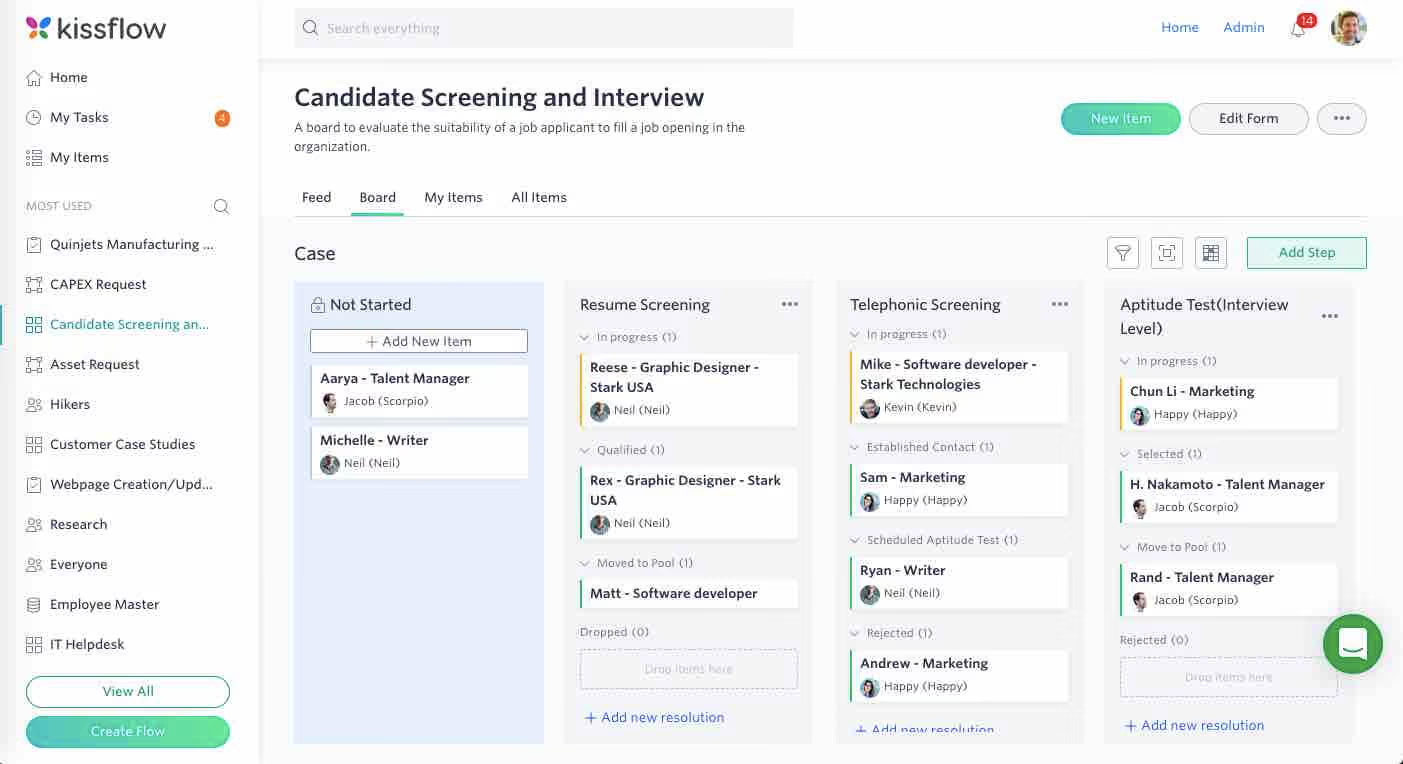
Kissflow is designed for both managers and their employees. It lets individuals know exactly what tasks are assigned to them and lets them track work as it moves along a flow. It allows team leaders to create and control codeless workflows and forms. It helps the entire organization digitize their work and creates an operational system of record to know the status of what work was completed.
- Domino’s
- Pepsi
- Sears
- Hubspot
- Casio
- Basic: $16/user/month (Starts at 10 Users)
- Advanced: $22/user/month (Starts at 10 Users)
- Fully Loaded: $30* /user/month (Starts at 50 Users)
Best For
Kissflow has plans for companies of different sizes.

Zoho People
Zoho People is a solution for HR teams looking for an affordable or even free workforce management tool. It administers core HR activities, like onboarding, time off management, attendance, performance, LMS, engagement, and database management. It also includes an employee self-service portal with security-conscious permission controls and more.
PROS
- Comprehensive core HR features consolidated in a single platform.
- Offers a wide array of integrations.
- Available in multiple languages, catering to users across the globe.
- Provides a free version and a free trial.
- All core HR features in a single dashboard
- Wide array of integrations
- User-friendly UI, constantly updated
- Available in multiple languages
CONS
- Some modules may lack the depth of comparable products. For example, some users found the payroll offering to be relatively basic.
- The mobile app does not mirror the features of the web version.
- The platform's responsiveness is unpredictable – users have reported occasional loading delays.
- Since they offer so many modules, some may be not as robust as other products that have been more specific about covering certain needs. For instance, some teams have found their payroll offering to be quite basic.
- Not all that’s available in the web platform is available in the app
- Some users reported that the platform can be slow to load every now and then.

Zoho People is a 360-degree HR solution that amazes us with its rich features. Depending on the plan purchased, users can get some or even all of their employee management needs covered, from onboarding and attendance management to time tracking, appraisals, and learning.
One standout feature is Cases. The feature lets users post their support questions under specific HR categories to receive prompt responses from assigned agents. It's a simple, effective, time-saving solution.
Zoho People features real-time access control. It allows administrators to assign access permissions for select members, promoting better collaboration while ensuring data security.
Another nice touch is Announcements: managers can use this to keep employees posted on company news using various content types, formatting options, and location-specific visibility.
In our testing, the self-service elements worked well in the Chrome browser. The web version contains numerous tools like employee records, leave requests, timesheets, and policy documents.
However, we did encounter some challenges with the mobile app. It occasionally lagged, particularly when using functions like check-ins and facial recognition. Additionally, certain tools, such as the payroll feature, are less fleshed out than in similar tools in this space.
ZPE Systems, Cloudfronts Technologies, Zomato, SpiceJet, Foresight CFO.
Zoho People is free for up to five users. After that, the platform offers four plans with the following pricing:
- Essential HR: $1.25/user/month billed annually.
- Professional: $2/user/month billed annually.
- Premium: $3/user/month billed annually.
- Enterprise: $4.5/user/month billed annually
Best For
This tool is particularly well-suited for SMBs who can make use of its multilingual capabilities.
From an HR perspective, Zoho People functions similarly to other HRIS platforms. It allows you to add new employees and input their personal information, compensation, documents, PTO, training, and performance tracking.
From the user side, the interface wasn’t the most intuitive when we used it last in 2024, which was a common piece of feedback. I still have access to Zoho People now, and it has changed drastically in terms of design since then.
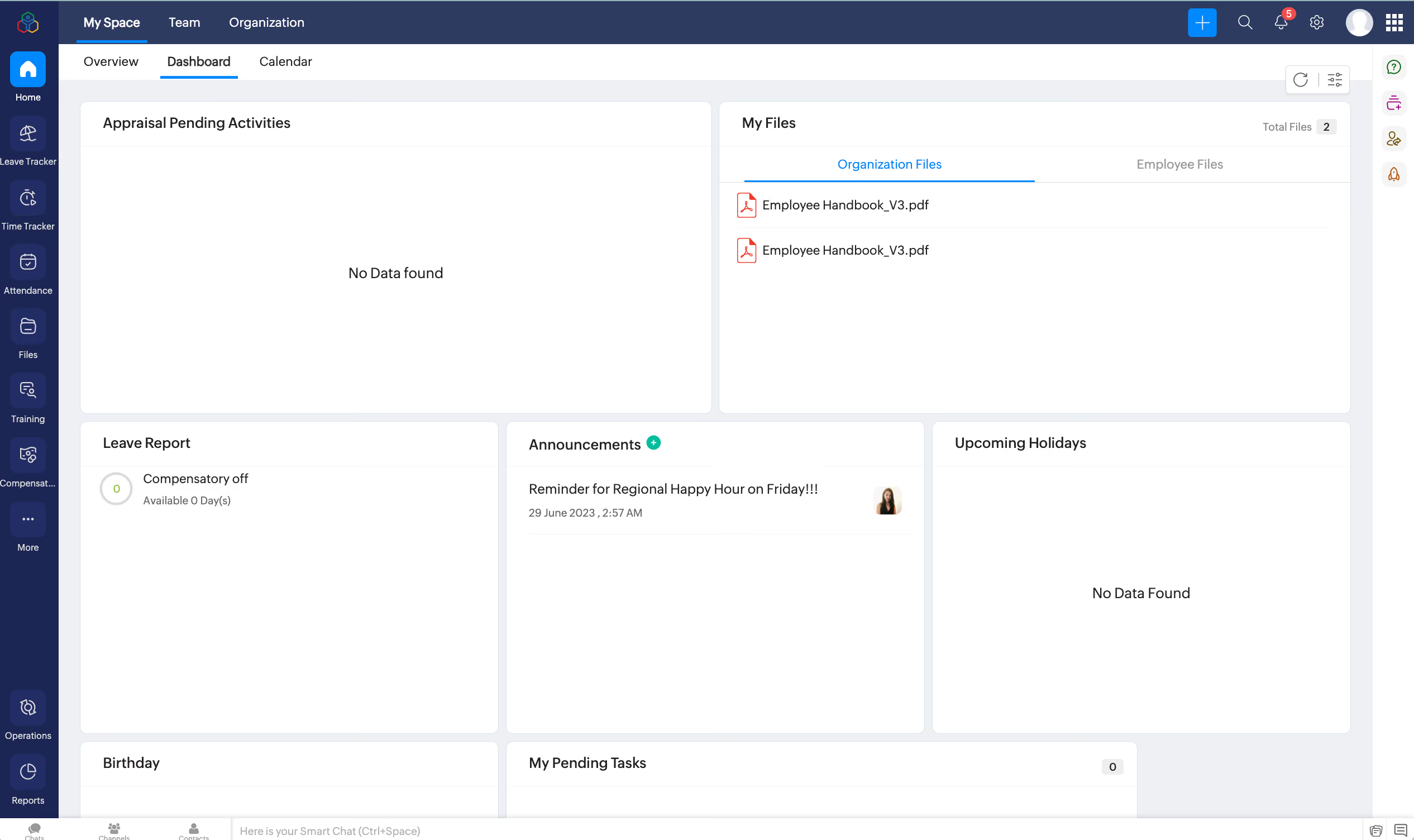
Our use of Zoho People was part of a larger bundle that included multiple Zoho systems like CRM, Sign, and Learn. We paid just over $2K monthly for access to these tools, with CRM being heavily utilized by the team.
The main advantage was the cost-effectiveness of the bundled package. If not for that, Zoho People wouldn’t have been our first choice. A user-friendly interface is important to us since our demographic is predominantly millennials, followed by Gen Z.
Ease of use and modern design were key factors in our selection process, which ultimately led us to transition away from Zoho People.
The company I worked for used Zoho People for three years since it aligned with Zoho CRM, a tool the sales team already used. It was the logical choice to stay within the same ecosystem. It also offered many free features that met our initial needs as a startup. As the company grew, we required more advanced functionalities, which eventually led us to transition to a different HRIS system.
The user interface was not as intuitive as other systems I've used as an HR leader. Navigation often felt outdated and clunky. Customization options were limited compared to competitors.
It’s not on my list of preferred HRIS platforms. It does the job and works well for companies just starting out that need a basic system for storing personnel files, providing easy employee access, and offering competitive pricing. From both a backend and user perspective, it’s not ideal. I would still choose other HRIS options like BambooHR or HiBob.
Usability should be the top priority. I’ve launched several HRIS platforms, and at the end of the day, employees need to actually use the system. No matter how great the backend is for HR or how competitive the pricing may be, if the user interface is too complicated, adoption will be a challenge. The system’s overall aesthetic should align with the company’s demographic to support engagement and success.
It improved over the time we used it, but the challenge was that competitors remained ahead of the curve. This made it a tough business decision to stick with Zoho People while waiting for it to catch up. Since we migrated out in December, I’ve noticed significant interface changes, but not enough to make me regret leaving the platform.
Zoho People is a good fit for teams already using Zoho CRM, as it makes sense to keep everything within the same ecosystem. It’s a practical choice for companies looking for a cost-effective, all-in-one solution. I personally think the interface seems to cater more to older generations. It sometimes feels like an elevated version of what AOL Instant Messenger would look like.
Anyone in the creative industry or millennial users and younger.
Key Features of Employee Management Software
“Employee management” is an umbrella software category; hundreds of different HR management software solutions (HRMS) can be labeled under it. While that may be the case, the following are features you can safely expect from employee management software.
- Storing employee records: An employee management software effectively functions as your employee database. It stores employee information such as names, addresses, designations, salaries, and start dates. You can even store custom employee info such as skills, education, birthdays, emergency contact details, and more.
- Time and attendance tracking: Manually updating timesheets is a tedious task that’s time-consuming and almost impossible to perform without error. Incorrectly inputting employee time and attendance data leads to incorrect payroll. With the help of employee management software, you can cut down on human errors and ensure that your payroll is always accurate.
- Employee scheduling: Employee management software can help you schedule and move around shifts for your employees to ensure that the working hours of your business are sufficiently covered. Depending on what product you use, employees may also be allowed access to the same system to adjust availabilities and request shift changes.
- Employee self-service portal: Most employee management solutions provide employee self-service portals. Employees may use these portals to handle a number of human resources-related tasks that would otherwise require the attention of an HR employee. Most self-service portals allow employees to update personal details such as contact details, addresses, bank account info, and more. Some employee self-service portals also allow employees to put in time-off requests and adjust availabilities.
- Employee performance monitoring: Most employee management systems allow employers to define goals and productivity metrics and monitor employees’ progress towards those goals and metrics from a single dashboard. Accessing such data enables employers to make informed decisions that drive performance, e.g., identify where certain employees could use some training or if their skills are perhaps more suited for a different role.
- 3rd-party integrations: The majority of employee management software solutions offer integration options with your existing business tools, such as those for recruiting, payroll, enterprise resource planning (ERP), team collaboration, and more to extend the functionality of your software, have your data synchronized automatically and eliminate duplicated effort.
- Additional features: In addition to the above, some employee management systems may also carry features for applicant tracking, onboarding, payroll management, benefits administration, learning management, employee rewards, and employee recognition.
Common Mistakes Made When Buying Employee Management Software
You can easily make mistakes when choosing an employee management solution if you don’t carefully research and compare what’s available on the market while factoring in the needs and budget of your business. Here are a few mistakes you should avoid:
- Buying an all-in-one employee management software when all you need is one or two HR functions covered: For example, if you only need a system for performance management or attendance tracking, then buy a product that does just that. An all-in-one HR cloud can be quite costly if you’re not putting it to good use. We recommend that you always invest carefully and selectively to make the most out of your budget.
- Choosing an employee management system that isn’t scalable: Your business may see exponential growth within just a matter of months. It may also experience financial hardships, requiring you to downsize your team. No matter what the future holds for your business, you’ll definitely need your employee management software to grow or shrink accordingly.
- Not aligning internally with all departments that could benefit from an employee management system before buying one: Many top employee management systems offer features extending beyond your HR department’s scope. For example, employee management software can have project management capabilities, which means different managers across your company can use it to stay organized and keep track of their team members’ progress. It is also quite common for an employee management system to have payroll processing and benefits administration features, which are typically the responsibility of the finance department and not HR. Since other departments/managers can benefit from your employee management system, make sure you factor in their feedback in your product selection process.
- Making long-term commitments before thoroughly testing a solution: Most software vendors will offer discounts if you get into an annual contract. Some will even try to tempt you to get into a two-year commitment. While such deals can save you significant money over time, you should only commit to a vendor after thoroughly testing their software and verifying that it’s the one for you. Otherwise, you will end up going back and forth with them regarding their refund policy and likely incurring a considerable cancellation fee.
Pricing Models of Employee Management Software
The majority of employee management software vendors offer tiered pricing to accommodate different business needs and financial capabilities. Those tiers vary in features and either cost a flat monthly/annual subscription fee for an unlimited number of employees or have a per-employee-per-month pricing structure, which could cost anywhere between $1.25 - $30 per employee per month.
Do keep in mind that in all cases, additional fees may still apply for on-demand services such as product training, customization, compliance services, dedicated account management, and cancellation. Consult your selected employee management software vendor on the exact breakdown of their recurring fees as well as the pricing of all on-demand services that are billed separately.
Benefits of Using Employee Management Software
Using employee management software allows you to:
- Secure employee information: Paper files and spreadsheets are not a secure way to store sensitive employee data, as they could easily fall into the wrong hands. You can mitigate such risks by using an employee management system instead. The majority of employee management systems are highly secure, with measures such as data encryption and multi-factor authentication to keep your employees’ information safe at all times.
- Increase productivity: Using an employee management system helps you automate many processes that are otherwise quite tedious and take up a great deal of your team’s time. When different departments across your company aren’t manually dealing with employee data maintenance, time and attendance tracking, shift scheduling, and leave management, they’re able to reinvest that time in other tasks that contribute to your bottom line.
- Improve employee satisfaction: Good HR tech has an impact on employee experience and retention. When employees are managed through outdated channels and processes, it is easy for them to get frustrated and dissatisfied with your company. Employee management software gives your employees a channel to easily update their information, request time off, adjust their shifts, track their performance, communicate with you when needed, and much more - all in an effortless manner.
Questions to Ask During Your Employee Management Software Demos
As you’re researching different employee management software, we always recommend that you schedule demo sessions with the top vendors on your list to make sure their solution is compatible with the needs of your business. Here are a few questions you can ask during your demos:
- What HR functions does your software cover? Can your solution replace other products in my HR tech stack?
- Can you walk me through what employees see through their self-service portal (if any)?
- Does your platform feature Artificial Intelligence (AI) to automate certain processes?
- How easy is it to implement your solution, and would I be able to do it myself?
- What business solutions does your software integrate with?
- What metrics have you used to prove the effectiveness of your solution, and where can I see these in my analytics dashboard?
- What data protection laws are you compliant with?
- How much does the software cost for my team size?
- How will our pricing change as our team grows or shrinks?
- Will I be assigned a dedicated account manager?
- What are your Customer Support SLAs?
- Do you have a help center with articles and other documentation for self-service?
Implementing an Employee Management Software
Implementing employee management software is fairly easy, especially since the majority of them are cloud-based, delivered through a software-as-a-service (SaaS) infrastructure. Getting started with a cloud-based solution is relatively quick. Once you’ve purchased a subscription that meets your needs, you can create an account and start configuring it and importing your employee data.
On the other hand, some employee management software solutions are self-hosted (on-premise). Self-hosted solutions generally take longer to set up, and depending on your chosen vendor, you may need to consult them regarding their solutions’ compatibility with your current hardware and installation process or better yet, have them do the installation for you.
Note: Most of the vendors we’ve listed in this guide provide step-by-step video tutorials and help docs that assist customers in getting up and running quickly. For more information, you can reach out to your chosen vendor’s support team.
Employee Management Software FAQ
What is employee management software?
Employee management software allows companies to carry out different HR functions, including time and attendance tracking, new hire onboarding, shift scheduling, leave management, employee engagement, and performance management. It may also have features for payroll processing and benefits administration.
What should you look for in employee management software?
Besides making sure that employee management software covers the HR/finance functions that you need, see that it is user-friendly, scalable, can integrate with favorite products, and has an employee self-service portal.
Who needs employee management software?
All businesses, regardless of size and industry, can benefit from employee management software to streamline how they store employee information, onboard and offboard employees, as well as drive up employee engagement and performance.
Final Thoughts
No matter what industry you’re in and regardless of the size of your company, an employee management system is quite useful to streamline different functions across your HR department and beyond. All of the solutions we’ve listed in this guide would make a great addition to your tech stack. All you have to do is:
- Align with your HR, Finance, and other team managers regarding their needs and expectations before selecting a product;
- Carefully consider those needs as well as your budget and choose a product that meets them;
- Request a trial account to test the platform’s features first-hand;
- Schedule demo sessions with different vendors to get all of your questions answered.
About the Author


About Us

- Our goal at SSR is to help HR and recruiting teams to find and buy the right software for their needs.
- Our site is free to use as some vendors will pay us for web traffic.
- SSR lists all companies we feel are top vendors - not just those who pay us - in our comprehensive directories full of the advice needed to make the right purchase decision for your HR team.


