

The 10 Best AI HR Software in 2026
Established HR platforms with AI built into core workflows, ranked on whether you can trust, verify, and control what that AI does.








AI HR platforms vary widely in quality. The best ones build AI into the parts of the employee journey where it truly matters, while plenty of others pile on bold marketing claims the product doesn't back up. The tricky part is you usually can't tell them apart until you've spent weeks testing them on real hiring, payroll, or compliance work, which most HR teams don’t have time for.
We built this guide around one question: can you trust, verify, and stay in control of a vendor's AI? Rather than covering AI-first HR software built almost entirely around a model, the guide focus on platforms with AI designed to assist the workflows talent teams are using. In a setting where HR decisions shape people's opportunities, regulators increasingly expect human review of AI-assisted employment decisions, and legal responsibility stays with the employer, not the vendor, we believe careful, well-governed AI matters more than the most autonomous AI.
We assessed more than 60 vendors against that standard, set out in How We Evaluated below, and 10 made the list. For each, we reviewed their AI features, product documentation, trust center, and AI terms, and spoke with HR practitioners who use these tools every day. You'll find what each platform's AI does, what its documentation does and doesn't disclose, its pricing, and who it suits best.
To make the list, a platform first had to pass two gates: (1) its AI is built purposefully for HR workflows and people data, not tacked on as flashy decoration; and (2) people stay in control, either approving anything consequential or setting the limits the AI works within.
Platforms that passed were then compared on four dimensions: AI maturity and real-world performance, governance and compliance, human oversight, and lifecycle coverage. Alongside our documentation review, we spoke with HR leaders, recruiters, and operations teams about how the AI fits their daily work, how often they correct it, and how much time it saves.
- AI Maturity and Real-World Performance: To assess each platform's AI performance in real-world HR operations, we checked each platform against three common HR workflows: drafting HR content (such as policies, job descriptions, reviews, and training materials), screening candidates, and analyzing compensation. We also asked practitioners how often they use AI output as-is versus correcting it, and whether it actually saves them time.
- Governance and Compliance Infrastructure: We reviewed platform documentation on bias audits, audit trails, explainability, data residency, and compliance claims. Given that employers hold full legal and compliance responsibility for workplace AI decisions, meaning liability cannot be transferred to software vendors or algorithms, it’s more important now than ever to pay extra attention to this criterion.
- Human Oversight Design: To assess how platforms integrate human decision-making to guide and guard the AI, we reviewed available AI HRIS features and asked ourselves: Can humans actually override AI decisions on the platform? Do AI outputs come along with explanations, and if yes, do they actually help or confuse? Users also lent us a hand by sharing their take based on their daily experience.
- Lifecycle Coverage: We examined vendor materials to assess which employee workflows feature AI integration. Feedback from users helped us verify whether these integrations are native and seamless and identify any additional or hidden fees. As our editor, Anh, shared from her prior experience in HR, “Automating a broken or poorly mapped HR workflow just creates mistakes faster. You’ll need strong integrations to be able to reap the benefits of your AI HRIS.”
Alongside our documentation review, we spoke with HR and operations teams about how the AI fits their daily work, how often they correct it, and how much time it saves. We reject most vendors we review, and we don't accept pay-to-play placements. Learn more about our HR tech assessment methodology.


Absorb

Absorb works best if you’re looking for an L&D platform that explains exactly where its AI data goes. Its AI program documentation lists every AI feature alongside its model provider, the data it processes, and how long that data is retained, which is more detail than most vendors we review have published.
PROS
- A published table lists each AI feature's model provider, data processed, retention period, and output ownership.
- Clients can request a different model provider where a feature supports several.
- Learning path recommendations never enroll, assign, or remove anyone automatically.
- Admins choose which courses and documents AI agents can draw from.
- An AI program designed to align with the NIST AI Risk Management Framework.
- User-friendly interface enables easy navigation for administrators and learners.
- AI automates administrative workflows, adjusts content, and provides coaching.
- Branding and functionality can be configured to meet organizational requirements.
- PCI-compliant ecommerce tools ease course sales via bundles, custom pricing, and coupons.
- Leaderboards and profile sharing facilitate social interaction and comparison of results.
CONS
- Absorb may use limited prompt and feedback data to improve its own AI capabilities.
- AI data flows to several providers, including Microsoft Azure, AWS, Google Gemini, and OpenAI, which widens the sub-processor surface.
- Covers learning and development only; no recruiting, payroll, or compensation.
- Costs are quote-based and generally higher than smaller platforms.
- Can be expensive for teams of under 200 employees.
- Enrolling users in courses with varying due dates requires manual setup.
While 360Learning routes everything through one provider, Absorb discloses deployed models and lets you pick what you need. Create AI runs on Microsoft Azure, AWS, Google Gemini, or OpenAI; skills mapping uses a RoBERTa model hosted within Absorb. The Aura Learner Agent uses Gemini, OpenAI, and AWS. Retention is spelled out per provider, from up to 30 days to up to 55 days for Gemini. That level of specificity is exactly what our governance criteria call for.
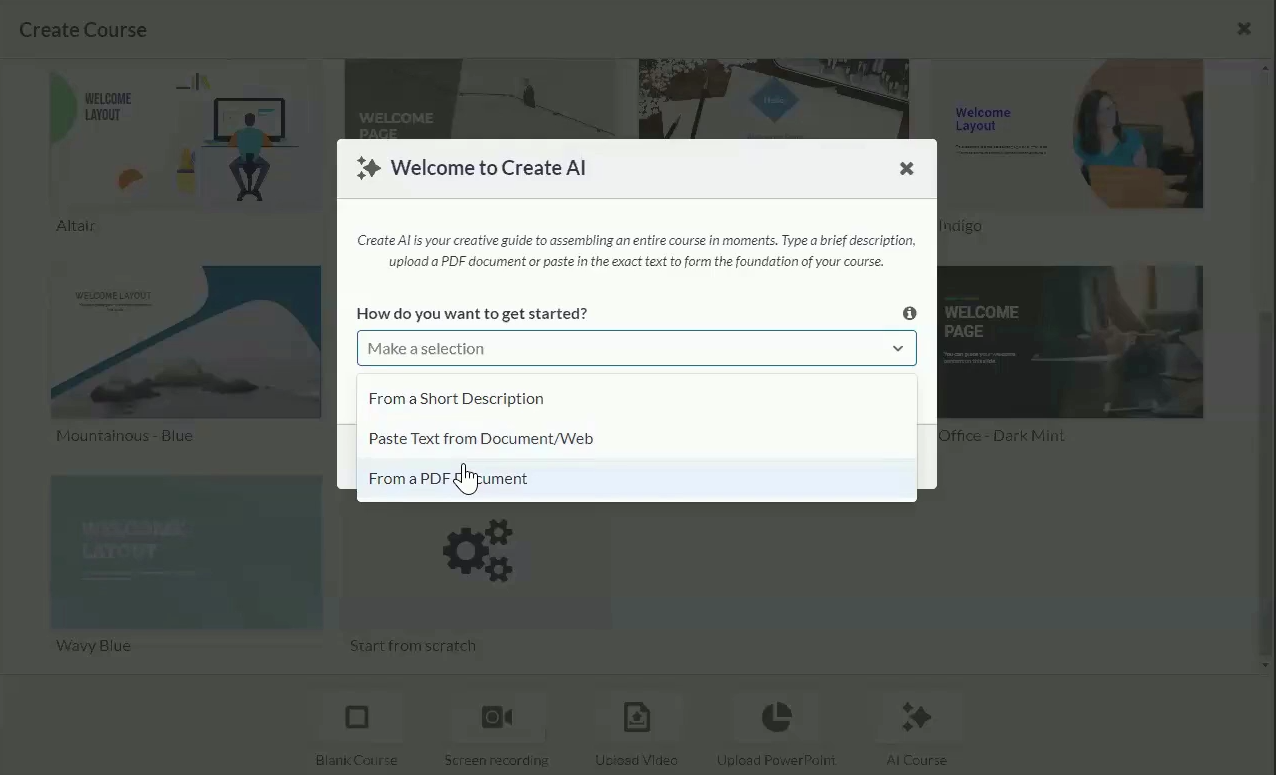
The tool handles the full course lifecycle. Create AI builds complete courses from topics, objectives, and source materials, including outlines, content sections, interactive elements, and quizzes that authors then brand and refine. The Aura Create Agent works inside the admin experience and can draw on client-selected documents, so its drafts reflect an organization's own terminology and policies. This should save real time in cases where you need to turn a new handbook into training.
Beyond provider-side retention, Absorb keeps an AI observability layer through Arize for up to 90 days, and retains conversation history, prompts, and outputs within the LMS for the term of the agreement. Absorb says it won't train on client course materials without consent, but it may use limited prompts, responses, and feedback signals to improve its own AI, with de-identification where appropriate. It’s also worth noting that future Aura Admin Assist releases will send personal data within the LMS to the model for certain admin tasks, with conditions such as no training and minimum-necessary access.
Human oversight is well designed for a learning context. Skills-based learning path recommendations never auto-enroll or assign anyone, and learners and admins can review, adjust, or ignore them. The Aura Learner Agent is framed as decision support, leaving the learner as the final decision maker. All generated content is editable, and certain features support team-based review before publishing.
As a learning platform, Absorb sits outside two of our three tasks entirely: it has no candidate screening or compensation analysis. On the third, it won't draft a policy, but the Aura Create Agent can turn an existing one into a course with knowledge checks.
Lifecycle coverage is centered on onboarding training, compliance, upskilling, and mentorship. Absorb integrates with other HR systems rather than replacing them, while implementation and customization can, according to our sources, add $5,000 to $15,000 upfront.
Absorb’s pricing is based primarily on active learners, contract term length, and feature tier. The average annual pricing, according to sources, is of about $34,000 for SMBs and $82,700 for enterprises.

Best For
Mid-size and enterprise organizations that want AI-accelerated course creation, skills mapping, and learner support, backed by detailed AI data documentation.

BambooHR
We think BambooHR's approach is among the most compelling for small and midsized HR teams that want AI to take on routine admin work without giving up control. Instead of a standalone chatbot, Bamboo AI sits inside specific workflows such as reporting, payroll review, and scheduling, and it routes consequential changes back to a person before anything is applied.
PROS
- Consequential changes (payroll, schedules, job structures, employee outreach) wait for human approval.
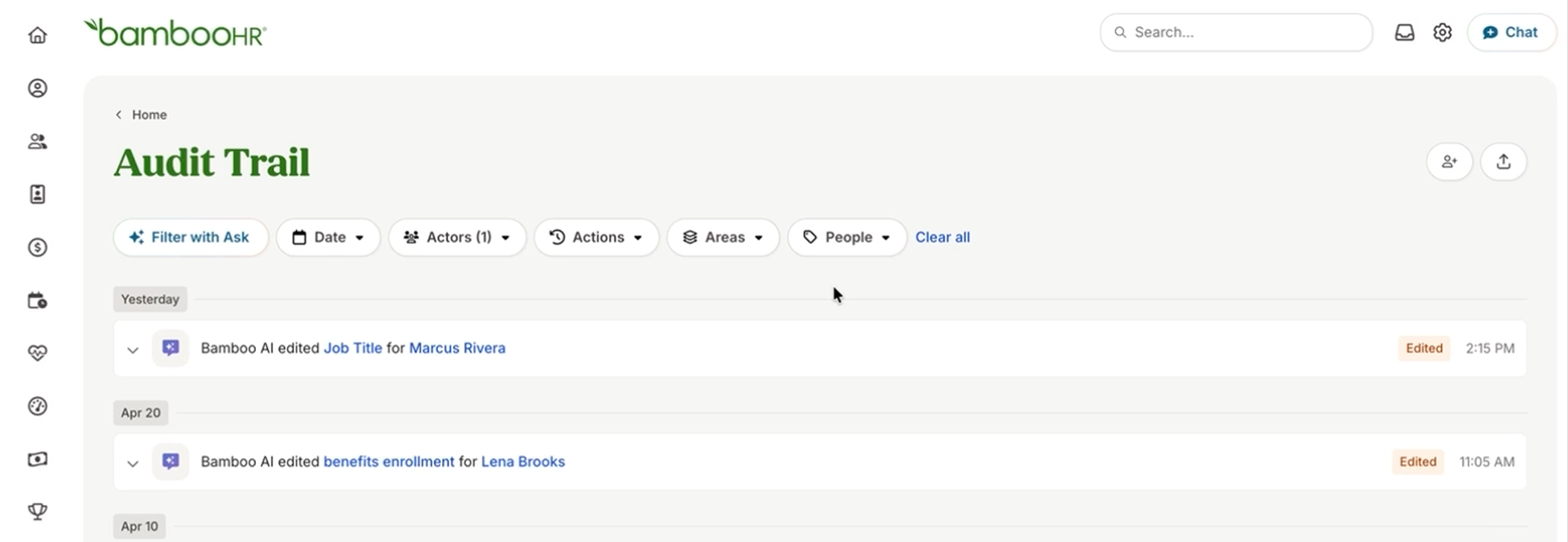
- The Audit Trail shows whether a person, Bamboo AI, or both made each change.
- AI access mirrors existing role-based permissions, and admins can switch Bamboo AI off at any time.
- Named model providers and a choice of US, Canadian, or European hosting.
- Published per-employee pricing on all three plans.
- Flexible packaging and custom pricing is the way they roll. You can pick out one or two packages and pick other modules as add-ons based on your needs.
- Very simple and straightforward tool, easy to use.
CONS
- Enterprises with complex global workforces, high-volume recruiting teams, and organizations that need AI-assisted hiring decisions will outgrow this HRIS quickly.
- No published bias audit results. The company commits only to practices that "may include" testing or impact assessments.
- The most useful AI capabilities are gated by tier, and Bamboo AI remains in beta.
- Payroll is only available for US-based employees
- Customer support is only offered during US business hours.
- Some modules like time tracking, performance management, and surveys are only available as add-ons.
BambooHR's AI is built to keep people in charge of consequential HR work. Payroll runs, schedule changes, job structure updates, and employee outreach all wait for human approval before they're applied or sent. Payroll Run Comparison works the same way: it explains the differences it can account for and flags the ones it can't instead of guessing. It's a lighter version of the checks Paylocity runs through dedicated payroll agents, but enough for most small teams.
In July 2026, BambooHR launched three task-specific assistants, now in open beta for all customers, with capabilities depending on which products you use. In particular, Report Assistant builds a report from a plain-language description, the Scheduling Assistant drafts the next schedule from past patterns, and a job architecture tool suggests job families, career tracks, levels, and codes for admins to accept or reject.
Data Hygiene shows the approach at its best. It checks records nightly for missing information, and before any outreach goes out, you can see which employees Bamboo AI plans to contact and what it will ask them for. The Audit Trail then records whether a person, Bamboo AI, or both made each change.
Regarding content drafting, Report Assistant and the job architecture tool generate structured outputs, and on the Pro plan, Ask BambooHR answers questions about your existing policies, handbooks, and benefits. But compliance templates and legal answers come through a VirgilHR-powered integration, as in there's no native tool for drafting policies or other HR documents from scratch.
However, we didn't find built-in AI for scoring or resume parsing beyond basic fields, so teams that want algorithmic screening may need marketplace partners such as Skima AI or Senseloaf. Compensation analysis fares better on the Elite plan, which pairs Mercer salary benchmarks with an advanced AI assistant built to analyze HR data, forecast scenarios, and support decisions.
BambooHR’s subcontractor list names Anthropic, Cohere, and OpenAI as language model API providers, and states that production systems sit in customer-chosen facilities in the US, Europe, and Canada. The vendor also says its responsible-AI practices are designed to identify and mitigate discriminatory outcomes, and that, depending on the system, these may include testing for bias or impact assessments. Unfortunately, we found no published bias audit results.
For lifecycle coverage, BambooHR spans hiring, onboarding, performance, compensation, payroll, benefits, and time tracking in one system. Careful budgeting is what we advice, though, as multiple modules of them are sold as add-ons.
BambooHR charges a flat rate starting at $250/month for businesses with 25 or fewer employees. For larger organizations, pricing is structured on a per-employee basis:
- Core ($10/month): Covers HR automation, data & reporting, hiring, onboarding, time off, benefits tracking, employee experience, compliance intelligence with 1 course, on-demand pay, and an AI assistant.
- Pro ($17/month): Includes Core features plus performance management, employee community, rewards, 15 compliance courses, and an upgraded AI assistant.
- Elite ($25/month): Includes Pro features plus compensation management, custom analytics, HR benchmarks, premium services, 300+ compliance courses, and an advanced AI assistant.
Volume, non-profit, and a 15% bundle discount (combining Payroll and Benefits Administration for US employees) are also available.
Best For
Small and midsize businesses, particularly US-based teams, that want AI assistance woven into an all-in-one HRIS with strong human approval controls.

Rippling
We found Rippling to be an ideal fit for teams of 50 to 1,000 employees seeking automation-driven HR, IT, and finance on one platform. Rippling AI expresses each request as a query, formula, or report against your live data, which makes its work auditable, and it stages every action for human confirmation before anything changes.
PROS
- Answers come as inspectable SQL, formulas, or reports, with links to the underlying records.
- Every proposed action needs explicit confirmation and runs through existing approval chains.
- Application Review explains each screening decision and warns before filters that could exclude protected groups.
- Usage data isn't used for model training, and admins can turn AI off platform-wide.
- All-in-one platform for employee management + PEO services offered, and even a suite of other IT products
- With 500 integrations, it’s very likely that they integrate with other key tools from your tech stack.
- Operates globally with any currency
- Workflow automation
- Analytics opportunities
- Provides a holistic view of company outflows—headcount costs included
CONS
- Pricing is modular and largely unpublished, and Rippling AI requires its own subscription with no public price.
- No published bias audit results for Application Review or other AI features.
- Two of the four AI Governance tools remain waitlist-only.
- Total buy-in to Rippling is essential
- Very SMB-oriented, in case you’re a larger company.
- New features tend to be buggy in ways that tech teams are not accustomed to fixing
Rippling's central design choice is to show its work. While Paylocity and ChartHop also link answers to source data, Rippling goes further by showing the logic behind each answer. Ask for voluntary terminations over six years and you get the answer plus the underlying reports to inspect, whereas vague references to a department, candidate, or person are resolved before the query runs, so a question about "John" prompts a follow-up asking which John you mean.
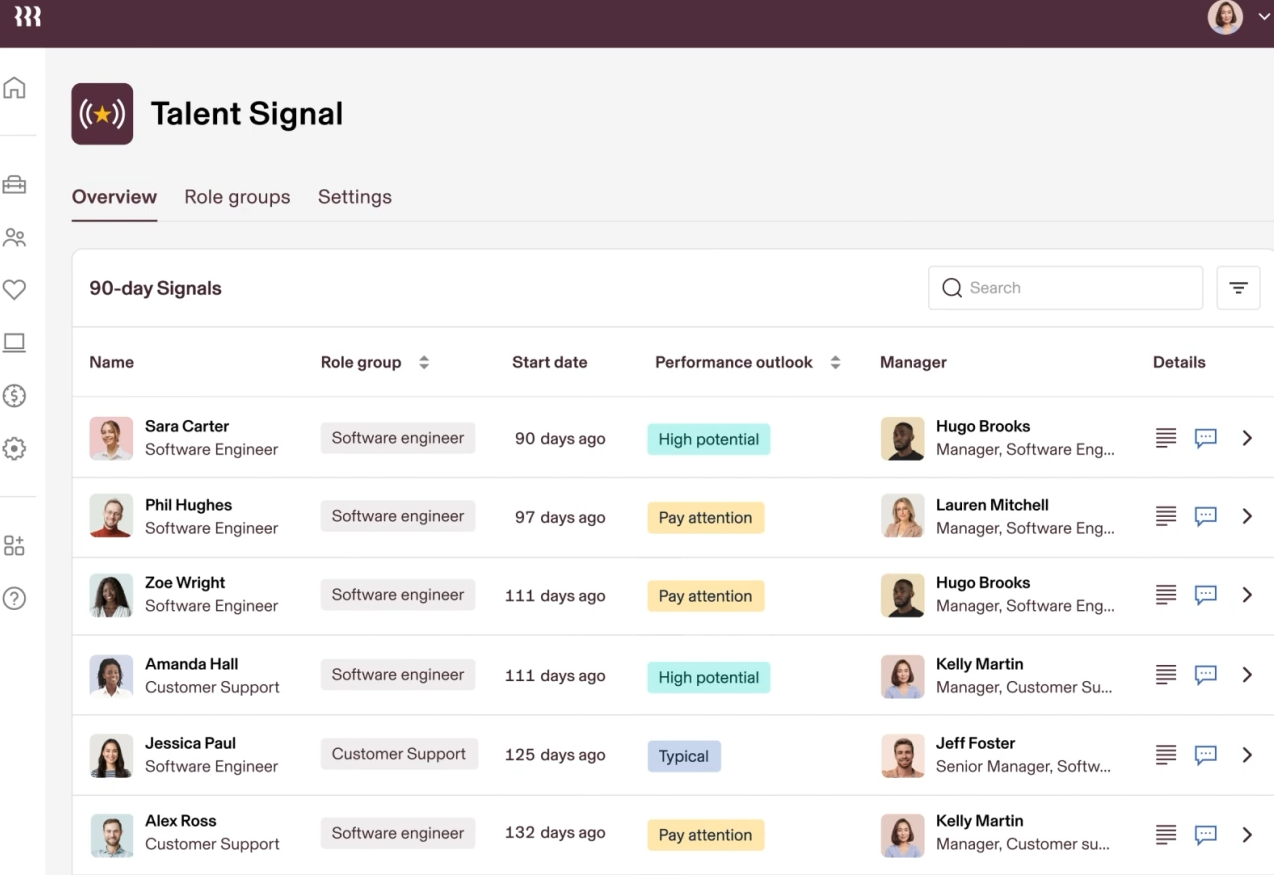
That verifiability extends to human oversight and regulatory compliance. Rippling AI inherits existing roles and permissions, ensuring strict data access controls across US, EU, and global jurisdictions. The changes proposed by the AI are queued for human review and go through standard multi-level approval chains before execution, providing a defensible audit trail for workforce decisions.
Compensation analysis plays straight to Rippling's query-first design. As the AI builds shareable, cited reports on headcount, hiring, and pay, every figure traces back to a record. However, policy support is narrower. Employees can ask about parental leave eligibility or travel expense rules, and admins can upload documents to sharpen company-specific answers, but there's no dedicated drafting tool.
Unlike BambooHR, Rippling AI does extend to candidate screening where its Application Review screens applicants against your criteria, summarizes why each did or didn't meet them, and warns you before running a filter that could screen out protected groups. HiBob also screens natively with AI CV matching, but we didn't find a comparable bias warning there. That said, we do wish Rippling published bias audit data for Application Review, because AI-assisted screening is exactly where employers carry the most legal exposure.
The HRIS platform uses foundation models primarily from OpenAI and Anthropic, with processing primarily in the US and data not used to train the providers' models. We like the new AI Governance suite in its IT product, which gives visibility and control over employee AI usage, spend, access, and agents. The MCP Gateway and Agent Identity Management are live, while the AI Gateway and Shadow AI Detection aren’t yet.
Lifecycle coverage is perhaps Rippling's strongest suit. Because HR, IT, payroll, and spend share one employee graph, a single hire can trigger onboarding, payroll setup, device and app provisioning, and benefits enrollment. That connected data is what lets the AI trace, for example, why an employee's paycheck dropped across payroll, benefits, and expenses. The trade-off is cost, as each module adds its own per-employee fee.
Rippling uses modular pricing, with a required core platform and separately priced products:
- Core platform: Starts at $8 per employee/month, plus a monthly base fee that third-party trackers put at around $35 to $40.
- Add-on modules: Payroll, benefits, IT, spend, and other products each add their own per-employee fee, and most teams pay $20 to $35 per employee/month once they add what they need (third-party estimate).
- Rippling AI: Requires an active Rippling AI subscription; price not published.
Implementation fees run $1,000 to $5,000, contracts are annual, and renewal escalators typically add 5 to 7% per year. Once modules are added, Rippling usually costs more per employee than BambooHR's published tiers, and unlike BambooHR, its AI is a separate subscription.
Best For
Growing companies, especially tech-forward and multi-state or international teams, that want verifiable AI across a unified HR, IT, and finance platform and are prepared to budget for modular pricing.
HiBob
For HR teams that need to show their AI use is governed, HiBob is worth checking out. Among the platforms we reviewed, it offers some of the most thorough published AI documentation, including an ISO 42001 AI management certification and per-feature controls that let admins decide exactly where AI runs.
PROS
- ISO 42001 certification, an external audit of how HiBob manages AI risk.
- Zero data retention with AI providers and no training on customer data.
- Per-feature AI toggles, each with a full description of what the feature does.
- A dozen specialized agents across performance, development, hiring, payroll, and compensation.
- Native AI CV matching and AI-generated scorecards in the Hiring module.
- They have tons of modules, which makes them a real one-stop shop. Beyond Core HR, they have modules for most things People Ops-related.
- Bob is a fast-growing company and their product looks the part, as it has one of the sleekest-looking platforms in the HRMS space right now.
- Their payroll hub allows you to connect all your payroll systems, which works great if you want to pay people in multiple locations without switching providers.
CONS
- Not the best fit for very small teams.
- Pricing is undisclosed and tends to run higher than BambooHR.
- Implementation fees may apply.
- No published bias audit results, despite AI CV matching in hiring.
- Customer support is only offered via a chatbot and email.
- As to implementation, several users commented that they felt there could be more attention via personal walkthroughs provided at the beginning. Many had to resort to reading documentation and watching videos or just figuring things out by themselves.
- Pricing is only custom and available upon request, so you can’t just sign up, pay, and start using the tool.
If your compliance team will vet the AI before HR ever uses it, HiBob gives them the most to work with. It holds ISO 42001, an AI management system certification that remains uncommon among HR platforms, and its AI Trust Center commits to zero retention with AI providers.
The AI itself is organized around Bob Companion, a central assistant that coordinates a dozen specialized agents. A Performance Agent summarizes review cycles and helps managers write reviews, a Development Agent builds personalized plans from skills, goals, and performance, and a Compensation Agent supports pay decisions. One user told us a short prompt describing an employee's responsibilities produced relevant skills and proficiency levels, saving significant setup time.
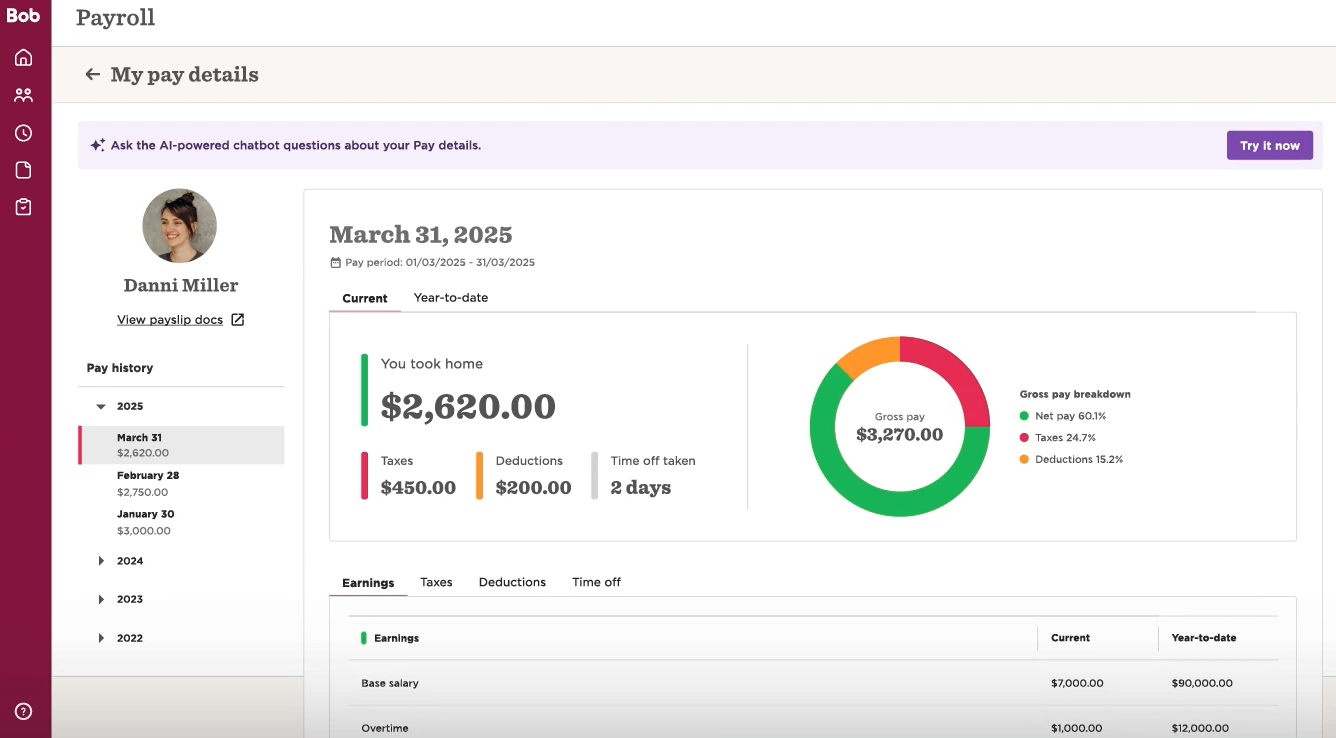
The Trust Center also commits to logical isolation of each customer's data and role-based access to AI settings. HiBob and Culture Amp are the two vendors in our shortlist committed to ISO 42001. While this doesn't guarantee fair outputs, but it does mean an external auditor has reviewed how HiBob manages AI risk.
Transparency extends to the sub-processor list: OpenAI and AWS-hosted models handle AI processing in the EU, and Bob Finance's AI analytics use Azure OpenAI. We couldn't find published bias audit results for the hiring AI, though. And the fact that the sub-processor list is dated November 2025 means you should confirm it's up to date before signing.
Screening is where HiBob goes furthest of our three tasks. Its ATS offers AI CV matching and AI-generated scorecards, and the Hiring Agent supports evaluations and interviews. Compensation is close behind, with the Compensation Agent working alongside comp cycle planning, custom pay bands, pay insights, and optional Mercer benchmarks. Policy support covers employee Q&A and generated job descriptions, learning content, and survey questions, but not policy drafting.
Lifecycle coverage is broad, spanning core HR, talent, US and UK payroll, a Payroll Hub for syncing with other payroll providers, workforce planning, and finance. However, the MCP server deserves a closer look before you connect it to anything as it currently authenticates through a Bob service user with a Base64-encoded token, and employee-level OAuth access isn't supported yet. Compared to BambooHR's connector and ChartHop's AI Pro agents which work within each person's own permissions or credentials, HiBob’s AI sees whatever that service user can see, not what the person typing the prompt is allowed to see.
HiBob uses custom, per-employee pricing built on a required Core platform plus optional modules:
- Core: Includes Bob AI Companion, the employee database, document management, time off, lifecycle workflows, integrations, analytics, and the mobile app.
- Add-on modules: Talent (including Hiring), Payroll & Benefits, Planning & Compensation, and Bob AI are sold separately.
HiBob lists entry-level pricing from $8 per employee per month, but market feedback puts typical rates at $16 to $25 per employee per month, which puts HiBob at or above BambooHR's Pro and Elite tiers. Third-party estimates put implementation at $3,000 to $30,000.
Best For
Mid-sized and multinational companies that want AI across talent, compensation, and engagement workflows, backed by audited AI governance.

Paylocity
We think Paylocity's approach is best suited for HR and payroll teams whose biggest AI need is catching errors before they reach paychecks. Its Ignite AI agents scan employee data, timecards, and payroll runs ahead of submission, and the Ignite AI Hub gives leaders an unusually direct view of how AI is being used and corrected.
PROS
- Payroll and time agents catch errors before submission, including 100+ data validations.
- Payroll Analysis explains run-to-run changes down to earnings, deductions, taxes, and net pay.
- The Ignite AI Hub tracks how many AI corrections users apply, which few platforms report.
- Answers link to source data and respect role permissions.
- SOC 1 and SOC 2 Type II attestations plus ISO 27001:2022.
- Paylocity’s customer support is highly rated for always being available to answer questions.
- Global payroll support for 100+ countries.
- Provides free and unlimited training modules on the website.
- Paylocity’s mobile app has a good UI and functionality
- The tool is easy to use for both employees and employers.
- Has 350+ pre-built integrations.
CONS
- Not for companies outside the U.S., very small teams, or buyers whose top AI priority is compensation planning or documented AI governance.
- We couldn't find published AI model providers, sub-processors, bias audits, or a customer-data training policy.
- Quote-only pricing with no free trial.
- Undisclosed pricing.
- It doesn’t have a free trial or free plan.
- Support is available in English only.
- It isn’t the best solution for remote teams looking for a tool to manage payroll and benefits for their contractors.
Paylocity recently launched Ignite AI, a platform-wide layer of agents across pay, time, recruiting, and finance that launched in July 2026. The Data Inspection Agent runs more than 100 validations on employee data, catching problems like invalid direct deposit accounts or missing local tax information. The Payroll Analysis Agent then compares the run against history and surfaces the smaller variances that manual reviews tend to miss. By splitting the analysis across specialized agents, this check goes deeper than what we’ve seen from BambooHR's Payroll Run Comparison.
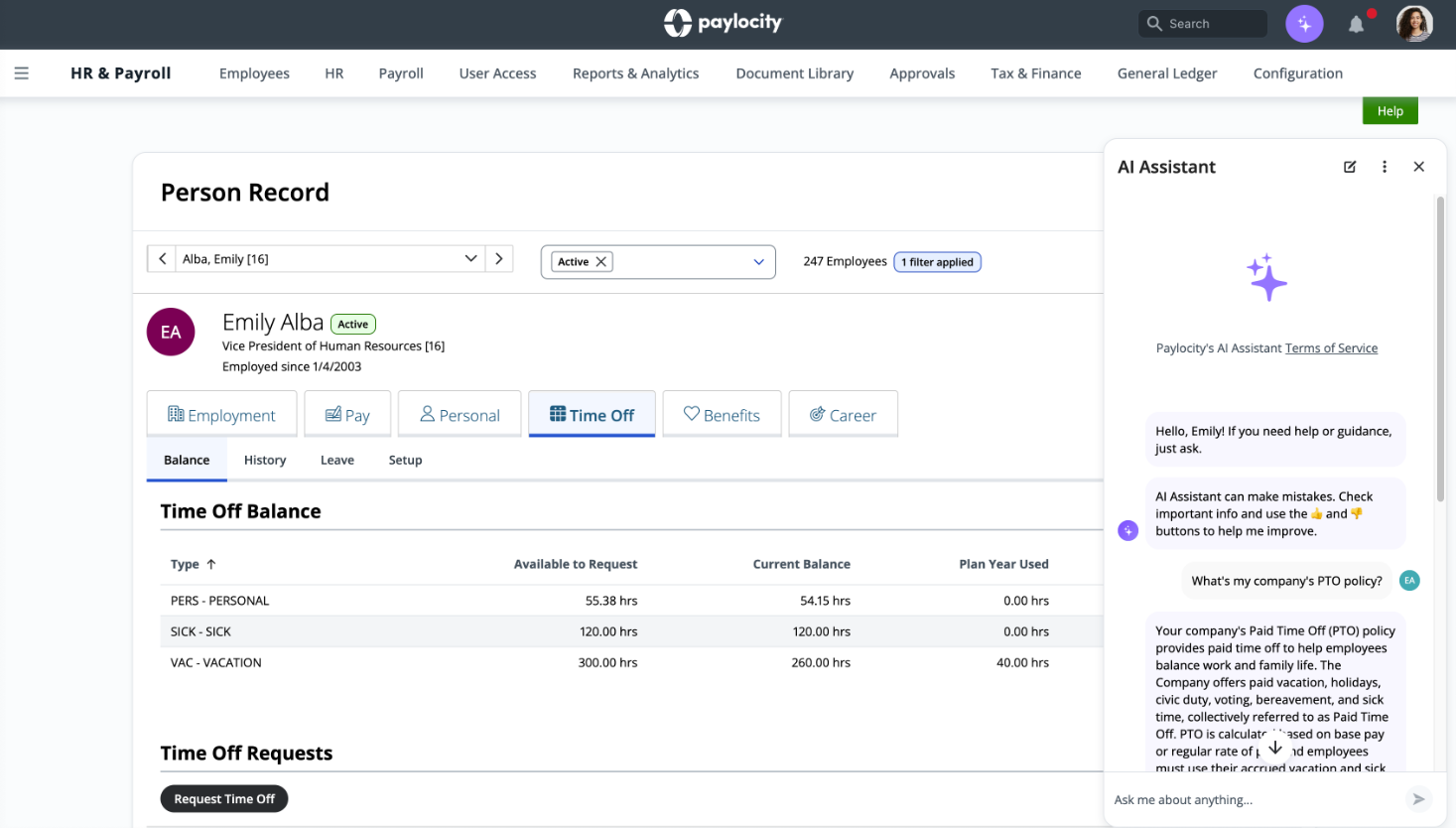
The Ignite AI Hub deserves a mention for its capability to speak directly to one of our evaluation questions. Alongside controls over which agents are active and who can use them, it shows how teams are adopting agents and how many AI corrections users apply. Most platforms leave you guessing how often AI output gets used versus overridden, and this dashboard at least starts to answer that.
Human oversight is generally well designed, though the messaging is sometimes looser than the mechanics. On timecards, supervisors approve or deny requests, adjust punches, and make bulk edits in one flow, and candidate matching is explicitly framed as input for human review. Yet Paylocity's launch materials also say agents help automate resolution, and one customer described Ignite AI as resolving tasks on its own. We'd ask for a clear list of which agents can write changes without approval before deploying anything near payroll.
Governance documentation is where Paylocity lags the other platforms we reviewed. Its security credentials are solid, with independent SOC 1 and SOC 2 Type II attestations and ISO 27001:2022 certification. The AI Ethics Statement linked from its client protection page is dated August 2021. It commits to an AI Ethics Committee that reviews use cases, annual ethics training for practitioners, and customer-configurable AI, and it acknowledges that AI systems can reflect real-world biases. Those are reasonable principles, but they predate generative AI and don't address the agents Paylocity now ships. Unlike Absorb and HiBob, which name their AI providers and publish sub-processor details, we couldn't find public disclosures of the foundation models behind Paylocity AI.
Away from payroll, the picture is uneven. Ignite AI answers questions about company policies, IRS regulations, and Department of Labor rules, but won't draft a policy. The Candidate Fit Agent matches applicants to role requirements, and the Grayscale acquisition is expected to add AI-native recruiting. Compensation work falls back on general conversational data analysis, with no dedicated agent.
Lifecycle coverage is broad for the U.S. mid-market, and because HR, payroll, and time share a single platform, agents can catch problems where those workflows intersect. We recommend you budget carefully, though. According to our sources, implementation fees typically range from 10% to 20% of annual software fees, and you may also expect per-transaction charges, such as direct deposit processing fees, on top of the per-employee rate. Its core HR and payroll entry price undercuts BambooHR's Core plan, but the full suite is among the higher-end options in this guide.
Paylocity uses custom, per-employee-per-month pricing based on headcount and modules:
- Full HCM suite: Most mid-market companies pay $26 to $33 per employee per month for payroll, benefits, time, talent, and learning.
- Core HR and payroll: Starts around $5 per employee per month, with recruiting adding roughly $3 to $5.
Best For
U.S. mid-market companies, roughly 50 to 1,000 employees, that want AI focused on payroll, time, and data accuracy inside a unified HCM platform.

360Learning
We found 360Learning to be among the most compelling for organizations in Europe that want AI to speed up course creation without spreading data across multiple AI vendors. It routes all generative AI through Microsoft Azure OpenAI in European data centers, and its collaborative model puts internal experts, not AI, at the center of training content.
PROS
- One AI provider, Microsoft Azure OpenAI, hosted in European data centers.
- Prompts kept no more than 30 days, and no training of OpenAI models on customer data.
- Each customer gets its own recommendation model, trained only on its own data.
- AI-generated course content carries a visible disclaimer for learners.
- A published, low-cost entry plan for teams of up to 100.
- AI Content Builder helps turn documents and internal knowledge into learning content.
- Collaborative learning features allow subject-matter experts to contribute directly to training programs.
- Strong mobile experience for frontline and deskless employees.
- AI-powered translation supports multilingual learning delivery.
- Skills mapping tools help identify workforce capabilities and gaps.
- Supports employee, customer, and partner training from a single platform.
- Extensive integration ecosystem, including SAP SuccessFactors and Workday.
CONS
- Bias mitigation leans on Azure's content filters rather than independent bias audits.
- 360Learning's own materials contradict each other on EU AI Act status, model versions, and whether recommendations self-learn.
- Covers learning and development only; no recruiting, payroll, or compensation.
- Detailed pricing can be difficult to evaluate without speaking to sales.
- Some key advanced capabilities are reserved for higher-tier plans.
- Reporting and analytics may feel cumbersome initially for some administrators.
360Learning keeps its AI supply chain short. Every generative feature runs through Microsoft Azure OpenAI in European data centers, which leaves buyers one well-known provider to vet instead of a chain of sub-processors.
On top of that single stack, the AI turns existing knowledge into training fast. It can generate full courses, including descriptions, content, and questions, from as little as a title or an existing document, and it handles quizzes, translation, video transcription, research help for authors, and personalized quiz feedback. Michelin says its local experts save three hours per course, largely through AI-suggested translations they then adjust.
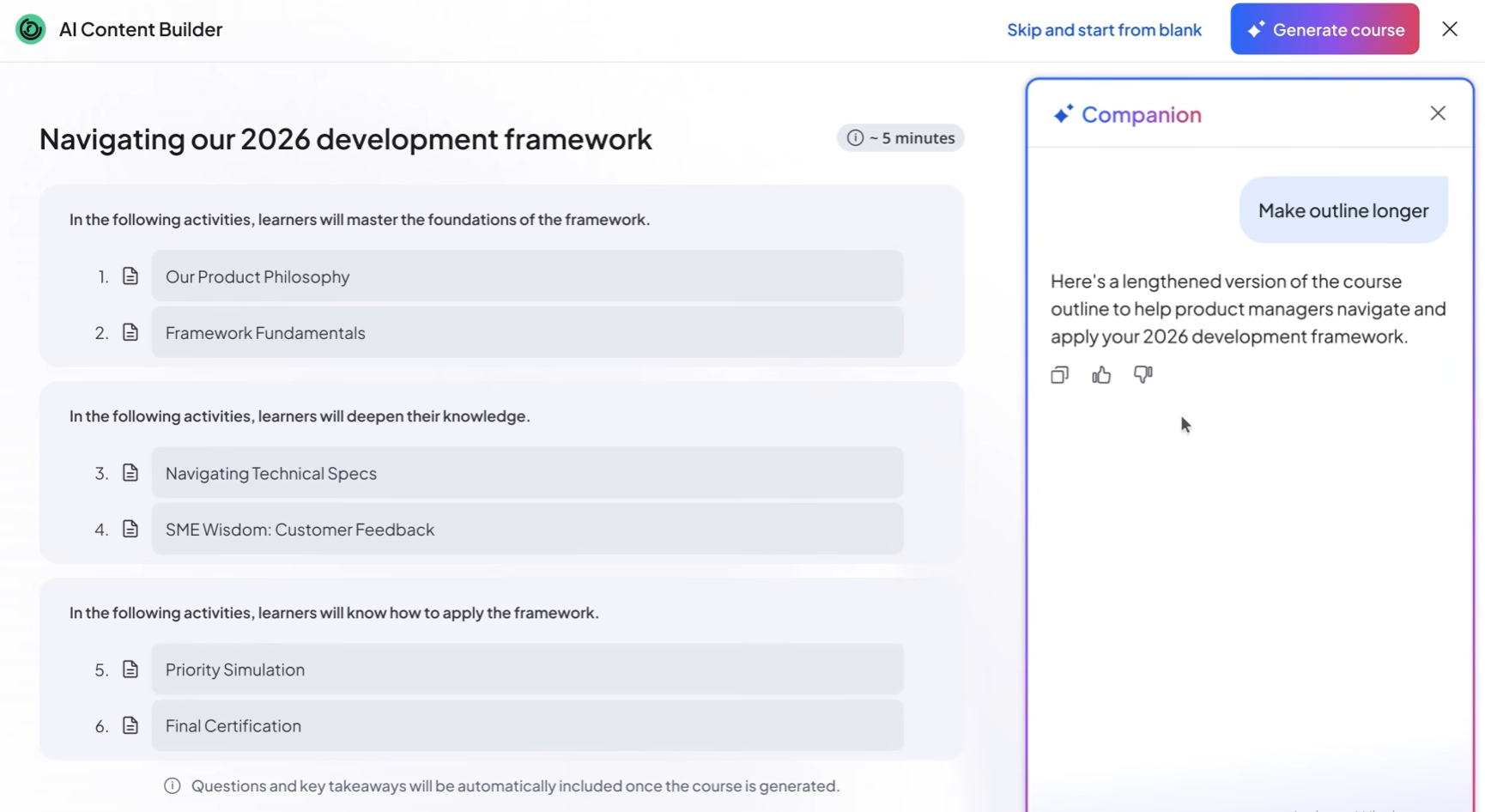
The data architecture is simpler than most we reviewed. Generative features use Azure OpenAI models like GPT-4 and GPT-4o, and content recommendations use LightFM, an open-source model. Each customer platform has its own dedicated recommendation model to ensure no data mixing across customers. 360Learning also says the model isn't self-training, with every update tested before release.
Governance is also pretty robust. 360Learning's AI framework rests on three documents: a public Commitments to Responsible AI, an internal AI Charter with seven rules for employees, and AI Squad Guidelines for developers. It has also self-assessed its AI under the EU AI Act as a Limited Risk system. We'd treat that classification with some skepticism. AI that evaluates learning outcomes in vocational training can fall into the Act's high-risk category, and 360Learning's AI does give feedback on learner answers. Your counsel should decide how that applies to your use. We also didn't find published results on bias audit, the same gap we found at Absorb.
We like that human oversight is built around review before publishing. 360Learning encourages users to verify all AI-generated content, displays a disclaimer in courses containing it, and offers admins a compliance verification feature. Prompt management tools let L&D teams steer outputs toward company culture and compliance standards. However, given that AI tools are deployed by default for existing accounts, admins should decide deliberately which features to keep.
360Learning can build a structured course with quizzes from a policy you already have, but it can’t write the policy. Screening and compensation are out of scope. The nearest HR-adjacent capability is skills, with AI skill tagging and recommendations matched to each learner's role.
For lifecycle coverage, 360Learning handles onboarding, compliance, upskilling, and sales enablement, with more than 50 integrations spanning HR, finance, and talent tools, including Workday and SAP SuccessFactors. In terms of pricing, its base plan is budget-friendly, but we recommend you budget for implementation and professional services, which can range at $5,000 to $25,000 or even more.
360Learning offers three plans:
- Team: $8 per user per month, for up to 100 users.
- Business: Custom pricing, but can start around $10,000 per year.
- Enterprise: Custom pricing.
Implementation and admin training can add $5,000 to $25,000 or more.
Best For
European and global organizations that want AI-accelerated, expert-led course creation, with a single EU-hosted AI provider.

15five
15Five is an easy recommendation to those looking to reduce the grind of performance reviews and manager coaching without letting it make the calls. Its AI gathers evidence and drafts review text, but never chooses ratings or submits reviews, and its 2026 SOC 2 Type II audit brings AI functionality into scope.
PROS
- AI drafts review text but never chooses ratings or submits reviews.
- The 2026 SOC 2 Type II audit includes AI functionality in scope.
- Kona stores no audio or video, deletes transcripts after 30 days, and hides them from HR admins.
- Named AI sub-processors (Anthropic, OpenAI, Pinecone), none permitted to train on customer data.
- Published per-user pricing on all three plans.
- 15Five helps HR leaders run their performance programs from start to finish and make talent decisions based on a 360-degree view of each employee.
- With the help of visual dashboards, HR leaders can access colorful and easy-to-comprehend insights that will make their talent decisions easier.
- The platform is fairly easy to use, comes with a mobile app, has transparent pricing, as well as a 14-day free trial so users can try before they buy.
CONS
- While AI drafting in performance reviews sits close to consequential employment decisions, we found no published bias audit results.
- Key AI features are sold as add-ons, and there's no recruiting, payroll, or core HRIS.
- AI can only be switched on or off company-wide; individual users can't opt out.
- Some users reported experiencing difficulty creating new objectives or connecting existing objectives to parent objectives in the objectives section.
- When you create an engagement survey using 15Five's template, you can only choose from a selection of pre-made categories rather than creating your own.
- The out of the box integration options are quite limited, and a Zapier integration used to be available but is now sunsetted. As an alternative, 15Five does have a public API for users to plug-in custom tools but that requires a bit more work.
15Five draws a firm line around what its AI may decide. It gathers evidence and drafts review text, but it never chooses a rating or submits a review. That restraint matters because the AI knows a great deal: its Context Layer combines each employee's 15Five history (reviews, engagement scores, 1-on-1 notes, check-ins, objectives, and milestones) with work data from Slack, Google Calendar, Jira, and Asana. Rich context is both the platform's main strength and its main governance challenge.
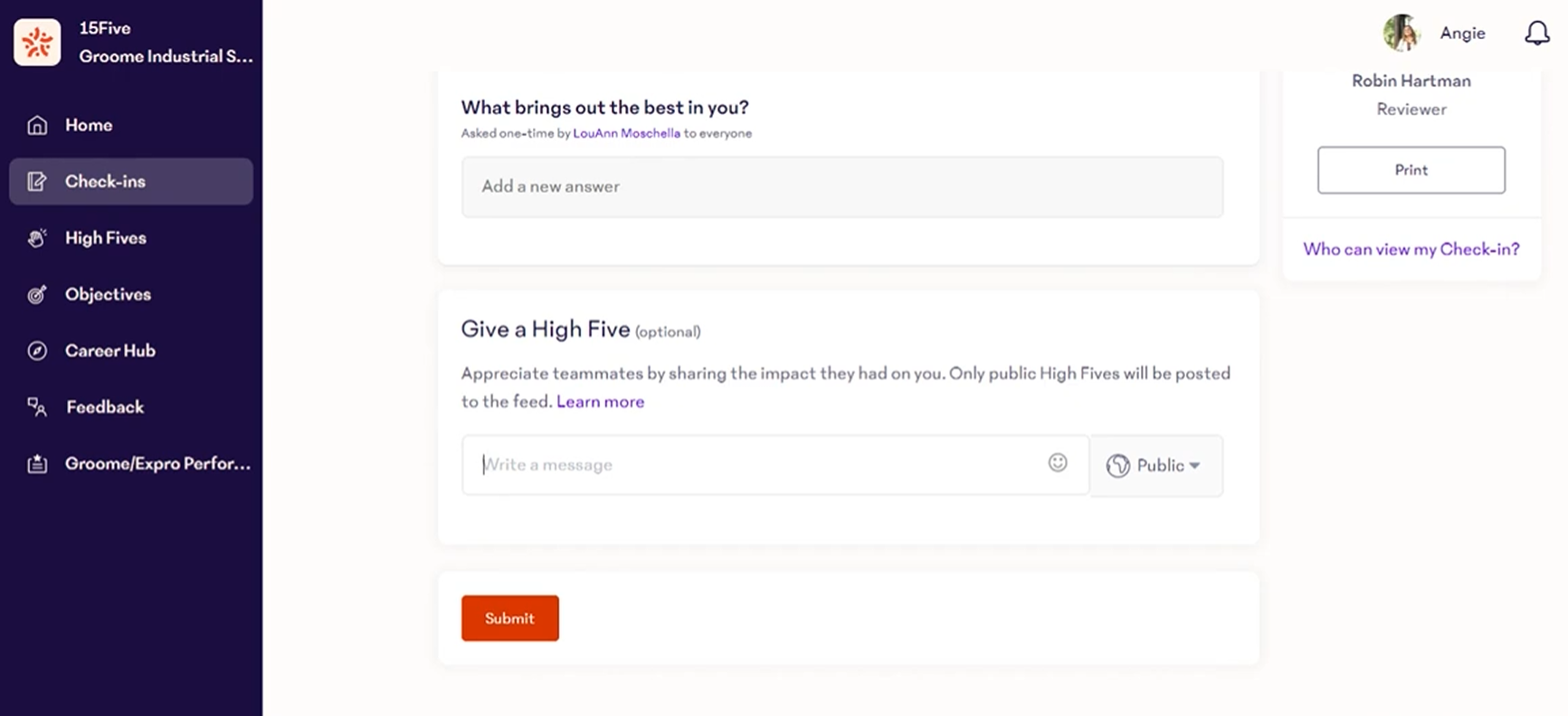
AI-Assisted Reviews is the feature most HR teams will care about. Scoped to the review period, it gathers evidence as "Moments" and drafts answers for eligible open-text questions, including Kona meeting data when available. We like that writers get to decide what's accurate and what to keep, and 15Five AI doesn't choose ratings or submit reviews. Still. we'd caution that a well-written AI draft can anchor a manager's judgment, and because reviews feed promotion and compensation decisions, managers should treat drafts as a starting point rather than a verdict.
The Perform plan also includes Amaya, an ask-me-anything AI agent that 15Five launched in February 2026. HR leaders can ask it natural-language questions about people data across engagement, performance, turnover, and employee attributes, and it summarizes patterns and highlights differences between groups.
Kona, the meeting assistant, is where privacy design is most visible. It processes meeting transcripts only, with no audio or video stored at any point. Transcripts are kept for 30 days for coaching quality assurance, then permanently deleted. Kona Coach delivers coaching prompts privately to managers via Slack, Teams, or the Kona Coach page, and those prompts are never synced to the shared agenda. One trade-off we notice is that raw transcripts are never available for compliance or audit use. That protects employee trust, but it means Kona records won't help in an investigation. We’d advise you confirm with the vendor on how this AI meets local notice and consent requirements before it joins 1-on-1s.
15Five pairs strong audit evidence with mostly clear data flows. Beyond the SOC 2 Type II audit, it holds SOC 3 and TX-RAMP Level 2, and its Trust Center offers penetration test reports, network and data flow diagrams, and a security whitepaper. Its Help Center indicates that data sent to its AI sub-processor is de-identified, with personally identifiable information removed before submission, and the sub-processor doesn't retain it. That puts 15Five ahead of Culture Amp, which sends text to its models without redacting PII.
Candidate screening is outside 15Five's remit, but content drafting sits at its core through AI-Assisted Reviews, which drafts open-text review answers. 15Five also supports compensation, letting teams tie pay decisions to the performance data already collected, with Mercer or Salary.com benchmarks available for an extra fee.
The trade-off however is control. Unlike Culture Amp which lets customers disable AI at the account or user level, 15Five’s AI features are switched on or off for the whole company, not individually. For AI-Assisted Reviews, 15Five discloses what's sent to the model, including review resources like High Fives and feedback, plus self and peer reviews, with objectives and 1-on-1 data added when a manager asks for a draft. Data goes to the model provider within the US, and there’s no bias testing for the review drafts.
For lifecycle coverage, 15Five spans engagement, performance, objectives, 1-on-1s, manager development, and compensation, and it integrates with leading HRIS systems, collaboration tools, and SSO providers. Pricing is transparent, but add-ons like Kona Coach alone costs $19 per manager per month. Even so, the $4 Engage plan is cheaper to start than Culture Amp, which quotes an estimated $5 to $15 per employee.
15Five publishes three plans, all billed annually:
- Engage: $4 per user per month.
- Perform: $11 per user per month; includes Amaya.
- Total Platform: $16 per user per month; includes everything in Engage and Perform.
Add-ons include Kona Meeting Assistant ($2 per employee per month), Kona Coach ($19 per manager per month), Compensation ($9 to $11 per employee per month), Manager Content ($49 per manager per month), and coaching ($399 per credit).
Best For
Mid-sized companies that want AI to support performance reviews, engagement analysis, and manager coaching, with strict limits on what AI can decide and audited controls around it.

Culture Amp
We chose Culture Amp for its strong AI commitments. Its AI Addendum contractually commits to maintaining ISO 42001 certification, giving advance notice before launching material new AI features, and letting customers disable AI features, and its public documentation is candid about where its protections stop.
PROS
- An AI Addendum that contractually commits to ISO 42001, advance notice of new AI features, and the right to disable AI.
- Documented AI Coach bias testing combining scenario tests, LLM-as-a-judge evaluation, and people-scientist review.
- Model providers process data ephemerally and are contractually barred from training on it.
- Separate penetration tests for new AI features before release.
- AI Coach reportedly included in every plan.
- People science team
- Tons of engagement surveys
CONS
- Personally identifiable information (PII) isn't redacted before text goes to AI models, and customers can't configure PII filters.
- Topic and sentiment classification can't be disabled, and customers can't opt out of de-identified data being used for any future Culture Amp models.
- Bias testing is documented only for AI Coach, not the AI features used in performance reviews.
- Their people science plus offering is not available for very small companies
- Enterprise clients might find that they lack some of the integrations and customizations a bigger team needs.
Culture Amp writes more of its AI promises into the contract than most vendors we reviewed. Its AI Addendum commits to maintaining ISO 42001 certification, giving advance notice before launching material new AI features, and letting customers disable AI at the account or user level.
Those commitments cover AI across three products. AI Coach is a conversational coach available in Engage and Perform. In Engage, AI summarizes and compares engagement comments and identifies themes; in Perform, it suggests improvements to performance reviews and summarizes feedback; in Develop, it helps employees compare two roles side by side. Claude from Anthropic is the primary coaching model, with Google Gemini via Vertex AI for speed-sensitive tasks, running across AWS and Google Cloud for redundancy.
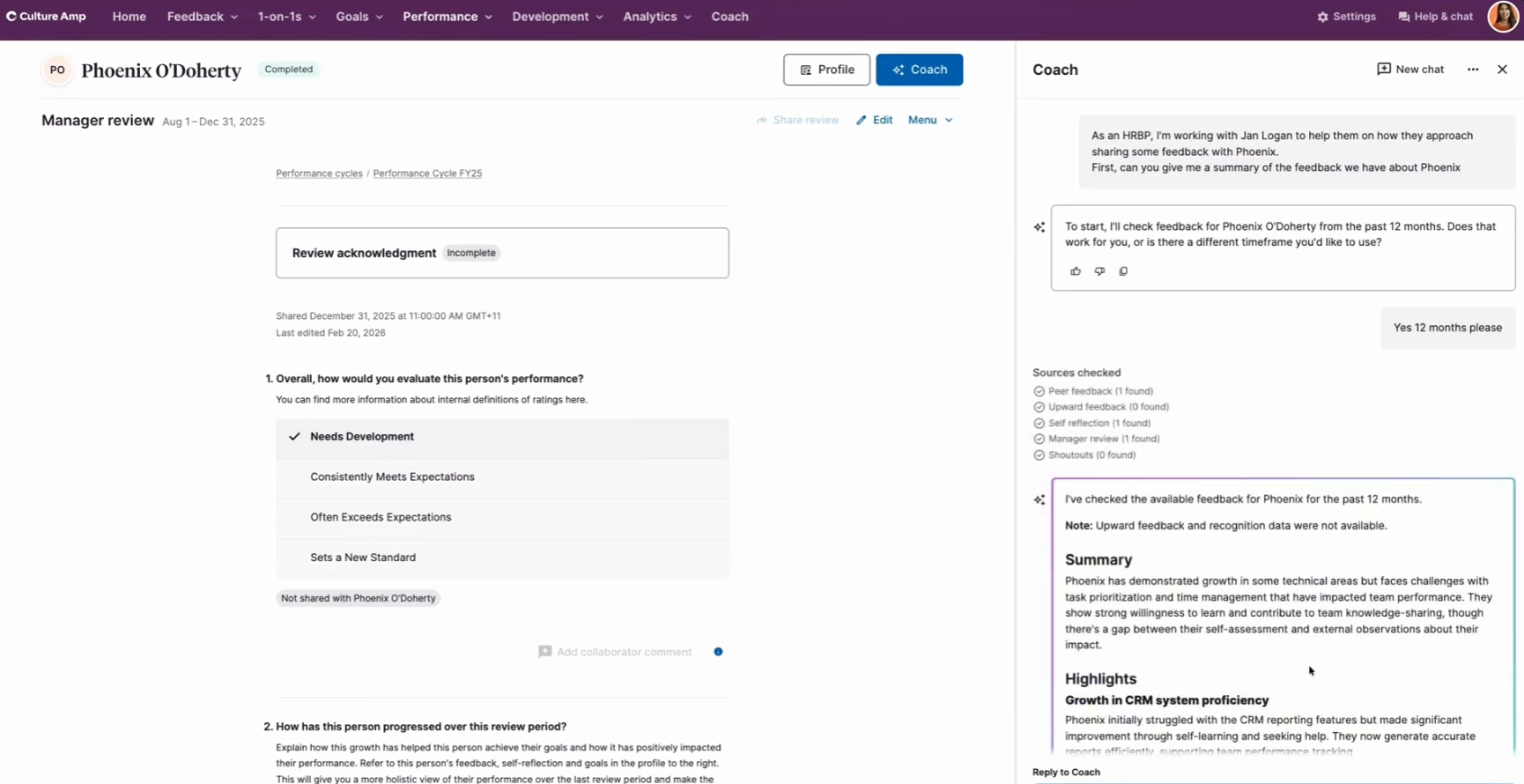
Many vendors describe responsible AI principles. Culture Amp turns several into obligations, and in our opinion is more candid than most about limits. Compared to 15Five which states it removes PII before data reaches its AI sub-processor, Culture Amp discloses that PII isn't redacted before reaching AI models, so features like AI Coach can personalize responses, and that customers can't configure PII filters. Instead, the algorithm recommends internal guidelines on what employees share.
Nevertheless, there's one position we'd scrutinize. Culture Amp says its AI isn't high-risk under the EU AI Act because the features aren't intended to monitor or evaluate employee performance or behavior, yet it does suggest improvements to performance reviews and summarizes feedback. Drafting help isn't the same as evaluation, and Culture Amp says it obtained outside legal advice, but we’d advise those planning to use these features in review cycles have their counsel weigh in. Ultimately, this FAQ is just guidance, not part of the contract, and the vendor’s AI Addendum leaves responsibility for AI-assisted decisions with the customer.
Culture Amp offers no candidate screening or compensation analysis. Its content drafting centers on performance: AI in Perform suggests improvements to review text and summarizes feedback, while Engage summarizes survey comments. Its other main AI investment shows up in Develop, where AI-powered role comparison gives employees a concrete view of where their careers could go next.
Lifecycle coverage spans engagement, performance, and development, including onboarding and offboarding surveys, with HRIS integrations included in every plan. We should warn you though, the pricing can be expensive (users we spoke with reported a minimum annual spend of around $4,500).
Culture Amp uses custom pricing billed annually. It’s estimated to be about $5 to $9 per employee per month for engagement-led plans under about 200 seats, and roughly $9 to $15 once Perform or Develop are added.
Best For
Mid-size and large organizations that want AI-assisted engagement analysis, performance support, and coaching, with AI governance commitments written into the contract.

Deputy
Deputy is ideal for managers running shift-based teams who need to make changes on the floor, not at a desk. Deputy AI turns requests like covering a sick employee or checking timesheets before payroll into ready-to-confirm actions, and it can't publish a schedule or approve a timesheet without explicit confirmation.
PROS
- The AI completes real actions, such as building schedules and approving timesheets, from voice or text on mobile.
- Nothing is finalized without explicit confirmation, and previews flag conflicts before you confirm.
- Processing stays in the account's hosting region (Australia, U.S., or EU/UK) through Amazon Bedrock, with no storage or training by the model provider.
- ISO/IEC 27001:2022, SOC 2 Type 2, TX-RAMP Level 2, and Cyber Essentials.
- Deputy AI included on every plan, currently at no extra cost.
- Create AI optimized employee schedules
- Eliminate no-shows with quick replacements
- Track unproductive time and breaks with precision
CONS
- Face Unlock isn't available for iPad Kiosks or Android Time Clocks located in Illinois, Maryland, or Oregon, as its use would violate local law. Customers in those states must give employees a PIN-only option to clock in and out.
- Deputy AI is still in beta, and turning it off means contacting Deputy rather than flipping an admin setting.
- Bias protections rest on design guardrails and human confirmation, with no published test results, and the underlying model isn't named.
- Limited reporting functionality
- Once published, upcoming schedules can’t be changed
Deputy AI is built around the realities of shift work. By voice or text from the mobile app, a manager can ask who's on shift at a location, build next week's schedule from the last four weeks, extend every kitchen shift by an hour during a rush, or check whether any timesheets don't match the schedule before a pay run. A daily rundown surfaces attendance issues, missed clock-ins, coverage gaps, and location exceptions. For a store manager juggling a sick call and a delivery at once, doing all that from a phone is genuinely useful.
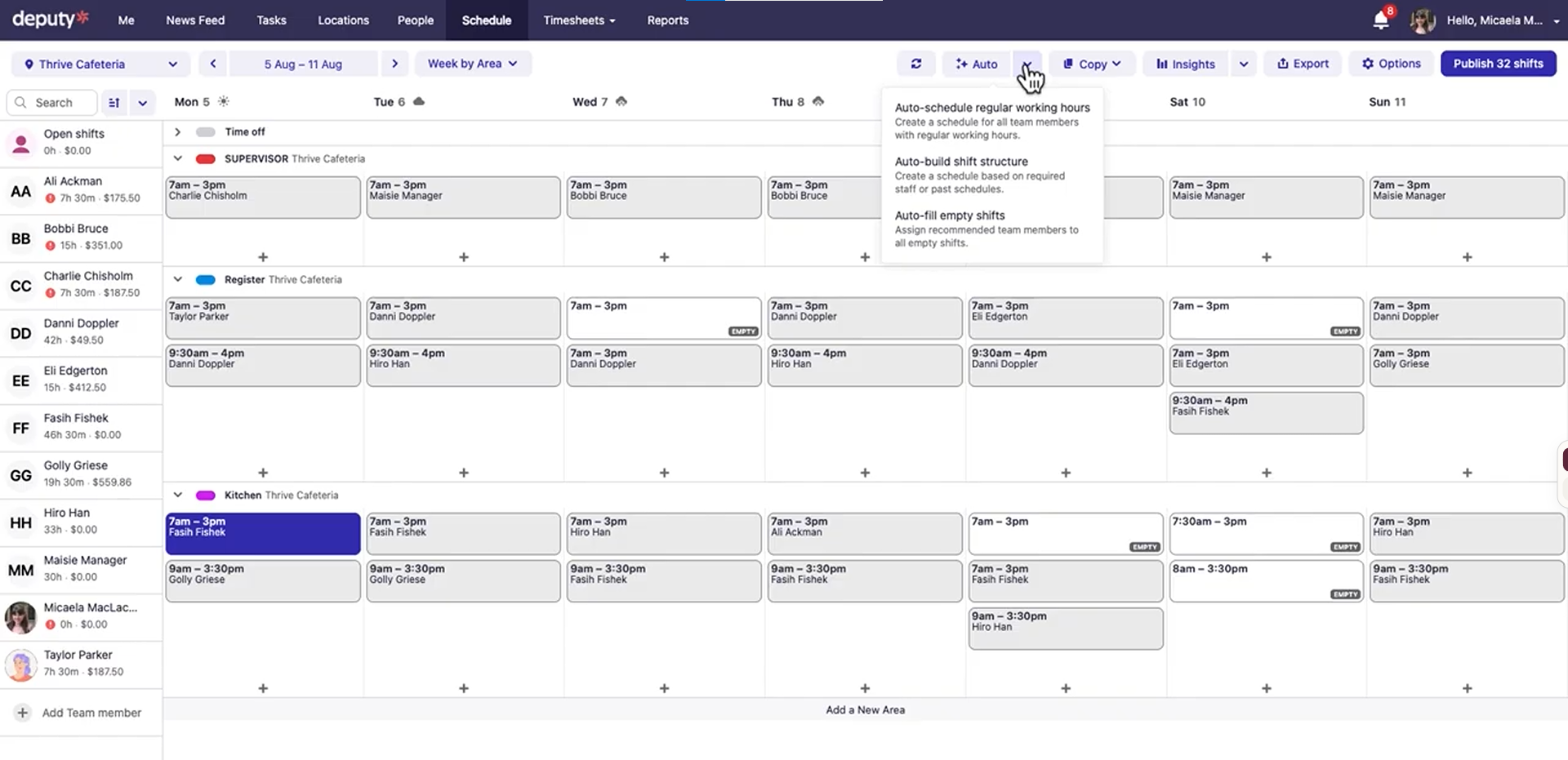
Human oversight is solid by design. Deputy describes its approach as human-in-the-loop, and its terms back this up by requiring an authorized user to confirm any supported action before it's executed. Voice actions follow the same rule, with every change ready for review before it goes ahead. That confirmation step matters most in bulk edits, where a misheard voice command could shift dozens of people's hours at once.
Governance documentation is clearer in Deputy's Trust Center than on its marketing pages. The AI page says customer data "is not processed by the LLM itself," but the Trust Center FAQ explains that Deputy AI transiently processes the details you provide, such as whether an employee has taken a break, and only to generate a response. That matches Deputy's terms, which say AI features use third-party models to process inputs that include customer data.
Processing runs through Amazon Bedrock in the account's hosting region, and Deputy says data is never stored by Bedrock or the model provider. Deputy and its sub-processors do monitor inputs, outputs, feedback, and errors to improve the product, which is standard practice but worth knowing. However, because Deputy AI is in beta, it's managed at the account level, and customers who want it off have to contact Deputy. HiBob and BambooHR, by comparison, let admins switch AI off themselves.
On bias, Deputy describes three layers of protection: back-end APIs designed to give unbiased recommendations for filling shifts, guardrails within Deputy AI against suggesting unfair actions, and the requirement that a human confirm every action. That's a reasonable design, but Deputy doesn't publish how it tests those APIs or guardrails.
While Deputy HR includes hiring tools, we didn't find AI candidate screening. There's no compensation analysis either. The more relevant test for Deputy is schedule building from past patterns, including how well it handles availability, labor law rules, and budget constraints. And in our tests, it delivered.
Lifecycle coverage centers on scheduling, time and attendance, labor compliance, and communication, with HR (talent management, onboarding, documents, performance) and U.S. payroll through Paycor sold as add-ons (reads cost extra).
Deputy offers three published plans, with a 10% discount for annual billing:
- Lite: $5 per user per month, covering basic scheduling, timesheets, and time clocking.
- Core: $6.50 per user per month, adding auto-scheduling, demand forecasting, labor optimization, and biometric time clocking.
- Pro: $9 per user per month, adding custom access levels, SSO, a sandbox environment, and 24/7 live chat.
Deputy AI is included free on all plans for now, though Deputy notes price and availability may change. Along with Culture Amp's AI Coach, it's one of the few AI features in this guide that costs nothing extra. Add-ons include Payroll by Paycor ($8 per user per month plus a 49 monthly base fee),HR(2 per user per month), Messaging+, and Analytics+. Monthly plans have a minimum spend of $30 per month, and every user, including managers and admins, counts toward the total.
Best For
Retail, hospitality, healthcare, and other shift-based businesses that want managers to handle scheduling and timesheet changes quickly from anywhere, with a confirmation step before anything goes live.

ChartHop
ChartHop is a great option for People Ops and finance teams that want to ask hard questions of sensitive people data, like pay equity or headcount scenarios, without widening who can see it. Its Access Guard system ensures the AI only sees what the person asking is authorized to see, and every answer links back to the source data.
PROS
- Access Guard applies the asking user's field-level permissions to every AI query.
- Every answer links to its source data and generates a matching sheet or chart.
- Write actions apply only after the user approves a summary of the change.
- AI Pro agents connect to tools like Salesforce and Notion with each employee's own credentials.
- Named model provider (Anthropic) and a completed SOC 2 Type 2 examination.
- Integrates performance reviews with live business data (e.g., Salesforce) for more objective conversations.
- AI summaries distill open-text feedback; calibration (alpha) helps normalize ratings before finalizing.
- Strong analytics with historical “time travel,” drill-downs, and customizable dashboards.
- Compensation: run salary/bonus/equity cycles with contextual org + performance data and visual comp letters.
- Headcount planning: visual scenarios, side-by-side comparisons, and AI-generated draft plans.
- Open API; HRIS/ATS/payroll integrations; role-based access for sensitive data.
- Mobile app supports completing reviews, surveys, and tasks across devices.
CONS
- ChartHop says it conducts regular fairness audits but doesn't publish results, and its ethics section leans heavily on the model provider's training.
- No native recruiting or payroll; ChartHop is designed to sit on top of other systems.
- Public pricing details are no longer available, and minimum contract requirements might apply.
- Learning curve can be steep due to frequent feature additions and configuration depth.
- Onboarding typically takes weeks to 2–3 months for multi-module rollouts.
- UI can lag with very large org charts or complex visualizations.
- Assisted help for custom templates capped at six per customer.
- Free plan discontinued; $9,000 annual minimum on paid plans.
ChartHop's AI runs across its analytics and planning tools. It summarizes open-text survey and form responses, synthesizes analysis across charts and data views, and powers a chatbot, Ask ChartHop, that navigates dashboards, profiles, and data sheets to answer questions. It can also generate proposals, such as a headcount plan scenario built from prompts and parameters, and turn plain-language requests into precise filters using ChartHop's query language. For finance and People Ops leaders modeling org changes, that's a meaningful shortcut past spreadsheets.
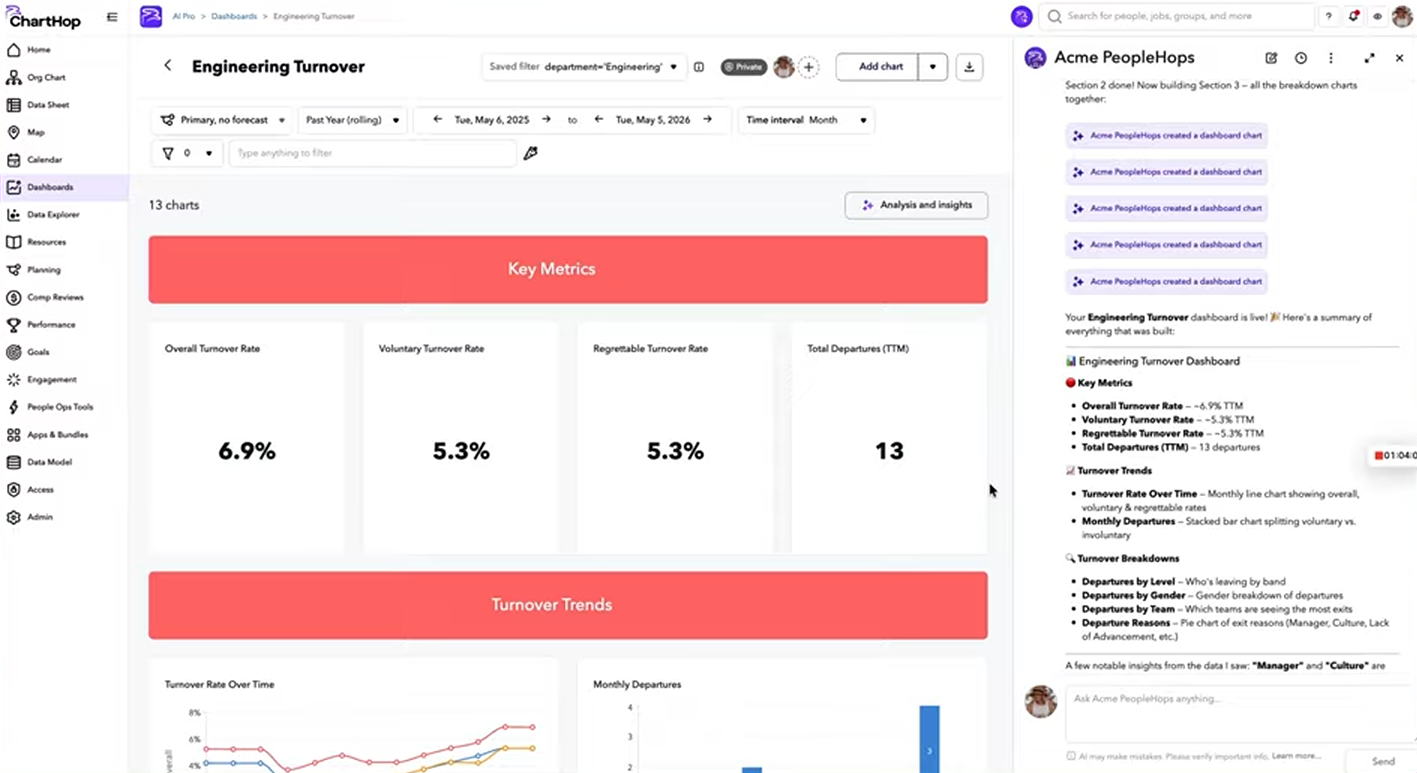
Access Guard is the core of ChartHop's governance story, and it addresses a real risk. When a user asks the AI a question, the model gets the same data access as that user, with all field-level limits applied. That matters most in compensation work, where one careless AI summary could expose salaries to the wrong manager. ChartHop also generates a matching data view with every response, so users can check the numbers in context rather than trusting a paragraph.
The documentation has gaps worth probing. ChartHop's AI Usage Policy says every AI session starts a new model instance and no data is retained between sessions. Yet its AI Agent Memory feature, currently in alpha as part of AI Pro, lets the AI remember facts, preferences, and context across conversations. Both documents were updated the same day. The memory feature is opt-in and can be cleared at the user or org level, so the likely explanation is that the policy predates it, but we suggest you verify with the vendor.
On fairness, ChartHop says it conducts regular audits of AI performance and fairness, but we found no published results, and its ethics section largely points to the model provider's own training and policies. That's not a substitute for testing how ChartHop's own prompts behave on HR data.
Human oversight is well designed for direct edits. AI Chat Write Actions can update job titles, departments, and profile fields, or create dashboards, goals, and tasks, but only after the user confirms a summary of the change, and only within their existing permissions. Because AI Pro's Agentic Actions can make judgment calls instead of following strict rules, we’d check which actions need human approval before using them for important tasks.
Our three test scenarios favor ChartHop's strengths. Compensation analysis is its best fit, combining a Compensation module with permission-locked AI recommendations and summaries. There's no policy generation. There's no native candidate screening either, though ChartHop integrates with applicant tracking systems like Greenhouse and Ashby.
Lifecycle coverage spans an optional HRIS plus headcount planning, compensation, performance, engagement, and goals. ChartHop positions itself as a layer on top of your existing stack, with a deep two-way sync with ADP Workforce Now, and many customers keep their existing payroll provider. That design however brings back the warning our editor raised about broken workflows: ChartHop's AI is only as accurate as the data flowing in from the systems connected to it.
ChartHop uses modular per-employee pricing, billed annually. Per our research:
- ChartHop Core: About $5 per employee per month, including people analytics, org visualization, and AI insights. It works as a standalone product.
- Add-on modules: Headcount Planning, Compensation, Performance, Engagement, Goals, and HRIS, reportedly about $3 per employee per month each. That makes ChartHop cheap to add compared with a full HRIS like Rippling, but you'll still pay for the HRIS and payroll underneath it.
Best For
Mid-market People Ops and finance teams that want AI-assisted analytics, headcount planning, and compensation work on sensitive people data, while keeping their existing HRIS and payroll.
Other AI-Enabled HR Platforms Worth Considering
These following vendors didn't make our top ten, but they fit this guide's scope and have notable AI features. We've left out AI-first tools such as Eightfold AI, HireVue, and Paradox, which fall outside that scope, along with well-known platforms like Lattice that most HR teams already know.
- Connecteam: One of the few workforce management platforms with a free plan, and a generous one at that. Paid hubs start at around $29 a month. The AI toolkit covers an AI agent for employee questions, auto-scheduling, an AI course creator in its learning management system, and file-to-form digitization that turns paper documents into fillable forms. Security credentials include SOC 2 Type 2, ISO/IEC 27001, GDPR, CCPA, and HIPAA.
- Motivosity: Launched in beta in May 2026, Appreciation Intelligence combines an MCP connector, permission-bounded AI agents, Insights AI, and Appreciation Coach to cut the manual work behind recognition programs at mid-market companies. Motivosity says data pulled through its connector goes only to the authenticated AI session that requested it and isn't sold, shared, or used for training. The minimum annual spend is $3,000.
- Workable: For talent acquisition teams hiring at volume, Workable's AI Agent is embedded in its recruiting software and can take over candidate sourcing, outreach, resume screening, and interview scheduling. It searches more than 400 million profiles, gathers missing candidate details through chat, scores applicants against up to 14 job criteria, and books screening calls with strong fits. Settings adjust per account, job, or candidate, every action is logged and reversible, and an admin can shut the agent off account-wide.
- Paycom: Paycom's AI can automate time-off, timecard, paycheck, and expense approvals within limits you set, and a person can reverse any decision. The vendor holds five ISO certifications, including ISO/IEC 42001, hosts client data on its own premises, and includes AI at no added cost. It's a reasonable fit for U.S. mid-market and enterprise companies that want machine learning inside a single payroll and HCM system.
- Nectar: Starting at $2.75 per user per month, Nectar is among the lowest-cost options, with AI summaries of nominations and shoutouts and sentiment analysis of recognition messages. It collects names, work emails, and a few optional details, and says customer data is never used for AI training.
- Visier: Large enterprises with people analytics teams will appreciate how transparent Visier's assistant, Vee, is. It shows the query, metrics, and filters it built from each question, and Visier names its model provider: GPT models hosted in Microsoft Azure. Its random forest models predict resignations, promotions, and job changes, each with a validation metric so customers can compare predictive analytics with what actually happened. Treat Visier's claim that Vee never guesses or hallucinates with skepticism, though, since every LLM-based assistant can make mistakes.
- ADP: ADP is the only vendor we found that points to a published independent bias audit of a specific hiring tool. The 2024 evaluation of Candidate Relevancy, which ranks applicants against the job description, found no statistical evidence of bias. The system keeps every candidate visible to the employer, isn't trained on protected demographic data, and is overseen by an AI & Data Ethics Committee. Companies already running RUN, Workforce Now, or Lyric HCM are the natural audience.
- Qualtrics: Qualtrics comes to HR from the employee listening side. Its Experience Management Platform is ISO 42001 certified, with annual third-party audits and ongoing bias and performance monitoring. Proprietary models handle some AI features, while others run through AWS, Microsoft Azure, and OpenAI under zero-retention agreements, and AI results stay within each user's dashboard permissions. It fits large enterprises with established employee development and engagement programs.
For specialized needs, see our recommendations for AI recruiting tools, HR chatbots, video interviewing platforms, and interview intelligence software.
What is AI HR Software? Key Trends & Compliance Regulations in 2026
AI HR software refers to HR technology that uses artificial intelligence to analyze, generate, or act on people data across hiring, pay, performance, and other workforce processes.
As this field evolves, so do its buzzwords. You'll meet several of them when vetting vendors, so it helps to know what they mean. Here are some common AI HR Software terms:
- Assistive AI is the oldest layer. It covers automation HR teams have used for years, such as resume parsing, candidate-job matching, attrition-risk scoring, and scheduling optimization. These systems analyze data and surface a recommendation, and a person makes the call.
- Generative AI creates content (Dua & Patel, 2024), such as job descriptions, performance feedback summaries, natural-language answers to policy questions, and training materials. It's the most common layer and the most overstated. SHRM found that over two-thirds of HR respondents reported increased creativity, but decision-making gains were mixed, with about half seeing no improvement (SHRM, 2026).
- AI agents are the newest and the most exposed to inflated claims. It can plan and carry out multi-step tasks on a user's behalf (Krishnan, 2025). However, experts have flagged widespread "agent washing," where ordinary chatbots or automation are rebranded as agents (Chandrasekhar et al., 2026).
- AI-native or AI-first describes products built around the model from the start, rather than established platforms that embed AI in existing workflows. Vendors often pitch these as the more advanced option, while their main supporting research rests on illustrative cases from an AI-company executive (Shaik, 2026).
What Counts as AI HR Software in This Guide
This guide covers HR platforms whose AI is purposely built into people workflows, works on the platform's own data, and runs under human-in-the-loop controls the customer can see and change. It leaves out general-purpose AI tools used for HR tasks and AI-first products for four reasons.
- The nature of HR work. Hiring, pay, and performance decisions shape people's careers, so an AI error isn't a minor glitch. When AI scores, ranks, or rejects people at scale, a flaw spreads just as fast: a federal court has let an age-discrimination case proceed on behalf of applicants screened by Workday's AI (Fisher Phillips, 2025), and the EEOC's first AI hiring settlement involved software that automatically rejected older applicants (Fennemore, 2025).
- The legal front. The employer, not the vendor, stays responsible for those decisions, and regulators increasingly expect a person to review them, as the laws section below shows.
- How HR teams adopt AI today. Much of it happens through general-purpose tools that sit outside the HR system, with no permission rules or audit trail. In a 2025 TELUS Digital survey, 57% of enterprise employees admitted entering sensitive information into public AI assistants, often through personal accounts (TELUS Digital, 2025).
- The market. Vendors increasingly lead with autonomy and "AI-native" claims that their documentation often doesn't support. Embedded AI that keeps people as the final decision makers makes errors easier to catch, explain, and defend.
How HR Teams Are Adopting AI
Our research on how HR teams are using AI shows adoption has doubled, with 41% of HR departments now using it. But most of that use runs through general-purpose tools like ChatGPT (58%), and fewer than 10% of organizations use dedicated HR systems with embedded AI (Sapient Insights Group, 2025). In other words, most HR teams are still deciding whether to trust AI inside the platforms they run, which is the decision this guide is built to support.
Vendors are racing to fill that gap, and the pitch keeps getting louder: "AI-native" platforms, autonomous agents, and older features rebranded as AI. In our review, marketing often ran ahead of documentation, with most vendors lacking bias audits, and many headlining frontier AI features which are in fact, conventional automation.
AI HR Software Laws and Regulations to Know
Regulators increasingly expect the human-in-the-loop approach this guide favors. Here's where the main rules stand as of October 2026.
United States
- New York City: Local Law 144 requires an independent bias audit in the year before an automated hiring tool is used, a public summary of the results, and advance notice to candidates and employees (NYC Department of Consumer and Worker Protection, n.d.; Nelson Mullins, 2026).
- Illinois: Since January 1, 2026, using AI that has a discriminatory effect in employment decisions, or ZIP codes as a proxy for protected classes, is a civil rights violation, and so is failing to give notice of AI use (775 ILCS 5/2-102(L); Lysinski, 2026). Rules on how to give that notice are still being finalized.
- Colorado: SB 26-189 replaces the 2024 AI Act from January 1, 2027. Employers must give notice before use, let people correct their data and request human review after an adverse decision, and keep records for three years (Colorado General Assembly, 2026; Littler, 2026).
- California: Since October 1, 2025, bias testing is relevant to discrimination claims, and employers must keep automated-decision data for four years (California Civil Rights Council, 2025).
European Union
- High-risk rules: The AI Act (Regulation (EU) 2024/1689) treats AI used for recruiting, monitoring, performance evaluation, promotion, and termination as high-risk. Those obligations are scheduled to apply from December 2, 2027 (Kinstellar, 2026).
- Transparency: Duties such as telling people they're interacting with AI already apply (Jones Walker, 2026).
Please note that this is a summary, and rules are changing quickly, so have employment counsel review how you plan to use AI in hiring, performance, pay, or termination decisions.
Key Features to Look for in AI HR Software
Most AI HR platforms offer some combination of seven capabilities: automating routine workflows, generating reports and analytics, forecasting workforce needs, drafting documents and policies, supporting compliance, powering employee self-service, and supporting coaching and skills development.
- Process Automation Across HR Workflows. AI can handle repetitive, rule-based tasks such as scheduling interviews, syncing data with your recruiting CRM, updating employee records, triggering onboarding steps, distributing employee engagement surveys. For instance, Paycom approves time off, timecards, and expenses on its own within limits you set, while BambooHR, Deputy, and Rippling wait for a person to confirm every consequential change. Automation suits decisions that are low in ambiguity and easy to reverse, and it's least suitable for anything involving discipline. When evaluating, we recommend you check the platform lets you choose which steps are automated and whether each automated action is logged.
- AI Report Generation and Workforce Analytics. You can ask questions in plain language, such as "which teams have the highest turnover?", and get clear charts and summaries back quickly. This explains why generative AI adoption in people analytics has tripled recently (Insight222, 2025). The key however is whether you can check the answer. Verifiable outputs are what protect you from costly mistakes such as bias and hallucinations. Rippling, ChartHop, Paylocity, and Visier are among HRIS that show the query or source records behind each figure, though it’s important to note that not every platform does so by default.
- AI Talent Intelligence and Forecasting. Given that employers expect 39% of workers' core skills to change by 2030 (World Economic Forum, 2025), we wouldn’t be surprised if demand of AI workforce and succession planning keeps rising. When vetting this feature, you may want to vendors how their models are updated, test the planning scenarios that matter most to your team, and compare the results with your current process. If all a tool produces is polished charts without granular insight, it may not be worth it.
- AI Document Drafting. AI can draft job descriptions, offer letters, review text, and training materials in minutes. To exemplify, HiBob generates job descriptions and learning content, 15Five drafts open-text review answers from the review period's evidence, and Absorb and 360Learning turn existing documents into full courses with quizzes. In any case, even specialized legal AI tools got facts wrong 17% to 33% of the time in a Stanford study (Magesh et al., 2025), so make sure you always have humans review every draft. In our experience, having the AI draft from your own approved templates tends to produce more consistent results.
- Compliance Monitoring and Audit. Depending on where you operate, tracking regulations, flagging policy gaps, and logging automated decisions can be essential. Paylocity flags missed punches, break violations, and unauthorized overtime, and BambooHR's Audit Trail records whether a person or the AI made each change. NYC's Local Law 144 requires an annual bias audit, a public summary, and advance candidate notice for automated hiring tools, which makes bias testing and exportable audit logs essential for NYC employers. Teams with EU workers must also avoid emotion-recognition features, because using AI to infer people's emotions at work is banned there (Bird & Bird, 2025).
- Employee Self-Service. AI HR chatbots can answer common questions about pay, benefits, and leave. Platforms like BambooHR, Paylocity, and Rippling pull answers from your policies, while Paylocity also covers IRS and Department of Labor rules. Research shows that such assistant can help support staff resolve 15% more issues per hour, with the biggest gains for newer staff (Brynjolfsson et al., 2025). Nevertheless, you’d want to put yourself in employees’ shoes to see how this tool works in action. As a rule of thumb, we recommend letting the chatbot handle frequent, simple questions and hand sensitive topics, like emergency leave, to an HR person as they come up.
- AI Coaching, Performance and Skills Development. An AI coach, as research found, can be as effective as human coaches at helping people reach goals, though the researchers noted that AI's lack of empathy and emotional intelligence make human coaches irreplaceable (Terblanche et al., 2022). The AI can help employees and managers set goals, prepare for check-ins, and explore internal mobility/career paths. The vendors we reviewed tend to keep them in a supporting role (e.g., 15Five's AI drafts review text but never picks a rating, and Culture Amp documents its bias testing for AI Coach) which makes them ideal for aiding development while preserving decisions on ratings, promotions, and pay to HR managers.
How to Pick The Best AI HR Software
Choosing AI in HR software comes down to two questions: what's behind the AI, and how well does it work with your data?
Review Models and Training
We recommend starting with four questions for every vendor: which AI models power each feature, where your data is processed, how long it's kept, and whether any of it is used for training. Under GDPR, you remain the controller (Art. 24), you need an Art. 28 processing agreement covering sub-processors, and storage limitation (Art. 5(1)(e)) applies (Regulation (EU) 2016/679). If you can't find out which model providers handle your data or for how long, you may not be able to meet those obligations.
Regarding training, although most vendors state that providers like OpenAI do not train on customer data, this 1) depends on the subscription tier, 2) may not apply to vendor-owned models, and 3) is only guaranteed if explicitly stated in your contract. Some use your prompts and feedback to train internal models. We advise you ask for contractually binding opt-out terms rather than relying on information offered on vendor’s website or demo.
Ask The Right Questions During Demos
The most useful demo questions test how the AI behaves on your data, what happens to that data, how errors are caught, and what the AI actually costs, rather than how well it performs on the vendor's prepared examples.
- Which model powers each feature, and is it adapted for HR data? A strong answer names the provider for each feature, as Absorb's documentation does, rather than describing "proprietary AI."
- Is our employee data used to train or improve any model, including yours? Listen for whether the answer covers the vendor's own models, not just third-party providers, and whether you can opt out in the contract.
- Can you show the AI working on data you didn't prepare? Bring a sample with missing fields, duplicates, or ambiguous names. A tool that asks which "John" you mean, as Rippling's does, is handling ambiguity better than one that picks for you.
- What happens when the AI is wrong, and who sees it first? Ask whether errors are flagged to a person before taking effect, and whether the platform tracks corrections, as Paylocity's Ignite AI Hub does.
- Which features have shipped, and which are in beta or on the roadmap? Ask the vendor to separate them clearly, and be cautious about paying for roadmap items.
- Is the AI included in the tier we'd buy, or priced separately? Ask for AI costs in writing, including any introductory pricing that may end.
- Do you run bias audits, and can we see the results? A useful answer includes who conducted the audit, when, and which features it covered. "We follow responsible AI principles" isn't an audit.
- Can we turn individual AI features on or off by team or region? Ask whether admins control this directly or must contact the vendor, as Deputy customers currently do.
- Where is our data processed and stored, and for how long? Compare the answer against your residency requirements and check that the contract matches it.
- What does the audit log record when the AI takes an action? Look for logs that show who requested the action, what the AI did, and who approved it.
Use Real-World Data for Testing
Before uploading anything to the system, review the vendor's data terms and use pseudonymized records where you can. Not all redact personal details before sending text to AI models. Once that’s settled, you should run your own demo version with a realistic set of your records, including missing fields, duplicates, and inconsistent job titles, rather than (vendor demos tend to run on clean sample data). Notice which errors the tool catches, and whether it guesses when it should flag a problem for review.
During the trial, you may want to track how often you accept AI output as-is and how often you correct it. Paylocity's Ignite AI Hub reports this directly. With most platforms, however, you'll need to keep your own count. Given employment regulations like California's which require employers to keep automated-decision system data for four years, it helps to know early what the platform logs and what you'll have to track yourself. It's also worth signing in as a manager and asking about data outside that manager's team, to confirm the AI respects permissions.
For hiring tools, we’d suggest you run test applications and compare the AI’s rankings with your recruiters'. Any contradicts or differences in who land high/low in the list? It's also worth trialing how the AI handles manipulation. Given that 41% of candidates say they have used prompt injections to bypass AI screening systems, you may like to have a few test resumes with hidden instructions to see whether the tool can be gamed before real applicants try it.
AI HR Software Pricing
Most AI HR platforms charge per employee per month, but the starting price rarely tells you what you'll pay for AI. In our research, vendors handled AI pricing in four ways. Some include it in every plan, others reserve advanced AI for higher tiers, some sell it as a separate add-on, and several don't disclose it at all. Starting prices tend to range from $4 to $10 per user per month, and quote-only platforms were estimated at $5 to $33 per employee per month depending on modules.
As noted earlier, the subscription is only part of the cost. Potential fees we recommend you verify with vendors before signing anything include:
- Implementation fees. Third-party estimates put these at $1,000 to $5,000 for Rippling, $3,000 to $30,000 for HiBob, $5,000 to $15,000 for Absorb, and $5,000 to $25,000 or more for 360Learning. Paylocity's typically run 10% to 20% of annual software fees.
- Add-on modules. Payroll, benefits, and compensation are often sold separately. BambooHR's payroll and benefits are add-ons, and Deputy's payroll through Paycor costs $8 per user per month plus a $49 monthly base fee.
- Minimums and escalators. Culture Amp's minimum annual spend is estimated at around $4,500, Deputy's monthly plans have a $30 minimum, and Rippling renewals typically rise 5% to 7% a year.
- Usage-based charges. Some Paylocity contracts include per-transaction fees, such as direct deposit processing, on top of the per-employee rate.
Benefits of AI in HR Software
Top AI HR software saves time on repetitive work, catches payroll and data errors before they spread, helps apply compliance rules consistently, and gives managers and employees faster answers from their own people data.
- Efficiency: The clearest gains we found came from AI handling repetitive, rules-based work. Deputy AI builds next week's schedule from the last four weeks of patterns, and managers can make bulk changes by voice from a phone. 15Five's AI-Assisted Reviews gather evidence from the review period and draft open-text answers, while BambooHR's Report Assistant builds reports from plain-language descriptions. In learning, 360Learning and Absorb generate full courses from a title or an existing document, and Michelin reports saving three hours per course with 360Learning.
- Fewer payroll and data errors: Several platforms use AI to catch mistakes before they reach a paycheck. Paylocity's Data Inspection Agent runs more than 100 validations on employee data, and its Payroll Analysis Agent compares each run against history. BambooHR's Payroll Run Comparison explains differences between runs and flags the ones it can't explain, and its Data Hygiene feature checks records nightly for missing information.
- Compliance support: AI can help HR teams apply rules consistently and document what happened. Paylocity's Time Correction Agent flags missed punches, break violations, and unauthorized overtime. Deputy's agent checks availability, leave, and role or training requirements before preparing schedule changes. Audit trails, such as BambooHR's record of whether a person, Bamboo AI, or both made a change, give you evidence if a decision is later questioned.
- Easier access to people data: Natural-language queries let HR leaders and managers get answers without building reports by hand. Rippling turns questions into SQL queries, formulas, or reports you can inspect, and ChartHop links every answer back to its source data. Permission controls such as ChartHop's Access Guard keep those answers limited to what each user is allowed to see, which matters most for compensation data.
- Faster employee answers: Employees can get answers to routine questions without waiting on HR. BambooHR's Ask BambooHR, Rippling AI, and Paylocity's Ignite AI answer questions about policies, benefits, and pay, which frees HR staff for issues that need judgment.
Risks and Pitfalls to Know
The main risks of AI HR software are biased outcomes, vendor claims that outpace the actual product, employee data traveling further than expected, and AI acting without enough human review, all while legal responsibility stays with the employer.
- Bias: AI that ranks candidates or drafts reviews can repeat patterns from past decisions, and most vendors we reviewed don't publish bias audit results. Of the platforms we reviewed, only ADP cited an independent audit (although that 2024 audit covers a single product). Several others offer screening or review-drafting AI with commitments in principle but no published testing. Because the employer carries liability for discriminatory outcomes, we recommend testing any hiring or performance AI against your own past decisions before relying on it.
- AI-washing: Marketing claims don't always match the documentation. Deputy's AI page says customer data "is not processed by the LLM itself," while its Trust Center FAQ explains that the AI transiently processes the details you provide to generate a response, and its terms say AI features use third-party models on inputs that include customer data. Paylocity's public AI Ethics Statement dates from 2021, before the agents it now sells existed. Visier claims its assistant doesn't guess or hallucinate, which no tool built on a large language model can promise. We advise reading the contract, terms, and trust center documents rather than relying on product pages.
- Data privacy: Your employee data may travel further than you expect. Not every vendor redact personal details before sending text to AI models. One’s MCP server may authenticate through a shared service user, meaning connected AI tools can see what that account can see rather than what the individual user is allowed to see. Some vendors also use customer data to improve their own models (often revealed only in their data privacy, T&C pages), even while promising in their landing pages that third-party providers won't.
- Over-automation: Some AI acts before a person reviews it. An agent can filter out candidates it considers obvious non-fits, and some HR platform’s automation can deny time-off requests under customer-set rules. Even when AI only drafts, a polished draft can anchor a manager's judgment, so a "human in the loop" needs time and authority to disagree.
- Liability stays with you: Vendor terms consistently place responsibility for AI-assisted decisions on the employer. Most, if not all, hold customers fully responsible for inaccurate or biased outputs and bar using the software as the sole basis for consequential decisions. Before signing, we recommend having counsel review any AI addendum.
- Immature features and shifting prices: Given the emergence of this technology in the HR space, most AI features available are in beta or early release. This means that their AI pricing and availability may change; e.g., one could change or be discontinued, or even be locked in for only higher tiers.
FAQs
What is AI HR software?
AI HR software embeds AI within its human resources platform to help employers analyze, draft, or act on employee data. Such a system ranges from an all-in-one HRIS with AI built into payroll and scheduling, such as BambooHR or Rippling, to single-purpose tools for learning (Absorb, 360Learning), performance (15Five, Culture Amp), or employee scheduling (Deputy).
How much does AI HR software cost?
Published prices in our research started at $4 to $10 per user per month, while quote-based platforms were estimated at $5 to $33 per employee per month depending on modules. AI may be included, reserved for higher tiers, or sold separately, and implementation fees can add thousands of dollars.
Is it legal to use AI in hiring and employment decisions?
Yes, but the rules are tightening, and in any case, your company stays responsible for the outcome. Under federal law, a recruiting tool that unfairly screens out a protected group can still lead to a discrimination claim (42 U.S.C. § 2000e-2(k)). The EEOC has said it will no longer bring these "disparate impact" cases itself (EEOC, 2026; Mayer Brown, 2026), but applicants and state agencies still can. New York City, Illinois, Colorado, and the EU add their own rules, summarized in the regulation section above. Have employment counsel review any AI tool used in hiring, promotion, pay, or termination before you roll it out.
Is HR getting replaced with AI?
Not in the platforms we reviewed. Their AI handles routine work like data checks, report building, and drafting, while vendors' own terms leave final decisions and legal responsibility with people. The most effective setups use AI to free HR staff for work that needs judgment.
Is my employee data used to train AI models?
It depends on the vendor. Most say third-party providers like OpenAI or Anthropic won't train on your data, but some vendors use customer data to improve their own models. Ask directly, and confirm the answer in your contract.
Can AI tools integrate with HR systems?
Yes. Several platforms in this guide, including BambooHR, HiBob, Rippling, and Motivosity, offer MCP connectors or servers that let general AI assistants such as ChatGPT, Claude, and Copilot work with HR data. Before connecting anything, however, we’d recommend you ask whether access is per user and whether connector activity appears in the audit log.
Can AI HR software make decisions on its own?
Some can. Most platforms we reviewed require a person to confirm AI actions, though some automatically approve or deny routine requests like time off under rules you set. Recruiting agents typically rank applicants rather than reject them, but lower-ranked candidates are less likely to be reviewed, so the ranking still shapes who gets hired. During a trial, check the audit log to see which actions were completed without anyone approving them.
What are the best AI HR software options for small businesses?
Some AI HRIS that comes with affordable pricing include BambooHR, Connecteam, Deputy, and 360Learning’s Team plan. Check out our top HR software for small businesses buyer guide for more information.
How should I evaluate AI HR software?
Start by finding out which models power the AI and how your data is handled, then test the platform with your own records instead of demo data. Track how often you correct its output, confirm it respects user permissions, and run a full workflow from start to finish before you decide.
Final Thoughts (and What to Look Forward to)
Across our core criteria of AI maturity, governance, and human oversight, BambooHR, Rippling, and HiBob stood out. Each builds AI directly into daily workflows while keeping people in control of consequential changes and documenting how data is handled. The right platform for you depends on matching your team's operational needs with the level of human oversight you require, and we hope our findings give you a clear starting point for vetting vendors.
For those who are curious about what’s next, we’re looking into Warp, Metaview and Effy AI, which have drawn praise across our practitioner network. Check back for more details in the coming weeks.
If you have thoughts on improving this guide or want to suggest another software vendor we should look into, feel free to email or LinkedIn our editor, Anh Nguyen.
Until next time!
References
Bird & Bird. (2025). AI & the workplace: Navigating prohibited AI practices in the EU. https://cm.twobirds.com/en/insights/2025/global/ai-and-the-workplace-navigating-prohibited-ai-practices-in-the-eu
Brynjolfsson, E., Li, D., & Raymond, L. (2025). Generative AI at work. The Quarterly Journal of Economics, 140(2), 889–942. https://doi.org/10.1093/qje/qjae044
California Civil Rights Council. (2025). Final text of regulations: Employment regulations regarding automated-decision systems. California Civil Rights Department. https://calcivilrights.ca.gov/wp-content/uploads/sites/32/2025/06/Final-Text-regulations-automated-employment-decision-systems.pdf
California Privacy Protection Agency. (2025). Text of approved regulations: CCPA updates, cybersecurity audits, risk assessments, and automated decisionmaking technology. https://cppa.ca.gov/regulations/pdf/ccpa_updates_cyber_risk_admt_appr_text.pdf
Chandrasekhar, C., Pedersen, B., & Rodel, P. (2026, April 16). Agent washing: Disclosure risks in the emerging market for AI agents. Harvard Law School Forum on Corporate Governance. https://corpgov.law.harvard.edu/2026/04/16/agent-washing-disclosure-risks-in-the-emerging-market-for-ai-agents/
Civil Rights Act of 1964, Title VII, 42 U.S.C. § 2000e-2(k). https://www.eeoc.gov/statutes/title-vii-civil-rights-act-1964
Colorado General Assembly. (2026). SB 26-189: Concerning the use of automated decision-making technology in consequential decisions. https://leg.colorado.gov/bills/SB26-189
Dua, I. K., & Patel, P. G. (2024). An introduction to generative AI. In Optimizing generative AI workloads for sustainability. Apress. https://doi.org/10.1007/979-8-8688-0917-0_1
Fennemore. (2025). A new storm for employers may be forming in the California sunshine: Preliminary certification of collective action against human resource AI software provider. https://www.fennemorelaw.com/?p=25321
Fisher Phillips. (2025). Discrimination lawsuit over Workday's AI hiring tools can proceed as class action. https://www.fisherphillips.com/en/news-insights/discrimination-lawsuit-over-workdays-ai-hiring-tools-can-proceed-as-class-action-6-things
Illinois Public Act 103-0804, 775 ILCS 5/2-102(L) (2024). https://www.ilga.gov/legislation/PublicActs/View/103-0804
Insight222. (2025). People analytics trends 2025/26: Navigating AI and people analytics from ambition to action. https://go.insight222.com/insight222-people-analytics-trends-report-2025/26
Jones Walker LLP. (2026, July 16). Yes, August 2 still matters: The EU approved a high-risk AI delay, but most transparency obligations remain. https://www.joneswalker.com/en/insights/blogs/ai-law-blog/yes-august-2-still-matters-the-eu-approved-a-high-risk-ai-delay-but-most-trans.html?id=102nbon
Kinstellar. (2026). The AI Act after the Digital Omnibus: Simplified rules, delayed deadlines—but can compliance wait? https://www.kinstellar.com/news-and-insights/detail/4619/the-ai-act-after-the-digital-omnibus-simplified-rules-delayed-deadlines-but-can-compliance-wait
Krishnan, N. (2025). AI agents: Evolution, architecture, and real-world applications (arXiv:2503.12687). arXiv. https://doi.org/10.48550/arXiv.2503.12687
Littler. (2026, May 15). Colorado amends its artificial intelligence law, substantially reducing obligations on employers. https://www.littler.com/news-analysis/asap/colorado-amends-its-artificial-intelligence-law-substantially-reducing
Lysinski. (2026). Illinois HB 3773: AI hiring compliance. https://lysinski.com/practices/ai-law/hb-3773-ai-employment/
Magesh, V., Surani, F., Dahl, M., Suzgun, M., Manning, C. D., & Ho, D. E. (2025). Hallucination-free? Assessing the reliability of leading AI legal research tools. Journal of Empirical Legal Studies. https://doi.org/10.1111/jels.12413
Mayer Brown. (2026, June). EEOC releases new National Enforcement Plan, reorienting agency priorities. https://www.mayerbrown.com/en/insights/publications/2026/06/eeoc-releases-new-national-enforcement-plan-reorienting-agency-priorities
Nelson Mullins. (2026, June 16). States take aim at AI in employment decisions. https://www.nelsonmullins.com/insights/alerts/privacy_and_data_security_alert/all/states-take-aim-at-ai-in-employment-decisions-illinois-s-disclosure-and-anti-discrimination-requirements-enforcement-gaps-under-nyc-s-local-law-144-and-connecticut-s-new-ai-law-privacy
NYC Department of Consumer and Worker Protection. (n.d.). Automated employment decision tools (AEDT). Retrieved October 2, 2026, from https://www.nyc.gov/site/dca/about/automated-employment-decision-tools.page
Regulation (EU) 2016/679 of the European Parliament and of the Council of 27 April 2016 (General Data Protection Regulation). (2016). Official Journal of the European Union. https://eur-lex.europa.eu/eli/reg/2016/679/oj
Regulation (EU) 2024/1689 of the European Parliament and of the Council of 13 June 2024 laying down harmonised rules on artificial intelligence (Artificial Intelligence Act). (2024). Official Journal of the European Union. https://eur-lex.europa.eu/eli/reg/2024/1689/oj
Sapient Insights Group. (2025). Sapient Insights Group releases the 2025-2026 HR Systems Survey report. https://sapientinsights.com/sapient-insights-group-releases-the-2025-2026-hr-systems-survey-report/
Shaik, A. S. (2026, April 1). Redefining the operating model: How AI-native organizations differ from AI-augmented ones [Working paper]. SSRN. https://doi.org/10.2139/ssrn.6811920
SHRM. (2026, April 8). AI in HR 2026: From hype to measured, human-centered impact. https://www.shrm.org/topics-tools/news/ai-hr-2026-from-hype-to-measured-human-centered-impact
TELUS Digital. (2025, February 26). TELUS Digital survey reveals enterprise employees are entering sensitive data into AI assistants more than you think [Press release]. Business Wire. https://businesswire.com/news/home/20250226490609/en/TELUS-Digital-Survey-Reveals-Enterprise-Employees-Are-Entering-Sensitive-Data-Into-AI-Assistants-More-Than-You-Think
Terblanche, N., Molyn, J., de Haan, E., & Nilsson, V. O. (2022). Comparing artificial intelligence and human coaching goal attainment efficacy. PLOS ONE, 17(6), Article e0270255. https://doi.org/10.1371/journal.pone.0270255
U.S. Equal Employment Opportunity Commission. (2026). National enforcement plan. https://www.eeoc.gov/sites/default/files/2026-06/NEP_-_signed.pdf
World Economic Forum. (2025). The future of jobs report 2025. https://www.weforum.org/publications/the-future-of-jobs-report-2025/
About the Author


About Us
- Our goal at SSR is to help HR and recruiting teams to find and buy the right software for their needs.
- Our site is free to use as some vendors will pay us for web traffic.
- SSR lists all companies we feel are top vendors - not just those who pay us - in our comprehensive directories full of the advice needed to make the right purchase decision for your HR team.


