

15 Best Video Interview Software Platforms of 2026
Don’t settle for mediocre video interview software. You (and your candidates) deserve better.











The best video interview software gives you access to a much larger and more diverse pool of talent. Even the simplest platforms can help you replace tedious phone screens with quick one-way recordings, make scheduling live interviews far easier, and give candidates a smoother experience overall. The more advanced systems can transcribe conversations automatically, generate structured scorecards, surface insights you might have missed, and keep your entire hiring team aligned.
But it is important to keep expectations realistic. These tools can dramatically speed up early screening, yet they cannot fix a disorganized hiring process on their own. And even the most polished platforms can frustrate candidates if the interface is clunky, the instructions are unclear, or the automation feels a little too robotic.
We have tested more than 80 video interview tools over the past four years, from lightweight apps that focus solely on one-way responses to full-featured enterprise systems that aim to cover every interview format. After all of that research, we think VidCruiter, Jobma, and Hireflix are the best choices for most teams.
Core interviewing workflows, integration performance, branding and customization, and technical support were what we evaluated for every video interview platform we considered.
- Core interviewing workflows: For each platform, we created and ran multiple interview scenarios that mirrored real hiring environments. We set up one-way, pre-recorded screenings with time limits, retake settings, and structured prompts. We also conducted live video interviews with multiple panelists to see how well the tools handled scheduling, interviewer handoffs, screen sharing, and real-time evaluation. We paid close attention to how quickly we could build an interview flow, how stable the calls were across different bandwidth levels, and how long it took to review and assess recorded responses.
- Integration performance: Because most employers rely on an Applicant Tracking System, we examined how well each tool integrated with systems like Greenhouse, Lever, BambooHR, Workday, and SAP SuccessFactors. We tested data syncs, candidate status updates, and the accuracy of interview notes passed between systems. We also checked whether integrations required coding, third-party connectors, or lengthy setup. Platforms with fragmented or manual integrations consistently performed worse in workflow consistency.
- Branding and customization: We assessed how deeply each platform allowed employers to customize the experience. This included branded intro and outro videos, color schemes, logos, and SMS or email templates sent to candidates. We also tested how job-specific branding carried into the interview environment, because inconsistent branding often confuses candidates or reflects poorly on employers.
- Reliability and support: We evaluated each tool’s reliability by running interviews under varied network conditions and by testing on different browsers and devices. We also engaged customer support teams with real questions to measure responsiveness, depth of knowledge, and the quality of troubleshooting. Support mattered most when interviews failed or when settings were accidentally misconfigured, which happened more often than expected.
While all four criteria were important, we placed the most weight on user-friendliness and integration due to their direct impact on day-to-day hiring workflows. Employer branding and support quality were used as differentiators when platforms were otherwise comparable. For more insight into our vetting and selection process, check out this article on how we assess HR software vendors.



VidCruiter

If you’re running 100+ hires a year and want consistency, fairness, and insight baked into your interviews, VidCruiter has few rivals. The platform offers powerful live and prerecorded video interviewing features, along with highly rated customer service and enterprise-grade security, making it a solid option for medium- to high-volume recruitment, both nationally and internationally.
PROS
- Interview Management System supports structured interviews with smart automations, analytics, and ethical AI.
- AI interview notes and candidate summaries reduce administrative workload.
- Smart Scheduling recommends optimal times, syncs calendars, and enables branded candidate self-booking.
- 24/7 live support available for both hiring teams and candidates.
- Supports 8+ languages natively, with fast turnaround for custom requests.
- Enterprise-grade compliance (SOC 2, ISO 27001/17/18) and geo-specific data hosting.
- Scalable and customizable — users pay for what they need and can purchase more features as they grow.
- Robust pre-recorded and live video interviewing with advanced automation.
- Browser-based, so it works across devices without installing apps.
- Available for recruiters in eight languages and supports job seekers in dozens more.
- 24/7 live agent support, assigned account manager, and on-demand training.
CONS
- Implementation timelines can be lengthy.
- Not the best option for teams seeking an AI-first solution.
- No public pricing or free trial available.
- Can be an overkill for teams with fewer than 100 employees.
- Because the product is feature-rich and highly customizable, the implementation phase can be time-consuming.
- Advanced search and technical skills testing features within the assessment module leave room for improvement.
- No free or trial version.
- Undisclosed pricing.
.gif)
VidCruiter has long been a dependable choice for companies needing both prerecorded and live video interviews, but their latest evolution into a full Interview Management System (IMS) is what got us truly excited.
Beyond simply recording candidate responses, VidCruiter’s IMS now supports structured hiring practices from end to end. We tested its Smart Scheduling tool and were impressed by how well it synced with our calendars and let candidates self-book time slots via branded links. The platform also comes with AI-generated interview notes, which, in our tests, provided editable summaries that saved us from scrambling to jot things down mid-interview.
VidCruiter didn’t skimp on interview quality, either. During a simulated live panel interview, we could see candidate responses in real-time alongside standardized questions and a built-in rating guide. Everyone on the panel, from internal team members and external guest raters, had an easy time scoring, thanks to VidCruiter’s intuitive interface. Plus, all this works straight from a browser, no downloads needed.
Another great moment came when we played around with VidCruiter’s DEI features. We appreciated how the platform nudged interviewers to use structured evaluations and fair scoring frameworks. This is a vendor that takes bias mitigation seriously.
Language support remains a strong suit, as VidCruiter comes ready with eight languages and can deliver more within 48 hours for candidates or four weeks for recruiters. From a compliance standpoint, it ticks all the boxes with SOC 2 Type II, ISO certifications, GDPR, and EEOC adherence.
That said, VidCruiter’s biggest asset, which is customization, is also what makes it a heavier lift to implement. The platform isn’t built for speed out of the box but requires collaboration with the vendor to get workflows just right, especially if you want to take full advantage of the IMS. Also, pricing is still undisclosed, and there’s no free trial, so prospective buyers need to go through sales just to get baseline cost info. Lastly, while the AI features are promising, they arrived much later than those of peers such as Jobma and BarRaiser.
100,000+ customers, including Lowe’s, Lionsgate, Samsung, Bears, US Foods, and United Nations.
VidCruiter pricing depends on the hiring volumes, so it’s best to contact the vendor directly for a quote. To give you an idea, our research indicates it typically starts at $1,000 annually.
VidCruiter's recent updates reflect a clear push toward AI-assisted interview structure and evaluation:
- Automated Interview Guides (May 2026) generate AI-powered job descriptions, competency-based questions and scorecards from job requirements
- AI job description generation uses role-specific competencies to attract relevant candidates with inclusive, bias-reduced language
- AI-generated transcripts, summaries and timestamped highlights for each video interview session
- Automated candidate qualification mapping organizes experience and skills against predefined competencies, flagging strengths and areas for improvement

Best For
VidCruiter's video interview software is best suited for medium to large-sized companies that hire at least 100 people annually.


At Synergized HR, we used VidCruiter primarily to manage and streamline the candidate screening and interview process for our clients. We began by customizing pre-recorded video interview questions that aligned with each specific role and company culture.
This allowed candidates to complete interviews on their own time, and our team could review responses more efficiently. We also used the platform’s rating system and automated workflows to collaborate with hiring managers and ensure consistent evaluations.
In addition, VidCruiter helped us stay organized and compliant by securely storing candidate data and tracking each step of the hiring process.
- The ability to customize everything—from questions to workflows—made it easy to match each client’s hiring process.
- The pre-recorded interviews allowed candidates to respond on their own schedule, which saved our team time on coordination.
- The platform kept all data secure and organized, reducing the stress of staying compliant.
At Synergized HR, we chose VidCruiter to streamline and improve our recruitment processes for tech startup clients. We used the platform for over two years, and it significantly enhanced our ability to efficiently screen candidates at scale.
The customizable workflows and structured interview tools helped us maintain consistency and compliance across various hiring projects.
Overall, VidCruiter became an integral part of our toolkit for delivering high-quality, tech-driven HR solutions. Like any business, we continue to seek cost-effective options.
- The initial setup took time and involved a learning curve before we were fully comfortable using all features.
- The user interface could be more intuitive, as navigating between sections can feel clunky.
- The reporting and analytics tools could be more customizable to better suit our specific tracking needs.
I’ve used a few other hiring platforms, but what stood out about VidCruiter was its level of customization. Many tools feel one-size-fits-all, but VidCruiter let us tailor the experience to match each client’s needs.
The pre-recorded video interviews worked more smoothly and reliably than others we’ve tried, and the collaboration features made it easier to coordinate with hiring managers.
Their customer support was also more responsive and hands-on, which made a big difference during onboarding. Overall, it felt like a more flexible and supportive solution.
When buying a tool like VidCruiter, it’s important to consider how customizable it is—every company’s hiring process is different, and flexibility is key. The platform should also be user-friendly for both your internal team and candidates.
Integration with your existing systems, such as your ATS or calendar tools, can significantly improve efficiency.
Customer support is another critical factor—having access to a responsive support team can improve the onboarding experience. Finally, choose a platform that can scale with your organization as hiring needs grow.
VidCruiter has evolved by continuously enhancing its platform to meet growing user demands. New features like live video interviews, automated reference checks, and improved analytics tools have streamlined the hiring process.
They have also worked on improving the user interface and expanding integration options with other HR systems.
VidCruiter is ideal for organizations with high-volume hiring needs, particularly in industries like tech or healthcare where consistent, scalable screening is critical. It suits companies that need a customizable recruitment solution for various roles and processes.
Businesses looking to improve candidate experience through video interviews and automation will find strong value in this platform.
VidCruiter may not be a good fit for small organizations or startups with limited hiring needs, as the platform can be more complex and costly than simpler alternatives. It’s also not ideal for companies without the resources to customize and maintain the tool.
For businesses that prefer a traditional, in-person hiring approach with minimal digital tools, VidCruiter may not align with their process.

Jobma
Jobma is multilingual and mobile-friendly, supports both pre-recorded and live video interviews, and even offers coding assessment capabilities. We also love that the vendor continues to push boundaries in talent screening, recently added AI-driven live interviews, candidate voice analysis, and automated resume scoring at no extra cost.
PROS
- One multilingual platform for one-way and live video interviews, coding assessments, and written and audio assessments.
- AI Live Interviews that probe candidates in real-time and provide structured feedback.
- Includes resume relevancy scoring and smart knockout filters.
- Supports voice clarity, pronunciation, and tone analysis for global roles.
- Native integrations with major ATS. Zapier integration is available.
- Offers a mobile app and an extension for quick interview scheduling.
- Human support available via live chat, email, and phone.
- SOC 2 Type II certified, CCPA, GDPR, and NYC AEDT compliant.
- One multilingual platform for one-way and live video interviews, coding assessments, and written and audio assessments.
- AI-powered features for automated scoring, proctoring, and transcriptions.
- Option to share candidate responses to certain questions and include internal feedback, background check docs, resume, transcription, and ratings.
- Native integrations with major ATS. Zapier integration is available.
- Offers a mobile app and an extension for quick interview scheduling.
- Human support available via live chat, email, and phone.
- SOC 2 Type II certified, CCPA, GDPR, and NYC AEDT compliant.
CONS
- Pricing is on an annual basis and undisclosed.
- No free plan. Free trial available post-demo.
- No built-in coaching tools for interviewers.
- Coding assessment tool is not as strong as major brands like HackerEarth and Qualified.io.
- Pricing is on an annual basis and undisclosed.
- No free plan. Free trial available post-demo.
- Coding assessment tool is not as strong as major brands like HackerEarth and Qualified.io.
Jobma is by far the one and only vendor we’ve come across that, in addition to its core product video interview tools, offers native features for assessing technical candidates. In other words, you can conduct recorded video interviews, live ones, add written, multiple-choice, and audio questions to your asynchronous interviews, and even set up your coding assessment tests using this single platform.
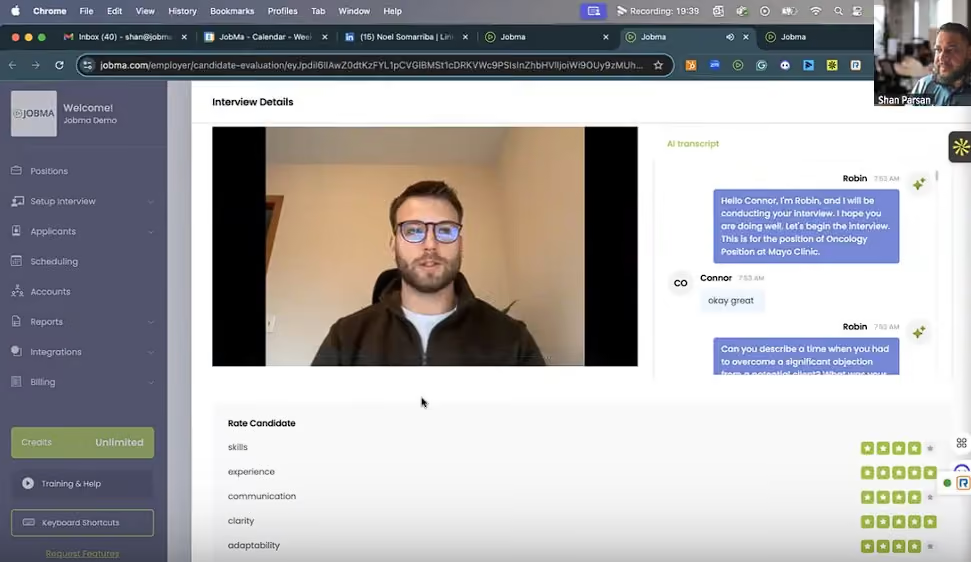
You’d want an interview process that reflects fairness and integrity without intruding on your candidates' personal space. Jobma’s proctoring convinces us it can make that happen by leveraging technology to detect interviewees' potential unethical actions, including multiple faces and voices, copy-and-paste, and window-switching.
There’s also a transcription tool within Jobma that you can use to transcribe candidate responses. Compared to some AI meeting assistants we have used, like Otter and Fathom, this tool is not inferior at all. Very few minor mistakes we could find in its transcripts. Plus, the texts are searchable, editable, and shareable, meaning your evaluations can be more collaborative and fact-based.
We have nothing to complain about Jobma’s integration capabilities since it has done a great job with both its native integrations and custom ones. The platform provides native, two-way integrations with several major ATS and recruiting tech brands. Even if the app you use daily isn't directly synced with Jobma, you can use Zapier to make the connection (via Zapier, Jobma can integrate with over 5,000 different apps).
However, Jobma won’t make you happy if trying with no strings before buying is your purchasing principle. This vendor has no free plan, and the free trial only comes after the demo, with a few agreements included.
While Jobma’s video interview solutions are solid, we feel that its technical assessment tool leaves quite a few things to be desired. Specifically, the pre-built assessment library is not as extensive as in some dedicated coding assessment sites we know (e.g., HackerEarth and Qualified.io). The platform also lacks gamified and hackathon features.
3,000+ companies, including the Massachusetts Institute of Technology, BBB, Mayo Clinic, Polaris, University of Washington, and West Virginia University.
In terms of pricing, everything (AI tools, assessments, proctoring, live & asynchronous interviews, integrations) is included in a single subscription. Jobma tailors packages based on company size, volume, ATS needs, and support requirements. Small companies get access to the same tools as enterprises but with scaled-down usage and costs.
Recent updates show Jobma is optimizing for decision velocity and defensibility.
- Candidate Identity Validation now embeds ID verification directly into the interview workflow, shifting the fraud prevention burden from post-interview review to entry point
- Candidate Evaluations introduce side-by-side comparison tools, letting evaluators assess multiple candidates simultaneously against the same criteria
- AI Resume Score and Summarization surfaces the reasoning behind resume screening, making opaque algorithmic filtering transparent and defensible
- Practice Sessions for AI Interviews let candidates rehearse the autonomous interview format before being evaluated, reducing format-shock and unprepared performance
- New Analytical Dashboard centralizes pipeline visibility with customizable metrics, letting recruiters monitor bottlenecks at a glance
- AI-Powered Interview Setup compresses interview configuration from multi-step form navigation to simple prompts, cutting setup time
- Background Screening Integration with AccuSourceHR automates post-offer verification, collapsing another manual handoff
Best For
Jobma is best for mid-sized and enterprise teams that want customizable AI-powered video interviewing, resume screening, and candidate scoring under one roof, especially across multilingual and high-volume use cases.

Hireflix
Hireflix is a leader in the one-way video interviewing space, sporting a minimalist and modern interface that's super easy to navigate. SMBs love the simplicity and the scalability, plus the 1-month free trial the software provides.
PROS
- Hireflix is simple and frictionless. Candidates can take the interview from any country, at any time, and from any device or browser. No application, log-in, or registration is required.
- All plans include unlimited users, unlimited active jobs, and unlimited interview themes.
- Can be deployed immediately, requires no technical knowledge.
- Responsive customer support.
- Excellent set of features for one-way video interviewing: robust branding options, customizable candidate communication, candidate notification flow automation, automatic transcriptions, and downloadable video interviews.
- Option to use your own domain on your Hireflix interview links.
- Provides transparent pricing and a 1-month free trial.
- Supports more than twenty languages.
- SOC 2 Type I compliant.
- Hireflix is simple and frictionless. Candidates can take the interview from any country, at any time, and from any device or browser. No application, log-in, or registration is required.
- According to users, Hireflix is super easy to implement, can be deployed immediately, requires no technical knowledge, and provides excellent customer support.
- Hireflix provides a multi-language candidate experience. It supports more than twenty languages including English, Spanish, French, Polish, German and more.
- Excellent set of features for one-way video interviewing (think time, answer time, retakes, multi-branding, transcriptions, customizable notifications, shareable links, an open API, native integrations with the top ATS's, and more.)
- One of the longest free trials for a product in its category.
CONS
- Limited native integration capabilities (12 ATSs).
- No built-in live video interviews and scheduling tools.
- Limited to video question types, no other formats supported.
- Absence of post-interview feedback option.
- Lack of online interview instructions for candidates.
- No free plan.
- If you are looking for AI or ML or live (two-way) video interviews, Hireflix will not be helpful for you since they focus exclusively in one-way video interviewing.
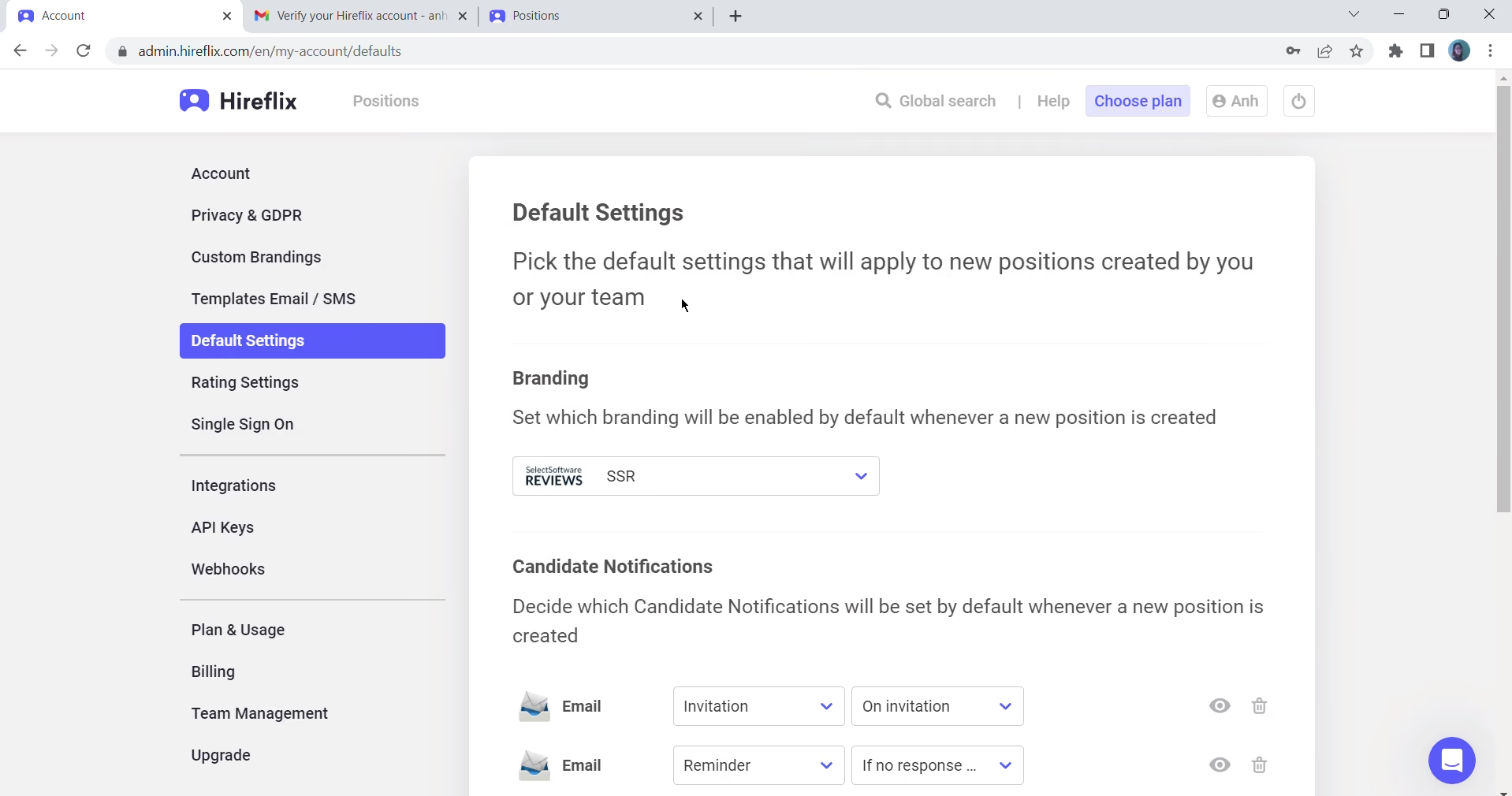
We love Hireflix for its comprehensive one-way interview features and overall simplicity. Rather than become a jack-of-all-trades, the platform is laser-focused on one-way video interviews. It is also one of the few tools with a transparent pricing structure.
Creating a test interview on Hireflix is easy. We added video and text questions, set the thinking time for candidates for each, and it was ready to go. Hireflix supports individual and bulk CVS invites. We could send our interview invitation via email or public link. When we joined the interview as a candidate, the interview link pointed us to the interview page directly — no app downloads or signups are required.
Hireflix is also quite generous regarding user access on each of its plans. Even the cheapest subscription offered unlimited seats, positions, multiple brands, and interview responses. The free trial lasts one month (among the longest trial period we’ve seen in this category) and lets users try all Hireflix functionalities. The video interview software even offers a 20% discount to NGOs and startups under two years old.
Hireflix provides integration with various third-party tools and we didn't encounter any issues during the implementation process. However, it’s a bummer that the software doesn’t support any other question types like text-based, multiple-choice, or file upload. It only does video questions. And while it has a page where interviewees can test their tech before joining the interviews, there are neither online instructions available on the website nor mock interviews they can practice to get ready for the real one.
FIFA, SeaWorld, Franklin Covey, World Vision International and UC Berkeley.
Hireflix offers a 1-month free trial and three pricing plans. All plans include one-way interviews, inviting candidates at scale, and reviewing responses as a team, unlimited users, unlimited active jobs, integrations, and support. When billed annually:
- Small: Priced at $75/month, this plan is ideal for businesses with less than 50 employees.
- Medium: This plan costs $150 per month and is geared towards mid-sized companies with 50-250 employees.
- Custom: Hireflix offers a custom quote for corporates, recruitment agencies, and other use cases.
Best For
Hireflix works best for startups and small to medium businesses that want to focus exclusively on one-way video interviews.

I used Hireflix daily to pre-screen potential candidates for technical roles that had a high volume of applicants. It allowed me to initiate communication with candidates I wanted to advance to the phone screen stage. It also helped me source candidates who were a good fit for specific roles. Additionally, it provided applicants with clear expectations regarding the skills and knowledge required to succeed in the role. Finally, it gave me insight into candidates' personalities and communication skills, allowing me to determine if they would be a good fit within the organization’s culture.
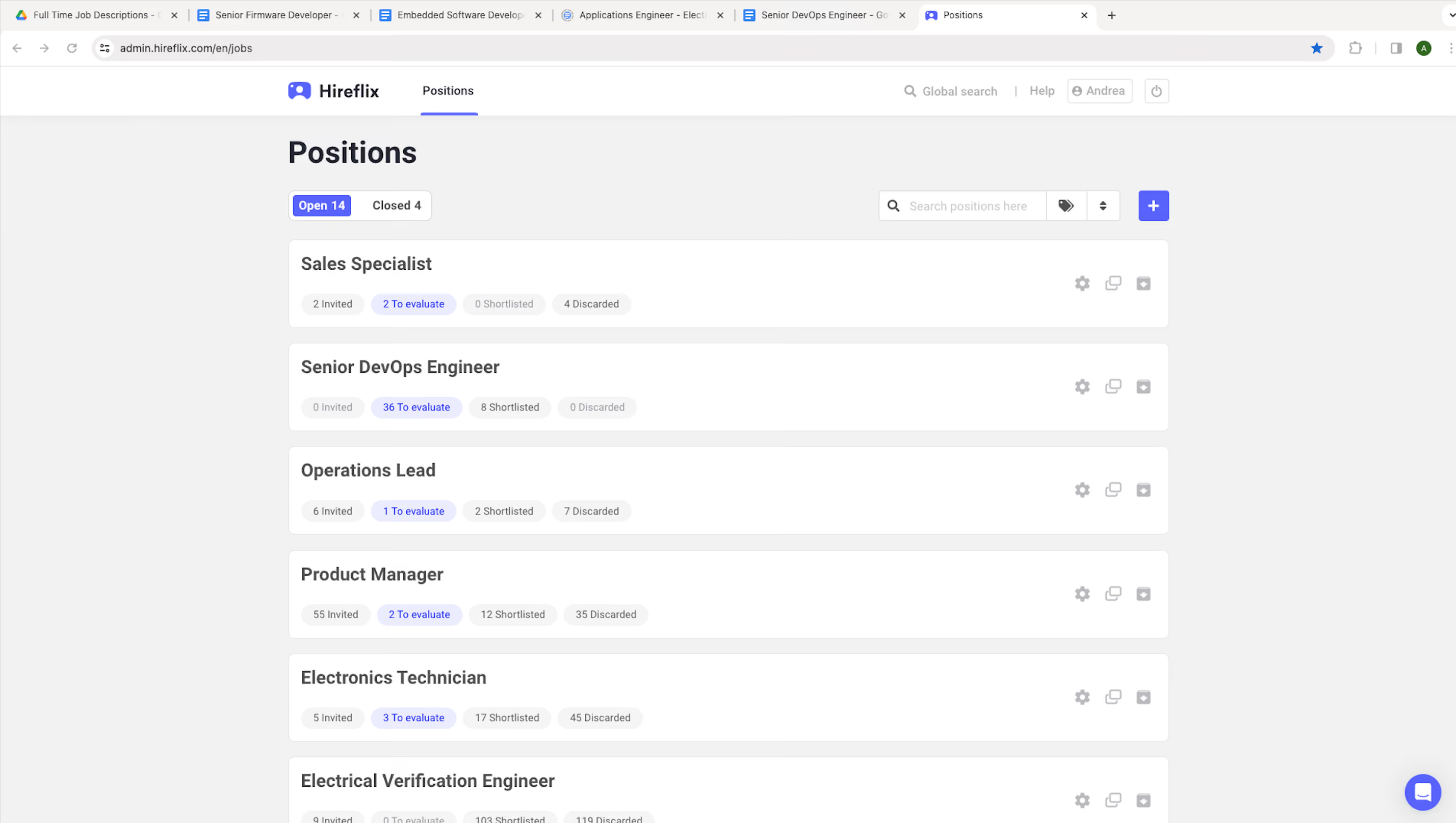
The first advantage of Hireflix is the ability to pre-screen candidates before inviting them to a phone screen.
Second, it helped me identify which candidates were genuinely interested in the role, as they were the ones who completed the Hireflix videos.
Third, it allowed me to engage with candidates in a more personable way because I could humanize them before speaking with them.
The organization that purchased Hireflix did so to automate as much of the recruiting process as possible. Hireflix helps save time screening candidates to assess their qualifications, communication style, skills, and personality fit for roles that need to be filled. The roles they were hiring for were technical positions requiring very specific knowledge and skills. It also allowed us to track candidates who had or had not completed the screening video and automatically notify those who had not. I personally used it for two months while working for the client.
One downside of Hireflix is that it doesn’t allow automatic reminders for candidates who did not complete their videos. Additionally, the system doesn’t detect incomplete videos, so I sometimes received videos where candidates were just staring at the screen without saying anything. Lastly, Hireflix doesn’t automatically archive invitations for candidates who hadn’t completed their videos or older videos that have already been viewed and saved.
Hireflix is the first automated video screening platform I’ve used as a recruiter, so I don’t have any direct comparisons to other tools.
When purchasing a tool like Hireflix, I recommend considering the comfort level of candidates completing a video interview. Since this technology is relatively new, not everyone will be comfortable with or understand how to use the platform, so it’s helpful to mention in the job posting that this platform will be utilized.
While I used Hireflix, there were no changes or updates made to the platform.
Organizations with a high volume of applicants would benefit from tools like Hireflix, as it saves time and effort in the sourcing and screening process. Additionally, organizations without a recruiter could use it to help filter through candidates who may or may not be a good fit. For tech-savvy users, Hireflix would be highly beneficial because they would be able to maximize its potential.
Hireflix wouldn’t be suitable for users who struggle with new technology, as the tool requires manual input for information and settings, which could prevent them from using it to its fullest potential. I also wouldn’t recommend it for organizations with only a few roles to fill, as the cost might outweigh the benefits.
Spark Hire
Spark Hire is a strong video interview solution for staffing and midsize businesses to video interview candidates for their remote and international positions, thanks to its intuitive UI, excellent technical support, and unlimited video interviews offered to all of its plans.
PROS
- Doesn’t limit the number of live and on-demand interviews businesses can conduct across all of its plans.
- US-based and multi-time zone support, available for both company users and applicants.
- Option for candidates to give feedback on their taken interviews.
- Advanced share links let stakeholders rate and leave comments on candidates, fostering collaborative hiring.
- Self-scheduling tools automate candidate invitations and interview reminders.
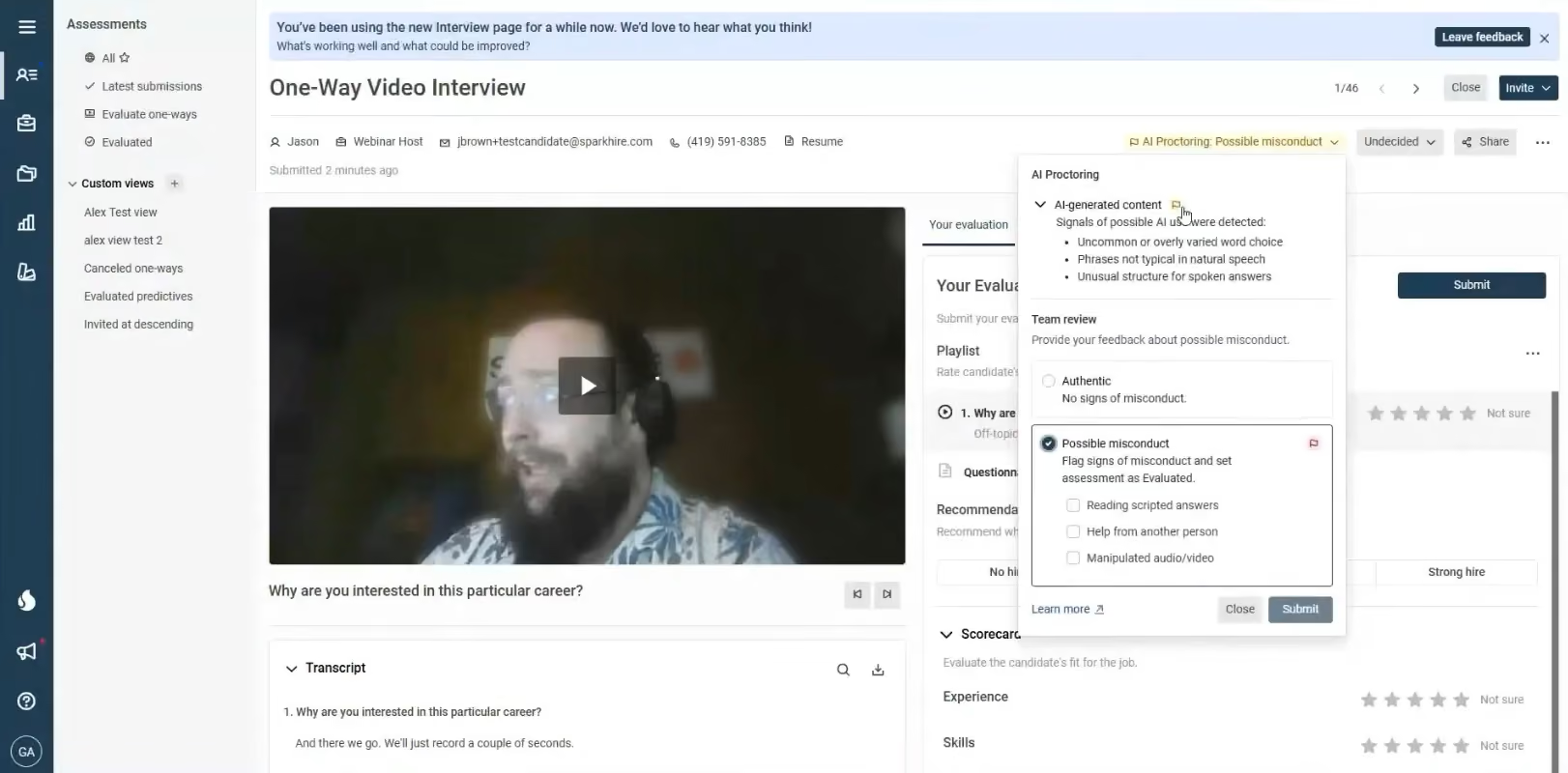
- AI proctoring flags scripted or AI-generated one-way responses for reviewer verification.
- Data analysis dashboard and features are top-tier.
- Efficiency-focused elements, like one-way video interviews, are great for busy TA teams.
- Collaboration is enabled by features that offer pipeline transparency to multiple stakeholders.
CONS
- Monthly rates rise to $299 with no free trial offered.
- Limited storage per plan; excess usage triggers automatic $15/5GB monthly fees.
- Standard plan limits of 5 users and 5 concurrent jobs increase costs for larger-scale hiring.
- Platform is restricted to English support only.
- Weekly self-scheduling caps can restrict high-volume automated invitations.
- Misconduct criteria for AI proctoring remain undisclosed.
- No free trial version.
- Some users require more customization than what is offered.
- No caption or translation features in video limits access for some candidates
One thing that blew us away about Spark Hire Meet is the absence of limits on live and one-way interviews across all plans. For one-way interviews, you can set time limits, control takes, and restrict answer length, with built-in rating, commenting, and rejection emails. Live interviews let you add your logo, customize colors, and auto-record, backed by excellent technical support.
Team-based evaluation is still our favorite part: share interviews with unlimited hiring managers, anonymize candidates, and gather real-time, login-free feedback.
Two newer additions round things out. Scheduling can now auto-send invites once a candidate reaches a set interview stage, paired with automated reminders — handy, though a weekly send cap keeps it from being fully unlimited. And an AI proctoring feature flags one-way responses that appear scripted or AI-generated, allowing your team to confirm or override each flag. We'd treat it as a useful triage signal rather than a proven detector, since Spark Hire hasn't published accuracy data.
On the downside, pricing is where Spark Hire starts to lose us: there's no longer a free trial, which makes it harder to test drive before committing. Storage is also stingier than we'd like — go over your plan's limit and you're billed for more. And that weekly cap on self-scheduling invites, while reasonable for smaller teams, is a real constraint for anyone hiring at volume, since it throttles a feature that's supposed to save you time in the first place.
7,000+ customers, including USPS, Ikea, Volkswagen, Bae Systems, and Love’s.
Spark Hire Meet—the video interview software product starts at $299 per month.
Best For
Spark Hire is a solid option for SMBs and staffing firms with remote or international job positions, especially those that value collaborative assessments and strong integration capabilities in their cloud-based video interview platform.

I use Spark Hire to streamline the hiring process and increase efficiency. Not having to invest personal time in interviews and instead using video to pre-screen candidates allows us to assess them while ensuring all information is easily accessible for further interviews. The ATS helps maintain a smooth flow of candidate data, making it readily available. This tool lets us focus on finding the best talent for our team without being time-consuming. Sharing interview recordings with other team members fosters collaborative decision-making by allowing everyone to review the interviews and provide feedback.
The time saved justifies the yearly fee. It is an easy-to-use program that efficiently manages interviews. The ability to generate individualized questions for hiring managers is a strong feature. The built-in scheduling tool accommodates the candidate's availability, allowing them to complete the interview at their convenience.
The company purchased Spark Hire to better align our recruiting efforts and increase interview speed and efficiency. Shortening average interview times allows employees to focus on other tasks throughout the day. Using Spark Hire helps candidates appear more genuine compared to a typical interview. The ability to interview multiple candidates simultaneously was a significant selling point for us. We also appreciated the flexibility of reviewing candidates on our schedule, unlike in-person or telephone interviews. The affordability of Spark Hire was another factor in our decision.
Some candidates are initially uncomfortable with the pre-interview process. Mobile phone usage could be improved. I would prefer if the yearly cost could be spread out monthly rather than charged per person. Some staff members who aren't as technologically advanced find parts of the program challenging to use.
Spark Hire stands out by focusing solely on streamlining video interviews. It excels in customizing interview questions and sharing them across the office. I prefer Spark Hire over other programs like Oyster because it integrates seamlessly with our ATS, making candidate access quick and easy.
Consider how well the platform can streamline the hiring process and enhance team collaboration. Utilize the trial/demo to ensure it meets your company's specific needs. Research the customer support resources to determine if they are adequate for addressing any questions or issues.
Spark Hire has continuously improved its features, particularly with interview questions and capabilities. The software is regularly upgraded to stay "bug-free."
Spark Hire is ideal for large companies, such as global organizations that hire across different countries.
Spark Hire may not be suitable for smaller companies, as the price point is not conducive for offices that do not hire multiple individuals.

Criteria
Criteria’s video interview platform is uniquely grounded in I/O psychology, structured evaluation, and ethical AI. It’s one of the few tools that combines pre-employment assessments with AI-scored interviews, built on research-backed competencies.
PROS
- Structured interview templates matched to role type, with customizable questions and evaluation guides
- AI scoring trained on thousands of manually rated interviews, benchmarked to expert evaluators
- Interview Intelligence model evaluates only the transcript — not tone or facial expressions — to reduce bias
- Interview flow is fully asynchronous, increasing candidate convenience and screening efficiency
- Includes built-in assessments to create a more holistic view of candidate fit
- Scientifically validated assessments built by in-house PhDs across cognitive, personality, EI, and risk dimensions
- Unlimited usage across Criteria’s full test library, included in every subscription
- Role-based “batteries” auto-recommended by job title, with customization options
- Mobile-friendly, candidate-first experience improves assessment completion rates
- Optional AI-powered video interview scoring and proctoring for additional insights and integrity
- Seamless integrations with 60+ ATS platforms and open API access
CONS
- Requires a time commitment from candidates that may not suit all roles or applicant volumes
- Best features, like Interview Intelligence, are available as paid add-ons
- No live interviewing capabilities for synchronous interaction
- AI feedback is additive, not fully customizable without engaging with internal science team
- No public pricing; must speak with sales to receive a tailored quote
- Add-ons like Interview Intelligence and proctoring may increase the total cost
- The Test Maker tool requires onboarding time to fully leverage for custom assessments
- Feature depth may exceed the needs of small or low-volume hiring teams
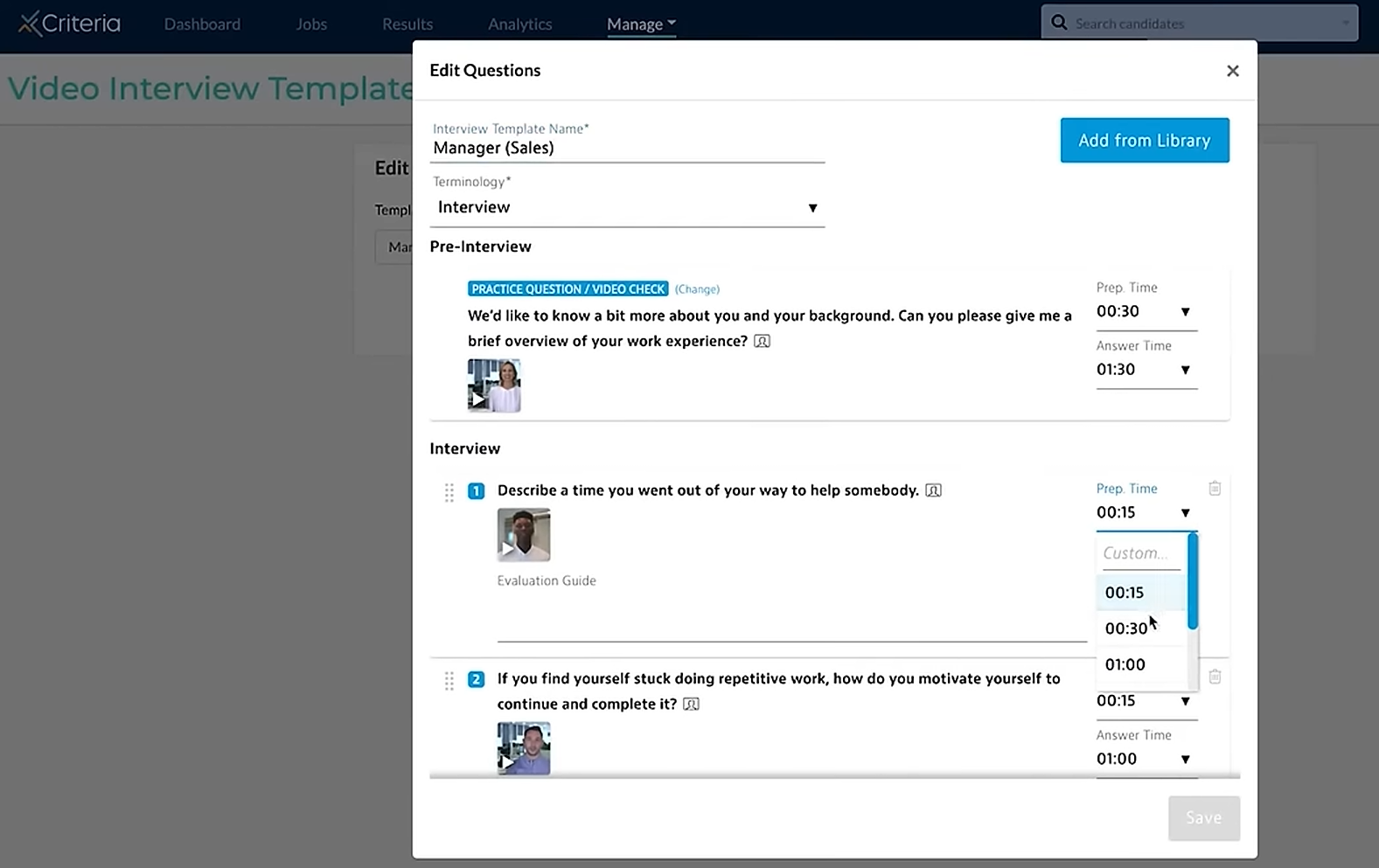
Criteria’s video interview offering stands out for its commitment to structure, scientific rigor, and responsible AI usage. Rather than tacking on interviews as an afterthought, Criteria has designed its product to sit natively alongside its validated assessments—offering a cohesive experience for both candidates and hiring teams.
The interview process begins with job-role-specific recommendations, much like their assessment flow. Each role is tied to a curated set of interview questions that hiring teams can adopt or modify. Candidates then complete these asynchronously, recording video responses on their own time.
During our demo, we appreciated how AI scoring works only off the interview transcript—not video or voice. That means no facial expressions, accents, or tone are evaluated. Instead, the Interview Intelligence model compares a candidate’s response text to a structured evaluation guide—like a digital rubric—and assigns predictive scores. This model was trained by Criteria’s in-house I/O psychology team using over 5,000 hand-scored interviews, and aligns closely with how human experts evaluate performance.
What’s especially forward-thinking is Criteria’s AI-agnostic infrastructure. Behind the scenes, the system may use Claude, Grok, OpenAI, or other LLMs depending on the task—ensuring accuracy, flexibility, and future-proofing.
This same intelligence powers post-hire check-ins and team coaching via a module informally referred to as “Coach Bo.” Drawing on assessment and interview data, Coach Bo can generate management guides tailored to personality traits or communication styles, acting as a virtual copilot for performance conversations and team development.
From the candidate’s side, the experience is robust and fair. The process requires some time investment, which helps surface more serious applicants. But because it’s asynchronous, candidates can complete interviews on their schedule, and everyone who finishes the process gets a real shot—something that’s not guaranteed with traditional phone screens.
The downside is that Criteria doesn’t yet support live interviews, and the deeper features like Interview Intelligence come as optional modules. But for teams focused on high-quality, high-volume hiring, the value-add of structured, AI-scored interviews grounded in behavioral science is hard to match.
Criteria is trusted by 3,000+ organizations, including Gucci, U-Haul, eBay, and J.G. Wentworth.
Criteria offers custom pricing tailored to customer size, hiring needs, and platform features. Key notes:
- Interview Intelligence is a paid add-on
- Free trial available online
- All subscriptions include access to the broader Criteria platform, including assessments and Test Maker
Best For
Companies seeking a modern, structured video interview platform backed by psychological research and ethical AI—especially for scaling high-volume, asynchronous hiring.

BarRaiser
What makes BarRaiser so unique is its savvy AI Interview Copilot. It serves interviewers with ready-made and live job-specific interview questions, prompts them to input feedback on each candidate’s answer, and even offers coaching features without additional charges.
PROS
- AI Interview Copilot for real-time feedback, live question generation, and interviewer coaching.
- 2-way integrations with over 40 ATS tools. APIs are also available.
- Interviews are taken right in video calling platform partners (Zoom, Google Meet, and Microsoft Teams). No additional app download is required.
- Responsive support is available via chat, email, and Slack. 24/7 call support for Enterprise plan.
- Excellent solution for conducting live technical interviews.
- Has a free plan and a free trial.
- SOC 2, GDPR, and NYC AEDT compliant.
- AI Interview Copilot for real-time feedback, live question generation, and interviewer coaching.
- 2-way integrations with over 40 ATS tools. APIs are also available.
- Interviews are taken right in video calling platform partners (Zoom, Google Meet, and Microsoft Teams). No additional app download is required.
- Responsive support is available via chat, email, and Slack. 24/7 call support for Enterprise plan.
- Excellent solution for conducting live technical interviews.
- Has a free plan and a free trial.
- SOC 2, GDPR, and NYC AEDT compliant.
CONS
- No one-way video interview feature.
- No call support for Team plan.
- Team plan limits the number of interviews to 30 per month, 60 min/interview maximum.
- Implementation can take 2 weeks for 1000-person teams.
- No one-way video interview feature.
- No call support for Team plan.
- Team plan limits the number of interviews to 30 per month, 60 min/interview maximum.
- Implementation can take 2 weeks for 1000-person teams.

“Looking good!” was our immediate thought once we laid eyes on BarRaiser’s dashboard. It’s not just beautiful but also user-friendly. With quick training from the vendor, we found no issues navigating the platform on our first try.
BarRaiser’s AI Interview Copilot is by far our favorite feature. As expected from an AI trained by over 110,000 real interviews, this interview copilot has a knack for providing tailored questions based on job descriptions and candidates' resumes, whether you need them before or during interviews. While other video interview software like Willo and myInterview lean more towards first-round interviews, the way BarRaiser’s AI Copilot is designed makes it work extremely well for in-depth, technical ones where questions delve much deeper into candidates' skills, experiences, and qualifications.
An added bonus is that both you and your candidates can use your existing video conference tools like Zoom, Google Meet, and Microsoft Teams for BarRaiser interviews. Instead of hosting its own video interview platform, BarRaiser’s AI works in harmony with these apps, assisting interviewers with the candidate profiles, interview flow, alerts for straying from the structure, sample questions, and real-time feedback. The algorithms also auto-calculates the interviewee's score, which can help a lot in shortlisting candidates post-interview.
BarRaiser’s interview coaching is on par with Clovers, with AI taking notes on key insights and observations during interviews that can be shared among interviewers for future improvements.
However, this video interview software can get quite expensive for teams with less than 500 employees. While it offers a free plan with 5 interviews, this may be not enough even if you hire just a position or two per year. BarRaiser’s Team plan caps the number of interviews at 30 per month, with a 60-minute duration limit for each interview. These fixed numbers sure limit flexibility and nudge users to upgrade to its highest-priced plan for more monthly interviews allowed.
We appreciate the responsiveness of its customer service. Whether our editors reach out during U.S. or Asian working hours, there’s always a person picking up our calls. However, considering fellow enterprise-focused solutions like Vidcruiter and Clovers offer dedicated support for all users regardless of their purchased plans, we think it's a fair point for BarRaiser to consider offering a similar level of support.
500+ companies, including Nike, Vimeo, and Hubspot.
BarRaiser has three plans:
- Interviewer Lite is free and comes with 5 interviews and AI note-taking.
- Team costs $75 per interviewer per month and caps the number of interviews to 30 interviews per month.
- Enterprise has custom pricing.
BarRaiser doesn’t charge observer licenses and offers a free trial post-demo.
Best For
BarRaiser is best for organizations with over 500 employees seeking interview intelligence solutions to live interview candidates worldwide. It works particularly well for technical interviews.

1Way Interview
We picked 1Way Interview for its commitment to small businesses, especially those with limited budgets or hiring bandwidth. The product combines a generous free plan, easy-to-use interface, and simple yet useful AI screening tools that validate text, video, and form responses.
PROS
- AI evaluates candidate responses across text, video, and form inputs.
- Onboarding is fully automated with step-by-step videos and tutorials.
- Candidate funnel analytics show where applicants drop off during assessments.
- The platform integrates with ATS tools or can be used as a standalone system.
- AI evaluates candidate responses across text, video, and form inputs.
- Onboarding is fully automated with step-by-step videos and tutorials.
- Candidate funnel analytics show where applicants drop off during assessments.
- The platform integrates with ATS tools or can be used as a standalone system.
CONS
- Lack of live video interview capabilities.
- There are no automated reminders for candidates who abandon interviews.
- Timestamp navigation is not available for video responses.
- Optimized for small businesses, the tool is not suitable for enterprise users.
- Lack of live video interview capabilities.
- There are no automated reminders for candidates who abandon interviews.
- Timestamp navigation is not available for video responses.
- Optimized for small businesses, the tool is not suitable for enterprise users.
We had a chance to demo the product a few months ago and were impressed with its usability and forward-thinking roadmap. Even better, many of the suggestions shared during our initial test have since been implemented.
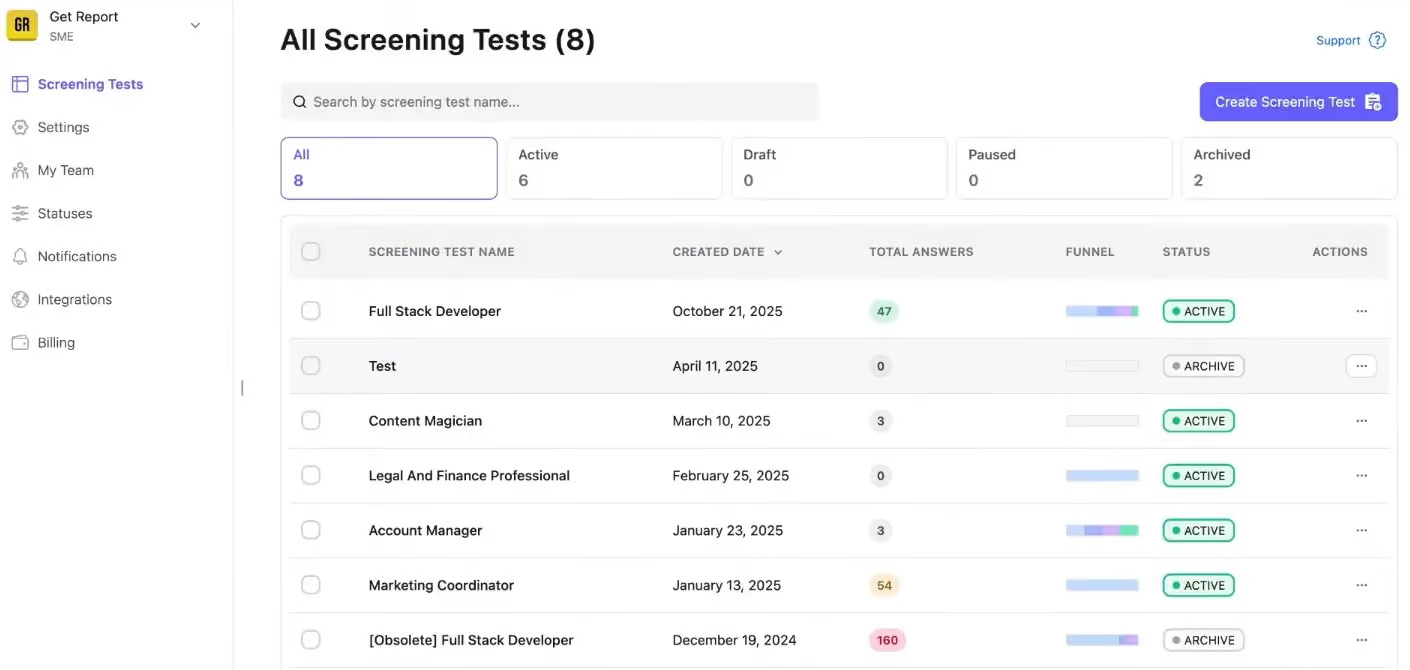
What consistently stood out across our tests was how intentionally 1WayInterview supports small businesses to better their talent screening workflows. You can start with basic knockout forms to prequalify candidates (shared via job boards or even Facebook ads), then automatically invite qualified applicants to complete a longer video or skill-based test. Our favorite feature is the AI response checker, which evaluates inputs across resumes, form responses, and asynchronous videos. This kind of automation is tough to find, especially at the price point this vendor offers.
Another major improvement we noticed since our last evaluation is the conversion analytics. The video interview platform now tracks where applicants abandon the process and offers recommendations to improve completion rates, which we trust is a must-have for many companies experimenting with video-first hiring. In one case, their own data showed that improved instructions and layout boosted test-start rates from 40% to over 70%.
We equally appreciated how the product enables workflow automation for qualification-based follow-ups and expands ATS integration options. The onboarding process is fully self-serve but now includes guided videos, email support, and a well-organized help center. Although reminder emails for unattended interviews are not live yet, we were told this feature is on the roadmap. Given how quickly the platform has shipped updates since our last test, we have reason to believe this is more than just a promise.
Of course, this option may not meet the needs of users looking for enterprise-grade and live video interview solutions, as it is clearly focused on smaller businesses and asynchronous interviews. 1Way Interview is also a relatively new player compared to more established brands like Hireflix and Willo. As such, it’s best suited for teams that can tolerate a lighter feature set and shorter market track record in exchange for affordability and speed of iteration.
Unlike some competitors, such as Jobma, 1Way Interview has yet to support timestamped video navigation for recruiters reviewing responses. To be fair, though, it’s a tradeoff many small teams are willing to accept at this price point.
1,000+ companies, including MAID360, GoPrime Mortgage, Headroom Collective, Excellence Appliance Repair, and Cullen Jewelry.
1Way Interview offers a 14-day free trial. For annual plans, the Starter plan costs $13.99/month, the SME plan costs $34.99/month, the Business plan costs $62.99/month, and the Unlimited plan costs $209.99/month.
Best For
1Way Interview is best for sub 50 people recruiting agencies, retail, ecommerce, home service businesses, and those seeking to screen a lot of customer-facing candidates with minimal time investment.

I use 1Way Interview whenever we need to hire new employees, especially for driver roles where there is usually high turnover. We typically need to hire new drivers every 3 to 5 months. It is used for first-round interviews to collect video responses, review candidates, shortlist them, and decide who moves to the next stage.
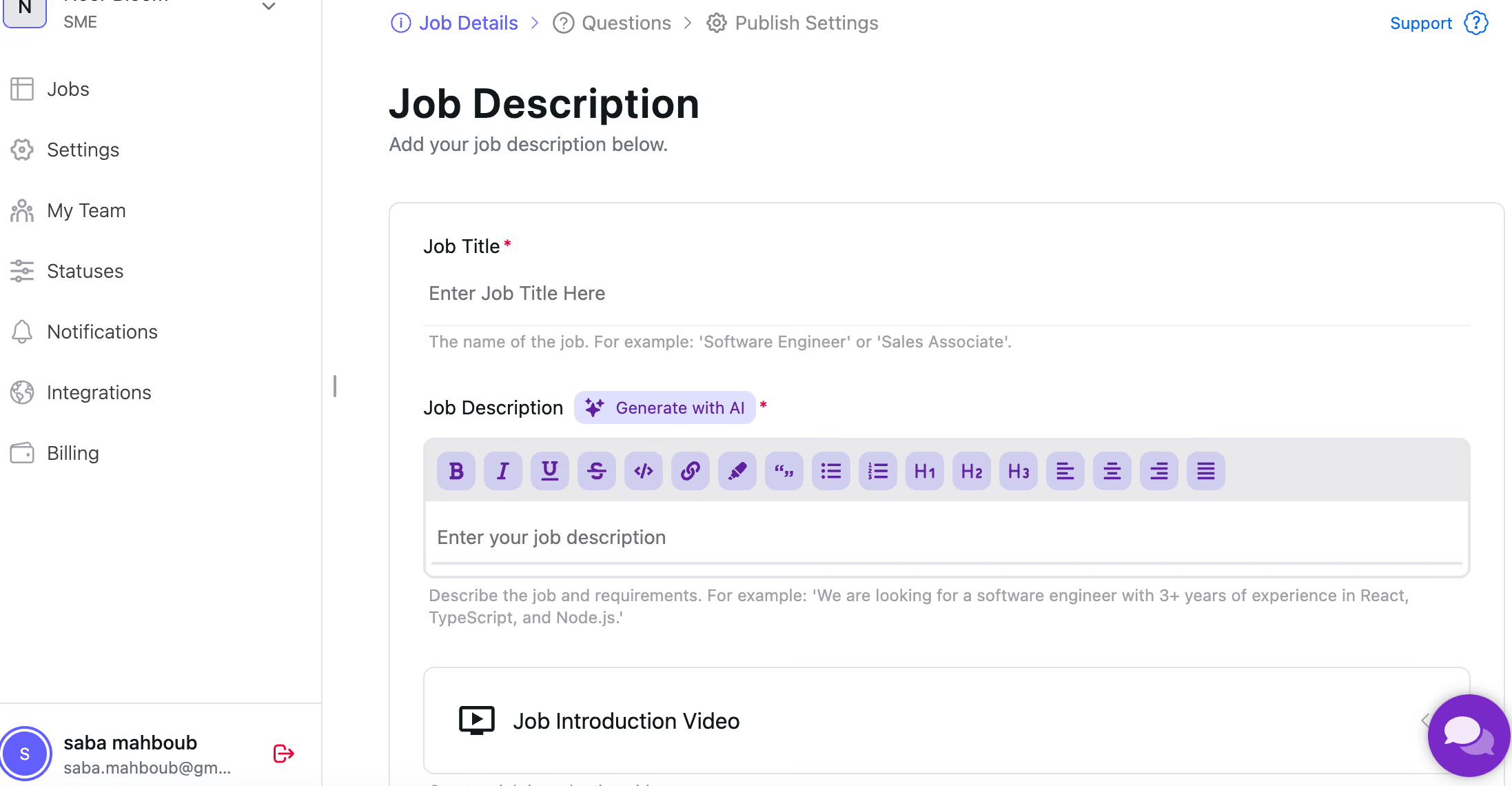
Every candidate can do the interview at their preferred time, so there is no scheduling limitation. Candidates have 3 tries to answer each question and can pick their best response, which reduces stress. It saves time and energy, especially when screening a high volume of candidates.
My experience with 1Way Interview was short-term while testing and exploring whether it's a good option for a startup's initial interviews. I also used it as a candidate during a few of my own job applications, so I can share insights from both employer and candidate perspectives.
One of the main challenges in hiring is the time-consuming nature of initial phone screenings, along with the back-and-forth emails to schedule them. 1Way Interview allows teams to collect video responses and review them on their own time, which helps save time and energy. It also brings flexibility for both sides and allows that effort to be focused on selecting higher-quality candidates.
Speaking to a camera feels unnatural, almost like talking to a robot. Some candidates may not be able to present themselves comfortably in this format.
I haven't used other similar tools, so I don't have deep experience comparing them. From what I've seen, the main differences are usually in features and cost. Some competitors offer candidates 2 or 3 chances to answer each question, and some charge more based on the features offered.
Company size, cost, flexibility, security, and ease of use for candidates are all worth considering before buying.
This is a relatively new method, using AI-based systems over the past 2 or 3 years, so I can't say much about its evolution. As more companies adopt it, these tools continue to develop to better meet user needs.
Recruiting companies, large organizations, or roles with high volumes of applicants. It is especially useful for online companies with remote teams across different cities or countries.
Small businesses with low hiring volume, those who prefer face-to-face interaction, and companies that outsource hiring to recruitment agencies.

Willo
Willo’s video interviewing platform has won the hearts of thousands of teams under tight schedules and limited recruitment budgets, and we could see why. It stands out for its easy implementation, highly accessible pricing, and free tier that provides the perfect balance of features needed for effective video interviews.
PROS
- Asynchronous video interviews include branded features, intelligent questions, bulk invites, automated reminders, and ID checks.
- Fast and simple setup, with transparent pricing and a free-forever tier.
- AI-powered transcription with 99.8% accuracy in 30+ languages.
- New AI tools for candidate summaries, personalized feedback emails, follow-up question drafting, and rejection filtering.
- 24/7 customer support across all plans and a public feedback portal for feature requests.
- Multilingual platform supporting 10+ languages; GDPR compliant and ISO 27001 certified.
- Asynchronous video interviews (one of the main benefits of video interviewing) that save your recruiting team time while allowing them to see candidates for who they are beyond a resume
- Extremely simple to get started, powerful enough for larger companies
- Transparent and affordable pricing, including a free tier
- Willo calculates the time your recruiting team saves each month so you know you’re getting value
CONS
- Lacks live video interview capabilities, focusing only on asynchronous workflows.
- Respondents cannot record their screen as part of an answer.
- No dedicated mobile app, which can make reading questions on smaller devices tricky.
- Doesn’t have the breadth of features that products have who have been in this space for 10+ years
- They don’t have a mobile app, but do have a mobile-optimized experience
- Native ATS integrations are limited to <10 ATS’s at this point
- They do not have real time 1:1 video interviews
Willo’s video interview platform has steadily evolved since we first tested it. What we especially like about Willo is their focused approach. Rather than trying to do everything at once, the vendor prioritizes enhancing the asynchronous video interview features to serve customers' growing demand better. Since our last review, the team has introduced a suite of new AI-powered features that simplify candidate workflow management for recruiters and hiring managers.

When we tested the latest version, we loved the AI-generated candidate summaries, which quickly produce short, readable profiles, allowing hiring managers to review applicants without having to dig through lengthy responses. Another useful addition was the AI-powered candidate filtering, which can automatically remove candidates who don’t meet criteria, such as timezone requirements or those who skip required questions. The system can even help draft follow-up questions for live interviews, which we found surprisingly well-tuned and context-aware.
Willo’s core strengths remain intact: it’s fast to set up, offers multilingual support, provides a clear and transparent pricing model (including generous discounts for nonprofits and education), and is constantly evolving based on user feedback. The platform now boasts over 22 native ATS integrations and more than 6,000 connections through Zapier, covering a wide range of recruiting ecosystems.
All that said, Willo still has some trade-offs. One issue is that the platform doesn’t support live video interviews, and respondents can’t share their screens, which may be a concern for technical hiring workflows. There’s also no mobile app (just a mobile-optimized site), which can make mobile use less fluid. However, given the pace of improvements, including new integrations and transcription features, we wouldn’t be surprised to see the vendor close those feature gaps by our next review update round.
Some of Willo’s customers include Nestlé, Autodesk, and Etihad Airways.
Willo offers tiered pricing starting with a Free Forever plan (1 job, 10 responses/month). Paid plans are Growth ($249/month, 5 jobs), Scale ($399/month, 10 jobs), and custom-priced Enterprise. API Access Plans start at $180/month (annually billed). Discounts include a 7-day free trial, 50% off for nonprofits, and prepayment savings.
Willo’s recent updates have been a mix of small UX refinements, security enhancements, and a few notable additions for enterprise customers.
- New features rolled out: An Assessment Library was introduced to help recruiters find and reuse templates, and enterprise accounts gained parent-child agency hierarchies for consolidated reporting and billing. More recently, Willo added template suggestions when creating new assessments to speed up setup.
- Enhanced features: The platform has seen steady UI improvements (refreshed assessment tables, clearer CTAs, improved video quality in introductions), faster data syncs, and expanded candidate exports with RealTalk status. Security measures, including stronger email validation, temporary account lockouts, domain whitelisting, and broader audit logging, have also been implemented.
Best For
Willo’s scalability makes it a good fit for independent recruiters, startups, and even bigger teams with high-standard asynchronous video interview requirements. Its discount programs also make the tool a worthwhile deal for nonprofits.

We utilize Willo for mass recruitment vacancies and for positions where we seek a first-personality vibe, effectively reducing the time our recruiters spend on CV review processes.
- User Experience
- Customizable questions and formats
- Capability to share candidate profiles with our Hiring Managers
- Integration with system-built question examples
We purchased Willo to enhance our recruitment process and improve the overall candidate experience. We have been using it for 2 years.
There is currently no option to integrate Willo with our existing ATS.
Outstanding customer support, a user-friendly platform, numerous customizable features, and GDPR compliant.
- GDPR compliance
- System administration
- User experience;
- Candidate experience;
- Range of services provided
- Impact on recruiters' job
Reduce the time spent by recruiters on mass recruitment projects and quickly form initial impressions about the candidates.
It is beneficial for companies dealing with a large volume of CVs and recruitment projects, particularly those requiring an immediate understanding of candidates' creativity and their ability to articulate their vision.
For IT companies, where technical assessments play a crucial role in understanding a candidate's adaptability for specific IT vacancies.
Other Video Interview Platforms Worth Considering
- Humanly positions video interviewing as a scalable, AI-led screening layer rather than a human replacement. In our review, its AI interviewer stood out for asking adaptive follow-up questions, scoring responses against structured criteria, and supporting multilingual delivery, making it promising for high-volume roles. The main risk is candidate perception: many job seekers still find the experience awkward or impersonal, especially in roles where empathy, clarification, or early rapport are expected.
- Criteria combines video interviews with assessments built on I/O psychology and structured evaluation. In our testing, it stood out for tying AI-scored interviews to research-backed competencies, something few tools do well. The trade-off is that live interviews aren’t supported yet, and advanced features like Interview Intelligence add to the cost.
- HireVue is one of the most established options we’ve reviewed for high-volume, enterprise hiring. It bundles video interviewing, assessments, scheduling, and conversational AI into a single platform that scales well. That said, it’s clearly designed for organizations with 2,500+ employees, with pricing and limited ATS integrations making it a tough fit for smaller teams.
- Avature gives enterprise teams deep control over both live and on-demand video interviews. We found its scheduling flexible enough for 1:1, group, and panel interviews, and the built-in CRM is useful for long-term candidate engagement. The downside is a steeper learning curve, with a UI and access controls that take time to master.
- interviewstream offers a balanced mix of live and on-demand interviews, custom branding, AI question suggestions, and multilingual support. Its interview library is a standout, with roughly 1,500 well-organized questions. Where it lags is in integrations and a mobile experience that feels underdeveloped.
- Recright pairs video interviewing with a native ATS, making it appealing for multi-branch and global organizations. We found the core interview and scheduling features solid, but ran into occasional technical issues. Advanced capabilities like branding, integrations, and scheduling depth also come at an added cost.
- Harver is best known for assessments, but its video interviewing tools are more capable than we expected. It supports both one-way and live interviews, with automated scheduling and sharing that reduce recruiter workload. The main drawback we observed is the learning curve, which can be challenging for teams new to recruiting technology.
Why You Should Trust Us
This guide was researched and written by Anh Nguyen, an HR tech researcher, editor, and former tech recruiter who has spent the past several years evaluating the tools that shape the modern hiring process. Anh is known around the (virtual) SSR office for her evidence-first approach and habit of looking well beyond vendor marketing language to uncover what a tool actually does for employers and candidates. Before joining SSR, Anh worked directly in recruiting, giving her firsthand insight into the everyday challenges hiring teams face when screening, interviewing, and selecting candidates.
For this guide:
- We have evaluated more than 80 video interview platforms over the past four years, including 26 tools tested in depth between 2023 and 2025.
- We have spent hundreds of hours trialing one-way video interviews, live interview workflows, AI interviewers, and candidate-facing experiences across different devices and bandwidth conditions.
- We have spoken with product leaders and engineers from companies behind these tools, including VidCruiter, Willo, Hireflix, Jobma, and many others, to understand how their technology is built and how it performs in real-world hiring environments.
- We have interviewed HR leaders, recruiters, and operations teams who rely on these platforms every day, reviewing tens of thousands of words of feedback across verified customer reviews, internal interviews, and long-form case studies.
- Although our business earns revenue through vendor advertising, our Editorial team operates independently from Sales. Editorial maintains full control over what appears in our guides, which vendors we feature, and how we evaluate them. We routinely decline pay-to-play offers, and the only way to appear in a guide is to perform well in our testing. Our success depends on reader trust, so we prioritize objectivity and clear, evidence-based recommendations above all else.
Benefits and Drawbacks of Video Interview Software
Benefits of video interviewing software include time and cost savings, enhanced flexibility, and access to a wider talent pool(!).
- Time-saving and cost efficiency: Pre-recorded or one-way video interviews eliminate the need for initial phone calls, while built-in automation features like schedulers, reminders, candidate interview sharing, and rating guides streamline time-consuming tasks(2). This efficiency allows you to invest your time and resources more effectively.
- Enhanced flexibility: Whether you're a staffing agency with clients in different time zones or a business hiring remote employees, video interviewing software offers great flexibility. It allows easy scheduling of live interviews to match candidates' availability worldwide. Also, reviewing recorded responses adds even more flexibility.
- Wider talent pool access: Particularly in competitive sectors like tech, video interviews extend your reach. A U.S. tech startup, for example, can evaluate candidates from Europe to Asia and then consider options like relocation or compliant hiring through partnerships with PEO providers or EOR companies.
Potential drawbacks of video interview software include technical issues, a lack of personal interaction with candidates, and potential bias.
- Technical issues: Technical glitches can be frustrating. And at times, using video interviews can create an uneven playing field for some candidates. Clear instructions, tech support, and alternative communication methods can help prevent these issues.
- Lack of personal interaction: Talking to a camera without immediate feedback can be challenging. Some candidates also miss the chance to ask follow-up questions for better clarity. To add a personal touch, talent acquisition teams often send questions as video recordings and add an intro or outro video rather than just plain text. Another example is how tech firms integrate video interviews with coding assessment platforms to provide a more comprehensive evaluation.
- Potential bias: While the rise of AI in video interviewing software brings tremendous convenience and the potential to minimize unconscious hiring biases(3), algorithms can carry biases themselves(4). Recent EEOC guidance stresses that employers may be held accountable for AI biases, even when sourced from third-party vendors(5). Thus, choosing a vendor that continually monitors machine performance and maintains a human touch is crucial.
Key Video Interview Trends You Need to Know
After spending the past four years reviewing and comparing video interview platforms, we have seen this category settle into a central place in modern hiring. What began as a temporary solution during the pandemic has become a reliable and often essential part of screening and evaluating talent. The tools are more capable now, and the expectations around them are higher. As employers look to upgrade their hiring stack, these are the trends that matter most.
One-way video interviews are replacing phone screens in high-volume roles
We have seen one-way, pre-recorded interviews gain significant traction in fast-paced, high-turnover fields such as hospitality, retail, and restaurants. These teams often need to sort through dozens of applicants quickly, and traditional phone screens simply do not scale. One-way interviews allow candidates to record short responses on their own time, and hiring managers can review those responses whenever their schedules allow.
For employers, this shift has meaningfully reduced time spent on early screening. However, the experience must be fast, mobile-friendly, and extremely easy to use, because candidate drop-off is common when tools are clunky or the question list is ridiculously long(6). We also find that one-way interviews work best when they are followed by a live conversation, which helps maintain engagement and reinforces the human connection that many candidates still expect.
AI is becoming an integrated part of the interview workflow
Across the platforms we test, AI is no longer positioned as a bonus feature. It now shows up in practical ways throughout the interview process. Many tools generate suggested questions, produce structured scorecards, create automated transcripts, and algorithmically assess candidate responses(7). Some are experimenting with speech or behavioral insights, although those capabilities are still early.
When used thoughtfully, these features help teams reduce reviewer fatigue and maintain consistency. At the same time, employers need to understand how the AI is working behind the scenes. We recommend choosing software that clearly explains how AI contributes to the evaluation, provides options for candidate consent, and keeps human reviewers in control of final hiring decisions.
Regulation is becoming a real consideration for AI-assisted interviewing
As AI becomes more embedded in hiring workflows, lawmakers have begun introducing rules that require transparency and accountability. New York City’s AEDT law is one of the first major examples, and other regions are preparing similar requirements.
For employers evaluating software, this means compliance should be part of the buying criteria. We look for platforms that offer clear consent flows, explainable AI, audit logs, and documentation that supports bias audits. These features help teams stay ahead of regulatory changes rather than reacting to them after the fact.
Emerging technologies show potential, but most are not ready for everyday use
A few vendors are piloting immersive interview rooms, avatar-driven conversations, and behaviometric analysis that interprets facial movement or vocal patterns. These are interesting directions for the future of the category, but in our experience, they are not yet reliable enough for most employers.
For the majority of teams and for the time being, it is more important to choose software that is stable, accessible, and easy for both candidates and hiring managers to use. The fundamentals still matter more than early-stage experimental features.
Candidates are pushing back on processes that feel overly automated
While automation has created significant efficiency gains, we are seeing more candidates express frustration when the process feels cold or overly robotic. One-way interviews with no follow-up, rigid workflows, and AI-generated communication can leave strong candidates feeling disconnected from the organization.
We find that the most effective strategy to address this is to pair automation with a meaningful human connection. Short welcome videos from recruiters, more explicit instructions within the platform, and structured probing have been shown to enhance candidate experience without compromising decision-making speed(8).
Video Interviewing Platforms for Staffing Companies
While we mainly focus this research on in-house, corporate HR and recruiting use cases, the recommended video interview software vendors also serve staffing companies, and for good reason.
These staffing companies can conduct interviews using this technology to gain a deeper understanding of candidates before presenting them to clients. It's like getting a sneak peek before the big show. Been there, done that, and I feel obliged to spill the truth: Clients love the sneak peek thing! (Who doesn’t love it?)
With user access management, staffing agencies can assign appropriate roles to clients, allowing seamless collaboration in the decision-making process and better security, all in one centralized hub. Video interview tech can also be handy staffing-firm software for showing a more human side of a candidate, vs. just a resume and some notes(9).
Looking for recruitment solutions catered to staffing firms? Check out our staffing agency software buyer guide!
How Much Does Video Interviewing Software Cost?
When it comes to video interview software pricing, there are four key factors to consider:
- The number of seats your company requires
- The number of open roles you have
- The number of interviews conducted per month
- The specific features and integrations you need.
Below are the estimated annual costs of video interview software broken down by business size:
- 1-100 employees: $1,500
- 100-250 employees: $5,000
- 250-500 employees: $10,000
- 500-1000 employees: $25,000
- 1000-5000 employees: $50,000
- 5000+ employees: $125,000.
If you're a small business looking to save some hard-earned cash, our review of the best free video interviewing software might be just what you're looking for.
How to Make the Most of Video Interview Software Demos
We’ve navigated this path with over 30,000 vendors. Here are our go-to's to make demos work for you:
- Know your needs: Create a checklist of essential functions and ask Sales to demonstrate each. This approach has saved us from getting swept away by salespeople's charm and shiny product features. Try it.
- Involve your team: Include key team members in demos. Their participation ensures the software meets the needs of all involved parties.
- Request access to trial versions: Nothing can beat having a chance to test the product firsthand. The little secret: Some vendors offer trials upon request, even if not publicly advertised. Also, with the right pricing negotiation strategy, you can save up to 60% on your HR Tech purchase(10).
Video Interviewing Software FAQs
What Is Video Interviewing Software?
Video interviewing software is a tool that enables remote interviews for businesses, offering features like video calls, recording/playback, live streaming, video conferencing, and candidate screening. It saves time and human resources by eliminating the need for in-person interviews and providing a convenient and efficient way to identify the best candidates.
What Are the Different Types of Video Interview Software?
There are primarily two types of video interview software: live video interview software and asynchronous video interview software.
- Live video interview software: Live video interview software allows you to have real-time interactions with the candidate, just like you would in a traditional face-to-face interview. This type of software often includes features like screen sharing, virtual whiteboards, and chat functionalities. Some popular examples of live video interview software include VidCruiter and HireVue.
- Asynchronous video interview software: Asynchronous video interview software allows candidates to record their responses to video interview questions at their convenience. The recorded interviews can then be reviewed by HR managers or interview panels at a later time. This type of software offers flexibility and eliminates scheduling conflicts. You've got features like question libraries, time-limited responses, and customizable branding. Examples of asynchronous video interview software include Willo and Hireflix.
Which Type of Video Interview Software Should I Choose?
Live video interview software gives you that real-time interaction, but it requires some coordination in scheduling. On the other hand, asynchronous video interview software offers flexibility and convenience, but you sacrifice that immediate back-and-forth communication.
In this guide, we have included some platforms, such as VidCruiter and Jobma, which offer a combination of both live and asynchronous features so that organizations can tailor their interviewing approach based on their recruitment needs.
Additionally, if you are looking for solutions with AI pre-screening capabilities, myInterview can be a great choice.
How Does Video Interviewing Software Work?
Each type of video interview software works differently. To give you an idea, we have made a comparison table below on how each type of video interviewing platform operates fundamentally.
It also varies depending on particular vendors’ approaches (some provide an inclusive solution that keeps the full interviewing cycle in-house, while others focus on one niche and leverage integrations to extend their product capabilities).

Are There Any Free Video Interviewing Software Platforms?
Yes! Some good free video interview software includes:
- Willo offers a free tier, allowing you to interview up to 10 people per month.
- Spark Hire lets you use one-way and live interviews, evaluations, and collaboration tools for free for 14 days.
- Hireflix offers a 1-month free trial you can opt for to explore its one-way video interview tools.
- Jobma offers a 14-day free trial as long as you have had a meeting with their sales team.
Bonus Advice and Tips on Video Interviewing
Given the negative experiences candidates often have with video interviews, we recommend the following best practices to create a more candidate-centered approach:
- Putting yourself in the candidates' shoes. One of the video interview tips we highly recommend is to consider how candidates feel throughout the interview process. Video interview software can help by providing precise and prompt communication. It also allows you to control the number of questions and answer attempts, and it can offer best-practice guidance for specific roles. Take the time to fully grasp these features to develop the interview design with the candidate in mind. Your CSM can also lend a good hand in helping you make the most out of the software.
- Practicing active listening in your video interviews to foster a positive interview atmosphere and help candidates feel more comfortable providing authentic and insightful responses(11). It can also help discover qualities (problem-solving abilities, communication skills, etc.) that may not be evident on a candidate's resume.
- Being cautious with AI. AI has become more common in hiring. From AI applicant tracking systems to AI recruiting software and video interviews, HR teams are increasingly leveraging AI to streamline their work(12). Yet, as we mentioned earlier in the video interview tech drawbacks section, AI can remove bias; it can also carry it. It is hence important to understand how automated screening works. Always double-check the software's logic with human oversight. This ensures you can identify top talent and avoid any compliance issues.
Got any insights or feedback you'd like to share? We’re all ears! Feel free to drop the editor of this piece, Anh Nguyen, an email or a LinkedIn message.
Till next time!
Sources
- 10 Key Advantages of Virtual Interviews (+ Best Practices for 2026)
- 7 One-Way Video Interview Tips for for Recruiting Top Talent
- Busting Hiring Bias: Tips & Tech for Fair Hiring Practices
- Study finds gender and skin-type bias in commercial artificial-intelligence systems | MIT News | Massachusetts Institute of Technology
- EEOC Guidance | U.S. Equal Employment Opportunity Commission
- Reactions to asynchronous video interviews: The role of design decisions and applicant age and gender - Tilston - 2024 - Human Resource Management - Wiley Online Library
- Koutsoumpis, A., Ghassemi, S., Oostrom, J. K., Holtrop, D., van Breda, W., Zhang, T., & de Vries, R. E. (2024). Beyond traditional interviews: Psychometric analysis of asynchronous video interviews for personality and interview performance evaluation using machine learning. Computers in Human Behavior, 154, 108128. https://doi.org/10.1016/j.chb.2023.108128
- Patel, R.D., Powell, D.M., Roulin, N. and Spence, J.R. (2025), Tell Me More! Examining the Benefits of Adding Structured Probing in Asynchronous Video Interviews. International Journal of Selection and Assessment, 33: e12514. https://doi.org/10.1111/ijsa.12514
- What Software Do Staffing Firms Use? - SSR
- HR Tech Pricing Data - SSR
- Active Listening Techniques for Candidate Interviews - SSR
- Demonstration: How HR Teams Are Using AI - SSR
About the Author


About Us

- Our goal at SSR is to help HR and recruiting teams to find and buy the right software for their needs.
- Our site is free to use as some vendors will pay us for web traffic.
- SSR lists all companies we feel are top vendors - not just those who pay us - in our comprehensive directories full of the advice needed to make the right purchase decision for your HR team.


