

16 Best Free Applicant Tracking Systems (ATS) in 2026
The best free ATS for recruiters on a tight budget, tested and compared by recruitment tech experts.








The best free applicant tracking systems handle essential hiring workflows at no cost, either through free-forever plans or time-limited trials. For small businesses, early-stage startups, and budget-conscious teams, they offer a genuinely useful starting point to move beyond scattered spreadsheets, post jobs to multiple boards in a few clicks, and give candidates a more professional experience without signing a contract or handing over a credit card.
We have tested and reviewed more than 50 applicant tracking software to date. Of those we shortlisted ones with free editions and spent dozens of hours creating accounts, posting jobs, building career pages, and running candidates through pipelines on every platform we included. After all of that research, we think Manatal, Wellfound, and Zoho Recruit are the strongest choices for most teams, though the right answer depends heavily on your company size, hiring volume, and whether you need a free-forever plan or simply a risk-free way to test before buying. You will find our full reasoning for each pick in the detailed reviews below.
We have evaluated over 50 free applicant tracking software editions (including both free trials and free plans) through hands-on in-house testing, live vendor demos, consultations with industry experts, and gathered real user feedback on each tool.
We follow a transparent, structured vetting methodology that ensures our recommendations are driven by real-world performance, not vendor hype. Here’s what we specifically prioritized:
- Employer and candidate experience: For each platform, we completed the full signup flow and timed how long it took to get from account creation to a live job posting. We also walked through the candidate-facing application process on both desktop and mobile to assess how professional and intuitive it felt. We paid close attention to how much was accessible without any technical setup, since most free ATS users are smaller teams without dedicated IT support.
- ATS integration: Because most hiring teams rely on at least a handful of existing tools (HRIS, calendar, recruitment CRM), we tested how well each free tier connected with tools like Google Calendar, Outlook, Slack, and common HR platforms. We checked whether integrations were available on the free plan or locked behind paid tiers, whether they required third-party connectors like Zapier, and how reliably data synced between systems.
- Job posting: A sound applicant tracking system is expected to include automated posting to top job boards, but free versions sometimes limit this feature in their “freemium” models. We read the fine print to ensure vendors didn’t hide this critical aspect of efficiency behind a paywall and that those we recommend should offer at least a handful of free job boards.
- Custom career site: We built a branded career page on every platform we reviewed, testing how much visual customization was available without paying (logo uploads, color schemes, job listing layouts, and the overall candidate-facing experience). We then reviewed these pages as a job seeker would, assessing whether they looked professional enough to reflect well on an employer. Platforms that produced polished, functional career sites on their free tier scored higher than those that offered only a basic listing page or required an upgrade before branding options became available.
- We prioritized: Setup friction (how quickly teams can launch), integration ecosystem (how well the tool fits existing workflows), job board reach (how many candidates see your opening), and career site quality (how professional your team appears to candidates).
- We deprioritized: Advanced features (like reporting, automation, and sourcing tools) because free tiers typically don't include these meaningfully; you'll evaluate paid tiers separately. We also didn't focus on "best for X use case" marketing claims, since we test reality, not positioning. Price wasn't a differentiation factor since you're evaluating free tiers; you'll assess paid costs when upgrading.


Manatal

Manatal only offers a free trial, not a free plan; however, the ATS’s price transparency means you don't need to call a sales representative just to get a ballpark figure. Our experience with the free trial provided us with a good overview of the platform’s capabilities, granting access to key functionalities without asking for sensitive credit card information.
PROS
- Four cost-effective plans that scale with your needs and budget
- Free 14-day trial with full feature access, no credit card required
- Straightforward, easy-to-use UI
- Manatal is quite affordable and offers a 15-day free trial for users to test it out before making commitments.
- Manatal is fairly easy to use. It features drag-and-drop enabled pipelines for candidate organization.
- Manatal’s AI-based recommendations feature can save hiring managers quite a bit of time. It’s able to scan job descriptions then search a users talent pool and bring up candidates most suited for the job.
CONS
- Job board posting, inbox, email automation and GDPR tools excluded from trial
- No indefinite free plan
- The AI recommendations feature works best with resumes that are in English, and doesn’t work as accurately with other languages according to several users’ feedback. Several users have also complained about Manatal’s interface only being available in English and that career pages cannot be published in languages other than English and Spanish.
- Manatal doesn’t offer a free plan. We mention this as a con as several SMB-geared ATSs do offer a free-forever verison, and that puts Manatal slightly behind competition.
- Manatal doesn’t offer prebuilt integration modules. They do have an open API that allows users to plug in third-party products and custom tools, but that required a bit more time and technical knowledge to accomplish. It’s also worth mentioning that only Custom plan customers can access Manatal’s API and Zapier integration. Customers on the Professional and Enterprise plan cannot.
- Users can search for candidates via Boolean Search or Advanced Search, but cannot combine the two search methods together. E.g users cannot use the Boolean search operators (AND, OR and NOT) within Manatal’s Advanced Search tab.
Though Manatal doesn’t offer a free plan, we feel that its 14-day free trial is more than enough for businesses to get to know the platform and see if it fits them. It gives users access to most of its functionality and doesn't ask for that sensitive credit card info. Its pricing is so clear— you know exactly how much you would pay for this tool, no unannounced charges, no hidden fees.

What we love most about this ATS, though, is its flexibility. Whether for someone like us, a remote startup with a small in-house hiring team, or a 100-employee recruitment agency, it seems to have everything we need.
From candidate sourcing, recruitment CRM software, profile enrichment, and AI-powered recommendations, to branded career pages, Manatal offers all these features at a starting price of just $15 per month. Moreover, the choice of four plans means it can grow with businesses, from those with just a couple of employees to global enterprises.
We have no gripes about Manatal’s user interface. Navigating the platform was straightforward, and the Help Center was impressively well-organized with detailed, digestible text and video tutorials.
However, we should warn you that during the trial, some features like job board posting and email automation are not available. As this tool leans more towards small and midsized businesses, you’d want to consider other options if you’re an enterprise seeking a vendor that offers tailored support rather than standard live chat and email.
10,000+ organizations, including Unilever, Coca-Cola, Panasonic, Ogilvy, and Toyota.
Manatal’s free trial is available for the Professional, Enterprise, and Enterprise Plus plans. You can try any plan for 14 days without providing credit card details to get access to most features, except job postings, sending emails via Manatal, mass emailing, automations, AI-generated descriptions, and GDPR consent tools. After the free trial, if you decide to go with this platform, the entry price is $15 per user per month when billed annually.
Recent product updates show Manatal is reinforcing its role as a global applicant tracking system while expanding capabilities in recruitment process automation and staffing agencies’ hiring.
- AI Expansion: Launch of the AI Recommendation Engine (Public Beta) and Manatal AI Interviewer for automated screening, candidate ranking, and asynchronous interviews.
- Candidate Engagement Integration: New integration with HeyMilo for AI-powered outreach, resume screening, SMS communication, and structured interviewing.
- Job Board Growth: Addition of CV-Library Group’s network and expanded posting capabilities via My Own Contracts for SEEK, JobsDB, JobStreet, and Naukri.
- Data & Workflow Control: Introduction of Customizable Object Creation Forms to enforce required fields and maintain structured, scalable workflows.

Best For
Manatal’s free trial is a good starting point for SMBs to see further how the ATS works before making any commitment.


I use Manatal for many reasons. I source candidates, store their information, post my jobs on job boards, my career page and our website. I keep notes about candidates as well as my current employees. I also upload all of my new hire information and/or paperwork for each new hire and use it as a digital personnel file.
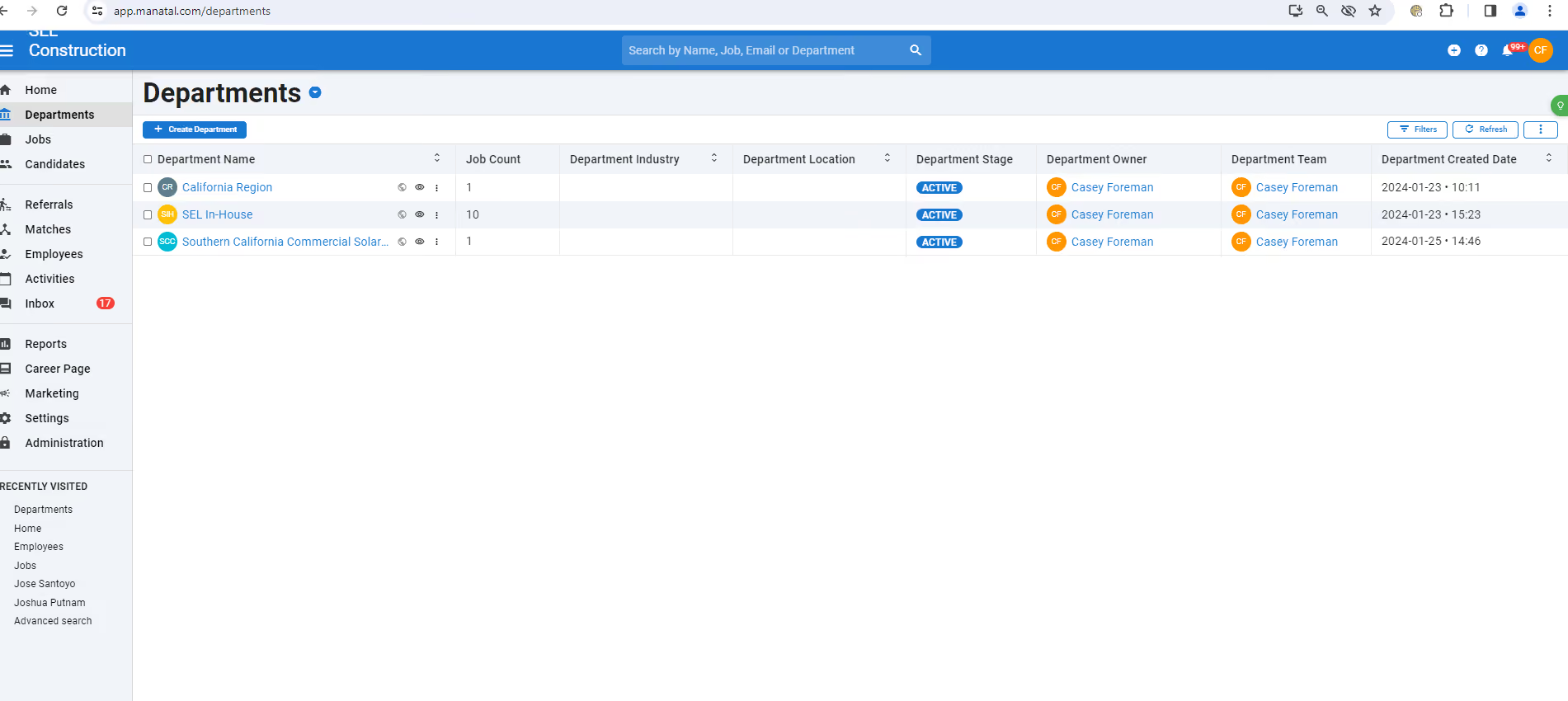
I like several things about Manatal. The first one being the ability to post on about 19 different free job board sites. I also like the ability to create my own pipeline categories as what I like to see doesn't typically come in a "standard" ATS. Another good thing about Manatal is the ability to email candidates through their personal candidate file, making the note taking a lot less tedious because it automatically keeps the email in that candidate/employee's file.
The main reason I chose Manatal was due to its price. It was one of the less expensive, web-based, customizable ATS systems I could find online. I have to say, however, that this isn't one of those "you get what you pay for" type programs. I was pleasantly surprised at Manatal's capabilities.
There are a few things with Manatal that could be improved. First one is their match system. I feel that the percentages I see on each applicant's file do not match the job description even close to the percentage it gives me. I also don't like that you can't just perform a search in the system without naming a specific field (i.e. I couldn't search by phone number). The other thing I don't care for too much is the email integration. I integrated, and then later removed, my work email because once integrated, all of my emails had to go through the Manatal program and there are emails that I don't want or need to stay within my ATS.
I would say for the price Manatal is awesome. It's better than I thought it would be given how inexpensive it is compared to its competition. Other ATS programs I've used in the past were specifically built for the companies I worked for previously, which cost $10K+. The company I'm with now is about 30 people, and Manatal suits my needs for a company this size.
ATS programs vary in so many ways that I really think it depends on what kind of company you are and what your needs are for an ATS. For a small business that doesn't specialize in just staffing, but has a few internal staffing needs themselves, this is great. For a large(r) staffing agency, Manatal is capable of handling what is needed; however, a custom built software would be more appropriate. Another thing to consider about Manatal is that its integrations are limited to just a couple email programs, another reason why it wouldn't work out so well for a larger company.
I've only been using Manatal for about 3 months now so I can't really answer that question. I know not much, if anything, has updated and/or changed in the time I've been using it.
Any business with smaller staffing needs. The industry doesn't necessarily matter (unless it's a larger staffing agency). We're in the construction industry and unfortunately we can't integrate it with any other program we use...which is fine for our needs right now. If we continue to grow the way that we are, then I would say we would have to consider another ATS that we could integrate with our construction software.
Larger staffing firms or any business that would need integration either with a scheduling and/or timekeeping program, industry specific software and/or accounting programs.

Monday.com
If you’d prefer a versatile platform that you can use for not just recruitment but several other business processes, we recommend Monday.com. This project management platform lets small teams creatively set up a free applicant tracking system using customizable templates, without needing to buy a dedicated ATS product.
PROS
- Free forever plan with hiring templates and up to 3 boards
- Highly customizable workflows and drag-and-drop pipeline
- Useful beyond hiring for broader business processes
- Free plan available, and affordable, scalable plans for small to midsize businesses
- Easy to learn and use
- Customizable dashboard
- Collaborative document creation with the ability to turn content in docs into tasks in projects with a few clicks
- Gamified progress tracking with visual celebrations for users
- Workflow automation for repetitive tasks
- Built-in communication tools reduce reliance on email
- Customized forms for in-house or client use that can be easily turned into projects
CONS
- Not a purpose-built ATS, no resume parsing or job posting
- Integrations and automations require a paid plan
- Learning curve due to project management origins
- 3+ users are required to get on any of the paid plans
- Limited storage on the Basic plan
- Could be too complex for simple project management needs
- No phone customer support
- Tracking different conversations can be difficult because of all the clutter
While Monday isn't a dedicated applicant tracking software system, during our testing, we discovered that its pre-built templates provide a solid foundation for a no-cost applicant tracking tool.

One of the standout features is the highly customizable columns in the ATS template. We found it easy to add columns for specific information, such as an applicant's source and input category choices. The drag-and-drop functionality is a delight, allowing us to easily move candidate cards between different stages of the recruitment process, like from “Screening” to "Qualified", and so on.
Monday.com strikes a balance between manual and automated processing. While moving cards is a manual task, you can set rules to automate repetitive actions, saving valuable time. We also liked the range of free views (Kanban, calendar, Gantt) that helped us visualize deadlines and hiring timelines.
Its compliance tracking is well-liked. You can assign tasks related to privacy and security measures, from providing non-disclosure agreements to ensuring candidates undergo necessary training, right on this platform.
While some automations are available, we found that the most powerful integrations (such as with external recruiting tools) sit behind the Standard plan paywall. That’s worth keeping in mind if your team needs more advanced workflows.
Importantly, teams using Monday.com as a free ATS won’t find specialized features like resume parsing, career page builders, or direct job board posting here, as you’d need to add third-party tools or upgrade for those. But for startups or small teams wanting to organize hiring efforts at no cost, Monday.com offers a flexible and highly visual entry point.
Over 200,000+ businesses use Monday.com including Lionsgate, Glossier, and Oxy.
Monday offers a free plan for up to 2 user seats and 3 boards. Paid plans (with free trials available) start at $9 per seat per month when billed annually.
Best For
Monday.com’s free plan is best for small teams looking to set up a basic ATS using flexible, customizable templates without investing in a dedicated hiring tool.

The team uses Monday.com every day. It’s an integral part of our organization. I primarily use a workflow to track applicants throughout the hiring process, which has significantly streamlined our recruitment efforts. The ability to utilize multiple boards for monitoring an applicant's progress helps connect with all relevant team members through the platform for communication and collaboration. This workflow has made the hiring process more efficient and organized.
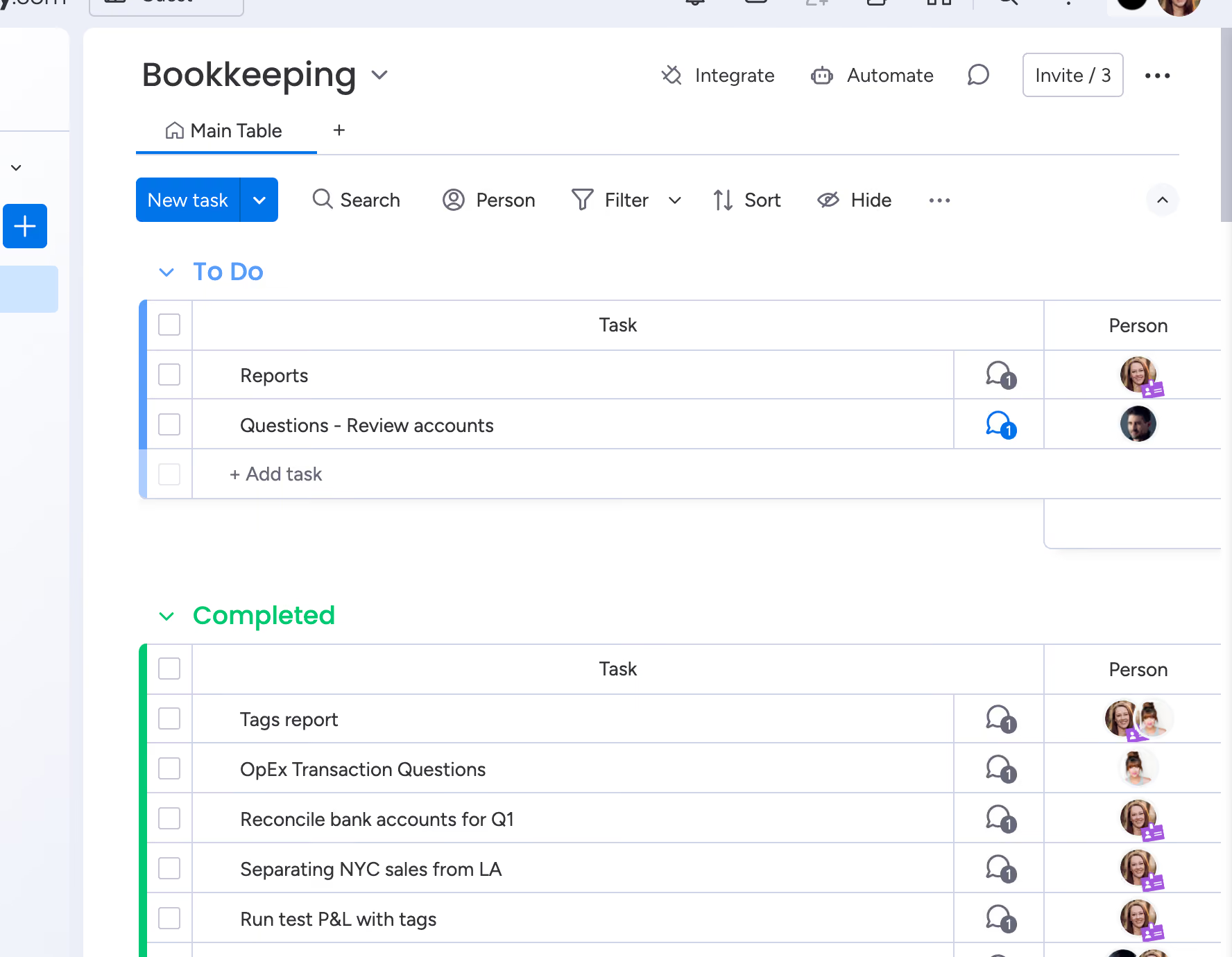
- The software is intuitive—we have some team members who are slow to learn but have picked it up quickly.
- It enhances collaboration by enabling file sharing within projects and providing real-time updates.
- Automation templates made it easy to get started building our workflows and task automation.
The team was experiencing issues with project delays and workflow, especially with assignments not being passed smoothly between members and difficulty in tracking progress. We needed to be more efficient and organized. We started using Monday.com over a year ago, and it has provided a centralized platform for project management, greatly improving coordination among team members. By automating repetitive tasks, it has freed up time for strategic and creative activities. As a result, our project tracking has become more precise and easier to manage.
- The software is expensive, especially for smaller companies.
- Upgrading is necessary to access the time-tracking features.
- There is no built-in messaging function; while we have a workaround, it can be somewhat cumbersome.
I’ve also used Basecamp. I prefer Monday.com over it. The project tracking is better, and the automated workflows fit the needs of the company better.
Cost is an important factor to consider, particularly with per-user fees, which can become expensive as your team grows. Evaluate the software's pricing structure and how it fits within your budget. Additionally, make sure that the software integrates with the essential tools (calendars, etc.) you use in your daily operations.
We haven't seen many updates that impact our usage of it since we've only been using it for a little over a year.
It's great for digital teams, especially those who don't meet face-to-face often.
It may not be suitable for in-person organizations that don't rely on digital software.

Dover
We love Dover for its unique approach to assisting startups: a free-forever ATS with an intuitive UI and well-developed inbound automation, plus the option to tap into its TA experts without hiring extra staff.
PROS
- The applicant tracking system is free to use, providing unlimited jobs, 75+ job board integrations, and great inbound automation.
- Stunning platform design, very easy to work with.
- Knowledgeable on-demand recruiting partners.
- Stunning platform design, very easy to work with.
- Knowledgeable on-demand recruiting partners.
- Free ATS includes unlimited jobs, 75+ job board integrations, and great inbound automation.
CONS
- No native feature for an employee referral program.
- Only supports parsing of English resumes.
- Not ideal for those wanting everything in-house or not using Google Workspace for calendars and emails.
- No native feature for an employee referral program.
- Only supports parsing of English resumes.
- Not ideal for those wanting everything in-house or not using Google Workspace for calendars and emails.
Despite being a free solution, Dover brought a delightful look and feel to nearly every encounter we had with the platform. The dashboard is clear and well-organized, but if you need a bit of instruction, the help center can offer good help with well-explained articles and videos. For startups new to the software, Dover may even provide a personalized onboarding call.
We also found some really good AI features within this free ATS: an AI for job description generation, an auto-confirmation email for those who just applied, and a chatbot that can filter the best candidates who meet your criteria. We gave the chatbot a go and asked it, “Show me people with at least 1 year of experience,” and it took less than a second to show only the matches.
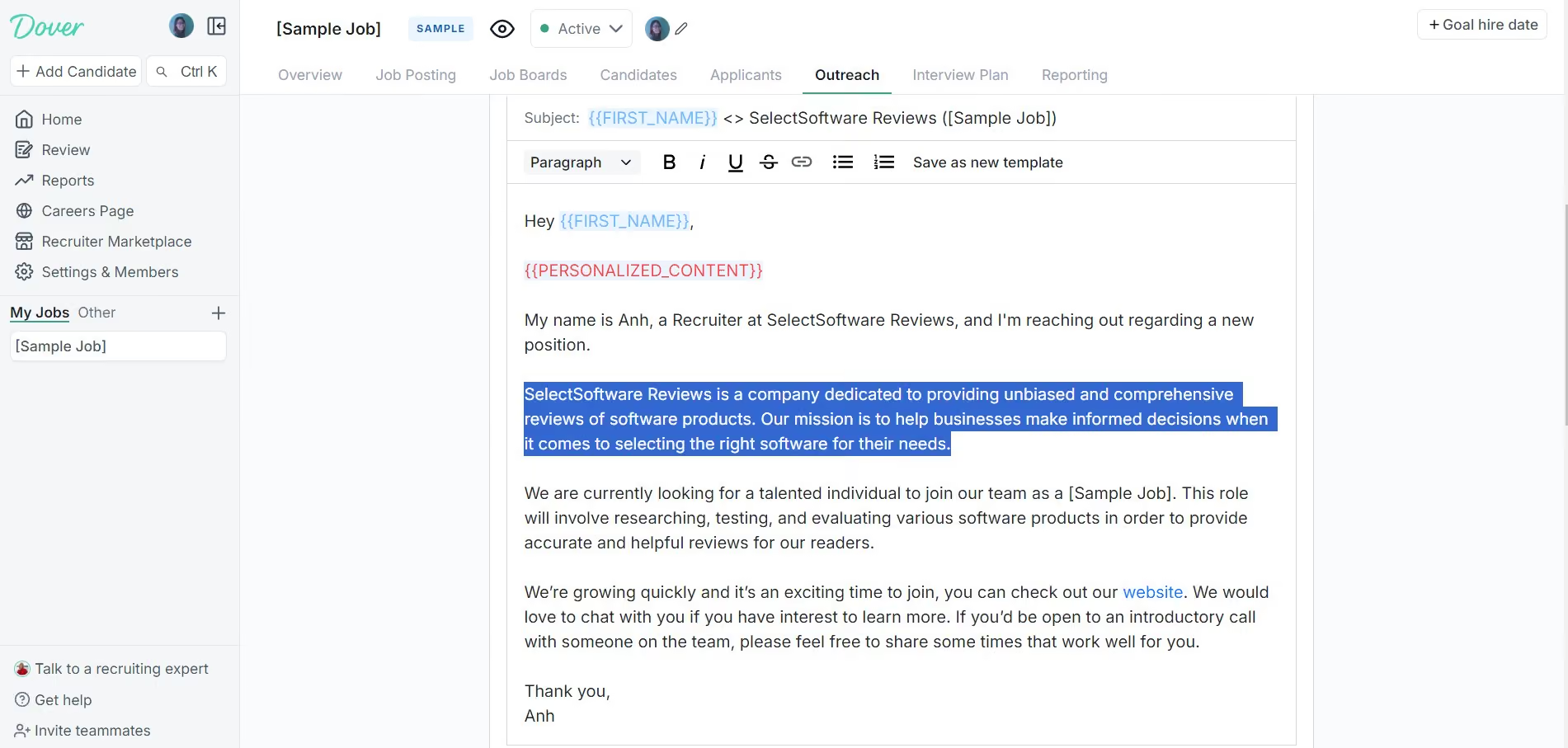
We didn’t expect a free solution to be this good at sequencing. We entered only our company name and domain before heading to this feature. To our surprise, it accurately described what we do in the email outreach (check out the above screenshot).
However, to streamline job distribution, we would have liked an option to filter job boards by free and paid. With 76 options available, choosing each one by one is definitely not the best use of time.
You should also keep in mind that Dover doesn't provide multiple software plans like most ATS platforms. Instead, it offers a free ATS and the option to outsource your sourcing to its recruiting partners. Hence, if you have a large team and want to manage everything internally, Dover might not meet your needs.
500+ companies, including OpenSea, WorkOS, and Scale.
Dover ATS is free and includes unlimited jobs, candidate tracking, AI applicant sorting, job board integrations, and an onboarding call for eligible startups. The platform also offers a Recruiting Marketplace, where recruiters set their rates. However, you can view historic cost-per-hire data right on Dover’s pricing page for reference.
Recently, Dover has focused on tightening its core ATS workflows while continuing to expand its Recruiter Marketplace. Key product updates between Q4-2025 and Q1-2026 include bulk sourcing via CSV uploads, clearer controls over scheduled and failed emails, and drag-and-drop resume uploads that auto-fill candidate details, reducing friction for lean recruiting teams. At the same time, Dover added more senior startup recruiters to its marketplace, reinforcing its positioning as a lightweight ATS that can scale with on-demand recruiting support rather than a feature-heavy, all-in-one system.
Best For
Dover’s free ATS is best for startups seeking a simple yet effective way to track applications and outsource initial screenings.

Zoho Recruit
For a free ATS, Zoho Recruit is a decent offer for most SMBs because it combines basic ATS & CRM in one place, free job boards, email management, and interview scheduling, all within its unlimited free plan.
PROS
- Free version available for anyone.
- Paid plans offer well-developed resume parsing and extraction, an AI chatbot, and candidate-matching automation.
- Supports several languages.
- Transparent pricing structure with the free version and trial option.
- ATS + CRM in one platform
- Backed by a company like Zoho, notable for reliability and good customer service.
- 24/5 support
- Priced quite modestly after the free version
- Certain features like video interviews are available as optional add-ons.
CONS
- Customer support hours were reduced from 24/5 to 8/5 since our last review update.
- The free plan only allows 256MB of storage.
- The free plan only allows 256MB of storage.
- Additional features, such as the client portal, mass email, workflow alerts, and API calls cost extra.
- Some users have complained about the quality of some of the integrations.
- The career site is not fully customizable until past a certain paid plan.
We filled in Zoho’s form and got ourselves a Zoho Recruit's free plan. Overall, Zoho Recruit's free version offers valuable features for candidate and email management, but it does come with limitations in terms of active job openings and storage.
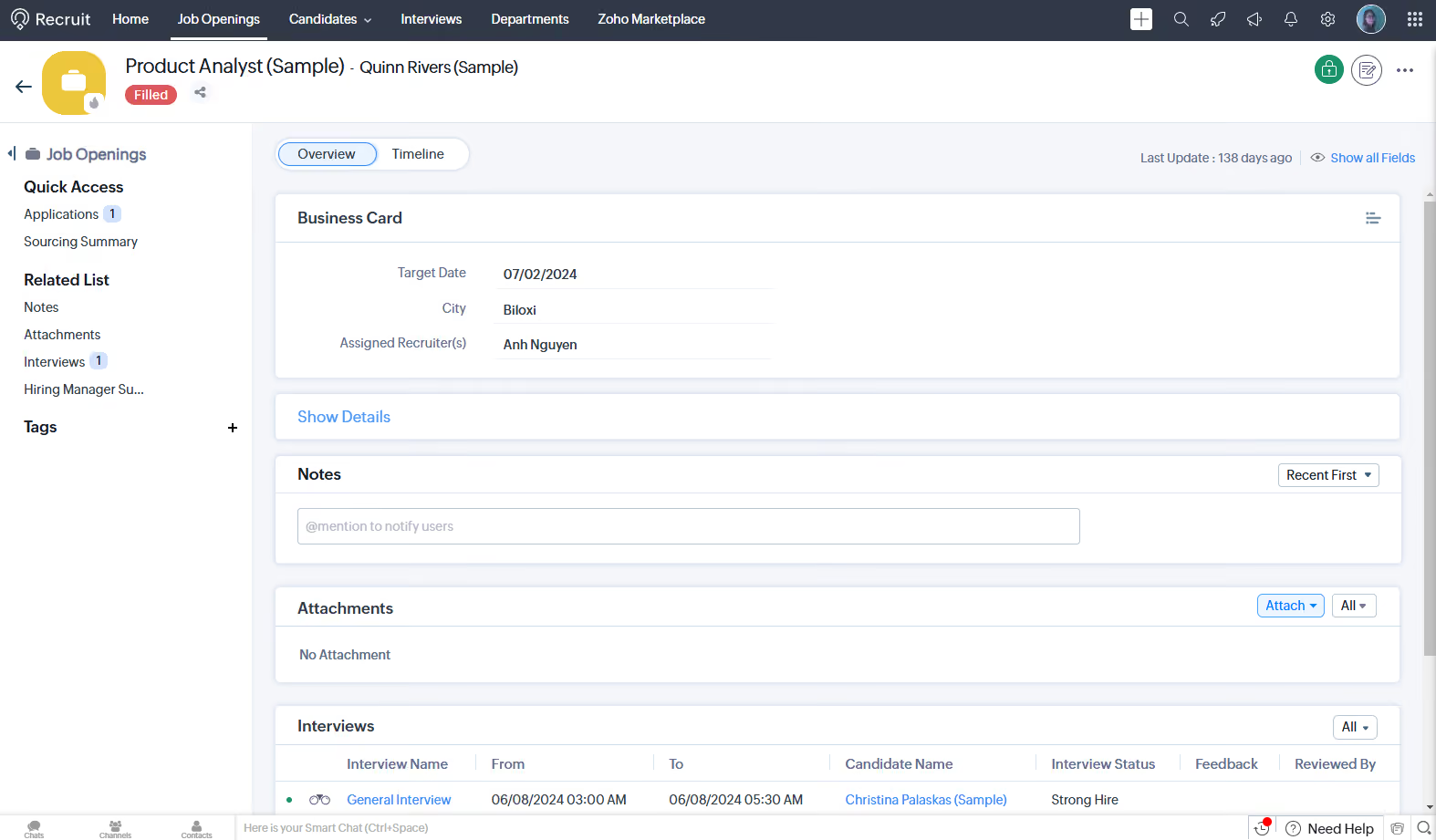
It’s good to see the free plan incorporates some essential services for candidate management, like email and interview scheduling. The career site is customizable (on a basic level, though). We can also post jobs on both free and paid job boards.
Another aspect we appreciated is the seamless integration with Google applications and the support for 26 languages, allowing for a diverse pool of applicants to be reached. Platforms that provide pre-designed templates are always a time-saver, and Zoho Recruit delivers five customizable email templates. Additionally, the user-friendly resume search feature makes finding relevant candidate information easier.
However, the free plan has some limitations. The most notable drawback is that you can only access one active job opening at a time. For hiring teams dealing with multiple positions simultaneously, this limitation can be pretty restrictive and could hinder efficient recruitment efforts.
Another thing to keep in mind is the storage limit, which is set at 256MB. This might not be ideal for businesses with larger databases and extensive recruitment needs. We also noticed that instead of 24/5 support, free users can only get 8/5 support from the Zoho team. On a brighter note, Zoho Recruit provides a 45-day money-back guarantee.
8,000+ organizations, including Bosch, Deloitte, Saint-Gobain, PWC, and Allianz.
Zoho Recruit provides two paid plans for Corporate HRs and three for staffing agencies in addition to its free plan. All plans share the same starting price of $25 per user per month when billed annually. This vendor also offers a 15-day free trial and a 45-day money-back guarantee.
Best For
Zoho Recruit's free version is a good basic recruitment software for small staffing agencies.
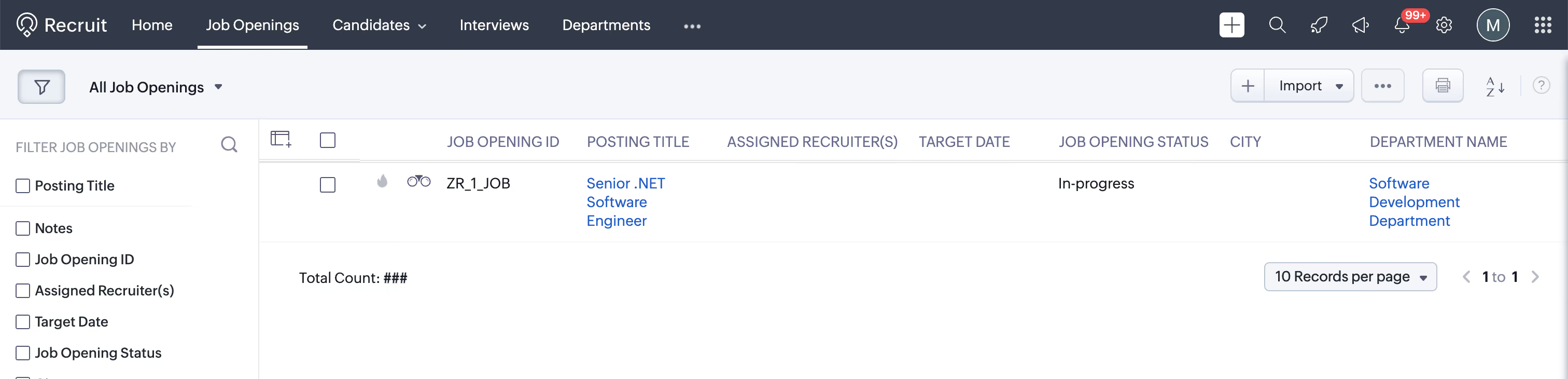
We use it to hire software engineers. The pipeline feature is well-designed and easy to manage. Each stage in the pipeline can be customized to match our hiring process.
We use it regularly during active recruitment periods. Reviewing and filtering applicants is straightforward and efficient.
- Zoho Recruit makes the hiring process more efficient and structured.
- All applicant data is stored in one place for easy access.
- Information and candidate profiles can be easily shared with hiring managers and stakeholders.
I have used Zoho Recruit for two weeks. It is a great platform for recruiting. It has significantly reduced the time and effort required to manage applications.
A minor improvement could be made to the user experience by splitting the review screen into two panes—one for the applicant list and one for details.
The interface can sometimes feel slightly unintuitive for new users. It would be helpful to have more flexibility in customizing notification settings.
Zoho Recruit is the only tool I have used so I can’t compare.
Consider how easy the tool is to use on a daily basis. Look for features that allow smooth collaboration with other stakeholders.
I don't know, as it’s been only a few weeks.
Zoho Recruit is well-suited for any company that needs to hire employees.
I don't know for which kind of companies Zoho Recruit won’t be a good fit.

GoHire
GoHire offers a 14-day free trial that gives startups and SMBs full access to customizable hiring pipelines, AI job tools, and unlimited team seats—perfect for testing before committing, isn’t it?
PROS
- Full-cycle ATS with AI tools for job descriptions, outreach and interview questions
- Unlimited pipelines and team members on all plans
- Startup and charity discounts available
There are both pros and cons to using GoHire.io. Let's take a look at some of the most important ones:
- One user appreciated the in-app messaging and email saying “Great templating for messages and emails.” They further liked the fact that they were able to control the on-boarding process as well as display jobs on the website.
- The platform is easy to use and helps businesses keep track of their hiring process by providing them with tools to manage job postings, candidate screening, interview scheduling, and offer management.
- GoHire.io makes it possible to post jobs on multiple job boards giving the user a wide variety of applicants. Therefore, hiring managers and founders can manage the applicants from numerous job boards on one platform. One user stated that they used to receive three job applications for €12.8 when using LinkedIn Jobs paid advertisements, but are now receiving 50+ applicants every month for free while using GoHire.
- The HR team appreciates that GoHire.io has a responsive customer support team. One user even appreciated that they were happy that their feedback was taken seriously and implemented on the ATS.
CONS
- No SMS messaging and limited email customization
- PDF-only file support
- Single-domain career page
- Limited third-party integrations
- GoHire.io does not support sending SMS to the applicants.
- While GoHire.io has received a lot of positive feedback about its platform, a significant number of users who had bought lifetime deals via AppSummo felt let down when the company discontinued the plan despite stating that it was a lifetime deal.
- One user complained that they were not able to upload multiple file formats for candidates. They were only able to upload PDF files.
We tested GoHire’s 14-day free trial to see how well it serves startups and small businesses, and we came away impressed with how accessible and flexible the platform is. Although we initially hit a snag signing up (our company email wasn’t recognized at first), GoHire’s support team quickly resolved the issue, getting us up and running.

Inside the free trial, we appreciated the simplicity of the dashboard and especially the career page editor. Using a WordPress-style interface, we could easily add text, images, and videos to build a branded careers page without needing any technical expertise. That said, the system only lets you link to a single domain, which could be limiting if you manage multiple brands or job sites.
GoHire’s trial also gave us access to AI-powered tools like job description generators, outreach messages, and onboarding checklists, plus over 700 prebuilt templates. Posting jobs to integrated job boards and social media was fast and seamless. We also liked that, even during the trial, GoHire placed no limits on the number of hiring pipelines or team members we could add.
While it’s worth noting the platform lacks some bells and whistles like SMS messaging or deep third-party integrations, GoHire’s free trial makes it easy for small teams to test key ATS features before purchasing. For budget-conscious companies needing an intuitive, affordable hiring tool, it’s a great way to explore the platform risk-free.
Snagajob, Promoter, Sweetberry, Swapcard, Voucher Cart.
GoHire offers three plans with a slight price increase since our last review. The vendor also offers free 14-day trial and doesn’t limit the number of team members for any of the plans. Here’s a breakdown of what you get with each plan (prices are based on an annual subscription):
- Starter costs $83 per month and includes baseline features, with 3 active job posts, a custom career page, interview scheduling, and unlimited team members.
- Growth costs $166 per month and provides everything from Starter plus customizable pipelines, bulk actions, screening questions, and mention team members.
- Pro costs $249 per month and provides all Growth features plus unlimited job posts, automated stage actions, advanced reporting, video questionnaires, and private notes.
A few extra things to keep in mind:
- Startups that qualify can buy Pro at a discounted rate for up to a year.
- If you're part of a registered charity, you can enjoy a 30% discount on any plan.
Best For
GoHire’s free trial is best for startups and small businesses looking to test a full-featured, affordable ATS with unlimited pipelines and team collaboration before committing to a plan.

Gohire is our one stop shop for our recruiting efforts. We use it to post job openings on several websites. Then when we get a funnel we use it for applicant tracking and for the entire team to give feedback on applicants as they go through our recruiting process
- Post jobs on multiple sites with one click.
- Has a great app to allow our recruiters to have access anywhere.
- Has a great scheduling feature to schedule an applicant through our whole process.
We have used Gohire for about two years now. We were looking for an all in one recruiting platform that would allow us to have a one stop shop. Prior to getting Gohire we had a different software for scheduling and applicant tracking. We also did not want to keep spending the manhours posting on different platforms.
Really not much to dislike. We have to pay per user and would like to have a few more users on it. If your job is not carefully filtered the amount of applicants can be overwhelming.
GoHire’s ability to work with so many different platforms makes it ahead of their competitors. We prefer using GoHire over competitors for a one stop shop
How many users they will need to have in their process. If they need extra tools such as scheduling.
GoHire has done a great job streamlining the hiring process and integrating with more platforms where talent can be found.
Any organization that needs to hire multiple applicants frequently.
Smaller business or companies that do not need to hire several applicants.

Wellfound
Owing to its popularity among job seekers with a startup mindset, Wellfound (formerly Angellist Talent) is a must-check-out for any startup searching for talent worldwide, especially in the tech space. The free ATS gives startups unlimited job postings, direct applicant messaging, and access to a huge global talent pool, all without paying a cent.
PROS
- Free ATS with unlimited job postings
- Access to 10M+ startup-focused, tech-heavy job seekers
- Native messaging for direct applicant communication
- Slack integration and major ATS sync
- RecruiterCloud offers AI-powered candidate sourcing from an internal pool of 10M+ startup-minded candidates and an external network of 500M+.
- Users can delegate their sourcing tasks to Wellfound (Autopilot) or handle them independently (Self-Serve).
- AI tags streamline review by highlighting key strengths in a candidate's profile.
- Free ATS included unlimited job postings, native candidate communications, team scorecards, and interview scheduling.
CONS
- No mobile app, desktop only
- Free plan lacks sourcing tools and third-party job board integrations
- Better suited for tech roles than non-tech or enterprise hiring
- Doesn’t have a mobile app.
- Not suitable for non-tech roles at large enterprises.
- Built-in reporting and analytics are somewhat basic compared to some competitors.
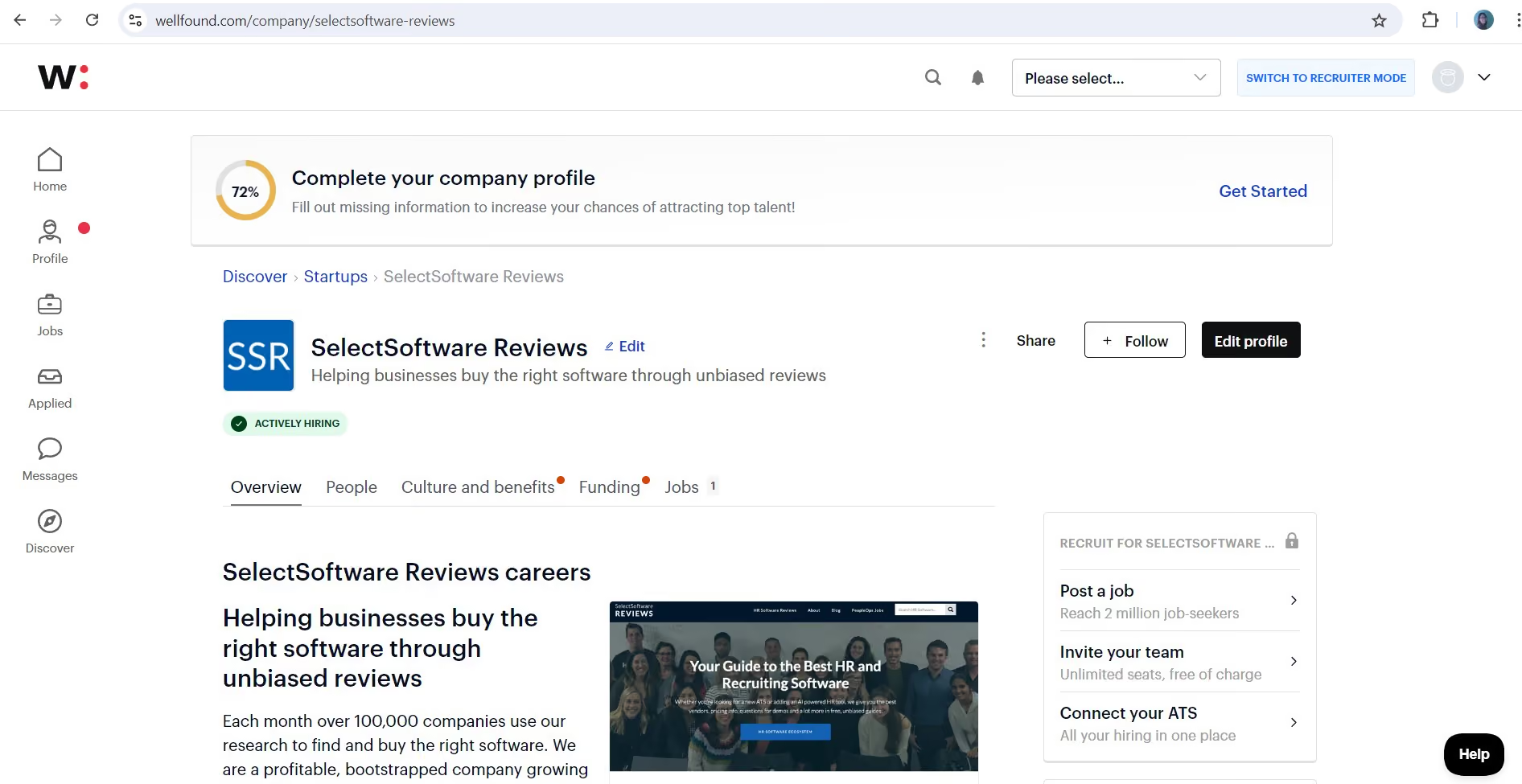
If you’re a startup looking for global tech talent, we highly recommend Wellfound’s free ATS. One huge advantage of this platform is that it’s long been a go-to place for tech enthusiasts and startup-minded talent who are on the job hunt—just the talent pool you’re searching for.
We enjoyed our experience testing this free ATS, both from the hiring side and as an applicant. The UI is clear and easy on the eyes, plus having in-app messaging and the option to tweak the hiring workflow makes everything more streamlined and straightforward.
Given that most vendors in this space often limit their freebies to one active job at a time, it’s nice to see Wellfound take another approach—it does not cap the number of jobs you can post. In other words, you can have as many as you need.
Unfortunately, this free plan does not have Boolean search or advanced sourcing capabilities. But if your team is using Greenhouse, Lever, Workable, or Ashby alongside Wellfound, there's a workaround. Since this free tool can connect with these ATS platforms, you can transfer applicant information and use their search features instead.
Regarding job distribution, while platforms Dover or Recooty can auto-spread your job posts across multiple boards, Wellfound sticks to its niche community for job postings. As a result, the reach may not be the same.
25,000+ companies, including Trace, Xander, and Dosu.
Wellfound offers a free ATS for job posting, branded company profiles, tracking and reviewing applicants, and integrating with major ATS providers such as Greenhouse, Lever, Ashby, and Workable, which anyone can sign up for online.
Best For
Wellfound is among the best free ATS solutions for startups and small businesses looking to hire tech talent globally.
My company used Wellfound daily, as our hiring efforts focused on remote positions. The platform supported our initiative to hire student and recent graduate IT professionals across multiple directorates within the organization.
Wellfound helped us reach candidates with relevant technical backgrounds efficiently. We used it to post jobs, search resumes, and communicate with applicants. The platform became a central part of our recruitment workflow during that period.
- Remote hiring was effective with Wellfound, especially during the COVID-19 pandemic when many candidates were seeking remote work.
- The platform had a large pool of IT candidates, allowing us to hire 80% of our new staff through it.
- Integration was quick and simple—our other systems connected without issues, and the platform was easy to learn and navigate.
My company used Wellfound because it allowed us to post job listings without requiring a membership. This was especially helpful as we were posting student trainee positions for our IT department.
We needed a cost-effective platform that could help us attract early-career candidates with technical skills. Wellfound provided access to a wide range of candidates, making it easy to fill temporary and entry-level roles.
- When we used Wellfound, the platform did not support onboarding processes, so we had to rely on separate systems after hiring.
- Candidate assessments and video resumes were often of low quality and not useful in evaluating applicants.
- The site sometimes experienced delays or downtime during updates, which slowed down certain tasks.
Wellfound differs from its competitors by focusing on IT roles and start-up environments. It works well for small tech companies looking to hire specialized talent quickly.
Company size is an important factor. Wellfound is best suited for new or small companies that need to hire IT staff without high recruitment costs. It's especially useful for sourcing entry-level tech talent.
Like many platforms, Wellfound has evolved by integrating AI into its features and workflows.
Wellfound is great for small start-up tech companies or individuals seeking entry-level IT positions with smaller organizations.
Wellfound is not a good fit for large corporate IT departments or companies with complex, high-volume hiring needs.

Recooty
Recooty’s free trial lets you post jobs to multiple free job boards, customize your career site, and explore all of the platform’s AI offerings. In our experience, this free ATS option is one of the most intuitive available—you can dive in immediately after completing a simple signup form, with minimal instructions required.
PROS
- 15-day free trial with job posting, AI tools and career site customization
- Extremely intuitive interface, no ATS experience required
- Native Google Calendar, Outlook and Zoom integration for interview scheduling
- Multi-language support for global teams
- One user liked the usability of the software, stating that it is 'easy and self-explanatory.'
- The ability to post a job on multiple platforms makes it efficient, as per one user who labels Recooty a 'one-click job posting solution.'
- The company offers a cheap subscription, making it affordable for small businesses.
CONS
- No free-forever plan
- No mobile app or Chrome extension for candidate sourcing
- Limited integrations and customization compared to competitors
- The company does not have a mobile application.
- Recruitment features can be quite basic compared to some competitors.
- Integrations are somewhat limited.
- Not suitable for large enterprises with more job postings and locations.
Recooty’s 15-day free trial is one of the easiest ways we’ve found to explore an ATS hands-on. Right after signup, we were able to post test jobs across several free job boards and quickly build a branded career site—without waiting for sales approval or lengthy onboarding.

Compared to our last review of the ATS’s free trial, shortlisting applications has now become much more convenient with the recently added AI features. During testing, the AI candidate sorting tool did a solid job ranking applicants based on resume-to-job description matching, while the AI score made it easy to focus on the most relevant applications. Moving candidates through the pipeline was just as seamless, and we especially liked the option to schedule interview invites or rejection emails with a delay, allowing for more thoughtful communication timing.
Another great feature of Recooty was its native integration with Google Calendar, Outlook, and Zoom. Scheduling interviews directly within the platform was quick and required minimal effort. The built-in communication tools were also a nice touch, as they allowed us to send and track emails without leaving the free ATS platform. For internal collaboration, the ability to tag team members in comments using ‘@mentions’ is simple yet effective to keep everyone in sync without endless email threads.
However, we couldn’t help but wish for more customization. Unlike Workable, which offers multiple tone options and benefit suggestions based on the job’s location, Recooty’s AI tool felt somewhat more basic in comparison.
While testing, we also noticed that Recooty focuses on the essentials, which is great for simplicity but leaves room for enhancement. More specifically, we were a bit bummed that Recooty doesn't have a built-in employee referral feature or salary estimator, especially since those are pretty standard these days. The good news is the vendor is working on adding these features, along with a Chrome extension and mobile app. We'll keep an eye out for those updates and keep you posted here!
10,000+ companies, including Sendlane, Airtable, Uber, Rack Bank, and Trello.
Recooty offers a 15-day free trial, after which users can choose from 3 paid plans, starting at $79 per month when billed annually.
Recooty has made steady progress over the past few months, with most updates aimed at improving scheduling, automation, and candidate management.
- New features rolled out: The platform recently added Microsoft Teams, Zapier, and Outlook Calendar integrations, while Google Calendar integration further supports scheduling coordination. Additionally, a location filter for applications now allows searches by city and country.
- Enhanced features: Bulk application management has become easier with the bulk unlock option, and recruiters can now review candidates more efficiently through AI-generated summaries and improved filtering tools. The talent pool management module, introduced mid-year, lets users organize prospects ahead of open roles. Recooty also added options for custom email domains, GDPR compliance links, and multi-format reporting to support administrative and compliance needs.
Best For
Recooty is best for small to mid-sized businesses that want a fast, no-fuss ATS trial to test hiring workflows before making a full investment.

Tellent Recruitee
We picked Tellent Recruitee because its 18-day free trial lets teams fully explore collaborative hiring, candidate tracking, and role-based workflows without adding payment details.
PROS
- 18-day free trial with unlimited users and full core ATS access
- Intuitive interface for job posting, tracking and referrals
- Strong team collaboration with role assignments and shared assessments
- Transparent, competitive pricing available upfront
- Tellent Recruitee is highly rated for ease of use and quick implementation.
- It offers a customizable, kanban-style recruiting pipeline with adjustable stages.
- The software also helps reduce hiring bias by allowing permission level adjustments for interviewers, preventing them from seeing each other's candidate scores.
- Quarterly product updates based on users’ feedback.
CONS
- Pricing has increased since our last review, though new features justify the change
- Reporting tools feel limited and difficult to navigate
- No native onboarding features
- Some features (skill assessments, onboarding, video interviewing, e-signatures) are only available via third-party integrations.
- Anonymous candidates’ resume screening still in development.
- No monthly contract option. Price has trended up over the last three years.
We spent time hands-on with Tellent Recruitee’s 18-day free trial, and it left us impressed with how much ground you can cover before paying a dime. Signing up required no credit card, and within minutes, we had full access to the ATS’s job posting, pipeline management, and collaboration tools.

One standout during our trial was Tellent Recruitee’s unlimited team collaboration. We invited multiple colleagues, assigned them specific hiring roles, and collaborated to evaluate candidates, all without exceeding user caps or incurring hidden costs. For SMBs aiming to make hiring a team-driven, objective process, this alone makes the trial worth exploring.
The free trial also gave us a chance to test Tellent Recruitee’s intuitive interface. Moving candidates through stages, scheduling interviews, and promoting employee referrals felt smooth and straightforward. However, we did notice that several advanced functions, such as onboarding workflows and e-signatures, weren’t built in and would require third-party tools.
While the reporting module didn’t quite match the detail of some other ATSs we’ve tried, we still found Tellent Recruitee’s free trial an excellent entry point for SMBs wanting to explore collaborative hiring software in a low-commitment way.
5,000+ companies, including Semrush, Mark and Spencer, and Transcom.
Recruitee offers a free trial that lasts 18 days, while its plans start at €301/month, with contracts requiring a one-year minimum.
Tellent’s Q3 2025 updates centered on expanding integrations, enhancing recruiter efficiency, and modernizing communication across its Hire, Manage, and Grow products.
- New features rolled out: Under Hire, Tellent introduced Offer Letters, enabling recruiters to create and send offers directly in-platform. Additionally, AgencyHub was introduced as a new add-on that consolidates communication and performance tracking for external recruitment partners. The WhatsApp Hiring Add-on has also been launched, enabling candidate engagement through WhatsApp with GDPR compliance. Additionally, VONQ Cost Per Application, powered by LinkedIn, now automates sourcing, prescreening, and applicant scoring for more predictable hiring costs.
- Enhanced features: The Tellent HR mobile app (beta) now supports submitting, reviewing, and approving HR requests on the go. The core platform gained new branding options, including custom company logos, to help organizations create a more cohesive user experience.
- Features on the roadmap: Upcoming releases include an AI-powered screening assistant for faster shortlisting, as well as SAP and Workday integrations to streamline ATS-HRIS data flow. Additionally, new job page layouts with a pre-built page library will be introduced to simplify CareersHub setup and enhance the candidate experience.
Best For
Recruitee’s free trial is ideal for SMBs looking to explore what this platform has to offer without upfront costs.

I use Tellent Recruitee every day. I know how to use most of its features, such as creating job postings, scheduling interviews, moving candidates through the hiring process, having technical and hiring meetings, rejecting or advancing candidates, making offer letters, and communicating with my team. I also use it to evaluate candidates after a phone screening and add resumes. I also connect Tellent Recruitee to other job websites.
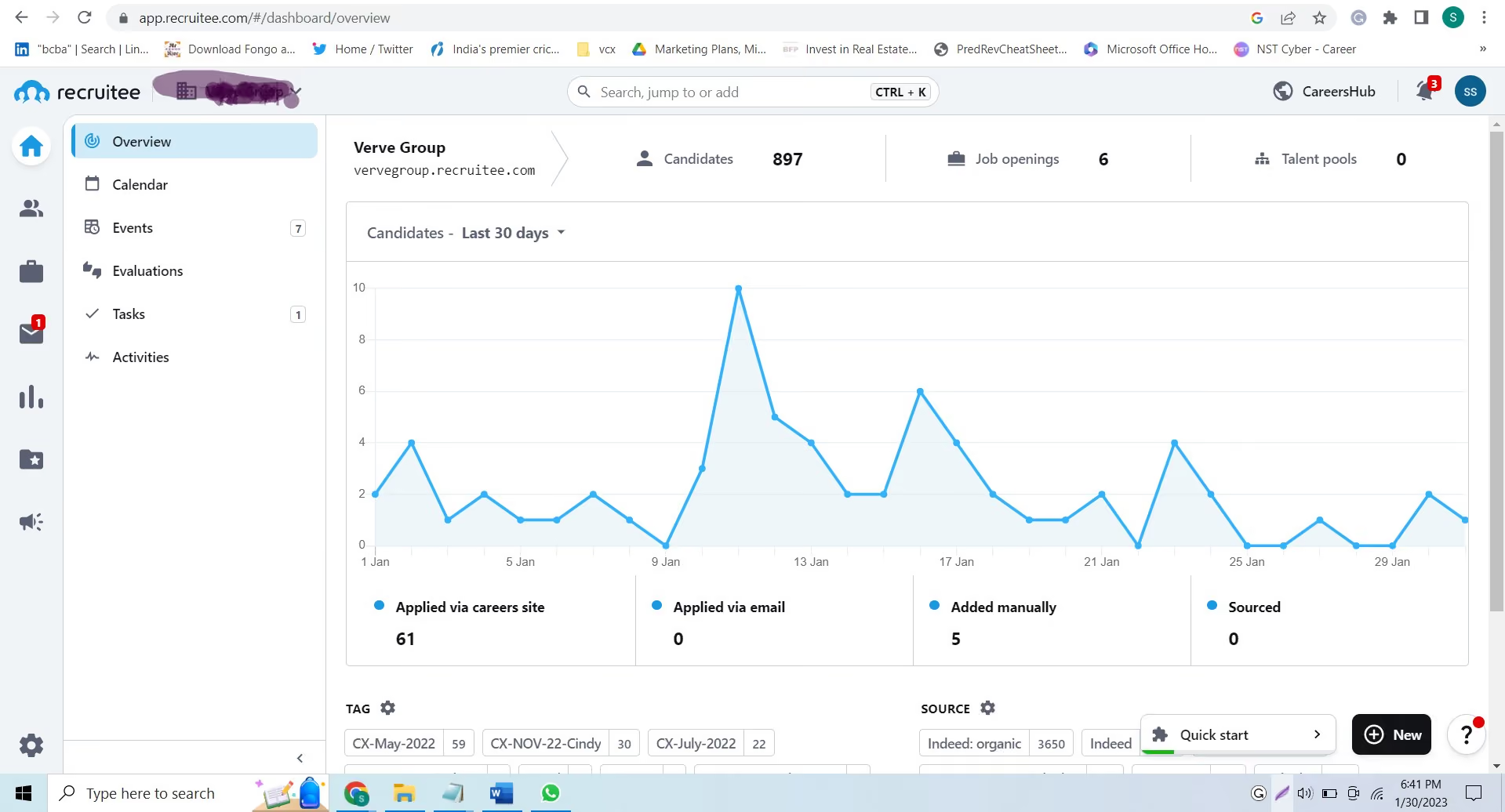
I like Tellent Recruitee because it is very easy to use. It has a user-friendly interface that allows me to perform all workflows efficiently. I can quickly post jobs and move candidates to different stages, saving me much time. The platform is designed to make it simple and quick to use, which is a big plus. I also appreciate that it's very straightforward to use all the workflows, so I can spend little time figuring out how to do something. Overall, Recruitee has made my recruitment process much more efficient and streamlined, which is why I continue to use it.
My organization was searching for an applicant tracking system (ATS) that could connect to multiple job portals, especially in Europe. In addition, the ATS they wanted should have a user-friendly interface so that both hiring managers and other team members can easily use it and be easy to set up.
The organization needed help with its previous ATS system. Connecting to job portals, especially those targeting European markets, was a significant pain point. Hiring managers and other team members needed help connecting to their google calendar, adding to the frustrations. The user interface of the previous ATS could have been better, making the overall experience negative.
To overcome these issues, the organization decided to switch to Tellent Recruitee in August 2022. Tellent Recruitee has provided numerous benefits to the organization and effectively solved the pain points they faced with their previous ATS system. With the ability to connect to over 20+ job portals, including regional portals for specific countries, the organization can now reach a broader range of job seekers. The user-friendly interface of Tellent Recruitee has made it easier for hiring managers and team members to navigate and use the system, improving their overall experience. Additionally, connecting the google calendar to Tellent Recruitee was a breeze, making scheduling and organizing interviews much simpler.
Since August 2022, the organization has been using Tellent Recruitee and has found it to be a reliable and efficient solution to their recruitment needs. The ability to create a complete job workflow within the system has made the recruitment process smoother and more organized. The support team of Tellent Recruitee is also a plus, providing quick and helpful assistance when needed.
One thing I dislike about Tellent Recruitee is the lack of an option for directly promoting jobs on LinkedIn. Currently, Tellent Recruitee doesn't have this feature, which can be a drawback for those who rely on LinkedIn for their recruitment process. Not being able to promote jobs directly on LinkedIn adds an extra step to the process and can be time-consuming. I hope that Tellent Recruitee will add this feature to enhance the user experience and make the recruitment process more efficient.
Tellent Recruitee is different from other applicant tracking systems (ATS) because they have good after-sales service. They listen to customer feedback and make changes based on it. They also have a close relationship with their customers and understand their problems. Other ATS that I have used do not have these features.
When buying an applicant tracking system (ATS), people should consider the following criteria:
- Ability to connect to local job portals
- User-friendly interface
- Ease of creating workflows
- Capability to process offer letters
- Integration with calendars to schedule meetings.
As I have yet to study Tellent Recruitee's history in depth, I can only speak about my experience with the company over the past six months. In that time, I have found Tellent Recruitee to be highly responsive to their customers' needs. They have been able to integrate the solutions we requested and are in the process of adding new features, such as background check capabilities. They have also recently added more portals to better match the needs of their users. Overall, it is clear that Tellent Recruitee is dedicated to making their customers happy and understanding their real-time problems. They go above and beyond to ensure that their users are satisfied with their products and services.
Tellent Recruitee is a user-friendly tool suitable for organizations in various industries, including IT, healthcare, e-commerce, and startups. Its user-friendly interface makes it accessible to anyone with basic computer knowledge, while advanced features are ideal for HR professionals. This versatility makes Tellent Recruitee a good option for organizations of all sizes and types.
Tellent Recruitee is a user-friendly tool suitable for organizations in various industries, including IT, healthcare, e-commerce, and startups. Its user-friendly interface makes it accessible to anyone with basic computer knowledge, while advanced features are ideal for HR professionals. This versatility makes Tellent Recruitee a good option for organizations of all sizes and types.

Teamtailor
We chose Teamtailor because its free trial gives companies a real, hands-on experience with its standout employer branding tools and DEI features—no credit card required.
PROS
- Free trial lets you explore key ATS features without entering payment info.
- Drag-and-drop career site builder makes setting up a branded landing page easy.
- Anonymous hiring and EEO surveys enhance DEI efforts right out of the box.
- Unlimited user access, even during the trial period.
- Accessible on both desktop browsers and mobile devices.
- Teamtailor’s ATS comes with a robust career site builder that’s also easy to use. It works with drag and drop - no coding knowledge necessary.
- Teamtailor backs several features that support diversity, equality and inclusion (DEI), including anonymous hiring, equal employment opportunity (EEO) surveys, etc..
- Teamtailor is highly rated for their ease-of-use. It’s quite simple to post and promote jobs through their platform.
- There is really in-depth and intuitive help documentation for this solution
CONS
- As several users noted, the analytics function is somewhat hard to fully tackle.
- Hyper-focused on ATS and offers no other HR solutions.
- The customization and video interview features could be improved.
- Teamtailor’s analytics are good, but enterprise clients need to use BI Connectors to build the reporting they need. Right now, you can’t sport data from the system. This is particularly important for companies with 500+ employees, or those who have many different locations or franchises.
- Analytics doesn’t allow recruiters to see their cost per hire, which is a really impactful metric
- While they offer integrations with HRIS, onboarding, etc - they have focused on just being a really good ATS now.
- There are predefined user access levels, but you cannot define your own user access levels which is important, especially for the largest companies.
We dove into Teamtailor’s free trial to see how well its applicant tracking and employer branding tools really hold up, and we’re happy to report it delivered a polished experience. Without needing a credit card, we were able to set up a trial account after completing a demo with the vendor, which allowed us to get hands-on experience with the system.
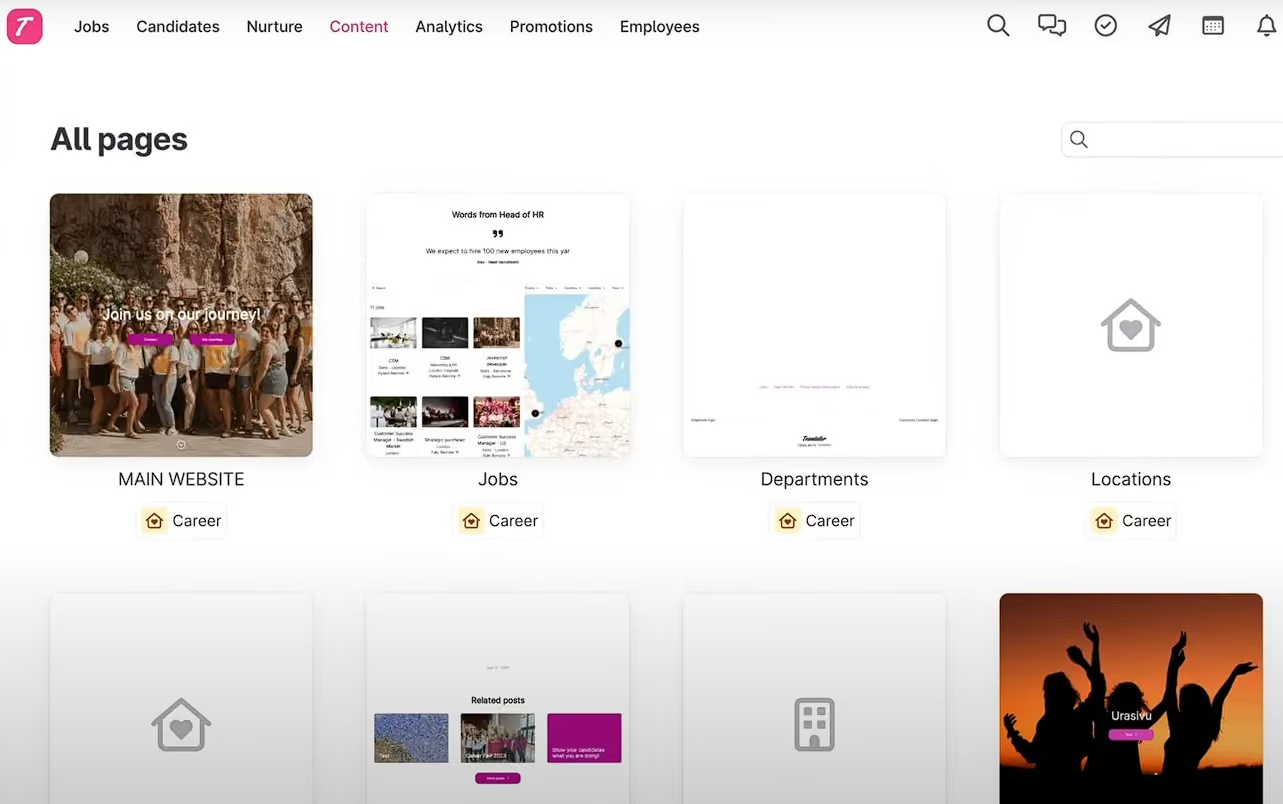
We highly recommend you give its career site builders a go when you’re on its free trial, as it was a delight during our testing. The interface was not only accessible via both browsers and mobile devices but also visually appealing. And within a few drags and drops, a sleek landing page was done, no coding knowledge was required in the making!
Teamtailor also offered multiple DEI tools in its trial. Features such as anonymous hiring and built-in EEO surveys offered a straightforward way to embed fair hiring practices into the process. However, when we tested the built-in analytics tools, the experience wasn’t as smooth as that of other ATS software, with extracting actionable insights requiring a bit more effort than expected.
It’s also worth noting that Teamtailor focuses on its ATS niche and doesn’t extend into broader HR solutions, such as performance management or onboarding. To be fair, though, the provided 350+ third-party integration options can be just the perfect alternative to sync data across your HR tech stacks.
Kry, Goodbye Kansas, Vitamin Well, Ponsse, Daniel Wellington.
Teamtailor ATS free trial is available after vendor demos. This platform doesn’t disclose its pricing, so you may also want to ask for a quote during the demo. To give you an idea, our source indicates that the entry price is around $3,000 per year.
Teamtailor’s recent updates show a steady expansion of its analytics, collaboration, and customization capabilities.
- New features rolled out: The introduction of Ask Co-pilot lets users query candidate data directly through chat for quick summaries and insights, reflecting a broader trend toward conversational AI in recruiting tools. Teamtailor also launched Divisions, allowing organizations with multiple brands to manage separate career sites under one account, and a Requisition Hiring Plan feature for annual workforce planning. Other notable additions include video backgrounds for job ads and internal recruitment analytics, helping teams visualize and track internal mobility.
- Enhanced features: Recent improvements focused on usability and data flexibility. Interview kits are now easier to manage and customize by job, while commenting has been revamped with real names, profile images, and rich-text formatting for clearer collaboration. Analytics and reporting gained new chart templates, expanded filters, and faster load times, making data slicing and visualization more accessible.
Best For
Teamtailor’s free trial is best for mid-sized companies eager to test a feature-rich ATS and employer branding tools hands-on before making a purchase.

We used teamtailor to publish jobs to job boards and social media and update or deactivate postings. We also were able to set up recruiting teams and set up the questions we needed for candidates. Also, it was very useful in keeping track of the many candidates, where they were in the process and, if they were not selected, the reasons why. We also used the triggers to communicate with candidates throughout the process, get needed information, and track communications. We also created career pages to better attract candidates and give a better sense of our company to potential applicants and increase the number of applicants.
I really liked the templates to create career pages, and felt it gave users a sense of the company and really made us look polished. The ability to track candidates was a huge advantage, eliminating the need to remember or to scroll through notes or emails to recall where someone was in the hiring process. I felt it was really easy for the entire team to use, especially hiring managers who are not in the HR department and needed an intuitive, simple way to participate.
I used teamtailor for a little over a year, and it was incredibly helpful in attracting and recruiting hard-to-get top talent. We needed our company to stand out, and to create an experience for applicants that would give a sense of our culture and why we are special and unique to work for. The ease with which we could create ads, the great templates provided, and the overall immersive experience for applicants improved not just the quality and number of applicants we received, but the conversion to hires. We also felt that throughout the process, our candidates had a better sense of who we are and seemed more engaged in the interviewing process as a result. Also, it integrated well with the various job boards and social media we needed to use, making it more efficient in getting the word out regarding openings.
I was not impressed with the analytics. Also, though it makes communicating and tracking candidates easy, being able to opt out of automatic emails would have been good on occasions, and it didn't have flexibility that way. Sometimes there were issues with scheduling too, and it didn't seem to always coordinate people's calendars completely.
This is a very comprehensive and complete ATS, and very easy to use. I have only used one other, and would say that teamtailor had better features and was easier to use.
I think it is important to consider the needs of the business. If you don't do extensive recruiting, this product may be more than you need. Is simply posting ads and getting responses enough, or are you finding a lack of quality candidates? If so, this may solve that. Are you hiring candidates who are in very high demand? If so, you should consider how you are presenting your company and if the process and features this tool provides may be able to make it more attractive to such candidates and is often what they expect.
It appears the company has increased the amount of knowledge, advice and resources regarding the recruiting process to users over time.
This is ideal for an organization that does a great deal of hiring, and has a lot of people involved in the hiring process. It is also great for companies that need to hire candidates that are in very high demand.
I think a small company that doesn't have a lot of hiring, or that maybe has mostly part time or more entry level jobs may not need something like this.

VanHack
In addition to basic job posting services, VanHack offers a free, full-scale applicant tracking system that supports unlimited jobs and users. Their platform lets you schedule interviews in as little as three clicks, post jobs, and track candidate progress.
PROS
- Free ATS that allows unlimited jobs and users.
- Easily filter potential candidates based on skills, experience, or customized keywords.
- A significant number of VanHack's job seekers are open to relocation
- Employers have access to a dedicated team of talent acquisition experts to identify potential candidates.
- The platform's salary guide assists job seekers and employers in understanding average compensation for each role.
- VanHack offers a free ATS that supports unlimited jobs and users.
- You can filter your list of potential candidates according to skills, years of experience, or custom keywords fairly easily.
- Many of VanHack’s job seekers are willing to relocate to pursue the right opportunity.
- Employers can work with a dedicated team of talent acquisition experts to find potential candidates.
- The platform’s salary guide helps job seekers and employers get a better idea of average salaries for roles.
CONS
- The platform focuses on tech-related jobs, so finding positions in other industries can be challenging.
- Some users report some spam messages and emails occasionally bypass their filters.
- Virtual hiring events often lack sufficient time to connect with numerous potential candidates.
- No mobile apps for hiring managers or recruiters to use while on the move.

- Because of the general focus on tech-related jobs, it’s difficult to find jobs in other industries.
- Despite their best efforts, some spam messages and emails do slip through the cracks.
- Virtual hiring events don’t provide enough time to meet many potential candidates.
- VanHack doesn’t currently offer a mobile app for hiring managers and recruiters to use on the go.
VanHack’s free ATS software is one of the most generous offerings we’ve seen in the space. This freebie supports unlimited users and jobs, and it doesn’t even require a credit card to get started. As a startup, this seems like a great deal. And after rigorously testing the free applicant tracking tool, we can confirm it truly is.
We also loved how easy it was to schedule an interview; we could do it in as little as three clicks. Additionally, the ability to post jobs directly from the ATS platform to multiple job boards at no cost was a real time-saver for budget-conscious companies, we can imagine.
We also appreciated that the ATS lets you post jobs directly to multiple job boards for free, a big advantage for budget-conscious teams trying to maximize reach. However, keep in mind that VanHack’s platform is specialized for tech hiring; if you’re looking to fill non-tech roles, you’ll get less value here.
While we appreciate that VanHack puts effort into filtering out spam, we did notice that some messages and emails still managed to slip through the cracks.
We also couldn’t help but feel disappointed to discover that there are no mobile apps available for hiring managers or recruiters. We would have loved to have the flexibility to manage our recruitment on the go, as this would greatly enhance our efficiency when moving between meetings or events.
600+ companies, including Deloitte, Brex, Booking.com, and Zalando.
VanHack is completely free for job seekers. For employers, VanHack charges a fee per hire that amounts to 20% of the candidate’s annual salary. Job posts, interviews, and candidate searching are all free.
Best For
For tech-focused teams looking to manage their hiring pipeline without any upfront investment, VanHack’s free ATS delivers an impressive package.

MightyRecruiter
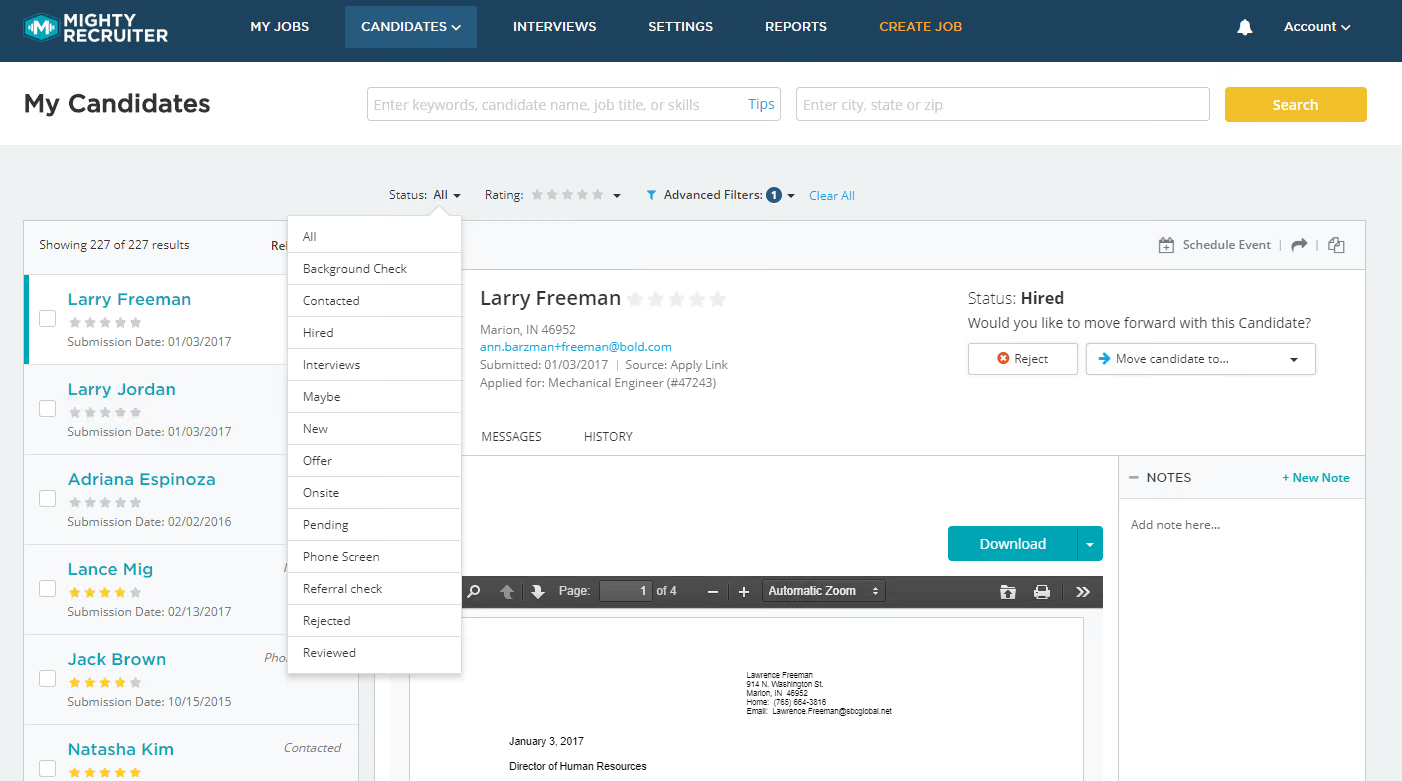
MightyRecruiter is one of the few free ATS we’ve reviewed that allows for unlimited job postings across various job boards. It also comes with a comprehensive resume database, employee referral features, a reporting dashboard and a branded career website at no additional cost.
PROS
- MightyRecruiter allows you to post unlimited jobs to 29+ job boards for free and access a resume database of over 22 million candidates.
- Clean and intuitive interface that allows you to create job postings, filter, screen, and rate candidates easily.
- Built-in reporting dashboard provides a comprehensive view of how your job postings are performing on various job boards and channels.
- MightyRecruiter allows you to post unlimited jobs to 29+ job boards for free and access a resume database of over 21 million candidates.
- The platform has a clean and intuitive interface that allows you to create job postings, filter, screen, and rate candidates easily.
- The built-in reporting dashboard provides a comprehensive view of how your job postings are performing on various job boards and channels through metrics like number of views, applications, and conversions.
CONS
- Limited integration options to job boards and social media.
- Does not offer advanced ATS features like integrated assessments, interview scheduling, workflow management, and collaborative hiring for end-to-end recruitment.
- Viewing the full resumes of candidates on their resume database costs extra.
- Once created, job postings can take anywhere between 24-48 hours to be approved by MightyRecruiter's team and made live.
- MightyRecruiter does not offer advanced ATS features like integrated assessments, interview scheduling, workflow management, and collaborative hiring for end-to-end recruitment
- While MightyRecruiter is primarily free to use, viewing the full resumes of candidates on their resume database costs extra.
MightyRecruiter truly impressed us with the efficiency of its free ATS system.
Without spending any dime, you can access this tool’s custom-branded career page, post unlimited job openings across 29 job boards, tap into a resume database of over 22 million candidates, as well as rank and filter candidates by the candidate’s commute distance, years of experience, ex-employers, education, and a handful others.
To speed up your talent sourcing efforts further, the platform packs over 200 ready-to-use job description templates and suggests suitable candidates for your job posts based on defined criteria.
In terms of reporting capabilities, the built-in dashboard gave us a nice view of our job postings' performances across job boards and channels. During our tests, we didn’t find any delays in the presented stats; all were updated in real-time.
Unfortunately, MightyRecruiter’s current integration capabilities leave something to be desired. The free ATS software can only connect with job boards and social media. There seems to be no way to connect, for example, a candidate assessment or video interview app with the platform.
ThinkGlink Media, DocuSign, OpExpert, GTM Pros, Small World Recruiting
MightyRecruiter offers free applicant tracking software at no cost for several features, including unlimited open jobs, unlimited resume searching, unlimited user accounts, one-click posting to a network of free job boards, mobile-friendly candidate management, social network, and auto-publishing.
While you can preview resumes as much as you want, keep in mind, though, that you'll need to buy Full Resume Views to access all the details.
Best For
MightyRecruiter’s free ATS is best for smaller teams that hire under 50 candidates a year.

As an employer using MightyRecruiter to post tutoring jobs, I check in once a week and have been using the platform for little under a year. I rely on its user-friendly interface to efficiently create and manage job listings, ensuring maximum visibility across various channels. The applicant tracking system (ATS) is crucial for systematically managing candidate applications, and I regularly engage with it to review and respond to submissions. MightyRecruiter's tools facilitate seamless communication with applicants, allowing us to share and review feedback and evaluations.

I appreciate the platform's user-friendly interface, which makes it easy to create and manage tutoring job listings efficiently, even with limited time investment.
I value MightyRecruiter for offering free options and catering to employers with limited budgets. Making it a practical and cost-effective choice for job postings.
The ATS provided by MightyRecruiter streamlines the candidate management process, allowing me to systematically track, review, and respond to applications in a way that aligns seamlessly with our tutoring hiring needs.
Our organization adopted Mighty Recruiter to address challenges in our recruitment process and has used it for the past 7 months. The primary pain point we aimed to solve was the need for a more streamlined and centralized solution for our hiring efforts. MightyRecruiter has significantly improved our recruitment workflow by providing a user-friendly platform for posting jobs, tracking applicants, and collaborating with team members. The platform's applicant tracking system (ATS) and free model have been particularly beneficial, allowing us to efficiently manage and evaluate candidate applications.
- I've observed that the candidate pool can be relatively small at times, and expanding this pool or providing more diverse sourcing options would enhance our ability to attract more people.
- The resume database that Mighty Recruiter promotes no longer works due to data protection laws, but they still promote it, leading to a misunderstanding of the product.
- I wish MightyRecruiter provided more customization options for job postings, allowing us to better showcase the unique aspects of our tutoring opportunities.
MightyRecruiter stands out from competitors such as ZipRecruiter, Handshake, and Indeed in several ways. While ZipRecruiter may offer a larger pool of applications, the cost-effectiveness of MightyRecruiter, especially for an employer with a limited budget, is a significant advantage. MightyRecruiter's free options make it a practical choice when compared to Handshake, which is also free but lacks the expansive features for job postings and candidate tracking that MightyRecruiter provides.
I prefer Indeed over MightyRecruiter simply because I have access to more candidates.
When considering a tool like MightyRecruiter for posting tutoring jobs, several key criteria should guide the decision-making process. First, evaluate the cost-effectiveness of the platform, especially in comparison to other options on the market. For roles, focus on the platform's ability to reach a targeted and relevant candidate pool, ensuring that the tool aligns with your specific hiring needs. Additionally, assess the user interface and functionality to ensure the platform is user-friendly and capable of streamlining your job posting and applicant tracking workflows.
There hasn't been much changes to the tool.
MightyRecruiter is well-suited for small to medium-sized organizations or employers with limited budgets.
Large organizations with large hiring needs for multiple openings for multiple roles.
Other Free Applicant Tracking Systems Worth Considering
While not as strong as the tools shortlisted above, the following platforms may still be worth exploring depending on your needs:
- Loxo: A well-known name in sourcing technology. The free plan includes one user, unlimited jobs, and access to a basic ATS and recruiting CRM, which is generous for a no-cost tier. However, we found the interface somewhat crowded, which from our experience, is not preferred by most small teams.
- Recruit CRM: Primarily known for its strong candidate management system, Recruit CRM can also support fundamental ATS needs. It offers a free plan with up to 50 active users, making it appealing to growing agencies. That said, it may feel more CRM-centric than ATS-focused for some teams.
- Airtable: While not a dedicated ATS, Airtable’s free plan can be adapted for applicant tracking using customizable templates. You can manage job openings, candidate pipelines, referrals, and even track job promotion efforts across channels. Be aware that setting this up requires manual configuration and ongoing maintenance, so it’s better suited for teams comfortable building and managing their own workflows.
- GiigHire: Free for one user with unlimited candidates, CV storage, and job postings. It also includes email integration, a hiring pipeline, and a basic careers page (limited to three jobs). The platform is very new, though, and we found limited information about customer support—even for paid tiers—which may pose a risk for teams that need reliable assistance.
Why You Should Trust Us
Authorship & Expertise
This guide was researched and written by Anh Nguyen, an HR tech researcher, editor, and former tech recruiter who has spent the past several years evaluating the tools that shape the modern hiring process. Before joining SSR, Anh worked directly in recruiting, giving her firsthand insight into the everyday challenges hiring teams face when trying to stretch a limited budget without sacrificing the quality of their hiring process.
Our Testing Approach
We tested hands-on:
- Created test accounts on 50+ free applicant tracking systems (both free-forever plans and time-limited trials)
- Posted live jobs and tracked candidates through complete hiring pipelines
- Built branded career pages and evaluated professional presentation
- Timed setup workflows: signup to live job posting
- Tested integrations with Google Calendar, Outlook, Slack, and common HR tools
- Evaluated mobile experience for candidates and recruiters
- Spoke with product leaders from Manatal, Recruitee, Teamtailor, GoHire, Recooty, and others
- Gathered real user feedback from verified customer reviews, internal interviews, and long-form case studies
How We Maintained Independence
Although our business earns revenue through vendor advertising, our Editorial team operates completely independently from Sales and maintain full control over:
- Which tools appear in this guide (based on testing performance only, not payment)
- How we evaluate them (transparent methodology shared below)
- What we say about each tool (honest pros, cons, and trade-offs)
We decline pay-to-play offers. The only way to appear in this guide is to perform well in our hands-on testing. Our success depends on reader trust, so we prioritize objectivity and evidence-based recommendations above all else.
How to Choose a Free ATS
There is no such thing as an entirely free, unlimited ATS. Even vendors offering forever-free plans typically put critical features like advanced reporting, automations, integrations, or outreach tools behind a paywall. Some "free" options are actually time-limited trials offering 7 to 30 days before requiring payment.
To find the right free ATS, we suggest you:
- Start by knowing your hiring volume. If you'll hire fewer than 10 people in the next year, pick based on what feels easiest to use. If you'll hire 10 to 25 people, expect the free tier to work for about six to eight months before feature limitations force an upgrade; plan for that transition in month four or five. If you'll hire more than 25 people, the free ATS is really just a sample. You should start looking at paid options in your first week.
- Consider what matters most to your specific situation. Are you focused on zero upfront cost? Dover and Monday.com are your best bets. Do you want transparent pricing before committing? Manatal shows you exactly what you'll pay ($15 per user per month) upfront. Need full features to test during your trial? GoHire, Recooty, and Recruitee give you complete access for 14 to 18 days. Are multiple team members hiring simultaneously? Recruitee and Teamtailor offer unlimited users on their free trials. If you're hiring globally, Zoho Recruit supports 26 languages. For maximum job board reach, Dover offers 75+ boards and MightyRecruiter offers 29. If you're only hiring for tech roles, Wellfound connects you to 10 million startup-minded candidates. If you lack technical setup skills, Dover and GoHire let you start posting jobs within minutes of signup.
- Test your actual workflow. Every ATS makes it easier to create a job posting or add a candidate, so those kinds of tests are not very meaningful. Instead, post a job to multiple boards, import a test candidate from email, integrate with your Google Calendar, send a bulk email you intend to send to disqualified candidates to yourself to see how it goes, and invite a team member to review a candidate. This entire workflow takes less than an hour but will reveal whether the platform actually fits how you work. If the workflow feels clunky during your trial, it will only get more painful as you use it for months.
- Plan for when the free tier stops working. If you have three or more concurrent open roles but the tool limits you to one active job, you're hitting the wall by month two or three. If your team is spending four or more hours per week on manual tasks the platform could automate, you need better integrations by month four or five. If your hiring forecast shows 20 or more hires in the next six months, start researching paid options now rather than waiting for a crisis.
When testing your free ATS, avoid the common mistakes that undermine evaluation.
- Don’t test generic features that every platform handles well; test the workflow you'll repeat dozens of times.
- Don’t trial the ATS during a slow hiring period; create realistic candidate volume to stress-test the tool.
- Don’t assume a feature available in your trial will remain free after you upgrade. Check the pricing page and budget for what moves to paid.
Benefits of Using the Best Free Applicant Tracking System
A free ATS can offer several practical advantages, particularly for small teams, early-stage startups, or organizations looking to improve hiring operations, candidate and recruiter experience without adding financial or administrative burden.
- Improved recruitment outcomes with no additional overhead. Free ATS tools typically provide core functions such as job posting, applicant tracking, and centralized workflows, allowing teams to streamline hiring processes without immediate cost.
- Low-risk evaluation of software fit. Free plans and trials let organizations test a system’s usability, features, and compatibility with internal processes before committing to a paid contract or long-term plan.
- Enhanced candidate experience. Many free ATS versions include branded career sites and simplified application processes, helping employers present a professional image to applicants.
- More organized recruiter workflows. Even without advanced features, a free ATS can centralize candidate data and communication, reducing the need for manual spreadsheets or scattered tools.
Free Applicant Tracking System Drawbacks
Even the best free ATS has limitations in its feature set, support, and scalability as your team grows.
- Limited feature access: While free trials and forever-free plans are fantastic entry points, they almost always come with limitations, whether it’s the number of jobs you can post, the depth of reporting, or access to integrations and automations. So once your team scales or your hiring gets more complex, you’ll likely run into roadblocks that only paid plans can unlock.
- Support responsiveness: Vendors often reserve their fastest, most hands-on customer support for paying customers. If you’re using the free tier, expect slower responses or limited support channels.
- Scalability and long-term planning: As your team scales or hiring becomes more complex, free features may no longer suffice, and transitioning to paid plans can be disruptive if not planned properly.
Our advice: don’t treat a free ATS like a short-term experiment. Be thoughtful. Research the paid tiers, understand the upgrade path, and ask tough questions during demos. Choose a vendor whose long-term roadmap fits your business, so you’re not caught off guard when the free features stop covering your needs.
Best Free ATS Software Key Features
Free applicant tracking systems typically include job posting automation, career site templates, organizational structure, interview scheduling, mobile-first design, and basic report features.
- Automated job posting (to a point). The best free ATS tools allow you to post jobs to a handful of free job boards with a few clicks, although integration with premium or niche boards usually requires a paid upgrade.
- Basic career site templates. Almost every free ATS we tested included a plug-and-play career page you can embed on your company website. You can typically upload a logo, adjust some colors, and display open roles, but deeper customization, such as multiple branded pages and knockout questions, is often reserved for paying customers.
- Organizational framework. Even free ATS versions centralize core hiring data such as applications, resumes, interview stages, and candidate contact info into one system. Some may offer access to advanced features, such as custom workflows, bulk actions, or integrations with HRIS or onboarding tools, but only for a limited period during their free trials.
- Mobile-first design: You shouldn’t have to pay extra for access to this feature, as it's now standard practice for top free applicant tracking tools to be either mobile-optimized or accompanied by a free mobile app that TAs can easily download and use.
- Interview scheduling. From our experience, the best free ATS platforms often integrate directly with Google Calendar or Outlook, allowing you to automate simple scheduling tasks within the free plan, whereas more advanced features (automated reminders, calendar integrations, interview scorecards, etc.) are usually accessible via free trials.
- Fundamental analytics dashboards. While you can’t expect highly advanced analytics from a no-cost ATS, we've found that even free versions offer some level of reporting functionality that can be quite useful. For instance, you can still track your progress in filling positions and access some essential recruitment stats such as conversion rates and time-to-hire.
Free Applicant Tracking System FAQs
What is a free applicant tracking system?
A free ATS helps you post jobs, track applicants, and manage candidate pipelines at no upfront cost. In practice, it means one of two things:
- Free-forever plans: A permanently limited but functional version of the product, which is good for teams with low, predictable hiring volume
- Time-limited trials: Full or near-full feature access for 7 to 18 days, which is better for teams evaluating whether a platform is worth paying for
Who actually uses free ATSs?
A wider range of organizations than most people expect:
- Startups and slow-growing SMBs that need organizational structure without an enterprise contract
- Larger companies use free trials to evaluate platforms before making a purchase recommendation to their finance team
- Solo recruiters and hiring managers wearing multiple hats who want to move hiring out of spreadsheets and email threads
What features should I actually expect for free?
Based on our hands-on testing across 50+ platforms, you can reliably expect:
- Basic pipeline management and candidate tracking
- A simple branded career page
- At least a handful of free job board postings (MightyRecruiter is the outlier, offering truly unlimited postings at no cost)
- Calendar integration for basic interview scheduling
You can sometimes expect:
- Limited team collaboration
- AI-assisted job description generation (GoHire, Recooty, and Manatal all offer this in their trials)
- Basic source tracking and pipeline analytics
Are there any risks to using a free ATS long-term?
Yes, and four worth knowing before you commit are:
- Feature dependency: Migrating candidate data mid-hiring cycle when you outgrow a free plan is more disruptive than most teams anticipate
- Support gaps: Free users are typically limited to self-service documentation and slower response times
- Unexpected paywalls: The most common complaint in verified user reviews was hitting paywalls after already building workflows around a free plan
- Scalability limits: Bulk actions, automated stage triggers, and advanced customization were consistently behind paid tiers across every platform we reviewed
Which free ATS is the fastest to set up?
- The fastest are Manatal, GoHire, and Teamtailor: All three got us from signup to a live job posting quickly, with minimal friction. GoHire required zero technical knowledge. Teamtailor's drag-and-drop career page went live within minutes, but you must complete a vendor demo before activating your trial.
- Close behind are Zoho Recruit and Tellent Recruitee: Both guided us through setup without significant friction, though each needed slightly more configuration time.
- Most effort is Monday: Since it’s not a purpose-built ATS, getting a functional hiring pipeline required manual template customization.
Key Takeaways
Finding the right free ATS comes down to knowing what "free" actually means for the platform you are considering and being honest with yourself about where your hiring process is headed, not just where it is today. To sum up, here is what each option does best:
- Best transparent trial pricing: Manatal
- Best free plan for SMBs: Zoho Recruit
- Best free trial for startups: GoHire
- Best for collaborative hiring workflows: Tellent Recruitee
- Best for project teams that don't need a dedicated ATS: Monday.com
- Best for employer branding and DEI: Teamtailor
- Best free-forever ATS with TA support: Dover
- Best for free, basic ATS & CRM: Loxo
- Best for tech startup hiring: Wellfound
- Best for ease of use and job board access: Recooty
- Best for fast interview scheduling: VanHack
- Best for unlimited job board postings: MightyRecruiter
For those on the fence on whether they should go with a free-forever plan or a free trial: Pick a free edition if you are early-stage, budget-constrained, and learning at your own pace while a trial will make more sense if you are actively hiring and ready to make a decision within weeks.
- Free editions offered by Dover, Zoho Recruit, and Monday.com require no credit card and work indefinitely for small hiring volumes, though their limited features can become restrictive as you grow.
- Free trials, such as GoHire (14 days), Recooty (15 days), and Recruitee (18 days), offer full feature access for comprehensive evaluation during active hiring cycles.
If anything in this guide raised questions we did not answer, or if you have tested one of these platforms yourself and want to share what you found, we would love to hear from you. Drop our editor, Anh Nguyen, a note via email or LinkedIn — she reads every message. And if you are ready to explore beyond the free tier, our Best ATS for Small Businesses guide offers a comprehensive overview of more advanced options that are also budget-friendly.
About the Author


About Us

- Our goal at SSR is to help HR and recruiting teams to find and buy the right software for their needs.
- Our site is free to use as some vendors will pay us for web traffic.
- SSR lists all companies we feel are top vendors - not just those who pay us - in our comprehensive directories full of the advice needed to make the right purchase decision for your HR team.


