

18 Best Help Desk Software & Ticketing Systems in 2026
Our experts have tested over 50 different ticketing systems; here are our favorites.











The best help desk software and ticketing systems let you manage, track, and resolve employee or customer support requests by turning each issue into a ticket that can be prioritized, assigned, and resolved efficiently. As your business grows and more customers come on board, having a good system in place becomes essential.
We’ve tested and compared over 50 ticketing systems to see which ones truly deliver. Each was evaluated on core features, pricing, and its ability to help businesses resolve customer issues efficiently. Above all, we were looking for the platforms that make ticketing support easy, scalable, and stress-free.
Beyond reviewing specs and attending demos, we put these platforms through real-world scenarios that support teams actually face:
- Real-world Setup & Onboarding: We created fresh instances and measured how quickly a non-technical team member could set up basic email ticketing, assign a rule, and send a canned response. Most platforms took 15-30 minutes. A few required hands-on support or consulting, whom we disqualified for unnecessary complexity.
- Multi-Channel Support: We tested how each system handles the reality of modern support tickets coming in via email, chat, social media, and phone simultaneously. Does it genuinely consolidate them into one inbox, and if so, does it happen in real time?
- Knowledge Base Integration: We checked whether agents could actually find and suggest knowledge articles from within a ticket workflow, or if it felt like a separate tool bolted on.
- Impactful AI Integration: While AI is reshaping the IT ticketing landscape, we distinguish between tools that use AI as a marketing gimmick and those that apply it meaningfully to workflows. During our evaluation, we looked for systems that actually leveraged intelligent triage, automated ticket classification, and agent assistance to drive real efficiency gains.
- Mobile Reality: We tested the actual mobile experience agents face when responding to tickets from the field or home office. While not a dealbreaker, these enable your support agents to stay connected and respond to customers and reach resolutions faster.
For an in-depth understanding of our selection process and guiding principles, check out our editorial guidelines.



Freshservice

Freshservice stands out when your organization needs tight ITIL compliance without the complexity tax. Most enterprise ITSM tools force you into rigid processes. Freshservice lets you enforce ITIL standards while still customizing workflows for your unique incidents, changes, and releases.
PROS
- Cross-departmental workflow automation enables handoffs between IT, HR, Finance to work reliably
- Enforces ITIL structure without being dogmatic about exactly how you implement it
- Solid knowledge base integration; agents can suggest articles in context
- Slack/Teams notifications keep relevant people informed
- Freddy AI can answer employee questions instantly inside Slack or Microsoft Teams.
- Service workflows can coordinate HR, IT, Finance, and Legal tasks in one place.
- Workspaces allow departments to operate independently while sharing the same platform.
- Strong automation tools like Journeys simplify complex employee transitions, such as onboarding or relocations.
- AI can search knowledge sources like Confluence, SharePoint, and Google Drive.
- Dashboards provide clear visibility into unresolved requests and operational bottlenecks.
- Freshservice integrates well with your HR tech stack, offering out-of-the-box integrations with Workday, BambooHR, Oracle HCM, and SAP SuccessFactors, and several others.
CONS
- Pricing scales quickly: expect $24,000+/year for a 20-person team
- Setup and configuration require hands-on ITIL knowledge
- Advanced automation features only available in higher pricing tiers
- Mobile app is functional but limited compared to the browser version
- Teams typically need 2-3 weeks before they feel confident in the system
- Agent-based pricing can add up quickly for larger service teams.
- The platform still feels like a service desk tool first, which may not match every HR team’s workflow.
- Some advanced automation and orchestration capabilities require higher-tier plans.

Freshservice is a cloud-based IT service management (ITSM) solution with a modern and user-friendly interface. Made specifically with enterprises in mind, Freshservice is ideal for companies looking for an ITIL-compliant solution with features for change management, incident management, release management, and much more.
We tested this against ServiceDesk Plus (more powerful but steeper learning curve for IT teams new to ITSM) and Jira Service Management (which requires deeper Atlassian ecosystem buy-in). For IT shops that need compliance without losing flexibility, Freshservice delivers.
The Journeys automation feature performed well in our tests. We set up an offboarding workflow that automatically triggered provisioning tasks across multiple systems when an employee left. It executed reliably in testing. The knowledge base integration works; agents can suggest articles within ticket threads. Freddy AI (the built-in AI agent) offered relevant suggestions after we trained it on a few weeks of ticket history, though it required active feedback to improve. We also tested the mobile app and found it usable for status updates but not ideal for detailed ticket work.
Freshservice's setup took longer than simpler platforms. Initial configuration requires understanding your ITIL processes and mapping them into the system. We observed that teams needed 2-3 weeks to feel confident, longer if processes were complex.
NHS, M&C Saatchi, TeamViewer, Honda, Judson University
Freshservice offers four pricing tiers: Starter at $19 per agent per month, Growth at $49 per agent per month, and Pro at $99 per agent per month, along with an Enterprise plan with custom pricing.

Best For
Consider Freshservice if your IT team manages incident, change, and release processes with coordinated handoffs across departments. It works best for teams with 15+ staff where ITIL compliance is a requirement. Skip it if you're managing basic ticketing (password resets, access requests), your team is under 10 people, or your budget is under $10,000/year.


I use this tool at a customer service desk where I can respond to their questions through live chat, emails, and WhatsApp because it is easy to use, I also use it as a marketing tool where I send promotions and offers to our clients through Whatsapp channel to increase our brand interactions and to inform our clients about ongoing promotions, offers, and product updates. The software is easy and faster to use helping me to stay in touch with our clients all the time they contact us

I like the integration with the caller center, you can easily make calls and receive calls within the tool without multiple logins to different tools, and calls are secure and faster,
There is enough customer care who responds to all questions on time when you contact them. Lastly, the software can be integrated with Facebook and Twitter without any technical knowledge and at no extra cost.
We had used a lot of tools in the past and none was delivering services to our expectations. We needed software that had all communication channels and marketing features in one place and that is why we bought the freshservice. It is helping us reach back to our clients anytime from any channel they use to contact us. The tool is also helping us in marketing where we can reach to our clients through email campaigns and WhatsApp campaigns, I have used the solution for five years and seven months
It is hard to transfer a chat and a call to another operator or to another department which is challenging us more often because it always fails to get transferred. The mobile application does not sync with the web application and hence you end up losing the chat history you had with the clients from the web application when you decide to use the mobile application. They have very limited payment methods where you can use a prepaid card to make payments towards your subscription.
They have Whatsapp integration which comes with free 1000 messages/month whereas other competitors charge for this service independently
Good for support operators.
May not be good for the sales team.

Zendesk
Zendesk is arguably the most well-known customer support software available today. Among its features are integrated surveys to measure customer satisfaction and analytics dashboards to monitor your team’s performance.
PROS
- Proven stability at high volume—can handle large support operations without degradation
- Native integrations with major platforms (Salesforce, HubSpot, Slack)
- Reliable ticket routing and multi-channel consolidation
- Decent mobile app for basic ticket handling
- Proven stability at high volume—can handle large support operations without degradation
- Native integrations with major platforms (Salesforce, HubSpot, Slack)
- Reliable ticket routing and multi-channel consolidation
- Decent mobile app for basic ticket handling
CONS
- $11,400-69,000/year for 50 agents, roughly 2-4x the cost of comparable platforms
- Setup and optimization require technical depth
- Doesn't offer white-glove implementation support in standard contracts
- Documentation-heavy & learning curve for non-technical teams
- $11,400-69,000/year for 50 agents, roughly 2-4x the cost of comparable platforms
- Setup and optimization require technical depth
- Doesn't offer white-glove implementation support in standard contracts
- Documentation-heavy & learning curve for non-technical teams

Zendesk is a dependable choice for larger support operations that value stability and performance at scale.
We evaluated it in environments with 50-200 agents handling tickets across email, chat, and social media. According to interviewed users, the platform doesn't have the most innovative features, but it's been around for 15+ years and handles volume reliably. If your primary concern is "will this stay up and perform well when we have 10,000 tickets coming in," Zendesk has proven itself.
Regarding Zendesk's core ticket management, ticket routing via triggers performed reliably in our tests. We created complex rules, and they executed as specified without unexpected behavior. Integrations with Salesforce, HubSpot, and Slack don’t require a custom API. The analytics dashboards provided useful data on response times, resolution rates, and first-contact resolution rates.
We also tested performance under load (simulating a 3x volume spike), and the system maintained responsiveness. The mobile app is functional for many workflows—agents can handle tickets from phones, though for detailed work, most still prefer the web interface.
Zendesk's cost is substantial. At $19/agent for the entry-level Team tier and $115/agent for the Enterprise tier, a 50-person support team costs $11,400 and between $ 69,000 annually. We compared this to Freshdesk's $29/agent Growth tier ($17,400/year) and Zoho Desk's $23/agent Professional tier ($13,800/year)—both roughly half the price for similar capabilities. You're paying Zendesk's premium for stability and scale performance, not unique features. Setup is more involved than advertised: while basic email ticketing takes 30 minutes, configuring integrations, custom fields, and multi-step automations can take weeks. The documentation is extensive but dense. This explains why many teams resort to professional services (at additional cost).
Mailchimp, Uber, Khan Academy
Zendesk offers three paid plans: Team, Professional, and Enterprise. These plans cater to different business sizes and range from $19 to $115 per agent per month, billed annually.
To find out which plan suits your business, visit Zendesk's pricing page. You can sign up for a free 14-day trial or contact Zendesk's team for a demo.
Best For
Consider Zendesk if you're managing 50+ agents, need proven stability at high volume, or are integrating with Salesforce (where native integration matters). It makes sense if reliability matters more than cost. Skip it if your team is under 20 agents (you'll overpay), or if your budget is under $15,000/year.
The ticket workflow was effective in directing tickets to the appropriate channels. Escalations were immediate when necessary. Customizing the auto-response feature was helpful, as it notified users that their ticket had been received.
Zendesk also recommended relevant articles or solutions automatically. Internal notes made collaboration easier among team members.
Internal compliance processes were simplified. Communication and collaboration across teams were improved. Ticketing helped maintain better organization.
I used Zendesk for about two years. The solution helped with managing ticketing and data analytics. Ticketing was the primary function for which Zendesk was used. It was especially effective in maintaining organization within HR ticketing. Overall, the tool was helpful in tracking and managing tickets efficiently.
Costs and add-ons were somewhat frustrating. Customization was difficult initially, though it became easier after setup. Integration was not as smooth as expected.
Costs and add-ons were somewhat frustrating. Customization was difficult initially, though it became easier after setup. Integration was not as smooth as expected.
Consider the size of the HR team or the team using Zendesk. Evaluate how well the team adapts to new processes and systems.
The integration of AI has been a recent development.
Large organizations with sizable HR teams will find Zendesk a great fit.
Smaller organizations that do not require advanced ticket routing can look past Zendesk.

ServiceDesk Plus
ServiceDesk Plus is a very comprehensive ITSM solution that’s trusted by some of the thousands of businesses, including 9/10 of Fortune 100 companies.
PROS
- Purpose-built ITSM (not a ticketing system with ITSM features bolted on)
- Integrates incident, change, and asset management so you can track their relationships
- Both cloud and on-premise deployment options (important for compliance-sensitive organizations)
- Detailed reporting on IT operations across multiple dimensions
- Purpose-built ITSM (not a ticketing system with ITSM features bolted on)
- Integrates incident, change, and asset management so you can track their relationships
- Both cloud and on-premise deployment options (important for compliance-sensitive organizations)
- Detailed reporting on IT operations across multiple dimensions
CONS
- Long, expensive implementation—8-12 weeks with consultants (budget $20k-50k+)
- User interface is complex; steep learning curve for ITIL concepts
- Expect enterprise-level costs (no public per-agent pricing)
- Requires IT staff with ITIL knowledge and process design expertise
- Overkill for small IT organizations or basic ticketing needs
- Long, expensive implementation—8-12 weeks with consultants (budget $20k-50k+)
- User interface is complex; steep learning curve for ITIL concepts
- Expect enterprise-level costs (no public per-agent pricing)
- Requires IT staff with ITIL knowledge and process design expertise
- Overkill for small IT organizations or basic ticketing needs

ServiceDesk Plus is ManageEngine's on-premise and cloud ITSM platform. Unlike Freshdesk or Zendesk (which are ticketing systems), ServiceDesk Plus is built around IT service management workflows.
We evaluated ServiceDesk Plus's incident management, change management, asset tracking, and reporting capabilities. The system successfully tracked relationships between these components. For example, when a change was deployed, it tracked the resulting incidents and helped identify patterns. This interconnected view is useful for troubleshooting systemic problems.
Reporting and dashboards provided detailed data on ticket backlogs, SLA compliance, and asset utilization. We tested both cloud and on-premises deployments; both were functional, though the on-premises deployment required additional infrastructure planning. The learning curve was steep, particularly with the interface, which assumes familiarity with ITIL terminology and process flows.
ServiceDesk Plus is complex. Implementation takes 8-12 weeks with consultant involvement. You need IT staff who understand not just ticketing, but ITIL processes, asset management policies, and change control procedures.
UX-wise, the user interface is functional but not modern. It's clearly designed for power users rather than ease of use.
Disney, Honda, ABC, Etihad Airways, RBS, Dell, Siemens
ServiceDesk Plus has 3 plans: Standard, Professional, and Enterprise. The pricing of those plans isn’t disclosed upfront. Contact ServiceDesk Plus’ sales team to get a custom quote.
Best For
Consider ServiceDesk Plus if your IT organization has 100+ staff managing interconnected incident, change, and asset workflows, or if you need on-premises deployment for compliance reasons. It's appropriate for enterprises where ITSM maturity is already a goal. Skip it if you have fewer than 50 IT staff, if you just need basic ticketing, or if you expect quick deployment.

As an operations manager, I use ServiceDesk Plus for various problem-solving tasks. If a service is needed in the facility, employees can submit a ticket to ensure a service professional is notified to address the issue. Internal issues, such as technical problems, can also be reported. The help desk provides useful information, and managers are able to report incidents that occur.
Requesting help on ServiceDesk Plus is time-efficient. It minimizes phone interaction, which could slow down productivity. Being able to track the workflow based on requests already submitted is helpful for follow-up. The search bar allows quick keyword searches, providing fast feedback for solutions.
Working as an operations manager required a lot of collaboration inside and outside the location. ServiceDesk Plus creates a line of communication on all sides. ServiceDesk Plus is key to communicating with IT and service professionals quickly. When a problem occurs, ServiceDesk Plus is available to notify the appropriate party to help solve the issue without slowing down production.
When reporting an issue, it can be hard to find help for your exact problem if you are unfamiliar with the system. Although it is convenient to submit tickets and report issues online, getting a response can sometimes take longer than expected. Requests can also be difficult to modify once they are sent.
ServiceDesk Plus offers more detailed assistance compared to other tools, which tend to be more vague.
Before buying this tool, a buyer should consider who will use it and their comfort level with technology. It's also important to evaluate the primary features the tool will be used for.
ServiceDesk Plus has helped operations managers find solutions or submit tickets with ease, allowing productivity to remain consistent.
ServiceDesk Plus is ideal for organizations that are operationally focused and for those with service professionals at different locations or using third-party servicing.
ServiceDesk Plus may not be a good fit for companies that are not ready to transition reporting, help desk, and other support systems to an online database.

Zoho Desk
Zoho Desk is a budget-friendly option that has one of the most extensive feature sets of any help desk and ticketing system in the market. Plus, this solution comes with a scalable pricing structure plus a free version with pretty decent offerings.
PROS
- Most affordable per-agent pricing ($14-40/agent depending on tier)
- Flexible configuration without tier-based feature locks
- Multi-language support (22 languages)
- Knowledge base auto-suggest performs well
- With Zoho Desk, you get one of the most extensive feature lists of any help desk and ticketing system in the market.
- Zoho Desk is very flexible when it comes to pricing, as you can switch plans as you go if your team member count or necessities grow.
- It’s available in 22 languages.
- Lets you provide support across multiple channels.
CONS
- Dated interface feels older than competitors
- Customization requires technical effort or outside help
- Support defaults to directing you to documentation rather than hands-on assistance
- Integrations with non-Zoho platforms require API knowledge or third-party connectors
- Mobile app is secondary to desktop experience
- Some of the product customizations can be hard to figure out, according to some users.
- The UX/UI can seem dated at times.
- Several users have reported that integrating the tool with several apps can be problematic.

Zoho Desk offers multi-channel support. At an affordable price, the solution can offer customer care via email, live chat, phone, and several social media platforms. Having all client inquiries in one location has made tracking and cooperation easier, some users noted.
Another great feature of Zoho Desk is the knowledge base. There are many articles and FAQs there, which are often used by agents for faster customer service. Based on the keywords in the tickets that customers submit, Zoho Desk's auto-suggest can suggest agents relevant articles from the knowledge base in a matter of seconds.
We also like the scalable pricing model of the tool. Besides providing transparent pricing, Zoho Desk offers a free version with some decent features, like email ticketing, a private knowledge base, a multi-language help desk, mobile apps, and 24x5 email support. Plus, the Enterprise plan's features are comparable to top-tier plans from other competing providers but relatively more affordable.
When we tested Zoho Desk, we uncovered a few possible downsides. While the software has a number of adjustable capabilities, they are not always user-friendly. A few customers stated that tailoring the program to their needs was challenging. The abundance of built-in functions also means it could take a while for users to get familiar with all the tools. Lastly, integrating Zoho Desk with some well-known sales and marketing platforms can be challenging.
McAfee, Daimler, LycaMobile, Rogers, Siemens Energy.
Zoho Desk has four plans: Free, Standard ($14), Professional ($23), and Enterprise ($40).
Best For
Consider Zoho Desk if budget is a genuine constraint and you have technical capacity to configure the system. It makes sense if you're already in the Zoho ecosystem (CRM, Books, etc.) or if you need multi-language support (22 languages supported). Skip Zoho Desk if you want immediate, intuitive usability (Freshdesk is better), if your team has no technical support and needs hand-holding during setup, or if you expect 24/7 implementation support.

I use Zoho Desk primarily as a user to submit IT help requests when I need to resolve issues that impact me from performing my HR payroll work. When I have a problem with a system error or a hardware question, I create a ticket and they can go to them. I also use it to reply or check the status of an open ticket.
Zoho Desk gives me one place to go and submit tickets and follow up on them. I can also have a history so if the problem reoccurs it is more efficient to resolve. It also has date and timestamp of when it started, when it is in progress, and when it is completed.
My current company that I do HR pay consulting for had scattered requests and no way of noticing a pattern. Their management was disorganized and responses were slow. They needed something that provided IT and managers some visibility so they could assist more efficiently and effectively. In addition, some worked on site with some remote. Zoho Desk was good fit.
Zoho Desk is a little more formal than sending an email to IT, which sometimes feels like a slower process. It is also less personable sending it to a generic box versus individuals. Also, it is not set up, at least with our company, with automatic responses that it has been received for a status.
I am not as familiar with some of the other systems, which are more of a manual process of ticketing. That said, Zoho Desk is more efficient and streamlined. When it was implemented at my company, they said they did their due diligence and it was far less expensive than a lot of its competitors.
If buying this type of tool, they should be really clear on what they want for the request. Is it for customer service, or customers at hotels or restaurants, or IT? They should understand the objective.
Zoho Desk has become more cloud based over time and conducive to integration with various systems and software, depending if it is for the hospitality industries or more IT companies or IT departments.
Zoho Desk is best for organizations that have a large to medium size customer or utilization base that wants to be able to provide analytics and reporting. In addition, that truly wants to understand the root cause of problems and to solve them.
Zoho Desk is not necessary for an organization that is small and does not need a tracking system that can be managed through Excel.

LiveAgent
LiveAgent is a simple customer support solution. Their native live chat is easily accessible via a widget that integrates smoothly with your websites and apps, allowing you to connect with customers instantaneously.
PROS
- Modern, aesthetically pleasing and easy-to-navigate UI
- 30-45 minutes from signup to first ticket. Minimal training required
- Universal inbox, live chat and knowledge base for high-volume query management
- Phone, chat, and email support in all plans
- Responsive product development driven by user feedback
- LiveAgent’s modern user interface looks aesthetically pleasing while being easy to navigate.
- LiveAgent is super easy to implement and use. Even if your team isn’t tech-savvy, the time to productivity is quick.
- LiveAgent empowers small support teams to easily handle large volumes of queries. Critical features like a universal inbox, a live chat widget, and a knowledge base enable you to address all tickets with greater efficiency.
- For LiveAgent, every user is a valuable client. Expect 24/7 customer support via phone, live chat, or email. The support agents are also in-house and not outsourced, which further ensures you’re given accurate answers to all your queries.
- LiveAgent takes feedback seriously and is constantly trying to improve the software, so you’re assured of a reliable tool.
CONS
- Mobile app lags behind competitors in quality
- Limited third-party integrations (40+ integrations vs. competitors' 100+)
- Social network integrations require a paid plan upgrade
- Likely outgrow as you scale beyond 20 agents
- LiveAgent needs to work on its mobile app interface. While convenient to work with, it isn’t as at par with the competitors.
- LiveAgent offers limited integrations, which may be a hindrance for companies wanting to significantly boost support effectiveness and visibility.
- LiveAgent’s Free plan doesn’t allow for integrations with social networks like Instagram, Facebook, Twitter, and Viber — you’ll have to upgrade to the paid plans to get access. Therefore, you can’t offer customers omnichannel support and have to stay limited to email, live chat, and call center support.

LiveAgent is a simplified ticketing platform focused on email, live chat, and knowledge base. We tested it with small support teams (3-20 agents) managing basic support operations. LiveAgent doesn't try to do everything; it does ticketing, chat, and knowledge management with a clean interface. This positioning makes sense for small teams and e-commerce operations where support is secondary to the main product and doesn't need sophisticated automation.
The interface is visually clean and modern compared to some competitors; agents don't need extensive training. The live chat widget integrates smoothly into websites and works as advertised. The knowledge base is accessible and agents can insert relevant articles into ticket responses. Customer support is surprisingly great – they’re available 24/7 via phone, chat, and email. The mobile app works on iOS and Android for basic operations like checking ticket status.
However, the feature set is deliberately limited. You can't build complex multi-step automations or configure sophisticated routing rules. If you need ITSM capabilities, detailed reporting, or high-volume customization, you'll feel constrained quickly. Third-party integrations are limited (40+ vs. competitors' 100+), and social media integrations (Meta, Twitter) require higher-tier plans. For teams above 20 agents or with complex support operations, you'll likely outgrow LiveAgent within 1-2 years.
Huawei, BMW, Yamaha, O2, Slido, Forbes, AirBus.
LiveAgent offers a free plan with some limitations on the features that can be accessed and three paid plans with feature increases, competitively priced as follows:
- Ticket: $15 per agent per month for LiveAgent’s ticketing solution.
- Ticket+Chat: $29 per agent per month for access to LiveAgent’s ticketing solution and live chat.
- All-inclusive: $39 per agent per month for all of LiveAgent’s features without any limits.
Best For
If your needs are straightforward and your team is small, LiveAgent works well. If you're managing complex workflows or teams over 50 agents, you'll likely outgrow it.

We use the solution to offer live chat on our website and to respond to customer questions through emails and social media.

I like the user interface, which is smooth and easy for anyone to use. The tool also provides good notifications so you never miss client chats.
We bought the software to communicate with our website users and clients through live chat and support emails. We have used the solution for two years and it has helped us build strong customer relationships because of how fast we now respond to their questions and requests.
Pricing of the software does not favor smaller businesses.
They have more integrations like emails, social media, and knowledge base than other tools.
Consider the modules that come with the solution and whether they cover your needs or not.
They have developed more modules like Knowledgebase where the user can go and read more documentation which cuts down on the number of tickets clients open.
Support agents and sales teams
Marketing teams

Monday.com
Monday Service is the recently launched ticket management system from Monday.com, one of the key names in modern business and productivity software. Their product integrates service management features with advanced automation, AI-driven ticket classification, and customizable workflows.
PROS
- AI-driven ticket classification with automatic priority setting and agent assignment
- Email-to-ticket creation via designated email address
- Highly customizable workflows, stages and ticket visualization
- Free plan available, and affordable, scalable plans for small to midsize businesses
- Easy to learn and use
- Customizable dashboard
- Collaborative document creation with the ability to turn content in docs into tasks in projects with a few clicks
- Gamified progress tracking with visual celebrations for users
- Workflow automation for repetitive tasks
- Built-in communication tools reduce reliance on email
- Customized forms for in-house or client use that can be easily turned into projects
CONS
- Limited to Monday.com ecosystem with no cross-product pricing discounts
- No free plan, only a 14-day trial
- Still in beta, so features and workflows may change
- 3+ users are required to get on any of the paid plans
- Limited storage on the Basic plan
- Could be too complex for simple project management needs
- No phone customer support
- Tracking different conversations can be difficult because of all the clutter

We have reviewed Monday’s products for Human Resources and Project Management in the past, so we weren’t all that surprised when they released an ITSM. Although, as of this writing, it’s still in Beta mode, we’ve had a demo of the product and did the 14-day free trial. While tinkering with the tool, we couldn’t help but think, why didn’t they release something like this years ago? It seems very logical because the Monday ecosystem adapts beautifully to the ticketing system landscape.
Any users of Monday.com’s work management and HRIS products will know that the tools are remarkable for their customization options and intuitive interface. Monday Service brings all that into the ticketing sphere. Although it primarily targets IT service teams, it’s made to adapt to all kinds of service operations.
In our view, what really sets Monday Service apart from modern ticketing systems are their AI capabilities. As previously mentioned, the system has the ability to automatically classify incoming tickets. We were able to set a priority level to each incoming task, which would assign the ticket to a specific person in the team without requiring any manual intervention.
We also like that you get a high-level view of the whole operation with reports and dashboards that you can customize to your liking. Its analytics dashboard stands out for providing insights into operational performance, identifying trends, and spotting opportunities for service improvements.
While Monday Service is still in Beta, it’s a fully functional product in terms of stability and one that’s likely to improve over time. While this is a potential drawback in terms of possibly changing workflows and having to get used to new features as you use the tool, we were told by their team that the full product rollout is happening by the end of the year or early next.
Service teams have already adopted Monday Service at places like Vimeo, Fiverr, KPMG, Sodastream, and Superhuman.
Monday Service is currently offered on a per seat / per month basis through the following plans:
- Standard: $29 per seat per month when billed monthly, though you can save 18% if paying yearly. This includes an unlimited amount of tickets, 2-way email integration, 1 email server, and 100 AI actions per month.
- Pro: At $44 per seat per month, this raises the automated actions to 5,000 per month and offers premium features like dynamic auto-responses, more ticket boards, service analytics, and more.
- Enterprise: Monday offers a custom-priced plan for larger operations with even more capabilities and features like advanced analytics, unlimited ticket boards, and enterprise support.
Best For
Mid to large-sized companies looking for a versatile, AI-driven ITSM solution. It suits organizations that require robust ticket management, extensive customization, and seamless integration within the Monday.com ecosystem.

We use Monday every single day. I always have it open—it's a very useful to-do board. We use it to track new hires and where we are in the onboarding process. We also track IT needs, with templates for each department, allowing us to copy them for new hires. Our IT Director can mark off items as he completes them. We use it to track the setup of brokerage accounts, daily/monthly KPIs, and to reference prior years' KPIs and deliverables. It's helpful in storing the data of our deliverables.

- Monday is very user-friendly.
- It is an excellent organizing and tracking tool.
- It helps keep our team on the same page and aligned.
- It is flexible, allowing for customization with colors, column types, status updates, dates, and more formatting options.
We bought a subscription to Monday.com to track deliverables and ensure we were all on the same page. It is very helpful for listing key items we focus on each month, assigning responsibility for each item, allowing owners to update their status, add comments, and even assign a due date. The entire team can access a board and make updates in real time. It is extremely helpful in keeping our team organized and connected with clear communication. We use it in every meeting to review items, their status, and check where we stand with each. We reorganize priorities daily, which is simple in the tool by just dragging and dropping. It's a very user-friendly tool and aesthetically pleasing to use.
- One con is the cost.
- There are so many features that it can be overwhelming at first, but once you get used to it, it's great.
- I wish it had more colors for the labels, or the ability to create custom colors using RGB.
I really like how easy it is to use and how organized it is. I've used a similar tool, but it wasn’t as aesthetically pleasing. I enjoy the little celebration that goes off when you mark an item as complete. It's the small details that set Monday.com apart from its competitors.
You should weigh the pros and cons of what you need versus the cost. There are a lot of features, so if you won’t use most of them, you might want a lower-tier plan with fewer features. Also, as your company grows, more people will need access to the boards, which can increase the cost. Overall, I think the cost is worth it. In our company, Monday.com has greatly improved alignment and communication.
It has added more features over the years and updated its user interface to be more aesthetically pleasing (such as adding confetti when a status is marked complete). They now have a mobile app, which is also very useful.
I think it's good for both small and large companies. It's especially useful for administrative tasks, marketing, HR, finance, operations, tech, and IT departments. However, I don't think it would be ideal for a warehouse or manufacturing environment.
I don't think it would be suitable for manufacturing or warehouse companies. Employees in those environments typically work behind equipment rather than computers, so I don’t think this tool would be widely used in those settings.

Hiver
Hiver seamlessly integrates multiple support channels into Gmail for efficient query management, team collaboration, and data-driven insights to deliver exceptional customer service.
PROS
- Works natively inside Gmail for a familiar, low-friction experience
- Easy email assignment, draft sharing, notes and team tagging
- Auto-tagging and auto-assignment reduce manual workload
- Highly responsive customer support with strong documentation
- Hiver works right within Gmail, an interface almost everyone is familiar with.
- You can easily assign emails, share drafts, leave notes, and tag team members, ensuring efficiency and driving collaboration.
- Automation features like auto-tagging and auto-assignment save a considerable amount of time and decrease manual labor.
- Users praise Hiver’s customer support for being highly responsive. The platform is also well-documented, with tutorials and help articles that provide clear guidance on how to use features.
CONS
- Occasional glitches and slow loading speeds
- Difficult to locate older closed tickets
- Gmail-exclusive, incompatible with other email providers
- The mobile app is lacking in functionality and can be buggy at times.
- There are occasional glitches and slowness, and tickets at times get assigned to the incorrect team.
- Users reported that at times, new emails come in closed status, which can cause confusion and delays in support delivery.
- Hiver exclusively works on Gmail. If your company uses a different provider, Hiver won’t work for you.

Hiver makes customer support seamless by bringing all communication channels together directly inside Gmail. Agents can manage email, live chat, and voice support without switching between platforms, allowing them to handle queries faster. The familiar Gmail interface means no complex training is required to get started.
One of Hiver's standout features is its ability to drive collaboration. Agents can loop in colleagues on customer emails just by @mentioning them, enabling smooth handovers and continuity of context. Hiver also helps teams work smarter through automation. Repetitive tasks like assigning certain query types to the appropriate agents can be automated based on keywords and rules. This saves agents time they would otherwise spend on routing tickets. For instance, all tickets related to technical bugs could automatically be assigned to the engineering team.
The platform provides extensive analytics on performance indicators like first response time, resolution time, and customer satisfaction. Bottlenecks can be identified and processes optimized using built-in reports. Managers get insight into individual agent productivity to inform coaching and training needs. Custom reports can also be created to track KPIs specific to the business.
By centralizing multiple channels into Gmail and providing collaboration tools, automation, and actionable analytics, Hiver empowers agents to deliver exceptional customer experiences. Its thoughtful integration and intuitive interface make it easy for teams of all sizes to streamline support operations.
Clutter, Epic Games, Oxford Business Group, NYU, Funding Circle
Hiver has three plans. When billed annually, they cost:
- Lite: $15 per user per month.
- Pro: $39 per user per month.
- Elite: $59 per user per month.
Best For
SMBs looking to efficiently run customer support ops without the learning curve.
My company uses Hiver daily to manage shared inboxes, streamline workflows, and enhance collaboration while responding to customer emails.
Previously, managing shared inboxes caused delays and missed responses, negatively impacting customer satisfaction. Hiver removed the need for third-party ticketing systems by providing a smooth way to allocate, monitor, and manage emails directly within Gmail. Its automation and reporting capabilities allowed us to streamline workflows and better understand team performance.
I have been using Hiver for two years, and it has significantly improved both team coordination and the efficiency of our email management.
- Hiver’s easy integration with Gmail eliminates the need for an additional ticketing system.
- Features such as internal notes and email assignment make collaboration more seamless.
- Automation tools simplify the process of prioritizing and categorizing emails, saving significant time.
My organization adopted Hiver to streamline collaboration for emails and enhance customer support efficiency. We have been using it for two years.
My company sought a solution to decrease response times and improve teamwork while responding to customer emails. Customer satisfaction had suffered due to the disarray caused by managing shared inboxes, leading to missed emails and delayed responses.
Hiver eliminated the need for third-party ticketing systems by providing a seamless way to allocate, monitor, and manage emails directly within Gmail. Workflows became more streamlined, and team performance was better understood thanks to its automation and reporting capabilities.
I have personally been using Hiver for two years, and it has significantly improved our team coordination and email management efficiency.
- Hiver’s reporting capabilities are limited and suited only to basic analytical requirements.
- Some features available on the desktop version are missing from the mobile app, which requires improvement.
- The pricing is relatively high, which may not be ideal for smaller organizations with tighter budgets.
Unlike standalone helpdesk systems, Hiver offers a familiar and user-friendly interface by integrating directly with Gmail.
When considering a tool like Hiver, it’s important to assess how easily it integrates with your existing email platform to avoid workflow disruptions. Look for features such as automation, analytics, and email assignment to improve productivity and teamwork. Scalability is crucial to ensure the tool can grow with your organization’s needs.
Additionally, compare the pricing to your team size and budget while evaluating the vendor’s customer service quality.
Hiver has introduced robust automation features, enhanced its analytics capabilities, and improved collaboration tools such as email assignment and internal notes. Updates have improved speed and provided deeper Gmail integration.
The platform has expanded its functionality to support larger teams while remaining simple and effective for small and mid-sized companies.
Hiver is an excellent choice for customer service departments and businesses that rely heavily on Gmail for managing group emails.
Hiver might not be suitable for organizations with complex customer care processes that extend beyond email management and require a comprehensive ticketing system.

Hubspot
Hubspot is not an overly advanced ticketing system, but it covers all the basics very well and makes doing those things easy. The helpdesk platform also excels in usability and is very wallet-friendly for SMBs. In fact, you can take advantage of this system without spending a penny by using its timeless free plan.
PROS
- Fast setup with no credit card required
- Intuitive interface requiring minimal training
- Kanban-style board for clear ticket tracking and workload visibility
- Automation for tagging, assignment and escalation
- Shared inbox consolidating email, chat and social media tickets
- CRM integration for full customer history context
- Predefined replies for faster responses to repetitive queries
- Built-in reporting for resolution time and ticket volume
- Fast and easy setup with no credit card.
- User-friendly interface that requires little to no training.
- Kanban-style board for clear ticket tracking and workload visibility.
- Effective automation for tagging, task assignment, and escalation.
- Shared inbox consolidates email, chat, and social media tickets
- CRM integration provides full context on customer history.
- Predefined replies/snippets save time on repetitive responses.
- Built-in reporting tracks key support metrics (e.g. resolution time, volume).
CONS
- Limited email customization for branding and advanced triggers
- Free plan capped at 2 users, too lightweight for complex environments
- Client portal setup challenging for multi-domain teams
- Minimal setup support for free-tier users
- Limited email customization for branding or advanced triggers.
- Free edition is up to 2 users and is too lightweight for complex or SLA-heavy environments.
- Client portal setup can be tricky for teams with multiple domains.
- Minimal setup support for free-tier users.
It’s no surprise Hubspot’s ticketing system is among the most popular brands in the market. Throughout our tech tests, the platform stood out as a thoughtfully designed, user-friendly platform that strikes a balance between accessibility and functionality. While it may not be ideal for highly complex or technical support environments, it’s a strong option for small to mid-sized teams or any organization already working within the HubSpot ecosystem.

One of the first things that stood out was how quick and intuitive it was to get started. We could configure our support inbox, create ticket pipelines, and begin responding to customer inquiries almost immediately. No credit card is required, and no formal training is needed either. The UI is clean, approachable, and doesn’t overwhelm you with options. For most teams, especially those not very tech-savvy, that’s a big win.
During testing, the ticket tracking features proved to be well structured. Tickets can be categorized by stage, owner, or priority, and the Kanban-style board gives a clear visual of workload distribution. Automation such as tagging, task assignment, and escalation rules helped route tickets efficiently. You can also reply directly from within a ticket and trigger workflows like email updates or survey requests.
The shared inbox is another useful feature. Being able to field customer requests from email, chat, and even social media (via integrations) in one place kept our agents more focused. One of our favorite features was the ability to create reusable snippets and predefined replies for common questions.
We also appreciated the built-in reporting and analytics, which helped us track metrics like ticket volume, resolution times, and agent performance. What’s more, if you’re already using Hubspot’s CRM, the system can make it even easier to see the bigger picture of each support case. Every ticket, conversation, and customer detail is neatly tied into the CRM, meaning you don’t have to scramble through separate platforms to understand a customer’s history. We can imagine this will be especially helpful when switching between team members: everyone has access to the same full-picture view, including prior conversations, notes, tags, and related deals or contact activity.
That said, if your brand has strict email design guidelines or wants more advanced triggers for notifications, you might find email customization within tickets limited. Similarly, while it works well with email-based channels, those managing more complex multi-channel or SLA-driven support environments may find the system too lightweight.
Other minutes include the fact that setting up the client portal can be quite tricky for teams managing multiple domains or legacy setups and that there’s not much support provided around this step for free users. Still, once configured, it opens the door to better self-service: Clients can track their tickets, which reduces inbound update requests.
228,000+ companies, including Reddit, WWF, Eventbrite, and Doordash.
HubSpot offers a free help desk ticketing system for up to two users. Additionally, there are multiple paid plans starting at $15 per user per month, catering to small to mid-sized businesses and enterprises, and include a 14-day free trial.
Best For
Support teams already using HubSpot CRM, SaaS businesses handling a moderate ticket volume, and teams prioritizing automation and metrics without extensive training.

Tidio
Tidio earned a top spot in this category for its robust AI agent Lyro, which supports over 50 languages and can handle everything from order tracking and returns to lead qualification and password resets. Plus, the helpdesk system integrates smoothly with Shopify and several popular CRMs, giving it broad appeal across support and sales teams.
PROS
- No-code visual workflow editor for multi-step automations
- Lyro AI agent supports 50+ languages for global coverage
- Agent Copilot suggests real-time responses from connected data sources
- Suggestions dashboard to improve resolution rates over time
- Free plan and free trial available
- Tidio allows users to build a single multichannel communicator by connecting different channels like website live chat, email inbox, Instagram, and Facebook Messenger to their platform. This means that you can always respond to your customers' queries irrespective of which platform they reach out to you on.
- Building a chatbot using Tidio is a fairly simple process. You can either use their existing templates or build one using their visual flow builder and drag-and-drop templates.
- If you’re a small business that just wants to keep track of your chatbot performance, then Tidio’s analytics dashboard outlines that information very well. You can view the number of conversations, leads, and messages easily without having to dig too deep.
CONS
- Lyro AI limited to 50 lifetime conversations on the free plan
- Tidio branding removal requires Growth plan or higher
- Live chat support restricted to two highest-tier plans
- According to some users, chat notifications can sometimes be unreliable. This means that you may not always get notified when you get a message.
- While you can create a chatbot in a different language, translating messages based on a user’s input is extremely difficult and requires manual effort.
We tested Tidio’s help desk system with an eye toward workflow automation, integrations, and ease of use, and for the most part, it impressed us.

One interesting feature we found during evaluation was the built-in AI agent named Lyro. It supports over 50 languages and, importantly, can handle multiple real-time tasks, including updating customer details, triggering password resets, and initiating return requests.
We also spent time using the Smart Actions builder, which lets you create multi-step workflows without writing any code. We built a workflow to manage subscription changes and found the setup to be intuitive, and users we spoke with shared the same experience. One person told us they liked how easy it was to set up on a website without needing advanced technical skills.
Agent Copilot also made a good impression. It suggests real-time replies during live chats based on connected data sources, which, according to several users, helped them respond more quickly and consistently. When Lyro couldn’t answer a visitor’s question, the system logged it in the Suggestions dashboard so we could follow up and improve our knowledge base.
One trade-off we noticed, however, is that the Free plan only includes 50 lifetime Lyro conversations. That limit doesn’t reset unless you upgrade, which means you can hit a wall quickly if you’re testing the platform or handling moderate support volume. Support access also depends heavily on your pricing tier. Only Plus and Premium users get live chat support from Tidio’s team. Everyone else, including Free, Starter, and Growth plans, has to rely on email support.
Lastly, for larger teams that want more control over branding, note that you must be on the Growth plan or higher to remove the “Powered by Tidio” label from the chat widget.
Integratec, Cove, Procosmet Italy, ADT.
Custom.
Tidio's recent updates reflect a clear push toward more capable AI automation and enterprise-ready workflows:
- Macros now pair canned responses with automated actions for faster resolution
- Lyro AI upgrades on roadmap include order editing from external systems, CRM lead syncing, pricing quote generation and custom workflow execution
- Predefined action templates and deeper tone and escalation customization for Lyro in development
- Overall trajectory points toward a more flexible, enterprise-ready AI helpdesk platform
Best For
Fast-growing e-commerce and SaaS teams that want to automate help desk and sales support with multilingual AI, without needing deep technical resources.
Front
We chose Front because it solves one of the biggest headaches in IT support: loop-in fatigue. We liked how the system enabled help desk staff to work through tickets in a familiar email-like interface while tagging developers or finance managers directly in the same thread using internal comments. It’s also impressive how its AI assistant, Autopilot, handled routine password resets and access requests while automatically summarizing long threads so that context wasn't lost when escalating issues.
PROS
- Autopilot handles routine, multi-step support tickets (such as access requests or software provision disputes) using predefined playbooks.
- Cross-team ticket collaboration allows help desk agents and tier-2/tier-3 teams to work within the same ticket thread, using AI summaries to maintain context.
- Shared inbox UI reduces agent onboarding time and supports rule-based ticket routing.
- Consolidates communication channels (email, WhatsApp, voice) and CRM data into a single inbox.
- Includes automated quality assurance and sentiment analysis tools.
- Autopilot handles routine, multi-step support tickets (such as access requests or software provision disputes) using predefined playbooks.
- Cross-team ticket collaboration allows help desk agents and tier-2/tier-3 teams to work within the same ticket thread, using AI summaries to maintain context.
- Shared inbox UI reduces agent onboarding time and supports rule-based ticket routing.
- Consolidates communication channels (email, WhatsApp, voice) and CRM data into a single inbox.
- Includes automated quality assurance and sentiment analysis tools.
CONS
- Overkill for smaller IT operations or teams with low ticket volume and simple tier-1 workflows.
- User feedback indicates a need for cross-workspace rule replication and deeper Microsoft Teams integrations for internal ticketing.
- Overkill for smaller IT operations or teams with low ticket volume and simple tier-1 workflows.
- User feedback indicates a need for cross-workspace rule replication and deeper Microsoft Teams integrations for internal ticketing.
Front differentiates itself from standard ticketing solutions by weaving internal team collaboration straight into support conversations and utilizing AI for intelligent ticket categorization.
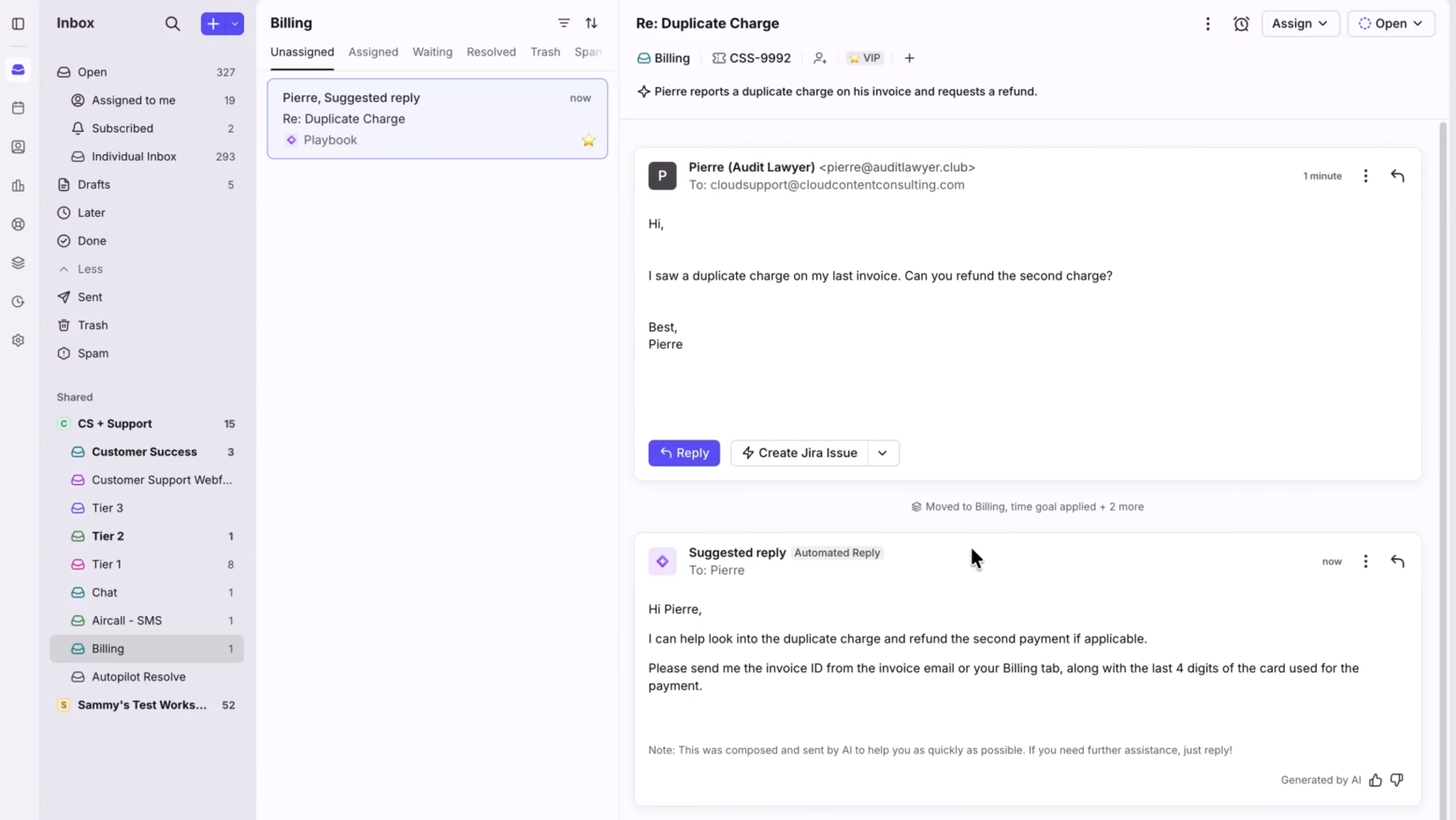
In our testing, Front's AI feature, Autopilot, was a great help in taking simple tasks off the help desk team’s plate. For common requests such as software access or invoice updates, the tool sorted incoming tickets, routed them to the appropriate team members, and provided agents with quick AI-generated summaries to maintain context. This significantly reduces the need to write manual handoff notes every time a ticket moves between departments.
The real standout during our review, however, is how Front handles cross-team collaboration. Agents can tag developers, tier-2/tier-3 teams, or finance managers directly on the thread using @mentions via internal comments, without the end user seeing the internal back-and-forth. It effectively eliminates the messy email chains, forwarded messages, and loss of context that typically plague help desk escalations.
Given such capabilities, we highly recommend Front for high-volume, multichannel customer support in industries where tickets frequently require handoffs to other teams and where high volume makes the ROI of automation obvious. Conversely, if you're running a smaller operation, managing primarily internal requests, or working in industries with lower ticket volume and simpler workflows, you're paying for capabilities you won't use.
BCG, IHG, Stripe, Uber Freight, Zoom
Front plans start at $25/seat/mo (Starter, up to 10 seats), $65/seat/mo (Professional, up to 50 seats), and $105/seat/mo (Enterprise). The Autopilot AI add-on starts at $0.05/conversation. Smart QA and Smart CSAT are included with the Enterprise plan or available as per-seat add-ons for Starter and Professional tiers.
Best For
IT help desk teams and organizations with high-volume, multichannel support tickets requiring cross-team routing, ticket triage, and automated workflow resolution.

Freshdesk
Freshdesk is a scalable solution for companies of any size. It packs strong features, including one for gamification to encourage agents to improve their output.
PROS
- Modern interface that doesn't require extensive training
- Multi-channel consolidation means email, chat, social, phone in one inbox
- Gamification feature produces real behavior change (agents respond faster)
- Scalable pricing allows you to add agents without major cost jumps
- Quick setup (30-45 minutes for basic email ticketing)
- Freshdesk enables your customer service team to offer proactive support across multiple channels, including Facebook, Twitter, email, and website, to engage your customers.
- Freshdesk is incredibly user-friendly. Your agents don’t need any specialized coding or technical knowledge to use it. Plus, it offers diverse templates with formatting components to simplify ticketing.
- Freshdesk's free plan is comprehensive, offering you all the features you would need as a small business and then some.
- With Freshdesk, your team can collaborate with each other and resolve issues faster.
- The platform comes with a mobile app that enables agents to provide support on the go. It’s available for both iOS and Android devices.
- In addition to a generous free plan, Freshdesk's paid plans provide great value for money. It gives you several advanced features like gamification at affordable rates.
CONS
- Advanced features require highest-tier plans, not always clear upfront
- Temporary access for seasonal or part-time workers requires a paid plan
- Lacks cross-departmental workflow capabilities if you need ITSM features
- No dedicated technical support, limited customization depth
- Freshdesk’s marketing is slightly confusing. Most of its advanced features require an upgrade to the highest pricing tears, which users don’t realize until after signing up. Here’s a free vs. paid plan breakdown, so you don’t find yourself making wrong decisions.
- You cannot provide temporary access to seasonal hires, part-time workers, or other team members in the Free plan. While this feature is available, you’ll have to upgrade to the premium plans.
- Freshdesk doesn’t offer dedicated technical support. As a result, complicated issues take longer to resolve.

Freshdesk is Freshworks' cloud-based ticketing system designed for support teams of 5-100 agents.
The interface is modern and doesn't look dated. Freshdesk positions itself as scalable: you can start with a small team and add agents as you grow without major replatforming. It's not the cheapest option and not the most feature-rich, but it occupies the middle ground effectively. If you're managing multiple support channels and want a platform that works without extensive technical configuration, this platform is worth evaluating.
Freshdesk’s multi-channel consolidation (email, chat, social, phone) worked as advertised, with tickets from all channels routed to a shared inbox. The knowledge base integration ensures that agents can insert relevant articles into ticket responses. Setup took 30-45 minutes for basic email ticketing and routing rules. The interface is intuitive enough that non-technical staff can perform most configuration tasks without help.
Freshdesk offers a free tier (2 agents, limited features) and paid tiers ($19- $ 119/agent). At the Growth tier ($29/agent), a 20-person team costs $6,960/year. This is reasonable but notably more than Zoho Desk ($23/agent = $5,500/year). We found that teams often need to move to higher tiers to access features they expect at lower-tier pricing (gamification, advanced automations, custom portals).
Fiverr, HP, Decathlon, Panasonic, NYU, Henkel, Pearson, Thai Union, American Express.
Freshdesk offers a Free plan for up to two agents for six months, covering core ticketing, a knowledge base, basic analytics, and team collaboration. Paid plans are split by support channel.
- Freshdesk Omni supports multiple channels (email, web, SMS, messaging apps) and starts at $29 (Growth). Higher tiers include Omni Pro ($79) for custom portals and advanced features, and Omni Enterprise ($119) for audit logs, skills-based routing, and advanced security.
- Freshdesk Email & Ticketing starts at $19 (Growth) for email-only support. Pro ($55) adds advanced routing and custom portals, while Enterprise ($89) includes compliance and security features. Both paid tracks offer a 14-day free trial.
- Freddy AI features are available as add-ons. AI agents and the Email AI Agent cost $49 per 100 sessions after the initial 500 free sessions. The AI Copilot suite is $29 per agent/month.
Best For
Consider Freshdesk if you're a growing support team managing multiple channels and want a modern interface without paying premium prices. It works well for 10-50 agents and for teams that don't need ITSM capabilities. Skip it if you need IT service management features (incident/change/release workflows) or if you're a solo user or a 2-person team (better options at lower price points).

I use the software every day to communicate with clients of our software, when they land on our website or when they send us an inquiry on our email and social media, we receive the ticket in our inbox and then respond to the email through the tool which this helps me to stay organized and monitoring communication amongst team to avoid disorganizations.

I like the knowledge base integration, it is easy to set the knowledge base that clients can use to find solution articles to their problems, as the pricing of the software is cheaper compared to other software tools providing the same services and products
I have used Freshdesk for two years to chat with clients through live chat on social media platforms about their issues with our services and products. Our company bought Freshdesk because it supports integration with more tools than other software and is easy to adapt to and understand. Lastly, managing agents becomes much easier with this tool.
It does not provide instant notification in my browser which makes it hard for me to stay on track with communication and at times makes us miss live chats from clients or delayed in getting back to our clients. Besides that, there are no other issues.
They provide enough support that makes you feel easy with the tool and their Whatsapp integration is direct and does not require technical skills. This reduces the time you use to deploy the Whatsapp channel in the tool.
They should consider the pricing of the software and the use case, this tool might be suitable for bigger businesses considering using the knowledgebase and would not suit smaller businesses therefore, pricing should be considered and the use case
They have improved the user interface for tickets, it is now easy to create tickets, find tickets, and solve them from the dashboard, and you can easily filter the tickets that are solved by other agents. Also, they introduced chat history which helps other agents catch up with communication of other agents with clients to avoid confusion in case a ticket is being transferred.
Organizations providing online services like software purchase
Smaller businesses with low-volume messages
Other Helpdesk Software & Ticketing Systems
- JitBit — For fast and simple help desk setup: JitBit is customer service software with a clean user interface; it has an inbox for all incoming tickets, a knowledge base for customers and agents to self-serve, and a reporting section with detailed dashboards that provide insights into all of your activities. Among JitBit’s features are automation rules and categories that help you stay organized and streamline numerous tedious processes. However, users we spoke with reported that managers cannot reopen closed tickets, forcing them to create duplicate tickets. Unanswered support tickets can be frustrating and cause delays. Searching for support tickets by tag can be time-consuming and inefficient.
- Vision Helpdesk — For multi-deployment flexibility: Vision Helpdesk is an affordable ticketing solution that companies of all sizes can derive value from. It collects customer queries and incident reports from multiple sources and pools them into tickets in a shared inbox that your support agents can respond to and resolve. However, the low price comes with a limited feature set and standard support. Many of the users we spoke with were dissatisfied with the assistance and configuration they received.
- Jira Service Management — For ITSM and deep integrations: Created by Atlassian, Jira Service Management is a collaborative IT service management (ITSM) solution that enables your support team to create multiple projects to track and handle customer support requests and incidents. The learning curve, however, is steep, while the platform can get expensive for larger teams and multiple projects.
- HappyFox — For customization capabilities: Geared mostly towards medium and large companies, HappyFox is a customer support solution that's highly customizable, easy to use, and quick to set. That said, it can be challenging to track which team member received what, and navigating the software can sometimes be confusing. Users have experienced maintenance downtime that prevented us from performing essential work responsibilities. The reported inability to export full tickets, only the original first message, is frustrating and inconvenient.
- Kayako — For customer journey-focused support: Kayako is a user-friendly customer support solution with cloud-based and on-premise deployment options. It packs many of the common features of ticketing systems, such as omnichannel support for incident logging, live chat, a help center for self-service, an analytics dashboard, integrations with social media channels, and popular third-party tools, customizable business logic rules for workflow creation, process automations, and more. Analytics, however, is a limited feature of the tool. It’s not easy to navigate, and it’s not very customizable either.
- SolarWinds Service Desk — For feature-rich IT service management: Besides allowing you to assign, prioritize, and escalate tickets collected from different sources, this system offers features for self-service, live chat, scheduled reporting, asset management, change management, network discovery, API access, and more. Yet, finding support can be challenging, and the initial setup can be time-consuming.
- Spiceworks — Free help desk ticketing system: With Spiceworks, you can offer your customers an omnichannel query collection to submit queries and share concerns across channels. You don't have to worry about the cost, thanks to the free service. Due to Spiceworks’ limited feature set, it isn’t very flexible. It lacks some desirable features, such as knowledge base management, interaction tracking, and prioritization.
Benefits of Using a Help Desk Ticketing System
Investing in a good help desk ticketing system enables you to boost team productivity, increase customer satisfaction and retention, and provide accurate data for continuous support operation improvement.
- Improve your team’s productivity: Help desk ticketing systems offer a host of features to save you time and enhance your team’s performance. They integrate with all of your customer contact channels to collect tickets then route them to a centralized location for your agents to pick up and resolve right away without needing to constantly monitor several channels and devices. Help desk solutions also allow you to customize workflows and automate many of your team’s manual tasks such as assigning, escalating, prioritizing, and categorizing tickets.
- Increase customer satisfaction, retention, and ROI: It’s a well-known fact in business that great customer service retains customers, and bad customer service drives them away. You might have a fantastic range of products, but it won’t mean much to your bottom line when your customers are unhappy because you’ve been taking too long to respond to their queries and incident reports or worse, missing their messages completely due to your overwhelming ticket influx from several contact points.
Using a help desk allows you to stay on top of all your customer interactions and deliver speedy support, which not only enhances customer experience and retention rate, but also turns your customers into your promoters, spreading the word about your reliability as a provider and eventually earning you more leads and successful signups. - Continuously fine-tune your support operations through accurate data: Manually monitoring your customer support KPIs is an impossible job and luckily, you don't have to do it. The majority of ticketing systems available today offer powerful analytics dashboards that provide you with detailed insights into what your team is doing well and what needs to be improved for you to continue observing your service level agreements (SLAs), drive customer satisfaction and deliver world-class service.
Common Mistakes Made When Buying a Help Desk Ticketing System
Some of the most common mistakes businesses make when choosing a help desk solution are overspending on unnecessary features, failing to account for future scalability, buying an entire suite when only one solution is needed, and making long-term commitments without thorough testing.
- Spending money on features you don’t need: ‘Premium’ doesn’t always mean ‘better’. Many small and medium-sized businesses choose a premium, enterprise-grade plan for the additional features it usually comes with, but in reality, only half of those features are used. We advise that you always invest selectively and wisely.
- Not accounting for future circumstances: Your business may see exponential growth within just a matter of months. It may also face financial hardships, which may require you to downsize your operation. No matter what the future holds for your business, you’ll definitely need your help desk plan to grow or shrink accordingly. Buying a help desk solution that isn’t scalable can be a costly mistake in the long run.
- Buying an all-in-one suite when all you need is just one or two specific solutions: This one is quite self-explanatory; if you only need a ticketing solution, opt for a provider that offers just that or selectively purchase a ticketing solution from an all-in-one suite vendor; never buy the whole suite.
- Making long-term commitments before thoroughly testing a solution: Some help desk vendors offer perpetual licenses that are purchased once only. While this reduces recurring costs and can save you a significant amount of money over time, you should do this only after thoroughly testing the help desk solution and verifying that it’s the right fit for you. Otherwise, you will end up going back and forth with the vendor on their cancellation and refund policy.
How Much Does Help Desk Software Cost?
Help desk software typically ranges from $7 to $39 per user per month, depending on the vendor, features, and team size. Most vendors provide a free trial, while free helpdesk systems like Spiceworks remain popular among smaller organizations. To give you an idea:
- Budget-friendly options like Zoho Desk start at $7/month, making them ideal for startups and SMBs.
- Mid-range tools such as Freshdesk, Freshservice, LiveAgent, Vision Helpdesk, Hiver, and Monday.com fall between $15 and $26/month.
- High-end solutions like Kayako and SolarWinds Service Desk start at $39/month and often offer advanced customization and enterprise-grade functionality.
- Custom pricing is standard for enterprise platforms such as ServiceDesk Plus and HappyFox, where costs vary based on deployment and global support needs.
While costs typically range from $7 to $39 per user/month, the pricing model determines how you’ll actually be billed.
- Per Agent (most common): You pay a monthly or annual fee for each support agent using the system. Some vendors bundle seats (e.g., up to 5 or 20 agents). This is the most cost-effective model for small teams.
- Per Device: Pricing is based on the number of devices using the help desk, rather than agents. It works best for companies where only certain machines need access.
- Per Ticket: A few vendors charge based on monthly ticket volume. This model requires a clear estimate of your average ticket load to avoid surprise costs.
- Per License (one-time fee): Mostly found with on-premise systems, where you buy a perpetual license once. While this avoids monthly costs, you’ll likely pay for upgrades and maintenance down the line.
Features of a Help Desk Ticketing System
Key features of help desk ticketing software include multi-channel support, workflow automation, a knowledge base, and reporting.
- Multi-Channel Support: Customers should be able to easily reach you through email, live chat, phone, social media, and more. A good ticketing system should integrate well with all your contact points to collect tickets and route them to a single shared inbox. This way, your agents can instantly receive and work on tickets on a single platform, without needing to monitor multiple channels and devices.
- Workflow Automation: Most ticketing systems let you create workflows and automate processes. You can automatically set ticket status and priority, assign and escalate tickets, send automated responses and follow-ups, and notify customers and agents of updates. Some systems also allow tagging for easier search and quick data retrieval for reports.
- Knowledge Base: A knowledge base is an online library of information about your products and services that customers can access at any time. It connects to your website and ticketing system so customers can quickly find answers to their questions, features, and processes. It also helps your staff by providing access to product docs, FAQs, internal guides, and playbooks at any time.
- 3rd Party Integrations: Not only should a good ticketing system integrate with multiple contact channels, but it should also integrate with popular customer relationship management (CRM), asset management, and team collaboration tools to further enhance your operations. You can usually find out whether a help desk integrates with your favorite products by checking its pre-built integration modules, which are usually listed on its website.
- Scalability: Your company’s size may double in a short period, and it's crucial for all your daily tools to continue supporting you. Thus, it’s important to consider its ability to store large volumes of data, the maximum number of user accounts it can support, as well as the maximum number of teams and customers it can handle.
- Reporting: With accurate, real-time data, help desk software lets you monitor your team's performance against SLAs, response times, and ticket resolution times. It should also include methods for collecting customer feedback through NPS and CSAT surveys, which can be automatically sent after tickets are closed.
Demo Questions
Before deciding on a help desk for your business, it’s recommended that you schedule demos with different vendors to make sure their solution covers all the needs of your business. Here are a few questions you can ask during your demo sessions:
- What communication channels does your solution integrate with?
- What customer support processes can I automate through your software?
- How does your software facilitate self-service?
- How does your solution measure customer satisfaction?
- How can I track my team’s performance through your software?
- Can I charge my customers for support given per ticket through your software?
- How much does the software cost for my team size?
Implementing a Help Desk Ticketing System
The majority of help desk ticketing systems are cloud-based, delivered through a software-as-a-service (SaaS) infrastructure. Getting started with a cloud-based solution is very quick and easy, as they all allow you to create an account and start configuring your instance right away once you’ve purchased a plan. On the other hand, on-premises help desks take longer to set up, and depending on your chosen vendor, you may need to consult them about their solutions’ compatibility with your current hardware and installation process, or, better yet, have them handle the installation on your behalf.
Help Desk Ticketing Systems FAQ
What is a help desk ticketing system?
A help desk ticketing system is a software solution that collects customer questions, requests, and incident reports from various channels and consolidates them into a single inbox for customer support agents to respond to swiftly and efficiently.
Who needs a help desk ticketing system?
Any company that wants to streamline its customer service operations and offer speedy support to its customers needs a help desk ticketing system.
What are the benefits of using a helpdesk ticketing system?
Using a helpdesk ticketing system allows you to:
- Boost your team’s productivity by automating manual tasks such as ticket routing and assignment
- Resolve tickets faster, which in turn increases customer satisfaction and retention
- Continuously fine-tune your support operations using accurate performance metrics.
What are the features of a help desk ticketing system?
The most common features of a helpdesk ticketing system are:
- Multi-channel support (email, live chat, phone, social media integration)
- Automatic ticket routing and assignment
- Canned responses
- Knowledge base
- Performance analytics
- SLA management
- CSAT surveys
What is the best help desk ticketing system for small businesses?
Zoho Desk and Freshdesk are two robust ticketing systems with free tiers and affordable plans that startups can use without breaking the bank. Both Freshdesk and Zoho Desk are also quite scalable, meaning that you can upgrade to more extensive plans as your business grows.
How much does a help desk ticketing system cost?
The majority of help desk ticketing systems use a ‘per agent per month’ pricing model. Depending on which help desk you use and the features you require, the fee can range anywhere from $7 to $39 per user per month.
Is there a free ticketing system?
Yes, there are some excellent free ticketing systems available, such as Freshdesk, Jira, Zoho Desk, and Spiceworks. For more details, see our free helpdesk software buyer guide.
Which is the best ticketing platform?
The choice largely depends on your business needs and budget, but often, Freshservice, Freshdesk, LiveAgent, and Zendesk are considered leading ticketing systems in the market.
What are the types of ticketing systems?
There are three main types of ticketing systems:
- Email-Based Ticketing Systems generate tickets from customer emails.
- Web-Based Systems allow ticket submission via an online portal for better tracking and categorization.
- Phone Support Systems create tickets from customer calls.
What is the difference between ITSM and a ticketing system?
ITSM (IT service management) is a broad strategy for managing all IT services, while a ticketing system is a tool used within ITSM to manage individual IT issues and requests. Essentially, ITSM is the overall framework, and a ticketing system is a specific part of that framework.
Final Advice
Choosing a help desk ticketing system can be a long process, but we’re confident you’ll make a good selection if you:
- Carefully consider your needs and budget and make purchases accordingly.
- Sign up for a trial period to experience the help desk first-hand and see if it’s the right fit for you.
- Schedule demos with different help desk vendors to get all of your questions answered.
About the Author


About Us

- Our goal at SSR is to help HR and recruiting teams to find and buy the right software for their needs.
- Our site is free to use as some vendors will pay us for web traffic.
- SSR lists all companies we feel are top vendors - not just those who pay us - in our comprehensive directories full of the advice needed to make the right purchase decision for your HR team.


