

9 Best Recruitment Automation Software Tools of 2026
Still copy-pasting interview links and chasing calendars? These recruiting automation tools fix that.











Recruiting is full of work that shouldn't require a human. Sending the same follow-up email for the 40th time. Checking three calendars to find one interview slot. Asking a candidate to reconfirm their availability because they missed the first message. These are solvable problems, and the right recruitment automation software solves them.
The harder question is which tool actually delivers. We've spent years evaluating HR technology at SelectSoftware Reviews, and recruitment automation is one of the most fragmented categories we cover. The range runs from lightweight ATS add-ons to full AI-driven hiring suites that handle sourcing, screening, scheduling, and onboarding with minimal human input. The marketing for almost all of them sounds identical.
For this guide, our team tested and researched over 40 recruiting automation platforms, running live workflows, building candidate pipelines, triggering automated sequences, and interviewing TA leaders who use these tools daily. We've focused on what actually matters in practice: whether the automation holds up under real hiring pressure, how candidates experience the process on the other end, and whether the time savings justify the cost.
The result is a shortlist of 8 tools we're confident recommending, plus a broader comparison of 20 platforms to help you orient across the full market. Whether you're a two-person People team drowning in scheduling, a TA leader at a mid-size company trying to standardize your process across departments, or an enterprise running thousands of applications a month, there's a tool in this guide built for your situation.
To build this guide, we evaluated over 40 recruitment automation platforms using a consistent methodology: live product testing, structured demos, input from TA professionals actively using these tools, and analysis of verified user reviews. Here's what we weighted most heavily and why.
- Automation depth and coverage: We mapped each platform against the full hiring funnel (i.e., sourcing, outreach, screening, scheduling, interviewing, and onboarding) and tested whether the automation held up under realistic conditions. That meant building multi-step candidate sequences, triggering conditional logic based on application responses, and stress-testing scheduling workflows across time zones and panel configurations. Tools that automate one stage well but drop the ball elsewhere got marked down accordingly. Tools that automate broadly but shallowly with clunky configuration or brittle edge-case handling fared no better.
- Candidate experience: Given that 2 in 3 job applicants accept an offer because of a positive candidate experience, we prioritized software that not only acts quickly but also keeps candidates engaged and well-informed throughout the hiring process. Features we assessed include how quickly candidates received responses, whether communication felt human or robotic, how self-scheduling portals actually behaved on mobile, and whether rejection messaging was handled with any care at all. Platforms that treated candidate communication as an afterthought didn't make the shortlist regardless of their recruiter-facing features.
- Reporting and actionable analytics: The best recruitment software goes beyond collecting data. It provides actionable insights that empower recruitment managers to make informed hiring decisions and optimize the application process for better hiring outcomes. We evaluated each tool's reporting capabilities against what a TA leader actually needs: time-to-hire by stage, funnel conversion rates, interviewer load distribution, and candidate drop-off points. We specifically tested whether insights were accessible without exporting CSVs or writing custom queries, and whether the data was granular enough to inform process changes rather than just confirm what you already knew. Dashboards that looked impressive but couldn't answer basic operational questions got flagged.
- Ease of setup and ongoing management: The best automation is automation your team will actually use. We paid close attention to how long initial configuration took, how much technical knowledge was required to build and modify workflows, and whether non-technical recruiters could manage the system day-to-day without IT involvement. We also looked at onboarding support to see whether it reflected how the product actually behaves. Several platforms we tested had polished marketing sites and help documentation that hadn't been updated since a UI overhaul. A few took days to respond to a basic support query. That gap matters most at 9pm the night before a full interview day, which is exactly when you'll need the answer.
Want to dive deeper into our evaluation process? Check out this detailed article on How We Evaluate HR Tech Vendors.


Juicebox

We chose Juicebox for its fast progression, shipping powerful features like “Find Similar Profiles” that drastically speed up list building. Combined with private agents and improved ATS integration, it’s not an exaggeration to say the platform is one of the most forward-looking automation tools we’ve tested.
PROS
- Multi-sequence, multi-sender tools for managing candidates across multiple roles
- Smart sequence scheduling and engagement tracking with “interested” toggle
- Auto-drafted replies, snippets and sequence status tags reduce repetitive tasks
- AI Agents, ATS exports, and reusable sourcing workflows reduce manual recruiter work
- Reusable search and Autopilot presets for fast campaign scaling
- Natural-language search across 800M+ profiles from 30+ data sources
- Find Similar Profiles instantly expands candidate pipelines from ideal candidates
- Multiple AI-assisted ways to filter candidates, including natural-language prompts, Boolean, and manual options.
- AI sourcing agents and contextual reasoning automatically rank candidates against custom hiring criteria.
- Offers advanced filters like career growth signals and funding-stage targeting.
- Agents automate sourcing and messaging workflows.
- Multi-step outreach sequences support both email and LinkedIn channels.
- Native Find Similar Profiles functionality helps recruiters quickly expand candidate pipelines from ideal examples.
- Talent Insights provides market and talent pool intelligence for smarter sourcing decisions.
- Frequently rolls out new features and product enhancements.
CONS
- Focused primarily on sourcing and recruiting automation rather than full applicant tracking.
- Advanced support and certain enterprise features are reserved for higher-tier plans.
- Primarily focused on sourcing and outbound recruiting rather than full-funnel recruiting workflows.
- Non-enterprise plans are offered only self-help support with no phone assistance.
- Sequencing functionality is still maturing.
Juicebox has quickly become a tool we pay close attention to in the recruiting automation space due to its rapidly evolving feature set and focus on reducing sourcing and outreach work.
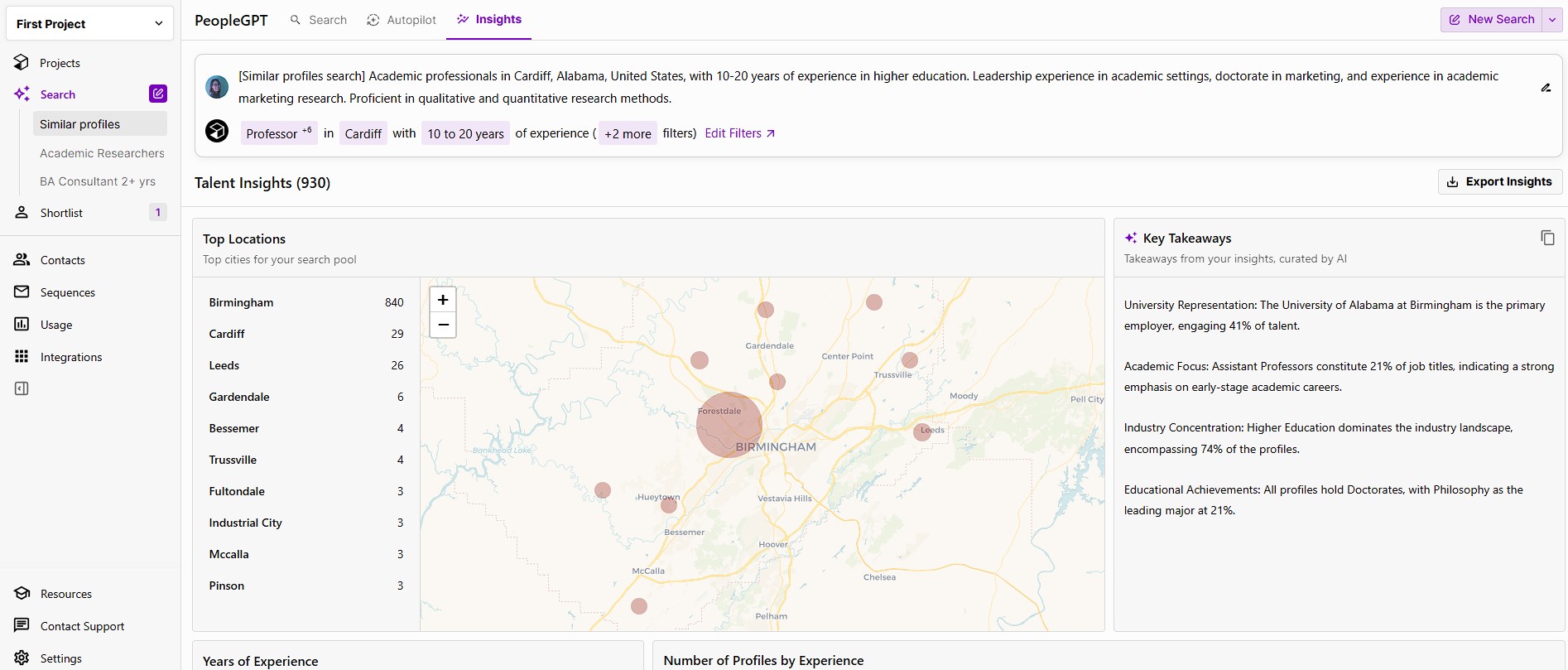
What separates Juicebox from many recruiting automation tools is that it combines sourcing, candidate discovery, and outreach in a single workflow.
One area we found particularly useful was how it handles candidate outreach across multiple roles. Multi-sequence enrollment and multi-sender sequences let us reach the same candidate for different positions without creating inbox chaos, while sequence scheduling automatically spreads emails across daily limits, and the new "interested" toggle provides a quick view of candidate engagement.
We also appreciated some of the smaller workflow enhancements, including auto-drafted replies, snippets, and sequence status tags. Auto-drafted replies handled basic candidate responses reasonably well, snippets reduced repetitive writing, and sequence status tags made follow-ups easier to prioritize.
Beyond outreach, Juicebox's natural-language search allows recruiters to describe ideal candidates in plain English and search across 800M+ profiles. AI Agents continuously source candidates based on recruiter feedback, while Find Similar Profiles helps recruiters expand talent pools using successful candidates as a starting point.
Behind the scenes, AI Agents, ATS exports, and reusable sourcing workflows help reduce some of the repetitive work involved in sourcing. We could set daily sourcing targets for multiple agents, skip profiles already in the system, and run several agents simultaneously without losing track of progress. Reusable search and Autopilot presets meant we didn't have to rebuild campaigns from scratch every time, although we found that careful setup still plays an important role in achieving precise results. Some advanced integrations and workflow automations are reserved for higher-tier plans.
Compared with Rolebot, Juicebox gives teams more direct control over outreach. Rolebot's vendor-managed approach may appeal to teams looking for a more hands-off experience, though it comes at a higher monthly cost. With Juicebox, recruiters manage their own sequences, which requires more involvement but also offers greater flexibility and a lower overall cost.
Support follows a similar pattern. Enterprise customers receive a dedicated success manager and faster response times, while Starter and Growth plan users rely primarily on documentation and email support. For lean recruiting teams, that's something worth considering upfront, though we found the platform relatively straightforward to navigate once workflows were established.
Juicebox Key Features
- Multi-source candidate sourcing with advanced filters
- AI-generated search queries and candidate matching
- Automated candidate screening and ranking
- Personalized outreach with automated follow-up sequences
- Outreach analytics including opens, replies, and conversion tracking
- ATS integrations and candidate pipeline management
- Natural-language candidate search
- AI Agents for continuous sourcing
- Find Similar Profiles for pipeline expansion
- Talent Insights for labor market and talent intelligence
5k+ companies use Juicebox, including Perplexity, Assured, and AngelList.
Juicebox offers a free plan and three paid plans, starting at $119 per user per month.

Best For
Juicebox is best suited for recruiting teams and staffing agencies that want stronger sourcing and outreach automation without replacing their existing ATS or recruiting systems.

GoodTime
GoodTime delivers on one of the most critical but often overlooked parts of the hiring journey: interview coordination. Their workforce of AI agents, dubbed Orchestra, handles complex interview scheduling, answers candidate questions, ensures interview loads are balanced, and more. These advanced features make it one of the strongest tools we’ve seen for scaling high-quality candidate experiences without burning out recruiting teams.
PROS
- Branded candidate portals with self-scheduling
- AI agents for panel coordination, time zones and interviewer selection
- Interviewer training with shadowing, certification tracking and auto-reminders
- Operational dashboards with bottleneck detection and time-to-hire suggestions
- SMS and WhatsApp outreach and candidate screening
- Proactive CSM support and extensive self-help resources
- GoodTime’s automation speeds up hiring, making it possible to complete the entire candidate pipeline within two weeks.
- The platform offers extensive customization, such as creating custom tags, setting interviewer availability, and designing templates for panels and emails.
- Custom branding options reflect your company's personality, making the tool feel more engaging and less generic.
- Their customer support is excellent, with 24/7 chat assistance, a dedicated Customer Success Manager, and a team that actively addresses bugs and feedback.
CONS
- Designed for companies with 250+ employees, not suited for smaller teams
- Requires ATS integration to function as a full recruiting suite
- Steep learning curve and occasional portal glitches reported
- Premium pricing hard to justify for some teams
- Because of its complex functionality, GoodTime’s user interface can be a bit tricky for a new user to navigate.
- Occasional bugs are reported by its users, mainly related to syncing with the calendar and ATS.
- Unless your team hires a large number of people, GoodTime can be expensive.
GoodTime is a category leader when it comes to automated interview scheduling, and for many TA teams, that alone makes it an indispensable part of the tech stack. The platform is built for speed, efficiency, and an elevated candidate experience, particularly for organizations dealing with high volumes of interviews, panel coordination, or multi-time-zone hiring.
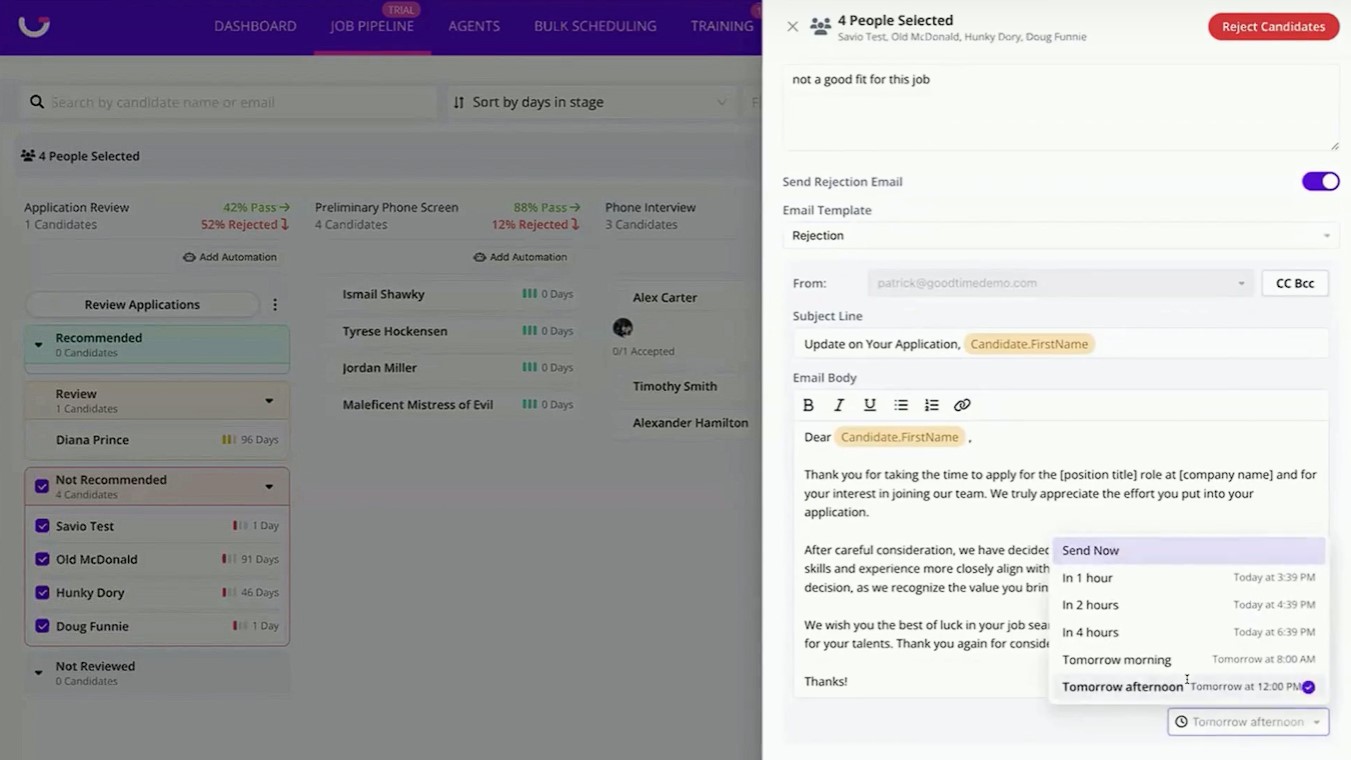
From our experience with the product, the branded candidate self-scheduling portal is the most outstanding feature. Candidates receive personalized links, can select interview times in their own time zone, and are automatically updated across email, SMS, or WhatsApp. It’s a clean, polished experience that minimizes back-and-forth, and it’s handy for companies running global hiring pipelines.
On the recruiter side, GoodTime’s AI agents do a great job at automating scheduling logistics based on calendar availability, interviewer load, and priority roles. During our testing, panel interviews across multiple departments were arranged in minutes. Recruiting coordinators also get real-time alerts if interviews need to be rescheduled or interviewers drop out, making it far easier to keep things on track.
We equally had a high opinion of the embedded interviewer training tools. With them, you can assign shadow sessions, track interviewer progress, and get automatic alerts when someone needs retraining. For companies trying to scale interview capacity or standardize quality, this built-in infrastructure saves time and ensures consistency. If you’ve checked out other interview scheduling solutions we’ve tested, you’ll notice that it's rare to see one addressing interviewer readiness this directly.
Although we didn’t experience it ourselves during our evaluation, some verified users we were in touch with noted that GoodTime can take time to set up, particularly when configuring complex custom workflows. For teams without dedicated recruiting operations support, implementation may feel daunting at first. That said, GoodTime’s proactive customer success team and in-person enterprise onboarding are available to help with the process.
Pricing is another consideration. GoodTime is positioned as a premium solution with custom pricing based on company size and needs, which may be a barrier for smaller teams but is generally aligned with enterprise-grade capabilities and support.
Lastly, and importantly, the platform isn’t an all-in-one recruiting solution and hasn’t tried to be one. It’s hyper-focused on meeting scheduling and coordination, so if you need applicant tracking, sourcing, assessments, or onboarding features, you’ll want to connect GoodTime with an ATS or a broader HR tech stack. For many buyers, that best-in-class focus on coordination, communication, and automation is a strength, but teams looking for a consolidated all-in-one system may see it differently
GoodTime Key Features:
- Automated interview scheduling for complex and high-volume hiring
- AI-driven coordination of interview panels and candidate logistics
- Candidate communication via SMS and messaging
- Scheduling analytics and hiring performance insights
- ATS integrations for real-time data sync
- Support for event-based hiring (e.g., campus and bulk interview days)
GoodTime serves over 300 companies, including HubSpot, HelloFresh, and Pinterest.
GoodTime’s pricing is custom, based on annual candidates rather than user count. It includes all essential features and integrations, with no tiered plans. Add-ons are available for enhanced functionality to meet unique team needs.
Best For
GoodTime is an excellent option for organizations that meet its eligibility threshold (250+ employees). This isn't a soft suggestion, as given GoodTime's pricing model and feature set are built for companies at this scale, smaller teams will find both the cost and the implementation overhead hard to justify.

We use GoodTime to automate and streamline interview scheduling with candidates. It integrates with our Google Calendar and Greenhouse to match interviewers and candidates based on availability.
GoodTime also helps us coordinate panel interviews, save time, and manage interviewer load. It reduces manual intervention and ensures a more consistent process across all hiring stages. We rely on it daily for operational efficiency in our recruitment workflows.
- GoodTime automatically schedules interviews, significantly reducing time and manual effort.
- It provides a professional and streamlined self-scheduling experience for candidates.
- The portal offers analytics on interviewer performance, time-to-hire, and scheduling efficiency, which helps us make informed improvements in our hiring process.
We decided to purchase GoodTime in 2023 to improve the efficiency of our recruitment process.
Before implementing GoodTime, our recruiting team spent an excessive amount of time coordinating interview schedules, exchanging countless emails, managing time zone mismatches, handling limited visibility into interviewer availability, and resolving scheduling conflicts.
This slowed our hiring process and created substantial manual administrative work. Our time-to-hire ranged from 6 to 12 weeks and contributed to an unprofessional candidate experience.
With GoodTime, we automated interview scheduling, aligned interviews with hiring team availability, and ensured a consistent candidate experience. The time spent scheduling interviews was reduced by over 40%, allowing the recruitment team to focus on candidate engagement and strategy.
We shortened our overall time-to-hire by an average of 15%. Candidates appreciated the ease of scheduling, and hiring managers found the process more streamlined and transparent.
I have been using GoodTime for over two years and have seen measurable improvements in scheduling speed and candidate satisfaction. One standout benefit is its ability to optimize interviewer load balancing, helping us scale hiring without overburdening the recruitment team.
- We found the interface and setup process complex initially, especially when integrating with Greenhouse.
- The pricing was slightly high for us as a startup.
- Customization was limited, and our more complex workflows were difficult to implement.
- The platform has bugs and can confuse candidates when scheduling interviews across international time zones.
GoodTime stands out by focusing heavily on automation and optimized interviewer matching. Unlike Calendly, GoodTime offers features tailored for high-volume recruiting and provides better control over the interview process.
When buying a tool like GoodTime, key criteria include seamless integration with your ATS, calendar, and communication tools—especially since we encountered issues with Outlook. It should be user-friendly for recruiters, interviewers, and candidates.
If your hiring teams are distributed globally, ensure it supports time zone alignment and is scalable. Lastly, assess the pricing structure, included features, and the quality of customer support.
When I started using GoodTime, the dashboard and navigation were not user-friendly. Over time, the platform introduced a redesigned dashboard with improved navigation, making it easier to track interview progress. The multi-day calendar view enhanced scheduling flexibility.
Reporting tools have improved, allowing data filtering by department and reducing scheduling errors. Integration with Greenhouse has also strengthened, particularly with bulk messaging capabilities.
GoodTime is ideal for mid-size to large companies with high-volume hiring needs. It suits recruiting teams that conduct panel interviews, operate across multiple time zones, and aim to prevent recruiter and interviewer overload. It is especially effective for organizations using Greenhouse or Lever.
GoodTime may not be suitable for small organizations or startups with infrequent hiring. If you only schedule a few interviews each month and don’t require panel coordination, the tool may be too complex and expensive. In such cases, simpler tools like Calendly or manual scheduling may be more practical and cost-effective.

Greenhouse
Greenhouse’s strength lies in how well it supports structured hiring. Whether you're automating candidate communications, building approval flows, or enforcing interview consistency, this recruiting platform gives you the tools to move fast and hire well, at scale.
PROS
- Workflow automation across the full hiring funnel
- Self-scheduling, auto-advance and rejection triggers for recruiter efficiency
- Structured interview kits and role-specific scorecards for consistent hiring
- Rich customization of pipelines, approval flows and hiring plans
- 500+ native integrations including calendars, HRIS and assessments
- Greenhouse's onboarding feature is built and executed well. New hires transition smoothly from candidate to employee.
- iOS and Android apps work well for recruiters on the go. Users can review applications, schedule interviews, view candidates' profiles, and more.
- 450+ third-party integrations.
CONS
- Requires clearly defined processes, limiting value for early-stage teams
- No native video interviewing or multi-channel sourcing
- Limited visibility for external recruiters and agency users
- Premium pricing may be a barrier for smaller teams
- Greenhouse’s pricing is undisclosed, and they do not offer a trial version.
- Some users note that reporting customization is quite limited and difficult to navigate.
- In-person/live support could be improved.
We’ve gone hands-on with Greenhouse multiple times over the years, and it’s one of the few tools we’ve seen that actually delivers when it comes to real-world recruiting automation. Not “AI does everything for you” kind of automation, but the useful kind: auto-triggered emails, candidate self-scheduling, customized scorecard flows, and conditional logic that helps your team spend less time on logistics and more time on hiring.
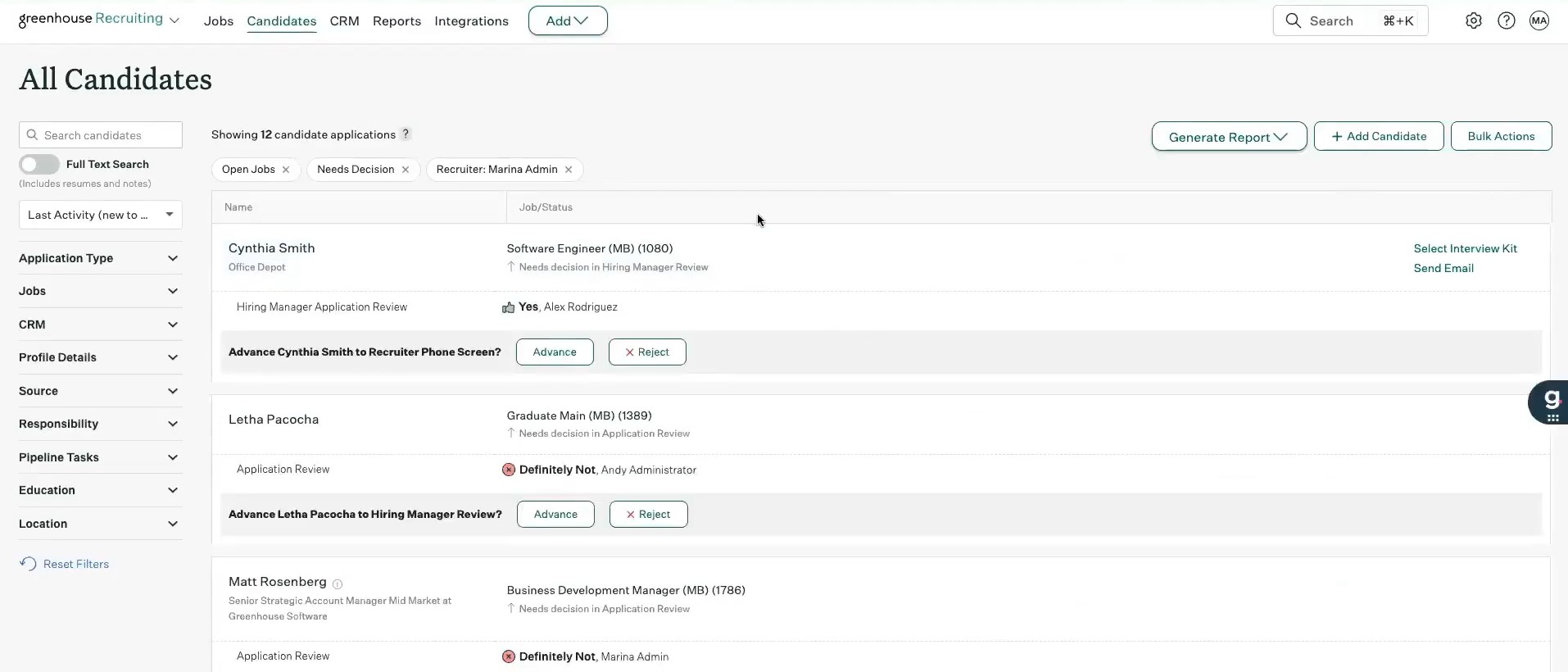
One feature that stood out immediately in our most recent test was how easy it was to build a hiring plan with branching workflows. We set it up so that qualified candidates received an automatic scheduling link for the first interview, while others were sent a polite rejection without any manual work from our end.
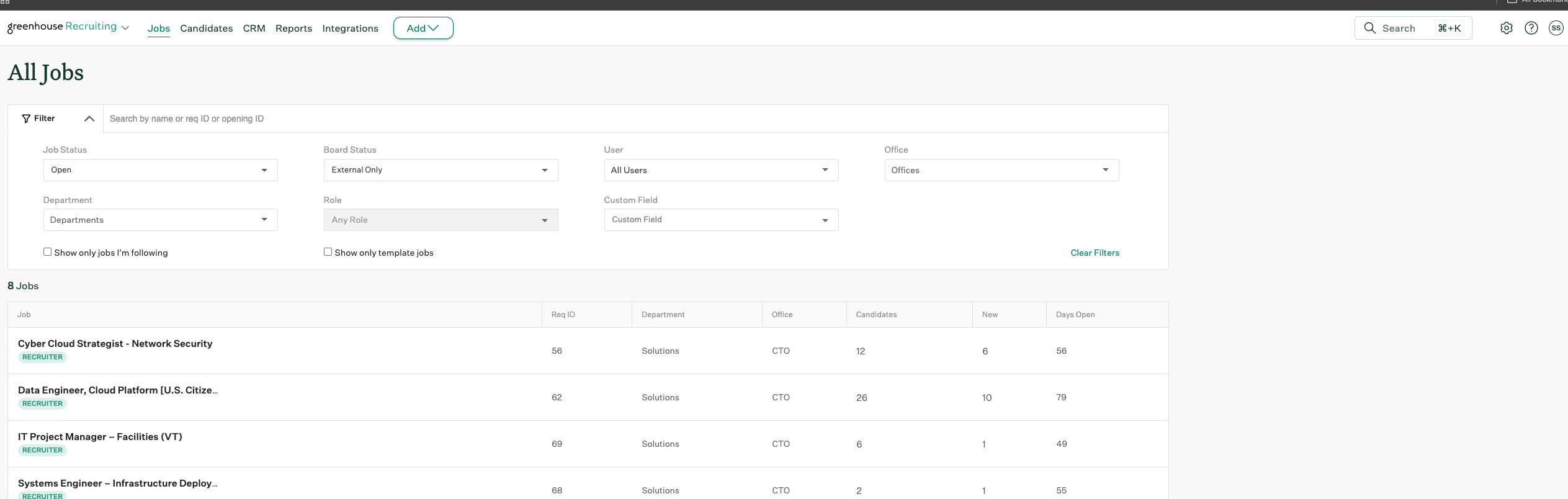
Self-scheduling, in particular, was our favorite. After syncing our Google Calendar, we sent scheduling links directly to candidates and let them pick their own slots. No follow-up needed. No “Did this person schedule yet?” emails. Across a week with active reqs, this saved us about 20 minutes per role. Multiply that across 8 to 10 open jobs (what a typical TA at a midsize org might manage) and you’re looking at hours saved every week.
Greenhouse also brings a level of structure that’s easy to appreciate once you’re inside the system. Interview kits clarify who’s asking what. Scorecards keep evaluations focused and consistent. You can even build knockout logic based on form inputs to automatically advance or disqualify candidates.
Reporting has come a long way, too. We built a time-to-hire dashboard for one test department and added a DEI funnel report for leadership, all without leaving the platform or downloading a single CSV. Being able to pinpoint where candidates are getting stuck in your funnel is the kind of operational insight that can shift a reactive team into a more strategic one.
That said, Greenhouse is most effective when your workflows are already in good shape. If you’re still figuring out your interview stages or bouncing approvals between Slack threads, the configuration process might feel more frustrating than freeing. This platform expects you to come in with a process and rewards you for it. It won’t build one for you.
Another limitation worth naming upfront, if your hiring model involves external recruiters or staffing agencies: Greenhouse's agency collaboration tools are underdeveloped relative to the rest of the platform. Agency partners don't get meaningful pipeline visibility, status updates typically have to be shared manually, and there's no clean way to give a search firm the access they need without overprovisioning. If a significant portion of your hiring runs through third parties, this will create friction, and it's not friction that a workaround can easily fix.
Finally, while Greenhouse integrates with just about every major HR tech vendor you can name, the recruiting platform doesn’t seem eager to build those capabilities natively. And that’s intentional. If you’re looking for a do-everything platform out of the box, this isn’t it, at least for now.
Greenhouse Key Features:
- End-to-end recruiting platform from sourcing to onboarding
- Structured hiring workflows with customizable pipelines
- AI-powered automation for screening and hiring tasks
- Candidate tracking and centralized data management (ATS)
- Interview coordination and standardized evaluation processes
- Reporting, analytics, and hiring performance insights
SpotHero, PetVet, Zerocater, CarGurus
Greenhouse offers three plans:
- Core: Foundational tools for structured, consistent hiring and a robust candidate experience.
- Plus: Adds automation, advanced configuration, and in-depth reporting to Core features.
- Pro: Enterprise-grade plan for complex, global hiring, including governance, security, comprehensive analytics, and extensibility.
Best For
Greenhouse is best for internal TA teams at mid-sized to enterprise organizations that want to automate repeatable hiring processes across multiple roles and departments. It’s especially strong for companies focused on consistency, speed, and structured decision-making.

We use Greenhouse end-to-end across our entire talent acquisition lifecycle:
- Creating requisitions with structured approval flows
- Managing all candidate pipelines in one place
- Scheduling interviews with automated reminders
- Running scorecard-based evaluations aligned to competencies
- Integrating background checks, assessments, and HRIS tools
- Automating candidate emails, compliance questions, and EOD checklists
- Using reports for capacity planning, SLAs, and DE&I tracking
Greenhouse is not just a repository, it supports a smooth, fully documented, data-driven hiring process.
- Extremely structured workflows that drive consistency across all teams
- Scorecards that improve interview quality and reduce bias
- Automations for candidate emails, reminders, and task assignments
- Powerful integrations (LinkedIn, job boards, background checks, assessments)
- Intuitive UI that even non-technical hiring managers can use
- Reporting dashboards that support forecasting and process improvement
- One of the most user-friendly enterprise ATS platforms I’ve used
We purchased Greenhouse to modernize and centralize our recruiting operations. Before Greenhouse, our process was manual, inconsistent, and heavily dependent on spreadsheets and email chains.
We needed a platform that could standardize workflows, improve hiring manager engagement, and provide real-time visibility into pipelines and reporting.
We've been using Greenhouse for over a year now, and it has become the backbone of our recruitment process.
- Reporting is powerful but has a learning curve and may require customization
- The scheduling calendar sync occasionally experiences delays during peak hours
- Some integrations (especially government contractor-specific tools) require custom setup
- Limited inline editing—you often have to open multiple screens to update details
- None of these are deal-breakers, but they could be more streamlined
Compared to other ATS platforms, Greenhouse excels in:
- Structured hiring methodology—not just a tracking system
- Scorecards and interview kits, which competitors often lack
- More mature, plug-and-play integrations
- Superior user interface
- Better onboarding for hiring managers
- Consistent workflow logic that isn’t dependent on recruiter preference
It’s built for scalability and disciplined recruiting processes.
- How structured and consistent do you want your hiring process to be?
- Do you need automation to offset limited TA bandwidth?
- Will your hiring managers actually use the system?
- How important is reporting for leadership, SLAs, and forecasting?
- Does your company need integrations with HRIS/payroll/compliance tools?
- Do you expect to scale hiring or manage government-compliance workflows?
These criteria determine whether you need a lightweight ATS or a full enterprise platform like Greenhouse.
We’ve seen Greenhouse:
- Add new automation capabilities
- Expand the integration marketplace
- Improve hiring manager task workflows
- Enhance scorecard, interview kit, and feedback capture tools
- Release more robust dashboards and pipeline analytics
- Improve mobile and remote collaboration features
They consistently update the platform and incorporate customer feedback.
Greenhouse is ideal for:
- Organizations that value structured hiring
- Teams with multiple hiring managers who need alignment
- Companies planning to scale or mature their TA function
- Firms that need auditability, compliance, and tracking
- Distributed or remote teams
- Government contracting firms that require documentation and workflow discipline
It is especially strong for TA teams focused on efficiency and quality of hire.
Greenhouse is not a good fit for very small companies that hire only a few roles per year.

Workable
Workable has long been a favorite of SMBs, and we can see why. Through our intensive testing, the recruitment software proved to be a well-rounded ATS that nailed both the candidate experience and automation flexibility while allowing for friendly monthly billing instead of only yearly contracts.
PROS
- Native sourcing, video interviews, assessments and Core HR in one platform
- Sophisticated automation for thank you notes, disqualifications and self-scheduling
- Highly customizable interview and communication templates
- Free trial with transparent pricing and monthly billing
- 290 native integrations plus API support
- You can post jobs with one click to over 200 sites. You also get access to access to Workable’s talent pool with over 400 million profiles.
- Workable has built-in cognitive and personality candidate assessment. The platform also has features for offer management, which means you can create offer letters and collect e-signatures without needing to use third-party tools
- You can reduce unconscious hiring bias with Workable’s anonymized screening feature. It helps you hide identifying candidate information from the sourced and applied stages of the hiring process.
CONS
- Employer interface available in English only
- Higher priced than alternatives like Recruit CRM and Manatal
- Not designed for staffing agency use
- Workable doesn’t provide automated reference checking and onboarding features.
- Useful features such as candidate texting, video interviews, and assessments are not offered in any of Workable’’s plans and instead, sold separately.
- Several users complained about the reporting feature not being detailed or customizable enough, and that the candidate search function could use more filters.
We’ve been familiar with Workable for years. Still, our latest test cemented our understanding of it as an ever-evolving and SMB-friendly tool with a remarkable focus on recruitment automation.
The first feature that caught our attention this time was the no-code career page builder. Simple and intuitive, this feature skips the bells and whistles to provide a practical and comfortable space. It enabled us to craft a career page that reflected our brand within a matter of minutes.
For those frequently handling hiring across different regions, we think you'll appreciate Workable’s built-in Language Kit. It fully translates the candidate-facing experience— from job postings to offer letters— into French, German, Greek, Spanish, and Portuguese. The only part we didn’t like here was that the hiring team’s interface remained in English—it would have been nice to have that same flexibility in the backend.
Now, on to our favorite part: the messaging automation. The range of pre-built templates was vast, and there was even a search bar to help us find what we needed quickly. The personalization options were also awesome, with placeholders for candidate names, company, and interview scheduling links, among a handful of others.
We had a great time playing around with the automation templates. Whether it’s sending out thank-you emails, disqualifying candidates, or sharing links for self-scheduling interviews, it only took us a few clicks to get the system smoothly running on its own.

If making your hiring process more inclusive is on your agenda, you’d want to try this tool. Besides the multi-lingual candidate interface, Workable offers a candidate profile anonymization feature that, in our tests, instantly masked personal details like names, photos, and social profiles.
However, at $299 per month, Workable is definitely not the most budget-friendly option we’ve tested, especially when compared to competitors like Manatal or Recruit CRM.
On a last and meticulous note, it's not possible to auto-merge candidate profiles on Workable at the time of our test. It’d require some manual labor to avoid losing important communication history with candidates. While not a major issue, we thought it was worth mentioning in case you often deal with duplicate profiles.
Workable Key Features:
- Multi-channel job posting and candidate sourcing (job boards, database, social media)
- AI candidate recommendations, screening, and profile summaries
- Candidate pipeline management with ATS and talent CRM database
- Automated candidate communication (email, SMS) and workflows
- Interview scheduling, self-scheduling, and video interviewing
- Reporting, analytics, and customizable hiring workflows
30,000+ companies, including IT Concepts, Karo Healthcare, and Access Services.
Workable offers two recruiting software plans: Standard ($299/month), and Premier ($599/month). Additional premium tools like Texting, Video Interviews, and Assessments start at $59/month. Discounts are available for bundled purchases of Recruiting and HR products.
Best For
Hyper-growth SMBs seeking a candidate-centered recruitment automation solution with in-house HR capabilities.
At my organization, we use Workable daily, as it is one of our main HRIS systems. We rely on Workable as our ATS for managing recruitment processes and candidate onboarding.
A key benefit is that it allows us to source and attract talent by posting job openings across multiple job boards from one platform. This has resulted in a 60% increase in applications submitted to our company.
We also use Workable to track applicants through the entire hiring process, from start to finish, without needing to switch between the three different systems we previously used.
- Ease of use: Workable is easy to use, and both I and other employees learned it quickly. When training new employees, they appreciate that the interface is user-friendly and not overwhelming.
- Integration: Workable is compatible with other platforms, which made the transition from our previous ATS smooth and straightforward.
- All-in-one functionality: Workable combines hiring, recruiting, and employee management into one system, making our processes more efficient and helping us meet our hiring goals faster.
My organization was encountering several issues with our human resource processes. One of the biggest challenges was having to use multiple platforms throughout our hiring and recruiting processes—one for ATS, another for HRIS.
Training our human resource specialists on how to use so many different platforms became tedious and frustrating, as it took too much time to onboard employees.
At times, our systems failed to integrate with each other, which required manual processing of forms and documents. If one system was down, it would delay or completely halt our processes, slowing down both hiring and processing timeframes.
Our management team decided to implement Workable into our hiring process, which made a tremendous improvement. Workable was easy to use, so training employees took far less time than before. It was also compatible with other tools our team was already using, which made for a smooth transition.
The best part of Workable for me is the automation—it streamlined repetitive hiring tasks and simplified the recruitment process. I have used Workable for over three years.
- Some of our existing systems were not compatible with Workable, so not all integrations worked as expected.
- The data tracking and analytics in Workable are not always accurate, and we sometimes have to track data separately to verify hiring numbers.
- There is limited room for customization, as the platform’s layout and features are fairly standard and not highly configurable.
I think Workable ranks very highly compared to its competitors. The ATS, hiring, and recruitment features are among the best I’ve used because everything is in one place and easy to operate. The ability to post jobs across various job boards from a single platform makes it especially effective.
Cost should be considered when purchasing Workable, as it may be expensive for smaller companies. For larger organizations, it’s a better fit. You should also evaluate your intended use of the platform.
Workable is excellent for ATS, recruiting, and employee management, but not ideal for needs like benefits administration, payroll, or organizational development.
Workable is ideal for mid-sized to large organizations that focus primarily on recruitment, hiring, and placement.
A middle to large sized organization who focuses predominantly on recruitment - hiring and placement
Very small organizations may find Workable too costly. It may also not be suitable for companies looking for a complete HRIS solution that includes payroll, benefits, performance management, and training and development.

Humanly
After testing Humanly, we found it an excellent tool for teams focused on comprehensive sourcing and candidate outreach, especially if you already have an ATS. Its standout features, like the Calibration Candidates and transparent automation, make it easy to tailor sourcing and engage with candidates thoughtfully.
PROS
- AI chatbot for screening, scheduling, note-taking and follow-up generation
- Automated candidate recommendations, outbound campaigns and referral programs
- Team-based sourcing and collaboration tools
- AI sourcing across 600M+ candidates and integrated ATS databases
- Two-way integration with 40+ ATS systems
- Humanly leverages a huge database of candidates to present you with talent from all corners of the globe. You can also source new ones through their Chrome extension while browsing sites like LinkedIn and GitHub.
- The Humanly tool integrates with hundreds of ATSs, providing an upgrade to your sourcing that won’t require you to switch tools.
- Generative AI is cleverly implemented for messaging candidates, automating campaigns, and ranking candidates at various stages of the hiring funnel, yet a human can step in and take over at any time.
- Their reporting module is among the cleanest and most in-depth we’ve seen for this kind of tool.
CONS
- Lacks core ATS features like job posting and resume parsing
- Steep pricing with no free trial or free plan
- No candidate personal information masking for reviewers
- Since it’s a tool that was relaunched after a company acquisition, there might be some changes in the near future that could impact your workflows.
- The price point might be a bit steep for smaller teams, but they do offer custom prices based on the functionality you need and the number of users.
If you’re looking for a sourcing tool specializing in outreach and campaign management, Humanly might be your solution— especially if you already have an ATS. After testing it, we found it’s built to streamline outreach and handle sourcing with impressive depth, though it’s not designed to replace traditional ATS features like job postings or onboarding.

Setting up campaigns on Humanly is quite intuitive, with many useful customization options. You can choose who sends the messages and who handles replies. Once we were done with the campaign setup, the system took less than a minute to create a sequence of one initial message and three follow-ups, and we liked that it gave us full control over the messaging content and timing. Plus, this flexibility even extended to various Job Settings, including a unique feature that notifies recruiters when a candidate updates their LinkedIn profile— a nice little nudge for timing the outreach, don’t you agree?
Now, onto our favorite feature: Calibration Candidates, which offers AI-driven sourcing recommendations based on filter criteria and similarity to selected candidates. The fact that the calibration candidates can be sourced from recent activity on Humanly as well as our integrated ATS made it totally on par with other popular brands in the sourcing tech landscape like Fetcher and Rolebot. Moreover, we could also add "calibration candidates" directly from LinkedIn URLs, which we found pretty neat when we have someone specific in mind to guide the AI.
Even better, we could help the AI learn by giving feedback on candidate attributes we liked or disliked, and the smart filtering tool made it easy to define "must-have," "nice-to-have," and "dealbreaker" criteria for more nuanced sourcing.
Regarding candidate communication, we appreciate this tool's balance between automation and control. When a candidate responds to our outreach, for example, we can handle the reply ourselves, delegate it to a teammate, or let Humanly send an automated response. But more importantly, if the AI isn’t sure what response to send, it flags it as an "Unclear Reply," and sends it straight to our inbox. We can’t stress enough how vital this extra layer of accountability is to keep candidate communication authentic and relevant.
In parallel, one feature worth flagging is Humanly's recently launched conversational AI video interviewer, which conducts structured first-round interviews in real time. We tested it with a handful of simulated candidates and came away with mixed feelings. The consistency is genuinely impressive — every candidate gets the same questions, the same tone, the same experience, regardless of when they apply or who's available. For high-volume roles where first-round interviews are largely evaluative checkboxes, that consistency has real value. But the interaction felt clinical in a way that's hard to ignore. Candidates applying for roles that require relationship-building or communication skills are being assessed by a process that demonstrates neither. We'd use it selectively: entry-level and high-volume roles where speed matters more than warmth, and we'd be transparent with candidates that they're talking to an AI.
Unfortunately, Humanly lacks core ATS functions like job posting and resume parsing, so you’d need a separate ATS if you require those. Also, the AI recruiting software’s pricing is undisclosed and, per our research, is not as SMB-friendly as some competitors like Manatal and Workable.
We also wish it could add the option to mask personal information on candidate profiles anytime soon, as anonymous profile screening has long been a priority for many businesses and TA teams.
Humanly Key Features:
- Automated candidate engagement, screening, and interview scheduling
- AI-powered interview automation with standardized evaluations
- Automatic interview note-taking and summaries
- Talent CRM for sourcing and nurturing candidates
- Applicant tracking system with pipeline and workflow management
1,000+ companies, including Twitch, Udemy, and Noom.
Humanly costs $1,000 per month or $12,000 annually per Stream slot, which supports sourcing for one role at a time (changeable as needed). Platform access includes AI sourcing, automated campaigns, and CRM for up to two users, with ATS integration for all candidate data.
Best For
Fast-growing organizations with a separate ATS in place.

Manatal
Manatal’s intuitive UI, budget-friendly ATS, and AI-powered candidate filtering help it earn its spot on our list. It’s also one of a few vendors in this space that provide a crystal clear pricing structure plus a 14-day free trial for testing.
PROS
- Affordable with a 14-day free trial
- Drag-and-drop pipeline for intuitive candidate organization
- Mass email campaigns with customizable automated follow-ups
- Auto-updated candidate profiles from social media data
- Referral program for career page visitors
- AI-powered candidate recommendations based on job descriptions
- Career pages available in 8 languages
- Manatal is quite affordable and offers a 15-day free trial for users to test it out before making commitments.
- Manatal is fairly easy to use. It features drag-and-drop enabled pipelines for candidate organization.
- Manatal’s AI-based recommendations feature can save hiring managers quite a bit of time. It’s able to scan job descriptions then search a users talent pool and bring up candidates most suited for the job.
CONS
- AI recommendations less accurate with non-English resumes
- Boolean and Advanced Search cannot be combined
- No email scheduling or mass recipient selection
- API and custom integrations limited to highest-tier plan
- No free plan
- The AI recommendations feature works best with resumes that are in English, and doesn’t work as accurately with other languages according to several users’ feedback. Several users have also complained about Manatal’s interface only being available in English and that career pages cannot be published in languages other than English and Spanish.
- Manatal doesn’t offer a free plan. We mention this as a con as several SMB-geared ATSs do offer a free-forever verison, and that puts Manatal slightly behind competition.
- Manatal doesn’t offer prebuilt integration modules. They do have an open API that allows users to plug in third-party products and custom tools, but that required a bit more time and technical knowledge to accomplish. It’s also worth mentioning that only Custom plan customers can access Manatal’s API and Zapier integration. Customers on the Professional and Enterprise plan cannot.
- Users can search for candidates via Boolean Search or Advanced Search, but cannot combine the two search methods together. E.g users cannot use the Boolean search operators (AND, OR and NOT) within Manatal’s Advanced Search tab.

As a rapidly scaling startup, affordability and scalability are non-negotiables to us in picking out recruiting software. So, when we discovered that Manatal starts at $15 per user per month and offers a free trial, we couldn’t help but be intrigued. This recruitment automation software covers everything from AI-driven recommendations to advanced filtering and candidate engagement—an extensive range of functionality rarely found at such a budget-friendly price point.
Similar to LinkedIn Recruiter, Manatal boasts various filters to refine searches and a convenient option to save filters for future use. Yet, what truly caught our attention was the ability to share these filters with other recruiters—a feature that sets Manatal apart from competitors. Having worked in staffing agencies where collaborative searching and filtering were run-of-the-mill tasks, it’s easy to imagine how much more streamlined our work could have been if we had adopted Manatal at that time.
For anyone spending their days navigating dozens of tabs to update candidates’ outdated contacts, Manatal’s Profile Enrichment feature could be a lifesaver. Right after we tapped on the Enrich profile button, the system used AI to identify and extract information from the candidate's publicly available social media accounts such as LinkedIn, GitHub, and StackOverflow, and their profiles were up-to-date in a matter of minutes.
While branded career pages and candidate matches are common in the recruiting software marketplace, Manatal impressed us with its built-in referral management system that lets users enable, disable, and track referral programs with a few clicks. The cherry on top is the post-referral and post-application candidate communication functionality. The system ticks all the boxes for email signatures, customization, and templates.
However, we found it a bit inconvenient that Manatal’s mass email campaigns do not offer options for scheduling beforehand or selecting recipients in bulk. While we have tried out (and loved) both Boolean search and advanced search the platform offered, it's disappointing we can't use them simultaneously. Regarding its candidate matching tool, we spotted a drop in accuracy when challenging the AI with non-English roles. While excelling with English resumes, it didn't perform as well when dealing with resumes in French.
Manatal Key Features:
- AI candidate sourcing, enrichment, and resume parsing
- AI candidate matching, scoring, and job recommendations
- Applicant tracking system with customizable pipelines and workflows
- Automated outreach (email, SMS) and candidate engagement
- Chrome extension sourcing across multiple platforms and talent databases
- Reporting, analytics, and recruitment KPI tracking
10,000+ companies, including Unilever, Coca-Cola, Panasonic, Ogilvy, and Toyota.
Manatal has four plans. The exact costs are as follows (billed annually):
- Professional plan: $15/user/month for up to 15 jobs and 10,000 candidates, with unlimited guests.
- Enterprise plan: $35/user/month for unlimited jobs, candidates, and guests.
- Enterprise Plus: $55/user/month, includes Enterprise features, user groups, open API access, SSO log-in, priority support, and access to Beta features.
- Custom: Pricing upon request.
Best For
With its pricing structure tailored for SMBs, Manatal offers a cost-effective solution for businesses of small to medium sizes to automate their pre-screening, whether they are in-house recruitment teams or staffing agencies.

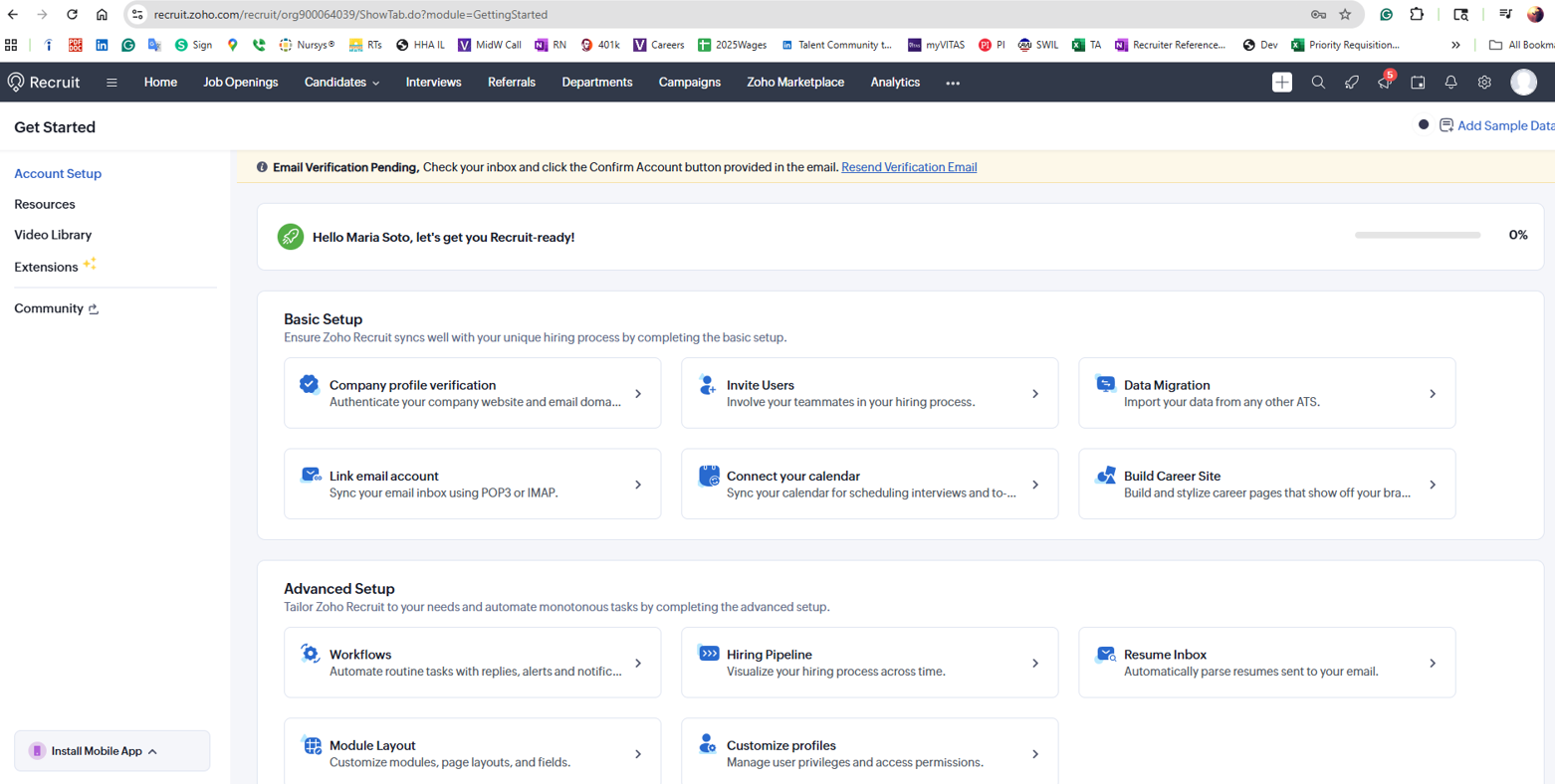
Zoho Recruit
Zoho Recruit impressed us with its powerful and flexible automation, allowing recruiters to streamline follow-ups, approvals, and task assignments with minimal manual effort. Its customizable workflows can adapt to different hiring needs, whether it’s for staffing agencies or in-house teams.
PROS
- Robust automation for follow-ups, approvals and task assignments
- Customizable workflows for diverse recruitment needs
- Free-forever plan with affordable flexible tiers
- Assignment rules for efficient candidate distribution across recruiters
- Combined ATS and CRM for staffing agencies and in-house teams
- ATS + CRM in one platform
- Backed by a company like Zoho, notable for reliability and good customer service.
- 24/5 support
- Priced quite modestly after the free version
- Certain features like video interviews are available as optional add-ons.
CONS
- Steep learning curve for complex workflow and integration setup
- Client portals and bulk emails require additional costs
- Mobile app prone to crashes with limited automation features
- The free plan only allows 256MB of storage.
- Additional features, such as the client portal, mass email, workflow alerts, and API calls cost extra.
- Some users have complained about the quality of some of the integrations.
- The career site is not fully customizable until past a certain paid plan.
Zoho Recruit earns its reputation in the recruitment tech space for affordability, but affordability isn't the only interesting part. What caught our attention during testing was how much workflow control it hands to recruiters who are willing to invest time in configuration. We set up approval chains, scheduled pre- and post-interview emails, and built assignment rules that automatically routed candidates to the right recruiter based on job location and department. For a tool that starts at $25 per user per month, the automation ceiling is higher than most buyers expect. Here’s what we found.
First things first: Zoho Recruit offers impressive control over automated processes. Setting up workflow rules was relatively simple, and we liked how we could trigger automatic actions—such as sending follow-up emails, updating candidate statuses, or assigning tasks—based on specific conditions. The ability to schedule pre- and post-interview emails was a great addition to keeping candidates engaged without requiring constant manual follow-ups.

Another feature we appreciated was approval process automation. Getting approvals for job requisitions or finalizing offers usually involves frustrating email threads and long wait times, so we were impressed that Zoho Recruit automates the entire approval workflow. This ensures that hiring requests are escalated to the right decision-makers instantly and automatically, cutting down on unnecessary delays.
We also tested Zoho Recruit’s assignment rules, which were especially helpful for teams managing multiple job openings simultaneously. In our tests, these rules auto-assigned candidates to specific recruiters based on predefined criteria like job location, department, or industry specialization. Sadly, we noticed these rules only apply to candidates imported through web forms or bulk uploads. If you add candidates manually, you’ll still need to assign them manually.
That brings us to some of the drawbacks we encountered during testing. One of the biggest downsides is that certain automation features, such as client portals and bulk emails, require additional costs. Given that many competitors include these in their standard plans, it was quite disappointing to see Zoho Recruit charging extra for essential automation tools.
Additionally, Zoho Recruit’s learning curve may be steeper than some recruiters would prefer. According to some users we interviewed, setting up complex workflows—such as custom schedules and webhook-based integrations—required a fair bit of trial and error. If your talent acquisition team isn’t particularly tech-savvy, expect that some of the more advanced automation features will take time to master.
Lastly, Zoho Recruit’s mobile app left us wanting more. While the desktop version worked great, the mobile app crashed a few times during our testing, and it doesn’t include all the automation features available on the web version. If you’re constantly on the go and rely on your phone for managing workflows, this could be a real inconvenience.
Zoho Recruit Key Features:
- Job posting and multi-channel candidate sourcing
- Candidate database and pipeline management
- Automated candidate communication and engagement
- Resume screening and interview scheduling
- Offer management and hiring workflows
- Reporting, analytics, and workflow automation
Deloitte, Saint-Gobain, PWC, and Allianz are among the 8,000+ companies that use this software.
Zoho Recruit offers a free edition and paid plans ($25-$75/user/month) with add-ons like Client Portal and Video Interviews available for an additional fee.
Best For
Zoho Recruit is a strong choice for teams looking for a recruitment automation platform that balances affordability with customization. The free-forever plan and transparent pricing structure make it an attractive option, especially for startups and SMBs.

I used it daily. It was easy to upload and download résumés, manage candidate information, and pull basic reports. You could keep the session open all day on one screen while reaching out to candidates and adding notes during calls. I stayed logged in for my entire shift each workday. Since we didn’t have an ATS at the time, we used Zoho in its place.
- It is an affordable tool that works well when the number of openings and hires is manageable and the recruitment team is small.
- It is user-friendly and does not require extensive training.
- Reporting features and analytics are basic but sufficient to perform daily tasks.
It was a small organization with many openings and high turnover. Zoho is ideal when the recruitment budget is tight, but you still need to manage and use it as an ATS. Options are limited (no text feature, bulk emails, or interactions), but it provides an easy way to track candidate status and avoid duplicates.
It works well for small companies with one or two recruiters, which was our situation at the time. I used it for over a year, logging in daily for my entire shift.
- Customer support is not very strong.
- The setup process takes considerable time, and if it is not done correctly, problems can arise later.
- The sync feature does not always work correctly, requiring multiple attempts.
It is one of the more affordable options for posting jobs and managing candidates.
Consider the size of the company and the recruitment team. Think about the visibility you need for job postings and the average number of openings you handle. These factors will determine whether Zoho is an appropriate fit.
They are incorporating AI features, offering job site integrations, and providing more customization options, which makes the product more flexible for users.
Small staffing agencies will find Zoho Recruit very helpful.
Large organizations with more than 5,000 employees won’t benefit from Zoho Recruit. Staffing firms specializing in executive or C-suite hires. Healthcare and law firms that require extensive compliance and undergo regular audits.

Paradox
Paradox is an ideal option for high-volume hiring teams to automate their recruitment with the help of AI. The algorithm (named Olivia) can assist in almost every essential part of the enterprise hiring process, from text recruiting to screening, scheduling, video interviewing, and onboarding.
PROS
- Reduces recruiter-candidate back-and-forth with AI automation
- Olivia AI chatbot delivers human-like candidate communication
- Supports 30+ languages for users and 100+ for job applicants
- QR code and call-to-action button applications for frictionless candidate entry
- Their implementation and customer service is very efficient and accessible. You will not only get a Customer Success Manager to help you with every step during your implementation phase but your issues will also likely be resolved within the same day. Unlike many vendors, you can contact their support team via phone and explain your issue in real-time.
- It’s very time-saving and cuts down on back-and-forth communication between job candidates and recruiters. As Derek B, Head of Recruitment at a large-sized enterprise puts it, “Olivia helped us shave our response time from 7 days to under 24 hours. This time saving ensured that the applicants we chose to interview were the best of the bunch.”
- Olivia, their AI chatbot is programmed to respond to candidates in a way that feels personal, as if a real person is responding. What’s even better is that despite complete automation, you can see all chats and manually override them if need be.
CONS
- Support resolution can require multiple back-and-forth exchanges
- No transparent pricing or free trial
- Although you can get some data and feedback about your company and its processes, analytics is not very robust in Paradox. If you’re looking for advanced features that let you slice and dice your data in various ways, you’ll have to look for other applications.
- Their AI assistant is intelligent and has a human touch but at the end of the day, Olivia is still AI. At times when you want nuanced answers in conversations, you’ll have to manually operate the chat.

Paradox isn’t the only player in the conversational AI market, but what truly sets it apart is Olivia's exceptional intelligence. While she can't replace human recruiters, having a tireless virtual assistant like her in the hiring process of large companies does bring substantial benefits.
We heard Olivia AI can answer candidate questions in over 100 languages. So, late one night at 10 pm, we decided to test this out by sending the AI two texts, one in Spanish and another in Vietnamese. She didn’t just pass the challenge, she aced it! Fast and helpful responses in both languages without breaking a sweat.
What also impressed us was how accessible this AI is. Whether job seekers are on job boards or social sites like LinkedIn or Facebook, a simple scan of a QR code or a click on a call-to-action button directly from their mobile screens will put them in contact with Olivia.
To see how the recruiting automation works in real life, we let it handle the initial tasks for filling our entry-level roles. And Olivia did prove her worth: The AI suggests fitting roles based on candidates’ queries, gathers crucial info (names, emails, resumes), and schedules interviews—all with a human-like touch.
Paradox didn’t disappoint us in terms of integration capabilities either. As expected from an enterprise-tailored recruiting tool, it can connect with dozens of popular ATSs, CRM systems, background check services, video interviewing platforms, email, calendar, and messaging tools. It also checks the box for custom integration support.
However, there are still a few things we don’t like about Paradox. While it’s not uncommon for recruitment software to undisclose its pricing structure, we wish that Paradox would at least provide a free trial for users to evaluate the software before purchase. Additionally, its typical starting price of around $1,000 might be a hefty sum for SMBs. But, to be fair, competitors like HireVue start at much higher prices.
A final caveat: Olivia works best when the goal is speed and coverage, not nuance. For high-volume, time-sensitive roles — hourly workers, seasonal hiring, graduate intake — she's excellent. For roles where candidate judgment, culture fit, or communication style matter in the first interaction, putting an AI in front of applicants first is a risk worth thinking through carefully. The best implementations we've seen use Paradox to handle logistics and screening, then hand off to a human the moment the conversation needs to become a real one.
Paradox Key Features:
- Conversational ATS and CRM for candidate tracking and pipeline management
- Chat and text-based candidate engagement and application screening
- Automated interview scheduling
- Career site automation with chatbot-driven candidate interactions
- Automated event management and communication
- Video interviewing, onboarding workflows, and candidate surveys
Unilever, McDonald’s, Amazon, 3M, CVS Health, Nestlé, Lowe’s
Paradox's monthly pricing begins at $1,000.
Best For
Paradox is best suited for large enterprises with high candidate volume.
I typically use it a few times a week. I mainly use it for candidate interactions. The AI assistant handles pre-screening by asking candidates qualifying questions and advancing those who meet our criteria. It also includes an AI tool for interview scheduling, which significantly reduces manual effort.
The platform's workflow tools support candidate check-ins and follow-ups, further reducing manual tasks. Overall, it has helped increase application completion rates.
- The AI chatbot is highly effective.
- The AI-powered interview scheduling feature eliminates a significant amount of manual work.
- Their mobile-first platform improves accessibility for candidates and benefits our employees.
We implemented Paradox to improve both the quantity and quality of our applicant pool. We also wanted to automate the candidate outreach process. Previously, we relied on many manual processes to source candidates and move them through the portal.
Paradox helped automate several workflows. Its AI-driven functionality was a major selling point. We’ve been using it for about a year. Paradox stood out due to its AI recruiting assistant, Olivia.
- The AI sometimes struggles with handling complex candidate questions.
- The reporting and analytics features need more flexibility and development.
- The platform's workflows would benefit from greater customization options.
Paradox excels in automation and candidate engagement. Rather than emphasizing video interviews, it focuses on improving communication and engagement to support retention.
Organizations should evaluate their hiring volume and candidate flow. For high candidate inflow, this tool is very effective. Paradox has expanded its AI capabilities, which is especially valuable for teams looking to leverage AI more heavily in their hiring processes.
Over time, Paradox has placed more emphasis on its AI capabilities. This has become the most critical aspect of its value proposition.
Paradox is well-suited for large companies with high candidate volume and those seeking to adopt more AI-driven recruitment processes.
Paradox may not be ideal for small companies with a low volume of candidates.
.png)
Fetcher
With Fetcher, you get the benefits of both worlds: Fetcher's algorithm searches the web for well-suited candidates according to your specified criteria, and their team of sourcing experts further refines and tailors the results for you.
PROS
- Intuitive interface with seamless user experience
- AI-identified candidates with human review across all plans
- Multiple customer support channels
- Unlimited outbound emails and re-engagement campaigns on all plans
- Chrome extension for LinkedIn sourcing, email collection and automated outreach
- API and custom integrations included at no additional cost
- Fetcher is highly rated by customers for its clean interface, ease of use, and customer support.
- According to most users, Fetcher's sourcing tool is one of the best in the business, providing them access to the best candidates with specialized skills and backgrounds.
- Customers find Fetcher's automated outreach feature extremely useful for sending cold emails and personalized messages to potential candidates.
CONS
- Minor bugs and glitches reported by some users
- Starting price raised significantly from $149 to $549 per user per month
- Focused exclusively on passive candidates, no active job seeker features
- Some users report experiencing bugs and glitches while using the software.
- In rare cases, Fetcher may source either over-qualified or under-qualified candidates for a particular role. However, according to users, their team is quick to correct and refine the search criteria in such scenarios.

When we landed on Fetcher’s dashboard, the first thing that struck us was its straightforward and user-friendly interface. Fetcher requires little to no training and support to get you up and ready to navigate the platform. We logged into our account, headed to the sourcing tool, set out job requirements, and were all set to review potential candidates the system sent.
But what truly blew us away about this recruitment automation software was its sourcing tool. An AI that carefully picks out profiles that match our given requirements, followed by a team of experienced sourcers reviewing the AI’s work before sending us the final batch.
Out of the numerous recruitment tools we have looked into, Fetcher and Rolebot stand alone in offering this approach. And Fetcher even outshines Rolebot for its flexibility: while Rolebot restricts you to a fixed 15 vetted candidates per day, Fetcher grants users the freedom to determine their desired volume. Based on our editor Anh’s experience working in recruitment agencies where dealing with time-sensitive roles is routine, this feature is a huge plus.
Fetcher's candidate outreach tools stand out as well. It’s got all the essentials—automation, email templates with a sprinkle of personalization, and reminders. The analytics aren’t the best, but powerful enough and easy on the eyes with real-time stats on unvetted profiles, news responses, gender and demographic estimates, and search performance.
The platform also offers several ways for users to reach out and get help. You can use email, built-in chat, and native note features. What truly impressed us, though, was that every user can request regular meetings with their sourcing team for additional assistance.
Nevertheless, there are times when Fetcher leaves us scratching our heads with its slow or, worse, freezing dashboard caused by system bugs and glitches. As you might have also noticed, Fetcher is more about sourcing passive candidates than offering a full-cycle recruitment tool, you won’t find native features for job posting, interviews, and onboarding here.
We’re disappointed to find out that, compared to our last review of Fetcher, the tool has discontinued its free plan, which was introduced not too long ago. And what a shame its current pricing is no longer more affordable than LinkedIn Recruiter. Fetcher’s paid plans now start at $549 per month, up from $149, while LinkedIn Recruiter remains at $170 per month.
Fetcher Key Features:
- Candidate sourcing with advanced search filters
- Automated candidate outreach (email sequences)
- AI-assisted messaging and personalization
- Talent pipeline building and management
- Diversity-focused candidate sourcing filters
Fetcher is used by over 500 businesses worldwide, including Andela, Frame.io, Magnite, Foursquare, and CarGurus.
Fetcher’s pricing begins at $549 per user per month, with a custom full-service option (Amplify) available. Volume pricing is offered for large companies and staffing agencies.
Best For
Fetcher is a fine tool for recruiters and hiring managers seeking an efficient path to outbound sourcing and diverse hiring. The platform also has a good track record with startups and SMBs in the scaleup stage.
I typically use Fetcher a few times a week. I primarily use it for sourcing candidates. One of the most important workflows for me is the customizable email drip campaigns. The platform's analytical tools are also helpful for monitoring hiring success.
Additionally, the integration with LinkedIn is a strong advantage for our team. Its AI functionality supports all of these processes effectively.
- The AI-driven sourcing significantly improves our candidate pool.
- The platform automates outreach and follow-up processes.
- The analytics tools are valuable for tracking candidate engagement metrics.
We implemented Fetcher to improve the quantity and quality of our applicant pool. We also aimed to automate the candidate outreach process. Previously, we relied heavily on manual processes to source candidates and move them through the portal. This tool helped us automate many of those workflows. Its AI-driven features were a major selling point. We have been using it for roughly a year.
- The AI-sourced candidates are not always the best matches.
- The email customization options could be more flexible.
- The pricing can be high for organizations with lower candidate volumes.
Fetcher strikes a good balance between AI-powered sourcing and automation, while maintaining a user-friendly interface.
By contrast, HireEZ offers stronger search filters and deeper AI matching capabilities, but it generally requires more manual input.
Consider how much manual sourcing you want to eliminate and how well the tool integrates with your existing systems. Fetcher performs well in terms of ATS integration, which is a clear benefit. It’s also important to evaluate pricing and the effectiveness of its AI-sourced candidate features.
Fetcher has increasingly focused on enhancing its AI-driven sourcing capabilities, which remains a central part of its value proposition.
Fetcher is a strong fit for mid-sized to large companies, especially those looking to scale their sourcing and hiring efforts. It’s also ideal for teams open to leveraging AI in their recruiting process.
Fetcher may not be well-suited for small companies with limited budgets for recruiting tools.
Pricing Comparison of Top Vendors
*Vendors listed as "Custom" do not publish pricing. Expect annual contracts and a minimum 2–3 week sales cycle before receiving a quote. The estimated ranges above are based on publicly available information and user-reported data.
Other Recruitment Automation Tools
- Recooty sits at the affordable end of the market and largely delivers what it promises: a clean ATS with AI-assisted job descriptions, multi-board posting, and basic candidate tracking. It won't compete with Workable or Greenhouse on automation depth, but for a small team posting a handful of roles a month and wanting something that works without a long setup, it's a reasonable starting point.
- VidCruiter has quietly built one of the more complete enterprise recruiting suites on the market, covering structured video interviews, automated reference checks, skills testing, and onboarding in a single platform. It's strongest for organizations that want to consolidate their tech stack rather than bolt on point solutions. The trade-off is complexity. Implementation takes time, and the interface reflects years of accumulated features.
- hireEZ (formerly Hiretual) is a sourcing-first platform well-regarded among technical recruiters for finding passive candidates in niche disciplines. The main limitation is that its broader ambitions in CRM, analytics, and pipeline management haven't kept pace with its core in sourcing. If sourcing is your primary bottleneck, it's worth evaluating; if you need a well-rounded recruiting suite, look elsewhere.
- Recruit CRM is built specifically for staffing agencies and external recruiters. The dual ATS and CRM setup makes it easy to manage candidate pipelines and client relationships from one place, which most general-purpose ATSs handle poorly. The automation is functional rather than sophisticated: email sequences, pipeline triggers, and basic reporting. Not the right fit for in-house teams, but genuinely useful for agencies that have outgrown spreadsheets and need a purpose-built solution.
- GrabJobs bundles a job board, chatbot screening, and automated interview scheduling into one inexpensive package, a combination that works well for businesses hiring at volume for frontline or service roles. The chatbot handles basic screening questions capably and saves real time at the top of the funnel. The platform is limited in depth, so don't expect sophisticated analytics or complex workflow customization. At $29 per month with a free plan available, it's a strong entry point for teams just starting to automate.
- Findem differentiates itself with attribute-based search. Rather than keyword matching, it lets recruiters search by characteristics. For organizations hiring against specific experience profiles rather than job titles, this is meaningfully more powerful than a Boolean search. The platform is expensive and enterprise-oriented, and the service model means you're partly paying for human expertise alongside the software.
- HireVue is one of the most established names in enterprise recruiting automation. It bundles AI-scored video interviews, game-based assessments, scheduling, and conversational AI into a platform built for significant scale. Its AI scoring has faced scrutiny for bias, and the platform is under increasing regulatory scrutiny in some jurisdictions. Worth evaluating seriously for global enterprises with the compliance infrastructure to use it responsibly, and less suited to teams that can't dedicate resources to governance.
- SeekOut offers one of the deepest candidate databases in the market, with strong coverage of GitHub profiles, diversity filters, and internal talent mobility. It's built for TA teams that take sourcing seriously, and the search capabilities go well beyond what most ATS-native sourcing tools offer. Outreach automation is functional, but not its strongest suit, so teams that need sophisticated sequencing will likely want to pair it with a dedicated outreach tool. Best suited to enterprises running proactive, research-driven talent pipelines.
- Loxo stands out for its genuinely useful free plan, which includes unlimited seats, an ATS, a recruiting CRM, and a Chrome extension at no cost. Paid tiers unlock sourcing automation, email sequencing, and phone outreach. For early-stage companies or agencies that want to gradually adopt automation without a large upfront commitment, the free-to-paid path is among the smoothest in this category. The platform isn't the most powerful option at any tier, but the breadth-to-cost ratio is hard to beat.
- Gem positions itself as the all-in-one recruiting platform for mid-market and enterprise teams that don't want to stitch together separate sourcing, CRM, and ATS tools. The sourcing automation and email sequencing are well-built, and the analytics are among the more actionable we've seen in this category. It's expensive, and the "one platform for everything" pitch deserves scrutiny since no single tool truly does everything well. But for teams whose current stack involves three or more disconnected point solutions, Gem's consolidation argument is worth taking seriously.
- Workstream is built specifically for hourly and deskless workforce hiring across restaurants, retail, healthcare, and logistics, a segment that most recruiting automation tools handle awkwardly. It covers the full workflow from job posting through onboarding and payroll, with automation focused on the speed and simplicity that high-turnover environments demand. Not a good choice if you’re hiring office or knowledge workers, but if you're filling shift positions at volume and drowning in no-shows and duplicate applications, Workstream is purpose-built for exactly that problem.
Recruiting Automation Software FAQs
Q: What is Recruiting Automation Software?
A: Recruitment automation software is a solution that uses workflows, AI, and machine learning to handle repetitive hiring tasks such as sourcing, screening, scheduling, and follow-ups, reducing manual work for recruiters. By doing so, it speeds up hiring, reduces manual tasks, improves candidate experience, and helps teams identify better-fit candidates faster.
Q: What features should I look for in recruiting automation software?
A: Automated talent sourcing, resume screening, interview scheduling, candidate messaging, and reporting tools are some of the most important recruitment software features to consider.
Q: What types of recruiting automation software are there?
A: Recruiting automation software comes in various types, covering the entire recruiting workflow. This includes candidate relationship management/recruitment CRM systems, candidate sourcing tools, interview scheduling software, and onboarding tools.
Q: How much does recruiting automation software cost?
A: Recruiting automation software pricing varies by business size and features:
- Small businesses typically pay under $200 per user/month (e.g., Manatal from $15, Juicebox from $119, Loxo from $169).
- Mid-sized businesses budget $89-$600 per user/month (e.g., Fetcher from $379/month, Workable from $299/month).
- Large enterprises requiring full customization expect to pay over $400/month, with high-end platforms like GoodTime and Humanly starting at $1,000/month.
- Additional costs for implementation, customization, integration, support, and data storage often apply.
Q: Are there free recruiting automation tools?
Yes, there are! Some solid free recruiting automation platforms include:
- Manatal: Offers a 14-day free trial without requiring credit card details. The starting price is $15 per user per month, making it budget-friendly.
- GrabJobs: Allows free registration, job posting, and access to applicant profiles. They also provide a 14-day free trial, and after that, you can transition to their free plan unless you opt for a paid package.
- Loxo: Has a generous free plan that includes an ATS, recruiting CRM, and a Chrome extension, all with unlimited seats and job postings.
- Gem: Offers a free trial, and eligible early-stage startups can get a special discount from this vendor, though it used to be a 2-year free plan.
About the Author


About Us

- Our goal at SSR is to help HR and recruiting teams to find and buy the right software for their needs.
- Our site is free to use as some vendors will pay us for web traffic.
- SSR lists all companies we feel are top vendors - not just those who pay us - in our comprehensive directories full of the advice needed to make the right purchase decision for your HR team.


