10+ Best HRMS Software Systems in 2026
An expert-led guide on top Human Resource Management Software review and comparison. Find out HRMS price, pros & cons, key feature, and more below.








Sometimes, it helps to understand something by defining what it is not. An HRMS differs from a Human Resources Information System (HRIS) or Human Capital Management (HCM) software. The distinctions are nuanced because there are many overlapping features, and some vendors use this confusion to their advantage, claiming that their software is all three.
We define HRMS software as a system designed to enhance HR administrative tasks like employee onboarding, payroll, benefits management, and talent acquisition, all while increasing efficiency, reducing manual tasks, and providing strategic insight through data analytics. An HRIS offers many of the same features, but the scope is restricted to data entry and basic processing of employee information. An HCM software is substantially dissimilar to both because it represents more of a management philosophy than a software category; and it usually lacks payroll.
We strongly advise you to move forward only when you understand the difference well enough to recognize when a vendor is stretching the truth. If it’s still a little fuzzy, this article on the difference between HCM, HRMS, and HRIS may help.
If you’re feeling confident in your understanding, then keep reading! Our product-by-product evaluation covers critical factors like customer success, user experience, support quality, and implementation.
Our team rigorously evaluates dozens of HRMS platforms annually through hands-on demos, user feedback, and conversations with HR leaders, IT teams, and implementation consultants. To make our list, products must excel in real workplace environments across three equally weighted criteria:
1. Data Security and Infrastructure: We prioritize vendors with robust security measures including 2FA/SSO support, end-to-end encryption, GDPR/CCPA/SOC 2 compliance, secure hosting practices, and regular security updates. Only platforms with proven data protection track records qualify.
2. Compliance Automation and Accuracy: Each platform must handle complex compliance requirements through automated tax filing, built-in employment law updates, configurable alerts and audit trails, comprehensive reporting tools, and support for DEI, anti-harassment, and wage transparency compliance. Global payroll capabilities earn additional points.
3. Employee Experience and UsabilityWe test for intuitive self-service portals, seamless onboarding, mobile responsiveness, dashboard clarity, and accessibility features (WCAG compliance, screen reader compatibility). Real user feedback across HR, IT, and employee groups informs our assessments.
We believe HRMS software should reduce administrative burden, not create it. Platforms that frustrate users or complicate workflows are excluded.
Editorial Independence: We accept no payment for placement. All recommendations stem from independent analysis and extensive testing. Learn more about our process.


.png)
Deel

Global teams, big and small, will appreciate Deel HR's simple yet capable HRMS offerings. Best for centralizing global HR data and workflows, the modular pricing model adds flexibility and versatility, letting you choose HRIS basics or combine it with ATS, performance, LMS, or the complete HRMS package, which includes advanced compensation and forecasting capabilities.
PROS
- Unified platform for HRIS and payroll services in over 100 countries and contractors in over 150 countries.
- Automated invoicing feature available in English for both companies and contractors or employees.
- Full in-house support from local country experts and a first response time of only 1.25 minutes.
- APIs and native integrations with over 100 popular HR tools.
- Self-service approach and tech-enabled features allow for quick and easy adoption.
- Excellent 24/7 customer service with fast onboarding (2-3 days) and local payroll experts in each jurisdiction.
- Seamless integration with platforms like QuickBooks, BambooHR, and Greenhouse, plus custom integration options.
- User-friendly, self-service features enable quick setup; identity verification often takes under 24 hours.
- Automated invoices simplify payments, provided they're in English.
CONS
- Not suitable for budget-conscious teams that don't hire internationally.
- Lacks advanced features found in more established HR solutions.
- Limited flexibility to change contracts or service agreements.
- Currently cannot generate invoices in languages other than English.
- Key features like onboarding automation are add-ons, which may increase costs.
- Limited flexibility in modifying contracts or service agreements; changes often require an addendum.
- Invoices cannot be generated in languages other than English.
Deel was originally a global payroll offering, that has since expanded their product to be a full-fledged HRMS. While it's probably best for global teams that have international colleagues, their functionality could also be used by companies operating in just one country.

One of our favorite features of this HRMS is "connections" - a product where teammates can connect virtually to bond and learn more with one another. HR teams will also appreciate the onboarding workflows (including the ability to provision equipment globally!), background checks, remote location management, and perks.
40,000+ organizations have used Deel’s HR and payroll solutions, including Makerpad, Andela, and Brex.
Deel HR offers modular solutions priced per employee/month: Core HR ($5) for HRIS basics; Recruit ($14) adding ATS, scheduling, and AI; Develop ($22) for goals, performance, and LMS; the Recruit & Develop bundle ($30); and the Full HR Solution ($56) covering all, plus advanced compensation and forecasting.

Best For
Deel HR is best for organizations that hire internationally.

Paylocity
Paylocity's HRMS solution provides a host of features designed to support the full employee lifecycle. Its emphasis on automation, customization, and compliance makes it a compelling choice for organizations seeking to optimize their HR operations.
PROS
- Paylocity provides a comprehensive platform that streamlines the management of payroll, HR, benefits, and more.
- The UI is quite clean and easy to navigate. There’s lots of online help docs to guide you through it too.
- There’s a mobile app for both employees and managers that enhances accessibility and convenience.
- Paylocity’s customer support is highly rated for always being available to answer questions.
- Global payroll support for 100+ countries.
- Provides free and unlimited training modules on the website.
- Paylocity’s mobile app has a good UI and functionality
- The tool is easy to use for both employees and employers.
- Has 350+ pre-built integrations.
CONS
- Pricing isn’t publicly shared and there is no free trial or free plan available.
- There is a bit of a learning curve due to Paylocity's extensive feature set.
- Report customization could be improved.
- Undisclosed pricing.
- It doesn’t have a free trial or free plan.
- Support is available in English only.
- It isn’t the best solution for remote teams looking for a tool to manage payroll and benefits for their contractors.
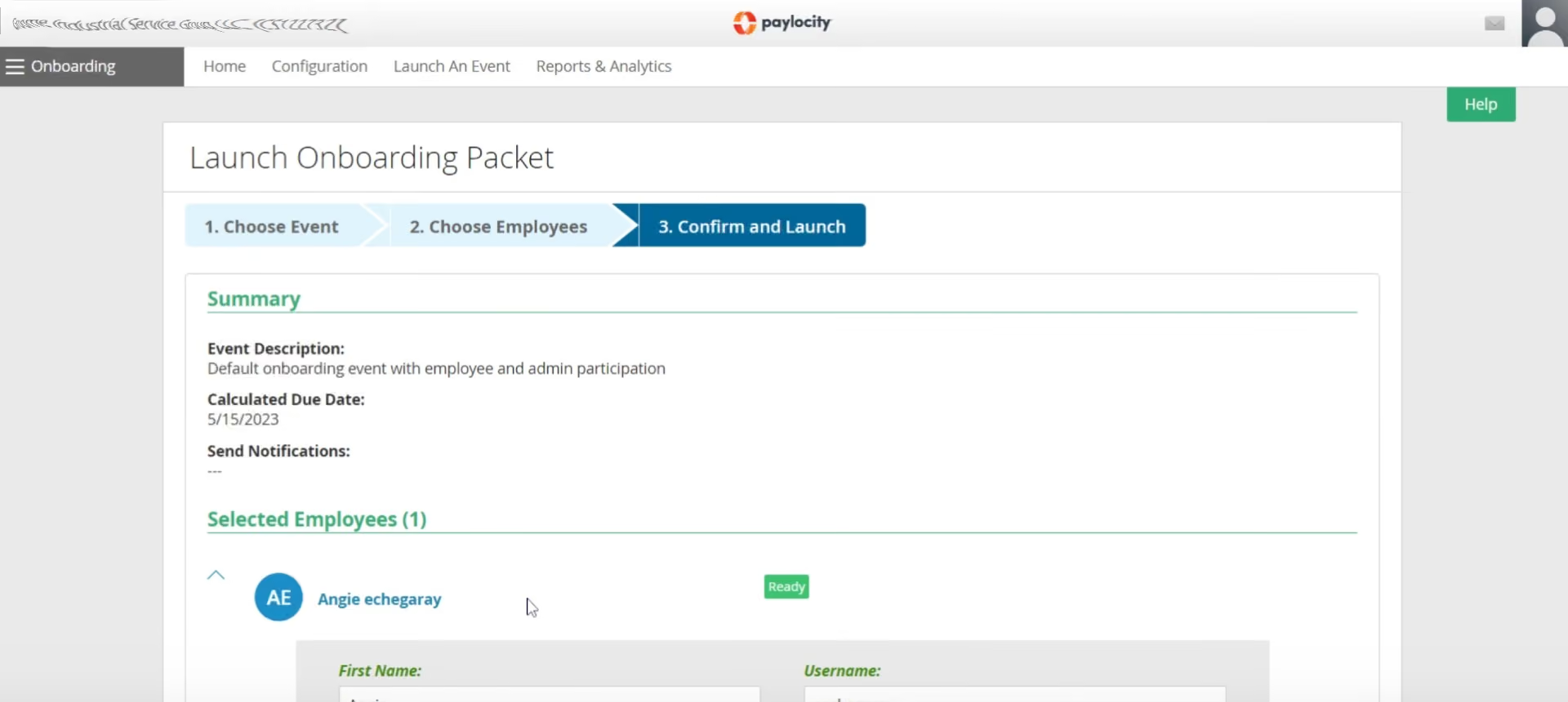
Beyond payroll solutions, Paylocity offers an all-in-one HR suite that simplifies the management of people data and processes. The platform particularly excels at information collection and task automation. With pre-built templates for common tasks like address changes and the ability to create custom workflows, Paylocity makes it easy to automate repetitive tasks and reduce administrative burden.
The platform is easily accessible both for employees and managers. There’s a self-service portal employees can log into either via desktop or mobile app and access all sorts of documents, request time off, update personal information, and collaborate with colleagues. Managers can also access the platform on desktop or mobile devices and benefit from full visibility into employee data, configure new positions, assign skills and certifications, predict vacancies, manage budgets, and more.
Compliance is another top priority for Paylocity, with an intuitive dashboard that provides quick access to crucial information such as work authorizations, EEO and FLSA compliance data, and industry news. For additional support, Paylocity's HR Edge service offers expert resources, including an account manager, to help minimize risk and implement best practices.
Lastly, Paylocity's powerful reporting and analytics capabilities allow you to gain valuable insights into your workforce. With real-time, visualized data, you can track key metrics, identify trends, improve HR strategies, and drive organizational success.
40,000+ businesses use Paylocity’s solutions including Weigel’s, ILC, Upward, and HMC.
The cost of Paylocity's services varies depending on the specific features required and the size of your organization. To obtain a personalized estimate, it's recommended to schedule a demonstration with their Sales team. This allows for a tailored discussion of your needs and a more accurate assessment of the associated costs.
Best For
Paylocity's solutions cater to businesses of all sizes across various industries, but their ideal target market comprises medium and large enterprises. These companies are best suited to fully utilize the platform's capabilities and leverage its benefits effectively.


When I utilized Paylocity, it helped me monitor staffing numbers across each cost center. It assisted in recruitment efforts by allowing me to track staff levels at each store and determine whether we were meeting our hiring targets. It also helped identify stores that required more recruiting efforts and facilitated meetings with store managers to discuss needs and create plans to meet set goals.
Paylocity was also used for payroll purposes. Reviewing the rates for each cost center helped determine competitive target rates for each role within the stores. Regarding payroll, it managed PTO accrual and ensured employees were paid correctly for the hours worked.
Paylocity offers many pre-loaded reports, which were useful for targeting specific metrics. The interface is user-friendly and has many valuable features. Having the opportunity to participate in a demo with a representative to walk through Paylocity’s functionality was extremely helpful. Additionally, the function that automatically posts new vacancies to multiple job sites, like Indeed and Monster, was very convenient.
Our company switched to Paylocity after acquiring another franchise. The acquired company already used Paylocity, and it was part of the contract that we would keep and integrate it with our existing employees. I have used it for about two years. However, there were numerous issues on payday, with several instances where paychecks were deposited into the wrong accounts.
While customer support was promised to be excellent, it was often difficult to find solutions when problems arose. The demo of the software was impressive, and the sales team did a great job, which is understandable why people might choose it, but the ongoing functionality can become frustrating when the same mistakes occur repeatedly.
Customer service frequently experienced turnover, making it difficult to find knowledgeable support, which was frustrating. Often, I found that I knew more than the representatives assisting me. We also encountered several instances where an employee’s pay was deposited into the wrong account, which was a significant concern that needed prompt resolution. Lastly, the frequent misalignment of cost centers was a constant issue, taking up a considerable amount of time to correct.
Paylocity has a very user-friendly interface compared to other tools I’ve used. The ability to provide demo training for onboarding new corporate individuals from other brands was a great advantage. However, once our account manager left, it became challenging to bring new users up to speed.
Consider your organization’s specific needs and take detailed notes during demos. Paylocity offers many training advantages, but it’s essential to have clear expectations of what you need from the tool.
Before I left the company, there was talk of introducing a texting feature, which seemed like a valuable addition.
I would recommend Paylocity for larger organizations. It offers a wide range of features that can be useful for payroll, onboarding, recruiting, labor management, and more.
Smaller organizations might benefit from using a more affordable alternative to Paylocity.
Workforce
We chose Workforce.com for its strong employee-facing mobile experience and its automated compliance safeguards, which make it especially effective for shift-heavy SMBs balancing labor efficiency with risk management.
PROS
- Highly rated mobile app for employees to manage shifts, communicate with their team members, access pay stubs, and request leave.
- Drag-and-drop scheduling dashboard improves day-to-day usability.
- Automated compliance checks prevent unqualified staff from being scheduled.
- Long-term audit logs (7-10 years) ensure record accuracy and traceability.
- Time clock prompts, custom questions, and employee attestations reduce payroll errors.
- Full-service, in-house payroll engine with tax filing and wage garnishment support.
- Centralized employee profiles housing HR data, documents, and compliance logs.
- Automated time-to-payroll workflows reduce manual intervention.
- Onboarding and offboarding steps are trackable, with document bundling and digital forms.
- Employee self-service tools (mobile and web) for leave requests, profile updates, and shift management.
CONS
- No free trial available without speaking to a sales representative.
- Not ideal for users needing only a subset of features due to its all-in-one design.
- The web interface for admins feels functional but lacks modern polish.
- Payroll compliance is designed for the US and UK markets, limiting global reach.
- No standalone access to payroll or HR modules.
- No free trial or sandbox access to test payroll workflows without speaking to a Workforce.com representative.
- Recruitment components are basic compared to specialized ATS systems.
- Their payroll system lacks international tax/localization support.
For shift-driven businesses in the U.S. and U.K., Workforce.com makes day-to-day work easier for both employees and managers.
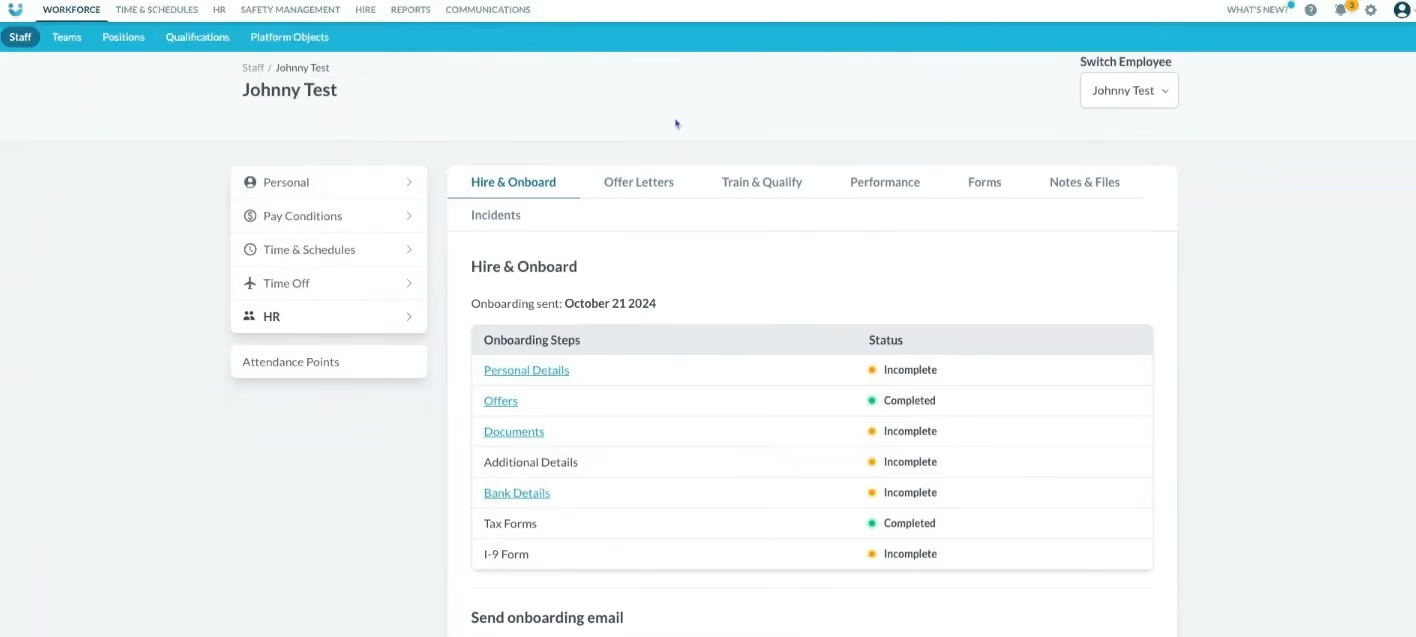
Most staff interact with it through the mobile app, which we found to be one of its strongest features. In our demo, we saw workers pull up their upcoming shifts, check the pay tied to each one, and request swaps with just a few taps. The app also kept a running total of weekly earnings. When we tried to drop a shift, it flagged the wages we’d lose by doing so. We thought this was a clever detail, as it turns a schedule into a visible paycheck reminder and, according to the team, helps reduce last-minute call-offs.
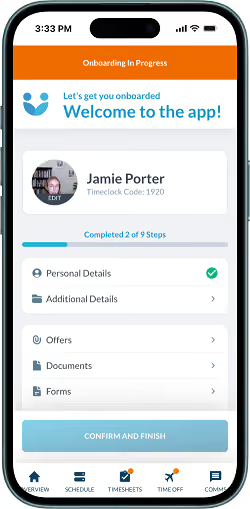
Managers receive tools specifically designed to enhance operational efficiency. We spent some time in the scheduling dashboard, where we could drag and drop shifts, monitor a live feed of who was clocked in, and compare scheduled hours against actual labor costs. We especially liked how easy it was to approve clean timesheets in bulk while leaving only the exceptions for closer review. That’s a real time-saver if you’re running a large hourly workforce. The flip side is that the admin interface feels more utilitarian than polished compared to some competitors like HiBob and Rippling.
Compliance was another area where Workforce.com impressed us. In one example, the system wouldn’t allow us to schedule a lifeguard whose CPR certification had expired. Every change to an employee’s record was captured in an audit log, which Workforce.com keeps for seven to ten years. When we edited a timesheet, the employee could review and approve the change before it was processed in payroll. These built-in checks gave us confidence that records would stay accurate and payroll errors would be minimized.
Still, compliance tools only go so far. Payroll compliance works well for U.S. and U.K. SMBs, but we didn’t see built-in support for broader and more flexible setups such as global and remote-first orgs. With Workforce, you also need to adopt the full suite to get value, as there’s no option to just buy payroll or onboarding on its own.
Altitude Trampoline Parks, Domino’s Pizza, Louisiana State University, Pinnacle Live, Cedartown Foods, Winnipeg Jets.
Workforce offers per-employee pricing, ranging from $5 to $24 monthly.
Best For
Workforce is ideal for SMBs managing hourly or shift-based teams that require an employee-friendly mobile app and built-in compliance safeguards, without the need for multiple systems.

BambooHR
BambooHR is a top-notch HR software known for its flexibility, user-friendliness, and reliability. It offers numerous features, including ATS, payroll, and performance management.
PROS
- Flexible packaging and custom pricing options based on user requirements
- Intuitive design ensures a user-friendly experience, simplifying HR processes for HR pros, managers, and the entire team.
- Regular updates and customer support, BambooHR continuously strives to enhance its offerings.
- Flexible packaging and custom pricing is the way they roll. You can pick out one or two packages and pick other modules as add-ons based on your needs.
- Very simple and straightforward tool, easy to use.
CONS
- The payroll functionality is limited to U.S. companies.
- Customer success hours only suitable for U.S. time zones
- Core HR tools must be purchased to use features like time & attendance, surveys, and performance assessment.
- Payroll is only available for US-based employees
- Customer support is only offered during US business hours.
- Some modules like time tracking, performance management, and surveys are only available as add-ons.

BambooHR offers flexible plans and a comprehensive platform that covers the entire employee lifecycle with full HRMS functionality, including recruiting, performance management, and many more. The platform also provides an integrated app marketplace for HR and recruiting vendors and a handy Human Resources glossary.
Among the 20,000+ companies that use BambooHR, you’d find names like Quora, Universal Group, Reddit, Asana, Change.org, University of Maryland, Grammarly, Stance, Postmates, Wistia, the Jacksonville Jaguars, and ZipRecruiter.
Pricing is not disclosed upfront, but they do offer a free trial of their all-in-one software and then go out of their way to find a version that will suit you. Before they come up with a personalized quote that will align with your budget, however, they are also likely to extend your free trial upon request or even give you a free demo of the advanced features.
Best For
BambooHR is an excellent choice for companies seeking a highly customizable HR product with pricing options that accommodate their specific requirements. It is worth mentioning that it is favored by partially and fully remote teams.

I use BambooHR daily as the central hub for all people operations. Most frequently, I manage employee records, onboarding workflows, and performance review cycles, ensuring that data stays consistent across teams.
I also use it to track time-off requests, run reports on headcount and turnover, and pull analytics for leadership dashboards.
The self-service features have been especially valuable for empowering employees to update their information, access pay details, and manage leave without HR intervention.
Overall, BambooHR has streamlined HR workflows, reduced manual work, and provided reliable insights that support strategic decision-making.
- Intuitive interface: BambooHR is extremely user-friendly, making it easy for both HR teams and employees to navigate without constant training.
- All-in-one functionality: It consolidates core HR workflows—like onboarding, time-off tracking, and performance management—into one seamless platform.
- Insightful analytics: The reporting and dashboard features provide quick, actionable insights into turnover, engagement, and workforce trends.
- Employee self-service: I appreciate that employees can update their own information and request leave directly, reducing administrative bottlenecks.
We purchased this tool to centralize and modernize our HR operations, which were previously spread across spreadsheets and disconnected tools. We needed a solution that could simplify employee data management, onboarding, performance tracking, and time-off workflows in one intuitive platform.
The key benefit we’ve experienced is how user-friendly it is for both HR teams and employees—automating administrative tasks, improving accuracy, and freeing up time for strategic work.
Its reporting and analytics features also make it easier to present insights to leadership for decision-making.
I’ve used BambooHR for over three years, and it has consistently improved transparency, engagement, and efficiency across HR processes.
- Limited customization: Some workflows and reports have rigid templates, which can make it difficult to tailor dashboards or fields to complex organizational needs.
- Performance management module: While functional, it lacks the depth and flexibility of dedicated performance tools—especially around goal alignment and continuous feedback.
- Integration gaps: Certain integrations with payroll or ATS systems require manual syncing or third-party connectors, which can slow down automation.
- Mobile app limitations: The mobile experience could be more robust, particularly for managers approving requests or viewing reports on the go.
BambooHR stands out for its simplicity, flexibility, and user experience. Compared to larger systems like Workday or SuccessFactors, it’s far more intuitive and easier to implement, especially for mid-sized organizations.
It balances strong core HR functions—like onboarding, time-off, and performance tracking—without overwhelming users with complexity.
While it may lack some advanced analytics or global compliance features found in enterprise tools, its clean interface, customizable modules, and reliable support make it a top choice for teams prioritizing efficiency over complexity.
When buying an HRIS like BambooHR, focus on ease of use, since adoption by managers and employees determines long-term success.
Evaluate the tool’s scalability and integrations to ensure it grows with your organization and connects smoothly with payroll, ATS, and benefits systems.
Reporting and analytics should also be a key factor—good insights drive better people decisions.
Finally, assess customer support and implementation timelines, as responsive service can make or break the onboarding experience.
BambooHR has evolved from a simple employee database into a comprehensive people platform. It now includes advanced features like AI-powered insights, benchmark reporting, and integrations for time tracking and benefits management.
Over time, the tool has focused on improving automation, analytics, and user experience, making it more strategic and scalable for growing organizations.
BambooHR is best suited for small to mid-sized organizations that want an intuitive, all-in-one HR platform without the complexity of enterprise systems.
BambooHR may not be the best fit for large, global enterprises with highly complex structures, advanced compliance needs, or custom integrations across multiple regions.
HiBob
HiBob stood out for combining culture-building tools with robust global reporting. Their out-of-the-box dashboards and customizable analytics give HR leaders real visibility into workforce trends across regions — something many mid-market HRMS platforms struggle to deliver.
PROS
- Built-in social tools like kudos, shout-outs, and newsfeeds reinforce culture and engagement.
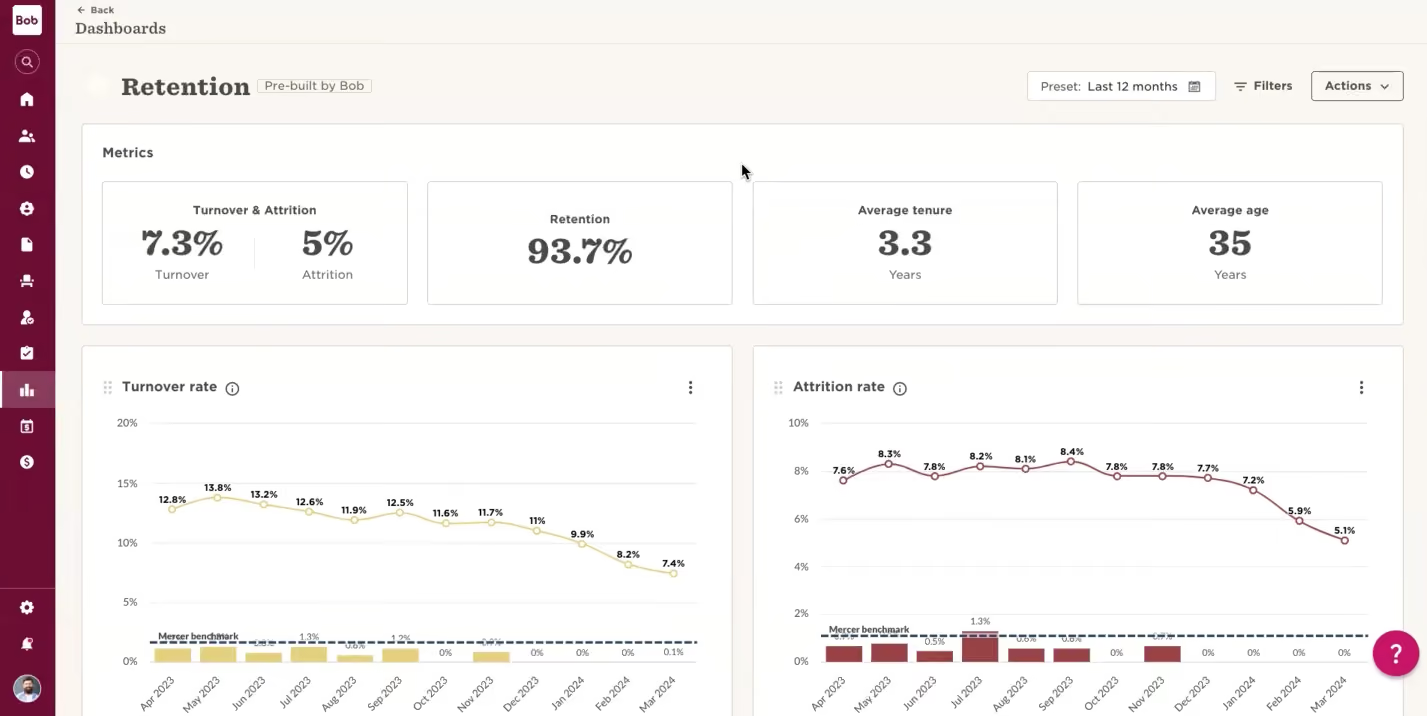
- Out-of-the-box dashboards provide immediate visibility into headcount, growth, DEI, and engagement metrics.
- Highly customizable reporting and workflow builder without requiring developer support.
- Strong global transparency tools for multinational organizations operating across regions.
- SOC 2 Type II, ISO 27001 certified, GDPR and CCPA compliant with granular permissions.
- Integrates well with payroll, recruiting, and benefits platforms.
- They have tons of modules, which makes them a real one-stop shop. Beyond Core HR, they have modules for most things People Ops-related.
- Bob is a fast-growing company and their product looks the part, as it has one of the sleekest-looking platforms in the HRMS space right now.
- Their payroll hub allows you to connect all your payroll systems, which works great if you want to pay people in multiple locations without switching providers.
CONS
- Time tracking may not suit highly hourly or frontline-heavy environments.
- Some workflows may feel click-heavy when navigating across modules.
- Pricing may be less accessible for companies with fewer than 100 employees.
- Organizations running highly complex enterprise-grade performance calibration processes may prefer deeper specialization.
- Highly matrixed, enterprise-scale organizations may require more advanced hierarchy modeling.
- Customer support is only offered via a chatbot and email.
- As to implementation, several users commented that they felt there could be more attention via personal walkthroughs provided at the beginning. Many had to resort to reading documentation and watching videos or just figuring things out by themselves.
- Pricing is only custom and available upon request, so you can’t just sign up, pay, and start using the tool.
HiBob positions itself as a modern HRMS that combines structured people operations with built-in engagement and culture tools, and in our experience, that claim holds up. While platforms like BambooHR emphasize simplicity and Rippling leans heavily into automation and IT management, HiBob focuses on engagement and global workforce visibility.
During our testing, we were particularly impressed by how the system blends culture tools with strategic reporting. Features like shout-outs and personalized employee profiles feel closer to an internal social network than a traditional HR database. One HR leader we spoke with described the experience as “actually enjoyable,” which is not something we hear often about HR systems.
Where HiBob has evolved meaningfully is in its analytics capabilities. Their out-of-the-box dashboards come preloaded with workforce metrics, allowing HR teams to immediately assess headcount trends, engagement levels, DEI data, and organizational growth patterns. We also tested the custom report builder and found it flexible enough to create tailored dashboards for leadership meetings without needing technical expertise. For multinational organizations, this global transparency is especially valuable, giving HR leaders a single source of truth across regions and helping them confidently present how the business is scaling, where it’s elastic, and where adjustments are needed.
Security-wise, HiBob is on par with industry leaders. It checks every major box: SOC 2 Type II, ISO 27001, GDPR/CCPA compliance, and two-factor authentication. Admins can create granular permissions for managers and departments, and all user activity is logged for audit purposes.
However, during conversations with users, we heard recurring feedback around organizational chart management. While visually clear, updating reporting lines or restructuring often requires admin permissions, which may slow down fast-moving teams. Highly complex, enterprise-scale organizations with matrix-heavy structures may require deeper hierarchy modeling capabilities.
Additionally, while HiBob includes performance management and goal tracking, organizations running highly structured enterprise-grade review cycles or complex OKR frameworks may prefer deeper specialization.
Usability is another mixed bag. Some users described the interface as click-heavy in certain workflows, particularly when navigating between modules. We also heard that notifications and updates don’t always surface clearly, which can occasionally create communication gaps.
5,000+ organizations, including Huel, JIMDO, riseUP, and VaynerMedia.
Custom Pricing.
Best For
Mid-sized, multinational companies (100-5,000 employees) that prioritize employee engagement and need global reporting transparency across distributed teams.
I use Bob mainly to enter my time off. My HR team uses it for employee tracking, salary tracking, and manually inputting employee changes. The tool includes integrations with our benefits providers for the HR team. Another key use case is goals tracking. Employees input their quarterly goals, while management and HR review whether goals are met consistently.
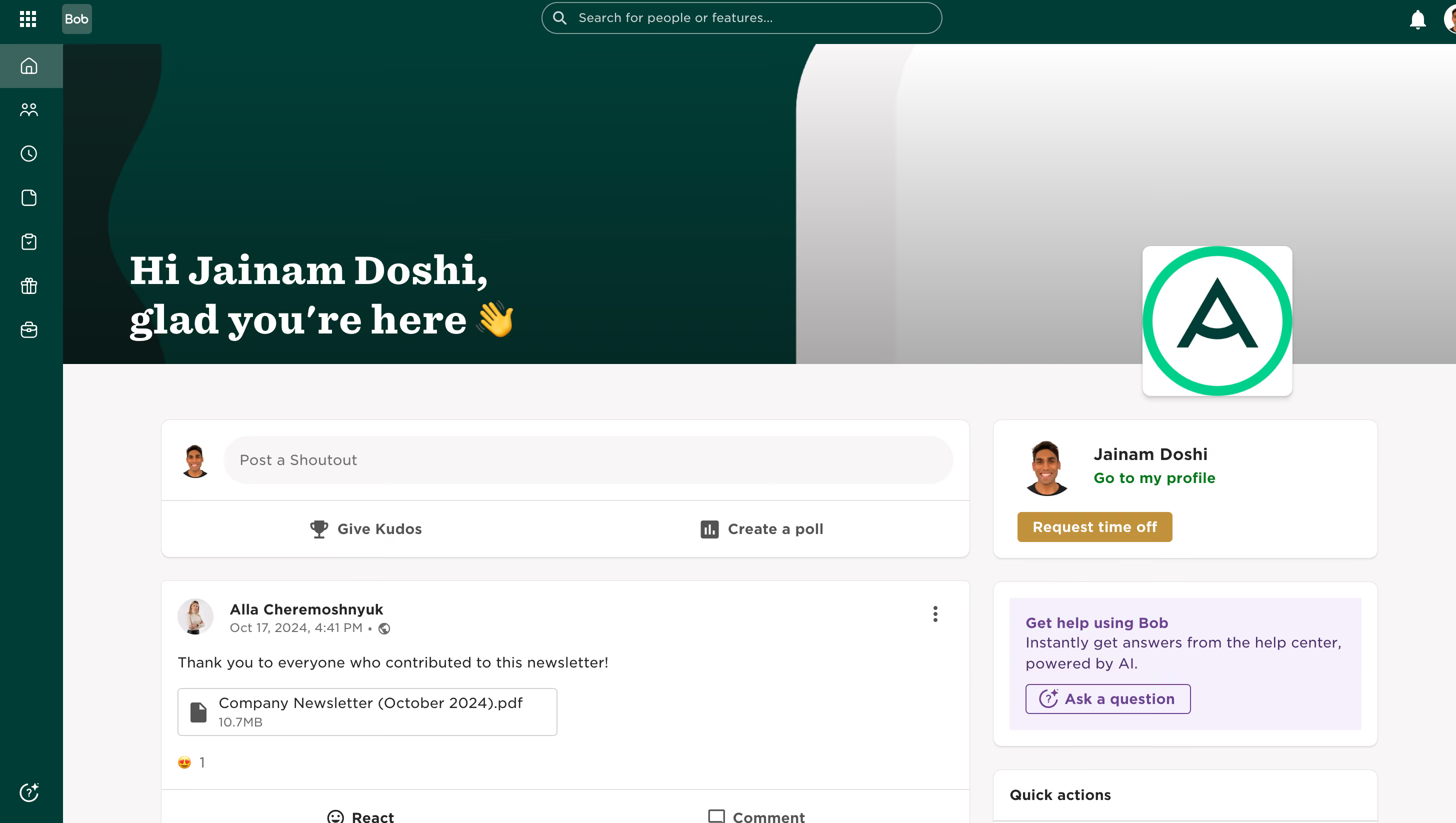
- It allows us to easily input time off.
- Provides easy redirects to benefits links.
- Displays a company-wide news feed.
We bought Bob for our talent management and employee management needs. We have used it for 1.5 years. It allows employees to easily view their time off and provides redirects to links for benefits and payroll information. The main issue our organization aimed to solve was finding a more affordable talent management tool.
- Limitations in its capabilities as an applicant tracking system (ATS).
- Limited functionality in managing the recruiting funnel.
- Does not have its own benefits portal.
- Employee-Centric Approach: Unlike many HR platforms that prioritize administrative functions, Bob enhances the employee experience with tools like recognition, surveys, and social features.
- Flexible for Modern Work Environments: Bob is tailored for hybrid and remote work setups, offering intuitive tools for managing distributed teams and fostering collaboration.
- Cultural Insights: Bob’s "People Analytics" dashboard tracks workforce engagement and provides insights to strengthen organizational culture.
- Global Reach: Bob supports global operations with localized compliance and multi-country payroll integrations, appealing to multinational companies.
Consider your company size—Bob is more suited for mid-sized to large organizations. Assess whether your industry operates remotely or in person; Bob is ideal for remote or hybrid setups. Finally, review your current integrations and tools, as Bob is focused on enhancing the employee experience rather than serving as an ATS or HRIS system.
- Learning Management System (LMS): The introduction of Bob Learning equips organizations with tools for managing employee development and continuous learning.
- UK Payroll Integration: HiBob expanded payroll functionality with a modern approach to payroll management for UK-based employees.
- Workforce Planning Module: This feature facilitates planning for scenarios such as reorganizations and mergers, aiding strategic decision-making.
- 1-on-1 Meeting Feature: HiBob introduced templates for onboarding, goal setting, performance reviews, career growth, and regular check-ins to strengthen manager-employee relationships.
- Mid-Sized to Large Organizations: Bob is ideal for companies with 100 to 5,000 employees, offering advanced functionalities for managing larger teams.
- Global Organizations: Bob’s multi-country support and compliance features make it a great fit for multinational companies.
- Companies Prioritizing Employee Engagement: Bob’s tools for goal setting, performance reviews, and social recognition foster strong workplace culture and employee retention.
- Tech-Savvy, Forward-Thinking Teams: Bob’s sleek, intuitive interface appeals to organizations that value modern, user-friendly platforms.
- Organizations with Hybrid or Remote Workforces: Bob supports collaboration and communication in flexible work environments.
- HR Teams Seeking Data-Driven Insights: Its analytics capabilities provide valuable data for decision-making regarding employee performance and organizational health.
- Small Organizations with Basic HR Needs: Businesses with fewer than 50 employees may find HiBob too complex or costly for their simpler requirements.
- Organizations with Highly Specialized HR Needs: Companies requiring niche, industry-specific HR tools may not find Bob customizable enough for their workflows.
- Companies with Limited Digital Infrastructure: Organizations that struggle with adopting digital tools might find Bob’s platform challenging to use effectively.
- Organizations with Complex Payroll Requirements: Businesses with intricate payroll setups may find Bob’s payroll features less robust than specialized providers.
- Companies Seeking an All-in-One ERP System: HiBob focuses on HR and people management, so it may not meet the needs of organizations requiring a more extensive ERP system.

Rippling
Rippling is a mighty HRMS solution for growing teams, ideally medium-sized, to handle payroll, budgeting, and time and labor management with efficiency and autonomy. The ability to integrate with 500+ apps makes Rippling a strong bet for teams looking to share data between all of their business software.
PROS
- Rippling provides an end-to-end HCM with great automation features.
- Supports both US payroll and global payroll in over 100 countries.
- Auto-translates receipt line items and converts their currencies for the reviewer.
- Robust integration capabilities.
- The benefits module enables users to collaborate with their preferred broker and choose from 4,000 options.
- Modules are available for individual purchase or as part of a suite, but the Core HR module is mandatory in any package.
- All-in-one platform for employee management + PEO services offered, and even a suite of other IT products
- With 500 integrations, it’s very likely that they integrate with other key tools from your tech stack.
- Operates globally with any currency
- Workflow automation
- Analytics opportunities
- Provides a holistic view of company outflows—headcount costs included
CONS
- Payroll automation not available.
- No complimentary trial.
- Support not provided 24/7, additional charges for phone support.
- Not suitable for businesses with 2,000+ employees.
- Total buy-in to Rippling is essential
- Very SMB-oriented, in case you’re a larger company.
- New features tend to be buggy in ways that tech teams are not accustomed to fixing

Rippling has emerged as a leading HRMS platform, providing an extensive array of HR management functionalities.
Since its launch in 2016, it has continuously evolved to prioritize efficiency, autonomy, and a user-friendly interface.
Vox, Maximum Games, Superhuman, Compass Coffee, Highnoon.
Rippling pricing starts at $8 per employee per month. For a personalized quote, you need to reach out to their sales team.
Best For
Rippling is an excellent choice of an HRMS for US-based and international teams that don’t have more than 2,000 employees.
Rippling was primarily used for recruitment, with some use for onboarding since the number of employees being hired was still relatively small. The ATS and onboarding systems integrated seamlessly, allowing for an efficient workflow.
The tool was predominantly utilized during recruitment, where its dashboards and customizable recruitment processes proved especially helpful. Rippling's features significantly simplified the hiring process.
The hiring process was transparent and straightforward. I found Rippling's dashboard particularly helpful and user-friendly. The onboarding process became significantly easier, and the smooth integration between the systems was a major advantage.
I was working with a start-up where everything related to resume management, onboarding, and offboarding was done manually. Payroll was managed through QuickBooks.
Rippling was introduced because there were plans to expand the workforce, creating a need for a system that could streamline and organize processes efficiently without consuming too much time.
Rippling proved useful as it offered both an applicant tracking system (ATS) and tools for onboarding and offboarding. It also includes payroll options that can be leveraged in the future.
I felt that the customer service could be improved. The pricing was a bit high for our budget, but the company went ahead with the purchase based on positive reviews. After implementation, we realized that the payroll system might not be the best option for our future needs.
The company chose Rippling because of its positive reviews. I would prefer a system that includes an integrated payroll system in the future so everything can be managed in one place.
It is important to plan how the company will use the system in advance. Pricing should also be carefully considered, especially if expansion plans are uncertain, as was the case with the company I worked for.
I haven’t used it long enough to observe any evolution. It appeared to be the same during my time using it.
This tool is ideal for companies transitioning from manual processes in recruitment and onboarding to automation. I am unsure about its suitability for other features or use cases.
It might not be suitable for companies that don’t plan to expand significantly. In such cases, the onboarding, offboarding, and recruitment portal features may not provide much value.

Dayforce
Dayforce is a modern cloud HR platform that can manage the entire employee lifecycle.
PROS
- Payroll coverage across 200+ countries and territories supports global scale.
- Built-in compliance tools and local experts help manage regulatory complexity.
- Unified system improves visibility into global payroll data and reporting.
- Continuous calculation reduces manual work and improves payroll accuracy.
CONS
- Likely too complex for smaller teams or companies with limited global footprint.
- Pricing is not transparent and may be high compared to simpler payroll tools.
- In countries where payroll is partner-delivered rather than native, reporting consistency and issue resolution may vary.

Although it’s labeled as an HCM, Dayforce also includes a comprehensive payroll tool. Dayforce integrates data from every stage of the employee lifecycle, empowering informed decision-making and data-backed insights. Its flexible rules engine enables efficient handling of intricate regulatory demands, delivering real-time updates and calculations.
- Guitar Center
- Danone
- Spirit Aerosystems
- El Pollo Loco
- Crescent Bank
Pricing for the Dayforce HCM suite is not provided up front.
Best For
Enterprises with over 1,000 employees.
I was the Director - We used it for HRIS and Payroll Processing - I often completed payroll as a back-up to the Payroll Specialist.
One of the best features is its payroll interface. As the head of HR, payroll reported directly to me and I found it easy to train my team members on the system so that I had multiple back-ups for payroll processing. Another great feature is the reporting capabilities. Additionally, the employee life cycle was exceedingly easy to manage from recruitment to termination. This made it simple to keep track of employee information and make necessary updates in a timely manner.
It was in place when I arrived. It was purchased to manage the employee life cycle and process payroll.
There were data migration errors when the systems were updated that required manual fixes. In addition, we often had to remind them of minimum wage changes in differing cities within Washington state. Finally, we had to hire a full time HR analyst to ensure data integrity.
They are extremely user friendly and the fly out for earnings are really easy to use to catch errors before they happen.
Some items to think about how you will use it to ease the transactional work on our team and to make sure you purchase all of the modules you need. You may want to consider consolidating your Payroll and HR Analyst positions after implementation.
They update their systems and user interface proactively to keep up with regulation and mini-wage changes.
Healthcare
I think it would be good for all organizations - it's a robust product. I would recommend a less expensive product to smaller organizations
.avif)
Netchex
Netchex stands out as a comprehensive HRMS for small and mid-sized businesses in the US by consolidating payroll administration, HR workflows, and employee engagement into a single platform. Rather than requiring users to navigate multiple systems, Netchex surfaces all pre-payroll tasks and decisions on a unified screen. Such a practical approach is highly favored by lean HR teams managing distributed workforces.
PROS
- Consolidated pre-payroll screen surfaces all outstanding items (time approvals, PTO requests, forms, benefit elections) in one place rather than scattered across multiple pages.
- Mobile-first design optimized for deskless workers; punch corrections and PTO requests work on phones and don't require desktop access.
- Check preview lets employees validate pay before processing; one customer reduced manual checks by 90%.
- AI Coach in performance reviews provides real-time feedback on manager comments before submission, reducing review cycles by 30%.
- Natural language reporting—ask questions in plain English and get answers immediately rather than building custom exports.
- Grows with your team: With Netchex, it’s very easy to opt for a new plan and keep all your data in the same place even if you outgrow your current pricing plan. Other vendors require a switch to a new service in that kind of event.
- Dedicated support team: Netchex are note-worthy for their award-winning and often lauded customer service. It’s all US-based and provided in real-time through email, live chat, and phone calls.
- Pre-payroll reports: Allows for critical error checks before submission.
- Flexible payroll grid: Easy to make changes or correct errors on the fly.
- Versatile payment options: Includes paper checks, direct deposit, and pay cards.
CONS
- Payroll module is required; HR and engagement features don't function as standalone products.
- Doesn’t offer global workforce management.
- No free trial; organizations must commit before testing.
- Requirement of payroll: Users must use the payroll module to access other functionalities, so it wouldn’t work as stand-alone HR software.
- No free trial: Potential users can't test the software without committing to a purchase. The demo with a sales rep is the closest thing.
Depending on the plan you pick, Netchex can be a fully-fledged HRMS platform tailored for small and mid-sized businesses. The payroll tool, which is their flagship product, is at the core of their offering. From there, they have slowly but surely expanded into all sorts of other HR workflows, from recruiting to performance management. Netchex also excels in employee engagement with features like Community, which encourages recognition and reward through a company forum.
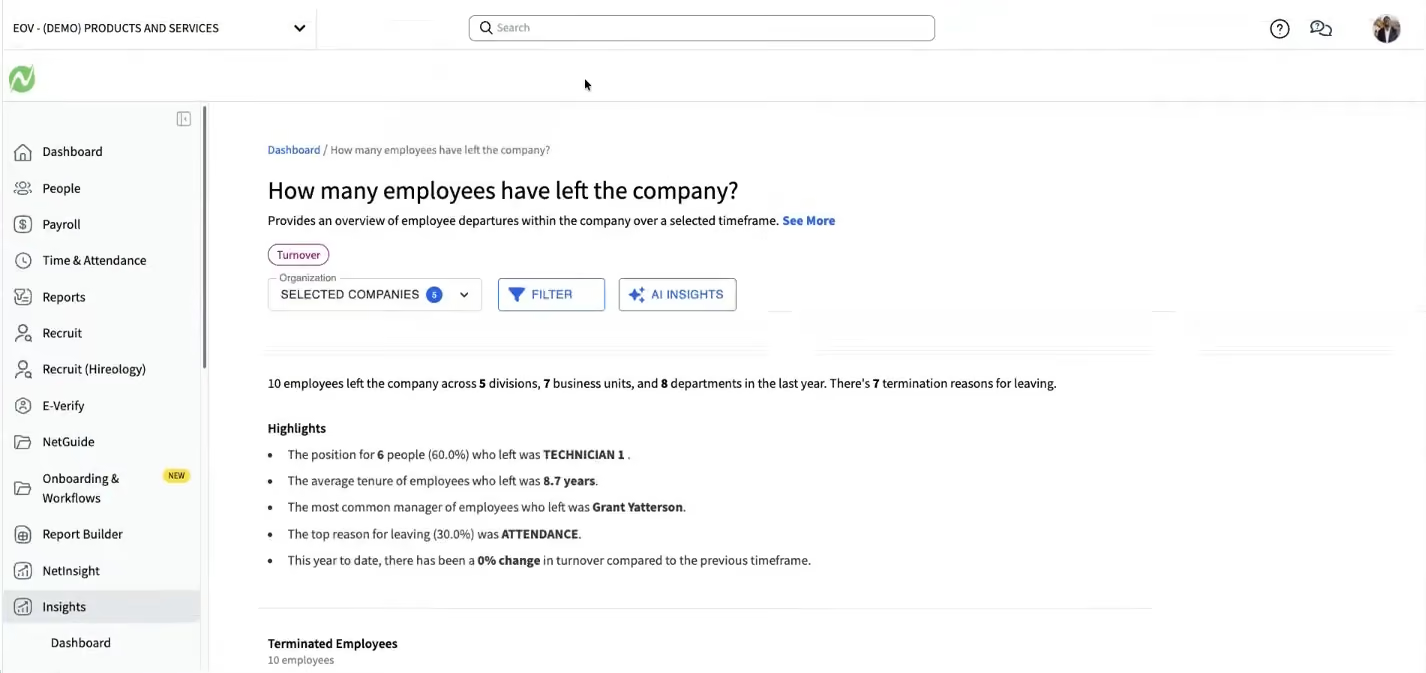
Their system is truly capable of covering the entire employee life cycle. That said, smaller organizations can start with the Core module and grow from there according to their needs. Their software is well enough built (and all made in-house) to the extent that upgrading to another plan and enhancing the tool with more features is a very straightforward process. The product has always been made with smaller teams in mind, so it's a tool that can grow with you.
Recent additions include AskHR, an AI-powered employee assistant that answers questions directly from company documents and policies, reducing routine HR inquiries. Performance management now includes an AI Coach that provides real-time feedback on manager review comments before submission. Reporting has evolved to include natural language queries—employees can ask plain-English questions and receive immediate answers—alongside NetInsights, which provides AI-driven analysis of HR data. The platform also offers financial wellness features including earned wage access (up to 50% of paycheck) and buy-now-pay-later options for employees.
Our only qualm about Netchex as an HRMS system is that the HR tools you might be looking for are not available as a stand-alone product. In other words, you have to use their payroll function for the whole system to work, but that's very much in the spirit of what an HRMS is supposed to do (to merge payroll and HR). If you're looking for a stand-alone HR tool, that would fall under the scope of a more basic HRIS.
Netchex’s HR software is used at companies like Xpressdocs, BK Corrosion, Regal Hospitality, and The Colony ER Hospital.
Netchex uses a Per Employee Per Month (PEPM) model. Costs vary based on headcount and selected features, with pricing available on their site.
Recent additions include AskHR (an AI assistant that answers employee questions using company documents), NetInsights (reporting with historical data snapshots), and Earned Wage Access. The roadmap's most significant upcoming feature is Mesh Teammates, a suite of AI agents designed to automate recurring HR administration tasks without requiring manual user input.
Best For
Small and mid-sized businesses (50–500 employees) managing distributed or shift-based workforces, particularly in hospitality, healthcare, manufacturing, and automotive industries where payroll accuracy and mobile-first employee experiences are critical.
Paycom
Paycom stood out for its deeply integrated employee self-service tools and end-to-end workflow automation. Our testing shows the system excels at streamlining routine tasks like time-off requests, expense reporting, and payroll runs through rule-based automation. Meanwhile, real-world results from current users confirm its performance management, learning, and succession planning modules are robust enough to support growing teams long term.
PROS
- Automates recurring decisions based on the rules your organization sets around expenses, time management, time-off requests and more.
- Strong employee self-service tools for managing personal, payroll, benefits, and time-off information.
- Single database keeps employee data consistent across HR and payroll workflows.
- Full-solution automation, which automates tasks and decisions across the entire employee life cycle.
- Includes automated HR management tools for performance, training, employee development and succession planning.
- Proprietary HR, payroll, time, and learning tools run on one database.
- Strong employee self-service tools for managing personal, payroll, benefits, and time-off information.
- Single database keeps employee data consistent across HR and payroll workflows.
- Deep HR and payroll integration enables automation across the employee life cycle.
- Broad automation reduces manual work across everyday HR processes.
CONS
- Robust reporting requires software knowledge to execute extensively.
- Requires customers to run payroll with Paycom to access the HR suite.
- While it offers many integrations, they may not be as robust as others in the industry.
- Pricing can be high compared with more focused HRIS options.
- Reporting can be complex and cumbersome for administrators to customize.
- Requires customers to run payroll with Paycom to access the HR suite.
- Limited flexibility for organizations that rely on external integrations.
Paycom’s biggest differentiator is not simply the breadth of its suite but how it designs and develops its software in-house, with HR and payroll tools that communicate to automate tasks and decisions holistically. That gives the platform a level of data consistency and workflow integration that can be difficult to achieve with a collection of separate HR tools.

Its employee self-service is among our favorites. Beyond standard data management that helps remove HR administrators from the center of every minor transaction, the platform offers a dedicated tool (Beti) that enables staff to resolve payroll discrepancies before submission, while IWant's natural-language interface simplifies information retrieval by bypassing complex menu navigation.
The customer evidence Paycom provided is equally compelling. The New England Patriots and The Kraft Group reported a 75% reduction in payroll preparation time after implementing Beti, while Direct Data Exchange calculated $5 million in savings across their 5,000 employees. They also achieved 100% technology usage among employees. A Forrester study found Paycom clients achieved 362% ROI over three years, with HR saving 45% of their time and generating $1.4 million in net present value.
Paycom’s tightly integrated architecture is a strength if you want to automate routine tasks and reduce decision fatigue. But this also means you may give up some flexibility in mixing and matching vendors. We confirmed this directly with the vendor, so organizations shopping specifically for an HRMS while keeping their existing payroll provider should remove this from their shortlist.
Overall, we’d recommend Paycom to U.S.-based organizations with international payroll that want to consolidate HR and payroll under a single provider and are comfortable committing to Paycom’s ecosystem. It is less compelling for HR-first buyers who want standalone HR software, extensive external integrations, or the freedom to pair their HRMS with a different payroll provider.
Paycom provided case studies for the New England Patriots and The Kraft Group, Shamin Hotels, Prairie Knights Casino & Resort, and Graeter’s Ice Cream.
Custom pricing.
Best For
U.S.-based organizations with international payroll that want HR and payroll from one vendor and value automation, employee self-service, and a unified database.
I use Paycom for HRIS, talent screening, payroll and to pay contractors.

- Reporting is great
- Payroll is straight forward.
- User friendly.
Printfly switched to Paycom following a brief stint with Namely. The switch was made because we didn't feel that Namely was robust enough for our organization. We switched to Paycom to enable the HRIS system, payroll, and scheduling.
- Tax team is HORRIBLE. They are not customer interfacing and are not held accountable for their errors.
- Problem tickets are not resolved quick enough.
- If you have an issue and you need to call customer service, there is a 99% chance you are not connected to your dedicated rep. The rep you are connected to is usually clueless and cannot assist.
I've used Paychex, Intuit and Gusto in the past. I think that I like Paychex the best because they were easy to get in touch with to answer questions.
Price - It's a costly system. Time - The set up is annoying. You are shuffled around and really need to take the time to teach yourself the system.
Paycom has added things like "ask here" and it allows for users to more easily ask questions about paychecks or benefits. Paycom also launched Beti which pushes employees to approve their own timesheets to ensure that there are no missing hours.
Anyone that is tech savvy
People that do not understand mobile apps

MHR People First
MHR's People First is a modular HRMS built around a core HR module that includes employee profiles, an org chart, audit trails, engagement tools, and reporting. What sets it apart is the social engagement layer, an intranet-like, LinkedIn-inspired feed with posts, recognition, polls, communities, and policy management, that turns the HRMS into something employees can open daily to stay updated on company news, not just when they need a payslip. From there, organizations add modules a la carte: learning, performance management, recruitment, absence management, onboarding, and more.
PROS
- Modular architecture lets you start with core HRM (profiles, org chart, audit, insights) and add only the modules you need.
- AI-powered performance check-ins suggest talking points based on prior conversations and department-level sentiment analysis.
- Includes a 90,000-course learning library alongside a full LXP with SCORM support and CPD credit tracking.
- WCAG 2.2 compliant, with ongoing accessibility testing through UX teams and local charities.
- US compliance covers FMLA, ADA, COBRA, HIPAA, I-9, and E-Verify.
- Modular architecture lets you start with core HRM (profiles, org chart, audit, insights) and add only the modules you need.
- AI-powered performance check-ins suggest talking points based on prior conversations and department-level sentiment analysis.
- Includes a 90,000-course learning library alongside a full LXP with SCORM support and CPD credit tracking.
- WCAG 2.2 compliant, with ongoing accessibility testing through UX teams and local charities.
- US compliance covers FMLA, ADA, COBRA, HIPAA, I-9, and E-Verify.
CONS
- No native payroll; MHR relies on third-party partners including ADP for the US market.
- Review footprint on G2 and Capterra is thin compared to incumbents like BambooHR or Rippling, so peer validation is limited.
- MHR has operated fully in the US for at least 18 months, but they are still in expansion. State-specific constraints may still exist for some teams and it’s worth discussing during a demo.
- The UI is functional and powerful, but looks dated compared to newer entrants in the HRMS space.
- No native payroll; MHR relies on third-party partners including ADP for the US market.
- Review footprint on G2 and Capterra is thin compared to incumbents like BambooHR or Rippling, so peer validation is limited.
- MHR has operated fully in the US for at least 18 months, but they are still in expansion. State-specific constraints may still exist for some teams and it’s worth discussing during a demo.
- The UI is functional and powerful, but looks dated compared to newer entrants in the HRMS space.

MHR has been building HR software since 1984, and People First is their cloud-native HRMS aimed at mid-market organizations of 100 to 2,000 employees. We demoed the platform with their solutions team and came away with a clear sense of where it stands.
The standout is the engagement layer. The default landing page is a social feed where employees post updates, recognize colleagues with tags like "collaboration" or "leadership," vote in polls, and join communities. MHR says this is the most-used feature on their own internal instance, and we can see why: unlike Rippling or BambooHR, People First treats engagement as a core HRMS function rather than a bolt-on. For teams struggling with platform adoption, that's a meaningful difference.
The AI touches are practical. Performance check-ins surface talking points from prior conversations and flag sentiment shifts across departments. The recruitment module does CV parsing, candidate-to-job matching with percentage scores, and generates interview prep from the candidate's resume. We also liked Data Explorer, a flexible reporting tool that supports natural language queries and lets you build cross-module reports.
The modular pricing works well for mid-market buyers. Core HRM includes profiles, org charts, audit trails, and insights; you layer on learning, recruitment, absence management, or onboarding as needed, similar to how HiBob structures its add-ons.
The drawbacks are real. Payroll is third-party only. The UI feels a tad behind tools like Rippling or HiBob. And while MHR has invested heavily in US compliance (FMLA, COBRA, HIPAA, I-9) and opened an Atlanta office, US buyers should ask specifically about state-level support depth during their evaluation.
MHR’s People First is used by the likes ot The Salvation Army, Revlon, LG, Skechers USA, The National Gallery, and Priory Healthcare.
MHR does not publish pricing. Plans are custom based on organization size and module selection. The core HRM module (engagement, employee profiles, org chart, audit, insights, comparison view) is the required foundation. Additional modules — learning, performance management, recruitment, absence management, onboarding, case management, goals — are added individually. Contact MHR for a quote.
MHR has been in the HR technology space since 1984, originally through their iTrent payroll and HR platform. People First is their more modern, cloud-native offering aimed at the mid-market. Recent development has focused on embedding AI across modules — performance check-in suggestions, recruitment matching, content filtering, and an employee chatbot being reintroduced to the mobile app.
The company has also invested in US market expansion, adding FMLA, ADA, COBRA, HIPAA, I-9, E-Verify, and multi-state compliance, and opening an office in Atlanta.
Best For
Mid-market organizations (100–2,000 employees) that want a modular HRMS with unusually strong employee engagement features built into the core platform. Particularly well-suited for companies that have struggled with HRMS adoption and want a system employees will engage with daily for internal communication. Naturally, it is also a strong fit for UK-headquartered organizations or those with UK operations, where MHR has deep expertise and a large customer base.

Workday
Workday is a highly favored HRMS solution specifically designed for enterprises. It offers a single source of workforce administration, engagement, and compensation and benefits data. This approach caters to all worker types, including contingent workers, employees, contractors, and retirees, making it a versatile solution for managing diverse workforces.
PROS
- Workday configurable process flows make it easy to scale processes to a global level while adapting them to local requirements.
- Employee and Manager Self-Service
- AI-driven skills cloud helps identify workers with the skills gap.
- Has a mobile app.
- Provides phone support, email support, community, and live chat support.
- Compliance with SOC 2 Type 2 standards
- Accessible customer support from the community, live chat, and telephone.
- Compatible with 300 HR systems such as ERP/GL, CRM, HR, and PSA.
- Configurable dashboard with AI and ML-driven insights.
- Ability to maintain real-time alignment of budgets and workforce plans.
- SOC 2 Type 2 compliance.
CONS
- Lacks pricing transparency.
- No free trial.
- The implementation process can be very time-consuming (~5 months on average).
- The interface may pose challenges for new users, and training may be necessary to familiarize oneself with all product features.
- Their mobile app isn’t very user-friendly.
- Undisclosed pricing.
- No free trial for its talent management software.
- Time-consuming implementation period (average 4.5 months).
- Challenge navigating for first-time users may require training.
- Issues with logging in were reported by users.
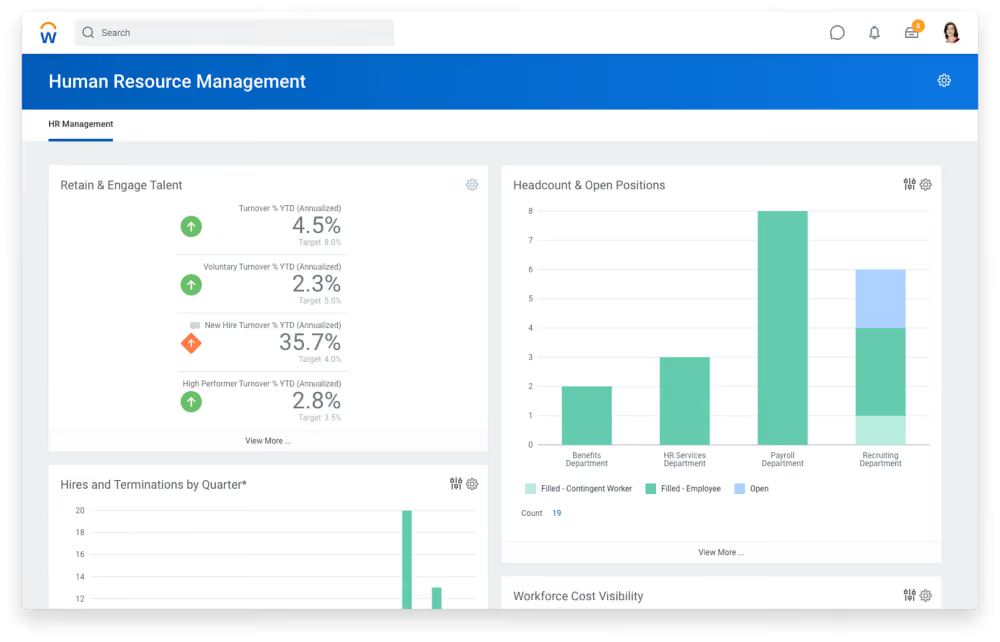
Workday stands out with its impressive adaptability to individual users. Leveraging machine learning, it offers tailored recommendations based on user roles, whether they are employees, contractors, managers, recruiting agencies, applicants, or retirees.
The tool is particularly well-suited for businesses with multiple global branches. It allows for global consistency while enabling customization of workflows to accommodate local differences, ensuring a seamless experience across the organization.
Workday's reporting capabilities are also noteworthy because they sync HR data with finance and integrate with various HR tools. This can be used for analytics that provides visibility into the workforce’s capabilities, making it easier to identify gaps and develop talent.
While Workday's HRMS suite is popular among large enterprises and global teams, the mobile app needs work. Both Android and iOS users have reported issues with the time clock system, frequent crashes, and sign-in problems. Workday's implementation process also has room for improvement, having received mixed reviews from users and HR teams.
Quicken Loans, AstraZeneca, Target, Dell, Bank of America.
The exact pricing details of Workday aren’t disclosed on the website. Contact Sales for a quote.
Best For
This platform is best for large, global organizations looking for an all-in-one tool. It offers insights into the workforce, fosters employee engagement, and facilitates adaptability to industry, situational, and regulatory changes.

What I like the most about Workday is its simple interface that you don't have to ask your Boss how to use it. It is very intuitive and easy to find what you are looking for. I worked for 3 companies before and ALL of them are using Workday. It is famous for being so straight-forward and simple and yet a very reliable tool between the company and the employees.
It is user friendly. It is easy to teach it to employees outside of our Human Resources department. There are so many features!
We bought Workday to ensure we had a financial system that would work with our HR systems. This helped us accurately run payroll. We use this Workday for storing the employee information, such personal details, previous employment details and contact details. It helps to track the goal setting to yearly appraisal feedback. We can easily be able to track the compensation revision history as well. It is a highly secured website. It requires a password + additional two security questions to login. This ensures the additional safety of the data.
It can be confusing to navigate at times. That is partially the software itself but more so how our team decided to set everything up. We are still adding more and more and making this process better for our users.
I would consider it very similar to Paycom. I would recommend Paycom over Workday by a slight margin.
Workday is an excellent choice if you are the owner of a business with 250 to 1,000-plus employees and require workforce management tools (onboarding and training, scheduling and leave management), as well as HR analytics tools (pay management and performance evaluation and management)
It has evolved to take on more employees with little effort.
Human Resources, Management, Financial Department
A smaller or start-up business.

SAP SuccessFactors
SAP SuccessFactors is one of the big names in HR software. They’re currently pushing the boundaries of the HCM category itself, calling their product an HXM suite (for Human Experience Management).
PROS
- Automatic retroactive processing recalculates prior periods when data changes after a run is finalised.
- Documents UK-specific handling of the Apprenticeship Levy and CIS deduction reclaims through the EPS.
- At £79.20 per user per year on the framework, it sits far below Workday's enterprise-grade pricing standard.
- Holds SC security clearance, Cyber Essentials Plus, and customer control over data location.
CONS
- SAP's cloud payroll still runs on a 20-year-old engine whose mainstream support ends in 2027, so any 2026 buyer enter mid-migration.
- The £79.20 framework price is payroll only; like Oracle, SAP licenses the HR core separately, so the real figure for an HRMS would be higher.
- Implementation is partner-delivered and complex, with reviewers citing a steep learning curve.
- The published framework price dates from April 2024 and predates the migration plans.

SAP is trying to transform traditional human capital management into a more employee-oriented endeavor. Through their HXM, they are trying to position the worker’s experience as the main filter for how companies engage with their people. Their product helps HR managers deliver experiences that resonate with employees while shaping their strategy.
Although not branded as an HRMS, SuccessFactors does cover all the features you’d expect from this category. This includes cloud payroll and benefits administration, even for a global workforce.
- American Airlines
- Ernst & Young
- Hero Group
- Terex
- Watco Companies
Pricing for SAP’s HXM suite is only available upon request.
Best For
Enterprises looking to improve UX
We use SAP-Success Factors daily to create training content for all of our district employees. We have a number of mandatory training sessions to meet compliance goals and we use SAP- Success Factors for that. We are able to create SCORM video files and post these to Success Factors. We can add additional components to the training packages as well to test employees' assessment results. We are also in the early stages of working on using Success Factors for employee performance management.

It makes training compliance much easier for us. It is good for large enterprise environments. It is highly customizable.
My organization bought SAP-Success Factors to use as an LMS tool. We've been using it for about 4 years. Prior to using SAP-Success Factors, getting our large pool of employees to complete mandatory training was difficult. Now we can create our own training content and manage its delivery much more easily. It also allows us to track compliance on training more easily.
It can be difficult to get the support we need from our SAP representative quickly. It is so customizable that it can be difficult to predict the effect of small changes to the software. The integration with reporting can be slow.
Success Factors is very robust and highly customizable, and that differentiates them from competitors.
You should consider the cost, and it can be prohibitive for smaller organizations. It is also so customizable that you will need someone on staff to become an expert to really use it to its fullest. It's also good to consider if you actually need a product this customizable or whether something more plug-and-play would work better for you.
We are constantly meeting with our SAP rep to tweak our setup. They are willing to work with us on this, but it is sometimes a lengthy process.
Success Factors is great for a large enterprise-level organization that needs highly customizable software.
Success Factors is more than probably any small organization would need in terms of breadth and customizability.
UKG
UKG is the merger of Ultimate Software and Kronos. As such, it brings more than 7 decades of experience with HCM tech into the workforce management space. UKG Pro, their HRMS, offers features like people analytics, benefits administration, and payroll.
PROS
- Leveraging years of experience in HCM and workforce management technology, UKG Pro and UKG Ready offer a comprehensive solution.
- By providing UKG Pro as an HRMS solution and UKG Ready for workforce management, you can access a range of features that address diverse HR requirements through a unified set of tools.
- You can configure user visibility within the system.
- The Ultimate Community provides on-demand information and networking opportunities for UKG Pro users.
- Includes an iOS app and an Android app for employees.
- Super robust product, packing years of experience with HCM and Workforce Management technology
- Since they offer UKG Pro for HRMS and UKG Ready for workforce management, you could arrive at a combination of products that suits many of your HR needs from the same set of tools.
CONS
- In comparison to more recent tools, both UKG Pro and UKG Ready might lack a clear focus or distinctive selling proposition tailored to specific types of businesses, meaning niche operations might find it challenging to adapt.
- The Android app has some issues with logging in.
- Not very budget-friendly with SMBs.
- All-in-one is not ideal for teams who require only a handful of specialized functionalities.
- Compared to newer tools, UKG Pro and UKG Ready tend to miss a unique selling point or a specific focus on a certain type of business. While they work great for bigger companies in all sorts of industries, very niche operations might have a hard time adapting to the tool.
- Similarly, UKG offers many solutions under one umbrella, so it's not the best fit if you're looking for only a handful of specific use cases.
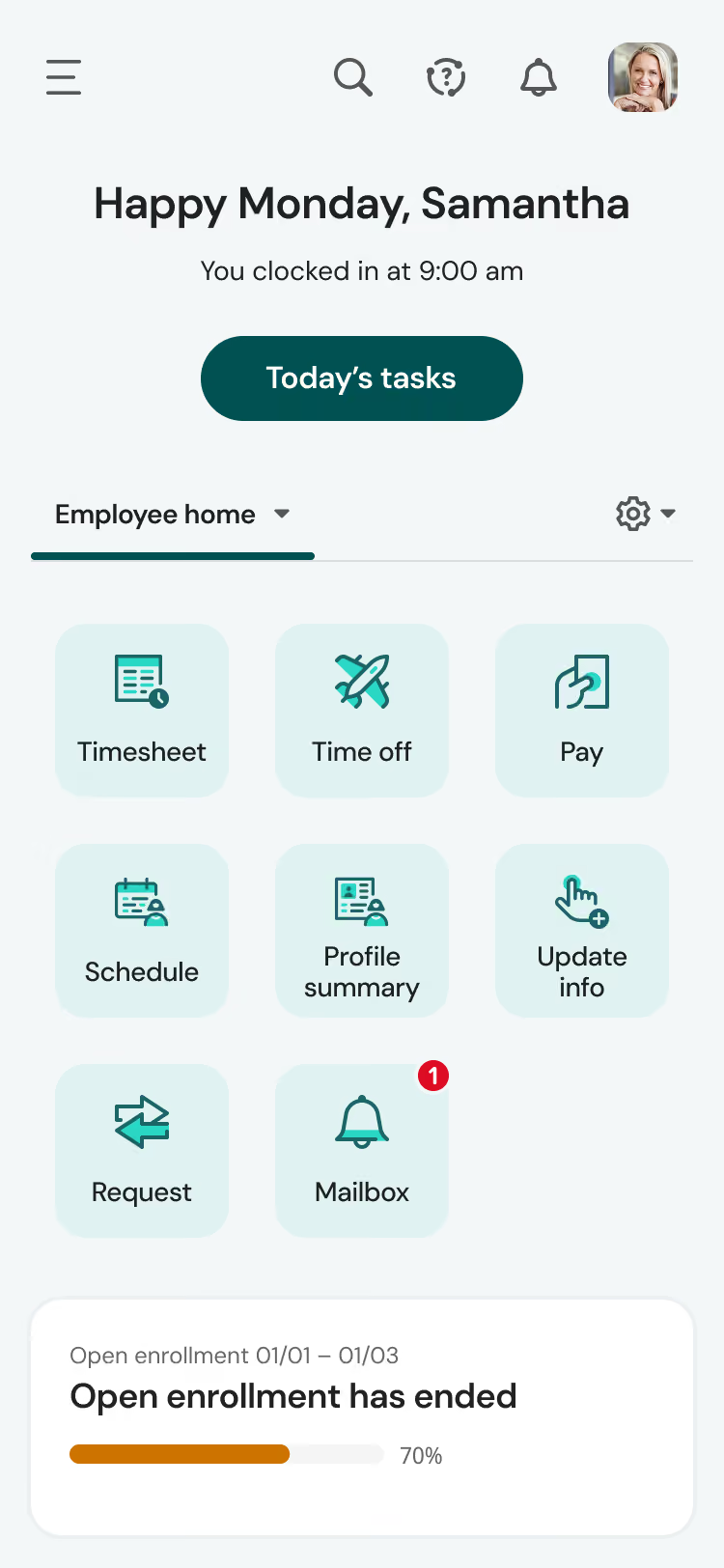
UKG offers a wealth of features and expertise to support the HR needs of large enterprises. From hiring and onboarding to performance management and succession planning, this platform aims to provide a holistic solution for HR needs. UKG has utilized its 70 years of experience in the field and companies' mergers to deliver such comprehensive solutions.
In addition to its wealth of features, we found the platform configurability and the outstanding support from the Ultimate Community to be particularly noteworthy aspects of our experience with UKG.
As administrators, we can control access to specific user groups. Tailored access is a significant advantage for teams prioritizing robust data security.
Although UKG's user interface boasts an attractive aesthetic, the plethora of features can be overwhelming. However, the Ultimate Community proved invaluable, providing access to loads of information and insights from previous conversations. The ability to ask questions and seek assistance from other users was also highly beneficial.
UKG exhibits noteworthy strengths, but we did encounter a few drawbacks during our assessment. Unlike newer specialized tools, it may lack the specificity needed by niche businesses. Furthermore, some users have reported issues logging into the Android app. Finally, this product is not priced for teams looking for a low-price solution.
Tesla, Marriott, Yamaha, Aramark, Puma, Sony Music, Samsung.
- Pricing for UKG is not disclosed on their website.
- Typically, the pricing is based on a per-employee-per-month model, with options for annual or monthly billing options.
- UKG Pro licenses generally start at around $600.00 per year for every 5 users. For an exact quote, please reach out to a sales representative.
Best For
UKG is an excellent choice for large companies operating in the Americas, EMEA, and Asia/Pacific regions, with a minimum employee count of 1000.

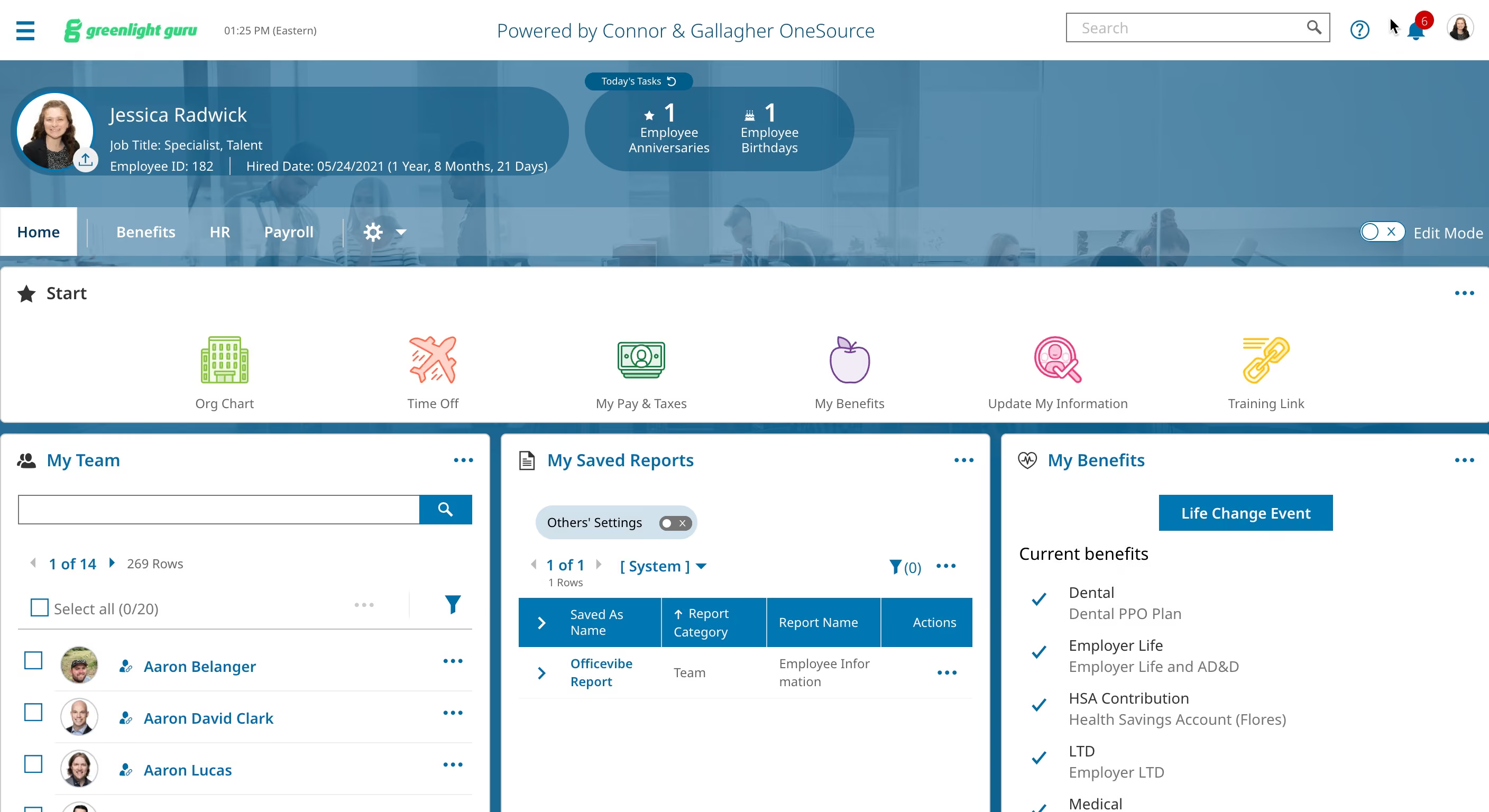
I personally use the tool every day. The main thing I use the tool for is pulling reports about employee information. I use these reports to provide talent metrics to our executive leadership team. I also use the tool daily to review the org chart. This assists in integrating employees into other programs we use, like Officevibe and Linkedin Learning, which UKG does not directly integrate into. One other workflow we use UKG for is assigning HR tasks. You can create custom tasks, so we use it to keep track of tasks that are not related to UKG, like removing people from other programs when they are offboarded.
Honestly, I do not like UKG, but these are 3 pros:
- The org chart is nice to be able to see who each person reports to (although only HR is able to see it)
- The HR checklist tasks are useful to keep track of tasks.
- The ability to filter reports before exporting is useful.
Our organization bought UKG to replace our old HRIS. We previously were with BambooHR but moved to UKG so that we could move payroll internally. We have been using the tool for one year. This tool provides the bare minimum needed for an HRIS as we have the basic version. We have used the tool for one year, but we are already looking for a new HRIS to move to because we have had a very bad experience with both the tool and customer support. I personally use the tool daily to run reports and review the organization chart.
- Pulling reports is so complicated. It is not streamlined at all.
- When conducting payroll, we get LOTS of error flags that we have to go through (and by LOTS I mean 75-100)
- The org chart is only accessible by the HR dept.
- It is just not user-friendly. I often have to hold the hands of our employees to show them how to submit a PTO request, change their personal info, etc.
This tool is much worse than similar tools in my opinion. The reason we switched was so that we could have an internal payroll solution, but after just 1 year we are already looking for a different tool.
The first criteria people should consider is whether the tool meets all of their requirements. That is the reason we switched to UKG because our old system did not meet our new requirements. Next, people should consider whether it has add-ons that support their business. We are looking for a system that has a built-in performance management solution, as well as L&D functions.
No. The customer support has not been helpful to us.
Small companies that want to do internal payroll but do not need all of the bells and whistles (and who do not mind spending a lot of time on payroll and pulling reports). I do not recommend the tool.
Most organizations. Any org that wants additional tools beyond the bare minimum. Any org that is big enough to need an org chart. We are at 250 and it is already an inefficient tool for us.
Paycor
Paycor is popular among small and medium-sized businesses across states for managing payroll, budgeting, and time and labor management. While the greatest strength of Paycor is payroll, the platform is also known for being a well-established HRMS with positive employee experience features and scalability.
PROS
- Paycor payroll solution and mobile app are both straightforward to use.
- Intuitive self-service employee portal.
- Offers multiple modules for small businesses and custom plans for teams with 50-1000 employees.
- Unlimited payrolls.
- Offers discounts frequently. Though not listed on their site, a free trial is available to those who contact the support team directly.
- On-demand pay is available for all plans.
- With the acquisition of the people development platform Verb, it has improved its employee learning experience.
- Paycor payroll solution and mobile app are both straightforward to use.
- Intuitive self-service employee portal.
- Offers multiple modules for small businesses and custom plans for teams with 50-1000 employees.
- Unlimited payrolls.
- Offers discounts frequently. Though not listed on their site, a free trial is available to those who contact the support team directly.
- On-demand pay is available for all plans.
- With the acquisition of the people development platform Verb, it has improved its employee learning experience.
CONS
- Undisclosed pricing.
- Customer support is reported to be slow at times.
- It is not a good fit for teams with 1000+ employees or those requiring advanced customization to meet their unique requirements.
- Undisclosed pricing.
- Customer support is reported to be slow at times.
- It is not a good fit for teams with 1000+ employees or those requiring advanced customization to meet their unique requirements.
%209.32.15.avif)
Aside from being one of the most well-established HRMS, Paycor stands out for its payroll capabilities. Running payroll on the platform is straightforward. We are a team with members of multiple contract types and nationalities, so we appreciate that it services both hourly workers and full-time employees, U.S.-based or otherwise.
The platform lets users choose their pay intervals (weekly, bi-weekly, monthly, etc.) and allows our team members to select their payment methods (on-demand pay, direct deposit, Paycor wallet). The best part is that these features, autorun, and off-cycle payroll runs are accessible to all users, including the Basic ones.
Self-service is another pro of Paycor. Through the portal, employees can access their onboarding, payroll, work schedules, and benefits enrollment (what could be better than autonomy?) They can also update their contact and banking information; then, notifications about changes are sent to admin users in real-time.
Paycor didn’t disappoint us with its latest mobile app version. It used to be very limited, but now we can access the whole self-service suite on mobile devices. Plus, all Paycor Scheduling subscriptions can access Team Chat — a real-time communication tool that lets members message individuals, groups, or channels within the app.
There are still parts we don’t like. While Paycor offers several support channels, the support team is sometimes slow to respond. We’d also love to see improvements in reporting and analytics. The lower-priced plans have minimal reporting capabilities, and even the enterprise plan users may still find the tool lacking.
Wendy’s, McDonald’s, Detroit Zoo, The Cincinnati Bengals, The YMCA.
Paycor doesn’t publish its pricing on the website. You need to get in touch with customer support to get a quote.
Best For
Small and medium-sized companies in the U.S. that are looking for a one-stop shop for their HR needs. Particularly, businesses in industries like manufacturing, healthcare, food and beverage, nonprofits, and professional sports organizations are likely to make the most out of Paycor’s features.

Paycor was my primary system for reviewing employee data, retention metrics, headcount, and workforce reports to support discussions with leadership.
In addition to payroll, I regularly used it to process and update employee status changes such as promotions, compensation adjustments, and transfers. It helped maintain data accuracy and proper documentation. I leveraged the background check functionality during new hire setup and onboarding.
I relied on Paycor for payroll audits and attendance reviews to confirm alignment with labor regulations. It was part of my daily operations and played a central role in both transactional HR responsibilities and workforce planning initiatives.
Paycor provides an intuitive, centralized platform that keeps payroll, HR, recruiting, and performance management in one place, which reduces administrative duplication.
The analytics tools make it easy to generate real-time reports that support informed and strategic leadership decisions.
The employee self-service functionality allows employees to access pay stubs, tax documents, and update personal information independently, which reduces routine HR inquiries.
Our organization was experiencing operational inefficiencies within HR and payroll. We were managing payroll, time tracking, and recruiting across separate platforms. As the business scaled, this became time-consuming and led to duplicate data entry, inconsistent reporting, and payroll errors that created strain within the HR department.
We needed a centralized platform to streamline processes, improve data accuracy, and provide stronger reporting capabilities to support leadership decision-making.
Paycor has provided significant value by integrating payroll, timekeeping, recruiting, onboarding, and performance management into one system. The employee self-service functionality has reduced administrative burden on the HR team, and the analytics tools have allowed us to better track turnover and retention.
As an HRBP, I have personally used Paycor for at least two years to support HR administrative and strategic tasks.
System updates or feature enhancements are sometimes rolled out with limited customization, requiring internal process adjustments that can be time-consuming.
Customer support response times can vary depending on the issue, and complex payroll or tax questions may require escalation and extended resolution times.
The pricing structure can become costly as additional modules or features are added, particularly for growing organizations, and some fees are not clearly outlined upfront.
Compared with other HR and payroll platforms we have used, Paycor stands out for its comprehensive all-in-one suite that integrates HR management tasks within a single system rather than relying on separate point solutions. While other tools offer strong payroll and compliance capabilities, Paycor’s interface and reporting dashboards feel more modern and accessible, making it easier for users to locate information.
I prefer Paycor’s reporting flexibility, as it allows for customized analytics that support workforce strategy. The employee self-service functionality reduces administrative work more effectively than some competitors that require HR involvement for basic updates.
Ease of use and employee experience should be top considerations, particularly the quality of the interface and the strength of self-service capabilities.
Organizations should evaluate the total cost of ownership, including base fees, per-employee charges, and costs for add-ons or integrations. It is helpful to assess reporting capabilities and confirm the system aligns with both current and future workforce needs.
Over the past few years, Paycor has evolved from a traditional payroll and HR system into a more comprehensive HCM platform that supports the full employee lifecycle, from recruiting and onboarding to performance management and retention.
Paycor is well suited for small to mid-sized organizations that want an all-in-one HR and payroll solution without managing multiple systems. It works well for companies that need streamlined payroll, timekeeping, recruiting, onboarding, and performance management in a single platform.
Paycor may not be a good fit for very large enterprises or global organizations that require extensive international payroll capabilities, multi-country compliance support, or highly complex HR configurations.

Zoho People
Zoho People is a complete solution for HR teams that offers a free plan in addition to other affordable options. Their tool can take on basic HR tasks like time and attendance, performance assessment, learning and development, employee engagement, and payroll management.
PROS
- All core HR features in a single dashboard.
- A wide array of integrations.
- Available in multiple languages.
- Has a free version and a free trial.
- All core HR features in a single dashboard
- Wide array of integrations
- User-friendly UI, constantly updated
- Available in multiple languages
CONS
- Payroll function was found to be too simplistic for some teams.
- Mobile apps offer a scaled-down version of what’s available with the web version.
- Occasional reports of slow load times.
- Since they offer so many modules, some may be not as robust as other products that have been more specific about covering certain needs. For instance, some teams have found their payroll offering to be quite basic.
- Not all that’s available in the web platform is available in the app
- Some users reported that the platform can be slow to load every now and then.

Overall, we were quite impressed with this tool. It’s built solid with smart features, and it scales well. The forever-free plan is a major plus, even with limitations around total users (the upper limit is five) and a scant 250MB of storage.
Zoho’s mobile apps offer on-the-go convenience, and the core HR functions are all in good working order.
One remarkable aspect is the Cases feature. This functionality empowers users to submit their support inquiries within designated HR categories, ensuring swift responses from dedicated agents. It's a straightforward and efficient solution that saves valuable time.
Equally impressive is Zoho People, which accomplishes two goals at once - fostering enhanced collaboration while bolstering security through its access control feature. Administrators are able to easily assign access permissions to members which enables both effective collaboration and robust security measures.
Announcements empowers managers to share vital company information using a wide range of content types, formatting choices, and location-specific visibility settings, ensuring that important announcements reach the right audience in the right way at the right time.
Our experience with the browser-based self-service feature was good. It provided a centralized platform for accessing employee records, leave management, timesheets, and policy documents. However, we had some challenges with the mobile app. There were occasional lags during check-ins and facial recognition processes, and certain tools, like payroll, were more basic functionally compared to other similar tools in this space. There have been user reports of loading delays, be we didn’t experience this.
This platform is a good place for a growing company to start, and this has been attested to by multiple users reporting that their team started with the free plan and grew into a higher tier.
ZPE Systems, Cloudfronts Technologies, Zomato, SpiceJet, Foresight CFO.
Zoho People has five plans:
- Free: up to 5 users and 250MB of storage.
- Essential HR: $1.25 per user per month when billed annually.
- Professional: $2 per user per month billed annually.
- Premium: $3 per user per month billed annually.
- Enterprise: $4.5 per user per month billed annually.
Best For
While Zoho offers custom pricing for organizations with over 500 employees, its existing feature sets are particularly well-suited for small and medium-sized businesses (SMBs). The tool's multilingual capabilities enable it to cater to global teams effectively, ensuring seamless collaboration and communication across language barriers.

All of my team members are on Zoho. It starts with onboarding a candidate to our organization with the help of Zoho People, keeping the important documents, daily attendance, leave trackers, etc.
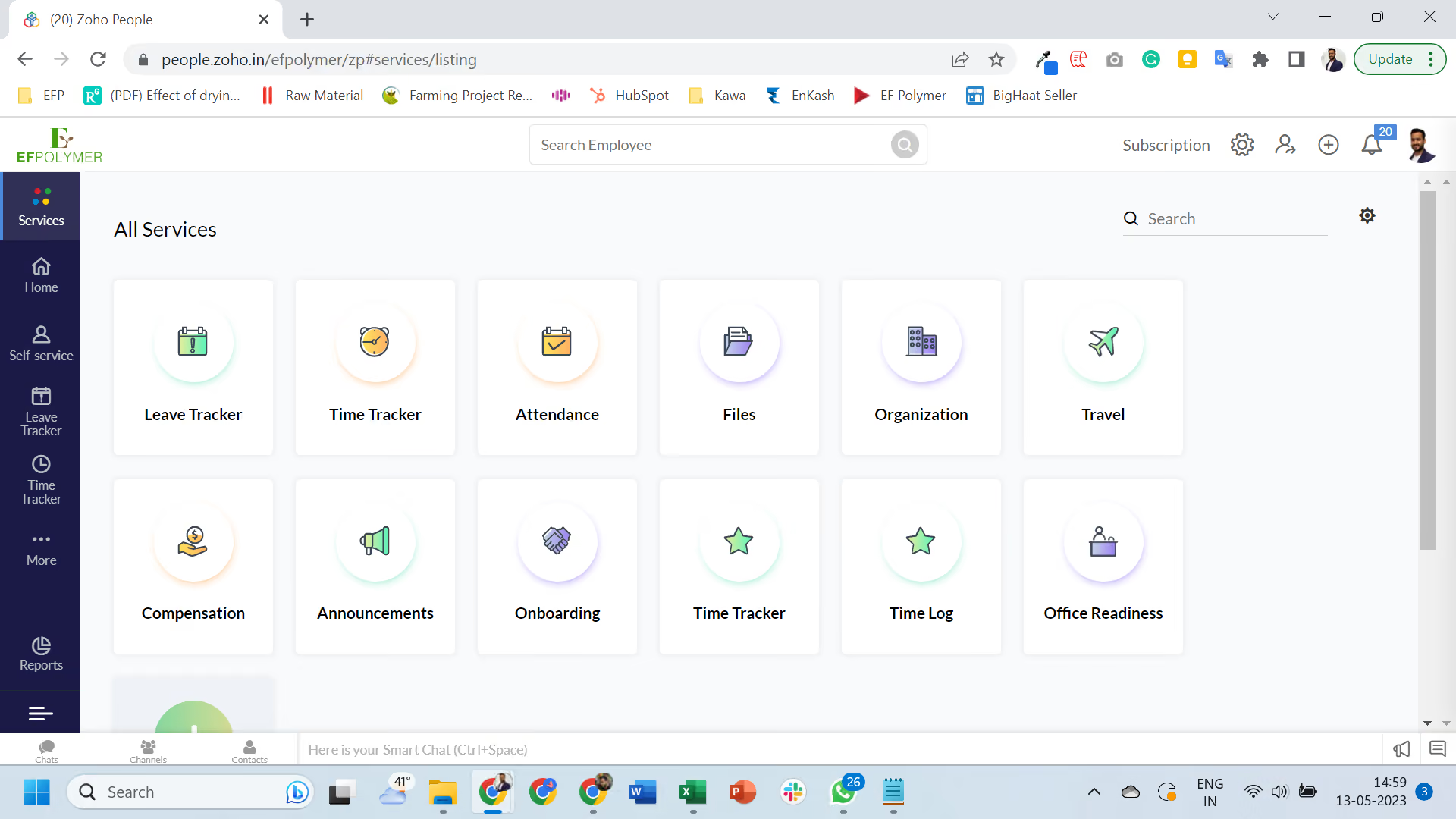
- I like the integration among the Zoho applications which makes life way easier.
- It also provides me with a wide range of features apart from attendance, leave, etc. so I keep trying new things.
- It was easy to set up; I didn't need to wait for an expert to set it up.
I just started my organization and wanted to keep records of their attendance, leaves, employee records, etc. I was using Zoho Books and was happy with that so I thought of trying Zoho People for HRMS. It has been nearly 3 years since I'm using Zoho People.
- There should be a few more integration options with other external software.
- The UI can be improved so interaction over the platform becomes easier.
- Sometimes changing the policies is difficult as quite a lot of things are interconnected.
I have used GreytHR and I found Zoho is quite advanced with a lot more features.
I think it all depends on someone's requirement but I think for startups and small-medium companies, keeping operations simple is key, we should not be wasting our time in dealing with bulky software. In this regard, Zoho People comes handy with the level of integration available within Zoho applications that can fulfill most of your organization's needs.
I have not seen Zoho People change a lot in the last 3 years since I started. There were some minor changes to the UI and some of the features which I found useful.
I think it is good for startups and organizations with remote teams etc. Also, if someone is using some of the other Zoho applications then I think it completely makes sense to use Zoho People.
I can’t think of an organization it wouldn’t be suitable for, but for a large organization, it might be difficult to align with Zoho People's predefined policies/structure.

Namely
Namely helps you streamline many of the day-to-day HR processes, including onboarding, attendance tracking, and performance management. It also packs a robust payroll and benefits administration module and reporting functionality that gives you insights into market trends.
PROS
- Namely’s UI is highly rated by users. It’s quite clean and easy to navigate despite how feature-rich Namely is.
- The employee onboarding module has an easy-to-use wizard that correctly guides new hires through the steps they need to complete and tasks they need to do.
- On top of the platform's built-in features for data management, recruiting, onboarding, time off tracking, payroll, and benefits administration, Namely offers managed payroll and benefits administration services in case you require more help.
- The majority of users are able to navigate Namely without any issues. They find the UI to be intuitive and clean, despite the fact that the platform has lots of features.
- Namely’s employee onboarding module gets a alot of praise from users. It features an easy-to-follow wizard, which helps new hires get on quickly and be clear on what they need to do.
- Besides the platform’s built in features for data management, recruiting, onboarding, time off tracking, payroll and benefits administration, there are also managed payroll and benefits administration services you can opt for to reduce the burden on your internal teams.
CONS
- Namely predominantly serves U.S.-based companies, which means it isn’t a good fit for companies that you need to pay and give benefits to employees in other countries.
- The implementation process can be lengthy, spanning a minimum of 6-8 weeks.
- For a platform as big as Namely, we were surprised by the lack of employee development features such as skill training, career pathing, succession planning, etc.
- Before buying Namely, you should verify whether it is compatible with your current benefits provider, as there have been a few instances reported where Namely’s team encouraged users to switch to other providers that cost more.
- Namely primarily operates in the U.S., which means if you’re looking for a global payroll and benefits provider, this platform isn’t for you.
- Though many praise the platform’s ease of use, it does take long to implement it. Namely’s own team says that an average implementation takes between 6-8 weeks.
- For a platform of Namely’s size, there currently aren’t any features that focus on employee development such as skill training, career pathing, succession planning etc.
- You’ll need to check beforehand if Namely can work with your existing benefits provider, if you have one. There have been a few reports (but not few enough to ignore) about Namely’s team convincing customers to change their benefits provider to providers that charged them more.
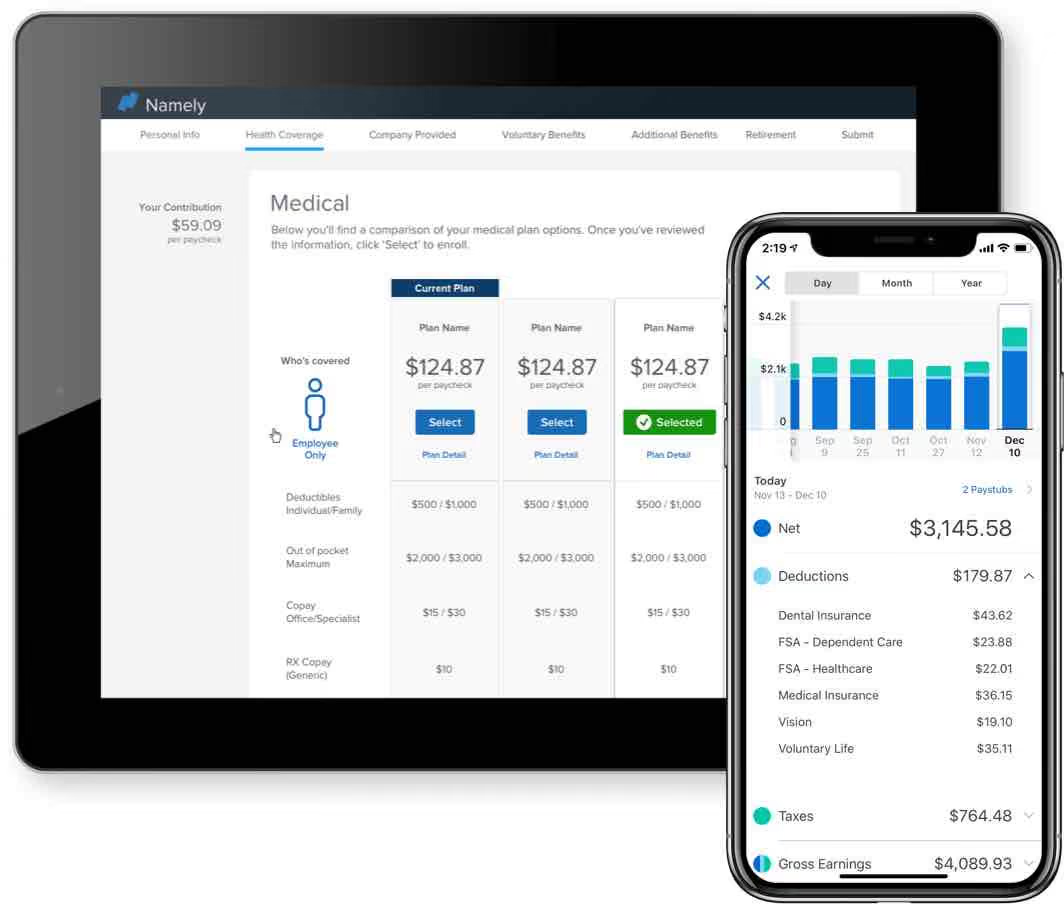
Namely’s HRMS helps mid-market companies (50-1000 employees) manage several HR processes in one centralized location. For starters, it can help you store and organize your employees' info as your system of record (SOR). You can also use it to onboard new employees through an intuitive wizard and e-signatures, check and approve time-off requests, as well as customize and conduct performance reviews.
The platform has built-in features for payroll management and benefits administrations that you can use, or opt for Namely’s managed payroll and benefits services and have them take care of relevant processes on your behalf.
Namely is used by hundreds of businesses, including The Channel Company, Greenhouse, OneLogin, and MacStadium.
Namely doesn’t have fixed pricing plans. They like to tailor their offering according to each customer’s needs, and as such, each customer gets a unique quote. To learn more about Namely’s pricing and to get a quote, you can reach out to their Sales team.
Best For
Namely is a great HRMS for the mid-market (50-1,000 employees).

My team and I used Namely every day for all our cloud-based HRIS needs. We used Namely for benefits, time tracking, housing HR policy and personnel documents, and, of course, onboarding. Namely is a functional tool with easy-to-set-up workflows for forms and processes. Also a payroll company, Namely does it all. Functions like e-forms and documents, which required passing through multiple departments, were made easy by the workflows offered in this tool. 10/10.
I like the aesthetic of the site; it is fun to use and user-friendly. The mobile version is functional during onboarding, unlike many other systems that claim to be mobile-friendly; Namely actually is! I like how things flow and the ease of uploading and storing documents. I like that our people enjoy using Namely.
We selected Namely because we wanted a personalized solution fit for our unique needs. We were tired of the same old runaround with big companies like ADP and being passed from one department to another to solve a simple issue. My company needed a better user experience for us as administrators and for our employees. Our primary pain point was transitioning off of a full-service PEO and needing a personalized touch and a good bit of handholding during setup. I used Namely for one year, and the company I was with is still using the product.
During the merger with Prism, there were some system bugs, but those seemed to get sorted out after a month or so. At times, the chat or help function can be slow to use, and I had to restart a few chats, which did not make me happy at that time. That said, the Namely reps were always courteous and went above and beyond to help us. Since we had no appointed contact team, I was always talking to a new person, which can be challenging when working through a long-term project like multi-state payroll tax setup or complex benefits.
I like that Namely allows the HR team to drive the bus. If someone is not tech-savvy, Namely will not be the best tool for them. Namely stacks up against its competitors well, and I loved using the system! I’d use it again.
Before investing in this platform, determine if your HR team is at least moderately tech-savvy; if not, look elsewhere. Do you have under 500 employees? If yes, Namely can easily accommodate your group. Do you have at least one HR person on staff per 75-100 employees? If not, you should consider adding an admin. Namely is a great tool, but it doesn’t think for you. People still need to do the work, especially benefits and payroll-related tasks.
Yes, it has, and they are doing a good job adjusting to market needs. Namely is cutting-edge and definitely improving over time.
Namely is a great tool for small to mid-sized businesses.
Someone needing active handholding daily or a lot of tech support will not do well using Namely.
Benefits of the Top HRMS Software
The evolution of Human Resource Management Systems has taken them from basic record-keeping tools (think PeopleSoft in 1987) to valuable strategic assets. In addition to the criteria mentioned above, take note of the key benefits below. Regardless of your industry, size, or location, each of the following are benefits you can expect from HRMS software.
Better employee experience: The benefits of a quality HRMS are directly enjoyed by your employees. For example, a user-friendly employee portal can allow employees to review and update their info, navigate benefits options, and request time off with ease in less time than through legacy systems and sometimes even from a mobile app. Of course, this can lead to increased employee satisfaction and engagement.
Drive employee performance: The best HRMS platforms can foster talent development through performance reviews, engagement surveys, performance management capabilities, and customizable integrations with other tools you use to build culture.
Save time with HR automation: A good HRMS can have a massive impact on efficiency. Automation can handle new employee onboarding, offboarding, benefits and payroll administration, time tracking, attendance management, and more. With fewer operational tasks, the HR department can focus its time and energy on more strategic initiatives like optimizing employee lifetime value, lowering the turnover rate, and improving employee productivity and well-being.
Increased compliance: Provided you and your team are careful with the setup and initial data entry, an HRMS can significantly improve HR’s data accuracy. A complete, accurate, and easy-to-access data collection means you can worry less about EEOC audits and wrongful termination lawsuits. If one of these worst-case scenarios actually occurs, you’ll be prepared.
These systems also help with HR’s adaptability to unforeseen circumstances. One clear example was the pandemic, where many of the top vendors in the US reacted to vaccine mandates by rapidly developing features to accommodate immunization tracking and other safety and compliance tools.
A more organized HR department: If your business, like many, started with a handful of spreadsheets and a patchwork of manual processes, an HRMS can help you graduate to a more refined set of procedures. An HRMS can substantially lighten your cognitive load by managing multiple interconnected employee info systems.
HR intelligence: As any operation grows, it becomes increasingly important to analyze its data. An HRMS lets you create custom reports, making it easier for your HR and finance teams to examine metrics like turnover rate, hiring costs, and employee engagement and use that data to make more informed decisions.
Workforce management: The best HRMS systems take a modern approach to workforce management by putting the employee experience front and center. You’ll find elements of employee engagement, like intuitive self-onboarding, easy-to-access payroll and benefits, mobile first-time tracking, smart scheduling, and payroll management, which are standard in top-tier HRMSs.
Streamline recruiting: It’s not unusual for HRMS platforms to include a lightweight Applicant Tracking System (ATS), but it is becoming common for a full-fledged ATS to be part of the standard HRMS package.
Hiring is a central element of workforce management, so if you’re already using an HRMS as an integrated information hub for employee data, it makes sense to use it to manage applicant info, too. The most advanced ATSs built into an HRMS can do everything from sourcing candidates, scheduling interviews, shortlisting or rejecting, and onboarding new employees to offboarding.
Pitfalls of Buying a Human Resource Management System
The rewards of implementing the right HRMS system are substantial, but so are the risks if you make the wrong choice. The information below is from our research of unhappy customers who bought the wrong software tool. We identified central themes across their experience, and after reading this list, you can avoid the common mistakes to watch out for.
Rushing the decision: The allure of an elegant interface, the appeal of innovative features, and the sentiment of a few glowing reviews are powerful forces. It’s easy to buy a product that doesn’t actually do what you need. We’ve all been there.
Design, feature set, and reputation are important when vetting any software, but they should not drive your decision. Make your choice with the company's overall objectives in mind. Budget ample time to identify your team’s requirements, past issues, and the primary goals you hope to achieve using HRMS software.
Lack of awareness: The fact that you’re reading this guide suggests you know the value of thorough research, but some busy HR pros lack the operational context needed to make the right choice. It’s common for these folks to limit their scope of research to one or two major pain points they experience personally. This, as you can imagine, usually ends badly.
Not consulting teammates: This can be disastrous when implementing HR software. Checking with employees in every department can be a painstaking process, even in a small business, but in the long run, it’s worth it. For more on this topic, read this article on getting buy-in from internal stakeholders.
Overlooking security and support: Security and support are not features where quality can be sacrificed for price. HRMS systems hold all your employee info, so choose a company that prioritizes security. Support is an element of security and a critical standalone feature. This is especially true during implementation when a few missteps during your initial setup can lead to big problems down the line.
HRMS Software Price
With most of the HRMS vendors listed on this roundup, pricing is per user per month. Some have an additional monthly base rate, and most offer custom pricing based on your business’s needs. Some also offer independently priced add-ons, which is excellent for small businesses who want to pay only for the features they’ll actually use. Regardless of your business size or state of growth, you may find this ROI calculator helpful for setting your budget.
We've compiled the following estimates to offer a rough idea of what to budget based on your organization’s size. This data reflects the input of HR experts, both in-house and external, but be aware that these are rough estimates, and the proposals and quotes you get will vary.
- 1-100 employees: $12,000 per year
- 101-500 employees: $48,000 per year
- 501-1,000 employees: $72,000 per year
Key HRMS Software Features
Knowing the key features of HRMSs and how they can support your goals is essential to finding the right software for your team.
At the beginning of this article, we covered the fundamental differences between HRMS, HRIS, and HCM platforms. We noted that, though many features overlap, contrasts in scope and philosophy made for clear distinctions between the three. Let’s look at each of these in more detail:
Employee Information Management: An HRIS is a secure database that serves as a single system of record for employee data, including personal details, job history, performance records, and benefits information.
Payroll: This is ubiquitous among HRMS platforms. Payroll features manage all aspects of payroll processing, including salary calculation, deductions, tax withholdings, calculation for PTO, sick days, overtime, and more. Time and attendance are adjacent features that contribute to accurate pay computation.
Some of the vendors mentioned in this list offer global payroll solutions, but if this feature is essential to run your business, we recommend reading our guide on global payroll.
Budgeting: Some HRIS platforms can help create budgets for the entire human resources department by integrating them with common accounting software. This can include expenditures, forecasts, and plans for future costs. Some also provide cost analysis overview and reporting features.
Performance Management: Many HRMS platforms support performance appraisal processes, goal setting, feedback collection, and performance review cycles. Best employee development practices are constantly evolving, and performance reviews are undergoing rigorous evaluation by HR thought leaders, so be sure the performance management features match your company’s talent development philosophy.
Compliance and Reporting: The compliance management and reporting functions record and synthesize information extracted from the numerous systems of record managed within the platform. The aggregated data is used as a precise record of regulatory compliance and to generate reports that can be evaluated for possible strategic insights.
Questions to Keep in Mind When Demoing HRMS Software Tools
Advanced preparation is the key to getting the most out of software demonstrations. Come prepared with questions that investigate each vendor’s approach to addressing the specific needs you’ve already identified.
Your demo questions should be a subset of the questions you have already asked. It’s common to exchange multiple emails leading up to a demo, so make the most of your time by getting the basics out of the way beforehand.
Keep your internal stakeholders in mind as you prepare. Ideally, they were directly involved, but short of that, be sure you have cultivated a cross-department understanding of what is essential across the org. Their needs should be reflected in your questions.
With your basic questions already answered and the best interest of all departments in mind, here are the must-ask questions for an HRMS product demo:
- Does it integrate with our current ATS, payroll, or any other systems you might have that impact workforce management?
- Does this solution have single sign-on (SSO) capabilities?
- Are there multiple authorization levels for different types of users?
- Is there a maximum number of employees it will support across the workforce?
- What types of reporting capabilities does it have?
- Does it include features to help HR communicate with employees (i.e., mass emails, internal chat, filtering messages by criteria)?
- What kind of tasks can we automate or streamline with this tool? How many hours can we expect to save doing so?
- How much technical training will be required?
- What kinds of technical support are provided?
- What recruiting capabilities are built in?
- How will information be exchanged with insurance brokers and carriers)?
- Does it accommodate benefits carriers’ rules?
- How can we import employee data into this system? (API, Excel spreadsheets, employee records, other databases, and paper documents)
- What built-in security measures does it contain?
We get a lot of positive feedback about this software buying organizer. Readers tell us it was a useful tool throughout the process, and in the end, they were thankful they’d used it from the beginning.
FAQs on Buying HRMS Software
These are the most frequently asked questions from HR professionals when it comes to human capital management software:
What is the best HRMS system?
The big names in HRMS software are UKG, SAP SuccessFactors, Namely, and Rippling, but are they really “the best”? The answer is yes and no.
Best can only be applied to one company at a time because no single HRMS platform is a universal fit for everyone. The wide range of HRMS platforms may seem unnecessary (or even overwhelming), but the variety represents the diversity in the businesses' needs.
What is the difference between HCM, HRMS, and HRIS?
The critical distinction between HRIS, HRMS, and HCM lies in their scope and focus. HRIS (Human Resource Information System) and HRMS (Human Resource Management System) are specific software types that focus on managing human resource information and processes, including payroll in the latter case. HCM, or Human Capital Management, encompasses a broader philosophy of business practices. It involves acquiring and optimizing a business's workforce and integrating strategic elements into managing human resources.
Why do definitions of HCM, HRMS, and HRIS vary so much?
There are many ways to answer this perfectly reasonable question, but the need for more consensus is primarily the result of two factors. First, an imprecise definition offers some wiggle room for vendors who claim their tool can do it all. Second, our approach to workforce management is shifting as technology and best practices evolve, so the categories are not fixed.
Despite this moving target, the distinctions primarily lie in their features, intended applications, and the philosophical framework behind each tool’s design. Generally, industry insights suggest that HRIS is the most narrowly defined solution, concentrating on essential HR functions. HRMS expands on this with broader features, still primarily within the HR domain. In contrast, HCM encompasses these features and extends further, incorporating strategic business planning to analyze and optimize the workforce as the key element.
Final Advice on Buying HRMS software
As we wrap up, let's assume you've absorbed the information above and identified a few potential vendors for scheduling demos. That’s just the first step, but it is the biggest one! If you were thorough and diligent from the beginning, you’ve set yourself up for an easier time reaching your goal. You’ve also become familiar with the general process we recommend for making all HR tech decisions.
Since you’ve identified your needs and have a comprehensive understanding of how different feature sets can meet them, fine-tuning your demos should be a breeze.
At this point, your knowledge far surpasses the average consumer. You speak the language of the HRMS vendor, so feel confident when you ask the person running your demo to focus on the relevant features you’ve identified.
You can even supply them with test data to use in the demonstration. This “test drive” approach will help you assess intuitiveness and overall user experience.
You’re already well on your way to bringing the best HRMS platform to your workplace! If you want to further your knowledge, you should read this article about the differences between HRIS, HCM, and HRMS, or you can focus your attention on this article covering the definition, features, and benefits of an HCM.
About the Author


About Us

- Our goal at SSR is to help HR and recruiting teams to find and buy the right software for their needs.
- Our site is free to use as some vendors will pay us for web traffic.
- SSR lists all companies we feel are top vendors - not just those who pay us - in our comprehensive directories full of the advice needed to make the right purchase decision for your HR team.


.avif)