

10+ Best Onboarding Software for New Hires in 2026
Fact-based employee onboarding software reviews from SSR experts plus insights from thought leaders and everyday users to make the most out of your onboarding tool.









Achieving business success starts with your people — but not just what they bring to the table. How you welcome and engage them so they stay focused and produce their best work can make or break your company’s ability to grow for the long term. It’s no surprise then that companies and hiring managers are building formal onboarding processes (from the software tools listed below to simple gifts send to new employees) to welcome and train new hires — and that they’re using employee onboarding software to automate these processes.
With the best employee onboarding software, you can make a new hire feel welcomed even before they start, set them up for success in their new roles, and empower them to give their all every day. Not only that, you’ll prevent them from wanting to leave. In fact, new hires are 58% more likely to be at the company three years later if they went through an onboarding program.
As you likely know, employee turnover can wreak havoc on your company’s productivity and recruiting costs. So it goes without saying that having a formal employee onboarding process is critical. In this guide, we break down everything you need to know about the top onboarding software providers so you can empower new hires before they even start, create high-growth teams, and save yourself a lot of time and money in the process.
To choose the best employee onboarding software, we’ve booked demos with several vendors, sought the expertise of HR tech leaders, did independent tests, and chatted with other end users. The features we think make the biggest difference for employee onboarding software are ease of use, customizability, feedback collection, and reporting and analytics.
- Ease of use: The best employee onboarding systems integrate new hires into your company quickly and smoothly, helping them access the relevant paperwork, e-sign documents, become familiar with your company’s policies, and more. Accessibility on mobile devices is also important, so extra points were given to platforms that enable employees to complete tasks on-the-go.
- Customizability: We’ve looked for employee onboarding software with customizable workflows, allowing your HR team to tailor the onboarding process according to various job roles and departments. The majority of these tools also allow you to customize and deliver training materials and courses that’ll acquaint new hires with your company's mission, goals, and how their role fits in the bigger picture.
- Feedback collection, reporting, and analytics: We know that listening to what your employees have to say about your onboarding process is key to making it better, so we’ve looked for tools that support feedback collection and analysis, either through built-in capabilities or integration. The tools on this list also have robust reporting capabilities, helping you track various onboarding metrics including completion time and rate.
We only recommend the best products in a given category. For more information on how we evaluate and select those products, check out our editorial guidelines.



Freshservice

For teams requiring tight integration between employee onboarding and IT and Enterprise Service Management, we highly recommend Freshservice. Its Journeys enable organizations to orchestrate structured, role-based onboarding across IT and business teams, whereas tools like ticket-driven workflows, identity orchestration, business systems, and employee lifecycle automation are great for structured, process-heavy environments.
PROS
- Cross-department orchestration coordinates tasks across IT, HR, Facilities, Legal, Finance, and other teams within a single structured workflow.
- Employee lifecycle automation standardizes and simplifies onboarding, offboarding, and internal transitions.
- Cross-system integrations orchestrate actions across HR platforms, identity providers, and business applications.
- Users can customize journeys with configurable workflows, tailoring paths by department, role, or region.
- Provides end-to-end tracking of tasks, stakeholders, and progress across complex lifecycle processes.
- Freddy AI can answer employee questions instantly inside Slack or Microsoft Teams.
- Service workflows can coordinate HR, IT, Finance, and Legal tasks in one place.
- Workspaces allow departments to operate independently while sharing the same platform.
- Strong automation tools like Journeys simplify complex employee transitions, such as onboarding or relocations.
- AI can search knowledge sources like Confluence, SharePoint, and Google Drive.
- Dashboards provide clear visibility into unresolved requests and operational bottlenecks.
- Freshservice integrates well with your HR tech stack, offering out-of-the-box integrations with Workday, BambooHR, Oracle HCM, and SAP SuccessFactors, and several others.
CONS
- Onboarding requests can only be initiated via the support portal, not directly from the agent view.
- Approval reassignment isn’t supported; requests must be canceled and recreated if a manager changes.
- Freshservice controls access to sensitive onboarding files through roles and permissions, but encrypted storage for those documents is not yet available.
- Agent-based pricing can add up quickly for larger service teams.
- The platform still feels like a service desk tool first, which may not match every HR team’s workflow.
- Some advanced automation and orchestration capabilities require higher-tier plans.
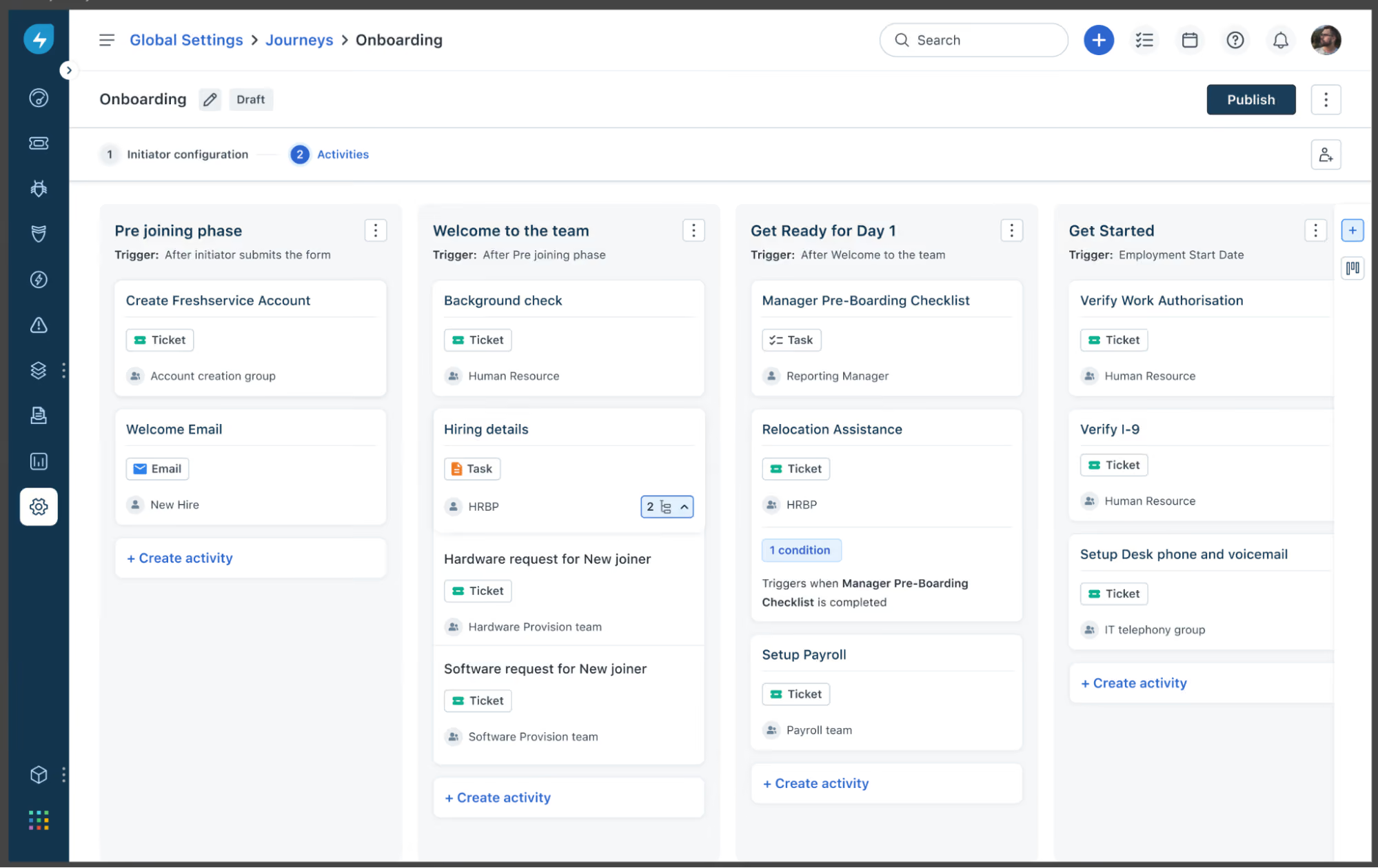
Freshservice approaches employee onboarding from a service management perspective, and that became even clearer to us after reviewing their latest Journeys capability. Launched in 2025, Journeys replaces Freshservice’s previous onboarding module for new customers and expands the platform’s focus from simple onboarding checklists to full employee lifecycle workflows.
Instead of treating onboarding as a single HR process, Freshservice positions it as a cross-department workflow that can involve HR, IT, Finance, Legal, Facilities, and other operational teams. That orientation makes sense for organizations where onboarding includes provisioning accounts, assigning equipment, collecting documentation, and coordinating approvals across multiple departments.
What stood out most to us was how much more customizable this feels than the older onboarding experience. Journeys supports multiple activity types, including emails, tickets, plain tasks, and form-based tasks. Teams can also personalize emails with placeholders, pass selected journey data into tickets for context, and let new hires complete assigned tasks before they even receive a company email address through a tokenized guest portal.
We also appreciate how service items can now be tied directly into a workflow. In the demo, a stakeholder selected software and hardware preferences inside a form task, and Freshservice automatically created child tickets for fulfillment in the right workspace. That is a smart improvement for organizations that want to standardize provisioning without asking HR or hiring managers to manually open follow-up requests. The system also gives journey owners a useful runtime view, with statuses, due dates, logs, and activity-level progress in one place.
That said, Freshservice still feels more operational than employee-experience-led. Even with Journeys, onboarding begins from the support portal, which may feel natural for service teams but less so for HR teams that primarily live in an HRIS. The product is clearly strongest when onboarding is treated as a coordinated service workflow, not as a culture-first welcome experience.
Freshservice does restrict access to sensitive onboarding documents, but according to the demo, they do not yet offer the added reassurance of encrypted document storage for this use case. In practical terms, that means access can be tightly limited, but HR teams handling highly confidential employee records may want stronger built-in document security.
Finally, the platform’s service-desk DNA still shows up in practical ways. Approval reassignment remains rigid in the older onboarding flow, and highly HR-specific teams may still find the overall experience more ticket-centric than they want. Even so, the new Journeys capability makes Freshservice more compelling than before for companies that need onboarding to coordinate multiple departments, conditional workflows, and fulfillment tasks at scale.
74,000+ companies, including Databricks, University of Oxford, RingCentral, and Marvel.
Freshservice Employee Onboarding is part of the Freshservice for Business Teams Pro plan at $49/agent/month (billed annually). The plan includes a Service Catalog, Journeys, Workflow Automator, reporting, compliance, and project management. Optional add-ons include Freddy AI Copilot and e-signatures. A 14-day free trial is offered.

Best For
IT-centric organizations, particularly those that already use Freshworks for service management.


I use this tool at a customer service desk where I can respond to their questions through live chat, emails, and WhatsApp because it is easy to use, I also use it as a marketing tool where I send promotions and offers to our clients through Whatsapp channel to increase our brand interactions and to inform our clients about ongoing promotions, offers, and product updates. The software is easy and faster to use helping me to stay in touch with our clients all the time they contact us
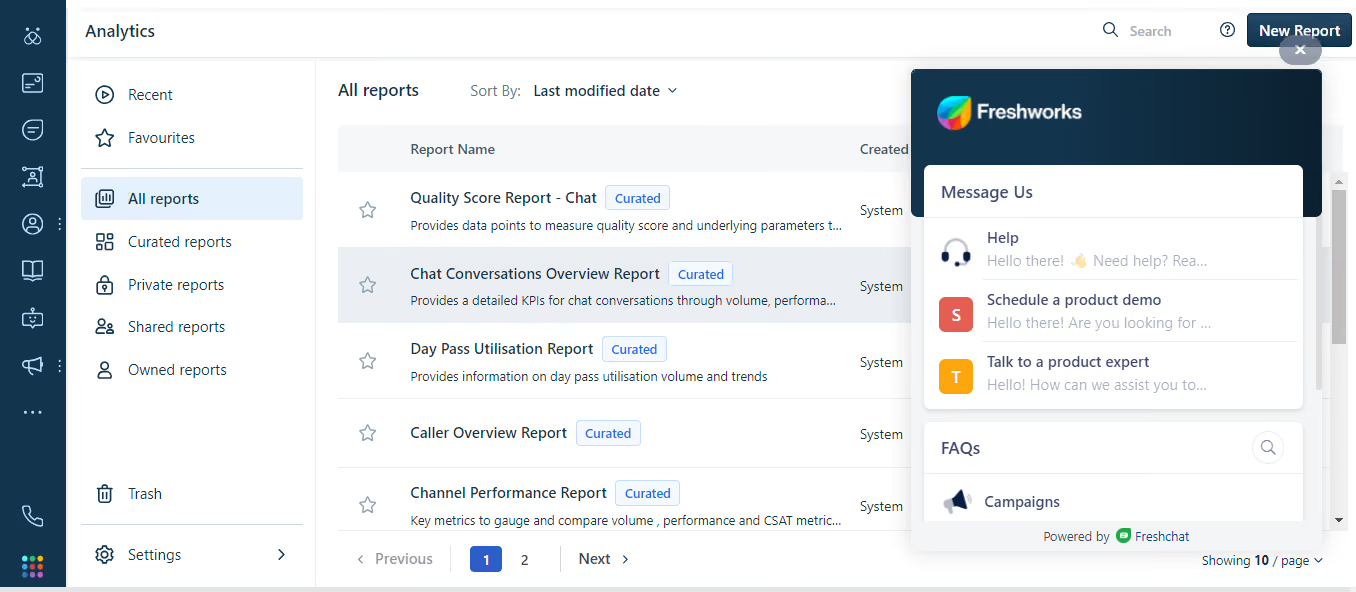
I like the integration with the caller center, you can easily make calls and receive calls within the tool without multiple logins to different tools, and calls are secure and faster,
There is enough customer care who responds to all questions on time when you contact them. Lastly, the software can be integrated with Facebook and Twitter without any technical knowledge and at no extra cost.
We had used a lot of tools in the past and none was delivering services to our expectations. We needed software that had all communication channels and marketing features in one place and that is why we bought the freshservice. It is helping us reach back to our clients anytime from any channel they use to contact us. The tool is also helping us in marketing where we can reach to our clients through email campaigns and WhatsApp campaigns, I have used the solution for five years and seven months
It is hard to transfer a chat and a call to another operator or to another department which is challenging us more often because it always fails to get transferred. The mobile application does not sync with the web application and hence you end up losing the chat history you had with the clients from the web application when you decide to use the mobile application. They have very limited payment methods where you can use a prepaid card to make payments towards your subscription.
They have Whatsapp integration which comes with free 1000 messages/month whereas other competitors charge for this service independently
Good for support operators.
May not be good for the sales team.

Rippling
Rippling can not only handle onboarding but payroll, benefits, and HR for both US-based and global businesses. The platform has extensive integrations, an intuitive UI, and multiple modules to be purchased jointly or separately. Rippling is found most helpful for fast-growing teams with under 2,000 employees.
PROS
- Rippling provides employees with a self-service portal for digital onboarding.
- Automated onboarding surveys.
- US payroll includes I-9s and W-2s, built-in auto-warnings to prevent businesses from violating state laws and regulations.
- Global payroll works for both employees and hourly workers.
- Can connect with 500+ apps.
- Built-in compliance training for employees and managers.
- Has a mobile app.
- Ability to purchase modules separately or as a full suite.
- All-in-one platform for employee management + PEO services offered, and even a suite of other IT products
- With 500 integrations, it’s very likely that they integrate with other key tools from your tech stack.
- Operates globally with any currency
- Workflow automation
- Analytics opportunities
- Provides a holistic view of company outflows—headcount costs included
CONS
- Payment is available via direct deposit or check only.
- No free trial.
- Phone support is a paid add-on.
- Not the best bet for teams with 2,000+ employees.
- Limited features on the mobile app compared to the web browser version.
- Total buy-in to Rippling is essential
- Very SMB-oriented, in case you’re a larger company.
- New features tend to be buggy in ways that tech teams are not accustomed to fixing

Rippling is renowned for its comprehensive payroll and HR features, particularly among fast-growing teams. While employee onboarding is not a standalone tool, it is included in the Rippling Unity module, which offers automation, documentation, and a workforce directory.
We are impressed by Rippling's lifecycle automation within the Unity product. It encompasses onboarding, payroll, benefits, training, and offboarding, accessible via web browsers and mobile devices. The platform provides a pre-built library for custom workflows, surveys, and HR documents, expediting the setup process. The automation capabilities allow us to tailor onboarding workflows and collect feedback automatically from new hires.
Employee self-service is facilitated through Rippling's benefits administration module. It allows employees to view and update payroll, benefits, and documents directly in the portal. Mobile access to compliance training courses is also available. However, the choice of withdrawal methods is limited to direct deposit or check, and the mobile app can be sluggish at times, affecting certain features like receipt scanning and paystub access.
Vox, Maximum Games, Superhuman, Compass Coffee, Highnoon.
Rippling pricing starts at $8 per employee per month. Get in touch with Sales for more details.
Best For
Rippling is most useful for growing teams that have fewer than 2,000 employees. It can work for US-based, international, remote, and office-based organizations.

We use Rippling as our source of truth for everything employee related. On the HR side, it handles our entire onboarding workflow: the moment an offer letter is signed, Rippling kicks off a chain reaction that handles background checks, signs I-9s, assigns handbooks, and drops them into our health insurance and 401(k) pipelines.
We run bi-weekly payroll through it for domestic W2 employees, and we use the global payroll features to pay international contractors and EOR employees across multiple countries in their local currencies.
What really changes the game for us as super admins is how we use Rippling's Unity platform to tie HR directly into IT and finance, automatically provisioning corporate Google Workspace accounts, creating Slack profiles, and granting access to specific AWS or GitHub repos based on department and seniority.
We also use Rippling Device Management to purchase, ship, and configure company laptops, and we can lock or wipe a laptop remotely if someone leaves. It's also where we track time off, manage hardware inventory, and run expense stipends.
The biggest pro for me as a super admin is the automated IT provisioning, which lets us create Slack and Google Workspace accounts and ship pre-configured laptops the second a new hire signs their offer letter.
I love that it serves as a true global single source of truth, meaning I can run US W2 payroll, manage international EOR employees, and pay global contractors all out of one dashboard.
The custom workflow builder is incredibly powerful, allowing me to set up automated triggers, like notifying IT and finance whenever an employee changes their home address or gets a promotion, without any engineering support.
We brought in Rippling about two years ago when our headcount started pacing ahead of what our fragmented tech stack could handle.
At the time, we were playing a frustrating game of telephone between three different systems: a legacy HRIS for tracking employee data, a separate standalone payroll provider, and a disconnected ticketing system just to get IT to provision a laptop or set up company email. We pulled the trigger because we were scaling fast and losing hours of manual work every time we onboarded or offboarded someone.
The promise of having global payroll, core HRIS, benefits, and device management all wired into one central identity management engine was exactly what we needed to stop the administrative bleeding.
It allowed us to manage our growing W2 team and international contractors without needing to hire two more full-time HR admins.
The modular, a la carte pricing structure can lead to severe sticker shock, because every essential feature from time tracking to basic app provisioning is gated behind an additional per user, per month fee that causes your annual bill to balloon as you scale.
Their customer support can be frustrating when a complex edge case breaks on the backend, often resulting in slow response times and tiered ticketing queues when you need a live person immediately.
The heavy reliance on automated triggers means that if a manager inputs a future-dated promotion or job title change incorrectly, it can prematurely trigger software de-provisioning or incorrect payroll calculations without warning.
The primary difference is that while competitors like Gusto or BambooHR started as payroll or HR databases and tacked on extra features later, Rippling was built from day one as an identity and access management system.
With Gusto, I was still stuck manually ordering laptops, setting up Slack accounts, and using separate platforms like Deel for international hiring, and with BambooHR, the payroll felt like a clunky, disjointed third party add-on.
As a super admin, I heavily prefer Rippling because it unifies HR, IT, and finance into a single dashboard, and being able to offboard an employee in three clicks saves my team dozens of hours of manual work every week.
When buying an all-in-one HRIS like Rippling, your primary evaluation criteria must be cross-departmental integration capabilities, specifically how seamlessly HR data flows into IT provisioning and expense management without manual workarounds.
You also need to look closely at global scalability, ensuring the vendor can natively handle both domestic W2 payroll and international EOR or contractor compliance under one interface as your team expands.
Finally, don't just look at the base price; carefully audit the vendor's modular pricing structure and contract terms, as add-on fees for features like time tracking, performance, or device management can easily double your expected budget as headcount grows.
Rippling has evolved from a basic US payroll and IT provisioning tool into a massive global operational platform. They moved aggressively into international workforce management by launching their own native EOR service and global payroll, eliminating the need for separate systems like Deel.
They have also expanded beyond core HR by launching comprehensive finance modules, including corporate cards, expense tracking, and automated accounts payable.
They have transformed from a sleek startup tool into an all-in-one ecosystem capable of handling a company's entire workforce, IT, and spend management globally.
Rippling is an absolute home run for rapidly scaling startups and mid-sized companies (roughly 20 to 500 employees) that operate with a lean HR and IT department. It's specifically built for distributed or remote-first organizations that hire a mix of domestic W2 workers, international contractors, and global EOR employees across multiple states and countries.
If your company uses a heavy amount of cloud software (like Slack, Zoom, Jira) and provisions physical corporate laptops, Rippling is the perfect fit. It excels when an organization wants to automate the administrative overlap between HR, IT, and finance to avoid hiring separate administrators just to manage passwords, hardware logistics, and multi-state payroll compliance.
Rippling is a bad fit for small, localized companies with deskless workforces, like retail shops or restaurants, where employees don't use company laptops or corporate software, making the costly IT and provisioning features useless.
It's also overkill for micro-startups under 15 employees with basic, domestic-only payroll needs, who would be better off saving money with simpler tools like Gusto.
Finally, massive enterprise organizations with deeply entrenched, highly customized legacy setups or complex union payroll requirements will find Rippling's standardized, automated workflows far too rigid compared to Workday or UKG.

Connecteam
Connecteam streamlines employee onboarding with mobile accessibility, user-friendly course creation, and centralized learning materials. Its micro training units, compliance tracking, and always-on access ensure faster training, increased productivity, and a consistently skilled workforce, all while saving time and resources.
PROS
- Connecteam offers a user-friendly platform that's mobile-oriented for deskless employees.
- Comprehensive feature set including team management, communication, training, and engagement.
- Transparent pricing across all plans and there’s a free-forever plan for small businesses.
- 14-day trial offered without requiring a credit card.
- One of the only fully-mobile HR tech tools for deskless workers
- Very adequately-priced for all it entails, SMB-friendly
- Quite open to feedback, having implemented user suggestions as features in the past.
CONS
- Initial learning curve can still be experienced due to the abundance of features available.
- Certain crucial features are restricted to higher-priced plans.
- Some users reported customization limitations, such as the inability to create shared document folders for onboarding and having to assign documents to specific employees instead.
- In the communication hub, the app offers no confirmation that messages were sent and/or seen.
- Certain features that some teams consider essential, such as GPS-tracking, are only available in the higher-tier pricing plans.
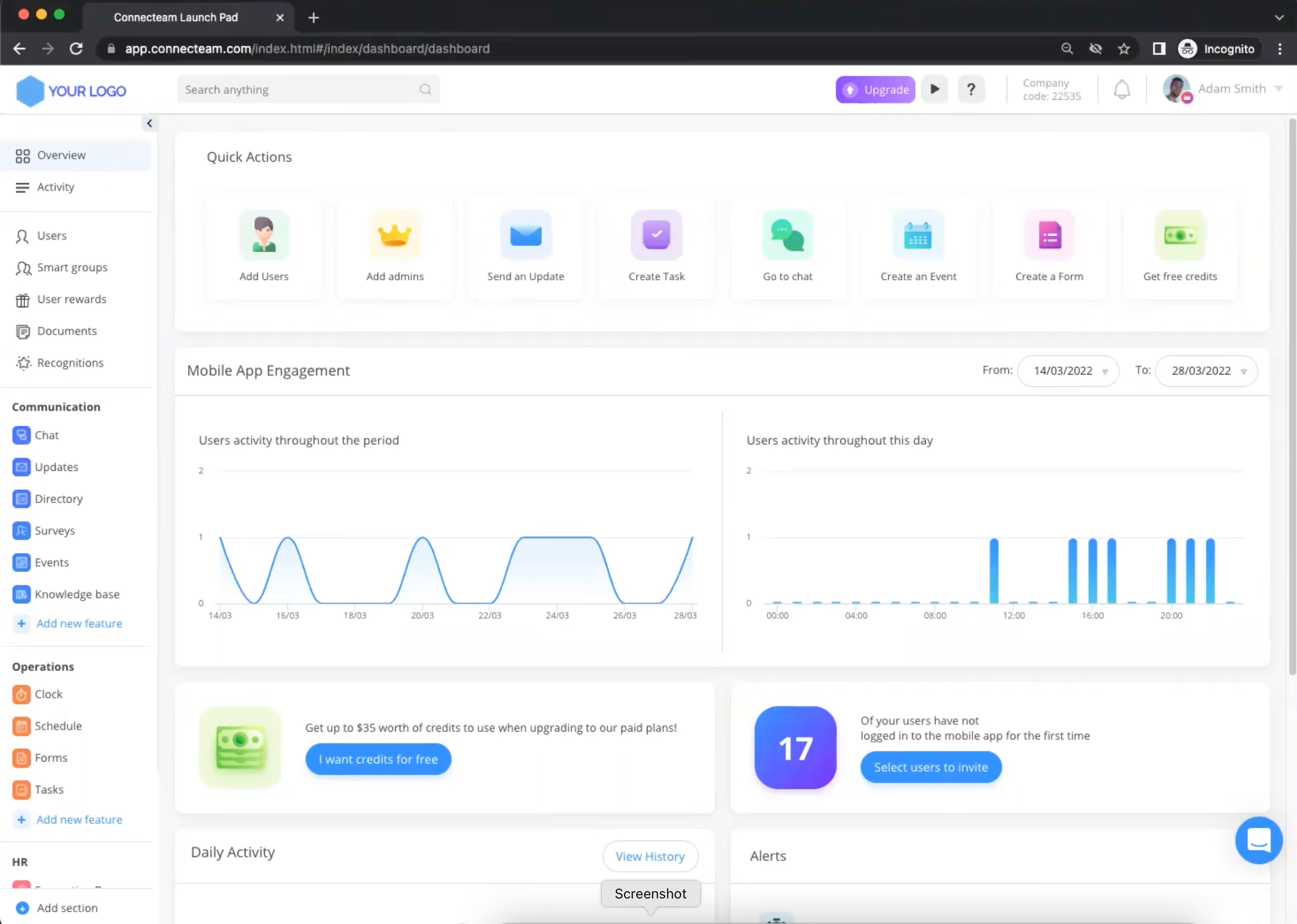
Connecteam offers a host of specialized tools that support the onboarding and training of deskless workers. The platform stood out for us for its mobile-first approach, which allows employees to access and complete training courses from anywhere, at any time. This flexibility is especially valuable for frontline teams who may not always have access to a computer.
Among the things we liked about it is its user-friendly course creation tools. Businesses can easily create and share their own educational materials, eliminating the need for expensive third-party content. The platform also offers a variety of pre-made courses and templates, saving time and resources on research and content creation. These courses are based on best practices and micro-learning principles, ensuring that employees receive engaging and effective training.
Connecteam centralizes all learning materials into one digital space, making it easy for employees to access the information they need. The platform's microtraining units allow for shorter learning times, while always-on access accelerates time to competence. This means that employees can get trained faster and remain productive, even as they continue to learn and grow within the company.
Compliance is another area where Connecteam shines. The platform ensures that everyone is trained consistently with one unified program, and makes it easy to revise content to align staff on new policies and procedures. Progress monitoring and follow-up features help ensure completion, while a detailed record of all mandatory training keeps the company covered.
Sodexo, Subway, Hilton, Chick-Fil-A, and Foot Locker
The onboarding features, including training courses, can be accessed through Connecteam’s HR & Skills hub. The pricing for this hub is as follows:
- The Small Business Plan: Free forever for up to 10 users.
- Basic: $29 per month for the first 30 users and $0.5 per month for each additional user.
- Advanced: $49 per month for the first 30 users and $1.5 per month for each additional user.
- Expert: $99 per month for the first 30 users and $3 per month for each additional user.
Best For
Connecteam’s platform is highly scalable, and its plans suit the needs of most businesses, regardless of size and industry.

The client primarily uses Connecteam at the beginning of each season, but it is reviewed and updated daily. Schedules are adjusted for weather delays, call-outs, and other changes as needed. It serves as the central tool for managing the game schedule and communicating with umpires. The client relies on it throughout the season to ensure smooth coordination. It replaced a previously manual and inefficient system.

Scheduling is clear and easy to understand. Communication between umpires has improved. The knowledge area is helpful for storing rule books and other documents.
I purchased Connecteam for a client. The client is a regional softball umpire organization affiliated with USA Softball and local recreational organizations. The scheduler was creating handwritten schedules for 100 umpires and more than 500 games per season (across three seasons).
After manually creating the schedules, he would text pictures of them to the umpires. Mistakes often occurred, and the process was time-consuming and prone to error. Connecteam helped streamline scheduling and communication.
Connecteam refers to all users as "employees" with no option to change that label, which is not accurate for independent contractors like umpires. It would be helpful to have a way to customize role terminology. I found the scheduling feature easy to use, but the umpire in charge had some difficulty with it initially.
I have not used other tools like Connecteam. I reviewed several options before selecting Connecteam and chose it because it offered a free plan for the first 30 users, which allowed us to test the tool before committing.
Make a list of the specific features you need before committing. Connecteam charges additional fees for some modules, so it can end up costing more than expected if you do not review the pricing details. Understanding what’s included in each tier is important to avoid unexpected costs.
I have only used Connecteam for 1.5 years, so I’m unsure of changes.
Connecteam is ideal for groups with offsite or field-based workers who need schedules and may need to clock in at job sites.
Connecteam may not be suitable for larger companies, those with mostly office-based staff, or organizations with more complex operational needs.

Whale
We found Whale a highly effective onboarding tool for growing teams, especially those prioritizing consistency, clear documentation, and role-specific training. The platform’s AI-powered automation and interactive learning features make it engaging for new hires, while its strong support framework ensures teams are set up for success.
PROS
- Automates role-based training for efficient and tailored onboarding.
- Engages new hires with AI-generated quizzes and gamified badges.
- Offers intuitive process documentation tools, including step-by-step guides and a step recorder.
- Scalable pricing, with a free plan for small teams and affordable options for mid-sized businesses.
- Strong implementation support, including a four-week onboarding framework guided by a Customer Success team.
- Automates role-based training for efficient and tailored onboarding.
- Engages new hires with AI-generated quizzes and gamified badges.
- Offers intuitive process documentation tools, including step-by-step guides and a step recorder.
- Scalable pricing, with a free plan for small teams and affordable options for mid-sized businesses.
- Strong implementation support, including a four-week onboarding framework guided by a Customer Success team.
CONS
- Limited customization options in the content editor.
- Best suited for mid-sized and scaling companies, less ideal for very small teams who lack well-defined onboarding processes.
- Relies heavily on structured workflows, which may not suit informal or dynamic teams.
- Pricing can become expensive for larger organizations with many users.
- Limited customization options in the content editor.
- Best suited for mid-sized and scaling companies, less ideal for very small teams who lack well-defined onboarding processes.
- Relies heavily on structured workflows, which may not suit informal or dynamic teams.
- Pricing can become expensive for larger organizations with many users.
If you’re a growing company ready to invest in structured onboarding, we think Whale is absolutely worth considering. It’s a tool designed to make onboarding efficient, organized, and tailored, and we found plenty to like about how it delivers on these promises.
One of the main reasons for our recommendation is how well Whale handles role-based training automation. As part of our testing, we set up onboarding for a sales team and assigned specific training modules based on their roles. The platform smoothly tailored training paths for new hires so everyone received exactly what they needed without having to sift through irrelevant material. For teams with limited HR resources or those looking to streamline their onboarding process, this level of automation can be a huge lifesaver, we’d imagine.

Another feature we thought was great was the platform’s use of AI to enhance learning. We tested the AI-generated quizzes and badges, which added an engaging, gamified element to the onboarding experience. For example, after completing a training module on customer handling, the system generated a quick quiz to reinforce key points, rewarding high scores with badges. This approach made learning interactive and fun— a refreshing touch for what is often considered a tedious process.
Teams wanting consistency in their training materials will love Whale’s focus on process documentation. The ability to create step-by-step guides and standard operating procedures felt intuitive and effective. During our test, we used the step recorder to capture a guide for using a CRM system. The result was a readily shareable, easy-to-follow document that we’d imagine new employees would find helpful.
In terms of pricing, Whale’s model starts at $99 for 10 users—quite accessible for most businesses looking to standardize their onboarding process affordably. Plus, if you’re a smaller team with fewer than five users, you can get started for free, no strings attached.
On the customer service front: our experience was quite positive. During our free plan trial, Whale’s support rep guided us through a four-week kick-off process, helping us create thematic structures, onboard users, and document workflows.
That said, the content editor was one of the first limitations we noticed about the onboarding tech. While functional, it lacks advanced customization options, which could be frustrating if you need highly personalized onboarding materials tailored to your brand or industry.
Additionally, though Whale does offer a free plan for teams of five or fewer, we believe the software works best for larger teams, ideally with 25+ employees and scaling. In our tech tests, we noticed that features like the step recorder are most valuable for ones with well-defined processes already in place. Smaller organizations or those without structured workflows might find Whale’s robust framework an overkill instead.
The number of customers is not disclosed, but our research indicates that most are small and midsized teams based in the U.S. and Europe. Notable clients include Oxygen Service Company, RIHM, Theiner ICT, Image Solutions, SJA Solutions, and Posternock Apell.
Whale is free for small teams, starting with documentation and knowledge sharing. The Scale plan costs $99 for up to 10 users, with an additional fee of $10 per month for each extra user. Enterprise pricing is available on request.
Best For
Whale’s employee onboarding software works best for growing businesses, especially those that prioritize consistency, clear documentation, and role-specific training.

Leapsome
More than a basic task tracker, Leapsome helps your new hires integrate both culturally and productively right from the start, using structured checklists, embedded surveys, learning resources, and real-time praise features.
PROS
- Onboarding workflows can be fully customized, scheduled, and triggered by employee attributes.
- Preboarding steps supported, including document upload, policy sign-off, and profile setup.
- Feedback and praise tools help reinforce early wins and promote belonging.
- Surveys, probation check-ins, and goal-setting can be linked directly to onboarding flows.
- Smart automations include reminders for new hires and nudges for managers.
- Built-in learning module allows for task-based learning paths during onboarding.
- Leapsome is quite feature-rich; the platform packs modules for employee onboarding, learning management, engagement, performance management, goals tracking and much more.
- The majority of users find Leapsome’s UI to be friendly and easy to navigate.
- There are lots of third party integrations options to choose from, including Slack, which many users appreciate.
- The platform has transparent pricing, and you only pay for the modules you need.
CONS
- All contracts are for a minimum of one year.
- Customer support requires a minimum annual spend of $6,000.
- The price is no longer publicly available.
- There is currently no way to post or upload an image or file into your feedback.
- Since Leapsome can do so many things, you may need some time to get used to it. The implementation process can also take some time.
- There currently isn’t a mobile app that users can download and access Leapsome quickly on-the-go.
- Free 14-day trials are available but you need to book a demo with the sales team first to sign up for one; you can’t do so on your own.
When we trialed Leapsome’s onboarding functionality, what stood out immediately was how much more it offered than just assigning tasks or sending welcome emails.
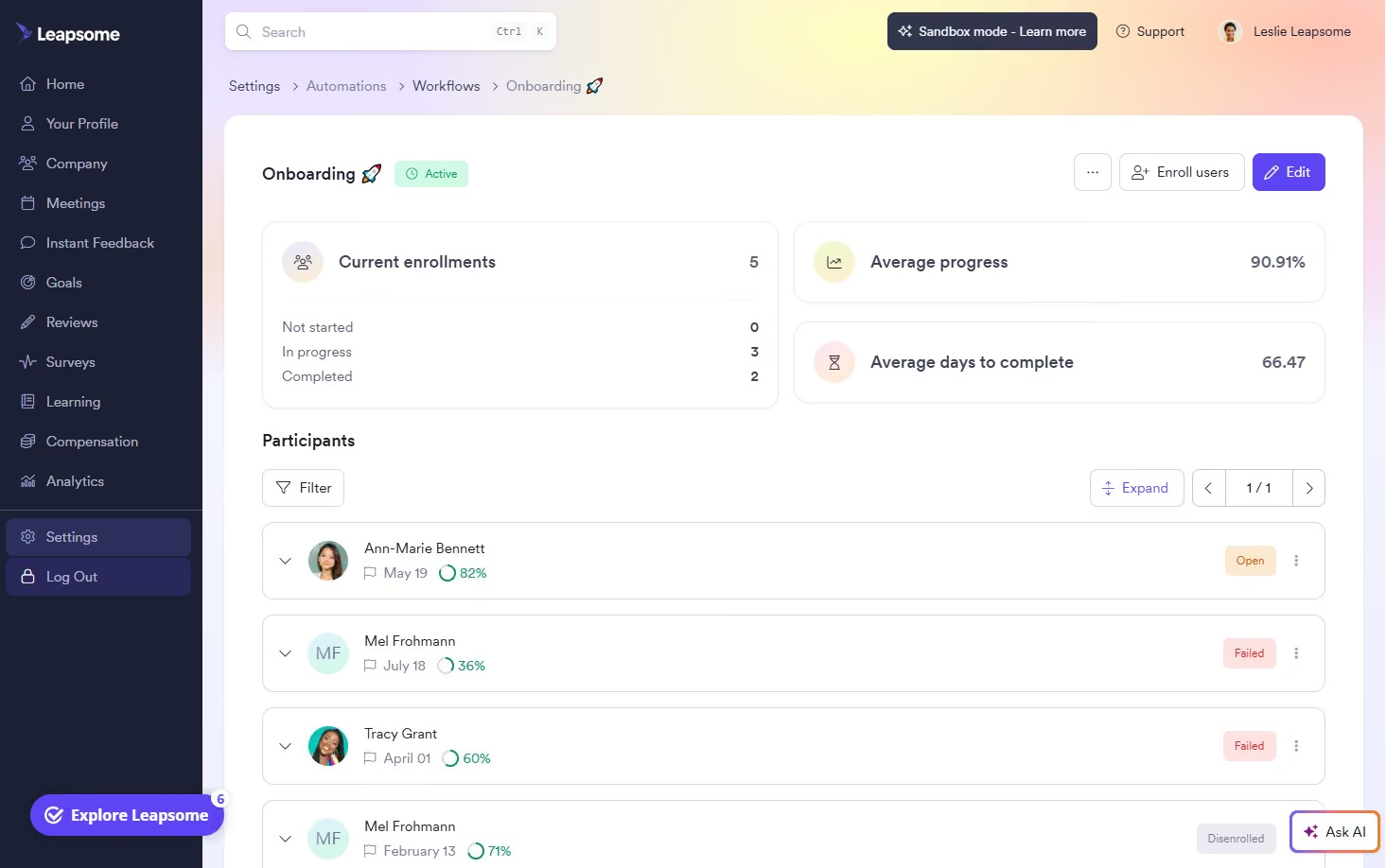
You can build out onboarding and even preboarding workflows that launch automatically based on any employee detail, like job title, location, or start date. The flexibility here is impressive: flows can include document uploads, policy acknowledgments, profile setup, training tasks, and probation check-ins. You can even schedule nudges and reminders for incomplete steps, and escalate overdue items to managers if needed.
But what we really liked was how Leapsome ties onboarding into performance and culture-building right from the start. Managers can give public praise to new hires using custom badges like “Team Player” or “Time Management.” That praise shows up in a Slack channel or on the in-office Praise Wall. New employees also get exposed early to team meetings with shared agendas, goal-setting check-ins, and feedback tools. It’s a thoughtful way to create early momentum, especially for remote or hybrid teams.
For adoption, Leapsome supports workflow-based nudges like the “New Joiner Awareness Journey,” which sends weekly onboarding tips during the first 30 days. Employees are prompted to explore their profiles, join team meetings, and offer praise to colleagues to help them engage with company culture.
That said, all Leapsome plans require a one-year contract, so you’ll want to be confident it fits your needs. Dedicated customer success support is available only to customers spending at least $6,000 annually, which may be a stretch for smaller companies looking to activate just one or two modules.
Even with those limitations, we think Leapsome hits a rare balance: it brings structure and heart to the onboarding experience. For SMBs that care about creating lasting first impressions and want to make feedback, recognition, and alignment part of the new hire journey, this one is a sound option worth considering.
1,500+ companies, including DrFirst, Bob W, and Jina AI.
Leapsome pricing is custom.
Best For
(Global) SMBs that want onboarding to extend beyond operations and into engagement, feedback, and retention.

BambooHR
BambooHR helps you save countless hours in onboarding. It comes with customizable pre-boarding packages, built-in e-signatures, onboarding process templates, and automated messaging to help new hires through onboarding tasks.
PROS
- Flexible packaging and custom pricing: you can add features as needed to your base plan
- Customizable checklists for the onboarding process
- Centralized information repository, good tool for optimized document organization
- Automate workflows and set up reminders for efficient task management
- Easy to use
- Flexible packaging and custom pricing is the way they roll. You can pick out one or two packages and pick other modules as add-ons based on your needs.
- Very simple and straightforward tool, easy to use.
CONS
- For advanced onboarding workflows, customization may be limited.
- Companies outside the United States might find it too U.S.-centric. For example, payroll is only available for U.S.-based employees, and customer support is only offered during U.S. business hours.
- Certain components like time tracking, performance management, and surveys are only available as add-ons.
- Payroll is only available for US-based employees
- Customer support is only offered during US business hours.
- Some modules like time tracking, performance management, and surveys are only available as add-ons.

For years, BambooHR has stood out for covering the complete employee lifecycle, encompassing core HRMS functions like recruiting and performance management. We’ve always found their design intuitive and easy to use, which helps explain why they remain one of the top names in HR software.
Onboarding features are limited to specific plans, so teams who are looking for this feature a la carte should look elsewhere. However, Bamboo is a great choice for teams in the market for or open to adopting an HR suite of user-friendly tools designed to streamline processes, optimize efficiency, and foster employee engagement.
Among the 34,000+ companies that use BambooHR, you’d find names like Quora, Universal Group, Reddit, Asana, Change.org, University of Maryland, Grammarly, Stance, Postmates, Wistia, the Jacksonville Jaguars, and ZipRecruiter.
BambooHR's employee onboarding tool is available across its three per-employee, per-month pricing tiers:
- Core ($10): Includes essential HR functions (records, hiring, onboarding, time off, compliance).
- Pro ($17): Adds performance and engagement tools to Core features.
- Elite ($25): Pro features plus compensation management, advanced analytics, and premium services.
Best For
BambooHR is a good bet for organizations seeking a customizable HR solution offering flexible pricing. It’s popular among teams embracing partial or complete remote work arrangements.

I used it daily as the HR Data Manager for my company. We maintained employee records, processed new hire onboarding, managed time-off requests, and generated reports for compliance and analytics.
I supported employee performance review cycles and tracked employee changes. I also audited data on a quarterly basis. It served as the central source of HR data for the company.
- The user-friendly UI is intuitive and easy to navigate.
- The strong onboarding and self-service tools streamlined our processes and allowed employees to complete tasks that would have otherwise required HR support.
- Reporting was reliable for auditing and compliance purposes.
Our organization purchased BambooHR to consolidate our scattered HR processes into a single platform. We had previously been using static information sources like Excel and Word documents to house employee data, which caused inefficiencies and reporting errors.
I used the system throughout implementation and for a year afterward. It resolved many issues with data inconsistencies and improved tracking of employee data, onboarding, and performance.
- Customization was limited, as some modules like performance had restricted flexibility in fields, workflows, and integrations.
- The lack of pricing transparency was frustrating; we had to go through multiple discovery calls to get a price estimate.
- Analytics capabilities were basic and not very robust.
It is focused on small to mid-sized businesses and ease of use. Unlike larger systems like Workday, it is not overly complex or overpriced and requires much less administrative effort. It is generally API-friendly, and the customer service team is excellent.
Organizations should consider their growth plans to determine whether BambooHR meets their scalability needs. They should also consider their employee base and whether ease of use will be a critical factor.
The interface has become more intuitive, with improved mobile access and self-service options for managers and employees. The analytics tools have improved slightly as well.
Small to mid-sized organizations can benefit grealy from BambooHR.
Large, complex organizations will find it better to use more robust software.
.png)
Deel
What sealed the deal for us in recommending Deel in this guide is its flexibility and its focus on remote teams. Deel Hire supports various types of international workers, offers multiple modules you can purchase individually, and lets you onboard new hires directly in Slack.
PROS
- Supports different types of workers, including EOR hires, salaried employees, and independent contractors.
- Bulk upload worker information available for mass onboarding.
- Option to onboard a new hire within Slack (via a plugin).
- Compatible with 96 HR and recruiting systems, including popular accounting, ATS, and remote workforce management software.
- Excellent 24/7 customer service with fast onboarding (2-3 days) and local payroll experts in each jurisdiction.
- Seamless integration with platforms like QuickBooks, BambooHR, and Greenhouse, plus custom integration options.
- User-friendly, self-service features enable quick setup; identity verification often takes under 24 hours.
- Automated invoices simplify payments, provided they're in English.
CONS
- The tool cannot be purchased separately; it’s accessible only as part of Deel HR.
- Not the best money spent for teams with only locally hired employees.
- Key features like onboarding automation are add-ons, which may increase costs.
- Limited flexibility in modifying contracts or service agreements; changes often require an addendum.
- Invoices cannot be generated in languages other than English.
As a distributed team, we have a special appreciation for Deel's completely remote-friendlyonboarding tool. It caters to pretty much any hiring need you might have: EOR workers, PEO hires, full-time salaried employees, or even independent contractors. And more importantly, the tool does so nicely, with transparency and flexibility as highlights.
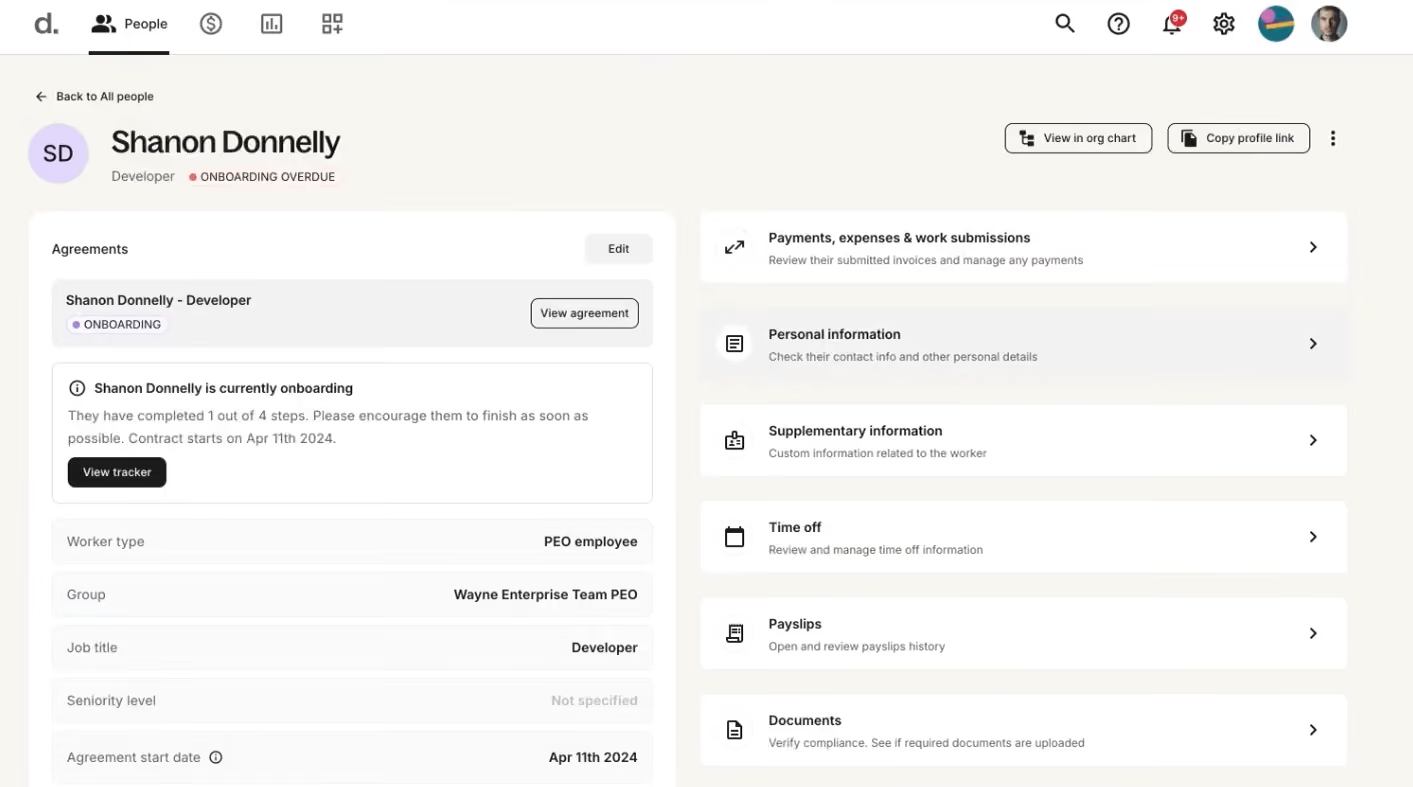
When we logged into Deel with an employer account, we were greeted right away with the onboarding progress of all our workers. We could instantly see who was missing what from their checklists (see screenshot). It makes it so easy to stay on top of the onboarding status and spot areas where we should simplify to better the new hire experience.
Digging deeper into the app, the level of transparency Deel provided users truly stood out to us. With a click on a worker, we could view more detailed information about how they were in their onboarding checklist: what's been done and what's still pending. And if it looked like they needed a nudge to finish up their tasks, sending them a reminder was just a button click away.
The Onboarding by Deel plugin is such a convenient tool. After we set up workflows for each department and location, the plugin automatically segmented and sent onboarding notifications and reminders directly to new hires through Slack. We could even monitor everyone's progress without leaving the comms app.

We wish this tool were more approachable, though. Under the current pricing structure, the onboarding tool is included in Deel’s broader modules. So, even if you’re willing to pay for this tool separately, that's not an option.
Also, if your team is fully locally hired and you don’t plan to hire employees or contractors from other countries, check out our reviews of Eloomi and ClearCo above— they could be a much better fit for you.
40,000+ companies, including OpenAI, Zapier, and LEGO.
Deel's onboarding integrates across several modules: Deel Hire (via Employer of Record, starting at $599/month, or US PEO, starting at $125/month) and Deel IT (via Deel IT module, starting at $45/month, or Platform, starting at $10/month).
Best For
Organizations seeking to recruit or currently employing workers and independent contractors globally.

I use Deel multiple times each month as our system for hiring, onboarding, and paying people in different countries. I start by adding new hires or contractors, collecting their contracts, IDs, direct deposit details, and any tax forms required by compliance in the platform.
I then add country-specific details—e.g., salary, currency, pay frequency, and mandatory deductions—so that payroll runs smoothly without manual calculations.
Each pay cycle, I review the payroll dashboard, check costs per country, and approve payments so that Deel can send money in the employee's or contractor's local currency.
Then I export payroll reports and employer-side payslips for the record of employment documents and to provide them to the finance team.
I also use Deel for benefits administration, including medical, health, dental, pension, and life insurance.
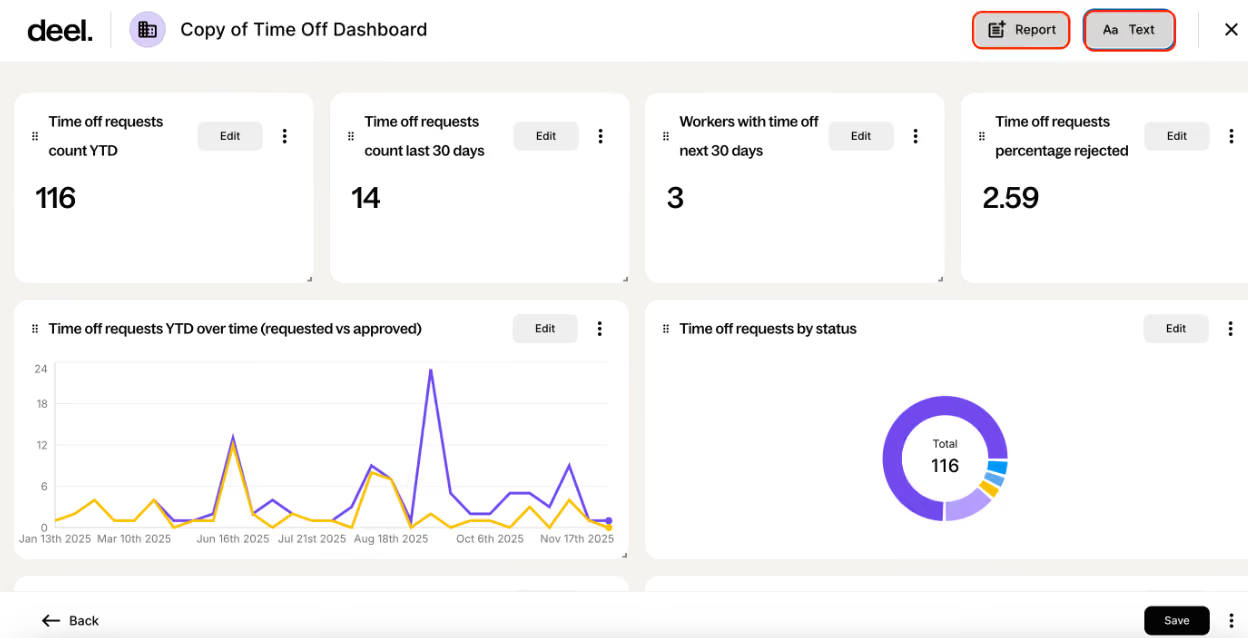
- I like Deel because it lets us hire and pay in many countries from one place, without setting up an entity.
- Another reason I like this solution is that it calculates payroll, payroll taxes, and any contributions automatically for each country, which saves time and reduces errors.
- A third is the compliance support. No matter how deep we research, local experts are always better and help us align with market practices.
We bought Deel when we moved from a single country to a distributed team across several countries and regions. We needed one system to hire employees through EOR, pay contractors, and run payroll where we had entities, without juggling a different local vendor in every country.
The main benefit for us is centralized global payroll with automated local tax, contributions, and multi-currency payments, so payroll and compliance work shifted from spreadsheets and email to one workflow.
Another main benefit is compliance support, with local contract support and country rules in the platform, which gives our HR and legal teams more confidence when entering new markets.
Having Deel admin access reduced the time spent coordinating with external payroll providers and internal finance each cycle, since everyone now works from the same global reports and dashboards.
- Some features feel less mature than those in a dedicated HRIS, which means we have to pair Deel with other systems for deeper HR needs.
- I also dislike that very basic changes require support tickets, and even then, resolutions take longer than expected or are never resolved. I had a case where one employee was added by mistake—they said it would disappear from the account, but it never did. That employee now appears twice, which confuses headcount and creates extra admin work.
- Reporting and workflow customization feel limited, so for more complex reporting, we still have to rely on Excel or other tools.
The main reason I picked Deel compared to other EOR providers was their broader country coverage, which helped with pricing.
Another reason was that the portal seemed user-friendly—it is easier for new employees to go through onboarding flows, submit expenses, or provide other information, as the portal is very self-explanatory.
Define your requirements and map your countries and hiring types first. Know exactly which countries you need now and over the next 12 months, plus your mix of EOR, contractors, and owned entities, since not every tool covers all equally well.
Check pricing and any hidden costs. Get a full breakdown of per-employee fees, including any additional tools you use (like I used benefits, which impacted total pricing depending on the insurance plan each employee chose), and compare the pricing with your budget.
Test integrations and workflows—confirm that it connects smoothly to other HRIS systems and accounting tools, and run a trial of the core features like payroll and onboarding. Evaluate the depth of compliance support.
When I started using Deel in 2021, it mainly covered contractors. Later, they added EOR and global payroll. Over time, they added other HR features like benefits administration and device management. Nowadays, I am also noticing AI tools in the portal.
Deel is really good for startups or companies that want to expand their team in different countries without setting up entities.
I see Deel as a good fit for marketing agencies, consultancies, and e-commerce businesses with distributed teams, where speed to hire and payment reliability matter more.
Companies with simple domestic payroll needs and no international hiring should look for local expert options.
Also, companies with fewer than 15–20 people in just 1–2 other countries should consider a local market vendor, as Deel’s pricing can be expensive compared to local alternatives.

Enboarder
Enboarder digitizes your onboarding process and makes it more personalized. It facilitates communication between your existing team and new hires to guide them through the transition and make them feel welcome.
PROS
CONS
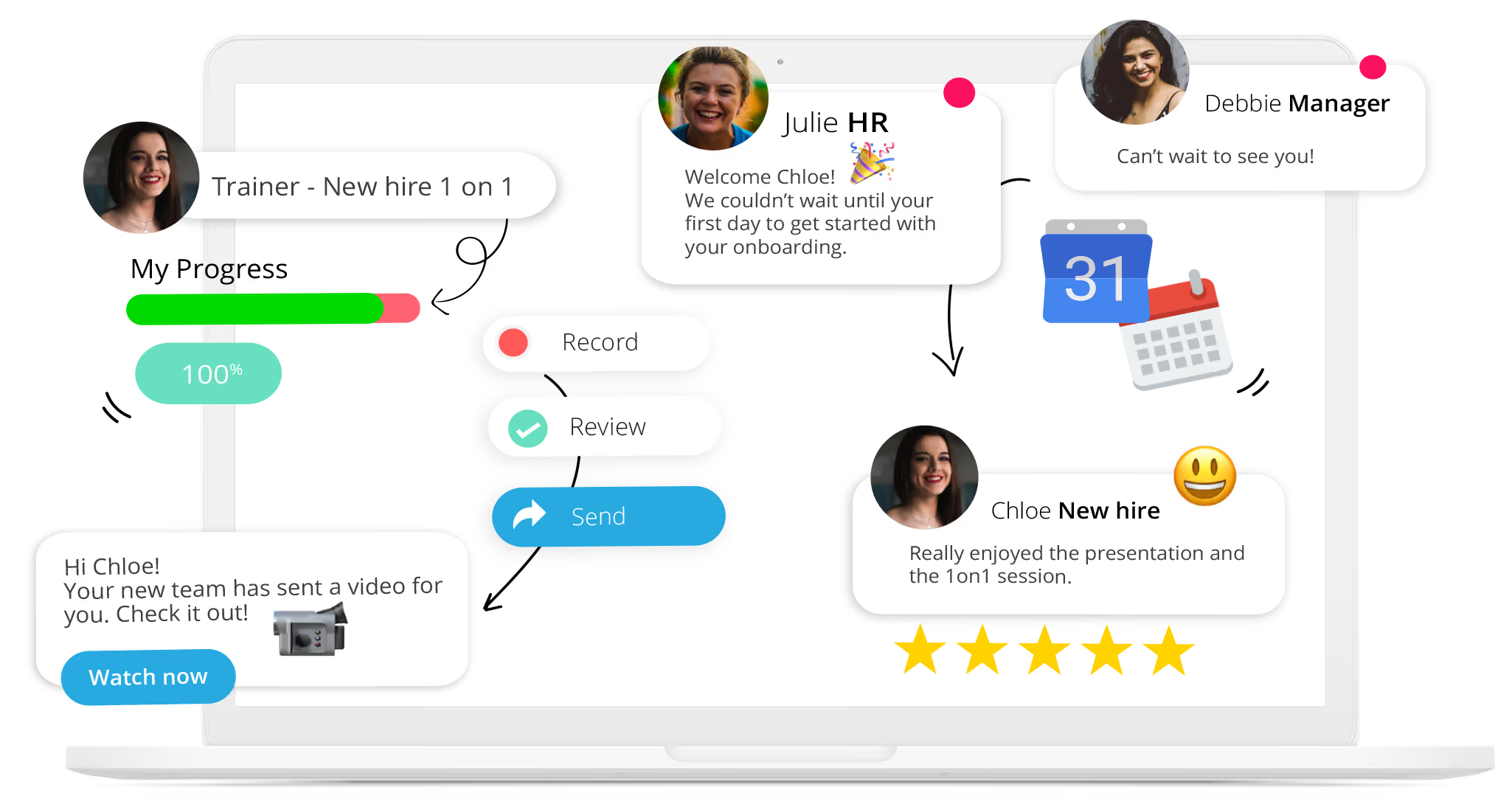
Enboarder is a cloud-based platform that streamlines how you onboard, offboard and reboard people - all while delivering great experiences. The platform is quite versatile; you can use it to transition employees at different levels, as well as partners, customers or any other relevant stakeholder. Enboarder is also easy to use; it features a drag and drop mechanism, allowing you to customize it to your liking with little to no help from your IT department.
Hugo Boss, EventBrite, Mcdonald’s, LVMH Fashion Group, ING
The pricing of Enboarder’s solutions isn’t disclosed upfront. Contact their Sales team to get a custom price quote based on the size and needs of your business.
Best For
Enboarder serves businesses of various sizes, from SMBs to Enterprises.

Trainual
Trainual accelerates employee onboarding like nothing else. All you have to do is document your onboarding process and leave the hard work of repeating and scaling up to Trainual.
PROS
CONS

As you may have guessed from the name, Trainual is generally focused on the learning that happens within your organization. And, one of the key ways they help employees learn is during onboarding. Their platform will allow your employees to learn and reference the core processes that will be essential to their role.
Trainual is used by the UPS Store, Stanford University, Design Pickle, RE/MAX, and Harmon Brothers.
Trainual's pricing starts at $99/month, billed annually, with the Pro plan. If more features are needed, as well as phone support and personalized coaching, the Premium Plan is $149 per month. Both of them include the first 25 users.
Best For
Small, medium, large businesses, and enterprises looking for an all-in-one solution for training, onboarding, and process documentation.

As the administrator, I uploaded training material to the library, organized the library and made assignments to the staff and new hires. I could add and remove documents and run reports to see how Trainual was being used.
- Very user-friendly
- Easy to organize
- Quick to learn
As an HR Consultant, I worked with a small business that used Trainual to store their training materials for new hires and employees as they grew. They used this platform instead of something internal as a library to house document files, onboarding material and make training easy for new and transitioning employees. I helped set up Trainual and onboard their new hires in the system. I was an admin for a year in the system.
- It didn't hold a lot of information.
- We needed to create everything from scratch. They don’t have a lot of templates.
It's really simple and user-friendly.
Consider how much training you need uploaded and how many users you need to have access. Trainual limits the number of people that can access the platform before it becomes VERY pricey.
Smaller businesses with limited amounts of training
Large businesses with a lot of data or talent movement

ClearCo
Modern, easy-to-use, and efficient, ClearCo's employee onboarding software has many useful features some of which are: device and equipment management, compliance management, automated task notifications, bulk onboarding.
PROS
- Offers several integrated HR solutions you can pick from and combine as needed.
- Intuitive, easy-to-navigate interface.
- Highly rated support team for speedy, quality responses.
- They provide implementation support so you can get your instance up and running quickly.
- ClearCo offers a host of talent solutions that work well with one another. You can choose the solution you need or combine them all to have a comprehensive talent management platform in your stack.
- The majority of users find ClearCo’s interface to be quite intuitive and easy to navigate.
- Many users have highly rated ClearCo’s support team for speed and quality of response. Several users have also reported a smooth implementation experience.
CONS
- Pricing is not readily available and you can’t create a trial account on your own.
- Reporting customization options are limited.
- The candidate search functionality could be improved in accuracy and speed.
- There isn’t a mobile app, but the platform is mobile-optimized.
- ClearCo’s pricing is not readily available on their website. You also can’t create a trial account on your own from the website and have to go through the sales team for more info.
- Some users felt that the reporting feature is limited in customizations.
- According to a few users, the candidate search function doesn’t always bring up the correct candidate(s) and could use some improvement.
- ClearCo doesn’t currently have a mobile app, but the platform is well optimized for mobile use both for hiring managers and candidates.

ClearCo's solution can provide a paperless onboarding experience for new hires. Their mobile friendly experience helps take care of compliance issues (I9, W-4, etc) all the way through directions to the office and new team member introductions.
ExxonMobil, Mitsubishi Electric, Yates Construction, JC Penney, and Lake Charles Memorial Health System.
Choose from buying a single module, several, or the whole platform. That being said, ClearCo's prices aren't provided upfront.
Best For
Companies looking for more than just an onboarding tool to add to their HR tech stack.
We use Clear Company for every new hire to get through all the communication and compliance portions with them. We send offer letters through Clear Company that are customizable, and we receive communication back from applicants via Clear Company as well. Once an applicant has accepted an offer, we also use Clear Company to streamline their background check. Clear Company provides a nice portal where we can clearly see where we are in the hiring process for an applicant.
The applicant tracking system works well for our small (less than 500 employees) business. It integrates well with our background check processes. It improves our communication with potential hires.
My company started using Clear Company because we wanted to make the onboarding process smoother for new hires. Prior to using Clear Company, we had a disjointed process. We had to individually craft emails to applicants in the recruitment process, and check in constantly on where we were in the process of recruiting them and completing background checks. Clear Company allowed us to streamline the process. We were able to set up customizable templates for ongoing communication with new hires. We were also able to streamline the background check process.
It takes some time to learn how to use it. We have not tried integrating with our payroll/HRIS software because it doesn't seem like it will function that well. It doesn't integrate with our social media.
I have not used other tools just like Clear Company, but we added Clear Company to our tool chest because it offers functionality that our HRIS software does not when it comes to applicant tracking and onboarding.
If you're considering using Clear Company, think about what functionality it will add that you don't already have with your other HR software. In our case, it adds additional applicant tracking and background check integration functionality that we wouldn't otherwise have. I would also consider the price. It is well-priced for our smaller business where we only pay for the essentials for a few users each month. The price could add up quickly in larger businesses, so you need to consider if the value-add of the product is worth the price tag.
I know they integrate with more payroll/HRIS systems than they used to (but still not with ours). They have improved the user interface over time as well.
I think Clear Company is good for small to medium-sized businesses. It is right-priced for this size of business and adds functionality that most businesses this size might be lacking in their other HR software.
I don't think Clear Company would be necessary or very useful for very small businesses who are not hiring very regularly. My business is smaller but experiences high turnover, so Clear Company is a good add for us. If you are not doing a lot of hiring, I don't think it would be much of a value add for the price.

Remote
Remote handles onboarding for hires employed through its EOR or added to its global payroll, covering employees and contractors in over 100 countries. Sending, filing, signing, and storing documents is paperless and mobile-friendly.
PROS
- As an owned-entity provider, Remote offers a lean onboarding process without the worries of IP and data passing to third parties.
- Employee self-service options.
- iOS and Android apps with self-onboarding for employees.
- Responsive customer service available via live chat and email.
- Regional global employment resources are easily accessible.
- Equity-based compensation option.
- Fast and compliant payroll in 170+ countries.
- Live chat support with local payroll experts.
- Flexible, localized benefit packages.
- Flat-rate pricing structure, no deposits or hidden fees.
- Mobile app streamlines expense reimbursement with autofill from receipt photos.
CONS
- Remote doesn’t offer a free plan or free trial.
- The platform doesn’t provide phone support.
- No features to support employee feedback for the onboarding process. (currently on the vendor’s roadmap)
- Doesn’t have a free trial.
- Redundant for organizations solely recruiting within the U.S.
- Help center documentation isn’t easiest to understand.
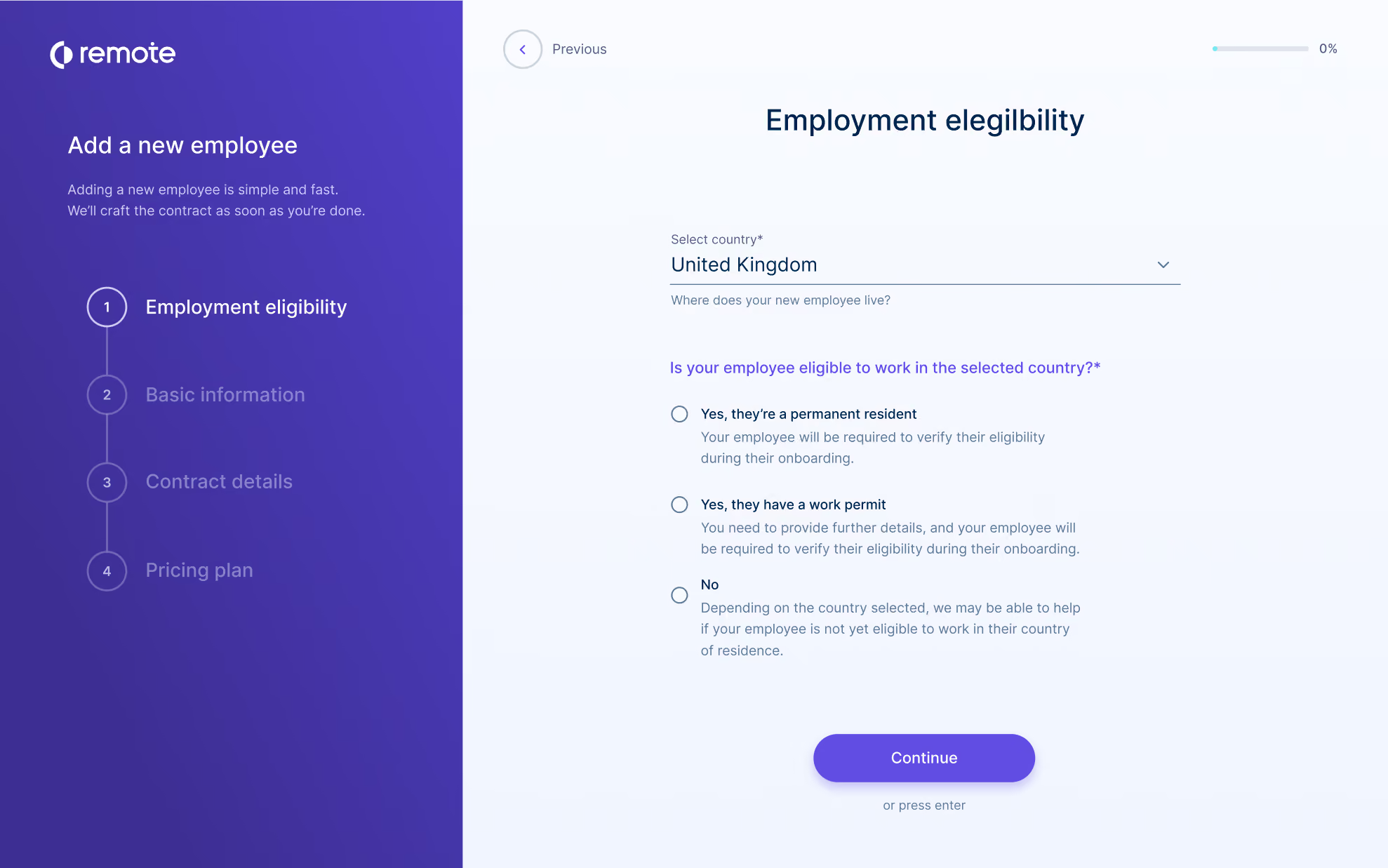
Remote is a great platform for companies that plan to hire and onboard a substantial number of international employees in the near future.
They have built a reputation with their flat-rate, straightforward global payroll, but their onboarding features are also top-notch. Their platform handles payroll, onboarding, taxes, benefits, and more – all with compliance and IP protection in mind.
One particularly appealing feature is the availability of experts in each region they operate. Sometimes, only a local will do this when it comes to the complex standards and customs of local laws and practices, and they have assured that resource is available to their customers by offering local support in each of the 60+ countries in which they operate. According to our research, the majority of Remote users who contacted these local experts for support were pleased with the service. Users also had positive feedback about Remote’s technical support.
Remote can be a sound option for effective global onboarding, whether you want to establish a new branch or employ one person in a different country. It has a dedicated self-service portal to keep workers connected. It provides robust data protection and security.
However, businesses looking for features like employee training or pre-built integrations won’t find Remote helpful, as the tool isn’t a training-focused onboarding platform, and rather than offering a range of native integration options, it provides customers with free custom API.
Arduino, GitLab, Paystack, Loom, cargo.one, Secureframe, Phaidra.
The onboarding features are included within Remote’s HRIS, which costs $12 per employee per month when billed annually.
Best For
Remote is a good fit for globally distributed teams looking to hire, pay, onboard, and retain international talent with country-custom benefits, seamless onboarding experience, and payroll.

We started using Remote for our international employment. The HQ is in Belgium, and we were expanding into France, Spain, and other countries yet to be decided. The tool offers a basic understanding of the social laws and costs associated with employment in these countries. Once candidates were onboarded, Remote supported the full process, including onboarding, holiday, and payroll management.
- Remote provides the basic information needed to investigate employment in a new country.
- The documents are freely available and in clear language.
- All foreign employees and contractors are managed in one tool.
- Remote is ideal for initial foreign expansion.
My previous company (at the time of writing, I have left the company) intended to grow within Europe. The goal was to have a small team of employees in multiple European countries. As each country has its own unique social laws, and we did not have an entity in every country, we needed a partner to support us with this growth. Remote provided this solution. They act as an intermediary partner, take employees onto their payroll, and support you with specialized HR topics unique to each country.
- Remote's pricing is high—it is good if you only employ a few people per country, but once the team expands, it is better to have your own entity.
- There is limited customization, as most processes must follow the structure provided by Remote.
- In some countries, Remote works with subsidiaries, which can slow down the onboarding process.
We chose Remote because of its clear pricing and the intuitiveness of the tool.
People need to keep the following in mind:
- In which countries do we want to employ people?
- How many people do we want to employ per country?
- Are we going to open a legal entity or not?
I’m not sure as I haven’t used Remote for long.
Remote is good for organizations looking to expand into multiple countries with small teams, without the hassle of legal administration.
Remote is a bad fit for companies with large employment in a single country. Once you have a team of 5 to 10 employees in one country, it no longer makes sense to have Remote as an intermediary.

Workleap
We found Workleap particularly impressive for its range of customizable templates and thoughtful e-learning tools, which make the onboarding journey more like an online course. This makes it an easy recommendation for teams that want to improve their new hire experience through generative AI and fresh employee feedback.
PROS
- Multiple searchable onboarding templates are available.
- A new hire survey will automatically be included in all future onboarding plans.
- The freemium plan includes core features of Workleap Onboarding, with easy activation— just create your account (no credit card required).
- Integration options for HRIS, video conferencing, calendar, and email are available.
- Workleap is easy to use and has a free plan that a team of up to 10 users can use.
- To ensure that feedback is truely anonymous, without the manager, or anyone with higher access being able guess who submitted what response, a minimum of 5 responses need to be sent in before the survey manager is able to access the anonymous feedback.
- The platform has a feature for peer-to-peer recognition, giving your employees the ability to praise one another for outstanding work.
CONS
- No e-signature feature.
- There is no mobile app.
- The free plan is limited to one onboarding template.
- Lack of phone and dedicated customer support.
- Some users have reported that Slack integration sometimes malfunctions.
- Workleap does not include a complete performance management solution among their offerings. They have an OKR tool that lets you set goals but there isn’t a mechanism in place to track thos
- e goals or conduct performance reviews.
- There currently isn’t a mobile app that managers and employees can use on the go.
Workleap provides an intuitive onboarding solution that makes the entire process easy and efficient for HR teams.

Onboarding templates are a no-brainer these days, as they save recruiters from starting everything from scratch every time a new hire is onboarded, and Workleap didn’t disappoint in that aspect.
There are plenty of templates, all very well-developed and easy to customize. During our testing of the tool via the free trial, we particularly appreciated the ability to assign multiple templates to a new hire. We typically have a general onboarding template for all hires and a specialized one for specific roles, and this approach just complimented our process— it allowed us to tailor onboarding to each role without reinventing the wheel every time. Not to mention, the fact that these templates are available even on the free plan is a huge plus.
For those looking to onboard several new hires more efficiently, you’ll agree with us that Workleap’s bulk assignments and role-based activities are truly labor-saving. The onboarding tool comes with multiple predefined roles and the option to create custom roles.
In our tests, instead of assigning tasks to each individual, we assigned activities to roles within templates. As soon as a specific person was assigned that role, all the related activities were automatically assigned to them.
Employee feedback is critical to improving the onboarding process, and we found that Workleap did an excellent job here. The platform includes native Pulse Surveys automatically enabled for new hires, allowing us to gather valuable insights on how new employees were progressing, their satisfaction levels, and their feelings about their new roles and company culture. We could also see aggregated reports as well as individual feedback, which gave us a comprehensive view of the new hire experience.
Unfortunately, Workleap does not offer e-signature functionality. The platform also lacks a mobile app, although we found that its responsive UI worked well enough on our smartphones to compensate for this.
Furthermore, the support is only available on weekdays during regular hours. For teams spread across different time zones who may need assistance outside of those hours, this limitation can be quite frustrating.
Workleap’s customers include Rewind, CSL Group, Thirdbridge, and Assent. The total number of customers is not disclosed.
Workleap's pricing plans are mostly differentiated by the number of onboarding templates available. The free plan includes one template, while the Starter ($49/month), Essential ($139/month), and Pro ($479/month) offer three, ten, and unlimited templates, respectively. Other features remain consistent across plans, including unlimited users, making it easy for teams of any size to get started.
Best For
Growing teams looking to streamline their onboarding workflows while collecting valuable insights from new hires.

eloomi
Eloomi's onboarding solution helps you define learning paths and automate workflows based on job roles, making it easy for new hires to enroll in all necessary training on their own. You can also customize materials and use interactive modules to make the process more engaging.
PROS
- Comprehensive modules for onboarding, training, performance, engagement, and recognition.
- Pre-made templates to create online training faster.
- Customizable and private surveys for honest employee feedback.
- Can request peer feedback on employee skills.
- Microlearning content prevents overwhelming onboarding.
- Eloomi is quite comprehensive, with modules for onboarding, training/learning, performance management, employee engagement, and recognition.
- The platform comes with a library of ready-to-use templates to help you create online training faster. It also has a mobile app for your employees to access training materials on the go.
- Their surveys are customizable and private, helping you get specific and honest feedback from employees.
- You can request other members of the organization to provide feedback on certain skills of employees.
- You can make use of Eloomi’s micro-sized online training content to prevent overwhelming onboarding experiences.
CONS
- Steep learning curve due to its vast feature set.
- Some bugs and slowness may be experienced when generating large reports, but support is responsive.
- Pricing is not transparent, and no free trials are offered currently.
- Because of the sheer number of features Eloomi offers, there’s a steeper learning curve for the average user to get the hang of the platform and understand it to its fullest.
- A few users reported experiencing bugs and speed issues when generating reports, especially ones with a large volume of data, but have noted that Eloomi’s customer support team is quick to resolve such issues.
- The platform’s pricing isn’t transparent and free trials aren’t available at this time.

With Eloomi’s employee onboarding solution, you can make your onboarding process reflective of your company culture. You can break the entire training process into bite-sized pieces to make it easier for your new hires to grasp all of the new information you share with them. You can also track their progress through your onboarding and training phase in real time and have conversations with them around it.
Eloomi’s customer list includes BONUS Vorsorgekasse AG, Breakout Games, Carne Group, ElectricBrands, Nufarm, Domino’s, and more.
Eloomi offers custom pricing, so the best way to find out how much it costs is to request a demo.
Best For
Eloomi is designed for HR leaders and managers in mid-sized and large businesses. Its purpose is to simplify employee onboarding, foster engagement through regular feedback, and monitor personal development.

We currently build trainings externally with a course creation tool and upload them into Eloomi. We also use the built-in course creation tool for smaller "micro-learnings" that many other subject matter experts can create and deploy.
We have set up a semi-annual performance and development review by role in the platform that flows from employee to manager, results in a live check-in conversation, and concludes with a manager confirmation of development action items.
We use Eloomi for compliance training and certification tracking as well.
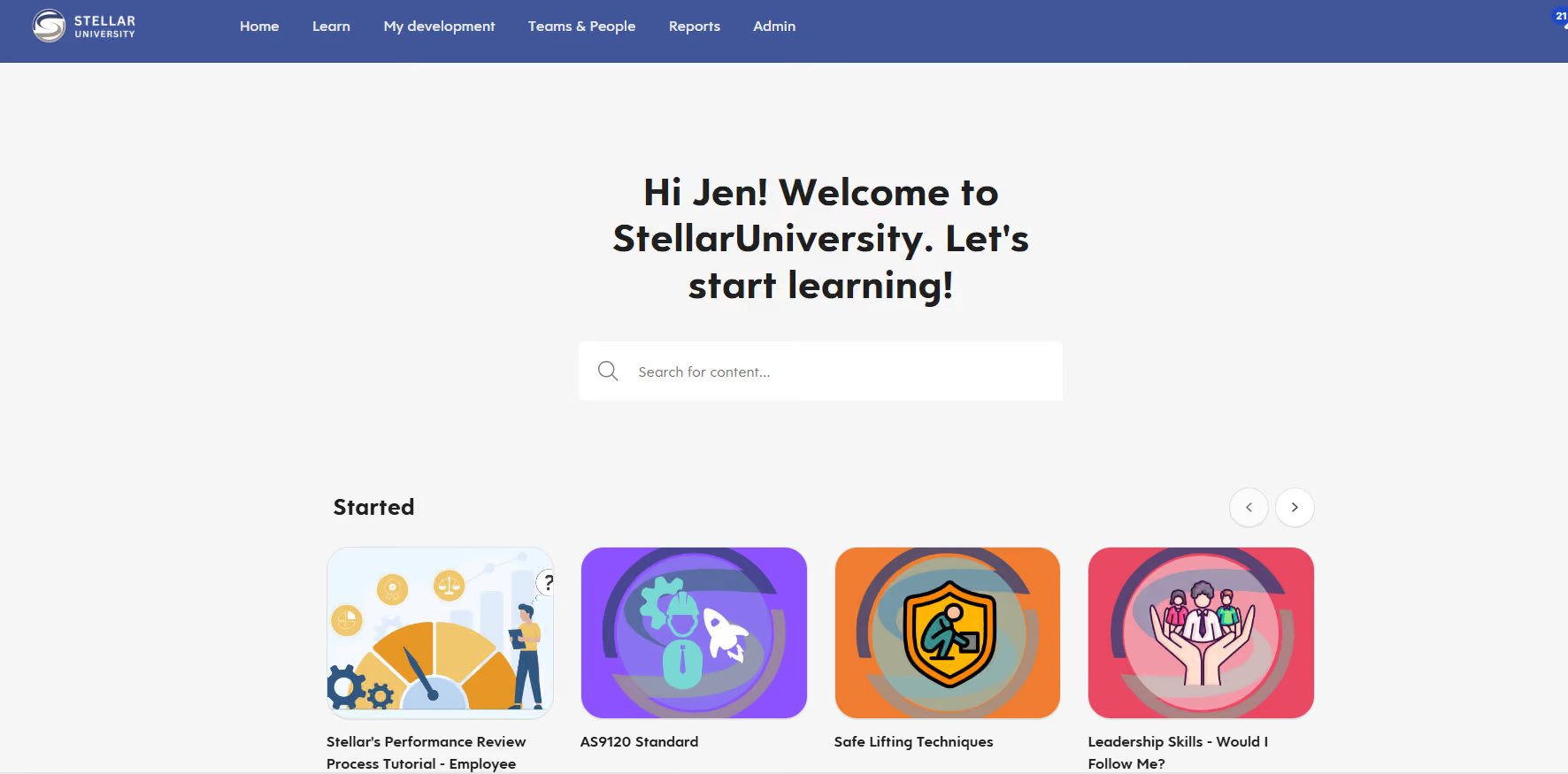
The look and feel of the platform, both from a user and admin experience, are simple, clean, and resemble an app I would use on my phone.
I like the customization of roles, whereas a previous tool had little in that area.
The course creation tool is simple to use, and the upload speeds for externally created content are incredibly fast.
We were contracting with another LMS vendor whose platform was affiliated with our industry and network. However, the tool itself was not very accessible to employees.
The user experience was challenging, as it felt visually outdated, and the admin experience was incredibly rigid. It lacked flexibility, automation, and flow capabilities, and was difficult to navigate.
We wanted a tool that felt more modern and also allowed us to build performance management into the platform alongside learning needs.
I have run into difficulty with the automation features. Once you set up automation, such as assigning a specific course to all new hires in a group, you cannot make any changes to that setup. If you want to exclude someone from the group, you cannot.
If you want to unassign content that was assigned via a group role or rule, you cannot. There are always circumstances outside the norm, and this lack of flexibility in editing controls is frustrating.
I feel that it looks and operates similarly to Workday. Its ease of use is impressive and doesn't require much to implement and set up. The fact that they also have a full course library elevates it above many other LMS "repository" platforms.
They should consider whether their course creation needs are internal or external. They should evaluate their current performance management process and whether they need a review management tool. They should also assess their current structure around roles, groups, and admin permissions.
While there is some customization in admin roles, the appeal of Eloomi lies in the automated flow from groups or rules—but it's important to understand that it cannot be adjusted once set up. In this regard, company size matters: if you have a lot of nuance, Eloomi may not be a good fit.
Eloomi implemented a chat feature for support that has been very useful. It provides a direct line to a live person as well as an AI bot that offers how-to information for more common questions. I use this frequently and find it very helpful.
Eloomi is great for small to mid-sized businesses that do not have an entire team dedicated to content or instructional design and need a simple built-in tool for content creation.
I cannot imagine that Eloomi is customizable or flexible enough for a company with 750 or more employees. The restrictions in editability would make nuanced differences incredibly challenging.
.avif)
Atlas HXM
Atlas is a good mix of industry expertise and tech. They empower companies to hire and pay employees internationally while complying with local labor regulations.
PROS
- Legal entities in more than 160 countries
- Specialized services for employee onboarding and payroll processing
- Atlas has legal entities in over 160 countries. They’ll help you take care of employee onboarding and payroll processing in any of those countries, eliminating the need to engage any local service providers.
- The platform simplifies how you hire, manage and pay employees and contractors abroad, without needing to set up an operation where they are located.
- Atlas helps you stay compliant with local labor laws and frees you from employer liability.
CONS
- Some users have noted that communicating with support can be tricky and time-consuming since they have an expert for each country. This means new people must sometimes be looped in, depending on the situation. Nevertheless, our research suggests that this is constantly improving.
- Limited pre-built integration modules, Atlas only offers API integration.
- Atlas currently doesn’t offer global managed payroll for non-employer of record (EoR) clients; so if your company doesn't need Atlas to take on from you as EoR, but need to use Atlas' global payroll services, you can't do so at this time. Do note though that the team at Atlas is planning to offer this service next year.
- Atlas currently has limited prebuilt integration modules but they do offer API access for users to plug in third-party tools.
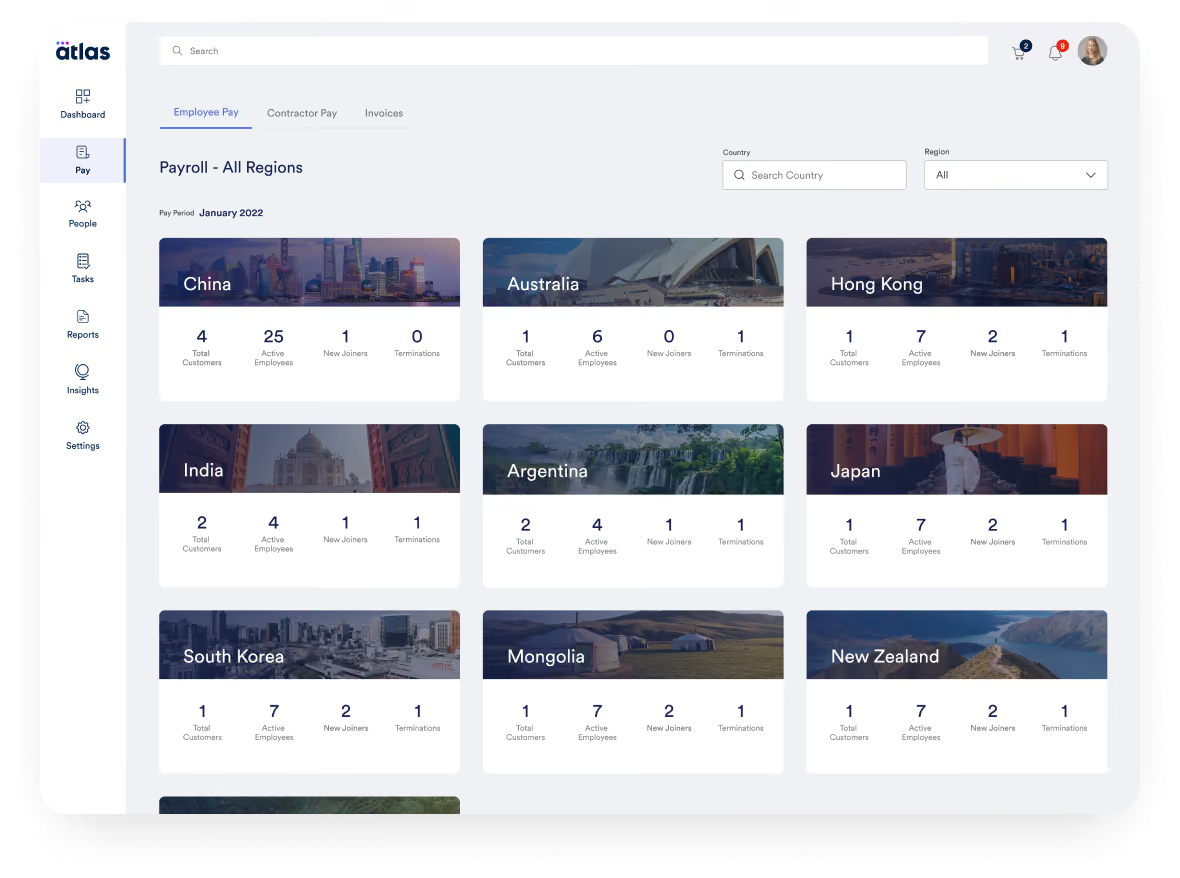
Atlas is a global payroll and direct employer of record (EOR) platform that helps companies ensure legal compliance as they hire and pay employees worldwide. They provide end-to-end management for local labor laws in global markets, from onboarding to payroll processing.
Atlas is suitable for companies of any size. The platform offers a compliance-assured EOR solution for those looking to hire and pay employees globally. The platform is continually growing, and they recently added contractor payments to the mix.
Atlas is used by over a thousand companies, including Toyota, CACI, Bath & Body Works, Coupa, PAE, and Namely.
- Essential: For $99 per month, this plan encompasses features and services that help users navigate the labor & employment laws in over 160 countries (+50 US States), manage employee lifecycle, compliance information between countries, be compliant with their accounting for travel and business expenses, receive personalized notifications, as well as have moderate access to expert insights and HR templates (which are priced separately).
- Premium: For $149 per month, this plan packs everything in the Essentials plan, plus compliance audit interactive checks, people analytics and planning features as well as dedicated account management.
- Enterprise: The pricing of this plan varies according to the number of purchased licenses and customer needs. You can reach out to Atlas’ Sales team for a custom price quote.
Add-ons:
- Contractor Pay: Starting at $49 per contractor per month
- Employer of Record: $595 per employee per month
- Visa & Mobility Sponsorship: Starting at $2,500 per visa
Best For
Atlas is great for teams of any size who’ve determined EOR is the right way to manage global payments.
We primarily use it for onboarding activities, hiring, and succession planning. It provides a comprehensive portal for employees, reducing administrative workload and enhancing the overall experience by allowing them to manage their own details.
We also rely on it for managing our global payroll, ensuring compliance with international employment laws. The platform helps streamline HR processes, making operations more efficient.
- Atlas HXM focuses on Human Experience Management, improving the workplace experience for employees by emphasizing talent management and engagement.
- The platform offers robust reporting and analytics capabilities, allowing companies to track performance metrics and gain valuable insights for strategic planning.
- Atlas HXM ensures compliance with local regulations, while its primary strength lies in enhancing the overall employee experience through a holistic approach.
We purchased Atlas HXM when we decided to revamp our onboarding process. We needed a better employee experience, covering everything from hiring to managing and ensuring timely payments.
Atlas HXM was highly compatible with our business needs at the time, offering compliance support and global mobility, all delivered through an easy-to-use technology platform.
We also used it for workforce planning, and it proved to be a highly service-driven and trustworthy platform. We have used it for about six years.
- The platform can be expensive, and for small businesses, the cost may outweigh the benefits.
- While Atlas HXM provides strong features, alternatives such as Workday or SuccessFactors may offer better integration capabilities.
- The setup process requires additional time, and vendor support can be slow to respond.
Atlas HXM excels in employee lifecycle management and HR analytics. It also stands out for its robust reporting capabilities. The performance management tools are particularly useful for tracking and improving employee performance.
Additionally, the platform simplifies onboarding through automation. Atlas HXM seamlessly handles payroll, compliance, and other HR functions across multiple countries.
Cost should be a major consideration when investing in this type of tool. It's important to evaluate your organization's budget and determine whether the platform is compatible with your existing processes.
Understanding the scope of changes your organization is looking to implement is crucial in selecting the right solution.
Lastly, assessing the user interface and ensuring it will be well received by employees is key, as system adoption is just as important as improving the employee experience.
Atlas HXM has significantly improved its user interface and overall efficiency in performing HR tasks. The integration of AI has been beneficial, helping to eliminate logistical challenges across borders. This has allowed many startups to expand their operations globally.
Organizations operating in dynamic and rapidly changing environments can benefit greatly from Atlas HXM. Businesses should also consider their size and budget to ensure the platform aligns with their needs.
Atlas HXM may not be a suitable match for smaller businesses or those that require simpler HR solutions.
Use-Cases: Why Use Employee Onboarding Software
If building a successful company with motivated, inspired, and productive team members is important to you, then you’re going to want a structured onboarding workflow that engages new hires. But if you’re still not sure if you need software to help manage, automate and streamline that process, here are common use-cases that may convince you to invest:
- Culture Building: Company culture starts with your people and how you engage them. Having a company mission and values is one thing, but sharing those with your employees from day one and ensuring that they understand them is another. With employee onboarding software, you can share your mission and values cemented into communications so new hires and existing employees alike know the company’s “why” — and in turn, their own reason for coming to work. You can also schedule welcome events for new hires, create welcome messages for new employees to your team or the entire company, match new hires with an internal “buddy” that they can lean on as they get acclimated to their new job, and more. All of these actions can contribute to the culture you want to create.
- Ensuring Employee Has Necessary Paperwork: There is a legal & compliance piece of onboarding that you need to follow, specifically when it comes to paperwork. Such paperwork includes employment contracts, non-disclosure agreements (if applicable to your company), health and safety training, I-9s and W-2s, company policies, benefits and payroll forms, and more. As you likely know, there’s a lot of administrative work when bringing on a new hire, and if you’re hiring a lot of people at once, it can really eat up your time. HR onboarding software can help streamline and automate this process for you.
- Training: A huge part of onboarding is, of course, employee training — and there’s a lot of it. After all, new hires need to learn the company mission and values, its product and/or service, and its customers as well as team processes, systems, etc. An employee onboarding platform can help you create a training plan, mentoring opportunities with senior leadership, skills assessments, etc. Of course, consider that all of these HR processes can become an automated workflow if you have the right onboarding app.
- Stay Organized: New hire onboarding checklists and processes built into a tool means you don't have to spend as much time making sure every box is checked. If something isn't done, the system will alert the human resources org.
- Automation: If your current onboarding checklist is literally a paper checklist, you are no doubt spending a lot of time and effort on tasks that can be automated through onboarding software. Collecting employee data, e-signtures, background checks, etc are all processes that your HR team can spend a lot less time on.
Considerations & Common Mistakes
There is a big difference between onboarding and orientation. If you don’t realize this, then your new hires’ experiences will be suboptimal. Fortunately, there are common challenges and mistakes associated with onboarding that you can learn from — and avoid. Here are a few:
- Not making employees feel welcomed: Employee onboarding software can only do so much to make employees feel welcomed. There is a required human element that you should make sure managers incorporate into the onboarding experience. For example, taking a new hire out to lunch with the team on their first day, walking them around the company to meet employees, hanging up welcome signs at their new desk, etc.
- Not setting the right expectations: Make sure new hires know from day one — or even before they start — what they can expect at different parts of their onboarding journey. This can help them prepare necessary paperwork, and generally cut down on the anxiety that comes with starting a new job.
- Before they start: To help new hires walk through your company doors with confidence on their first day, tell them ahead of time about anything they need to prepare for day one, where they should go, who they should check in with, what they should wear (if there’s a dress code, that is), etc.
- First day: Who should they meet with on day one to get a rundown of their role? It goes without saying that they should meet with their managers, but if there are other employees they’ll be working with regularly, make sure to pre-schedule the right meetings/meet-and-greets.
- Focusing on paperwork vs. employee experience: As we’ve mentioned, employee onboarding software can take the burden of paperwork off of your plate. But it can also do a lot when it comes to your employee’s overall experience with the company. So don’t shy away from software providers that offer more than just paperwork help — and don’t forget to incorporate any relevant culture activities, like happy hours, team lunches, etc.
- 30/60/90 days: Managers should create a clear 30/60/90-day plan that maps out clear goals and milestones for a new hire’s first three months of employment. Your onboarding software provider should have templates and manager trainings that can help get this started.
Benefits & ROI
At the end of the day, employee onboarding software can help your new hires achieve productivity faster than they would without a formal training and welcoming process. And, as we’ve mentioned, employees are more likely to stay at your company long-term if they’ve undergone a formal onboarding process. Increased retention of course saves you time and money on recruiting, prevents lost work from employee turnover, and contributes to a more productive and successful company overall.
While there’s no defined return on employee onboarding software, the benefits from it (better employee retention, more employee engagement, and more streamlined HR processes) are huge. To help you get an idea of what that translates to in dollars, use our HR tech ROI calculators here.
Pricing
How much to budget for employee onboarding software depends on a number of factors, such as what components you actually need and how many users you’ll have. Some of the software providers we’ve mentioned here charge for each individual module they offer while others charge a per user per month fee (which we’ve seen for as low as $0-$8/user/month) and/or an annual fee. All this to say, don’t forget to discuss pricing on your demo based on your specific needs so you can get a clear sense of total cost.
Features: What You Can Expect from Employee Onboarding Software
At a minimum, employee onboarding software can help you optimize the process of welcoming and training a new hire. This means automating paperwork, streamlining training, and more. But some vendors have a broader set of offerings that cover pre-boarding and recruiting. It really depends on your company’s needs and overall onboarding goals. In general, you can expect to see the following features from employee onboarding software:
- Automated Workflows: Employee onboarding software can help streamline a lot of the workflows that are vital to your job but that also take up a lot of your time. This includes:
- Email & Text Capabilities: Some employee onboarding software allows you to streamline communications with new hires (and even job candidates) through automated email and text capabilities. With email templates, calendar syncing, even text-to-apply functionality, you can more efficiently handle a lot of the admin work involved in recruiting and onboarding.
- Legal Documentation & Other Paperwork: Before new employees actually start, let them complete their paperwork from home. You can send them everything from I-9s and W-2s to your employee handbook, non-disclosure agreements, and more.
- Training: Create training materials (in some cases, with the help of preloaded templates) and offer synchronous or asynchronous training sessions so new hires can get up to speed on everything from company mission and values to core work functions. You can even administer simple tests to increase accountability and make sure everyone is on track as they transition into their new role.
- Performance Management: Offering continuous and real-time feedback to all employees (not just new hires) is a great way to increase engagement and retention — after all, the last thing you want is for an employee to be blindsided at a mid-year review for something that may have happened months prior. Fortunately, some employee onboarding systems offer a performance management feature where you can set goals for individual team members and map them to broader team and company goals. From there, you can track progress, note successes, and discuss lessons learned so team members have a clear path for growth and continuous contribution.
- ATS & Recruiting: Depending on your needs, you can find employee onboarding software that offers applicant tracking components to help you streamline your entire hiring process and lay a strong foundation for onboarding new hires. These features include everything from employer branding and career sites, to interview scheduling and video interview functionality, to talent communities and candidate management, to recruiting analytics, background checks, offer letter management, even referrals.
Demo Questions: What to Ask During Demos
Before you have any software demos, make sure to prepare a list of questions so you can get a clear picture of each vendor and what they offer. That way, you can more confidently invest in the solution that’s right for your company and its unique needs.
To help you get started, here are some sample questions to ask:
- How are new employees automatically put into an onboarding process?
- What parts of the product address training?
- How are connections with colleagues fostered?
- Do I need to buy a broader platform to use this?
- When does onboarding start and end from the employee’s perspective?
- How does this integrate into my existing HR software and payroll? What integrations will I need?
- How will others in the organization use this solution?
- What are the key features I want to ask about?
- What are the things that would make me nervous about buying this sort of solution?
Implementation
There are two key implementation steps you’ll need to take with employee onboarding software. On one hand, you’ll need to get the software up and running, which might include integrating with existing HR software you already use. On the other, you’ll need to set up workflows for different employees and create all necessary training and onboarding content.
In most cases, implementation depends on your company, the software provider you choose, and how the two need to integrate for success. To get a clear sense of what implementation will look like for your company, use your demo to find out how integrations work, who you’ll need to tap internally for help (i.e. will IT need to help with any software integrations), etc.
Employee Onboarding Tools FAQs
What is employee onboarding software?
Employee onboarding software provides tools to automate and improve the process of bringing new hires into an organization. It typically includes features like digital paperwork, company resource distribution, training assignments, and onboarding checklists.
What are the benefits of using onboarding software?
Benefits include a faster, smoother, and more consistent onboarding experience for new hires. It reduces manual tasks for HR and managers, improves engagement, and allows customizing onboarding per employee role.
How is onboarding software different from an LMS?
A learning management system (LMS) focuses specifically on training while onboarding software has a broader scope. It facilitates all aspects of onboarding, not just training - paperwork, company policies, equipment, peer connections, etc.
What features should I look for in onboarding software?
Key features of onboarding software include customizable templates, digital document signing, automated task triggers, new hire portals, team/manager collaboration tools, surveys, analytics, mobile access, and HRIS integrations.
Does onboarding software integrate with my HR stack?
Most onboarding systems integrate with leading HRIS/HCM platforms to allow the passing of new hire data seamlessly and keep records updated across systems. API integration is also often available.
Is onboarding software secure?
Reputable onboarding software vendors ensure the security of sensitive new hire records and data through encryption, permission controls, and other measures like SOC 2 compliance.
What is the typical pricing model for onboarding software?
The pricing of onboarding software usually follows a per-user-per-month model. Some products may base their pricing on features but it isn’t common. Enterprises can expect custom pricing if they require advanced features, particularly around permissions/security.
Next Steps
At the end of the day, new hire onboarding is critical for business success. It’s also a long-term process with multiple stages that can last an entire year — from preboarding (making an offer, handling paperwork, and preparing for their first day), to welcoming them on their first day, to providing ongoing training and support as they get up to speed. Therefore, it makes sense to spend the time getting the right employee onboarding solution live sooner than later.
Eventually, your focus will shift from onboarding to engagment and satisfaction, for a which high-quality employee engagement software is essential — but remember that what you do now for a new hire’s first few months will have a lasting impact on their productivity and longevity with your company. With the right onboarding software, you can maximize success for both your new hire and your company, reduce attrition, and build a productive and welcoming company culture.
About the Author


About Us

- Our goal at SSR is to help HR and recruiting teams to find and buy the right software for their needs.
- Our site is free to use as some vendors will pay us for web traffic.
- SSR lists all companies we feel are top vendors - not just those who pay us - in our comprehensive directories full of the advice needed to make the right purchase decision for your HR team.


