

11 Best Benefits Administration Systems (2026)
The best benefits administration systems, hand-picked and field-tested by SelectSoftware Reviews' HR tech experts. See info on pricing, features, integrations, and more below.












As a benefits leader, you have the rewarding job of making your company a great place to work. After all, employee benefits packages and other perks can help you attract top talent, retain current employees, and build a culture that aligns with your values.
The downside, of course, is all the administrative work that benefit plans and benefits enrollment creates for you. Fortunately, benefits administration software can help you automate your benefits management, improve efficiency, and streamline open enrollment — all while staying compliant.
Benefits administration software serves as a one-stop-shop for all your employee benefits. With everything centralized, the setup and management is easier for you and open enrollment is easier for your employees.
The result? Employees make smarter, more informed decisions about their benefits, and you have less administrative work to manage. To help you find the right benefits management software, we put together the following guide with top software platforms, features to look out for, common mistakes to consider, pricing, and more.
We assessed dozens of benefits administration software platforms with special consideration given to the three most critical functions performed by this type of tool: integration/configuration, self-service for employees, and compliance.
We used our HR industry experience to refine the scope of our research and applied our multi-dimensional assessment process to test each contender for these quality standards.
- Integration and Configuration: First-class benefits administration software integrates smoothly with each customer’s tech stack.To test for this, our team compared the quality and quantity of integration partners against a list of common business ops tools.
Our HR tech experts also determined the most important workflow automations, and we audited each product for the ease with which a user could configure these features.
- Self-Service for Employees: Self-service features reduce the burden of data entry on your HR team, improve the accuracy of employee information, and support employee empowerment. Our expert researchers performed simulations using each tool as if they were an employee and graded each platform's performance on the ease with which they could enter and change information across different data types.
- Compliance: Legal compliance is imperative, so we scrutinized the fine print, checking for each company’s capacity to keep customers complaint. We considered the product's state-by-state adaptability, as well as its capacity to handle multi-national organizations.
We’re data nerds and love a good dashboard, so we also checked for each tool’s reporting and analytics capacity. To learn more about how we approach our work from the granular to the gigantic, read this article on how we assess HR tech vendors.


ForUsAll

ForUsAll is a great choice for small and medium-sized businesses (SMBs) because it is very quick to set up and quite affordable.
PROS
CONS
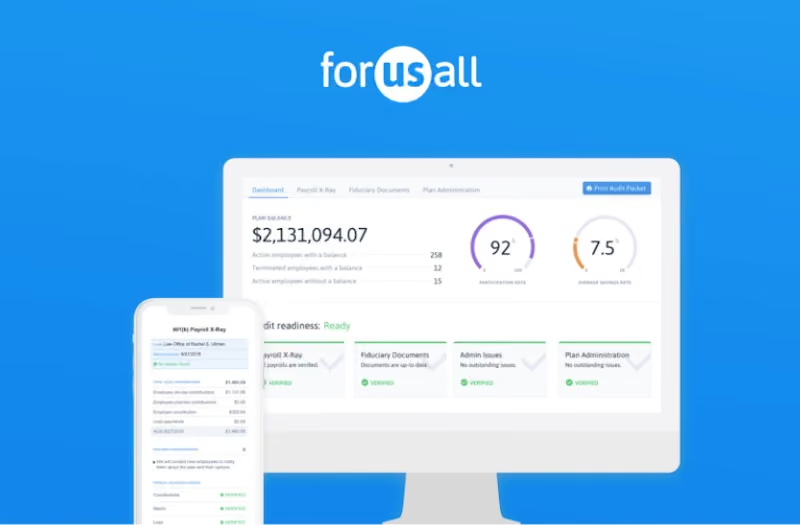
ForUsAll is a cloud-based 401(k) administration platform for small and medium-sized businesses. Acting as both your 3(38) and 3(16) fiduciary, ForUsAll ensures you stay compliant while automating manual tasks such as contributions, 401(k) loans, eligibility tracking, hardships, and notifications. You can integrate ForUsAll with most cloud-based payroll systems for an automatic synchronization of your data. Payroll integration also allows it to automatically update deferrals, notify new participants when they become eligible, and more.
CMC Properties, Lever, Arbor Lodging, Smart Biz, Bolt Threads
ForUsAll costs as follows:
- For the employer: Employers using ForUsAll pay a base monthly fee of $120 with an addition of $6 per participant per month.
- For employees: Employees pay 0.50% of assets under management annually.

Best For
.png)
Deel
Deel localizes your offerings in accordance with local guidelines so that you can stay compliant with your global workforce.
PROS
- 24/7 in-app support and an impressively fast onboarding speed of 2-3 days.
- Access to local payroll experts in various jurisdictions, and support is available for contractors navigating the process of setting themselves up as an LLC.
- Self-service approach with tech-enabled features helps workers swiftly adopt the tool.
- Worker identity verification is reported to take less than 24 hours on average, and sometimes mere minutes.
- Offers APIs as well as over 100 native HR software integrations.
- Automated invoices (English language only).
- Excellent 24/7 customer service with fast onboarding (2-3 days) and local payroll experts in each jurisdiction.
- Seamless integration with platforms like QuickBooks, BambooHR, and Greenhouse, plus custom integration options.
- User-friendly, self-service features enable quick setup; identity verification often takes under 24 hours.
- Automated invoices simplify payments, provided they're in English.
CONS
- Some of Deel’s best features, like onboarding automation, are add-ons, which can be cost-prohibitive.
- Modifying contracts or service agreements with Deel is difficult and often requires addendums for any changes.
- Each payout comes with a $5 fee.
- Invoicing feature is limited to generating invoices in English, with no option for other languages.
- Key features like onboarding automation are add-ons, which may increase costs.
- Limited flexibility in modifying contracts or service agreements; changes often require an addendum.
- Invoices cannot be generated in languages other than English.
If your benefits-management needs feel complex due to the presence of team members in different geographies, Deel Benefits is worth looking into.
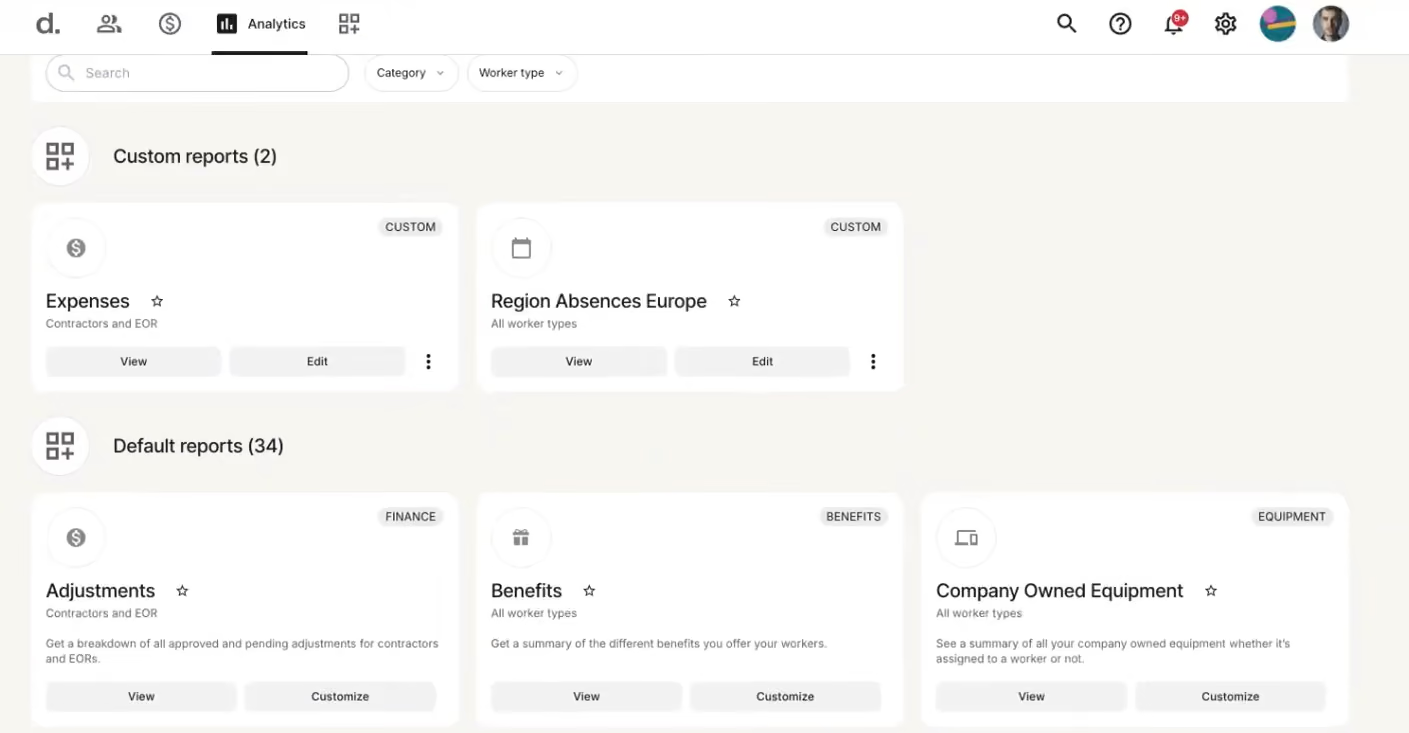
Deel Benefits can help with hiring and providing benefits and perks for people in various geographies. The benefits themselves would vary depending on the region. Still, you’d streamline their management through the same platform you’d use for payroll, contracts, timesheets, invoicing, and even some core HR functions.
As to the specific benefits offered, the best way to vet them is to go to their benefits tool on their website. You select a country and the type of benefits, and they present what they can provide.
For example, if you want to hire in Canada, you can choose Statutory and/or Common benefits. These include employment and worker compensation insurance, transportation and electronic coverage, and certifications.
40,000+ companies, including Andela, Brex, and Makerpad.
Deel Benefits has three plans whose pricing is custom:
- Benefits Admin: Global benefits administration (EOR, PEO, & global payroll) with unified management, covering plan admin, enrollment/renewal reporting, QLE management, and carrier integration.
- Benefits Marketplace: Purchase global benefits plans (statutory and optional) via a trusted brokerage network, offering competitive prices and comparison tools.
- Managed Benefits: Comprehensive benefits administration, including employee support, QLE management, offline carrier sync, and renewal coordination.
As a new product, Deel has changed a lot since its inception. Its newest offering, DeelHR, allows companies to complete most of their HR operations tasks in Deel.
Best For
Deel Benefits is a good bet for those businesses that want to provide benefits on top of payroll for an overseas workforce, whether it’s through an EOR arrangement or for their contractors. It’s worth noting that they have a way for you to offer interesting perks apart from the law-required benefits.


In HR, I begin by generating an onboarding packet once I receive confirmation that an offer has been accepted. This includes creating a worker profile with the new hire’s job title, pay rate, location, and start date. We either create a new profile or contract that incorporates completed onboarding forms, including benefits enrollment and PTO information.
Once the profile is complete, we use Deel to send a team notification to welcome the new hire and provide onboarding reminders. After the employee is fully onboarded, the system validates their information to confirm that all required documentation has been received and properly stored.
- I appreciate the accessibility of functions such as payroll, onboarding, and the ability to have Deel set up our employer entity in multiple locations while remaining compliant.
- The communication features within the Deel system allow for easy updates across teams.
- The tool streamlines complex HR and payroll processes into a unified platform.
We purchased Deel to support employees across multiple states and countries. It was a significant benefit to have the Deel team set up our company’s legal entity within a state without requiring our Finance team to pause and complete the registration themselves. This was a major advantage for us.
Deel also simplified our onboarding process, enabling us to expedite onboarding efficiently while providing a seamless experience for both the employer and the new hire. Additionally, we leveraged the payroll functionalities, which added further value.
These capabilities made the system a worthwhile investment for our organization.
- The site is not particularly user-friendly for new users.
- We occasionally encounter glitches and system errors.
- There have been instances where forms were difficult to locate, causing confusion.
- Errors in invoices and contracts have also occurred, sometimes stalling operations despite our ability to work through them.
One area where Deel stands out is its combination of contract management, global payroll, HRIS, and other functions within a single platform. Its capacity to support international clients is a major advantage, allowing companies to grow globally without having to navigate the complexities of international payroll and compliance independently.
Many competitors lack this feature or the ability to register companies in multiple states or countries, which can otherwise delay business operations by weeks as finance teams handle all necessary paperwork and state-specific procedures.
Compliance and international support are key criteria to evaluate. Even if an employer doesn't have international employees at the time of implementation, the option to add this functionality later can be extremely beneficial.
Comprehensive support for onboarding, payroll, and compliance is not available in all systems, so these factors should play a critical role when selecting a new HRIS system.
It appears that Deel has enhanced its automation workflows and now includes functionality to track paid time off requests.
Deel is well-suited for mid-sized to large organizations with an international presence. It’s also a strong option for large companies with smaller HR or Finance teams. The platform’s flexibility and scalable support provide considerable benefits in these scenarios.
While smaller companies can use Deel, there may be more cost-effective solutions tailored to their specific needs.
Deel may not be ideal for small organizations without employees in multiple states or countries. It also might not serve organizations well if they don't plan to use the tool for payroll or require features like performance management.

Paylocity
Paylocity combines benefits administration, payroll, and HR in one platform, with guided enrollment, automated eligibility and carrier processes, decision support, and integrated spending accounts.
PROS
- Guided enrollment and personalized decision support simplify benefits selection.
- 100+ pre-built carrier integrations support automated data connectivity.
- Payroll integration helps keep eligibility and deductions aligned.
- Supports medical, dental, vision, FSA, HSA, and other benefits.
- Automated reminders, eligibility alerts, and workflows reduce administrative work.
- Paylocity’s customer support is highly rated for always being available to answer questions.
- Global payroll support for 100+ countries.
- Provides free and unlimited training modules on the website.
- Paylocity’s mobile app has a good UI and functionality
- The tool is easy to use for both employees and employers.
- Has 350+ pre-built integrations.
CONS
- Some standout capabilities are powered by partners rather than built natively, including benefits decision support (Reclaim) and retirement (Vestwell).
- Benefits administration pricing is not publicly disclosed.
- Undisclosed pricing.
- It doesn’t have a free trial or free plan.
- Support is available in English only.
- It isn’t the best solution for remote teams looking for a tool to manage payroll and benefits for their contractors.
Paylocity's benefits administration software makes a strong case for companies already running Paylocity payroll and HR. It covers guided setup and enrollment, decision support, carrier EDI file generation, compliance workflows, spending accounts, and connections to HR and payroll.
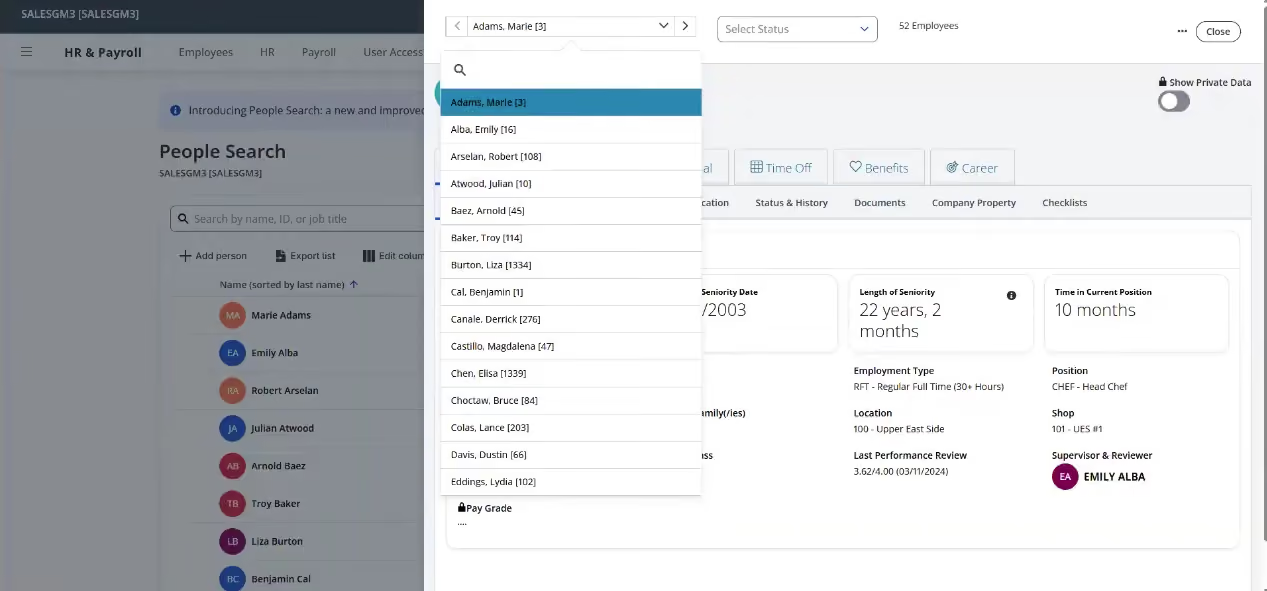
The enrollment experience is well curated. Paylocity offers guided setup for HR teams and brokers, while employees get a step-by-step process with cost breakdowns, tooltips, and personalized recommendations through Benefits Decision Support, powered by Reclaim. We like pairing standard enrollment workflows with decision support, since benefits selection confuses many employees and better guidance can cut the questions HR fields during open enrollment. Automated reminders and eligibility notifications keep things moving without manual chasing.
On the administrative side, the platform leans on automation. You can monitor enrollment statuses and alerts from a dashboard, build workflows for routine requests, and generate and send EDI files to carriers. Paylocity says it has prebuilt integrations with over 100 carriers, though feeds are configured and tested per client, so buyers should not assume every integration is plug-and-play.
Paylocity Retirement, powered by Vestwell, embeds 401(k) and 403(b) workflows into the platform, with payroll as the contribution data source and self-service for employees. As with decision support, this is a partner-powered layer, so we'd confirm which capabilities and integrations a given proposal includes before signing.
Paylocity serves 40,000+ companies; Green Lawn Fertilizing/Green Pest Solutions is one documented benefits customer.
Custom pricing.
Best For
Paylocity is best suited to mid-sized U.S. companies already using Paylocity payroll and HR that want to consolidate benefits administration and employee data in one platform.

As a Recruiter I was mainly using it as an ATS. I used to create job postings and it would integrate to different career sites and job boards. The interested candidates filled the application form in paylocity itself which made things easier for me to get more details (phone number, email address) about them.
I used to schedule phone screens, video interviews with the candidate texting feature in paylocity. I could upload interview notes on paylocity in realtime to get feedback from other colleagues on the candidate.
There are several workflow features- Creating and sending the Offer letter, conducting reference checks and background checks. The last feature was onboarding the candidate and changing them to an employee in the system. The best feature was that the payroll team could take things further from my part by tracking their time worked, in and out punches and then depositing money in their account.
Its employee onboarding workflow is really smooth and user friendly for the recruiter. It helps in automating, creation and distribution of onboarding tasks and training materials.
I could regularly track completion of new hire paperwork, such as tax forms, I9 etc before their start date and coordinate with them if they haven't completed.
Another major advantage of paylocity is its payroll processing workflow. It calculates employee wages, deductions, and taxes based on pay rules and regulations and generates pay stubs. If an organization has a more hourly/contract based employees then this tool is apt for them.
Employees clock in and out through that system and then it integrates time and attendance data with payroll for accurate wage calculations.
When I joined, the organization was already using Paylocity as their HRIS system. I have used Paylocity for the entire tenure when I was working at Stars, around 5 months. Paylocity not only has ATS features but it also is a comprehensive HR and payroll management software. This was the main reason that the CEO of the company shifted from another tool to Paylocity as he wanted one tool which can manage Recruiting as well as Payroll.
In the organization, 90% of the employees are hourly employees. Paylocity helps manage employee attendance, track hours worked, and handle time-off requests. It offers various methods for clocking in/out, tracks leave balances, and integrates with payroll for accurate and efficient time tracking. This was the major key benefit of this tool.
Paylocity isn't quite user friendly, it has a lot of complex features. It makes it harder for people who are new to HRIS systems to adapt to Paylocity.
Its mobile app is also not at all user friendly, freezes when I want to clock in and out for the day. For a better experience it is always better to be on the desktop.
Its integration with different job boards and career sites isn't quite wide. It has limited reach and if you want to reach out to a wider pool of candidates by posting a job it charges extra money which is not cost effective.
Paylocity offers a comprehensive suite of HR and payroll management tools in a single platform. It combines various functionalities, including payroll processing, benefits administration, time and attendance tracking, performance management, and more. This integrated approach allows organizations to streamline their HR and payroll processes and reduce the need for multiple software solutions. As a recruiter, I would prefer another tool over Paylocity but from an organization's point of view, this is a good investment where HR and payroll management tool is in a single platform.
The organization's needs and priorities and ensure if it aligns with their HR and payroll requirements. Also, the cost is a major factor, if the organization isn't in need of payroll software then it's better to consider other options as Paylocity sometimes can be a little expensive. Paylocity offers Payroll Processing Workflow, Employee Onboarding Workflow, and Time and Attendance Workflow.
If the organization is specifically looking for these then Paylocity is a great investment. Also if the organization has more hourly/contract workers rather than full-time employees then Paylocity is a great tool.
No significant changes since I started using the tool.
Paylocity is a great tool for hourly/contract-based employees who has to daily punch in and punch out for their work hours. So it is mainly ideal for an organization that has nonexempt employees rather than exempt employees.
For smaller organizations, it probably won't be a good fit because Paylocity is a little complex with a lot of advanced features. It doesn't make sense to invest that much for a smaller organization.

Gusto
Gusto provides full-service payroll services with benefits and HR. The software takes care of the administration and deductions by syncing them with payroll and makes things easier for you and your employees with its built-in employee self-service.
PROS
- Gusto has an eye-catching UI and is compatible with several devices.
- Automatic payroll deductions for easier benefits administration.
- The dashboard feature keeps tabs on compliance tasks.
- The hiring and onboarding sequence is nicely streamlined between HR and the new hire
- Post-offer, pre-start tasks are made easy with integrations like CorpNet and Checkr.
- Easy payroll for U.S.-based W-2 folks, domestic and international contractors.
- Phone support, email, and other customer service resources.
- Licensed benefits advisors for all plan users.
- The business model is responsive to customer needs.
- Transparent pricing structure. Doesn’t require long-term contracts.
- Free account setup.
- Ability to create onboarding checklists, send offer letters, collect signatures, and store all onboarding documents online.
- The dashboard feature keeps tabs on compliance tasks
- The hiring and onboarding sequence is nicely streamlined between HR and the new hire
- Post-offer, pre-start tasks are made easy with integrations like CorpNet (state tax set up) Checkr (background checks)
- Easy payroll for U.S.-based W-2 folks, domestic, and international contractors
- Person-to-person phone support, email, and other customer service resources
- The business model is responsive to customer needs
CONS
- Gusto facilitates payments for international contractors but not for employees.
- There is no built-in accounting feature, so the management of earnings and expenses can’t happen in one place.
- Analytics dashboard capabilities are underwhelming
- Simple plan users do not have access to native time tracking, necessitating third-party integrations.
- Users of the Simple plan cannot access federal and state compliance alerts – they are not even available as add-ons.
- Plus plan users have access to compliance alerts, but they must be added on.
- No free trial or free version
- Gusto can support payments for international contractors, but not employees
- No native accounting feature to keep earning and spending under the same roof
- Analytics dashboard is simplistic
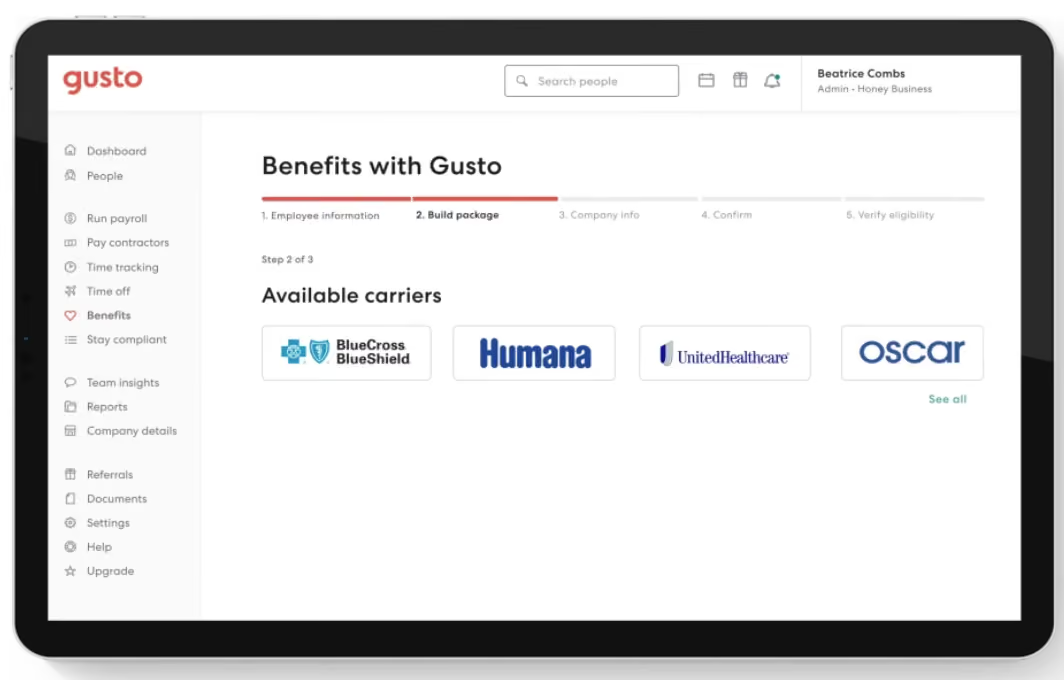
We have had a positive experience with Gusto's benefits administration features. The software seamlessly integrates payroll and benefits administration, simplifying the process with automatic deductions and syncing capabilities. The built-in employee self-service functionality is also a nice touch that makes it easy for employers and employees to manage benefits and access relevant information.
Gusto's user interface is visually appealing. Being browser-based lets it provide a smooth user experience across multiple devices. Additionally, Gusto provides licensed benefits advisors to assist and guide users in optimizing their benefit plans.
We appreciate Gusto's customer-centric approach, as they remain responsive to customer needs and continuously improve their services based on feedback. Their transparent pricing structure and flexibility without long-term contracts add to the appeal. Moreover, Gusto offers free account setup, making it convenient for businesses to get started.
The availability of person-to-person phone support, email assistance, and other customer service resources reflects Gusto's commitment to providing excellent support. However, it's worth noting that some features, such as federal and state compliance alerts and integrating existing broker and health insurance plans, are only available in the Premium plan or as add-ons for the Plus plan. Simple plan users may need to consider third-party integrations for certain functionalities like time tracking.
While it doesn't offer a free trial, Gusto's consistent focus on core functionalities sets it apart from other platforms that often get sidetracked by unnecessary features.
Gusto powers HR and benefits management for over 400,000 businesses across the U.S.
Gusto’s benefits management tools are part of its HR software packages, with pricing starting at $49 per month plus $6 per employee. Premium plans cost more but unlock expanded HR features, including access to certified HR experts and advanced benefits administration tools.
Best For
Even budget-strapped startups can afford Gusto’s basic plan. For companies with some bank capital to invest in human capital, the top-tier Premium plan is a great choice, especially if they have an HR department of one person.

With my current consulting client, we use Gusto for a few different workflows. We use it for payroll, sending offer letters, managing our 401K program as well as new employee onboarding. In previous companies I worked at, we used it for payroll. In my opinion, the greatest strength of this tool is running payroll. It’s super simple to use.
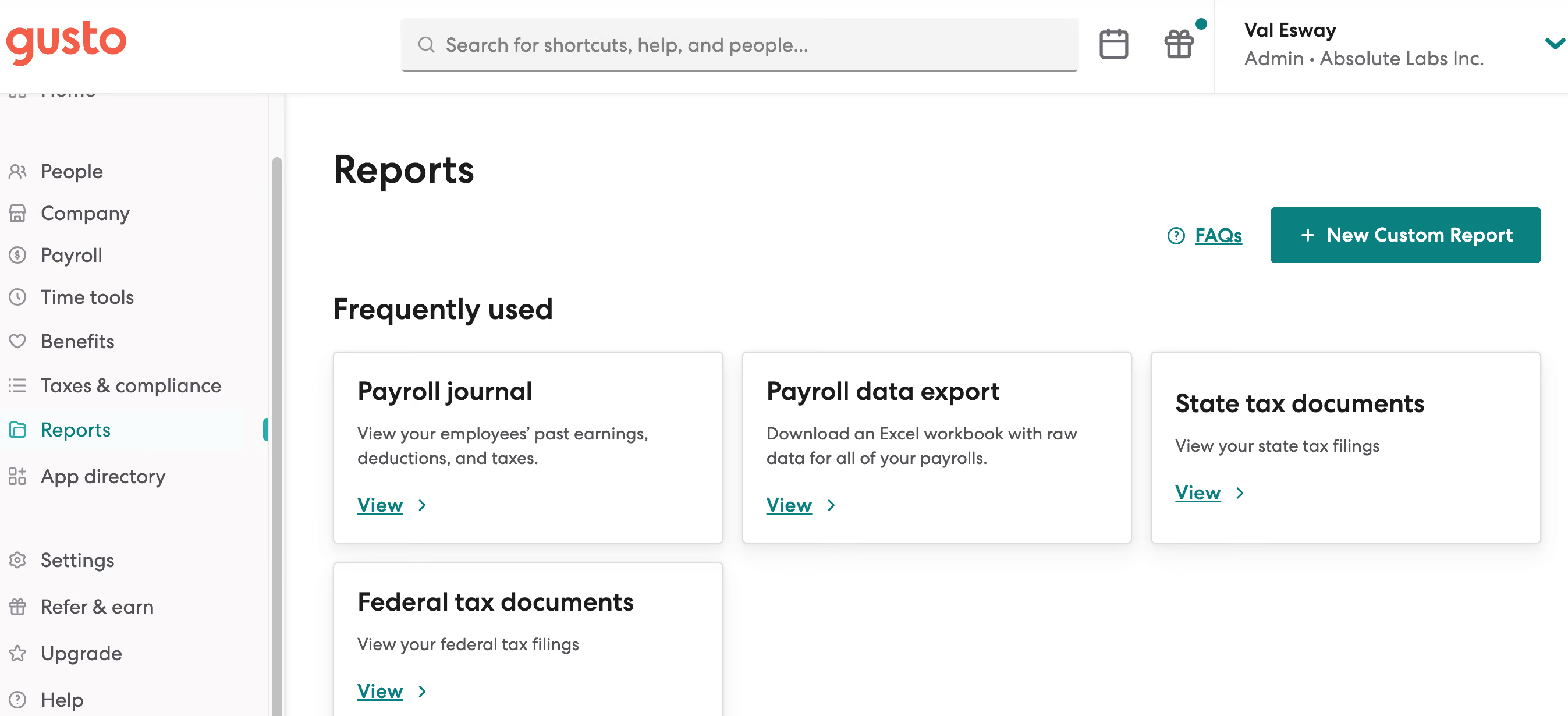
The ease of payroll and ability to have payroll run on auto-pilot is AWESOME. The customer service is friendly and for the most part quite efficient. The UI is pretty good compared to a lot of other platforms I've used.
We initially chose Gusto when the company was first established. We needed a simple payroll solution that would work for a company of our size, which at the time was just one W-2 employee on the payroll. We used the solution for about eight months before transitioning to a different solution that would allow us to manage payroll and offer benefits under one platform. Prior to that, I personally used the solution at another company for almost a year.
Since I also do freelance HR consulting, I am now working with a client who also uses Gusto. In this company, we use it for payroll, benefits management, and 401K.
Paying international contractors has been challenging in my experience. I'm not a huge fan of having the employees separated out by whether or not they are onboarded yet. I would rather see all employees with a status showing whether or not they have completed onboarding.
Payroll is a breeze! It's really one of the best tools I've used for payroll for a small company. The customer service is stellar.
Think about your long-term growth plans. I think Gusto is best for smaller companies. Think about whether or not you'll be paying contractors and especially international contractors because that can get complicated. And when you are first implementing the tool, do your best to have someone who understands the platform and how to best optimize it for your team do the set up.
I'm not sure but I do often see that they are rolling out beta features, which leads me to believe that they are always evolving to meet customer needs.
I think Gusto is best for small businesses, especially for small businesses that may not have a dedicated HR personnel. It's easy enough to use that the average business owner should be able to navigate it without too much trouble.
I think it may not be the best platform for larger orgs, especially for orgs with complicated pay needs, i.e. international contractors.
Paycom
Paycom’s Benefits Administration stands out for connecting benefits, deductions, eligibility, and life events directly to payroll, automating tasks and decisions across the entire employee life cycle and reducing the need to move employee data between systems.
PROS
- Benefits data flows directly into payroll for deductions and eligibility.
- Employees can complete enrollment, review plans, and preview payroll impacts live via desktop or Paycom’s mobile app.
- Flexible controls support eligibility, waiting periods, coverage levels, and effective dates.
- HR teams can batch-update premiums and deduction amounts before open enrollment.
- Enrollment reporting shows incomplete tasks and employees’ upcoming benefit selections.
- Proprietary HR, payroll, time, and learning tools run on one database.
- Strong employee self-service tools for managing personal, payroll, benefits, and time-off information.
- Single database keeps employee data consistent across HR and payroll workflows.
- Deep HR and payroll integration enables automation across the employee life cycle.
- Broad automation reduces manual work across everyday HR processes.
CONS
- Benefits Administration is an add-on to Paycom payroll, rather than available as a standalone product.
- Payroll is required to use Paycom’s broader Global HCM software.
- Paycom does not provide enough public information to assess benefits-specific customer volume or pricing.
- Pricing can be high compared with more focused HRIS options.
- Reporting can be complex and cumbersome for administrators to customize.
- Requires customers to run payroll with Paycom to access the HR suite.
- Limited flexibility for organizations that rely on external integrations.
Paycom’s Benefits Administration takes a different approach from standalone benefits tools by keeping benefits and payroll in the same software and database. During our research, the payroll connection stood out as the biggest strength: deductions, eligibility, and life events can flow through payroll rather than requiring HR teams to maintain separate data between systems.
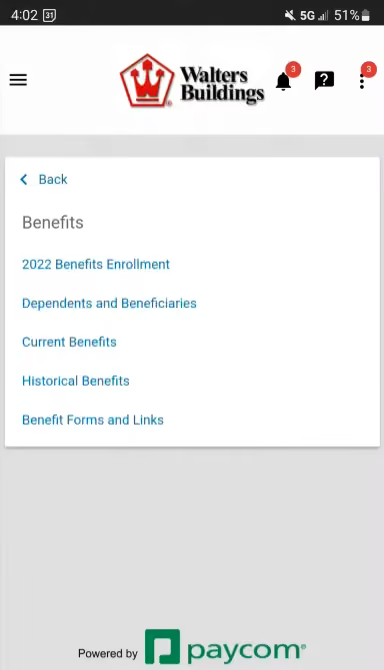
The employee enrollment experience is also flexible. Employees can enroll from a desktop or through Paycom’s mobile app, while HR teams can configure deduction amounts, enrollment dates, effective periods, new-hire waiting periods, eligibility rules, plan options, and coverage levels. Paycom also supports batch updates to plan premiums and deduction amounts ahead of open enrollment, which can reduce repetitive administrative work.
We also like the visibility HR gets into enrollment. Paycom provides reporting on where employees are in the enrollment process, which benefits tasks remain incomplete, and which benefits employees have selected for the upcoming year. That gives HR teams a straightforward way to identify employees who still need to complete their elections.
The main drawback is the bundling requirement. Paycom’s Benefits Administration comes with Paycom payroll rather than functioning as a standalone benefits administration system. That makes the platform particularly compelling for organizations already looking for an integrated payroll and HR system, but less attractive for companies that want to add benefits administration to an existing payroll environment.
Custom pricing.
Best For
Mid-sized and enterprise organizations that want benefits, payroll, and employee data managed in one system rather than across separate platforms.

I used Paycom every day. I utilized the electronic personnel files that helped ensure that I had all onboarding documents correct during this process. I also used the recruiting function. I had many hires and Paycom offers a great function to keep track of all of your recruiting needs. Including where you are at in the interview process, applications, interview questions, and many more!

I love the aspect of streamlining Paycom and Payroll. Another pro to utilizing Paycom is the electronic version of personnel files. The recruiting tool in Paycom is another great tool to help with any organization's recruiting and hiring needs!
Our organization originally did not have a HRIS system. One of the major selling points to the organization is that Paycom offers a seamless transition to make all of our HR personnel files digital along with many other HR options to help streamline all HR processes. In addition, we added a function within Paycom to ensure our payroll was efficient and easy to work through each pay period. Paycom also offered our hourly employees an app to help make it easier to clock in and out during the work shift. This was a key function as many employees were offsite and other locations other than headquarters.
There has been a few times were the dedicated account manager took longer to get back to specific questions that I would have liked.
Paycom offers a lot more functionally. The implementation process was not too difficult company-wise. And the price is a vary fair investment.
If your organization is thinking about utilizing its first HRIS system. If your company wants a user-friendly payroll system.
It has added many functions, including pieces of training, performance reviews, and tracking attendance.
Any organization that is mid-sized or a corporation.
Smaller businesses

Remote
While Remote is mainly known for their global payroll product, teams interested in options for benefits administration for internationally distributed teams should pay attention! That is because, unlike many vendors, Remote owns local entities in the countries in which they operate. This means, in very general terms, that its customers can offer their employees a more straightforward, more “local” experience regarding payroll and benefits.
PROS
- Remote provides flat rates, so you can easily compare its pricing with other vendors. The platform doesn’t add a markup on any benefits premiums.
- Self-service options for employees.
- Local specialists provide 24/7 support.
- Benefits plans are locally curated. Health, dental, vision, life, mental health support, and disability are all covered, as is pension/401(k).
- Helpful resources are available on their site, offering tips for specific to geographic regions.
- Equity-based compensation is available.
- Fast and compliant payroll in 170+ countries.
- Live chat support with local payroll experts.
- Flexible, localized benefit packages.
- Flat-rate pricing structure, no deposits or hidden fees.
- Mobile app streamlines expense reimbursement with autofill from receipt photos.
CONS
- Some employers reported a steep learning curve in learning to navigate the software.
- No off-cycle pay runs are available at the moment.
- Though the current live chat and email support have been great, there is no phone support users can reach out to.
- Remote offers limited integration options, yet you can access its custom API for free.
- Doesn’t have a free trial.
- Redundant for organizations solely recruiting within the U.S.
- Help center documentation isn’t easiest to understand.

Remote lets you offer customized benefits packages to fit each country where you have employees. The platform enables compliance by providing country-specific benefits and perks that adhere to local laws. We like that Remote is one of just a few vendors that own local legal entities in countries that the platform services. Since it has no intermediaries, it can offer more flexibility and speed.
Though they were a bit hard to locate in their respective app stores, both the Android and iOS apps are in good shape – they are easy to use and equipped with essential features.
Arduino, GitLab, Paystack, Loom, cargo.one, Secureframe, Phaidra.
- Contractor Management plan: $29/contractor/mo
- Employer of Record plan: $599/employee/mo (when paid annually)
- Global Payroll and Remote Enterprise plans: Customized pricing – contact Remote for details
- Startup and nonprofit discount: Eligible startups and nonprofits can get 15% off EOR and Contractor Management services for 12 months.
- Refugee discount: Up to 10 employees free when hiring refugees
Best For
Remote is a robust solution for startups and distributed teams to provide their employees and contractors with country-specific benefits and easy onboarding and payroll.

- I used Remote on a monthly basis for contract management when onboarding new contractors by inserting job-specific information, which Remote then used to draft contracts in compliance with relevant employment laws and taxes, mainly in the Philippines and the US.
- For payroll management, I set up profiles for new contractors, prompting them to submit banking details. Invoices were uploaded monthly for payment, with notifications received for review and authorization.
- The finance department loaded funds into the system, and Remote handled currency conversion and payment release to the contractors.
- Remote drafts contracts to ensure compliance with employment laws in countries such as the Philippines and Portugal.
- The system's navigation is easy and seamless, saving time.
- Notifications update HR and line managers for approval once invoices are submitted, ensuring timely contractor payments.
- The reporting tool allows for the review of previous invoices and payments made to contractors.
My previous employer, Competitive Capabilities International, already had this tool in place when I joined, and I used the system for six months while employed there. The previous payroll processing system, SAGE VIP, was not as effective as the Remote platform for contractor payments. Remote also streamlined the drafting of contracts, ensuring compliance with employment laws without the need for legal counsel, which was time-consuming. This tool addressed the pain points of inefficiency and compliance, providing a more robust and automated solution for managing contractor payments and contracts.
- The limited usage of the tool makes it difficult to comment on any significant cons.
- I was satisfied with the required functions of the Remote system.
- There were no notable issues during my use of the tool.
I haven’t worked with a similar system for contractors before using Remote, but I was quite impressed with its functionality and ease of use.
- Usability and training: The system should be easy to use and navigate. I grasped the Remote system in a day.
- Compliance: Ensuring the tool adheres to employment laws and best practices is crucial to avoid fines.
- Security: The system should have multi-factor authentication to protect user data.
- Cost-effectiveness: Remote is more cost-effective than employing an individual for these services, allowing focus on more critical tasks instead of manual admin work.
The functionality and usage remained the same for me during my six-month period of use.
Remote is ideal for organizations with a remote workforce employed globally. It provides peace of mind by ensuring payroll and contracting compliance with each country's specific legislation. It benefits HR from contracting, onboarding, and payroll perspectives, and may also benefit finance departments depending on who handles payments.
Organizations with full-time, in-office staff or companies that do not have remote staff in different locations or countries would not benefit from this tool.

OnPay
OnPay ensures compliance and takes no upfront payment for its benefits administration software. When you decide to use it, you'll be connected with their team of licensed brokers so that your employees can get their favorite benefits from the best companies.
PROS
- Transparent pricing is among the most budget-friendly in the industry.
- Offers a one-month free trial.
- The plan combines payroll, benefits, and HR tools.
- Supports several pay types: regular hours, salary, overtime, and bonus. You can also create your own.
- Ability to act as an insurance broker to help businesses find medical, vision, and dental insurance in 50 states.
- Special payroll services for certain industries like restaurants, farms and agricultures, churches and clergy, and nonprofits.
- Free tax form handling for W-2 employees and 1099 contractors.
- Some HR services included within the plan at no additional cost.
- 30-day free trial available (starts after OnPay verification).
- Well-developed online help resources.
CONS
- Incompetent mobile app with poor ratings (2.1/5) from iOS users.
- Limited integrations.
- Takes two to four days for direct deposit. No faster direct deposit option is available.
- Lacks advanced HR features like employee surveys and performance reviews.
- Poor functioned employee mobile app.
- Requires payment four days before payday for direct deposit.
- Doesn’t support automatic payroll.
- Customer support sometimes hard to reach.

We recommended OnPay because, besides being a solid cloud-based payroll software solution, it also offers features for HR management and benefits administration at an affordable, transparent monthly price. For businesses in certain industries like restaurants and agriculture, the platform also provides special payroll services (tip calculations, separate tax filings, etc.) without charging additional fees.
OnPay partners with several low-cost benefits administration providers so that you can choose several health insurances and 401(k) retirement plans for your employees. While we found that OnPay’s integration is quite limited compared to its rival Gusto, its feature-rich HR tools are offered without requiring users to upgrade their plans or pay more, making the platform a more cost-effective option for several startups and small businesses.
- OnPay charges a base fee of $40 plus $6 per employee per month.
- Setup and migration of employee data are free of charge.
- You can use the price calculator on their website to see exactly how much it’ll run you for your team size.
- One-month free trial is available on the website.
Best For
Businesses looking for an affordable software tool that can carry HR, payroll, and benefits in one place. Its special payroll offerings also make the software a better bet for businesses in industries like restaurants, farms and agricultures, churches and clergy, as well as nonprofits.

We use Onpay for all our payroll needs. We process payroll every two weeks and appreciate that they offer unlimited payroll runs. We manage both contracted and full-time workers, and Onpay makes handling both types simple. Tracking and completing payroll is easy, which has saved us significant time in managing payroll tasks. It has freed up a lot of time on our backend for more efficient time management.
The process of adding a new employee to the payroll system is straightforward and efficient. The system alerts are manageable and provide proactive notifications of any potential issues before payroll is finalized. Additionally, tax documents and year-end statements are mailed automatically without any extra fees, making it a hassle-free service.
We decided to switch to Onpay because it had a strong reputation. During our research, many recommendations pointed toward this system. Once we began learning it, we found it very easy to use. We appreciated that it offered a comprehensive package for all our payroll needs. A bonus was that it’s a cloud-based program with lifetime access, which is crucial for HR as we often need to access past records. Onpay is affordable and overall very user-friendly.
The manual check process can be time-consuming for companies that issue a lot of manual checks. Setting up 401(k) deductions can be confusing if there are unusual requests. Payroll education and support for new employees could be improved with better FAQs or online tutorials.
Onpay is very easy to navigate, and the cloud-based functionality adds extra convenience and security. I prefer cloud-based services as they offer better protection, especially in case of risks to your HRIS systems or databases.
Consider how many paychecks are processed each month and the total number of employees. Are your current processes streamlined, and how complex are your payroll deductions? It's also important to review how many errors typically occur during payroll runs and whether the tool can minimize those.
Onpay listens to user suggestions and continuously adapts to improve over time.
Onpay is ideal for medium-sized organizations with fewer than 1,000 employees.
Onpay may not be suitable for large organizations with many different paycheck types and pay periods.

Papaya Global
Papaya Global lets you manage payroll and provide benefits for your employees and contractors, wherever they are. They operate in 160+ countries, most of them through their EOR model. Their benefits offering has evolved notably with time, encompassing telehealth services and other forms of holistic wellbeing.
PROS
- Employees get a personalized physical and mental health plan tailored to their location. They can then access these services through the web and mobile versions of the platform.
- Papaya ensures prompt payouts within 72 hours across 160+ countries through the platform.
- Transparent pricing with a 60-day money-back guarantee.
- Dedicated customer success managers in your time zone for localized assistance.
- The starter monthly fee is reduced to $12 per employee for full-service payroll.
- Papaya Global packs the EOR services you need to do global payroll and employment compliantly in over 160 countries.
- Automated payments in over 100 currencies, 80 of them directly to the worker's bank account through its global banking partners.
- Dedicated customer support providing locations-specific knowledge regarding employment and payroll.
- End-to-end payroll guaranteed payouts in 72 hours.
- Offers four standalone solutions: data and insights, supplemental benefits & immigration support, payment services, and employee data management, making the platform more affordable and scalable.
CONS
- Lacks local entities in some of the countries they operate in; no tax penalty guarantee information available.
- No free trial or plan is offered.
- Additional fees include setup, onboarding, cycle per employee, year-end fees, and a required deposit.
- Limited existing integrations, but free use of pre-built APIs and custom API integrations.
- No free trial or free plan.
- Doesn’t own entities in all the countries it serves. The platform forms relationships with existing local in-country partners to handle employment in a specific region on the client’s behalf.
- BI analytics reports and global immigration services cost additional fees.
- Charges extra fees for setup, onboarding, employee cycle, and tax filing. Also requires a refundable deposit.
- Built-in integration options aren’t very robust. However, the platform does offer pre-built APIs, SFTP, and custom API integrations for free.
Paya Global is one of the best platforms for handling international benefits and payroll. With Papaya Global, you offer an overseas employee a similar benefits package (including equity) as if you had an operating entity in their region.
They can do this both through the Employer of Record and Contractor models. Of course, the pricing varies for both cases. It’s also worth mentioning that the global benefits offering is an add-on, starting at $190 per employee per month.
Papaya Global has garnered high praise from both users we've interacted with and our editorial team. Our familiarity with the tool dates back to early 2021, and it immediately impressed us with its transparent pricing, extensive HR capabilities, robust BI analytics, and localized customer support.
The platform serves both employers and employees, offering seamless access to payroll, payments, and workforce analytics. It guarantees automated payments in local currencies, personalized benefit packages, and multilingual pay slips across 160+ countries.
That said, when considering Papaya Global for your global payroll software, remember that it may not have a local entity in the particular service region you need one and, when that is the case, they rely on third-party local partners. Note that while pricing transparency is a strength, additional expenses like setup fees per location, onboarding fees, cycle fees per employee, year-end tax filing fees, and a refundable deposit should be considered.
Wix, Intel, Johnson & Johnson, Toyota, Deezer, Fiverr, Microsoft
- Full-Service Payroll service: Starts at $12 per employee per month, with flexible options based on operational needs.
- Payroll Platform License service: Begins at $3 per employee per location for tech upgrades.
- Data and Insights Platform License service: From $150 per employee per month, offering real-time analytics on payroll costs and headcount.
- Payments-as-a-Service service: Starting at $3 per employee per month, delivering a dedicated workforce payment platform.
- Global EOR plan: Ranges from $650 to $1000 per employee per month for comprehensive EOR management.
- Contractor Management & IC Compliance plan: Tailored services for outsourced contractors, starting at $2 per contractor per month.
- Global expertise services: Starting at $190 per month per employee, this lets you add the global health plan, immigration support, and global equity for employees.
Papaya Global's benefits offering has evolved to focus more on holistic well-being, covering mental health and featuring e-services like telehealth and self-care tracking apps. Their equity management tool now supports a vast spectrum of options, including (NQSOP; ISO; ESOP), Restricted Stock Units, Cryptocurrency, Employee Share Purchase Plans, and even Phantom Stock Plans.
Best For
Papaya Global is a top choice for streamlining global payroll and benefits operations in countries with established entities, especially for businesses with international hires located within Papaya Global’s extensive country coverage.
I primarily used Papaya Global to ensure we were hiring the right people globally while complying with local labor laws. It was invaluable when onboarding new employees, making sure everyone felt welcome and informed, no matter their location. The tool’s reporting capabilities were also extremely useful, particularly when reviewing compensation to ensure fair and competitive pay.
Additionally, it helped manage day-to-day HR tasks like monitoring employee well-being and managing benefits. It was essential in keeping everything organized and transparent across the company, regardless of where employees were based. I used it frequently, as it was like a Swiss Army knife for all HR tasks, especially for managing global operations.
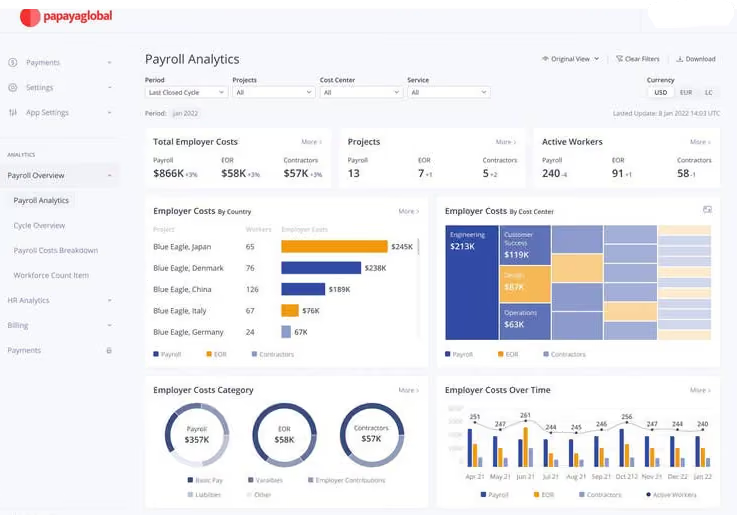
I liked the main dashboard because it was user-friendly, allowing me to access important information quickly. Papaya Global integrated well with the client's existing HR tools, making it easier for everyone and ensuring smooth data flow. The reporting was accurate, providing the exact details needed for decision-making. Lastly, the tool had great scalability, adapting to the client’s needs as they grew without any issues.
I used Papaya Global while working with a client as a freelancer in HR. They started using it because managing HR tasks across different countries was becoming overly complicated and time-consuming. They struggled to keep up with the various labor laws and maintain communication with their team spread around the globe. The tool was a lifesaver, providing a single platform to handle everything and keep everyone aligned.
Personally, I’ve been using it for about two years, and it has been incredibly helpful. It automates repetitive tasks that used to take up a lot of my time, all with the click of a button. It also integrates seamlessly with their other HR systems, allowing information to flow smoothly. It has saved both me and the client significant time and effort.
One major downside is that Papaya Global is quite expensive for what it offers. It doesn’t have enough advanced features to fully justify the cost. Additionally, it’s not very customizable, so it can be difficult to adapt it to specific business needs. While it automates some tasks, many actions still need to be done manually, which is disappointing considering the price. It also has a steep learning curve, so new users might struggle to get accustomed to it quickly, which can slow down adoption. Finally, customer support is not very responsive, which can disrupt workflows when issues arise.
Papaya Global stands out for its Employer of Record feature, which is especially helpful for managing legal compliance overseas. It effectively handles the regulatory challenges of working across different countries, providing peace of mind without the need for a large legal team. Although I haven’t used other tools, this one excels in handling international employment and compliance. The biggest advantage is the confidence it offers in ensuring compliance globally. Managing complex HR tasks across different countries is much easier with this tool, making it invaluable to our company.
When considering a tool like Papaya Global, it’s crucial to assess your company’s global footprint and ensure the tool can handle payroll, legal matters, and hiring across multiple countries. It’s also important to choose a tool that works in locations where you don’t have an office, as this helps you stay compliant with local laws.
Usability is another key factor; a user-friendly tool will help your HR team get up to speed quickly and keep operations running smoothly. Lastly, verify that the tool integrates well with your existing HR systems to allow for seamless data transfer.
By expanding to more countries, Papaya Global has stayed ahead of the competition. It now offers a broader range of services, helping companies manage global offices effectively. Over time, it has improved its legal compliance capabilities, which is critical when dealing with different countries' regulations. The tool has also become smarter with automation and reporting, streamlining processes and freeing up users to focus on more important decisions.
In addition, the platform has been enhanced to make navigation easier, even as it grows more powerful. This has made it a go-to choice for companies with employees spread across the globe.
Let's not forget about the look and feel of the thing. Papaya Global has put a lot of effort into making sure that using their platform is as easy as pie. It's all about making it simple to understand and navigate, even as it gets bigger and more powerful. This has turned it into a go-to choice for companies with employees scattered across the globe.
Papaya Global is ideal for large businesses that deal with complex salary management, especially when they operate in multiple countries. It’s perfect for companies with a diverse global workforce that need a robust system to comply with various labor laws and regulations.
Businesses that value seamless integration with existing HR systems and require advanced technology to handle complex tasks will find this tool especially beneficial. Even if a company doesn’t have offices in every country they hire from, this tool can manage payroll effortlessly.
Papaya Global might not be the best pick for companies with basic payroll needs because it could come with more bells and whistles than they actually need. If you're a small business with a tight wallet, the price might seem a bit steep, especially if you're not looking to manage payroll across different countries.
Plus, if your team isn't full of tech personnel or HR minded individuals, you might find it a bit tricky to use and might not get the most out of all its fancy features. For places like that, something simpler and easier on the budget might be the way to go.
Bennie
Designed to make benefits more accessible and less complicated, Bennie is available both as a web and a mobile app. With it, employees can track claims spending, estimate cost of care, find a doctor, access a live concierge team, and more.
PROS
CONS

Bennie is a hub for your employee benefits information on a mobile-first platform. If employees have any questions about their benefits, they simply go to the app and interact with Ask Bennie, a smart healthcare concierge.
For employers, Bennie skips the typical brokerage experience. Instead, Bennie partners with major regional and national carriers to bring your company more personalized benefits. HR teams have their own backend to manage everything in one place. Customers also get access to strategic benefits and HR technology consulting.
- Schedulicity
- Superhuman
- Nabis
The Bennie app is free to use for your company and employees. Bennie shops around for the best plan for your company, and takes a commission from the insurance company you decide on.
Best For
Companies in the 50-500 employee range.
We use Bennie to administer our benefits for employees. It is a full-service app where employees can ask questions about their health benefits and find in-network doctors and clinics. They also use it to review insurance coverage, the cost of a procedure, copays, or how to use the plan.
It’s like having a concierge service for healthcare. It simplifies benefits and makes everything easier to understand.
- Bennie offers an intuitive app that allows employees to easily access their benefits information, including plan details, ID cards, and provider directories.
- Bennie acts as an extension of our HR team, offering proactive benefits consulting and support, including strategic planning and renewal assistance.
- The "Ask Bennie" feature provides employees with personalized assistance for questions related to claims, coverage, and enrollment, saving time and reducing confusion.
Our organization bought Bennie to help employees understand their health benefits more easily. The Bennie app is a go-to resource for employees and employers, allowing us to access everything employees need to understand their benefit plans.
We wanted a simple way for our employees to get answers without always reaching out to the Human Resources team. Members can easily view ID cards, find in-network medical providers, and chat with a live healthcare concierge for questions about claims, coverage, and more. We have been using Bennie for about three years.
- We had issues with integrating Bennie with our existing HRIS, leading to data inaccuracies and administrative delays.
- There have been instances where incorrect information was provided to employees, resulting in coverage discrepancies and increased costs.
- While Bennie offers cost savings, its pricing structure may not be suitable for smaller businesses with limited budgets.
Bennie is different from competitors like Gusto, Zenefits, and Justworks as it combines personalized benefits consulting with easy-to-use technology. While Gusto and Zenefits focus mostly on payroll and general HR, Bennie offers expert advice and digital tools. This mix allows Bennie to create customized benefits plans and provide active support for employers.
Bennie also acquired People 1st Health Strategies, which helped them develop the Better Health Plan. This plan gives small and mid-sized businesses access to the advantages of self-funded health insurance. Bennie works with partners like Ease to make enrolling in benefits simpler and smoother.
When buying a tool like Bennie, companies should evaluate their size and business needs. HR teams should confirm whether it integrates well with their existing systems. The pricing should match the features offered. Security and privacy of employee data must also be reviewed.
The tool should make benefits easier to manage for both employers and employees, and the provider should be responsive to user feedback.
Bennie has evolved to better align with the changing needs of employers and employees. They have enhanced their technology to provide faster, more accurate responses through their AI-powered concierge, ensuring employees receive timely and personalized support.
For HR teams, Bennie has integrated additional tools to streamline benefits administration and reduce the administrative burden. They have also incorporated user feedback to refine features such as cost transparency and provider network navigation.
Bennie is well-suited for small to medium-sized companies that want to help employees better understand their health benefits. It is ideal for teams without a large HR department, as it enables employees to get answers independently.
Bennie also works well for individuals who find insurance confusing. Companies looking to save time and simplify benefits management will find it useful.
Bennie may not be a good fit for large organizations with dedicated HR and benefits teams, as those companies may already have comprehensive systems in place. It also may not suit companies that offer minimal health benefits or whose employees rarely use insurance.
Very small businesses with tight budgets might find the pricing high. Employers and employees who prefer consistent in-person support may not prefer using an app.

Namely
Easy to navigate, Namely is extremely organized and uses the best-in-class technology. Its benefits administration software is integrated with its HR and payroll system to save time and complexity.
PROS
- Namely’s user interface is highly praised for its intuitiveness and cleanliness, allowing users to navigate the platform effortlessly despite its extensive features.
- Users appreciate Namely's employee onboarding module, which includes a user-friendly wizard that helps new hires quickly understand their tasks and responsibilities.
- In addition to the platform's built-in tools for data management, recruiting, onboarding, time off tracking, payroll, and benefits administration, Namely offers managed payroll and benefits administration services, alleviating the workload for internal teams.
- The majority of users are able to navigate Namely without any issues. They find the UI to be intuitive and clean, despite the fact that the platform has lots of features.
- Namely’s employee onboarding module gets a alot of praise from users. It features an easy-to-follow wizard, which helps new hires get on quickly and be clear on what they need to do.
- Besides the platform’s built in features for data management, recruiting, onboarding, time off tracking, payroll and benefits administration, there are also managed payroll and benefits administration services you can opt for to reduce the burden on your internal teams.
CONS
- Namely's primary focus is on the U.S. market, limiting its suitability for those seeking a global payroll and benefits provider.
- Implementing Namely can take a while, with an average implementation period of 6-8 weeks, according to the platform's own team.
- Namely lacks dedicated features for employee development, such as skill training, career pathing, and succession planning.
- Users should verify if Namely is compatible with their existing benefits provider, as there have been reports of Namely's team persuading customers to switch to providers that charge higher fees.
- Namely primarily operates in the U.S., which means if you’re looking for a global payroll and benefits provider, this platform isn’t for you.
- Though many praise the platform’s ease of use, it does take long to implement it. Namely’s own team says that an average implementation takes between 6-8 weeks.
- For a platform of Namely’s size, there currently aren’t any features that focus on employee development such as skill training, career pathing, succession planning etc.
- You’ll need to check beforehand if Namely can work with your existing benefits provider, if you have one. There have been a few reports (but not few enough to ignore) about Namely’s team convincing customers to change their benefits provider to providers that charged them more.
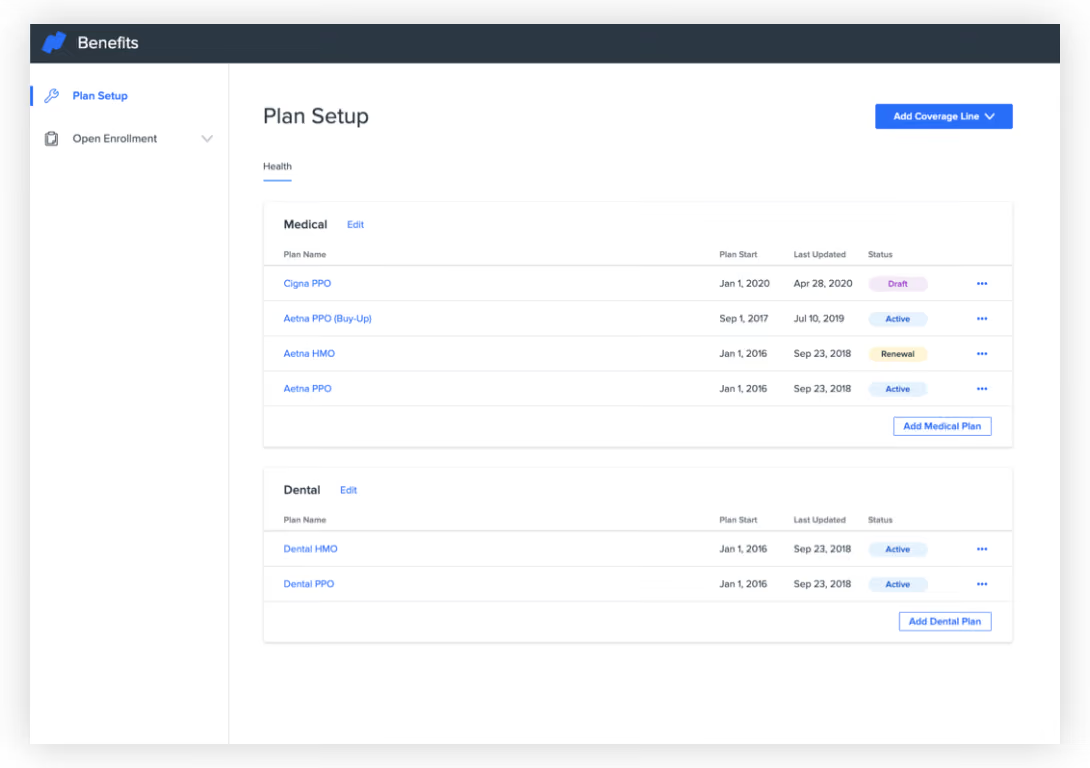
Namely’s comprehensive HR suite packs a range of features that make it an excellent choice for benefits administration. You can enroll your employees in, track, and manage various benefits programs such as health insurance, retirement plans, and flexible spending accounts. All of this is simplified through customizable online enrollment forms that provide employees with plan details. The software also allows for seamless integration with insurance carriers and third-party administrators to automate data transfers and reduce manual entry errors.
We appreciate a good reporting module, and the one Namely has can not only generate reports but also give you deep insights into benefits utilization, costs, and trends, which is a nice feature to have if you want to frequently improve your benefits plans and compete in today’s super competitive hiring landscape.
Over 1200 companies use Namely, including Greenhouse, The Channel Company, Life is Good, and OneLogin.
Namely does not disclose their pricing upfront. However, having no benchmark provides the unique opportunity to negotiate with sales to determine the right price for your company specifically.
Best For
Namely targets mid-sized companies. They specifically mention companies with 50-1000 employees.

We currently utilize Namely for managing payroll, which has been essential in ensuring timely and accurate compensation for our employees. Namely is used daily for onboarding new employees, streamlining the process and making it more efficient. It has also been valuable in tracking new employee benefits and was particularly useful during our company-wide open enrollment period in July. Supervisors use Namely for conducting yearly performance reviews for all employees, which has significantly reduced the need for paper-based evaluations. Additionally, Namely helps us with quarterly and annual data tracking for State and Federal reporting purposes, ensuring compliance and accuracy.
- Namely offers excellent benefits brokerage and administration, making it easy to manage employee benefits.
- The customer service provided by Namely is outstanding, with quick and helpful responses to our needs.
- The onboarding process for new employees is streamlined and efficient, reducing the time and effort required to bring new hires on board.
My organization plans to expand in the next two years, and we were looking for an HRIS software that is manageable for both supervisors and employees. We needed a system that could effectively track new employees throughout their tenure with the organization, and management agreed that we required software capable of scaling as we grow. After going through a thorough selection process with various HRIS companies, we found it challenging to choose the best fit for our organization. However, we were impressed that the team at Namely answered all of our questions and provided excellent guidance during the implementation process. We have been using Namely for about one year, and we are very satisfied with it so far.
- Uploading form templates into Namely can be challenging, requiring additional time and effort.
- The ability to add e-signatures to documents is limited, which could be improved for better functionality.
- Making edits within the platform can sometimes be difficult, causing frustration when changes are needed.
I like that Namely is good for small and mid-size companies just starting their HR Department. They don't oversell products like some other HRIS software - they give you what is needed.
When purchasing Namely, it's important to consider its functionality and whether it meets the specific needs of your organization. It is also essential to evaluate whether the pricing fits within your budget, especially if you are a new or smaller company. Namely’s capacity to grow with a company is a key advantage, making it a good option if your organization is planning on expanding in the near future.
Namely has evolved to be very user-friendly for both employees and administrators, making it easier to navigate and use on a daily basis.
Namely is particularly well-suited for small to mid-sized companies looking for a comprehensive HRIS solution that can grow with their needs.
Namely may not be the best fit for large companies with more complex HR needs, as its features are tailored more towards smaller and mid-sized organizations.

Maxwell Health
A one-stop technology solution that merges your HR ecosystem with benefits administration system, Maxwell Health helps employees save time and make sound decisions about their benefits.
PROS
CONS
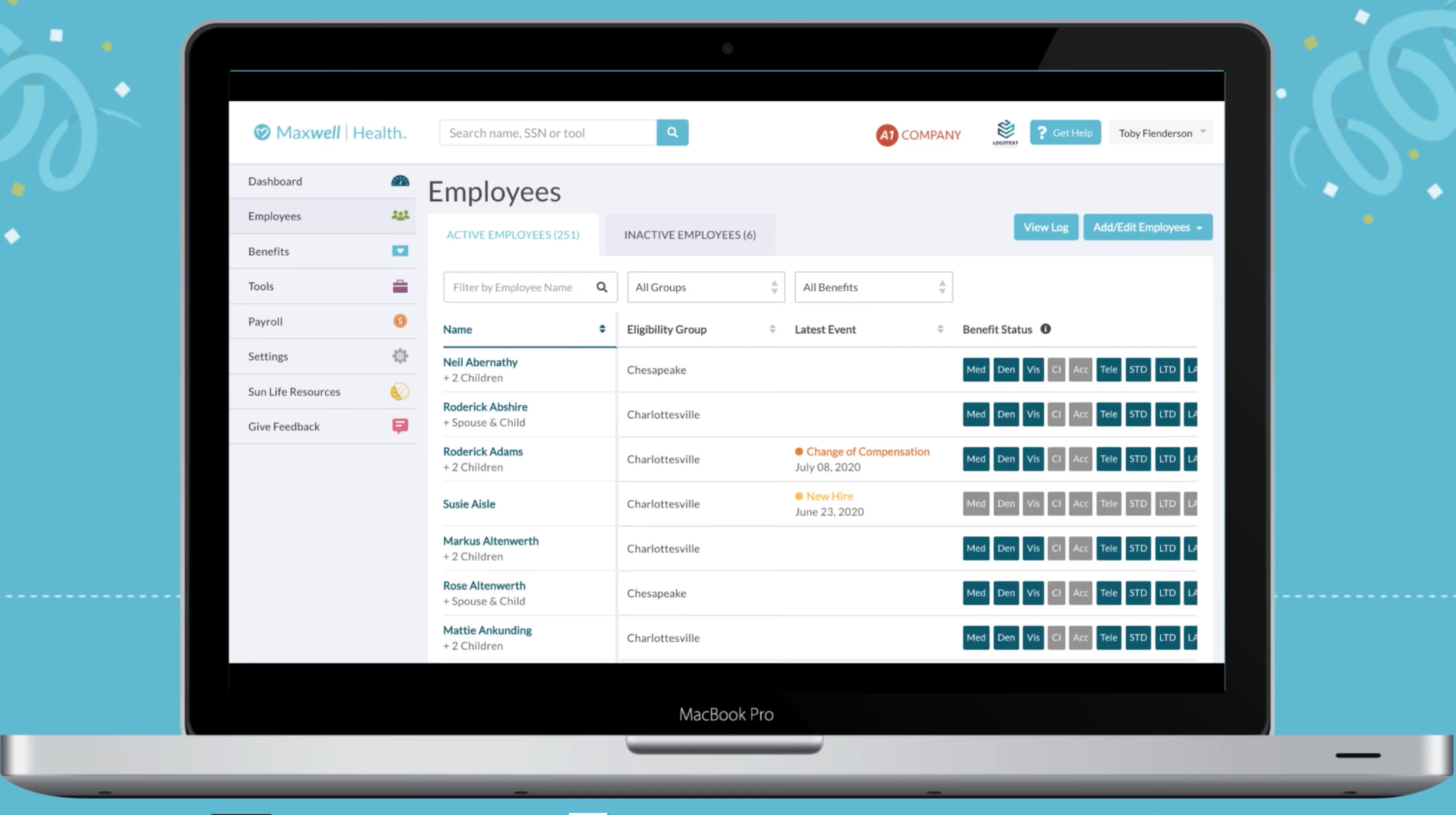
Maxwell Health, now owned by Sun Life Insurance, offers companies a modern approach to managing benefits for employees. From open enrollment to COBRA, they can help you stay compliant, and give employees a wide range of options all available through an easy to use mobile interface.
- Rose Street Advisors
- Taney County, Missouri
- Harrisburg University of Science and Technology
Maxwell does not release their pricing online. You will have to contact a sales representative.
Best For
If your company isn’t picky about what insurance company to work with, Maxwell Health’s partnership with Sun Life Insurance is ideal. You get a simplified end-to-end experience, requiring even less administrative work on your part.

We used Maxwell primarily for open enrollment. It also allowed employees to manage their benefits throughout the year. The platform was instrumental in streamlining workflows for employee benefits administration. It was utilized year-round, ensuring employees could access and update their benefits as needed.
Employees also used it to make personal changes to their benefits, such as updating dependents or coverage options.
- The platform is user-friendly for both employers and employees.
- It provides a centralized system to manage all employee benefits.
- It simplifies and streamlines the open enrollment process.
Maxwell Health was provided to my company through our insurance provider. Prior to this, my company did not have a centralized platform for managing employee benefits. Maxwell streamlined our open enrollment process and overall benefits management. It provided a single platform for employees to access and manage their benefits easily.
Additionally, it simplified benefits administration for the HR team, making the process much more efficient.
- It can be challenging to get direct support within the system.
- There were occasional issues with employee records after they updated their personal information.
- From an employer’s perspective, it was difficult to make changes during open enrollment once the official deadline had passed.
Maxwell offers a simplified and user-friendly platform that employees can easily navigate and understand.
Pricing should be a key consideration when selecting a platform. Ensure the tool is user-friendly for both employers and employees to avoid unnecessary complications. Integration with your payroll platform is highly beneficial for seamless administration.
Confirm that it is compatible with your offered benefits and your insurance broker’s platform(s) to avoid technical issues.
he platform has undergone slight modifications to improve usability, making it more user-friendly for employees.
Maxwell is well-suited for organizations that provide multiple benefits to their employees.
It may not be ideal for companies that offer only a few employee benefits, as the platform’s capabilities might be underutilized.

Rippling
Rippling is geared toward SMBs with its terrific automation and built-in integrations. Besides common features like self-service and onboarding, the benefits administration tool lets you work with your picked broker within the app and choose benefits packages from over 4,000 plans.
PROS
- Rippling can operate globally with almost any currency.
- 500+ integrations.
- Automates issuance processes.
- Provides a holistic view of company outflows—headcount costs included.
- All-in-one platform for employee management + PEO services offered, and even a suite of other IT products
- With 500 integrations, it’s very likely that they integrate with other key tools from your tech stack.
- Operates globally with any currency
- Workflow automation
- Analytics opportunities
- Provides a holistic view of company outflows—headcount costs included
CONS
- Total buy-in to Rippling is essential.
- No free trial.
- Phone support is available via the HR Help Desk service, which costs extra.
- Very SMB-oriented, so perhaps not the best option for larger companies.
- Total buy-in to Rippling is essential
- Very SMB-oriented, in case you’re a larger company.
- New features tend to be buggy in ways that tech teams are not accustomed to fixing
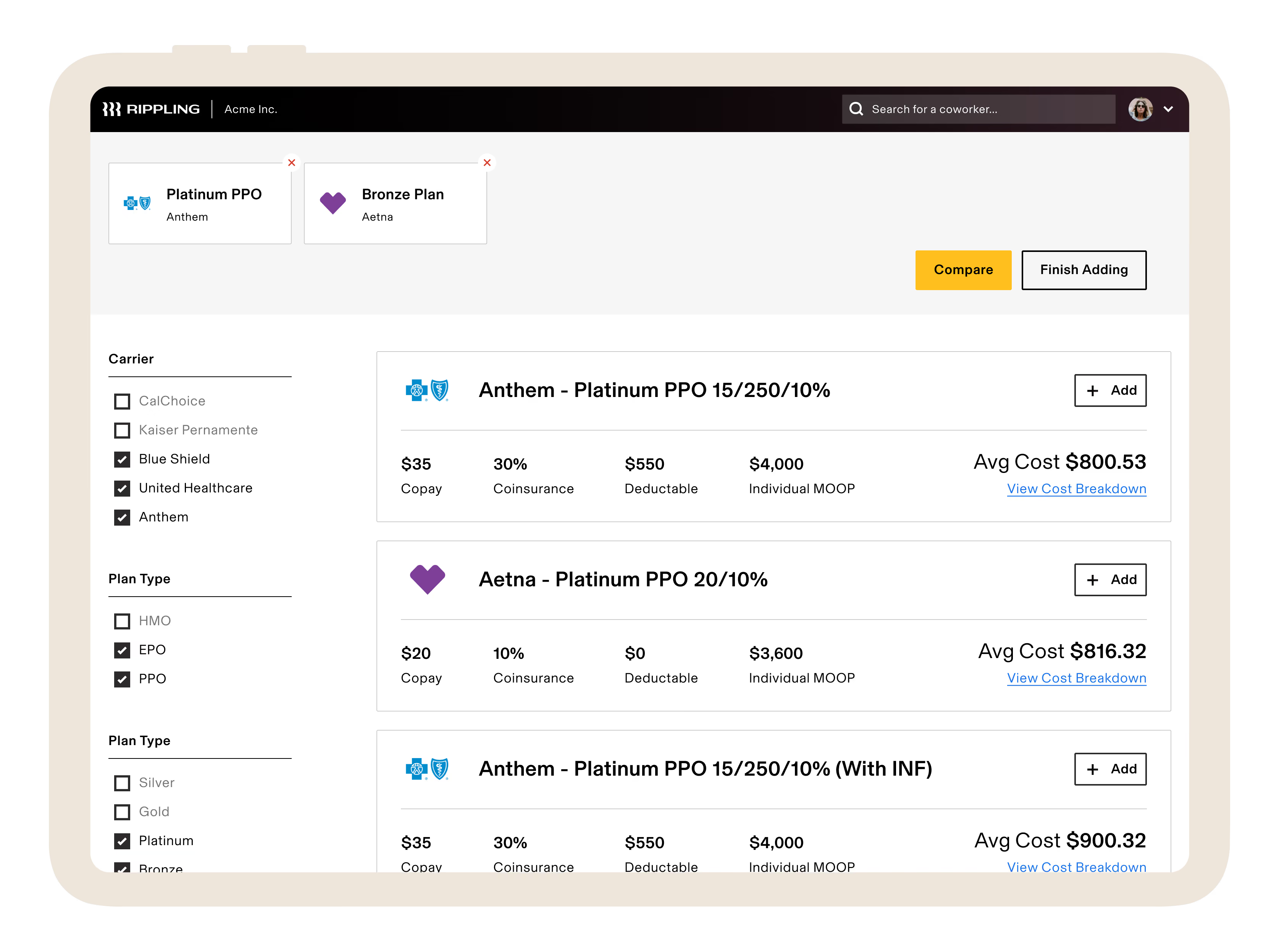
Rippling is in a class by itself compared to other benefits administration software. With a remarkable 500 app connectors, it surpasses most vendors we've tested across multiple categories. This helps the tool not only perform standard features an average benefits tracking system does, like parsing a paper receipt image captured with a phone but can also contextualize spending activity within the larger framework of employee data.
We tested Rippling's benefits management features and discovered that despite being a relatively new solution, it stands out for its strong emphasis on automation. Alongside standard functionalities like online onboarding, benefits enrollment, and employee self-service portals, Rippling offers unique capabilities.
One notable feature is the ability to add your existing broker as a user or receive recommendations if you don't have one. Additionally, Rippling excels in automation by automatically updating employee deductions when qualifying life events occur, such as location changes or marital status updates.
In the past two years, Rippling has expanded its offerings to include time and attendance, talent management, learning management, licensed PEO services, and global payroll. Remarkably, the platform has maintained its eye-catching UI despite the additions. However, there are a few aspects to keep in mind.
While you have the flexibility to select and purchase modules separately, Rippling’s core HR offering is the starter plan for all iterations.
Vox, Maximum Games, Superhuman, Compass Coffee, Highnoon.
Rippling's Core HR platform starts at $8 per employee per month. Contact Rippling regarding a custom Benefits Administration quote.
Best For
Rippling is best for small to medium-sized companies, globally or nationally distributed with multiple levels of organization.

We use Rippling as our source of truth for everything employee related. On the HR side, it handles our entire onboarding workflow: the moment an offer letter is signed, Rippling kicks off a chain reaction that handles background checks, signs I-9s, assigns handbooks, and drops them into our health insurance and 401(k) pipelines.
We run bi-weekly payroll through it for domestic W2 employees, and we use the global payroll features to pay international contractors and EOR employees across multiple countries in their local currencies.
What really changes the game for us as super admins is how we use Rippling's Unity platform to tie HR directly into IT and finance, automatically provisioning corporate Google Workspace accounts, creating Slack profiles, and granting access to specific AWS or GitHub repos based on department and seniority.
We also use Rippling Device Management to purchase, ship, and configure company laptops, and we can lock or wipe a laptop remotely if someone leaves. It's also where we track time off, manage hardware inventory, and run expense stipends.
The biggest pro for me as a super admin is the automated IT provisioning, which lets us create Slack and Google Workspace accounts and ship pre-configured laptops the second a new hire signs their offer letter.
I love that it serves as a true global single source of truth, meaning I can run US W2 payroll, manage international EOR employees, and pay global contractors all out of one dashboard.
The custom workflow builder is incredibly powerful, allowing me to set up automated triggers, like notifying IT and finance whenever an employee changes their home address or gets a promotion, without any engineering support.
We brought in Rippling about two years ago when our headcount started pacing ahead of what our fragmented tech stack could handle.
At the time, we were playing a frustrating game of telephone between three different systems: a legacy HRIS for tracking employee data, a separate standalone payroll provider, and a disconnected ticketing system just to get IT to provision a laptop or set up company email. We pulled the trigger because we were scaling fast and losing hours of manual work every time we onboarded or offboarded someone.
The promise of having global payroll, core HRIS, benefits, and device management all wired into one central identity management engine was exactly what we needed to stop the administrative bleeding.
It allowed us to manage our growing W2 team and international contractors without needing to hire two more full-time HR admins.
The modular, a la carte pricing structure can lead to severe sticker shock, because every essential feature from time tracking to basic app provisioning is gated behind an additional per user, per month fee that causes your annual bill to balloon as you scale.
Their customer support can be frustrating when a complex edge case breaks on the backend, often resulting in slow response times and tiered ticketing queues when you need a live person immediately.
The heavy reliance on automated triggers means that if a manager inputs a future-dated promotion or job title change incorrectly, it can prematurely trigger software de-provisioning or incorrect payroll calculations without warning.
The primary difference is that while competitors like Gusto or BambooHR started as payroll or HR databases and tacked on extra features later, Rippling was built from day one as an identity and access management system.
With Gusto, I was still stuck manually ordering laptops, setting up Slack accounts, and using separate platforms like Deel for international hiring, and with BambooHR, the payroll felt like a clunky, disjointed third party add-on.
As a super admin, I heavily prefer Rippling because it unifies HR, IT, and finance into a single dashboard, and being able to offboard an employee in three clicks saves my team dozens of hours of manual work every week.
When buying an all-in-one HRIS like Rippling, your primary evaluation criteria must be cross-departmental integration capabilities, specifically how seamlessly HR data flows into IT provisioning and expense management without manual workarounds.
You also need to look closely at global scalability, ensuring the vendor can natively handle both domestic W2 payroll and international EOR or contractor compliance under one interface as your team expands.
Finally, don't just look at the base price; carefully audit the vendor's modular pricing structure and contract terms, as add-on fees for features like time tracking, performance, or device management can easily double your expected budget as headcount grows.
Rippling has evolved from a basic US payroll and IT provisioning tool into a massive global operational platform. They moved aggressively into international workforce management by launching their own native EOR service and global payroll, eliminating the need for separate systems like Deel.
They have also expanded beyond core HR by launching comprehensive finance modules, including corporate cards, expense tracking, and automated accounts payable.
They have transformed from a sleek startup tool into an all-in-one ecosystem capable of handling a company's entire workforce, IT, and spend management globally.
Rippling is an absolute home run for rapidly scaling startups and mid-sized companies (roughly 20 to 500 employees) that operate with a lean HR and IT department. It's specifically built for distributed or remote-first organizations that hire a mix of domestic W2 workers, international contractors, and global EOR employees across multiple states and countries.
If your company uses a heavy amount of cloud software (like Slack, Zoom, Jira) and provisions physical corporate laptops, Rippling is the perfect fit. It excels when an organization wants to automate the administrative overlap between HR, IT, and finance to avoid hiring separate administrators just to manage passwords, hardware logistics, and multi-state payroll compliance.
Rippling is a bad fit for small, localized companies with deskless workforces, like retail shops or restaurants, where employees don't use company laptops or corporate software, making the costly IT and provisioning features useless.
It's also overkill for micro-startups under 15 employees with basic, domestic-only payroll needs, who would be better off saving money with simpler tools like Gusto.
Finally, massive enterprise organizations with deeply entrenched, highly customized legacy setups or complex union payroll requirements will find Rippling's standardized, automated workflows far too rigid compared to Workday or UKG.
Why Use Benefits Administration Software
As an employer, you are required to offer certain benefits (like health insurance and Social Security), while others are “nice-to-haves” that can help with recruiting and retention.
The more benefits you offer, the more administrative work you have to manage — unless, of course, you use benefits administration software. If you offer any or all of the following benefits, a benefits admin platform can streamline how you manage them — and how employees sign up for them:
- Social Security: A federal benefits program that provides insurance for older workers and their spouses, those whose spouse or qualifying ex-spouse have died, and the disabled.
- Worker’s Comp: Benefits given to employees who suffer work-related injuries or illnesses. It helps cover medical care, wages from lost wok time, and more.
- Health Insurance: A type of insurance that covers medical and surgical expenses. This is arguably your biggest benefits expense.
- Unemployment Insurance: A state-provided insurance that workers are eligible for if they lose their job and meet other requirements.
- Family Medical Leave: The Family and Medical Leave Act (also known as FMLA) provides up to 12 weeks of job-protected leave per year to care for a seriously injured or ill immediate family member (i.e. spouse, child, or parent). While the leave is unpaid, FMLA requires that health benefits remain intact.
- Vacation Time & Other Paid Leave: This can include a certain number of PTO days, sick days, and parental leave for your full-time employees.
- Affordable Care Act (ACA) Coverage: The landmark health reform, also known as Obamacare. Under the ACA, employers with 50 or more full-time employees are required to offer affordable, essential coverage to their full-time employees or choose to pay a tax penalty.
- Dental Insurance: A type of insurance that covers certain dental procedures and expenses.
- Vision Insurance: A type of insurance that covers certain vision procedures and expenses.
- Pet Insurance: A type of insurance that covers certain veterinary costs when your pet gets sick or injured.
- Wellness Programs: While these differ per company, wellness programs are designed to promote long-term health for employees. Some programs include discounts on gym memberships, providing on-site fitness classes, offering preventative health screenings, hosting stress management workshops, stocking kitchens with healthy snacks, etc.
- Financial Wellness: Financial wellness programs are designed to help employees take control of their finances so they can spend smarter, reduce debt, and save more money. Such programs include retirement/401k plans, student debt repayment, and more.
- Education Benefits: Also known as tuition benefits, education programs are designed to give employees opportunities to further their education. For example, some companies offer employees a reimbursement benefit up to a certain amount that covers classes, courses, certifications, etc.
- Life Insurance: A type of insurance that provides a lump-sum payment to the insured’s beneficiaries upon the insured’s passing.
- HSA & FSA: Pre-tax dollars that can be used for health-related and other approved expenses.
If you're not sure what benefits to offer at your company (besides, of course, the bare minimum requirements), consider who your full-time employees are.
In other words, what is important to them? For example, if the bulk of your employees are fresh out of college, a financial wellness benefit that helps them pay off their student debt will be a very attractive offering. You could also survey your employees if you're on the fence about a certain benefit to see if it’s something they actually want and would use.
Considerations for Employee Benefits Admin — Plus, Common Mistakes to Avoid
The features we just listed are pretty comprehensive, but benefits admin software won't take everything benefits-related off of your plate. Not only that, benefits management in general has its share of challenges. To make sure you do benefits "right," have successful open enrollment periods, and don't blow your benefits budget, here are six considerations and common mistakes to look out for:
- Choosing benefits that fit your company's need vs everything: As you probably already know, there are seemingly endless benefits you could offer to your employees. While it might be tempting to offer everything under the sun (which can be a great recruiting tool), you might end up creating more work and spending more money than it’s worth. In other words, you could wind up offering (and paying for) benefits that your employees don’t actually use. So think about what makes sense for your company and your employees — and start there.
- Not allowing employees to pick and choose benefits: By nature, people like having choices and making informed decisions for themselves. So give them different options so they can pick and choose the benefits that are right for them.
- Compliance with mandated benefits: Under laws like the Affordable Care Act, certain benefits are required for businesses of 50 or more full-time employees. If you don’t stay compliant, you could be charged fees. Fortunately, many benefits admin solutions offer automated compliance workflows so you can get the right forms to the right regulatory bodies when you need to.
- Knowing which benefits are offered tax free: Offering tax-free benefits are a win-win for your company and your employees. For example, tax-free benefits like health savings accounts, flexible spending accounts, commuter benefits, even tuition benefits can save your employees — and your company — money. After all, the income your employees set aside pre-tax for these benefits does NOT count toward your payroll tax dues. So, you could be leaving money on the table if you don’t offer tax-free benefits — or if your employees aren’t taking advantage of them.
- Costs can get high quickly: Your benefits offering can get expensive very quickly, especially when it comes to healthcare coverage. There are a variety of ways to keep your costs in check — from cost-sharing with employees (i.e. with increased employee contributions and higher deductibles), to changing vendor partners (like moving retirees from group plans to Medicare), to managing pharmacy spend (for example, encouraging the use of generic prescriptions or adding a narrow network).
Benefits & ROI
Benefits admin software can help your company in a myriad of ways. Here is a summary of the benefits we’ve mentioned:
- Compliance: At the most basic level, you’re required by law to offer certain benefits — and benefits admin software makes it easier for you to stay compliant with these laws.
- Less Busy Work: Because benefits admin software lets you automate the paperwork-heavy busy-work associated with benefits, your team will have more time to focus on other high-priority areas.
- Employee Satisfaction: Open enrollment will no longer feel like a chore for your employees — instead, they’ll be able to make smart enrollment decisions online and, in most cases, with just a few clicks. Offering a full-suite of benefits (that are easy to elect) will help you attract top candidates to your organization — and keep them once they’re hired.
- Smarter Investments: Because benefits admin software offers reporting, you’ll be able to see what benefits are being utilized the most — and which ones aren’t worth investing in further.
To get an idea of what benefits like these can actually do for your bottom line, check out our HR Tech ROI Calculators.
Pricing: What Employee Benefits Admin Platforms Cost
Most benefits admin platforms charge on a per-employee-per month basis and offer tiered pricing depending on the amount of features and functionality you’re looking for. We’ve seen pricing start as low as $8/employee/month.
When you have your demo(s), you should get a pricing plan that is customized for your company and needs. Just make sure that each quote you get breaks down the features that are included so you can easily compare and make the most informed investment for your company.
Features: What You Can Expect from Benefits Administration Software
Benefits administration software isn’t just a way to centralize your benefits management and alleviate the burdens of paperwork and other administrative tasks. They also offer a host of integrations and features to make your job easier, keep you compliant, save you money, and promote employee engagement. Let’s take a look:
- Suite of Benefits: Depending on the vendor you choose, you can manage all of your benefits in one place. We’ll talk about this later in the guide, but remember to ask your vendor(s) of choice which benefits are included with their solution.
- Online Enrollment & Self-Service for Employees: Allow employees to opt-in to their benefits elections themselves — and say goodbye to endless paperwork. With a safe and secure benefits admin platform, your employees can easily enroll in their plans of choice online — or even through a mobile app.
- Plan Configuration: Easily set up and manage all plans and benefits in one place. This not only makes things easier for your HR/people operations team, it also makes benefits shopping easier for your employees. They can more easily compare plans and sign up online.
- Payroll Integration: Integrate your benefits and payroll data so the right deductions automatically sync to each employee’s payroll record.
- Simple Onboarding: Make onboarding easy for new employees by centralizing all necessary paperwork and enrollment opportunities in one place. What’s more, if an employee leaves your company, you can just as easily un-enroll them and initiate COBRA.
- COBRA: Easily manage COBRA eligibility and compliance with automated reporting to your COBRA administrator.
- ACA Reporting: The Affordable Care Act requires employers with 50+ full-time employees to report healthcare coverage to the IRS. With benefits administration software, you can easily generate forms 1094 and 1095 and submit your reports for you so you stay compliant (and avoid fees).
- More Compliance: In addition to ACA and COBRA compliance, benefits administration software can help you stay compliant in other areas — and get ahead of changing regulations. This includes compliance with HIPAA (i.e. protecting employees’ Personal Health Information, or PHI), ERISA, the Dept. of Labor, the IRS, and OSHA.
- Reporting: Automate reporting of your HR data — including billing insights, headcount and attrition reports, job and salary reports, and more — to make more strategic, data-driven people decisions. You could even benchmark against other companies in your space to see if there are opportunities or areas of improvement.
As you develop your full benefits package, think about the features that would benefit your employees the most AND that would help make your job easier.
Demo Questions: What to Ask About Benefits Administration Software
We always recommend demoing a couple vendors so you can see their platforms in action before you actually invest. To prepare for your demos, create a list of questions specific to your company’s benefits needs. Here are some sample questions to get you started:
- What benefits does your platform have?
- What benefits do you find are most attractive to employees like mine?
- How can employees sign up for benefits?
- Can employees access their benefits plan on their phones?
- How does HR create a benefits plan?
- How will this solution fit into the rest of my tech stack and therefore what integrations do I need?
- How will others in the organization use this solution?
- What are the key features I want to ask about?
- What are the things that would make me nervous about buying this sort of solution?
Implementation: Getting Your Employee Benefits Software Off the Ground
The first step to implementing benefits admin software is figuring out what your suite of benefits looks like. From there — and based on the information you gathered during your demo — you’ll know what is required to get your platform of choice up and running. For example, you might need to engage your IT team to help with any necessary integrations.
Then, you’ll need to encourage utilization of the platform during open enrollment periods, for new employees who are onboarding, and for employees who are leaving and need to sign up for COBRA. To get employees to make their benefits elections before your open enrollment period ends, we recommend a variety of touch-points, including:
Software Training Sessions: If you're using a new system, you're going to need to train your HR or People Ops team on setting up and managing each benefit. Then, you'll need to introduce the platform to your employees so they know how to use it. You could do this a number of ways:
- Ask your vendor if they have pre-recorded training videos that you can share with your employees
- Meet with individual teams to walk them through the platform
- Give a brief demo of the platform at an all-staff meeting
All-Staff Emails: Send a note to the entire company at the beginning of open enrollment with instructions on how to use the platform, what actions they need to take by the deadline, what happens if they don't do anything, etc. Then follow-up with "last-call" reminders as the deadline approaches.
Engage Team Leads: Ask team leads and managers to remind their direct reports to make their benefits selections before the deadline.
Benefits Administration Software FAQs
What is benefits administration software?
Benefits administration software are platforms built specifically to plan and provide benefits packages to employees, while also maintaining compliance with government regulations.
Why use benefits administration software?
Benefits administration software streamlines all benefits operations, saving your HR team much needed time. In addition, all employee benefits data is held in one portal, meaning you can analyze all benefits information and create detailed reports about what benefits are used most or least. This provides you with valuable action points for benefits administration. Finally, letting software maintain compliance for you ensures simple, fast, and accurate reports to the IRS and other government entities.
What are some features of benefits administration software?
Features of benefits administration software include reporting, ACA and COBRA compliance, onboarding tools, plan configuration, self-service portal, online enrollment, and payroll integrations.
Next Steps for Your Employee Benefits Administration
Broadly speaking, there are two ways to get benefits admin support: a platform that only focuses on benefits admin or a more comprehensive Human Capital Management (HCM) suite that offers benefits admin as one of many HR features.
So, you’ll need to figure out which one will make the most sense for your company. We recommend demoing a couple vendors that fit into these two buckets so you can see how their solutions and features align with your needs and budget.
About the Author


About Us

- Our goal at SSR is to help HR and recruiting teams to find and buy the right software for their needs.
- Our site is free to use as some vendors will pay us for web traffic.
- SSR lists all companies we feel are top vendors - not just those who pay us - in our comprehensive directories full of the advice needed to make the right purchase decision for your HR team.


