

The 11 Best Workforce Planning Software Tools of 2026
The best workforce planning software, reviewed and compared by our HR tech experts. Find feature comparisons, pros & cons, pricing details, and more below.








Business forecasting, analysis, and organization of workforce supply and demand are all made possible by workforce planning software, which ensures that the right people are in the right jobs at the right time.
If you’re interested in a solution to ease up your manpower planning work, you’ve come to the right place. We’ve compiled a list of the best workforce planning software options available today.
To determine the top workforce planning software solutions, our team evaluated dozens of tools based on vendor demos, expert consultations, user reviews, and hands-on testing. We looked for solutions that excel in three key areas: data integration, scenario modeling, and user experience.
- Data integration: The workforce planning tools that rise to the top can pull data from your core HR, payroll, and other business systems to create a single source of truth. This enables accurate forecasts based on real employee data. We gave preference to solutions with pre-built integrations to major HCM platforms and the flexibility to connect to multiple data sources.
- Scenario planning: The best workforce planning software allows you to model various scenarios to see the impact of different hiring, promotion, and attrition assumptions. We favored solutions that support the setup of multiple assumptions, what-if analyses, side-by-side scenario comparisons, and more so you can adjust variables and see how headcount, costs, and other metrics shift accordingl
- User experience: While planning capabilities are important, the tools also need to be easy for planners and managers to use. We looked for intuitive interfaces, customizable dashboards, and smart collaboration features. The top solutions provide self-service access and enable different teams to work together seamlessly.
For a deep dive into our methodology for evaluating HR software, please see our editorial guidelines.


.png)
Deel

Deel’s workforce planning tool is a natural extension of its global HR suite, and in many ways, it reflects the company’s DNA: built for distributed teams, with compliance and cross-functional collaboration at the core. While it’s still maturing as a product, we see the potential in its strong focus on global hiring laws and AI roadmap.
PROS
- Clean, intuitive interface for building headcount plans.
- Structured, automatic approval workflows for HR, finance, and recruiting collaboration.
- Real-time ATS integrations for quick execution of headcount plans.
- Compliance support and salary benchmarks for 150+ countries.
- Excellent 24/7 customer service with fast onboarding (2-3 days) and local payroll experts in each jurisdiction.
- Seamless integration with platforms like QuickBooks, BambooHR, and Greenhouse, plus custom integration options.
- User-friendly, self-service features enable quick setup; identity verification often takes under 24 hours.
- Automated invoices simplify payments, provided they're in English.
CONS
- Hiring projections, real-time cost visibility, and AI tools for skill and pay analysis are still in development.
- Limited integrations beyond Deel HRIS and Ashby ATS.
- Key features like onboarding automation are add-ons, which may increase costs.
- Limited flexibility in modifying contracts or service agreements; changes often require an addendum.
- Invoices cannot be generated in languages other than English.
Deel’s Workforce Planning module brings a strategic layer to its global HR platform, aimed at helping cross-functional teams align faster and more accurately around headcount and budget decisions, without losing sight of compliance. While still early in its product lifecycle, throughout our testing, the tool proved to be a globally aware alternative to spreadsheet-based planning.
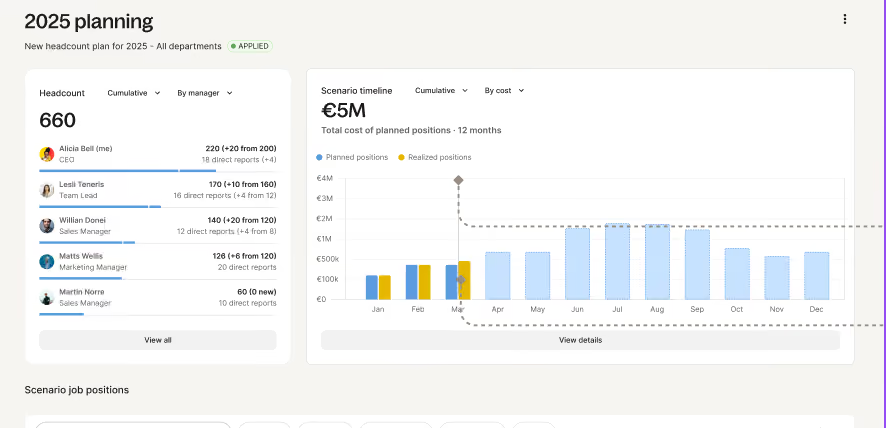
During testing, we found the interface to be easy to navigate, especially when building headcount scenario plans. We could create scenario plans based on different goals, add detailed positions with departments and regions, and even visualize the scenarios directly in the org chart. Deel’s collaborative dashboards were a highlight here: they offer shared visibility into workforce plans and expected costs, with built-in approval steps that help eliminate back-and-forth between teams.
Where Deel differentiates most is in compliance. The platform draws on Deel’s global hiring infrastructure to surface labor law considerations and salary benchmarks for over 150 countries. While we weren’t able to test fully automated cost adjustments, the system is clearly designed to help teams avoid regulatory missteps when hiring abroad.
It’s worth noting, however, that many of the platform’s promising features are still on the roadmap. Hiring projections, real-time cost visibility, AI-driven skill gap analysis, and compensation insights are all marked as “coming soon.” Similarly, integration support is currently limited to Deel’s own HRIS and Ashby ATS, with broader ATS and financial planning tool compatibility still in development.
As a result, while Deel is moving toward scenario modeling with actionable financial insights, those capabilities are not fully available today. That sets it apart from mature tools like Agentnoon, which already support exportable “what-if” plans and advanced modeling logic.
Another consideration is that this workforce planning tool is marketed as an add-on to Deel Engage, meaning companies must adopt the broader performance and talent suite to access the headcount planning features. For those seeking a workforce planning point solution, this bundling may feel restrictive.
Deel is used by over 35,000 organizations, including Bubb, Filtered, and Chirpy.
Deel Workforce Planning starts at $18 per employee per month.

Best For
Deel’s workforce planning tool is a promising solution for globally distributed teams looking to align HR and finance on compliant, cost-conscious headcount plans.

Paylocity
What stands out about Paylocity is how it connects headcount planning directly to hiring, so approved roles move into recruiting without needing to be recreated or passed between systems. Because planning pulls from real HR and payroll data, teams are working from the same baseline, which makes forecasts and decisions feel more grounded in day-to-day operations.
PROS
- Pulls data directly from HR, payroll, and time tracking, so workforce plans are based on real employee data rather than manual inputs.
- Keeps planning, approvals, and hiring workflows in one place, which makes it easier to move from headcount plans to open roles without rework.
- Strong collaboration setup across HR, finance, and recruiting with shared visibility and controlled permissions.
- Solid reporting layer with a large library of pre-built reports and customizable dashboards.
- Self-service experience is generally easy to navigate, especially for employees and managers.
- Paylocity’s customer support is highly rated for always being available to answer questions.
- Global payroll support for 100+ countries.
- Provides free and unlimited training modules on the website.
- Paylocity’s mobile app has a good UI and functionality
- The tool is easy to use for both employees and employers.
- Has 350+ pre-built integrations.
CONS
- While scenario planning is available, it might not offer the same depth for complex "what-if" modeling as specialized workforce planning tools.
- Reporting and configuration take time to set up before they become useful.
- The interface can feel dense at first, especially for admins managing multiple workflows.
- Some users have noted that the support experience or system performance can occasionally be inconsistent, particularly during the initial setup phase.
- Undisclosed pricing.
- It doesn’t have a free trial or free plan.
- Support is available in English only.
- It isn’t the best solution for remote teams looking for a tool to manage payroll and benefits for their contractors.
Paylocity’s workforce planning tools make the most sense if you are already operating inside its broader HCM platform. The biggest shift, compared to how a lot of teams still plan headcount, is moving everything out of spreadsheets and into a shared system. In practice, that changes how teams work together more than any single feature. Finance, HR, and recruiting are all looking at the same data, tied back to actual employee records, which cuts down on the version control issues that tend to show up in planning cycles.
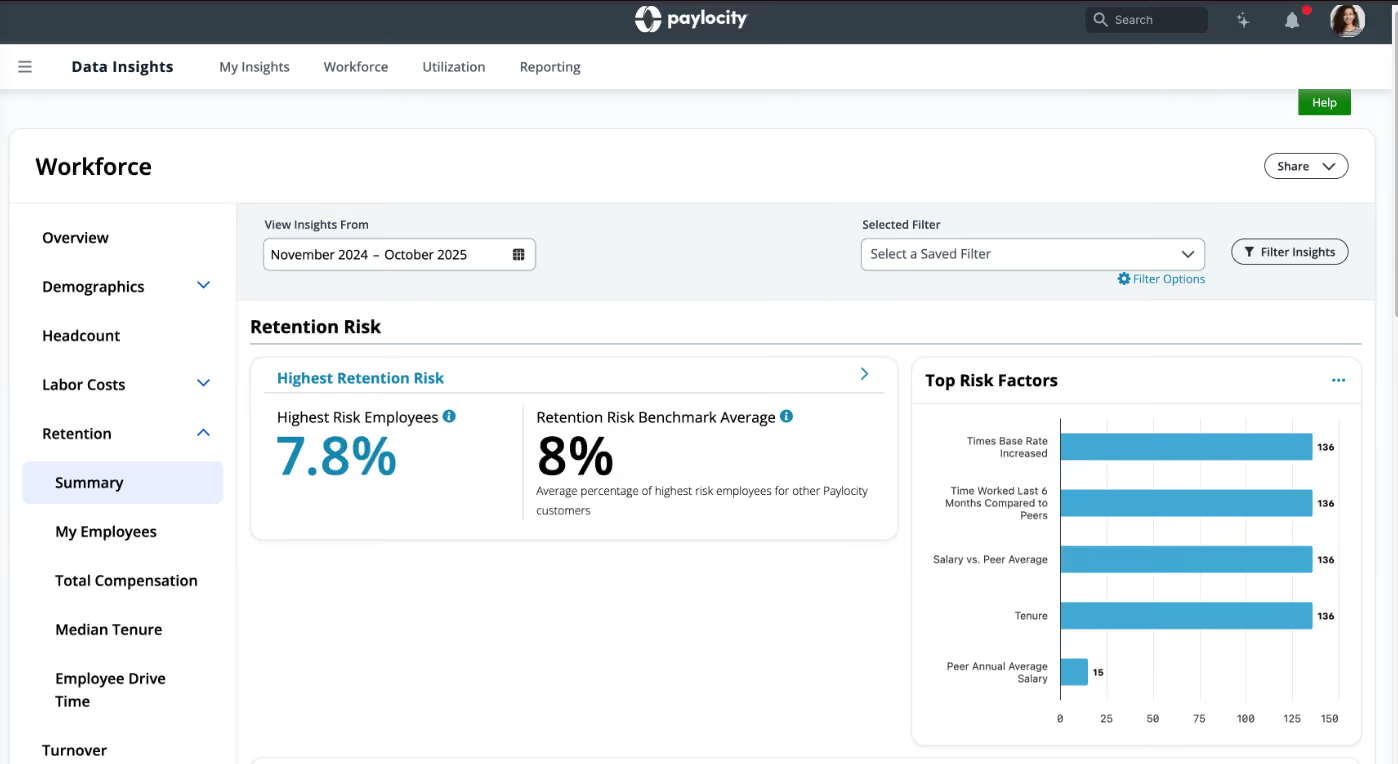
In our walkthrough, what stood out first was how centralized the experience feels. Headcount plans, approvals, and hiring workflows all live in one place, with permissions layered in so the right people can see or act on specific pieces. It is not especially flashy, but it is structured in a way that makes ongoing planning easier to manage. Once a role is approved, it can move directly into recruiting without needing to be re-entered somewhere else, which is a small detail that ends up saving time.
The data side is one of the stronger parts of the platform. Because Paylocity already handles payroll, HR, and time data, workforce planning pulls from those same sources. That gives you a reasonably reliable baseline for forecasting headcount costs, salary budgets, and workforce gaps. We found the connection between planning and actual payroll data especially useful when thinking about cost projections. It is not a fully open data environment, but within the Paylocity ecosystem, it works as a consistent source of truth.
Where the product feels more complete is in execution. Planning does not stop at forecasting. You can track open seats, manage backfills, and connect plans directly to recruiting workflows. In our view, this is where Paylocity is most practical. It helps teams move from planning to actually filling roles without switching systems or rebuilding context.
Scenario planning is present, though not as deep as some standalone tools. You can plan headcount using different approaches, top-down, bottom-up, or a mix of both, and adjust assumptions around roles, budgets, and hiring timelines. There is enough here to model hiring needs and see how they affect costs and capacity. That said, if you are looking for detailed what-if modeling with side-by-side scenario comparisons or highly complex forecasting, this is not where Paylocity goes furthest.
Integrations outside of the Paylocity ecosystem exist, but the product works best when you are already using its core HR and payroll systems. It also takes some upfront work to configure planning workflows, approvals, and reporting in a way that matches how your organization operates. Smaller teams or companies with simpler planning needs may find the system more robust than necessary.
Custom Pricing.
Best For
Mid-sized organizations that want to centralize headcount planning, budgeting, and hiring workflows within a single HR and payroll system.


Paylocity is used for every aspect of the business and is the most complete HRIS for our needs:
- Easy, painless payroll that is automated and tax compliant.
- HR task automation.
- Recruiting and onboarding.
- Communication and collaboration, helping build a more connected and engaged culture.
- Operational efficiency - Time spent on administrative tasks is reduced, such as manual clocking, time-tracking, and costing out of labor rates.
- The Talent Acquisition module helps fill roles more quickly with top talent by leveraging modern tools like texting and QR scan codes.
- Cost-effective solutions for a variety of organizations, including education, financial services, healthcare, manufacturing, nonprofit, restaurants/hospitality, retail, and technology. Solutions are available for small, midsized, and large enterprise organizations. Paylocity streamlines HR tasks, minimizes compliance risk, and drives communication and collaboration with tools to improve employee engagement.
Since 2000, I have used Paylocity. Our previous HR systems were numerous. We moved the following processes into Paylocity, which offers an all-in-one HR solution:
- Payroll - Automated processes, tax compliance, and overall simplification of payroll processing.
- Workforce Management - Improved efficiency by automating scheduling, time tracking, and ease of use for employees via their phones.
- Human Resources Software - Automation of manual tasks such as reviewing time management and I-9 Work Authorization tracking. Simplification and access to real-time information via the mobile app allow everyone to view their pay info, tax forms, time off requests, update personal information, and complete tasks that previously required paper.
- Talent Management - This tool helps shorten the time to hire during the recruiting cycle, expands the reach of finding top talent by posting and sharing openings across many job boards, and enhances the candidate experience through texts and QR code scanning.
This aids in finding talent faster and making engagement easier. Additionally, this module is excellent for onboarding new employees by eliminating hours of onboarding paperwork, as every aspect of onboarding is done online through Paylocity.
There is a performance management segment that provides employees with the tools they need for career development and conducting reviews. Also within this module, compensation and a Learning Management System (LMS) are robust and automated, with a wealth of tools built in to help with employee engagement and retention.
- Benefits - We moved from manual to automated processes, reducing confusion through simplified, flexible benefits management and employee usage. Key takeaways: access anywhere via mobile or desktop, real-time information, employee education with step-by-step guidance videos/scripts, compliance with federal and state regulations for COBRA, ACA, and HIPAA, and ease of error reduction through automation.
- Employee Experience - Employees have access to the HR platform, increasing self-service adoption, building confidence, collaboration, and connection.
- Data - Paylocity helps bring data to life while keeping in tune and up-to-date with your workforce. For example, AI is used to provide key insights for identifying gaps and actionable recommendations on how to improve employee productivity and reduce turnover.
I do not have any cons to share about Paylocity.
In comparison to Workday, the ease of implementation and support was better with Paylocity. When I used Workday with a large enterprise organization supporting 10,000 employees, the assigned team was larger and divided into various segments. Paylocity supported a small service organization with fewer than 2,500 employees.
The criteria should include the following:
- The available budget.
- Types of systems and applications being integrated.
- Company size.
- Readiness to move away from paper and files into software/automation. Paylocity simplifies and streamlines critical payroll and HR processes.
- Remember to allocate time and a team to help design the front end of the system and plan the rollout—this takes time and patience.
Paylocity has expanded and introduced the Modern Workforce Index (MWI), giving HR leaders real-time visibility into organizational health compared to similar companies based on NAICS codes and organization size.
Paylocity is primarily designed for small to medium-sized organizations. It simplifies and streamlines critical payroll and HR processes and functions.
Larger enterprise organizations won’t find Paylocity dynamic enough for their needs.
Anaplan
Anaplan is all about complex scenario planning. Their robust solution is used for many kinds of planning processes and forecasting.
PROS
CONS

Within HR, Anaplan is used to turn workforce planning into an extension of the company’s strategic, operational, and financial projects. HR organizations can connect with finances and business data, as well as third-party sources, in order to plan and visualize various workforce scenarios.
For instance, Anaplan can forecast attrition based upon past experiences, plan workforce movements, set and monitor headcount targets, and identify talent gaps. All this is done within an excel-like platform with rich analytics and statistical capabilities.
- Del Monte
- Vodafone
- The Greenery
- RSA
- Tableau
- PayU
Anaplan offers three plans, Basic, Professional, and Enterprise. These vary in their planning and modeling capabilities, but all of them are custom-priced depending on team size and needs.
Best For
Several business sizes and industries could make good use of Anaplan’s extensive platform.
Board
Board helps manage and plan human resources efforts with a unified analytics software platform.
PROS
CONS

Board has business intelligence products for HR, finance, sales performance, and supply chain management. Their HR tool helps manage resources for the department in a manner that stays unified with the plans and activities of the other business units.
Their platform focuses on leveraging workforce analytics to provide actionable insights. When it comes to workforce planning and performance management, these insights can be key in making sure that the proper decisions are taken at the right moment.
- Coca Cola
- KPMG
- Puma
- Mitsubishi Electric
- United States Navy
Board does not provide pricing details upfront.
Best For
Board is best-suited for enterprises that want to align their decision-making behind a single source of data.
Planful
Planful connect HR, finance, and operational data together. Businesses can then plan out the workforce that they’ll need to meet their goals.
PROS
CONS

Planful strives to help teams that may be spending too much time in manual processes, suffering from siloed approaches, and stuck to knee-jerk reactions to day-to-day problems. They ease these headaches by enhancing workforce planning with accurate and current data from the business, better aligning HR’s forecasts with what’s happening, and being planned, at other departments.
In this sense, Planful works for teams beyond HR as well. For example, as soon as a workforce budget is created, HR data is instantly loaded into the system, saving time for each manager, whether they’re in finance, HR, or marketing. Also, once a workforce forecast is done, it can easily be adjusted to match market ups and downs.
- Five Guys
- Nerdwallet
- PalletOne
- Morphe
- Specialized
- Thule
Planful doesn’t provide pricing upfront.
Best For
HR departments that want a tight partnership with the finance team when it comes to workforce planning.

Visier People
Visier is a robust analytics solution that has a People Planning module. Their platform is built mainly for mid-market to enterprise clients and they offer professional services as well.
PROS
CONS
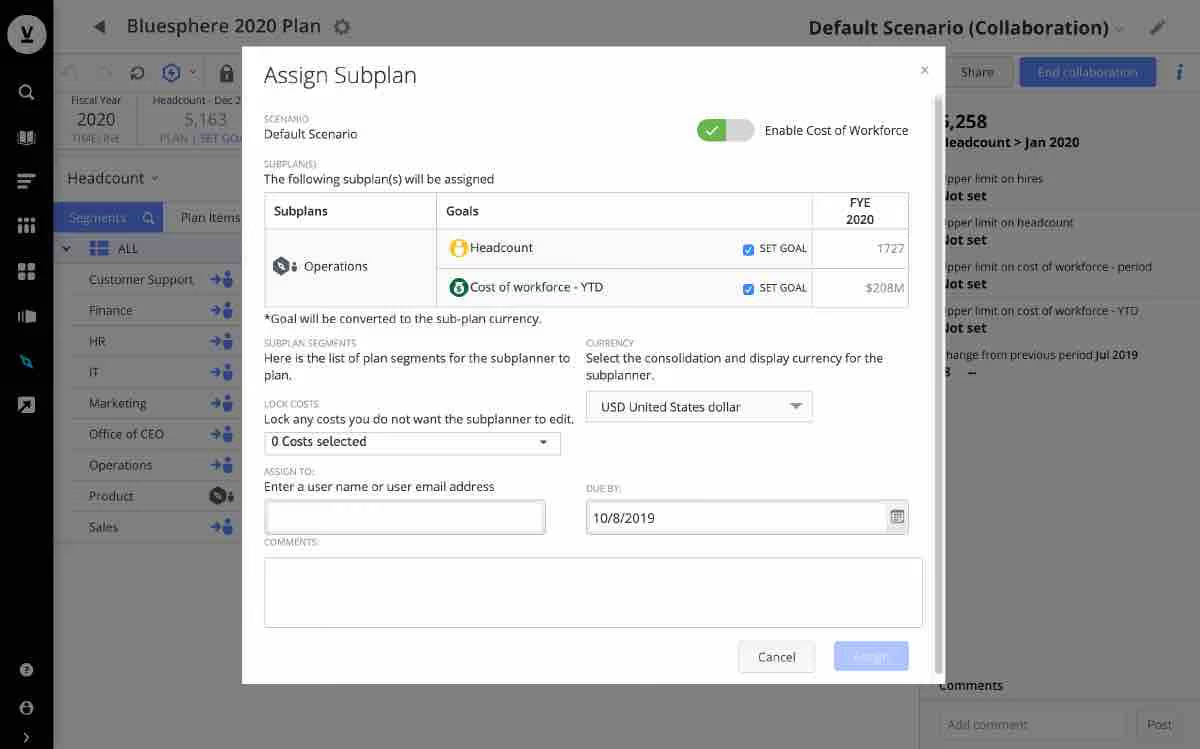
The fact that they’ve chosen to name their workforce planning module ‘People Planning’ goes to show how in tune the folks at Visier are to modern human resources. Thinking of that, it makes sense that they keep coming up in many HR analytics conversations.
Many organizations use Visier to better understand themselves. Whether it’s retention, headcount forecasting, TA funnels, or how all these efforts stack up in relation to peer companies, Visier has very robust people analytics capabilities to offer.
Visier is used at organizations like Amgen, BBVA, Micron, EA, Nielsen, Bridgestone, Dignity Health, and more.
Pricing for Visier is not currently disclosed, so the best way forward is to get in touch or request a demo.
Best For
Mid-market to enterprise clients looking to get workforce planning done right, but also implement a myriad of HR analytics tools while they’re at it.

Agentnoon
We picked Agentnoon for its powerful combination of speed, flexibility, and data integrity in workforce planning. It handles large, complex orgs with ease, while offering scenario tools you don’t often see bundled into one platform, from real-time collaboration to formula-based modeling and exportable “what-if” slide packs. We also liked the degree of configurability for filtering, color-coding, and spotlighting team structures.
PROS
- Handles massive orgs (e.g., 300K employees) with fast load times.
- Advanced scenario modeling with rule-based highlighting and span analysis.
- Intuitive UI and drag-to-navigate org chart.
- Strong data harmonization, filtering, and attribute customization.
- Exports tailored for slide decks, HRIS upload, and executive reviews.
- Handles massive orgs (e.g., 300K employees) with fast load times.
- Advanced scenario modeling with rule-based highlighting and span analysis.
- Intuitive UI and drag-to-navigate org chart.
- Strong data harmonization, filtering, and attribute customization.
- Exports tailored for slide decks, HRIS upload, and executive reviews.
CONS
- Some users report occasional bugs tied to rapid feature releases.
- The English-only interface limits global team use cases.
- Although Agentnoon integrates with over 100 HR systems, its API usage may be complex for some users.
- The platform lacks mobile accessibility.
- Some users report occasional bugs tied to rapid feature releases.
- The English-only interface limits global team use cases.
- There is no direct write-back to HRIS, requiring a formatted export such as Workday EIB.
- The platform lacks mobile accessibility.
Agentnoon positions itself as an AI-native organizational design platform, and during our test drive, it lived up to most of the hype. Built to serve HR teams navigating restructures, budget planning, or org health checks, the platform impressed us by how quickly it handled large-scale data. For example, it loaded a 3,000-person org chart in under two seconds during live testing. This speed makes it one of the most responsive tools in its class.
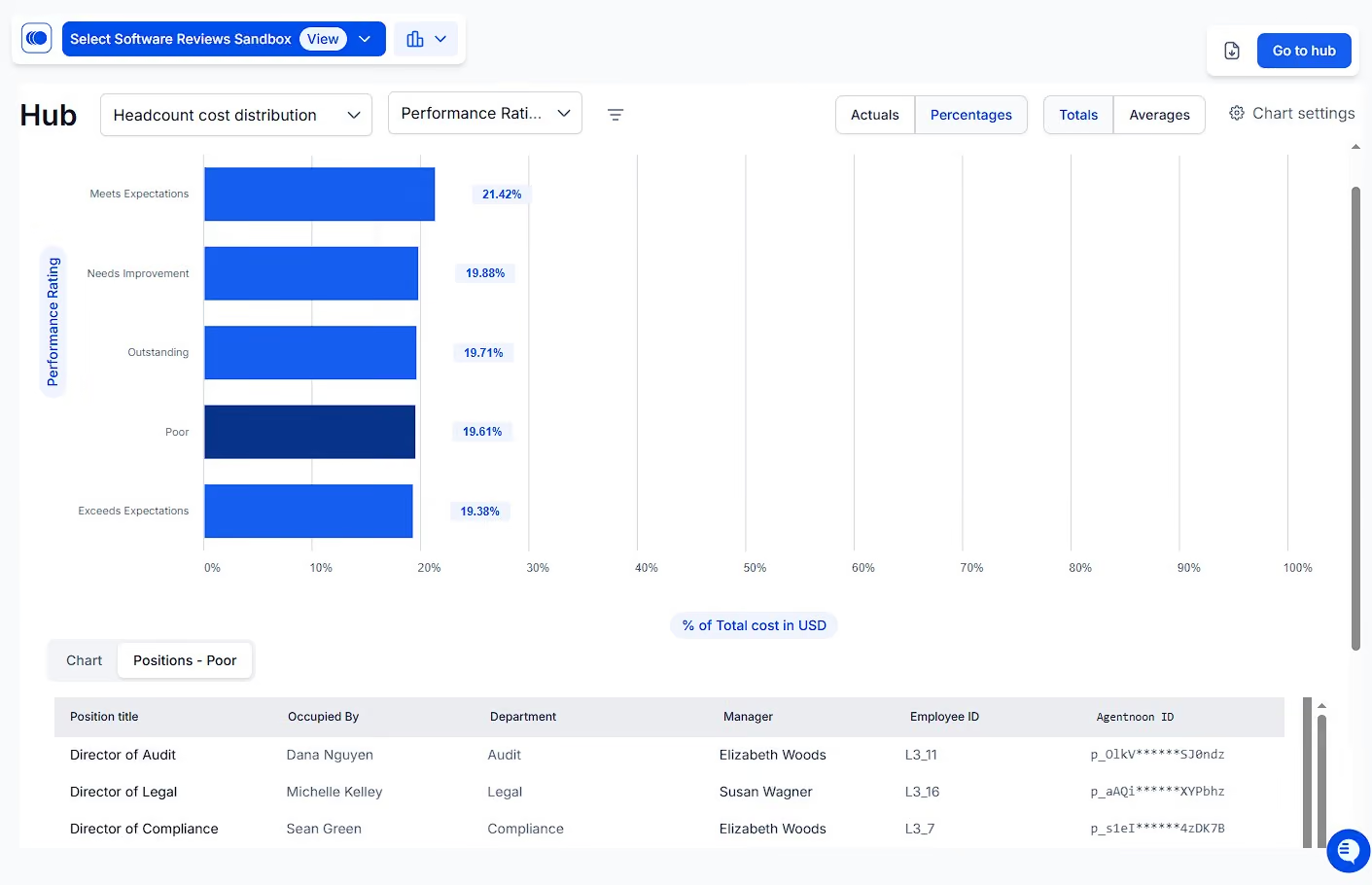
The org chart is both visual and highly interactive. During our demo, we filtered by manager, level, and location to isolate critical segments, double-clicked to drill into specific business units, and set custom rules to highlight span of control issues. Compared to traditional PowerPoint or spreadsheet-based presentations, this felt significantly more fluid and intuitive.
Scenario modeling is where Agentnoon stood out most, though. We appreciated being able to spotlight exceptions (e.g., managers with too few or too many reports), apply formulas to forecast costs, and export a ready-made slide deck for stakeholders. The ability to save and revisit different modeling views also proved especially helpful for organizations operating on extended planning cycles or multiple modeling tracks.
However, while the platform integrates more than 100 HR systems, it’s clear that the API usage might be a bit of a head-scratcher for some HR professionals. The user interface is sleek and user-friendly, but a few users we talked to shared that they ran into occasional bugs. We also found it limiting that Agentnoon does not yet support mobile access. The platform is currently desktop-only, which may be a drawback for on-the-go users or executives who prefer to review plans from a tablet or phone.
To sum up, for companies with over 200 employees, especially those involved in ongoing restructuring, multiple operating models, or workforce transformation projects, we think Agentnoon offers a powerful mix of flexibility, visual clarity, and analytical depth. Our experience suggests it can significantly improve how HR teams plan, model, and communicate organizational changes.
Some of Agentnoon’s customers include Nestlé, Kenvue, Autodesk, Etihad Airways, Al-Jazeera, NYU, and Superhuman.
Agentnoon offers two primary pricing plans:
- SMB Plan: $4 per record per month.
- Enterprise Plan: Custom quotes are available for enterprise clients, but they typically cost around $1,000 per user per month.
Best For
Agentnoon is best for organizations with over 200 employees planning restructures, headcount models, or operating model design across large teams.

We used Agentnoon to structure our data. This allowed us to integrate information from our various HR resources into one place.
It was particularly helpful when visualizing complex workforce structures. This enabled us to use existing data to inform decision-making. It also supported data validation, though that was not the primary reason we purchased it.
I liked the structure visualization. I liked the flexibility of Agentnoon. I also liked the integration with the tools we already had.
My company used Agentnoon to manage our workforce development. We used it for over a year. We had difficulty visualizing the workforce we currently had, and it was even harder to visualize potential changes.
The visualization options were particularly helpful, as was the integration with other platforms. It helped us structure our data more effectively.
I thought Agentnoon was more robust than we needed. This likely meant we were paying for more than was necessary. I personally had issues with data import, though not all of my team experienced the same.
I’m not sure, as I have not used similar tools to Agentnoon.
I would consider how much of Agentnoon is actually needed. Many people buy more features than they will realistically use.
Agentnoon has recently been purchased by Dayforce, so I assume they will be updating the tool.
A mid-sized organization will find Agentnoon to be a good fit.
I don't think Agentnoon would be a good fit for a very small or very large organization.

Quinyx
Quinyx is a powerful and user-friendly workforce planning software that can help businesses to improve their scheduling, reporting, and employee management. Its feature set, data-driven approach, and scalable model make it a perfect option for fast-growing companies.
PROS
- Quinyx provides advanced scheduling features, including pre-built templates, options to roll out schedules fully manually, semi-manually, or automatedly, auto-compliance warnings, and shift management capabilities.
- Customer support can be reached through a variety of means: online help documents, tickets, emails, and phone calls. Users have highly rated them for their helpfulness.
- Has a variety of reporting features that allow managers to track employee attendance, productivity, and time off.
- Can integrate with various other software, such as payroll and HR systems, ERP, and Forecasting & BI.
- Available in 15 languages: English, French, German, Spanish, Italian, Portuguese, Dutch, Swedish, Danish, Norwegian, Finnish, Polish, Russian, and Turkish.
CONS
- Some users have reported that Quinyx can be slow and unresponsive, especially when managing large teams.
- Some also have stated that Quinyx can take a long time to update data, such as employee schedules and timesheets.
- It is impossible to copy and paste large numbers of shifts at once in the standard schedule mode.
- Tech issues requiring Quinyx’s Service Request Form (SRF) will be invoiced for at least 4 hours.
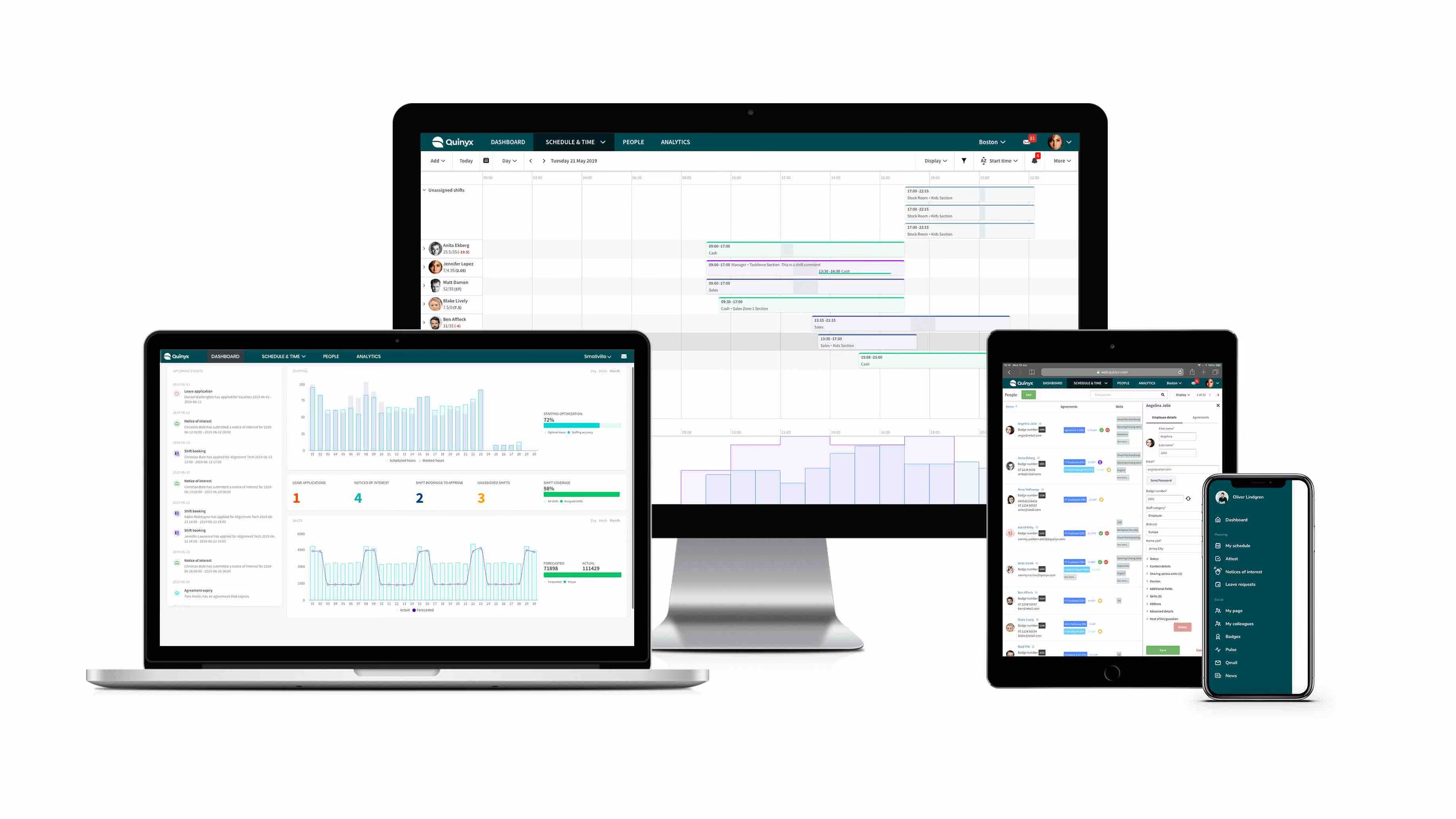
Quinyx strives to provide the most up-to-date and significant insights regarding recruitment needs. Businesses can use the workforce management solution to calculate and visualize various what-if scenarios and the impact that they could have on their workforce. We have tested Quinyx for our workforce planning and have found some really good gems about the product.
First and foremost, Quinyx packs a lot of features that we have found helpful. For instance, we like the ability to create schedules based on Quinyx’s pre-built templates, saving us a lot of time and hassle. We also like that Quinyx uses AI to auto-detect our future staffing gaps and give us recommendations on how to fill them. The platform can help with proactive planning regarding training, outsourcing, or reallocating people. To do all this, Quinyx takes multiple data sources and factors them into consideration. These include resource constraints, costs, current attrition level, and efficiency rates.
But it’s worth mentioning that several users whose teams are shared have encountered slow platform loading, especially when they update data or schedules, which can be frustrating.
Quinyx doesn’t have a transparent pricing structure, and the tool doesn’t offer a free trial that allows us to try things upfront.
Also, while it provides customer support in various channels: phone calls, emails, tickets, and help center, without charging additional fees, the tech support submitted via its service request form costs a minimum of 4 hours of service fees, regardless of the request’s type.
McDonald’s, Hilton, Starbucks, Domino’s, DHL, London City Airport, Elysium Healthcare.
Custom.
Best For
Medium-sized businesses and growing teams on the market for a scalable solution to help them improve their scheduling, engagement, time attendance, and strategic workforce management.

APS
We had a blast testing out APS workforce management software. It was impossible not to notice the automated org charts, detailed staffing metrics, and position management this vendor offered—efficient and incredibly helpful for organizations to guide their staffing decisions.
PROS
- Personalized customer service with a dedicated account team for ongoing support.
- Strong talent gap identification and workforce planning features for strategic hiring.
- Automated organizational chart keeps company structure up-to-date.
- Flexible staffing and position management tools for accurate labor budgeting and forecasting.
- Self-service access to the org chart improves visibility and communication across teams.
- Customizable metrics and reporting help forecast staffing needs and track trends over time.
- APS is very cost-effective. Although the pricing is custom and depends on your business size, we’ve heard current users speak of its affordability. Jackie R, who is a HR Director for a small-sized company says, “I love that APS offers all aspects of an HRIS system at an affordable price. We are a small business and can't afford the big name payroll vendors, but get everything they offer at APS for a price we can afford as a small business.”
- Their customer service is remarkable. As testified by multiple users, the customer service team at APS is prompt and there for you every step of the way, right from implementation to anytime you get stuck using the software. They’ll likely resolve your issue within the same day.
- APS is very easy to navigate and everything is updated and saved in real-time. Despite its complex features, you would likely not find it confusing. They also have how-to guides that come in very handy.
CONS
- Undisclosed pricing. No free trial available.
- Only only service clients in the U.S.
- Payroll must be purchased to access the workforce management product.
- Learning curve for reporting features may require support assistance initially.
- The reporting feature is limited in functionality. Sometimes, there will be missing information that you may require.
- Although their customer support is prompt, you can’t directly reach their team via phone. Customer service answers your queries via email and if you wish to talk to someone on the phone, you’ll have to mention it.
APS Workforce Planning Software provides a robust and well-rounded approach to managing labor, budgeting, and staffing needs.
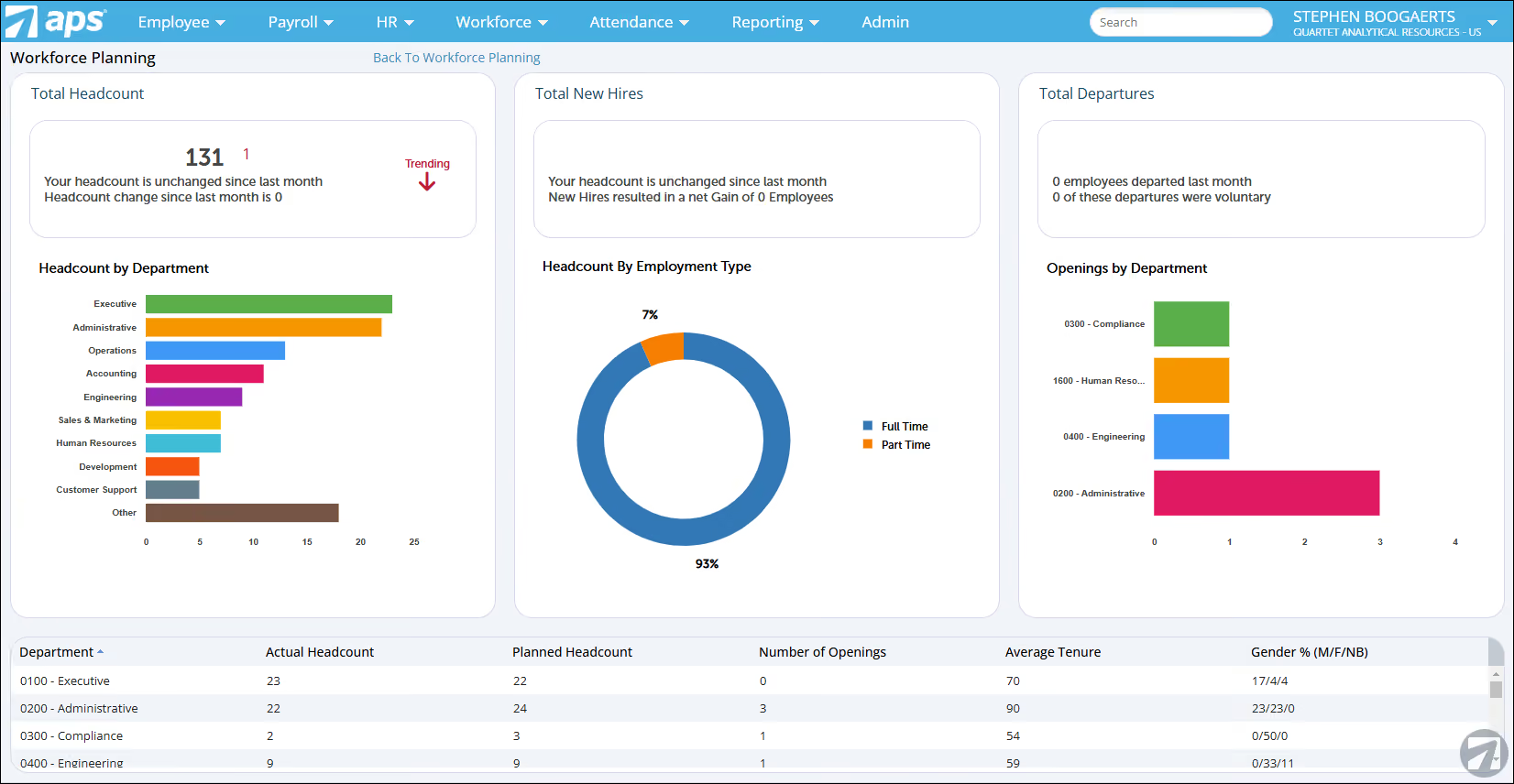
We love the ability to manage labor costs by tracking headcount and employee productivity APS offers. Throughout our testing, the system provided excellent visibility into staffing levels (overstaffed, understaffed, fully staffed, and open positions)—a key metric to ensure we’re optimally staffed. We also found the software’s capability to identify talent gaps impressive. We could, for example, quickly assess where additional hires were needed to meet future goals and develop strategic plans accordingly.
APS seems to know how to streamline everything from onboarding to employee progression. Linking workforce decisions to larger company goals was simply easy. This, combined with the staffing metrics we mentioned earlier, is precisely what one would need to anticipate potential workforce issues and proactively plan for change.
The staffing and position management tools in APS provide granular control over labor management. We appreciated the ability to establish positions, headcount, and budgeting—all crucial for effective workforce planning. Plus, the feature to auto-assign details like the reporting manager and wage type during the new hire process helped maintain data accuracy and onboarding efficiency.
The system also enabled us to view headcount per position, which was helpful for identifying discrepancies and planning future hires. The transparency created by position hierarchies meant that reporting structures were clear across the organization, and we particularly liked the automated org chart. Any updates to position details, reporting structures, or employee transfers were reflected automatically (farewell spreadsheets!).
There’s also this self-service access to the org chart we discovered in our test, which enables managers and employees to have a clear view of their team’s structure and role responsibilities. Needless to say, this visibility increased engagement and alignment across the company.
Let’s also discuss APS’s reporting features. While they are highly customizable, we did encounter a bit of a learning curve. Fortunately, the APS support team was incredibly helpful in guiding us through the setup and ensuring we got the metrics we wanted.
However, it’s quite a letdown to learn that to access APS’s workforce management features, one has to purchase the payroll component, which is unquestionably not ideal for teams interested in just the workforce planning offering.
Additionally, while APS has built a solid reputation in the U.S. workforce management software market, we feel that its strong focus on domestic companies, in a way, leaves international organizations out in the cold.
3,500+ companies, including Wahlburgers, Rainbow Sandals, Grayson College, and Hillside Christian Church.
APS’s workforce planning software has undisclosed pricing.
Best For
U.S.-based companies seeking a workforce management tool with strong payroll service capability.

ChartHop
ChartHop’s Headcount Planning module gives teams the ability to visually model headcount changes, forecast costs, and connect planning directly to business metrics. The scenario planning tools stood out in our demo, especially how quickly AI can generate draft plans based on growth targets or budget constraints.
PROS
- Visual scenario planning for headcount, reporting lines, and budget impact.
- AI can auto-generate plans from prompts (e.g., “Increase headcount by 10% in sales”).
- Integrates with live business data, such as revenue forecasts from Salesforce.
- Flexible workflows and approval chains tailored to budget thresholds.
- Supports secure, role-based access to planning scenarios.
- Open API for syncing with HRIS, ATS, and payroll systems.
- Mix-and-match pricing allows you to buy Headcount Planning as a standalone module.
- Integrates performance reviews with live business data (e.g., Salesforce) for more objective conversations.
- AI summaries distill open-text feedback; calibration (alpha) helps normalize ratings before finalizing.
- Strong analytics with historical “time travel,” drill-downs, and customizable dashboards.
- Compensation: run salary/bonus/equity cycles with contextual org + performance data and visual comp letters.
- Headcount planning: visual scenarios, side-by-side comparisons, and AI-generated draft plans.
- Open API; HRIS/ATS/payroll integrations; role-based access for sensitive data.
- Mobile app supports completing reviews, surveys, and tasks across devices.
CONS
- Steep learning curve for new users due to the breadth of features.
- Onboarding a full team can take 2-3 months.
- UI can slow or become buggy when working with very large org charts or complex planning visualizations.
- No longer provides a free plan. A minimum contract of $9,000 per year required.
- Learning curve can be steep due to frequent feature additions and configuration depth.
- Onboarding typically takes weeks to 2–3 months for multi-module rollouts.
- UI can lag with very large org charts or complex visualizations.
- Assisted help for custom templates capped at six per customer.
- Free plan discontinued; $9,000 annual minimum on paid plans.
ChartHop’s Headcount Planning is designed for leaders who want to connect strategic hiring and budgeting with real-time people and business data. We appreciate how the platform’s visual scenario planner lets you reorganize reporting lines, add or remove roles, and immediately see the financial impact. You can run “what if” scenarios in minutes, for example, increasing headcount in a specific region based on revenue forecasts. The system also makes it easy to compare side-by-side against your current org state.
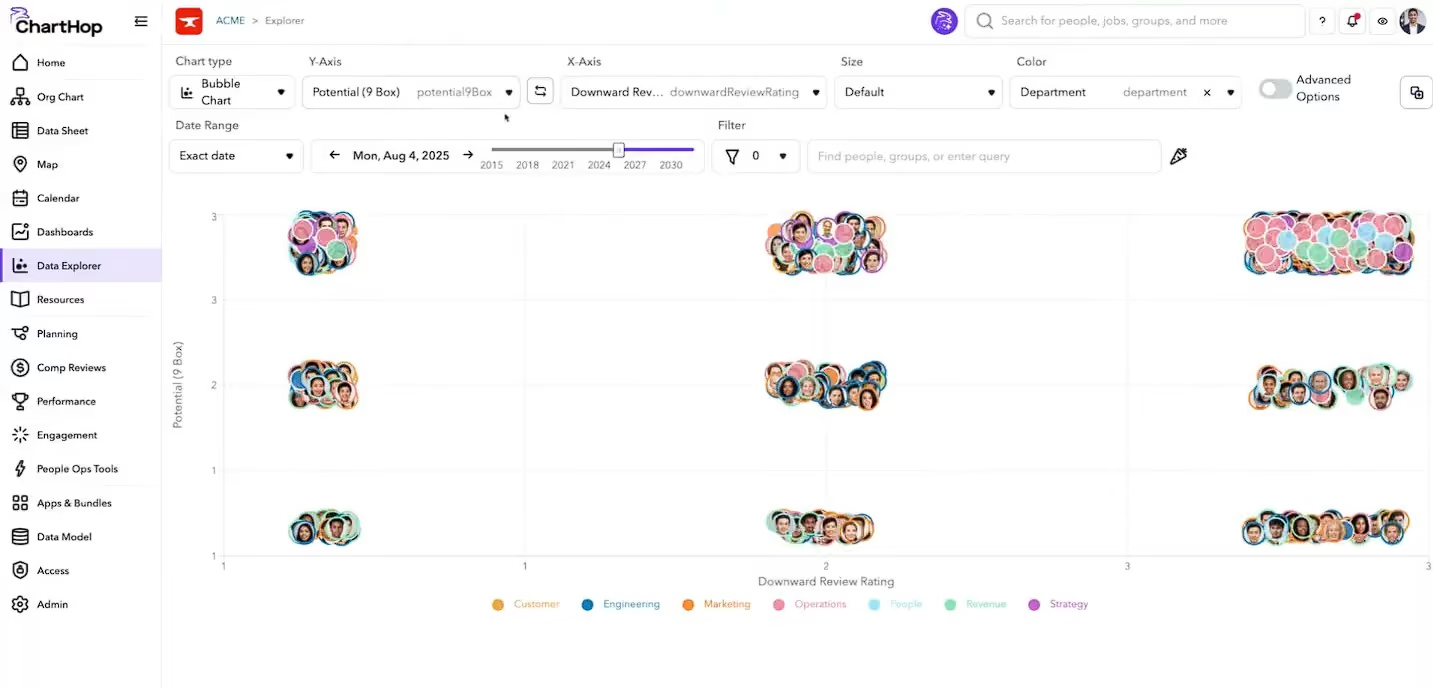
We were very impressed with ChartHop’s AI-generated planning. In our evaluation, we tested creating a 10% headcount growth plan for multiple teams, and the system instantly built out proposed roles and costs, which we could then refine. Integration with systems like Salesforce means you can ground workforce models in real sales or demand data, not just assumptions.
Workflows are configurable, so you can set up approvals based on budget thresholds or role type. This helps maintain governance while still empowering managers to request changes. Security is robust, with role-based access ensuring sensitive budget or comp data is only visible to the right people.
Unfortunately, ChartHop no longer offers a free plan, though a free trial is available for those wanting to test the waters. The implementation process can also be lengthy, typically taking weeks to complete. And while we value the frequent product updates, they do require time and effort from users to make the most out of the platform’s capabilities.
Sequoia, Plaid, Locus, InVision, BetterCloud
ChartHop's Headcount Planning costs $8 per employee each month if purchased as the initial module, or $4 per employee monthly as an additional module. A minimum yearly contract of $9,000 is required, with implementation fees billed separately.
Best For
Mid-sized and large organizations that want to connect workforce planning with live business metrics, scenario modeling, and centralized people data.

I used ChartHop to maintain our org chart, track headcount, and generate analytics on demographics and turnover. I also relied on it to visualize reporting structures for leadership and support DEI data analysis.
One of the most helpful features was the ability to sync data from our HRIS so that updates were automatically reflected in the org chart. This eliminated the need to manually create charts in spreadsheets or PowerPoint and ensured that leaders always had accurate, up-to-date information.
I also used ChartHop’s reporting features to analyze workforce trends, such as department growth and attrition, which helped inform planning discussions. ChartHop became a key tool for making workforce data more transparent and actionable.
- The org chart visualization is intuitive and updates dynamically with employee changes.
- Strong analytics and reporting capabilities for workforce metrics.
- Easy integration with HRIS systems to keep data up to date.
- Great for headcount planning and forecasting.
We adopted ChartHop to improve workforce planning and bring better visibility into our organizational structure and people data. The goal was to have a central platform for org charts, headcount planning, and analytics.
I used ChartHop for about a year and a half in an administrative role. Before ChartHop, maintaining org charts and compiling headcount data was a manual, time-consuming process that often led to inconsistencies.
The platform gave leadership clearer insights into team structures, staffing needs, and turnover trends, which supported more strategic decision-making. It also allowed us to analyze DEI data more effectively and create more accurate workforce reports.
ChartHop helped us shift from reactive HR processes to more proactive planning.
- The reporting dashboard can feel overwhelming, and simpler templates would make this feature more user-friendly.
- The platform is powerful, but it takes time to learn—more in-app training resources would help.
- Pricing can be high for smaller companies, so more flexible tiers would be helpful.
Unlike traditional HRIS reporting modules, ChartHop specializes in visualizing org structure and delivering analytics that are easy to share with leadership.
Buyers should think about their company’s size and growth stage. ChartHop shines for scaling organizations. Evaluate whether you need advanced analytics and reporting, as that’s where it delivers the most value.
ChartHop has expanded integrations and added stronger analytics features, making it more central to HR decision-making. The product has become more user-friendly, though there’s still room for simpler dashboards.
ChartHop’s a good fit for mid-sized to larger companies or startups scaling quickly that need visibility into headcount planning and org structure.
Very small businesses may not need ChartHop’s advanced analytics or be able to justify the cost. Companies without complex reporting needs may find it more tool than they need.

Workday
Workday is one of the most popular people management software products out there, with a workforce planning tool specifically geared towards enterprises.
PROS
- Workday customer support is available via community, live chat, and phone.
- Option to try Workday Adaptive Planning free for 30 days.
- Compatible with 300 HR systems, including ERP/GL, CRM, HR, and PSA.
- Configurable dashboard with AI and ML-driven insights.
- Keeps workforce plans and budgets in sync with financial plans in real-time.
- Provides SOC 2 Type 2 compliance.
- Accessible customer support from the community, live chat, and telephone.
- Compatible with 300 HR systems such as ERP/GL, CRM, HR, and PSA.
- Configurable dashboard with AI and ML-driven insights.
- Ability to maintain real-time alignment of budgets and workforce plans.
- SOC 2 Type 2 compliance.
CONS
- Pricing is undisclosed.
- Takes time for implementation (average deployment time is 4.5 months).
- Can be challenging to navigate for first-time users and may require some training to get used to all features.
- A few users encountered trouble logging in.
- Undisclosed pricing.
- No free trial for its talent management software.
- Time-consuming implementation period (average 4.5 months).
- Challenge navigating for first-time users may require training.
- Issues with logging in were reported by users.

Workday is one of the most popular HR suites for enterprise teams. Although its implementation process is known to be lengthy, it maintains a loyal customer base with those needing a global-ready product that can scale and checks the necessary IT/Infosec boxes.
The workforce management tool is captained by a well-made dashboard, which provides a complete and highly customizable view of workforce data, including total headcount, headcount by location, worker type, open positions, the average cost per hire, and more. Numerous integrations are available, and the dashboard can be configured to reflect the user's selections.
From the dashboard, users can generate self-service reports with more comprehensive insights on topics from headcount to skills gaps. Since planning, execution, and analysis are done in one single platform, leadership can keep track of every workforce planning decision and make needed adjustments in a timely manner.
Quicken Loans, AstraZeneca, Target, Dell, Bank of America.
Custom.
Best For
Enterprise teams looking for a comprehensive workforce management software coupled with core HR and business needs within the same platform.

I used Workday daily to manage various aspects of our organization's workforce. The key workflows I rely on include employee data management, performance management, and reporting. For employee data, I maintain up-to-date employee records, including personal information, job titles, and reporting structures. For performance management, as a manager, we used it to track employee performance by setting goals, conducting performance reviews, and managing feedback. Workday also has robust reporting functionality.

User-friendly interface: Workday's clean and intuitive design makes it easy for users to navigate and find the information they need.
Scalability: This makes it an ideal solution for growing businesses that require additional functionality over time. As a company expands or needs change, Workday can be customized to meet those evolving requirements.
Seamless integration: Workday offers robust integration capabilities with various third-party applications, ensuring a smooth flow of data across different systems. This compatibility with other software tools enables organizations to maintain a connected ecosystem, streamlining processes and reducing the need for manual data entry or reconciliation.
My organization was 10k plus employees and our old HRIS system was dated and clunky. I used it for approximately 2 years. We needed better self-service for not only employees but for managers as well with built-in approval processes. Additionally, we were looking for a tool that could handle the complex requirements of our global workforce, including compliance with local labor laws and regulations. Our previous system didn't have robust reporting capabilities, and it was challenging to extract useful data for analysis. Furthermore, it made it easier to manage employee data and processes across multiple systems. It also provided built-in compliance features, ensuring that we were meeting legal requirements in all countries where we had operations.
Cost: The investment in Workday is substantial, and not a good option for smaller companies.
Learning curve: While Workday's user interface is intuitive, the platform's extensive features may require some time to master. Adequate training and onboarding are essential for users to get the most out of the software.
Limited customization: Workday offers a wide range of built-in features and functionalities, but it may not be the best fit for organizations with highly specific or unique requirements.
While Workday has a long list of impressive companies that utilize their system I find SAP SuccessFactors does just as much and for slightly cheaper.
Functionality: Determine the features and capabilities that are most important to your organization. Consider aspects such as human resources, payroll, talent acquisition, time and attendance, performance management, financial management, and analytics. Ensure the tool you choose covers the required functionalities or can be easily integrated with other systems to create a comprehensive solution.
Scalability: Assess whether the tool can grow and adapt to your organization's changing needs. A scalable solution will allow you to add or modify features as your business evolves, ensuring long-term viability.
Integration: Examine the tool's ability to integrate with existing systems and third-party applications. Seamless integration is essential for streamlining processes and reducing the need for manual data entry or reconciliation.
User experience: Evaluate the tool's user interface and overall usability. An intuitive and user-friendly design will encourage adoption and make it easier for employees to effectively use the platform.
They have expanded product offerings and made some user experience enhancements.
Enterprise with large (1000k+) and global employees.
Small businesses with under 1k employees.

SAP SuccessFactors
As one of the big names in enterprise software, it’s no surprise that SAP SuccessFactors has an HR metrics and workforce planning tool made for medium to large businesses.
PROS
- Automatic retroactive processing recalculates prior periods when data changes after a run is finalised.
- Documents UK-specific handling of the Apprenticeship Levy and CIS deduction reclaims through the EPS.
- At £79.20 per user per year on the framework, it sits far below Workday's enterprise-grade pricing standard.
- Holds SC security clearance, Cyber Essentials Plus, and customer control over data location.
CONS
- SAP's cloud payroll still runs on a 20-year-old engine whose mainstream support ends in 2027, so any 2026 buyer enter mid-migration.
- The £79.20 framework price is payroll only; like Oracle, SAP licenses the HR core separately, so the real figure for an HRMS would be higher.
- Implementation is partner-delivered and complex, with reviewers citing a steep learning curve.
- The published framework price dates from April 2024 and predates the migration plans.
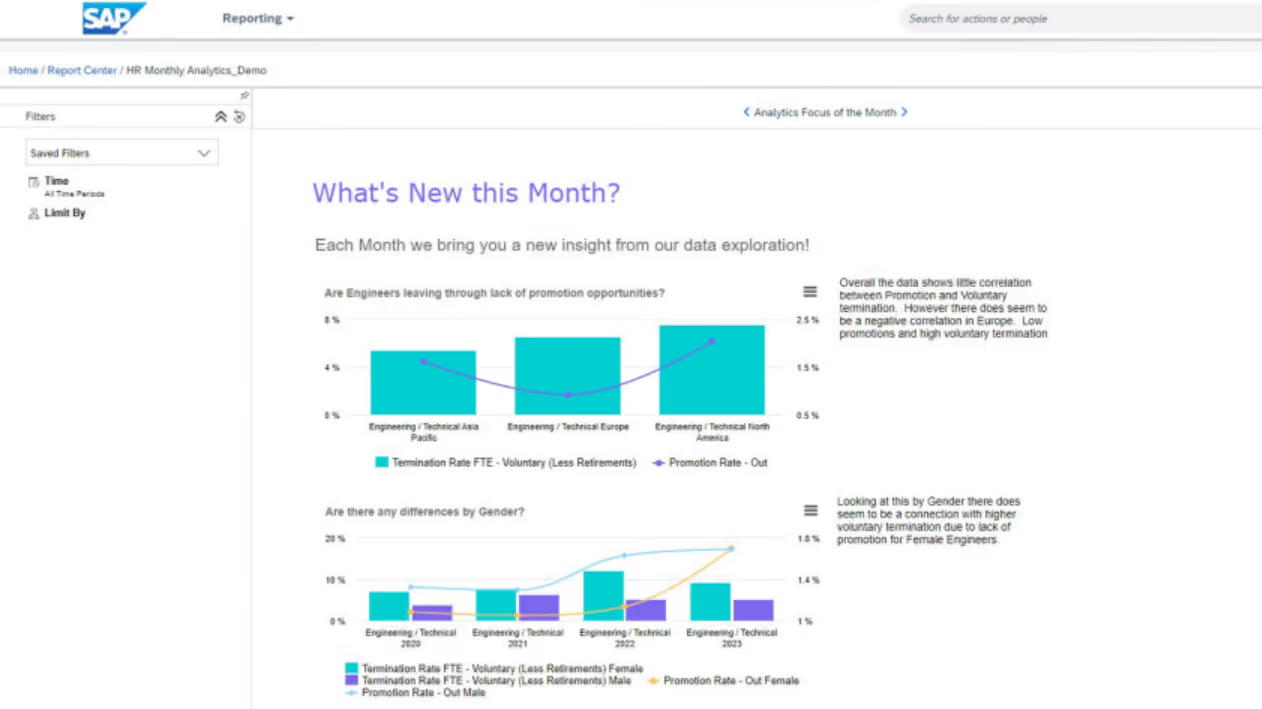
SAP SuccessFactors is a cloud-based solution with a people analytics module that’s built for strategic workforce planning. Using augmented analytics and AI-driven insights, HR teams at large companies can make smarter and more informed decisions when it comes to talent acquisition, employee engagement, internal mobility, diversity, turnover, and more.
- American Airlines
- Vitra
- Premier Foods
- Ernst & Young
- Hero Group
- Terex
- Watco Companies
The exact pricing for SAP SuccessFactors is only available upon request, but they do offer a 90-day free trial of their analytics cloud.
Best For
Enterprises looking to leverage AI in order to streamline their workforce planning.
Use Cases: Why Use Workforce Planning Software
Workforce planning software can help you optimize productivity — both for you and your employees. As such, you’ll be able to reduce costs and be more efficient as a company overall. Here’s how WFP systems can make HR jobs easier:
- Forecasting Labor Demands: Know how many employees — and what type of employees — you need on a given day based on expected demand so you avoid over- and under-staffed days and not get stuck paying unnecessary overtime. For example, if you have a call center and are approaching a busy sales season, you'll likely need to temporarily increase your workforce. But exactly how many more people will you need at your contact center? How many overseas staff will you need to engage employer of record companies for? With workforce software, you can find out how many more you'll need to cover your expected increase in sales volume (without hiring too many and overpaying or hiring too few and losing sales).
- Scheduling Employees: Manage all your employees’ schedules in one place, so you never have to worry about over-scheduling, missed shifts, or unhappy employees (or managers).
- Time & Attendance: Attendance tracking and time management are hugely important tasks, but they also can take a lot of YOUR time to keep up with. Fortunately, scheduling software lets you easily track your employees’ hours and allows them to clock in and out. Depending on the workforce software you use, you can manage time and attendance directly through the platform itself by integrating with an existing timesheet tool you’re already using.
- Time Off Requests: Allow employees to request paid time off (PTO), parental leave, and more. Managers can approve or deny requests right in the program and see who will be out when creating schedules. That way, you never make the mistake of scheduling an employee when they won’t actually be working.
As you can see, convenience plays a big role in why you might use a workforce planning tool. Traditionally mundane and manual processes — from managers creating and assigning employee schedules to employees requesting time off — can be streamlined, managed, and stored all in one place.
Pricing: What WFP Solutions Cost
More often than not, workforce planning systems will charge on a per employee per month basis. Some might offer certain modules as independently-priced add-ons or charge a fixed annual fee. Hence, the best way forward is to see which vendor from this list works with companies similar to yours and get in touch with them for an actual quote.
Key Considerations of Workforce Planning Software
Is it well-known that the workforce is often an organization’s biggest strength but also its greatest cost. Because of that, it’s a challenge to move beyond any slow and manual processes that fail to integrate into the bigger strategy. When choosing a workforce planning tool, one should make the following considerations in order to truly reap its benefits.
- Continuous optimization: Workforce planning tools aren’t ‘set it and forget it’ like other HR solutions out there. Since a business's staffing requirements, like the business itself, are always shifting, the program needs to be updated accordingly. New forecasts need to be made considering the latest insights and developments in order for the actual workforce planning to be effective. The main thing to take away from this is that the system you choose should have reporting functionality that lets you know when it’s time for a new forecast.
- Syncing with finance & other departments: One of the main characteristics of effective workforce planning is that it takes into account the needs, plans, and objectives of other parts of the organization. Thus, HR becomes a strategic partner in fulfilling the business’s broader goals. Hence, it’s important that any WP tool provides visibility to business leaders in other parts of the organization, so everyone can leverage it, and the insights it creates, for their decision making.
- Mobile readiness: Lastly, the solution should not only be accessible to people beyond HR, it should also be convenient to use. Choosing a solution that’s mobile-friendly creates a better experience for everyone involved since they can study the data and consider new insights from multiple devices. If the solution also has HRIS capabilities such as scheduling and time tracking, then it’s all the better if employees can access these features while on-the-go as well.
Demo Questions: What To Ask About Workforce Planning Tools
You’ll likely have to book a demo in order to find out the exact pricing of most of these tools, and it’s also necessary to see them in action.
Now, one thing to keep in mind here is that even if seeing a demo was a bit of a necessity born from the lack of a free trial (when there isn’t one), you should drive the discussion as much as possible.
The main goal of each demo is to understand if this solution could be the best for your unique needs, and which features it has that make it so. You should also talk about what integrations are important to you, what kind of insights you’re after, and what kind of support you’ll get if something goes wrong.
Here are some other questions to help you get started, but we recommend you draft a list of the ones that are most important to you and your team. You can bring that to the demo, or even send it to the salesperson that’ll be conducting it in advance.
- Is this suited to a particular industry or type of worker?
- Do I need to use the rest of your HR software suite to use this?
- How will others in the organization use this solution?
- How have other organizations used this to optimize their WP efforts?
- What are the key features I want to ask about?
- What are the things that would make me nervous about buying this sort of solution?
- What kind of implementation plan would we be looking at?
Workforce Planning Software FAQs
What is workforce planning?
Workforce planning is the process of preparing your business for new hires, terminations, succession planning, growth, and acquisition.
What are the three stages of workforce planning?
The three stages of workforce planning are acquisition, development, and termination.
What is workforce planning software?
Workforce planning software are solutions that are designed to manage, analyze, and track administrative processes related to your employees. It encompasses the entire employee lifecycle, from hiring to termination.
What features do workforce planning software solutions provide?
Workforce planning software offers the following features: time tracking, scheduling, mobile app, analytics, reporting, payroll, benefits, performance management, AI, compliance, and communication.
What are the benefits of using workforce planning software?
Benefits of using workforce planning software include reduced compliance risk, improved retention, and automation of tedious tasks.
Last Advice on Buying Workforce Planning Software
Workforce planning software can be a key part of assessing gaps in your workforce and determining which interventions need to be made in order to have the right people in the right position at the best possible time. But of course, the tool is not everything. For workforce planning to truly become an aid to broader business goals, there needs to be a strong link between all departments.
We mention that because although picking out 2-3 tools from this list and booking demos is one of the obvious next steps, you should make an effort to involve every stakeholder in the conversation. WP software, if it is to fulfill its purpose, is not only for the HR department.
If you’re in need of a broader HR solution that helps with workforce planning, recruitment, and more, check out our roundups on the best HR software, the best HR tools for SMBs, or the best free HR software.
About the Author


About Us

- Our goal at SSR is to help HR and recruiting teams to find and buy the right software for their needs.
- Our site is free to use as some vendors will pay us for web traffic.
- SSR lists all companies we feel are top vendors - not just those who pay us - in our comprehensive directories full of the advice needed to make the right purchase decision for your HR team.


