

Best PEO Companies: List of Top 9 Providers in 2026
We compare the best PEO organizations for simplifying business administration, giving you the efficiency and assurance needed to successfully expand into new states and/or international markets.











Professional employer organizations (PEOs) help organizations, particularly scaling small businesses, reduce administrative workload, improve compliance, or offer more competitive employee benefits. Through a co-employment arrangement, top PEO providers handle these aspects on your behalf, giving your team access to the same HR infrastructure that enterprise companies build entire departments around.
Whether you're scaling stateside or globally, this guide compares top PEO companies on services, pricing, usability, and user feedback, so you can find the right fit without sitting through a dozen sales calls.
To find the best PEO providers, we evaluated each option based on a combination of product capabilities, pricing transparency, and real user feedback. Our evaluation criteria also draw on insights from Donna M. Brown, a US-based HR consultant who advises scaling companies on PEO transitions, and Sam Eaton, a UK-based HR expert with experience building HR infrastructure across multiple countries.
- Core services: payroll, benefits administration, compliance support, and HR tools
- Pricing structure: transparency, scalability, and total cost of ownership
- Ease of use: platform usability and implementation experience
- Customer support: availability, responsiveness, and access to dedicated experts
- Scalability: ability to support growing teams, multi-state, or global operations
All tools included in this guide are widely used by small- to midsize businesses and meet baseline standards for reliability and functionality.
We pride ourselves on strict editorial standards and use a thorough process to vet and review software before we publish it on the site (and in fact, most vendors we have to end up rejecting). This process includes having our team of HR and recruiting experts use the tool themselves, gathering user feedback, and then evaluating the vendor against key metrics such as financial health, customer retention, and responsiveness to customer queries.


.png)
Deel

We picked Deel because this global PEO is part of a broader platform that includes international payroll and EOR. It is a practical option for companies that want to manage different types of employment in one system.
PROS
- Accessible starting price at $125 per employee per month
- Unified platform for PEO, payroll and global employment
- Straightforward self-service workflows and software-led experience
- Excellent 24/7 customer service with fast onboarding (2-3 days) and local payroll experts in each jurisdiction.
- Seamless integration with platforms like QuickBooks, BambooHR, and Greenhouse, plus custom integration options.
- User-friendly, self-service features enable quick setup; identity verification often takes under 24 hours.
- Automated invoices simplify payments, provided they're in English.
CONS
- PEO is secondary to its global employment products
- Total cost varies beyond the base price
- Key features like onboarding automation are add-ons, which may increase costs.
- Limited flexibility in modifying contracts or service agreements; changes often require an addendum.
- Invoices cannot be generated in languages other than English.
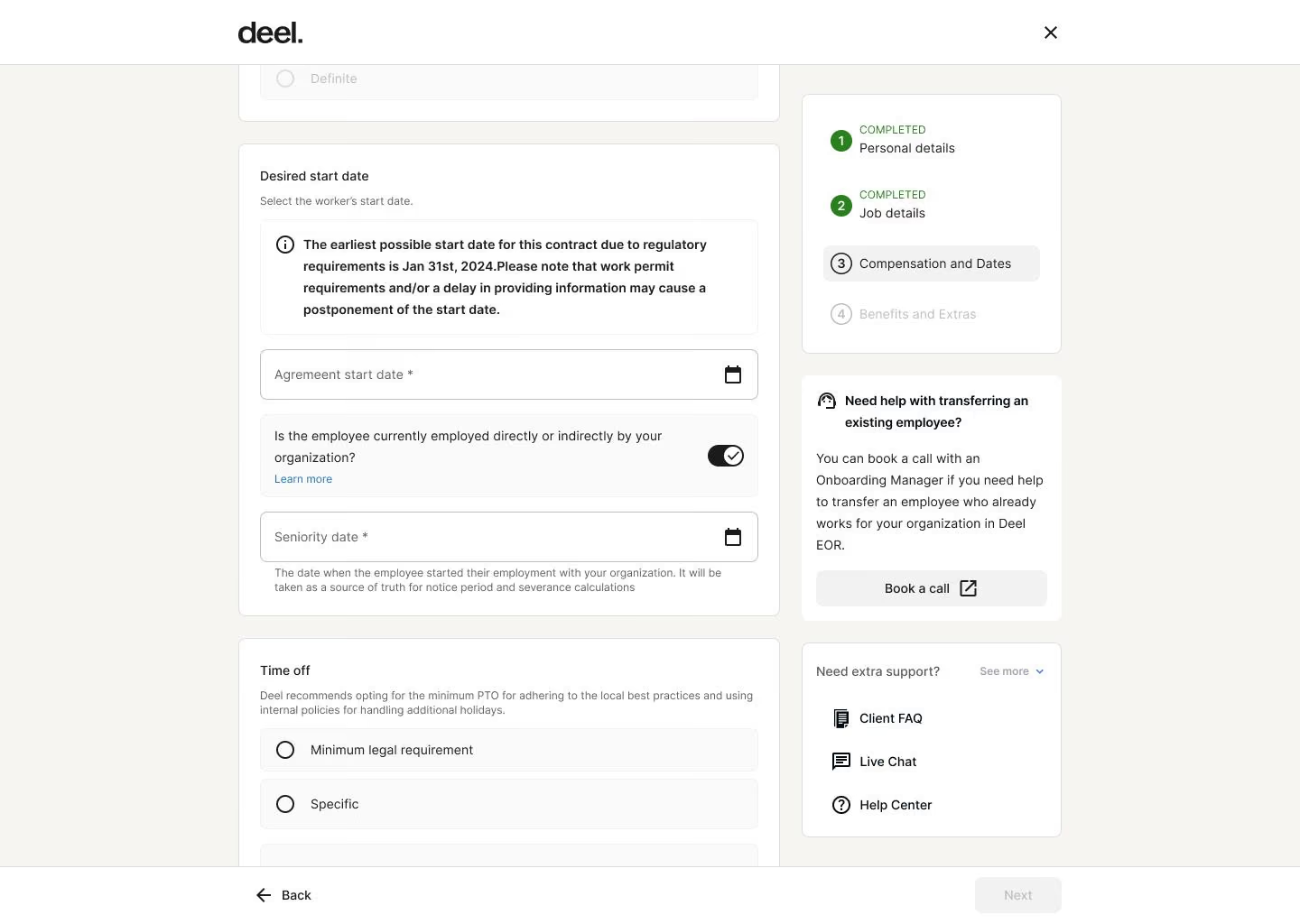
Deel’s PEO is built around platform consolidation. In our experience, it makes the most sense for companies already using Deel for global payroll or contractor management, since adding a PEO brings different types of workers onto the same platform.
Compared to ADP or Paychex, Deel relies more on software than on HR support. It’s closer to Papaya or Rippling in that respect. One notable difference, though, is how quickly Deel has expanded its platform, with ongoing investments in its employment infrastructure and services over the past few years.
Deel’s PEO pricing starts at $125 per employee per month, placing it in the lower-to-mid range for PEOs. However, the tradeoff is that PEO is not the product’s core focus. Deel is primarily known for global employment solutions, so its PEO offering feels more like an extension of the platform than a service-led solution.
Deel PEO Key Features:
- Unified platform for employees, contractors and EOR hires
- Automated payroll, tax filings and compliance
- Built-in benefits administration
- Strong labor law and worker classification compliance
- Automated onboarding and offboarding
- Employee self-service portal
- Broad accounting, HR and finance integrations
- Payroll and workforce reporting
Starts at $125 per employee per month.

Best For
Global SMBs to manage multiple employment models (employees, contractors) in one platform.

Justworks
We selected Justworks because it keeps both the product and pricing easy to understand. It is one of the few PEOs that publishes pricing, which removes a lot of the guesswork early on.
PROS
- Transparent per-employee pricing makes costs easy to estimate
- Simple platform for payroll, benefits and HR tasks
- Easy setup for small teams
- IRS Certified Professional Employer Organization (CPEO) and ESAC accredited, reflecting strong compliance standards.
- Transparent payroll pricing starting at $8 per employee per month plus a $50 monthly base fee.
- Integrated HR platform includes onboarding, PTO management, employee directories, and document storage.
- Automated payroll for salaried employees reduces administrative overhead.
- Guided benefits enrollment with plan explanations helps employees make informed choices.
- Strong support infrastructure with chat, phone, email, Slack, and text support options.
CONS
- Limited workflow flexibility and customization
- Better suited for simple than complex HR needs
- Core benefits such as medical, dental, and vision insurance are offered as add-ons.
- Pricing for benefits depends on carriers and market availability.
- Some organizations may still require third-party HR tools for deeper workforce analytics.

Justworks’ PEO is built around clarity and ease of use. In our review, the most noticeable difference is pricing transparency. Unlike most PEOs, such as ADP or Paychex, which require a sales process, Justworks provides clear per-employee pricing tiers, making it easier to estimate costs and compare options up front.
The platform itself is also relatively easy to navigate. Payroll, benefits, and HR tasks are handled in a single system, making the experience more approachable than traditional PEO platforms. This makes it a good fit for smaller teams without dedicated HR staff.
Support is available, but it is not as involved as service-heavy PEOs. Justworks provides help when needed, but companies are expected to manage many processes themselves through the platform.
There is also less flexibility. The system is designed to be simple and standardized, which helps with ease of use but limits how much you can customize workflows or policies.
Justworks PEO Key Features:
- Automated payroll, tax filings and year-end reporting
- Group health insurance and employee benefits
- HR compliance support
- Time tracking and PTO synced with payroll
- Employee self-service portal
- Round-the-clock admin and employee support
- Payroll and workforce reporting
Axios, Qubit, Area17, Museum Hack
$79 per month per employee with no base fee.
Best For
Budget-minded businesses.


I use it daily. It allows me to process weekly payroll. I use it to track PTO, sick time, and any personal time from the team. I use it for I-9 verifications. I use it as a digital folder for all employees.
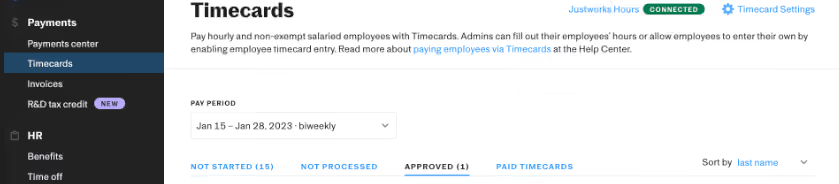
Everything. It makes managing HR seamless. It integrates with most other HRIS'. It is user-friendly. It has automation, so once you set up a process, you can automate it. They have customer support for employees.
5-years+. It is a great tool for small and large companies. They are able to manage remote workers from all across the states. They are computer and mobile-friendly. They have customer support for your employees.
The app is not as great as the desktop version. They don't really lay out employee benefits for your specific company clearly.
Their software is more up-to-date than most of their competitors. They are constantly updating their services. They remain affordable.
Make sure you choose the right package; they have basic and plus plan options. If your company has remote employees spread across the USA then Justworks is great. They are able to integrate data from most other payroll or PEO competitors.
They have an app. They provide customer service for employees when most companies don't do this. They do more than just payroll and in the beginning that was their bread and butter.
Any and all organizations can use Justworks
No. It is a tool that is built to grow with your company as you scale.
TriNet
We picked TriNet because it organizes its PEO offering around specific industries rather than a one-size-fits-all model. This makes it a practical option for companies that want HR support aligned with the norms, risks, and benefits expectations of their sector.
PROS
- Industry-specific HR, compliance and benefits support
- Sector-aligned guidance and best practices
- Combined payroll, benefits and HR in one platform
- Industry-specific HR, compliance and benefits support
- Sector-aligned guidance and best practices
- Combined payroll, benefits and HR in one platform
CONS
- Predefined industry frameworks limit flexibility
- Custom pricing makes costs harder to estimate
- Limited customization outside industry models
- Predefined industry frameworks limit flexibility
- Custom pricing makes costs harder to estimate
- Limited customization outside industry models
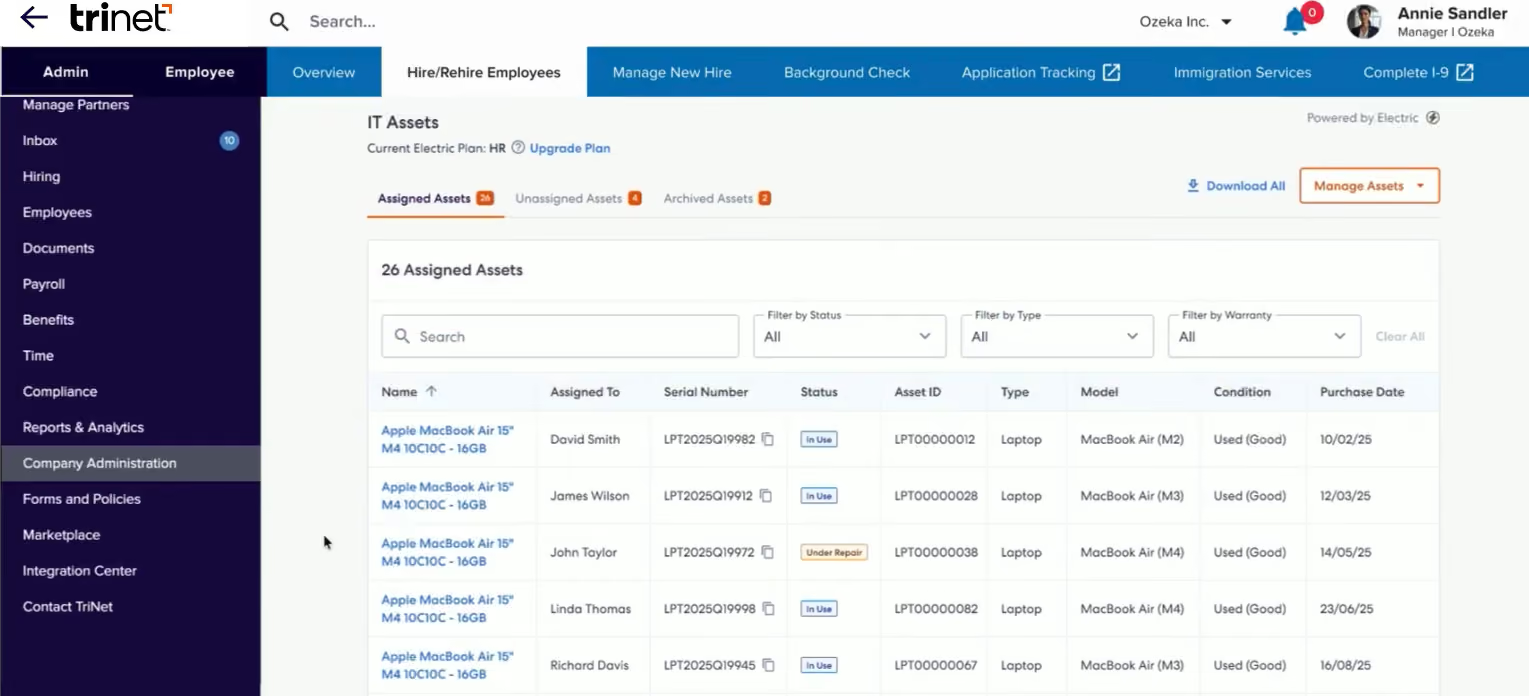
TriNet organizes its PEO offering by industry. In practice, this means HR support, benefits, and compliance guidance are aligned with specific sectors rather than applied uniformly. Compared to ADP or Paychex, this can make the service feel more relevant in industries with specific requirements.
The core services, including payroll, benefits, and compliance, are similar to those of other traditional PEOs. You also get HR support for employee relations and policy guidance. The difference is that this support is framed through an industry lens rather than a general approach.
But because services are structured around predefined industry groups, companies may need to fit into those frameworks rather than customize everything themselves. This can work well if your needs align with the model, but less so if they don’t.
TriNet PEO Key Features:
- Tailored industry-specific HR support and consulting
- Automated payroll, tax filing and compliance
- Health, retirement and employee benefits
- Solid risk management and labor law compliance
- Time and attendance tracking synced with payroll
- Employee self-service portal
- Payroll and workforce reporting
Left Field Labs, Audeze, Big Health, Redwood Brands LLC, Fort Mason Games.
Undisclosed.
Best For
SMBs seeking a PEO providing HR support that reflects how their industry operates.

Paychex
Unlike Rippling or Oyster, Paychex PEO follows a more traditional model, combining payroll, benefits, and HR support with a service team. It is a closer fit for companies that want to offload HR work to a provider rather than manage it through software alone.
PROS
- Dedicated HR professionals for compliance and employee relations
- Combined payroll, benefits and HR in one platform
- Well-established PEO model
- Timecard processing can be fully automated.
- Integrates well with benefits providers like Benetrac for benefits management.
- User-friendly interface for reviewing W2s and paystubs.
CONS
- Platform UI is not the most modern-looking
- Custom pricing makes costs harder to estimate
- Service-driven approach less automated than newer platforms
- Limited third-party integrations.
- Some users reported slow app login.
- Less modern looking compared to competitors.
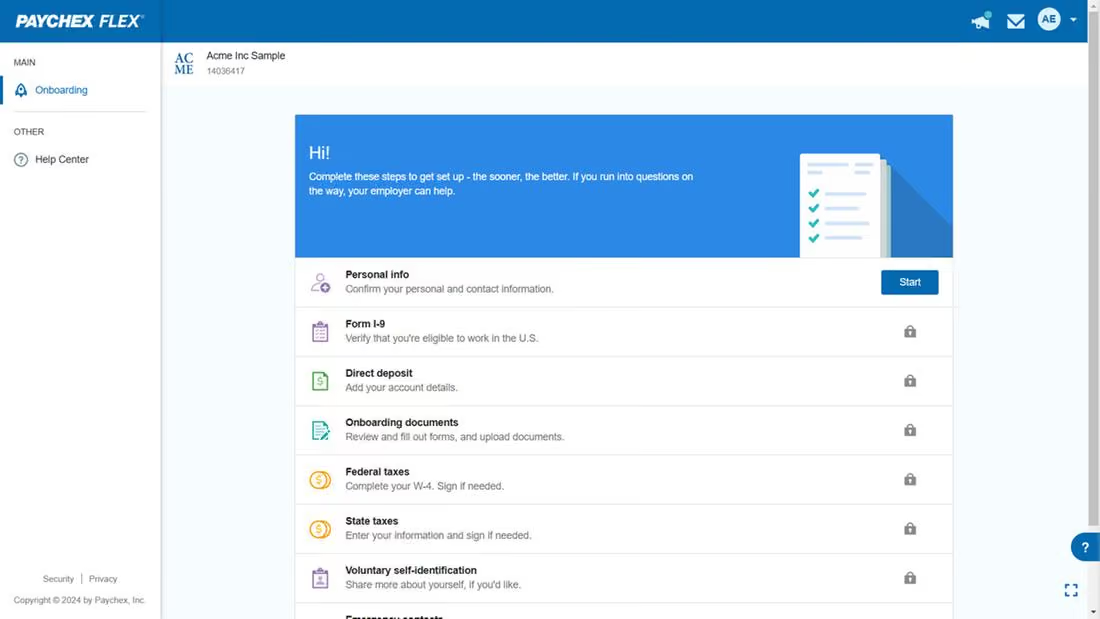
Paychex PEO is built around service and support first, software second. In our testing, the main difference compared to tools like Rippling or Gusto is the level of support. Paychex provides access to HR professionals who help with compliance, policies, and employee issues, rather than relying primarily on software. This puts it closer to ADP and Insperity, though generally more focused on small to mid-sized businesses.
However, it can feel more rigid than software-led platforms, as processes are more structured and can take longer to adapt. Teams that want faster control over workflows may find tools like Rippling or Justworks easier to work with.
Pricing is also not transparent. Like most traditional PEOs, you need to go through a sales process to understand total costs, which can vary based on headcount, benefits, and risk profile.
Paychex PEO Key Features:
- Automated payroll, tax filing and compliance
- Strong health insurance, retirement plans and ancillary coverage
- Reliable HR support for compliance and employee relations
- Wide-ranging risk management across labor laws, workplace safety and liability
- Structured onboarding, document management and recordkeeping
- Time and attendance tracking synced with payroll
- Easy-to-use employee self-service portal
- Robust payroll, workforce and compliance reporting
ESET, Funnelbox Inc., Smile Cafe, H.Y.P.E. Counseling Services, ASG, Pet Partners
Undisclosed.
Best For
SMBs that want to hand off HR work to a PEO service team and rely on structured support.

We used Paychex to submit payroll for employees. It also handled tax deductions and other withholdings, such as retirement and healthcare contributions. The system prepared and mailed W-2s and other tax documents on our behalf. When employees had unique tax situations or questions, we could reach out to a Paychex representative for support. We primarily used the online portal but also accessed customer service through phone support when needed.
I appreciated the option to contact a customer service representative for any payroll-related questions. I liked that payroll could be entered online or submitted over the phone. I also valued the flexibility to add additional HR services, such as recruitment, retention, or benefits, if needed.
A previous organization I worked for purchased Paychex to administer payroll. We did not have an existing payroll system and needed a reliable solution to process payroll for 25-30 employees. Additionally, we required the ability to send tax documents and receive tax advice from experts.
Since no one within the company was a payroll expert, access to payroll professionals was essential. We only used Paychex for payroll services and did not require any additional HR functions.
Paychex customer service can be inconsistent; sometimes, I had to call multiple times to get a knowledgeable representative. I found it inconvenient that payroll submissions over the phone had to be done within a specific timeframe, requiring me to adjust my schedule. I also wish there were more self-service training options for employees, as I often felt responsible for training them on the platform.
I have not used other tools as standalone payroll solutions. I like that Paychex offers flexible plan customization based on the services you need. Other providers tend to push full-suite HR packages, whereas Paychex allows businesses to choose only what they require.
I recommend that the payroll administrator has prior payroll experience to ensure they ask the right questions when processing payroll and can assist employees with any issues. It is also important to check if existing HR tools offer payroll integration, as managing multiple platforms can be cumbersome.
While Paychex is a great solution, integrating payroll with other HR systems may be more efficient. If a company needs multiple HR solutions, Paychex can be a cost-effective option for bundling services.
Paychex has expanded its offerings to include additional HR services, supporting a full-suite HR platform.
Paychex is ideal for businesses that want a customizable HR platform, whether they need only payroll services or multiple HR solutions. It is also a cost-effective choice for small businesses that need payroll processing without investing in a full HR system.
Paychex may not be suitable for very large organizations, as its payroll system requires manual input, which could be inefficient for companies with a high number of employees.

Rippling
We picked Rippling PEO because it is not a standalone PEO in the traditional sense. Instead, it sits inside Rippling’s broader platform that combines HR, payroll, IT, and finance. In practice, this means companies can manage employees, devices, apps, and payroll in one place, rather than stitching together multiple tools.
PROS
- All-in-one PEO, HR, payroll and IT in a single platform
- Modular setup lets you start small and scale over time
- Automated workflows across HR, payroll and IT reduce manual work
- All-in-one platform for employee management + PEO services offered, and even a suite of other IT products
- With 500 integrations, it’s very likely that they integrate with other key tools from your tech stack.
- Operates globally with any currency
- Workflow automation
- Analytics opportunities
- Provides a holistic view of company outflows—headcount costs included
CONS
- PEO requires adopting Rippling's Core HR products
- Less hands-on HR support than traditional PEOs
- Full value depends on adopting multiple Rippling modules
- Total buy-in to Rippling is essential
- Very SMB-oriented, in case you’re a larger company.
- New features tend to be buggy in ways that tech teams are not accustomed to fixing
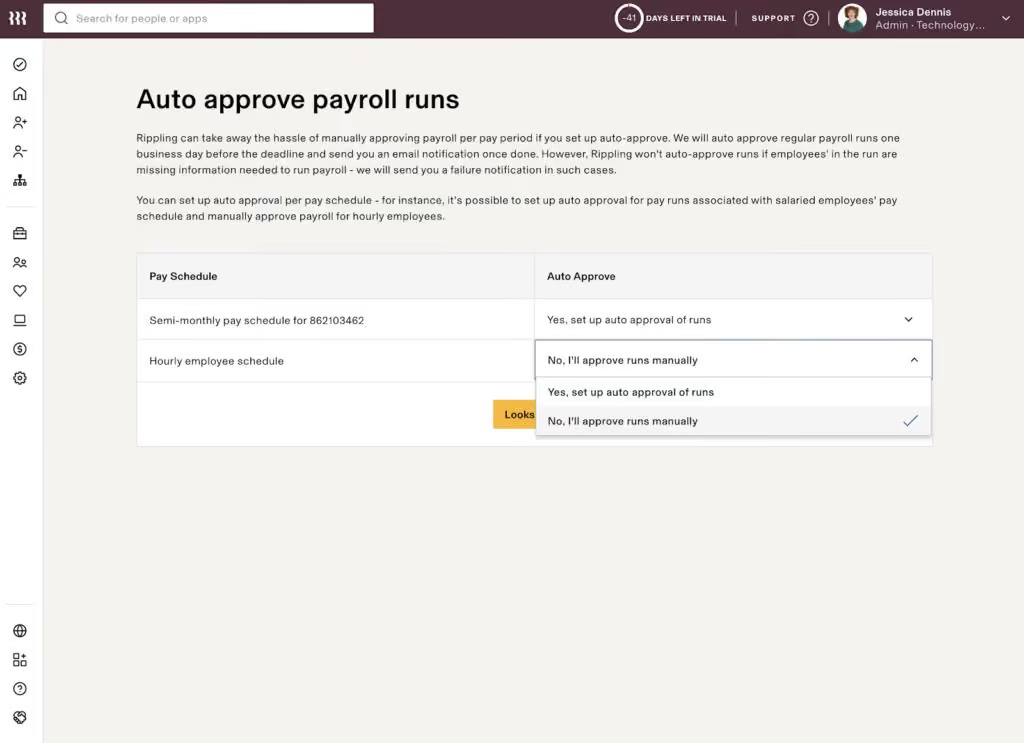
In most PEOs we reviewed, such as ADP and Paychex, the value comes from outsourcing HR and getting access to better benefits. Rippling takes a different approach. It is less about replacing your HR function entirely and more about centralizing systems while still getting PEO-level support.
During our review, what stood out was how tightly the PEO offering connects to the rest of the platform. Employee data, payroll, benefits, and permissions all live in the same system. That reduces the need for integrations and avoids the usual data syncing issues you see when payroll, HRIS, and IT tools are separate.
This setup is especially useful if you already need tools like payroll, device management, or app provisioning. Instead of adding a PEO on top of a fragmented stack, you are consolidating everything into one system.
That said, this also makes Rippling a different kind of PEO. If your goal is to fully outsource HR and rely heavily on a provider’s service team, Rippling may feel more hands-on than traditional PEOs that emphasize high-touch support.
Rippling PEO Key Features:
- Unified PEO, HR, payroll and IT management
- Automated payroll, tax filings and compliance
- Benefits administration with plan selection and enrollment
- Single employee record across HR, payroll and IT
- Automated onboarding and offboarding workflows
- Device and app management tied to employee accounts
- Wide-ranging labor law and regulatory compliance
- Robust payroll and workforce reporting
Rippling starts at $8 per user per month. However, the actual amount you will pay will vary depending on the specific modules you choose and your employee headcount.
Best For
Combining a PEO with a modern HR system and reduce the number of tools you use.

As the Head of People Operations, my daily workflows rely on Rippling. Overseeing the employee lifecycle requires me to use a combination of onboarding/offboarding, reporting, benefits administration, performance management, and general employee data management on a weekly basis. From an onboarding/offboarding perspective, Rippling not only serves as the home base for information but also communicates timely and effective tasks to the necessary parties, ensuring a clear and compliance-first process. With Rippling’s ability to relay information to integrated accounts like Guideline and Carta, my role leans more into oversight, allowing me to focus strategically elsewhere.
Rippling centralizes the majority of the HR processes (+ Finance and IT, if you chose) that would otherwise be spread across multiple systems. For example, our company’s flex benefits, COBRA, and ACA were either managed with a carrier outside of our broker or manually by us and now Rippling handles the administration of all these areas in consolidation with our other health insurance benefits.
The strength of Rippling’s integration library allows for consistent and regular communication to and from Rippling for processes that are not directly managed within the system. For example, prior to Rippling, we manually onboarded and offboarded employees to/from Guideline. With Rippling, the systems speak to each other and manage the employee’s lifecycle with our company-sponsored 401k.
A highly beneficial aspect of Rippling is the workflow feature. Workflows have allowed us to set up Rippling in a way that allows it to speak within the system, initiate processes, and communicate to people/external systems. Rippling is a high-tech HRIS and a constantly progressing platform that meets the needs of today’s operations teams (HR, IT, Finance included).
We selected Rippling to implement a strong HRIS while centralizing other HR operations. By implementing Rippling, we were able to solve and improve several areas. First, we consolidated historical employee data from three to four different platforms into one, allowing us to use Rippling reporting to provide company trends. Second, we simplified benefits administration by transferring health insurance, Flex Benefits, COBRA, and ACA management to the Rippling platform. Third, Rippling offers a cleaner, more centralized, and highly integrated solution for our HRIS needs. I have been actively using Rippling for six months.
Rippling is a complex system. For it to be fully functional to the best of its ability it needs to be given the time to implement and set up in great detail. Knowing this, the implementation should have been much more hands-on. I’d recommend that whoever is leading the implementation internally has experience with other systems, so they know what to look for.
Rippling does not have an employee “notes” section. As the place I rely on for the most up-to-date employee job and personal information, it is missing the ability to keep it up to date with employee relations information directly in their profile. This is a feature I have experience with in other HRIS’s and is a missed opportunity in the Rippling platform.
Unlike BambooHR, a competitor, Rippling does not offer a “missing data” report. To find out who within the company is missing information, we will have to discover it when it is flagged during another unrelated process. I think this puts us at risk if we are unknowingly missing key information or signatures from any employee.
Rippling is a fully functional operations system with a large integration library. It provides HR with the necessary tools and offers Finance and IT tools. Incorporating various clouds and add-ons allows Rippling to carry an administrative weight heavier than its competitors.
Rippling is a complex system, so you should be prepared to invest time and attention to building a strong foundation during the implementation process. It can do a lot, but it needs to be built on the backend for the front end to function at its best. Since many tools within Rippling rely on one another, approach it with a big-picture philosophy for your organization’s intentions. Be clear about what you need during the discovery process, as Rippling has many features, but not all may be necessary for your company.
Rippling continues to introduce small improvements to existing features and entire tools, like performance reviews, and exclusive highly functional built-in integrations, like Carta. These developments are likely to continue as Rippling gains popularity in HR and Finance.
Rippling is highly flexible and can be strong for a wide range of companies. It can suit new startup companies (less than 50 employees) but may be best for 70+ and growing SMBs.
Businesses with more than 500 employees may outgrow the system.

Papaya Global
We picked Papaya Global PEO because it focuses on centralized global payroll and compliance, rather than positioning itself as a service-heavy domestic PEO. This makes it a practical option for companies that want consistency and control over their complex employment operations.
PROS
- Centralized payroll, tax and compliance in one system
- Consistent processes for payments and employment requirements
- Strong fit for global teams prioritizing payroll accuracy and control
- Papaya Global packs the EOR services you need to do global payroll and employment compliantly in over 160 countries.
- Automated payments in over 100 currencies, 80 of them directly to the worker's bank account through its global banking partners.
- Dedicated customer support providing locations-specific knowledge regarding employment and payroll.
- End-to-end payroll guaranteed payouts in 72 hours.
- Offers four standalone solutions: data and insights, supplemental benefits & immigration support, payment services, and employee data management, making the platform more affordable and scalable.
CONS
- Limited hands-on HR support compared to traditional PEOs
- Lacks transparent pricing, making costs harder to estimate
- Limited benefits customization and broader HR services
- Could be overkill for teams seeking just US/domestic PEO
- No free trial or free plan.
- Doesn’t own entities in all the countries it serves. The platform forms relationships with existing local in-country partners to handle employment in a specific region on the client’s behalf.
- BI analytics reports and global immigration services cost additional fees.
- Charges extra fees for setup, onboarding, employee cycle, and tax filing. Also requires a refundable deposit.
- Built-in integration options aren’t very robust. However, the platform does offer pre-built APIs, SFTP, and custom API integrations for free.
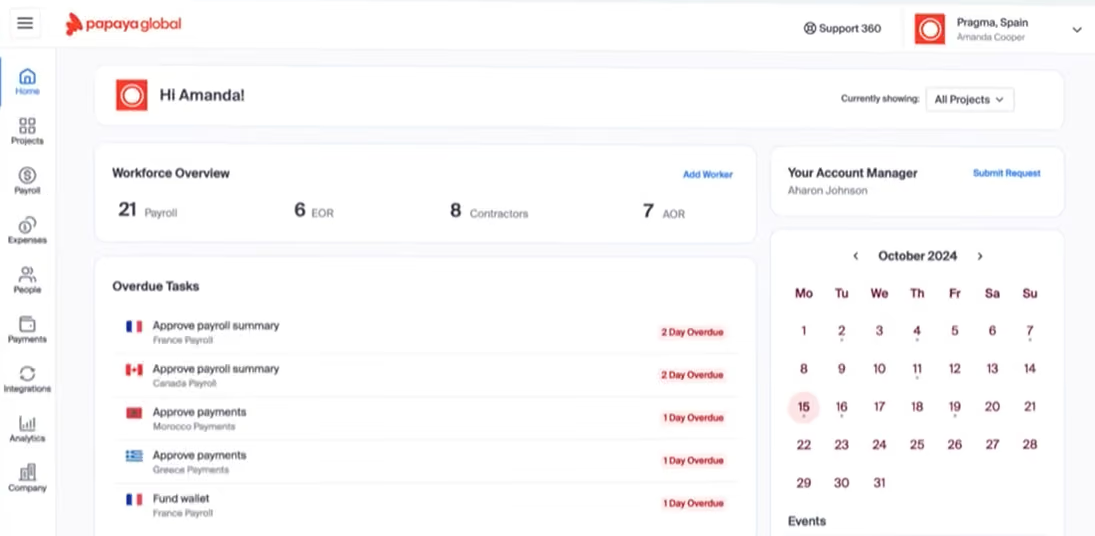
Papaya’s PEO is centered on global payroll and compliance. In our review, the core strength is its ability to standardize multi-country employment operations. Payroll processing, tax handling, and compliance workflows are managed in a single system, which reduces the need to coordinate with multiple local providers. This is especially useful for companies operating in multiple locations or dealing with varying regulatory requirements.
What’s less emphasized is the HR side. Compared to traditional PEOs, Papaya offers less depth in areas such as employee relations, training, and hands-on HR support. The platform is more focused on making sure employees are paid correctly and that compliance requirements are met.
Pricing is another limitation. Papaya does not publish clear PEO pricing, so it’s difficult to estimate costs upfront or compare it directly with other providers without going through a sales process.
Papaya PEO Key Features:
- Automated global payroll, tax calculations and filings
- Strong local labor law and statutory compliance
- Streamlined onboarding, contracts and employee records
- Locally compliant benefits administration
- Actionable payroll and workforce reporting
- Broad HR, finance and ERP integrations
Microsoft, Intel, Toyota, Wix, Fiverr, Johnson & Johnson, Deezer
Starts at $25/employee per month.
Best For
International businesses that prioritize reliable global payroll and compliance management rather than domestic PEO.

Oyster
We chose Oyster PEO for its straightforward, standardized approach. The PEO service sits alongside Oyster’s broader global hiring platform, which makes it a practical option for companies that may need both domestic PEO support and international hiring tools in one place.
PROS
- Transparent, flat pricing easy to estimate
- Direct connection to EOR and global payroll
- Straightforward setup with minimal implementation friction
- Intuitive: The platform is easy to navigate and makes logical sense.
- competitively priced: The flat rate for employees and contractors makes cost comparisons simple, and is competitive in the market.
- Targeted for a remote workforce: Whether your employees are in one country or 100, Oyster can accommodate them accordingly, and this is a feature few platforms can boast.
CONS
- Limited customization compared to full-service PEOs
- Light on hands-on HR support and outsourcing depth
- Narrow integration options restrict workflow flexibility
- Slight delays in processing times for payments in the local currency are somewhat common.
- Immediate communication via phone support is not an option, but they do offer live support via Zoom when necessary.
- An initial security deposit is necessary to begin the engagement and is refundable.
- The platform lacks native time-tracking functionality and provides only an in-app tool for managing time off.
- If you’re looking to co-employ your employees and partially outsource HR responsibilities, Oyster isn’t for you. They are more akin to employer of record services (EOR) than a Professional Employer Organizations (PEO).
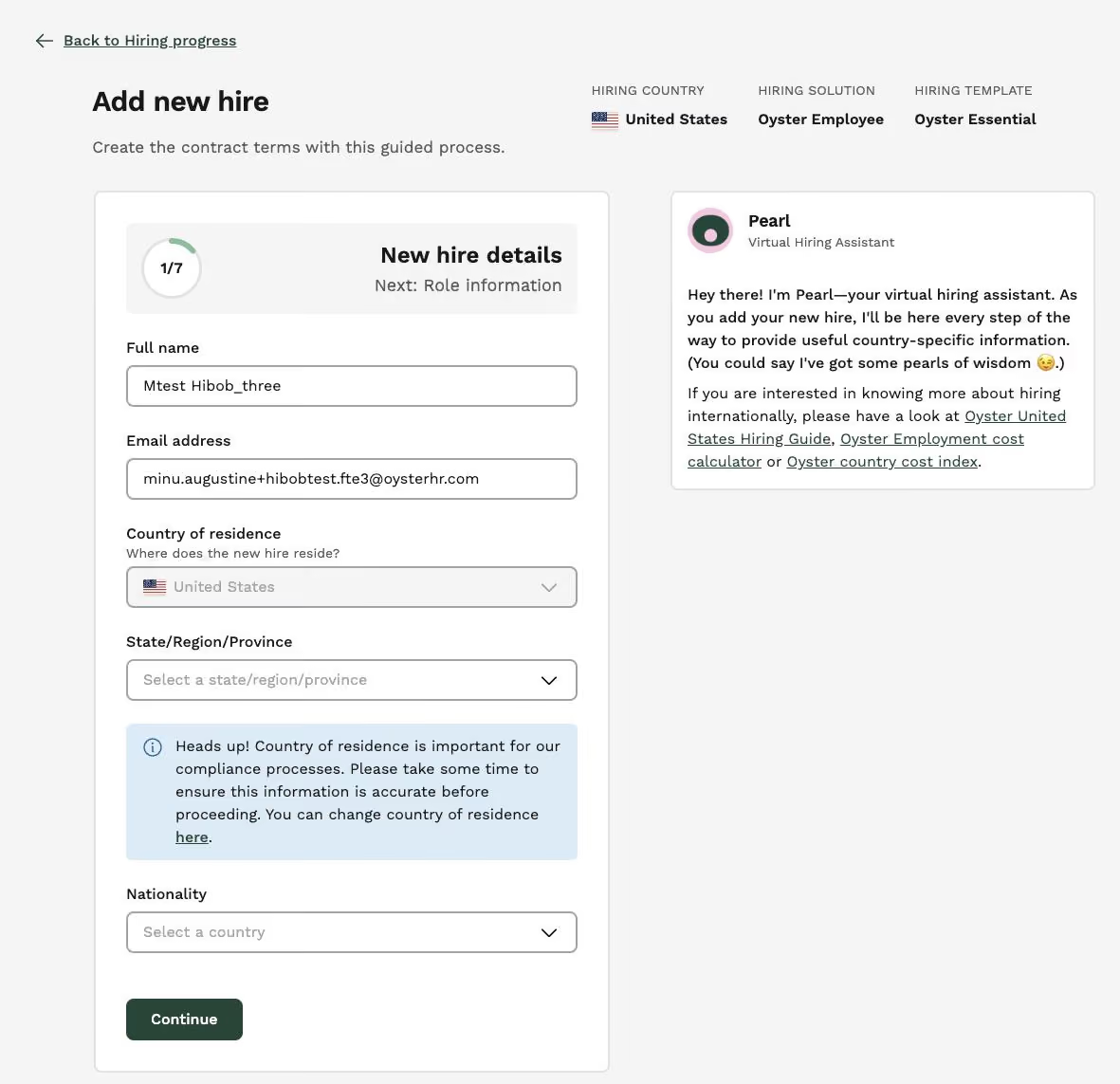
Oyster’s PEO is one of the more straightforward options we looked at. We like that pricing is fixed, and the scope of services is easier to understand up front. That’s a contrast to providers like ADP or TriNet, where pricing and setup can vary widely depending on the company.
The platform is also built with distributed teams in mind. While the PEO itself is used for employees in countries where you already have an entity, it connects directly to Oyster’s EOR and global payroll products. That makes it easier to manage a mix of domestic employees and international hires within a single system.
That said, Oyster offers less flexibility. Compared to Insperity or TriNet, there’s less room to tailor benefits or HR processes. It’s designed to be consistent rather than adjustable.
Oyster PEO Key Features:
- Automated payroll with local tax calculations and compliance
- Locally compliant benefits administration across regions
- Intuitive onboarding workflows and document management
- Employee self-service portal
- Straightforward global workforce tracking, payroll, and reporting
Oyster’s customers include Quora, Wagestream, Impala, and Grover.
$114 per employee per month.
Best For
Teams seeking a clear, predictable PEO that works well alongside global hiring tools.

The company will use Oyster to hire employees in different countries without setting up legal entities or subsidiaries. It will be used to handle payroll processing for international employees. It will be used for benefits administration.
This includes health insurance, retirement plans, and other employee benefits. Of course, it will be used for HR administration, such as employee data management, time tracking, and employee support services.
It simplifies the process of hiring and managing international employees. It provides a centralized hub for managing all aspects of global workforce administration. It guarantees stability, which is important for a global tool.
My organisation bought Oyster to facilitate hiring and to scale operations globally more efficiently. With it, it is easier to onboard new employees across different countries.
Oyster also focuses on improving the experience for remote employees by offering localized benefits and support, which can enhance employee satisfaction and retention. The company is currently implementing the tool. The plan is to use it globally till the end of the current year.
For smaller businesses or startups, the cost of using Oyster's services may be perceived as high, particularly if they have a limited budget for global expansion or HR management.
Integrating Oyster with existing HR or payroll systems requires additional effort or customization, depending on the company's IT infrastructure and requirements. Some users find that certain features or functionalities they desire are not available or fully developed within Oyster's current offering.
Oyster offers dedicated support from experts in global employment and compliance, ensuring that customers receive personalized assistance and guidance throughout their international expansion journey.
Consider whether the platform can scale with their business as you expand internationally. Evaluate the comprehensiveness of the services offered. A user-friendly interface and intuitive navigation are crucial for ease of use.
Oyster has continuously expanded its coverage to include more countries and jurisdictions.
Oyster supports the complexities of remote workforce management seamlessly.
Oyster is not needed for organizations that operate exclusively within a single country and do not have plans for international expansion.

ADP
We selected ADP TotalSource because it is one of the most established PEO offerings, built on ADP’s long-standing payroll infrastructure. It is a practical option for companies that want a provider with scale, experience, and a structured service model.
PROS
- Large, established payroll and compliance infrastructure
- HR support for compliance, policies, and employee issues
- Structured and consistent payroll and benefits administration
- Native, all-in-one technology suite for recruitment, payroll, and compliance.
- 17 RPO service centers in 14 countries and provide services in 42 different languages.
- Dedicated team of AIRS-certified recruiting professionals.
CONS
- Less flexible than modern, software-driven PEO platforms
- Custom pricing makes costs harder to estimate
- Structured processes can slow down changes and adjustments
- Technology options outside ADP’s dedicated HR tools are limited.
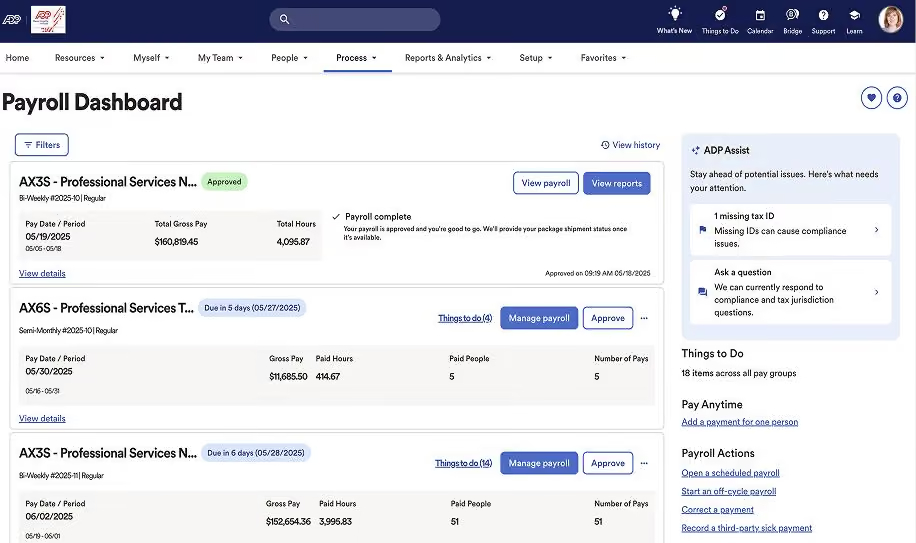
ADP’s PEO stands out for scalability and consistency. In our evaluation, payroll and compliance processes were reliable and predictable, which reflects the scale of ADP’s infrastructure. For companies that prioritize stability, this can reduce operational risk.
Compared to Paychex or Insperity, ADP leans more heavily on its systems than on advisory support. You still get HR guidance, but the core value is in execution rather than consulting.
To be fair, though, there is less flexibility in how workflows are configured. The system does what it is designed to do, and it does it well. But when it comes to customization, changes may take longer to implement.
ADP also does not publish PEO pricing, so you need to go through a sales process to understand costs.
ADP PEO Key Features:
- Automated payroll, tax filing and compliance
- Enterprise-level health insurance, retirement plans and ancillary coverage
- HR support for compliance and employee relations
- Thorough risk management across labor laws, workplace safety and liability
- Onboarding, document management and recordkeeping
- Time and attendance tracking integrated with payroll
- Employee self-service portal
- Payroll, workforce and compliance reporting
Cimquest, 4C Foods Corp, Nina Footwear, Kidpik, Safe Homes of Orange County, Grand Street Medical Associates
Undisclosed.
Best For
Companies seeking a stable, established PEO provider with strong payroll and compliance capabilities.

Insperity
We picked Insperity because it leans more into HR consulting and structure than many other PEOs. It is less about just handling tasks and more about helping companies formalize how HR is run.
PROS
- Standardizes HR policies and processes at scale
- Strong compliance and HR structure guidance
- Well-suited for companies formalizing HR for the first time
- Standardizes HR policies and processes at scale
- Strong compliance and HR structure guidance
- Well-suited for companies formalizing HR for the first time
CONS
- Predefined processes limit flexibility
- Custom pricing makes costs harder to estimate
- Less emphasis on software and automation than newer PEO providers
- Predefined processes limit flexibility
- Custom pricing makes costs harder to estimate
- Less emphasis on software and automation than newer PEO providers
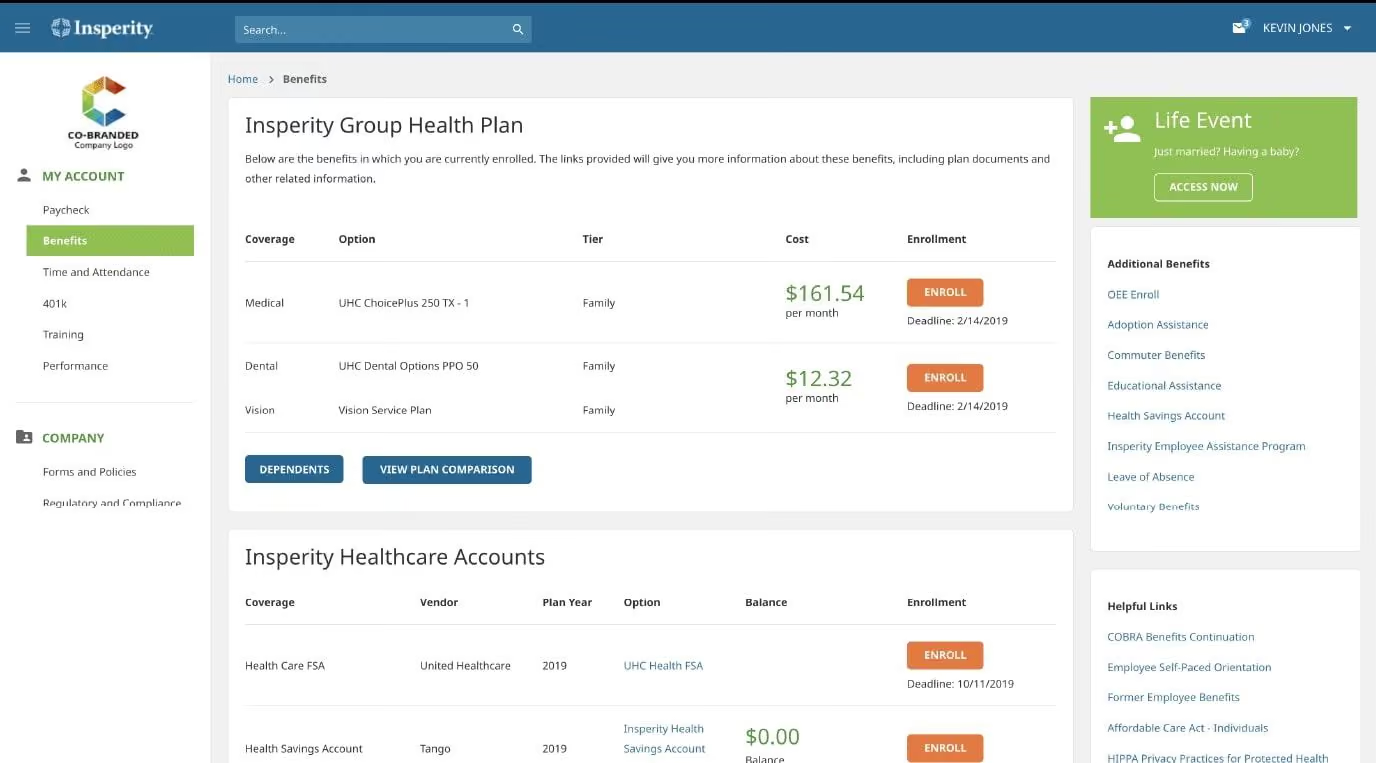
Insperity is excellent at standardizing HR practices. The PEO provider does not just process payroll or administer benefits, but also helps shape policies, handbooks, and employee management practices. This makes it a strong fit for teams that need to put more structure around HR as they grow.
Because Insperity emphasizes consistency and risk reduction, companies may need to align with its recommended processes and policies. This can be helpful if you want guidance, but compared to Rippling or Gusto, where workflows are easier to adjust, this PEO expects you to follow its recommended approach more closely.
Like other traditional PEOs, Insperity's costs depend on company size, benefits, and risk profile, so you need to go through a sales process to understand total spend.
Insperity PEO Key Features:
- Automated payroll, tax filing and compliance
- Dedicated HR support and performance management
- Solid health insurance, retirement plans and ancillary coverage
- Risk management and workplace safety
- Employee handbooks and policy setup
- Recruiting and talent development support
- Time and attendance tracking synced with payroll
- Employee self-service portal
Vynamic, Evolve Biosystems, ACCESS Specialty Animal Hospital
Undisclosed.
Best For
Organizations needing help building structure and consistency into their HR function.
Pros and Cons of Using a PEO
A PEO can take a meaningful amount of HR and compliance work off your plate, and the strongest available data suggests PEO clients often grow faster, retain employees better, and get broader access to benefits than similar businesses that do not use one. This is especially true with small businesses. As Donna argued, “If you're a small company, getting benefits out of the small employer market in the US is not great."
The tradeoff is that co-employment adds legal and operational complexity, pricing is not always straightforward, and the model can feel restrictive as a company grows.
- PEOs offload a meaningful amount of HR and payroll work. In a PEO arrangement, the provider typically handles payroll processing, tax filing, and benefits administration on your behalf, reducing the day-to-day operational burden on internal teams. The IRS explicitly notes that PEOs perform employment tax withholding, reporting, and payment functions for client companies.
- PEOs can give small businesses access to stronger benefits. This is one of the clearest advantages of PEOs. BLS data show that only 59% of workers at establishments with fewer than 100 employees have access to retirement benefits, 42% to life insurance, 30% to dental, and 21% to vision coverage. With a PEO, these small employers can improve benefits coverage to better attract and retain talent.
- Top PEOs improve retention and business outcomes. Research found that PEO clients had 4.3% employment growth versus 1.9% for comparable firms, 12% lower turnover (50.4% vs. 57.6%), and were 50% less likely to go out of business annually.
- PEO companies provide compliance support in areas where mistakes can be costly. The same benefits-access gap and compliance burden explain why PEOs are most commonly used by small and midsized employers that lack dedicated HR infrastructure, rather than large enterprises that can build these systems internally.
However,
- PEOs do not remove your legal responsibility as an employer. This is the most important downside to understand. The common-law employer remains responsible for employment taxes; in other words, a PEO can reduce the workload, but it does not eliminate accountability.
- The division of responsibility can be unclear. Because co-employment is not consistently defined across laws, responsibilities must be carefully outlined in contracts. Studies note that unclear allocation of duties between the PEO and client can lead to compliance and reporting issues, especially across different jurisdictions.
- Pricing is often more complex than it appears. PEO pricing is typically quoted as a per-employee fee or a percentage of payroll, but total costs can vary. The U.S. Chamber of Commerce estimates typical pricing at about $40 to $150 per employee per month (or 2% to 12% of payroll) and warns that additional costs such as setup fees, benefits markups, and early termination penalties are common.
- Implementation and exit take time and planning. Moving into or out of a PEO company is not immediate. Onboarding can take one to two weeks to set up and another two to eight weeks after signing, while exiting a PEO relationship can take four to six months due to payroll, benefits, and compliance transitions.
- The model becomes less flexible as companies grow. As businesses scale, standardized PEO services can become limiting. Companies often leave PEOs because they want more control, need more customized benefits, or no longer find the pricing model efficient at larger headcounts. This is especially true when it comes to employee experience. As Donna put it, “Even though the PEOs will tell you, 'oh, we're totally behind the scenes,' you're using their products, so your ability to design products for your business is limited.”
- Regulations vary by state, which adds complexity. PEO oversight is not uniform. A study found that while 38 states have comprehensive PEO laws, rules still differ on licensing, tax treatment, and responsibility allocation, which can complicate compliance for multi-state employers.
How to Choose the Right PEO
Choose a PEO by aligning it to your needs, validating true cost, pressure-testing the service model, and confirming credibility through customers and credentials.
- Match the PEO to your actual needs. Donna shared that the number 1 question to ask when looking for a PEO is: " Define what you need help with. In her words, “Where's your risk, and how important is it that it gets solved? Some [PEOs] are focused on customer service. Some are focused on their technology. Some were great at doing payroll, and now they want to expand, and they're not really great at those other things.”
So your needs could range from expanding operations into new states to decreasing workers’ compensation insurance costs. Once your priorities are set, use them as the gold standard to evaluate potential PEO providers for your use case.
- Understand the full pricing model. Compare percentage-of-payroll vs. per-employee pricing and account for long-term costs such as annual admin increases, benefits markups, and add-on fees. What looks cheap up front can become expensive over time.
- Compare providers holistically. Make sure their services cover both your current needs and near-term growth. This will save you from adding more vendors later and losing the value of consolidation.
- Evaluate the actual service team. Meet the people you’ll work with, check their credentials, responsiveness, and client-to-staff ratio, and confirm how support is delivered (dedicated rep vs. ticket system).
- Validate with real customers and reputation signals. Ask for client references, review satisfaction ratings, and check for certifications such as the Employer Services Assurance Corporation (ESAC) and risk coverage like Employment Practices Liability Insurance (EPLI) to ensure the PEO provider is stable and trustworthy.
PEO Key Features
A top PEO typically bundles HR software, payroll, benefits, and advisory support into a single system, allowing employers to run HR without building a full in-house team. In practice, most PEO organizations include:
- Payroll and tax administration: End-to-end payroll processing, including direct deposits, off-cycle payments, and payroll tax filing. Both experts we spoke with for this guide identified this as the #1 priority for any PEO implementation. If there’s one thing you need to get right, it’s this.
- Centralized HR platform (SSO + self-service): One hub for payroll, benefits, time off, and employee data, often with employee self-service and mobile access.
- Benefits administration (group-level plans): Access to health, retirement, and additional perks typically reserved for larger employers.
- Time tracking and PTO management: Automated timekeeping and leave requests that feed directly into payroll.
- HR support and consulting: Access to HR specialists for recruiting, onboarding, employee relations, and compliance guidance.
- Onboarding and training support: Help with new hire setup, policies, and benefits education.
- Compliance and risk management: Guidance on labor laws, standardized policies, and, in some cases, risk mitigation support.
- Permissions and admin controls: Ability to assign roles and access levels across finance, HR, and leadership.
- Employee directory and internal tools: Built-in company directory and basic engagement features.
- 24/7 support options: Employee and admin support via phone, chat, or email, depending on provider.
Implementing a PEO
A PEO implementation is mostly about moving payroll, benefits, and employee data without breaking anything, while making sure your team knows how to use the new system on day one.
- Assign a project owner: This person should coordinate payroll cutover dates, approve data, and serve as the main contact with the PEO.
- Lock in payroll timing before anything else: Decide exactly when you switch payroll providers (e.g., start of a quarter). Misalignment here can lead to duplicate or missed pay runs.
- Audit and clean your employee data before migration: Export employee data from your current HRIS (including employee info, compensation, tax details, PTO balances, and benefits). Clean errors before import so that bad data won’t carry over and break payroll or filings.
- Map integrations upfront (or expect manual work): Confirm how the PEO company connects to your accounting system, time tracking, and benefits carriers. If something doesn’t integrate, decide who will handle it manually.
- Review benefits set up in detail, not just at a high level: Validate plan options, eligibility rules, deductions, and effective dates. Benefits mistakes are one of the most common and visible issues post-launch.
- Run parallel payroll if possible: Process at least one payroll cycle in both your old system and the PEO service provider to catch discrepancies before going fully live.
- Train admins and employees separately: Admins need to know approvals, reporting, and workflows. Employees need basics: how to access pay stubs, enroll in benefits, and request PTO. But it’s worth remembering that if employees don't see how the new system makes their work easier, training alone won't drive usage.
- Set a clear support model before go-live: Know exactly who handles what (your team vs. PEO provider), how to escalate issues, and expected response times. This will help avoid confusion when problems arise.
- Schedule a post-launch audit (first 30-60 days): Review payroll accuracy, benefits deductions, tax filings, and employee feedback. Fix issues early before they compound.
Signs You've Outgrown Your PEO
A PEO that worked with 30 employees may not work with 150. The challenge is that PEO limitations tend to surface gradually, and because HR teams often absorb the friction themselves, leadership may not see the problem until something breaks.
Here are the most common signals we've seen across companies that waited too long to make the switch:
- You're guessing about compliance instead of knowing. The (surprisingly) clearest early warning sign is the language your team uses internally. When answers to basic compliance questions shift from "we're in compliance" to "I think we're compliant," exposure has already started. PEOs vary widely in how much visibility they give clients into their own compliance posture, and at higher headcounts or across multiple states, that opacity becomes dangerous.
- You've lost control of your employee experience. PEOs deliver HR through their own systems, branding, and processes. In other words, Onboarding flows, benefits presentation, and HR communications all carry the PEO's fingerprints — not yours. At smaller headcounts, that tradeoff is usually worth it. But as your company scales, the standardization that made a PEO efficient may start to conflict with the specific culture and experience you're trying to build.
- You can't redesign your own workflows. When your business needs to move fast (a new employment type, a rapid headcount shift, a new market), you need systems you can reconfigure quickly. Many PEO vendors have expanded their offerings to cover this, adding EOR support and moving further along the SaaS-to-service spectrum. But an expanded scope doesn't automatically mean flexibility. The question is therefore whether the platform lets you configure workflows to match how your business actually operates, integrate cleanly with your existing tools, and move data freely if you eventually outgrow the arrangement. Unfortunately, from our experience, not many handle this well.
- Everything looks fine on the surface, but HR is drowning. This is the pattern we see most often and catch the latest. HR teams are good at holding things together, from spreadsheets, manual workarounds, and compensation, and that competence masks the underlying problem from leadership. The business sees a functioning HR operation. What it doesn't see is how much of that depends on individuals covering for what the PEO can't do. By the time it becomes visible, something has usually already broken.
- The complexity has outpaced the model. In our own polling, companies reported moving off PEOs at headcounts ranging from 20 to 300, which confirms that headcount alone isn't the trigger. What actually forces the decision is complexity: multi-state operations, new employment types, managers who need real-time data access, and compliance requirements that demand more than a shared-service model can deliver. A perhaps better question to ask is: "Can this model keep up with where our complexity is going in the next 12-18 months?"
FAQs
What is a PEO and how does it work?
A PEO (Professional Employer Organization) is a service that manages HR, payroll, benefits, and compliance through a co-employment model. The PEO handles administrative HR tasks, while you retain control over daily operations and employees. This lets companies outsource HR without fully giving up employer responsibility.
What is the best PEO company for small businesses?
Top PEO service providers for small businesses typically include providers like APD, Deel, Justworks, Insperity, Paychex, and TriNet. The right choice depends on pricing structure, benefits quality, service model, and whether the PEO supports your growth plans and industry requirements.
What is the difference between a PEO and an EOR?
A PEO requires you to have a legal entity and shares employment responsibilities through co-employment. An EOR (Employer of Record) becomes the legal employer and can hire employees on your behalf in countries where you don’t have an entity. PEOs are typically domestic; EORs are used for global hiring.
How much does a PEO cost per employee?
PEOs typically cost $40 to $150 per employee per month or 2% to 12% of payroll. Total cost varies based on company size, benefits selection, and risk profile. Additional fees (e.g., setup, benefits administration, and compliance services) can increase the total cost.
What types of businesses benefit most from a PEO?
PEOs are best suited for startups and SMBs without a dedicated internal HR department or those that seek comprehensive HR management. Large companies can use PEOs, though it’s less common, given most enterprises build internal HR teams for greater control and customization.
What is the minimum number of employees for a PEO?
Most PEOs require at least 5 to 10 employees, though some accept smaller teams. The ideal range is typically 10 to 300 employees, where companies benefit most from outsourced HR, payroll, and benefits without the overhead of building an internal HR department.
How does co-employment work in a PEO?
In a co-employment model, the PEO handles HR administration, such as payroll, taxes, and benefits, while your company manages day-to-day operations and employee performance. You remain the primary employer for operations, but certain legal and administrative responsibilities are shared with the PEO.
When should I leave a PEO?
Headcount matters less than how fast your operational footprint is changing. If your team is experiencing multi-state operations, new employment types, or compliance requirements that demand more than a shared service model can handle, that's the signal. Budgeting four to six months for the transition is advised so you can start before you're forced to.
References
- Third-party payer arrangements: Professional Employer Organizations, Internal Revenue Service
- Employee benefits in the United States, U.S. Bureau of Labor Statistics, National Compensation Survey
- PEO clients: Faster growing, more resilient businesses with lower turnover rates
- PEO study, The Maryland Insurance Administration
- Choosing a PEO: A Guide to Finding a Professional Employer Organization, US Chamber
- ESAC Accreditation, Employer Services Assurance Corporation
- Employment practices liability insurance, Insurance Information Institute
- SSR webinar: Scaling HR: Moving off Spreadsheets, PEOs, and Wing-It PeopleOps. Invited experts: Donna M. Brown, Sam Eaton
Expert insights in this guide reflect the personal experience and professional judgment of the contributing practitioners. Individual results may vary based on your organization's size, industry, and circumstances.
About the Author


About Us
- Our goal at SSR is to help HR and recruiting teams to find and buy the right software for their needs.
- Our site is free to use as some vendors will pay us for web traffic.
- SSR lists all companies we feel are top vendors - not just those who pay us - in our comprehensive directories full of the advice needed to make the right purchase decision for your HR team.


