

The 10 Best HR Software for Small Business of 2026
The best HR software for small business as picked by SSR's expert HR tech reviewers. Read about features, benefits, pitfalls, pricing, and more below.








Small business HR software provides a range of functionalities designed to streamline and manage various human resource tasks.
The HR software market is packed with options. So many, in fact, that buyers are left confused and frustrated. We’re here to help! This guide offers general guidance and an expert perspective on crucial features like employee self-service, automation, and integrations.
Between product testing, user research, and talking to experts, we have put hours into this guide. In addition to offering product suggestions, we'll teach you how to evaluate HR software on your own. You’ll learn what to expect, what to avoid, and what to ask.
We’ve reviewed hundreds of HR software products over the years. In that time, we’ve learned the best way to give you what you’re looking for is to distill it down to the essentials.
This guide evaluates the most critical functions of HR software for small businesses. With our hands-on experience in HR, we were able to trim it down to three key elements: employee self-service, automation, and integration.
- Employee self-service: Small businesses are especially vulnerable to the harmful effects of wasted efforts, and this risk should be accounted for in the features of its HR software. Self-service portals empower employees to enter and update their own information. It may seem like the impact of employee self-service (ESS) is minimal, but the cumulative effect is substantial. Among other factors, our ESS evaluations note the ease of use, the number and type of data employees could access and update, and the platform's attention to information security protocols.
- Automation: Streamlined workflows save time, reduce errors, and allow your HR team to apply their efforts to tasks that need a human touch. To evaluate this factor, we asked industry experts to use their wide-ranging HR experience to assess the workflow of each tool. We coupled that with input from our user researchers, who ran simulations of typical sequences across the employee experience, like hiring, onboarding, and running payroll for a new employee.
- Integrations: Choosing HR software that doesn’t integrate with your current tech stack will cause significant challenges in the future. When testing integration capabilities, our evaluations were essentially pass/fail: our team checked for compatibility with common, standalone tools (the kind that small businesses use when starting out) and rated each platform on the number they could connect to.
You should know that we are approached by far more vendors than you see on our site. After careful vetting, only about one in ten make the cut. It’s a lot of work, but to offer you solid advice on buying HR software for small businesses, we must reevaluate our choices constantly.
You can learn more about our selection criteria and research methods by reading this article on how we assess HR tech vendors.


Workable

Workable has done an excellent job expanding beyond recruiting into a full-fledged HRIS for SMBs. We like that the platform’s user interface is modern and intuitive, and features for onboarding, employee self-service, and HR reporting are particularly well-developed.
PROS
- Automated onboarding with customizable workflows, e-signatures, and task reminders.
- Self-service employee portal for updating records, accessing documents, and submitting HR requests.
- Intuitive time-off management with leave tracking, policy customization, and approval workflows.
- Comprehensive HR reporting tools with export options for deeper analytics.
- Regularly introduces new features and enhancements.
- You can post jobs with one click to over 200 sites. You also get access to access to Workable’s talent pool with over 400 million profiles.
- Workable has built-in cognitive and personality candidate assessment. The platform also has features for offer management, which means you can create offer letters and collect e-signatures without needing to use third-party tools
- You can reduce unconscious hiring bias with Workable’s anonymized screening feature. It helps you hide identifying candidate information from the sourced and applied stages of the hiring process.
CONS
- No built-in payroll tool and payroll integrations are only available on the highest-tier plan.
- Time tracking and performance management features are relatively new and lack some depth in functionality.
- Higher price points compared to some alternatives like Connecteam and Zoho People.
- Workable doesn’t provide automated reference checking and onboarding features.
- Useful features such as candidate texting, video interviews, and assessments are not offered in any of Workable’’s plans and instead, sold separately.
- Several users complained about the reporting feature not being detailed or customizable enough, and that the candidate search function could use more filters.
Workable may be best known for its recruiting tools, but after testing its HR features, we quickly saw why it deserves a spot among the top HRIS options for SMBs. From onboarding to time-off management, the platform takes a lot of the manual work off HR’s plate, and we were pretty impressed with how smooth it made things.

One of the biggest highlights for us was its automated onboarding. Setting up a personalized welcome portal took minutes, and we loved how smoothly it handled e-signatures, progress tracking, and task reminders for hiring managers. What really impressed us, though, was the ability to customize workflows for different roles—something that could save businesses significant time compared to manual processes.
Managing employee records was another area where Workable stood out. Employees could update their own information, access company documents, and submit HR requests without having to rely on HR for every little thing. It might not sound like a huge deal, but in our test run, this small change noticeably reduced admin back-and-forth, and it was reassuring to have a detailed history of role changes, salary updates, and approvals all in one place.
Time-off and PTO management were equally well-executed. Employees could check their leave balances and submit vacation requests through an intuitive self-service portal, while HR had full control over policy customization and approval flows.
We also liked the HR reporting tools, which made it easy to generate reports on workforce trends, attendance, and time tracking. Plus, being able to export data to BI tools was a nice touch, especially for small businesses looking to get deeper insights without investing in separate analytics software.
However, we couldn’t help but feel disappointed by the lack of a built-in payroll system. Payroll integrations do exist, but they’re locked behind the highest-tier plan, which might not be realistic for smaller teams on a budget.
Teams with a largely mobile workforce may also find Workable’s time tracking tool limiting, as it doesn’t provide a GPS-enabled clock-in feature for tracking remote or field employees.
And pricing is another factor worth considering. Workable is transparent about costs, but it’s unfortunately not the most budget-friendly option out there. Compared to some alternatives like Connecteam (starting at $0), Goco (starting at $5 per user per month), and Zoho People (starting at $4.61 per user per month), Workable’s pricing (starting at $99 per user per month) might be a tough sell for SMBs that only need basic HR functions.
That said, Workable is continuously evolving. The vendor rolls out new features almost every month, and the recent updates like automatic calendar updates for booked time off and a time-off balance calculator have already made a difference. So if you’re an SMB looking for an intuitive, automation-driven HRIS that keeps improving, rather than a low-cost option with only the basics, Workable is definitely worth considering.
30,000+ companies, including Bevi, Dribbble, and Moodle.
Workable's HR bundle starts at $99 per month (billed annually), with a 15-day free trial and bundle discounts.

Best For
If you’re an SMB looking for a modern HRIS with strong employee management, HR automation, and compliance tools, Workable is worth considering—especially given its frequent product updates and ongoing feature improvements.


We use Workable daily as the central hub of our recruiting process. It supports everything from job postings and candidate access to pipeline management, allowing us to organize applicants in a clear funnel by stage.
The platform makes internal collaboration seamless, enabling our hiring managers and recruiters to share feedback, communicate efficiently, and stay aligned throughout the hiring process.
We also rely on Workable for scheduling interviews, conducting candidate assessments, and generating weekly metrics reports.
Its ease of use, automation features, and reporting capabilities have significantly improved our team’s efficiency and provided better visibility into our hiring performance.
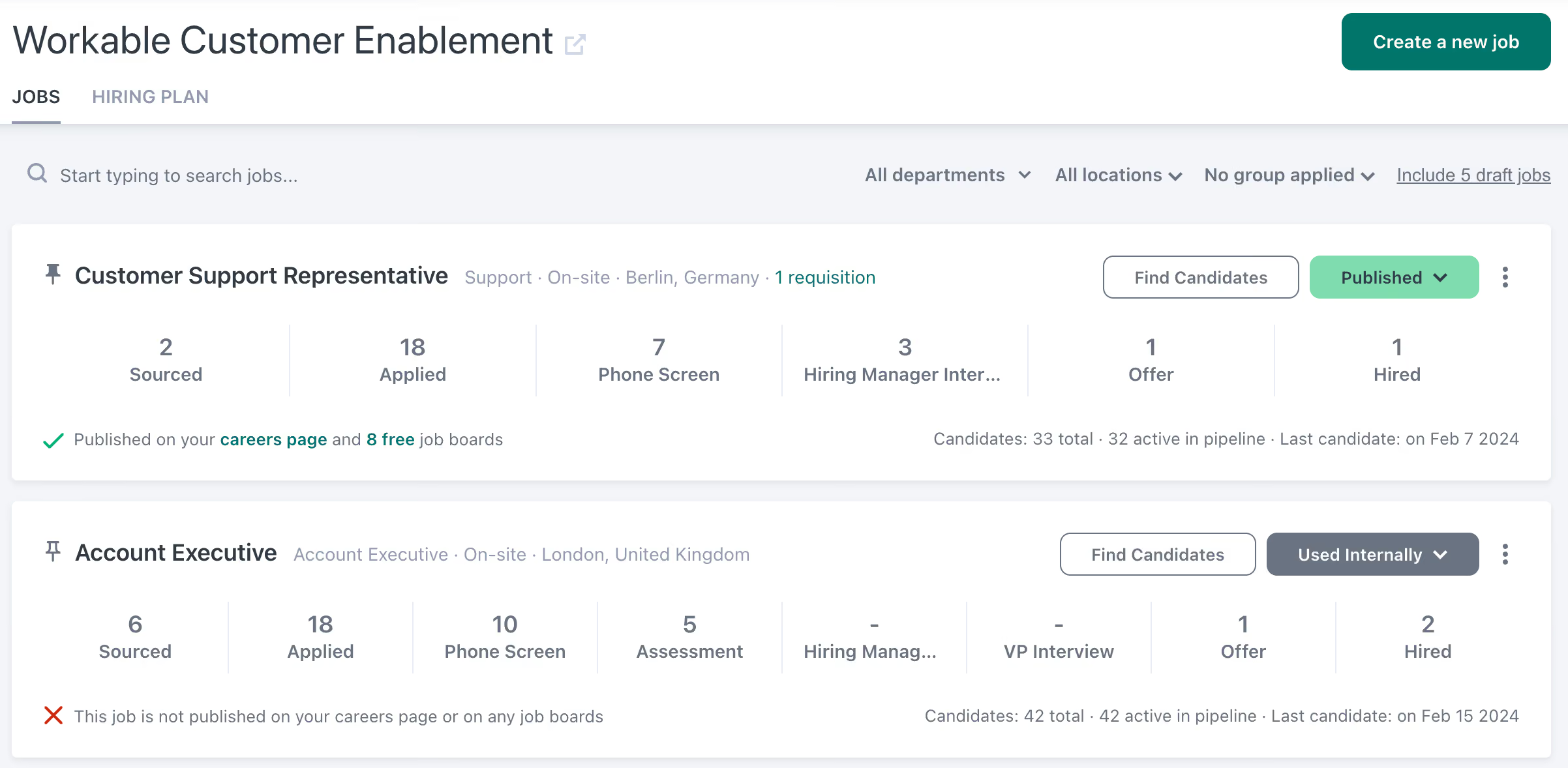
- I love how clean and intuitive Workable’s UI/UX is.
- The platform is extremely user-friendly and visually organized, which makes the recruiting process feel simpler and more manageable.
- It acts as a strategic hiring partner by providing detailed reporting, automating scheduling, and enabling transparent communication between recruiters and hiring managers.
- Workable streamlines day-to-day tasks and gives our team the insights and tools needed to make smarter, data-driven hiring decisions.
I’ve been using Workable for a year now. We implemented it to centralize our hiring process and give hiring managers direct access to applicants.
We also needed a platform that could automatically pull in open jobs, distribute them across multiple job boards, and parse candidate profiles directly into our ATS.
Just as importantly, we wanted robust reporting on key data such as hiring activity. Workable has streamlined communication between our teams, improved efficiency, and provided the reporting capabilities we rely on to track essential hiring metrics.
- The pipelines are easy to use, but it would be helpful to have more customization options for stages and workflow automation, especially for teams with complex hiring processes.
- The reporting and analytics are solid, but deeper insights—such as predictive hiring trends or more detailed diversity dashboards—would support stronger data-driven decisions.
- Email and text messaging work well, but adding richer communication options, like chat or integrated video calls, could make staying in touch with candidates even smoother.
Workable has a clean and easy-to-navigate design that makes it simple for teams without extensive technical expertise to use. It’s an intuitive tool that’s pleasant to work with and never feels overwhelming.
I would highlight how easy Workable is to operate, along with its strong candidate pipeline management. If you’re looking for a user-friendly platform, this is it. The clean and organized design reduces training time and encourages adoption across the team.
It's also more cost-effective than other platforms I’ve researched, so if ROI is a consideration, we’ve seen great success with it.
I have only been using Workable for one year, so I’m not sure I can answer this.
Human Resources and Recruiting teams within modern organizations that rely on automation and efficiency will benefit from Workable.
Probably a more traditional or industrial environment that still relies on pen and paper and is not focused on metrics or reports won’t find Workable worth it for them.

Connecteam
Connecteam stands out as the premier all-in-one HR software tool tailored specifically for small businesses with a significant number of deskless employees. It comprehensively addresses most core HR concerns in a way that caters to the unique needs of unanchored workers.
PROS
- Among the rare fully-mobile HR tech tools designed for deskless workers
- Great value for its features, SMB-friendly pricing
- Highly receptive to user feedback, incorporating suggestions as new features
- One of the only fully-mobile HR tech tools for deskless workers
- Very adequately-priced for all it entails, SMB-friendly
- Quite open to feedback, having implemented user suggestions as features in the past.
CONS
- In the communication hub, the app lacks confirmation for sent and/or seen messages.
- Certain essential features like GPS-tracking are restricted to higher-tier pricing plans.
- In the communication hub, the app offers no confirmation that messages were sent and/or seen.
- Certain features that some teams consider essential, such as GPS-tracking, are only available in the higher-tier pricing plans.
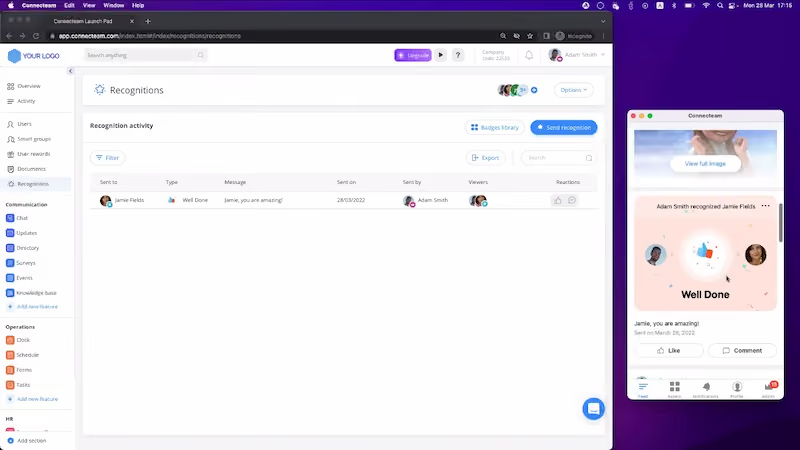
Connecteam is the HR app for companies with a high percentage of deskless workers to manage. If you need a simple, robust, yet intuitive tool that lets you take care of HR processes for low-tech employees who don’t have a computer, this one is certainly worth checking out.
From the Connecteam app, managers can handle administrative work, like staff scheduling, task management, attendance management, time keeping, training, onboarding, and much more. Non-desk workers then interact with all of this via a mobile app, where they need nothing but a phone number to create an account.
Nike, Herbalife, Billabong, Footlocker, Mason Construction, American Eagle, McDonald’s, and many more.
Connecteam’s pricing can range from free-for-life to up to $159 per month. Final numbers will vary depending on the number of users and modules you choose. To give you an idea, here’s an overview of each plan within the operations module:
Connecteam’s payment structure is fixed for the first 50 employees you add. Once you add more, there would be an extra payment of $1.5 per additional employee per month.
These pricing options are yearly, where you save 18%, but you can also opt for month-to-month payments. They also offer enterprise pricing with more features and a personal account manager. Each paid plan also has the option of a 14-day free trial.
Best For
Connecteam connects and empowers teams and businesses of all sizes. Its user-friendly workforce management tool caters to low-tech, deskless workforces without extensive IT intervention. Industries served include healthcare, manufacturing, security, and more.
Connecteam is a user-friendly software for managing employees, facilitating communication, and enhancing collaboration. It is especially valuable for businesses with many non-desk employees. Connecteam helped us streamline communication, improve daily operations, and develop professional skills. It allowed us to schedule shifts, monitor employee work hours, and send automated reminders. The software was accessible on both desktop and mobile platforms, allowing us to use it anytime, anywhere.
- One standout feature of Connecteam is its user-friendly design, offering various options to customize team collaboration.
- Users can easily upload their own documents and files from any device, making resource sharing simple.
- The intuitive interface allows you to manage your team from a single dashboard, where you can view the status of tasks at a glance, reducing miscommunication and boosting productivity.
- Tasks can be assigned directly from the dashboard, eliminating the need for additional communication methods.
I used Connecteam for three months while on contract with my previous employer. As of late 2024, I believe they are still using the platform. We chose Connecteam because it is a comprehensive employee app designed to streamline communication, optimize daily operations, and boost professional skills. It allowed us to schedule shifts, monitor employee work hours, and send automated reminders, all within a single platform.
- While Connecteam offers a flexible pricing structure, some users find frequent upgrade prompts frustrating.
- For smaller teams with fewer than 30 members, the pricing can be relatively high, which might discourage some users.
- The costs can add up depending on the desired features and team size, so businesses should carefully assess their needs and budget before committing to the platform.
Connecteam stands out for its ease of use, featuring an intuitive and user-friendly interface. The layout is clean, with clearly labeled tabs for each function, making navigation straightforward.
For example, team members can easily create individual profiles with personal information, promoting better collaboration and engagement within the organization. The app’s simplicity ensures that even users with limited technical skills can navigate it effectively, fostering team integration and productivity.
Connecteam offers a flexible pricing structure compared to other employee scheduling tools. The software includes three distinct hubs, each offering five unique plans: Free, Basic, Advanced, Expert, and Enterprise.
Pricing is fixed for the first 30 users, making it affordable for small teams, but as your team grows, additional charges apply. This tiered structure allows businesses to choose a plan that fits their needs while accommodating future growth.
Connecteam has evolved by empowering managers to automate business processes, allowing them to focus on growth strategies while helping employees enhance productivity, professionalism, and job satisfaction. By streamlining tasks and reducing administrative burdens, the platform creates a more engaged and efficient work environment, ultimately driving better results for the organization.
Connecteam is ideal for teams of 30-50 employees, especially those with non-desk workers who need streamlined communication and scheduling tools.
Connecteam may not be suitable for teams that frequently change personnel or those that constantly restructure their workflow, as it might be challenging to manage frequent adjustments.
HiBob
Bob is a modern-looking HR solution notable for its ease of use. Small businesses in various countries use it to streamline their HR operations with remarkable customization and efficiency. It’s excellent for managing international teams.
PROS
- Good customization for international operations. It’s easy to manage workflows like time off requests, parental or other types of leave, and employment types, across several countries, depending on how you’re set up.
- Contains some intranet-like features, which is odd for an HRIS, but a nice-to-have, people frequently point out. For example, people can post ‘shout-outs’ to the home page.
- They have tons of modules, which makes them a real one-stop shop. Beyond Core HR, they have modules for most things People Ops-related.
- Bob is a fast-growing company and their product looks the part, as it has one of the sleekest-looking platforms in the HRMS space right now.
- Their payroll hub allows you to connect all your payroll systems, which works great if you want to pay people in multiple locations without switching providers.
CONS
- Reporting can be somewhat basic for an HRIS
- As it’s made to be an HRIS, some modules are limited in function compared to more specialized tools. For instance, its performance module can also do surveys, but some of the users we consulted think these would benefit from more options and customizable parameters.
- Customer support is only offered via a chatbot and email.
- As to implementation, several users commented that they felt there could be more attention via personal walkthroughs provided at the beginning. Many had to resort to reading documentation and watching videos or just figuring things out by themselves.
- Pricing is only custom and available upon request, so you can’t just sign up, pay, and start using the tool.
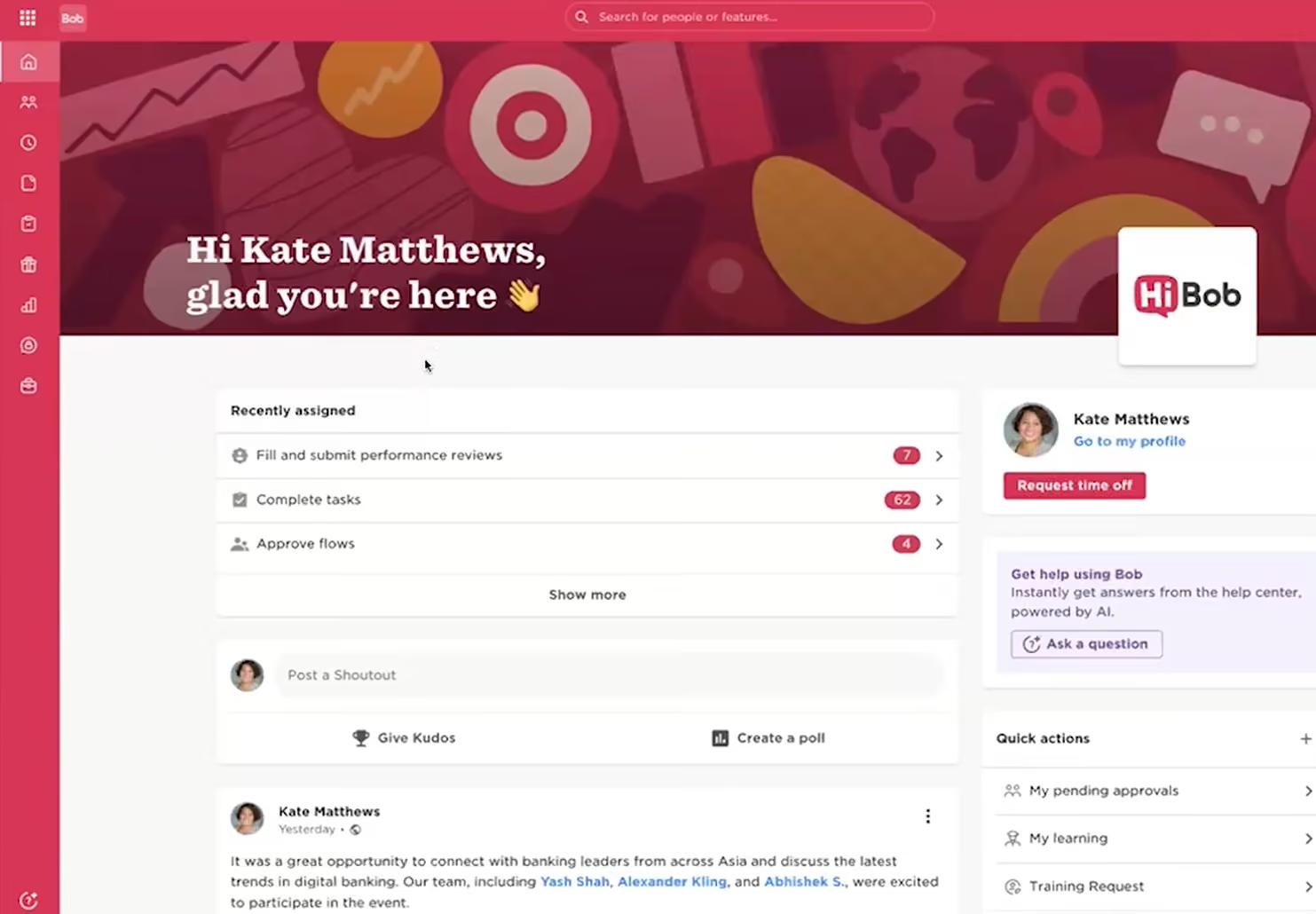
Bob, or HiBob, has made it its philosophy to always put the employee first. You can see that ethos embodied in how easy the product is to use and the various ways this solution engages employees to better understand and cultivate culture. Bob is a great fit for forward-thinking HR departments that need tools like onboarding, time-tracking, payroll reports, time off management, surveys, benefits, and much more.
Tufin, Yotpo Ltd., Fiverr, Happy Socks, Taptica
Bob offers custom pricing. They have flexible plans for growing companies and will work with you to offer the best possible cost.
Best For
Companies with fast-growing teams that want to manage all or most HR processes in a single platform, in a modern way.

I used Bob as part of my regular HR workflow. Our team accessed the system several times a week to review and update employee data, support onboarding and offboarding, and track employee changes. It served as the primary source of truth for employee information. We used it to maintain accurate organizational charts and reporting structures.
The platform supported our day-to-day HR operations and reduced the need for manual tracking and follow-ups. We used it for performance management and people planning initiatives as well.
- Bob significantly reduced manual administrative work.
- It included an employee engagement feature that allowed recognition and shout-outs.
- The initial implementation process was straightforward and manageable.
Our company was experiencing rapid growth and needed a system that could scale with us. We required a centralized system of record to manage employee data more effectively, even though we were already using ADP in a limited capacity.
Manual processes and disconnected systems were becoming inefficient and difficult to manage. Bob stood out for its automation capabilities and its ability to integrate with other systems, which helped streamline workflows.
- The reporting capabilities were somewhat limited.
- It did not include built-in payroll or applicant tracking functionality.
- The user interface felt basic and lacked visual appeal.
To be honest, I think it's about the same. There wasn't anything earth-shattering about the system. I prefer a more comprehensive system, like ADP or Workday.
I think they should think about the workforce in terms of numbers, growth, and culture. It's important to choose a tool that can scale with the company without becoming overly complex or pricey. Ease of use matters for both employees and employers/administrators.
I can't really speak to this too much. I used it for about a year before I left the company. As we learned the system, we began rolling out additional features to the workforce.
I believe Bob is perfect for small to mid-sized growing companies!
Bob wouldn't be good for highly complex enterprise organizations with strict compliance requirements or for companies with customized payroll and timekeeping needs. They also wouldn't be good for a company with high-volume recruiting that needs a system to track the pre-hire stages.

Paylocity
Paylocity stood out for its depth of employee self-service, mobile parity, and built-in HR compliance tools, all packaged in a modern, scalable HRIS that small businesses can grow into. Also remarkable for the SMB case is how they unify HR, finance, and IT features; packing several business functions into one comfortable and easy to use platform.
PROS
- Employees can manage tax info, view paystubs, request PTO, clock in/out, and complete onboarding via one unified self-service interface.
- Core HR tasks are mobile-accessible, ideal for deskless or field workers.
- Flexible reporting engine offers over 800 prebuilt reports, dynamic custom options, and built-in automation/scheduling.
- Streamlined payroll processing integrates salary and hourly data into a single run with detailed line-item control.
- New hires can complete all mobile onboarding tasks (document signing, form collection) in minutes.
- Paylocity’s customer support is highly rated for always being available to answer questions.
- Global payroll support for 100+ countries.
- Provides free and unlimited training modules on the website.
- Paylocity’s mobile app has a good UI and functionality
- The tool is easy to use for both employees and employers.
- Has 350+ pre-built integrations.
CONS
- Pricing is not publicly disclosed and requires a sales consultation.
- May be overly complex for very small teams without dedicated HR personnel.
- Primarily designed for U.S. teams and lacks comprehensive global compliance features.
- Undisclosed pricing.
- It doesn’t have a free trial or free plan.
- Support is available in English only.
- It isn’t the best solution for remote teams looking for a tool to manage payroll and benefits for their contractors.
We recently demoed Paylocity’s HR suite and came away impressed by how much enterprise-grade functionality they’ve tailored for the SMB market. Designed to consolidate payroll, time tracking, HR workflows, and performance management under one roof, Paylocity gives users the kind of control and visibility they’d usually need multiple tools to achieve.

The employee self-service hub is central to this effort. Upon login, users land on a streamlined homepage that consolidates essential functions: access to current and historical pay information, time-off balances and request forms, clock-in tools, and outstanding tasks such as training, surveys, or document sign-offs. Each component is accessible from the same interface, designed to reduce reliance on HR teams for routine updates. Employees can manage their direct deposit settings, update emergency contacts, and submit changes to their tax information directly.
Plus, these workflows extend cleanly to mobile. The mobile experience mirrors the desktop version, allowing frontline workers or remote teams to complete onboarding, track time, and submit forms without needing access to a laptop. During testing, we observed that new hires could complete onboarding in under 15 minutes, task by task, with real-time progress indicators and built-in e-signature functionality.
The analytics features are pretty impressive as well, with over 800 prebuilt reports and dynamic, custom report builders. As an admin, you can automate recurring reports on a weekly or monthly basis and retrieve them later from a dedicated pickup queue.
Although Paylocity does have an SMB-friendly product, they are designed to work for mid-market and enterprise organizations as well. As such, it is not the best fit for teams of 10 or fewer employees. And while the HR software package hits the right mark for most growing teams, the lack of transparent pricing on their website may give budget-conscious buyers pause.
Paylocity serves 40,000+ businesses, including POLYWOOD, The Kennedy Group, and Hathaway Brown School.
Pricing is custom and only available via demo.
Best For
Paylocity is best for U.S.-based small businesses looking for a mobile-friendly HR platform with strong employee self-service and reporting tools. One of its strengths is how it can grow with an expanding business. You don’t need to add all the features first, but upgrade as you need them without having to migrate to another platform or get another software product.

We used it for accounting and recruiting. We also used it to pull quarterly tax reports. It helped retain employees by allowing them to access their pay early. We considered using it to organize our employee benefits but ultimately did not utilize that feature. We used it to streamline our operations so the office could work more harmoniously.
- Paylocity was great for onboarding and tracking time/attendance.
- It was a time saver when inputting payroll.
- I liked that employees could access their pay before the paycheck was issued.
We used Paylocity for just a few months. It wasn't quite what we had expected. We were looking for payroll software combined with a program for our HR needs. We had one person completing payroll, and it was not efficient. The amount of money spent on the accounting manager was not conducive to the company's budget. We also struggled with our recruiting process. It was nice for employees to access their pay before payday.
- The program itself was not "quick and simple" to set up.
- It was not always user-friendly, especially for staff members who aren't tech-savvy.
- We did not like customer service; the agents weren't as knowledgeable as those from other HR programs I've used.
- Teaching the program was difficult, and we wanted more how-to videos and tutorials.
I did not care for Paylocity. It was difficult, not user-friendly, and customer service was lacking.
If they are a small company, Paylocity is not going to be a good fit. They should evaluate their company's needs and weigh all options. This could be a good program for international companies looking for a basic solution.
I did not see it change much in the short period I used it.
I feel Paylocity would be a good program for large, international companies.
Paylocity would not be suitable for small companies.

BambooHR
BambooHR is a leading HR software, catering to both large companies and small businesses with its flexible pricing options.
PROS
- BambooHR is an HR tool tailored for small businesses, providing flexible packaging and customizable pricing, enabling you to expand features as your business scales.
- BambooHR is a simple and straightforward tool that is easy to navigate. This user-friendly interface and intuitive design is especially great for SMBs since tools like these tend to be used by managers across departments.
- Robust employee self-service features include onboarding, time off requests, and surveys.
- Flexible packaging and custom pricing is the way they roll. You can pick out one or two packages and pick other modules as add-ons based on your needs.
- Very simple and straightforward tool, easy to use.
CONS
- Payroll functionality within BambooHR is currently limited to U.S.-based employees.
- Small businesses operating in time zones outside of the U.S. should note that customer support is not available outside of U.S. business hours.
- Features such as time tracking, employee surveys, and performance management are add-ons that can increase an SMB's budget.
- Payroll is only available for US-based employees
- Customer support is only offered during US business hours.
- Some modules like time tracking, performance management, and surveys are only available as add-ons.

Having once been a small business, BambooHR strives to provide custom plans to suit growing business needs. Their HR platform covers the entire employee lifecycle, though some features, including performance management, are available only as an ad-on.
For small businesses, they offer the HR Essentials plan. They also offer various amenities, including an app marketplace for HR/recruiting vendors, an HR glossary, and occasional HR-focused events.
Among the 20,000+ companies that use BambooHR, you’d find names like Quora, Universal Group, Reddit, Asana, Change.org, University of Maryland, Grammarly, Stance, Postmates, Wistia, the Jacksonville Jaguars, and ZipRecruiter.
BambooHR pricing starts at $10 per employee/month for the Core plan, which covers essential HR needs like employee records, hiring, onboarding, time off tracking, and compliance tools. The Pro plan ($17) adds performance management and employee engagement features, while Elite ($25) includes compensation management, advanced analytics, and premium services. Volume and nonprofit discounts are available.
Small businesses can add Time Tracking, Payroll, and Benefits Administration (US only), or use Employer of Record services via Remote to hire globally. A 15% bundle discount on Payroll and Benefits applies to US-based employees only.
Best For
BambooHR is a go-to resource for countless small businesses for good reason. It’s always been an approachable tool, well-known for its customizable capabilities. Its flexible pricing options cater to the requirements of growing organizations. Additionally, BambooHR's popularity among partially or fully remote teams further makes it an ideal choice for small businesses embracing flexible work arrangements.

I used BambooHR daily to manage different parts of the employee lifecycle. The workflows I relied on most were onboarding, where I could set up new hires with tasks and paperwork, and managing employee records, which improved accuracy and made information easy to find.
I also used it for performance reviews and to track time-off requests, which made it easier to stay organized. One of the most valuable features for me was the reporting and data tools.
I could quickly generate reports on headcount, turnover, and PTO balances, which gave leadership the insights they needed without spending hours in spreadsheets. This helped me identify trends in employee data and spot potential compliance issues early.
- BambooHR is very user-friendly and easy for both HR and employees to navigate.
- The onboarding workflows save a lot of time by automating tasks and paperwork for new hires.
- The reporting features make it simple to generate useful data and track HR metrics.
- Employee self-service tools allow staff to update their own information, reducing HR administrative work.
My organization chose BambooHR because we needed a more streamlined way to manage employee records, onboarding, and performance tracking. Before implementing it, our HR processes were very time-consuming, which made it hard to keep data accurate and accessible.
BambooHR solved that by giving us a central system where employees and managers could easily find what they needed. I have personally used it for about two years, and during that time I found it especially helpful for automating onboarding workflows and keeping employee information organized.
Overall, it made day-to-day HR administration much smoother and saved our team a lot of time.
- Reporting is useful but can feel limited when trying to build more complex reports; adding more customization and advanced filters would make the tool more powerful.
- The payroll integration is not as seamless as dedicated payroll platforms; it would be more efficient if it offered stronger built-in payroll functionality.
- Customer support response times can be inconsistent, especially during peak seasons; a real-time chat feature would help resolve issues more quickly.
BambooHR stands out from many competitors because of its clean, intuitive interface that makes it easy for both HR teams and employees to use. Compared to other systems I've used, it requires less training and onboarding, which improves adoption across the company.
It also offers strong onboarding workflows and employee self-service features that some competitors don't emphasize as much.
When buying an HR tool like BambooHR, the first thing to consider is ease of use for both HR teams and employees, since adoption depends heavily on user experience. It's also important to look at how well the system integrates with payroll, benefits, and other platforms you already use.
Make sure the tool can grow with your organization rather than needing to be replaced after a few years.
BambooHR has evolved by expanding beyond core HR functions like employee records and onboarding to include more features such as performance management, time tracking, and payroll.
Over time, they have also improved the user interface and added more automation to simplify day-to-day tasks for both HR and employees.
BambooHR is well-suited for small to mid-sized organizations that need an all-in-one HR platform without the complexity of larger enterprise systems.
BambooHR may not be the best fit for very large enterprises that need advanced customization, complex reporting, or deep global payroll integrations.

Rippling
Rippling is not just a lightweight HR tool, but it is a structured workforce management platform in a way that businesses of all sizes can adopt one module at a time. For companies ready to consolidate their end-to-end workplace systems into one and automate countless manual workflows. streamline operations and willing to invest in initial setup and training, it can serve as a long-term.
PROS
- Unified features (global payroll, onboarding, benefits, time tracking, employee scheduling, offboarding) replace disparate tools.
- Automates compliance updates based on evolving state, local and federal laws.
- Ability to adapt your benefits strategy (PEO, third-party broker, or Rippling's brokerage) without leaving the platform.
- Streamlined mobile experience with features like geofenced time tracking, physical timeclock, kiosk, mobile, and even biometric clock-ins.
- Core HR features are enhanced by robust reporting, user permission management, and approval workflows.
- All-in-one platform for employee management + PEO services offered, and even a suite of other IT products
- With 500 integrations, it’s very likely that they integrate with other key tools from your tech stack.
- Operates globally with any currency
- Workflow automation
- Analytics opportunities
- Provides a holistic view of company outflows—headcount costs included
CONS
- The extensive feature set may initially be daunting for new users.
- No free trial; pricing might be a consideration for some small businesses.
- Total buy-in to Rippling is essential
- Very SMB-oriented, in case you’re a larger company.
- New features tend to be buggy in ways that tech teams are not accustomed to fixing
Rippling is built in a way that lets small teams operate efficiently and stay on the same platform as they grow and scale. It offers more configuration and depth than many SMB tools, though you’ll want to invest some time upfront to get the most out of it.
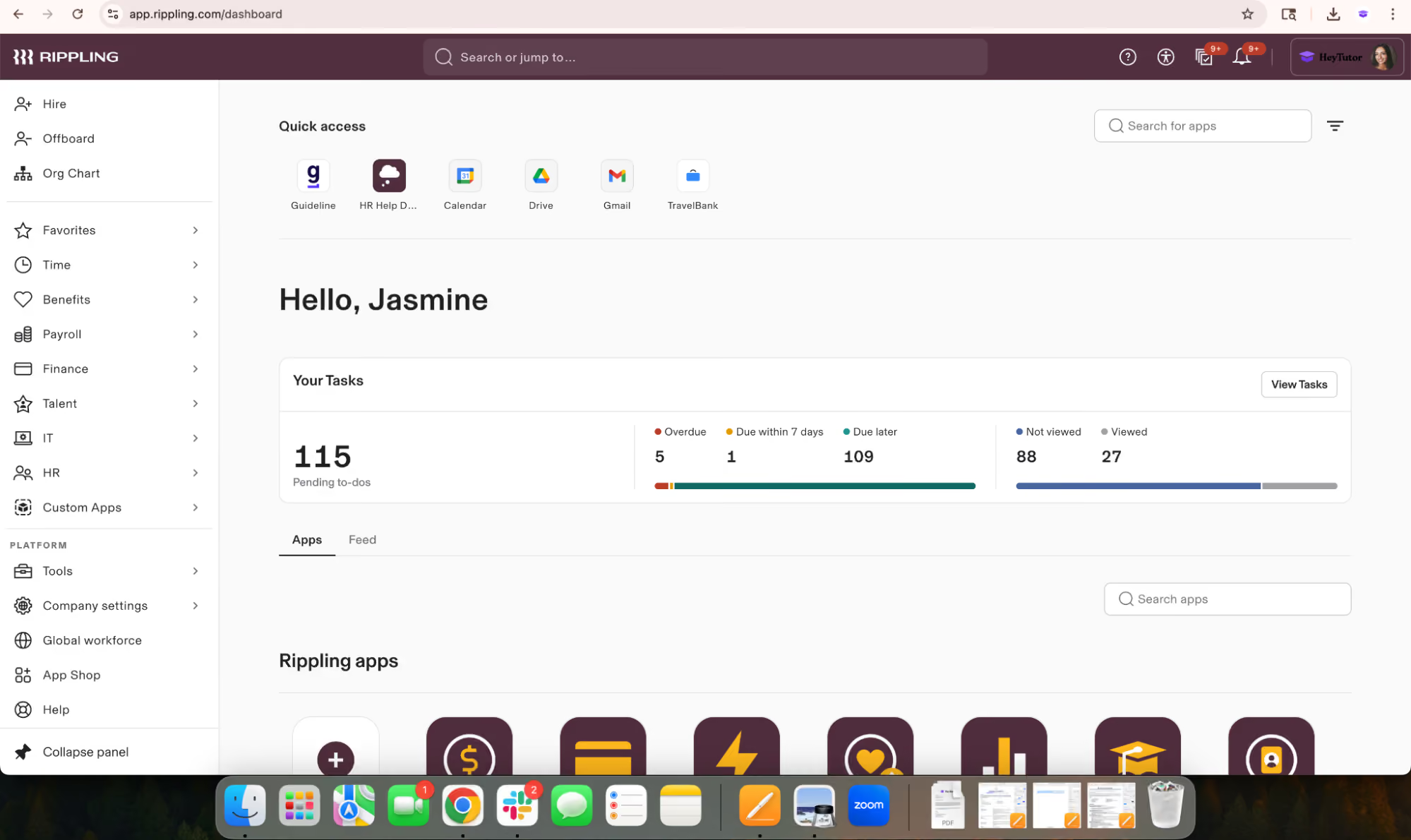
Onboarding setup worked smoothly in our tests. It took a few clicks to craft a welcome packet with offer letters, tax forms, and e-signature tasks. One campaign manager we interviewed said the workflow for enrolling field staff was pretty straightforward, and so was the one for payroll. Both of which helped them reduce hours of administrative work.
We found the time-tracking and payroll systems to be well-designed. Plus, they both can be accessed via mobile devices. Employees can clock in, request time off, and view pay stubs on the go. That said, some users mentioned that the clock-in process was a little too easy to interrupt, leading to more missed punches when staff didn’t wait for the confirmation screen to appear. It’s a small issue, but one that came up more than once.
When it comes to compliance features, the platform didn't disappoint. Ripping’s auto-compliance feature keeps track of meal, break, and rest-time rules, making sure everything is tailored to where each employee is located. As many startups and small businesses are increasingly hiring across the country, this kind of background handling can be quite a blessing.
Job costing is built directly into the payroll flow. During testing, we assigned job codes to different clients and received alerts when hours started creeping past their budgeted limits, which makes it easier to track labor and mileage by project without needing a separate system
While this HR software packs a serious punch with its features, the sticker price is something a small business owner may need to think about carefully. If you're on a tight budget or your HR needs are super basic, the cost could be a real strain on your finances. A major selling point is the access to expert HR Advisors, which small business owners often find invaluable. However, it's worth knowing that this type of support isn't included in the standard subscription. You'll have to pay extra for that peace of mind.
30,000+ companies, including Cobex Construction Group, Harver, and Emotive.
Rippling starts at $8 per employee per month, but the total cost depends on which features you choose.
Best For
Small and mid-sized businesses seeking HR software that offers room to grow without needing to switch platforms down the line.

Our organization uses Rippling to manage various HR processes, including payroll, time-off, benefits administration, employee data management, reporting, and leave management. We are also considering the performance management and survey modules but have not yet decided to implement them. As we grow, Rippling has been proactive in suggesting further process automation. We appreciate the flexibility to activate modules as needed, which prevents us from being overwhelmed by unnecessary complexity.
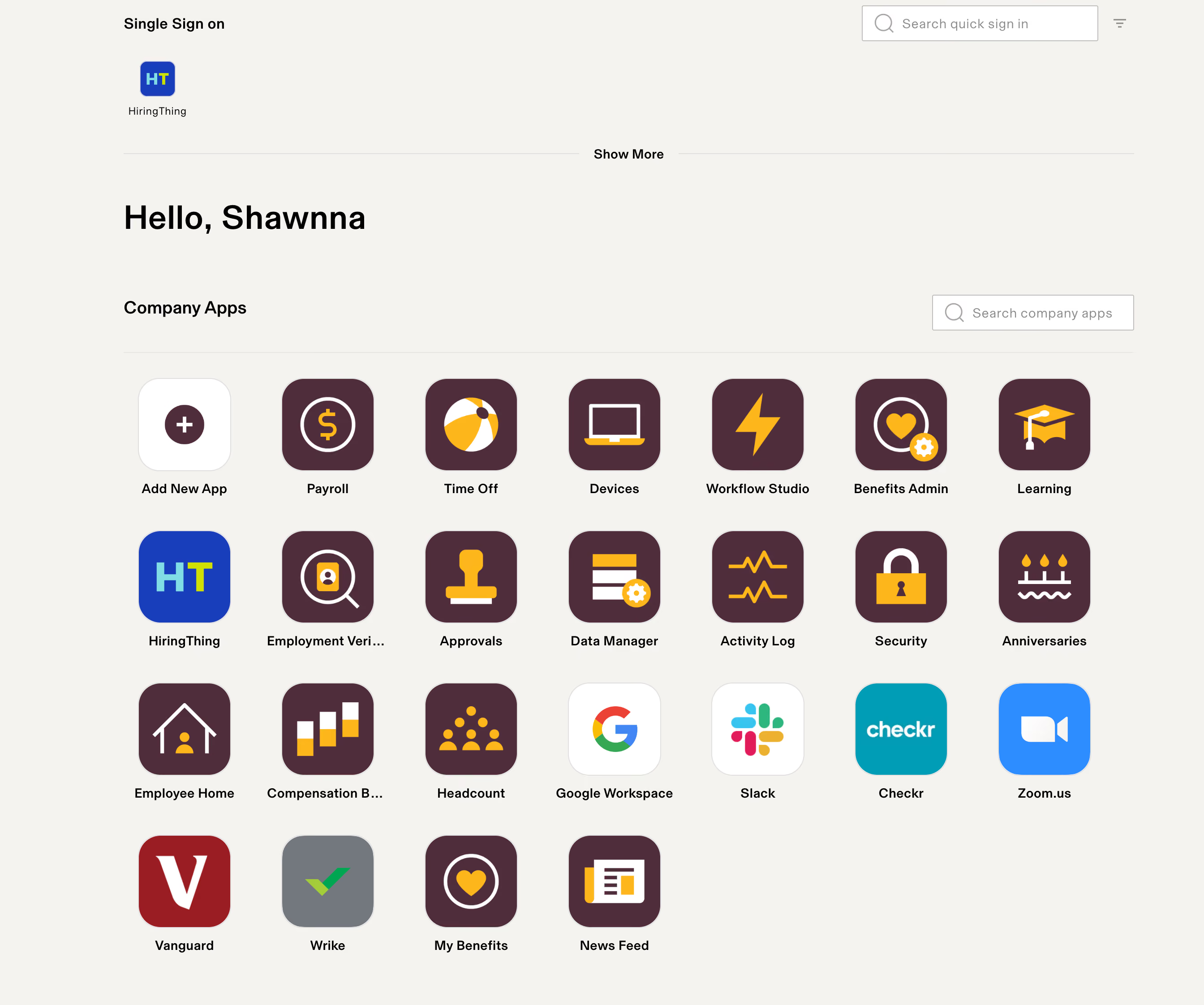
Rippling's user interface is exceptionally user-friendly, with appealing graphics and straightforward instructions, which differentiates it from other more complex HRIS systems. Our employees find it easy to navigate and locate what they need. The modular approach of Rippling, allowing us to activate features as needed, is highly beneficial. Additionally, Rippling's customer service has proven to be responsive and thorough.
Our organization was grappling with highly manual HR processes such as payroll, benefits administration, timekeeping, and time-off requests, which were prone to errors due to being handled via Excel spreadsheets. As our organization continued to grow rapidly, we required a tool that could automate these processes in a user-friendly manner with minimal implementation time. We have been using Rippling for almost two years now.
We find ourselves renegotiating the cost of our contract annually, with sales representatives often pushing for us to add new features instead of facing a price increase. While custom workflows are beneficial, they can be challenging to set up without a clear understanding of the functionality. The payroll function's inability to handle retroactive pay is a significant drawback, requiring manual calculations on our part.
Rippling stands out due to its ease of use and engaging user interface, which makes it more appealing to employees compared to other HRIS systems I've encountered, which often appear sterile and are not intuitive.
When choosing an HRIS, consider both your current needs and future growth. Be wary of systems that might become obsolete as your business evolves or require additional purchases to meet new needs. It’s also crucial to consider the system's cost structure, especially if your organization experiences high turnover or expects significant growth. Lastly, evaluate how user-friendly and engaging the system is for your employees, as a difficult or dull interface might deter them from using it effectively.
Rippling actively responds to customer feedback, making regular recommendations for system upgrades or new modules based on our specific needs. They have significantly improved their Applicant Tracking System (ATS) by incorporating suggestions from users like us during their annual updates.
Rippling is particularly well-suited for small to medium-sized organizations looking to automate their HR processes comprehensively. It's easy to implement, requiring only a small team, and manageable even by a modest HR department.
Rippling may not be the best fit for government contractors, as it lacks certain functionalities required to ensure compliance with specific contract requirements. Organizations in this sector might find other HRIS systems more tailored to their needs.

Gusto
Gusto's new native ATS enhances its offerings, allowing job posting, syndication, interview notes, and basic scheduling. Designed for employers with moderate hiring needs, it seamlessly integrates with the Gusto platform and demonstrates promising functionality and reliability.
PROS
- Gusto automatically files state new hire paperwork for users.
- Self-onboarding allows employees to add or update personal info, including bank details and withholdings.
- I-9s and W-4s are e-signed and stored within the system.
- Customizable offer letters and onboarding checklists for new hires.
- Native features to post jobs on popular job boards (LinkedIn, Indeed, ZipRecruiter, etc.) and track applications in one place.
- Accessible phone and email support.
- Payroll support for U.S.-based W-2 employees and domestic/international contractors.
- Transparent pricing without long-term contracts or setup fees.
- The dashboard feature keeps tabs on compliance tasks
- The hiring and onboarding sequence is nicely streamlined between HR and the new hire
- Post-offer, pre-start tasks are made easy with integrations like CorpNet (state tax set up) Checkr (background checks)
- Easy payroll for U.S.-based W-2 folks, domestic, and international contractors
- Person-to-person phone support, email, and other customer service resources
- The business model is responsive to customer needs
CONS
- No capacity for hiring or paying non-U.S. employees
- Time tracking and e-signatures missing from Simple plan
- Only Premium plan users can access 24/7 support
- Free trial not offered
- Gusto can support payments for international contractors, but not employees
- No native accounting feature to keep earning and spending under the same roof
- Analytics dashboard is simplistic

Gusto's HR solution with its native ATS is a reliable and efficient tool that simplifies hiring, onboarding, and payroll processes.
The ATS feature integrates with popular job boards like LinkedIn, Indeed, and ZipRecruiter and is particularly useful in reaching a wider pool of candidates. It also automatically files state new hire paperwork, helping users save time and ensure compliance.
Another quality feature is Gusto’s self-onboarding: employees can update their personal information, including bank details and withholdings, here on their convenient devices. The e-signature capability for I-9s and W-4s also eliminates manual paperwork.
Gusto provides customizable offer letters and onboarding checklists, allowing users to tailor the onboarding experience for new hires.
As Gusto’s core product is payroll, its capability to provide this service is excellent. Users can use Gusto to pay their W-2 employees and contractors across the U.S. and worldwide. Paying global employees is the only thing Gusto payroll hasn’t covered yet. Thus, the tool is not a good fit if you’re doing international employee hiring.
Gusto serves over 400,000 businesses nationwide, with a large portion made up of small and midsize companies.
Gusto’s HR software for small businesses starts at $49 per month plus $6 per employee, with higher-tier plans available that offer more advanced HR features, including time tracking, performance tools, compliance alerts, and access to certified HR experts.
Best For
Gusto offers a budget-friendly basic plan, making it accessible to startups with limited budgets. For SMBs with smaller HR departments and greater financial capacity, the Premium plan is a recommended choice to invest in human resources effectively.

With my current consulting client, we use Gusto for a few different workflows. We use it for payroll, sending offer letters, managing our 401K program as well as new employee onboarding. In previous companies I worked at, we used it for payroll. In my opinion, the greatest strength of this tool is running payroll. It’s super simple to use.
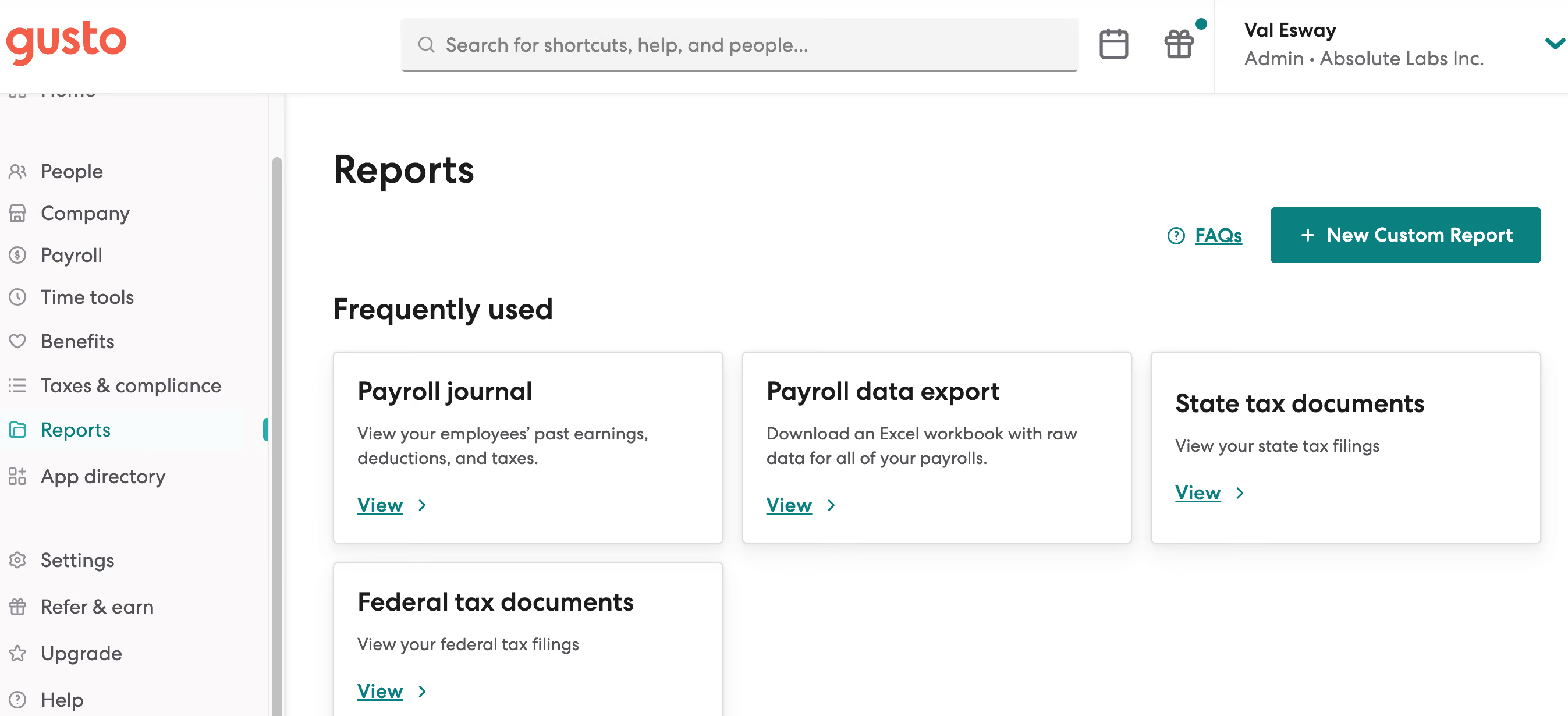
The ease of payroll and ability to have payroll run on auto-pilot is AWESOME. The customer service is friendly and for the most part quite efficient. The UI is pretty good compared to a lot of other platforms I've used.
We initially chose Gusto when the company was first established. We needed a simple payroll solution that would work for a company of our size, which at the time was just one W-2 employee on the payroll. We used the solution for about eight months before transitioning to a different solution that would allow us to manage payroll and offer benefits under one platform. Prior to that, I personally used the solution at another company for almost a year.
Since I also do freelance HR consulting, I am now working with a client who also uses Gusto. In this company, we use it for payroll, benefits management, and 401K.
Paying international contractors has been challenging in my experience. I'm not a huge fan of having the employees separated out by whether or not they are onboarded yet. I would rather see all employees with a status showing whether or not they have completed onboarding.
Payroll is a breeze! It's really one of the best tools I've used for payroll for a small company. The customer service is stellar.
Think about your long-term growth plans. I think Gusto is best for smaller companies. Think about whether or not you'll be paying contractors and especially international contractors because that can get complicated. And when you are first implementing the tool, do your best to have someone who understands the platform and how to best optimize it for your team do the set up.
I'm not sure but I do often see that they are rolling out beta features, which leads me to believe that they are always evolving to meet customer needs.
I think Gusto is best for small businesses, especially for small businesses that may not have a dedicated HR personnel. It's easy enough to use that the average business owner should be able to navigate it without too much trouble.
I think it may not be the best platform for larger orgs, especially for orgs with complicated pay needs, i.e. international contractors.

50skills
We think 50skills should be on the radar of any SMB’s HR department because it gives small teams the power to automate complex employee processes without needing developers or IT support. Its visual workflow builder, HR-focused AI agents, and plug-and-play templates make it easy to create and launch automations like onboarding or employee leave requests in just minutes. Think of it like a Zapier for HR, where you can use proven templates or build entirely customizable workflows from scratch. During testing, we found the ability to trigger automations via Slack or Claude particularly useful for modern teams already working in heavily digital environments.
PROS
- Drag-and-drop workflow builder made for HR— not developers
- AI-powered agents can launch and execute workflows after a single prompt via Slack, Teams, or Claude
- Includes extensive templates to automate all kinds of HR tasks like onboarding, offboarding, requests, training, and more
- Great audit trail and version control for tracking actions and AI decisions
- SMB-friendly onboarding support with the first workflow built for free
- Integrates with your ATS, HRIS, email, chat, and calendar tools
- Drag-and-drop workflow builder made for HR— not developers
- AI-powered agents can launch and execute workflows after a single prompt via Slack, Teams, or Claude
- Includes extensive templates to automate all kinds of HR tasks like onboarding, offboarding, requests, training, and more
- Great audit trail and version control for tracking actions and AI decisions
- SMB-friendly onboarding support with the first workflow built for free
- Integrates with your ATS, HRIS, email, chat, and calendar tools
CONS
- Not a full HRMS— does not include native payroll, time tracking, or benefits modules
- Still early-stage in the U.S. market; most traction to date is in Europe
- Workflow customization may require some hand-holding for non-technical users early on
- Tiered services for implementation are still being formalized (pricing may vary)
- Not a full HRMS— does not include native payroll, time tracking, or benefits modules
- Still early-stage in the U.S. market; most traction to date is in Europe
- Workflow customization may require some hand-holding for non-technical users early on
- Tiered services for implementation are still being formalized (pricing may vary)
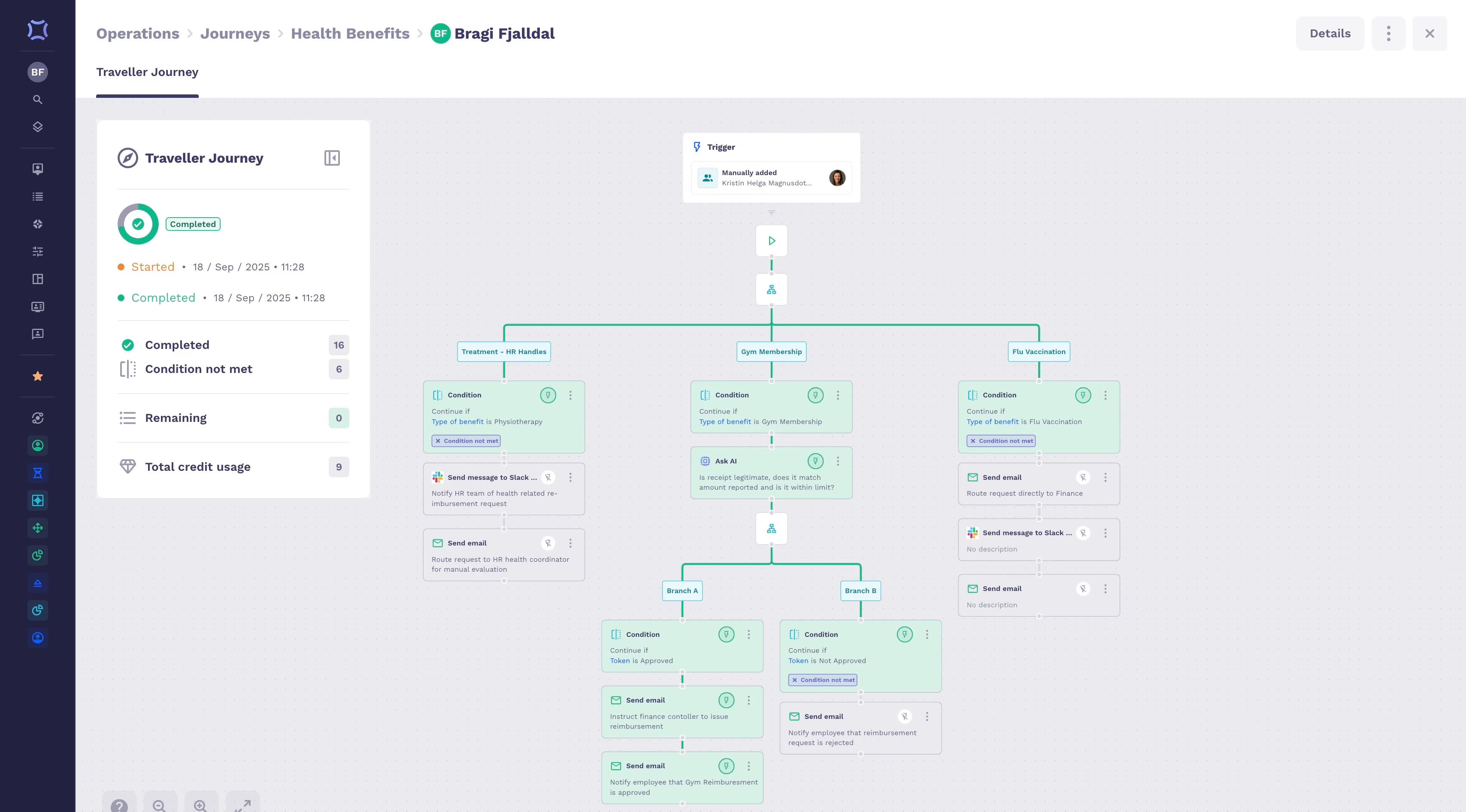
50skills is an AI-powered HR automation platform built specifically for small to midsize businesses that want to modernize their People operations without overhauling everything.
Instead of replacing an HRIS, it acts as an orchestration layer— connecting systems, streamlining workflows, and empowering HR teams to manage processes without engineering support. Some examples we saw during our demo included onboarding journeys, employee requests, or training flows that trigger automatically when someone fills out a form or pings a chatbot.
During our product walkthrough, we also saw a reimbursement request being submitted through Claude, verified by an AI agent, and routed according to logic defined in a visual builder. The same workflow could have been launched from Slack, Teams, or an employee portal. It was intuitive, auditable, and fast—exactly what time-strapped HR managers need, or SMBs without an HR department.
We also appreciated how flexible the system was. You can build workflows using a simple drag-and-drop interface, add conditions (like “wait until X date” or “if the employee is in Y department”), and push messages through Slack or email. Dozens of ready-made templates are available, and customers get help building their first workflow during onboarding.
Naturally, one of 50skills’ most relevant features is its AI integration. Their AI agent studio lets HR teams create reusable “bots” that perform tasks like CV screening or candidate communication—then drop them into any workflow. “Vibe coding,” where users will soon be able to instruct the platform with plain-language prompts (“Build me a training workflow for new hires in marketing”), is in the works as of Fall 2025.
That said, 50skills isn’t trying to be your HRMS. It doesn’t manage payroll or compliance out of the box, and it’s still relatively new to the U.S. market. But for HR teams that need process automation more than a bloated suite, this tool is a powerful and pragmatic fit.
Used by Securitas, Vodafone (franchises), Icelandair, Hilton (regional), Air Atlanta
- Starter: Starts at $299/month — includes core workflow builder, templates, AI agent builder, and up to 3 workflows
- Professional: Custom pricing — includes advanced integrations, priority support, and unlimited workflows
Note: Implementation of additional workflows may incur extra service fees depending on the plan
Best For
Small to midsize businesses (50–1,000 employees) that want to automate HR workflows without heavily relying on IT or buying a legacy HR management system.

Leapsome
We found that Leapsome delivers a flexible HRIS tailored for small-to-midsize businesses that want to go beyond core admin work. With performance, engagement, learning, and a new HR module, the platform has grown into a robust system for growing teams to manage people data and build a strong company culture.
PROS
- Modular platform: start with one feature (e.g., HRIS or reviews) and expand as needed.
- Customizable onboarding, offboarding, and approval workflows.
- Centralized employee profiles with editable sections and user-defined attributes.
- Built-in time tracking, absence management, and document storage.
- AI-powered feedback, reviews, and survey assistants.
- Fully multilingual interface (32+ languages).
- GDPR-compliant and ISO-certified.
- Leapsome is quite feature-rich; the platform packs modules for employee onboarding, learning management, engagement, performance management, goals tracking and much more.
- The majority of users find Leapsome’s UI to be friendly and easy to navigate.
- There are lots of third party integrations options to choose from, including Slack, which many users appreciate.
- The platform has transparent pricing, and you only pay for the modules you need.
CONS
- Workforce planning tools are limited and not built for enterprise scenarios.
- Customer Success support is gated behind $6,000 annual contract minimum.
- Pricing is no longer public; requires demo for accurate quote.
- Annual contract required, no month-to-month plans.
- There is currently no way to post or upload an image or file into your feedback.
- Since Leapsome can do so many things, you may need some time to get used to it. The implementation process can also take some time.
- There currently isn’t a mobile app that users can download and access Leapsome quickly on-the-go.
- Free 14-day trials are available but you need to book a demo with the sales team first to sign up for one; you can’t do so on your own.
Leapsome may have started as a performance management tool, but its evolution into a broader HR platform makes it a compelling option for small and mid-sized businesses that want to grow without losing sight of culture. For that reason, we strongly recommend this platform for those who want to centralize employee data, automate workflows, and support employee development in one place.

At the center of its HR suite is a lightweight HRIS that covers core functions like onboarding, offboarding, absence tracking, document storage, and even time tracking. Setup is straightforward: admins can tailor employee profiles with custom fields, group them by department or role, and trigger workflows based on dates or attributes. This means tasks like collecting policy signatures, launching probation check-ins, or managing sick leave can all be automated, complete with reminder nudges and escalation rules.
If we had to pick our favorite feature, it would be how Leapsome natively blends its operational tools into the rest of the platform. HR teams can link onboarding to learning paths, assign goals during 1:1 meetings, or run surveys tied to manager effectiveness. The integrated feedback and praise tools help small teams reinforce a values-based culture, even before their first HR hire.
Of course, there are some compromises. One is that Leapsome doesn’t support advanced workforce planning or compensation modeling dashboards. By design, the platform is intentionally focused on companies with fewer than 5,000 employees. It’s a deliberate trade-off, but one worth noting for those who prefer a system that can scale with them from a 50-person startup to a large enterprise.
Another thing to bear in mind is that access to Leapsome’s dedicated Customer Success services requires an annual contract of at least $6,000. This, unsurprisingly, will make the tool less attractive to budget-conscious businesses, who may also be put off by the lack of publicly available pricing.
1,500+ organizations, including DrFirst, Bob W, and Jina AI.
Leapsome offers modular, annual-contract pricing based on features and company size. Exact quotes require a demo. Discounts are available for startups and nonprofits.
Best For
Small businesses (50-250 employees) that want an HR platform with strong automation, performance tools, and feedback features built in.
.png)
Deel
Deel HR is a flexible HR management platform that builds on its global payroll infrastructure to support cross-border hiring, compliance, and workforce planning. The HR system is designed specifically for globally distributed teams and growing companies that want to scale their HR stack over time.
PROS
- Supports independent contractors in 200+ countries, with hiring products available in 150+ countries.
- Optional tools for compensation, workforce planning, and career growth.
- Unified dashboards make it easier to analyze global workforce costs and trends.
- Built-in compliance workflows automate documentation and reduce risk.
- 2,000 in-house in-country HR and legal experts.
- Excellent 24/7 customer service with fast onboarding (2-3 days) and local payroll experts in each jurisdiction.
- Seamless integration with platforms like QuickBooks, BambooHR, and Greenhouse, plus custom integration options.
- User-friendly, self-service features enable quick setup; identity verification often takes under 24 hours.
- Automated invoices simplify payments, provided they're in English.
CONS
- Advanced HR features like workforce planning and career development cost extra.
- Overpowered for U.S.-only teams that don’t need international functionality.
- Limited capabilities in learning and succession planning compared to legacy HR systems.
- No free trial or freemium version available.
- Key features like onboarding automation are add-ons, which may increase costs.
- Limited flexibility in modifying contracts or service agreements; changes often require an addendum.
- Invoices cannot be generated in languages other than English.
Deel offers a technically sound HR tool that supports complex employment structures. The vendor approaches HR software from a global-first perspective, so you get all the standard HR features tied with easy international payroll and compliance.

We found the platform straightforward to use, even for people who aren't very experienced with HR systems. The dashboards immediately showed us who was who (contractor or PEO/EOR employee), where they were, and what department they were in. Clicking on someone’s profile gave us all the details: time-off rules, important compliance stuff, old payslips, you name it. This made it easier to compare how much we were spending on contractors versus full-time employees across locations.
Another feature we like is the built-in AI labor law assistant. We asked it about onboarding requirements in Canada, and it provided relevant guidance within a few seconds. While we still think you’ll need proper reviews, this could provide a quick, valuable overview of what's involved in hiring an employee from an unfamiliar country.
We hope to see Deel invest further to expand strategic HR functions, such as succession planning and learning management, which are currently in place but may not yet offer the depth of more established HR systems. The modular pricing also means costs can scale quickly if you need multiple add-ons.
Additionally, as Deel is designed for SMBs with distributed teams who require a system that balances day-to-day HR workflows with international compliance coverage, it may not be the best choice for domestic teams with simpler requirements.
Used by more than 40,000 companies, including Brex, Andela, and Makerpad.
Deel HR starts at $5 per month.
Best For
Deel HR is best for globally distributed or remote-first small and mid-sized companies that need scalable HR software with built-in compliance.

Deel is a crucial tool for payroll systems. As a payroll admin, you would use it almost daily to optimize payroll operations, manage payroll structures, and handle Employer of Record (EoR) services.
Some organizations opt for additional compliance support or custom reporting features. Deel workflows also include employee onboarding, offer letter generation, document collection for compliance, and payroll-related benefits administration.
- Deel is an excellent solution for organizations with international contractors, offering a smooth and simplified process.
- It provides EoR services in over 150 countries and includes additional features like onboarding and time-off tracking for international contractors.
I worked with a company expanding into two international markets as part of a tech stack selection project. My engagement lasted about six months and involved selection, implementation, and change management for onboarding.
Deel is a global payroll solution designed to streamline compensation operations for organizations. The company needed a system to manage international payroll efficiently while ensuring compliance across different regions.
- Deel is only worthwhile if you fit its niche. It can be expensive, and if you don’t have a high volume of international hires, the cost may not be justified.
- If you need a more streamlined international hiring process with lower volume, alternatives like Oyster, Remote, or Papaya may be better options.
- Customer support is lacking.
Deel is uniquely positioned to expedite international hiring, particularly for contractors, seasonal hires, or high-turnover roles. It outperforms most competitors in this area for the price. However, if your needs don’t align with this niche, Deel may not be the best choice.
- What does your international hiring strategy look like, and what types of employees are you hiring?
- What is your budget?
- What HRIS features do you need?
Deel’s primary strength is its extensive EoR services, which have expanded to meet user demand. The company has focused on increasing its EoR coverage in new countries to strengthen its niche. Additional onboarding and benefits features support this strategy, but overall, Deel has not evolved significantly beyond its core offering.
- Companies with high-volume international hiring can benefit from Deel, particularly for contractors or high-turnover roles.
- Organizations managing extensive international payroll and compliance requirements.
- Employers needing to sponsor immigration visas.
- Companies that do not hire internationally don’t need Deel.
- Organizations prioritizing integrated HRIS features or complex HR operations.
- Honestly, most organizations.
Keka
It’s nice that Keka’s HR software blends core HR, payroll, and workforce engagement into one platform that grows with a business. Its tiered pricing lets SMBs start small with essential automation, then add advanced analytics, engagement, and performance management tools without switching systems.
PROS
- Three tiered plans let SMBs scale features as they grow.
- Payroll is included in all tiers with direct deposit, tax filing, and benefits tracking.
- Customizable onboarding workflows and interactive employee profiles.
- Built-in time and attendance with overtime automation; GPS and selfie attendance in higher tiers.
- Performance reviews, OKRs, and continuous feedback available in the top plan.
- Mobile app access for employees from the entry-level plan onward.
- Federal and state tax filing is included at all tiers.
- Flexible pay schedules with direct deposit support.
- Overtime and leave policy automation to match local labor laws.
- Benefits, loans, and expense tracking in one place.
- Built-in dashboards and reports to monitor payroll trends.
- Accounting integrations for streamlined finance workflows.
CONS
- “Free Trial” requires a sales demo before access, which isn’t communicated upfront.
- Implementation fees apply for setup, payroll configuration, and data migration.
- Some advanced features (custom reports, asset tracking, engagement tools) locked to higher tiers.
- Multi-entity payroll and API access sold as add-ons.
- Slow page load times during demo could affect productivity.
- “Free Trial” access is gated behind a sales demo and disclosed only after signup.
- Implementation fees for setup, tax configuration, and data migration.
- Advanced tools (custom reports, asset tracking, engagement surveys) only available in higher tiers.
- Multi-entity payroll and API access require add-on fees.
- Slow load times in the demo raise usability concerns about payroll deadlines.
For SMB HR teams, the appeal of Keka is clear: payroll, core HR, and compliance are all included from the start, and you can add more sophisticated tools as your business matures. At $9 per employee per month, the Foundation plan handles essentials like profiles, onboarding, payroll, benefits, time-off, and attendance without the complexity of dealing with multiple vendors.

What stood out most in our demo, perhaps, was how well onboarding and employee self-service are executed. HR can set up department-specific onboarding checklists, and employees can manage their own documents, personal details, and leave requests through both the web and mobile app. For small teams, this can mean fewer emails and faster updates to employee records.
As companies expand, the Strength and Growth tiers unlock more control and strategic tools such as advanced roles and permissions, custom reports, GPS or selfie attendance for distributed teams, and performance management with OKRs and continuous feedback. And as we briefly mentioned earlier, this lets SMBs avoid the “rip and replace” cycle when their needs outgrow basic HRIS tools.
To be fair, the buying process may frustrate some users. Keka offers a free trial, but you can’t access the product until you sit through a sales demo. This may not be a huge issue, but the fact that this condition isn’t communicated upfront on their website left us with an unexpectedly frustrating feeling. We also learned that the platform includes an implementation fee for setup and data migration, which could be more burdensome for smaller budgets. And during our demo, slow page load times made us wonder how the platform would perform when processing payroll for hundreds of employees at once.
Used by over 10,000 companies, including eBay, Randstad, and ONEPLUS.
Keka HR software pricing starts at $9 per employee per month.
Best For
Small to mid-sized businesses seeking an all-in-one HRIS and payroll platform with the option to add advanced engagement and performance tools as they grow.

Factorial
Factorial earned a top spot on this list for its clean interface, modular structure, and highly adaptable employee records, which are key features to simplify core HR tasks for small businesses operating in multiple locations.
PROS
- Intuitive HRIS experience for both employees and admins.
- Modular setup enables teams to start small and scale features gradually.
- Customizable employee records with competency and document tracking.
- Location-based onboarding workflows streamline compliance.
- Mobile-friendly time tracking and document e-signatures built in.
- Flexible pricing scheme
- Complete HR Suite + ATS
- Strong SMB focus
- Good UX/UI and frequently updated design
CONS
- Does not run payroll internally and requires third-party integration.
- Free trial access is gated behind a required sales demo.
- Lacks native recognition or rewards integrations for U.S. teams.
- Reporting and analytics are limited and require manual exports.
- Some users have pointed out that the tools are not very customizable.
- Because it covers such a wide range of functions, we’ve found that modules like payroll and reporting could be further developed.
As we tested Factorial during a live demo and focused specifically on its core HR functionality, which comprises onboarding, employee data, time tracking, org structure, and compliance workflows, what we found is a system designed with SMBs in mind. It’s easy to use, quick to implement, and flexible enough to grow with the team.

One of the most valuable features for small businesses, according to our testers, is Factorial’s employee record system. Admins can track standard information like job title, salary, and manager relationships, but also add custom fields to track competencies, certifications, and internal notes. There’s even the option to create entirely blank tabs, allowing teams to mold the system to reflect company-specific needs without relying on external spreadsheets. For compliance-heavy or operationally diverse small businesses, this flexibility is a big win.
Onboarding is another area where Factorial performs well. We liked that workflows can be tailored by geography, department, or entity, so employees in different states or countries receive relevant documents, checklists, and training steps. This feature is especially useful for U.S.-based SMBs with multi-state operations or teams abroad like ours, as this can save HR hours of manual work and ensure consistency.
The platform also covers time off management and attendance with built-in tracking via desktop, mobile, or QR code scanning. Geo-fencing is available for remote or field workers, and approval flows can be customized to match existing org structures. These tools are lightweight yet functional enough for the needs of smaller teams.
However, unlike Paycor or Paylocity, Factorial doesn’t provide payroll in-house. While the system aggregates compensation, PTO, and attendance data, it must be exported to third-party processors like ADP or QuickBooks. If your team is based in the U.S., please note that Facorial’s customers in the country do not have access to rewards or recognition integrations. While kudos and public posts are available internally, there’s no native way to tie those to gift cards, points, or external incentives.
Another limitation is access to the product’s free trial, as it only becomes available after speaking with sales. Lastly, those familiar with enterprise HRIS solutions will agree with us that Factorial’s reporting capabilities are still relatively underpowered. Admins can pull basic data exports, but in-depth headcount tracking, DEI metrics, or payroll forecasting will likely need to be built manually.
Over 13,000 companies worldwide have used Factorial HRIS.
Factorial HRIS starts at $8 per user per month.
Best For
Factorial is ideal for small businesses that want a flexible, easy-to-use HR system with strong onboarding and employee record capabilities, particularly those operating across multiple locations.

We use Factorial HR as our main HR system on an ongoing basis. I log into the platform multiple times each week to manage core HR workflows.
We use Factorial HR to onboard new employees, collect required documents, and assign policies during setup. Day-to-day leave management runs through the system, including employee requests and manager approvals.
We store contracts, letters, and employee records in Factorial so HR and managers have one source of truth. We also rely on Factorial HR for basic reporting around absences and headcount.
- Factorial HR reduces manual work for the HR team; onboarding is fast and structured.
- Requests and approvals are automated, saving time for managers, employees, and the HR team.
- All documents are centralized, which makes accessing information easy.
We bought Factorial HR to replace manual tracking through spreadsheets and email threads. We needed a single system for employee records, leave management, documents, and approvals.
We spent too much time answering basic employee questions about PTO balances, policies, and status updates. Managers depended on HR for routine approvals and to pull any data.
Factorial HR provided a centralized system with clear workflows. We set up onboarding, leave requests, and document storage in one platform. Employees access their personal data and submit requests without follow-up from HR. Managers approve actions directly in the system. We gained visibility into headcount, absences, and trends through standard reports.
I have personally used Factorial HR for over five years. My day-to-day usage includes employee setup, permissions, leave rules, document management, and reporting.
- The first area is payroll capabilities—I believe it could be expanded to handle more complex setups.
- The second is the performance review tools, which could offer better tracking and analytics for slightly larger teams.
- Support for configuration changes could also be faster and offer more self-service options.
This tool stood out for me because of its simplicity and centralized system. Unlike other tools I’ve used, it combines employee records, leave approvals, and documents in one platform.
Factorial HR setup is also fast and easy, so we started using it almost immediately. Others felt more complex or required multiple systems for the same workflows.
I prefer Factorial because I wanted my team to move toward automation, keep data clean, and provide core HR functionality without unnecessary complexity.
One key criterion is evaluating scalability, including pricing as the team grows. Another is to confirm whether core functions such as document storage and leave tracking are included.
It’s also important to assess how easy the tool is for HR, managers, and employees to use, so the HR team can spend less time on manual support.
In the beginning, Factorial HR focused on simple and basic HR functions like employee records and leave management. I noticed the platform improved by providing mobile access, which made approvals and requests faster. They also started giving more control to employees and managers, such as role and permission changes.
This tool is best for small to mid-sized companies with straightforward HR processes. Factorial HR is also a good fit for companies with a small HR team, as managers and employees can handle tasks directly in the system.
Companies that need highly customizable workflows should explore other options. Factorial HR is not ideal for large organizations with complex HR needs.

Zoho People
Zoho People provides a comprehensive solution. Features include employee self-service, time and attendance management, performance tracking, payroll management, announcements, and user access control. What sets it apart is its budget-friendly pricing options and forever-free plan. This makes it an ideal, scalable solution for fast-growing businesses, startups, and small teams.
PROS
- All core HR features in a single dashboard.
- Gives certain users access based on job roles, hierarchies, or locations.
- Announcements feature helps users stay updated with work-related activities.
- Wide array of integrations.
- Has an Android and iOS app.
- Transparent and affordable pricing. Has a free plan and a 15-day free trial.
- 24/5 support.
- Available in multiple languages.
- All core HR features in a single dashboard
- Wide array of integrations
- User-friendly UI, constantly updated
- Available in multiple languages
CONS
- Since they offer so many modules, some maybe not be as robust as other products that have been more specific about covering particular needs. For instance, some teams have found their payroll offering quite basic.
- The mobile app isn’t very user-friendly.
- Some users reported that the platform can be slow to load every now and then.
- Since they offer so many modules, some may be not as robust as other products that have been more specific about covering certain needs. For instance, some teams have found their payroll offering to be quite basic.
- Not all that’s available in the web platform is available in the app
- Some users reported that the platform can be slow to load every now and then.

Zoho People offers an impressive list of features on each pricing plan, so most teams can find a good feature fit at a price they can afford. The platform even provides a free plan for up to five users.
Cases is a unique feature. It allows employees to submit HR questions into specific topic categories and receive immediate responses from agents assigned to them. It's a simple yet remarkable feature that saves employees and HR colleagues time.
With its access control management feature, users can assign permissions based on specific roles, defining precise access levels for each individual. This ensures that admins can effectively control what others can or cannot access within the system.
Another noteworthy feature is Announcements, which allow administrators to share information using diverse content types. The feature's customization options, including formatting and location-specific visibility, further enhance its usefulness.
Zoho People’s self-service feature enables employees to access their records and perform HR operations like leave management, timesheets, and policy documents.
The mobile apps further enhance accessibility, although some users have expressed dissatisfaction with their occasional instability and subpar performance.
Some room for improvement can be found in tools like payroll, which is relatively basic compared to similar tools.
ZPE Systems, Cloudfronts Technologies, Zomato, SpiceJet, Foresight CFO.
Zoho People is free for up to 5 users. After that, it has four plans that priced as follows:
- Essential HR: $1.25/user/month billed annually.
- Professional: $2/user/month billed annually.
- Premium: $3/user/month billed annually.
- Enterprise: $4.5/user/month billed annually.
Best For
Zoho People is an affordable yet powerful solution for small and medium businesses to manage and access employee data from a centralized location.

It offers several key workflows that we can leverage to enhance our HR operations.
- Employee On-boarding: Zoho People simplifies the onboarding process by automating tasks such as creating employee profiles, collecting necessary documents, and assigning onboarding tasks to relevant stakeholders.
- Time and Attendance Management: It enables accurate tracking of employee attendance, including clock-in/clock-out times, breaks, and leave requests.
- Leave Management: It ensures transparency in leave policies, simplifies the approval process, and maintains accurate leave records.
- Performance Management: It facilitates goal setting, performance evaluations, and feedback mechanisms. Managers can define objectives, track progress, conduct appraisals, etc.
- HR Analytics and Reporting: It allows us to generate reports on various HR metrics, such as employee attendance, leave utilization, performance ratings, and turnover rates. These insights enable data-driven decision-making and help identify areas for improvement.
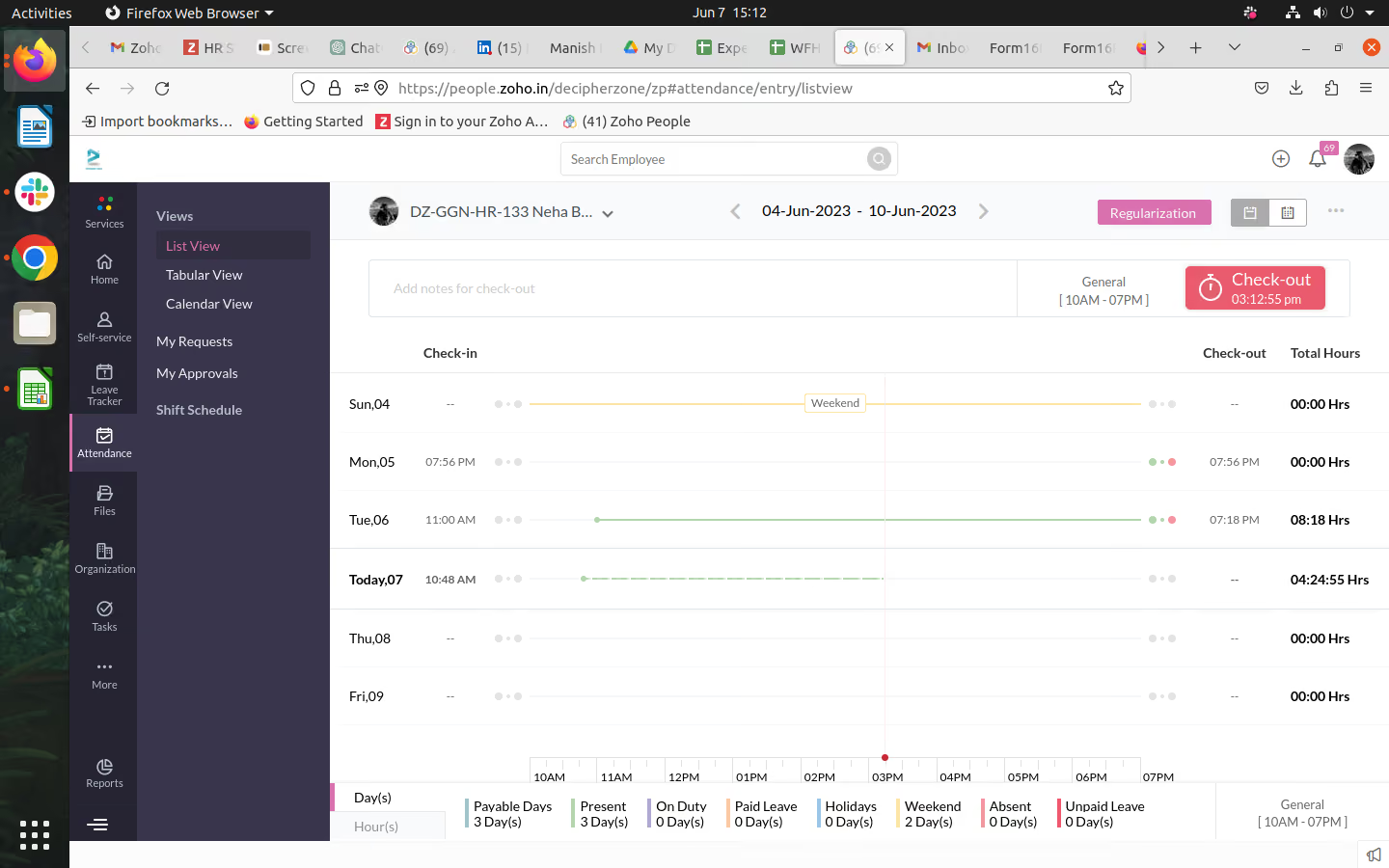
Pros -
- Comprehensive HR Management: It provides a centralized platform for managing all HR-related tasks, simplifying processes, and increasing efficiency.
- Mobile Accessibility: It offers a mobile app that enables employees and managers to access HR-related information and perform essential tasks on the go.
- Scalable and Customizable: It offers scalability, allowing us to accommodate our growing needs. It's highly customizable, and allows us to tailor the software to our specific HR workflows and requirements.
We majorly use it for attendance & leave management. Zoho People helps in keeping a track record of each & every employee. Other than that it provides Efficient HR Management, Employee Self-Service, seamless collaboration between HR teams and employees, Comprehensive Analysis of key HR metrics, etc. I personally have been using it for the past 1.6yr
- Customer Support Response Time: The support response time is slower. This affects the resolution of critical issues.
- Pricing Structure: The pricing structure is relatively higher compared to other HR management software options in the market.
- Learning Curve: It has certain features, which may require a learning curve for new users. Getting familiar with the platform and understanding its functionalities might take some time, particularly for users who are not familiar with HR management software tools.
I have used Workday HCM in the past and I feel ZOHO People is better as it provides better UI at a very cheaper price. It is not possible for small or mid-size organizations to afford workday
Following things should be kept in mind while deciding on such tools-
- Size of the organization
- Goals of the organization regarding growth & increase in team size in future
- Price of the product
- Number of users it allows to access
Zoho People has evolved in the following ways -
- Continuous Feature Enhancements: Zoho People has consistently improved its feature set based on user feedback and market trends. It has undergone regular updates and enhancements to offer new functionalities and improve the overall user experience.
- Mobile Accessibility: Recognizing the growing importance of mobile devices, Zoho People has expanded its mobile capabilities.
- Integration Capabilities: It has focused on integration with other Zoho applications, such as Zoho CRM, Zoho Recruit, and Zoho Analytics, to provide a comprehensive suite of tools for businesses.
- Automation and Workflow Customization: It has placed an emphasis on automation and workflow customization features. Users can define their own workflows, set up approval processes, and automate routine HR tasks.
- Self-Service Portals: It has expanded its self-service capabilities. The software offers self-service portals where employees can access their personal information, submit leave requests, manage time and attendance, view payslips, and collaborate with their teams.
IT companies
Academic Organizations like schools & colleges

Oyster
Oyster is loved for its automated onboarding and robust benefits & payroll. If you’re a distributed team, you’ll love Oyster’s native HR tools, strong compliance support, and how well it handles your global employment as a legal employer on your behalf.
PROS
- Oyster takes care of necessary documentation through self-onboarding tools: employees access, sign, and upload documents themselves through the platform.
- Targeted for a remote workforce: Whether your employees are in one country or 100, Oyster can accommodate them accordingly with its current partners.
- Helpful HR tools that are free to access. For example, you can use Oyster’s Benefits Advisor tool to research benefits that local companies offer and local experts recommend in a specific country.
- Support salary payouts in over 120 currencies.
- Pearl — Oyster’s virtual hiring assistant is handy to suggest on the system's hiring, onboarding, and employment terms (the standard probation period and vacation leave credits) for new recruits based on where they’re based.
- Generous discounts for nonprofit organizations and refugee recruitment.
- Intuitive: The platform is easy to navigate and makes logical sense.
- competitively priced: The flat rate for employees and contractors makes cost comparisons simple, and is competitive in the market.
- Targeted for a remote workforce: Whether your employees are in one country or 100, Oyster can accommodate them accordingly, and this is a feature few platforms can boast.
CONS
- Expanding the integrations is on Oyster’s plan, so you may want to check whether your current software is or will soon be compatible with Oyster before making a purchase.
- Oyster doesn’t provide tools for employee performance at the moment. There are no in-app communication features either.
- Oyster’s benefits packages, while being robust, are available as add-ons.
- Slight delays in processing times for payments in the local currency are somewhat common.
- Immediate communication via phone support is not an option, but they do offer live support via Zoom when necessary.
- An initial security deposit is necessary to begin the engagement and is refundable.
- The platform lacks native time-tracking functionality and provides only an in-app tool for managing time off.
- If you’re looking to co-employ your employees and partially outsource HR responsibilities, Oyster isn’t for you. They are more akin to employer of record services (EOR) than a Professional Employer Organizations (PEO).

Oyster is built with remote-first businesses in mind. The platform has gained trust over the years by taking on the role of a capable legal employer to handle global employment on the customers’ behalf.
What we love most about Oyster is that its robust health and benefits options are country-tailored and reflect employees' local laws and cultures in over 180 countries. This feature, thus, is rejoiced by organizations that are scaling fast and globally.
More recently, there is also a feature calledOyster Total Rewards. It provides insights tools and compensation consulting to help businesses design salary, equity, and benefits plans for their employees according to their locations. The offboarding also has a more simplified flow for team members to follow throughout the offboarding process.
Quora, Wagestream, Impala, and Grover are some companies on Oyster’s long list of customers.
- Contractor: From $29 per contractor per month. It includes hiring contractors in 180+ countries, drafting, editing, signing compliant contracts, processing invoices, and paying contractors in 120+ currencies.
- Employee: Between $499-$699 per employee per month, billed annually. The plan enables you to hire full-timers in 130+ countries with compliance and liability coverage, get automation, and IP protection, set up global payroll, and manage expenses, allowances, and bonuses in 130+ countries.
- Scale: Custom pricing and comes with a discounted rate, dedicated guidance, and support to navigate global employment and bulk hiring.
- Optional Benefits (as opposed to those locally-required) are available as add-ons to the Employee and Scale plans.
- Special discounts for nonprofits and refugee employment.
Oyster continues to add countries to its service offering as well as additional Integrations with business management programs.
Best For
Remote, hybrid, and distributed teams looking for an HR tool possessing global payroll, country-custom benefits, and robust compliance support.

I use Oyster regularly to manage our global workforce. It simplifies onboarding by providing structured workflows for new hires in different countries. The platform also handles payroll across multiple currencies, ensuring employees are paid accurately and on time.
We rely on it for administering localized benefits and for staying compliant with international labor laws. Customer support is responsive, and the built-in analytics help us track workforce trends and needs.
- Oyster provides strong global compliance and employment expertise.
- The international onboarding process is fast and efficient.
- Payroll management across different currencies is reliable and flexible.
- The benefits administration tools help attract and retain global talent.
- The platform includes useful analytics and reporting.
- Customer support is responsive and knowledgeable.
- The product evolves based on user feedback.
Our organization was expanding globally and needed help navigating international compliance and employment regulations. With a small HR team of just three people, we lacked the in-house expertise to manage international hiring effectively.
Oyster helped us solve those challenges with a platform that covers global compliance, onboarding, payroll, and benefits. It gave us the support we needed without having to hire additional staff.
The company has been using Oyster for over a year, and it has become an essential part of our HR operations.
- The cost can be high, especially for smaller companies.
- Integration options with other HR or business tools are limited.
- Time tracking and performance features are basic.
- Customization options are minimal.
- Learning and development tools are underdeveloped.
- Absence management is limited compared to specialized platforms.
- The mobile app lacks some functionality available on desktop.
- Document management features are very basic.
I haven’t used other tools like this before, so I can’t directly compare it with competitors.
When choosing a tool like Oyster, consider your specific HR needs and how well the platform addresses them. Budget is important, but you should also think about how the tool integrates with your current systems. For us, compatibility with our existing setup was key. Be clear on the problems you're trying to solve so the solution aligns with your goals.
We have only used Oyster for about a year, so I’m not sure if any significant changes were made to the platform.
Oyster is well-suited for global or fast-growing companies, especially in industries like manufacturing, where international hiring is common.
Oyster may not be a good fit for smaller organizations that don’t need extensive HR support or global capabilities.

GoCo
GoCo provides payroll and benefits administration, performance management, hiring, onboarding, documentation, time tracking, and HR support from a centralized dashboard. It’s also a versatile solution that seamlessly integrates with some of the most popular apps and services.
PROS
- GoCo is a highly affordable solution for small teams and organizations that only have a few employees, especially if those employees work remotely and maintain flexible schedules.
- GoCo gives users the ability to automate recurring tasks and activities, i.e. providing new hires with the necessary documents, collecting their e-Signatures, and setting termination protocol in motion.
- GoCo is also available as a mobile app. This provides even more support to today’s mobile workforce by giving them the luxury of requesting time-off, managing their benefits, or viewing their performance reports from nearly any location in the world.
- GoCo includes a fully embedded payroll solution that is highly secure. Alternatively, GoCo’s Payroll Sync feature is capable of connecting with several cloud-based payroll solutions.
- GoCo is a highly affordable solution for small teams and organizations that only have a few employees, especially if those employees work remotely and maintain flexible schedules.
- GoCo gives users the ability to automate recurring tasks and activities, i.e. providing new hires with the necessary documents, collecting their e-Signatures, and setting termination protocol in motion.
- GoCo is also available as a mobile app. This provides even more support to today’s mobile workforce by giving them the luxury of requesting time-off, managing their benefits, or viewing their performance reports from nearly any location in the world.
- GoCo includes a fully embedded payroll solution that is highly secure. Alternatively, GoCo’s Payroll Sync feature is capable of connecting with several cloud-based payroll solutions.
CONS
- Transitioning your payroll to the GoCo platform can be challenging and some users report a steep learning curve with the GoCo platform in general.
- Some users report difficulty when scheduling time-off for employees that aren’t full-time, especially if their pay is prorated.
- In certain cases, benefits plans cannot be edited by your administrative staff, ultimately requiring customer support to add information for new carriers or edit the information of existing providers.
- There are a few persistent technical glitches that are yet to be resolved by technical support.
- Transitioning your payroll to the GoCo platform can be challenging and some users report a steep learning curve with the GoCo platform in general.
- Some users report difficulty when scheduling time-off for employees that aren’t full-time, especially if their pay is prorated.
- In certain cases, benefits plans cannot be edited by your administrative staff, ultimately requiring customer support to add information for new carriers or edit the information of existing providers.
- There are a few persistent technical glitches that are yet to be resolved by technical support.

GoCo functions as an all-in-one solution to your HR, payroll, and compliance needs. Not only will your team save time by accessing all of these activities in one convenient location, but their direct line to HR ensures that their voices are being heard.
One of GoCo’s key features is the ability to automate certain tasks, like onboarding and even pre-boarding. This ensures that your new hires have everything needed to get started while freeing up your managers and supervisors to look after their daily responsibilities.
GoCo is used by organizations such as Comit Developers, Caliper Foods, Synstelien Community Services, Stoughton Area School District, and Dom & Tom.
GoCo pricing starts at $5 monthly for each employee. Custom pricing plans are available.
Best For
GoCo would make a great addition to the tech stacks of small to medium-sized businesses (SMBs) looking for a budget-friendly yet comprehensive HR software.

I used GoCo weekly, and more heavily anytime we had a new hire, an onboarding wave, open enrollment, or a policy update. The main workflow for me was onboarding: launching an onboarding flow, assigning tasks to the manager, IT, and HR, and pushing out the document packet for e-signatures so everything was completed before Day 1.
I used it as the source of truth for employee documents — offer letters, handbook acknowledgments, policy sign-offs, and compliance-related records we wanted tracked in one place.
Time-off tracking was another regular touchpoint, including approvals, balance checks, and reporting. When payroll was included, I used the embedded payroll powered by Gusto feature to run payroll directly in GoCo, which reduced back-and-forth between systems and kept records aligned.
- The workflow checklist makes onboarding and recurring HR processes more consistent and less dependent on memory.
- The document management and e-signature flow are simple, so you are not chasing signatures across email threads.
- If you use embedded payroll, having payroll powered by Gusto inside GoCo can feel genuinely all-in-one instead of loosely connected systems.
We brought in GoCo because we needed a single place to clean up the “messy middle” of HR — onboarding, documents, benefits workflows, and time-off tracking — without adding an enterprise-level system that takes forever to configure.
GoCo solved that by giving us structured workflows (checklists, tasks, automated reminders) and a centralized employee file that stayed organized. The biggest benefit was reducing admin time — managers had clearer steps, employees had a self-service portal, and HR was not chasing signatures or missing forms.
We liked that it could be paired with payroll in a more “all-in-one” way using embedded payroll powered by Gusto, so payroll and HR data did not feel disconnected. I personally used GoCo for about two years in an HR operations capacity.
- It can take significant setup effort upfront to build workflows the right way; otherwise, you do not get the full time-saving benefit.
- Reporting is solid for day-to-day HR needs, but more advanced slicing, especially for finance-style reporting, can feel limited without exporting data.
- Some customizations require workarounds rather than built-in configuration options.
GoCo stands out in the SMB HR operations space — it focuses less on being a massive enterprise HR suite and more on making HR processes repeatable, including onboarding, documents, benefits workflows, and time off in one place.
Compared to BambooHR, GoCo tends to feel more workflow-heavy and benefits- and process-oriented, whereas BambooHR is often more focused on core HR and reporting, depending on how a company uses it.
Compared to Rippling, GoCo is lighter and simpler; Rippling can be powerful, but it can be more complex than some smaller teams want.
The embedded payroll powered by Gusto option can make GoCo feel more unified than tools that rely on looser integrations.
For teams that want clean onboarding and benefits administration workflows without a steep learning curve, GoCo can be a practical middle ground.
Company size is one of the biggest factors. Smaller teams should prioritize ease of setup, workflow automation, and document management over advanced reporting or enterprise-level customization.
I have not used the tool in the past year, so I cannot speak to recent changes or product updates.
GoCo is good for small businesses under 50 employees that want structured HR processes without implementing a complex enterprise system.
GoCo is not good for large organizations with highly complex, multi-layered workflows and advanced reporting requirements.
FAQs on buying HR software for a small business
What is the best Human Resources software for small businesses?
The best HR software for a small business will, at minimum, address an organization’s most troublesome pain points while fitting into the desired budget. Individual needs and budgets vary, but the best platforms automate and streamline basic HR processes like employee data management, payroll, time/attendance, and benefits.
Why does a small business need HR software?
Small businesses can use HR technology to save time and improve the employee experience, performance, and hiring process. Another significant benefit is compliance: most small businesses do not recover from the fallout of even minor compliance issues.
What’s the difference between HRIS, HCM, HRMS, and HR software?
Let’s start by unpacking the letters. HRIS stands for Human Resources Information System, HCM stands for Human Capital Management, and HRMS stands for Human Resources Management System. The difference between HRIS, HCM, and HRMS comes down to methodology and specific features, but each is an example that falls under the umbrella of HR software.
What can you expect from modern HR software?
Software for small businesses has grown increasingly sophisticated (or complex, depending on your perspective) over time. Early platforms offered the basics, like employee information management, payroll processing, time/attendance, and benefits management. Modern small business HR software can do much more, like drive employee engagement with features that look and feel like social media.
Pitfalls of buying HR software for a small business
The most common pitfall of buying HR software is not buying HR software.
Often, small businesses realize they need HR software when it’s almost too late. It is common to start a business with spreadsheets for payroll and shared passwords on sticky notes.
Obviously, this works. No business would ever make it past the idea stage if it didn't. But we’ve seen a lot of panicked small business owners who’ve had the rug of sticky notes and spreadsheets pulled out from under them, and they would back us up on this: don’t wait to buy HR software.
Here are the most common mistakes people make:
- Choosing a vendor with no employee self-service: Since the whole idea of HR software is to save time, Employee self-service features are a must. ESS features are handy during employee onboarding or when starting a PTO request, for example. In these cases, an automated, self-service workflow can save time and reduce errors.
- Choosing a vendor that lacks automation: Speaking of automated workflows, it’s also recommended that your vendor has this capability in some of their features. Whether it’s running payroll, onboarding, or signing documents, many menial tasks can be done automatically.
- Rushing the decision: You should expect and allow for this process to take some time. That’s easy to say when you’re not the rug-pulled-out-from-under-you-guy, but even if you’re under pressure, make the time for good choices.
- Among the most critical considerations of your selection should be integration. If you’re starting with sticky notes, this won’t be an issue, but your HR software will be baked into the middle of all business operations, so integration with your entire tech stack is crucial.
- Rushing the implementation: For small businesses, implementing cloud-based HR software is often a self-service process. This is a critical step that requires time and deep focus.
- Basic data entry mistakes can have massive implications. For example, provisioning access to employee data to the wrong person (or, even worse, a whole team!) is much worse than embarrassing: it’s illegal.
- Moving slowly and keeping the vendor’s customer service resources handy can avoid this worst-case scenario.
Benefits and ROI of HR software for a small business
While reading this, there might still be a small part of you that says, “I’m a small business. Do I really need a fancy HR system?”
The answer is yes.
If you plan to grow your business, you need HR software. With the right platform, the HR software you use today to streamline operations for a dozen people could be the same one you use in a year when you’ve grown to a hundred people.
HR software can do more than manage basic employee data. Modern platforms can orchestrate training programs and track metrics like satisfaction and engagement. There are limits to the effect software can have on company culture or turnover, but consider this: at the very least, the software will free up your HR team and managers so they can attend to the tasks only people can do.
How are most HR management solutions for small businesses priced?
The vendors listed in this roundup represent the most common pricing models in HR tech. Most charge monthly per user, and some have an additional base fee. Many offer independently priced add-ons, which is excellent for small businesses who want to pay only for the features they’ll actually use.
Vendors in this space are familiar with the tight margins of small businesses, so they are often willing to negotiate. Be sure to ask about custom pricing tailored to your business needs.
The following estimations offer a rough idea of what you can expect to spend based on the size of your team on an annual basis. This information is drawn from data points collected from our personal experience, user interviews, and consultation with other HR tech experts.
- 1-100 employees: $12,000 annually
- 101-500 employees: $48,000 annually
- 501-1000 employees: $72,000 annually
We’d love your input, too! To help us provide the most accurate figures, we're crowdsourcing data on HRIS pricing. The survey is anonymous and takes about two minutes. Plus, anyone who helps the community by filling it out will be given access to the entire data set.
Key HR software features for small businesses
If this is your first HR tech purchase, which features should you prioritize? While that depends primarily on your particular situation and business needs, the following features are standard:
- Employee management: Core HR functions related to employee management should be included. Features like an employee directory or org chart are staples, and you can expect time management features like scheduling, time tracking, and leave management.
- Onboarding & Documents: Many of these tools include a basic Applicant Tracking System (ATS) that can do everything from sourcing candidates to onboarding a new hire. Some of them can even process the necessary documentation through automated workflows.
- Employee Performance: HRMS features are relatively standard in HR software for small businesses. They can be used to define and track individual and team goals, and many also support collecting feedback and performance reviews.
- Benefits Administration: Basic benefits administration is reasonably common, but tailor-made administration functionality is rare due to variations between states.
Some other features that you should consider include:
- Social recruiting
- Sourcing
- Reporting & Analytics
- A good mobile app (Android & iOS)
Questions to keep in mind when demoing HR software for small companies
While most of the top HR software solutions for small businesses like yours offer a free trial or an instant self-service demo, some will ask you to schedule a live demo with one of their reps. Come prepared with questions reflecting the time you’ve spent exploring the market and defining your company’s specific needs.
Below, you’ll find some sample questions to get you started. Be sure to download our totally free and super-helpful spreadsheet organizer to make notes on each vendor and compare them later.
- How will this solution seamlessly integrate with our existing tech infrastructure, and what integrations will be required?
- How will other team members effectively utilize this solution within the organization?
- What are the critical functionalities I should inquire about?
- How can this tool enhance and elevate the applicant experience?
- What aspects might make me or my team apprehensive when transitioning from our current processes to this platform?
- How does this product ensure the security of employee data?
- What can I expect about the caliber of customer support? Does the platform have a help center? Online guides? Are the support resources high-quality and accessible to all?
Just because you’re a small business doesn’t mean that you should be reluctant to control the demo. These solutions are specifically designed for businesses like yours, so it’s better for everyone involved if you can articulate your needs and the use cases you care the most about.
Last advice on buying HR software if you’re a small business
Before you start doing free trials or schedule demos, get all the input you can from stakeholders who will be affected by the decision. The direct experience of people in other departments is invaluable for finding the right tool for your team. Encourage them to consider how the new software would impact their work today and how it might hold up in the future.
Software built for small businesses is usually designed to scale. You can expect this whether you’re starting with the most basic plan or even the free one.
It’s impossible to plan for everything, but with the right HR software, you can feel confident knowing that you’re prepared for anything from the success you expect to the setbacks you don’t.
You’re probably aware that with 50 or more workers, businesses must adhere to federal guidelines under FMLA and EEOC. But 50 is no longer the magic number. As it becomes common for states to require employers with fewer than 50 people to provide health coverage and retirement planning, the conventional wisdom has shifted.
Coupled with new laws, the perception of HR as a critical element of strategic operations has steadily narrowed the HR-to-headcount ratio.
And as a final note, If you're buying to implement in the US and seeking a custom evaluation, feel free to schedule a complimentary one-on-one consultation with an HR tech advisor here.
About the Author


About Us

- Our goal at SSR is to help HR and recruiting teams to find and buy the right software for their needs.
- Our site is free to use as some vendors will pay us for web traffic.
- SSR lists all companies we feel are top vendors - not just those who pay us - in our comprehensive directories full of the advice needed to make the right purchase decision for your HR team.


