

11 Best Talent Assessment Tools We’ve Tested in 2026
The best hiring assessment tools reviewed, compared, and rated by HR tech experts. Find info on features, pricing, demos and more below.









The best talent assessment tools help you dig deeper than just resumes and find the right talent to build high-performing teams. With the help of data and machine learning, these platforms can evaluate candidates' skills and how well they fit your company culture. They also let you compare results across your applicant pool, taking the guesswork and human bias out of your hiring process.
To help you make a smart investment, we’ve put together this handy guide on everything you need to know about the best candidate assessment tools, from pros and cons, key features, pricing, ROI, questions to ask during demos, and more.
Our list of the best talent assessment tools is the result of thorough research, including software demos, testing sessions, and insightful discussions with experienced talent acquisition and recruiting experts. We considered numerous factors, and we think the most critical ones for this software type are accuracy, customization, user-friendliness, and integration.
- Accuracy: We handpicked tools that undergo scientific validation. Candidate screening software that is scientifically validated means recruiters are equipped with accurate insights into candidates' traits and skills. This minimizes the risk of bad hiring practices and establishes a fair playing field for everyone.
- Customization: Our chosen tools offer customizable assessments tailored to your organization's unique needs and job requirements. This flexibility ensures candidates are evaluated based on the exact competencies and skills required for the role, leading to a more accurate assessment.
- User-friendliness: We put ourselves in the shoes of both recruiters and candidates, seeking tools with a friendly and intuitive interface. A user-friendly assessment tool enables candidates to focus on showcasing their abilities without being slowed down or confused by complex interfaces or unclear instructions.
- Integration: Without proper HR tech integration, recruiters may need to manually perform tasks that could otherwise be automated, such as transferring candidate test results, updating statuses, or generating reports. This can slow down the entire process and decrease overall efficiency. Hence, it's important for an assessment tool to either have native integrations with popular HR software or provide robust API functionality for custom integrations.
Check out this article on how we vet HR tools if you're interested in learning more about our software evaluation methodology.


CoderPad

With an impressive 60+ languages and frameworks supported, CoderPad (formerly CodinGame) allows recruiters to screen developers through fun coding games and challenges.
PROS
- Engaging gamified technical assessments add enjoyment for candidates compared to standard tests.
- Clear pricing structure with a free 14-day trial.
- Easy to use for both recruiters and developers.
- Supports 60+ programming languages and frameworks.
- Integrates anti-cheat tech and code playback in test reports.
- Auto-scores candidates and compares them to other developers who have taken similar tests.
- You can cancel your subscription yourself from the user account at any time and with no cancellation fees.
- Offer candidates different language options (English, French, or Spanish).
- Supports live interviews.
- Free plan for up to 2 tests per month, plus a 14-day trial.
- Tests available in English, Spanish, and French.
- Conduct live tech interviews and watch candidates code.
- Assess candidates through take-home projects.
- Built-in university recruiting features.
- Native tools for gamified coding assessments.
- Updated pricing friendlier for SMBs.
CONS
- Limited question library for specific technologies, with custom questions limited to 10 on the most popular pricing plan.
- Not all developers are big fans of gamification. Some find the UI distracting at times.
- Limited built-in integrations. ATS integration & API access are available for higher-priced plans, with additional fees apply.
- Advanced features locked behind higher subscription tiers.
- The site at times can get buggy.
- Limited pre-built questions in the library.
- Few built-in integrations with third-party systems.
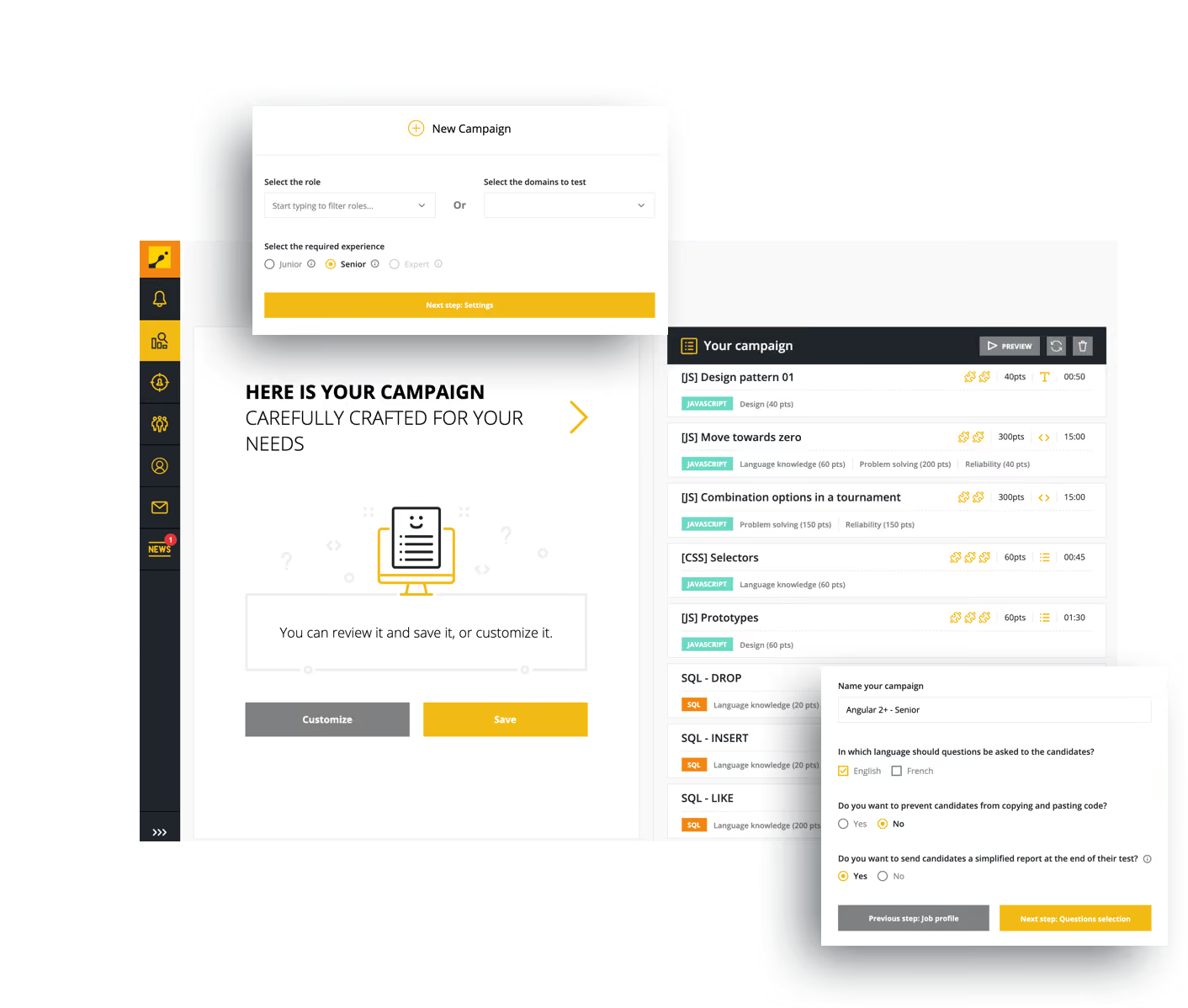
If you're looking for a vendor that does candidate assessment specific to jobs that require coding, CoderPad is a great bet. Their assessments try to mimic the actual work they'd do if hired as much as possible. In addition to being a gamified tool to assess developers, it also has video interviewing and candidate management capabilities.
Facebook, Nintendo, EA, Warner Bros
CoderPad offers a free plan that includes 2 tests or interviews per month. The Starter plan costs 80 per month or 960 billed annually and includes 60 tests or interviews per year with no monthly volume limit. The Team plan costs 400 per month or 4800 billed annually and includes 360 tests or interviews per year with no monthly volume limit. Custom pricing is also available.

Best For
CoderPad is a good fit for medium-to-large-sized companies that want to assess the coding skills of candidates using gamified assessments.


We used CoderPad for coding assessments. Generally our interviewers and our candidates like CoderPad because the IDE was straightforward and easy to understand. Additionally, it was easy to toggle between coding languages. The interview teams liked it because it was easy to find the recordings from the interview. Our TA team liked it as well because it was easy to extract the code and put it into candidate feedback.
- Ease of use; the platform has a clean UI
- Price point and model made since for us
- There’s a wide range of coding languages offered
We needed a coding evaluation platform that worked in a live interview setting. Unfortunately we didn't have consistent hiring with teams that needed a coding tool. CoderPad helped us out tremendously by offering a payment model that allowed us to purchase a number of tests upfront and then more when we needed them.
The biggest issue we had with CoderPad was that it didn't integrate with Workday (at the time this was an issue but I know it has since changed). Outside of that though, we thought CoderPad was a fine tool and didn't dislike much about it.
CoderPad offers a ton of flexibility around how you pay and use it. Additionally, the ability to find previous interviews and recordings was super easy.
- How many interviews are you conducting?
- Who will need access and how often?
- What do you want your candidate experience to be like?
At the time, I know a lot of customers were leaving because they didn't have tight integrations with ATS. I know this has changed and also they've built out more modern integrations (like ChatGPT)
Technical recruiting/TA teams
Companies that don’t need to hire coders

Criteria
Criteria offers one of the most robust and research-backed assessment platforms we've tested. It combines scientific validity, strong job-role matching, and a breadth of test types that make it ideal for organizations looking to reduce bias and improve hiring accuracy at scale.
PROS
- Scientifically validated assessments built by in-house PhDs across cognitive, personality, EI, and risk dimensions
- Unlimited usage across Criteria’s full test library, included in every subscription
- Role-based “batteries” auto-recommended by job title, with customization options
- Mobile-friendly, candidate-first experience improves assessment completion rates
- Optional AI-powered video interview scoring and proctoring for additional insights and integrity
- Seamless integrations with 60+ ATS platforms and open API access
- Scientifically validated assessments built by in-house PhDs across cognitive, personality, EI, and risk dimensions
- Unlimited usage across Criteria’s full test library, included in every subscription
- Role-based “batteries” auto-recommended by job title, with customization options
- Mobile-friendly, candidate-first experience improves assessment completion rates
- Optional AI-powered video interview scoring and proctoring for additional insights and integrity
- Seamless integrations with 60+ ATS platforms and open API access
CONS
- No public pricing; must speak with sales to receive a tailored quote
- Add-ons like Interview Intelligence and proctoring may increase the total cost
- The Test Maker tool requires onboarding time to fully leverage for custom assessments
- Feature depth may exceed the needs of small or low-volume hiring teams
- No public pricing; must speak with sales to receive a tailored quote
- Add-ons like Interview Intelligence and proctoring may increase the total cost
- The Test Maker tool requires onboarding time to fully leverage for custom assessments
- Feature depth may exceed the needs of small or low-volume hiring teams
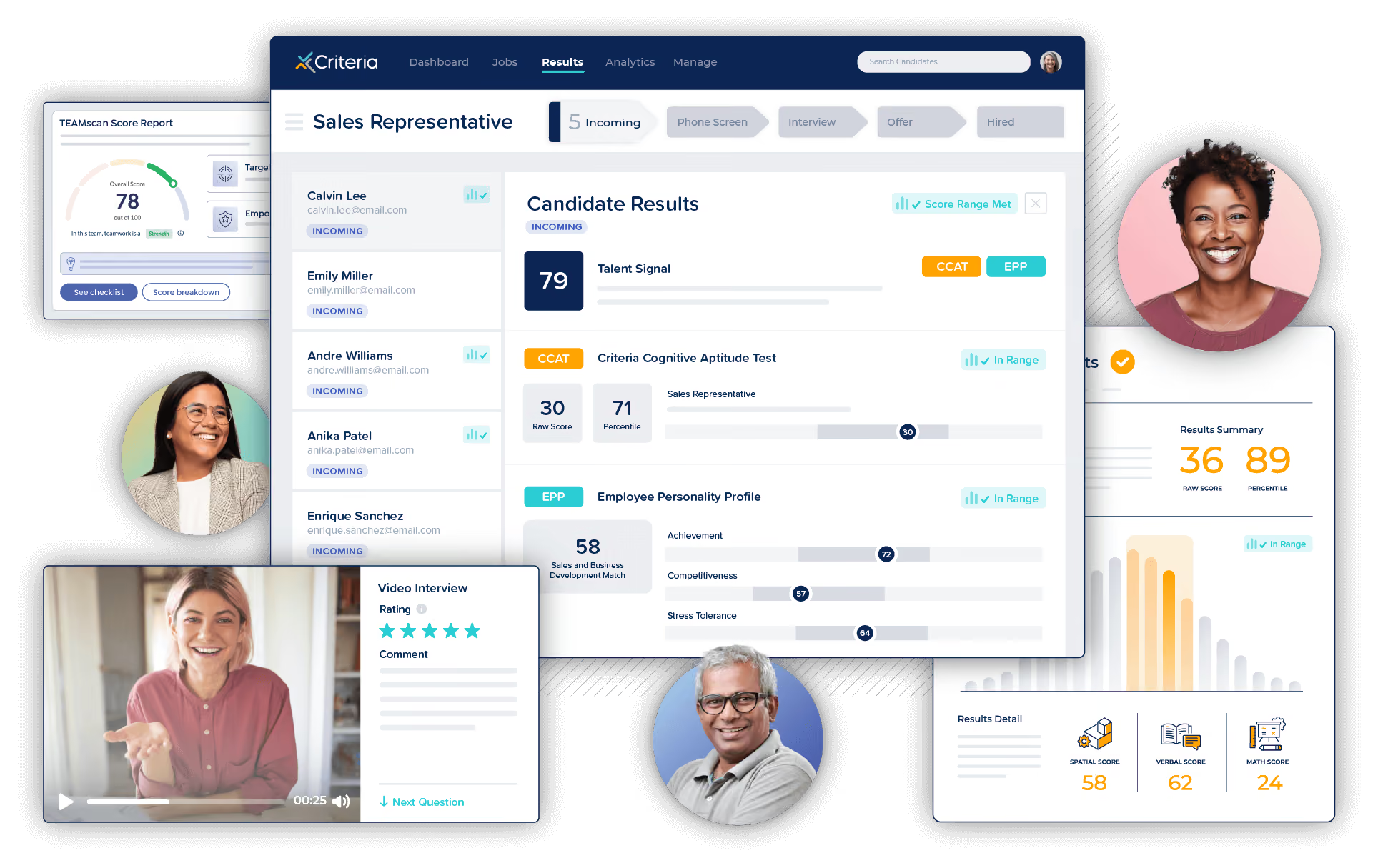
Criteria is more than a traditional pre-employment testing vendor—it’s a full-scale candidate evaluation platform rooted in organizational science. From our live demo with their product team, we saw how the platform streamlines hiring decisions with highly customizable, scientifically validated assessments.
What stood out most during testing was Criteria’s ability to automatically generate role-specific recommendations using Bureau of Labor Statistics data. For instance, sales roles are typically matched with personality and cognitive tests, while operations roles receive risk and attention assessments. Customers can use these pre-configured batteries or customize their own from a broad library that includes cognitive aptitude, personality, emotional intelligence, risk tolerance, and game-based mechanics.
Unlike other vendors that restrict usage by test type or volume, Criteria’s pricing model includes unlimited use of all assessments, enabling organizations to scale without worrying about overages. The platform also includes Test Maker, a self-service tool that allows teams to create custom assessments from scratch.
Beyond assessments, Criteria supports asynchronous video interviews with built-in AI scoring, powered by a model trained on thousands of manually labeled transcripts by their in-house PhD team. The AI evaluates only the text of the response to avoid visual or audio bias, and scoring is benchmarked against structured rating guides that evaluators can customize. While AI scoring is optional, it provides a scalable way to surface top candidates without replacing human judgment.
The platform is mobile-friendly, accessible, and supports a smooth candidate experience. Optional proctoring features are available for high-stakes roles and include real-time monitoring tools that discourage cheating without being overly intrusive.
Overall, Criteria is a strong choice for teams seeking an evidence-based, bias-conscious hiring solution that scales across job types and hiring volumes. While pricing is not transparent and some features are modular, the platform’s flexibility and scientific rigor set it apart from other assessment vendors.
Criteria is used by over 3,000 companies, including Gucci, eBay, J.G. Wentworth, and U-Haul.
Criteria offers tailored pricing based on company size, usage volume, and platform needs. Every subscription includes:
- Unlimited access to all assessments
- Role-based recommendations and customization tools
- Integration support and onboarding assistance
Optional features like proctoring and Interview Intelligence may be priced separately. A free trial is available via their website.
Best For
Criteria is best for mid-sized to enterprise companies that want to scale structured, science-based hiring while minimizing bias and maximizing predictive accuracy across diverse roles.

VidCruiter
VidCruiter provides skills testing that complements its recruitment software, making it a favorite suite for midsize and large businesses to take care of high-volume recruiting needs.
PROS
- VidCruiter skill assessment software features automated candidate scoring and notifications.
- Library with 100+ skills tests validated by industrial and organizational (IO) psychologists.
- Skills assessment workflow can be saved as templates for reuse.
- The ability to implement customized assessments based on customer specifications.
- Hybrid interviewing solution enables teams to host interviews with participants joining by phone, video, and in-person in one meeting.
- Modular and highly configurable: buy only the products you need, add more later, or connect VidCruiter to the ATS you already use.
- Mature pre-recorded, live, and hybrid interviewing, with live calls on VidCruiter's own video room or on Zoom, Google Meet, and Microsoft Teams.
- AI features that draft job descriptions and interview questions, score candidate responses, and provide summaries, transcripts, and clear scoring breakdowns—all subject to recruiter review.
- Built-in deepfake detection and controls that stop a recording if a candidate leaves the screen.
- Runs in a browser on any device, in eight languages for recruiters and dozens for candidates, with regional servers and enterprise security certifications.
- Round-the-clock live support, a named account manager, and on-demand training.
CONS
- There aren’t many advanced technical skills tests in the library, though users can embed tests to VidCruiter from a third party.
- Undisclosed pricing. Also not among the lowest cost options in the market.
- No free plan or free trial.
- Setup takes real effort for complex, multi-workflow rollouts, though AI now shortens interview building.
- AI scoring covers recorded interviews only; live interviews aren't scored yet.
- No free plan or trial. Pricing isn't published.

Bason on our hands-on assessment, VidCruiter's skills testing software is a valuable addition to a recruiting toolkit. The user-friendly interface and flexibility of the tool allow users to easily assess candidates' skills through pre-made or customized assessments, and the ability to include videos and images provides candidates with an authentic preview of the team’s culture, helping them determine their fit for the job.
One standout feature is one that saves the recruitment team valuable time: auto-calculation of score-weight questions. While video, audio, and text-based questions still require manual scoring, the assistance with score-weight questions significantly reduces workload. Moreover, the system automates follow-up communication with candidates based on their assessment outcomes, ensuring a seamless process.
Despite its strengths, VidCruiter's assessment tools have a few drawbacks. The library, for example, lacks advanced technical skills tests, requiring users to embed tests from external partners.
Exact pricing is undisclosed, but VidCruiter is known for being a good tool, not an inexpensive one. However, without a free plan or a free trial, potential users can’t explore and assess the tool's capabilities before committing to a subscription.
VidCruiter customers include the United Nations, Axa, Samsung, Lowe's, and US Foods.
Pricing is not published on VidCruiter’s website.
Since we last checked in, VidCruiter addressed a specific issue we had listed as a “CON” when we wrote a review three years ago. We are happy to report that the number of pre-built integration options now satisfies the criteria and has moved to the “PROs” list. Bravo for your impressive partner network, and welcome to the “pros”!
Best For
Businesses with high volume hiring needs, including governments, education, and health care. Industries that require skill assessment as part of their compliance programs can also benefit from this tool.

Our team uses the software for both live and pre-recorded interviews with candidates. For the most part, we use the pre-recorded function with candidates, allowing them to record themselves answering questions that we have predetermined for their interview. Following their interview, our team spends one day a week, going through all of the applicants that had recorded an interview to be able to quickly make decisions on who we would advance to the next round.
Additionally, within the system, we leveraged a custom rating scale to provide a consistent experience when reading candidates. This really helped our team when considering applicants and measuring them all against the same criteria.
1. Overall, the ability to offer both live and recorded interviews.
2. The cost of the offering was very reasonable compared to its competitors.
3. The customer service you are able to receive from them when needed on demand is wonderful. They’re very responsive usually within a matter of just a couple of minutes.
My organization was looking for a way to screen applicants for an initial interview in an effective and efficient manner. Knowing that, we started exploring options for video interviewing both pre-recorded and live.
Through our research, we identified VidCruiter as an option and ultimately was the one that we implemented. We added their software during the pandemic and have used it since. It’s been a great help, and really reduced our screening times through recorded interviews as we have been doing a large amount of hiring.
1. The company is based out of the country, which was not a preference of our organization for security and compliance reasons.
2. Overall, the functionality of the system, as a whole, was a bit more limited than some of its competitor's offerings.
3. The branding of the offering was a little outdated, and wasn’t as modern as some of the alternative options we considered.
Overall, their offering is reasonably priced software that can be used to accomplish the goal of conducting live or recorded interviews with candidates.
Many of the other offerings were much more expensive than what we were able to pay. It’s easy to use and the responsiveness of the customer service team is exactly what we needed. Some of the alternatives had much longer wait times in comparison, which we didn’t want to deal with.
It allows us to accomplish exactly what we need without paying a high price and without making our process super complicated for candidates, which we appreciate.
Overall, really determine at the start what you need a software for to help your process. If you are only needing it for basic functions, like conducting a live or recorded interview with candidates, you may find that there are some vendors that offer functionality way beyond that, which may be more than you need.
As a result, this means the price tag of those offerings could be significantly higher, more than you can justify, or are willing to pay. Once you’ve identified what you need and can pay, it really helps narrow down the list of vendors that you can move forward with.
One of the biggest improvements our organization has experienced in working with them is that they built integrations with other systems that now make our process really smooth.
For example, we utilize Workday for our HRIS and their software integrates smoothly. This wasn’t something we had at the beginning of our experience as a customer, but now have it and it’s really helped become a seamless transition from one software to the next.
Great for an organization that doesn’t need all the bells and whistles, but that needs an offering that can do basic functionality like live and recorded interviews with candidates. So ideally, the best fit would be for a small or medium size organization.
If you are a large organization, you likely want more personalized branding, a modern look and feel, and a more robust offering than what they can offer.
Very large organizations that want robust functionality, customization, and all the bells and whistles of a product offering. Their product has all the standard functionality that you may want out of an offering, but it is pretty foundational rather than an offering that goes over and above what you would normally need.

HireVue
With HireVue, recruiters can assess a gigantic number of job seekers with relative ease using this AI-powered candidate assessment software. This and its video interview capabilities make it a great tool for enterprise teams.
PROS
- The virtual assistant can help with initial screening, vetting, and sending messages.
- Great on-demand interviewing feature.
- Playback speed available.
- The implementation team and customer support agents are quite responsive.
- AI virtual assistant screens, messages and collects candidate responses autonomously
- On-demand video interviews with adjustable playback speed for recruiter efficiency
- AI Interviewer conducts 24/7 voice interviews with validated scoring and recruiter-ready shortlists
- Science-backed scoring built on 70M+ validated interactions with bias-mitigated outputs
- Audit-ready workflows with configurable governance controls for enterprise compliance
- 45+ ATS integrations stacking conversation and assessment signals
- Highly responsive implementation team and customer support
CONS
- Likely to be cost-prohibitive for budget-conscious teams.
- Not good for small teams – it’s best for headcounts of 2k+ and growing.
- Limited integration partners.
- Pricing geared toward companies with 2,500+ employees, limiting accessibility for smaller teams
- Limited integration partners beyond ATS platforms
- Asynchronous interviews can allow candidates to tailor responses, requiring human review to catch misrepresentations
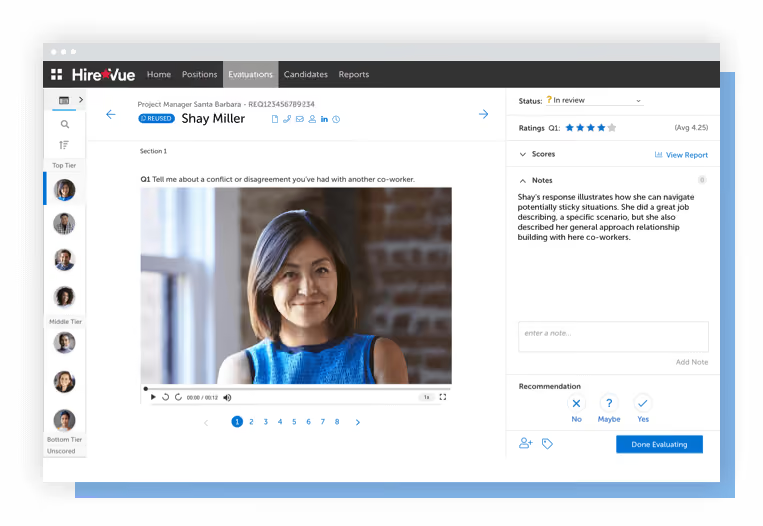
HireVue was one of the first businesses in the HR Tech sector to pioneer the practice of video interviews.
This tool comes at a high price but is an excellent choice for teams who can pay. It excels in automation and high-volume recruitment for its sole target market: large and growing teams.
The platform offers plenty of features, including text-message and AI-powered recruitment, video interviewing, constructing interviews, candidate testing, and scheduling. From what we experienced with HireVue, the video interviewing software outshines the rest of the features based, in part, on its ability to conduct both live and one-way video interviews.
Accessibility and ease of use are highlights of this too. We like that candidates aren’t required to download an additional app or use their laptops or computers to take the interviews: any phone with an internet connection will do.
The built-in interview guide, designed by organizational psychologists, is also a nice touch. There are more than a thousand job-specific interview guidelines, so building a tailored interview from scratch is relatively easy.
The virtual assistant can be a terrific time-saver for recruiters. This conversational AI can answer candidates' questions and direct them to the next stage of the assessment process via WhatsApp or text message. It can also schedule interviews and present job seekers with suggestions for relevant positions within the company.
Big firms like Amazon, SmartLynx Airlines, and Unilever have used HireVue for their hiring.
HireVue offers two pricing plans starting from $35,000 per month.
Best For
HireVue is designed for large enterprises (at least 2,500 employees) to streamline their high-volume hiring process.

HireVue was used daily to screen potential candidates for open roles. We were able to customize the look, feel, and candidate experience through their one-way interview features. This dramatically improved the speed at which candidates were able to move through the pipeline while maintaining a positive interview experience.
Ease of use, customizable and adaptable, mobile friendly, great customer service, and real-time accessibility.
I utilized the HireVue tool when I worked at Caleres. They had over 1500 retail locations across the US and Canada. Hiring was a priority but we found a bottleneck in our hiring process. Hiring managers and interviewers were unable to keep up with interviews due to their busy travel schedules. HireVue was purchased to speed up the screening process by allowing all interviewers the ability to virtually assess applicants via one-way interviews on their own time and from wherever they were.
HireVue could be improved by adding in additional user permission levels to better control access to data. HireVue could also expand the types of API integrations available to stay current with all new HCM platforms.
The degree of features and customization differentiates HireVue from its competitors. I believe HireVue is one of the best-in-class tools out there for these types of services.
Potential buyers should consider how this tool will improve efficiency in their interview processes. There may be pushback on gaining buy-in at first; however, clear training and explaining the 'why' will help increase tool adoption.
They are constantly improving features to ensure the end users can maximize the use of this tool.
HireVue is a great tool for high-growth and turnover organizations (i.e. Multiunit Retail). It provides effective and efficient solutions allowing companies to hire and scale at a fast pace.
Companies with minimal open requisitions annually or low/limited growth plans may not benefit from this tool as much.

SuccessFinder
SuccessFinder stood out to us as a comprehensive, research-backed behavioral assessment platform that offers role-specific insights for hiring, leadership development, and internal mobility. Their one-assessment approach delivers deep, granular behavioral data across 85 traits and 26 competencies, setting it apart from more categorical or surface-level tools.
PROS
- Their single psychometric assessment reveals 100+ behavioral data points.
- Strong scientific foundation with over 50 years of I/O psychology and 1 million unique profile permutations.
- Role-specific benchmarking capabilities allow for tailored success profiles.
- Useful across hiring, coaching, leadership development, and succession planning.
- Self-serve experience and coaching tools support scalable employee development.
- “Ladder of Leadership" model helps align leadership potential with organizational levels.
- Open API supports integration with HRIS/LMS systems.
- ACV is strong with NRR between 100%–120%, reflecting high customer retention.
- Their single psychometric assessment reveals 100+ behavioral data points.
- Strong scientific foundation with over 50 years of I/O psychology and 1 million unique profile permutations.
- Role-specific benchmarking capabilities allow for tailored success profiles.
- Useful across hiring, coaching, leadership development, and succession planning.
- Self-serve experience and coaching tools support scalable employee development.
- “Ladder of Leadership" model helps align leadership potential with organizational levels.
- Open API supports integration with HRIS/LMS systems.
- ACV is strong with NRR between 100%–120%, reflecting high customer retention.
CONS
- Pricing is on the higher end of the market.
- Certification is required to interpret full results, which may limit access for smaller HR teams.
- Designed primarily for enterprises, it may not be ideal for smaller companies under 500 employees.
- Lacks native mobile app experience for employees or HR users.
- Pricing is on the higher end of the market.
- Certification is required to interpret full results, which may limit access for smaller HR teams.
- Designed primarily for enterprises, it may not be ideal for smaller companies under 500 employees.
- Lacks native mobile app experience for employees or HR users.
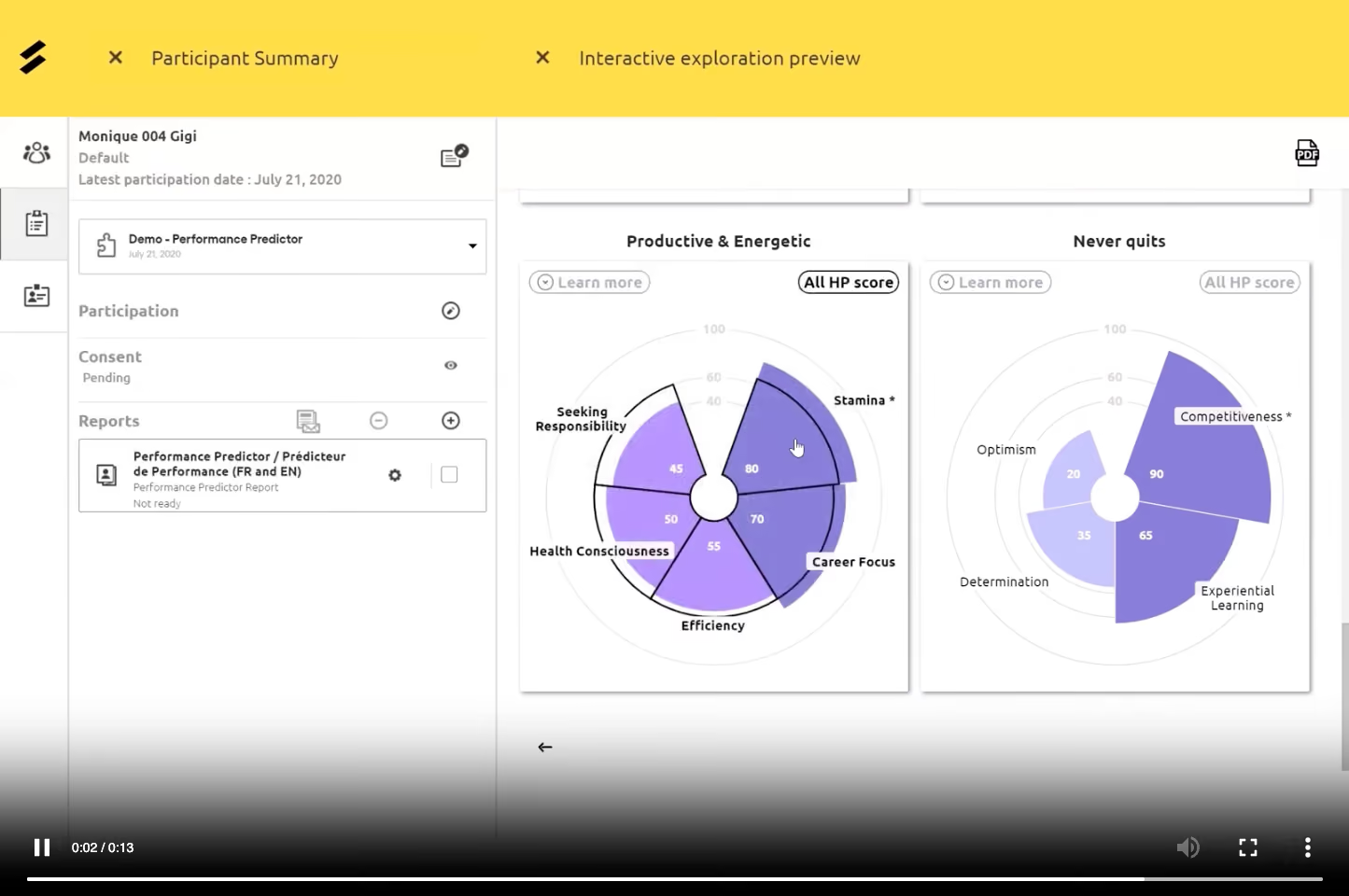
After demoing SuccessFinder and speaking directly with their team, it was clear this is not just another personality assessment codified into a candidate screening tool. Instead of sorting users into fixed types or generic buckets, SuccessFinder identifies and quantifies a person’s "behavioral DNA" — measuring 85 individual traits and organizing them into 26 business-relevant competencies.
The depth is immediately evident. A single assessment can generate over a million unique behavioral profiles. These results are not only highly granular but role-specific, which means HR teams can compare candidates (or employees) to success benchmarks built from top performers in their own organization. SuccessFinder's scientists help clients build these custom profiles using applied research, not AI short-cuts.
One of the most compelling features we tested was the Ladder of Leadership, a model derived from research on 1,000+ high-performing leaders. It maps individuals against behavioral requirements for different levels of management, from first-time managers to C-suite leaders. The platform flags areas of strength and risk, helping leaders and their teams visualize the behavioral shifts needed for advancement.
Another standout is the predictive role fit feature. It estimates how someone might perform in alternative roles, enabling strategic internal mobility or lateral moves backed by psychometric data. The insights are accessible through an intuitive interface, with dashboards and toolkits for both HR professionals and individuals.
For scalability, we liked the SuccessFinder To Go (SFTG) tool, which distills key findings and coaching tips into a self-serve format for large-scale deployment. This empowers employees to drive their own development without requiring a live debrief.
The platform integrates well with broader HR tech stacks via open API, allowing organizations to connect assessment data with learning journeys or performance systems.
However, HR leaders should be aware that full interpretation of SuccessFinder results requires certification, which costs $575 and takes 8-10 hours to complete. While that ensures high fidelity in use, it does create an access barrier for smaller teams. Also, pricing is custom and on the premium end, with a typical cost of around $500 per user.
Overall, SuccessFinder is a premium behavioral assessment platform designed for companies that want to go beyond surface-level evaluation and invest in scientifically grounded, scalable talent insights.
Gallagher, TD Bank, CAE, Beneva, BRP, Magna International, Alaska Airlines, LG
SuccessFinder pricing is custom and typically starts at around $500 per user, with an average annual contract value between $40,000 and $50,000.
- Certification for full access: $575 per seat
- Free trial is available post-demo
Best For
SuccessFinder is best for enterprise and large mid-sized companies that prioritize leadership development, internal mobility, and role-specific talent insights built on psychometric science.

Infor Talent Science
Infor Talent Science is a behavioral assessment platform backed by Ph.D.-level I/O psychology and over 25 years of predictive hiring data. Unlike skills-testing tools, it measures behavioral fit rather than technical ability, making it a strong pick for large organizations hiring at volume who want science-backed candidate screening with hands-on psychologist support.
PROS
- Dedicated I/O psychologists build and maintain role-specific performance profiles tailored to each client organization.
- Unlimited assessments included with headcount-based pricing; no per-assessment charges regardless of candidate volume.
- Integrates with major ATS’ (iCIMS, Workday, Greenhouse, SmartRecruiters) with SSO access to reports.
- One assessment scores candidates against multiple role profiles, enabling internal mobility and career pathing without re-testing.
- Employee development, onboarding guides, and team-building modules extend value well beyond initial candidate screening.
- Dedicated I/O psychologists build and maintain role-specific performance profiles tailored to each client organization.
- Unlimited assessments included with headcount-based pricing; no per-assessment charges regardless of candidate volume.
- Integrates with major ATS’ (iCIMS, Workday, Greenhouse, SmartRecruiters) with SSO access to reports.
- One assessment scores candidates against multiple role profiles, enabling internal mobility and career pathing without re-testing.
- Employee development, onboarding guides, and team-building modules extend value well beyond initial candidate screening.
CONS
- 500 employees required, ruling out small and mid-sized businesses entirely.
- Custom profiles require adequate data collection, so niche or low-headcount roles may rely on less precise standard profiles.
- The assessment can add a step to the application process, which may affect completion rates in some hiring environments.
- Behavioral assessment only; no skills testing or technical evaluation. Buyers who need both will need a second tool.
- No public pricing; quotes are based on deployment scope, profiles, and business objectives
- 500 employees required, ruling out small and mid-sized businesses entirely.
- Custom profiles require adequate data collection, so niche or low-headcount roles may rely on less precise standard profiles.
- The assessment can add a step to the application process, which may affect completion rates in some hiring environments.
- Behavioral assessment only; no skills testing or technical evaluation. Buyers who need both will need a second tool.
- No public pricing; quotes are based on deployment scope, profiles, and business objectives
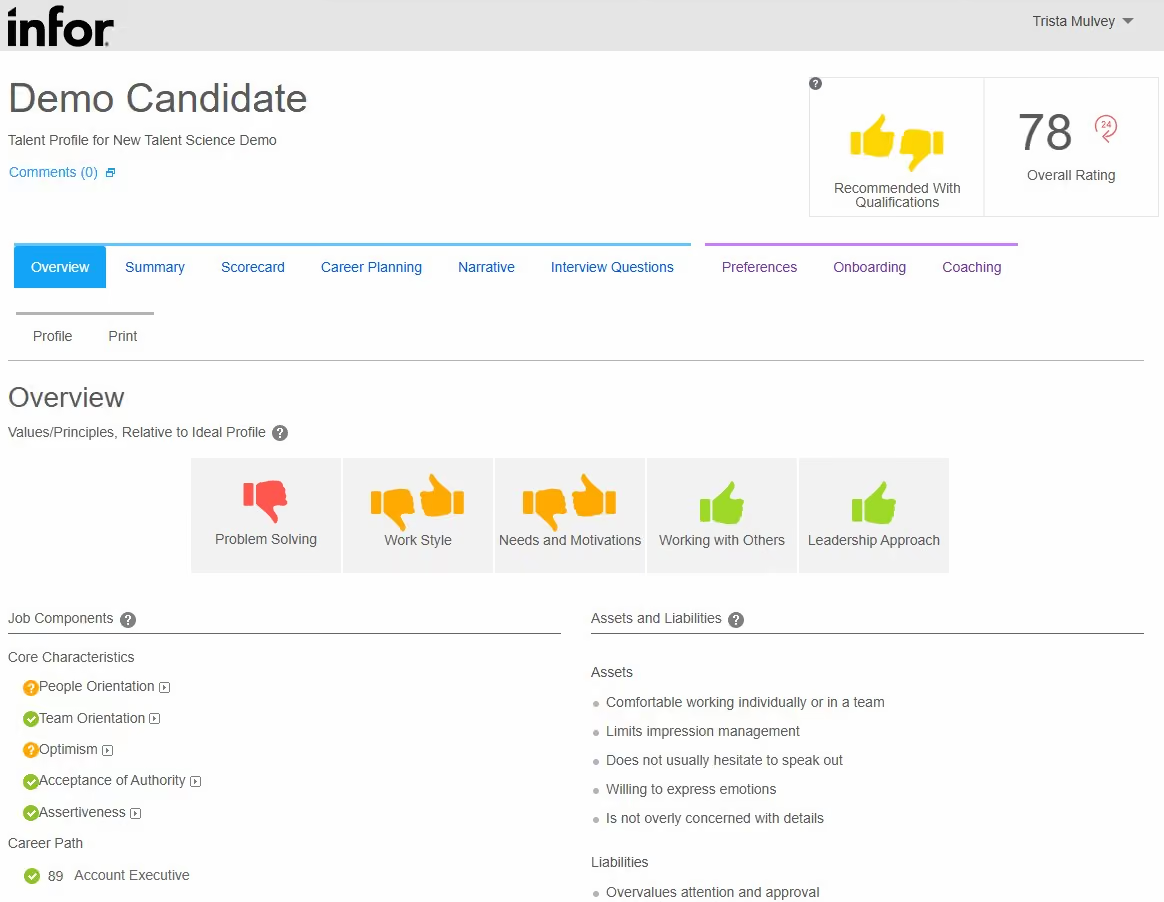
Infor Talent Science, formerly PeopleAnswers (founded 2001, acquired by Infor in 2014), is one of the longest-running behavioral assessment platforms on the market. It operates as a standalone product; no other Infor software is required.
During a recent demo, we saw the platform integrate into an ATS so candidates complete the assessment during the application flow and results feed straight into the hiring manager’s system. Each candidate gets a behavioral fit score across four recommendation categories, a scorecard of 26 weighted characteristics, and auto-generated interview questions probing where they deviate from the ideal profile.
Another thing that sets Infor apart here is human expertise. Ph.D.-level I/O psychologists work with each client to build custom performance profiles defining what success looks like for a specific role at a specific organization. These profiles follow patented data analysis, so the tool shows the most positive results in high-headcount roles (nurses, warehouse staff, retail associates). One healthcare client, for example, used the career pathing feature to fill clinical vacancies by identifying behavioral fits among their nutritional services staff.
An important distinction: Talent Science measures behavioral fit, not technical skills. It predicts will-do (personality, motivation, cultural alignment) rather than can-do (coding, domain knowledge). If you need skills testing, this is not the tool. If you want to predict whether a candidate will stay and perform based on behavioral data, it is purpose-built for that.
Infor Talent Science did not disclose its total customer count but they did share that over ¼ billion assessments have been completed on their platform. Johnson Financial Group, Gables Residential, and Fairview Health are currently named clients with published case studies.
Infor Talent Science uses custom pricing based on organizational headcount and the number of position profiles. Assessments are unlimited; there is no per-assessment charge. Ph.D.-level I/O psychologist support is included in every license at no extra cost. Pricing is customized to address unique customer focus, from enterprise to targeted departments. Contact Infor directly for a quote.
Recent updates include new employee-facing development tools like the Personal Career Coach module, an improved assessment experience with richer post-assessment feedback, and expanded coaching content for managers. The product is now organized into Select (hiring), Coach (development), and Grow (mobility) modules. The team is also working on UX modernization and shorter assessment completion times in response to user feedback.
Best For
Infor Talent Science is best suited for large organizations (500+ employees) with high-volume hiring needs, particularly in healthcare, retail, hospitality, and manufacturing.
Canditech
Canditech stood out to us because its assessments feel much closer to the actual work candidates would be doing on the job. Combined with PhD-backed psychometric expertise, 500+ assessment sections, and extensive customization, this approach provides a practical way to evaluate candidates’ actual performance.
PROS
- PhD-backed psychometric expertise supports scientifically rigorous, work-sample-based assessments.
- 500+ assessment sections cover technical, soft, cognitive, and AI skills.
- Highly customizable questions, scoring, branding, timing, language, and difficulty.
- AI assessment builder can create role-specific assessments from job requirements.
- WCAG 2.2 compliance and accessibility features support a more inclusive candidate experience.
- 40+ ATS integrations support two-way assessment and candidate data flows.
- PhD-backed psychometric expertise supports scientifically rigorous, work-sample-based assessments.
- 500+ assessment sections cover technical, soft, cognitive, and AI skills.
- Highly customizable questions, scoring, branding, timing, language, and difficulty.
- AI assessment builder can create role-specific assessments from job requirements.
- WCAG 2.2 compliance and accessibility features support a more inclusive candidate experience.
- 40+ ATS integrations support two-way assessment and candidate data flows.
CONS
- Not designed as a dedicated deep-dive coding assessment platform.
- Live coding functionality was still in progress based on our review materials.
- An open API is not documented in the materials we reviewed.
- No documented background check, payroll, or scheduling integrations.
- ATS integrations are not available on the Team plan.
- Not designed as a dedicated deep-dive coding assessment platform.
- Live coding functionality was still in progress based on our review materials.
- An open API is not documented in the materials we reviewed.
- No documented background check, payroll, or scheduling integrations.
- ATS integrations are not available on the Team plan.
Canditech’s biggest strength is its ability to place candidates in situations that resemble the work they'll be doing. We liked this approach because it gives candidates a chance to demonstrate their abilities rather than simply telling the hiring team what they know.
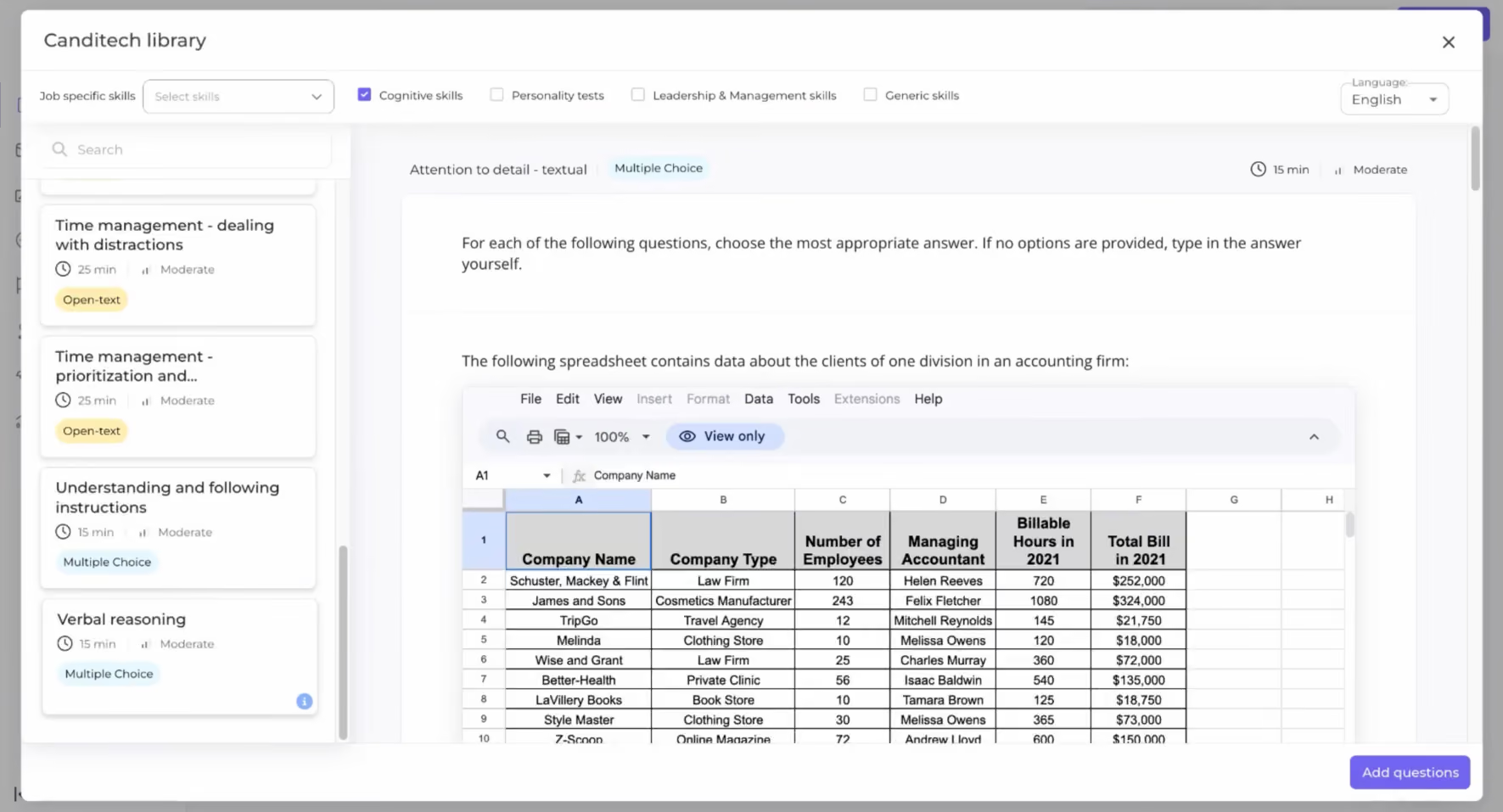
During our demo, we saw how hiring teams can build these simulations using videos, images, links, screenshots, and datasets. For example, you could ask a candidate for an Excel-heavy role to complete a spreadsheet task, have someone applying for a data position work with a SQL dataset, or give a candidate a workplace scenario and see how they respond. They can feel much more like a preview of the job itself.
The platform gives hiring teams strong control over how assessments are designed. Canditech has over 500 assessment sections covering technical skills, soft skills, cognitive ability, reasoning, situational judgment, and AI proficiency. Questions, scoring weights, time limits, difficulty, language, and branding are customizable. Plus, there's an AI Assessment Builder you can use to generate assessments from given job descriptions to save time.
We also found the user experience well thought out. Candidates receive clear instructions and progress updates throughout the assessment, while employers can customize the branding and messaging to make the experience feel more aligned with their company. The platform also keeps assessment management relatively simple. Assessments provide overall and section-level scores, percentile rankings, scoring distributions, and proctoring information. AI agents can score open-text and video responses using customized criteria while hiring teams retain full control to override results as needed, which we appreciated.
Canditech integrates with more than 40 ATSs, which makes it easier to add assessments to an existing recruiting workflow. However, we should warn you that these aren't available on the lowest-tier plan. We also think the API experience could be more convenient, since teams need to contact support for API access rather than getting everything directly through a self-service developer portal.
Monday, Quora, Payoneer, EY, Wix, fiverr.
When billed annually, the Team plan starts at $75 per month, and the Pro plan is $100 per month. Enterprise options and a free trial are also available.
Best For
Organizations that want customizable, job-realistic assessments across technical, soft-skill, cognitive, and AI-related capabilities.

Vervoe
Vervoe is much more than a simple pre-employment assessment tool. Not only does it let you assess the skills of potential candidates, but it can even predict their on-the-job performance using advanced AI algorithms.
PROS
- A long, 3-month free trial is available.
- AI-driven job performance prediction.
- API access is available to customers who need it.
- Vervoe can be integrated with online job boards, ATS programs, student portals, chatbots, and more.
- All pricing plans include access to a content library with hundreds of usable assessment templates.
- Individual candidate report cards make it easy to find qualified applicants.
CONS
- Their standard plan only includes one assessment.
- Premium and advanced features are only available with their custom pricing tiers.
- There isn’t currently a two-way video interview functionality.
- No way to manage questions after saving them in the question bank.
- A few users mention the inaccuracy of Vervoe’s AI grading system.
- Monthly billing is not available.

Vervoe uses advanced AI algorithms to predict a candidate’s on-the-job performance based on various behavioral and situational skills assessments. Their AI-powered solution then automatically grades candidates and ranks them according to relevant job skills.
To reduce cheating, Vervoe has a few mechanisms in place including a question randomization feature that automatically rotates assessment questions so candidates always see a different order, plagiarism detection that flags suspicious similarity between the answers of two or more candidates, and a geolocation detector that notifies you if a candidate appears to be completing an assessment from multiple locations. The team at Vervoe is also currently working on a ChatGBT content detector that catches AI-generated answers, which is neat and very necessary today.
Vervoe is championed by companies like Walmart, Australia Post, FDM, TriNet, OmnicomGroup, and several more.
Vervoe offers a 7 day free option priced at 0, then pay as you go pricing that scales by candidate volume. Packages include 300 for 10 candidates, 450 for 30 candidates, 600 for 50 candidates, 1100 for 100 candidates, 5000 for 500 candidates, and 9000 for 1000 candidates. Custom pricing is also available.
Vervoe has expanded its functionality over the years to include a range of behavioral and situational skills assessments supporting different content formats (docs, spreadsheets, coding, video, audio, etc). They’re also constantly improving existing features such as their AI-grading which they first launched in 2018, and adding on more third-party integration options, especially with applicant tracking systems and background check providers.
Best For
Vervoe is best suited for medium and large organizations looking to quickly narrow down a large pool of prospective new employees.
TestGorilla
TestGorilla’s Pre-employment assessment platform is user-friendly, and easy to implement with over 230 scientifically validated tests. Some tests are even available in languages other than English, including Dutch, German, Spanish, and French.
PROS
- TestGorilla features a friendly UI that’s easy to navigate. The platform is also fairly easy to implement and anyone is able to create an account for free to test it out.
- Candidates don’t need accounts to take your test. They can access the test from the email invitation you send them.
- While TestGorilla’s full test library is only available in English, over 40 of their tests are now offered in other languages, including Dutch, German, Spanish, and French.
- TestGorilla features a friendly UI that’s easy to navigate. The platform is also fairly easy to implement and anyone is able to create an account for free to test it out.
- Candidates don’t need accounts to take your test. They can access the test from the email invitation you send them.
- While TestGorilla’s full test library is only available in English, over 40 of their tests are now offered in other languages, including Dutch, German, Spanish, and French.
CONS
- Users cannot view the question bank in full or choose the questions that go into tests. A proprietary algorithm does that instead, to ensure that TestGorilla’s stored questions are used at an equal rate by users. when a question is used too many times, it is archived and replaced by a new question.
- Candidates cannot directly communicate with the employer through the platform.
- Users cannot view the question bank in full or choose the questions that go into tests. A proprietary algorithm does that instead, to ensure that TestGorilla’s stored questions are used at an equal rate by users. when a question is used too many times, it is archived and replaced by a new question.
- Candidates cannot directly communicate with the employer through the platform.

TestGorilla’s pre-employment assessment platform allows you to hire qualified candidates with tests that ascertain their cognitive abilities, language proficiency, personality and culture fitness, role-specific skills, situational judgment and more.
Candidates don’t need to create accounts to access your tests; they can do so from the email invite you send them after identifying themselves by name and relevant email address. Once candidates complete your test, TestGorilla will automatically grade and rank them, and display the results for your viewing in a single screen.
TestGorilla is used by over 5800 companies, including H&M, Majorel, Bain & Company, and Oracle.
TestGorilla offers a free plan that includes 5 essential skills tests and 5 custom questions per assessment. Its paid Core plan is billed annually and starts at 135 per month for 459 credits per year, with higher tiers at 215 per month for 750 credits per year, 280 per month for 1000 credits per year, and 400 per month for 1500 credits per year. Custom pricing is also available.
Business: Designed for businesses with high-volume hiring needs, this plan costs $2,000 per month for 125 assessment credits, and $95 per additional assessment.
Best For
Companies of all sizes can find benefit is TestGorilla’s offering, but it is best suited for medium and large companies looking to vet a substantial number of candidates for a variety of skills.

I use TestGorilla as the very first step in our hiring funnel, right after the initial application. My primary workflow involves picking 3 to 5 specific tests, usually one technical skill, one cognitive ability test, and one personality test, and sending them out to every qualified applicant.
I check the dashboard daily to see the real-time candidate rankings, which allows me to instantly see who the top-tier performers are based on their average score. We also use the one-way video interview feature for the final question of each assessment, which lets us see the candidate's communication style before we ever hop on a live Zoom call.
It's become such a central part of our process that we don't even look at a resume until we've seen their TestGorilla results.
The library for tests is incredibly large and diverse, allowing us to test for niche skills like "UX Design" or "Critical Thinking" just as easily as we test for Java or SQL.
The candidate experience is very clean and professional; unlike some older tools, TestGorilla doesn't feel like a stressful "exam," which helps keep our candidate drop-off rate low.
The automated ranking and analytics are top-notch, providing a "Skills-First" view of the applicant pool that completely removes the unconscious bias that comes from looking at names and universities.
We bought TestGorilla because we were tired of the "technical tunnel vision" we got from other platforms that only tested coding. We had a string of hires who were brilliant at algorithms but had zero soft skills or cultural alignment, which led to high turnover.
The main pain point was the inability to test for a well-rounded candidate (coding + personality + cognitive ability) in a single sitting. I've used the tool for about two years now.
The key benefit is their massive library of 400+ pre-built tests that cover everything from Python to Critical Thinking and even Culture Add, which has saved our hiring managers dozens of hours of interview time.
While the library is huge, the customization options for individual questions within those tests are a bit limited compared to "build-your-own" platforms.
The time limits on certain cognitive tests can be extremely tight, which sometimes stresses out great candidates who just happen to be slower test-takers.
The integration with smaller ATS platforms could be more robust; while TestGorilla covers the big ones like Greenhouse, the setup for more niche recruitment tools can still feel a bit manual.
vs. HackerRank: HackerRank is a "technical gauntlet" for devs. TestGorilla is a talent screen for everyone. It's just as good at hiring a Marketing Manager as it is a Full-Stack Engineer.
vs. CodeSignal: CodeSignal focuses on high-end, proctored coding scores. TestGorilla focuses on the "whole person," giving you a 360-degree view that includes personality and motivation, not just syntax knowledge.
You need to consider the breadth of roles you hire for; if you only hire engineers, go with a dedicated coding tool, but if you hire across departments, TestGorilla's library is unbeatable. Also, look at the anti-cheating philosophy, as TestGorilla uses proctoring and "Trust Scores" to monitor for things like tab-switching and AI usage, which is essential in 2026.
My advice is to prioritize candidate experience; a tool that takes 3 hours to finish will scare off your best talent, so look for a platform that allows you to build high-signal tests that take 45 minutes or less.
In the last year, TestGorilla has completely leaned into the "AI Era" of hiring. Their biggest evolution is the AI Fluency Framework, which now allows you to test how well a candidate actually uses AI tools like ChatGPT or Copilot to solve problems, rather than just trying to ban them.
TestGorilla is perfect for Small-to-Medium Businesses (SMBs) and fast-growing startups that don't have a massive HR team but still want to make "data-driven" hiring decisions.
TestGorilla is not a great fit for hyper-specialized R&D labs or academic institutions that need to write their own complex, multi-hour proprietary exams from scratch. It's also not ideal for micro-businesses that only hire once every two years, as even the "Core" plan might feel like an unnecessary overhead.

HackerRank
HackerRank is one of the largest tech assessment platforms out there with customers such as AirBnB, DropBox and more.
PROS
- HackerRank has transparent pricing. They also offer a free 14-day trial with an easy sign-up process.
- HackerRank’s community has over 18 million Developers, with 40% of them already assessed.
- HackerRank for Work currently supports over 40 different programming languages.
- HackerRank has transparent pricing. They also offer a free 14-day trial with an easy sign-up process.
- HackerRank’s community has over 18 million Developers, with 40% of them already assessed.
- HackerRank for Work currently supports over 40 different programming languages.
CONS
- Third-party integrations are limited at this time, and only Enterprise customers are given access to pre-built integrations and HackerRank’s API.
- The platform is currently only available in English.
- Third-party integrations are limited at this time, and only Enterprise customers are given access to pre-built integrations and HackerRank’s API.
- The platform is currently only available in English.

The HackerRank Developer Skills Platform can boost your recruitment plan through each step of the candidate's journey. Their solution is used not only to assess tech skills, but to plan recruitment processes, source candidates, automate screening, interview people remotely, and rank the bes talent for each position.
HackerRank has over 2800 customers, including brands like Cisco, Twitter, Bloomberg, and VMware.
Aside from its free trial, HackerRank offers multiple paid plans. On annual billing:
- The Starter plan is priced at 165 per month, with 1990 billed annually, includes 1 user, and covers 120 attempts per year, with 20 per additional attempt.
- The Pro plan is priced at 375 per month, billed annually, and includes unlimited users, with 300 attempts per year at 20 per additional attempt.
Custom pricing is also available.
Best For
In their words, HackerRank is "enterprise-ready for effortless scaling". This means it's used both by fast-growing startups and large companies.

After screening the candidates, I usually ask them to complete the HackerRank assessment, so I am pretty much exposed to using this every day. Based on the languages the Software Engineers are using, I will be able to identify which language they used in order to send the correct assessment. Finally, after they're done with the assessments, they will get back to me with the results on whether they passed or failed.
First, HackerRank is very easy to use and understand even when I used it the first time. Second, I like that I can easily create new codes/tests. Finally, I can easily reach out to anyone from the team should I have any requests or inquiries.
We used HackerRank for more than 5 years. We bought it in order to gauge the expertise of the Software Engineers that we are hiring. Also, we want to be able to expand and develop tests while hiring people for the said position. Before buying HackerRank, we had to do manual testing or come up with software tests that made the hiring quite impossible to proceed to the next steps, but HackerRank made it easier. It streamlined the processes and we're hiring way faster and quicker than usual along with the quality candidates.
I have never encountered any dislikes with it so far. Though, I have always wanted them to come up with Software Tests for Flutter Developers. They got back to me quickly about it and mentioned that they might come up with something soon.
They have to think about the type of Software Tests they want for their candidates. Second, they need to think if the team has the programming language they need to come up with the right assessment. Lastly, they need to consider the budget. If they want an easy to use software tool, this is what they should use.
They normally take the users' requests quickly and even take the feedbacks to improve the process. That's what I like about them so far.
For the Software Coding Assessments and HR streamlined processes.
I’d recommend it for most teams hiring software developers.

Qualified.io
If you’re looking to vet and hire developers, Qualified is a well-regarded developer assessment tool offering customizable assessments mimicking real-world scenarios, objective evaluation methods, real-time feedback to candidates, and more.
PROS
- Assessments can be tailored to your hiring requirements.
- Choose from over 25 programming languages for assessments.
- Quickly filter out unqualified candidates.
- Try the platform for free for up to 14 days.
- Candidates get real-time feedback on their performance.
- You can create customized assessments tailored to the role you’re hiring for.
- There are over 25 programming languages to choose from for assessments.
- The initial screening process is automated, allowing you to quickly filter out unqualified candidates and focus on those with high potential to be a great fit.
- You can try the platform for free for up to 14 days. The free trial includes up to 5 assessment results, and access to many of the Team plan features.
- Candidates appreciate that the platform gives them real-time feedback and a clear understanding of their performance.
CONS
- May not be as effective at evaluating soft skills.
- Need to go through the sales team for pricing.
- No live interview functionality built-in.
- Interface is modern but busy.
- Some users found code editors to be too small.
- While Qualified.io is a great tool for evaluating technical skills, it may not be as effective at evaluating soft skills, such as communication and teamwork.
- Pricing isn’t transparent and you need to go through the sales team to get a sense of how much it’ll cost you.
- There currently isn’t a live interview functionality built-in
- The interface, though modern looking, is rather busy
- A few users found the code editors to be a little too small
Qualified’s pre-employment assessment platform was designed by developers for developers. Although it doesn’t currently support live interviews, Qualified lets you create customizable assessments, automate the screening process, give real-time feedback to candidates, and make use of several other features to narrow down the field of potential recruits. Candidates who pass your initial assessments can be invited to additional coding sessions or interviews as needed, and individual developer profiles let your team track candidate progress through the hiring process.
Large enterprises like Qualified, including Apple, Zoom, and Domino's have used Qualified.io for their coding interviews.
Custom pricing is available. Contact Qualified for more information.
The team at Qualified constantly adds new features and improves current functions in their platform. They recently added invitations for large cohorts, dozens of new challenges, filters, and smart contracts. They’ve also implemented real-time pair programming for project challenges, expanded SmartIDE, improved the Interact experience for code challenges, invitation handling, dynamic Qualified scoring, the Challenge Preview layout, and more.
Best For
Qualified is ideal for hiring managers who want to challenge their candidates with various coding and developer assessments. It’s also well-suited for those who want a solution that will integrate with their current HR software.

CodeSignal
CodeSignal is a candidate assessment tool for engineers and developers. As a platform, it also features remote interviews and certified assessments.
PROS
- Supports over 70 programming languages.
- ‘Flight simulator’ for real-world skills assessment.
- Friendly UI with auto-complete feature.
- Replays candidate keystrokes.
- CodeSignal allows companies to create tasks in over 70s languages and install any package or framework.
- To assess real-world skills, in a real-world developing environment, CodeSignal packs a proprietary “flight simulator” solution that lets candidates work on a full-stack application, complete with databases, APIs, and frontend layers.
- The platform features a friendly and well-thought-out UI for hiring teams and developers. Developers have particularly praised the auto-complete feature in the IDE.
- CodeSignal lets you replay every keystroke made by a given candidate during a test or interview. This can be shared with the entire hiring team if need be.
CONS
- Pricing not publicly listed.
- No discussion forum or community.
- Only available in English.
- CodeSignal doesn’t publicly list their pricing. You’ll need to contact their sales team to get a price estimate.
- Several developers complained about CodeSignal’s lack of a discussion forum or community to connect with one another and share knowledge.
- The platform is currently only available in English.
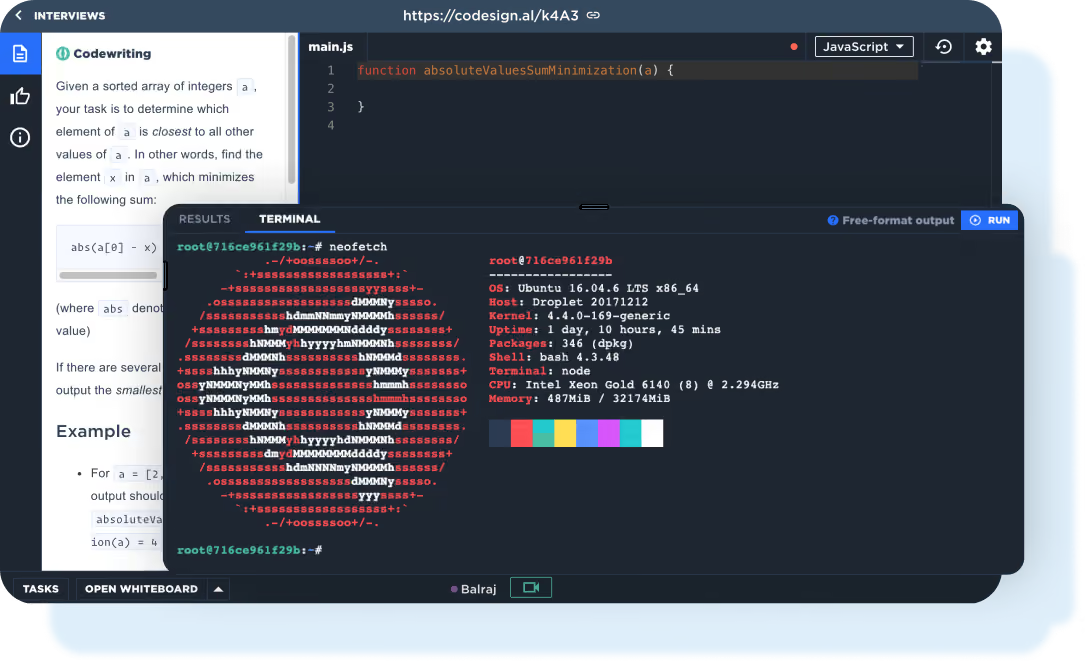
CodeSignal’s team wants us to go beyond the resume when we vet engineers - which is definitely a great idea given all the signal we can get from understanding the skills and aptitude a given applicant has.
CodeSignal is a hiring platform used by companies like Roblox, Zoom, and Zoom to assess the coding skills of their candidates. The majority of them are large teams (1,000-5,000 employees).
CodeSignal offers custom pricing based on your needs.
Best For
CodeSignal is made for companies, mainly enterprise level, that need to hire many engineers, developers, and test for coding skills on a frequent basis.
We used CodeSignal for software engineer interviews. This came in two forms: live-coding sessions and take-home assessments. The live-coding sessions were 1-2 hours long. The take-home assessment was timed and took around an hour. We were doing around five live sessions and 10+ take-home assessments a week. The results then fed into our Greenhouse instance beautifully.
- The product was easy and straightforward to use - our candidates and interviewers all liked the functionality that it offered
- The sales team wasn't pushy - Unlike other similar solutions, the in-house sales team at CodeSignal was friendly and authentic. They really treated us like a big enterprise client. Additionally their pricing model made sense.
- The UI - It was clear and understandable. They chose colors that made it visually easy to use.
As a small company with a SaaS security product we needed the ability to conduct coding tests with engineering candidates. We evaluated and used several other similar tools but really liked CodeSignal for a multitude of reasons. They had a fantastic pricing model, integrated nicely with our ATS (Greenhouse), and candidate/interviewers liked it.
No complaints :)
CodeSignal differentiates itself in their approach and flexibility. It genuinely felt like CodeSignal listened to their customer base when they made changes. Additionally, CodeSignal’s deal structure was more flexible and permitted growth compared to some of the other competitors.
- How many users will you need and what permission level do you want them to have?
- What is your current interview volume?
- Will this improve your candidate/interviewer experience?
Technical recruiting/TA
Companies that don’t often hire tech talent

Radancy
Radancy is where video interviews meet AI sourcing and bias-free assessments. It can set you up with a queue of custom-picked candidates to watch while the algorithms scan every video to reveal the best matches for each job. Further, each video is analyzed for things like soft skills, personality traits, and more.
PROS
- Screening feature identifies suitable candidates based on skills and personality.
- AI-power features for video transcriptions and analysis.
- Comments and sharing features for better collaboration.
- Instant candidate ratings enable data-based decision-making.
- Creates a branded, customized interview process.
- Ensures fairness in evaluations with consistent access to candidate information.
- Has a free plan.
- Their customer support is great, especially the chat support. When it comes to creating online events, their team would give you a step-by-step walkthrough of the entire process. Every month, their team arranges a monthly call between their customers and their appointed account representative to make sure everything is working fine. Their response time for customer queries is also fairly quick and you will usually hear back from them within the same day.
- Radancy makes networking easier. There are multiple networking booths for events where attendees can talk to employers via text, voice, or chat. Attendees can also easily switch between different booths.
- Before, after, and during each event, you’re provided with detailed analytics and data about signups, candidates, attendance, and other such metrics.
- Their team comes up with updates on a frequent basis and not only asks for client feedback but also takes end-user feedback into mind when rolling out new features.
CONS
- Lacks some customization options, like modifying email templates.
- No mobile app currently available for hiring managers or candidates.
- The free forever plan is limited to one active job post at a time.
- Customizations are limited. For instance, emails for the events are system automated and that can limit you from displaying your voice and brand.
- Compared to other popular video conferencing tools, Radancy’s built-in audio and video tool is not as stable and there can be occasional bugs.
- Initial setup can be a little confusing and it takes some trial and error to figure out a structure that helps you make the most out of your virtual events.
- The pricing of the platform isn’t transparent and self-signup free trials aren’t available at this time.
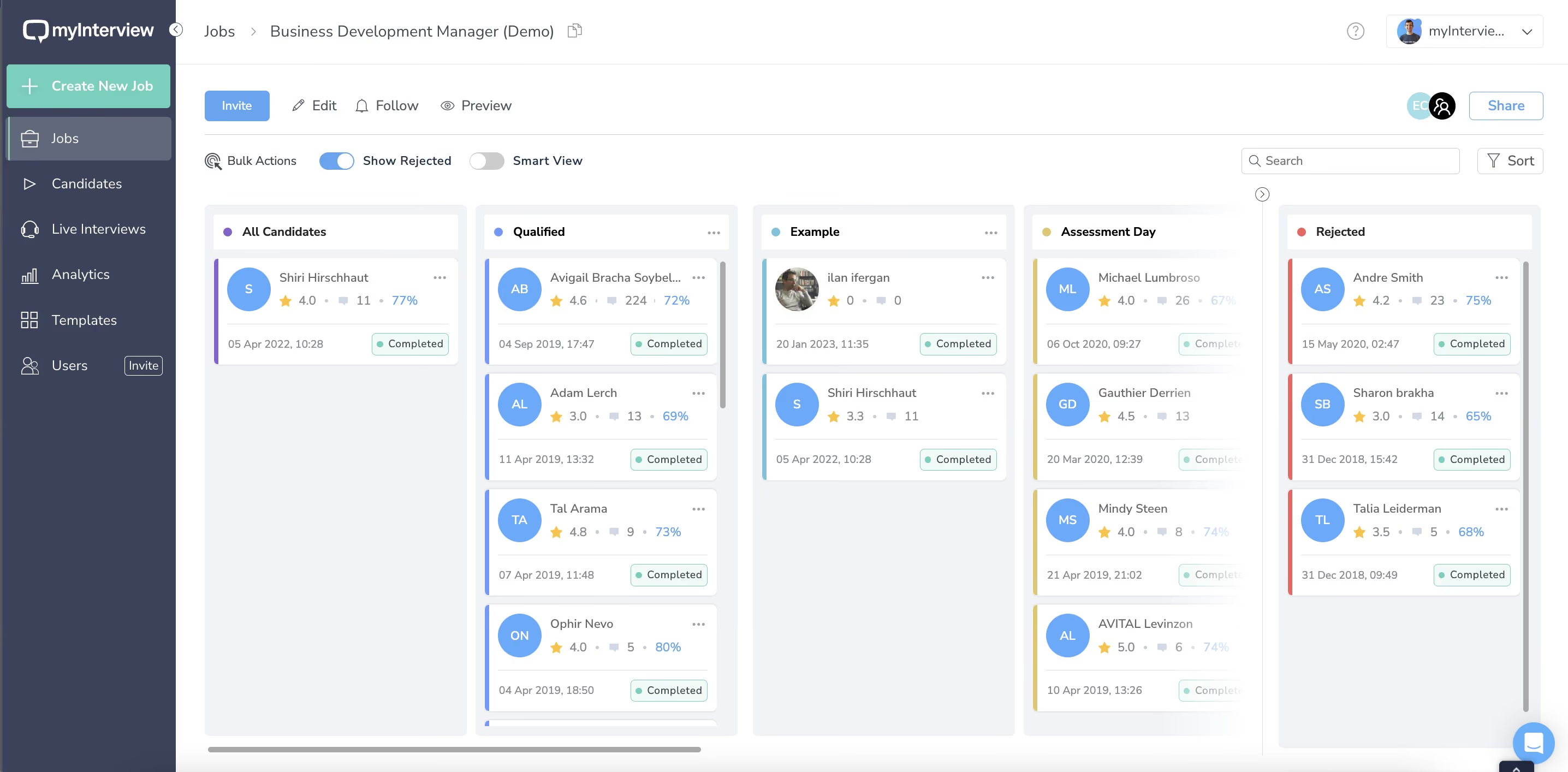
Randancy (formerly myInterview) caught our attention for its user-friendliness and for letting users filter candidates by keywords or specific industry terms. Some TA users we talked to used it during the interview assessment stage to quickly jump to the exact points where certain keywords were mentioned.
Another cool feature is video transcription. When applicants submit their interviews, the software generates transcripts with tags that recruiters can easily sort through. But the AI doesn't stop there — it also analyzes the applicants' soft skills, personality traits, and keywords. It even provides a ranking list of qualified candidates. Just keep in mind that these features are only available in the highest-priced plan.
Sharing interviews is fairly simple with myInterview. You can share them with multiple reviewers, both internally and externally, for more comprehensive evaluations. And they've even added a 15-day deadline to external share links to make sure reviewers take action on time.
Radancy is well-regarded for its customer service, which is always a plus. However, they no longer offer a free plan. Instead, they now have two pricing plans with a minimum contract length of one year. Unfortunately, there's no free trial available either.
1,000+ companies, including Billabong, Goodwill, and Chick-fil-A.
Radancy no longer offers the free plan and there isn’t a free trial either. Their pricing is custom and starts from $99 per month.
Best For
Randancy is ideal for growing teams starting with the free plan and upgrading as needed. It's particularly useful for high-volume roles like entry-level positions with numerous applicants.

We use myInterview daily as an integral part of our recruitment process. The platform is employed mainly for initial candidate screenings, enabling us to handle large volumes of applications efficiently. We design custom interview templates and questions tailored to specific job roles to ensure a consistent evaluation process. The AI-powered analysis helps us identify candidates with the right soft skills and personality traits. Additionally, we use the integration features with our HRIS to streamline data management, enhancing the overall efficiency of our hiring workflows.
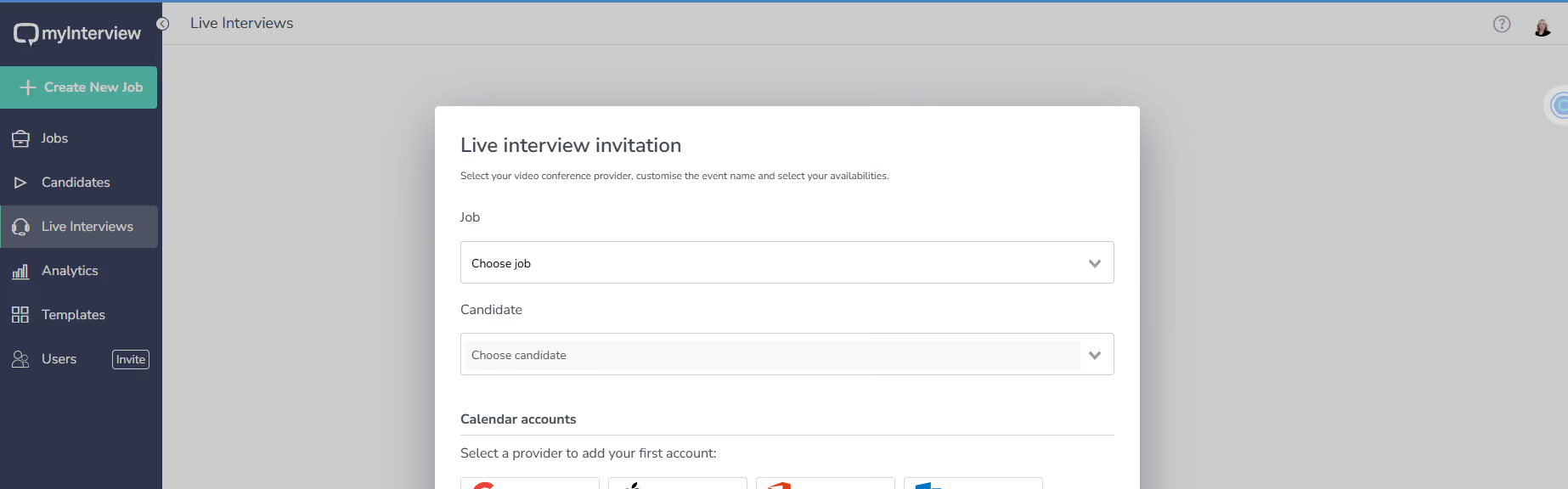
The AI-powered video screening saves our recruiters significant time by automating the initial assessment process. The platform's integration capabilities with our HRIS streamline data management and improve efficiency. Customizable interview templates and questions ensure a standardized and thorough evaluation of candidates.
To address the inefficiencies in our clients' hiring processes, especially the time-consuming nature of initial candidate screenings, we needed a solution that could handle high-volume applications efficiently while providing deeper insights into candidates' soft skills and personalities. myInterview offered AI-powered video screening, which automated much of the initial assessment, saving our recruiting team time and resources. The platform's integration capabilities with our existing HRIS were also a bonus. We have been using myInterview for approximately one year, and it has greatly improved our clients' hiring workflow.
Our recruiters have provided feedback that the AI analysis, while helpful, can sometimes miss nuances that only a human recruiter might catch.
While other tools offer broader customization and additional onboarding tools, we prefer myInterview for its robust AI-powered video screening, which provides deeper insights into our candidates' soft skills and personalities. The combination of AI analysis and seamless integration capabilities makes myInterview the preferred choice for our recruiters. This ensures a more efficient and insightful hiring process, allowing us to make informed decisions quickly.
Ensure the platform is intuitive for both recruiters and candidates to avoid deterring usage that would then slow down the hiring process. Look for tools with robust AI capabilities that provide valuable insights into candidates' soft skills and personalities, enhancing decision-making. Check if the tool integrates well with your existing HRIS and payroll systems for efficient onboarding and seamless data management.
Consider features that improve the candidate experience, such as flexible recording times and user-friendly interfaces. Ensure the tool can scale with your company's growth and offers customizable options to meet specific hiring needs.
Since we began using myInterview, the platform has continuously improved its AI algorithms, which are essential for accurate candidate analysis. Additionally, the user interface has become more intuitive, making it easier for both recruiters and candidates to navigate.
myInterview is particularly well-suited for organizations that handle high volumes of applications and need to streamline their initial screening processes. For our RPO division, it is ideal for medium to large companies with growing recruitment needs, especially those in tech-savvy industries.
myInterview may not be a good fit for small businesses with limited budgets or organizations that prefer traditional, in-person interview processes every step of the way.
Why Use Candidate Assessment Tools?
Pre-employment screening plays a key role in any successful talent strategy. You want to find candidates with the right skills who also fit in well with your company culture so they’ll succeed AND stay. You also want to understand how to best manage them so they stay motivated and are set up for success from day one. Of course, recruiting teams want to do all this in the most efficient way possible, so you can keep growing your team without wasting time or money.
Talent assessment tools are a great way to streamline your talent management and evaluation, as well as to optimize both your quality of hire and time-to-hire. In addition to the obvious use cases (like assessing skills, culture fit, and tech and cognitive abilities), there are an array of other reasons to consider adding this tool to your recruitment efforts:
- Narrow the candidate pool by focusing on skills. The right tools help you get a much better sense of high-potential candidates. When you go into any hiring process with skills in mind, you let the candidate and his or her aptitude shine — not their resume. So see which candidates have the necessary skills for a job and focus on bringing them in for interviews. You’ll save a lot of time in the process.
- Make final hiring decisions with confidence. An objective test from a talent assessment tool can provide conviction that you are making the right decision when it comes to hiring. This is similar to how SAT scores can give college admissions confidence in making the decision on an applicant. Of course, just as with the SATs, there are imperfections in the signals provided by these tools, so it is just one piece of the puzzle.
- Predict job performance and culture fit. Assessments will help you determine if someone has the right skills, but that’s not all. You can also get a sense for how a candidate is likely to fit into your organization’s culture. This is a major benefit because if they’re a good culture fit, they’re more likely to succeed in their roles and stay at the company longer.
- Prepare managers more effectively. Analyze behavioral screening results to understand how people tick — what behaviors do they generally exhibit? How do they tend to approach their work/tasks? Not just how good they are likely to be in their role, but what motivates them to actually do their best? Understanding this type of information will allow you to better prepare their managers for onboarding and beyond.
- Create diverse and higher functioning teams. By using data to focus on actual skills and fit, you’ll more objectively screen candidates and ultimately build a more diverse and successful workforce. Not only that, you’ll be able to use candidate and people data to understand how a candidate will fit into a specific team, and how that team will ultimately work together.
Common Mistakes in Buying and Using Talent Assessment Tools
The most common pitfalls and mistakes that talent acquisition teams experience while using candidate assessment tools come down to biased scoring, over-automation, and creating an assessment experience that turns good candidates away.
- Assuming the scoring is unbiased: As we mentioned, just like SAT scores correlate with household wealth, assessment algorithms can unintentionally favor certain groups and produce “false signals” that don’t reflect job aptitude. If you do implement a new solution, take a look at how candidates from different backgrounds are scoring, and be aware that you may be penalizing job seekers who’d actually be a good fit.
- Treating AI video scoring as “fully trustworthy”: AI-led video screening is increasingly common, but “common” doesn’t mean “reliable enough to trust 100%.” Video signals are noisy (lighting, audio quality, camera comfort, accent, speech patterns, neurodiversity, disability, and culture can all skew outputs), and models can still reproduce bias or misread performance. Use AI scoring as decision support, not a final verdict: spot-check results with human reviewers, score against a clear rubric, regularly audit pass-through rates across groups, and give candidates alternative formats (or a human-review path) when video isn’t the best measure of job success.
- Automation only goes so far: Hiring is a personal experience, and as you already know, as great as automation is, it’s not personal. You simply can’t make a fully confident hiring decision on data alone, so supplement the work your screening tool is doing with actual face-to-face interviews — just save those interviews for the most promising candidates.
- Buying a tool without confirming what it actually measures: Many assessments are built for specific roles (often technical) and don’t generalize well. If you’re looking for a broader range of skill sets, make sure you understand which skills, competencies, and role families the tool can validly test, and which it can’t (especially hands-on/trade skills that aren’t testable on a computer).
- Creating unnecessary friction for candidates: Long, mobile-unfriendly, or overly difficult pre-employment tests reduce completion rates and disproportionately impact candidates with less time, less access to a quiet space, or accessibility needs. Keep the flow simple: start with easier questions, make it mobile-friendly, and keep time demands reasonable.
- Skipping candidate feedback: If you don’t ask candidates how the experience felt, you’ll miss the early warning signs: confusing instructions, irrelevant questions, technical issues, or a process that damages your employer brand. Add a short feedback prompt at the end and review it regularly.
Also, it’s a good practice to use these pitfalls as a checklist during vendor demos so you can pressure-test how the tool handles fairness, scoring transparency, candidate experience, and where human judgment should stay in the loop.
Benefits of Using Talent Assessment Tools
Talent assessment tools can improve hiring outcomes while reducing the time and cost it takes to get there. In practice, the biggest benefits (and ROI drivers) show up in recruiter efficiency, faster hiring cycles, and better quality hires.
- Higher recruiter productivity: Automation reduces time spent on repetitive screening tasks and standard assessments, freeing recruiters to focus on high-value work like candidate outreach, interviews, and stakeholder alignment.
- More consistent, skills-focused screening: Statistics on recruitment have shown that diverse teams innovate and perform better. When you use a data-driven tool critically for screening, you can minimize hiring bias and focus on individuals’ skills and qualities, such as problem-solving and adaptability. The result is more diversity across gender, ethnicity, experience, and more.
- Scalable screening for high-volume roles: Talent assessment tools make it easier to evaluate larger applicant pools quickly, filter out unqualified candidates earlier, and build talent pools for future openings.
- Faster time-to-hire: When you can more quickly screen more people, you can more quickly find promising candidates and begin the interview process with them.
- Stronger hiring outcomes: With the help of a top candidate assessment tool, you are more likely to find the best talent and hire someone who is right for the job and your company — all of which leads to higher performing teams and a more successful organization.
Candidate Assessment Tool Pricing
For basic skills testing, pricing is often free to a few hundred per month, or under 5000 per year on annual plans. For enterprise talent assessment platforms, pricing is typically custom, typically starting around 40,000 to 50,000 per year, with some vendors priced much higher per month.
- Lower cost tools for basic skills testing: These are typically free or a few hundred per month, often staying under 5000 per year on annual plans. Examples include CoderPad at 80 per month and 400 per month, TestGorilla at 135 per month up to 400 per month, HackerRank at 165 per month and 375 per month, and Radancy starting from 99 per month.
- Usage-based pricing for flexible hiring volume: If you prefer to pay based on how many candidates you assess, costs can start in the low hundreds and scale with volume. Vervoe is a clear example, with pricing from 300 for 10 candidates up to 9000 for 1000 candidates.
- Enterprise platforms with custom contracts: For larger organizations or more complex assessment programs, pricing is usually custom and often starts around 40000 to 50000 per year. SuccessFinder fits this range, and HireVue is positioned at the high end with pricing starting from 35000 per month.
Candidate Assessment Tool Features
Key features of best talent assessment tools include video interviews, coding assessments, skills tests, cognitive screening, psychographic evaluations, ATS integrations, and reporting.
- Video interviews: In-person interviews are great, but there simply isn’t enough time to meet with every candidate face-to-face at the screening phase. Conducting video interviews can save you a lot of time. Not only that, you’ll get a sense for how candidates communicate by watching recorded video responses to your screening questions. We have an entire page dedicated to the best video interview platforms.
- Coding assessments: Test candidates’ coding abilities and overall technical skills to see if they’re even qualified for an in-person interview. You can give everything from pre-screens to full-scale coding projects that mirror the work they’d be doing as an employee.
- Skills assessments: Test job-specific skills, general work skills, and/or soft skills to get a sense for how a candidate might perform in the role. The skills tests you administer could include text, multiple choice or video questions, document editing, code editing, and more.
- Cognitive screening: Assess how someone thinks, problem-solves, and learns new things. Using this information can help you understand how to manage them and prepare them for success in their new role.
- Psychographic screening: Understand a candidate’s personality traits, including their values and interests. This can help you determine how they’ll fit into a specific team as well as your company’s overall culture.
- Employer branding: In addition to using your company branding (like logo, messaging, and voice), you can infuse your employer branding as well throughout your assessments. That means inserting information about what it’s like to work at your company and why a candidate should want to work there. This is especially important because candidates are likely applying to other companies, so you want yours to stand out.
- ATS integration: Sync your applicant tracking system with your candidate assessment tool to more seamlessly run your recruiting, screening, and hiring efforts.
- Library of potential questions: If you need help coming up with individual questions or full skills assessments, you can pull from a library of content and then customize that content as you see fit. Or, if you already have your testing content created, you can just use that.
- Structured candidate screening: Eliminate unconscious bias around gender, ethnicity, credentials, education, etc., and focus instead on someone’s actual skills. When you make fair and objective hiring decisions, your organization is better primed for success.
- Talent pools: If you’ve screened a candidate who scored well for culture fit and soft skills but didn’t have the technical skill set required for the role they wanted, keep them in a talent pool until a better-suited position opens up for them.
- AI-powered candidate ranking: Many tools grade and stack-rank your candidates based on their results so you can evaluate them more efficiently and be confident that you’re only focusing on the best.
- Reporting and insights: Get data on which candidate sourcing methods perform better than others, understand completion rates and times, then make any necessary adjustments accordingly.
- NPS/feedback surveys to candidates: Get direct feedback from your candidates on how your interview/screening process is, to better understand where you might need to make improvements.
Demo Questions for Employee Assessment Tools
Demos are very important as you do your own assessment of these candidate screening tools. To make sure you get the most out of your demos, prepare a list of questions specific to your screening and hiring needs, the use-cases that matter most to you, and how your overall HR tech stack might be affected. And be upfront about what you want to get out of the demo so the person on the other end doesn’t waste your (or their own) time.
So what questions should you ask? Generally speaking, you should always be thinking about the following questions when you’re considering any new software program:
- How will this solution fit into the rest of my tech stack? What integrations do I need?
- How will others in the organization use this solution?
- What are the key features I want to ask about?
- What are the things that would make me nervous about buying this sort of solution?
- How does pricing work?
- What implementation guidelines do they suggest?
For candidate assessment tools specifically, here are some questions to cover:
- What ATSs do you integrate with? How long does this take?
- How do I build new screens?
- What are your best practices for screens for my type of roles?
- How are candidate responses reviewed?
- What employer branding can I put into this process?
- What percent of candidates accept the screen? Does that differ by role or source of candidate?
- What is your candidate NPS?
- Do you have a team that can help me map my current screening to your tool?
- What types of screens do you focus on (skills, tech, psychographic, etc.)?
Implementing Talent Assessment Tools
The vast majority of these candidate assessment tools are cloud-based, so you won’t have to manage a technical or complicated implementation process. In fact, onboarding can be pretty simple. Focusing on these three things will help you maximize success:
- Connect your ATS so that when new people apply, they are sent the right assessment
- Create assessments for key roles
- Create messaging for candidates
- Train your recruiting team on how to access and evaluate the assessments
- Create a workflow that pushes passed applicants into the next round of interviews
If you discover during your demo that your implementation might be more complicated, make sure to get a clear picture of what you’ll need from the vendor’s account management team, along with a customer reference call. This means understanding any tech requirements and, depending on the scope of the implementation, electing a project manager to run point, keep the team focused, and communicate updates regularly to key stakeholders.
Pre-Employment Assessment Software FAQs
What is pre-employment assessment?
Pre-employee assessment is the process of evaluating a candidate before hiring through skills tests, personality tests, cognitive assessments, job simulations, behavioral assessments, and video interviews.
What is a pre-employment assessment tool?
A pre-employment assessment tool is a software solution designed to customize, administer, analyze, and report different types of test results to a hiring team to make informed talent decisions.
Why use a pre-employment assessment tool?
Your company can use a talent assessment tool to gain data-driven insights into candidates for specific roles, resulting in culture fit talent and better quality of hires.
What are some benefits of using a pre-employment screening tool?
Benefits of using a pre-employment screening tool include:
- Better productivity
- Unbiased screening process
- More scalable screening
- Faster time to fill roles
- Success for whole organization
What are the different types of pre-employment assessment tools?
There are a few different types of pre-employment assessment tools, such as:
- Video interviews
- Coding assessments
- Skills assessments
- Cognitive screening
- Psychographic screening
What features do pre-employment assessments tools offer?
There are many great features that pre-employment assessment tools offer companies. You will get ATS integration, larger talent pools, AI-powered candidate ranking and predictive index, actionable insights and reporting into talent strategy and upskilling, and feedback surveys.
Candidate Assessment Software, Final Advice
Finding candidates with the right skill set who are also good culture fits ultimately leads to more organizational success and less attrition. With a candidate assessment tool, you can be more confident in your screening and hiring efforts and build a higher-performing company.
To find the right assessment tool for your needs, run an audit of your existing screening process to see what data you’re currently getting and/or prioritizing. From there, you can more easily identify which of the solutions here can take this screening work off of your recruiters’ plates and make your overall screening efforts more consistent and more efficient. At the end of the day, you want something that will make your job easier and your company more successful.
From here, it’s probably best to talk to 2-3 vendors about their solution and get a sense for how they would fit into what you are trying to accomplish with your program.
About the Author


About Us

- Our goal at SSR is to help HR and recruiting teams to find and buy the right software for their needs.
- Our site is free to use as some vendors will pay us for web traffic.
- SSR lists all companies we feel are top vendors - not just those who pay us - in our comprehensive directories full of the advice needed to make the right purchase decision for your HR team.


