

11 Best Benefits Administration Systems (2026)
The best benefits administration systems, hand-picked and field-tested by SelectSoftware Reviews' HR tech experts. See info on pricing, features, integrations, and more below.









As a benefits leader, you have the rewarding job of making your company a great place to work. After all, employee benefits packages and other perks can help you attract top talent, retain current employees, and build a culture that aligns with your values.
The downside, of course, is all the administrative work that benefit plans and benefits enrollment creates for you. Fortunately, benefits administration software can help you automate your benefits management, improve efficiency, and streamline open enrollment — all while staying compliant.
Benefits administration software serves as a one-stop-shop for all your employee benefits. With everything centralized, the setup and management is easier for you and open enrollment is easier for your employees.
The result? Employees make smarter, more informed decisions about their benefits, and you have less administrative work to manage. To help you find the right benefits management software, we put together the following guide with top software platforms, features to look out for, common mistakes to consider, pricing, and more.
We assessed dozens of benefits administration software platforms with special consideration given to the three most critical functions performed by this type of tool: integration/configuration, self-service for employees, and compliance.
We used our HR industry experience to refine the scope of our research and applied our multi-dimensional assessment process to test each contender for these quality standards.
- Integration and Configuration: First-class benefits administration software integrates smoothly with each customer’s tech stack.To test for this, our team compared the quality and quantity of integration partners against a list of common business ops tools.
Our HR tech experts also determined the most important workflow automations, and we audited each product for the ease with which a user could configure these features.
- Self-Service for Employees: Self-service features reduce the burden of data entry on your HR team, improve the accuracy of employee information, and support employee empowerment. Our expert researchers performed simulations using each tool as if they were an employee and graded each platform's performance on the ease with which they could enter and change information across different data types.
- Compliance: Legal compliance is imperative, so we scrutinized the fine print, checking for each company’s capacity to keep customers complaint. We considered the product's state-by-state adaptability, as well as its capacity to handle multi-national organizations.
We’re data nerds and love a good dashboard, so we also checked for each tool’s reporting and analytics capacity. To learn more about how we approach our work from the granular to the gigantic, read this article on how we assess HR tech vendors.


ForUsAll

ForUsAll is a great choice for small and medium-sized businesses (SMBs) because it is very quick to set up and quite affordable.
PROS
CONS
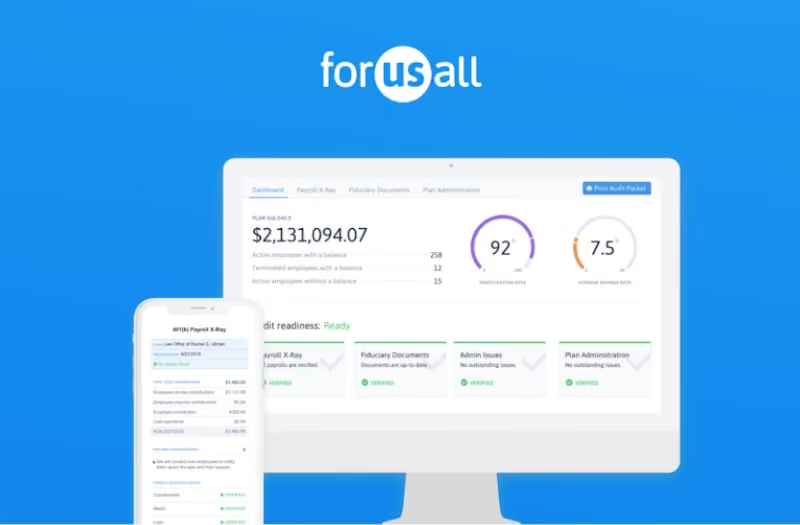
ForUsAll is a cloud-based 401(k) administration platform for small and medium-sized businesses. Acting as both your 3(38) and 3(16) fiduciary, ForUsAll ensures you stay compliant while automating manual tasks such as contributions, 401(k) loans, eligibility tracking, hardships, and notifications. You can integrate ForUsAll with most cloud-based payroll systems for an automatic synchronization of your data. Payroll integration also allows it to automatically update deferrals, notify new participants when they become eligible, and more.
CMC Properties, Lever, Arbor Lodging, Smart Biz, Bolt Threads
ForUsAll costs as follows:
- For the employer: Employers using ForUsAll pay a base monthly fee of $120 with an addition of $6 per participant per month.
- For employees: Employees pay 0.50% of assets under management annually.

Best For
.png)
Deel
Deel localizes your offerings in accordance with local guidelines so that you can stay compliant with your global workforce.
PROS
- 24/7 in-app support and an impressively fast onboarding speed of 2-3 days.
- Access to local payroll experts in various jurisdictions, and support is available for contractors navigating the process of setting themselves up as an LLC.
- Self-service approach with tech-enabled features helps workers swiftly adopt the tool.
- Worker identity verification is reported to take less than 24 hours on average, and sometimes mere minutes.
- Offers APIs as well as over 100 native HR software integrations.
- Automated invoices (English language only).
- Excellent 24/7 customer service with fast onboarding (2-3 days) and local payroll experts in each jurisdiction.
- Seamless integration with platforms like QuickBooks, BambooHR, and Greenhouse, plus custom integration options.
- User-friendly, self-service features enable quick setup; identity verification often takes under 24 hours.
- Automated invoices simplify payments, provided they're in English.
CONS
- Some of Deel’s best features, like onboarding automation, are add-ons, which can be cost-prohibitive.
- Modifying contracts or service agreements with Deel is difficult and often requires addendums for any changes.
- Each payout comes with a $5 fee.
- Invoicing feature is limited to generating invoices in English, with no option for other languages.
- Key features like onboarding automation are add-ons, which may increase costs.
- Limited flexibility in modifying contracts or service agreements; changes often require an addendum.
- Invoices cannot be generated in languages other than English.
If your benefits-management needs feel complex due to the presence of team members in different geographies, Deel Benefits is worth looking into.
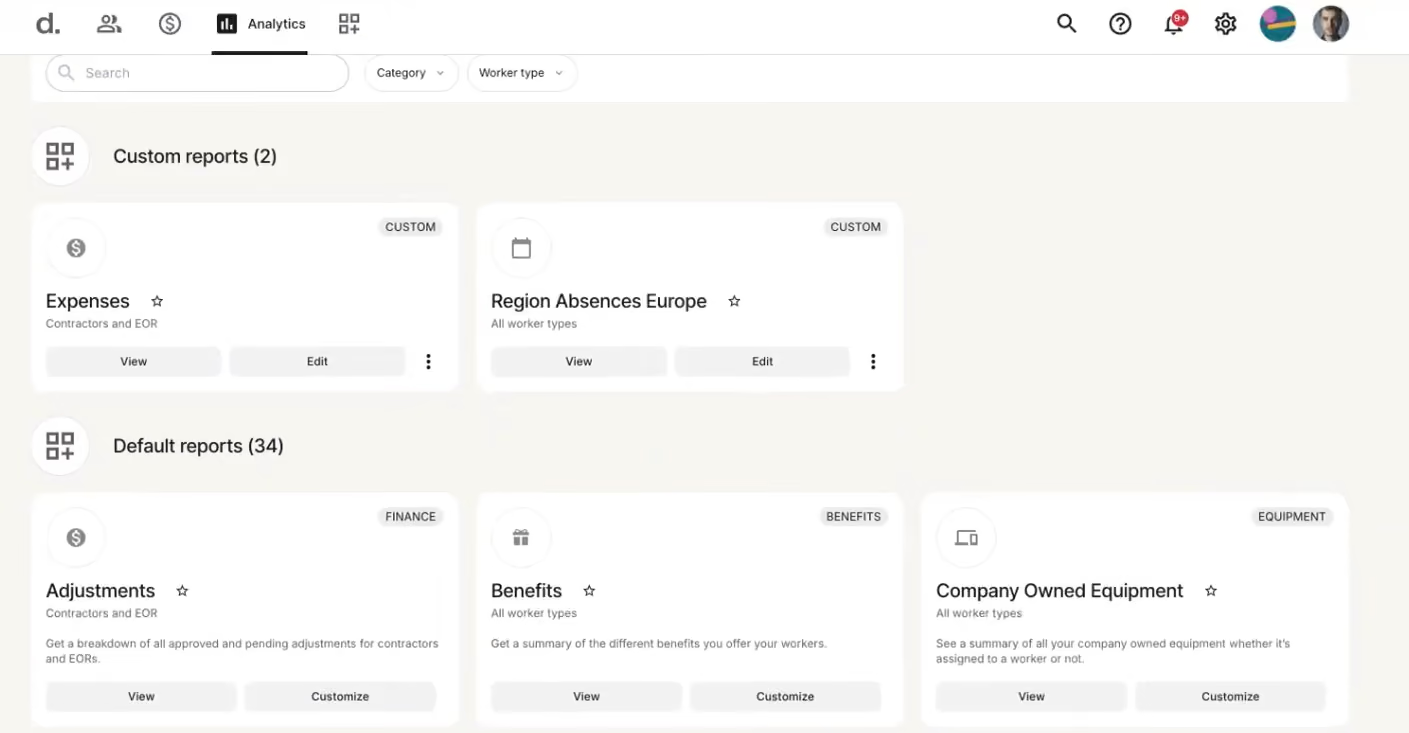
Deel Benefits can help with hiring and providing benefits and perks for people in various geographies. The benefits themselves would vary depending on the region. Still, you’d streamline their management through the same platform you’d use for payroll, contracts, timesheets, invoicing, and even some core HR functions.
As to the specific benefits offered, the best way to vet them is to go to their benefits tool on their website. You select a country and the type of benefits, and they present what they can provide.
For example, if you want to hire in Canada, you can choose Statutory and/or Common benefits. These include employment and worker compensation insurance, transportation and electronic coverage, and certifications.
40,000+ companies, including Andela, Brex, and Makerpad.
Deel Benefits has three plans whose pricing is custom:
- Benefits Admin: Global benefits administration (EOR, PEO, & global payroll) with unified management, covering plan admin, enrollment/renewal reporting, QLE management, and carrier integration.
- Benefits Marketplace: Purchase global benefits plans (statutory and optional) via a trusted brokerage network, offering competitive prices and comparison tools.
- Managed Benefits: Comprehensive benefits administration, including employee support, QLE management, offline carrier sync, and renewal coordination.
As a new product, Deel has changed a lot since its inception. Its newest offering, DeelHR, allows companies to complete most of their HR operations tasks in Deel.
Best For
Deel Benefits is a good bet for those businesses that want to provide benefits on top of payroll for an overseas workforce, whether it’s through an EOR arrangement or for their contractors. It’s worth noting that they have a way for you to offer interesting perks apart from the law-required benefits.


We use Deel specifically for our international team. Our W2 employees are managed through a different payroll provider. Since our payroll is set up on autopilot, I don’t log in to Deel very often. I typically log in about once per week.
We keep our Deel usage simple and primarily use it for payroll. In the past, we have also used it as an EOR for an employee in Canada.
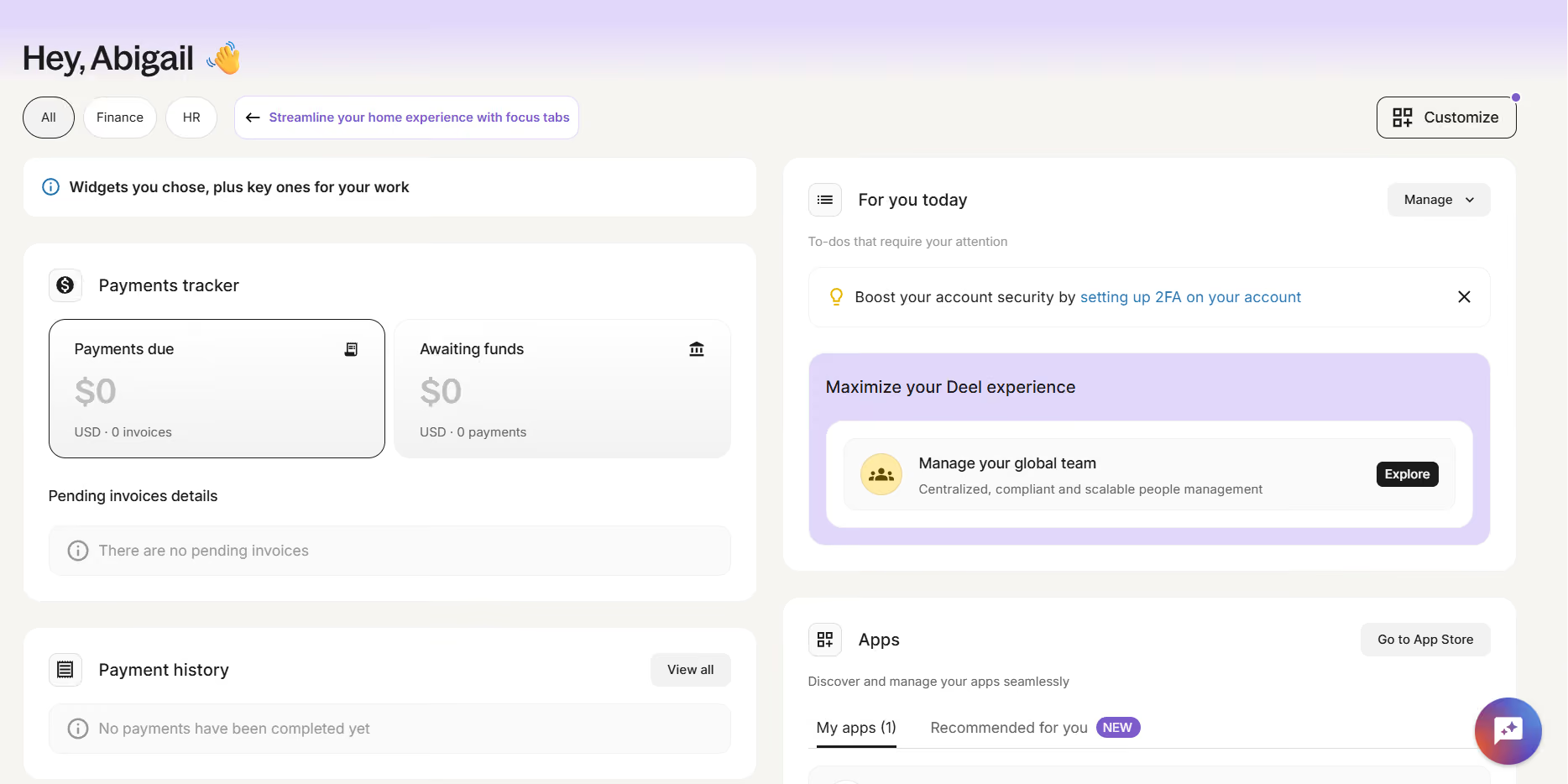
One pro of Deel is that it’s always very easy to get in touch with support.
We have used Deel for at least a few years. I have personally used Deel for just over one year. The pain point we were trying to solve was implementing a seamless payroll process for our international team.
We have also used Deel as an EOR for our international employees. We initially started using Deel specifically for our international team, and it worked really well for those employees.
The key benefit it provides is simple payroll processing, regardless of where the person resides. The site is easy to use and navigate. Another benefit is the responsiveness of the support team.
One con of Deel is the offboarding process and its unclear procedures. I wish they would improve this part. Another con is that support often passes you between multiple people, none of whom have prior context, which leads to repeating the same information.
Deel is fine, but I think their competitors are better. I prefer every other payroll platform I have used over Deel.
One criterion to consider before using Deel is what your team structure looks like. Deel is helpful because employees or contractors can be onboarded regardless of location. I found that, for us, it made the most sense to use Deel specifically for our international team.
I can’t think of any specific changes that have been made in the one-plus year I’ve used Deel.
I can’t think of any specific changes that have been made in the one-plus year I’ve used Deel.
I would say Deel is great for organizations of any size. It’s probably best for companies with international teams.
Paycom
Paycom’s Benefits Administration stands out for connecting benefits, deductions, eligibility, and life events directly to payroll, automating tasks and decisions across the entire employee life cycle and reducing the need to move employee data between systems.
PROS
- Benefits data flows directly into payroll for deductions and eligibility.
- Employees can complete enrollment, review plans, and preview payroll impacts live via desktop or Paycom’s mobile app.
- Flexible controls support eligibility, waiting periods, coverage levels, and effective dates.
- HR teams can batch-update premiums and deduction amounts before open enrollment.
- Enrollment reporting shows incomplete tasks and employees’ upcoming benefit selections.
- Proprietary HR, payroll, time, and learning tools run on one database.
- Strong employee self-service tools for managing personal, payroll, benefits, and time-off information.
- Single database keeps employee data consistent across HR and payroll workflows.
- Deep HR and payroll integration enables automation across the employee life cycle.
- Broad automation reduces manual work across everyday HR processes.
CONS
- Benefits Administration is an add-on to Paycom payroll, rather than available as a standalone product.
- Payroll is required to use Paycom’s broader Global HCM software.
- Paycom does not provide enough public information to assess benefits-specific customer volume or pricing.
- Pricing can be high compared with more focused HRIS options.
- Reporting can be complex and cumbersome for administrators to customize.
- Requires customers to run payroll with Paycom to access the HR suite.
- Limited flexibility for organizations that rely on external integrations.
Paycom’s Benefits Administration takes a different approach from standalone benefits tools by keeping benefits and payroll in the same software and database. During our research, the payroll connection stood out as the biggest strength: deductions, eligibility, and life events can flow through payroll rather than requiring HR teams to maintain separate data between systems.
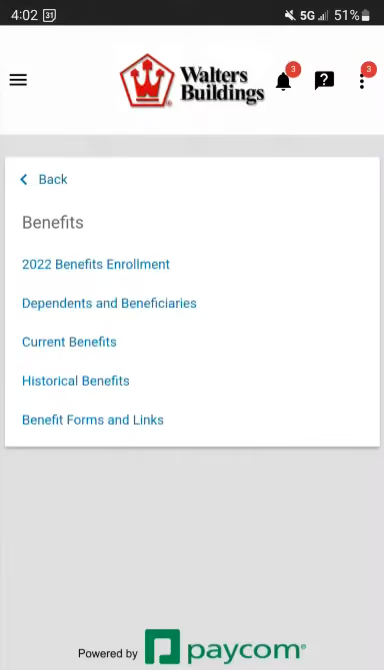
The employee enrollment experience is also flexible. Employees can enroll from a desktop or through Paycom’s mobile app, while HR teams can configure deduction amounts, enrollment dates, effective periods, new-hire waiting periods, eligibility rules, plan options, and coverage levels. Paycom also supports batch updates to plan premiums and deduction amounts ahead of open enrollment, which can reduce repetitive administrative work.
We also like the visibility HR gets into enrollment. Paycom provides reporting on where employees are in the enrollment process, which benefits tasks remain incomplete, and which benefits employees have selected for the upcoming year. That gives HR teams a straightforward way to identify employees who still need to complete their elections.
The main drawback is the bundling requirement. Paycom’s Benefits Administration comes with Paycom payroll rather than functioning as a standalone benefits administration system. That makes the platform particularly compelling for organizations already looking for an integrated payroll and HR system, but less attractive for companies that want to add benefits administration to an existing payroll environment.
Custom pricing.
Best For
Mid-sized and enterprise organizations that want benefits, payroll, and employee data managed in one system rather than across separate platforms.

I use Paycom for posting jobs, payroll, tax accountability, ATS, and resume scorecards. It has helped us optimize a lot of the admin stuff and maintain records better. When posting jobs, it offers a diverse list of places where we can post the positions that are free, at cost and college job boards which can be helpful for small firms with tight budgets. It helps us with tax compliance and kinda helps us project how many candidates we are going to seek in certain geographical areas. The ATS, helps us keep our collection of resumes to a minimum so that we can eliminate repeats.
I love that we were able to use Paycom for our specific needs. I feel that Paycom understands the small business and mid-size business needs. Paycom listens to their customers and are always seeking to make their product better!
We purchased Paycom 5 years ago and have been using it since. We were using an outdated product for payroll that didn’t offer a diverse use across the board in terms of add-ons. The ATS system worked well with a tool called Job Scan, this helped reduce people applying for several positions with the same resume. Now that most small and large companies have employees in other states, Paycom has the info to keep the taxes aligned. Self Service was also a main factor; we needed a tool that would allow employees to be able to access their information so that our small staff wasn’t constantly having to field the calls for things like W-2s that should be easily accessible.
I wish there was more product training at a lower cost. Every time we get a new admin we have to pay for additional training. I would like to see more add-ons like the other companies who wanted our business. More computability with the old Deltek software that we were using so that the change over was smoother.
Paycom is different from the competitors because the customer service is phenomenal! They listen to the customer!
When buying a payroll tool, the first thing I would recommend is analyzing your company’s needs. I believe assessing how the employees use the product is important in making the decision as well!
Over the years, Paycom has made the software more user-friendly, introduced communities, and improved mobile support.
Paycom is great for small to midsize businesses
Paycom would not be good for an engineering firm because of the way the hours are billed!

Paylocity
Paylocity combines benefits administration, payroll, and HR in one platform, with guided enrollment, automated eligibility and carrier processes, decision support, and integrated spending accounts.
PROS
- Guided enrollment and personalized decision support simplify benefits selection.
- 100+ pre-built carrier integrations support automated data connectivity.
- Payroll integration helps keep eligibility and deductions aligned.
- Supports medical, dental, vision, FSA, HSA, and other benefits.
- Automated reminders, eligibility alerts, and workflows reduce administrative work.
- Paylocity’s customer support is highly rated for always being available to answer questions.
- Global payroll support for 100+ countries.
- Provides free and unlimited training modules on the website.
- Paylocity’s mobile app has a good UI and functionality
- The tool is easy to use for both employees and employers.
- Has 350+ pre-built integrations.
CONS
- Some standout capabilities are powered by partners rather than built natively, including benefits decision support (Reclaim) and retirement (Vestwell).
- Benefits administration pricing is not publicly disclosed.
- Undisclosed pricing.
- It doesn’t have a free trial or free plan.
- Support is available in English only.
- It isn’t the best solution for remote teams looking for a tool to manage payroll and benefits for their contractors.
Paylocity's benefits administration software makes a strong case for companies already running Paylocity payroll and HR. It covers guided setup and enrollment, decision support, carrier EDI file generation, compliance workflows, spending accounts, and connections to HR and payroll.
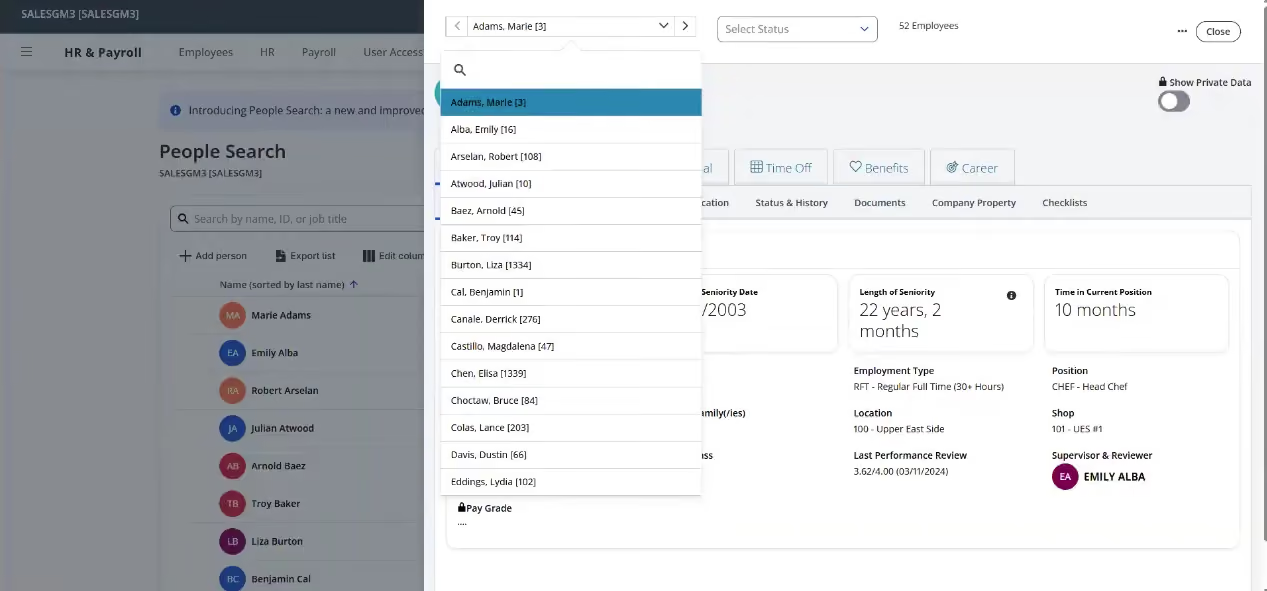
The enrollment experience is well curated. Paylocity offers guided setup for HR teams and brokers, while employees get a step-by-step process with cost breakdowns, tooltips, and personalized recommendations through Benefits Decision Support, powered by Reclaim. We like pairing standard enrollment workflows with decision support, since benefits selection confuses many employees and better guidance can cut the questions HR fields during open enrollment. Automated reminders and eligibility notifications keep things moving without manual chasing.
On the administrative side, the platform leans on automation. You can monitor enrollment statuses and alerts from a dashboard, build workflows for routine requests, and generate and send EDI files to carriers. Paylocity says it has prebuilt integrations with over 100 carriers, though feeds are configured and tested per client, so buyers should not assume every integration is plug-and-play.
Paylocity Retirement, powered by Vestwell, embeds 401(k) and 403(b) workflows into the platform, with payroll as the contribution data source and self-service for employees. As with decision support, this is a partner-powered layer, so we'd confirm which capabilities and integrations a given proposal includes before signing.
Paylocity serves 40,000+ companies; Green Lawn Fertilizing/Green Pest Solutions is one documented benefits customer.
Custom pricing.
Best For
Paylocity is best suited to mid-sized U.S. companies already using Paylocity payroll and HR that want to consolidate benefits administration and employee data in one platform.

For onboarding, I get to create a profile for candidates so they can receive the onboarding package, also, I love how we can send it in Spanish as well. I’m able to help the HR team complete the tasks, which is not hard to use. Also, we get access immediately, when we submit it, making the whole process breezy. Regarding Payroll, I have heard great things about how convenient it is. I haven’t had the opportunity to try it firsthand though.
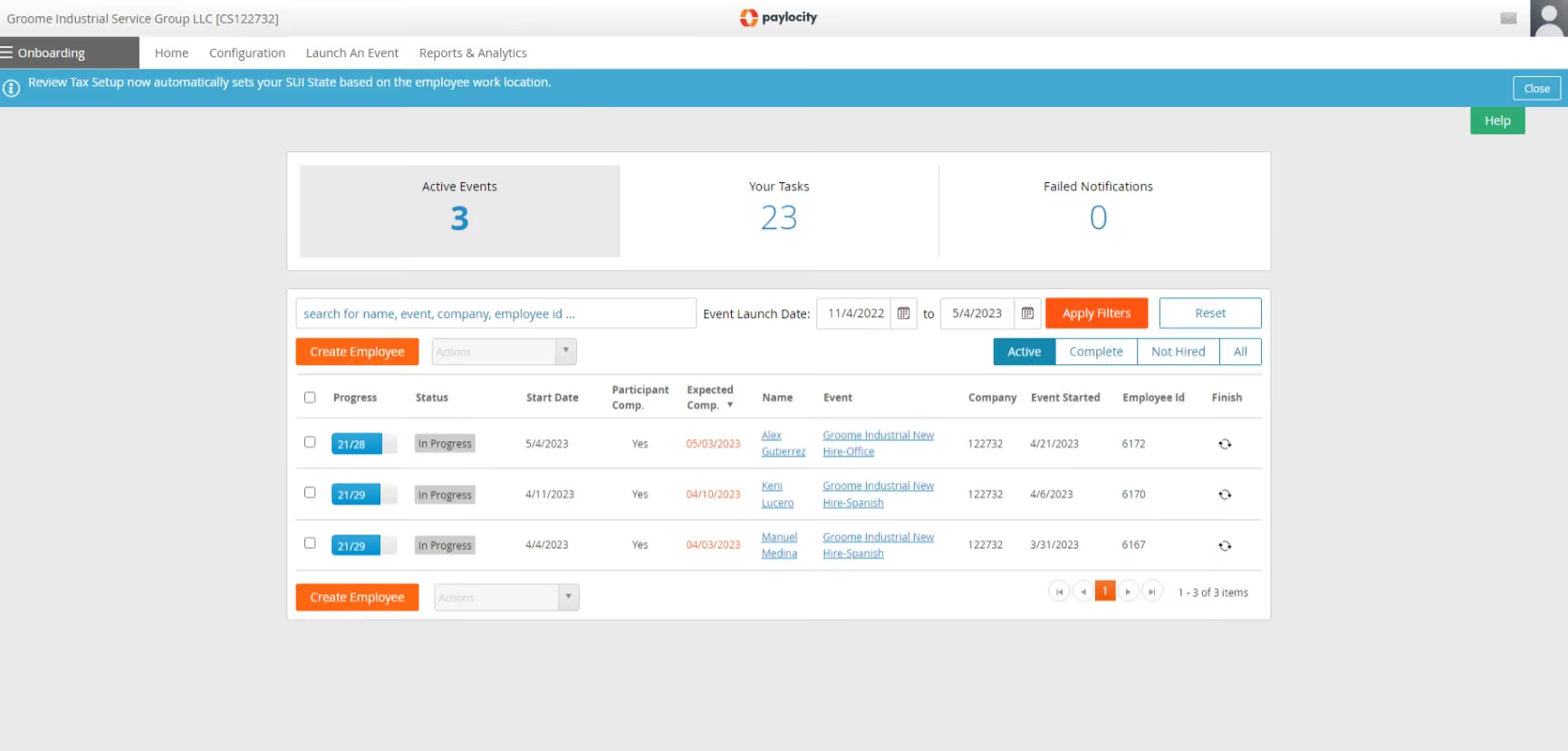
- It’s a useful tool for onboarding and payroll.
- I like the app, the design is very nice and it's easy to use.
- I have used other onboarding platforms and they are quite difficult to understand or process.
For over 3 years, our company has been using Paylocity for onboarding and payroll purposes, but not their ATS feature. This system has been extremely helpful to keep track of the onboarding activities, which helps to keep everything organized and in one place. Also, for Payroll, the app is easy to use and very clear from what I have heard from my teammates.
- I would say, the platform is not modern enough.
- They need to update it quite often. I haven't seen many changes since I started using it a year ago. Usually, I hear that they are launching new things, but I haven't seen it personally.
- The ATS platform is not good. That's why we didn't get on it. It was not suitable, pricing-wise.
Well it's efficient for what is needed. It is quite similar to when I was using Greenhouse in the past, but I believe Paylocity’s app is better than what I have seen before.
It has the right tools for what is needed, I would say the cost is worth it for what they offer. Also, Paylocity has been in the market for a while and a lot of companies are using them. That’s key to keep in mind. The external reviews are good as well! However, it is vital to thoroughly examine using demos and trials to see if it’s the right fit for your company’s specific needs.
It has helped the business as we didn't have a system like this before. That said, I haven't seen many changes since I started using it a year ago.
For small businesses that are growing/expanding or any company that has over 50 employees.
Well, for a company with less than 50 employees, the price wouldn't be worth it.

Gusto
Gusto provides full-service payroll services with benefits and HR. The software takes care of the administration and deductions by syncing them with payroll and makes things easier for you and your employees with its built-in employee self-service.
PROS
- Gusto has an eye-catching UI and is compatible with several devices.
- Automatic payroll deductions for easier benefits administration.
- The dashboard feature keeps tabs on compliance tasks.
- The hiring and onboarding sequence is nicely streamlined between HR and the new hire
- Post-offer, pre-start tasks are made easy with integrations like CorpNet and Checkr.
- Easy payroll for U.S.-based W-2 folks, domestic and international contractors.
- Phone support, email, and other customer service resources.
- Licensed benefits advisors for all plan users.
- The business model is responsive to customer needs.
- Transparent pricing structure. Doesn’t require long-term contracts.
- Free account setup.
- Ability to create onboarding checklists, send offer letters, collect signatures, and store all onboarding documents online.
- The dashboard feature keeps tabs on compliance tasks
- The hiring and onboarding sequence is nicely streamlined between HR and the new hire
- Post-offer, pre-start tasks are made easy with integrations like CorpNet (state tax set up) Checkr (background checks)
- Easy payroll for U.S.-based W-2 folks, domestic, and international contractors
- Person-to-person phone support, email, and other customer service resources
- The business model is responsive to customer needs
CONS
- Gusto facilitates payments for international contractors but not for employees.
- There is no built-in accounting feature, so the management of earnings and expenses can’t happen in one place.
- Analytics dashboard capabilities are underwhelming
- Simple plan users do not have access to native time tracking, necessitating third-party integrations.
- Users of the Simple plan cannot access federal and state compliance alerts – they are not even available as add-ons.
- Plus plan users have access to compliance alerts, but they must be added on.
- No free trial or free version
- Gusto can support payments for international contractors, but not employees
- No native accounting feature to keep earning and spending under the same roof
- Analytics dashboard is simplistic
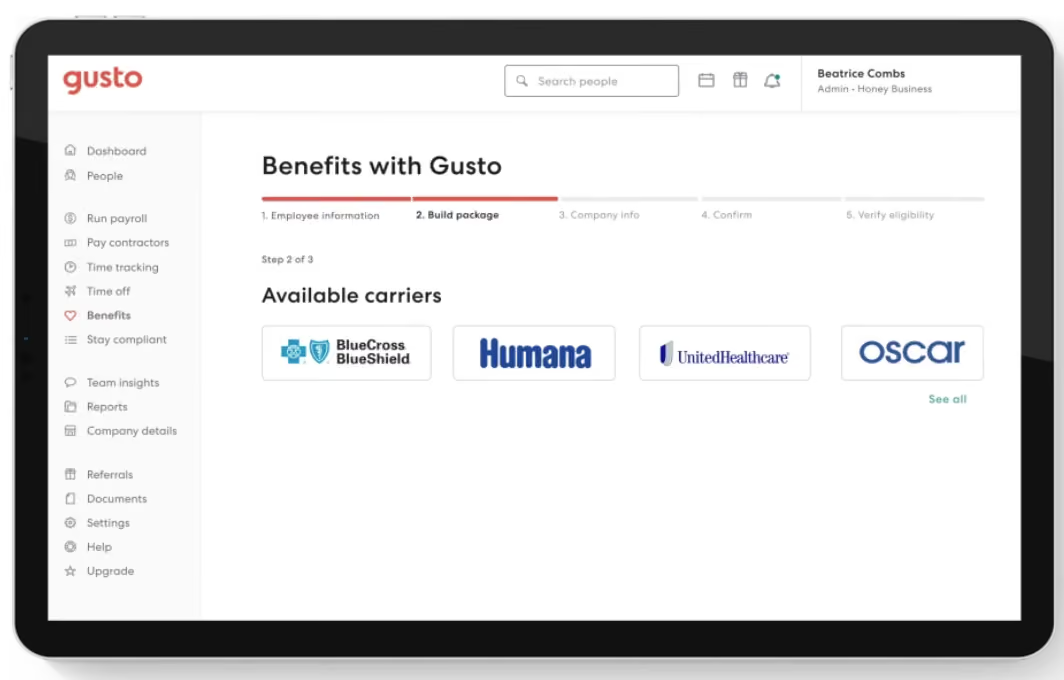
We have had a positive experience with Gusto's benefits administration features. The software seamlessly integrates payroll and benefits administration, simplifying the process with automatic deductions and syncing capabilities. The built-in employee self-service functionality is also a nice touch that makes it easy for employers and employees to manage benefits and access relevant information.
Gusto's user interface is visually appealing. Being browser-based lets it provide a smooth user experience across multiple devices. Additionally, Gusto provides licensed benefits advisors to assist and guide users in optimizing their benefit plans.
We appreciate Gusto's customer-centric approach, as they remain responsive to customer needs and continuously improve their services based on feedback. Their transparent pricing structure and flexibility without long-term contracts add to the appeal. Moreover, Gusto offers free account setup, making it convenient for businesses to get started.
The availability of person-to-person phone support, email assistance, and other customer service resources reflects Gusto's commitment to providing excellent support. However, it's worth noting that some features, such as federal and state compliance alerts and integrating existing broker and health insurance plans, are only available in the Premium plan or as add-ons for the Plus plan. Simple plan users may need to consider third-party integrations for certain functionalities like time tracking.
While it doesn't offer a free trial, Gusto's consistent focus on core functionalities sets it apart from other platforms that often get sidetracked by unnecessary features.
Gusto powers HR and benefits management for over 400,000 businesses across the U.S.
Gusto’s benefits management tools are part of its HR software packages, with pricing starting at $49 per month plus $6 per employee. Premium plans cost more but unlock expanded HR features, including access to certified HR experts and advanced benefits administration tools.
Best For
Even budget-strapped startups can afford Gusto’s basic plan. For companies with some bank capital to invest in human capital, the top-tier Premium plan is a great choice, especially if they have an HR department of one person.

I use Gusto approximately every day. Some key workflows are onboarding users (employees) and storing important demographic information and compensation information, paying users (we used to pay employees on the platform, now it's just contractors), and staying in payroll compliance - Gusto gives you a to-do section that shows you all of the things you need to do to stay in compliance.

It's very intuitive, the UX/UI and design features are really amazing. It's also very well liked by our employees because of its ease of use. It's built to keep small companies in compliance -- Gusto really takes it a step further than most other Payroll platforms and gives you a bunch of compliance features and help. Gusto also has "next-day pay" features on some of the more premium tiers of membership; this is a really solid SLA and turnaround for payroll platforms, as this process (sending money to folks) isn't the easiest thing to do at scale.
We onboarded onto Gusto when the company first started back in 2016/2017. We didn't have a way to pay people, and Gusto offered an intuitive, small-business solution to pay employees, help us stay in compliance, and do all the heavy lifting for us in the Payroll and HR world. We've used Gusto for approximately 6 years and we still use it today to pay contractors, which is another benefit it provides.
Gusto is built for small companies so if your company grows quickly, it could easily outpace the features that Gusto provides. It doesn't integrate well/if at all with other softwares it doesn't already have a partnership with. It also has pretty limited reporting capabilities; the reports you can pull are nice, but there are limited types that you can choose from and building reports doesn't include all fields you might need.
It’s more intuitive, but not as scalable for large companies. I'd prefer the more intuitive tools to start with, and then once I wrap my head around how payroll works then I think switching to a larger, more scalable tool helps with understanding the big picture.
If you have a small finance/payroll/HR team, and want a tool to do a lot of the work for you, get Gusto. If you're a large team with a large company, I wouldn't recommend it.
For the most part, it's really improved its contractor payment system and also its compliance features. It still needs to work on allowing for more integrations with third-party tools.
Small organizations (1-100)
Midsize to large companies (100 - 1000+)

Remote
While Remote is mainly known for its global payroll and EOR products, it also handles benefits administration for internationally distributed teams. Unlike many vendors, Remote owns local entities in the countries where it operates. This means, in very general terms, that its customers can offer employees a more straightforward, more “local” experience regarding payroll and benefits.
PROS
- Remote provides flat rates, so you can easily compare its pricing with other vendors. The platform doesn’t add a markup on any benefits premiums.
- Self-service options for employees.
- Local specialists provide 24/7 support.
- Benefits plans are locally curated. Health, dental, vision, life, mental health support, and disability are all covered, as is pension/401(k).
- Helpful resources are available on their site, offering tips for specific to geographic regions.
- Equity-based compensation is available.
- Fast and compliant payroll in 170+ countries.
- Live chat support with local payroll experts.
- Flexible, localized benefit packages.
- Flat-rate pricing structure, no deposits or hidden fees.
- Mobile app streamlines expense reimbursement with autofill from receipt photos.
CONS
- Some employers reported a steep learning curve in learning to navigate the software.
- No off-cycle pay runs are available at the moment.
- Though the current live chat and email support have been great, there is no phone support users can reach out to.
- Remote offers limited integration options, yet you can access its custom API for free.
- Doesn’t have a free trial.
- Redundant for organizations solely recruiting within the U.S.
- Help center documentation isn’t easiest to understand.

Remote lets you offer customized benefits packages to fit each country where you have employees. The platform enables compliance by providing country-specific benefits and perks that adhere to local laws. We like that Remote is one of just a few vendors that own local legal entities in countries that the platform services. Since it has no intermediaries, it can offer more flexibility and speed.
Though they were a bit hard to locate in their respective app stores, both the Android and iOS apps are in good shape – they are easy to use and equipped with essential features.
Arduino, GitLab, Paystack, Loom, cargo.one, Secureframe, Phaidra.
- Contractor Management plan: $29/contractor/mo
- Employer of Record plan: $599/employee/mo (when paid annually)
- Global Payroll and Remote Enterprise plans: Customized pricing – contact Remote for details
- Startup and nonprofit discount: Eligible startups and nonprofits can get 15% off EOR and Contractor Management services for 12 months.
- Refugee discount: Up to 10 employees free when hiring refugees
Best For
Remote is a robust solution for startups and distributed teams to provide their employees and contractors with country-specific benefits and easy onboarding and payroll.

We employ about 15 employees within Remote's platform. In this platform, they hire the employees we identify, provide them with a platform for payment and time tracking, and manage benefits on our behalf that our employees can enroll in. Additionally, the platform integrates with our HCM Dayforce, allowing us to update employee data automatically without having to manage multiple systems. Remote also gives us tools to ensure we are paying competitively in countries where we aren't experts.
It is easy to set up new countries depending on business needs as an EOR provider. The easy-to-use platform helps us identify and manage our talent well. Global benefits allow us to navigate new countries without worrying about the nuances of benefit offerings.
We are a global company with needs in various countries for employee benefits, payroll, and HRIS. Specifically, we needed assistance with paying employees in countries where we do not have a legal entity. Remote provides Employer of Record services for us in multiple countries, allowing us to employ top talent without the burden of legal requirements and compliance. They have an easy-to-use platform that helps our employees stay on top of their pay and benefits, and they have dedicated team members that assist employees with any questions they may have. It's a cost-effective solution for our global payroll needs.
Remote could be more cost-effective. I have found other EOR services with cheaper offerings. The platform is fine, but it could have more features related to global compensation and access to more community-based groups that would allow companies to connect with each other.
Their platform is easy to use, and the recent addition of support tickets has made it very easy to access help in any situation. Additionally, Remote has a singular pricing model, which is convenient because we do not have to worry about charges for leavers, joiners, or year-end.
Consider hidden costs around processing and setup. The bottom-line monthly cost is not always the full price, as some of these EOR services will charge setup fees and year-end fees that, although mentioned in their proposals, are not included in the annual cost. Remote does this very well, and their pricing is very easy to understand.
I have not used Remote long enough to see changes over time.
Remote is good for global companies that have a few international employees.
EOR services, in general, are not great for companies that have a lot of employees in many different countries. Operating Remote would be cumbersome with more than 10 employees per country.

OnPay
OnPay ensures compliance and takes no upfront payment for its benefits administration software. When you decide to use it, you'll be connected with their team of licensed brokers so that your employees can get their favorite benefits from the best companies.
PROS
- Transparent pricing is among the most budget-friendly in the industry.
- Offers a one-month free trial.
- The plan combines payroll, benefits, and HR tools.
- Supports several pay types: regular hours, salary, overtime, and bonus. You can also create your own.
- Ability to act as an insurance broker to help businesses find medical, vision, and dental insurance in 50 states.
- Special payroll services for certain industries like restaurants, farms and agricultures, churches and clergy, and nonprofits.
- Free tax form handling for W-2 employees and 1099 contractors.
- Some HR services included within the plan at no additional cost.
- 30-day free trial available (starts after OnPay verification).
- Well-developed online help resources.
CONS
- Incompetent mobile app with poor ratings (2.1/5) from iOS users.
- Limited integrations.
- Takes two to four days for direct deposit. No faster direct deposit option is available.
- Lacks advanced HR features like employee surveys and performance reviews.
- Poor functioned employee mobile app.
- Requires payment four days before payday for direct deposit.
- Doesn’t support automatic payroll.
- Customer support sometimes hard to reach.

We recommended OnPay because, besides being a solid cloud-based payroll software solution, it also offers features for HR management and benefits administration at an affordable, transparent monthly price. For businesses in certain industries like restaurants and agriculture, the platform also provides special payroll services (tip calculations, separate tax filings, etc.) without charging additional fees.
OnPay partners with several low-cost benefits administration providers so that you can choose several health insurances and 401(k) retirement plans for your employees. While we found that OnPay’s integration is quite limited compared to its rival Gusto, its feature-rich HR tools are offered without requiring users to upgrade their plans or pay more, making the platform a more cost-effective option for several startups and small businesses.
- OnPay charges a base fee of $40 plus $6 per employee per month.
- Setup and migration of employee data are free of charge.
- You can use the price calculator on their website to see exactly how much it’ll run you for your team size.
- One-month free trial is available on the website.
Best For
Businesses looking for an affordable software tool that can carry HR, payroll, and benefits in one place. Its special payroll offerings also make the software a better bet for businesses in industries like restaurants, farms and agricultures, churches and clergy, as well as nonprofits.
We use OnPay to process bi-weekly payroll for our employees and contractors. We utilize the direct deposit functionality and use it to withhold for benefits and 401(k) deductions. It automatically remits payroll taxes to the state on our behalf. We have also recently started using it to track and approve employee PTO requests.
We are a small non-profit, and they provide us with a non-profit discount. It has all the functionality we need without being overly complicated. Processing payroll is quick and easy.
We bought OnPay because it seemed to be the best fit for our organization. It has all the functionality we need to handle HR and payroll for our small group of employees. It is robust enough to meet our needs but not overly complicated like some of the larger systems. It is easy to use, yet it allows us to process multi-state payroll and manage our employees' time off. It also includes all the basic reporting that we require.
It doesn't offer much in terms of custom reporting. Much of the HR information requires navigating to individual employee records to view. You can't edit a benefit plan once it's created; you have to make a new one to implement any changes.
OnPay is really the only system of its type and size that I've used, so I can't say how it compares to competitors. It is much simpler than ADP or UKG, which I have used, but we are getting it for a fraction of the cost. The simplicity of the system actually works well for our team.
Consider the needs of your business and team. OnPay is a fairly basic HR and payroll system. It covers all the essentials, but if you need extensive reporting or numerous integrations with other systems, you might want to explore a higher-tier HR/payroll solution. Additionally, consider cost. Even without the non-profit discount, it's a very economical solution compared to some of the larger providers.
I haven't noticed any significant changes since we started using OnPay, but as I mentioned, it already meets our needs.
I believe OnPay is great for smaller companies that don't need extensive features in their HR and payroll system.
I think a large organization with complex reporting needs would struggle to get everything they require from OnPay.

Papaya Global
Papaya Global lets you manage payroll and provide benefits for your employees and contractors, wherever they are. They operate in 160+ countries, most of them through their EOR model. Their benefits offering has evolved notably with time, encompassing telehealth services and other forms of holistic wellbeing.
PROS
- Employees get a personalized physical and mental health plan tailored to their location. They can then access these services through the web and mobile versions of the platform.
- Papaya ensures prompt payouts within 72 hours across 160+ countries through the platform.
- Transparent pricing with a 60-day money-back guarantee.
- Dedicated customer success managers in your time zone for localized assistance.
- The starter monthly fee is reduced to $12 per employee for full-service payroll.
- Papaya Global packs the EOR services you need to do global payroll and employment compliantly in over 160 countries.
- Automated payments in over 100 currencies, 80 of them directly to the worker's bank account through its global banking partners.
- Dedicated customer support providing locations-specific knowledge regarding employment and payroll.
- End-to-end payroll guaranteed payouts in 72 hours.
- Offers four standalone solutions: data and insights, supplemental benefits & immigration support, payment services, and employee data management, making the platform more affordable and scalable.
CONS
- Lacks local entities in some of the countries they operate in; no tax penalty guarantee information available.
- No free trial or plan is offered.
- Additional fees include setup, onboarding, cycle per employee, year-end fees, and a required deposit.
- Limited existing integrations, but free use of pre-built APIs and custom API integrations.
- No free trial or free plan.
- Doesn’t own entities in all the countries it serves. The platform forms relationships with existing local in-country partners to handle employment in a specific region on the client’s behalf.
- BI analytics reports and global immigration services cost additional fees.
- Charges extra fees for setup, onboarding, employee cycle, and tax filing. Also requires a refundable deposit.
- Built-in integration options aren’t very robust. However, the platform does offer pre-built APIs, SFTP, and custom API integrations for free.
Paya Global is one of the best platforms for handling international benefits and payroll. With Papaya Global, you offer an overseas employee a similar benefits package (including equity) as if you had an operating entity in their region.
They can do this both through the Employer of Record and Contractor models. Of course, the pricing varies for both cases. It’s also worth mentioning that the global benefits offering is an add-on, starting at $190 per employee per month.
Papaya Global has garnered high praise from both users we've interacted with and our editorial team. Our familiarity with the tool dates back to early 2021, and it immediately impressed us with its transparent pricing, extensive HR capabilities, robust BI analytics, and localized customer support.
The platform serves both employers and employees, offering seamless access to payroll, payments, and workforce analytics. It guarantees automated payments in local currencies, personalized benefit packages, and multilingual pay slips across 160+ countries.
That said, when considering Papaya Global for your global payroll software, remember that it may not have a local entity in the particular service region you need one and, when that is the case, they rely on third-party local partners. Note that while pricing transparency is a strength, additional expenses like setup fees per location, onboarding fees, cycle fees per employee, year-end tax filing fees, and a refundable deposit should be considered.
Wix, Intel, Johnson & Johnson, Toyota, Deezer, Fiverr, Microsoft
- Full-Service Payroll service: Starts at $12 per employee per month, with flexible options based on operational needs.
- Payroll Platform License service: Begins at $3 per employee per location for tech upgrades.
- Data and Insights Platform License service: From $150 per employee per month, offering real-time analytics on payroll costs and headcount.
- Payments-as-a-Service service: Starting at $3 per employee per month, delivering a dedicated workforce payment platform.
- Global EOR plan: Ranges from $650 to $1000 per employee per month for comprehensive EOR management.
- Contractor Management & IC Compliance plan: Tailored services for outsourced contractors, starting at $2 per contractor per month.
- Global expertise services: Starting at $190 per month per employee, this lets you add the global health plan, immigration support, and global equity for employees.
Papaya Global's benefits offering has evolved to focus more on holistic well-being, covering mental health and featuring e-services like telehealth and self-care tracking apps. Their equity management tool now supports a vast spectrum of options, including (NQSOP; ISO; ESOP), Restricted Stock Units, Cryptocurrency, Employee Share Purchase Plans, and even Phantom Stock Plans.
Best For
Papaya Global is a top choice for streamlining global payroll and benefits operations in countries with established entities, especially for businesses with international hires located within Papaya Global’s extensive country coverage.

There are several key ways I use Papaya Global. I use it routinely for our hiring and onboarding process, not just for our in-house employees but for contractors as well. I assign roles and permissions for our different departments, including temporary roles for contractors based on need.
This also includes time tracking for our hourly employees and contractors. I use it to monitor local labor laws and manage employee benefits, including handling time-off requests, benefit enrollment, and logging performance reviews.
Every 25th and 10th of the month, I review our workflows, including automated payroll, to ensure pay and time accuracy.

First, its ability to consolidate payroll and compliance. Second, the ease of use during our onboarding process for both employees and contractors. Third, the ability to manage employee benefits and time-off requests across multiple jurisdictions.
Our company operates in several jurisdictions, both in the United States and abroad. We needed an HR system that had extensive features but was also easy to use. Its ability to integrate payroll, compliance, and tax management in one place made it simple for our management teams in different jurisdictions to operate efficiently.
As our team consists not only of in-house employees but also contractors, temporary hires, and vendors, the ability for managers to view and manage this diverse group was critical.
Previously, we used a collection of different systems that did not communicate with each other in many of the jurisdictions where we operated. This led us to create our own spreadsheets and send them to a centralized person who would consolidate the data for tracking and reporting purposes.
In the two-plus years we have used Papaya—aside from the initial growing pains of adjusting to the layout—our organization has operated much more smoothly.
The platform has so many features that it can be overwhelming and occasionally clunky. It becomes easier to use over time, and the Papaya Academy is very helpful. The cost is higher than other solutions we have used.
A more subscription-based model that doesn't charge per employee might be better. Customer support can be inconsistent, with varied response times and occasionally unhelpful responses. I recommend that they create a standardized training program for their support staff, especially internationally.
Compared to other tools where we had to use different products in various locations, Papaya Global is the best at integration, and we no longer need multiple systems. It is number one for a reason.
First, consider the cost, which can be high for smaller companies.
Second, assess the size of your company and the jurisdictions in which you operate to determine if such a robust solution is necessary. If you're not operating in at least three different countries, this solution may not be right for you.
Third, the software is designed for companies with more complex needs than just running payroll. If you need a solution that combines payroll, HR, tax, and compliance, this is a strong option.
Papaya Global consistently update their solutions and have made improvements to customer support.
Medium to large-sized organizations operating in multiple countries will find Papaya Global useful. It is especially useful for those seeking a single solution for HR and payroll.
Small organizations or those not operating in multiple countries will not find Papaya Global a good fit.
Bennie
Designed to make benefits more accessible and less complicated, Bennie is available both as a web and a mobile app. With it, employees can track claims spending, estimate cost of care, find a doctor, access a live concierge team, and more.
PROS
CONS

Bennie is a hub for your employee benefits information on a mobile-first platform. If employees have any questions about their benefits, they simply go to the app and interact with Ask Bennie, a smart healthcare concierge.
For employers, Bennie skips the typical brokerage experience. Instead, Bennie partners with major regional and national carriers to bring your company more personalized benefits. HR teams have their own backend to manage everything in one place. Customers also get access to strategic benefits and HR technology consulting.
- Schedulicity
- Superhuman
- Nabis
The Bennie app is free to use for your company and employees. Bennie shops around for the best plan for your company, and takes a commission from the insurance company you decide on.
Best For
Companies in the 50-500 employee range.

We used Bennie at the leadership level to select the best possible benefits package for our employees within our budget. Our employees used Bennie to select the plan for open enrollment as well as for day-to-day benefits questions.
- I liked that it enabled my employees to easily leverage their benefits, such as finding in-network doctors.
- I liked that it offered additional benefits that are not "cookie-cutter" but enriched our wellness package for employees.
- I liked the ease of integration and deployment.
At the time we purchased Bennie, we had an HR team of one and were leveraging a PEO, which is quite costly. Our employee population had just passed 50, and many changes needed to be made.
Bennie allowed us to move away from leveraging our PEO and to also maintain the percentage of coverage we had offered as an employer the year prior. In addition, Bennie lessened the work needed by our 1-person HR team, as employees had access to a resource at their fingertips.
Bennie allowed us to leverage the personnel resources we had and extricate ourselves from a costly PEO contract.
- The demo offered failed to differentiate between the services we would receive with the purchase of the platform and the benefits of their consultancy.
- I didn't feel as much of a hands-on experience as I did with my previous broker
- The cost was high, in my opinion.
Bennie offers end-to-end services unlike products like Alex from Jellyvision.
What employee benefits package do you have in place today, and what is the breakdown for employer pay vs. employee pay? How tech-savvy and likely to use an app is your employee population? Do you have mechanisms for communicating a change of this nature? Benefits are deeply personal to employees, and any shift feels like a potential major disruption.
I don't believe I used the tool long enough to answer this.
It worked well for a start-up with tech-savvy employees and a less tenured (career-wise) population. For many of our employees, Bennie was their first experience with healthcare benefits outside of their parents' plan.
Bennie would likely not be a strong fit for low-tech organizations or organizations where Bennie could not integrate with their existing HRIS.

Namely
Easy to navigate, Namely is extremely organized and uses the best-in-class technology. Its benefits administration software is integrated with its HR and payroll system to save time and complexity.
PROS
- Namely’s user interface is highly praised for its intuitiveness and cleanliness, allowing users to navigate the platform effortlessly despite its extensive features.
- Users appreciate Namely's employee onboarding module, which includes a user-friendly wizard that helps new hires quickly understand their tasks and responsibilities.
- In addition to the platform's built-in tools for data management, recruiting, onboarding, time off tracking, payroll, and benefits administration, Namely offers managed payroll and benefits administration services, alleviating the workload for internal teams.
- The majority of users are able to navigate Namely without any issues. They find the UI to be intuitive and clean, despite the fact that the platform has lots of features.
- Namely’s employee onboarding module gets a alot of praise from users. It features an easy-to-follow wizard, which helps new hires get on quickly and be clear on what they need to do.
- Besides the platform’s built in features for data management, recruiting, onboarding, time off tracking, payroll and benefits administration, there are also managed payroll and benefits administration services you can opt for to reduce the burden on your internal teams.
CONS
- Namely's primary focus is on the U.S. market, limiting its suitability for those seeking a global payroll and benefits provider.
- Implementing Namely can take a while, with an average implementation period of 6-8 weeks, according to the platform's own team.
- Namely lacks dedicated features for employee development, such as skill training, career pathing, and succession planning.
- Users should verify if Namely is compatible with their existing benefits provider, as there have been reports of Namely's team persuading customers to switch to providers that charge higher fees.
- Namely primarily operates in the U.S., which means if you’re looking for a global payroll and benefits provider, this platform isn’t for you.
- Though many praise the platform’s ease of use, it does take long to implement it. Namely’s own team says that an average implementation takes between 6-8 weeks.
- For a platform of Namely’s size, there currently aren’t any features that focus on employee development such as skill training, career pathing, succession planning etc.
- You’ll need to check beforehand if Namely can work with your existing benefits provider, if you have one. There have been a few reports (but not few enough to ignore) about Namely’s team convincing customers to change their benefits provider to providers that charged them more.
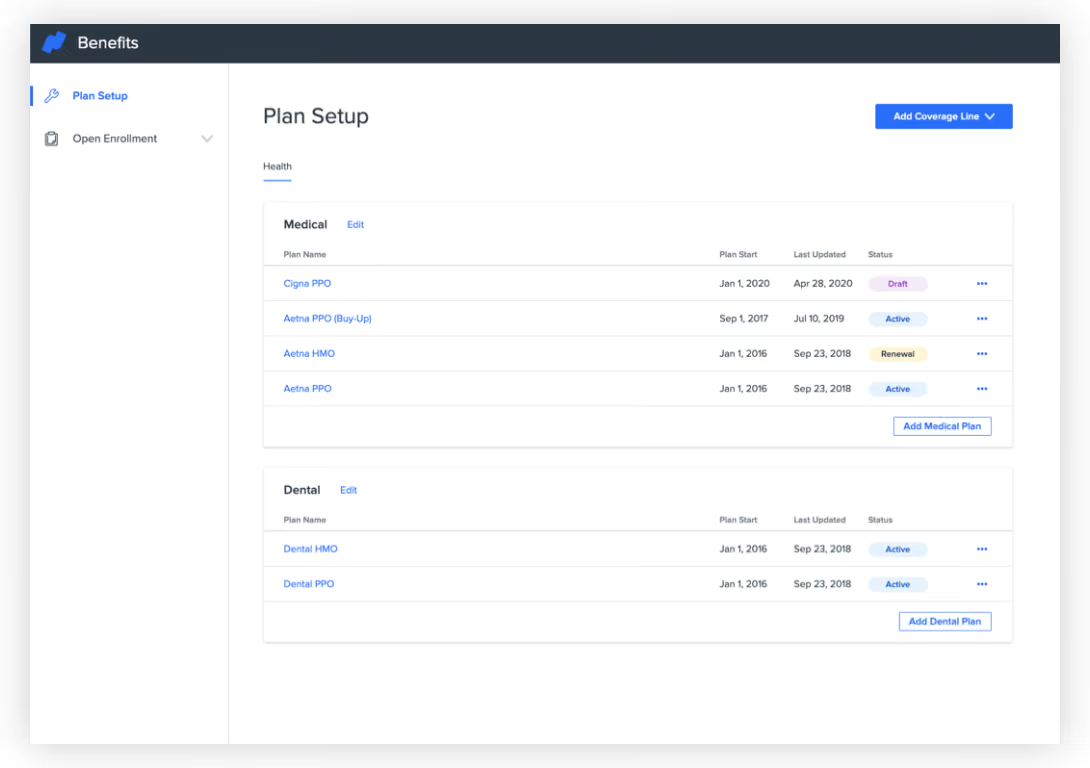
Namely’s comprehensive HR suite packs a range of features that make it an excellent choice for benefits administration. You can enroll your employees in, track, and manage various benefits programs such as health insurance, retirement plans, and flexible spending accounts. All of this is simplified through customizable online enrollment forms that provide employees with plan details. The software also allows for seamless integration with insurance carriers and third-party administrators to automate data transfers and reduce manual entry errors.
We appreciate a good reporting module, and the one Namely has can not only generate reports but also give you deep insights into benefits utilization, costs, and trends, which is a nice feature to have if you want to frequently improve your benefits plans and compete in today’s super competitive hiring landscape.
Over 1200 companies use Namely, including Greenhouse, The Channel Company, Life is Good, and OneLogin.
Namely does not disclose their pricing upfront. However, having no benchmark provides the unique opportunity to negotiate with sales to determine the right price for your company specifically.
Best For
Namely targets mid-sized companies. They specifically mention companies with 50-1000 employees.
I use Namely daily to manage a wide range of HR features. One major way I utilize the system is to process payroll, ensuring that employee reimbursement is accurate and timely. I also manage benefits, including updating employee enrollments and answering insurance-related questions.
Another critical workflow is performance management, where Namely helps track employee goals, feedback, and reviews. I use it to maintain worker information in a database, updating it as needed to comply with legal and internal requirements. Overall, Namely provides a single, efficient platform for managing all essential HR tasks.
Namely has an extremely user-friendly interface that helps manage HR tasks efficiently. It integrates payroll, benefits, and performance management into one platform, simplifying key processes. The tool offers customizable reporting capabilities that provide insightful personnel data while maintaining compliance with regulations.
Namely, an automated HR solution preferred by our management after a long history of inefficient HR processes, has proven its relevance as all operations have been streamlined. Switching and gathering information from different platforms was difficult, especially when accustomed to one system's workflow.
Before introducing Namely, completing payroll, personnel records, and other internal processes was time-consuming and prone to errors. We aimed to implement automation to allow a focus on tasks like performance management rather than correcting discrepancies. Namely’s user-friendly interface, creative report design, and working tools played a crucial role in its successful implementation.
I have been using Namely for [insert your time of use], and it has made our human resource processes more efficient, improving workforce management. It has also eliminated the problem of waiting for reports, a common issue in many companies that wastes valuable time.
Customer support at Namely is slow, especially when handling urgent issues. Some customization options, like those for reports, are limited and should be more flexible. Occasional system glitches or downtimes can disrupt important HR workflows and reduce productivity.
Namely's key differentiator is its all-in-one platform, featuring an intuitive user interface that combines payroll, benefits, and performance management in one system. This reduces the need for multiple tools. Compared to platforms like ADP or Workday, Namely is much easier for non-technical users. While competitors may offer more in-depth functionality in specific areas, Namely strikes the best balance between features and simplicity, making it ideal for midsize companies seeking a full-service solution.
When investing in an HR tool like Namely, key considerations include scalability—ensuring the platform can grow with your company—and integration capabilities with other systems such as payroll and benefits providers. Ease of use is critical, as a user-friendly interface leads to higher adoption and minimal training. Additionally, it's important to assess the level of customer support provided and how responsive the vendor is when issues arise. Customization options are another important factor, as the platform’s ability to adapt to your specific HR needs can significantly impact day-to-day operations.
Namely has evolved significantly over time, enhancing its platform to meet user demands with better integration features. Originally focused on core HR management, it has expanded to include payroll management, benefits administration, and compliance tools that help companies align with regulations.
The user experience has improved with a more intuitive interface, and customizable reporting has become more robust to extract meaningful data. Namely has also responded to customer feedback by improving its customer support and onboarding processes, addressing concerns about response times and implementation smoothness.
Namely is ideal for mid-sized organizations, typically with 50 to 500 employees, that want a user-friendly HR solution covering all key HR functions. It is especially suited for companies seeking an easy way to manage payroll, benefits, and performance management without the complexities of large enterprise systems.
Namely also works well for organizations that value employee engagement and want to use data-driven insights to improve HR practices continuously. Its intuitive design makes it accessible for HR teams with any level of technical expertise.
Namely is likely not the best fit for very small organizations with fewer than 50 employees, as they may not need the full range of features and could find more affordable, simpler solutions.
Similarly, large enterprises or organizations with complex HR needs, such as extensive compliance requirements or highly specialized workflows, may find Namely’s functionality insufficient compared to larger systems like Workday or SAP SuccessFactors.
Companies requiring highly customized solutions or with industry-specific needs may also find Namely too rigid or limiting.

Maxwell Health
A one-stop technology solution that merges your HR ecosystem with benefits administration system, Maxwell Health helps employees save time and make sound decisions about their benefits.
PROS
CONS
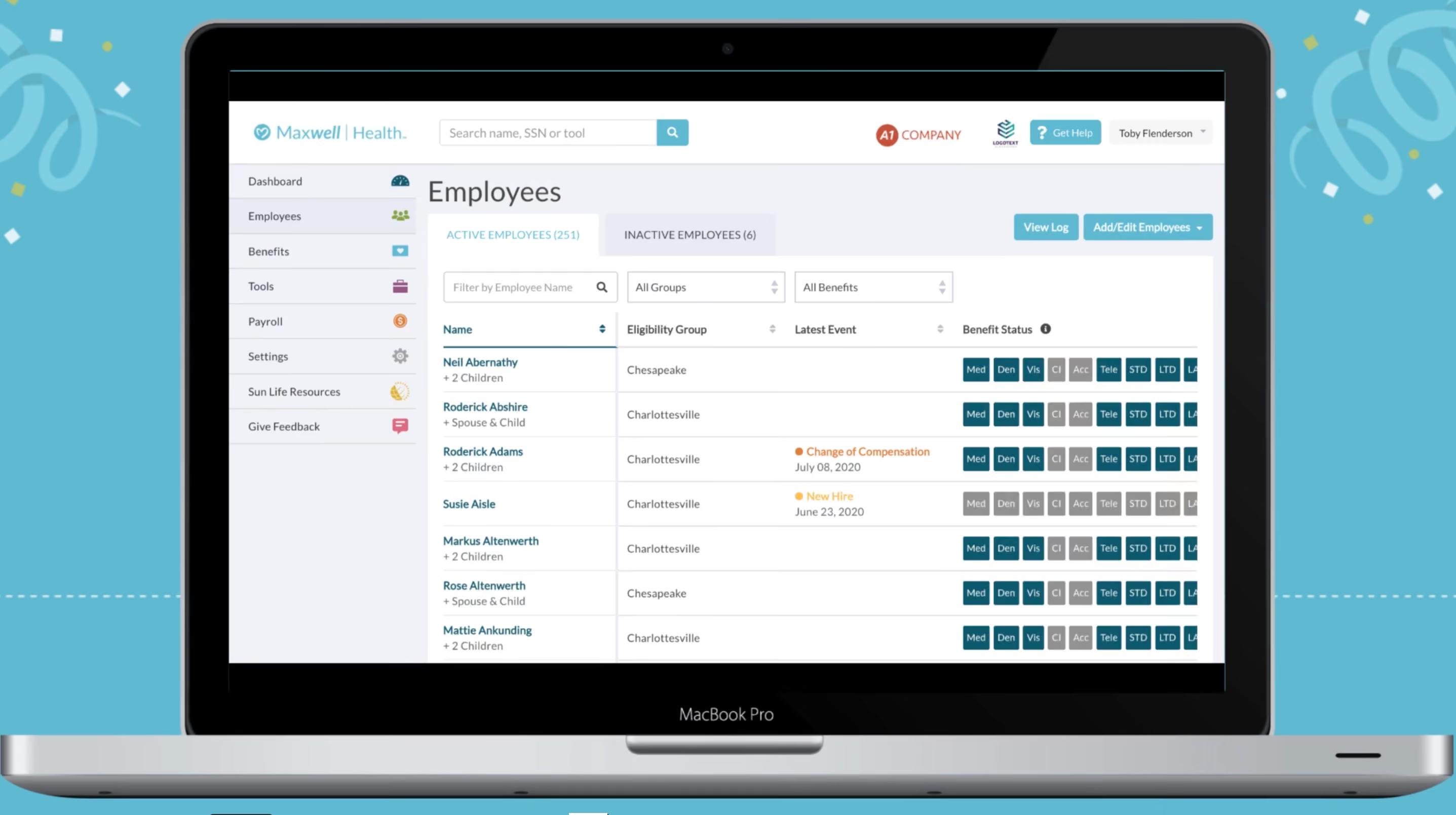
Maxwell Health, now owned by Sun Life Insurance, offers companies a modern approach to managing benefits for employees. From open enrollment to COBRA, they can help you stay compliant, and give employees a wide range of options all available through an easy to use mobile interface.
- Rose Street Advisors
- Taney County, Missouri
- Harrisburg University of Science and Technology
Maxwell does not release their pricing online. You will have to contact a sales representative.
Best For
If your company isn’t picky about what insurance company to work with, Maxwell Health’s partnership with Sun Life Insurance is ideal. You get a simplified end-to-end experience, requiring even less administrative work on your part.

We used Maxwell primarily for open enrollment. It also allowed employees to manage their benefits throughout the year. The platform was instrumental in streamlining workflows for employee benefits administration. It was utilized year-round, ensuring employees could access and update their benefits as needed.
Employees also used it to make personal changes to their benefits, such as updating dependents or coverage options.
- The platform is user-friendly for both employers and employees.
- It provides a centralized system to manage all employee benefits.
- It simplifies and streamlines the open enrollment process.
Maxwell Health was provided to my company through our insurance provider. Prior to this, my company did not have a centralized platform for managing employee benefits. Maxwell streamlined our open enrollment process and overall benefits management. It provided a single platform for employees to access and manage their benefits easily.
Additionally, it simplified benefits administration for the HR team, making the process much more efficient.
- It can be challenging to get direct support within the system.
- There were occasional issues with employee records after they updated their personal information.
- From an employer’s perspective, it was difficult to make changes during open enrollment once the official deadline had passed.
Maxwell offers a simplified and user-friendly platform that employees can easily navigate and understand.
Pricing should be a key consideration when selecting a platform. Ensure the tool is user-friendly for both employers and employees to avoid unnecessary complications. Integration with your payroll platform is highly beneficial for seamless administration.
Confirm that it is compatible with your offered benefits and your insurance broker’s platform(s) to avoid technical issues.
he platform has undergone slight modifications to improve usability, making it more user-friendly for employees.
Maxwell is well-suited for organizations that provide multiple benefits to their employees.
It may not be ideal for companies that offer only a few employee benefits, as the platform’s capabilities might be underutilized.
Rippling
Rippling is geared toward SMBs with its terrific automation and built-in integrations. Besides common features like self-service and onboarding, the benefits administration tool lets you work with your picked broker within the app and choose benefits packages from over 4,000 plans.
PROS
- Rippling can operate globally with almost any currency.
- 500+ integrations.
- Automates issuance processes.
- Provides a holistic view of company outflows—headcount costs included.
- All-in-one platform for employee management + PEO services offered, and even a suite of other IT products
- With 500 integrations, it’s very likely that they integrate with other key tools from your tech stack.
- Operates globally with any currency
- Workflow automation
- Analytics opportunities
- Provides a holistic view of company outflows—headcount costs included
CONS
- Total buy-in to Rippling is essential.
- No free trial.
- Phone support is available via the HR Help Desk service, which costs extra.
- Very SMB-oriented, so perhaps not the best option for larger companies.
- Total buy-in to Rippling is essential
- Very SMB-oriented, in case you’re a larger company.
- New features tend to be buggy in ways that tech teams are not accustomed to fixing
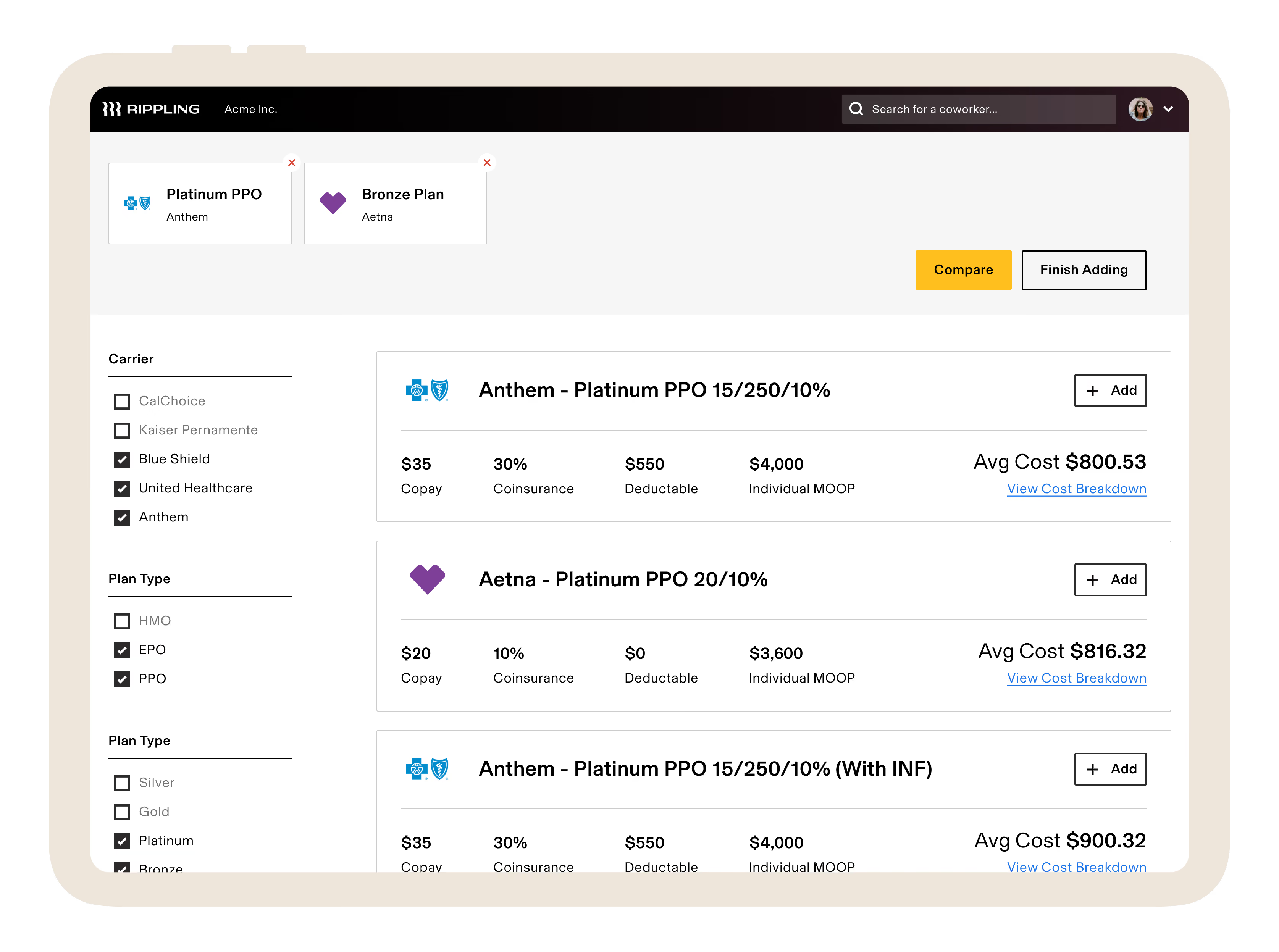
Rippling is in a class by itself compared to other benefits administration software. With a remarkable 500 app connectors, it surpasses most vendors we've tested across multiple categories. This helps the tool not only perform standard features an average benefits tracking system does, like parsing a paper receipt image captured with a phone but can also contextualize spending activity within the larger framework of employee data.
We tested Rippling's benefits management features and discovered that despite being a relatively new solution, it stands out for its strong emphasis on automation. Alongside standard functionalities like online onboarding, benefits enrollment, and employee self-service portals, Rippling offers unique capabilities.
One notable feature is the ability to add your existing broker as a user or receive recommendations if you don't have one. Additionally, Rippling excels in automation by automatically updating employee deductions when qualifying life events occur, such as location changes or marital status updates.
In the past two years, Rippling has expanded its offerings to include time and attendance, talent management, learning management, licensed PEO services, and global payroll. Remarkably, the platform has maintained its eye-catching UI despite the additions. However, there are a few aspects to keep in mind.
While you have the flexibility to select and purchase modules separately, Rippling’s core HR offering is the starter plan for all iterations.
Vox, Maximum Games, Superhuman, Compass Coffee, Highnoon.
Rippling's Core HR platform starts at $8 per employee per month. Contact Rippling regarding a custom Benefits Administration quote.
Best For
Rippling is best for small to medium-sized companies, globally or nationally distributed with multiple levels of organization.

The first function we transitioned into Rippling was our payroll administration. Rippling provides scheduling and timekeeping management tools, something that is not always a feature with other payroll administration systems (e.g., Gusto).
It's nice to have scheduling, timekeeping, and payroll together because they all have an impact on each other, and keeping it all in one system made things efficient and reduced errors.
We also moved our benefits management tasks into Rippling. We also used the financial features like expense management and travel stipends.
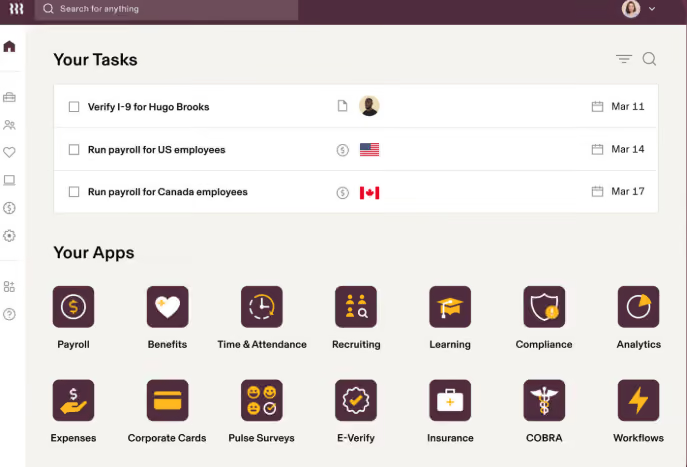
- How many features are offered within the system
- The automations that occur between different functions and departments, e.g., new hire triggers that get sent out to all departments to complete their new hire tasks.
- Errors went to almost zero within payroll due to how easy the scheduling, timekeeping, and payroll processes are within Rippling.
Our business was growing and we were looking to combine and streamline several of our functions. We had been looking into HRIS options but we really liked the idea of HR, IT, and Finance all being connected in a single system with Rippling.
We now can handle expense reports, payroll, benefit administration, travel stipends, and device management in one place. We saved time by not having to re-enter information into several different systems. We truly enjoyed how streamlined everything felt with Rippling.
- The price is very steep in order to access all of the features we truly needed
- Our salesperson promised we would have great customer service, but after we signed the contract, it was almost impossible to reach someone. Also, we never had anyone consistent to work with us.
- There was a very big learning curve and it required a lot of staff training.
It connects scheduling, timekeeping, and payroll together, which is sometimes not the case with other payroll admin systems like Gusto. Also, the user experience is much easier with Rippling compared to something like ADP or Workday, which are clunky and corporate feeling.
Think through what offerings are actually needed, because adding on categories like finance and IT makes this software very expensive. I think Rippling is best for businesses around 50-1,500 employees, and if your company is poised for growth, I suggest adopting Rippling sooner rather than later!
Over time, Rippling has really boomed into a larger company that seems to fit well with both small and larger sized businesses. Initially, it felt like it was a small to mid-sized business solution.
I think Rippling can be great for a small but growing business. It also can handle businesses with 1,500-2,000 staff very easily! It's great for a variety of industries as well.
It would be too costly for a business with less than 50 employees who do not plan on adding staff in the near future.
Companies that just need payroll administration assistance could benefit from shopping around for other solutions at a better price.
Also, any company that needs extensive help with adopting this should consider an alternative solution, as Rippling truly doesn't provide that level of attention and hand-holding.
Why Use Benefits Administration Software
As an employer, you are required to offer certain benefits (like health insurance and Social Security), while others are “nice-to-haves” that can help with recruiting and retention.
The more benefits you offer, the more administrative work you have to manage — unless, of course, you use benefits administration software. If you offer any or all of the following benefits, a benefits admin platform can streamline how you manage them — and how employees sign up for them:
- Social Security: A federal benefits program that provides insurance for older workers and their spouses, those whose spouse or qualifying ex-spouse have died, and the disabled.
- Worker’s Comp: Benefits given to employees who suffer work-related injuries or illnesses. It helps cover medical care, wages from lost wok time, and more.
- Health Insurance: A type of insurance that covers medical and surgical expenses. This is arguably your biggest benefits expense.
- Unemployment Insurance: A state-provided insurance that workers are eligible for if they lose their job and meet other requirements.
- Family Medical Leave: The Family and Medical Leave Act (also known as FMLA) provides up to 12 weeks of job-protected leave per year to care for a seriously injured or ill immediate family member (i.e. spouse, child, or parent). While the leave is unpaid, FMLA requires that health benefits remain intact.
- Vacation Time & Other Paid Leave: This can include a certain number of PTO days, sick days, and parental leave for your full-time employees.
- Affordable Care Act (ACA) Coverage: The landmark health reform, also known as Obamacare. Under the ACA, employers with 50 or more full-time employees are required to offer affordable, essential coverage to their full-time employees or choose to pay a tax penalty.
- Dental Insurance: A type of insurance that covers certain dental procedures and expenses.
- Vision Insurance: A type of insurance that covers certain vision procedures and expenses.
- Pet Insurance: A type of insurance that covers certain veterinary costs when your pet gets sick or injured.
- Wellness Programs: While these differ per company, wellness programs are designed to promote long-term health for employees. Some programs include discounts on gym memberships, providing on-site fitness classes, offering preventative health screenings, hosting stress management workshops, stocking kitchens with healthy snacks, etc.
- Financial Wellness: Financial wellness programs are designed to help employees take control of their finances so they can spend smarter, reduce debt, and save more money. Such programs include retirement/401k plans, student debt repayment, and more.
- Education Benefits: Also known as tuition benefits, education programs are designed to give employees opportunities to further their education. For example, some companies offer employees a reimbursement benefit up to a certain amount that covers classes, courses, certifications, etc.
- Life Insurance: A type of insurance that provides a lump-sum payment to the insured’s beneficiaries upon the insured’s passing.
- HSA & FSA: Pre-tax dollars that can be used for health-related and other approved expenses.
If you're not sure what benefits to offer at your company (besides, of course, the bare minimum requirements), consider who your full-time employees are.
In other words, what is important to them? For example, if the bulk of your employees are fresh out of college, a financial wellness benefit that helps them pay off their student debt will be a very attractive offering. You could also survey your employees if you're on the fence about a certain benefit to see if it’s something they actually want and would use.
Considerations for Employee Benefits Admin — Plus, Common Mistakes to Avoid
The features we just listed are pretty comprehensive, but benefits admin software won't take everything benefits-related off of your plate. Not only that, benefits management in general has its share of challenges. To make sure you do benefits "right," have successful open enrollment periods, and don't blow your benefits budget, here are six considerations and common mistakes to look out for:
- Choosing benefits that fit your company's need vs everything: As you probably already know, there are seemingly endless benefits you could offer to your employees. While it might be tempting to offer everything under the sun (which can be a great recruiting tool), you might end up creating more work and spending more money than it’s worth. In other words, you could wind up offering (and paying for) benefits that your employees don’t actually use. So think about what makes sense for your company and your employees — and start there.
- Not allowing employees to pick and choose benefits: By nature, people like having choices and making informed decisions for themselves. So give them different options so they can pick and choose the benefits that are right for them.
- Compliance with mandated benefits: Under laws like the Affordable Care Act, certain benefits are required for businesses of 50 or more full-time employees. If you don’t stay compliant, you could be charged fees. Fortunately, many benefits admin solutions offer automated compliance workflows so you can get the right forms to the right regulatory bodies when you need to.
- Knowing which benefits are offered tax free: Offering tax-free benefits are a win-win for your company and your employees. For example, tax-free benefits like health savings accounts, flexible spending accounts, commuter benefits, even tuition benefits can save your employees — and your company — money. After all, the income your employees set aside pre-tax for these benefits does NOT count toward your payroll tax dues. So, you could be leaving money on the table if you don’t offer tax-free benefits — or if your employees aren’t taking advantage of them.
- Costs can get high quickly: Your benefits offering can get expensive very quickly, especially when it comes to healthcare coverage. There are a variety of ways to keep your costs in check — from cost-sharing with employees (i.e. with increased employee contributions and higher deductibles), to changing vendor partners (like moving retirees from group plans to Medicare), to managing pharmacy spend (for example, encouraging the use of generic prescriptions or adding a narrow network).
Benefits & ROI
Benefits admin software can help your company in a myriad of ways. Here is a summary of the benefits we’ve mentioned:
- Compliance: At the most basic level, you’re required by law to offer certain benefits — and benefits admin software makes it easier for you to stay compliant with these laws.
- Less Busy Work: Because benefits admin software lets you automate the paperwork-heavy busy-work associated with benefits, your team will have more time to focus on other high-priority areas.
- Employee Satisfaction: Open enrollment will no longer feel like a chore for your employees — instead, they’ll be able to make smart enrollment decisions online and, in most cases, with just a few clicks. Offering a full-suite of benefits (that are easy to elect) will help you attract top candidates to your organization — and keep them once they’re hired.
- Smarter Investments: Because benefits admin software offers reporting, you’ll be able to see what benefits are being utilized the most — and which ones aren’t worth investing in further.
To get an idea of what benefits like these can actually do for your bottom line, check out our HR Tech ROI Calculators.
Pricing: What Employee Benefits Admin Platforms Cost
Most benefits admin platforms charge on a per-employee-per month basis and offer tiered pricing depending on the amount of features and functionality you’re looking for. We’ve seen pricing start as low as $8/employee/month.
When you have your demo(s), you should get a pricing plan that is customized for your company and needs. Just make sure that each quote you get breaks down the features that are included so you can easily compare and make the most informed investment for your company.
Features: What You Can Expect from Benefits Administration Software
Benefits administration software isn’t just a way to centralize your benefits management and alleviate the burdens of paperwork and other administrative tasks. They also offer a host of integrations and features to make your job easier, keep you compliant, save you money, and promote employee engagement. Let’s take a look:
- Suite of Benefits: Depending on the vendor you choose, you can manage all of your benefits in one place. We’ll talk about this later in the guide, but remember to ask your vendor(s) of choice which benefits are included with their solution.
- Online Enrollment & Self-Service for Employees: Allow employees to opt-in to their benefits elections themselves — and say goodbye to endless paperwork. With a safe and secure benefits admin platform, your employees can easily enroll in their plans of choice online — or even through a mobile app.
- Plan Configuration: Easily set up and manage all plans and benefits in one place. This not only makes things easier for your HR/people operations team, it also makes benefits shopping easier for your employees. They can more easily compare plans and sign up online.
- Payroll Integration: Integrate your benefits and payroll data so the right deductions automatically sync to each employee’s payroll record.
- Simple Onboarding: Make onboarding easy for new employees by centralizing all necessary paperwork and enrollment opportunities in one place. What’s more, if an employee leaves your company, you can just as easily un-enroll them and initiate COBRA.
- COBRA: Easily manage COBRA eligibility and compliance with automated reporting to your COBRA administrator.
- ACA Reporting: The Affordable Care Act requires employers with 50+ full-time employees to report healthcare coverage to the IRS. With benefits administration software, you can easily generate forms 1094 and 1095 and submit your reports for you so you stay compliant (and avoid fees).
- More Compliance: In addition to ACA and COBRA compliance, benefits administration software can help you stay compliant in other areas — and get ahead of changing regulations. This includes compliance with HIPAA (i.e. protecting employees’ Personal Health Information, or PHI), ERISA, the Dept. of Labor, the IRS, and OSHA.
- Reporting: Automate reporting of your HR data — including billing insights, headcount and attrition reports, job and salary reports, and more — to make more strategic, data-driven people decisions. You could even benchmark against other companies in your space to see if there are opportunities or areas of improvement.
As you develop your full benefits package, think about the features that would benefit your employees the most AND that would help make your job easier.
Demo Questions: What to Ask About Benefits Administration Software
We always recommend demoing a couple vendors so you can see their platforms in action before you actually invest. To prepare for your demos, create a list of questions specific to your company’s benefits needs. Here are some sample questions to get you started:
- What benefits does your platform have?
- What benefits do you find are most attractive to employees like mine?
- How can employees sign up for benefits?
- Can employees access their benefits plan on their phones?
- How does HR create a benefits plan?
- How will this solution fit into the rest of my tech stack and therefore what integrations do I need?
- How will others in the organization use this solution?
- What are the key features I want to ask about?
- What are the things that would make me nervous about buying this sort of solution?
Implementation: Getting Your Employee Benefits Software Off the Ground
The first step to implementing benefits admin software is figuring out what your suite of benefits looks like. From there — and based on the information you gathered during your demo — you’ll know what is required to get your platform of choice up and running. For example, you might need to engage your IT team to help with any necessary integrations.
Then, you’ll need to encourage utilization of the platform during open enrollment periods, for new employees who are onboarding, and for employees who are leaving and need to sign up for COBRA. To get employees to make their benefits elections before your open enrollment period ends, we recommend a variety of touch-points, including:
Software Training Sessions: If you're using a new system, you're going to need to train your HR or People Ops team on setting up and managing each benefit. Then, you'll need to introduce the platform to your employees so they know how to use it. You could do this a number of ways:
- Ask your vendor if they have pre-recorded training videos that you can share with your employees
- Meet with individual teams to walk them through the platform
- Give a brief demo of the platform at an all-staff meeting
All-Staff Emails: Send a note to the entire company at the beginning of open enrollment with instructions on how to use the platform, what actions they need to take by the deadline, what happens if they don't do anything, etc. Then follow-up with "last-call" reminders as the deadline approaches.
Engage Team Leads: Ask team leads and managers to remind their direct reports to make their benefits selections before the deadline.
Benefits Administration Software FAQs
What is benefits administration software?
Benefits administration software are platforms built specifically to plan and provide benefits packages to employees, while also maintaining compliance with government regulations.
Why use benefits administration software?
Benefits administration software streamlines all benefits operations, saving your HR team much needed time. In addition, all employee benefits data is held in one portal, meaning you can analyze all benefits information and create detailed reports about what benefits are used most or least. This provides you with valuable action points for benefits administration. Finally, letting software maintain compliance for you ensures simple, fast, and accurate reports to the IRS and other government entities.
What are some features of benefits administration software?
Features of benefits administration software include reporting, ACA and COBRA compliance, onboarding tools, plan configuration, self-service portal, online enrollment, and payroll integrations.
Next Steps for Your Employee Benefits Administration
Broadly speaking, there are two ways to get benefits admin support: a platform that only focuses on benefits admin or a more comprehensive Human Capital Management (HCM) suite that offers benefits admin as one of many HR features.
So, you’ll need to figure out which one will make the most sense for your company. We recommend demoing a couple vendors that fit into these two buckets so you can see how their solutions and features align with your needs and budget.
About the Author


About Us

- Our goal at SSR is to help HR and recruiting teams to find and buy the right software for their needs.
- Our site is free to use as some vendors will pay us for web traffic.
- SSR lists all companies we feel are top vendors - not just those who pay us - in our comprehensive directories full of the advice needed to make the right purchase decision for your HR team.


