

The 7 Best HR Software for Construction Companies of 2026
Our team of experts thoroughly vet every construction HR software we recommend to help you cut through the clutter and find your best fit.








Construction businesses' human resources departments deal with many moving parts, such as paying contractors, managing timesheets, hiring full-time employees, and more. That's where construction HR software comes to the rescue.
From new hire onboarding to workforce management and compliance, an HR system catered to construction companies can tremendously help your HR department stay efficient and improve your employee experience.
So without further ado, let's check out our top picks for small businesses, franchises, and large enterprises.
Our team of HR tech experts created this shortlist of the best HR software for construction companies using a mix of product and market research, testing, insight from thought leaders, and feedback from real-world users. Our assessment is based on the four key elements that drive great construction software: compliance and safety, workforce management, employee self-service, and data management.
- Compliance and Safety: Construction is a highly regulated industry, so the best software for construction companies has to keep up. Our research team assessed both the scope of compliance features (OSHA, environmental regulations, etc.) and each tool’s adaptability to geographic location (local labor laws, zoning codes, etc).
- Workforce Management: Our in-house HR pros took charge of assessments related to workforce management. They conducted simulations acting as both employee and recruiter, investigating process flows for scheduling, time and attendance, payroll processing, and more.
- Employee Self-Service (ESS): Construction companies often operate with little administrative support, so employees need to be able to access, update, and maintain their own records. We used data from product demos and simulations to evaluate ESS features, with scoring based on ease of use for employees and administrators and the scope and relevance of integrated data.
- Data Management: It is essential for these tools to collect and manage large amounts of data. Our evaluations relied on input from our network of HR pros, whose “big-picture” assessments of analytics workflows helped determine the viability of each product. We coupled this with hands-on evaluations focused on overall data point capacity and the quality of reports generated.
HR tech is never one-size-fits-all, so we fine-tuned our criteria to the needs of the construction industry. If you’d like to learn more about what goes into making a guide like this, check out this article on how we evaluate HR tech vendors.



Rippling

Rippling is one of the best upper mid-range HRIS we’ve tested, if you want something not too expensive that still covers a wide range of features. The platform has most of the HR functionalities an average construction firm would need: job costing, compliance, time tracking, and scheduling into a single, easy-to-use platform, saving time for both admins and field teams.
PROS
- Unified workforce management for employee scheduling, payroll, and time tracking.
- Compliance automation adapts labor rules based on state and federal law changes.
- Job costing capabilities accurately allocate time and expenses per project.
- The platform is user-friendly for both employees and admins on web and mobile.
- Real-time labor insights monitor and control labor costs with integrated data.
- All-in-one platform for employee management + PEO services offered, and even a suite of other IT products
- With 500 integrations, it’s very likely that they integrate with other key tools from your tech stack.
- Operates globally with any currency
- Workflow automation
- Analytics opportunities
- Provides a holistic view of company outflows—headcount costs included
CONS
- Some users report slow or AI-driven support experiences that delay issue resolution.
- Some features, like viewing all tax forms or accessing stored documents, are restricted to the desktop version.
- Rippling’s feature density can be initially overwhelming without proper implementation support.
- Total buy-in to Rippling is essential
- Very SMB-oriented, in case you’re a larger company.
- New features tend to be buggy in ways that tech teams are not accustomed to fixing
We’ve spent time hands-on with Rippling and spoken to real users in the construction space, particularly those in mid-sized firms scaling rapidly. What stood out to us is how well Rippling consolidates critical workforce systems: time tracking, scheduling, job costing, and payroll are all in one place, which minimizes friction and data errors that tend to pile up when juggling multiple platforms.
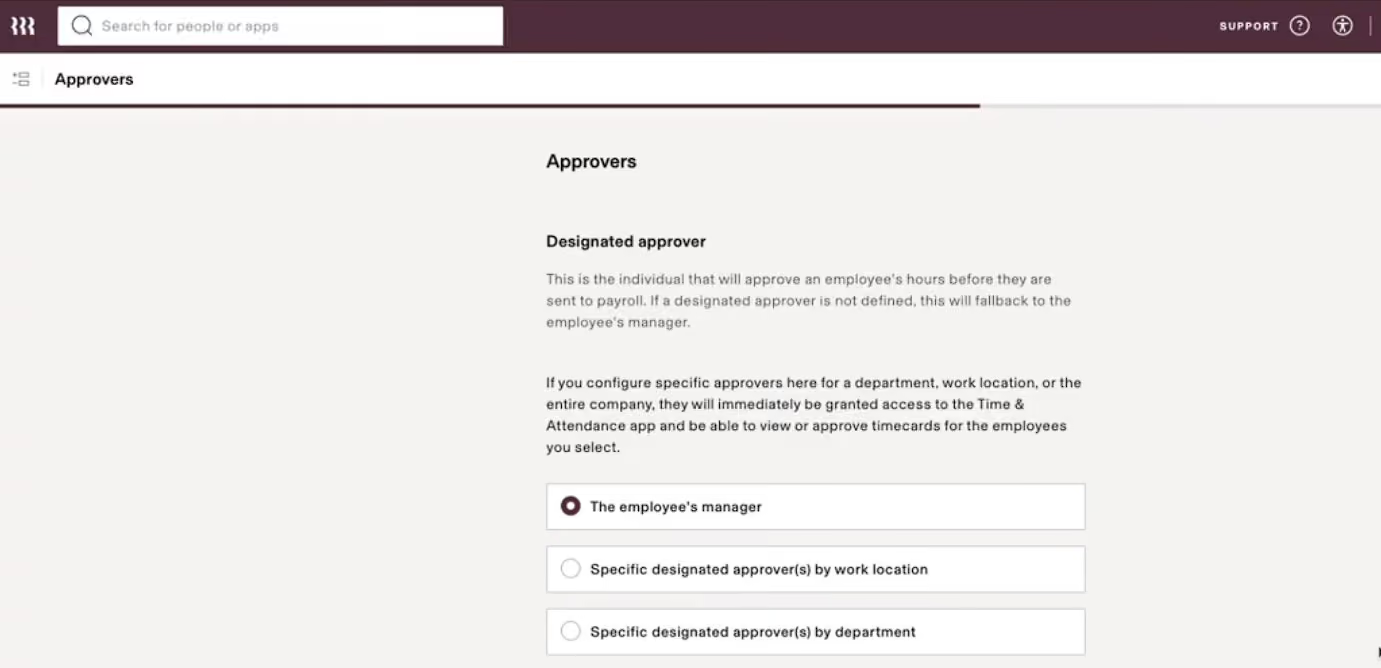
In testing, we appreciated how Rippling’s automation lightened the administrative load. Once time and job data are logged, they flow directly into payroll, with the system automatically handling expense tracking, PTO balances, and even overtime calculations. For field employees, the mobile app makes it simple to clock in, request time off, and view pay stubs, which can be essential when your team is field-based.
One area where Rippling performs especially well is job costing. During our demo, we simulated allocating labor and mileage across multiple roofing projects. Rippling made it easy to assign costs to jobs in real time and flagged potential overages early, giving construction leaders a chance to adjust schedules or submit change orders to clients.
On the compliance side, Rippling automatically creates and updates overtime and break policies based on the job site’s state laws. We didn’t need to dig through legal manuals or remember which states had different break thresholds, as the construction HR software handled that automatically.
Unfortunately, while the platform itself is intuitive, we should warn you that onboarding can feel overwhelming without a dedicated setup consultant, as there’s a lot packed into the interface.
Support is another area where we saw mixed results. Our basic questions were answered quickly, but more complex issues required escalation, and some users mentioned delays or reliance on AI-based replies that didn’t always solve their problems on the first try.
Notable customers include Cobex Construction Group, Harver, and Emotive.
Rippling’s HRIS starts at $8 per month, and buyers can choose to bundle it with Payroll, Time & Attendance, and Job Costing tools.

Best For
Rippling is best suited for growing construction businesses seeking to consolidate HR, payroll, and compliance in one platform with strong job costing and scheduling needs.


As an HR user, Rippling is used almost daily for HR operations. It plays a key role in recruiting, benefits management, and absence/time tracking. An HR admin can vet candidates, configure and manage benefits, track and pay PTO, and handle compliance documentation. The system supports various workflows, making HR processes more efficient.
- Rippling has a clean, visually appealing interface.
- It offers strong integrations and is user-friendly for beginner admins.
- Implementation is quick and straightforward for organizations.
I consulted with a tech startup on a tech stack selection project, where they chose to use Rippling. My engagement lasted about six months, covering implementation and organizational change management.
Rippling is a workforce management platform specializing in HR management, compliance, and expense management. The organization needed an HRIS as it began scaling aggressively and required a system to streamline HR operations.
- The system lacks flexibility for complex HR requirements compared to platforms like Oracle or Workday.
- Customer support is among the weakest in the HRIS market.
- While onboarding is fast, it can be confusing, as Rippling prioritizes speed over thorough implementation.
Rippling targets the middle market, catering to fast-growing startups and mid-sized enterprises. It offers more features than basic HRIS options but lacks the depth and complexity of Workday. While many companies find it appealing, I don’t think it’s worth the price.
- Budget vs. features—how much are you willing to spend for the functionality you need? HRIS options vary widely.
- Organization size and HR complexity—ensure the system can handle your operational demands.
Founded in 2016, Rippling has effectively targeted fast-growing startups and mid-sized enterprises. However, its development team focuses more on UI enhancements than adding meaningful features.
- Companies that prioritize an intuitive interface for admins and employees.
- Those looking for more features than basic HRIS options but not ready to invest in enterprise-level solutions.
- Companies with either very small or very large HR budgets, as their needs likely don’t align with Rippling’s offerings.
- Organizations with advanced HR architecture or complex requirements.

BambooHR
BambooHR is a highly adaptable platform that offers numerous perks and flexible pricing. It is a renowned and trusted name in human resources tech and a compelling option for construction sector needs. It’s.
PROS
- Custom pricing options are available for their flexible packages.
- User-friendly and straightforward tool.
- Accurate time tracking capabilities for precise monitoring.
- May integrate with construction-specific payroll systems.
- Flexible packaging and custom pricing is the way they roll. You can pick out one or two packages and pick other modules as add-ons based on your needs.
- Very simple and straightforward tool, easy to use.
CONS
- The system cannot pay non-U.S. employees.
- The availability of customer support is reduced to U.S. business hours.
- Low-tier plans do not include critical features, like time tracking.
- No specialized project management or resource allocation features.
- Payroll is only available for US-based employees
- Customer support is only offered during US business hours.
- Some modules like time tracking, performance management, and surveys are only available as add-ons.
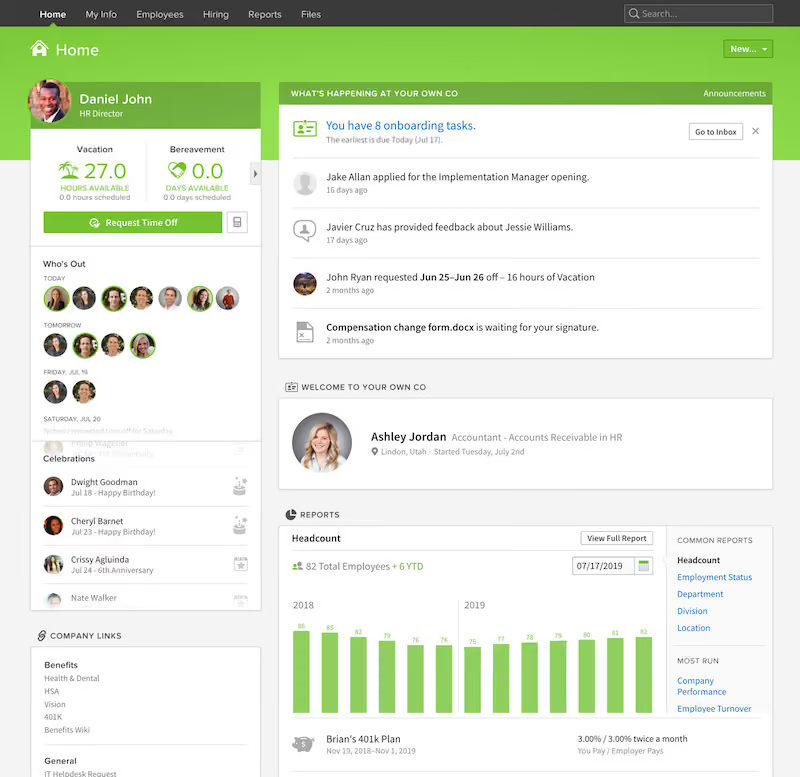
BambooHR is an all-around great choice for any company looking to streamline HR processes, and depending on your selected package, recruiting, performance management, time tracking, and even payroll.
The HR Essentials package offers core features like a database for detailed employee information, leave and absence management, an employee self-service module, and more. If most of your workers are on-the-job and don't have access to a desktop computer during the day. BambooHR has a best-in-class mobile app designed for employee self-service, so you can rest assured that your employees can access essential functions at all times.
Among the 34,000+ companies that use BambooHR, you’d find names like Quora, Universal Group, Reddit, Asana, Change.org, University of Maryland, Grammarly, Stance, Postmates, Wistia, the Jacksonville Jaguars, and ZipRecruiter.
BambooHR pricing starts at $10 per employee/month for the Core plan, $17 for Pro, and $25 for Elite. Higher tiers add features like performance management, advanced analytics, compensation tools, and expanded compliance training. Volume and nonprofit discounts are available.
Construction teams can add Time Tracking, Payroll, and Benefits Administration (US only), plus Employer of Record services via Remote for global hiring. A 15% bundle discount applies to Payroll and Benefits Administration for US-based employees only.
Best For
Construction companies seeking customizable HR solutions with flexible pricing. Suitable for various company sizes.

There are multiple ways to incorporate BambooHR into your business workflows from an HR perspective. We used it for job postings, hiring, and onboarding. Also, we used it for tracking PTO, employee records, and payroll. We found it helpful for benefits enrollment too.
A relatively new feature is tracking employee satisfaction through eNPS, which is great ,and BambooHR includes the ability to use it for performance management.
I have found BambooHR to be simple in its design for a user-friendly approach. Also, with an average cost of $17 per employee (flat rate for more employees) it's saved both time and money.
Everything our small company needs is available in one platform, which is nice not to have to "hop around" to other platforms.
We are a small company that could not afford to hire an entire human resources department. Also, we wanted to move to a platform to house, e.g., employee records, track hiring processes, and data management. BambooHR was a way for us to accomplish these goals at a reasonable price and brought the company into the 21st century!
We used this platform for a couple of years for our benefits enrollment, administration, and hiring processes. It was user-friendly for our employees.
BambooHR has "add-on" features that can drive up the costs. The "straightforward" (i.e., limited) features may not be suitable for mid-to large-scale businesses. BambooHR has had its challenges with year-over-year capabilities.
BambooHR is user-friendly and great for small businesses. It is a "pay as you need" in its features, so you don't have to buy the entire package, if you will.
A careful analysis of your business needs from an HR perspective is required. For instance, how many employees do you have, what are your challenges in the HR realm (e.g., multiple systems for each function), and how much can you afford. This is a feature-based platform and can be helpful for any-sized business (smaller is my suggestion) to select what you need based on affordability.
BambooHR has become more user-friendly with more options.
BambooHR is good for a small business, based on cost and options it offers.
Large-scale or international businesses with hundreds of employees that have a cross-functional human resources department that uses/needs a platform that has multiple features in one, platform-based cost, and BambooHR may not be that.

ADP
The solutions from one of the most-experienced companies in the payroll software space can definitely be applied to construction companies of multiple sizes.
PROS
- Native, all-in-one technology suite for recruitment, payroll, and compliance.
- 17 RPO service centers in 14 countries and provide services in 42 different languages.
- Dedicated team of AIRS-certified recruiting professionals.
CONS
- Technology options outside ADP’s dedicated HR tools are limited.
ADP is a big name in payroll software and workforce management solutions. Construction companies of any size will find just as much value in ADP as a tech company, enterprise corporation, or other kind of customer.
In addition, ADP already has many customers in the construction industry. According to their website, they frequently receive feedback from those clients and translate that into useful, construction-specific functionality.
ADP has a few different pricing tiers. Payroll Essentials features only workforce management, tax, and payroll systems. Upgrading to HR Plus adds digital record keeping, analytics, onboarding, and HR tools. Hiring Advantage adds talent acquisition tools. Finally, Performance Plus tops it all off with performance management and compensation management.
The cost of these feature sets depends on the size of your business. Businesses with under 50 employees may qualify for a free first 3 months. You must get in contact with a sales representative for a quote, because pricing is not publicly available.
Best For

Connecteam
Connecteam offers a range of cool tools that help construction companies manage office and onsite workers, keep projects on track, and ensure safety and compliance.
PROS
- Native tools for job scheduling, shift management, and communication.
- GPS time clock app with location tracking and work zone alerts.
- Set break hours to follow applicable laws and regulations.
- Manages staff licenses, certifications, and registrations.
- Create and share guides, procedures, and training on work safety for mobile learning.
- Enables crew to report hazards and contact emergencies via the construction app.
- One of the only fully-mobile HR tech tools for deskless workers
- Very adequately-priced for all it entails, SMB-friendly
- Quite open to feedback, having implemented user suggestions as features in the past.
CONS
- No native payroll features.
- Limited third-party integrations.
- Mobile app lacks dark mode.
- In the communication hub, the app offers no confirmation that messages were sent and/or seen.
- Certain features that some teams consider essential, such as GPS-tracking, are only available in the higher-tier pricing plans.

Intuitive mobile apps, flexible pricing, and one unified platform for job scheduling, communication, reports, training, time clock, and safety make Connecteam one of our top construction HR software recommendations.
What we love most about Connecteam is its employee scheduling tool. You can create crew schedules for specific job sites and share them with job details, materials, equipment, and tasks based on safety certifications—all with this single tool.
You can also manage crew availability, make swaps for delays due to weather or client changes, and ensure employees are on-site with GPS location tracking. Once you approve the crew's hours, timesheets are instantly sent to your connected payroll app.
Construction is a highly regulated industry, and Connecteam's compliance efforts are notable: All plans, including the free one, provide multiple compliance features such as GDPR, ISO 27001, and SOC 2. If you’re looking for something more advanced, Connecteam has some good options like SSO, 2FA, and mobile app lock (however, they are available for the Enterprise plan only).
Our main gripe with Connecteam is that they offer very few integration options. Adding to the frustration, API access is limited to just the Enterprise plan.
Another downside we found is that mobile apps lack a dark mode. Given the platform’s frequent feature updates, though, we wouldn’t be surprised to see it launch this feature in a month or two.
36,000+ companies, including Canada’s Restoration Services, Mattest Materials Testing, and Rone Engineering Services.
Connecteam is free for up to 10 users. The platform also offers a free trial without requiring a demo or credit card info. Connecteam paid plans start at $29 per month when billed annually.
Best For
While teams with no more than 10 employees can benefit from Connecteam’s free plan, mid-sized to large construction businesses tend to make the most of this platform’s offerings.

Arcoro
Arcoro is one of the few software companies specifically aimed towards the construction industry in the US, their a supporter of the ACG.
PROS
CONS

Arcoro is a supporter of the Associated General Contractors of America (ACG), the leading association for the construction industry that represents more than 27,000 firms. The SaaS company understands the ins-and-outs of the business, so they're well equipped to deal with construction-specific use cases.
Although pricing is not publicly shared, Arcoro advertises a discounted price for ACG members.
Best For

In my role, I used Arcoro for multiple purposes. I could see emergency contact information for emergency response procedures. I ran reports for various projects. I used the performance review section at annual review time. It was very beneficial to be able to see when service anniversaries and birthdays were coming up for organizing celebrations.
Because the tool was so basic, it was easy to learn. It provided employee demographics in an easy-to-consume way. It was inexpensive (according to leadership, I did not have line of sight to its cost).
My organization had been using Arcoro for quite a while prior to my joining. I used it for 6-7 years in my role. It was used for performance reviews (to a point), as a limited survey tool, and a place to house HR-related documents, both visible and not visible to the employee. It was also used to maintain employee data (address, phone, date of hire, date of departure, employee type, etc.), demographics, emergency contact information, and more. The system allowed for reporting and monitoring as required by state and federal regulations.
It was a very basic solution that is not compatible with other systems. It was very difficult to modify to fit the needs of the business. It did not have any, or very few, automations.
Arcoro is great for small businesses that don’t need a lot of bells and whistles. It can be managed by one person. It is economical, which can be appealing for companies that can’t afford a higher-end HRIS.
Understand your needs very clearly before buying the system. Spend a lot of time understanding the backend and how the employees would interface with it because it is not very modifiable, which could lead to frustration. If you need something that is agile and customizable, this tool is not for you.
I am unsure how it has evolved over time to meet user needs. During my tenure, I did not personally see any evolution, and I believe this was the driving factor for our company to move on to a different tool.
Small businesses can benefit greatly from Arcoro.
Large businesses that require a lot of automation or integrations, or those that need an agile HRIS will need a more robust system.

Raken
Raken is a construction management tool that focuses on turning long and daily processes common to every construction business into quick and simple tasks.
PROS
CONS
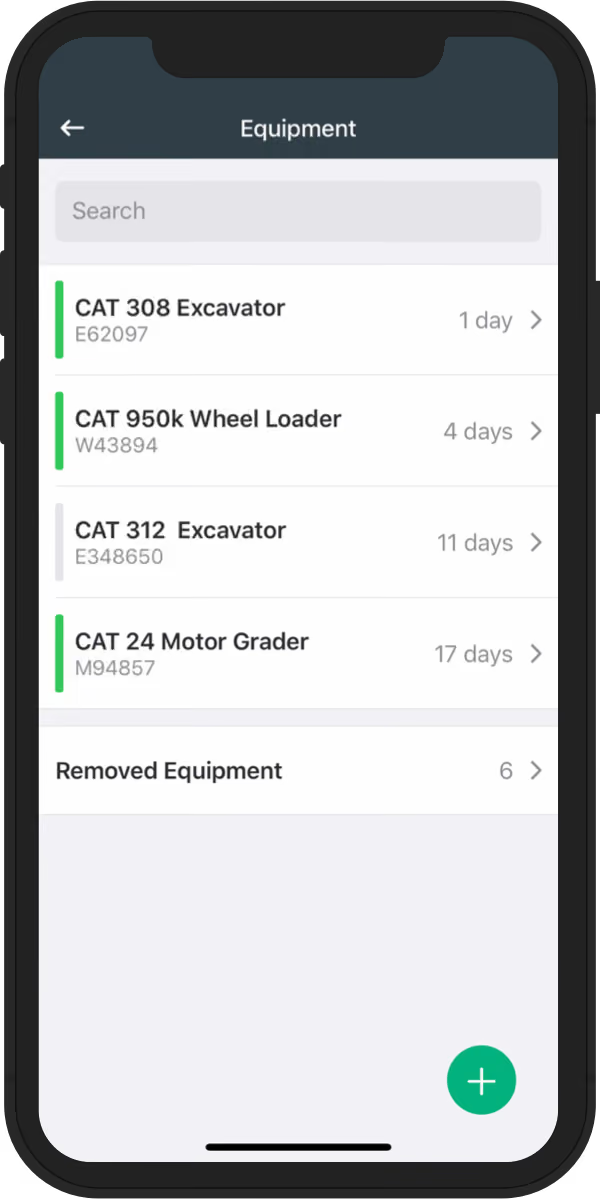
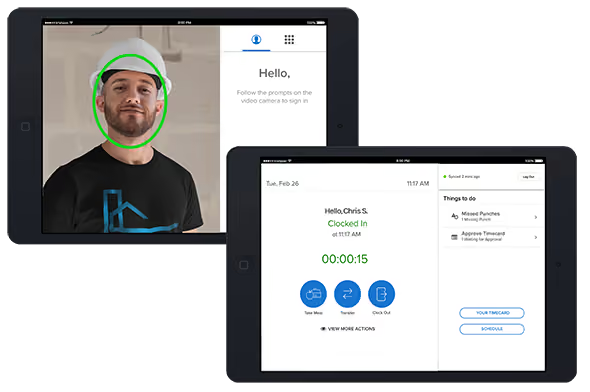
Raken is the software of choice for 4,000 general and specialty contractors. Unlike the other software on this list, it is geared towards general construction management. However, that doesn't mean it won't have plenty to offer HR teams.
Raken has top-notch time tracking functionality. It's all done through a well-designed mobile app that includes a self-service portal for employees. In one tap, your HR team can allocate regular hours, overtime, or double hours to minimize the chance for payment disputes.
Best For

Sage People
Sage People is a complete, cloud-based HR management solution that can manage global teams.
PROS
- Impressive range of automated workflows for global workforces
- Local expertise provided for payroll and compliance
- Good range of workflows for globally-distributed teams
- Lots of local expertise from payroll and compliance consultants
CONS
- Lacks integrations with many common HR tools
- The mobile app is reported to lack essential features
- Not many integrations
- Some users have found the mobile app to lack core functionalities

Sage is a software company with many different solutions, one of which is Sage HR.
Sage HR is a human resource management suite that covers everything from onboarding to expense tracking, to leave management to reporting, and much more. It's an intuitive core HR platform that any construction company will find useful.
Sage HR especially stands out for construction because of the other software its parent company offers, namely Sage 300 Construction and Real Estate. Sage 300 Construction and Real Estate is an ERP with real-time collaboration capabilities for workers on-and-off the job.
While your HR team probably won't need to use it, it's nice to know that Sage as a company understands construction use cases. It also seamlessly integrates with Sage HR, so it's a good choice if you want to keep all of your employee data under one vendor's roof.
Best For

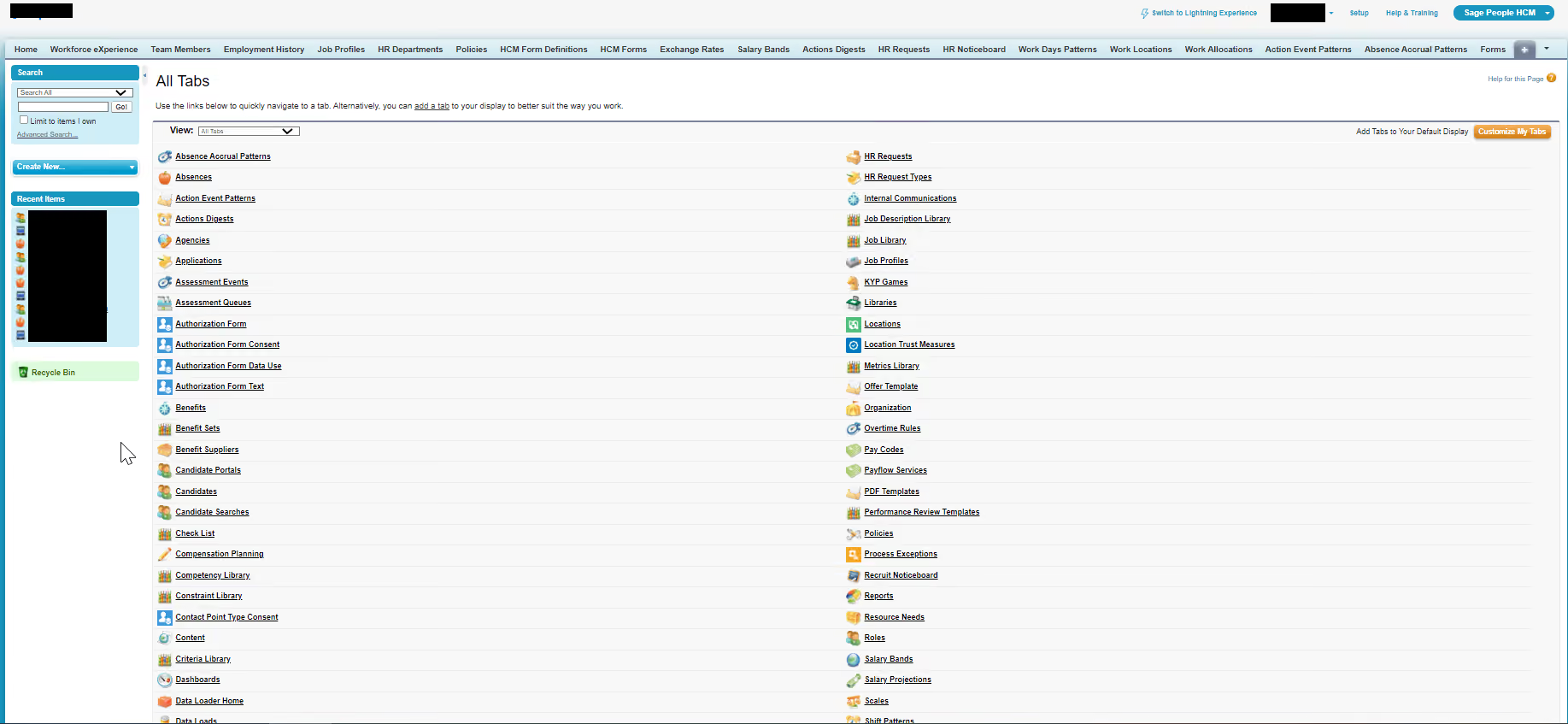
I use Sage People,
- to record employees and all their employment history.
- to give employees access to their own information page.
- to provide various reports for internal teams and human resources teams.
- to feed databases and generate human resources dashboards.
- for managing employee databases from various countries and integration with other internal applications like DocuSign, Bonusly, payroll, etc.
I like Sage People,
- as it has many features for example it generates extremely comprehensive and complete reports.
- as it has tools that allow me to batch-load data in a very easy and practical way.
- because it has very complete and functional support available to the user.
The tool was acquired for the registration database of employees. It was necessary to have a tool that could globally attend several countries. The tool had to be integrated with several applications like slack, DocuSign, financial force, etc. The system needs to be very complete in terms of reports and automation. I have been using the system for more than 1 year and 3 months.
Despite being complete the system has some limitations and in some countries with specific legislation is difficult to adapt to local rules. I can say that the system is quite complex and therefore some activities are quite difficult to perform and require some steps of attention.
I can say that the system has a lot of integrations with several other applications and platforms. Sage also stands out for its complete functionality in terms of reports. I also see the support offered to understand the system as a great differential, it is very complete.
Take into consideration a tool that can be globally adapted to many countries. Consider a tool that is widely possible to connect to other human resources applications and systems such as benefits, payroll, and other applications. Also, consider a tool that is easy to use and has a potential range of reports to generate.
I highlight that SAGE has released an updated version that can be used in parallel to the classic version, they call it Lightening with a more modern interface and some improved features.
In my point of view this tool is ideal for global organizations, with a human resources department that looks and takes care of your database and needs consistency and a reliable system with the ability to manage large volumes of data and generate practical reports and dashboards and requires integration with other internal systems in the company.
Small companies that do not need such a complex and complete system may not make much sense to use SAGE.
More on HR Software
The software listed here are all great choices for your construction business, but just in case you need something more broad, the following resources may be helpful to you:
- Our Top Picks of Best Human Resources Information Software: We have options for domestic and international organizations, SMBs, nonprofits, as well as remote teams.
- The Best Free HR Software for Startups and Small Businesses: Besides a list of the worth-checking-out tools, we’ve included some of the best tips to help you narrow your search more effectively.
- Best Payroll and HR Software: As its name suggests, check this out if you’re in the market for a solution that can handle nicely both payroll and HR.
About the Author


About Us

- Our goal at SSR is to help HR and recruiting teams to find and buy the right software for their needs.
- Our site is free to use as some vendors will pay us for web traffic.
- SSR lists all companies we feel are top vendors - not just those who pay us - in our comprehensive directories full of the advice needed to make the right purchase decision for your HR team.


