

10+ Best Restaurant Scheduling Software & Apps in 2026
The best restaurant scheduling software platforms reviewed and compared: Get info on features, pricing, pros & cons and more below.








Managing staff schedules is among the most challenging parts of running a successful restaurant business. Last-minute leave requests, unplanned shifts, and miscommunication among team members can severely hurt productivity and cost a restaurant thousands of dollars.
As economies around the world are bouncing back from pandemic restrictions, coping with new ones, or dealing with rapidly shifting demand, it makes sense that 65% of restaurant owners surveyed by 7shifts in their 2025 report consider staffing the top challenge they face.
To make sure you avoid the pitfalls of inadequate scheduling and staffing practices, we’ve handpicked some of the best restaurant scheduling software for your business.
In this detailed guide, we’ll cover the top restaurant scheduling tools, describe their strengths and weaknesses, evaluate their features, and examine their pricing plans.
To find the best scheduling software for restaurants, we meticulously evaluated a plethora of tools drawing upon demos, testing, user feedback and expert insight. To be featured, tools must excel on three pivotal criteria: staffing features, ease of use, and pricing.
- Staffing Features: We prioritized products with comprehensive staffing features, as this is one of the main challenges restaurants face. The software tools we picked all offer robust functionalities, including shift planning, team communication, employee availability management, and shift swapping.
- Ease of Use: User-friendliness is essential in the fast-paced restaurant industry. We focused on software that stands out for its intuitive and straightforward interface. These solutions all offer a hassle-free setup, streamlined navigation, and efficient workflows.
- Pricing: Budget considerations can be paramount for restaurant businesses. We sought out companies with competitive and transparent pricing models. The chosen solutions offer flexible subscription plans, affordable pricing tiers, and features tailored to the unique needs of dining establishments.
To delve deeper into our rigorous evaluation process, you can always have a look at our post on how we select the finest HR tech.


Connecteam

Connecteam boasts a comprehensive collection of scheduling, time tracking, and employee management at a competitive price. Even the free plan provides excellent value: it accommodates up to 10 users and offers job scheduling, checklists, forms, task management, and time tracking.
PROS
- Intuitive and easy-to-use scheduling interface.
- Customizable shift templates.
- Real-time notifications for schedule updates.
- Employee self-service for availability and shift swaps.
- Integration with GPS and geofencing.
- Competitive pricing. Free for up to 10 users.
- One of the only fully-mobile HR tech tools for deskless workers
- Very adequately-priced for all it entails, SMB-friendly
- Quite open to feedback, having implemented user suggestions as features in the past.
CONS
- Occasional app crashes.
- Limited offline functionality.
- In the communication hub, the app offers no confirmation that messages were sent and/or seen.
- Certain features that some teams consider essential, such as GPS-tracking, are only available in the higher-tier pricing plans.
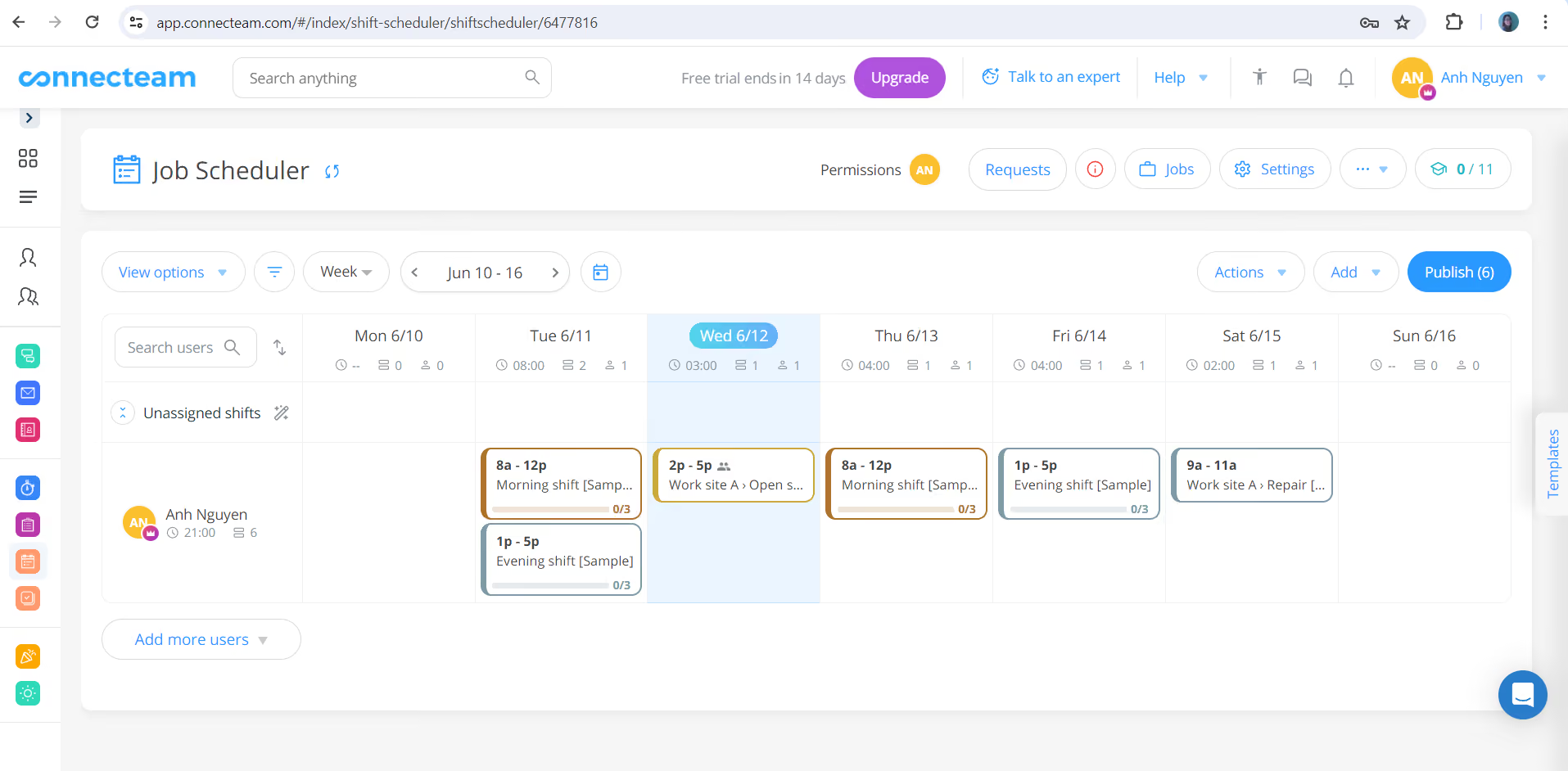
Connecteam lives up to our expectations with a range of features designed for workforce management in the demanding food service industry. The platform provides restaurant managers with tools to create detailed schedules, track employee hours, and effortlessly manage shift changes.
The scheduling interface is particularly our favorite. There are a handful of pre-made templates managers can use to build schedules quickly, plus these templates are quite flexible. They can easily be adjusted to meet your restaurant settings, whether it’s daily, weekly, or monthly schedules. Additionally, the drag-and-drop feature makes it easier to assign shifts.
Mobile-friendliness was another criterion we looked into when assessing this vendor. Much to our relief, they fulfilled this request. Connecteam has an employee self-service where restaurant workers can set their availability and request time off directly from their mobile devices. Plus, the availability of shift swaps streamlines the whole process of finding replacements for everyone involved.
The in-app notifications are pretty handy for keeping your staff informed in real time. Through Connecteam, they get alerts about new shifts, changes to their schedules, and whether their time-off requests were approved.
Those with multiple locations or specific job roles may wonder if Connecteam supports the creation of job-specific schedules. Yes, it does. As a manager, you can assign shifts based on roles to make sure that each position is adequately staffed.
The only real downfall of this restaurant scheduling app is that it can crash sometimes. Though not an everyday thing, this may cause some inconvenience in the daily operations of managers and workers.
On another note, Connecteam won’t be a good fit for those prioritizing offline restaurant management features.
20,000+ users from brands like Subway, Chick-fil-A, and Biggby Coffee have used Connecteam for their restaurant scheduling.
Connecteam offers tiered pricing based on features and user count, starting at $0 for up to 10 users.
- Small Business: Free for up to 10 users.
- Basic: $35/month ($29 annual) for 30 users; additional users $0.6/month ($0.5 annual).
- Advanced: $59/month ($49 annual) for 30 users; additional users $1.8/month ($1.5 annual).
- Expert: $119/month ($99 annual) for 30 users; additional users $3.6/month ($3 annual).
- Enterprise: Custom pricing for 200+ employees.
- Includes a 14-day free trial; annual plans save two months.

Best For
Connecteam is best for small restaurants, mid-sized chains, and franchises that require robust scheduling software that can also do task management and time clock.

TCP
We chose TCP’s Humanity Schedule for its impressive features that are key to restaurant operations. In our tech tests and research, it became clear that the system’s demand-driven forecasting engine, automated compliance safeguards, and labor-cost controls are highly praised by restaurants facing fluctuating staffing needs and tight profit margins.
PROS
- AI-powered Demand Scheduler forecasts needs and auto-builds compliant schedules.
- Auto-fill assigns qualified staff based on availability, skills, and compliance rules (labor laws, overtime).
- Prevents compliance violations with built-in Fair Workweek, FLSA, and minor labor rule configurations.
- Labor Optimizer compares scheduled vs. actual hours to control overtime and budgets.
- Mobile app allows employees to manage shifts, time-off requests, and availability with notifications.
- Task management tools enable managers to assign and track shift-specific duties in real time.
- AI-powered Demand Scheduler forecasts needs and auto-builds compliant schedules.
- Auto-fill assigns qualified staff based on availability, skills, and compliance rules (labor laws, overtime).
- Prevents compliance violations with built-in Fair Workweek, FLSA, and minor labor rule configurations.
- Labor Optimizer compares scheduled vs. actual hours to control overtime and budgets.
- Mobile app allows employees to manage shifts, time-off requests, and availability with notifications.
- Task management tools enable managers to assign and track shift-specific duties in real time.
CONS
- Higher-tier plans or add-ons required to access Labor Optimizer and Shift Tasks features.
- HRIS integrations and API access are restricted to Professional (add-on) or Enterprise tiers.
- All pricing and payments are in USD only.
- Higher-tier plans or add-ons required to access Labor Optimizer and Shift Tasks features.
- HRIS integrations and API access are restricted to Professional (add-on) or Enterprise tiers.
- All pricing and payments are in USD only.
TCP’s Humanity Schedule is designed for industries such as restaurants, where labor demand can fluctuate significantly throughout the day.
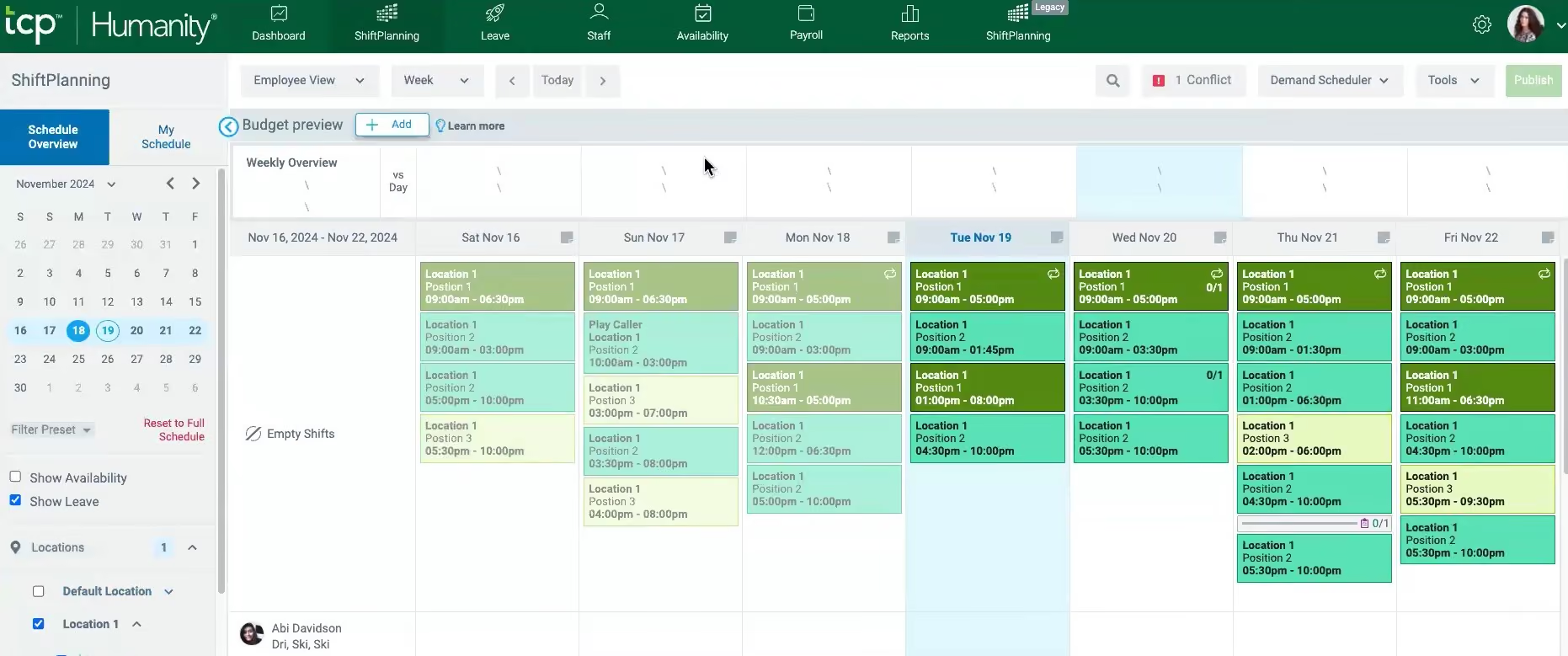
The Demand Scheduler immediately caught our attention. During testing, this tool allowed us to upload historical sales data, set staffing rules, and have the system automatically forecast coverage needs. From there, it could also create and auto-fill schedules in just a few clicks, which is highly convenient.
Additionally, the system provides strong compliance features. In our tests, it did not miss a single issue we intentionally created (overlapping shifts and overtime thresholds). According to the vendor, it can also detect minor labor restrictions and Fair Workweek conflicts before schedules are finalized, which can be very helpful to reduce compliance risks and costly corrections for restaurant operators.
The operational benefits are equally compelling. During our research, we found a testimonial reporting that after replacing their Excel files and manual employee scheduling process with TCP’s Humanity Schedule, they saved over 10 hours per week, released schedules three weeks in advance, and reduced payroll errors through automated reporting.
We think restaurant managers will also find the Staffing Checker and Budget View tools useful. With these features, they can compare scheduled labor against expected demand by hour and role to prevent overstaffing during slow times or avoid scrambling for coverage during busy periods. The Labor Optimizer further enhances operational clarity by identifying the difference between scheduled and actual hours to help reduce unnecessary overtime.
Design-wise, we appreciated TCP’s people-first approach. On par with competitors like When I Work and Connecteam, the scheduling platform comes with an employee mobile app that gives employees access to schedules, shift trades, availability updates, and instant communication, improving transparency and accountability when tracking event logs for shift changes and time-off approvals.
However, the integration capability is a clear limitation for lower-tier customers. Particularly, the Essentials plan only lets users export payroll, meaning those looking for HRIS integrations, API access, or any custom system connectivity can't even buy them as add-ons at that level. This leaves you with two options: either pay for a higher tier to sync scheduling data, employee details, and leave balances with your existing HRIS, or tolerate doing all that work manually.
Another thing to keep in mind is the billing currency. TCP only handles pricing and payments in USD. For restaurant brands with a global presence or based outside the U.S., this could lead to challenges with exchange-rate fluctuations and added complexity to accounting processes.
35,000+ companies, including
TCP Humanity Schedule offers three pricing tiers: Essentials ($2.75/employee/month), Professional ($3.75/employee/month), and Enterprise (custom pricing). A 30-day free trial with Professional features is available.
Best For
Multi-location restaurants across the U.S.


We used TimeClock Plus to track all timekeeping for both hourly and salaried employees, therefore, daily. TCP's geofencing was extremely important for our owner to track all remote staff, and it was used daily. The app allows the employer to map a location to an employee, and geofencing in this app is extensive. TCP setup for the entire company was very streamlined, and new hire onboarding was simplified. Tech support is very competent. Tracking employees by what they're working on can be preset, and an employee can switch tasks for accurate job costing. Employees and managers used the app daily to clock in and out, track their hours, request and approve PTO, see regular hours and overtime hours, and communicate via notifications.
TimeClock Plus is robust, with many features we do not use because our payroll company provides them, but it's nice to know the tools are there. The dashboard and exceptions filter make it simple for managers to approve their employees' hours and time-off requests. TCP has decent training videos. The PTO calendar and employee notifications are very helpful. Integration into my payroll, Gusto, was seamless.
We switched to TimeClock Plus (TCP) when we experienced unacceptable issues with Homebase. TCP integrated with my payroll company, Gusto. TCP was very cost-effective when we used the minimum features. TCP has decent geofencing and geolocation, which was a requirement by the owner. TCP also has overlapping features with my payroll that we didn't need, but it was nice to have the option as a backup.
TimeClock Plus can be overwhelming for a small business, as it has many features that might not be used. Some employees reported that their times weren't being recorded properly, but managers could easily log in and make adjustments. It can be expensive if you purchase features you do not utilize.
TimeClock Plus is a lot like Kronos to me, with many features. I like it for how customizable everything is, and their help team walked me through the process for anything I couldn't figure out.
First, determine if you need all the features offered. We narrowed everything down to the Time and Attendance Essentials. TimeClock Plus integrates with everything, but ensure it's a seamless integration with your payroll. TCP has serious scalability, so if you anticipate a lot of growth, this is a solid system.
I've only used TimeClock Plus recently.
TimeClock Plus is great for mid-sized to large organizations that need a high level of customization. TCP worked extremely well for a small manufacturing business, though we only utilized the minimum features.
TimeClock Plus isn't needed for a very small organization. There are many other timekeeping systems specifically designed for very small businesses.

When I Work
When I Work offers a solid scheduling solution for small restaurants on a budget. The app takes an essentialist approach to workforce management by filtering out extra features and focusing on delivering high-quality employee scheduling and time tracking features.
PROS
CONS

When I Work is a powerful employee scheduling tool. Its ability to give managers an organization-wide view of staff scheduling makes it stand out. Even though businesses of all sizes use it, When I Work is ideal for employee scheduling software for small or medium-sized restaurants on a budget.
When I Work offers per-user pricing, starting at $2.50 per user per month.
- Essentials: $2.50/user/month with core scheduling features.
- Pro: $5.00/user/month, adds advanced scheduling and reporting.
- All plans include a 14-day free trial and flexible billing options.
Best For

I utilized it for 8 months. The primary function was schedule management - utilizing the platform to keep track of work schedules and shifts available to pick up. Additionally we utilized it for timekeeping purposes, generating reports from the system to pay 10-99 employees. The chat function was used, however sparingly due to preferred other platforms for this. We had users at multiple access levels, with leaders managing the schedules and reports.
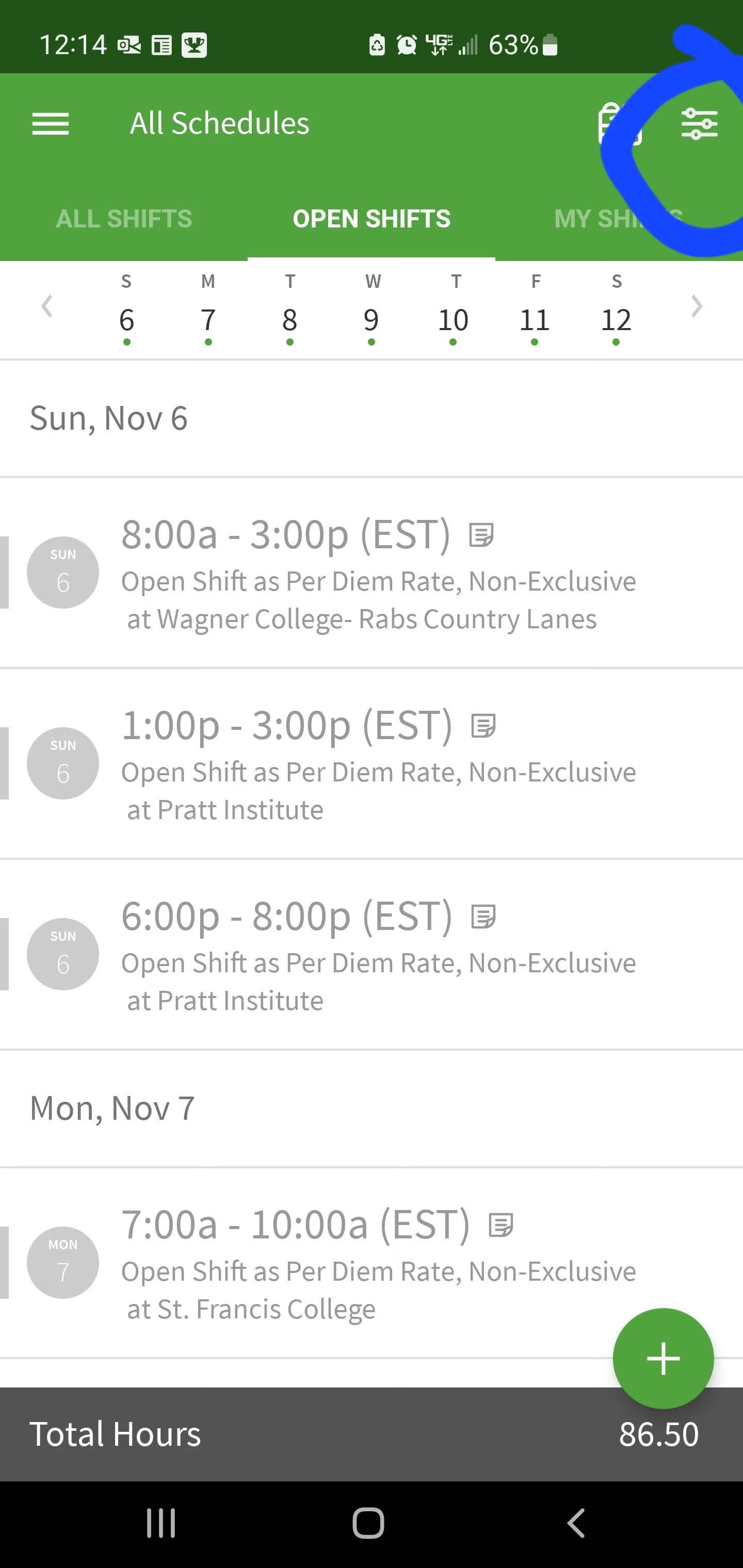
- User-friendly interface in both the app and the web-based platform
- Easy to manage a high-volume of team members
- Solved our problems of needing a centralized scheduling system for multiple locations and a reliable time-keeping app
I utilized when-i-work while employed with JAG Physical Therapy. I have 8 months' experience utilizing the system. It was purchased to be a schedule management system to schedule, track time and attendance, and communicate with our hourly employees. The pain points leading to purchase included a need for an all-access central scheduling system that can accommodate multiple site locations. The key benefits included the ability to keep track of time off, employee availability, and manage shift swaps with a few clicks.
- The chat feature is clunky. We chose to utilized WhatsApp instead for security purposes
- Difficulty with integration into ADP payroll system
- Various aspects of the clock in/clock out logistics, with GPS tracking. This led to extra work when people forgot to clock in or out and had to manually enter
I preferred When-I-Work's App vs Deputy, however preferred the web-based interface of Deputy. It was easier to find settings for changes, easier to copy and duplicate shifts in a series with customization.
- Cost - When-I-Work is an affordable choice for what you get
- Other systems in your workplace - check for the ability to integrate
- Comparison of chat features vs other options - have to find what works best for you. Would be better if when-i-work was encrypted.
It became more user-friendly over the 8 months I utilized the app. The customer service team was helpful in solving challenges that arose.
Any multi-location entity
I cannot think of a situation where it wouldn't be helpful for tracking schedules and time cards.

7shifts
7shifts is a restaurant-specific platform that bundles scheduling, time-clocking, tip management, payroll, and labor compliance in one intuitive solution. We picked 7shifts because it combines ease of use with depth—allowing even tech-averse restaurant teams to manage shifts, budgets, and labor laws in just a few clicks.
PROS
- Easy-to-use shift management and scheduling features for managers and employee users.
- Real-time labor forecasting by connecting with over 50 POS systems.
- Free, user-friendly employee app supports shift swaps, time-off requests, and team chats.
- Built-in tip pooling and payroll reduces manual errors and admin burden.
- Live labor vs. sales dashboards to help managers proactively adjust staffing.
- Robust integrations connect with 50+ POS systems for real-time sales and labor insights.
- All-in-one management unifies schedules, time-tracking (7Punches), payroll, budgeting, compliance, and tip pooling in one mobile-friendly platform.
- A generous free plan supports up to 20 employees with basic scheduling and communication tools, ideal for small teams.
- Mobile-first design offers free mobile apps for iOS and Android, enabling shift swaps, time-off requests, messaging, and real-time notifications.
- Automated labor forecasting integrates POS sales data to suggest optimal labor plans and cut unnecessary costs.
CONS
- Once a report is published, it cannot be edited.
- Weekend support is slower unless subscribed to a top-tier plan.
- Mobile app sync can lag slightly during poor internet connectivity, briefly confusing users.
- 24/7 live support is limited to top-tier plans; Entrée users mainly use chat and email.
- Mobile shift update syncing may occasionally lag under poor network conditions, but it usually resolves quickly.
- Published reports cannot be edited; adjustments require a fresh export.
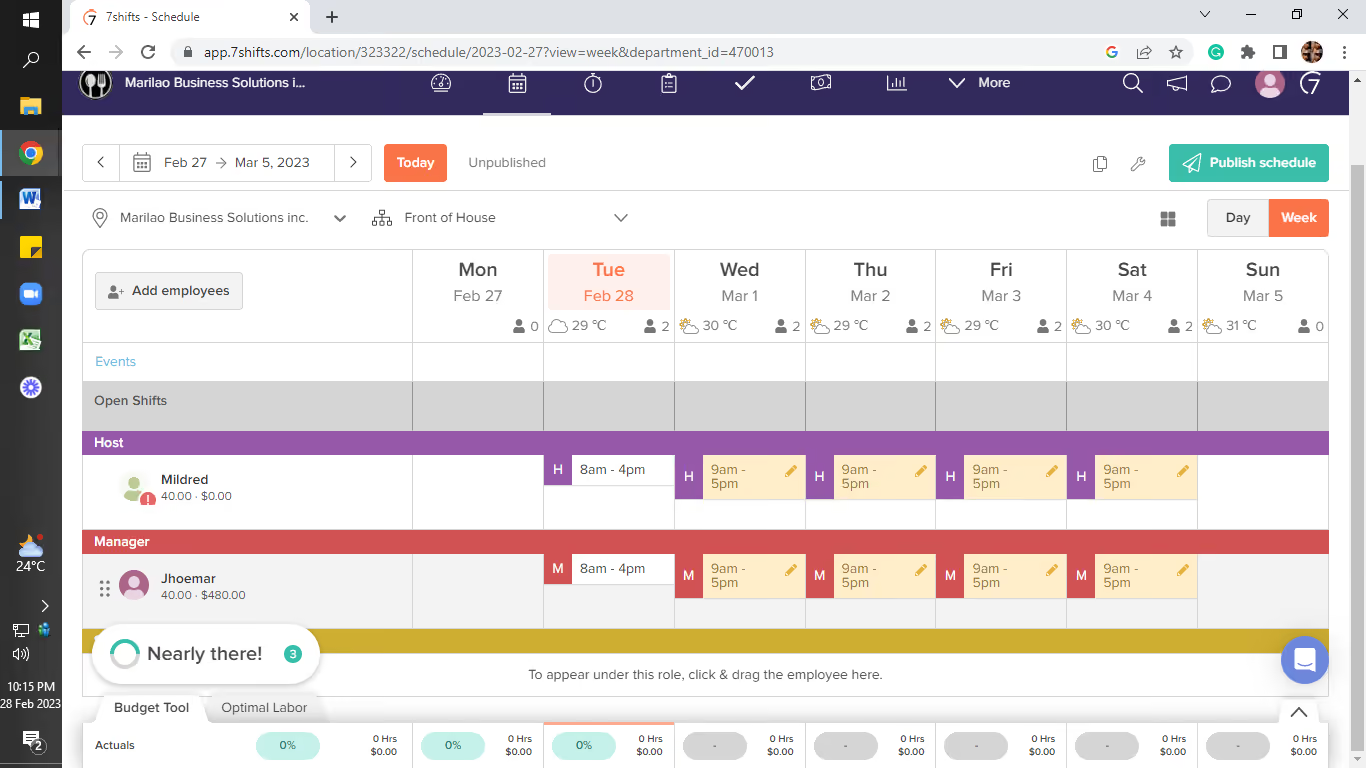
7shifts delivers one of the most polished, restaurant-first employee scheduling platforms we’ve tested in 2025. Starting with a drag-and-drop builder that’s genuinely easy to learn, the system simplifies the entire scheduling process—from building to approving shift swaps—all through a clean mobile interface.
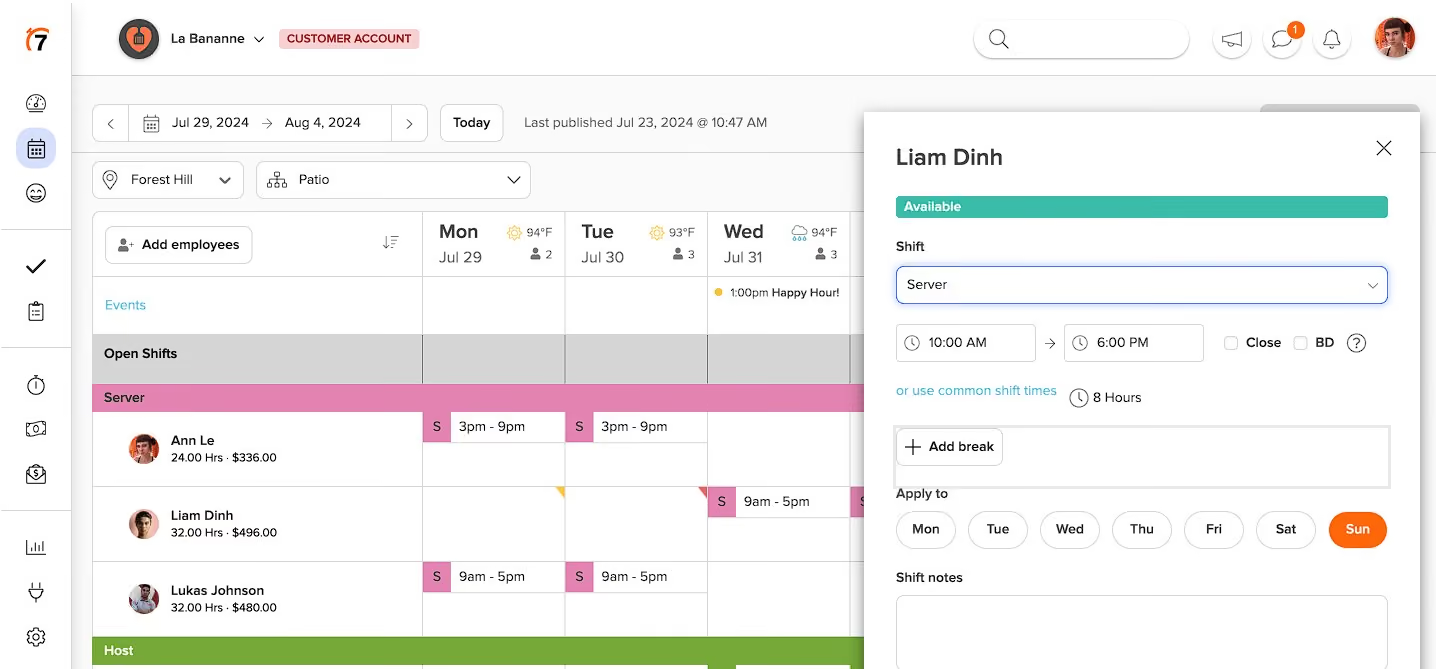
We especially liked the POS integration and auto-scheduling features. By pulling in real-time sales data, managers get labor forecasts while writing schedules, making it much easier to control labor costs without guesswork. During our demo, 7shifts’ optimal labor planning tool flagged overstaffed shifts in seconds—a feature that can save operators thousands annually.
Another standout is the tip management suite. Many restaurants struggle with manual tip pooling and payouts, often resorting to spreadsheets. 7shifts automates this entirely, syncing with sales and time punches to distribute tips fairly and compliantly. Their new daily tip payout feature, which deposits credit card tips directly into employees’ bank accounts at clock-out, is a major quality-of-life upgrade for frontline staff.
The recently launched payroll functionality is tightly embedded into the platform, making payday nearly automatic once time tracking and tips are captured. Compared to solutions like Toast Payroll, 7shifts strikes a great balance between ease of use and restaurant-specific nuances, such as sub-minimum wages and tip credits.
However, it’s quite a letdown that once a report is published, there's no opportunity for any adjustments or edits. This limitation can be quite frustrating, especially if you spot errors or need to add additional insights later. On the customer service front, it’s worth noting that live support is somewhat restricted for those on lower-tier plans, which can leave users feeling a bit stranded when immediate assistance is needed.
Moreover, we noticed that in scenarios with shaky internet connectivity, mobile syncs may experience brief lags. It’s not a huge issue, but it’s definitely something to keep in mind if you're in a fast-paced environment where every second counts.
35,000+ customers, including Lula Cafe, Chatime, and Bartaco.
7shifts provides the following subscription options:
- Free: Suitable for businesses with up to 20 employees, includes basic scheduling functionalities.
- Entree: Priced at $34.99 per location per month, supports up to 30 employees.
- The Works: For $76.99 per location per month, offers unlimited employee capacity.
Best For
7shifts is ideal for independent restaurants, multi-location groups, and growing brands that need scheduling, compliance, and payroll handled in one restaurant-specific platform.

- As someone who uses 7shifts regularly, I can say that it has become an essential tool for managing our scheduling and time-tracking processes. I use it on a daily basis to create and manage employee schedules, approve time-off requests, and communicate with our team.
- One of the key workflows that I use 7shifts for is creating schedules. With the ability to customize our scheduling rules and preferences, I can easily create schedules that are optimized for our needs. I can quickly add or remove shifts, assign employees to specific shifts, and communicate any changes to our team.
- Another workflow that I use 7shifts for is managing time-off requests. Employees can submit time-off requests through the app, and I can easily approve or deny them. I can also set up rules for time-off requests, such as requiring a certain amount of notice or limiting the number of employees who can be off at the same time.
- I also use 7shifts for time tracking, which has streamlined our payroll processes. I can easily view and export timesheets, and the system automatically calculates overtime and other labor law requirements.
- Overall, I use 7shifts on a daily basis to manage our scheduling and time-tracking processes, and it has been an essential tool for improving our operations and communication with our team.
I can tell you that there are several things that I really like about the software. Here are a few of the main pros:
1. Ease of use: 7shifts is very intuitive and easy to use, even for someone who is not tech-savvy. The interface is clean and simple, and the features are well-organized and easy to access.
2. Flexibility: 7shifts is highly customizable, which has been great for us as we have a large and varied workforce. We can set up our scheduling rules and preferences, and the system automatically generates optimal schedules based on our needs.
3. Communication: 7shifts has greatly improved our communication with our team. We can easily send messages and announcements to our employees through the app, and they can quickly and easily request time off or shift swaps. This has helped to reduce conflicts and improve morale among our team.
Overall, I have found 7shifts to be a great solution for managing our scheduling and time-tracking processes. The ease of use, flexibility, and communication features has been particularly helpful, and I would highly recommend it to other organizations.
Our organization purchased 7shifts in order to streamline our scheduling and time tracking processes. Prior to using 7shifts, we were using a combination of spreadsheets and paper schedules, which was time-consuming and often led to errors or conflicts. We were looking for a tool that would allow us to easily create and manage schedules, track employee hours, and communicate with our team.
One of the key benefits of using 7shifts has been the ability to quickly and easily create schedules, even for a large and varied workforce. We can customize our scheduling rules and preferences, and the system automatically generates optimal schedules based on our needs. We can also easily communicate with employees through the app, and they can quickly and easily request time off or shift swaps.
Another benefit has been the time tracking feature, which has helped us to track employee hours and ensure compliance with labor laws accurately. We can easily view and export timesheets, which has streamlined our payroll processes.
Overall, we have been using 7shifts for about a month, which has been a game changer for our organization. It has saved us time, reduced errors and conflicts, and improved communication with our team.
There are a few things that I think could be improved about the software. Here are a few cons:
1. Glitches: Like any software, 7shifts occasionally has glitches or bugs. While these are usually resolved quickly, they can be disruptive to our operations when they occur.
2. No GPS tracking: 7shifts does not offer GPS tracking, which can be a downside for organizations with mobile or remote employees who need to track time and location.
3. Mobile app limitations: While the mobile app is useful for checking schedules and communicating with employee’s on-the-go, it can be a bit clunky and slow at times. It would be great to see some improvements in this area.
Overall, while there are a few things that I think could be improved about 7shifts, I still find it to be a great solution for managing our scheduling and time-tracking processes. The pros outweigh the cons for us, and we have been very satisfied with the value we have received from using the software.
- In my experience, one thing that sets 7shifts apart from its competitors is its focus on the restaurant industry. While other scheduling and time-tracking software options are more general-purpose, 7shifts is specifically designed to meet the needs of restaurants, with features like shift swapping, time off requests, and menu item tracking.
- Additionally, I have found that 7shifts has a more user-friendly interface than some of its competitors, which makes it easier to train new employees on how to use the software. The scheduling process is also very intuitive and easy to use, which has helped us to save time and reduce scheduling errors.
- In terms of similar tools that I have used, I have found that 7shifts compares favorably to other scheduling and time-tracking software options. While there are certainly other good options out there, we have found that 7shifts meets our needs well and provides good value for the cost.
- Overall, while there are certainly other scheduling and time-tracking software options available, I believe that 7shifts is a strong choice for organizations in the restaurant industry. Its focus on this industry and its user-friendly interface set it apart from some of its competitors, and we have been very satisfied with our experience using the software.
When buying a tool, it's important to consider several key criteria to ensure that you get the best value for your money. One important factor is the tool's quality and durability, which can affect its lifespan and how well it performs. Another important factor is its functionality and features, which should align with your needs and intended use. It's also important to consider the price and your budget, as well as any additional costs such as maintenance or replacement parts. Lastly, you should also look at reviews and feedback from other users to get a sense of the tool's performance and reliability.
As we have just started using the tool, I cannot provide much information on this.
7shifts is a great tool for businesses in the food and hospitality industry, such as restaurants, cafes, and bars. It's designed to help managers and employees streamline their scheduling processes, track labor costs, and manage time-off requests, which are all important aspects of managing a successful restaurant or hospitality operation. Additionally, 7shifts has several features that are tailored to the unique needs of these types of businesses, such as shift swapping, automatic scheduling, and integrations with popular POS systems. Overall, if you're running a food or hospitality business and need a reliable tool to help manage your scheduling and labor costs, 7shifts is definitely worth considering.
7shifts may not be the best fit for businesses outside of the food and hospitality industry, as its features and functionality are specifically tailored to the unique needs of these types of businesses. For example, if you run a retail store or a manufacturing operation, you may not need some of the scheduling and labor management features that 7shifts offers. Additionally, if your business operates on a significantly different schedule, such as 24/7 or with rotating shifts, you may find that 7shifts is not flexible enough to accommodate your needs.

Buddy Punch
Buddy Punch has a practical scheduling setup for restaurants that need recurring schedules, availability controls, location restrictions, and straightforward time tracking. We also have to give credit to the platform for making several of the everyday scheduling tasks relatively simple.
PROS
- Recurring shift templates reduce the work required to rebuild weekly restaurant schedules.
- Tight geofencing helps verify that employees clock in at the correct restaurant location.
- Shift-trade approvals give managers control over coverage changes.
- Availability preferences appear while managers build schedules, helping prevent avoidable conflicts.
- Schedule warnings flag overlapping shifts, PTO conflicts, and unavailable employees.
- Kiosk clock-ins give restaurant staff a simple alternative to using the mobile app.
- Scheduled-hours forecasting helps managers identify potential staffing gaps before publishing.
- The drag-and-drop builder makes shift creation fast and intuitive.
- Employees can view schedules, request time off, and swap shifts via self-service.
- Scheduling and time tracking are integrated into one system.
- Labor cost controls, such as auto clock-outs and early punch-in limits, are built in.
- Supports multi-location, department, and role-based scheduling.
CONS
- Employees cannot browse and claim open shifts, limiting flexibility when restaurants need last-minute coverage.
- The scheduling tool forecasts hours but does not forecast labor costs based on employee pay rates.
- There is no built-in messaging, so employees must coordinate shift changes outside Buddy Punch.
- Scheduling automation was still listed as a future feature during our review.
- The mobile app has fewer scheduling tools for managers than the desktop app.
- Limited reminder options for missed punches or schedule changes.
- Some users have reported sync issues with the QuickBooks integration.
Buddy Punch’s scheduling tool makes a lot of sense for restaurants whose schedules follow a fairly predictable pattern. One of our favorite things is the ability to create recurring schedules without rebuilding every shift from scratch. During our demo, we saw how shift templates could retain departments, job codes, locations, tasks, and notes when the schedule repeats. For a restaurant with consistent lunch and dinner coverage, that could take a fair amount of repetitive work off a manager’s plate.
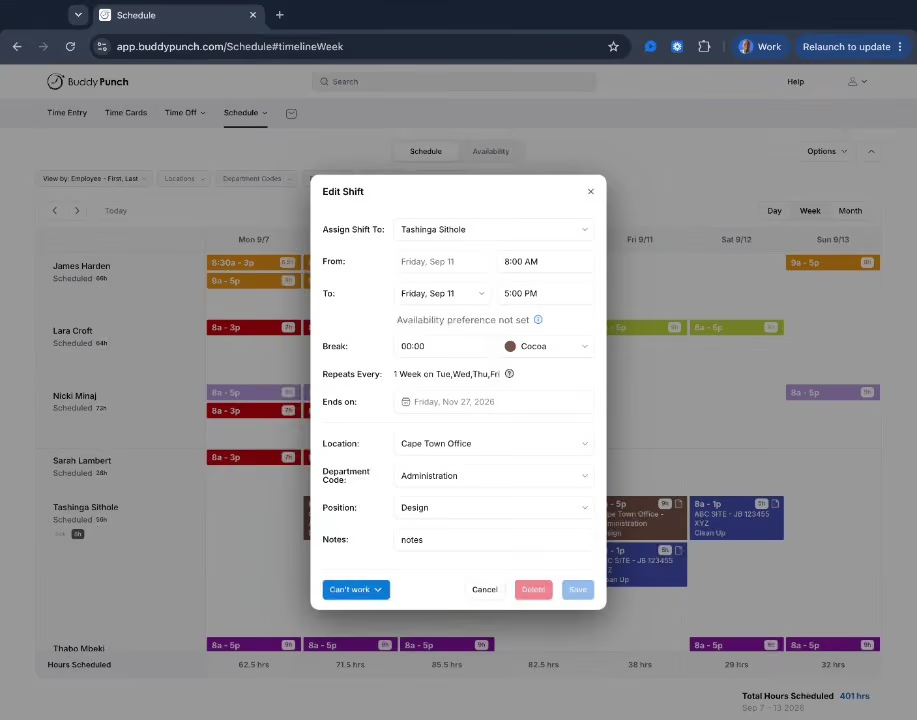
What stands out to us is how availability and conflict controls are built into the scheduling workflow. Employees can enter their preferred work times and unavailable days, and managers can see those preferences while putting the schedule together. Buddy Punch also flags overlapping shifts and conflicts with PTO or stated availability. We liked that managers have some control over how those warnings work, too. Depending on the situation, they can simply receive a notification, block the scheduling action, or allow an override when a double shift is intentional. That flexibility feels particularly useful in restaurants, where scheduling exceptions are bound to come up.
For restaurants operating across multiple locations, geofencing adds another practical layer. Employees can be restricted to punching in at designated locations, while managers can see where employees are while they’re clocked in. We also noticed that the kiosk option could be a good fit for restaurant environments. Employees can punch in from an iPad or tablet using a 4-digit PIN, which gives managers another option for teams that don’t want to rely on everyone using their own phone.
Where Buddy Punch falls short is on the more dynamic side of restaurant scheduling. Shift trading is available, which is helpful, but employees still need to coordinate with each other outside the platform before submitting a formal trade request. There’s no in-app messaging, so back-and-forth may end up happening via text or another communication tool. It gets the job done, but we do think there’s a little bit to be desired when it comes to keeping the entire coverage conversation in one place.
We were also surprised that Buddy Punch doesn’t offer forward-looking labor-cost forecasting. While features like overtime calculations, overtime alerts, automatic breaks, punch limits, and automatic punch-out give managers useful visibility into hours as they’re worked, they don’t turn that data into projected payroll costs based on individual employee pay rates. As for scheduling automation, the feature is not available yet at the time of our review.
Starbucks, YMCA, State Farm, and The University of Michigan.
Buddy Punch combines a base fee with per-user pricing, starting at $4.49 per user per month.
- Starter: $4.99/user/month ($5.99 monthly) + $19 base fee.
- Pro: $6.99/user/month ($7.99 monthly) + $19 base fee.
- Advanced: $12.99/user/month ($13.99 monthly) + $19 base fee.
- Free 14-day trial included; no hidden fees.
Buddy Punch launched their Premium Plan in late 2023. It offers advanced GPS tracking while an employee punches in, allowing you to see their movement during a shift.
Best For
Restaurants with recurring schedules and managers who prioritize scheduling controls, attendance verification, and predictable shift planning over open-shift marketplaces or labor-cost forecasting.

ZoomShift
ZoomShift makes it incredibly easy for employees and managers to navigate the app. The user interface is intuitive yet simple. In addition, the app developers are responsive to user feedback about adding or modifying features.
PROS
- Manage staff scheduling on the move
- Color-coded schedules
- Forecast labor costs and hours with ease
- Manage staff scheduling on the move
- Color-coded schedules
- Forecast labor costs and hours with ease
CONS
- Updates too often for an employee scheduling software, which some customers may find confusing
- Some reports indicates that the tool tends to crashes and disconnects from the server
- Accidentally deleted shifts cannot be retrieved
- Updates too often for an employee scheduling software, which some customers may find confusing
- Some reports indicates that the tool tends to crashes and disconnects from the server
- Accidentally deleted shifts cannot be retrieved

ZoomShift is a fantastic schedule creation tool. Its user interface is intuitively designed to help new users access the essential features of the software with ease. ZoomShift is best for small restaurants that experience seasonal highs and lows.
ZoomShift offers user-based pricing, starting at $0 for small teams of up to 20 users.
- Essentials: Free for up to 20 users.
- Starter: $2/user/month ($150 annually), adds time tracking and PTO management.
- Premium: $4/user/month ($250 annually), includes geofencing and advanced scheduling.
- Includes a 14-day free trial with no long-term commitments.
Best For
I use it regularly to manage employee scheduling and time tracking. One of the workflows I use it for is creating employee schedules. I can easily view employee availability, drag and drop shifts to assign them, and reduce errors in the scheduling process.
Another key workflow I use Zoomshift for is time tracking. the tool's time clock integration allows us to track employee hours automatically, which has been a huge time server for our organization.
.avif)
There are several things that I like about this tool. Here are three main reasons:
- The first thing I like about Zoomshift is its ease of use. the drag-and-drop interface makes it very easy to create and modify schedules, and the tool's automated shift reminders help ensure that employees are aware of their upcoming shifts. This has made the scheduling process much smoother and more efficient.
- Another thing I like about ZoomShift is its time-tracking capabilities. The tool's time clock integration has helped us save a significant amount of time and reduce errors in our payroll process. I can easily view and approve employees' time cards, as well as generate reports for payroll and other purposes.
- Finally, I appreciate the ability to communicate with employees through Zoomshift. The tool's messaging feature allows us to send real-time updates to employees about their shifts and any changes to the schedule. This has helped us improve communication with our employees and ensure that everyone is on the same page.
Overall. I have found Zoomshift to be a very useful and user-friendly tool for managing employees scheduling and time tracking. It has helped us save time, reduce errors, and improve communication with our employees.
Our organization decided to purchase ZoomShift to help streamline our employee scheduling and time-tracking processes. Prior to using this tool, we were manually creating schedules and tracking hours, which was time-consuming and prone to errors. We wanted a solution that could help us save time and reduce errors, while also giving employees more control over their schedules. were actually using this for a couple of months and were happy using it.
Here are some weaknesses of Zoomshift that I think need to improve:
- Mobile app limitation: The mobile app for ZoomShift is not as feature-rich as the web version, limiting the ability to manage and update on the go.
- Limited customization options: While the solutions are flexible, there are some limitations in terms of how much you can customize certain features such as scheduling templates. I wish there were more options for customizations to tailor it to our organization's needs.
- Pricing: Zoomshift’s pricing can be relatively high for businesses with a large number of employees, making it less accessible for small businesses and start-ups with limited budgets.
ZoomShift is different than its competitors in several ways. First, ZoomShift is very user-friendly and easy to navigate, which is not always the case with other scheduling tools. Secondly, ZoomShift offers a wide range of features and customization options, allowing businesses to tailor their scheduling need to fit their specific requirements. This includes features such as time clock tracking, shift swapping, and automatic scheduling.
When buying a scheduling tool like Zoomshift, there are several criteria to consider. Firstly, the tools should be easy to use and navigate, with a clear interface and simple features. Next, it should be flexible and customizable, allowing businesses to tailor the scheduling process to their specific needs. It should have features like time clock tracking and shift swapping, which can help streamline the scheduling process. Also, it should be affordable and offer good value for money. Finally, it should have strong customer support, with a knowledgeable and responsive team available to assist with any issues that may arise. My advice would be to research different options and read reviews from other users to find a tool that meets these criteria and is well-suited to your business needs.
Based on my experience, ZoomShift is very good for small to medium-sized businesses that need a user-friendly and customizable scheduling tool. It's also a great option for organizations that require shift schedules for their employees, such as restaurants, retail stores, and healthcare facilities. the tool is well-suited for businesses with employees who work in shifts and require an easy and efficient way to manage their schedules.
For me, one example is those small businesses or independent contractors who do not have a large workforce or who do not require advanced scheduling and time-tracking features. In addition, organizations that do not have reliable internet access or that have limited access to technology may not be able to fully utilize ZoomShift's features, as it is an online-based software. Similarly, businesses that operate primarily on paper-based systems may not find the transition to online-based scheduling and time-tracking software feasible.

Sling
Sling is an excellent tool for restaurants with multiple locations. Even the free version of the app allows unlimited users and locations. The mobile and desktop apps are stable and free.
PROS
- Get alerts when total labor cost exceeds the budget
- Use projected sales data to view labor costs as a percentage of sales
- Predictive alerts minimize OT cases
- Get alerts when total labor cost exceeds the budget
- Use projected sales data to view labor costs as a percentage of sales
- Predictive alerts minimize OT cases
CONS
- Mobile app notifications don’t come through sometimes, as reported by some users
- The time clock can’t be customized for different roles
- Mobile app notifications don’t come through sometimes, as reported by some users
- The time clock can’t be customized for different roles

Sling is among the best restaurant scheduling software you can find for free. Its scheduler provides organization-wide awareness. You can add unlimited users and locations. The tool works best for small restaurants looking for a comprehensive scheduling solution on a budget.
Sling provides per-user pricing with free and paid options, starting at $0 for basic scheduling.
- Free: Basic scheduling for up to 30 users.
- Premium: $2/user/month ($1.70 annual), adds labor cost management.
- Business: $4/user/month ($3.40 annual), includes kiosk tracking and PTO management.
- 15-day free trial available for Premium and Business plans.
Best For

I use Sling daily to determine who is working and to schedule appointments accordingly. I also use it to verify time entries for team members. It allows me to quickly see who is scheduled and whether anyone is approaching overtime, so I can work with managers to control labor costs.
The tool makes it easy to monitor and manage scheduling in real time. I also use Sling’s metrics to help forecast payroll expenses.
- Sling integrates with our POS system, making team member management more seamless.
- It allows managers to monitor daily labor costs and make real-time adjustments.
- Sling provides a reliable communication channel for reaching all team members.
We have been using Sling for about 10 months. We decided to switch to Sling because of its integration with our POS system and the depth of its features.
Sling allows our managers to see, on a daily basis, how well they are managing labor costs, which contributes to higher efficiency and improved bottom-line performance.
It also provides automated notifications, ensuring that team members are always aware of their schedules.
- Sling’s reporting system could be improved to make printed schedules more visually appealing.
- The selection options for location, position, and similar filters are not intuitive and could be streamlined.
- Since Sling is focused primarily on scheduling, additional tools may be needed for broader team development.
I have not used other tools for comparison.
When purchasing a tool like Sling, consider whether you need only scheduling functionality or a broader workforce management platform. Pricing is also important—determine if a per-person or per-location pricing model is more cost-effective for your organization.
It appears that Sling has partnered with POS vendors like Toast to improve integration and enhance the user experience.
Sling is well-suited for food service organizations.
Sling may not be a good fit for large organizations with complex workforce management needs.

HotSchedules
HotSchedules is widely adopted in the hospitality space for a reason: it provides restaurant teams with a central hub to manage schedules, streamline team communication, and control labor costs. We picked it because of its blend of usability and depth, particularly when it comes to scheduling and forecasting. During our demo, we found the shift-swapping, time-off requests, and skill-based auto-scheduling to be intuitive and well-suited for high-turnover environments.
PROS
- Mobile-first design makes shift management and communication easy for both staff and managers.
- Supports compliance with fair workweek laws via automatic rule enforcement and alerts.
- Built-in labor forecasting, with POS integration, improves schedule accuracy and cost control.
- Auto-scheduling and shift templates speed up the creation of compliant schedules.
- Multi-location support enables employee sharing and visibility across sites.
- Mobile-first design makes shift management and communication easy for both staff and managers.
- Supports compliance with fair workweek laws via automatic rule enforcement and alerts.
- Built-in labor forecasting, with POS integration, improves schedule accuracy and cost control.
- Auto-scheduling and shift templates speed up the creation of compliant schedules.
- Multi-location support enables employee sharing and visibility across sites.
CONS
- The reporting suite is functional, but users note it offers limited actionable insights unless you add the paid Fourth Analytics module.
- No free trial, and pricing is only revealed after a demo. Additionally, commitments typically have a 12-month minimum.
- Forecasting accuracy depends heavily on the quality of POS integration and historical data.
- The reporting suite is functional, but users note it offers limited actionable insights unless you add the paid Fourth Analytics module.
- No free trial, and pricing is only revealed after a demo. Additionally, commitments typically have a 12-month minimum.
- Forecasting accuracy depends heavily on the quality of POS integration and historical data.
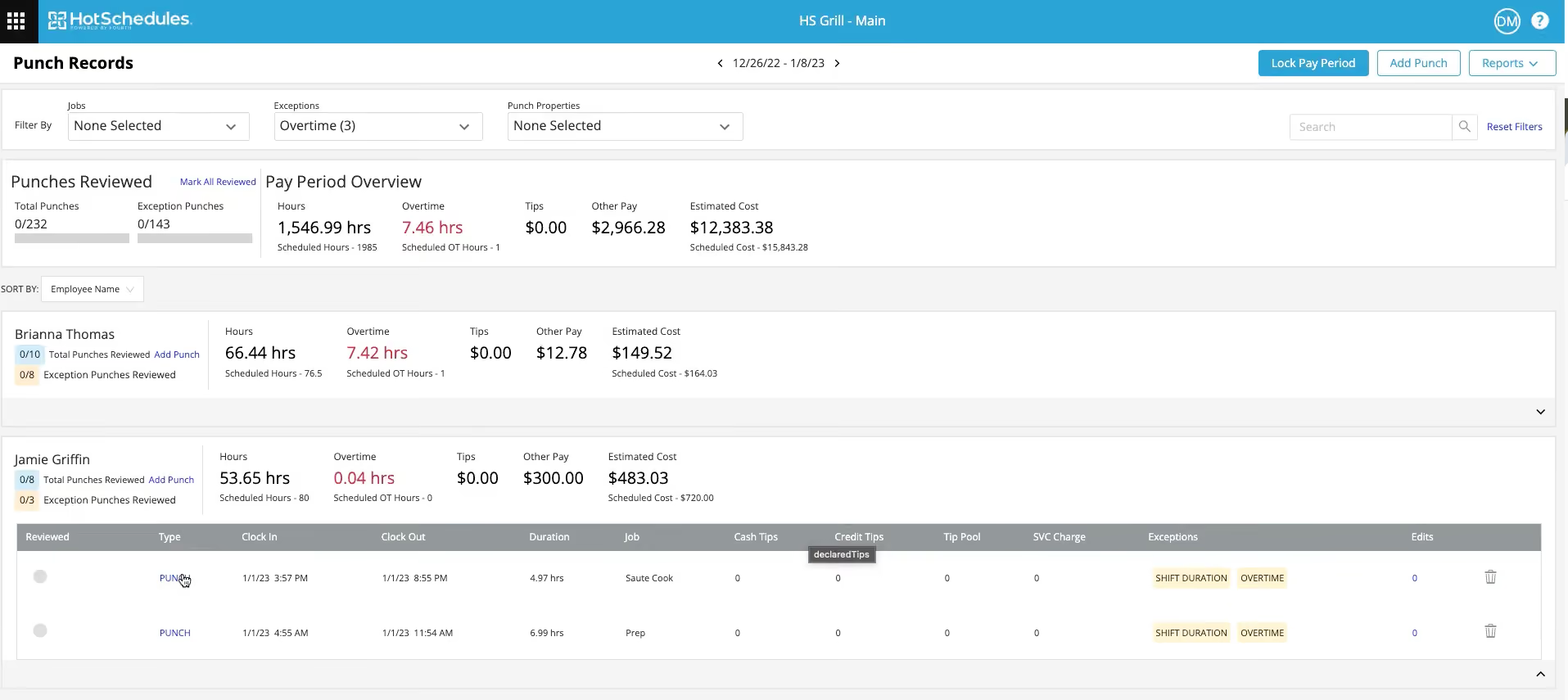
HotSchedules has long been a staple in restaurant workforce management, and after testing it ourselves, we understand why. From the moment we logged in, it was clear that this tool is built around the daily realities of running a restaurant—managing availability, responding to last-minute changes, and maintaining open communication across teams.
Its standout feature is the mobile app. During a full demo, we saw how staff could swap shifts, check schedules, or update their availability on the fly. Managers, on the other hand, could approve requests, assign shifts, or message team members directly—all without opening a laptop, if they prefer. There’s also a built-in logbook and task list manager to support shift handovers and operations.
For operators seeking better labor planning, HotSchedules offers several tiers of forecasting: from simple week-over-week trends to full-blown AI-based predictions based on years of historical data, weather, events, and more. We especially liked how its advanced packages paired forecasts with auto-generated schedules and labor optimization rules (e.g., "add one server for every 30 guests").
However, the tool isn’t without drawbacks. Reporting is serviceable, but to access the module’s full capabilities, you need to opt for one of the more advanced plans. Additionally, while the tool is extremely functional, its UX appears somewhat dated compared to newer tools, at least in our opinion. That said, any new restaurant scheduling software would be hard-pressed to compete with HotSchedules in terms of functionality.
Used by hundreds of restaurants, including big brands like Dunkin’, Arby’s, and Pizza Hut.
All HotSchedules plans require a 12-month commitment and a demo before custom pricing is provided. That said, their plans can be structured as follows:
- Classic: Scheduling and communication features; no POS sync or AI forecasting.
- Advanced: POS-integrated scheduling with legacy forecasting.
- Advanced IQ: Adds AI-based forecasting and compliance alerts.
- Expert: Includes labor optimization and onsite consultation.
Best For
HotSchedules adapts well to a wide range of establishments, from independent and small-chain restaurants to large brands with multiple locations.

Push Operations
Push Operations stands out for its outstanding payroll management capabilities. It’s easy to navigate and incredibly fast, saving managers hours weekly.
PROS
- POS system integration
- Eliminate break violations through proactive alerts
- Customized reporting
- POS system integration
- Eliminate break violations through proactive alerts
- Customized reporting
CONS
- Some users have reported issues like a confusing interface, long loading times, and the platform logging out randomly.
- Some users have reported issues like a confusing interface, long loading times, and the platform logging out randomly.
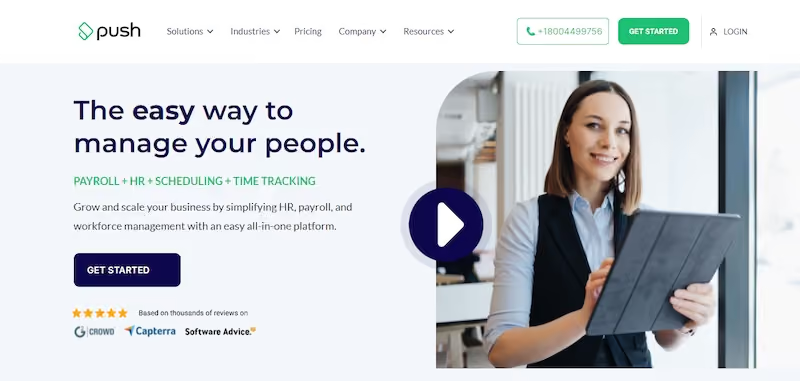
Push Operations is a small business. This allows them to provide personalized customer service. Push stands out for its cloud-based payroll management system that saves lots of managerial time. The software is best for multi-location restaurants with 50+ employees.
Push starts at $30 per month for 5 employees.
Best For

Planday
Planday offers some of the most critical scheduling app features at an affordable price. Out of all the software we tested, Planday’s app stood out for its visual appeal and after-sales support. That being said, most users are able to figure out and use the app on their own.
PROS
- Automatic punch clock alerts prevent OT cases.
- Easily manage employee schedules, payroll, and timesheets.
- The app is highly customizable to suit the needs of your business.
- The development team is proactively fixes bugs and frequently releases new app updates
- Automatic punch clock alerts prevent OT cases.
- Easily manage employee schedules, payroll, and timesheets.
- The app is highly customizable to suit the needs of your business.
- The development team is proactively fixes bugs and frequently releases new app updates
CONS
- Daily reports don't show weekly overtime until the last day of the week.
- According to some reviews, the customer service has room for improvement.
- Limited mobile app functionality.
- The app asks for way too many access permissions on its host device which may be considered invasive by users.
- Compared to its competitors, such as Deputy, Zoomshift, and Sling, Planday offers a much less affordable solution.
- Daily reports don't show weekly overtime until the last day of the week.
- According to some reviews, the customer service has room for improvement.
- Limited mobile app functionality.
- The app asks for way too many access permissions on its host device which may be considered invasive by users.
- Compared to its competitors, such as Deputy, Zoomshift, and Sling, Planday offers a much less affordable solution.
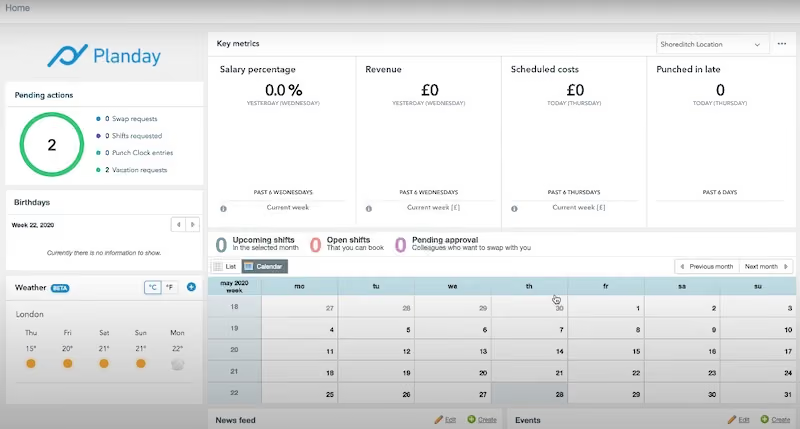
Planday is most suitable for shift-based restaurants with multiple teams working with their schedules because it allows managers to create different schedules for different groups.
For this reason, the software is an excellent match for the needs of modern restaurants, bars, pubs, and similar businesses.
Ida Beate Wenstad, the restaurant manager at Heim in Norway, says that Planday makes it easy for her and her employees to plan their workdays and shifts without worrying about making calls to colleagues for shift management. She goes on to say that Planday allows her to maintain a bird’s eye view of the business while maintaining control over weekly staffing budgets.
Some of Planday’s prominent customers are Shell, Sophie’s, Riddle & Finns, Enoteca Da Luca, and Rumba Cabana.
Planday offers flexible, per-user pricing with optional base fees, starting at $2.99 per user per month.
- Starter: €2.99/user/month + €5 base fee; basic scheduling for one location.
- Plus: €4.99/user/month + €25 base fee (min. 10 users); multi-location support.
- Pro: Custom pricing for advanced planning tools.
- Includes a 30-day free trial with no credit card required.
Best For
Planday is best for shift-based, labor-intensive restaurants with multiple locations that require forecasting and labor planning tools.

Planday allows us to plan our internal shift schedule effectively so that there is no confusion and constant coverage. We use Planday to track our customer success and other key operations shifts. The tool allows us to make quick edits to the shifts. It also clearly displays them for team members to review without issues. Planday allows team members to track their timeshare which simplifies the process of reviewing the productivity of team members
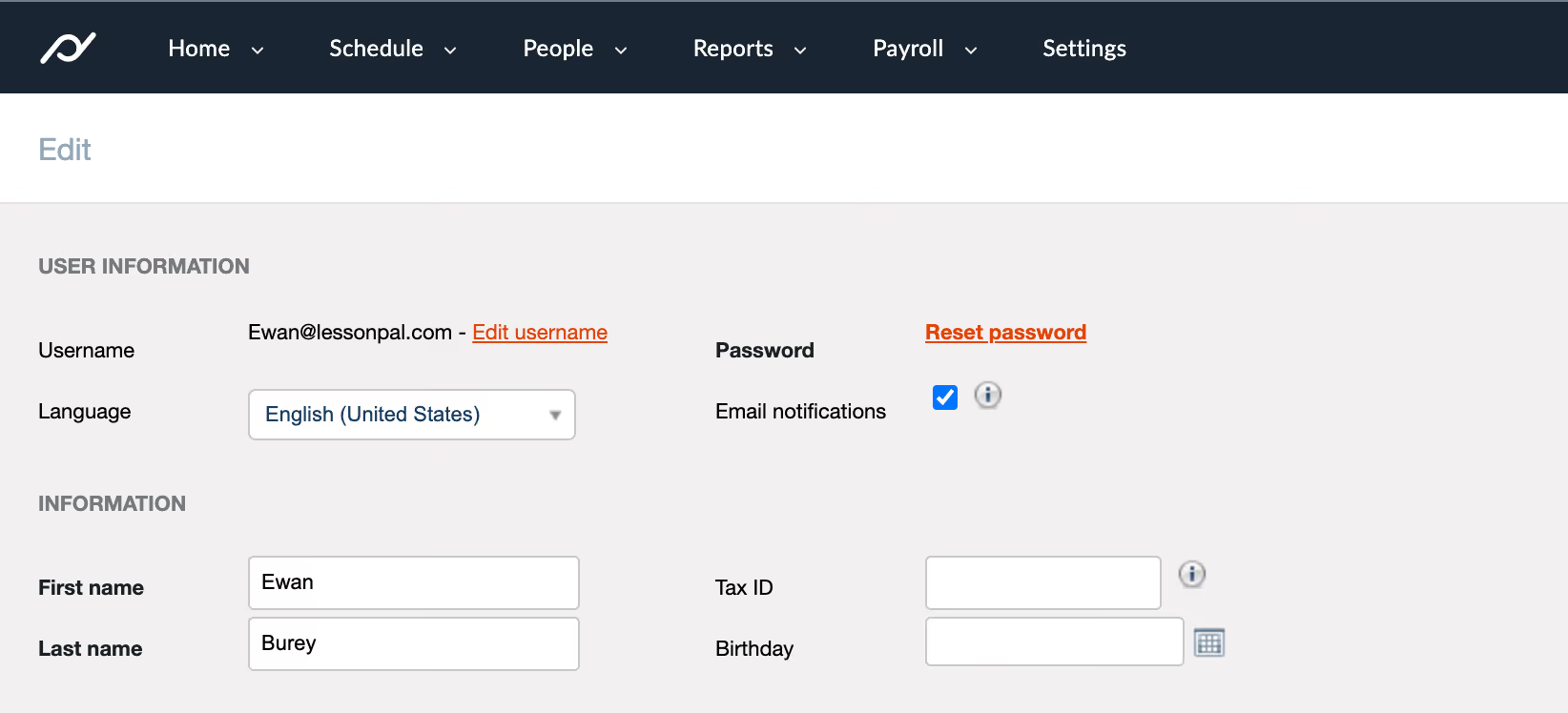
- The simple layout that shows the schedule clearly
- The ability to make quick adjustments to the schedule
- The overall user experience is intuitive
It's difficult to maintain all of the scheduling between our internal team. It's also difficult to track the productivity of other team members in a globally diverse team when some team members don't operate on set schedules. Planday tackles both of those problems with one product. We use it to track the timeshare of the team members as well as coordinate with select team members..
- The site has some longer load times when signing in after a long time
- The color scheme of the website could be better (Personal opinion not that there's anything wrong with it)
It provides a very intuitive experience to manage the entire shift process, from scheduling, tracking time and executing payroll
You should think about the number of members on your team that need to be on the shift and also the type of shift system that you have.
The product is constantly adding new features.
It's good for all organizations that have a shift system.
It wouldn't be good for organizations that predominantly operate on mindshare and are more deadline based rather than time spent.

Deputy
Deputy is a robust restaurant scheduling app. It stands out from its competitors due to its AI scheduling capabilities that make workforce management easier. Simply enter your team data and let Deputy take care of everything from shift scheduling to payroll.
PROS
- Create AI optimized employee schedules
- Eliminate no-shows with quick replacements
- Track unproductive time and breaks with precision
- Create AI optimized employee schedules
- Eliminate no-shows with quick replacements
- Track unproductive time and breaks with precision
CONS
- Limited reporting functionality
- Once published, upcoming schedules can’t be changed
- Limited reporting functionality
- Once published, upcoming schedules can’t be changed

Deputy is packed with valuable features. Its AI-powered employee scheduling gives it an edge over its competitors. The software is best for small restaurant owners who like to free up their time to focus on growing their business.
- Hubspot
- Ace Hardware
- Bondi Vet
- Silk Hospitality
- Dallas Air
- Au bon pain
Deputy provides flexible plans starting at $0, catering to businesses of all sizes.
- Starter: Free, limited to 100 shifts/month.
- Premium: $6/user/month ($5 annual).
- Scheduling or Time & Attendance: $4.50/user/month.
- Enterprise: Custom pricing for 250+ employees.
- HR Add-On: $2/user/month.
- Minimum spend: $25/month for paid plans. Free trial available.
Best For
Medium to large organizations, especially those with frequent shift changes such as hospitality and retail.

We use Deputy every day for staff scheduling. It has been especially useful for our multi-location company, as it allows us to switch shifts quickly and efficiently.
Deputy is accessible via both computers and mobile apps, making it easy for employees to check schedules and make updates as needed. Its user-friendly interface ensures that scheduling is streamlined across all locations.
- We love Deputy’s in-depth scheduling capabilities.
- The mobile and desktop applications are easy to use.
- Deputy provides kiosk options for time tracking.
We purchased and have used Deputy for four years to manage staff scheduling and time-off needs. Even after switching HRIS systems, we continued using Deputy because it effectively handled scheduling.
We chose Deputy because it integrated seamlessly with our HRIS and provided the perfect scheduling solution for our company. Its flexibility and ease of use have made managing shifts much simpler.
- Deputy lacks robust reporting capabilities.
- The system is not intuitive for administrators during setup.
- Deputy does not integrate well with our HRIS time-off management.
Deputy integrates with several different HRIS systems, making it a flexible option for many businesses.
- What specific scheduling and time-off needs is your organization trying to address with Deputy?
- Do you plan to change company policies or procedures related to pay structures or time-off management?
- Do you prefer customizable, easy-to-read, and simple-to-create scheduling tools?
Deputy has made updates to better accommodate full HRIS functionality.
Deputy is ideal for small to medium-sized organizations, particularly those with multiple locations.
Deputy may not be the best fit for medium to large organizations looking for an all-in-one solution for scheduling, timesheets, and HRIS management.

Homebase
Homebase’s ability to present a centralized view of company-wide scheduling makes it unique. This centralized view offers customizable dashboards for users. Along with its paid features, the app offers a robust free plan that’s good enough for the needs of most small restaurants.
PROS
- Separate dashboards for managers and employees
- Real-time communication features allow for schedule changes on the move
- Requesting and approving paid time off is easy
- Great scheduling templates help managers streamline work
- Separate dashboards for managers and employees
- Real-time communication features allow for schedule changes on the move
- Requesting and approving paid time off is easy
- Great scheduling templates help managers streamline work
CONS
- Limited third-party integration support
- Additional features are somewhat expensive
- Limited third-party integration support
- Additional features are somewhat expensive

Homebase is one of the best restaurant employee scheduling applications. It allows restaurant owners to manage their team’s schedule, make changes, and send out alerts to employees accordingly. Homebase is best for hourly teams, which is why it’s well-suited to the restaurant industry.
Homebase offers location-based pricing with free and premium plans, starting at $0.
- Basic: Free for one location, up to 20 employees.
- Essentials: $30/month ($24 annual); advanced scheduling and time tracking.
- Plus: $70/month ($56 annual); adds hiring and PTO management.
- All-in-One: $120/month ($96 annual); includes HR and compliance tools.
- Add-ons like Payroll ($39 base + $6/employee) and Tip Manager ($25/month) available.
Best For

You can use it on a website or an app. Overall, it is the same technique on the website or app. You sign into your company schedule and find your name. Once you find your name, you can click on start shift. When you want to take a break, there is an option for that too. Then you can log back in to end your shift.

It makes it easy to sign in anywhere. It is easy to track how many hours you worked. It is easy to guide through the website/app.
I used Homebase for about 3 years. One of the main reasons our company bought Homebase was because everyone kept forgetting to clock-in through a machine at work so our company wanted to make clock-ins more convenient. I liked it when we transitioned to it, we were able to clock-in whether we were in office or remote. It helped track everyone's work time accurately. It also sent in our hours to payroll according to the scheduled pay time.
Sometimes people still forget to clock in with the app. When I used it about 2 years ago, I wish it sent us notifications to remind us to clock-in or out. The platform does go down sometimes.
I like Homebase because it is made for everyone to use. It is extremely easy to navigate Homebase.
I have more pros than cons for Homebase. I highly suggest the platform. It is organized and easy to navigate.
It is easier for managers or bosses to manage employee hours through the dashboard. It has more visibility on who is on time and who is late.
Medical offices, small organizations, remote workers
Huge corporate offices with over 200+ employees

Schedulefly
Launched in 2007, Schedulefly, to this day, remains one of the easiest apps to use. The software has a loyal user base of over 7000 restaurants.
PROS
- Coordinate with your team easily with one-click schedule sharing and instant notifications.
- Employees can trade shifts without a hassle by direct coordination.
- Requesting time off is a breeze with the option to add notes for more context.
- Coordinate with your team easily with one-click schedule sharing and instant notifications.
- Employees can trade shifts without a hassle by direct coordination.
- Requesting time off is a breeze with the option to add notes for more context.
CONS
- The tool does not offer a mobile app which significantly reduces its utility for off-site workers.
- The mobile site has very limited functionality and is not optimized for mobile experience which we found makes some of the workflows take longer.
- Does not integrate with any third-party software which means it cannot become a part of your existing HR and payroll process.
- The tool does not offer a mobile app which significantly reduces its utility for off-site workers.
- The mobile site has very limited functionality and is not optimized for mobile experience which we found makes some of the workflows take longer.
- Does not integrate with any third-party software which means it cannot become a part of your existing HR and payroll process.
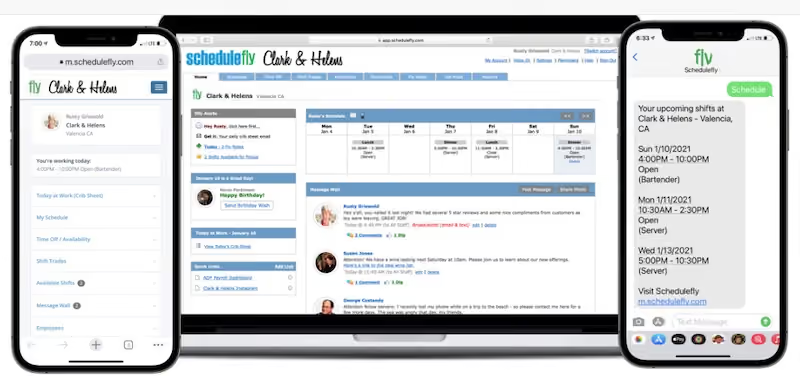
Wes Aiken, the founder of Schedulefly, was a restaurant employee during his college years. Schedulefly was born as a result of the gaps Wes noticed in how employee scheduling is done in the restaurant business. Therefore, it’s safe to say that Schedulefly is specifically designed with restaurants in mind.
As a result, you get a tool that’s light, accessible from any web browser, and offers an efficient employee scheduling solution. As a restaurant, you can also take advantage of Schedulefly’s kitchen and menu management features. However, it’s worth noting that this isn’t the best software for large restaurants due to its limited features in terms of design, scalability, and security.
Sup Dogs, Baked & Wired, Le Farfalle, Avery Brewing
Schedulefly offers a simple pricing structure based on the number of staff you need to create accounts for. You can start with $30 per month for up to 19 users and scale up to 79 people at $60 per month. Beyond that level, you can request a custom quote.
Schedulefly offers a 30-day free trial for you to see whether the software meets your requirements. You don’t need a credit card to sign up.
Best For
Schedulefly is best for restaurants on a budget that are only looking for basic scheduling features.
What is Restaurant Scheduling Software?
Restaurant scheduling software is a program/app that allows restaurant managers to organize and automate scheduling processes for their staff with a host of features. These features include a customizable scheduling tool, attendance tracking, task management, etc.
Data shows restaurant managers spend as much as 20% of their time working on employee schedules every week. Restaurant scheduling software does the hard work for you, freeing up your time as a restaurant manager to focus on more important pursuits.
How Much Does Restaurant Scheduling Software Cost?
Most scheduling software offers basic features for free for small restaurants with only a handful of employees and fixed shifts. But for more extensive operations, the subscription fee is typically between $2.5 and $5 per user per month or at a fixed price of $14 to $35 per month for unlimited users.
Last Advice: Which Is The Best Restaurant Scheduling Tool For You?
Restaurant schedule software is in high demand, and for good reason. It allows restaurant managers to automate operational work and focus on other aspects of their jobs.
When choosing scheduling software, managers need to carefully consider the features on offer. It's vital to match business needs with software features.
Restaurant sizes and needs vary widely. Therefore, it's hard to name a single software as the best one for all situations.
However, we hope our detailed analysis of some of the best available options will help you make the right choice.
We recommend that you try these tools since most of them offer free plans. For those without, you can schedule a demo and have their team give you a run down of the tool.
As a last piece note, most of the software here is all about scheduling. If you find that most feature lists don’t cover all that you’d need, that could be a sign that you need a more complex solution, like Workforce Planning Software.
About the Author


About Us
- Our goal at SSR is to help HR and recruiting teams to find and buy the right software for their needs.
- Our site is free to use as some vendors will pay us for web traffic.
- SSR lists all companies we feel are top vendors - not just those who pay us - in our comprehensive directories full of the advice needed to make the right purchase decision for your HR team.


