

9 Best Payroll Software in Australia: Reviews & Pricing (2026)
Compare features, pricing, and ATO compliance to find the best Australian payroll software for your business.











Selecting the best payroll software is key for Australian companies to ensure they benefit from meaningful payroll automation, including Single Touch Payroll (STP) Phase 2 reporting, accurate superannuation processing, and streamlined Modern Award interpretation, while avoiding costly Australian Taxation Office (ATO) non-compliance issues and the liabilities associated with manual payroll administration.
This guide breaks down the best Australia payroll software platforms we tested across small businesses, mid-market operators, and enterprise teams with complex Award-covered workforces. We'll also walk you through what to look for before you buy.
Note: All figures in AUD unless otherwise stated.
In our evaluation of Australia payroll software, we followed our strict editorial guidelines and considered each platform's ability to correctly calculate and lodge payroll, handle superannuation, and interpret Award conditions without manual intervention. We also assessed how well each platform supports the humans running payroll, not just the compliance engine underneath. An Overall Score is calculated based on performance across each category.
- STP Phase 2 compliance: We ran identical pay runs across each platform using the same employee mix, earnings types, and reporting period, then compared what was actually lodged with the ATO against what should have been lodged. (We used a test ABN and sandbox ATO environment, so no real employees were caught in the crossfire.) High-scoring platforms lodged correctly on the first attempt, disaggregated income types accurately, and flagged errors before submission rather than after.
- Superannuation accuracy: We set up employees across multiple super funds, including both retail and industry funds, and processed a full quarter of contributions through SuperStream. We then reconciled every contribution against the calculated 11.5% guarantee to identify rounding errors, missed payments, and fund rejection rates. The more platforms got this right without manual correction, the better they scored. (And yes, some platforms failed this more than you'd expect for software people are trusting with their employees' retirement savings.)
- Award interpretation: We loaded employees under three of Australia's most complex Modern Awards, the General Retail Industry Award, the Hospitality Industry Award, and the Clerks Private Sector Award, and processed pay runs that included overtime, penalty rates, split shifts, and casual loadings. We then compared the platform's output against manual calculations verified by a registered payroll consultant. Platforms that got penalty rates wrong, or required manual overrides to apply the correct Award classification, lost points here.
- Reporting capabilities: We assessed whether each platform could produce a clean payroll register, a superannuation contributions summary, a leave liability report, and employee income statements without requiring a manual export or a call to support. We also tested how cleanly each platform's data pushed into Xero, MYOB, and QuickBooks.
- Customer support: We contacted each platform's support team three times across different channels, phone, email, and live chat, with a realistic compliance question about STP error resolution, and timed how long it took to get a correct, actionable answer. A platform that routes you to a knowledge base article when you have a live lodgement error is not, in our view, offering support.


Xero

Xero's key advantage is the accounting integration, with payroll journals posting directly to the general ledger with zero reconciliation required, something no standalone payroll tool can replicate. For businesses already running their books in Xero, that single-system experience removes an administrative step from every pay cycle.
PROS
- Payroll and accounting operate within the same platform, reducing duplicate data entry and reconciliation work.
- STP Phase 2 reporting, PAYG withholding calculations, and SuperStream processing are built into the payroll workflow.
- Employee self-service through the Xero Me app gives staff access to payslips, leave balances, and leave requests.
- Most payroll tasks are straightforward to learn, even for business owners without formal payroll training.
- Payroll journals automatically sync with Xero accounting records.
- Widely supported by Australian accountants and bookkeepers.
- Payroll and accounting operate within the same platform, reducing duplicate data entry and reconciliation work.
- STP Phase 2 reporting, PAYG withholding calculations, and SuperStream processing are built into the payroll workflow.
- Employee self-service through the Xero Me app gives staff access to payslips, leave balances, and leave requests.
- Most payroll tasks are straightforward to learn, even for business owners without formal payroll training.
- Payroll journals automatically sync with Xero accounting records.
- Widely supported by Australian accountants and bookkeepers.
CONS
- Subscription price increases are a common source of frustration among long-term customers.
- Modern Award interpretation capabilities are limited compared with specialist payroll platforms.
- Payroll is bundled with accounting subscriptions, making it less attractive for businesses seeking payroll only.
- Businesses with complex penalty rates, enterprise agreements, or award structures may require manual workarounds.
- Some users report that recent interface updates prioritize appearance over information density.
- Contractor management tools remain relatively basic.
- Subscription price increases are a common source of frustration among long-term customers.
- Modern Award interpretation capabilities are limited compared with specialist payroll platforms.
- Payroll is bundled with accounting subscriptions, making it less attractive for businesses seeking payroll only.
- Businesses with complex penalty rates, enterprise agreements, or award structures may require manual workarounds.
- Some users report that recent interface updates prioritize appearance over information density.
- Contractor management tools remain relatively basic.
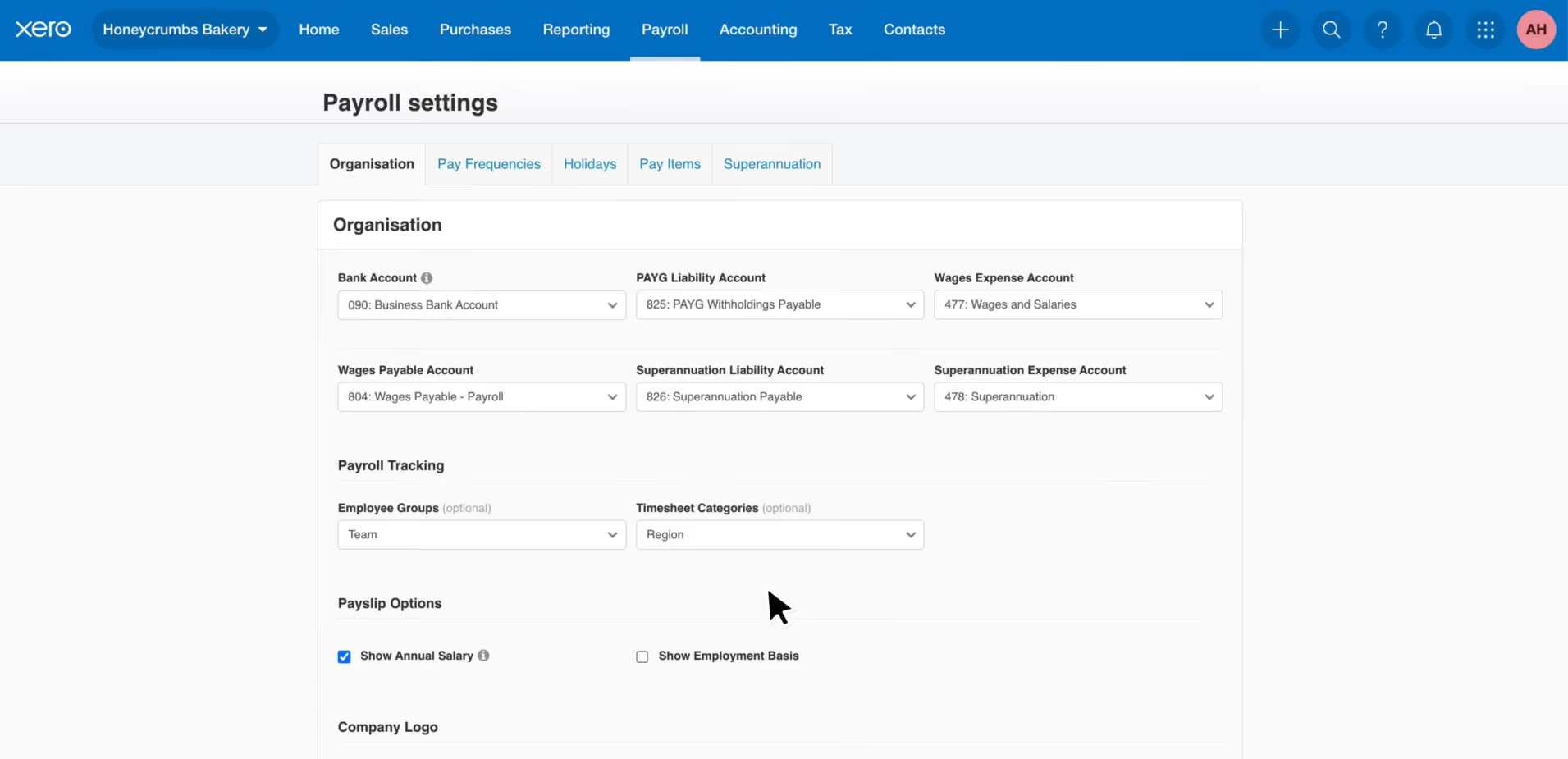
Xero Payroll is one of the most recognizable payroll products in Australia, largely because of its close connection to the broader Xero accounting ecosystem. For businesses already using Xero for invoicing, bookkeeping, BAS preparation, and financial reporting, adding payroll feels less like a buying decision and more like flipping a switch.
The compliance foundations cover what most Australian small businesses need. STP Phase 2 reporting, PAYG withholding, SuperStream, leave accruals, and EOFY finalization all run within the standard workflow. Employees handle their own payslip access, leave requests, and timesheet submissions through the Xero Me app, which in practice means fewer routine queries landing in the payroll inbox each week.
Where Xero starts to show its limits is the moment Modern Awards get complicated. Businesses running shift workers, casuals, or anyone covered by an Award with overtime thresholds and penalty rates will find the platform's interpretation tools less capable than specialist providers. This isn't a theoretical concern. It shows up consistently in customer feedback, where payroll teams describe relying on manual overrides and additional configuration to get Award calculations right. If penalty rates and casual loadings are a daily part of your payroll, that manual overhead adds up quickly and largely defeats the time-saving case for the software.
However, Xero Payroll is not available as a standalone product. It comes bundled with an accounting subscription, which means payroll-only buyers are paying for a full accounting platform to access the payroll module. Long-term customers also flag recurring subscription price increases as a frustration, which is worth factoring into any multi-year cost comparison against dedicated payroll alternatives.
Xero Payroll is included within Xero's accounting subscriptions and is not available as a standalone product.
- Ignite: $37/mo
- Grow: $78/mo
- Comprehensive: $107/mo
- Ultimate 10: $143/mo
- Ultimate 20: $180/mo
- Ultimate 50: $250/mo
- Ultimate 100: $300/mo
Promotional pricing is frequently available for new customers, but businesses should verify current pricing directly with Xero.

Best For
Small businesses whose payroll requirements are relatively straightforward and accounting integration is a priority.
.png)
Deel
Deel differentiates itself from the rest of listed vendors by processing Australian employee payments via direct deposit, tax withholding, superannuation, and government remittances directly on the employer's behalf, rather than handing the execution back to the payroll team. That fully managed model becomes most valuable when Australian payroll sits alongside headcount in other countries, as the platform consolidates what would otherwise be separate payroll systems, vendors, and reporting views into one.
PROS
- Fully managed payroll service available in Australia, including direct employee and statutory payments.
- Consolidates payroll, Employer of Record, and contractor payments within a single platform.
- Automates payroll calculations, payslip generation, deductions, remittances, and compliance processes.
- Integrates with HRIS platforms such as BambooHR, Workday, and HiBob.
- Provides standardized global Gross-to-Net reporting across entities and countries.
- Flexible payroll configuration supports bonuses, commissions, equity, allowances, and custom payroll adjustments.
- Australian employers can choose between Deel-managed payments or self-funded payroll execution.
- Excellent 24/7 customer service with fast onboarding (2-3 days) and local payroll experts in each jurisdiction.
- Seamless integration with platforms like QuickBooks, BambooHR, and Greenhouse, plus custom integration options.
- User-friendly, self-service features enable quick setup; identity verification often takes under 24 hours.
- Automated invoices simplify payments, provided they're in English.
CONS
- Treasury services incur additional fees when Deel processes payments on behalf of clients.
- Implementation can take between one and three months depending on workforce size and country complexity.
- Payroll calendar changes require support requests and advance notice rather than self-service editing.
- First payroll cycle cannot begin immediately after activation, which may delay initial implementation timelines.
- Most post-cutoff payroll changes are deferred to the next payroll cycle unless an off-cycle payroll is approved.
- Key features like onboarding automation are add-ons, which may increase costs.
- Limited flexibility in modifying contracts or service agreements; changes often require an addendum.
- Invoices cannot be generated in languages other than English.
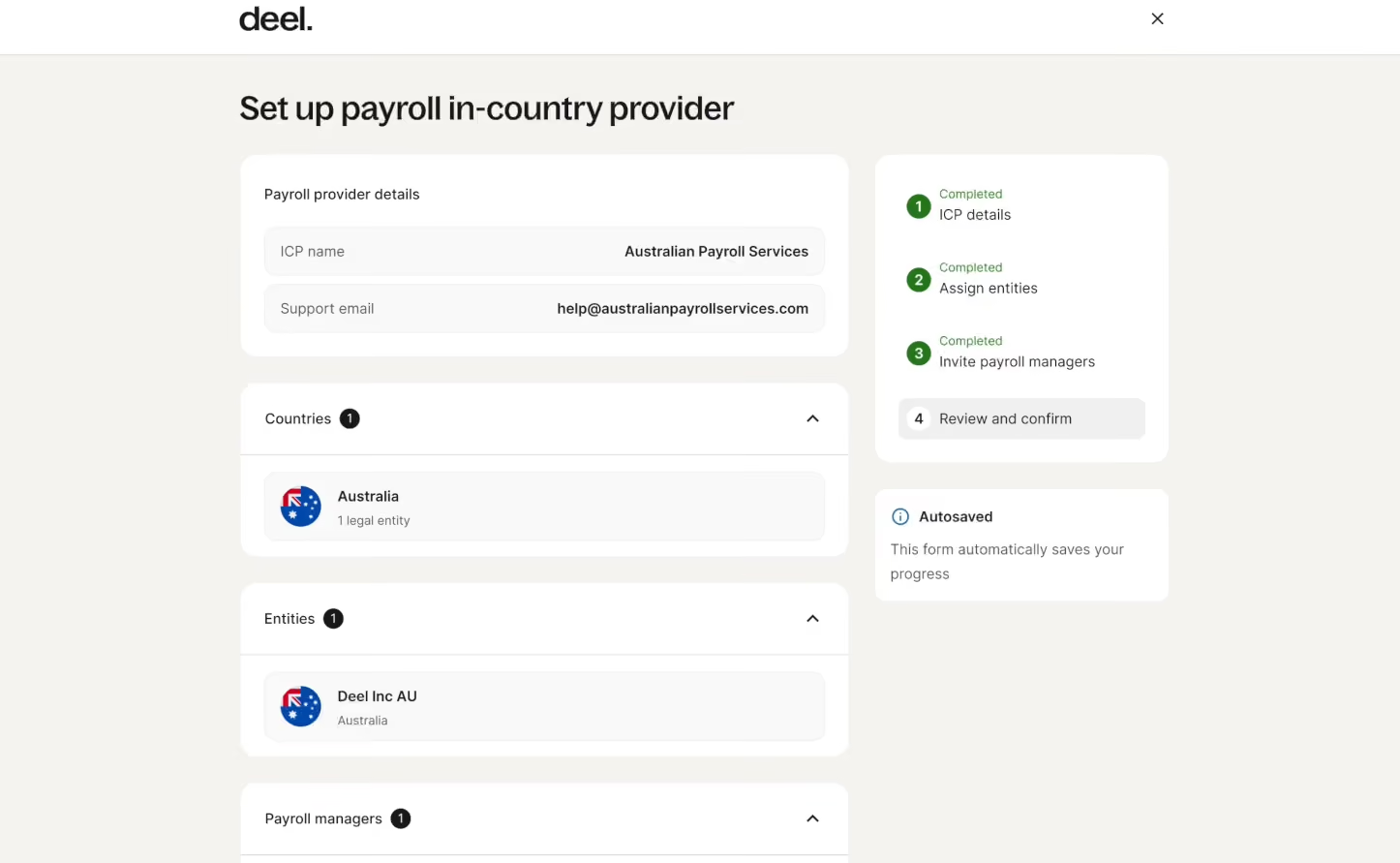
Deel’s model makes most sense when Australian payroll is one part of a wider international workforce operation.
For an organization managing employees across Australia and multiple other countries, they get to run separate regional payroll systems, maintain local compliance expertise in each market, and reconcile payroll costs across entities manually every cycle. Deel replaces that with a single platform, a standardized Gross-to-Net reporting format across all countries, and one vendor relationship. The Global Payroll dashboard consolidates calendars, cycle tracking, approval workflows, reporting deliverables, and support ticket management in one view, and connections to BambooHR, Workday, and HiBob mean payroll data flows into the systems where workforce decisions are actually being made.
The economics require honest scrutiny before the decision is made. Pricing starts at US$29 per employee per month, but implementation fees and treasury service fees add to the total cost in ways the headline rate does not capture. Implementation runs one to three months depending on workforce size and scope. Payroll calendar changes require a support request rather than self-service editing. Changes submitted after the payroll cutoff defer to the next cycle unless an off-cycle payroll is approved, a rigidity that businesses accustomed to more flexible domestic platforms will need to build into their operational rhythm.
For businesses running payroll exclusively in Australia, that cost structure is difficult to justify against Employment Hero, Xero, or MYOB, which are purpose-built for the domestic market at lower price points and with faster deployment timelines. Nevertheless, Deel's value is unparalleled when you need Australian payroll alongside international headcount and want the benefits of consolidation.
Pricing begins at US$29 per employee monthly. Final costs vary by workforce size, pay frequency, and geographic scope. Implementation and treasury service fees for client-side payments may also apply.
Best For
Growing companies managing employees across Australia and multiple countries who want to outsource payroll administration, compliance, and payment execution through a single global platform.

Rippling
Rippling consolidation creates a single source of truth across payroll, HR, IT, and finance, which is especially advantageous for organizations with a multi-jurisdictional workforce. Furthermore, the platform’s modular architecture enables scaling businesses to start with EOR services and transition to in-house payroll management as they expand internationally without changing systems.
PROS
- Unified payroll, HR, IT, and finance reduces data silos and manual reconciliation between systems.
- Manages Australian and international payroll from one dashboard.
- Flexible deployment model: start with EOR services or manage payroll in-house without changing platforms.
- Modular architecture allows organizations to adopt payroll alongside HR and IT services in a coordinated way.
- Supports bonuses, commissions, equity, allowances, and custom payroll adjustments within one interface.
- Implementation support provided, though timelines vary by organizational complexity.
- All-in-one platform for employee management + PEO services offered, and even a suite of other IT products
- With 500 integrations, it’s very likely that they integrate with other key tools from your tech stack.
- Operates globally with any currency
- Workflow automation
- Analytics opportunities
- Provides a holistic view of company outflows—headcount costs included
CONS
- The complexity of the platform creates a steep learning curve.
- Configuration and customization often require specialized Rippling expertise or professional services engagement.
- For Australian-only payroll operations, the global feature set and pricing structure may be unnecessarily complex and costly.
- Limited pricing transparency.
- Total buy-in to Rippling is essential
- Very SMB-oriented, in case you’re a larger company.
- New features tend to be buggy in ways that tech teams are not accustomed to fixing
Rippling consolidation creates a single source of employee data that flows across payroll, HR, time tracking, benefits, and IT. When an employee's compensation changes, the update cascades into payroll calculations without manual re-entry. Leave accrual rules adjust based on employment status changes made in HR. Superannuation withholding recalculates when job classification or salary details are updated. We observed this automation during platform navigation—data synchronization that would otherwise require manual reconciliation between disconnected systems simply doesn't occur because there is only one system to reconcile.
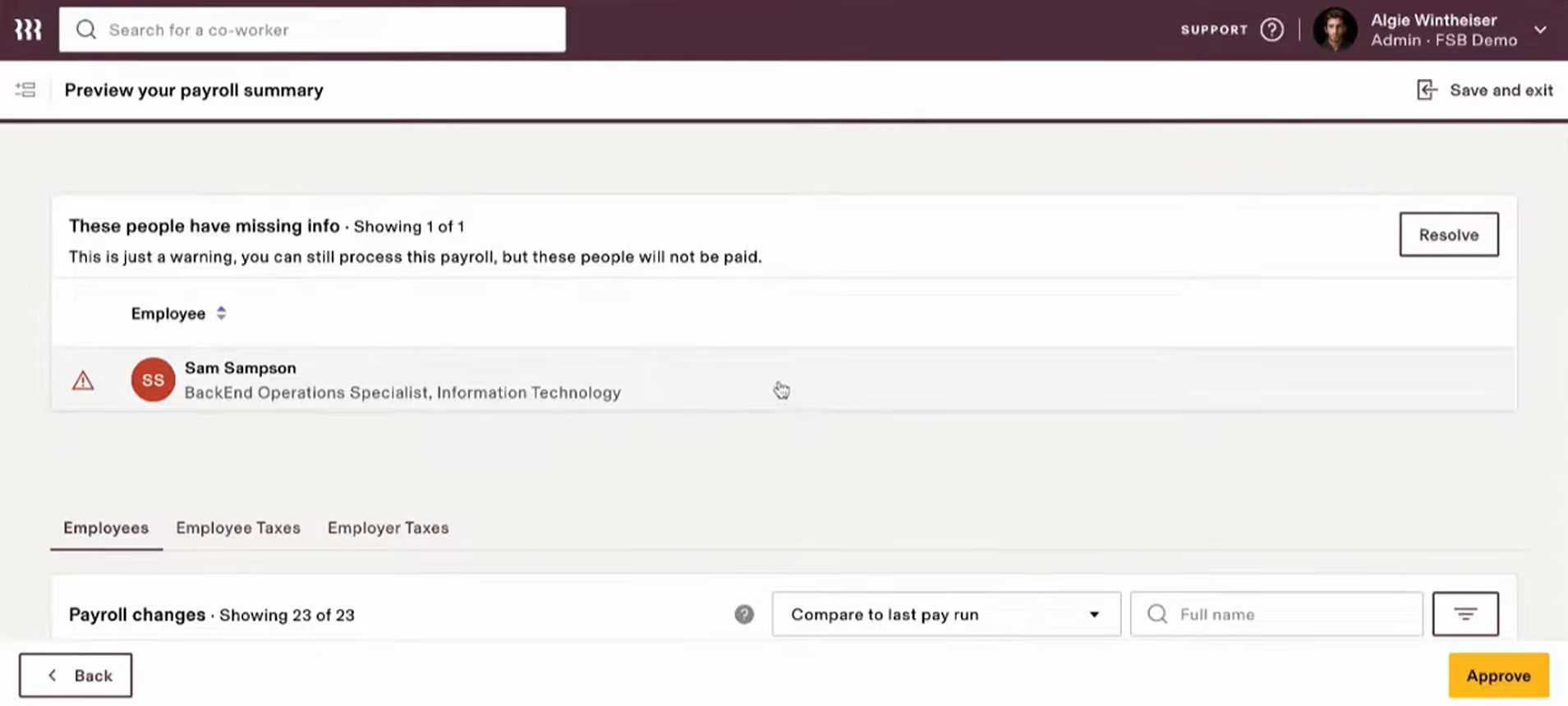
Workflow customization capabilities are particularly powerful for technology-forward teams with the expertise to configure them effectively. Rippling's modular architecture allows organizations to define approval chains based on organizational roles rather than specific people, trigger payroll actions based on employee attributes like role or leave balance, and automate routine compliance updates without manual intervention. These capabilities exceed what standalone payroll platforms typically offer.
Multinational organizations will love Rippling’s multi-jurisdictional payroll management capability. By enabling simultaneous execution of pay cycles across entities, the platform provides consolidated reporting without exporting to spreadsheets and manually stitching numbers together, which frequently complicate international payroll workflows.
Real-world deployment data backs this up. Mentorloop, a 16-person Australian tech company with employees across Australia and the UK, consolidated fragmented operations into Rippling. The company reported reduced administrative overhead and lower subscription costs while gaining centralized visibility into payroll and compliance data across regions.
However, realizing these benefits required months of implementation and configuration. In this sense, that complexity is also the platform's defining tradeoff. Understanding how to make the most of available customization and automation capabilities requires configuration knowledge that extends beyond payroll.
Rippling doesn't publish Australian payroll pricing, though total cost often exceeds dedicated domestic platforms once all required modules are included. Organizations running payroll exclusively in Australia, or those evaluating Rippling payroll as a standalone decision, should thus weigh the consolidation benefit against the implementation timeline, learning curve, and cost.
Rippling does not publish standard pricing.
Best For
Tech-forward companies managing employees across Australia and multiple other countries who prioritize integrated payroll, HR, and IT operations over single-country payroll optimization.


We use Rippling for all HR processes - hiring, onboarding, training, time and attendance, etc. We also use the pulse tool for surveys of our employees. We have built workflows to support onboarding and schedule management when someone takes time off. It's a daily tool for us.
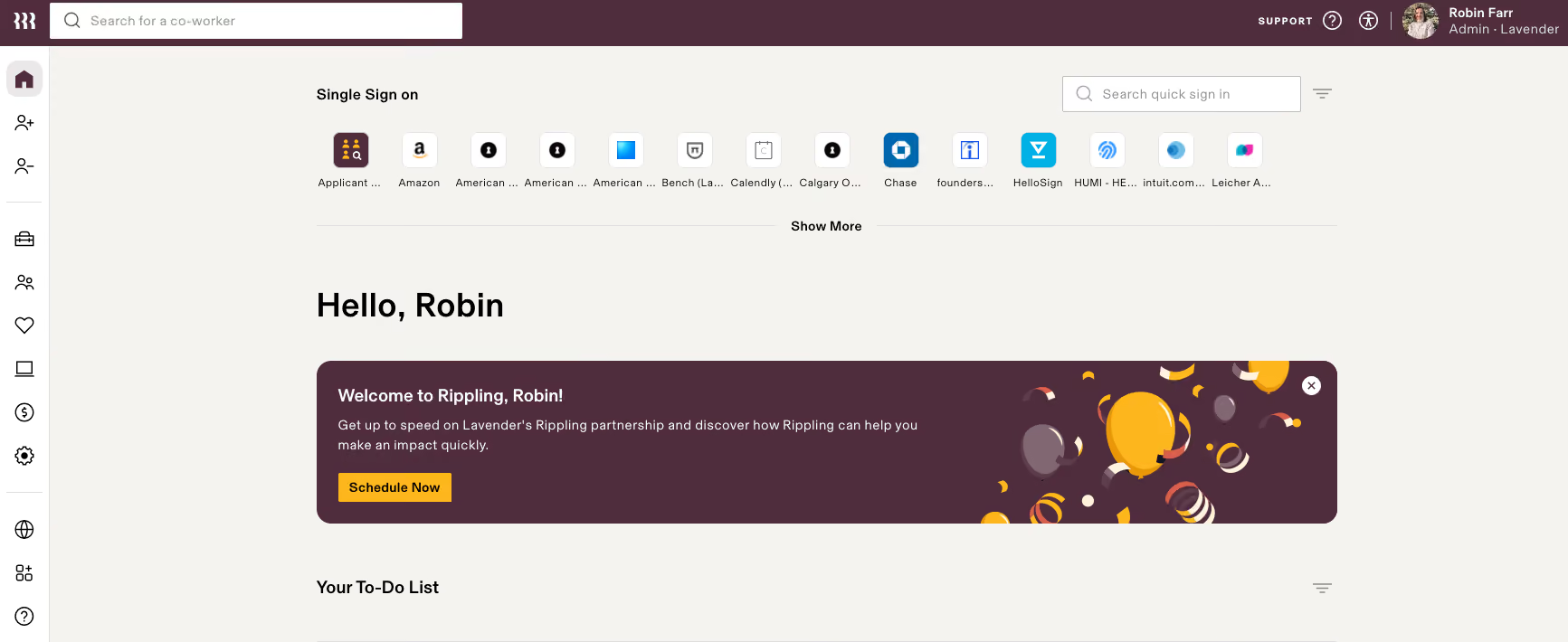
Rippling is quite comprehensive and has more functionality than other HRIS I have used, such as the pulse/survey tool right within the platform. It also integrates with Slack, so notifications and reports can be sent there. I like the workflow options as well, which allow you to set things up to launch when certain conditions are met, e.g. send an onboarding survey a month after start date.
We are a relatively new company and did not have an HRIS in place. After looking at a few we opted for Rippling because of the functionality it offered as well as integrations and automations. We have been using it for about 9 months.
Rippling has been around for a few years but it feels like they are still working out some bugs. There are certain things that just don't work the way you'd expect. We have recently implemented their global payroll app for our Canadian employees and it doesn't do things like break out vacation time, etc. It has a reporting function but it's a bit hard to get exactly what you're looking for and the charts that it creates don't always display information in the most relevant way.
Rippling is quite user-friendly in terms of interface. It has more functionality than others I've used and they're doing a great job figuring out how to incorporate integrations to make it really useful.
It's very good for US employees but is missing a few features for global payroll at this time. Best to understand how all modules are priced so you know what's worth implementing and don't end up paying for functions you don't use.
Rippling has taken suggestions when we've found things that could be improved or added (TBD if those things are implemented). They have added some features in the last few months so definitely seem to be continuing to grow the platform.
HR teams, I think it would be good for organizations with over 50 employees
Very small organizations, those primarily based outside the US

Employment Hero
Employment Hero earned its place on this list by doing something most all-in-one platforms claim, but few deliver: payroll, HR, onboarding, leave, and employee records operate from a single data record. Its automated compliance coverage is also the most comprehensive we reviewed, handling STP Phase 2, SuperStream, Payday Super, and Modern Award interpretation within the same workflow.
PROS
- Automates Australian payroll compliance, including STP Phase 2, SuperStream, PAYG tax, and Payday Super requirements.
- Combines payroll, HR, onboarding, leave management, timesheets, and employee records in a single platform.
- Employee self-service app allows staff to access payslips, update details, and request leave or PTO without HR intervention.
- Frequently praised by administrators for ease of use, simple onboarding, and straightforward payroll processing.
- Strong reporting capabilities with accurate payroll reports and financial insights.
- Continuous product development and regular feature updates.
- Integrated HR, payroll, and hiring reduce manual data entry and tool switching
- Easy-to-use workflows that non-specialists can manage confidently
- Strong Canadian compliance with automated tax calculations and CRA remittances
- Supports multiple pay schedules, bank accounts, and automated payslips
- Time and attendance sync helps streamline payroll processing
- T4 generation and submission handled within the platform
CONS
- Mobile app usability receives mixed reviews, with some users reporting clock-in issues, navigation problems, and missing functionality.
- Some payroll and leave management workflows can be difficult to troubleshoot when errors occur.
- Holiday balances, leave tracking, and permissions settings may require manual intervention in certain situations.
- Support quality appears inconsistent, with some customers praising onboarding while others report slow issue resolution.
- Interface updates occasionally change navigation patterns, creating confusion for end users.
- Works best within the full Employment Hero platform, not as a standalone payroll tool
- Some features require higher-tier HR plans, increasing overall cost
- Pricing is undisclosed with no free trial
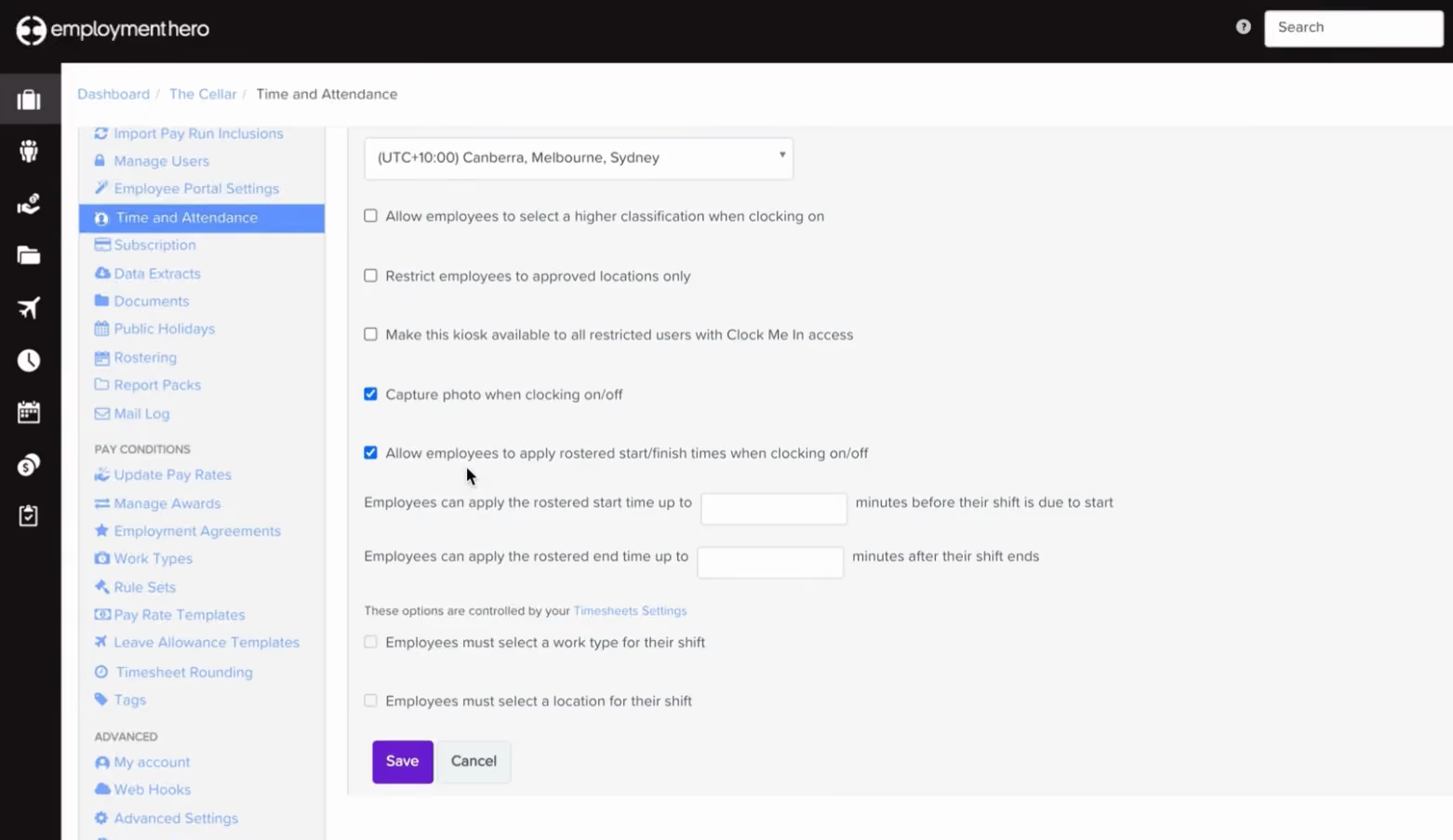
Most payroll and HR platforms that claim to be "all-in-one" mean they have built an integration between two separate products. Employment Hero is genuinely one system, with payroll, HR, onboarding, leave management, timesheets, and employee records all running from a single data record. That difference is most visible during onboarding: a new hire's details entered once flow directly into their first pay run without re-keying, and a leave approval updates the payroll calculation automatically. The reconciliation errors that accumulate between disconnected systems simply don't occur because there is only one system to reconcile.
The compliance depth is the broadest we reviewed. STP Phase 2, SuperStream, Payday Super, Modern Award interpretation, penalty rates, and automatic superannuation updates all sit within the same workflow. For businesses in hospitality, retail, or any other Award-heavy industry that has previously relied on manual overrides to get penalty rates right, that automation represents a meaningful shift in how much the payroll team actually needs to do each cycle.
Customer feedback on the payroll experience is consistently positive. Administrators describe setup as faster than expected, reporting tools as intuitive, and the implementation process as well-supported.
The picture changes when you look at what employees experience. The Work App, used for clocking in, viewing payslips, submitting leave, and accessing employment documents, is the platform's most documented weakness. Clock-in failures, navigation problems, and missing menu options appear frequently enough across independent reviews to constitute a pattern rather than isolated incidents.
While onboarding support is reported to be smooth and well-resourced, post-implementation support receives mixed feedback, with complaints on slower resolution than they experienced during setup.
Starting at $10/month, Employment Hero’s Payroll plan offers unlimited pay runs, automated tax, award interpretation, and HR integration. Upgrades include the Employment Unlimited plan or add-ons like Rostering ($4/employee/month), Managed Payroll ($20/employee/month), and HR Advisory ($14/employee/month).
Best For
Australian SMBs that want consolidation of payroll, HR, and compliance in one system. Before committing, test the employee-facing mobile app under real working conditions rather than just the payroll workflow, and if your team will need ongoing complex support, ask specifically about post-implementation response times.

SAP SuccessFactors
SAP's standout capability is retroactive payroll processing that automatically recalculates superannuation, tax, and leave accruals when employee data changes after a pay run has been finalized — a gap that leaves payroll teams doing manual reconciliation on most platforms we tested. Combined with direct integration into Financial Accounting and cost centers, it creates a level of payroll-to-finance automation that mid-market tools simply don't offer.
PROS
- Comprehensive support for Australian payroll requirements, including tax, superannuation, leave, salary packaging, and termination processing.
- Powerful retroactive payroll functionality automatically recalculates tax, superannuation, leave accruals, and payroll adjustments when employee data changes.
- Integration with HR, Time Management, Financial Accounting, and Controlling reduces manual data entry and improves data consistency.
- Flexible payroll architecture allows organizations to customize payroll schemas and processes to meet unique business requirements.
- Supports advanced payroll analytics through payroll declustering and SAP HANA reporting capabilities.
- Automatic retroactive processing recalculates prior periods when data changes after a run is finalised.
- Documents UK-specific handling of the Apprenticeship Levy and CIS deduction reclaims through the EPS.
- At £79.20 per user per year on the framework, it sits far below Workday's enterprise-grade pricing standard.
- Holds SC security clearance, Cyber Essentials Plus, and customer control over data location.
CONS
- Implementation can be complex and typically requires coordination across multiple HR and payroll workstreams.
- Enterprise-focused architecture may be excessive for small and mid-sized organizations with straightforward payroll needs.
- Advanced customization and payroll schema configuration often require specialized SAP expertise.
- Pricing and minimum user requirements may place the solution out of reach for smaller employers.
- Payroll reporting enhancements such as declustering may require additional technical configuration and infrastructure planning.
- SAP's cloud payroll still runs on a 20-year-old engine whose mainstream support ends in 2027, so any 2026 buyer enter mid-migration.
- The £79.20 framework price is payroll only; like Oracle, SAP licenses the HR core separately, so the real figure for an HRMS would be higher.
- Implementation is partner-delivered and complex, with reviewers citing a steep learning curve.
- The published framework price dates from April 2024 and predates the migration plans.
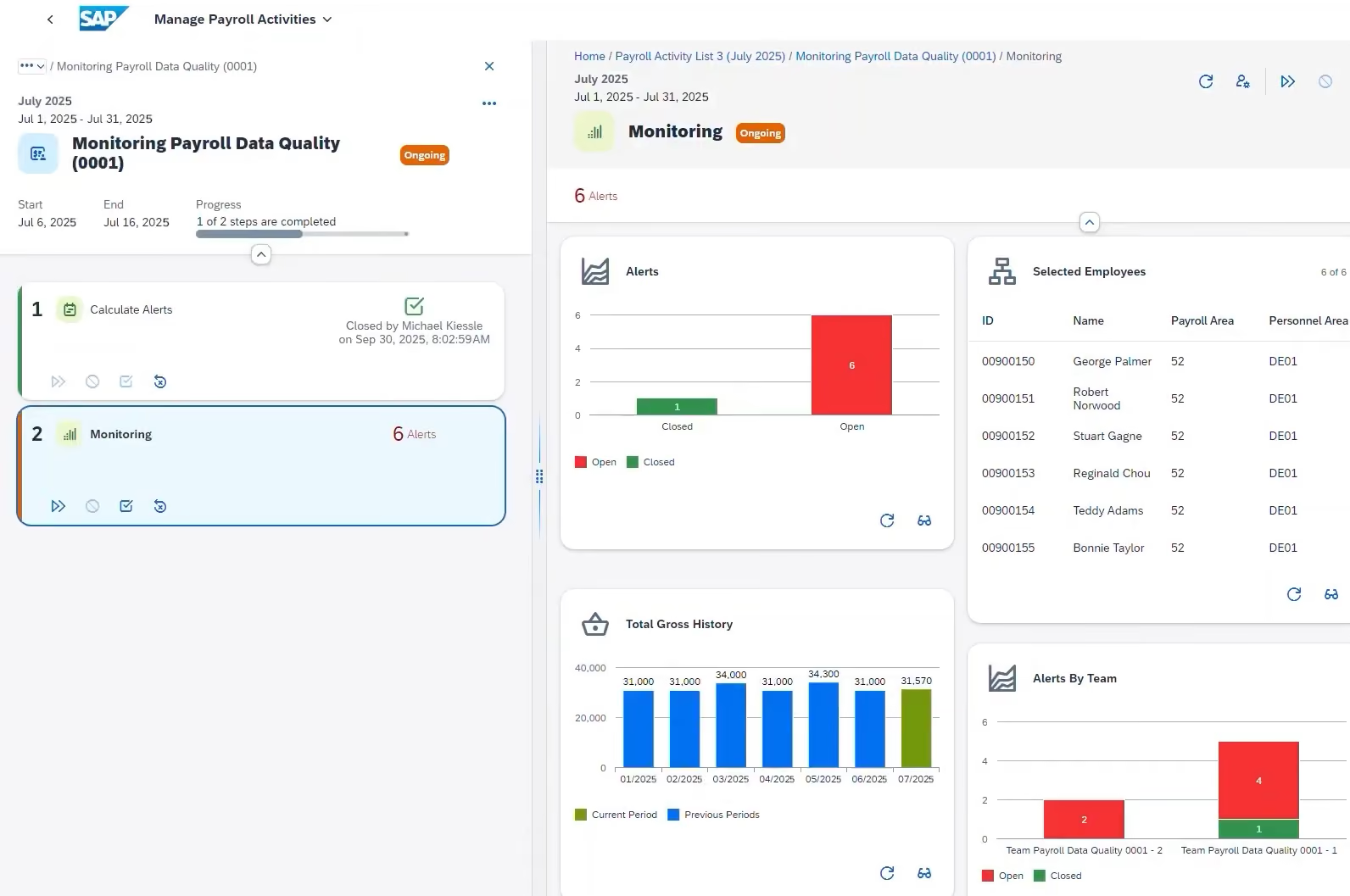
The capability that most clearly separates SAP from every other platform we reviewed is its retroactive payroll processing engine. When employee data changes after a pay run has been finalized, whether a classification correction, a backdated salary adjustment, or a leave entitlement update, SAP automatically recalculates the affected prior periods and carries the differences forward into the current cycle. That recalculation extends to superannuation contributions, tax withholding, and leave accruals, not just base wages. On every other platform in this review, those corrections fall to the payroll team manually. For an enterprise where retrospective changes are a regular occurrence, that is a meaningful reduction in reconciliation work after every finalization cycle.
The integration with other SAP modules adds further automation that standalone payroll tools cannot replicate. Employee master data flows from Personnel Administration directly into payroll. Time Management feeds pay run inputs automatically. Completed payroll posts directly to Financial Accounting and cost centers. For organizations already running SAP's broader ecosystem, the payroll-to-finance workflow has fewer manual handoffs than any other platform on this list.
The declustering functionality, which exposes payroll cluster data as transparent tables for advanced reporting in SAP HANA environments, goes further still, making payroll data available for workforce analytics in ways that standard payroll reports simply do not support.
The tradeoffs are proportional to the power. Implementation involves multiple HR and payroll workstreams, requires specialized SAP expertise for schema configuration, and takes longer than any modern cloud payroll platform. Advanced customization is not self-service. To be fair, though, none of that is a criticism but the appropriate context for a platform built for large enterprises with dedicated HR and IT resources.
SAP SuccessFactors Payroll starts at US$12 per user/month, requires a minimum of 1,000 users, and offers contract terms from 3 to 60 months. Additional modules and enterprise-specific pricing are available based on custom deployment requirements.
Best For
Large enterprises and multinational organizations that need robust Australian payroll compliance, advanced reporting capabilities, and tight integration with broader HR and finance operations.
MYOB Business
MYOB is the only platform on this list that offers users the freedom between cloud-based and desktop-enabled operation via AccountRight, making it the strongest option for businesses in low-connectivity environments or teams that prefer desktop performance. Also its payroll compliance automation — STP Phase 2, SuperStream, NES leave accruals, and termination processing — is fully built into the workflow rather than bolted on.
PROS
- User-friendly interface with straightforward navigation for accounting and payroll tasks.
- Comprehensive accounting, payroll, accounts payable, and accounts receivable functionality in one system.
- Automated payroll calculations for tax, superannuation, leave, overtime, and Single Touch Payroll reporting.
- Fast performance, particularly in desktop-based AccountRight environments.
- Extensive online help documentation and step-by-step support articles.
- Flexible deployment options, including cloud-based and desktop-enabled plans.
- Supports easy migration from Xero, QuickBooks, and Reckon.
- Strong security measures and compliance updates aligned with Australian tax regulations.
- User-friendly interface with straightforward navigation for accounting and payroll tasks.
- Comprehensive accounting, payroll, accounts payable, and accounts receivable functionality in one system.
- Automated payroll calculations for tax, superannuation, leave, overtime, and Single Touch Payroll reporting.
- Fast performance, particularly in desktop-based AccountRight environments.
- Extensive online help documentation and step-by-step support articles.
- Flexible deployment options, including cloud-based and desktop-enabled plans.
- Supports easy migration from Xero, QuickBooks, and Reckon.
- Strong security measures and compliance updates aligned with Australian tax regulations.
CONS
- Customer support appears to be a recurring pain point, with numerous users reporting long wait times, delayed responses, and unresolved support cases.
- Subscription cancellation can be difficult, according to multiple customer reports citing lengthy processing times and continued billing after cancellation requests.
- Reporting capabilities are limited compared to larger ERP systems, particularly for consolidated financial statements and intercompany accounting.
- Integrations with third-party applications can require additional effort and may not be as seamless as competitors.
- Some users report increasing subscription costs over time.
- Payroll functionality occasionally requires manual workarounds for specific tax scenarios, such as bonus payments.
- Customer support appears to be a recurring pain point, with numerous users reporting long wait times, delayed responses, and unresolved support cases.
- Subscription cancellation can be difficult, according to multiple customer reports citing lengthy processing times and continued billing after cancellation requests.
- Reporting capabilities are limited compared to larger ERP systems, particularly for consolidated financial statements and intercompany accounting.
- Integrations with third-party applications can require additional effort and may not be as seamless as competitors.
- Some users report increasing subscription costs over time.
- Payroll functionality occasionally requires manual workarounds for specific tax scenarios, such as bonus payments.
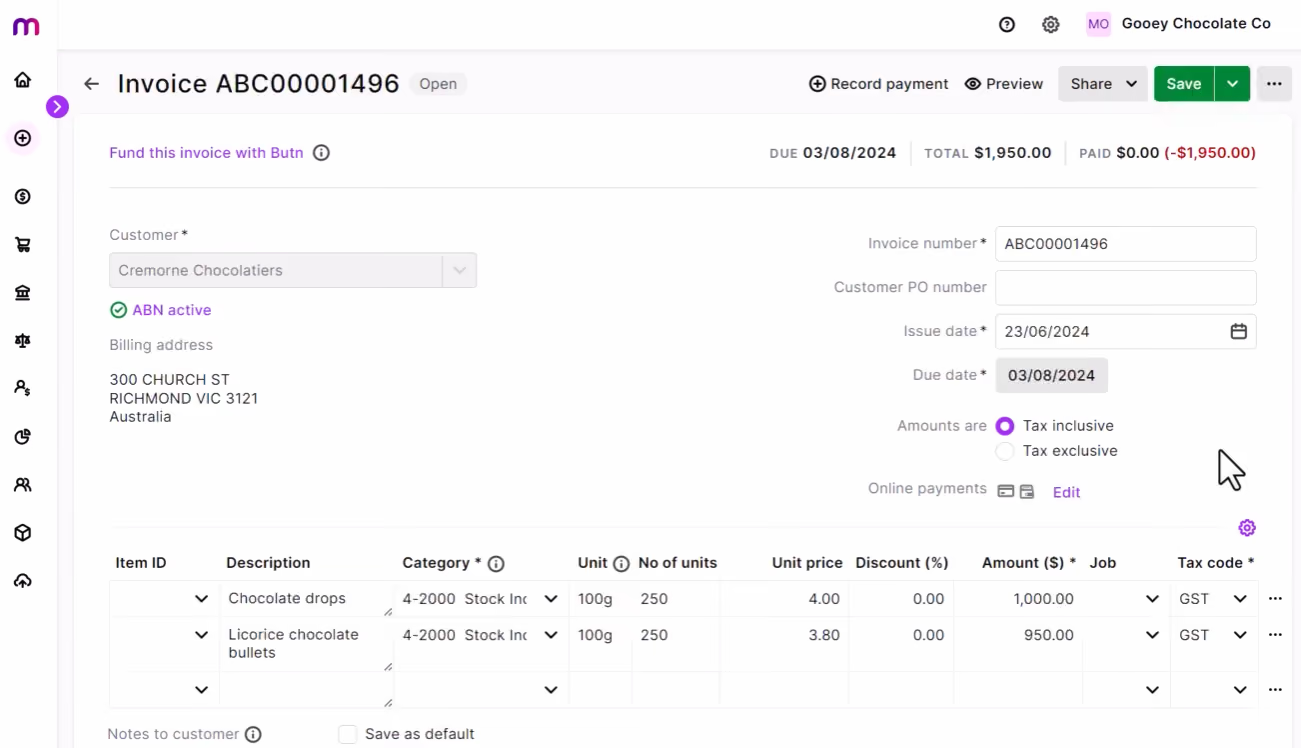
MYOB has been part of the Australian accounting software landscape long enough that its product reflects both the depth that builds over decades and some of the institutional friction that accumulates alongside it.
For a business that wants one system to cover the full financial and payroll operation without assembling point solutions, MYOB delivers. Furthermore, it provides deployment flexibility – offering both cloud-based products and desktop-enabled AccountRight plans. This means payroll processing is not dependent on connection stability, which matters for regional businesses in ways that cloud-only platforms cannot accommodate.
The payroll compliance automation is solid across the requirements Australian businesses face regularly. Tax, superannuation, leave accruals, STP Phase 2, online employee onboarding, automated super contributions, and Payday Super readiness all run within the standard workflow. Termination processing, including unused leave, redundancy entitlements, and tax treatment by termination reason, is handled automatically. Migration tools for businesses coming from Xero, QuickBooks, or Reckon reduce the switching friction.
Three limitations are worth naming though. Bonus payment tax calculations have been documented in customer feedback as a scenario requiring manual workarounds rather than automatic handling, which will matter to businesses paying irregular bonuses regularly.
Advanced reporting also hits a ceiling: consolidated financial statements and intercompany accounting require either manual workarounds or a move to a larger ERP.
Regarding support, long hold times, delayed ticket responses, difficulty reaching resolution on account issues, and continued billing after cancellation requests were submitted appear too frequently and too recently across independent reviews to be treated as outliers. We advise you to contact MYOB support with a realistic compliance question before signing up, not after, to see for yourself what the experience is actually like.
MYOB Business pricing tiers:
- Payroll Only: $15/month for up to 4 employees; includes tax, super, leave, and STP compliance.
- MYOB Business Lite: $315/year for sole traders/small teams; includes GST and inventory, plus payroll for $3/employee/month.
- MYOB Business Pro: $70/month; adds unlimited bank feeds and sales orders, plus payroll for $3/employee/month.
- AccountRight Plus: $165/month; includes desktop access, priority support, and unlimited payroll.
- AccountRight Premier: Custom pricing; adds multi-currency and multi-business management.
- Solo by MYOB: $99/year mobile solution for sole traders covering invoicing, GST, and banking.
Note: Pricing applies after introductory offers.
Best For
Australian small and medium-sized businesses that need integrated accounting and payroll software with strong compliance automation and flexible deployment options.

Reckon
Reckon's customer feedback on response times and hands-on compliance assistance is most excellent and consistently positive of any platform we reviewed, which matters most for the small business owners and first-time payroll administrators who make up its typical user base. Its compliance fundamentals — STP reporting, superannuation, leave tracking, and payroll tax — are handled correctly at a price point that starts at $16 per month, undercutting Xero, MYOB, and Employment Hero for comparable small-team payroll needs.
PROS
- Easy-to-use interface with a short learning curve, even for first-time payroll administrators.
- Excellent value for money compared to alternatives such as Xero, MYOB, and Employment Hero.
- Strong Australian compliance support, including Single Touch Payroll (STP), superannuation calculations, leave tracking, and payroll tax requirements.
- Customer Support is consistently praised for responsiveness, patience, and real-time assistance.
- Mobile and web access allow payroll management from virtually anywhere.
- Streamlined payroll workflows support timesheets, pay runs, payslip delivery, and government reporting.
- Unlimited employee support available on higher-tier plans.
- Easy-to-use interface with a short learning curve, even for first-time payroll administrators.
- Excellent value for money compared to alternatives such as Xero, MYOB, and Employment Hero.
- Strong Australian compliance support, including Single Touch Payroll (STP), superannuation calculations, leave tracking, and payroll tax requirements.
- Customer Support is consistently praised for responsiveness, patience, and real-time assistance.
- Mobile and web access allow payroll management from virtually anywhere.
- Streamlined payroll workflows support timesheets, pay runs, payslip delivery, and government reporting.
- Unlimited employee support available on higher-tier plans.
CONS
- Some users report occasional bugs, glitches, and performance issues that require support intervention.
- Initial employee setup can involve a learning curve for payroll newcomers.
- The user interface feels somewhat dated compared to newer cloud payroll competitors.
- A small number of customers report frustrations with subscription management and pricing increases.
- Some businesses have experienced occasional system slowdowns and timeout issues.
- Advanced workforce management functionality is less extensive than broader HCM platforms.
- Some users report occasional bugs, glitches, and performance issues that require support intervention.
- Initial employee setup can involve a learning curve for payroll newcomers.
- The user interface feels somewhat dated compared to newer cloud payroll competitors.
- A small number of customers report frustrations with subscription management and pricing increases.
- Some businesses have experienced occasional system slowdowns and timeout issues.
- Advanced workforce management functionality is less extensive than broader HCM platforms.
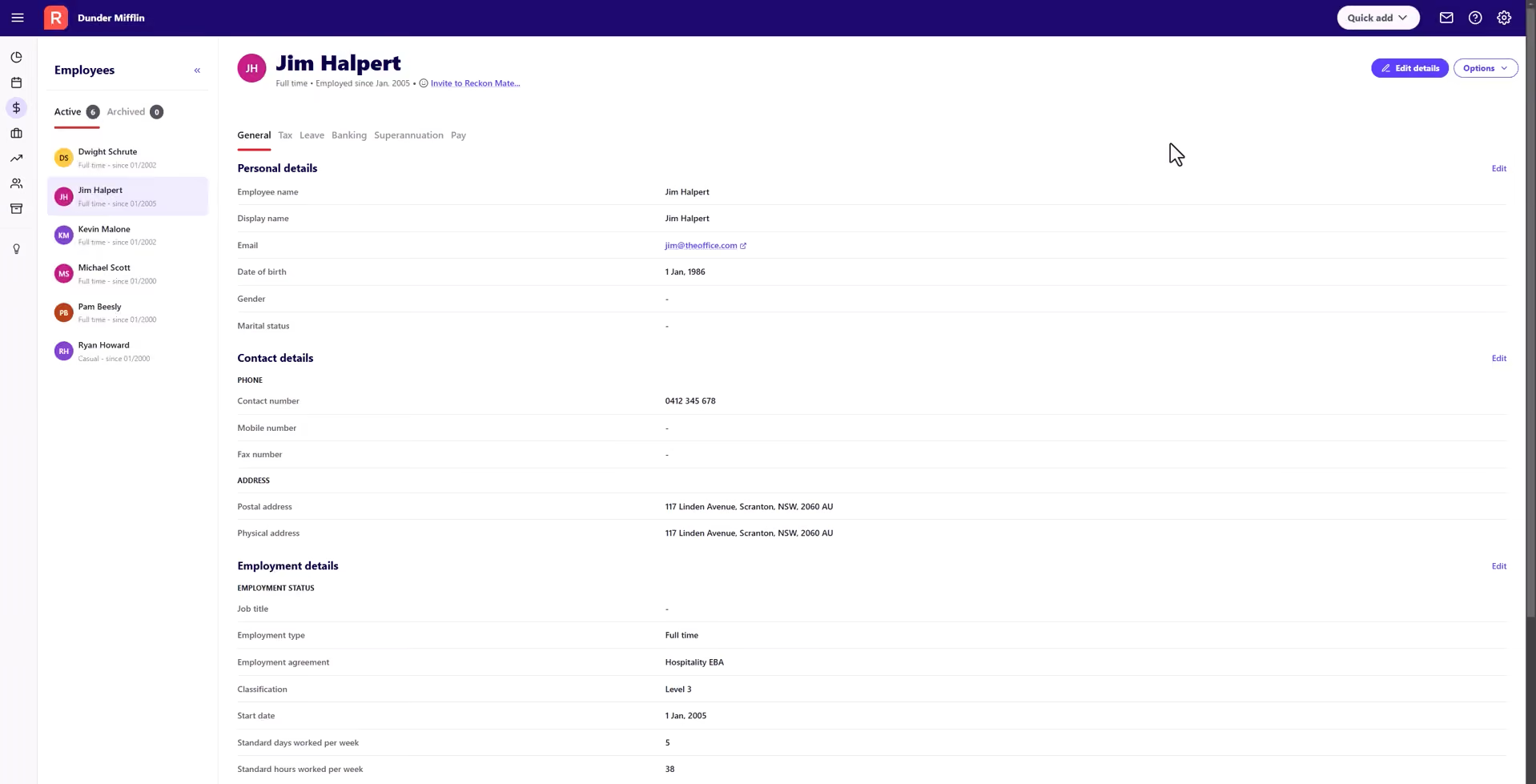
Reckon is the least prominent name on this list, which makes it the easiest to overlook and, based on what we found in the research, the most likely to surprise you. Across an unusually wide range of industries, retail, healthcare, law firms, agriculture, trades, customer feedback lands on the same three points with striking consistency: the platform is straightforward to learn, it produces accurate compliance output, and when something goes wrong, the support team picks up and actually helps.
The pricing puts Reckon in a different bracket from most of the competition. At $16 per month for up to four employees, it undercuts Xero, MYOB, and Employment Hero for comparable small-team payroll needs.
Even more impressively, at that price, the platform does not neglect its customer service. Per our user surveys, responsiveness and hands-on assistance are key themes associated with this platform, more so than any other Australian payroll tool we evaluated. Several long-term customers credit the support team directly with helping them navigate ATO and Fair Work requirement changes in real time.
The compliance fundamentals are sound. STP Phase 2, superannuation at the legislated rate, leave tracking across annual, personal, and long service leave, overtime, deductions, allowances, and payroll reporting all run within the platform. Pay runs process correctly, payslips distribute electronically, and government reporting runs from a centralized dashboard. Mobile access covers payroll from wherever the business owner happens to be, which for small operators matters more than it might on a larger team.
Three key limitations we found: 1) occasional software bugs appear in the feedback record and require support intervention to resolve. 2) the interface is less modern than cloud-native competitors. And 3) Reckon is not the answer if your business needs advanced workforce management, rostering, time tracking, or broader HCM capabilities.
Reckon Payroll offers three payroll plans:
- Payroll Essentials: $16/month for up to 4 employees. Includes pay runs, STP reporting, superannuation calculations, leave tracking, payroll reporting, employee self-service app, timesheets, expense claims, and mobile access.
- Payroll Plus: $32/month for up to 10 employees. Includes all Payroll Essentials functionality with increased employee capacity.
- Payroll Premium: $60/month for unlimited employees. Includes all payroll features without employee limits.
New customers may qualify for promotional pricing, with plans starting at $1/month for the first 6 months before reverting to standard pricing.
Best For
Australian small businesses that want affordable payroll software with strong compliance tools, responsive customer support, and straightforward payroll processing without the complexity of a full HCM suite.

Payroller
Payroller is the only platform on this list that bundles STP Phase 2 compliance, superannuation processing, rostering, time tracking, and employee self-service into a free entry-level plan — a combination that would require multiple paid tools from most competitors. For micro-businesses with straightforward payroll, that scope at that price point is genuinely difficult to match.
PROS
- Affordable pricing with a free tier available for eligible single-employee businesses.
- Built-in STP Phase 2 reporting and automated tax, superannuation, and leave calculations.
- Available on web and mobile, allowing payroll processing from virtually any device.
- Includes workforce management tools such as rostering, time tracking, leave management, and employee self-service.
- Xero integration is available on paid plans.
- Generally praised by small business users for ease of setup and day-to-day payroll administration.
- Affordable pricing with a free tier available for eligible single-employee businesses.
- Built-in STP Phase 2 reporting and automated tax, superannuation, and leave calculations.
- Available on web and mobile, allowing payroll processing from virtually any device.
- Includes workforce management tools such as rostering, time tracking, leave management, and employee self-service.
- Xero integration is available on paid plans.
- Generally praised by small business users for ease of setup and day-to-day payroll administration.
CONS
- Customer support receives mixed reviews, with several users reporting slow responses and unresolved issues.
- Some customers experienced difficulties resolving STP reporting and compliance-related problems.
- Limited integration ecosystem compared to larger payroll platforms.
- Monthly salaried payroll options appear less flexible than hourly-based payroll configurations.
- Communication and billing support have been recurring concerns among dissatisfied users.
- Customer support receives mixed reviews, with several users reporting slow responses and unresolved issues.
- Some customers experienced difficulties resolving STP reporting and compliance-related problems.
- Limited integration ecosystem compared to larger payroll platforms.
- Monthly salaried payroll options appear less flexible than hourly-based payroll configurations.
- Communication and billing support have been recurring concerns among dissatisfied users.
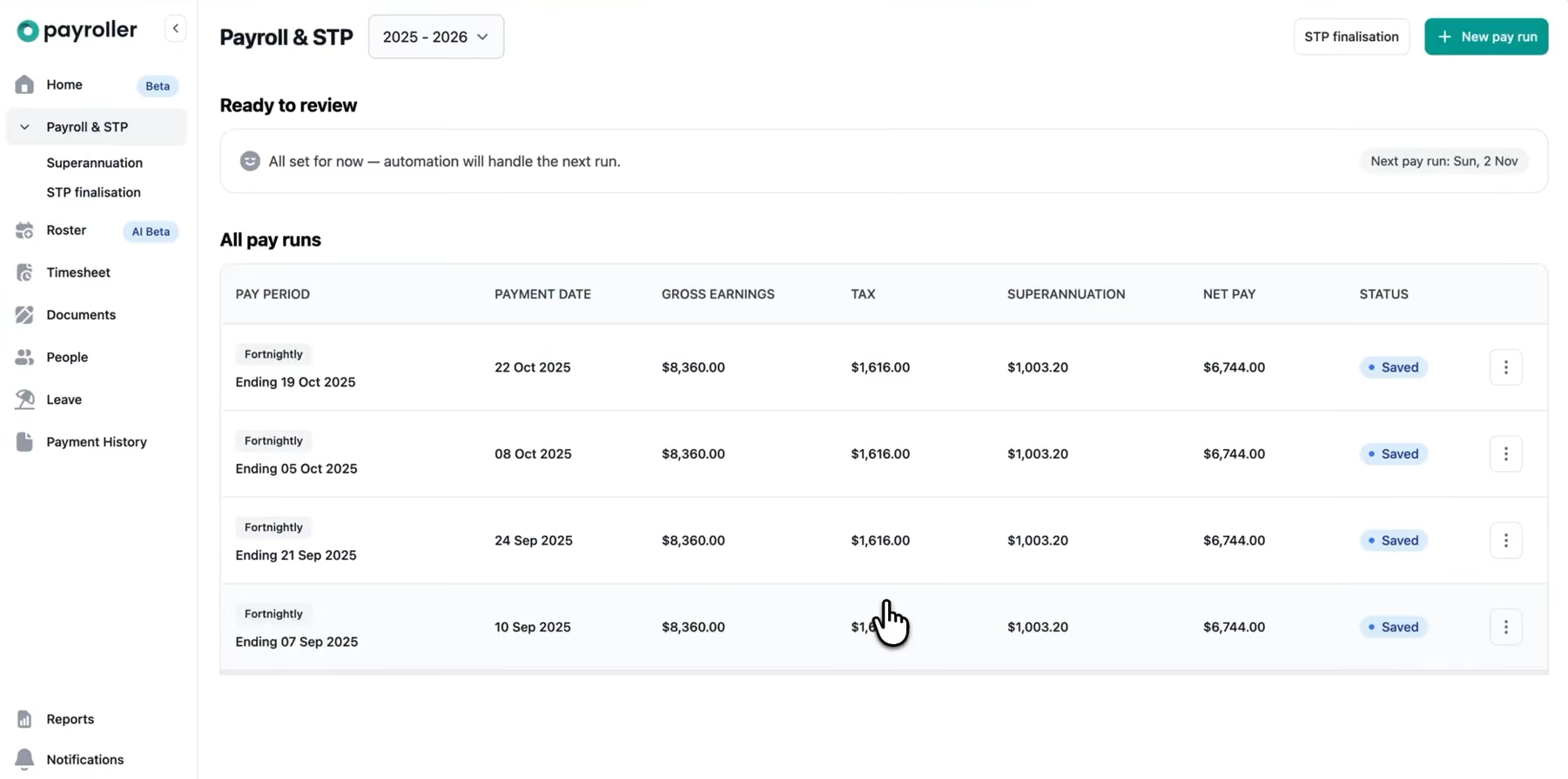
Payroller's value proposition is straightforward: it gives micro-businesses more capability per dollar than anything else we reviewed. STP Phase 2 compliance, superannuation processing, leave management, rostering, time tracking, and employee self-service all sit within a single platform, with a free entry tier for eligible single-employee businesses and paid plans starting at $2.99 per employee per month. Assembling equivalent functionality from separate tools would cost considerably more, which likely explains why the platform reports more than 180,000 Australian businesses on it despite being a less prominent name than Xero or MYOB.
The setup experience holds up under scrutiny. Customers across retail, hospitality, trades, and real estate consistently describe getting employee records configured, pay runs processed, and tax and superannuation calculating correctly without formal payroll training. Web and mobile access means payroll can be run from wherever the business owner happens to be, a practical detail for sole operators who are rarely at a fixed desk. The timesheet-to-pay-run feed removes the manual transcription step where errors most commonly occur in basic payroll setups.
The compliance coverage handles the surface without gaps. STP Phase 2 reporting is built into the pay run workflow, superannuation calculates automatically, payslips distribute electronically, and the platform has signaled readiness for Payday Super requirements.
What the pricing and ease of use do not prepare you for is what happens when a compliance issue arises and you need help quickly. Support on STP error resolution and ATO submission problems is the most inconsistent of any platform we reviewed, with some customers describing responsive assistance and others reporting delayed responses on urgent lodgement issues.
The integration ecosystem is also narrower than larger alternatives, with Xero connectivity available on paid plans but limited third-party connections beyond that.
Payroller reports serving more than 180,000 Australian small businesses across industries including retail, real estate, wholesale, trades, and hospitality.
- Lite: Free. Includes leave management, employee app, mobile payroll, and STP Phase 2 support.
- Standard: From $2.99 per employee/month. Adds web payroll, superannuation processing, and Xero integration.
- Enterprise: Custom pricing. Includes advanced functionality and support for larger organizations.
Best For
Micro-businesses with simple, stable payroll who want the broadest feature set at the sharpest price point. If there is any chance you will need fast, reliable support when something goes wrong with a lodgement, weigh that support track record honestly against the pricing advantage before committing.
Payroll Standard
While not a payroll system, Payroll Standard operates upstream of your existing software to manage the heavy lifting: translating industrial obligations into accurate, executable logic. By leveraging AI-enabled interpretation, rules-based automation and industrial expertise, the platform maps modern awards, EAs and other industrial instruments into system configurations and operational outcomes. This cuts configuration timelines down to days, a stark contrast to the months-long cycles of traditional approaches.
PROS
- Payroll Standard configures and maintains long service leave, consistently verified against legislative and regulatory requirements.
- Generates configuration workbooks more accurately than manual methods, reducing interpretation errors and rework.
- EA and industrial instrument mapping can be completed in days for less complex instruments, compared to traditional approaches that can take months.
- Structured interpretation, auditable outputs, and automated validation accelerate testing.
- Exports directly to Dayforce, Workday, Oracle, SAP, UKG and other technology platforms through supported configuration formats.
- Provides a central data source for industrial interpretation across payroll, HCM, and workforce management platforms.
- Payroll Standard configures and maintains long service leave, consistently verified against legislative and regulatory requirements.
- Generates configuration workbooks more accurately than manual methods, reducing interpretation errors and rework.
- EA and industrial instrument mapping can be completed in days for less complex instruments, compared to traditional approaches that can take months.
- Structured interpretation, auditable outputs, and automated validation accelerate testing.
- Exports directly to Dayforce, Workday, Oracle, SAP, UKG and other technology platforms through supported configuration formats.
- Provides a central data source for industrial interpretation across payroll, HCM, and workforce management platforms.
CONS
- It does not handle pay runs, requiring you to maintain a separate system for payroll processing.
- Teams with simple workforce structures and few award requirements may find the platform's depth of capability unnecessary and complex.
- Limited pricing transparency with no free trial offered.
- It does not handle pay runs, requiring you to maintain a separate system for payroll processing.
- Teams with simple workforce structures and few award requirements may find the platform's depth of capability unnecessary and complex.
- Limited pricing transparency with no free trial offered.
Payroll Standard is not a payroll processing system. It does not store employee data or handle actual pay runs. However, translating complex award obligations, enterprise agreements, and leave entitlements into system configuration is where most payroll implementations fail—and this is the problem Payroll Standard solves. The platform interprets these compliance layers and translates them into structured, auditable logic that teams apply across payroll, HCM, and workforce management systems.
Configuration accuracy is a key strength. The platform utilizes a rules-based AI system that relies on programmed logic rather than external training data, enabling it to generate configuration workbooks with significantly improved accuracy compared to manual requirements gathering approaches. When we queried the AI about first aid allowance eligibility under the SHADS award, it pulled specific clause numbers and rates from the map, providing a clear audit trail. The visual pay flow shows why: every clause is mapped to a decision pathway where employee type, shift status, and entitlement conditions determine outcomes. This traceability supports confidence in compliance decisions.
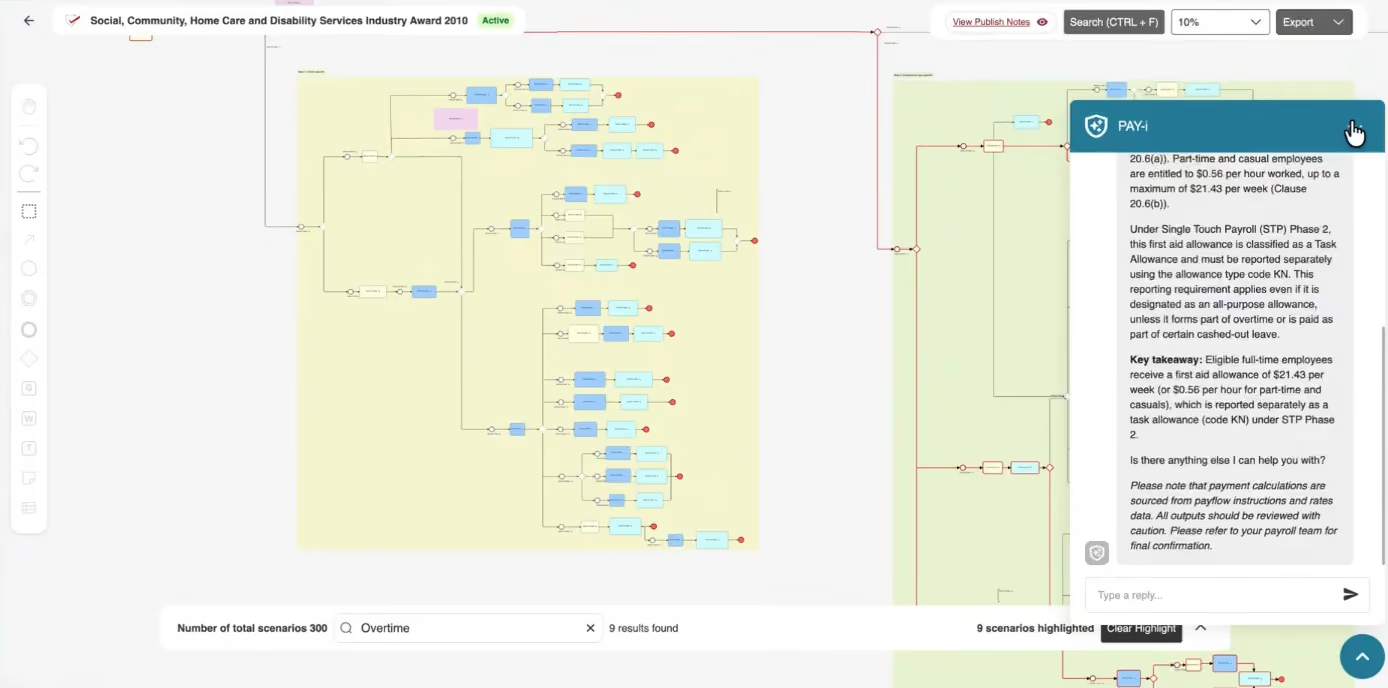
Long service leave capability is another strength. The platform maintains LSL rules for all Australian states and updates them from Fair Work. For employers with staff across multiple states, this removes a significant manual compliance process. On legislative updates, the platform monitors Fair Work and pushes changes to users, who can review, accept, or defer them. Any deferral requires a logged reason—a feature we consider to be an example of robust governance. This ensures clients remain compliant without being forced into premature system changes, while the log of deferrals maintains a clear audit trail for accountability. A drawback is that notifications are sent to all users regardless of their specific award relevance. However, the vendor has stated that award-specific alerts are scheduled for release in late 2026.
As a compliance interpreter, Payroll Standard complements existing payroll and workforce systems rather than replacing them. It can operate standalone or integrate to export configurations in required formats. This also means it is not suitable for organizations seeking a platform to handle actual pay runs. Integration-wise, native support exists only for Sage, Unit4, SAP, and SuccessFactors. Other platforms require API connections.
Pricing is subscription-based. Custom quotes require direct contact with the vendor.
Payroll Standard has been in development for six years, with an initial focus on addressing industrial instrument interpretation and compliance management requirements for large organizations.
Currently, the company is transitioning to a direct sales model. The product roadmap includes enhanced legislative tracking, the addition of source document linking in PDF exports, and targeted notifications by award type, which are scheduled for release in late 2026.
Best For
Organizations managing complex industrial environments, including multi-award workforces, enterprise agreements and challenging compliance obligations. Most value where interpretation accuracy, compliance confidence and implementation timelines are critical.
Benefits and ROI of Using Australia-Specific Payroll Software
Switching from manual payroll or generic tools to Australian-specific payroll software reduces compliance risk, saves administration time, and can deliver measurable cost savings.
The Australian Payroll Association (APA) revealed in its 2025 Payroll Industry Report that the most frequent payroll difficulty is inadequate system integration. This is followed by challenges related to payroll processes and technology, as well as the ongoing effort to keep up with legislative changes(1). In other words, the three problems sitting at the top of the list are precisely the ones purpose-built payroll software is designed to address.
- Reduced data errors and input risk: The 2025 APA report highlights poor data quality as a primary payroll risk. Inaccurate inputs like timesheets and leave requests directly compromise payroll accuracy. Modern Australian payroll software mitigates this by validating data at the entry point, integrating seamlessly with HR and timekeeping systems, and applying automated pre-processing checks. This approach catches errors at the source, reducing the reliance on manual corrections by payroll teams.
- Reduced ATO penalty exposure: The ATO imposes penalties for incorrect STP reporting, PAYG withholding errors, and superannuation guarantee shortfalls. The Superannuation Guarantee Charge includes the unpaid amount, 10% annual interest, and an administration fee of $20 per employee per quarter(2). Automation within Australia payroll software minimizes manual errors and missed deadlines that trigger these penalties.
- Superannuation compliance and guarantee charge avoidance: With the ATO recovering over $911.5 million in superannuation guarantee shortfalls(2), compliance is critical. Payroll software that automatically calculates superannuation at the legislated rate, tracks employee eligibility, and processes SuperStream payments significantly mitigates underpayment risks compared to manual systems.
- Modern Award compliance and underpayment risk reduction: With the Fair Work Ombudsman recovering $358 million in underpaid wages in 2024-25(3), Modern Award compliance is a major operational challenge. Payroll software with built-in Award interpretation automatically handles penalty rates and allowances, reducing human calculation errors.
- Time savings on STP reporting and EOFY finalization: Research indicates that 24.5% of organizations still rely on legacy systems, which lack necessary automation(1). Payroll software built with Australian businesses in mind can automate STP submissions and EOFY finalization, removing the need for manual assembly inherent in spreadsheet-based systems.
- Scalability as headcount grows: As businesses expand, manual payroll processes often become unmanageable. Platforms like MYOB, Xero, and Employment Hero offer tiered plans that accommodate growing headcounts without requiring additional payroll staff, making internal operations sustainable even as complexity increases.
- Improved audit trail for ATO and Fair Work compliance: Data security has been flagged as a top-five payroll risk(1). Australia payroll software creates timestamped audit trails for every pay run, amendment, and STP submission. In the event of an ATO audit or Fair Work inspection, these records are significantly more defensible than unverified spreadsheets. Furthermore, purpose-built platforms enhance data security through role-based access controls, encryption, and comprehensive audit logging, offering protections that manual and generic payroll tools rarely provide.
Pitfalls to Avoid When Buying Payroll Software for Australian Businesses
Research shows that poor integration and process issues are the two major operational challenges in Australian payroll today(1). The mistakes below are what we see Australian businesses make most often, and the ones that tend to land you in that statistic.
- Choosing software that isn't STP Phase 2 compliant. STP Phase 2 has been mandatory since January 2022, but not every platform has fully implemented it. Some just patched their Phase 1 infrastructure rather than rebuilding for Phase 2's disaggregated reporting requirements. Before you sign anything, confirm the platform is on the ATO's list of STP Phase 2-enabled products and ask specifically how it handles income type disaggregation. A vendor saying they are "working toward full Phase 2 compliance" is not the same as being compliant.
- Overlooking the Modern Award interpretation capability. Given that Award and EBA interpretation is an active challenge for employers already running Australia payroll systems(1), a platform can calculate PAYG withholding correctly and still leave you exposed to a Fair Work back-payment claim if it cannot apply penalty rates, overtime thresholds, or casual loadings under your relevant Award automatically. Inquire vendors which Awards their platforms interpret without manual configuration. The answer will tell you more than the demo will.
- Ignoring superannuation payment workflows. Calculating super correctly and actually paying it on time through SuperStream are two different things, and the ATO treats them accordingly. Some payroll platforms calculate the liability correctly but leave the payment process largely manual. Confirm that your platform processes SuperStream payments automatically and flags upcoming quarterly deadlines before they pass.
- Underestimating the digital capability gap in your team: Surveys of 203 Australian HR professionals highlight inconsistent digital adoption and competency gaps in managing new systems(5). This is vital for software selection, as even the best platforms fail if the team lacks the skills to use them. The APA's 2025 report confirms this, noting that 7.1% of organizations struggle with a lack of training and 12.1% face team resourcing challenges(1). Consequently, you must consider your team's digital capability alongside software features when making a decision.
- Underestimating end-of-financial-year processing requirements: The June 30 Australian financial year-end tests payroll platforms with simultaneous demands for STP income finalization, payment summary reporting, and superannuation reconciliations. Prioritize systems with clear EOFY workflows; otherwise, the lack of flexible reporting—a challenge for 11.2% of employers(1)—will necessitate manual workarounds under intense pressure.
- Timing your implementation badly around the financial year: Switching payroll platforms mid-financial year creates a data migration problem that most businesses underestimate. Year-to-date figures need to reconcile perfectly, STP reporting history needs to transfer correctly, and your new platform needs to be fully operational before the next pay run. Given that approximately 24.5% of companies view payroll technology upgrades as a significant risk(1), it is highly advisable to schedule implementation at the beginning of the new financial year on July 1 if at all possible. It will not eliminate the complexity, but it will contain it.
Australia Payroll Software Use Cases
Australian payroll software can cater to a wide range of operational needs, including ensuring ATO compliance for small businesses, managing complex award and shift requirements for mid-market firms, facilitating global and multi-client workflows, and supporting specialized audit needs for non-profit and public sector organizations.
- Small Australian business under 50 staff seeking simplicity and ATO compliance: If you're running a small business and the person doing payroll also does everything else, you need software that handles STP Phase 2 lodgement and superannuation calculations correctly without requiring a payroll qualification to operate. Platforms like Employment Hero and QuickBooks Payroll are built for this, tackling small business compliance with gusto. They won't overwhelm you with configuration options, but they will keep you on the right side of the ATO. (The last thing a small business owner needs is a Failure to Withhold penalty because the software made STP feel more complicated than it had to be.)
- Mid-market business with complex shift, casual, or Award-covered workforces: If your business runs across multiple shifts, employs a mix of full-time, part-time, and casual workers, and sits under a Modern Award with penalty rates and overtime rules, basic payroll software will eventually let you down. You need a platform with genuine Award interpretation built in, not a manual override system dressed up as automation. KeyPay and Deputy integrate time-and-attendance data directly into payroll calculations, which matters enormously when a single rostering decision can trigger a different penalty rate. This is where getting the software wrong stops being an inconvenience and starts being a Fair Work liability.
- Australian companies with global staff requiring multi-currency or Employer of Record (EOR) services: Hiring overseas contractors or full-timers in other countries while running your core team through Australian payroll is not something most domestic payroll platforms are built for. For remote hires in other nations, you need multi-currency capabilities or a parallel EOR arrangement. See our guide to global payroll software and our EOR guide for a full breakdown of how those two approaches compare before you commit to either.
- Accountancy firms or payroll bureaus: Firms managing numerous clients require software designed for bureau workflows rather than single entities. Essential features include client-segregated data, bulk STP lodgement across various ABNs, and clean, per-client reporting. While Xero Practice Manager and MYOB Practice offer multi-client support, their bureau-specific depth varies. Before committing, confirm how many active clients their system typically handles and if growth impacts pricing.
- Not-for-profits or public sector bodies with complex audit needs: Organizations in community services, aged care, or local government face unique complexities like sector-specific Awards and salary packaging. Platforms that support salary sacrifice and fringe benefits tax calculations natively will save significant time here. If your organization receives government funding, you'll also want to confirm that your payroll reporting and benefits administration can satisfy acquittal requirements without a custom workaround built on top of an off-the-shelf platform.
Australia Payroll Software Pricing Models
Australian payroll software is typically priced across five models: flat monthly fees, bundle pricing, per-employee per-month, bespoke pricing, and service-based pricing.
- Flat monthly fee with employee bands: A fixed monthly amount covers payroll for up to a set number of employees, stepping up to the next band as headcount grows. The cost is predictable, the entry point is low, and there are no per-head calculations to monitor. Reckon Payroll is the clearest example: $16/month for up to four employees, $32/month for up to ten, and $60/month for unlimited staff. This model hence suits businesses with stable, predictable headcount best.
- Accounting bundle pricing: Payroll is included within a broader accounting subscription rather than sold as a standalone product. Xero is one example: its payroll and accounting are bundled into plans starting at $75/month. Businesses already managing invoicing, BAS, and bookkeeping in Xero get payroll without an additional line item. For payroll-only buyers, the price reflects accounting functionality you may not need.
- Per-employee per-month: You pay a base platform fee plus a set amount per active employee. Employment Hero starts at $10/month, with Rostering, Managed Payroll, and HR Advisory modules each carrying additional per-employee charges on top. Compared to flat-fee band pricing, this model scales more smoothly for growing businesses but becomes harder to budget when casual or seasonal headcount fluctuates significantly month to month.
- Enterprise bespoke: Pricing is negotiated individually with no published rate that applies universally. SAP SuccessFactors operates this way: US$12/user/month with a 1,000-user minimum puts the floor at US$12,000/month before implementation and configuration. Deep Australian compliance coverage, retroactive payroll processing across superannuation and tax, and tight integration with enterprise HR and finance systems are the justification for both the price and the contract structure.
- Global managed payroll: Rather than providing a payroll engine to run yourself, this models bundle calculation, compliance management, payslip production, and direct payment execution into a fully managed service across multiple countries. Deel, for instance, starts at US$29/employee/month before implementation and treasury service fees. This pricing structure makes most sense when Australian payroll is one part of a multi-country workforce operation.
What the pricing doesn't tell you
Please note that the figures above are starting points, not total costs of ownership.
- Implementation fees for SAP and Deel can dwarf the per-employee fee in year one.
- Add-ons move the real cost materially for Employment Hero and MYOB.
- Promotional pricing such as Reckon's $1/month for the first six months, introductory discounts elsewhere reverts to standard rates after the promotional period.
It is also worth noting that 24.3% of Australian businesses with fewer than 50 employees outsource payroll entirely to make the best of external expertise, driven by the cost of maintaining internal payroll infrastructure(1). Bureau pricing, typically structured per payslip or as a fixed monthly retainer, sits outside the scope of this guide, but it is worth modeling before committing to an in-house software deployment if your team lacks payroll expertise or your Award coverage is highly complex.
Key Features You Should Look Out for in Australia Payroll Software
The best Australian payroll software combines ATO compliance, automated superannuation, Modern Award interpretation, and seamless accounting integrations to keep your business compliant and your payroll running accurately.
- ATO Compliance and STP Phase 2: Your software must be ATO-registered and support STP Phase 2, automatically reporting wages, PAYG withholding, and superannuation each pay run. Employment Hero, KeyPay, Xero Payroll, and MYOB all deliver full STP Phase 2 compliance out of the box.
- PAYG Withholding Calculation: Software should automatically calculate PAYG withholding based on each employee's TFN, residency status, and tax scale, eliminating manual errors. Xero Payroll and MYOB are particularly strong here, applying ATO tax tables automatically with each pay run.
- Superannuation Management and SuperStream Compliance: Look for automatic super calculation at the legislated rate (11.5%), eligibility tracking, and SuperStream-compliant payment processing. Employment Hero and KeyPay both offer automated super payments with built-in deadline reminders to avoid guarantee charge penalties.
- Modern Award and Enterprise Agreement Interpretation: Australia's Modern Award system requires software to correctly apply pay rates, penalty rates, overtime, and allowances automatically. KeyPay (now part of Employment Hero) leads the market here, with built-in interpretation across hundreds of Modern Awards.
- Leave Entitlement Tracking Under the NES: Software must accrue and track annual, personal, parental, compassionate, and long service leave in line with National Employment Standards and state-based legislation. MYOB and Xero Payroll both handle NES-compliant leave accruals automatically across multiple leave types.
- Termination and Redundancy Pay Calculations: Termination payments involve unused leave, redundancy entitlements, and varying tax treatment depending on the reason for termination, all of which good software automates. Employment Hero and MYOB both calculate termination components correctly and apply the right withholding tax treatment.
- Employee Self-Service Portal: A self-service portal lets employees access payslips, submit leave, update bank details, and complete onboarding paperwork without HR involvement. Employment Hero offers one of the strongest self-service experiences in the Australian market, including a well-rated mobile app.
- Contractor and Off-Payroll Worker Management: Software should assess contractor super-eligibility, support voluntary PAYG withholding agreements, and flag potential sham-contracting risks. This is especially critical in construction, IT, and professional services, where the ATO actively scrutinizes contractor arrangements.
- Integration with Australian Accounting Platforms: Seamless integration with Xero, MYOB, and QuickBooks automatically posts payroll journals to your general ledger, eliminating double entry. KeyPay integrates natively with all three platforms, providing robust accounting software integration, while Xero Payroll is built directly into the Xero accounting ecosystem.
- Privacy Act and Australian Privacy Principles (APP) Compliance: Payroll software must handle employee data in line with the Privacy Act 1988 and Australian Privacy Principles, with Australian-based data hosting preferred. Look for platforms with role-based access controls, audit trails, and clear breach notification policies.
Demo Questions to Ask Australia Payroll Software Providers
- How does the system handle STP Phase 2 submissions and ATO corrections?
- Is superannuation fully automated, including quarterly SuperStream payments and guarantee charge tracking?
- How are leave entitlements (annual, personal, long service, parental) calculated under the NES and applicable Modern Awards?
- Does the software handle contractor PAYG withholding and superannuation eligibility assessments?
- How does it support termination pay calculations, including unused leave and redundancy?
- What is the recommended process for switching providers at the start of the Australian financial year (1 July)?
- Is data stored in Australian-based infrastructure, and how does the platform comply with the Privacy Act 1988 and APPs?
- How does the software manage payroll for employees covered by different Modern Awards or Enterprise Agreements?
- Can the system calculate and report Fringe Benefits Tax (FBT) obligations or integrate with FBT reporting tools?
- How does it handle JobMaker, apprenticeship incentives, or other ATO-administered employer credits?
FAQs About Australia Payroll Software
What is the best Australia payroll software for small businesses?
Top Australian payroll software options include Employment Hero, KeyPay, Xero Payroll, MYOB, and QuickBooks Payroll. The most suitable choice depends on business size, budget, and integration needs. Most offer STP compliance, automated tax calculations, and superannuation management.
What does ATO-compliant payroll software mean?
ATO-compliant software meets Australian Taxation Office requirements, including STP Phase 2 reporting, correct PAYG withholding calculations, and SuperStream super payments. It ensures every pay run is automatically reported to the ATO in real time.
What is Single Touch Payroll and does my payroll software need to support it?
STP is mandatory ATO reporting and yes, all Australian employers must use STP-enabled software. Your software sends wage, tax, and super data to the ATO each pay run. Phase 2 is now required, covering more detailed payroll reporting.
Does Australian payroll software handle superannuation automatically?
Yes. Good payroll software auto-calculates super at the current rate (11.5% of ordinary time earnings), tracks eligibility, and processes payments via SuperStream. It also alerts you to quarterly deadlines, helping avoid ATO penalties for late contributions.
What is the best time of year to switch payroll software in Australia?
The best time is the start of a new financial year — 1 July. This simplifies data migration, avoids mid-year reconciliation issues, and aligns with STP reporting cycles and superannuation obligations.
How does Australian payroll software handle PAYG withholding and off-payroll workers?
Payroll software calculates and withholds PAYG tax from employee wages each pay run, reporting it to the ATO via STP. For contractors, it assesses super eligibility and sham contracting risk but contractor payments aren't always processed through payroll.
What statutory payments does Australia payroll software need to calculate?
Australian payroll software must calculate: annual leave, personal/carer's leave, parental leave, long service leave, public holiday pay, redundancy pay, and superannuation. All entitlements must align with the National Employment Standards (NES) under the Fair Work Act.
How much does Australia payroll software typically cost?
Costs scale with business size: small firms typically pay $15–$16/month (MYOB, Reckon), growing companies average $10–$75/month (Employment Hero, Xero), and enterprise or global services can reach thousands monthly (Deel, SAP).
Can Australia payroll software integrate with accounting tools like Xero, Sage, and QuickBooks?
Yes. Most Australian payroll platforms integrate natively with Xero, QuickBooks, and MYOB. Sage integration is less common. Employment Hero and KeyPay offer broad accounting integrations that automate journal entries and reduce manual reconciliation.
References
(1) Australian Payroll Association. 2025 Payroll Industry Report. Based on data collected from 1,927 Australian employers, February 2025. https://info.austpayroll.com.au/hubfs/Marketing/2025%20Payroll%20Industry%20Report.pdf
(2) Australian Taxation Office. The quarterly super guarantee charge. Australian Government. https://www.ato.gov.au/businesses-and-organisations/super-for-employers/missed-and-late-super-guarantee-payments/the-super-guarantee-charge
(3) Fair Work Ombudsman. Annual Report 2024-25. Australian Government. https://www.fairwork.gov.au/sites/default/files/2025-10/office-of-the-fair-work-ombudsman-2024-25-annual-report.pdf
(4) Yusuf, Z., Nawawi, A. and Salin, A.S.A.P. (2023). The effectiveness of payroll system in the public sector to prevent fraud. Journal of Financial Crime, 30(2), 404–419. https://doi.org/10.1108/JFC-08-2017-0075
(5) Nankervis, A.R. and Cameron, R. (2022). Capabilities and competencies for digitised human resource management: perspectives from Australian HR professionals. Asia Pacific Journal of Human Resources, 61(1). https://doi.org/10.1111/1744-7941.12354
Featured image provided by: Melissa Walker Horn
About the Author


About Us

- Our goal at SSR is to help HR and recruiting teams to find and buy the right software for their needs.
- Our site is free to use as some vendors will pay us for web traffic.
- SSR lists all companies we feel are top vendors - not just those who pay us - in our comprehensive directories full of the advice needed to make the right purchase decision for your HR team.


