

The 12 Best Payroll Software for Small Businesses of 2026
We’ve carefully demoed and tested dozens of payroll systems to arrive at this selection of the best payroll software for small businesses. See below for expert insight, pricing info, pros & cons, integrations, and more.











Small business payroll software automates, organizes, and optimizes payroll processing tasks for SMEs who don’t enjoy the luxury of limitless budgets and copious capacity. Selecting the correct tool for the task can quite literally make or break a small business, so it’s crucial you know what to look for when making a decision.
We have collated evidence and insight from multiple sources including demos, interviews, and user questionnaires to provide you with the best possible buyer’s guide for small business software below. We have been writing about these tools for years, so we know what makes one platform stand out from the rest.
We considered numerous factors when whittling down our list of small business payroll software tools to the select few featured in this guide, chief among which are automation capabilities, compliance features, and price.
- Payroll Automation: One of the primary considerations for any small business looking for payroll software is reliably automating tasks. We prioritized the tools with the most advanced features here, which translates to saving more hours each payroll cycle.
- Compliance: Then there’s the question of peace of mind. You want to know that the system helps you remain compliant and avoid fines. The companies we chose all do an excellent job when it comes to helping small business owners adhere to all regulations regarding payroll.
- Pricing: Lastly, we know that price is a significant consideration for most small businesses. We picked tools that would adapt to all kinds of budgets and situations. This ranges from tools that are good for solopreneurs paying contractors to premium plans designed for larger headcounts but that still won’t break the bank.
To learn more about our process for evaluating software companies, read this blog on how we select the best HR tech.


Paychex

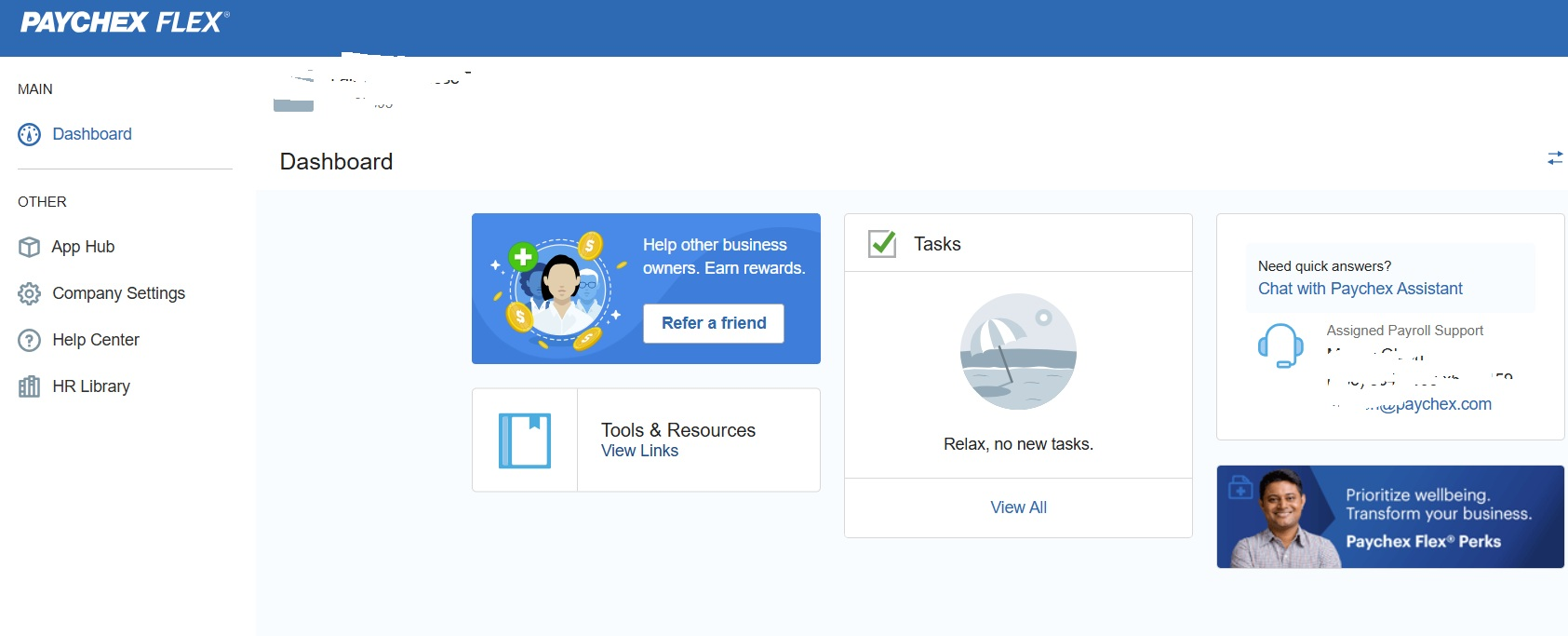
Paychex is worth mentioning as a top SMB payroll tool because of Paychex Flex, a simplified but powerful version of its product. It’s an all-in-one payroll system designed to grow with your business, built as a simple-to-use solution that gets it done without any fluff.
PROS
- Timecard processing can be fully automated.
- Integrates well with benefits providers like Benetrac for benefits management.
- User-friendly interface for reviewing W2s and paystubs.
- Timecard processing can be fully automated.
- Integrates well with benefits providers like Benetrac for benefits management.
- User-friendly interface for reviewing W2s and paystubs.
CONS
- Limited third-party integrations.
- Some users reported slow app login.
- Less modern looking compared to competitors.
- Limited third-party integrations.
- Some users reported slow app login.
- Less modern looking compared to competitors.

When it comes to SMB payroll tech, Paychex Flex has been our perennial favorite, thanks to its scalability. We first tested this software a couple of years ago, and until now, we’re still impressed with the simplicity and the range of plans it offers for various business sizes.
From HR to retirement packages, online payroll services, and benefits, you get the flexibility to choose what really fits your team’s needs. And as we’ve kept a close eye on every HR tech we review, we’ve barely heard negative comments about this platform’s usability.
We are not big fanz of Paychex’s appearance (the design looks quite dated compared to modern-looking competitors like Gusto or Remote, actually), but what’s underneath didn’t disappoint—the platform’s features are constantly improving. The timecards are a good example. Each time an employee punches in and out, the system generates a timecard and is ready to process once it’s time to run a payroll cycle. This alone can save dozens of hours of company time.
Paychex products have evolved a lot, but unfortunately, the integration capabilities have not. As of this writing, the platform still lacks native integration with Quicken. While we can’t say this is a deal breaker for most, those seeking to remove manual entry for certain tasks like 401k transactions may find this bothersome and might be better served by another tool.
745,000+ companies, including Warner Bros, Denny's, Grubhub, and Frito-Lay.
Paychex Flex offers three curated plans: Essentials, Select, and Pro. Essentials has a monthly base rate of $39 plus $5 per employee. Select and Pro are custom plans that require a call for a quote.
- Vermont Child Care Contribution Tax now available.
- Paychex Oasis customers can now access the Mineral platform for custom handbooks, HR resources, and legal information.

Best For
Small to medium-sized businesses that require a scalable payroll and HR solution.


At my previous employer, we used Paychex to track payroll hours and manage leave balances, including vacation and sick time. We maintained basic employee information in the system to support recordkeeping and compliance requirements.
We relied on Paychex payroll reporting for state agencies and used the accuracy guarantees to reduce compliance risk for a small company. HR support through Mineral.com, which was included with Paychex, was used extensively.
Even after 25 years in HR, having access to an external resource providing fair and accurate guidance was valuable, and Mineral.com fulfilled that role.
- Paychex is simple to use when compared to ADP and has proven to be reliable with strong system uptime.
- The system makes it easy to track payroll hours, vacation, and sick time while keeping employee information in one location that is easy to maintain.
- Payroll reporting, especially for state agencies, is straightforward, and the accuracy guarantees help reduce compliance risk for a small company.
- The HR support provided through Mineral.com offered accessible guidance and tools that increased HR flexibility and management support for operations.
At a previous employer, I made the decision to move to Paychex around November 2021 after multiple costly errors by ADP and a lack of customer service, including a serious error in state filings that resulted in a levy on the company’s accounts.
ADP’s software was difficult to navigate and required too many steps to import employee work hours into the payroll system. Moving between payroll and employee records was cumbersome and inefficient. Cost was another concern for a smaller organization.
In addition, working with non-U.S.-based support agents often made communication challenging, as responses were scripted and rarely led to resolution. The company continues to use Paychex and has done so since November 2021.
- For a company of approximately 180 employees, Paychex was a strong fit and did not present day-to-day drawbacks.
- The primary concern is scalability, as companies anticipating significant growth may require an upgraded or more robust solution.
Paychex stood out due to highly accessible support and a strong focus on small businesses. We had dedicated account support staff and did not rotate between different contacts for implementation, tax, payroll, or HR support.
Consistency in support allowed for efficient issue resolution and relationship building. The level of service provided was delivered consistently rather than promised in theory.
Paychex is designed primarily for smaller businesses, even though the platform is easy to navigate and simple to train staff on payroll processes. It is a fast, efficient solution intended to reduce administrative burden for HR and payroll teams that often operate within the same department.
When evaluating payroll or HRIS providers, buyers should consider organizational size, complexity, and the level of support needed for implementation, payroll processing, and tax reporting. Tracking time, vacation, and sick time within the system and access to HR support through Mineral and a dedicated HR contact should also be evaluated.
During the time I directly used Paychex, there was a noticeable shift toward reducing administrative workload. Payroll processing steps were reduced and automated, allowing payroll to be completed more quickly.
Navigation improved, reporting became more practical, and time tracking for vacation and sick time became easier to use. Employee information also became easier to access and manage.
The addition of Mineral and a dedicated HR support contact strengthened Paychex as a complete solution rather than just a payroll provider.
Paychex is well suited for small to mid-sized companies that need a payroll system that is easy to use, easy to train others on, and supported by additional HR resources. The combination of payroll functionality and HR support makes it a strong option at a reasonable cost.
Paychex is not a strong fit for larger organizations with complex operational needs. It may not meet the requirements of companies that need extensive integrations with other systems, highly complex pay structures, or significant scalability.
Organizations requiring more advanced or customized functionality may be better served by a more robust enterprise-level system.
.png)
Deel
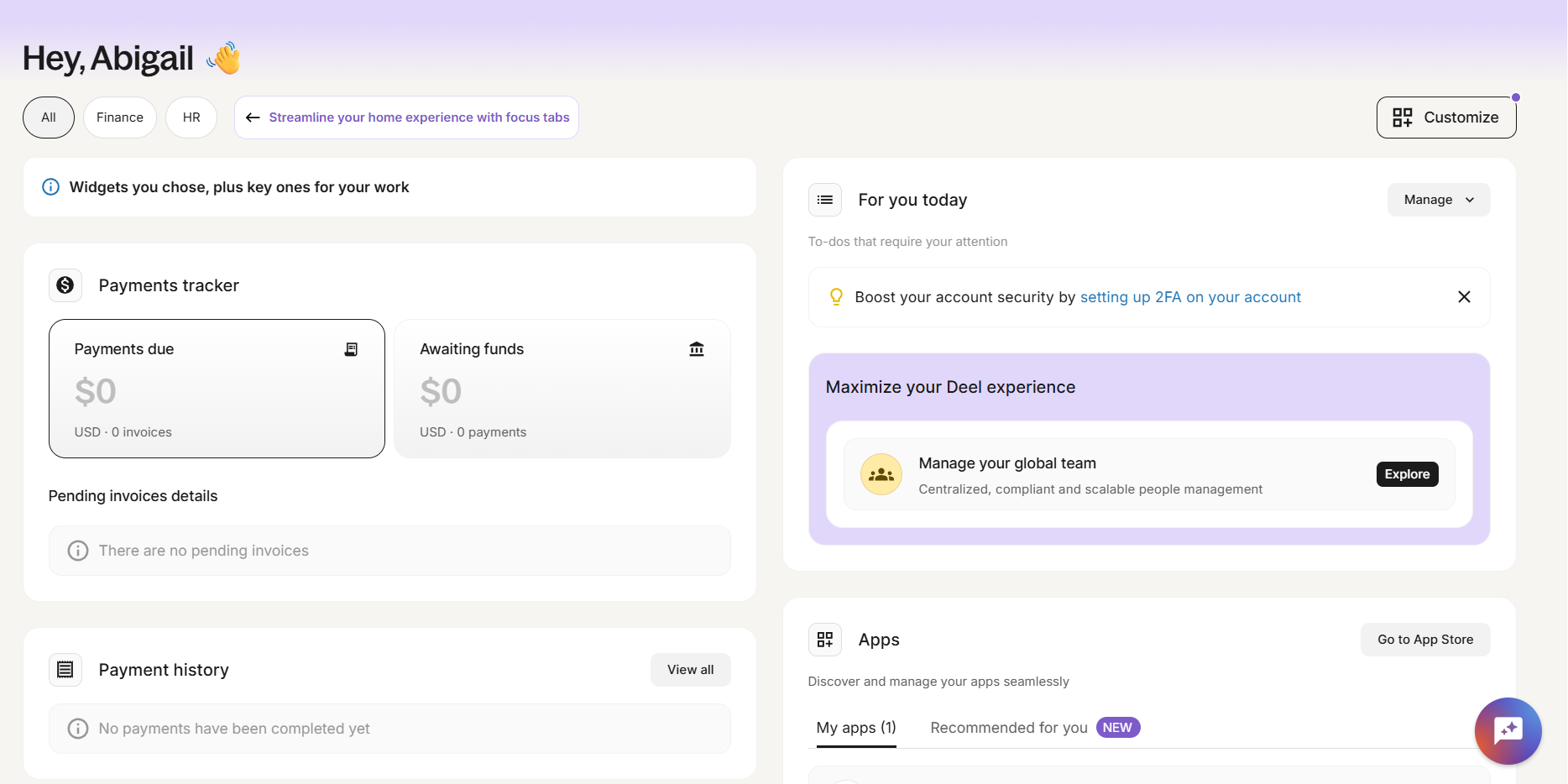
Deel offers an intuitive and highly automated solution which we found particularly useful for international teams, big and small. Its ability to simplify payroll across 100+ countries while ensuring compliance, combined with a free HRIS makes it a strong option for small businesses managing global talent.
PROS
- Payroll automation supports payments in over 200 currencies.
- 15+ payment options including bank transfers, Wise, PayPal, and cryptocurrency.
- Strong compliance support with 2,000 in-house legal, tax, and payroll experts.
- Competitive pricing for salaried employees.
- Excellent 24/7 customer service with fast onboarding (2-3 days) and local payroll experts in each jurisdiction.
- Seamless integration with platforms like QuickBooks, BambooHR, and Greenhouse, plus custom integration options.
- User-friendly, self-service features enable quick setup; identity verification often takes under 24 hours.
- Automated invoices simplify payments, provided they're in English.
CONS
- No free trial available.
- Pricing for contractors is slightly higher than some competitors.
- Key features like onboarding automation come as add-ons.
- Key features like onboarding automation are add-ons, which may increase costs.
- Limited flexibility in modifying contracts or service agreements; changes often require an addendum.
- Invoices cannot be generated in languages other than English.
We picked Deel’s payroll because it’s easy to use, offers a variety of payment options, and provides strong compliance support.

The payroll automation immediately caught our eye during testing. Running payroll across multiple countries is as simple as a few clicks, and we can pay both employees and contractors in over 200 currencies. Furthermore, with so many payment options, including bank transfers, Wise, PayPal, Payoneer, and even cryptocurrency, it feels like Deel has thought of every possible way to ensure employees and contractors get paid efficiently.
One of our favorite features is the Deel Card, which allows global contractors to receive payments in USD and use the funds directly without the hassle of currency conversions—something we believe most, if not all, distributed teams will appreciate.
Beyond ease of use, Deel’s built-in compliance support is also well executed. As a 14-person startup, we understand that many small businesses don’t have an in-house legal or tax team, so knowing that Deel has over 200 experts ensuring compliance in more than 100 countries does provide great peace of mind. There is also a Shield module for those needing extra protection against compliance risks. However, we did find that modifying contracts wasn’t as flexible as we wanted—any changes require an addendum, which could mean additional administrative work for HR.
When it comes to pricing, Deel is priced from $24 to $29 per employee per month for global or US, which is quite reasonable. However, its employment and payroll offerings—for example, contractor payroll charging $49 per contractor per month—are somewhat steeper than competitors like Papaya Global ($30 per contractor per month) and Oyster ($29 per contractor per month). We also noticed that some key features, such as onboarding automation, come as add-ons, which can increase the total cost of ownership.
Deel has served over 40,000 companies, including Brex, Makerpad, and Andela.
Deel provides a range of payroll services:
- Managed Payroll: Priced from $24 to $29 per employee per month for global or US payroll, tax, and reporting.
- Employment & Payroll: Ranges from $125 to $899 per employee per month for global hiring (EOR) or US co-employment (PEO), including HR, benefits, and legal assistance.
- Hire Contractors: Between $49 and $325 per contractor per month for compliant global hiring and payment, with options for standard management or Contractor of Record.
Best For
Deel Payroll is a great fit for small businesses managing a global workforce.

We use Deel specifically for our international team. Our W2 employees are managed through a different payroll provider. Since our payroll is set up on autopilot, I don’t log in to Deel very often. I typically log in about once per week.
We keep our Deel usage simple and primarily use it for payroll. In the past, we have also used it as an EOR for an employee in Canada.
One pro of Deel is that it’s always very easy to get in touch with support.
We have used Deel for at least a few years. I have personally used Deel for just over one year. The pain point we were trying to solve was implementing a seamless payroll process for our international team.
We have also used Deel as an EOR for our international employees. We initially started using Deel specifically for our international team, and it worked really well for those employees.
The key benefit it provides is simple payroll processing, regardless of where the person resides. The site is easy to use and navigate. Another benefit is the responsiveness of the support team.
One con of Deel is the offboarding process and its unclear procedures. I wish they would improve this part. Another con is that support often passes you between multiple people, none of whom have prior context, which leads to repeating the same information.
Deel is fine, but I think their competitors are better. I prefer every other payroll platform I have used over Deel.
One criterion to consider before using Deel is what your team structure looks like. Deel is helpful because employees or contractors can be onboarded regardless of location. I found that, for us, it made the most sense to use Deel specifically for our international team.
I can’t think of any specific changes that have been made in the one-plus year I’ve used Deel.
I can’t think of any specific changes that have been made in the one-plus year I’ve used Deel.
I would say Deel is great for organizations of any size. It’s probably best for companies with international teams.

Paylocity
Paylocity earned its spot on our list for small business payroll software due to its blend of automation, configurability, and integrated HR tools. For small businesses aiming to scale, this unified approach delivers efficiency gains that many entry-level payroll tools don’t usually offer. In other words, you get an enterprise-level feature set that’ll grow with you, but with SMB-oriented pricing.
PROS
- Streamlined payroll automation with smart defaults and custom filtering.
- Employee self-service portal for pay stubs, direct deposit, tax info, and PTO requests.
- Robust reporting suite with 500+ templates and dynamic custom reports.
- Performance, onboarding, and recruiting tools are built into the same platform.
- Mobile-friendly experience for time tracking, onboarding, and task completion.
- Marketplace of prebuilt integrations with QuickBooks, NetSuite, Acumatica, and more.
- Paylocity’s customer support is highly rated for always being available to answer questions.
- Global payroll support for 100+ countries.
- Provides free and unlimited training modules on the website.
- Paylocity’s mobile app has a good UI and functionality
- The tool is easy to use for both employees and employers.
- Has 350+ pre-built integrations.
CONS
- Pricing is not publicly available, and you usually only get a quote after a demo
- The feature set may be excessive for very small teams (<10 employees).
- Reports can be complex to configure without initial training.
- Undisclosed pricing.
- It doesn’t have a free trial or free plan.
- Support is available in English only.
- It isn’t the best solution for remote teams looking for a tool to manage payroll and benefits for their contractors.
Paylocity made the cut for our SMB payroll page thanks to their purpose-built functionalities that bundle an enterprise-grade HRMS into a small business's one-stop tool. Beyond payroll, it includes an applicant tracking system, mobile onboarding, electronic document signing, performance management, and even asset and access management. These HR workflows are all part of a unified employee dashboard that’s accessible via desktop or mobile, which gives employees the power to self-manage everything from PTO requests to updating tax withholdings.
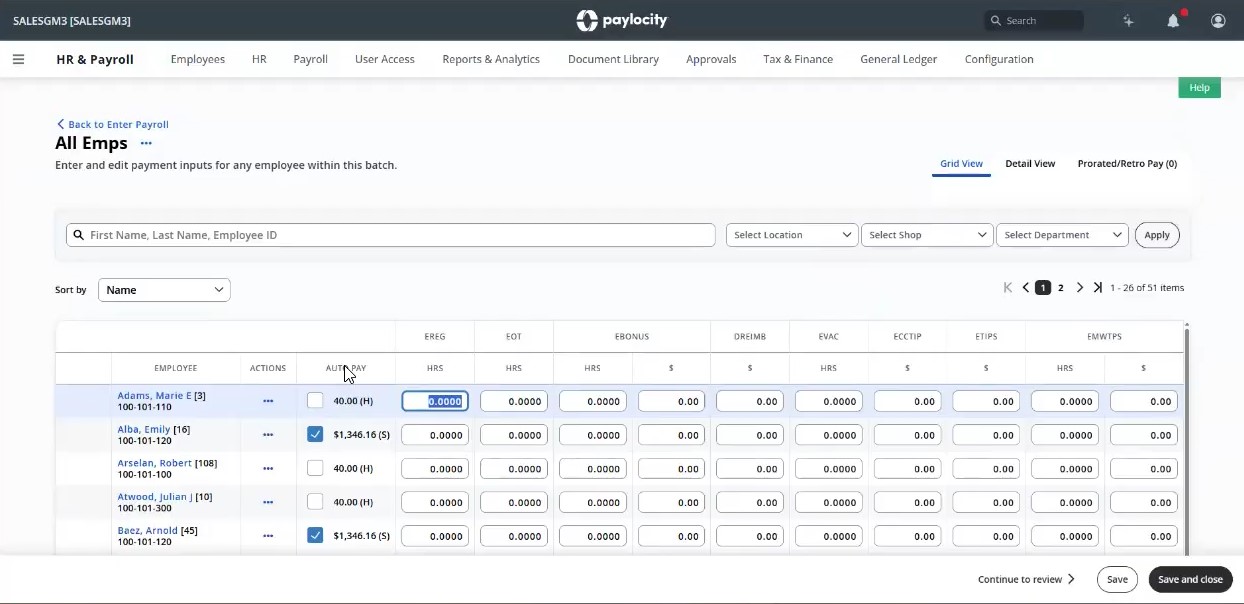
As we dove deeper into each feature via a recent demo with their SMB team, what immediately stood out was how easy it was to run payroll in a batch view with pre-filled salary, deduction, and benefits data pulled from integrated systems. We could make one-off adjustments, filter by department or pay group, which could be particularly helpful, for example, to isolate hourly employees or run a bonus batch for managers. There’s even support for nuanced edge cases like manual tax withholding edits, which we found simple to apply in real time.
From user interviews, we’ve heard lots of good words about Paylocity’s automation, so we had high hopes when testing this feature out. And thankfully, it lived up to our expectations. Recurring earnings and time data sync automatically, and it’s not an exaggeration to say reports are time-savers, given how convenient it allows HR to receive reports at the interval of their choice, securely stored within the platform.
That being said, it’s not the right choice for every small business. A 5-person startup, for example, may find the system more robust than they need. We’re also not fans of the fact that the pricing is undisclosed. Unlike many competitors, such as Deel, Gusto, OnPay, and Paychex, which typically list their rates openly, Paylocity tends to keep its pricing hidden behind a sales demo. While this approach isn’t necessarily a bad thing, it's definitely not what most small businesses prefer.
As a final note, Paylocity is also well-equipped to handle payroll for international contractors or even full-time employees, thanks to its acquisition of Blue Marble back in 2021. They can help SMBs run payroll in the US and in over 150 countries, all within the same platform.
Paylocity is used by 40,000+ companies, including POLYWOOD, The Kennedy Group, and Hathaway Brown School.
Paylocity pricing is custom and based on employee count and feature selection. A demo is required to receive a quote.
Paylocity has added several 2025 updates that significantly improve compliance, integrations, and reporting:
- New general ledger integrations with QuickBooks Online, NetSuite, and Acumatica now allow native, real-time syncing of payroll data with your accounting tools. The setup also includes a step-by-step mapping tool and real-time error checks, so you can catch issues before they affect your books.
- Custom journal entry logic allows you to automatically generate accounting entries based on employee details, including department, location, or job type. This helps customize financial tracking without requiring manual calculations each time payroll is processed.
- Reporting has also improved. New templates group earnings, taxes, and deductions into cleaner summaries, while a company-wide tax report consolidates historical and current data for faster audits.
Best For
Paylocity is best suited for U.S.-based small and midsize businesses with 20-500 employees that want to unify payroll and HR workflows in one platform.

We use Paylocity for benefits, payroll, applicant tracking, recruiting, and reporting. The reporting tool is very robust. I can pull reports on everything from headcount to new hires and terminations. I can also rely on BSwift reporting to create and reconcile invoices for benefits. It is useful for COBRA administration as well. The platform integrates with most of my vendors, including our 401(k) plan.
It is a user-friendly platform, allowing ease in self-service for employees. The implementation was easy, with lots of assistance provided from the vendor. Integration with vendor platforms via file feeds is robust.
I have used Paylocity for 2 years. The implementation was fast and went smoothly. There were some issues initially on the benefits side when setting up our many insurance plans, but they use BSwift, which is a great tool, and ultimately, we were able to go live. Our payroll team was very dissatisfied with our existing vendor, Paycom. Our benefits team also wanted expanded reporting capabilities. Additionally, our existing platform did not integrate with our timekeeping system, Kronos.
They have frequent turnover in dedicated account representatives on the benefits side. We had to purchase special time clocks to capture our employees' time in Kronos. There were some issues setting up tricky benefit plans that the system was unable to accommodate.
I prefer this platform over ADP, Paycom, and UKG. It is much more user-friendly for employees and better scaled to the size of our business.
Employee user skill level is an important consideration. It is good for low-skilled users and has many self-help tools. It also has a great benefits tool, which is excellent for open enrollment and compliance. The reporting features are strong.
Paylocity will work with you to customize the platform wherever possible. They need to provide more frequent system upgrades and improvements based on customer feedback.
Paylocity is best for users of all skill levels, from basic to advanced. It is great for manufacturing organizations, those with complex plan designs, union contracts, and professionals.
Paylocity would not be a good fit for very small companies with fewer than 500 employees or in a work environment where computers are unavailable to employees.

Homebase
We found Homebase Payroll to be a strong choice for small businesses with hourly workers, particularly those already and/or looking to integrate scheduling and time tracking into their payroll workflow. The vendor is also running a notable promotion through January 31, 2026: new customers receive six months of free payroll on the Payroll and Plus Plans, along with free scheduling, time tracking, and team communication tools.
PROS
- Offers 6 months of free payroll on the Payroll and Plus Plans (including free scheduling, time tracking, and team communication), available until January 31, 2026.
- Provides AI-powered tools and insights to save time and simplify workflows.
- Native integrations with Square, QuickBooks, and over 20 leading platforms.
- Competitive affiliate payouts and high conversion rates for partners.
- Transparent pricing structure with a free plan for basic time tracking and scheduling.
- Separate dashboards for managers and employees
- Real-time communication features allow for schedule changes on the move
- Requesting and approving paid time off is easy
- Great scheduling templates help managers streamline work
CONS
- Homebase doesn't offer benefits administration directly. (it can be obtained through their partnership with Stride though.)
- Not suitable for businesses with salaried employees due to its focus on hourly workers.
- Currently only supports U.S.-based businesses.
- Limited third-party integration support
- Additional features are somewhat expensive
If intuitive time tracking, compliance support, and transparent pricing are high on your priority list, Homebase is a solid option worth considering.
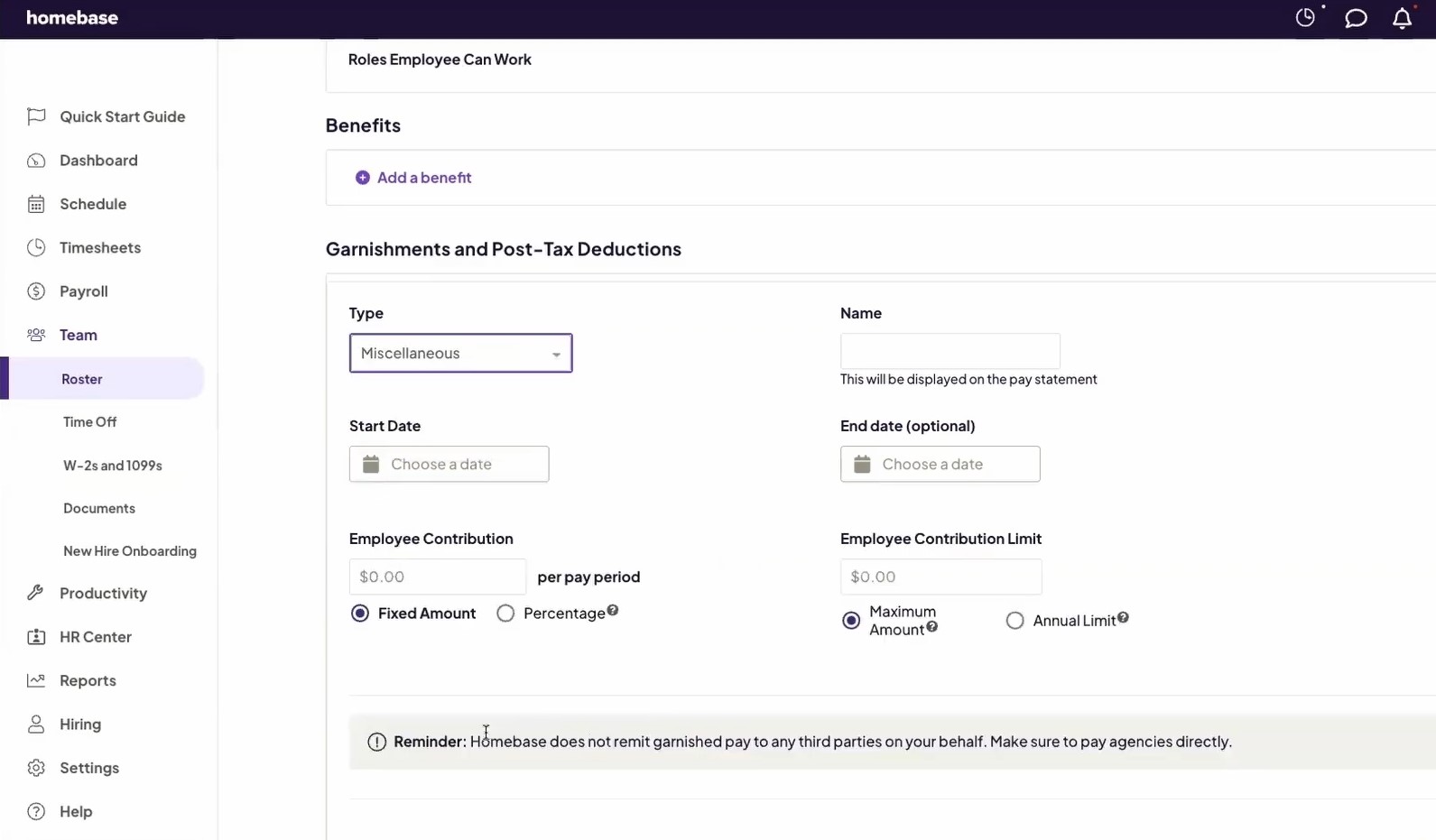
There are many great payroll solutions on the market; however, many bury their costs in the fine print. For a transparent priced option, we like Homebase. Right on its website, you can easily find out how much the payroll tool costs.
As of this writing, it’s priced at $39 per month plus $6 per active employee, which is relatively affordable. To sweeten the deal, the vendor also has a free trial. The only thing to keep in mind is that payroll is an add-on, so you'll need to choose one of their four plans to access it. That being said, their basic plan is free to start with—good enough for companies with one location and up to 20 employees.
Another thing we loved about this payroll software is its automation capabilities, particularly its real-time syncing with the time tracking system. To test this out, we set up a schedule for an hourly team and had employees clock in and out using their mobile app.
The system didn’t disappoint: it automatically pulled hours worked, calculated overtime, and factored in PTO, all without requiring manual timesheet adjustments. Compared to Gusto’s Simple Plan, which lacks built-in time tracking, Homebase includes this feature natively, making it a better option for businesses managing shift workers.
We also liked the overtime prevention tool, which automatically clocks out employees at the end of their shifts to prevent unnecessary labor costs. In this area, Homebase outshines QuickBooks Payroll, which does not offer built-in overtime prevention.
With Homebase, your tax filing is automated at the federal, state, and local levels. We prefer this to Patriot’s Full Service Plan, which charges $12 per month per state for the feature. We think many users would, too.
However, Homebase doesn’t have built-in benefits administration features the way Gusto does, so you’d need to rely on a third-party tool for such needs.
Another drawback we noticed while assessing the product was that this payroll system does not offer automatic compliance reporting, or real-time GPS tracking, all of which are available in Gusto Premium and QuickBooks Payroll.
100,000+ companies, including The Blind Goat & Xin Chao, Fuzzy Goat Yarn Shop, and Forth & Nomad.
Homebase Payroll costs $39/month + $6/month per active employee and is offered as an add-on.
Best For
Homebase Payroll is a great option for small businesses with shift-based employees, such as retail stores, restaurants, and service providers.

Rippling
If your team is lean but spread across states, and you’re tired of managing payroll tax portals or correcting W-2 errors, Rippling is one of the most comprehensive and modern solutions we’ve encountered in this field. The vendor provides significant value for SMBs looking to centralize their payroll, benefits, and compliance workflows with built-in automation features to minimize dependence on manual processes.
PROS
- Automated state tax handling manages registrations and payroll taxes across 50 US states.
- All-in-one payroll platform integrates time tracking, benefits, and accounting, reducing errors and manual work.
- Compliance support provides access to HR experts and tools like Mineral for legal guidance and policy automation.
- Termination workflows automate offboarding payments to meet final paycheck deadlines.
- User-friendly interface for both payroll admins and employees, requiring minimal training.
- All-in-one platform for employee management + PEO services offered, and even a suite of other IT products
- With 500 integrations, it’s very likely that they integrate with other key tools from your tech stack.
- Operates globally with any currency
- Workflow automation
- Analytics opportunities
- Provides a holistic view of company outflows—headcount costs included
CONS
- New customers cannot trial a pay run before going live.
- Self-led onboarding process can leave some users feeling unsupported during setup.
- Users find document uploads clunky, citing issues with receipt attachments and locating drafts.
- Support inquiries via chat can cause delays in escalation.
- Total buy-in to Rippling is essential
- Very SMB-oriented, in case you’re a larger company.
- New features tend to be buggy in ways that tech teams are not accustomed to fixing
We tested Rippling’s payroll platform with an eye toward the challenges SMBs face—tight bandwidth, multi-state compliance, and minimal margin for error. What we found is a system that delivers impressive automation, especially for teams managing remote or distributed workforces.

Take Hovercraft, a small marketing agency with employees in nine states. They leaned on Rippling’s HR Services to handle the notoriously painful task of registering for state payroll tax accounts and staying compliant across jurisdictions.
When we looked under the hood, it was clear how this worked: Rippling automatically creates state accounts, handles tax payments, and flags regulatory updates—tasks that would otherwise consume days of admin time each month. Hovercraft now saves an estimated 30 hours per week, enough to avoid hiring an additional operations staffer.
That said, it’s not just compliance that Rippling streamlines. At The Portland Clinic, a healthcare provider with 500 employees, payroll used to be error-prone due to disconnected systems (ADP for payroll and UKG for time tracking). After switching to Rippling, the clinic integrated time and attendance into payroll, which cut down on data entry errors and post-payroll corrections.
During our evaluation, we liked how Rippling’s approval reminders and auto-calculated overtime reduced manual intervention and improved pay run accuracy. Their payroll admin shared, “I’ve come to a point where I trust it and rarely have to double-check it.”
But Rippling isn’t plug-and-play for everyone. Several users we spoke with described the implementation process as more DIY than expected. There’s no dry run for your first payroll, which left some admins feeling anxious about going live. One user mentioned it was “like flying blind,” and wished for a dedicated setup partner.
Support is another mixed bag. The chat-based system works well for routine questions, but escalations can take longer than some teams would prefer, especially if they’re used to immediate live help.
Notable customers include Hovercraft, Harver, and The Portland Clinic.
Rippling's pricing starts at $8 per user, in addition to a $40 monthly platform fee.
Best For
Rippling’s payroll software is best for small and mid-sized businesses that manage multi-state teams and want to reduce admin hours through automation.
Rippling was primarily used for recruitment, with some use for onboarding since the number of employees being hired was still relatively small. The ATS and onboarding systems integrated seamlessly, allowing for an efficient workflow.
The tool was predominantly utilized during recruitment, where its dashboards and customizable recruitment processes proved especially helpful. Rippling's features significantly simplified the hiring process.
The hiring process was transparent and straightforward. I found Rippling's dashboard particularly helpful and user-friendly. The onboarding process became significantly easier, and the smooth integration between the systems was a major advantage.
I was working with a start-up where everything related to resume management, onboarding, and offboarding was done manually. Payroll was managed through QuickBooks.
Rippling was introduced because there were plans to expand the workforce, creating a need for a system that could streamline and organize processes efficiently without consuming too much time.
Rippling proved useful as it offered both an applicant tracking system (ATS) and tools for onboarding and offboarding. It also includes payroll options that can be leveraged in the future.
I felt that the customer service could be improved. The pricing was a bit high for our budget, but the company went ahead with the purchase based on positive reviews. After implementation, we realized that the payroll system might not be the best option for our future needs.
The company chose Rippling because of its positive reviews. I would prefer a system that includes an integrated payroll system in the future so everything can be managed in one place.
It is important to plan how the company will use the system in advance. Pricing should also be carefully considered, especially if expansion plans are uncertain, as was the case with the company I worked for.
I haven’t used it long enough to observe any evolution. It appeared to be the same during my time using it.
This tool is ideal for companies transitioning from manual processes in recruitment and onboarding to automation. I am unsure about its suitability for other features or use cases.
It might not be suitable for companies that don’t plan to expand significantly. In such cases, the onboarding, offboarding, and recruitment portal features may not provide much value.

Patriot
Patriot offers unlimited payroll runs, free account setup, U.S.-based inhouse support, and takes full responsibility for any issues pertaining to user tax filings.
PROS
- Intuitive and simple service.
- Guaranteed tax filing accuracy with free end-of-year payroll tax filings.
- Free U.S.-based software support via phone, email, and chat.
- Transparent fee structure, 30-day free trial available.
- Regularly rolls out new features and enhancements.
- Intuitive and simple service.
- Guaranteed tax filing accuracy with free end-of-year payroll tax filings.
- Free U.S.-based software support via phone, email, and chat.
- Transparent fee structure, 30-day free trial available.
- Regularly rolls out new features and enhancements.
CONS
- No support for teams with members outside the U.S.
- No employee benefits management services.
- Limited integration capabilities.
- No support for teams with members outside the U.S.
- No employee benefits management services.
- Limited integration capabilities.

We didn’t expect this level of flexibility from an economical payroll tool. With Patriot, there’s no limit to the number of payroll runs, and you can pay your team members at the frequency of their choice, be it weekly, biweekly, semi-monthly, or monthly.
Moreover, this platform does not charge any fees for its account setup assistance. Should you opt to DIY, it probably won’t be much trouble, thanks to the platform’s payroll startup wizard and the in-house support team. In our tests, it took just 7 minutes to hear back from them.
As long as all your team members are based in the U.S., you’ll find Patriot to be an invaluable ally, as this vendor can handle payroll processing and direct deposit payments for both full-time salaried workers and contractors. If you opt for the higher-tiered plan, this platform can also take care of your payroll tax filing and payment at both the federal and state levels.
That said, we should caution you that Patriot will charge $12 per month for each state tax filing. And unlike some competing tools like Gusto, this vendor does not support employee benefits management.
Another point to note is that Patriot’s payroll services are tailored to US-based companies. In other words, it’s not a good fit for those with international hires.
10,000+ companies, including Ninja Window Washing, B Squared Fine Homes, and Coblentz Cabinets.
Patriot offers two payroll plans:
- Basic costs $17/month plus $4 per employee or contractor. The business owner is responsible for payroll and tax filing.
- Full Service costs $37/month plus $4 per employee or contractor. The business owner runs payroll, but Patriot handles payroll tax filings.
- Patriot up its fees from $17/mo to $37/mo plus $4/employee or 1099 contractor.
- Starting August 13, 2024, all payroll software customers get free law alerts, a compliance dashboard, and an HR assessment tool.
- It also just launched a contract portal and a mobile app for employee timekeeping.
Best For
Small businesses whose employees and contractors are based in the U.S.

QuickBooks
QuickBooks' direct deposits are super fast, and if you're already using other products from this vendor, it's a major bonus. The payroll tool integrates beautifully with the rest of QuickBooks’, which makes it a breeze to manage timesheets, invoicing, and expenses.
PROS
- Unlimited pay runs, auto full-service payroll, and same-day deposits included.
- Supports unscheduled payrolls and automatic year-end tax filings.
- Reminders for tax readiness provided.
- Pricing transparency. 30-day free trial available.
- Unlimited pay runs, auto full-service payroll, and same-day deposits included.
- Supports unscheduled payrolls and automatic year-end tax filings.
- Reminders for tax readiness provided.
- Pricing transparency. 30-day free trial available.
CONS
- No employer app.
- More expensive than some competitors like Patriot.
- Limited third-party integrations.
- No global payroll features.
- No employer app.
- More expensive than some competitors like Patriot.
- Limited third-party integrations.
- No global payroll features.

Millions of small businesses have used Intuit QuickBooks accounting software for their lightweight bookkeeping, so we bet this brand is no stranger to most of you. It is effective, simple, and affordable. And as we tested its online payroll product, the same is true for this tool.
QuickBooks payroll processes employee pay stubs and automatically files taxes in a simple, intuitive interface. Remarkably, the direct deposits are among the fastest we’ve seen, with next-day payments offered in the cheapest plan and same-day ones in the rest.
The platform also helps with calculating and submitting your payroll taxes, and it gives you reminders to make sure you're tax-ready.
Many HRs we talked to praised this payroll for its seamless integration with other QuickBooks products, which was also part of the reasons they chose this software in the first place.
However, we would not recommend this tool for businesses with international staff, as global payroll is currently beyond the vendor's capabilities. The same goes for those on a tight payroll budget. For context, QuickBooks charges $25 per month plus $6 per employee, while Patriot does $17 plus $4 per employee.
Regarding the mobile experience, although the browser version is optimized for both desktop and mobile use, there is no dedicated mobile app for employers, and the employee app lacks some features found on the web version. For example, on the web, we could match our receipts to incoming bank transactions, whereas in the mobile app, we were only able to take photos of the receipts.
29,000,000+ companies, including Industrial Manila, Tamar's Hope, and Hiplus.
QuickBooks has three plans as below and a 30-day free trial:
- Core: $25 per month plus $6 per employee
- Premium: $55 per month plus $8 per employee
- Elite: $80 per month plus $15 per employee
- Both the base fee and employee fee across plans have been increased. For example, Core plan used to be $22 per month plus $4 per employee now is $25 per month plus $6 per employee.
- QuickBooks Online Payroll now offers organizational charts and directories.
- The platform now can automatically match new bank transactions for QuickBooks Payroll and Payments.
Best For
Small businesses that are already using QuickBooks accounting.

I use Quickbooks for monthly invoicing, financial statements, and to keep track of account receivables. We don't currently have it integrated with other softwares, but are thinking about integrating it with our workforce planning software in the future if that is possible. In terms of workflow, I access Quickbooks at least once a week to load new invoices, match receipts, upload receipts from my phone, and download our monthly PnL report. We have a separate system that we put the PnL report in that helps us track our cash flow in a way that accounts for projections.

It is easy to use - the interface is intuitive. I like the app and the fact I can do receipt tracking on my phone. I like that I can easily give my employees a company card and have them forward receipts into Quickbooks.
We work with a CPA firm who helped us to integrate Quickbooks across our organization. We began using Quickbooks in 2018, when our firm had just under $60,000 in revenue a year. Today, we use Quickbooks to manage the company's $1.7M and growing annual budget. We used Quickbooks because we wanted to have accurate timely financial statements across the organization, track all of our expenses, and manage our businesses PnL easily. I've been the primary user for the past 5 years.
I wish that it had better cash flow capabilities - the current capabilities do not account for projections. I also wish that when adding users there was an option to add employees who just had employee cards who need to email receipts into Quickbooks instead of having to take up a user seat - right now we have some employees emailing receipts to a company user to forward them on because there is only five seats in our plan. I also wish Quickbooks integrated better with my bank - the bank connection is always breaking and needs to be updated.
I haven't used similar tools - before Quickbooks I did everything on a spreadsheet. I did choose Quickbooks because it came highly recommended from my CPA firm.
People should think about their needs for financial reporting. People should also think about their needs for billing, and tracking employee expenses.
It works great for my consulting firm!
I think it will work for most people, but I can see it being a challenge for people who have always tracked receipts and expenses manually to shift.

Gusto
Gusto is a top-notch option for SMBs when it comes to full-service payroll and customer service. Plus, its UI is among the best we’ve seen in this space.
PROS
- Features online signatures, automated tax filing, unlimited pay runs, and automatic deductions for benefits administration.
- Supports payroll for U.S. W2 workers and domestic or international contractors.
- Reliable customer support. Licensed benefits advisors assist with all plans.
- Transparent pricing with no long-term contracts or setup fees.
- The dashboard feature keeps tabs on compliance tasks
- The hiring and onboarding sequence is nicely streamlined between HR and the new hire
- Post-offer, pre-start tasks are made easy with integrations like CorpNet (state tax set up) Checkr (background checks)
- Easy payroll for U.S.-based W-2 folks, domestic, and international contractors
- Person-to-person phone support, email, and other customer service resources
- The business model is responsive to customer needs
CONS
- No support for international full-time salaried workers.
- No accounting tool for tracking earnings and spending.
- Simple plan lacks time tracking and online signature features.
- Compliance alerts and broker integration cost extra.
- No free trial available.
- Gusto can support payments for international contractors, but not employees
- No native accounting feature to keep earning and spending under the same roof
- Analytics dashboard is simplistic

We’ve kept track of Gusto for years, and in our view, they have done a great job avoiding a common software pitfall. The vendor has kept a steady pace through the years and their primary focus on payroll and benefits has not been clouded by impulsively building more features into their stack. Instead, they work with numerous integrated partners who take the wheel on new initiatives, letting Gusto focus on what they do best.
One of our favorite features is the full-service payroll. Gusto supports payroll for U.S.-based W-2 employees and domestic and international contractors. This vendor also offers e-signature collection, automated tax filing, automatic deductions, varied payroll schedules, and unlimited pay runs so businesses can ensure employees receive pay and benefits promptly.
For a long time, we have also appreciated how transparent Gusto is about pricing. The payroll software does not require long-term contracts or setup fees, allowing SMBs to manage their payroll efficiently without any unexpected costs.
A fair warning, though, international payroll through Gusto is only possible for contractors, not for full-time employees. In other words, they don’t offer an EOR model. Another feature Gusto lacks is accounting, meaning you must use third-party integrations for complete financial management.
Furthermore, while the Simple plan is cost-friendly, it lacks essential features like native time tracking and the e-sign. Lastly, compliance alerts and broker integration are terrific features, but the platform requires you to either opt for its Premium plan or pay extra to use them.
Gusto serves over 400,000 customers across all the United States. They don't specify which portion of that is Small Businesses, but from our experience, a myriad of SMBs across the US love using Gusto and feel confident sticking with it as their payroll expands.
Gusto's payroll pricing starts at $49/month, plus $6 per team member for the Simple plan, which is suitable for single-state payroll, reporting, and support. The Plus plan starts at $80, and the Premium plan at $180, with additional per-person fees of $12 and $22, respectively. They also offer a Contractor Only plan at $35/month. Add-ons, such as HR Resources ($50 + $5 PEPM) and Priority Support ($30 + $3 PEPM), are available for Simple and Plus plans.
- 5 new add-ons for Simple plans (Time tracking, next-day direct deposit, performance, priority support, and HR resources).
- Personalized health insurance suggestions during shopping.
- Vestwell, Guideline, Betterment at Work, and Human Interest as new 401(k) integration partners.
- New feature Smart Import automates payroll data import from spreadsheets or time-tracking software.
Best For
Startups with limited budgets (Basic plan) and SMBs with smaller HR departments and greater financial capacity (Premium plan).

I use Gusto almost daily to manage various aspects of HR and payroll. My primary focus is on compliance, ensuring state registrations are up to date and payroll regulations are adhered to, especially as we expand into new states. I'm also responsible for pulling reports for compensation planning and performance reviews. The platform is integral for tax compliance; we rely on it to respond promptly to notifications from state entities and maintain our records accurately. Additionally, any changes in employee information are updated in Gusto to keep our records current.

Gusto simplifies hiring in different states and ensures compliance with varying state laws. The platform is user-friendly, making it easy for both HR staff and employees to navigate. It includes all essential HRIS functions without unnecessary complexity.
Our company chose Gusto to streamline our payroll processing, prioritizing a system that was affordable and easy to set up and use. With a focus on hiring across the US, we needed a reliable platform to handle state registrations and payroll compliance quickly and efficiently. Gusto not only manages payroll but also covers essential HR functions such as expenses, time off, and benefits. It serves as the single source of truth for our US employees and contractors. I've been using Gusto for five months, having been with the company for the same period.
The reporting features in Gusto are somewhat limited and not very user-friendly. We have experienced errors in reporting that have resulted in penalties, although Gusto did reimburse us for these. Customer service response times can be slow, ranging from several days to weeks.
Gusto stands out for its simplicity and competitive pricing. It handles many compliance details, which are often challenging for small businesses to manage on their own. For those seeking a straightforward solution that consolidates multiple HR functions, Gusto is an excellent choice.
When considering a tool like Gusto, evaluate your company’s growth trajectory and geographic spread. Assess the core HR needs your organization must fulfill, such as onboarding, payroll, and compliance, and determine whether Gusto can effectively address these while offering time and cost savings. Prioritize your HR team's needs, focusing on what currently consumes the most time and how a tool can streamline these processes.
Since I started using Gusto, the platform has remained relatively stable without significant changes. However, there have been concerns about the declining quality of customer support, which has become less efficient and helpful over time.
Gusto is well-suited for small businesses, ideally with fewer than 50 employees. It might stretch to accommodate a few hundred employees, but that is nearing the limit of its capabilities without straining the system and the HR team.
Organizations with more than 200 employees may find Gusto lacking in features necessary to manage a larger workforce effectively.
.png)
Netchex
We really like Netchex because it's super easy to use. Your team won’t need a bunch of training to get started, and if anyone’s got questions, there’s always a dedicated customer support rep ready to help out.
PROS
- Seamless plan upgrades without data loss.
- Pre-payroll reports for critical error checks before payroll processing.
- Highly praised customer service, entirely U.S.-based.
- Payroll grid for easy input, changes, and error fixes during payroll cycle.
- Diverse payment options: paper checks, direct deposit, and pay cards.
- Grows with your team: With Netchex, it’s very easy to opt for a new plan and keep all your data in the same place even if you outgrow your current pricing plan. Other vendors require a switch to a new service in that kind of event.
- Dedicated support team: Netchex are note-worthy for their award-winning and often lauded customer service. It’s all US-based and provided in real-time through email, live chat, and phone calls.
- Pre-payroll reports: Allows for critical error checks before submission.
- Flexible payroll grid: Easy to make changes or correct errors on the fly.
- Versatile payment options: Includes paper checks, direct deposit, and pay cards.
CONS
- Users must use the payroll module to access other functionalities.
- Overkill for teams with under 50 employees.
- Undisclosed pricing. No free trial available.
- Requirement of payroll: Users must use the payroll module to access other functionalities, so it wouldn’t work as stand-alone HR software.
- No free trial: Potential users can't test the software without committing to a purchase. The demo with a sales rep is the closest thing.

We know that most small businesses are pressed for time, so their payroll tool must be extremely easy to use. And the fact that Netchex remains easy and pleasant to work with in all our test cases is truly impressive.
You can add employees, set payroll cycles, and fix issues with minimal training. Plus, no matter which plan you pick, you’ll get a customer support rep from Netchex who not only helps with the initial setup and then vanishes, but stays approachable for any snags that may arise post-implementation.
Given how pricey payroll mistakes can be, being able to spot issues before everything is finalized is a lifesaver - and that’s exactly what Netchex’s pre-payroll does, which we love. It gives you a heads-up if there's a paycheck going out to someone who shouldn't be getting one or if the numbers aren’t adding up right.
Another big thumbs up for Netchex is its eye for innovation. They’ve recently added some neat features like AskHR, where employees can get quick answers to their questions, and Netchex AI, which is stellar at crunching data in complex ways.
As much as Netchex is geared towards SMBs, if you've got fewer than 50 employees, it might feel a bit much and lean towards the expensive side. And just like Paychex, they don’t let you take their service for a test drive before committing.
6,500+ organizations, including Xpressdocs, BK Corrosion, Regal Hospitality, and The Colony ER Hospital.
Netchex uses a per employee per month pricing model, which varies based on company size and products.
The platform has undergone significant advancements since we first became familiar with Netchex. They recently introduced several new features, including AskHR for automated employee assistance, NetChex AI for intelligent data analysis, and Community to boost employee engagement and recognition.
Best For
Businesses with 50-500 employees.

While its primary function is payroll, we use it daily. What are we doing? Like most other systems, Netchex has the ability to serve as an HRIS. That means daily I am looking at T&A, I am pulling reports for leadership (and they do have a nice custom reporting feature, it just looks like an early 2000's style).
We do a lot of hiring, so the onboarding feature is cool. You key in source data like new hire's name, DOB, social, pay, department, etc., and it sends a link for a new hire to key in their direct deposit and audit their information. So, they cannot be onboarded until they have completed those forms, that is a daily beat we check.
Netchex does not have a feature for workflow, though you can save custom reports and pull manually.
If you just need an affordable, basic platform, this is a strong recommendation in that instance.
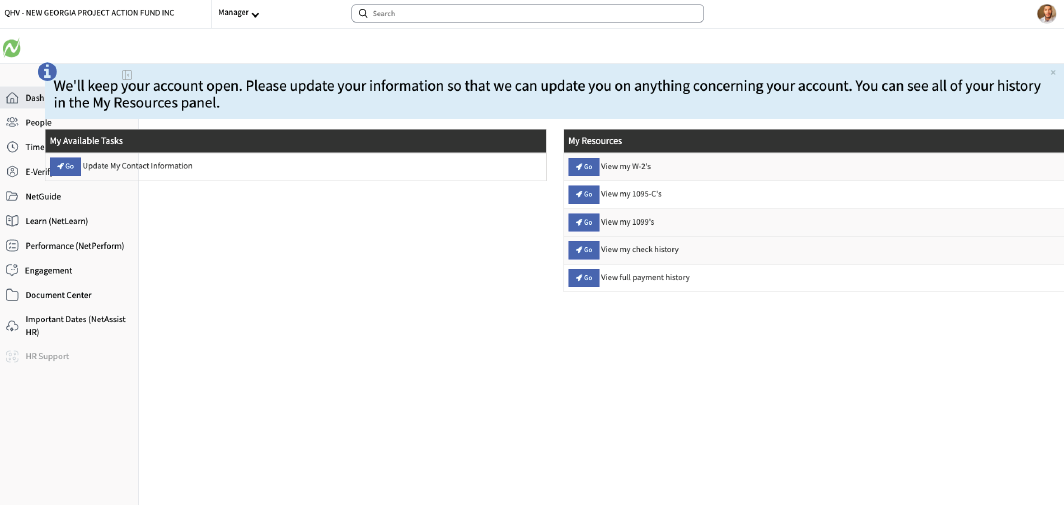
It's a simple system with familiar and basic abilities if you just want something with the basics.
I like the price of $25/EE/month being that they file taxes on your behalf plus w2 creation.
I like their reporting feature, though it is basic. They have a lot of fields for you to select and you can mix the fields however you want and export to excel for further manipulation. It does not configure, it just has the ability to draw from most fields in the system (ie hire date, name, pay, taxes, etc.). Some platforms do not have reporting with such robust fields.
We decided to go with Netchex because at the time, they had a special, $20 per EE. The usual fee is $25 per EE. We were happy to join this especially since we got to meet our implementation person during sales, which was rare. They addressed my concerns, also they are Louisiana based, which is a deep south state and we support southern states.
What is important to note is we knew there would be no fancy platform like at ADP. It was the new kid on the block and it was affordable, and we did not need any features beyond payroll, time & attendance, and reporting. Also a plus, they filed our taxes for us, which I appreciate, as at QuickBooks Desktop, I had to manually file every payroll.
Though it is a simple system, it's detailed, so it's not a system I can say you can easily figure out. It does require at least a sit down, vs other platforms I think you can figure out (ie ADP and Rippling).
Cases are kind of slow. I had a tax amendment that took us a long time to receive a close. It's ugly, not like an under-the-hood platform like ChatGPT, but it's ugly in a 1997 way.
Netchex is rooted in Southern Charm and Hospitality. While they are slow in response to cases, on the phone, they are charismatic and very nice.
This stacks up as a great confidence builder, they remember your name, your nuances and after a while you don't have to give them your company code.
You do get locked in after a while, by using their documents portal to house employee files, because you would have to manually extract them 1 by 1 if you ever decide to leave. So it started as easy and then it was too difficult to leave while keeping our information.
If you are a small business that just needs basic payroll function with a robust reporting tool, then this is a great tool for you. If you want to pay a flat $25/month per employee and no other fees, then this is a great platform for you. Especially if you have under 50.
Some features have gotten bigger and more noticeable, for example a lot of 3 dots are used where over time an actual button would appear. Almost as if Netchex is on a journey to be more modern. But, they are a smaller business.
Netchex thrives at being a low maintenance, friendly call center place. I can especially see an owner who has 5 staff or fewer hiring staff and processing a salary payroll very easily.
Netchex is best for small businesses who do not have complex needs. There are no automated workflows, or AI. However, 3 years ago, they did get a chatbot to handle basic functions. But it was a flowchart kind of chatbot, meaning it was not like Claude.AI or Gemini, it only works off of prompts. Which is a simple fix in embedded formula with a platform like VoiceFlow, for example. I see it's by choice.
Perhaps their limitations on technology speak to their core audience, who are mostly deep south, dirty south, and southwest mostly as their customer base.
I think once you get past 200 employees, it's time to consider switching. While you can enjoy their simplicity with 5 staff members, 200+ would end up requiring a lot of work if you need nuance changes or mass changes. While yes on some items you can do a mass upload, most items you cannot.
If you need automation, this is not for you. If you need a system that can handle complex inquiries at scale on your behalf, then this is not for you.

Remote
We highly recommend Remote to SMBs looking to hire employees and contractors worldwide. With this platform, you can easily handle salaries, benefits, expenses, and incentives compliantly in over 170 countries—all in one place.
PROS
- Fast and compliant payroll in 170+ countries.
- Live chat support with local payroll experts.
- Flexible, localized benefit packages.
- Flat-rate pricing structure, no deposits or hidden fees.
- Mobile app streamlines expense reimbursement with autofill from receipt photos.
- Fast and compliant payroll in 170+ countries.
- Live chat support with local payroll experts.
- Flexible, localized benefit packages.
- Flat-rate pricing structure, no deposits or hidden fees.
- Mobile app streamlines expense reimbursement with autofill from receipt photos.
CONS
- Doesn’t have a free trial.
- Redundant for organizations solely recruiting within the U.S.
- Help center documentation isn’t easiest to understand.
- Doesn’t have a free trial.
- Redundant for organizations solely recruiting within the U.S.
- Help center documentation isn’t easiest to understand.

Scaling internationally is exciting news for any business, but it also comes with a huge HR headache. Each country and state has different laws (which change over time), and local talent has varying interests in compensation packages. Having been there ourselves, so we can't help but appreciate how much easier Remote has made it for SMBs looking to expand their teams globally.
Remote offers two plans: one for global payroll and another for Employer of Record (EOR)—which includes everything from payroll to benefits, HR, and tax needed to hire and pay people from over 170 countries compliantly. Both come with transparent rates and no hidden fees. However, what really stands out to us is that regardless of the plan chosen, you gain access to in-house, local payroll support. We bugged these people a couple of times in our testing, and they have never let us down once—always quick turnaround and thorough guidelines.
That said, we do wish there was a free trial so the platform is more accessible to small businesses. Also, those preferring self-help documentation instead of always having to reach out to human support might not be satisfied with what's available in Remote's help center. In our experience, the instructions are not the easiest to follow, as they are mostly in written form with very few product screenshots for illustration.
Since our last review, there have been several notable changes. A new integration with Coinbase now allows employers to pay employees in cryptocurrency. Additionally, Easop was acquired to automate equity compensation compliance for globally distributed teams. The employee app has also been improved to display time-off statistics and automatically add public holidays to the calendar.
Remote customers include brands like GitLab, Paystack, and Loom, but the exact number is undisclosed.
Remote offers two packages for payroll management:
- Global Payroll: $50 per employee per month
- Employer of Record: Starting at $599/month billed annually
- New integration with Coinbase enables employers to pay employees in cryptocurrency.
- Acquired Easop to automate equity compensation compliance for globally distributed teams.
- Improved employee app shows time-off stats and auto-adds public holidays to the calendar.
Best For
Remote-first companies to hire and pay employees and contractors worldwide.

Remote is used by our firm to hire in locations like South Africa, Colombia and Brazil. We are able to use Remote as the Employer of Record and offer benefits just like they worked directly for our firm. You queue up the hire, Remote makes the offer in their system and makes all the employee information available via web portal. All expenses, benefits info, etc. can be accessed any time.
- Easy Onboarding - Remote does make onboarding hires in remote locations quite easy.
- Online Portal - great to have all the hires from all international locations in one place.
- Expenses - easy for employees and companies to track/pay expenses.
With a shortage of talent in the U.S., our firm needed to hire in locations where we did not have an entity. Global EORs offer a way to do that without setting up a legal entity first. Remote was an up-and-coming player in the space that made getting setup much faster, less complex than traditional partners like Velocity Global. We have used the system for approximately 2 years now.
- Billing/Invoicing - Remote has had multiple billing errors in our invoices and their system is incredibly confusing for reconciling what is outstanding vs. the errors they have made.
- Management - Remote has changed management recently and they have changed terms & conditions from our original invoices and have taken away promotions by saying they were "introductory promotions" rather than the "negotiated terms" like we originally discussed.
Remote was a leader in simplicity when we first began using their services a couple of years ago. Now, I believe certain competitors have caught up and surpassed them.
- Cash flow - these services require upfront payment for payroll so be prepared to pay month end payroll by the 17th of that month.
- Terminating employees - Employment laws vary country by country. Remote is offering a service to make it easier on your company to hire elsewhere; however, terminating employees can be quite difficult.
Remote was very startup friendly 2 years ago. Their management has changed and their culture has changed drastically. It is no longer a customer-focused culture going above and beyond to win customers.
Remote is good for an established company in search of a way to explore hiring people in other regions of the world.
Remote is not good for startups.

Square
Square’s level of flexibility is amazing. It supports unlimited pay runs and next-day direct deposit, comes with some add-ons that you can choose to pay for if you need them, and can beautifully integrate with its ecosystem as well as several third-party business tools.
PROS
- Integrates with Square POS and other Square tools. Strong third-party integrations.
- Free seasonal inactivity provided.
- Reasonable, flat pricing. Free trial available.
- Free federal and state tax filing and payments.
- U.S.-based phone support for all plans.
- Integrates with Square POS and other Square tools. Strong third-party integrations.
- Free seasonal inactivity provided.
- Reasonable, flat pricing. Free trial available.
- Free federal and state tax filing and payments.
- U.S.-based phone support for all plans.
CONS
- Does not support employers in household and agricultural sectors.
- Automated payroll, PTO, sick leave tracking, time tracking, shift scheduling, and overtime calculations can only be accessed on higher-priced plans.
- Does not support employers in household and agricultural sectors.
- Automated payroll, PTO, sick leave tracking, time tracking, shift scheduling, and overtime calculations can only be accessed on higher-priced plans.

We first tested Square in 2020 and have kept a close eye on the tool ever since, and we have to admit that this is one of the best payroll options available when it comes to flexibility.
Square has two simple plans: one for contractor payroll and another for both contractors and full-time employees. The pricing is transparent and reasonable, with no annual commitment required. The best part, though, is that users can pause their subscription and won't be charged until it resumes after 9 months or when they process payroll again, whichever comes first. For businesses dealing with off-season, this is a huge money saving.
If you're a retailer, especially a store owner or in the restaurant business, you’ll find the combination of Square POS and Square payroll useful in many ways. Plus, if you're looking for third-party integrations, there are still plenty of options offered.
Just keep in mind that Square Payroll only works for businesses that file Form 941 or Form 944 and doesn't support employers in the household and agriculture sectors.
We should also warn you that even though the contractor plan is incredibly affordable — at $6 per contractor per month — it doesn’t cover features like automated payroll, PTO, and overtime calculations. You’d have to choose the higher-priced plan to access these features.
Square's clients include The Art of Donut, Glamourax Salon, and Live by the Sword, but the exact number of customers remains undisclosed.
- Employees and Contractors: $35/month + $6 per person paid per month. Free trial is available.
- Contractors Only: $6/contractor paid per month
- Price increase slightly: Same monthly base fee, per-person fee up from $5 to $6.
- New Time Off reports allow users to view, manage, and track team time off in a reporting view.
- Admins now can control access to wages and labor cost data when managing permission sets.
Best For
Seasonal employers, including store owners and restaurants.

Initially, we used Square to process credit cards and provide receipts to customers. Square offers much more now. We can offer our customers financing, which is especially helpful in today's economy. We can schedule appointments through Square, helping us stay on track. We can also send and receive text messages. Square allows us to do marketing, driving customers to our online shop where they can shop and pay with one click.
I like the ease of use in the field for me and the customer. I can offer financing to my clients if they need extra time to pay. I can text my customers from this app, which makes it easier for me, as all their information is at my fingertips when I am in Square.
We needed a way to accept credit card payments at the point of sale, which moved regularly. We had no stationary retail location and needed to process credit cards on the spot. The alternative was writing the information down and processing it later, which created a lot of problems - incorrectly written card numbers, expiration dates, or cards that didn't process. Square took care of all of those issues, allowing us to provide a receipt to the customer and giving us peace of mind. This really streamlined our business.
Some of the transaction fees make it expensive to do business. I'd like to see more options for POS hardware. The integrations need to be more robust; there are some good platforms, but there need to be more to select from.
Square offers a robust array of services that complement basic credit card processing. They have taken it to the next level and expanded to include anything a small to large business may need. Square integrates with payroll, bookkeeping, staff management, payments, operations, and reporting. It can handle client management, scheduling, texting, and marketing.
Look at all the tasks this app can do and compare that to what you currently do within your organization. Do a cost comparison and see which one is more customer-focused. Consider which one uses fewer vendors and requires less manpower to manage.
Square has constantly evolved to become indispensable. It does everything from processing credit cards, invoicing, payroll, and banking to managing vendors, creating purchase orders, managing inventory, bookkeeping, reporting, client management, and marketing. If you can imagine something you want done, Square can probably customize a package with that in it for you.
Square is suitable for small to large businesses looking for a comprehensive solution for their payment processing and business management needs.
Square might not be suitable for an enterprise-sized organization due to its scalability limits.

OnPay
OnPay is fast, and you won't have to spend hours figuring out how to use this tool. In addition to payroll, this vendor provides some nice HR basics in its one-and-only plan, at no extra costs.
PROS
- Free tax form handling for W-2 employees and 1099 contractors.
- Some HR services included within the plan at no additional cost.
- 30-day free trial available (starts after OnPay verification).
- Well-developed online help resources.
- Free tax form handling for W-2 employees and 1099 contractors.
- Some HR services included within the plan at no additional cost.
- 30-day free trial available (starts after OnPay verification).
- Well-developed online help resources.
CONS
- Poor functioned employee mobile app.
- Requires payment four days before payday for direct deposit.
- Doesn’t support automatic payroll.
- Customer support sometimes hard to reach.
- Poor functioned employee mobile app.
- Requires payment four days before payday for direct deposit.
- Doesn’t support automatic payroll.
- Customer support sometimes hard to reach.

If you’ve already read our reviews of other payroll tools we’ve included in this guide, you may have noticed that OnPay is not the only vendor that can perform full-service payroll plus HR and benefits. However, it is the only one that has bundled all these functions into a single, affordable plan.
Starting at $46 per employee per month, you'll receive everything from multi-state payroll processing to automated onboarding, e-signing, broker-of-record integration, employee self-service, and account migration—all without additional fees or the need for plan upgrades.
Moreover, this platform is one of the few in the industry that offers a 30-day free trial, which you can easily sign up for online through its website. The only thing to note here is that the trial starts only after OnPay verifies your provided information, including your bank account. So make sure you double check the form before submitting.
Compared to its peers, OnPay has done an outstanding job providing online free guides. Despite being free resources, the guides are rich in information and offer many good insights into payroll, benefits, and HR.
Unfortunately, the vendor’s support didn’t meet our expectations. It took some time to receive a response from their live chat, and our email also had to wait until the next day for a reply.
Lastly, a few things to be clear: Unlike Gusto, OnPay has no native time tracking tool. It also doesn’t support automatic payroll.
OnPay charges a $40 monthly base fee plus $6 per employee. It also offers a free trial.
- Price increase: OnPay: $36 monthly base fee + $4/employee.
Best For
Small business owners that need full-service payroll and HR basics.

I use OnPay daily. The platform reduces the workload for my department, especially concerning taxes and payroll runs. It also provides in-depth reports on employee compensation, ensuring we stay updated on compensation compared to industry standards. The platform is very user-friendly and easy to teach to my colleagues in the department.
- It minimizes mistakes during payroll runs.
- It allows for unlimited payroll runs.
- I also appreciate the automated tax filings.
We were looking for software to help streamline our tax processes. OnPay offers an automated tax system that handles most of the work, and it also allows us to run unlimited payrolls. This feature was crucial for us since we have multiple shifts within our organization. With OnPay, we found that these two pain points became much more manageable. I have personally used this platform for over two years.
- I wish there was more flexibility in drilling down into specific reports.
- The company’s customer support could be better.
- The pricing structure could also use improvement.
The payroll runs and automated tax filings are two specific features that set OnPay apart from its competitors.
If you're facing increased payroll runs that add extra costs per month, I would certainly consider this platform for your organization. This feature handles most of the heavy lifting regarding payroll, saving you time and effort. The automated tax filings are also a significant benefit for any business looking to streamline this process, reducing the workload for your HR or Accounting/Finance departments.
From my experience, the overall customer service has improved significantly. Getting support when needed, even for simple questions, has become easier since I started using the platform.
OnPay is well-suited for any organization or industry, particularly small to medium-sized businesses.
Large corporations may not find OnPay the best fit.
Payroll Software Benefits and ROI for Small Businesses
Payroll Software Helps SMBs Save Time and Money
For small businesses, time is money. You don’t want to spend time on repetitive tasks that can be easily automated. It is estimated that an hour wasted per employee amounts to $3,750 per year, and that figure can be as high as $11,250! For a small business, this is too high of a cost to bear. It affects your profitability and growth.
On the other end of the spectrum, automated payroll management saves you a lot of time (up to 40 hours a month) and money.
Automated Payroll Help Reduce Human Errors
Money lost due to human error during payroll preparation proves to be a huge problem. The American Payroll Association estimates that human error can reach 8% while processing payroll manually. To give an example of what this means in hard numbers, an 8% human error rate on a $15,000 payroll equals $1,200 lost in erroneous wage calculation.
Payroll Software Helps Protect SMBs from Compliance Issues and Tax Penalties
With payroll software solutions, you are protected from compliance issues. Small businesses do not have the time nor resources to be at the front of the ever-changing tax policy landscape.
It is especially complicated when you have employees in different states or beyond US borders. Each state and country has differing tax policies (deduction rates, compulsory contributions, etc.). If you default in filing correct tax returns, you will be penalized. As a small business looking to grow and expand, losing money to tax penalties will grossly affect your bottom line. All these can be avoided with a simple automated payroll solution.
Pricing Models for Small Business Payroll Service
For small businesses, payroll software mostly offers two kinds of pricing models:
- Flat rate per month/year
- Base rate plus per employee per month/year
The majority of the payroll software companies mentioned in this article use a base rate model. That is a good choice for small businesses, especially those with few employees. If you are a rapidly-growing business or you already have a sizable number of employees (say > 50) then a flat-rate pricing model might be best.
FAQs
Which payroll company is best for small businesses?
It depends on your business needs and the price you are willing to pay. If you want an affordable, stand-alone, full-service payroll, you can go for the more affordable options like Patriot, Quickbooks, and Zenefits. If you want HR solutions too, Gusto and Paychex Flex are a good fit.
What is the most used payroll software?
Due to its accounting suite, Quickbooks is the most used payroll software. Paychex and Gusto are close runner-ups.
What is the best international small business payroll service?
Amongst the payroll software providers on our list, Remote offers the best international options.
Final Advice on Buying a Small Business Payroll Solution
For small businesses, the process of choosing a payroll service provider can be cumbersome. The extreme dynamicity of small businesses requires you to choose one that fits your exact needs. We advise you to highlight your needs using these questions:
- How big is my business? Are you a solopreneur, a microbusiness with fewer than 10 employees, or maybe a small enterprise with over 100 staff?
- Who are my employees? Are your employees salaried workers or contractors? If they are salaried, do you pay an hourly wage or monthly salary?
- What is my budget? How much can you spend per employee/per month?
Answering these questions satisfactorily will streamline your payroll options. If, for example, you have employees who get paid per hour, you will likely opt for a payroll software that has time tracking to calculate and sync employee hours with payroll.
In the end, make sure to take your time and ask a lot of questions before you choose the best payroll software for your small company.
Please note that the services mentioned in this article are for small companies in the United States. If you are a global business looking to compensate your remote employees while staying compliant with international labor laws, check out our roundup of the best international payroll companies.
About the Author


About Us

- Our goal at SSR is to help HR and recruiting teams to find and buy the right software for their needs.
- Our site is free to use as some vendors will pay us for web traffic.
- SSR lists all companies we feel are top vendors - not just those who pay us - in our comprehensive directories full of the advice needed to make the right purchase decision for your HR team.


