

From Intuit, the makers of one of the most popular accounting software tools of ever, comes Quickbooks Time. It provides a centralized clock-in/clock-out platform for businesses with employees that report for work in the same location.
Ratings
Ease of Use
Best For
Key Differentiator
Price
Free Trial
PROS
- This product offers promotions and discounts (up to 50%) from time to time.
- Their customer service is personalized. You get to reach them by scheduling a call and customers have commended the courteous, tailored responses to issues they have.
- Consolidated clock in/clock out system for central work locations.
CONS
- The GPS technology is slow to catch up on current locations at times. Instead of live updates, the software shows the employee’s previous locations.
- While their customer support is very helpful, they don’t provide many options for you to contact them. You can only schedule a call.

Need Help? Talk to an HR Software Advisor!
Tell us more about your company & an HR Software Advisor will help you find the right software





Intuit is best known for its accounting suite and payroll solution for small businesses, Quickbooks. In 2018, they acquired Tsheets to include time tracking to the list of services they offer. In addition to time tracking, Quickbooks Time also functions as a scheduling software which helps you manage tasks and employees to get productivity at its best possible level.
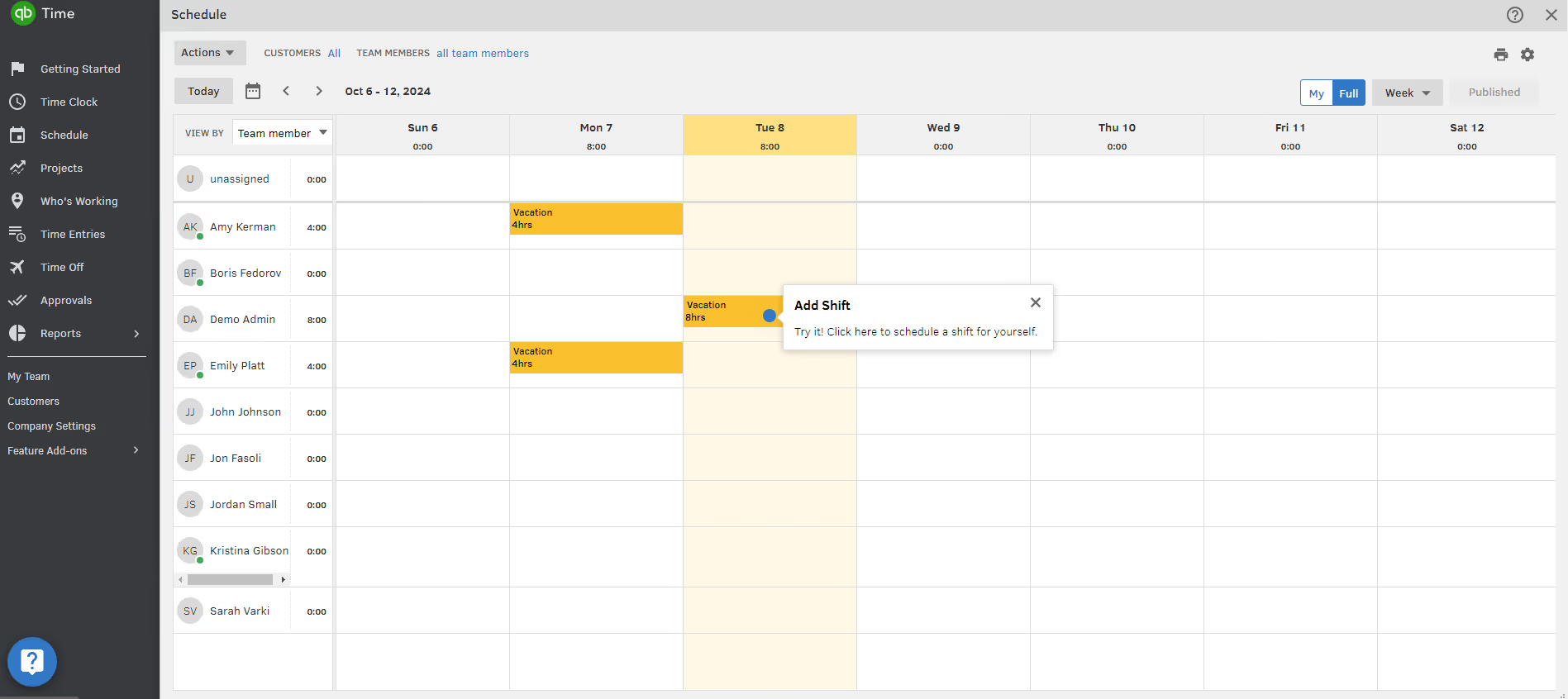
Quickbooks excels in scheduling and team management. Administrators can schedule work for their staffers from the schedule section on the dashboard. To schedule shifts, all you need to do is choose the time and day, team member you want to assign it to, and share it when you’re ready. Your team members will be immediately notified of these changes.
Quickbooks ‘Who is Working’
Another interesting feature that can help managers with their scheduling process is the “who is working” window. This lets you see who is working and who is available, which is useful for quickly assigning tasks to those ready to work. Quickbooks Time also syncs with third-party calendar applications such as iCal, Google calendar, and so on. This feature can be used to import events from your calendars and register them as entries on our timesheets.
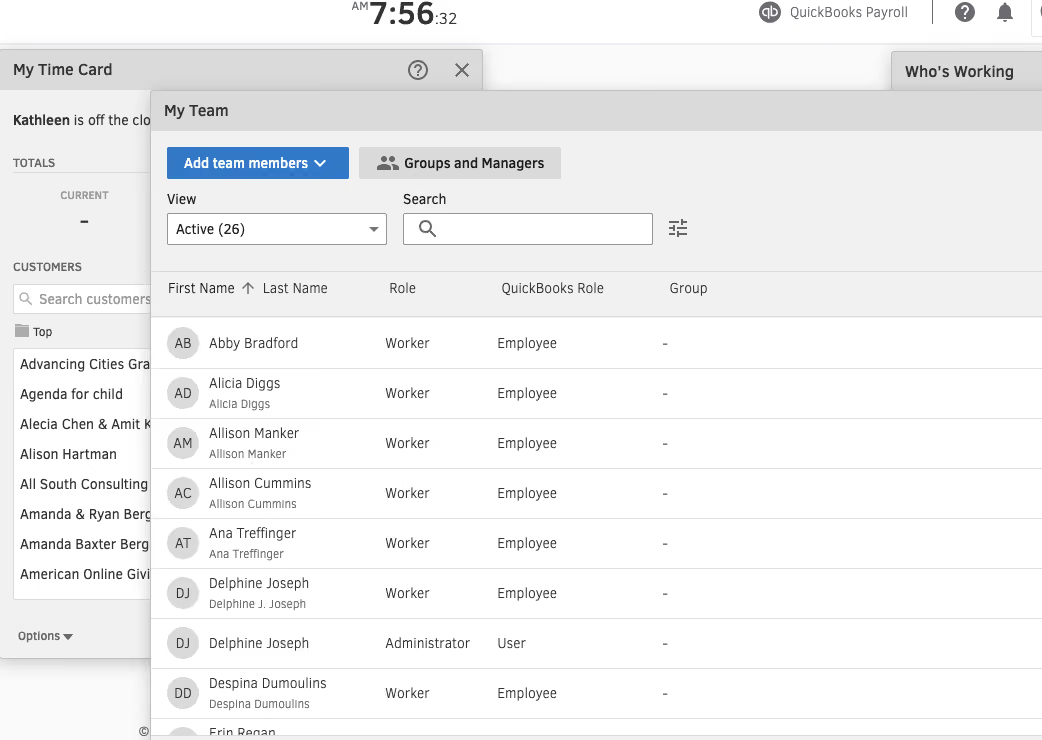
With Quickbooks TIme, employers and managers do not have to handle every single task or project. They can simply set permissions and add members as workers, managers, admins, or anything in-between. This feature is useful for designation work and creating a structured hierarchy within your organization.
Quickbooks Time Kiosk & Geofencing Features
Perhaps the most standout Quickbooks Time feature is what they call the Time Kiosk. This functions as a traditional time clock where everyone has to clock in and out from. Quickbooks has digitized this concept for businesses that still require something of the sort.
Examples of businesses that would benefit from the implementation of this feature include restaurant businesses, construction businesses, hospitals, and any organization that has a central work location, really.
This time kiosk can be set up on a tablet and mounted at the entrance of your business organization. The manager would have registered the employees of the organization using their biometric information (facial recognition). So a worker would be immediately clocked in when they go to use the central device. Employees are also allowed to set up a four-digit pin as added log in security.
Quickbook’s geofencing feature allows you to build a virtual fence around your job sites. If you are a home services business for example, you will appreciate this feature as Quickbooks Time will automatically clock your employees in when they reach a set job site. Using GPS technology, you can also monitor mobile employees as they are on the go.
Quickbooks Reports & Leave Management
Quickbooks offers three top reports - payroll reports, projects reports, and approval reports. They also provide other reports to give you an overview of how your team tracks time. The payroll report gives you a breakdown of how much time your employees tracked with respect to their hourly rates. This report can be filtered by date ranges and/or team members and exported as CSV and PDF files.
The project reports employs more visualization to display tracked data as pie charts. This report contains information on how much time was spent on each task, how much time your employees dedicated to the project, and so on.
The approval report makes it possible to view detailed information on timesheets that are approved and those that are yet to be approved. Within this report, you can decide to approve the timesheet or send it back to the employee for correction.
Quickbooks Time also allows you to set up and customize your paid and unpaid time-off policies. Employees can request for paid time off from their devices and the admin personnel can approve from their end.
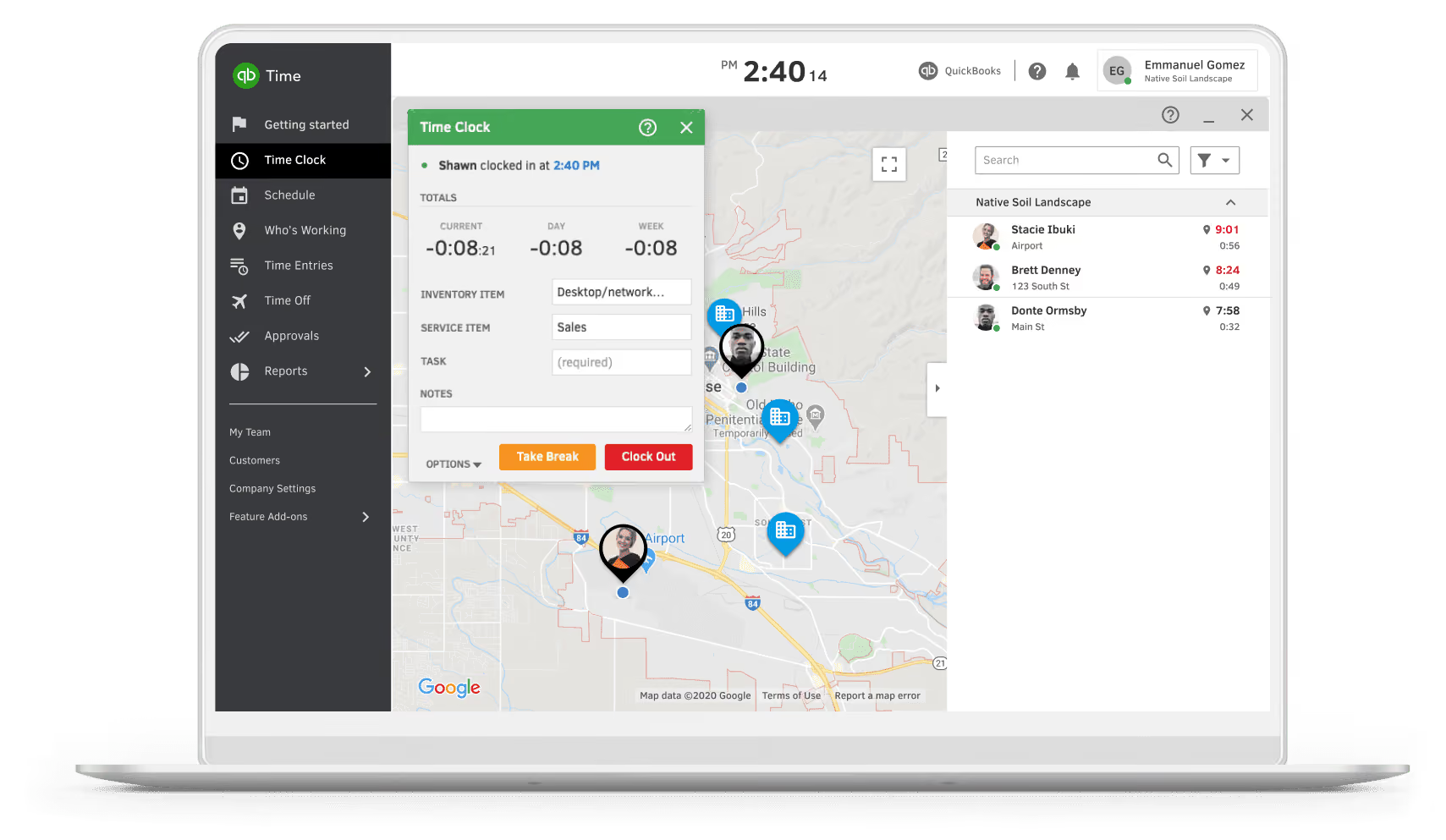


Employees use QuickBooks Time to log PTO, clock in and out, and connect their hours to payroll. Contractors also rely on it for tracking their hours. The organization uses the Time Premium subscription alongside QuickBooks Online for scheduling and ensuring departments are adequately staffed, even with PTO or call-outs.
While my primary use of QuickBooks Time is for payroll processing, employees benefit from features that improve scheduling transparency, PTO tracking, and pay expectations for hourly workers. This tool has become a key resource for daily operations and workforce management.
- The platform syncs seamlessly with payroll, streamlining the payment process.
- Employees appreciate the app’s scheduling features and real-time PTO tracking.
- Contractors value the ability to anticipate their earnings using the app.
I was hired to manage payroll for an organization that has been using QuickBooks Time for two years. I personally joined this project six months ago. QuickBooks Time provided a unified solution for tracking employee hours and integrating accounting and payroll within one system. It simplified the process of clocking in and out for employees, who could use either an app or kiosks set up at various locations.
After adopting QuickBooks Time, the organization experienced fewer issues with employees forgetting to clock out, which had been problematic for compliance with salaried employees required to track hours.
- The pricing can be high, especially for smaller organizations or startups.
- Some smaller organizations I’ve worked with found alternatives that offered basic time tracking at a lower cost.
- While QuickBooks Time integrates well with QuickBooks Online, it may not be as practical for businesses with simpler needs or fewer employees.
QuickBooks Time stands out because of its integration with QuickBooks, which is widely used and familiar to many payroll administrators. This integration simplifies workflows and reduces the learning curve for those with QuickBooks experience.
Consider factors like pricing, the size of your workforce, and the number of locations you manage. QuickBooks Time offers features that are particularly beneficial for larger organizations or those with a mix of hourly and salaried employees.
In my six months of experience, I’ve found the customer support team responsive and helpful, providing phone assistance and screen-sharing sessions to address questions. Their video library of tutorials on core functions and features has also been instrumental in learning and adapting to new workflows.
QuickBooks Time is ideal for larger organizations with multiple locations or businesses seeking to analyze labor costs across projects. Its robust features make it a strong investment for businesses with more complex staffing and payroll needs.
For organizations with simpler needs, such as small teams, single locations, or access to free or low-cost time tracking solutions, QuickBooks Time may not provide enough value to justify the investment.
I have my staff clock in and out for work using QuickBooks Time, which ensures that payroll runs smoothly. I track when employees start and finish work each day, making sure that remote or field workers log their hours correctly. I also review and adjust timesheets when needed to ensure they comply with our company policies and labor laws. QuickBooks Time integrates easily with our payroll system, facilitating accurate transfer of approved hours and simplifying payroll management.
Additionally, I can quickly generate detailed time-tracking reports (for planning, budgeting, compliance, and project management) using the reporting feature. This has become a crucial part of our HR and payroll processes, making time and attendance management across the company much simpler.
- User-Friendly Interface: The learning curve for new users is not as steep due to QuickBooks Time's intuitive interface.
- Real-Time Tracking: Real-time time record submissions ensure accurate payroll calculations, enabling better labor cost and productivity analysis.
- Seamless Integration: QuickBooks Time integrates perfectly with our existing accounting software, saving time on payroll and reducing errors from manual data entry.
- Mobile Accessibility: Employees can use the mobile app to clock in and out from any location, which greatly benefits those working remotely or in the field.
In our company, QuickBooks Time was acquired to eliminate various time tracking and payroll management issues. Before using this tool, we struggled with manual entry of employee working hours, leading to numerous errors in payslip processing and challenges in maintaining records for employees in the field or working from home.
QuickBooks Time has simplified this process by providing a convenient solution for workers to clock in and out from any location, enabling us to access live data for shifts and hours worked. It also integrates well with payroll, minimizing errors and reducing administrative tasks.
I have been using QuickBooks Time for over three years, and during this period, I have observed significant improvements in efficiency and accuracy across our operations. The main advantages include automated time tracking, mobile access for employees, integration with other QuickBooks tools, and support for our HR and payroll departments to maintain compliance and manage data effectively.
- Limited Customization: The time-reporting feature is limited to standard templates, making it challenging to create customized reports that meet specific organizational needs.
- Mobile App Glitches: Occasionally, the mobile app encounters glitches, interrupting employees who are trying to clock in while working remotely or on the go.
- Complex Setup for New Users: Although the interface is easy to use, the initial setup can be complex and time-consuming when configuring options and preferences.
- Lack of Advanced Reporting Features: The existing reporting capabilities could be improved with more advanced analytics, which would make the data more useful for project efficiency.
QuickBooks Time stands out from similar tools by directly integrating with QuickBooks accounting software, making it an ideal option for companies already using QuickBooks for financial management. This integration ensures smooth payroll processing.
I find QuickBooks Time easier to navigate and understand compared to other solutions, enhancing the efficiency of end-user training. The mobile application is robust, allowing employees to clock in and out from anywhere, which is essential for our remote and field teams.
Some competitors may offer more advanced reporting tools, but QuickBooks Time focuses on simplicity and practicality. Its design and seamless integration with other systems in our organization save time and reduce errors, minimizing inefficiencies.
When purchasing a time-tracking tool, consider several key factors. First, ease of use is crucial; an intuitive interface will help employees adapt quickly and reduce training time. Second, integration with existing software in your organization is essential for smooth operations and to minimize data entry errors.
It's also important to evaluate the tool’s reporting features, as strong analytics can provide insights into labor costs and productivity for better decision-making.
Mobile access is another important factor, especially for organizations with remote or field teams. Finally, ensure that the tool offers reliable customer support to assist with implementation and troubleshooting.
QuickBooks Time has evolved significantly over the years, incorporating various features and improvements to better meet users' needs. Initially focused on basic time tracking, it has expanded to include mobile accessibility, allowing employees to clock in and out using their smartphones—an essential feature for remote or field-based employees.
The tool has also enhanced its reporting capabilities to offer more comprehensive analytics on labor costs and productivity, helping organizations make informed decisions.
Another area of focus has been integration with other software, allowing seamless connections to various accounting and payroll systems, thus reducing errors from manual data entry. Intuit has actively listened to customer feedback, resulting in a user-friendly interface that is simple to navigate, cutting down the learning curve.
Regular updates, including features like GPS tracking and customizable alerts, demonstrate QuickBooks Time's commitment to addressing the needs of modern workforces.
QuickBooks Time is particularly well-suited for small to medium-sized businesses that need an efficient way to handle time tracking and payroll. It is ideal for organizations with mobile or remote workforces, such as construction companies, field service providers, and professional services firms whose employees often work off-site.
Additionally, businesses already using QuickBooks for accounting will benefit from the smooth integration, which streamlines payroll processing by reducing redundant data entry errors. The robust reporting features also support better decision-making and resource allocation for organizations focused on analyzing labor costs.
QuickBooks Time may not be the best option for larger enterprises or organizations with complex time-tracking needs that require advanced features, such as comprehensive project management tools or detailed resource planning.
Businesses relying on customized time-tracking solutions, like those in manufacturing or logistics with complex labor policies, might find QuickBooks Time too limited due to its lack of customization options.
The integration benefits are also less relevant for companies not using QuickBooks accounting or payroll software, making QuickBooks Time less valuable compared to other standalone time-tracking solutions.
Finally, the tool’s reporting capabilities may fall short for organizations needing detailed analytics, as it lacks the deep functionality offered by some specialized tools.

We primarily use QuickBooks Time for tracking our internal team’s time and our consultants’ time for client work and projects. By tracking our external project and client work in such a detailed way, we can capture and summarize each individual's deliverables at the end of each month.
In addition, we track our internal processes related to business development for projects and services. This helps us understand where our productivity lies. It also allows us to measure how long tasks take, so we can use the data from time tracking to help with price costing for business development projects for client usage and consultation.
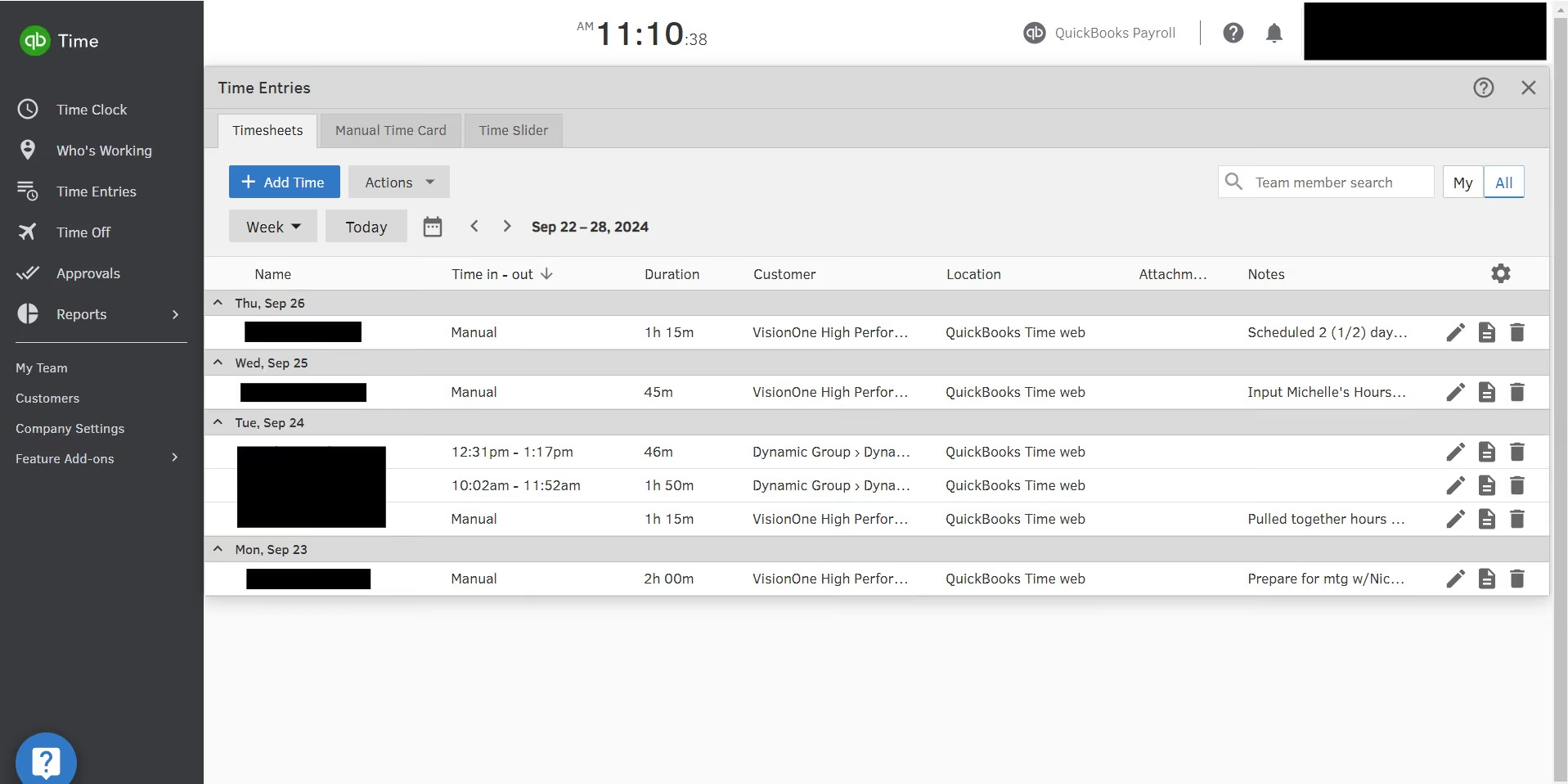
You can create custom reports to fit the needs of project and client costing. QuickBooks Time is user-friendly—our team has a wide range of technology users, and it is intuitive for everyone. It offers full customization in how you set up projects, customers, client bases, and groups to fit your billing and reporting needs.
Our organization first looked into QuickBooks Time because we needed a solution where we could house all of our project- and retainer-based time. We are a management consulting firm, and it's critical for serving our clients well that we accurately report and categorize our time.
We have clients on retainer, and we also have clients with whom we do only project-based work. It is crucial in these situations to have a system that links the time we spend working with a client and/or project, with the option of adding layers of categorization. Additionally, we needed a system that allowed us to take detailed notes.
QuickBooks Time can be set up in almost any configuration you need for this type of work. As an administrator, you can determine how it makes the most sense to set up your client categories and project-based work. You can do it differently or the same for every client or project. You may only work with internal clients, but this solution would work just as well for external clients.
QuickBooks Time allows for accurate time tracking—either to the minute clocking in and out or clocking durations of time. It has mobile accessibility for those who work in the field or remotely. One of my favorite features is the ability to integrate with payroll and accounting systems, which reduces the risk of inaccurate reporting.
Speaking of reporting, the ability to get customized reports on hours, project or client-specific data, and overtime is valuable. All these features help with job costing, invoicing, and productivity analysis. While we don't currently use this feature, the system also allows users to create and share employee schedules.
After one year of using the system, I have found it incredibly user-friendly and easy to navigate.
There are too many clicks involved when selecting categories and subcategories to align your working time. Sometimes, instead of a whole page changing when navigating, a box or separate page pops up. I would prefer a single screen for navigation. It would be helpful if employees received an alert when they forget to clock out at the end of their shift. As an administrator, I get an alert, but to my knowledge, employees do not.
QuickBooks Time is user-friendly and intuitive. In my opinion, it sits in the middle of the pack. There aren't any extraordinary features that set it apart, but there also aren't any major drawbacks.
You should have an idea of how you want to handle time costing before purchasing this type of tool. A clear understanding of how you will report on your time and use the data for reporting will help you identify the necessary features and where you can be flexible. Knowing how to break down internal and external clients is also essential, as is understanding how you want to tie time tracking to specific customers.
Yes, I feel they may be slightly behind in proactive innovation, but they're certainly not at the back of the pack.
QuickBooks Time is great for consulting firms and users who need to track time for specific projects or workflows.
Nothing comes to mind for this question.

Connecteam

Connecteam

Paylocity
Paylocity

Buddy Punch
Buddy Punch

TCP
TCP

Rippling
Rippling
CA technologies, KICK ventures, Apex IT, Vantage Credit Union, and thousands of small businesses.
- Time clock kiosk: Quickbooks Time stands out as the only software offering this feature. Quickbooks Time clock kiosk works as a traditional punch clock, providing a digital central clock-in-and-out solution.
- Geofencing and GPS tracking: Quickbooks Time uses GPS technology to track your employees' location while they are on the job, and uses geofencing to remind them to clock in when they get to the job site.
- DCAA compliance: If your business frequently handles government contracts, this feature ensures your timekeeping stays compliant with Department of Labor and Defense Contract Audit Agency laws.
Quickbooks Time also offers:
- Project management
- Scheduling
- Reporting
- Time off management
Naturally, Quickbooks Time integrates well with Quickbooks' proprietary accounting, payroll, point of sale, and bookkeeping softwares. Giving you the flexibility to have a well-rounded setup that addresses all the necessary facets of typical business administration.
However, you can also use Quickbooks Time with other accounting and payroll software. It integrates with tools like ADP, Square, Gusto, Salesforce, OnPay, PowerBI, and more.
Quickbooks Time offers two pricing plans. The good thing about Quickbooks pricing is they almost always give some form of discount at any given time. Usually, you will get a 50% discount for 3 months when you buy any of Quickbooks Time plans. You also get a 30-day free trial. The plans are as follows:
- Premium: This plan costs $20 base fee per month plus an additional $8 per user, monthly.
- Elite: For this plan, you pay a base fee of $40 per month plus an additional $10 per user, monthly.
Quickbooks Time is best for businesses that are already using any of Quickbooks' services. If you also have a central location where your employees do business, this software will come in handy to help cut costs.
QuickBooks Time has a support portal with numerous resources for customers to self-serve. Customers in need of assistance can also contact the QuickBooks Time support team via phone or live chat.
Quickbooks Time used to be TSheets, which was founded in 2006 by Matt Rissell and Brandon Zehm. Matt was a businessman selling ink and printer cartridges from his franchised Cartridge World stores.
The idea of creating a time tracking application came to him when he was looking for a way to accurately track the time his employees were clocking in and out but couldn’t find any suitable solutions online. He placed a call to his then friend and software architect, Brandon Zehm, and the two worked together to create a cloud-based time tracking solution for his store.
On the very first payroll after he implemented this solution, his bookkeeper saved up to $2,000 – which they would have lost as a result of time theft. It was then that Matt realized that there could be a way to market the product and get more out of it. Two years later in 2007, Matt sold his store and devoted his time solely to TSheets.
Tsheets grew rapidly due, in part, to their relatively affordable price at the time plus the enormous burden they took off the shoulders of bookkeepers.
They were acquired by Intuit in 2018 for a sum of $340 million and rebranded to Quickbooks Time. Now, Quickbooks Time is the most used time tracking application in the market. As a matter of fact, it is estimated that every 0.5 seconds an employee tracks time with Quickbooks Time somewhere in the world.
Company HQ
Eagle, Idaho, United States
Number of Employees
> 250
Year Founded
Amount Raised
FAQ
Is Quickbooks Time free if you use Quickbooks?
Unfortunately no. They used to offer free basic time tracking if you were subscribed to Quickbooks online (QBO) but they discontinued that feature in 2021. Now you need to subscribe for both QBO and Quickbooks time to be able to use both platforms. Good news is, Quickbooks time natively syncs with QBO.
Can you use Quickbooks time as a standalone app?
Definitely. Quickbooks time is a standalone tool with standalone pricing.
About SSR

We spend hundreds of hours researching the best HR and recruiting software so you don’t have to. We never take money from vendors during our research phase and rely heavily on practitioners and experts to help us recommend the right software. However we may earn a small fee if you click on vendor links on this page.