
Lever continues to combine the power of an ATS and a CRM, but with its latest AI Companion features, it has taken a significant leap forward. With AI Interview Companion (formerly Pillar), Talent Fit matching, and IBM watsonx.governance, Lever now delivers structured interviews, transparent candidate ranking, and bias mitigation at scale.
Ratings
Ease of Use
Best For
Key Differentiator
Price
Free Trial
PROS
- New AI Interview Companion streamlines structured interviews with automated note-taking, sentiment tracking, and bias flagging.
- Talent Fit engine provides ranked candidate lists with transparent scoring explanations.
- Intuitive UI that’s easy to learn and praised by most users.
- Combines ATS and CRM functionality, supporting both current and future hiring pipelines.
- Built-in DEI analytics (EEO surveys, dashboards) and strong integrations with third-party DEI tools.
- Role-based analytics with 20+ key TA metrics in its standard TRM package.
CONS
- Pricing remains undisclosed and no self-serve free trial is available.
- ROI Dashboard and AI Interview Transcripts are unavailable for EU accounts due to GDPR and data-sharing constraints (support expected later in 2025).
- AI features, while powerful, may require extra training or change management for recruiters.
- Lacks built-in background or reference checks (relies on integrations).
- Reporting, though solid, is not as customizable as some enterprise-focused ATS platforms.
- No dedicated mobile app, though the platform is mobile-optimized.

Need Help? Talk to an HR Software Advisor!
Tell us more about your company & an HR Software Advisor will help you find the right software





Lever has evolved into a strong SMB-focused ATS and CRM hybrid, delivering enterprise-grade capabilities without overwhelming smaller teams. In our hands-on tests, we found its AI Interview Companion and Talent Fit features to be standout additions, designed to solve time-consuming recruiting tasks for teams with fewer resources.
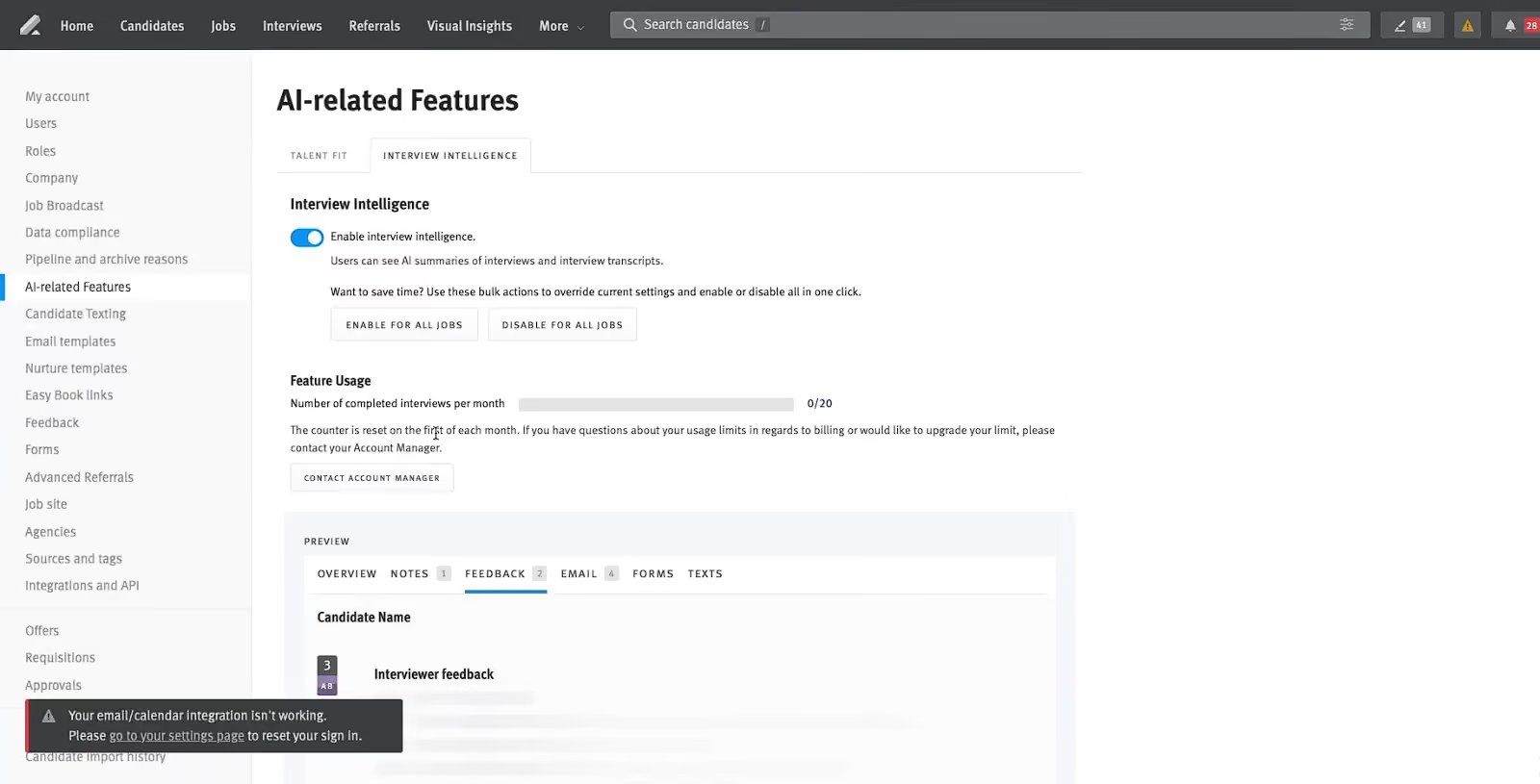
AI Interview Companion (formerly Pillar) proved particularly effective during our demo. It auto-generated structured interview guides, which meant we didn’t need to manually craft role-specific questions. During a mock interview, the AI tracked sentiment, monitored talk-time balance, and flagged biased language in real time. The automated interview summaries saved us from the usual scramble of post-call notes, allowing our team to make faster, more informed decisions.
The Talent Fit engine was equally impressive. Instead of presenting a generic list of candidates, Lever instantly scored and ranked applicants based on how well their experience and skills matched our job requirements. The transparent scoring made it easy to see why a candidate was ranked high or low, which is a refreshing departure from traditional black-box AI systems. For SMB recruiters juggling multiple roles, this feature can reduce time-to-hire significantly.
Lever’s ATS + CRM hybrid design remains one of its strongest differentiators. It doesn’t just track active candidates but also allows teams to nurture passive talent via automated, multi-touch email campaigns. Combined with its searchable talent database, this means you can rediscover past applicants rather than start every search from scratch.
We also tested Lever’s diversity hiring tools, such as EEO surveys and DEI dashboards. These built-in features give SMBs the ability to track diversity data and generate reports that would otherwise require third-party integrations.
However, Lever’s reporting, while visually intuitive, has fewer customization options compared to tools like Greenhouse or SmartRecruiters. SMBs with unique reporting requirements might find themselves exporting data for additional analysis. We also found that while the browser interface is optimized for mobile, the absence of a dedicated mobile app could be a hassle for recruiters who manage candidates on the go.
Pricing is another consideration. Lever does not disclose pricing upfront, which can be frustrating for small businesses with limited budgets. And while AI Interview Companion and Talent Fit are powerful, some teams might need extra training to fully leverage these features, particularly when implementing structured interviewing or bias detection tools for the first time.
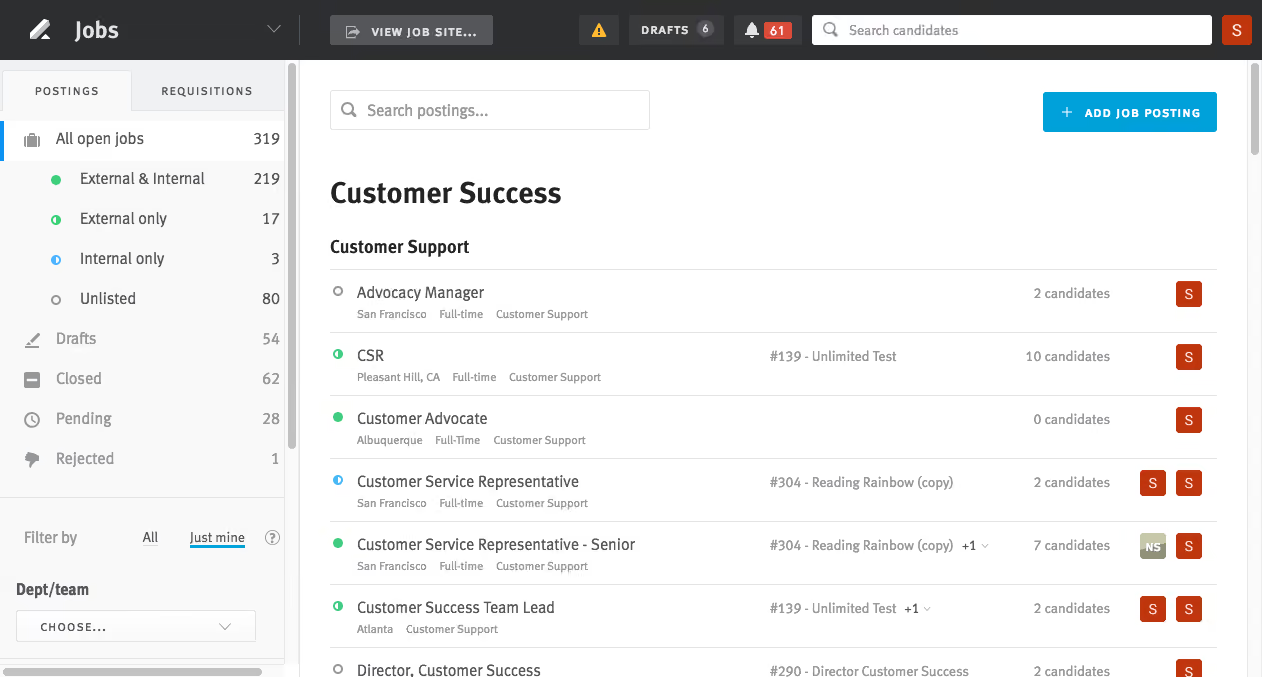


I typically used Lever as part of my recruitment workflow as a business partner and HR manager. I would post jobs, source candidates, and track applicants throughout the hiring pipeline.
I also used it to collect feedback from interviews and stay in regular contact with candidates. As the HRBP, I frequently used the reporting features to evaluate our TA KPIs, such as time to hire and fill, source effectiveness, and diversity metrics.
It's easy to manage the entire pipeline in one place. I liked the ability to create templates and workflows to simplify the hiring process and make communication more consistent. I appreciated the automated communications and the option for candidates to schedule interviews.
I worked at Octopus Deploy when I used Lever, and I used it for a year. Our company chose Lever to streamline our recruiting process as the company was growing rapidly during COVID.
We began hiring more global roles, and Lever allowed us to reach a wider audience while keeping our pipelines consistent. It also offered a great UI, excellent metrics reporting, and helpful compliance checks.
The reporting is powerful but can be complex and difficult to customize. Integration and setup were challenging, as there were a few issues to work out with APIs and user access. The cost is relatively high compared to competitors, which can be hard to justify for smaller, leaner teams.
The UI is much cleaner, and the workflow tools made the overall process simpler compared to systems like JazzHR, Workday, Paycom, and others.
Ease of adoption is the most important factor for Lever. Your recruitment team and hiring managers need to be involved early, committed to learning the tool, using it fully, and promoting it throughout the hiring process.
You also need to confirm that your existing HRIS and payroll systems are among the software options that integrate with its APIs. Consider whether the software is scalable with your company’s projected growth.
During the time I used it, Lever expanded its automated workflows, including drip campaigns triggered by the requisition stage. It also grew its integration ecosystem and now connects with most HRIS tools on the market, making it highly accessible and flexible.
Lever is good for mid-sized to growing organizations that need to scale quickly.
Lever is probably not a good fit for very small companies or startups that hire infrequently, as they may not see a strong ROI. It may also not work well for teams that are less tech-savvy, as its complex reporting and workflows may go underutilized.

We used Lever as both an ATS and a CRM. Many competitors required two separate systems for those functions. It made candidate and job requisition management easy. The integration with job posting platforms was strong. It supported automated communication with candidates and tracking throughout the hiring process.
It also worked well for employees located outside the U.S. The interface was extremely user-friendly. The CRM was suitable for managing passive candidates, though it felt slightly outdated, as is common with most CRMs.
The cost is reasonable for what it includes. The dashboard and the functionality of the ATS and CRM were very easy to use. It integrates well with job posting sites and internal programs such as Slack.
We were long-time users of SuccessFactors but wanted a more affordable alternative that still met our talent acquisition needs. As a large, global company with a sizable talent acquisition team, we needed a reputable ATS. We were looking for a solution that was easy to use and offered strong customer support.
Lever stood out due to its excellent training materials compared to other ATS/HRIS platforms. It provided both an ATS and a CRM, which was beneficial. It also offered strong reporting capabilities and supported both candidate and job workflows.
There is no mobile app that I am aware of. The CRM component for passive candidates felt slightly outdated. The search parameters for sourcing candidates were not very strong.
Lever includes more features than many of its competitors in the ATS space. It can be used by mid-sized and large companies and tailored to specific needs and budgets. I still slightly prefer SuccessFactors because, with an in-house IT specialist, we could better adjust it for recruiting and automating communications.
Consider what you want from your ATS. Decide if a CRM/ATS combination is necessary for your team. The cost may be high for small to midsized companies.
System integration has improved over time. Lever consistently releases high-quality training materials for users.
Lever is well-suited for midsized or large enterprises, including global organizations.
Small companies would likely not benefit from using Lever.

I use the tool primarily as a recruiter. I am the first point of contact in screening applicants directly from the website, reviewing their resumes, updating their statuses, sending automated responses, and moving them through the recruitment stages until onboarding.
I have also used the system to input notes, include feedback, and tag hiring managers. I’ve uploaded documents and maintained candidate information to keep it up to date and accurate. In some cases, I have associated an applicant from one role to another.
Outside of the usual workflows, I’ve used Lever as a sourcing platform to parse and search through the company’s entire candidate pool for roles they may or may not have applied to.
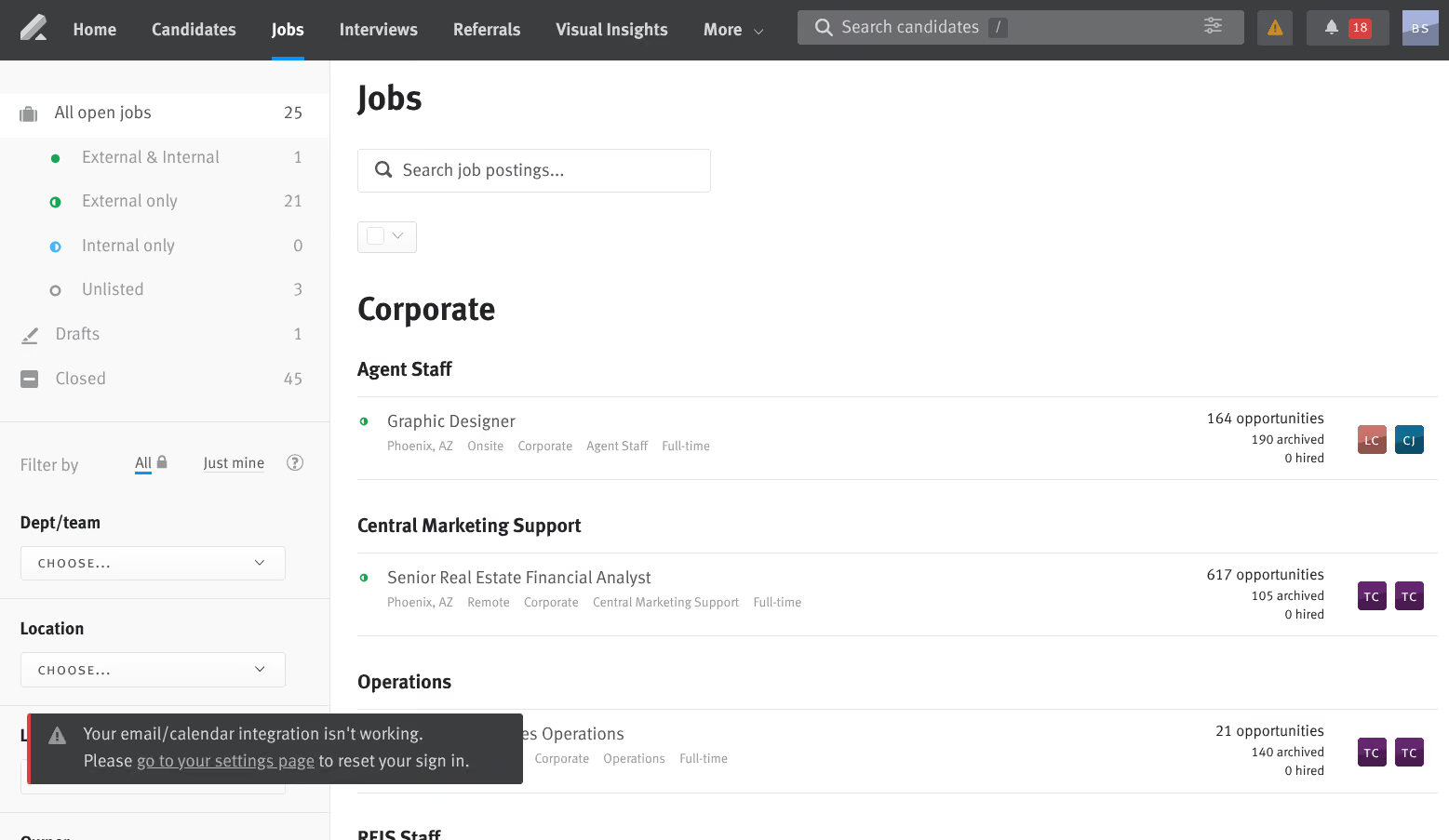
It is very user-friendly. The interface is intuitive and easy on the eyes, with a clean and organized layout. Even hiring managers can navigate it with minimal guidance.
Another benefit is that the ATS is fluid and customizable, seamlessly reflecting the hiring process. You can easily update candidate information, upload documents, and edit candidate names without issues.
Lever also integrates very well with LinkedIn, minimizing redundancy in sourcing efforts. This is one of my top preferred systems.
I have only worked with this client for a year. I believe they have used this system for at least four years as their main ATS and candidate database. The organization likely chose this tool to manage a large volume of applicants efficiently.
It provides a centralized platform for tracking applicants, managing workflows, and ensuring timely communication. From what I’ve seen, the system supports the end-to-end recruitment process effectively.
Once the system and workflows are set up, changes can be difficult. For example, this client forgot to include a status for when HR sends candidates for review, such as "HM Review," so we currently use alternatives like "Intro Session" or "Phone Interview," depending on the team.
Data is not readily available for export and analysis; while there are functions, the landing page only shows status updates on recent or newly opened roles.
Integration with Outlook is not seamless. I’ve seen other ATS platforms with smoother email integration that allow full email functionality within the system—Lever, or at least this client’s version, does not.
The interface and integrations stand out. This tool is easier to learn quickly compared to others I’ve used. Lever effectively supports the recruitment process by helping to manage candidates, track progress, and apply appropriate tagging.
The LinkedIn integration is among the best I’ve encountered. I also like how candidates are directed to apply through the client’s website in a clear and straightforward way.
I think Lever is quite expensive, but the value is there—especially if your organization heavily uses LinkedIn. It’s critical to establish a solid process when setting up workflows to reflect the actual hiring process. Doing this properly helps hiring managers participate more actively in screening and feedback. Planning the workflow in advance can prevent limitations later.
I haven’t worked with this client long, and so far, the Lever functions I started with have remained the same a year later.
A large organization (1,000+ employees) with active hiring manager involvement and one that uses LinkedIn as a primary sourcing platform will benefit greatly from Lever.
An organization with a simple hiring flow or one still exploring sourcing platforms won’t benefit from Lever. If all you need is a basic ATS, there are more budget-friendly options available.

Greenhouse

Greenhouse

Workable
Workable

Gem
Gem

Pinpoint
Pinpoint

VidCruiter
VidCruiter
Lever is designed for SMBs and fast-growing companies with active recruiting needs. Very small businesses with just a handful of annual hires might find Lever’s feature set more than they need, especially since there’s no free trial or entry-level pricing tier.
Lever is used by over 5,000 companies, including Netflix, Spotify, KPMG, Atlassian, Canva, and Veeva.
- Applicant tracking: Configurable career sites, customizable hiring workflows, job post advertising, automatic candidate screening/disqualification, employee referrals, internal mobility programs, interview planning, candidate self-scheduling, structured interviews, and Zoom integration for live video interviewing.
- Candidate relationship management: multi-channel lead sourcing, dedicated sourcing pipeline, automated multi-touch nurture email campaigns, searchable talent database, and intelligent recommendations to rediscover talent.
- Talent Analytics: With Visual insights’ out-of-the-box and custom reports, data explorer, data warehouse sync, and advanced analytics, Lever eliminates the need for 3rd party solutions, spreadsheets, and data migration. Designed for recruiters, hiring managers, and finance teams - Set goals, track progress, schedule, download, and save.
Lever also has features for:
- Diversity hiring tools
- Offer management and approval workflows
- Collaborative hiring
- Automation workflows
Lever integrates with hundreds of third-party solutions including Slack, Zoom, LinkedIn, and SAP. Check out Levers integration marketplace for the full list of products they integrate with.
Lever's quote-based pricing starts around $6,000, varying with business needs.
For any SMB looking to streamline sourcing, interviewing, and nurturing talent, Lever offers a balance of enterprise-grade capabilities without overwhelming complexity.
Lever has transitioned from a traditional applicant tracking system to a platform that integrates candidate relationship management capabilities and, most recently, AI-driven tools.
- 2015–2020: Lever established itself as an ATS with built-in CRM features, enabling companies to manage active applicants and nurture passive candidates in one system.
- 2021–2023: The platform added more advanced analytics, workflow automation, and diversity-focused tools such as EEO surveys and DEI dashboards.
- 2025: Lever introduced AI Interview Companion (integrating technology from its Pillar acquisition) and Talent Fit, a candidate ranking engine that uses AI to evaluate skills and experience.
- Governance: Lever implemented IBM watsonx.governance for compliance, bias detection, and transparency across its AI features.
The current roadmap includes features such as AI-generated interview transcripts, ROI tracking, and tools for rediscovering candidates from past pipelines.
Four packages are offered—Self-Guided, Essential, Standard, and Premium—covering setup, workflow customization, data migration, training, and go-live support.
Lever offers a 24/7 help center with detailed documentation and responsive ticket-based support. Implementation and onboarding services receive positive user feedback.
Founded in 2012, Lever started out as an incubator company within Twitter, with Nate Smith, Sarah Nahm, and Randy Truong at the helm. The three of them had one main goal: to connect human potential to meaningful work. To achieve this end, they’ve worked on building a comprehensive recruiting solution, packing the capabilities of an applicant tracking system (ATS) and a candidate relationship management system (CRM) into a single, enterprise-ready platform.
Lever has gained customer adoption and made a name for themselves in the HR tech space in a relatively short period of time. Today, Lever is used by over 5000 companies including big brands such as Netflix and Spotify, boasts several awards, and prides themselves on a 50:50 employee gender ratio in their offices.
Company HQ
San Francisco, California, United States
Number of Employees
270+
Year Founded
2012
Amount Raised
As of November 2021, Lever has raised a total of $122.8M over 7 funding rounds.
FAQ
Is Lever an ATS system?
Lever’s Talent Relationship Management (TRM) packs a full-fledged ATS that you can use to source, manage, and hire suitable applicants.
What is the cost of Lever?
Lever doesn’t disclose their pricing upfront. Contact a sales representative to learn about the cost for your business size and needs.
About SSR

We spend hundreds of hours researching the best HR and recruiting software so you don’t have to. We never take money from vendors during our research phase and rely heavily on practitioners and experts to help us recommend the right software. However we may earn a small fee if you click on vendor links on this page.