
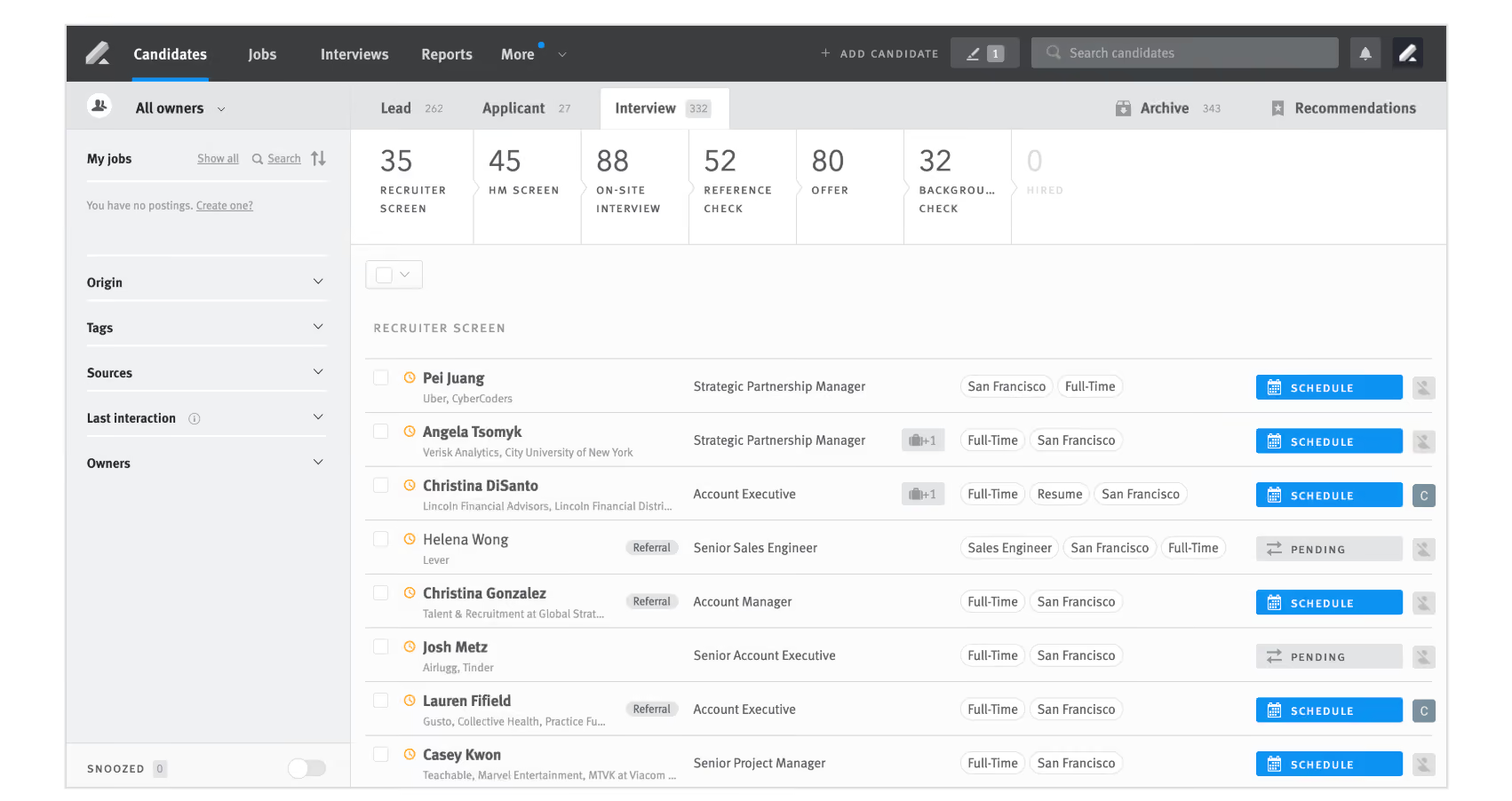
Lever continues to combine the power of an ATS and a CRM, but with its latest AI Companion features, it has taken a significant leap forward. With AI Interview Companion (formerly Pillar), Talent Fit matching, and IBM watsonx.governance, Lever now delivers structured interviews, transparent candidate ranking, and bias mitigation at scale.
Ratings
Ease of Use
Best For
Key Differentiator
Price
Free Trial
PROS
- New AI Interview Companion streamlines structured interviews with automated note-taking, sentiment tracking, and bias flagging.
- Talent Fit engine provides ranked candidate lists with transparent scoring explanations.
- Intuitive UI that’s easy to learn and praised by most users.
- Combines ATS and CRM functionality, supporting both current and future hiring pipelines.
- Built-in DEI analytics (EEO surveys, dashboards) and strong integrations with third-party DEI tools.
- Role-based analytics with 20+ key TA metrics in its standard TRM package.
CONS
- Pricing remains undisclosed and no self-serve free trial is available.
- ROI Dashboard and AI Interview Transcripts are unavailable for EU accounts due to GDPR and data-sharing constraints (support expected later in 2025).
- AI features, while powerful, may require extra training or change management for recruiters.
- Lacks built-in background or reference checks (relies on integrations).
- Reporting, though solid, is not as customizable as some enterprise-focused ATS platforms.
- No dedicated mobile app, though the platform is mobile-optimized.

Need Help? Talk to an HR Software Advisor!
Tell us more about your company & an HR Software Advisor will help you find the right software





Lever has evolved into a strong SMB-focused ATS and CRM hybrid, delivering enterprise-grade capabilities without overwhelming smaller teams. In our hands-on tests, we found its AI Interview Companion and Talent Fit features to be standout additions, designed to solve time-consuming recruiting tasks for teams with fewer resources.
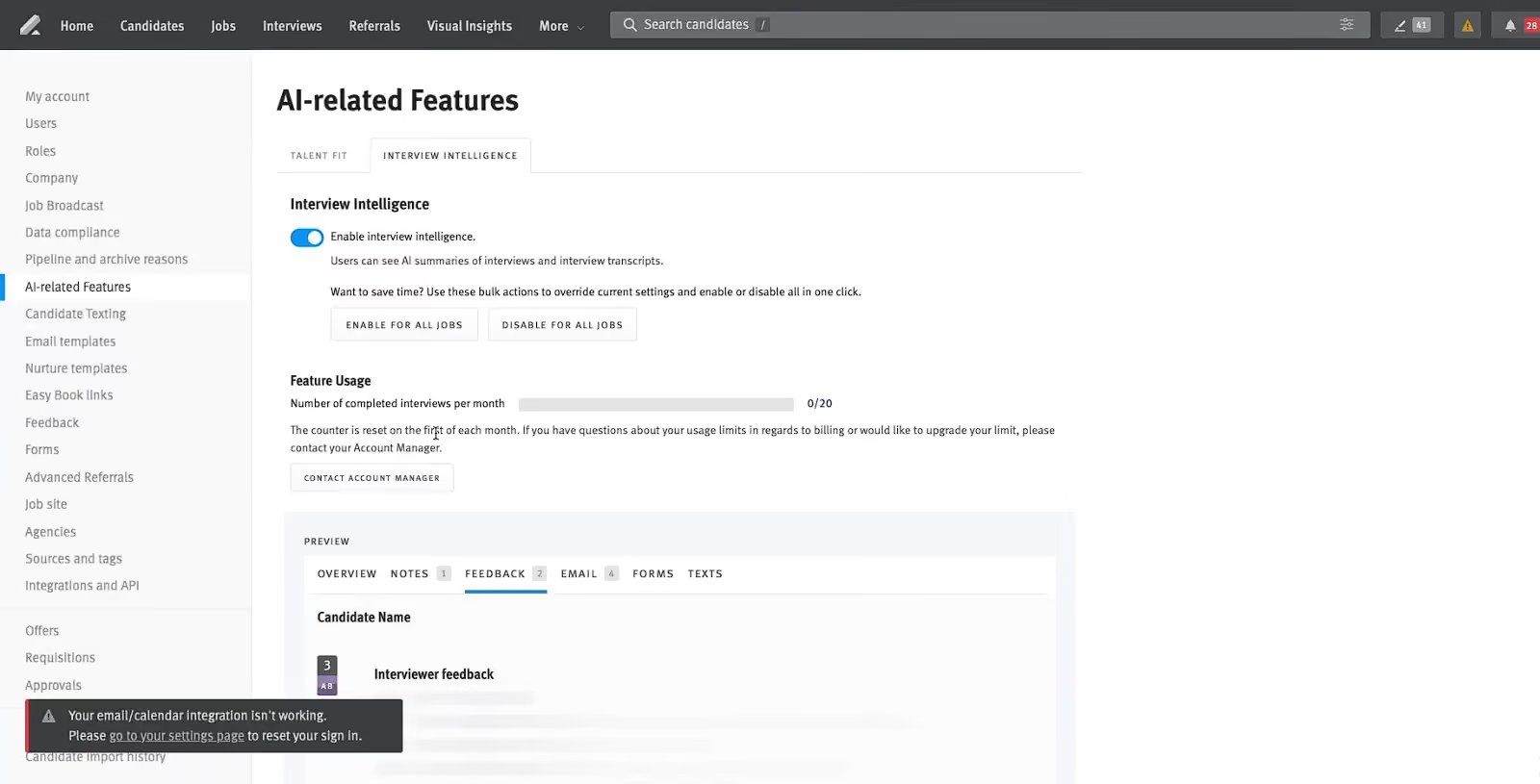
AI Interview Companion (formerly Pillar) proved particularly effective during our demo. It auto-generated structured interview guides, which meant we didn’t need to manually craft role-specific questions. During a mock interview, the AI tracked sentiment, monitored talk-time balance, and flagged biased language in real time. The automated interview summaries saved us from the usual scramble of post-call notes, allowing our team to make faster, more informed decisions.
The Talent Fit engine was equally impressive. Instead of presenting a generic list of candidates, Lever instantly scored and ranked applicants based on how well their experience and skills matched our job requirements. The transparent scoring made it easy to see why a candidate was ranked high or low, which is a refreshing departure from traditional black-box AI systems. For SMB recruiters juggling multiple roles, this feature can reduce time-to-hire significantly.
Lever’s ATS + CRM hybrid design remains one of its strongest differentiators. It doesn’t just track active candidates but also allows teams to nurture passive talent via automated, multi-touch email campaigns. Combined with its searchable talent database, this means you can rediscover past applicants rather than start every search from scratch.
We also tested Lever’s diversity hiring tools, such as EEO surveys and DEI dashboards. These built-in features give SMBs the ability to track diversity data and generate reports that would otherwise require third-party integrations.
However, Lever’s reporting, while visually intuitive, has fewer customization options compared to tools like Greenhouse or SmartRecruiters. SMBs with unique reporting requirements might find themselves exporting data for additional analysis. We also found that while the browser interface is optimized for mobile, the absence of a dedicated mobile app could be a hassle for recruiters who manage candidates on the go.
Pricing is another consideration. Lever does not disclose pricing upfront, which can be frustrating for small businesses with limited budgets. And while AI Interview Companion and Talent Fit are powerful, some teams might need extra training to fully leverage these features, particularly when implementing structured interviewing or bias detection tools for the first time.
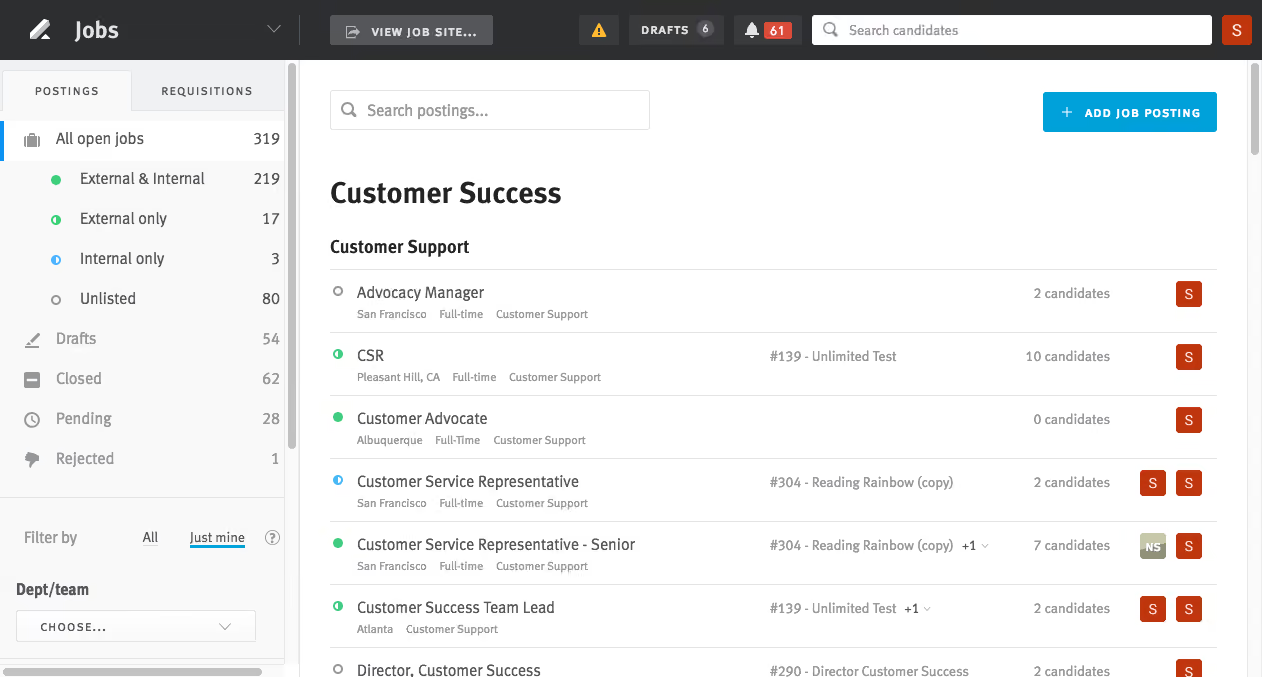


- Job Posting: Lever enables us to take an internal job description and adapt it for external posting as a job advertisement. This can be done from a single source and distributed to multiple external platforms, such as our LinkedIn Recruiter account.
- Candidate Flow: We use all candidate profile features to collect and manage candidate information. We also leverage the structured interview process, bulk email capabilities, and resume parsing. Lever includes DEI-specific fields, which we have started using to track our commitment to fair hiring practices.
- Ease of Startup: We implemented the essential features quickly and can scale as we grow.
- Integrations: It integrates with LinkedIn Recruiter, Indeed, and Hubspot—three essential tools in our workflow.
- Structured Interview Process: With a geographically dispersed and largely remote workforce, this feature ensures consistent interview quality and helps capture cultural considerations, supporting fairness and preparedness.
The company was bringing all People functions in-house and needed a tool for talent acquisition. The basic requirements were to post jobs, build a candidate pool, and generate offers. Lever provided this functionality without high costs or a lengthy implementation timeline.
We were also attracted to its additional integrations and reporting features, which could scale as the company’s needs evolved. Many of our other software tools offer integration support with Lever.
- Customization: While customization is possible, the associated services significantly increase costs, which is not ideal for smaller, budget-constrained companies.
- API Fee Cost: Integration costs are high compared to other providers.
- Onboarding: The onboarding workflow features are limited, requiring us to supplement with manual processes. We hope this will be resolved in the future.
Lever includes the core features common to many applicant tracking systems—job postings, candidate applications, and interview management. It stands out for its resume parsing, email templates, and DEI capabilities. It falls short in onboarding features and affordability compared to some other tools.
The top three criteria to consider when evaluating Lever are:
- Candidate management—what data you need to collect and the expected volume.
- Integration—what other tools you want to connect with this platform.
- Scalability—how affordable and complex it will be to expand the tool’s features as your organization grows.
We began using Lever in 2020 and have not seen major new product enhancements since then. However, the quality and stability of existing features have improved.
Lever is suitable for organizations of any size.
Lever may not be ideal for organizations that require multiple customizations and integrations simultaneously. Our experience involved a slower and more complex implementation than originally anticipated.

I uncovered some inconsistencies in reporting, which led me to the recruiting team. They were using Lever to post jobs and distribute them to their website, Indeed, and LinkedIn Jobs. However, they were not fully utilizing its capabilities, which led to inefficient candidate communication, missing key application-style questions, and challenges with AAP federal reporting. These issues were not, to the best of my knowledge, due to Lever itself. My work focused on identifying and addressing these gaps in usage.
Lever has strong functionality for posting jobs. Its candidate tracking and communication features are excellent when used properly. It includes role-based data access control, which is very helpful for larger teams.
My client was already using Lever when I was contracted to help improve some of their HR processes and review compliance. The company operates nationwide with six regions, over 30 satellite offices, and thousands of employees. The goal was to standardize tools across all regions. Many, but not all, were using Lever for recruiting. I worked with the tool as part of my engagement to assess its implementation and effectiveness.
I found the reporting to be limited, though I am unsure whether this was due to Lever or the client’s setup. The interface can be difficult to navigate and could be more user-friendly. It lacked integration with the existing HRIS, resulting in additional manual work for recruiters.
Lever is better than some platforms but not as strong as others. The pricing is excellent for the level of functionality it provides.
Anyone considering Lever should ask whether it integrates with your HRIS, background check providers, and onboarding tools. It is also important to check if it integrates with your calendar and email systems. Finally, confirm that the cost aligns with your budget and overall recruitment needs.
I believe it has, but I’m not sure.
Lever is suitable for businesses with multiple hiring managers and multiple interviews per hire. It works best for higher recruiting volumes, but may not be ideal for large enterprises. It is especially useful for small recruiting teams that need support managing candidates.
It may not be suitable for smaller businesses with low hiring needs. I am also unsure if it works well for highly regulated industries, as I had to implement my own compliance workaround. It does not integrate well with older HRIS tools.

Lever was used to source applicants, manage the recruiting lifecycle, and extend offers to candidates. Hiring managers used it to manage their own processes and store interview questions. It also provided a seamless way to schedule interviews for candidates.
Lever allowed us to propose available time slots, and candidates could choose what worked for them. The product integrated smoothly with Outlook and Gmail calendars. It also provided us with valuable recruiting metrics.
- I liked the ability to see our recruiting data quickly for each open position.
- I liked having a seamless way to track information—recruiters, hiring managers, and candidates were all on the same page when using Lever.
- I liked how user-friendly it was. Whenever we needed to train a new team member, it was easy for them to get started.
The organization I worked for managed Lever on behalf of a client. The client was looking for a user-friendly ATS that displayed data efficiently, which Lever provided. The client had previously managed the recruiting process manually, so Lever offered a significant improvement. They appreciated the customization Lever made available. It streamlined their process and made managing recruitment much easier.
- I would have liked more flexibility in Lever's reporting and analytics. A dashboard for quick viewing would be helpful.
- Lever's sourcing tools were very basic. I wished it included tools for quickly contacting candidates.
- I would have liked a way to engage candidates passively. If a candidate wasn't a fit for a role, the only way to organize them was to reject them; there wasn’t a way to store them in folders for future positions.
Compared to Greenhouse, Lever does offer less customization.
Companies should consider their business needs and whether the tool meets them. Too often, a company implements an ATS that doesn't allow for customization of their processes.
Lever has improved its user interface to make it more user-friendly.
Lever is great for organizations with high-volume recruitment.
Lever may not be ideal for organizations that don’t recruit for many positions.

Greenhouse

Greenhouse

Workable
Workable

Gem
Gem

Pinpoint
Pinpoint

VidCruiter
VidCruiter
Lever is designed for SMBs and fast-growing companies with active recruiting needs. Very small businesses with just a handful of annual hires might find Lever’s feature set more than they need, especially since there’s no free trial or entry-level pricing tier.
Lever is used by over 5,000 companies, including Netflix, Spotify, KPMG, Atlassian, Canva, and Veeva.
- Applicant tracking: Configurable career sites, customizable hiring workflows, job post advertising, automatic candidate screening/disqualification, employee referrals, internal mobility programs, interview planning, candidate self-scheduling, structured interviews, and Zoom integration for live video interviewing.
- Candidate relationship management: multi-channel lead sourcing, dedicated sourcing pipeline, automated multi-touch nurture email campaigns, searchable talent database, and intelligent recommendations to rediscover talent.
- Talent Analytics: With Visual insights’ out-of-the-box and custom reports, data explorer, data warehouse sync, and advanced analytics, Lever eliminates the need for 3rd party solutions, spreadsheets, and data migration. Designed for recruiters, hiring managers, and finance teams - Set goals, track progress, schedule, download, and save.
Lever also has features for:
- Diversity hiring tools
- Offer management and approval workflows
- Collaborative hiring
- Automation workflows
Lever integrates with hundreds of third-party solutions including Slack, Zoom, LinkedIn, and SAP. Check out Levers integration marketplace for the full list of products they integrate with.
Lever's quote-based pricing starts around $6,000, varying with business needs.
For any SMB looking to streamline sourcing, interviewing, and nurturing talent, Lever offers a balance of enterprise-grade capabilities without overwhelming complexity.
Lever has transitioned from a traditional applicant tracking system to a platform that integrates candidate relationship management capabilities and, most recently, AI-driven tools.
- 2015–2020: Lever established itself as an ATS with built-in CRM features, enabling companies to manage active applicants and nurture passive candidates in one system.
- 2021–2023: The platform added more advanced analytics, workflow automation, and diversity-focused tools such as EEO surveys and DEI dashboards.
- 2025: Lever introduced AI Interview Companion (integrating technology from its Pillar acquisition) and Talent Fit, a candidate ranking engine that uses AI to evaluate skills and experience.
- Governance: Lever implemented IBM watsonx.governance for compliance, bias detection, and transparency across its AI features.
The current roadmap includes features such as AI-generated interview transcripts, ROI tracking, and tools for rediscovering candidates from past pipelines.
Four packages are offered—Self-Guided, Essential, Standard, and Premium—covering setup, workflow customization, data migration, training, and go-live support.
Lever offers a 24/7 help center with detailed documentation and responsive ticket-based support. Implementation and onboarding services receive positive user feedback.
Founded in 2012, Lever started out as an incubator company within Twitter, with Nate Smith, Sarah Nahm, and Randy Truong at the helm. The three of them had one main goal: to connect human potential to meaningful work. To achieve this end, they’ve worked on building a comprehensive recruiting solution, packing the capabilities of an applicant tracking system (ATS) and a candidate relationship management system (CRM) into a single, enterprise-ready platform.
Lever has gained customer adoption and made a name for themselves in the HR tech space in a relatively short period of time. Today, Lever is used by over 5000 companies including big brands such as Netflix and Spotify, boasts several awards, and prides themselves on a 50:50 employee gender ratio in their offices.
Company HQ
San Francisco, California, United States
Number of Employees
270+
Year Founded
2012
Amount Raised
As of November 2021, Lever has raised a total of $122.8M over 7 funding rounds.
FAQ
Is Lever an ATS system?
Lever’s Talent Relationship Management (TRM) packs a full-fledged ATS that you can use to source, manage, and hire suitable applicants.
What is the cost of Lever?
Lever doesn’t disclose their pricing upfront. Contact a sales representative to learn about the cost for your business size and needs.
About SSR

We spend hundreds of hours researching the best HR and recruiting software so you don’t have to. We never take money from vendors during our research phase and rely heavily on practitioners and experts to help us recommend the right software. However we may earn a small fee if you click on vendor links on this page.