




Rippling is an employee management platform for everything between onboarding and offboarding. They stand out for having a very appealing UI, with design that we find soothing to the eye. They also offer PEO services that you can keep track of through the platform.
Ratings
Ease of Use
Best For
Key Differentiator
Price
Free Trial
PROS
- All-in-one platform for employee management + PEO services offered, and even a suite of other IT products
- With 500 integrations, it’s very likely that they integrate with other key tools from your tech stack.
- Operates globally with any currency
- Workflow automation
- Analytics opportunities
- Provides a holistic view of company outflows—headcount costs included
CONS
- Total buy-in to Rippling is essential
- Very SMB-oriented, in case you’re a larger company.
- New features tend to be buggy in ways that tech teams are not accustomed to fixing

Need Help? Talk to an HR Software Advisor!
Tell us more about your company & an HR Software Advisor will help you find the right software





Rippling is a relatively new player in the HR tools market, with a focus on helping SMBs manage HR and IT in one solution. They focus specifically on businesses with less than 2,000 employees.
An interesting thing about them is that they are very vocal about trying to make their software easy-to-use and intuitive not just for HR professionals and recruiters, but for the CEO, IT staff, and any team member that will interact with the product.
For example, recruiters are able to get into the tool and see all the necessary HR information related to their profile that they need to consult sometimes. For example, download their pay stubs, consult PTO, number of sick days, or even check out who’s off when.
Rippling started with offering core HR, payroll, and benefit management tools with a strong focus on automation. In 2022, however, they incorporated many new modules to their offering, like time and attendance, talent management, learning management, even licensed PEO services, and then a full global payroll suite by the end of the year.
Their global payroll offering, which includes many ways to manage an international payroll (including EOR), is one of the best products in the category. They handle all aspects of paying people overseas instead of aggregating outside services from third-party providers, which is new in the space, at least in 2023. Aside from a demo of this new part of the platform, we interviewed several users of the tool, and have found the experiences are overwhelmingly positive.
They now also have an IT cloud product, for app and device management. As with the HR side of it, it was always supposed to be a very self-service approach. Rippling’s products are meant to be something that you can sign up for and get cracking within a few minutes, with no long meetings or training sessions, at least after you’ve gotten a custom quote from their team.
As to the look and feel, it is exactly what you'd expect from a silicon valley-based startup, with a modern UI and eye-catching design that’s been interesting to watch evolve over the years since we first came across Rippling.
Notably, and finally, they also have over 500 integrations with everything from Slack to Github.




Our organization uses Rippling to manage various HR processes, including payroll, time-off, benefits administration, employee data management, reporting, and leave management. We are also considering the performance management and survey modules but have not yet decided to implement them. As we grow, Rippling has been proactive in suggesting further process automation. We appreciate the flexibility to activate modules as needed, which prevents us from being overwhelmed by unnecessary complexity.
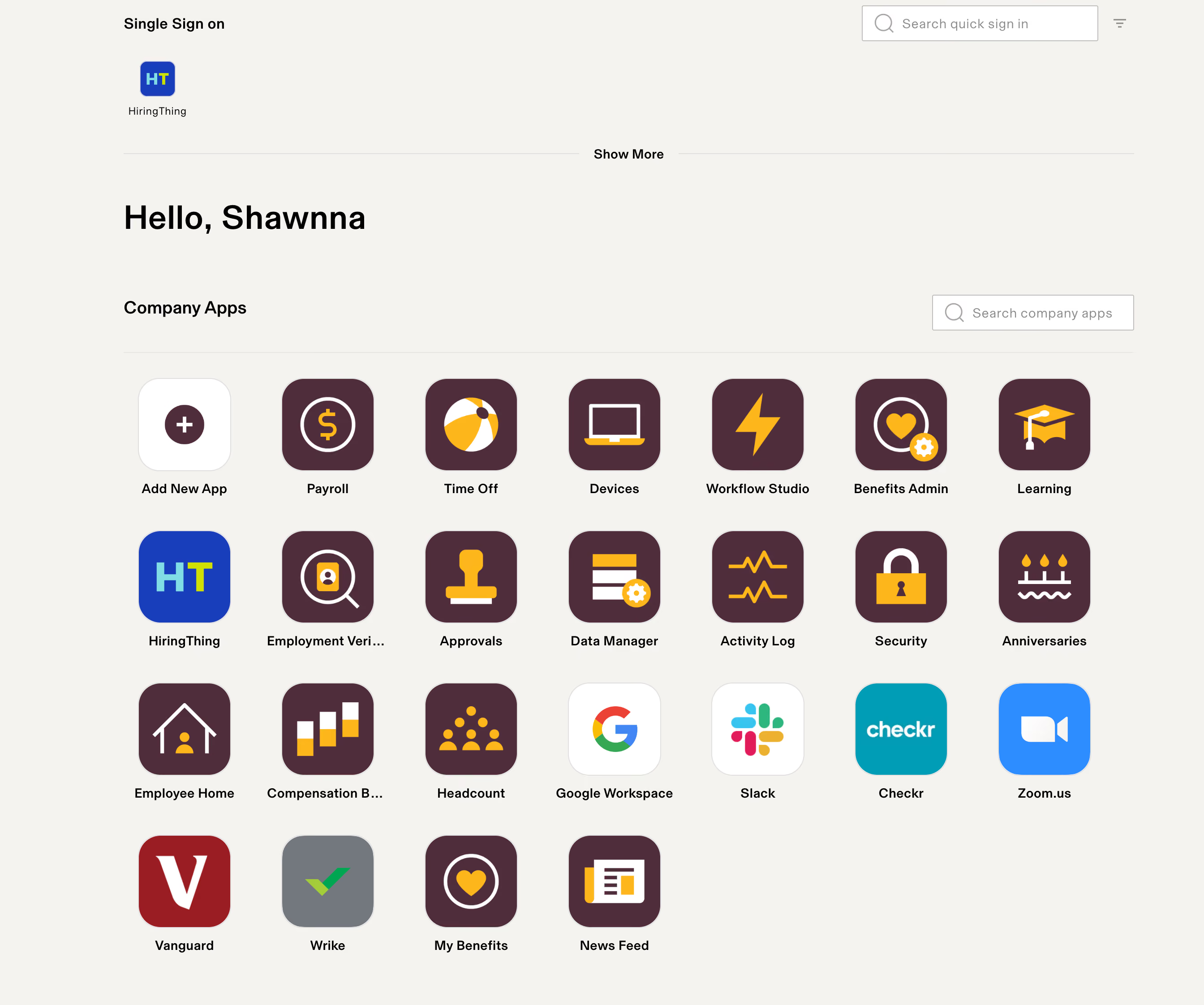
Rippling's user interface is exceptionally user-friendly, with appealing graphics and straightforward instructions, which differentiates it from other more complex HRIS systems. Our employees find it easy to navigate and locate what they need. The modular approach of Rippling, allowing us to activate features as needed, is highly beneficial. Additionally, Rippling's customer service has proven to be responsive and thorough.
Our organization was grappling with highly manual HR processes such as payroll, benefits administration, timekeeping, and time-off requests, which were prone to errors due to being handled via Excel spreadsheets. As our organization continued to grow rapidly, we required a tool that could automate these processes in a user-friendly manner with minimal implementation time. We have been using Rippling for almost two years now.
We find ourselves renegotiating the cost of our contract annually, with sales representatives often pushing for us to add new features instead of facing a price increase. While custom workflows are beneficial, they can be challenging to set up without a clear understanding of the functionality. The payroll function's inability to handle retroactive pay is a significant drawback, requiring manual calculations on our part.
Rippling stands out due to its ease of use and engaging user interface, which makes it more appealing to employees compared to other HRIS systems I've encountered, which often appear sterile and are not intuitive.
When choosing an HRIS, consider both your current needs and future growth. Be wary of systems that might become obsolete as your business evolves or require additional purchases to meet new needs. It’s also crucial to consider the system's cost structure, especially if your organization experiences high turnover or expects significant growth. Lastly, evaluate how user-friendly and engaging the system is for your employees, as a difficult or dull interface might deter them from using it effectively.
Rippling actively responds to customer feedback, making regular recommendations for system upgrades or new modules based on our specific needs. They have significantly improved their Applicant Tracking System (ATS) by incorporating suggestions from users like us during their annual updates.
Rippling is particularly well-suited for small to medium-sized organizations looking to automate their HR processes comprehensively. It's easy to implement, requiring only a small team, and manageable even by a modest HR department.
Rippling may not be the best fit for government contractors, as it lacks certain functionalities required to ensure compliance with specific contract requirements. Organizations in this sector might find other HRIS systems more tailored to their needs.

We use Rippling for many different things, but some of the most important are payroll and benefits. If we didn't have Rippling, we would likely need to hire a full-time payroll person who could also manage benefits administration. Additionally, because we are so small, we likely wouldn't have great options for benefits whereas with Rippling we have more options.

It is very comprehensive, providing everything I need, which eliminates the need to connect multiple different platforms. Also, the site is clean, and it runs smoothly and quickly.
We use Rippling for a variety of functions including employee offer documents, onboarding, payroll, PTO, expense reimbursements, and benefits. Without it, we would need to hire several different people, which isn't feasible as we are a smaller company. It makes sense for us to use Rippling instead of hiring a large number of support staff.
There's nothing I really dislike about it; I feel like it gets everything I need done without any headaches.
With one of the companies I used in the past, it felt like I still needed many other tools and platforms to connect to it, whereas Rippling seems to have everything integrated already.
I think it depends on the cost-benefit for you. For us, as a small company, it makes sense to use Rippling rather than multiple different platforms and people. However, for a larger company, it might be more cost-effective to manage these processes in-house.
I haven't noticed any changes myself.
I think it's best for small to mid-size organizations that would benefit from having everything in one place with one provider.
Maybe a larger company, as they may have more economies of scale where the cost-benefit of using different platforms or hiring more support staff could be more beneficial to them.

We mainly used it for W2 and 1099 payroll, onboarding, offboarding, and reporting. For an added fee, you can utilize some of their workflow automation tools to optimize some of the more manual workflows.
- Domestic U.S. payroll: Rippling is recommended for a predominantly salaried workforce. There is a very basic timekeeping system that we utilized for our hourly non-exempt workforce for time off tracking and 1099 contractors. The salaried payroll is very easy to use; however, the state registration for payroll can be a bit complex. Reaching a payroll support person can also be a bit of a headache, especially during a payroll crunch, but there are also many helpful payroll support people. You can utilize chat, or they can call you to resolve issues. One of the biggest challenges we have faced was opening a payroll ticket and taking days, up to weeks, for it to close if it was a complicated issue. You do not get a dedicated customer support representative so definitely take that into consideration.
- International payroll: International Payroll: International Payroll is not supported, however, you can store HR Information for international employees. It's a bit more of a hassle to keep their information and turn off their payroll info, but helpful for having a full scope of the employee base.
- Onboarding / offboarding: The integration for onboarding with greenhouse ATS was a bit clunky. Names and basic information would transfer over from Greenhouse, but you would have to search the name on the Rippling end. Creating the onboarding packet was not too difficult, the user interface is pretty basic, but easy to set-up and administer for e-signature. Offboarding can be done in advance of a departure, and access points, notifying IT, etc. can be set up in an easy to use workflow. Departed employees can still access a limited version of their employee portal to see their W2s and Paystubs via Rippling after they've departed the company which is extremely useful.
- Laptop Inventory Management: We originally had paid for this service as we were a small HR team of 2 with no IT department at first. It's helpful to have as a service, but unfortunately it over promises and under delivers. There are frequent inventory shortages for laptops, so the best thing to do is purchase in bulk or purchase laptops to have on-site and send them out to new employees outside of the system. If you have your own IT department, in-house is a better way to go since this does cost a significant amount of additional charge.
- I liked that Rippling provides robust reporting across their different functionalities.
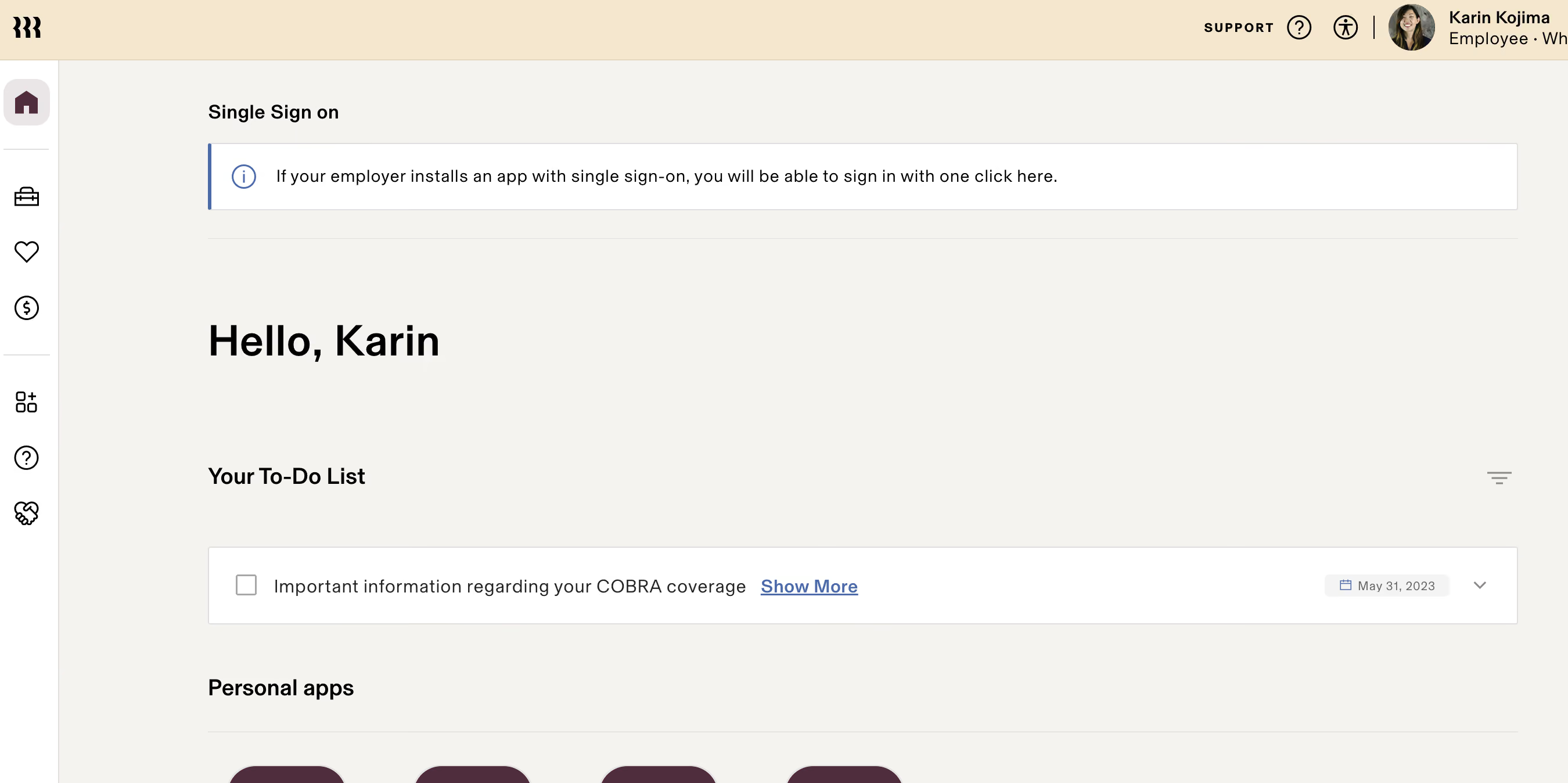
- Rippling does a great job at making a user-friendly interface to navigate.
- I like that it has all the bells and whistles you need for a small to medium sized business.
We started off using Gusto as our Payroll/HRIS. Our team grew from under 50 to about 110 in 6 months. Unfortunately, we quickly outgrew Gusto's Benefits, Reporting, and HRIS capabilities.
A nearly all-in-one system is difficult to find. Coming from Gusto, we knew we wanted to keep our benefits, payroll, and HR information in one system, with great functional reporting across these data points. This cross functional data helped us create great reports that helped us visualize our YoY growth, retention rates, benefit enrollment data, headcount, and much more.
- They nickel and dime every part of the platform, so you'll end up with hidden costs for unlocking parts of the platform that are usually included in others, and you'll end up with a larger cost than you originally thought. Ask for an upfront detailed overview of the costs of all the modules.
- Subpar customer service with not a lot of dedicated support.
Overall, it's a good competitor for small to medium-sized HRIS solutions because it includes HRIS/Payroll capabilities. They extend into all facets of HCM, but they do payroll, benefits, and reporting best. I appreciate they delve into different avenues, but a perfect all-in-one is impossible, so it's best to stay with what you're best at. In terms of an "all-in-one" solution, if your team is under <500 employees, it's a decent solution. The platform and company is still growing, so be patient with changes and bugs. But overall, 7/10 experience utilizing Rippling. They do listen to customers, advocate for change within the system, and move quickly.
- Budget - Rippling can start off inexpensive, but when you add the bells and whistles, it can get quite expensive. Make sure to ask what each module costs independently.
- Payroll Audience - If your population includes a significant population of hourly time keeping needs, this may not be the best platform. You can also integrate various time tracking tools as well.
- All-in-One - Unfortunately, there still isn't a perfect solution. It's important to know which modules to prioritize. If you care about your payroll, HRIS, and benefits admin in one, this is a good system for a small to medium-sized company.
- Customer Support - If you need significant customer support, Rippling may not be the best fit. It was a challenge getting a hold of our reps at times. For payroll support, you don't get a dedicated person so it can be a challenge. If you prefer to have white-glove service here, this may not be the best unless things have changed.
- App Integrations - Rippling is a closed environment, meaning you cannot create your own integrations. However, they do have a lot of APIs available for many of the largely popular apps/tools. Most of our tech stack was already aligned to what we used within Rippling so it wasn't too difficult, but it's a serious point to consider for things like your accounting system, time tracking system, expense management, etc.
Since the time we started utilizing Rippling, they have implemented significant changes to their platform. They added PEO services, global payroll, LMS, pulse surveys, and a few other new functionalities. They truly are innovating to become the all-in-one mid-enterprise platform.
I believe Rippling is great for companies under 500 employees with a predominantly salaried workforce. This tends to be more common in tech centered environments. Also when you have a lean team around Payroll/HR, it can be a great system to utilize.
A predominantly hourly non-exempt workforce. I think the platform would not be great for 500+ or <50 employees. It would be expensive for <50 employees, and be too manual for 500+, even with its workflow automation because of the integrations not working properly.
.avif)
Deel

Deel

Paylocity
Paylocity
HiBob
HiBob

BambooHR
BambooHR

Gusto
Gusto
Rippling has always been about catering to the SMB market, who value having easy to use tools in a single place where the whole team can access them. Enterprises looking for a more robust platform might find it too simple. We would also argue that, since larger companies are not really their niche, the CS team might not be very used to dealing with larger teams.
Proxy, Dwell, Superhuman, Expensify, Checkr
- Manage devices: Among other things, Rippling lets you manage and protect the computers, phones, and tablets that your employees use for their work.
- App management: Another feature that's particular to Rippling is their mission control for work apps. In brief, you can manage users and their access for tools like Slack, Office, Google Workplace, and Dropbox.
Rippling also offers:
- Payroll
- Benefits
- Talent Management
- Time & Attendance
- Automated Onboarding & Offboarding
- PEO
When it comes to integrations, Rippling is one of the leaders in the HR tech space, being able to integrate with over 500 tools. Some of them are Lever, Greenhouse, and Quickbooks, for example.
Rippling starts at $8 per month per user, but the final fee you pay will vary depending on which modules you'd like to use (or if you want the whole platform) and for how many people.
Rippling is a good bet for SMBs that prioritize user experience and would appreciate having most of the HR tools in one platform. They’ve designed the product to be friendly for all the company to use and they have tried to incorporate all the HR tools a regular department would need.
Although they have always been geared towards small and medium-sized businesses, Rippling has consistently been adding new features and modules year on year. For example, their HR offering was basic at first, and now, in 2023, it features everything you’d expect from an ‘all-in-one’ HR platform, such as Benefits, Talent Management, Time & Attendance, and Payroll, making it a fully-fledged HRMS. This continual improvement means that the product is steadily catching on with companies of all sizes, even on the enterprise level.
Typically, Rippling takes around 2 weeks to implement, but times will vary depending on the scope of each project.
Rippling has a Customer Success department, a CSM toolkit, and a help center.
Rippling has an interesting origin story, in big part because they were founded by the former Zenefits CEO and one of its Co-Founders, Parker Conrad, after a somewhat dramatic exit. Conrad co-founded Zenefits in 2012. Part of what inspired him to help create the product was the launch of Barack Obama’s Affordable Care Act and his experience as a cancer patient.
Zenefits became one of the quickest-growing tech startups of its era, getting valued at $4.5 billion within two years of its inception. Since then, it has remained a constant household name in the world of HR software for American SMBs. Even after some controversy.
In 2015, it was reported by Buzzfeed News that the startup had allowed salespeople to sell health insurance that they were unlicensed to sell, since in the US the law requires insurance brokers to be licensed. The company came under heavy scrutiny for failing to enforce these legal requirements, to the point that Conrad had to step down from his role as CEO.
From the ashes, Parker Conrad teamed up with Zenefits’ former director of engineering and founded Rippling. The driving idea was to create a platform that could simplify HR in general through automated workflows. The focus was on going beyond benefits and payroll and touching upon everything that HR is traditionally supposed to do.
Founded in 2016, the product caught on somewhat slower than Conrad’s former project, but they solidly built a name for themselves by orienting their product towards companies with less than 2000 employees.
Rippling secured $1.2B in funding across five rounds, with their latest funding raised on Mar 17, 2023, through a Series E round. The company is backed by 33 investors, with Greenoaks and Empede Capital being the most recent contributors.
To this day, they continue to grow consistently and are considered one of the top players in the HRMS space for SMBs. Also, they now hold their own licenses for insurance services, PEO, and payments. You can consult the exact info on those via their website.
Company HQ
San Francisco, CA
Number of Employees
1290+
Year Founded
2016
Amount Raised
Last raised $250M via series D funding.
FAQ
About SSR

We spend hundreds of hours researching the best HR and recruiting software so you don’t have to. We never take money from vendors during our research phase and rely heavily on practitioners and experts to help us recommend the right software. However we may earn a small fee if you click on vendor links on this page.

