Proton Versus the Competition

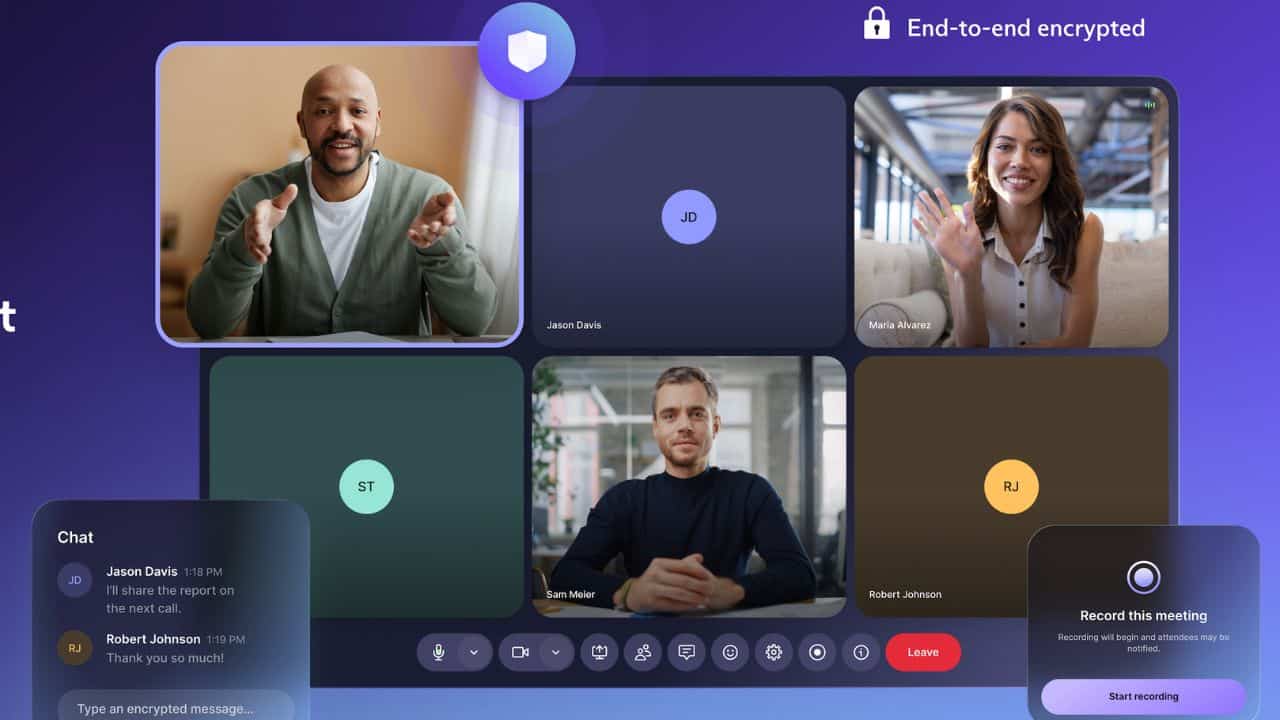
Proton Workspace bundles encrypted email, calendar, cloud storage, docs, sheets, video conferencing, VPN, and a password manager into a single subscription governed by Swiss privacy law. For small teams whose collaboration needs center on secure communication and file sharing rather than complex project management, it replaces multiple tools at a competitive price point, while ensuring not even Proton itself can access your data.

If you're ready to get a Proton demo, we suggest getting in touch for a look at the product and quote. Otherwise, read on!

Ratings

Ease of Use

Best For

Key Differentiator

Price

From $12.99/user/mo (annual)

Free Trial

Yes

PROS

  • Full productivity suite (Mail, Calendar, Drive, Docs, Sheets, Meet, VPN, Pass) in one subscription, eliminating the need for separate security tools.
  • End-to-end, zero-knowledge encryption across all apps — ISO 27001 certified and SOC 2 Type II audited.
  • Competitive pricing at $12.99/user/month (paid annually, $14.99 if going month by month) bundles VPN and password manager that competitors like Google Workspace charge extra for.
  • 14-day free trial, plus a 30-day money-back guarantee.
  • Easy Switch migration tool simplifies moving from Google Workspace or Microsoft 365.

CONS

  • Limited third-party integrations compared to Google Workspace or Microsoft 365 — a real constraint for teams reliant on CRMs, project management tools, or cross-platform calendar syncing.
  • No native shared inbox feature; teams needing collaborative reply on shared addresses will need workarounds.

Need Help? Talk to an HR Software Advisor!

Get 1:1 help from an HR Software Advisor
Save time with recommendations in less than 20 minutes
Save up to 30% with our pricing insights

Tell us more about your company & an HR Software Advisor will help you find the right software

Phil Strazzulla
HR Tech Expert, Harvard MBA, Software Enthusiast

Need Help? Get Custom Recommendations for Best Team Collaboration Software

Talk to An Advisor
Over 3 million HR leaders trust our advice

Proton Review

Proton Workspace is an unconventional pick for a team collaboration guide, but it earns its place for a specific buyer: the small business that needs foundational digital infrastructure: email, file storage, docs, video calls— and wants it locked down from the start.

What sets Proton apart from every other tool on this list is its encryption architecture. Unlike Google Workspace or Microsoft 365, where the provider can technically access your data, Proton uses zero-knowledge encryption; meaning the company itself cannot read your emails, files, or documents. For HR teams handling sensitive employee data, legal documents, or compensation details, that’s a meaningful differentiator, not just a marketing claim. The platform is ISO 27001 certified and SOC 2 Type II audited, which simplifies compliance with HIPAA, GDPR, and CCPA.

We explored the Workspace Standard plan, which covers Mail, Calendar, Drive (with Docs and Sheets), Meet, VPN, and Pass at $12.99/user/month. Compared to piecing together a Google Workspace subscription, a standalone VPN, and a team password manager, the bundled cost comes out lower. Proton has also never raised prices on existing customers; a rarity in SaaS.

That said, feedback from business users we consulted consistently flags the same limitation: integrations. One cybersecurity consultant who ran their company on Proton for over a year noted that calendars won’t sync with tools like Teams or Salesforce, and that non-technical employees struggled with the workarounds. If your team lives in a SaaS stack— CRM, project management, shared calendars across platforms— Proton might create friction. Docs and Sheets, while functional for basic use, also lack the depth of Google’s equivalents. Other reviewers echo this: they praise the encryption and reliability but note the ecosystem is still maturing.

Proton Workspace works best for small, privacy-conscious teams. Think legal practices, healthcare consultancies, financial advisors, nonprofits, or early-stage startups where email, file sharing, and video calls cover 90% of collaboration needs.

What users think of Proton

No items found.

Proton Alternatives:

Jira

It’s easy to collaborate with teams via Jira’s visual boards. Create cards with multiple subtasks and set up task dependencies for collaboration on projects. All users can leave comments on each task to keep conversations relevant to each issue.
Popularity Score
4.1 / 5
User Score
4.3 / 5
Product Score
4.2 / 5
Visit Website

Jira

It’s easy to collaborate with teams via Jira’s visual boards. Create cards with multiple subtasks and set up task dependencies for collaboration on projects. All users can leave comments on each task to keep conversations relevant to each issue.
Popularity Score
4.1 / 5
User Score
4.3 / 5
Product Score
4.2 / 5
Learn More

Monday.com

Not many project management apps offer functionality for so many types of businesses, ease of use, and affordability like monday.com does. It also offers gamification for users, such as visual celebrations for completing a task, which makes it fun and motivating for everyone in your department or company to use.
Popularity Score
4.2 / 5
User Score
4.6 / 5
Product Score
4.3 / 5
Visit Website

Monday.com

Not many project management apps offer functionality for so many types of businesses, ease of use, and affordability like monday.com does. It also offers gamification for users, such as visual celebrations for completing a task, which makes it fun and motivating for everyone in your department or company to use.
Popularity Score
4.2 / 5
User Score
4.6 / 5
Product Score
4.3 / 5
Learn More

Connecteam

Connecteam has a host of features that make it easy for employees to chat, share files, and manage tasks, all with a user-friendly interface that works across devices. It also has a free plan that gives you full access to all of its 3 hubs: Operations, Communications, and HR & Skills.
Popularity Score
4.5 / 5
User Score
4.6 / 5
Product Score
4.6 / 5
Visit Website

Connecteam

Connecteam has a host of features that make it easy for employees to chat, share files, and manage tasks, all with a user-friendly interface that works across devices. It also has a free plan that gives you full access to all of its 3 hubs: Operations, Communications, and HR & Skills.
Popularity Score
4.5 / 5
User Score
4.6 / 5
Product Score
4.6 / 5
Learn More

Miro

Miro’s online collaboration tool that lets you start with a whiteboard and build your custom flowchart or mind maps with prebuilt shapes, sticky notes, markers, and other tools with all of your remote teammates. Then you can save those boards.
Popularity Score
4.5 / 5
User Score
4.6 / 5
Product Score
4.7 / 5
Visit Website

Miro

Miro’s online collaboration tool that lets you start with a whiteboard and build your custom flowchart or mind maps with prebuilt shapes, sticky notes, markers, and other tools with all of your remote teammates. Then you can save those boards.
Popularity Score
4.5 / 5
User Score
4.6 / 5
Product Score
4.7 / 5
Learn More

Podio

The difference between Podio and a typical team collaboration app or Podio and project management software is that it’s totally customizable, from the dashboards to the apps you can create with little to no coding knowledge needed.
Popularity Score
4.6 / 5
User Score
4.2 / 5
Product Score
4.6 / 5
Visit Website

Podio

The difference between Podio and a typical team collaboration app or Podio and project management software is that it’s totally customizable, from the dashboards to the apps you can create with little to no coding knowledge needed.
Popularity Score
4.6 / 5
User Score
4.2 / 5
Product Score
4.6 / 5
Learn More

Who shouldn't buy Proton

Proton Customers

Over 100,000 organizations use Proton’s business tools, ranging from small nonprofits to Fortune 500 companies and United Nations agencies, though specific client names are largely undisclosed.

Proton: For privacy-first teams that need encrypted email, storage, docs, and calls under one roof
visit Proton

Proton Key Features

Proton Key Integrations

Proton Pricing

Proton Workspace Standard costs $12.99/user/month (billed annually) or $14.99/month. Workspace Premium, which adds Lumo AI, 3 TB storage, and 250-participant meetings, costs $19.99/user/month (annual) or $24.99/month. Enterprise pricing is custom. All plans include a 14-day free trial.

Proton is Best For

Proton Workspace is best for small to mid-sized businesses that prioritize data privacy and need a secure, all-in-one alternative to Google Workspace, provided they don’t rely heavily on third-party SaaS integrations.

How has Proton Changed Over Time?

Proton Implementation

Proton Customer Success

About Proton

Company HQ

Number of Employees

Year Founded

Amount Raised

FAQ

About SSR

We spend hundreds of hours researching the best HR and recruiting software so you don’t have to. We never take money from vendors during our research phase and rely heavily on practitioners and experts to help us recommend the right software. However we may earn a small fee if you click on vendor links on this page.

Learn More

Proton Alternatives

Jira

Well-established software development collaboration tool

Popularity score
4.3 / 5
user score
4.3 / 5
Product score
4.2 / 5
Monday.com

Best team collaboration software for scalability

Popularity score
4.5 / 5
user score
4.6 / 5
Product score
4.3 / 5
Connecteam

Free collaboration tool with built-in features for HR operations

Popularity score
4.6 / 5
user score
4.6 / 5
Product score
4.6 / 5
Miro

Best for remote team collaboration via collaborative whiteboard

Popularity score
4.6 / 5
user score
4.6 / 5
Product score
4.7 / 5

Review Methodology

We take our research process seriously and want to make sure we are presenting our readers with the very best solutions in a given software category. Check out this guide to learn how we evaluate vendors before featuring them in our buyer guides.

Learn More