

Pinpoint is among the most sophisticated applicant tracking systems: it’s got a modern UI, extensive integrations, and a top-notch career site builder meant for in-house talent acquisition and HR teams at fast-growing companies.
Ratings
Ease of Use
Best For
Key Differentiator
Price
Free Trial
PROS
- Pinpoint is an agile ATS that is highly customizable and values collaborative hiring.
- It’s got a simple and transparent pricing structure.
- Pinpoint offers unlimited jobs and team members in all of its plans.
- Their customer service team is highly praised by users.
- The career site builder is very robust, allowing teams to attract and convert the right talent.
- There are over 100 HR software integrations to choose from, and Pinpoint’s team is adding 3-5 every month.
CONS
- The employee onboarding module does cost extra.
- It isn’t the best fit if you’re looking for the cheapest ATS.
- There free trial is only available upon request.

Need Help? Talk to an HR Software Advisor!
Tell us more about your company & an HR Software Advisor will help you find the right software





Pinpoint was started with the goal of building a user-friendly applicant tracking system that created a strong candidate experience, as well as a robust system for recruiting teams to leverage when hiring.
The look and feel is in keeping with best in class software companies globally. So, it’s easy on the eyes. Where it stands out from the crowd is that this system was built with the user in mind - both candidates and recruiters/hiring managers/TA admin.
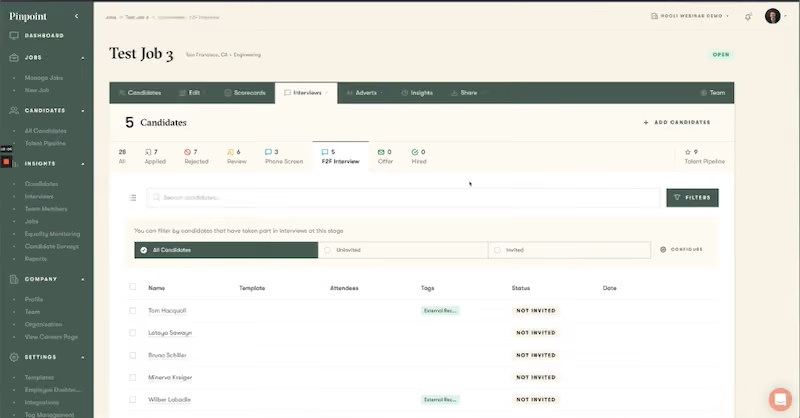
This manifests through one of the most powerful features: the ability for recruiting teams to build and manage beautiful career sites that are designed to attract and convert candidates. It’s easy to apply, and for those not ready they can opt into a talent community to stay in touch with your company.
In the recent past Pinpoint has also built out an employee onboarding module. The idea was to keep the positive experience going for hires as opposed to dumping them into an old school HRIS. This module is also build with simplicity, but everything you’d expect from a modern onboarding solution - from work buddies to I9s.
For recruiting teams, you can manage your multilingual career site and showcase employee testimonials, create custom user roles, manage talent pipelines, and manage the entire recruiting process with different workflows for different types of roles.
Pinpoint also stands out when it comes to power. Your team can build in automations (send candidates an email when they move to a new stage in hiring process), automate interview scheduling, or take a look at how your team is doing when it comes to equitable hiring practices.
Like all strengths, power can also be a weakness. If you’re a small company that only hires a few people per year, or has one HR person that does recruiting for 5% of their time, this system is too much for your team. You’ll be better off using an ATS that is only for posting jobs and collecting resumes.
As mentioned previously, this solution is also not for global Fortune 500 companies that need all the many bells and whistles you’ll find in a much more complex solution like WorkDay, or the ability to straight up customize your solution like you can by spending a few hundred thousand on Taleo consultants.
That said, it’s hard to encourage you enough to get a demo of this platform assuming you aren’t a Fortune 500, extremely small company, or looking for the cheapest solution around - this ATS is that good!




We use Pinpoint daily, it's an ATS, so it does the typical things an ATS does. This includes, creating career pages on our corporate website that explains some basics about Article, and allows a candidate to decide if they’d they feel they’d be aligned to working with us.
On the career site, all the open jobs are visible for potential candidates to see. They can then decide to apply, upload a resume and fill in some basic info. On our side of the ATS, we create the jobs that are posted - designing the interview flows, application questions, and scorecards, then advertising them to the selected job boards.
We use Pinpoint to evaluate the viability of applicants, referrals, and candidates we source, being a single point of truth. Once candidates are selected to proceed, we use Pinpoint to move through the interview process, giving the hiring manager visibility into the hiring process.
For candidates, we use Pinpoint to schedule and communicate with candidates, who are selected for this process, but also to reject those candidates who are not. There is a lot more of course but this is a basic walk-through, and I’d assume if you’re reading this, you have a good idea of what an ATS does.

They're an ATS that is ascending, and not coasting on reputation; they've continuing to evolve, with new useful features, and integrations quickly rolling out.
Overall, I’d argue that Pinpoint puts candidates first, with easy applications and great branded communication. Adding to this, candidate-centric design is the built-in self-scheduling for interviews, and including a candidate NPS score - this is key to letting my team and I understand the candidate experience.
The new automation feature they launched where you can create rejection emails based on application questions has saved my team a lot of time by not having to screen candidates who do not meet minimal requirements, currently, this is about 29% of applications. We have been creating custom rejection emails for each automation, this allows the candidate to know specifically why they were rejected, and if they answered the application incorrectly by mistake, allow them to reapply.
I’m also a fan of their pronoun feature, which allows candidates to share their preferred pronouns. Little touches can make a huge difference when building inclusive hiring practices.
They continue to have fantastic support and as a partner, they really care about my team and our success. Adding to this are the people they hire, who are really great and it makes interacting with them so much easier.
With less talk/hype and more substance, you can tell they focus on the product and customers, not on the hype marketing machine jumping on whatever the trendy topic is.
We have used Pinpoint for 2+ years now, with a TA team that was quickly growing (we’d have over 20 users at peak). As an organization, we had just started hyperscaling, and we end up growing over 3x in under 18 months.
As we started on this journey, I quickly found that the ATS we were using, couldn’t keep it up. It was, designed for SMBs and smaller recruitment teams. One of the biggest pain points was it lacked the ability to reject candidates through an anonymous email, instead, when candidates were rejected it came from each recruiter's email - given the volume of applicants, this solution was not feasible and would lead to a poor candidate experience.
Additionally, the previous ATS ecosystem was small and wasn’t growing quickly, and it lacked the ability to build a career site out of the box.
We also needed the ATS to be easy to use, not just for the recruiters, but also, for the number of new hiring managers who would quickly need to understand how to use the ATS. This made the case to look replace the old ATS clear, we made a scorecard and started to evaluate our ATS options, ultimately landing on Pinpoint.
- Some of the UI/UX could be improved, particularly when you're screening large volumes of candidates, minor but it would be helpful.
- Because it lacks a deep integration into LinkedIn, we need to use LinkedIn’s “job wrapping” feature.
- The newer automation feature is really powerful, however, setting them up requires too many clicks, it’s not a huge deal, but it could be made smoother.
Much easier application process than most ATSs, making it very candidate friendly. Overall, they nail the mid-market really well, with enough features, integrations, and reporting, but they’re not hard to use and overly cumbersome compared to big ‘enterprisey’ ATSs.
When selecting an ATS I’m a proponent of using the following ranking:
- Candidate experience, regardless of the market, the best talent will always have options, if the application experience and communication experience is poor, they’ll choose to work elsewhere
- Recruiter experience since they use the tool the most. If they don’t like it, or it’s overly complex they’re going to work around it, rather than through it
- Hiring manager experience, will they log in, and actually use it
- Support, if I have an issue will it get resolved?
- Ecosystem/ integrations, an ATS should not do everything, rather it’s the hub to connect point solutions with
- I'm a huge fan of how they rolled out candidate pronouns, allowing candidates to share their preferred pronouns when applying.
- Multiple new integrations have been launched.
- Much faster page loading response times from when we first rolled it out.
Mid-sized to enterprise organizations.
I'm not sure. Maybe small companies that don't have a dedicated HR team.

Workable

Workable

Greenhouse
Greenhouse

Deel
Deel

Spark Hire
Spark Hire

ClearCo
ClearCo
Pinpoint is for companies that hire a lot (at least 30/yr, the more the better), and put a focus on talent. Realistically, you get what you pay for in this solution, and so if you are optimizing around price, this isn’t the solution for you.
It’s also worth noting that companies that have bad existing systems sometimes struggle to utilize Pinpoint. If your recruiters/hiring managers/employees have been used to the brain damage of a legacy system, it will take time for them to trust and utilize the power of this ATS - don’t underestimate that.
Pinpoint is also not a good fit for companies that don’t hire much. It starts at $345 per month, so it is really hard to rationalize if you are hiring only a dozen or two per year. They do have smaller customers with less than 100 employees, but most of these companies are growing rapidly.
Lastly, if your team requires massive customization, this is not the ATS for you. A good way to tell if this is your company is to look at your budget. If you have >$100k/year allocated just to customizing the ATS, then stick to the legacy providers (well, actually you should re-evaluate why you need these specific customizations and if sticking with a sub par legacy ATS is worth it).
Pinpoint is closing in on 1,000 customers with current names like CoinShares, Pathways Global, and Grant Thornton.
- Career Site Builder: This is one of the best parts of Pinpoint. Your recruiting team now doesn’t have to rely on IT or marketing to change your career site. You can also add information about your ERGs, career paths, interview prep info, and anything else you want to showcase to candidates.
- Employee Onboarding: Pinpoint customers can use the system to onboard new employees (as a note, this module is extra outside of the core ATS). It covers the warm and fuzzy stuff like who your work mentor will be and what to expect culturally, as well as the typical employee paperwork, handbooks, etc.
- Job Board Distribution: You can easily distribute jobs to publishers like Google, LinkedIn, Indeed, etc.
- Recruitment Process Automation: The point of an ATS is to automate in order to help your recruiters save time. Their automation allows you to simply set up this then that type of workflow to save you time (and sanity). For example, you may want to automatically send an email linking candidates to relevant employee profiles, and a scheduling link, when they are moved to a certain stage in the recruiting process.
- DEI: Equality reporting is a big part of their product strategy. You can take a look at how candidates of various demographics do in the process, and what touchpoints they have. You can also do blind recruiting so that gender/race doesn’t influence your colleagues.
- Candidate Feedback: This system also has a built-in candidate survey to collect standardized (eNPS) and unstructured feedback on your candidate journey.
- Custom Report Builder: You can build your own custom reports based on any data available in Pinpoint. Maybe I want to build a report showing me the pipeline for Java engineers in Boston, or a report that shows me the time to hire remote customer service agents. The world is your oyster. You can also schedule reports to be sent out whenever you want (maybe certain reports go off quarterly to the C-suite before board meetings so they know what’s going on in TA).
Like most top ATS’s Pinpoint has invested in their integrations so that if you love your video interview platform, you don’t have to give it up to use their system.
They have integrations with:
- Assessment tools like Vervoe and Coderbyte
- HRIS’s like Bob and Bamboo
- Job boards like LinkedIn and talent.com
- Lots of other tools from background checks to SSO
They add 3-5 new integrations each month, many of which you can activate in minutes when you use Pinpoint.
In general, Pinpoint’s pricing is based on the size of your company. Their pricing starts at $345 per month when billed annually, according to our research.
Companies that want enterprise features (multi-page career sites, multi-lingual support, custom integrations, help on data migrations, etc) will start at $1,200/mo (also billed annually).
We think this pricing is fairly comparable with other truly best-in-class ATSs. This product becomes valuable to companies when they start hiring more than a dozen people per year, otherwise, you may be better off using simpler solutions.
We also appreciate they have a lot more transparency on pricing versus many other players in the space.
Pinpoint is a wonderful ATS for companies that value their candidate experience, and have the need for a tool that will help increase the productivity of their recruiting team through a better career site, talent CRM, and integrations with your favorite HR Tech.
Pinpoint's recent updates focus on recruiter workflow efficiency, internal mobility, and broader AI and screening capabilities:
- Saved filtered candidate views let recruiters store and reuse search filters by stage, location or custom attributes for parallel pipelines and passive candidate pools
- Radius-based location filtering enables geographic search around a fixed address for proximity-sensitive roles
- Internal job visibility widget displays open roles without requiring employee login, supporting internal mobility in distributed environments
- Onboarding without confirmed start dates supports contingent offers, phased starts and visa or relocation-dependent hiring
- Organization-wide workflow automation lets admins apply standardized rules across all job templates for high-volume recruiting
- Expanded job drawer metadata access gives all users visibility into custom fields and job post metadata regardless of permission level
- One-way video interviews added for fast, consistent early-stage screening
- AI tool integrations allow Pinpoint to connect with existing AI tools in the recruiter's stack
- Support chat repositioned to left margin to reduce UI disruption during resume review and job configuration
The current record for go live at Pinpoint is 3 days. However, the average timeline is more like 4-12 weeks, depending on how complex your organization is (large enterprise customers are looking at 3-6 months). Companies that are more organized and execution oriented will see drastically lower implementation times.
Any size company gets a dedicated account manager to walk them through the entire implementation process.
Recently, they’ve added a self-serve onboarding process. There are 2 hours of explainer videos that help you navigate through each step of the process. This is great for companies that don’t want to wait to schedule time with their account rep and want to just get going.
Each customer gets a dedicated rep that looks after you throughout implementation. Afterwards, you have access to the customer success team. Most interactions start with chat where the average time to speak to a human (not a bot!) is 2 minutes.
Pinpoint was started by Tom Hacquoil. Tom had previously run a cloud computing company where M&A was a big part of their growth strategy. He realized very quickly that talent was the most essential aspect of growing this company. So, he started a bootcamp to train new employees.
Tom didn’t think any existing options met his bar for a quality candidate experience, so he built his own tool to manage applicants for the bootcamp. This was the first version of Pinpoint.,
From there, the product grew with recruiting and candidates in mind, while translating the best ideas from sales/marketing/product/customer service to recruiting.
Company HQ
Jersey, UK
Number of Employees
71
Year Founded
2017
Amount Raised
Pinpoint has impressively bootstrapped its business. It is really hard to get a complex product like an ATS to this point without raising tons of venture capital money, but they’ve done it!
FAQ
About SSR

We spend hundreds of hours researching the best HR and recruiting software so you don’t have to. We never take money from vendors during our research phase and rely heavily on practitioners and experts to help us recommend the right software. However we may earn a small fee if you click on vendor links on this page.