


Criterion helps midmarket orgs gain better control over their human capital by combining the entire talent lifecycle into a single interface: applicant tracking, onboarding, compensation, benefits, performance, and learning management. The HCM also has good scalability—it can accommodate well whether you have 200 or 5,000 staff.
Ratings
Ease of Use
Best For
Key Differentiator
Price
Free Trial
PROS
- Flexible and reasonable pricing: starts at $4.50 per employee per month.
- All-in-one platform combining ATS, payroll, benefits, and learning management.
- Open API for app integrations.
- Native biometric check-in feature.
CONS
- Mobile app users reported experiencing login issues and frequent crashes.
- There’s a steep learning curve for employer users.
- The implementation process can be lengthy.

Need Help? Talk to an HR Software Advisor!
Tell us more about your company & an HR Software Advisor will help you find the right software





Criterion satisfies every feature note we were hoping for in an enterprise-centric HCM. It covers talent acquisition, onboarding, attendance, benefits, compliance, communications, enrollments, payroll, and other HR tasks through a single central database. Thanks to this, finding employee information is quick and easy, and its ability to eliminate double data entry is just on par with other robust HCM listed in this buyer guide.
Two standout features of Criterion that receive lots of love from admin and employee users alike are its time tracking and payroll.
The time and attendance feature includes scheduling and labor tracking that can work for both on-site and remote hires. It also supports biometric check-ins where employees can clock in with a fingerprint—a huge plus for teams in environments like factories and warehouses.
As for payroll, Criterion has one-click integration with payroll systems and can process payroll and taxes quickly with minimal user input. Plus, the employee self-service portal that centralizes all communications between managers and staff regarding time tracking, PTO, and performance reviews is such a great element in driving better team collaboration and engagement.
Criterion offers a mobile app that allows workers to track their time on the go. However, it wasn’t as good as we expected, with system crashes and login issue loops happening here and there as we tested it out.
It’s no secret that Criterion is recognizable by its feature richness but not so much in appearance. The UI looks quite dated, and teams prioritizing simplicity over comprehensiveness may find this HCM’s layout a bit too information-heavy.
Owing to its extensive feature set and, especially, formula-driven configurations, employers may encounter some learning curves to get used to all the features Criterion offers. For the same reason, the time to get the software up and running is quite long, with implementation taking 2 to 6 months to finish.
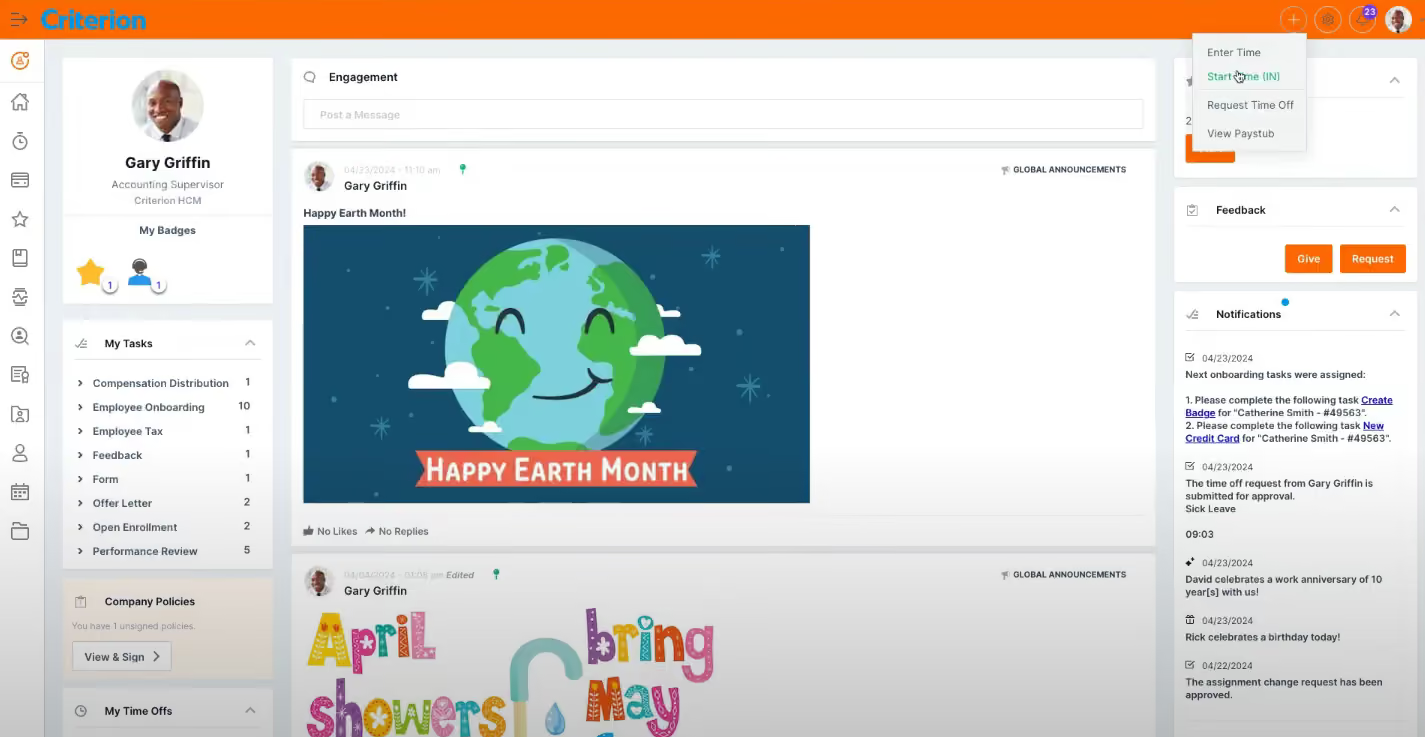


We used the employee records management feature which helped us organize our HR files and create some needed structure. We also used the benefits administration where we worked with Criterion to handle open enrollment and carrier communication. We also used the hiring features including the recruiting and applicant tracking system.
We were considering using the Learning Management System but we didn't have enough manpower to help create the necessary documents and trainings to transition into that system.
We also used the payroll options for a short period of time before transitioning to QuickBooks payroll.
- Good reporting options are available on Criterion that helped us make some workforce decisions.
- We had a wonderful customer service agent who often made herself available to us whenever we had an issue. This is very rare with SaaS CX these days!
- Fast payroll processing with automated aspects to make the process quick and easy.
Our company needed to centralize and streamline the entire employee lifecycle so we researched HCM options and Criterion was the first one we tested. We ended up using it for just less than a year due to the difficulty of using the system.
Our team found it to be a steep learning curve. Before long, they were creating workarounds and alternative paths instead of using the system as intended. We were drawn to Criterion based on its full HCM platform and the fact that it was meant for mid-sized businesses.
- Criterion has a steep learning curve.
- The platform feels out of date and not modern.
- We were promised a few things throughout the sale/demo stage that didn't end up being true.
Criterion has more customizable options than things like ADP Workforce Now provides. Better customer service than most competitors.
The price is steep so consider what pieces are necessary and what could be split up amongst the team. You can buy by the bite with Criterion so think through your payroll processing options before jumping straight to them. Think about the implementation process as it's a very difficult software to transition to. Be sure you and your team have the bandwidth!
Criterion now offers some AI tools for automating tasks, finding compliance issues, and more. It also has been acquired by Sage, which is an accounting and ERP software provider.
Mid to large sized businesses with more than 200 employees. Industries like construction, education, franchise businesses, etc. do well with Criterion.
Small businesses with less than 200 employees would be paying too much for Criterion. Furthermore, businesses with more than 1,000 employees should consider solutions like Workday or others.

I used Criterion on a daily basis as the central hub for managing our end-to-end HR operations. The platform supported several core workflows, including employee data management, onboarding and offboarding, payroll preparation, and time-and-attendance oversight.
I also relied on it to streamline manager self-service, ensuring approvals, leave requests, and documentation flowed smoothly without manual intervention.
The reporting and analytics tools were used frequently to monitor workforce trends, support compliance reviews, and provide leadership with actionable insights.
Overall, Criterion functioned as a core operational system that kept our HR processes aligned, consistent, and scalable across the company.
- I like that Criterion pulls everything into one place, which means I’m not juggling multiple systems just to get basic HR work done.
- It’s flexible enough to adapt to how we actually operate day to day, rather than forcing us into rigid, generic processes.
- The reporting tools are genuinely useful and give me the kind of real-time insights I need to stay ahead of issues instead of reacting after the fact.
A company I worked for invested in Criterion to address a long-standing gap in how we managed core HR, payroll, and workforce data across multiple business units. Prior to implementation, our systems were fragmented, highly manual, and created recurring pain points around compliance, reporting, and manager self-service.
We needed a single, enterprise-grade platform that could streamline end-to-end HR operations, automate routine workflows, and provide real-time visibility over people data to support more strategic decision-making.
Criterion delivered clear benefits: stronger data integrity, improved employee and manager self-service, a significant reduction in admin, and far more consistent processes across the employee lifecycle.
I personally used the system for three years, and it matured into a stable, high-impact tool that underpinned our HR operating model and supported growth.
- I found some areas of the system felt a bit clunky, and I often wished the user experience was more intuitive for managers who aren’t system-confident.
- Certain workflows take more clicks than they should, which slows things down when you’re trying to move quickly.
- Reporting is strong, but it would have greater impact if some dashboards were easier to customise without needing backend support.
Compared to other HR systems I’ve worked with, I find Criterion stands out because it blends depth and flexibility without feeling bloated. A lot of competitors offer either strong HR modules or strong payroll modules—but make you work harder to get them talking together.
Criterion handles both in one unified system, which simplifies things. The configurability also wins points: rather than forcing us into a rigid workflow, it allows us to shape the system around how we actually work.
Finally, in contrast to some platforms that are flashy but weak on self-service and mobile access, Criterion delivers solid manager and employee portals that support remote-first, distributed teams effectively.
When buying this type of tool, look closely at how well it integrates with your existing systems and whether it truly streamlines your end-to-end HR operations instead of adding more admin.
Assess how intuitive it is for managers and employees—because even the best system will fail if the frontline can’t or won’t use it.
Make sure the vendor’s support, implementation approach, and ongoing updates match the pace and complexity of your organisation. The technology is only as strong as the partnership behind it.
To be fair, it’s difficult for me to comment on how much Criterion has evolved overall as I haven’t used it recently. When I used the system, it was stable and functional, and we saw steady, incremental improvements—nothing radical, but enough to keep the platform moving forward.
Updates mainly focused on tightening existing workflows, improving mobile access, and smoothing out some of the clunky areas. It felt more like continuous refinement than major overhauls, which worked well for us at the time because it didn’t disrupt day-to-day operations.
Beyond that, I can only assume the product has matured further since then, but my direct experience is limited to those three years I used it.
Criterion is a strong fit for organisations that need a solid, all-in-one HR and payroll system without the complexity of a huge enterprise platform.
It works particularly well for mid-sized businesses that want cleaner processes, better data visibility, and a system that can grow with them as their structure becomes more complex.
Criterion isn’t the best fit for organisations that need heavy custom development or a highly complex enterprise setup that changes constantly.
If a business wants a flashy, ultra-modern interface with advanced AI tools built into every corner, they’ll probably find Criterion too steady and traditional.

I used Criterion for one year. The key workflows we used included HR, payroll, recruiting, data, employee engagement, and more. HR included documentation, company information, benefits management, and workforce management tasks.
Recruiting included candidate pipelines and talent engagement, and onboarding was seamless since everything for recruiting and HR is in Criterion. Data and reporting were easy to generate and somewhat customizable.
I liked that you could pick and choose which solutions you wanted in your Criterion HCM. We selected every solution they offer ($35 per month per person), so we had a one-stop-shop/all-in-one solution, and at that price, it was a terrific value.
Not every person needed payroll, and not every person needed recruitment, so Criterion was very customizable. I liked that Criterion was simple and easy to use.
I used Criterion for one year. We bought it as an all-in-one solution for our HR needs. We were a small company that needed a simple solution to help with HR, payroll, recruitment, and data. Criterion is a clean, user-friendly platform. It is a great HCM for small companies and functions better than Workday.
If you are a larger company, Criterion is not robust enough. There was slowness in the payroll system, especially with timecards. There were glitches with the facial recognition feature when using timecards.
Criterion is different from its competitors because of the one-stop-shop/all-in-one solution it offers. Criterion HCM provides customizable solutions for the entire HR lifecycle, including recruitment, HR functions, and payroll. It has a great price point. Data and reporting are built-in, and you can create simple custom reports as well.
Small to medium-sized businesses, including startups, could successfully use Criterion HCM. It is affordable at $35 per month per employee (for the all-in-one solution), or cheaper for those who don't need every solution Criterion offers. Criterion is best for companies that want simple and seamless solutions, not complicated workflows or highly personalized requests.
The integrations and automations have improved. The ability to send product requests is a great option. Facial recognition for employee timecards has been added.
Small to mid-sized businesses, including startups and entrepreneurs will find Criterion a good fit.
Large companies or companies that need complex workflows won’t find Criterion robust enough.

BambooHR

BambooHR

Paylocity
Paylocity

Rippling
Rippling

Workforce
Workforce

Dayforce
Dayforce
500+ companies, including Scott Steel, Inflector, and Gordon College.
Criterion has three products you can buy separately or jointly: Human Resources costs $7.50 PEPM, Payroll costs $4.50 PEPM, and Talent Engagement costs $4.50 PEPM.
Criterion HCM is of great use to mid-sized and large enterprises (200 to 5,000 employees), North America-based preferable.
Company HQ
Number of Employees
Year Founded
Amount Raised
FAQ
About SSR

We spend hundreds of hours researching the best HR and recruiting software so you don’t have to. We never take money from vendors during our research phase and rely heavily on practitioners and experts to help us recommend the right software. However we may earn a small fee if you click on vendor links on this page.

