



7shifts stands out in the restaurant workforce management space by bundling scheduling, time tracking, tip management, payroll, and compliance tools into one easy-to-use platform. Unlike most restaurant scheduling software, 7shifts uses real-time POS data to auto-schedule shifts, control labor costs, and forecast staffing needs with AI-driven accuracy.
Ratings
Ease of Use
Best For
Key Differentiator
Price
Free Trial
PROS
- Robust integrations connect with 50+ POS systems for real-time sales and labor insights.
- All-in-one management unifies schedules, time-tracking (7Punches), payroll, budgeting, compliance, and tip pooling in one mobile-friendly platform.
- A generous free plan supports up to 20 employees with basic scheduling and communication tools, ideal for small teams.
- Mobile-first design offers free mobile apps for iOS and Android, enabling shift swaps, time-off requests, messaging, and real-time notifications.
- Automated labor forecasting integrates POS sales data to suggest optimal labor plans and cut unnecessary costs.
CONS
- 24/7 live support is limited to top-tier plans; Entrée users mainly use chat and email.
- Mobile shift update syncing may occasionally lag under poor network conditions, but it usually resolves quickly.
- Published reports cannot be edited; adjustments require a fresh export.

Need Help? Talk to an HR Software Advisor!
Tell us more about your company & an HR Software Advisor will help you find the right software





7shifts is an employee scheduling tool specifically designed for restaurant managers. One thing we love about this software is that it not only gives you the ability to manage work schedules, it also provides a range of other functionalities including timesheet management, approvals, communication, and tips management all in one place. It is essentially an HR software for the restaurant industry.
The company’s core values center on speed and simplicity. From the way the system is set up, you can notice this theme all around. As the administrator/manager, for example, you can easily set up your company account and assign shifts, giving you the time to focus on the more important business end of things.
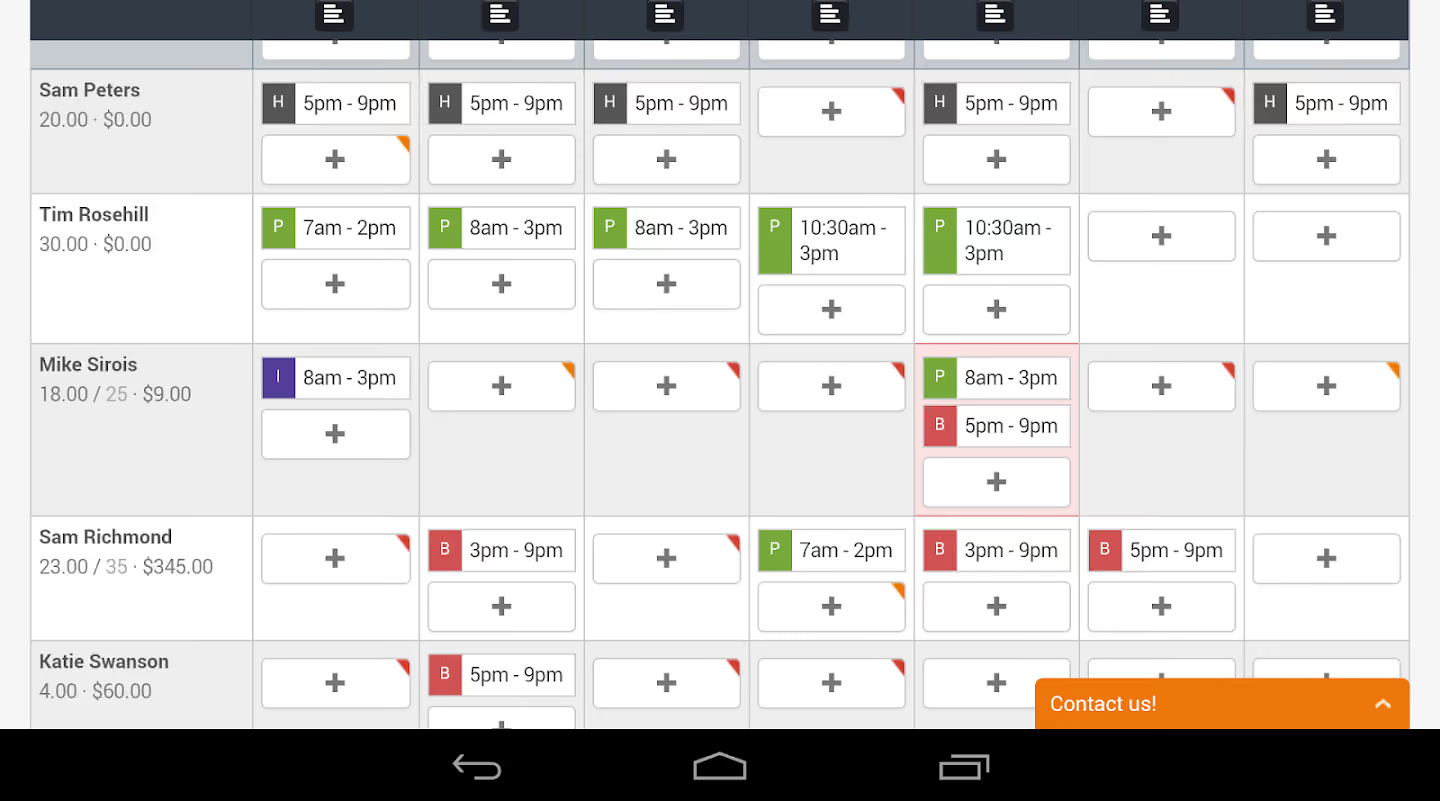
Scheduling tasks is just as easy. Managers are able to assign tasks on a calendar-view schedule page. An interesting feature of this page is the live weather forecast you get for each day of the week. This is quite helpful for alfresco-style dining restaurants and cafes.
7shifts is available on mobile devices and as a web app. Employees primarily use the mobile application while the web app is mostly for restaurant owners, managers, and administrators. The web app has a dashboard interface that gives you the ins and outs of your operation vis-a-vis sales, labor activities, and costs. These metrics are usually represented on a chart for easy analysis.
As part of their HR offerings, you get to manage hiring, attendance, and payroll from your 7shifts account. The software integrates with a ton of payroll systems including Quickbooks, ADP, and Gusto, so you can pay employees without having to switch to other systems. Their most interesting integration category is point of sale, because it integrates with several parts of the system. You can, for example, extract data from the POS system onto the scheduling interface for budgetary purposes. Where you get to compare your actual sales to your projected sales.
7shifts also offers an auto-scheduling feature. The auto-scheduler uses artificial intelligence to automatically create schedules based on your restaurant’s labor, staff availability, and compliance metrics. This will prove helpful for users with recurring, consistent work schedules through all departments and locations. If you prefer a more hands-on approach and not leave everything to the computer, you can always use the templates to create, copy, and paste recurring tasks. These features are very on-brand with their simplicity philosophy.




We primarily use 7Shifts for timekeeping, scheduling, and team communication. One of the standout features is its built-in messaging system, which allows employees and management to chat in real time, making it easy to swap shifts, clarify schedule changes, and share important updates. It has significantly reduced scheduling confusion and improved overall team coordination.
Initially, employees used the chat for non-work-related conversations, almost like a private social media hub. While we tried to curb this, we eventually created a dedicated thread for non-work-related chats, allowing employees to engage without cluttering important work communications.
- We purchased it for its easy-to-use scheduling platform that simplifies coordination between departments.
- The chat/communication feature proved to be unexpectedly valuable.
- Managers can upload documents, such as alcohol service licenses, which automates employee compliance documentation.
We needed a more streamlined and cost-effective way to manage scheduling, track time, and centralize employee management.
Before 7Shifts, we relied on a mix of outdated systems and manual processes, which led to miscommunication, scheduling conflicts, and excessive labor costs due to inefficient tracking.
We were also looking for a tool that was intuitive for employees—something they could access easily from their phones to check schedules, swap shifts, and track hours without constant manager intervention.
7Shifts simplified scheduling and provided automated labor forecasting and compliance tracking, which helped reduce unnecessary overtime and kept us within budget.
Since implementing it, we’ve experienced fewer scheduling issues, better communication between teams, and a noticeable improvement in workforce efficiency.
- It requires two apps for employees, which may seem minor but is inconvenient.
- Reporting is limited—we wanted simplicity, but that limitation applies across the program.
- Some features lack flexibility and customization options.
7Shifts stands out from competitors by focusing specifically on the restaurant and hospitality industry, with features tailored to the scheduling challenges of shift-based work. Unlike more generalized workforce management tools, it includes automated labor forecasting, compliance tracking (including break and overtime enforcement), and POS integration, helping managers optimize labor costs in real time.
One of its biggest differentiators is the built-in communication platform, which allows teams to chat, managers to send announcements, and employees to swap shifts seamlessly—reducing the typical back-and-forth found in other tools. Many competitors lack this level of collaboration and engagement functionality.
7Shifts is also more affordable than some higher-end workforce management software, with a user-friendly mobile app that employees use with minimal training. Some competitors, such as HotSchedules or Deputy, offer similar functions but often involve steeper learning curves, more complex setups, or pricing models that don’t scale well for small and mid-sized businesses.
Key considerations include scalability, integrations, mobile accessibility, security, reporting, user experience, onboarding and training, and contract terms. It's important to evaluate how well the platform aligns with your operational needs and how much support your team will need to implement and maintain it effectively.
7Shifts itself has changed very little. The more noticeable improvements have come from our increased usage of its features as we became more comfortable with the software.
7Shifts is best suited for service and hospitality industries.
Businesses with consistent schedules would have little need for 7Shifts. It is also not a good fit for organizations that require comprehensive employee management solutions, such as those in retail or businesses that carry inventory.

Through 7shifts, you can assign daily tasks and schedule employees in advance, including for the upcoming months. I use it every two weeks and have set a reminder to post the schedules on time. The platform displays the team assigned to each shift and each department.
It also allows you to receive, approve, and reject shift change requests or days off. It is a practical, easy-to-use tool that informs each employee of their duties and schedule. It also supports clocking in and out and tracking time worked.
It allows workers to view their own schedules and those of their colleagues. It enables the assignment and tracking of daily tasks, including marking completed ones. It also supports internal chat functionality for fast and effective communication between team members.
7shifts is a platform that allows for easy organization of working hours across an entire team. It is a useful tool for companies in the hospitality and food services sectors, such as restaurants, bars, and hotels, that have employees with varying tasks and work schedules. The platform allows you to assign specific tasks and send reminders to employees. I have used 7shifts for more than three years across different companies, particularly in restaurant settings.
At times, the platform may freeze or close unexpectedly, losing unsaved information. If you need immediate assistance, it is better to call support, as the chat response time can be slower than expected.
7shifts is one of the most well-known applications in the restaurant industry. It has been a pioneer in restaurant scheduling and continues to improve by regularly updating and adding new features that make it more practical to use.
7shifts is an excellent tool for companies in the food and beverage industry, including restaurants, hotels, and bars. It is especially useful for improving schedule management and task coordination.
7shifts is continuously updated, frequently introducing new features that help save time and simplify tasks for both employees and employers. It remains easy, practical, and secure to use.
7shifts is an excellent tool for companies in the food and beverage industry, including restaurants, hotels, and bars.
7shifts is not ideal for jobs with fixed schedules, such as office roles with standard 40-hour workweeks, where scheduling tools are less necessary.

7shifts was checked and updated daily. It was primarily used to track shifts for kitchen/front of house staff. I would send notifications for open shifts, schedule changes and other relevant info to the team. I would also create wage predictions to forecast for payroll. I would also exercise its template options for tasks.
It has great customer support. 7shifts integrates with accounting software easily. It is user friendly.
My client was a small restaurant with five employees looking for a way to simplify shift scheduling. 7shifts was a cost effective method for a small team to manage their weekly schedules and updates. The company had noticed difficulties and overlap with their previous method of scheduling. I have used this tool for two years.
There are occasionally bug issues with the app. 7shifts has limited role assignments for staff, expansion of options would be helpful. The software has to be thoroughly rechecked for accuracy before processing payroll.
I am a fan of 7shifts because of team feedback. The software allows easy access in allowing staff to swap shifts and it is very user friendly in comparison to competitors.
People should consider the size of their team before purchasing. While 7shifts is reasonably priced, you may spend over $400 yearly depending upon the features you require. The app issues may cause frustration for team members but customer support is swift.
I like 7shifts’ consistency. Updates and notifications have improved greatly over the past years as I grew more familiar with the product and as the restaurant expanded.
Small restaurants/popups
I would not suggest 7shifts for large chain locations.
7shifts might not be the best fit for restaurants needing true global, multi-timezone scheduling. The system is still largely optimized for North American restaurant operations and could be cumbersome for international teams or those with fluctuating, seasonal headcount beyond what fixed plans allow.
Notable customers include Sambo’s, The Chopped Leaf, Andy’s Frozen Custard, National Coney Island — ranging from single-location cafés to national chains.
- Auto-Scheduler: The auto-rescheduler is an AI-powered feature that uses machine learning to adapt to your processes and workflow. It takes into consideration recurrent activities on specific days and other metrics to recommend the best way to schedule your labor for optimal efficiency. The AI-powered auto-scheduler also predicts sales based on previous data. It tells you the days you make the most sales, days with the most demands, and it creates ways to utilize labor to satisfy demand without, of course, causing overtime and labor violations.
- Shift pooling: 7shifts allows you set shifts which your employees can then bid for. If bids are approved, the schedule would be automatically updated.
- In-app messaging and communication: 7shifts makes it possible for users to communicate via 1-on-1 messaging or in group chats. The mobile app notifies employees of upcoming shifts and tells them when they need to take a breather with the automated break alerts. Managers also get real-time updates when tasks are completed or for pending and outstanding assignments.
- Manager logbook: To further help managers organize and oversee activities, 7shifts have made available a virtual manager logbook. With the logbook feature, managers will be able to document important shift details and track issues if need be. It is also a great reference material as the logbook can be archived for future use. The most interesting thing about this feature is that you can synchronize data from integrated third party tools or the time tracking system on the platform to give more context to documented operations.
- Hiring and candidate tracking: With 7shifts, you also get an applicant tracking system. You will be able to recruit, track, and hire candidates from online job boards. The good part of this is, the recruitment interface is not as complicated as the ones professional agencies use. It features a simplistic UI that allows you create job postings by filling out a couple of fields on the job post builder. Hiring stages can also be tracked to keep things organized for you and your candidate.
- Time tracking: If you want to keep track of your employees’ time, you can do so with 7shifts’ proprietary time tracking software — 7Punches. 7Punches is a clocking system that allows your employees clocking in and out during shifts. The timesheet generated with the system can be synced with payroll systems for swift payments.
7shifts integrates with over 50 platforms including:
- POS: Toast, Square, Clover, Lightspeed
- Payroll: ADP, Gusto, QuickBooks, Paycor
- Time Tracking and Labor Management: Tonic, Deputy
7shifts offers the following subscription plans:
- Free: Ideal for businesses with a maximum of 20 employees and includes core scheduling features.
- Entree: Priced at $34.99 per location monthly, supporting up to 30 employees.
- The Works: At $76.99 per location per month, this plan offers scheduling for an unlimited number of employees.
7shifts offers a comprehensive solution for restaurants looking to move away from paper schedules, spreadsheets, manual tip calculations, and disparate payroll systems. It is well-suited for independent restaurants, franchises, and expanding hospitality groups.
7shifts will assign a dedicated account manager to help you through your onboarding process. You also have the option on their custom plan to keep the account manager at your beck and call, even after the implementation process. You also get several resource articles including blogs, articles, and support how-to videos to get you acquainted with the software. To make their customers perform even better in their restaurant businesses, they have put in place a ree online restaurant and hospitality management courses which they offer through the 7shifts academy.
Jordan Boesch, founder and CEO of 7shifts, got the idea for 7shifts when he realized how painful it was for his father to manage the chain of Quizno’s businesses he owned at the time. To lighten the workload, Jordan wrote a simple program that allowed his father to upload schedules on worksheets, which could be downloaded by his employees. 7Shifts later became an iteration of that idea on a massive scale.
The software debuted in 2014 and at the time, started as a simple tool to help simplify team management and improve performance for restaurants. Today, it has helped restaurant owners schedule over 1 billion hours, published 200 million shifts, and raised a total of $131 million in funding. Their recent round was an $80 million Series C funding led by a London-based venture capital firm — Softbank Vision Fund. 7shifts is trusted by 700,000+ restaurant pros across 27,000 locations around the world.
Company HQ
Saskatoon, Saskatchewan, Canada
Number of Employees
101 - 250
Year Founded
2014
Amount Raised
$131 million
FAQ
Does 7Punches come together with 7shifts?
7shifts does not come out of the box with their time tracking app, 7Punches. It is a free, companion app to 7shifts that syncs time data to the scheduling tool.
Does 7Tasks come together with 7shifts?
No. It does not. It comes as an add-on that costs $12.99 per location per month.
About SSR

We spend hundreds of hours researching the best HR and recruiting software so you don’t have to. We never take money from vendors during our research phase and rely heavily on practitioners and experts to help us recommend the right software. However we may earn a small fee if you click on vendor links on this page.

