


What makes Quantum Workplace stand out is their hands-on customer service. Once you buy their software, you don’t just get a one-off implementation service that most vendors provide but instead an ongoing support team that helps you make the most of your investment.
Ratings
Ease of Use
Best For
Key Differentiator
Price
Free Trial
PROS
- Easy to use, the user interface is intuitive, you can find what you’re looking for and still see the most important items pinned on top.
- The option to personalize surveys, make them from the best practices templates, or build entirely from scratch.
- The ability to share and review recognition with your teammates in a social newsfeed format. What’s great is that you have the option to make it as detailed and scheduled or as succinct and impromptu as you please.
- An ever-present customer service team. Many users have complimented on their responsiveness.
CONS
- Many users have expressed their issues with canceling, rescheduling, and the inability to schedule 1-on-1s on short notice.
- Some users have found the goals feature to be a little confusing to understand because of its extensivity.
- This is a rather unprecedented one, but we found many users wishing for more vibrant colors for the platform.

Need Help? Talk to an HR Software Advisor!
Tell us more about your company & an HR Software Advisor will help you find the right software





Quantum Workplace has three core products that provide tools for employee engagement, performance management, and people analytics. If you’re looking for ways to elevate your company’s overall employee experience, Quantum Workplace is worth checking out.
You can create comprehensive engagement surveys to get a bird’s eye view of your employees’ perception of the organizational culture. In case you’re looking to get real-time feedback from your employees on any topic, Quantum Workplace also lets you create pulse surveys that are quick to launch. Then there are lifecycle surveys that are completely automated and generate insights from key moments of an employee’s lifecycle such as onboarding, exit, or at the time of retirement.

Quantum Workplace’s performance management tool helps employees set and track their goals, have 1-1s with their managers, and get recognized for their efforts. A feature worth mentioning is the social news feed that lets employees bond and congratulate each other with likes, comments, photos, and gifs.


While the engagement and performance tools are packed with an array of useful features, the cherry on the cake is Quantum Workplace’s AI-driven analytics software that helps managers uncover deeper insights from engagement surveys and performance data. You can get turnover reports, flight risk prediction, overall employee performance, and much more. We must warn you though, sometimes the AI’s interpretation of employees’ sentiments can be a little inaccurate. We’d suggest that you don’t blindly rely on the analytics reports for data points that you know can’t be objectively mapped.
Finally, what’s great about Quantum Workplace apart from its excellent customer service is its intuitive user interface that’s calming and easy to navigate. There’s also a mobile app that employees and managers can use alike to speed up the pace of processes. You can use it to stay up-to-date with recognition happening in your workplace and even post recognition for your co-workers right from the app. On top of that, there are shortcut features you can use to quickly give or request feedback and capture private notes. The best thing about this mobile app is that it automatically syncs with the desktop version of Quantum Workplace, so you wouldn’t have to worry about repeating tasks or manually updating later from another device.
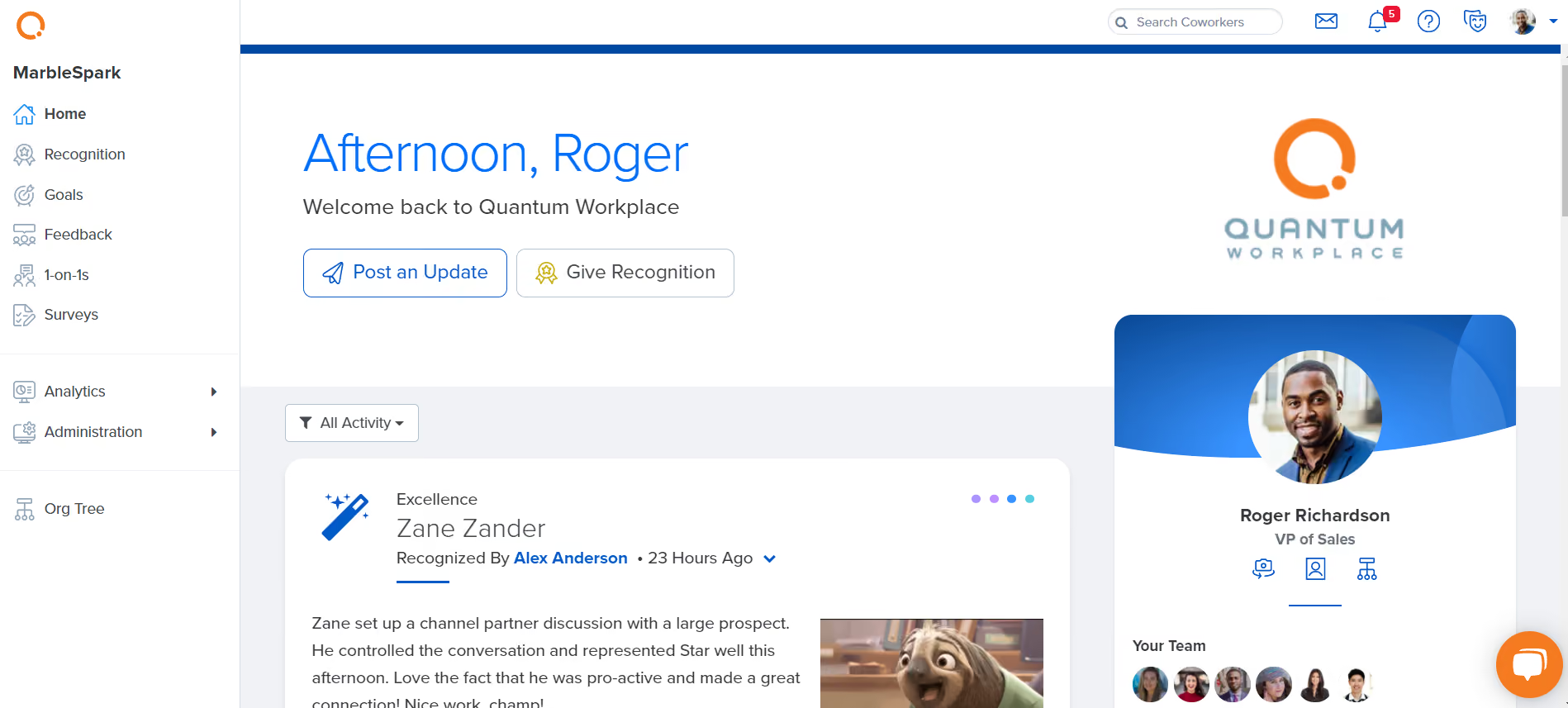


We use Quantum Workplace for goal setting, 1-on-1s, feedback, recognition, and performance reviews. The goal-setting module allows us to create organizational goals that then trickle down to department goals, to individual goals. 1-on-1 is a great module to help team members prepare and facilitate meetings.
We use Feedback to collect 360 feedback on employees when they hit a milestone. Recognition is used to publicly acknowledge and celebrate team members. Finally, we use the Reviews module for more comprehensive performance evaluation.
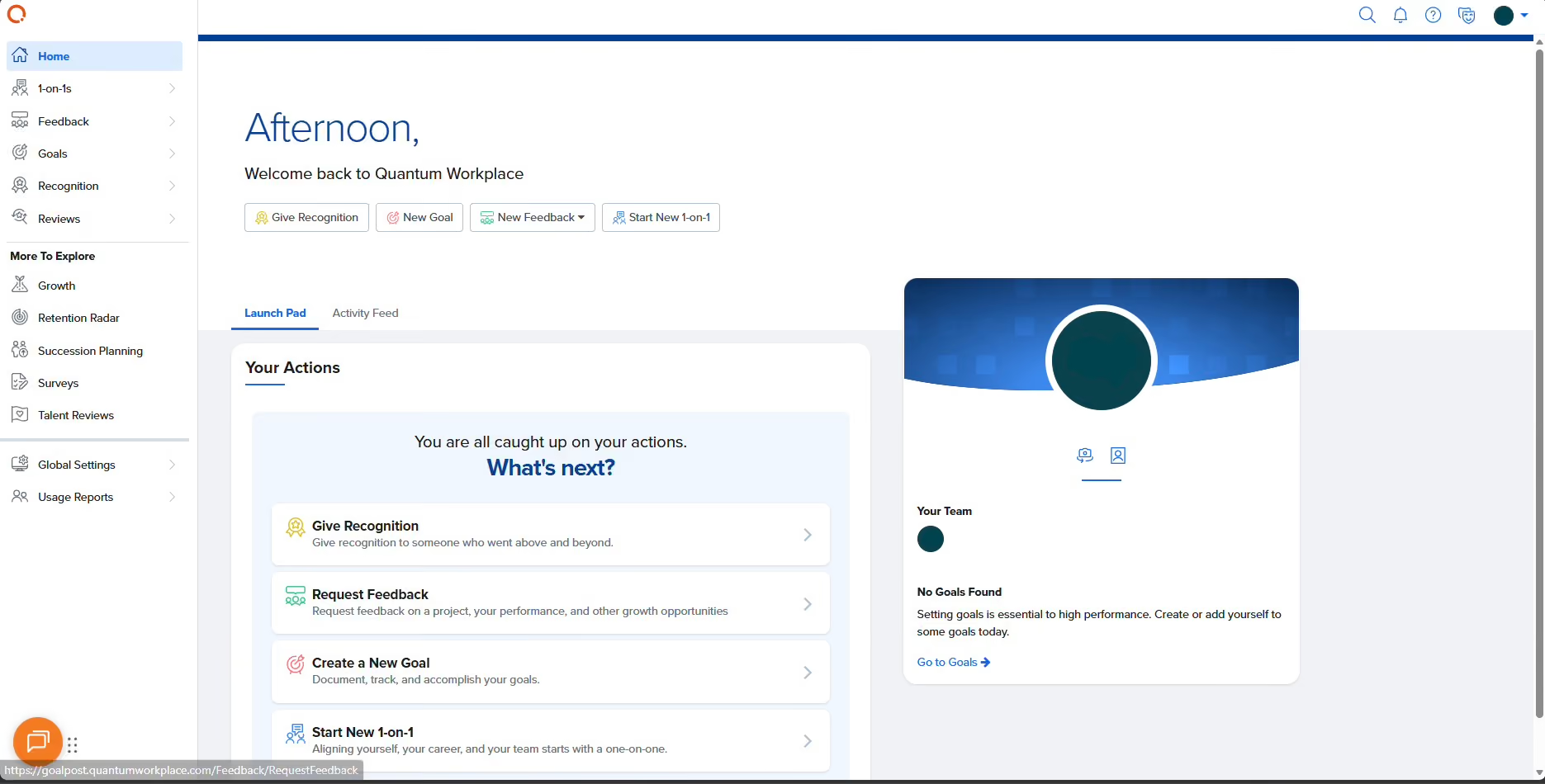
The implementation team is great. A dedicated implementation manager got assigned to us for every module. They bring lots of insights on the best practices for the platform.
Quantum Workplace is intuitive for administrators where we can easily find what we are looking for. The system also allows granular admin permission settings, which is great.
The modules work together. Managers can pull up employees' history while writing reviews, making the process smoother and more efficient.
We got Quantum Workplace in 2025. Our performance evaluation process was very manual, Word doc and Excel based. It made calibration, look back, and administration difficult. We got Quantum in hopes of streamlining the review as well as goal-setting processes.
For certain modules in Quantum Workplace, I wish there was more configurability. Some of our team sizes are small and so certain settings don't have options that work well for us.
A few modules look or sound similar and it can be confusing as to what each does. It took us a while to remember the difference between 1-on-1, Reviews, and Feedback.
It seems like many things can be accomplished in either module.
The interface is modern but also simple. The support team is wonderful. Quantum Workplace is a very robust tool that integrates nicely with our existing HRIS.
How much time and resources can you allocate to the implementation? Each module needs to be configured with the implementation team, so you will need someone to work with stakeholders to define the workflows and work them into the new system.
The goal of the system is to help individuals grow. If your organization's culture doesn't support this, it becomes a chore and you won't get much out of the analytics.
We just got Quantum Workplace.
- Like any performance management system, the company using Quantum Workplace must have clear reporting structures.
- Companies that value feedback and growth.
- Companies that have at least a 10k budget for the system.
It might be challenging for a matrix structure to use Quantum Workplace. We can only have one manager in the system so the other manager would have to be treated as a peer.
Companies with smaller teams might not be able to use the Feedback module if you choose to anonymize reviewers because you need at least two reviewers (except manager) in order for the reviews to even be viewable.

I used Quantum for surveys. I could create surveys from scratch or use templates already within the system. I created surveys to send to new hires to gather feedback on the recruitment and onboarding process, and to collect feedback on orientation.
We also used this for shorter surveys like pulse surveys to gauge sentiment on various topics, such as thoughts on returning to an on-site setting or input on the selection of a new president.
Once the data was collected, I would review and analyze the results and make recommendations to senior leadership based on the feedback. I used the system weekly in one or more capacities, as we hired year-round and conducted orientation every two weeks. This meant I was regularly using it for orientation feedback, new hire feedback, or shorter surveys.
I was not overly impressed with Quantum Workplace. I had used other systems prior, such as Qualtrics and SurveyMonkey. I thought it was overpriced, lacked the interface those programs had, and did not offer as many features.
I was often frustrated when trying to perform more advanced tasks like creating questions with dependencies or logic. It was not as intuitive compared to other systems I had used.
I remember needing to research or contact the company for guidance on multiple occasions—and at times, the system was not working correctly, requiring support. It also had a very barebones user interface—it was quite basic and unpolished.
A previous organization I supported from 2022 to 2024 purchased and used Quantum Workplace. We used it in HR for various surveys, including pulse surveys, new hire check-ins/feedback surveys, post-orientation surveys/evaluations, and engagement surveys. The biggest driver was to conduct annual engagement surveys.
I worked in recruitment and conducted new hire orientation, so I used it regularly. We were a think tank and wanted to collect data and feedback from new hires and employees in a hybrid work setting with several core programs.
Employees supported one of several key programs, which often created a silo effect where they felt disconnected from the larger organization. I used it for over a year. It met the basic purpose of collecting data, but I found other survey tools at that time offered more features and functionality. I was often frustrated with its limitations.
At the time I used it, it was very basic and lacked a variety of features and options. It was not intuitive—you often had to research or contact support for instructions. The interface was outdated and not visually appealing.
I think Quantum has less functionality than other non-HR-focused survey tools. Other systems (Qualtrics, especially) have more options, a better interface, and are much more intuitive, and often less expensive.
I believe there are better systems available for the same or lower cost. When I used Quantum, it felt basic and underdeveloped. I would honestly choose something like Qualtrics if given the option.
Before investing in a costly survey tool, ask yourself:
- How many people are in my organization?
- Will this be used by just HR?
- Will this be used internally only, or will we use it to seek feedback from external groups such as customers?
- How many surveys do we conduct per year, and how long are they?
- How much time can I dedicate to learning the system?
If you're a smaller organization that doesn't survey frequently, you may not need an expensive tool—and could possibly get by with a free version. You can also ask to speak with current customers to get feedback on the system and the quality of customer support.
From my experience, it was not keeping pace with other systems. When you reached out for help, it took time to hear back and resolve issues. I was not impressed. I would not recommend it.
I don’t think it has a specific niche market. It’s not the best system, and other tools offer more features and options. I would not recommend it. Quantum does help guide users through the engagement process for a fee, so if you are an organization that needs that kind of support, it may be helpful to you.
I think most organizations could find better alternatives for a lower cost. If you're a small organization or not particularly tech-savvy, this tool may not be a good fit. It is fundamentally a survey tool. If you don't have significant survey needs, this tool may not be necessary for you.

I personally use Quantum daily. It is used for recognizing employees and giving shout-outs for daily successes. I also use it for both written and verbal write-ups. We are launching quarterly reviews tomorrow, moving away from the annual review process we had with Performance Pro.
I’m looking forward to greater involvement from managers and quicker completion because of how easy the tool is to use. I also use it to update performance goals.
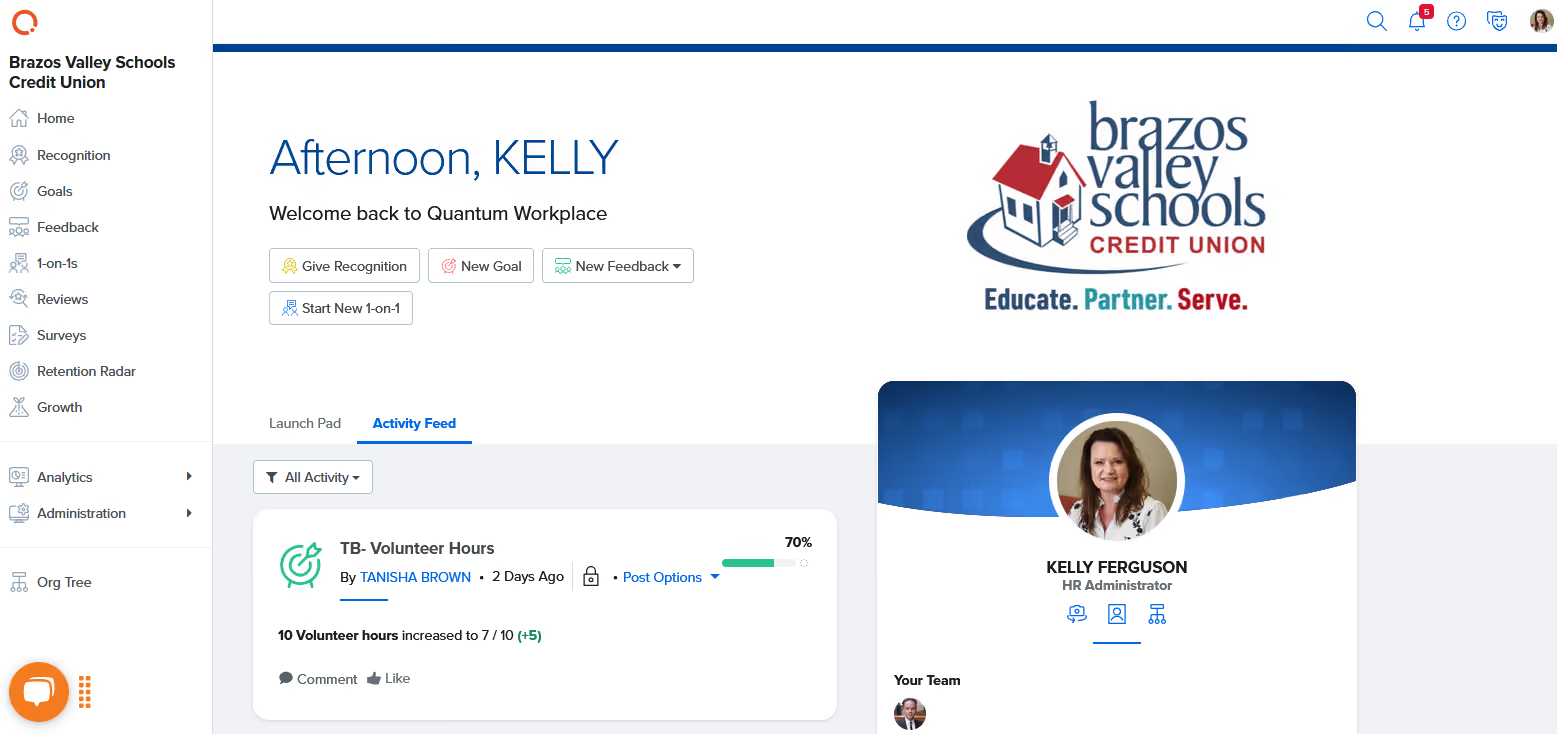
I like the option to create custom forms and how easy it is to launch or edit them. I appreciate the ability to make private notes on each person at the administration level. I also like the goal section and the charts that track progress toward meeting goals.
Previously, we used Performance Pro as our performance management tool at the credit union. Performance Pro was difficult to use and felt outdated in its functionality. We moved to Quantum because it is easier to use and more visually appealing.
The implementation process and employee adoption have been successful. Previously, no one wanted to use Performance Pro, but now everyone enjoys using Quantum, and they use it daily.
I wish there were a feature for managers to make notes visible to everyone at the administration level and above. When a manager enters private notes on an employee and then leaves the company, those notes are lost.
I also wish there were a way to keep job descriptions attached to each employee. In Performance Pro, we stored a copy of the job description with each employee file for quick reference.
Yes, the support from Quantum is quick and thorough. It offers significantly more options and ease of use compared to Performance Pro.
The tool should meet the current needs of the company while offering additional features for future use. A hands-on demonstration and access to a demo account are crucial when deciding.
We are still in the early stages of using Quantum. We've been with them for seven months, and we are still identifying our needs and working with Quantum to meet and exceed them.
I don’t think there is a specific user or organization that is ideal. I can see Quantum working in a variety of settings.
I’m not certain, but Quantum might not be suitable for very small organizations with 25 or fewer employees.

Betterworks

Betterworks

Deel
Deel

Teamflect
Teamflect

Leapsome
Leapsome
Trakstar
Trakstar
Quantum Workplace would not be a good fit for small-sized companies with budget constraints. Also note that they do not offer a free trial of their products, so it won’t be suitable for companies that like to take their sweet time before implementing a new product.
Quantum Workplace is used by over 10,000 companies, including Dentsply Sirona, Panera Bread, Fossil Group, DSW, BKD, and Getty Images.
- Employee engagement surveys: This type of survey is comprehensive and most companies use this feature for annual reviews and to get an overall idea about how employees feel about the company culture.
- Pulse surveys: This feature helps you launch a survey in just a few minutes and is useful for times when you need to get employee feedback on a specific topic under a time crunch.
- Automated surveys: Also known as employee lifecycle surveys, this feature allows your team to automatically collect surveys from employees during different stages of their employee lifecycle. It then automatically syncs up with your HRIS.
- Goal setting and tracking: You can create individual goals, team goals, or even goals with multi-metric OKRs that will seamlessly align with each other to help you see the big picture. The goal setting feature also allows you to track your progress and celebrate milestones in fun and interactive ways.
- 1-on-1s: The 1-on-1s between managers and employees can be used for any type of conversation ranging from performance reviews to weekly check-ins. You can also use templates to guide the conversation and automate 1-on-1 cycles to foster communication. Some users, however, have expressed their annoyance when it comes to canceling or rescheduling 1-on-1s.
- Public recognition: You can publicly recognize your employees in a variety of ways with Quantum Workplace – give and view recognition in a company-wide social news feed, give different value badges to your employees, like/comment/react with gifs to recognition posts.
- Employee feedback: Quantum Workplace’s feedback tool lets employees give as well as request feedback in real-time. You can make use of pre-built feedback templates to guide you.
- Talent review: Every 90 days, managers spend 3-5 minutes per employee to answer talent review questions after which, Quantum Workplace groups employees in four different categories based on performance and growth. It then gives you pointers and ideas for coaching different category employees in a manner that would help them and your company the most.
- Analytics: With the help of the analytics tool, you can see visual trends and indicators for your company and use it for future planning. Some examples include identifying turnover risk, analyzing survey comments, and seeing the performance data for many employees at once.
- Succession planning: This feature helps you identify top performers that are likely to become successors for your company’s critical roles. You can learn about an employee’s successor readiness, promote growth for successors, and even align your succession plan with your inclusion and diversity goals.
From HRIS to communication tools, Quantum Workplace lets you integrate with many third-party applications such as Slack, ADP, Namely, BambooHR, Outlook, and Workday. What’s worth mentioning is that if you can’t find the application you need on Quantum Workplace’s list of integrations, you could ask them to build a new integration from scratch.
Pricing is not disclosed upfront but you can get it after booking a demo.
Quantum Workplace is best suited for mid-sized and large enterprises who have greater needs for engagement.
The implementation process for Quantum Workplace is fairly easy and straightforward. Patricia D, a Human Resources Director for a mid-sized company said, “We previously worked with a direct competitor of Quantum for 3 years. During that time, we had an onboarding call and then no follow-up. We switched to Quantum this year and the difference has been night and day. We have an assigned team - not an implementation team - an ongoing team that provides dedicated support”.
Initially, you’ll need to set up your users, HRIS, and SSO. Although there are video walkthroughs to guide you every step of the way, you’ll also have a Customer Success Manager assigned to you for each stage of implementation.
Assuming there is an existing HRIS you need to integrate, the implementation process will take you about 3 to 6 weeks.
When you buy Quantum Workplace, you’re assigned a Customer Success Manager to support you with each phase of your implementation. It starts with a detailed Implementation Kickoff Meeting followed by weekly implementation tasks. Even after you’re well-acquainted with the software, their support team stays in touch with you and actively seeks ways to enhance your user experience.
Founded in 2002 by Greg Harris, Quantum Workplace, formerly known as Quantum Market Research pioneered some of the earliest employee engagement and performance software. Their mission is to make work better every day. Given the number of specific praises we’ve heard from HR managers and business owners about their customer support, we’re positive that they’re quite successful in living up to their mission.
Over the 20 years, they’ve added many feathers to their cap. Within just three years of starting out in Omaha, their contest ‘Best Places to Work’ spread out to 41 cities. By 2008, they became the largest benchmark database for employee engagement in North America. In 2015, they opened another office in Denver and three years later in 2018, they got funded by a private equity company, McCarthy Capital.
The past few years have been fueled by a lot of growth for Quantum Workplace; they crossed their 100th employee milestone, added new teams, and secured investment from another private equity firm, LLR Partners.
Company HQ
Omaha, Nebraska, United States
Number of Employees
130+
Year Founded
2002
Amount Raised
Undisclosed amount from private equity companies
FAQ
Is Quantum Workplace an all-in-one HR Software?
No. Quantum Workplace has software for employee engagement, performance management, and people analytics. It does, however, integrate with many HRMS.
What is the price of Quantum Software?
Quantum Software has not listed any pricing on their official website. To get a price, you will have to book a demo and contact them personally.
Are Quantum Workplace surveys anonymous?
In a way, yes. Each employee is given a unique link to participate in the survey only once and no one in the organization can see the responses of a specific survey taker. So, even though an employee doesn’t take a survey anonymously, their responses are kept completely confidential.
About SSR

We spend hundreds of hours researching the best HR and recruiting software so you don’t have to. We never take money from vendors during our research phase and rely heavily on practitioners and experts to help us recommend the right software. However we may earn a small fee if you click on vendor links on this page.