


JazzHR is laser-focused on the unique recruitment needs of small and medium-sized businesses. Their solution can not only help SMBs source, track and manage candidates, but also boost their employer brand.
Ratings
Ease of Use
Best For
Key Differentiator
Price
Free Trial
PROS
- JazzHR is quite affordable and doesn’t place any limits on the number of users added. It also offers free, 21-day trials that anyone can sign up for.
- JazzHR has built-in features for offer management. You can choose from existing offer letter templates or create your own and share them with successful candidates
- You can automate triggers for candidates to be automatically notified via email when their application has moved a stage further in the hiring process. Several other email responses can be automated.
CONS
- Some users reported a learning curve with JazzHR's UI and that it took them some time to get used to it
- For a product geared towards SMBs, it lacks a free plan. We mention this as a con since other SMB-geared recruiting products do offer free-forever versions, which puts JazzHR slightly behind the competition.
- Several users have mentioned that the reporting feature is difficult to use with very little room for report customizations.
- JazzHR currently lacks a mobile app, and the browser version isn’t well-optimized for mobile use.

Need Help? Talk to an HR Software Advisor!
Tell us more about your company & an HR Software Advisor will help you find the right software





JazzHR is a cloud-based recruiting solution that’s specifically built for small and medium-sized businesses. Through it, you can build custom-branded career pages, post jobs to multiple free and paid job boards, and share those posted jobs on various social media sites for maximum reach.
Once candidates apply for your posted jobs, JazzHR enables you to track how far they have progressed through your hiring process through customizable recruiting stages and workflows. You can also communicate with candidates who applied for your posted jobs without leaving JazzHR. Not to mention, several email responses, such as interview scheduling requests and progress notifications, can be automated so you’re able to spend your time on more important tasks.
We like that JazzHR has pre-integrated offer management features. You can choose from several existing offer letter templates, or customize one yourself and share it with successful candidates. You can also collect e-signatures without needing to integrate JazzHR with third-party tools.
We do, however, have to dock a few points from JazzHR for lacking a mobile app. While some features of JazzHR such as candidate quick screen and interview guides have been optimized for mobile browser access, it’s rather a hassle for hiring managers to get to those features on mobile browsers vs on a dedicated mobile app. And as companies are increasingly seeking mobile-first recruiting strategies to save time and reach candidates where they are, having a mobile app to your recruiting software becomes a necessity, not an accessory.
Overall, we think that several SMBs can find value in JazzHR’s offering. If you’re looking for an affordable recruiting solution with features for candidate sourcing, applicant tracking, and offer management (and you can get past the lack of a mobile app), then JazzHR is definitely worth checking out.


We used JazzHR for ATS purposes. That means a lot more than just applicant tracking, though. JazzHR offers interview scheduling features, easy job posting to 100+ free and paid job boards, customizable hiring workflows, and more.
We loved the scorecards that came with all interviews, so our notes were collected and reviewed easily. We also used the background check integrations, which made this step much more efficient than what we were doing previously.
The tracking dashboard was the solution we were looking for and made it so easy to glance at the progress of our open positions.
- The ease of posting job openings, and the fact that JazzHR would send the job posting to almost 100 job boards with us only having to click a few buttons.
- The customizable hiring workflows made us feel like we could keep our specific wants and needs without having to conform to software that may not fit our industry.
- Fast and easy setup! Adoption across the board was easy for everyone.
Our small business was growing quickly, and we didn't yet have a dedicated People Ops or HR professional on the team. Our hiring efforts became bottlenecked, and we needed help streamlining our recruitment and hiring processes.
We were looking for an ATS that fit our needs without being too expensive. JazzHR gave us a free 30-day trial, and within a week we knew we had found the system that was right for us.
We finally threw away the spreadsheets and Google Docs that had previously managed our hiring logistics!
- Reporting could be improved. I could never collect time-to-hire data without some level of manual work involved.
- We had frequent issues with the calendar integration (we used Outlook email).
- It didn't have any integration with LinkedIn, which I hope gets fixed in the future. It would have been nice to have an automated post go out whenever we opened a position.
I think JazzHR is competitively priced compared to Greenhouse, Workable, etc. I also really like that there isn't a limit on users. This seems to be more and more common in SaaS, and I find it frustrating, so I like that JazzHR hasn't conformed to that!
Hiring volume will be a big factor. I was comfortable with 5-10 jobs being opened on JazzHR, but if you need more, you may want to expand into a more enterprise-level solution. Also, the package pricing depends on the number of open jobs at any given time, so that is another reason to think this through when choosing an ATS.
It has added e-signature capabilities over the years, as well as the option to schedule video interviews without having to schedule separately through Zoom.
JazzHR is good for a small-sized business that is not hiring more than 10 positions at one time. It still requires someone to proactively move candidates along the process, which is fine for a small organization, but large, enterprise-sized companies may need more proactive automations.
Large companies that need multiple positions open at one time and strong reporting capabilities from their ATS should think about Workday or other solutions of that size, as JazzHR won’t be robust enough for their needs.

Using JazzHR was very straightforward and it helped us with our recruitment.
We were able to create jobs directly on the platform and post them on major recruiting websites such as Ziprecruiter, LinkedIn, and Indeed as well as on our internal company job page.
Once we posted, we would get informed of the applications/candidates. It was fairly easy to review the information of each candidate and match their resumes with our job descriptions.
Once the matching was done, then the interview process would start and we could move them directly through the pipeline.
Once the interview processes were over, the feedback and rating could be left directly on the website. After this, it was easy for us to close the job which would then result in closing it on the other websites as well.
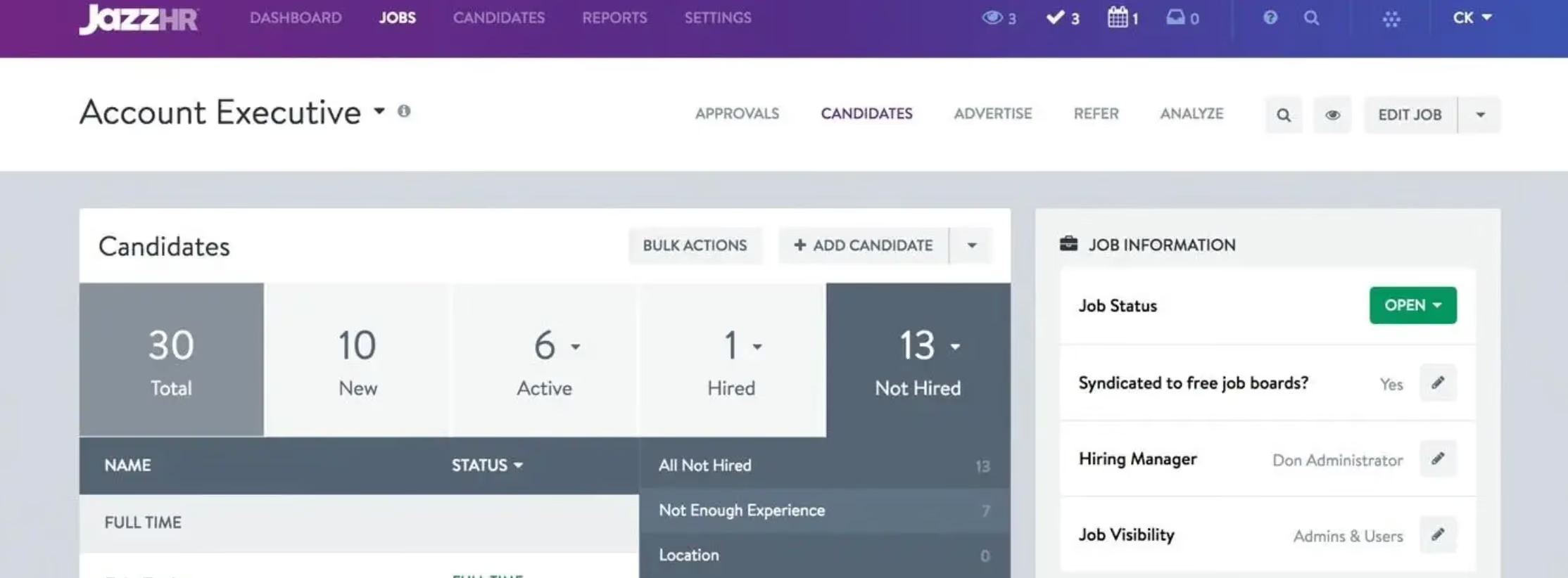
- I really like how user-friendly it is. I think that this platform is really easy to use and can be learned by anyone who is starting off as a recruiter early in their career as well as easy for hiring managers with many years of experience.
- Job posting is simple. JazzHR made it easy for our team to post the job description directly on the platform and have it populate to other websites which allowed us to have a large pool of candidates. It made our lives easier because we did not have to manually post on different websites.
- It is affordable. JazzHR is a great place to start for small to mid-size businesses who are planning to grow and expand without having to spend a lot of money. It was a great, affordable platform which helped us get the job done at a very reasonable rate.
I have used JazzHR for over 2.5 years and absolutely enjoyed how amazing the platform was. We wanted to ensure that we use a good recruitment platform which would help us streamline and manage the full cycle recruiting process.
The key benefits it provided were that it helped us with our job posting, candidate tracking, interview coordination, and feedback/notes. It was super helpful to have all of it in one place as we were on a hiring spree at one point.
Additionally, it was a more affordable platform for us as we were growing as a company. Our recruitment efforts were significantly reduced once we implemented JazzHR.
- Job description formatting would be a bit difficult. Our process was to have the job description in a separate document and we would just copy and paste. However, while pasting, the formatting would be off, the font sizes would be different, and the bullet points would not show up. This was a bit time-consuming as we wanted to ensure the formatting looked neat.
- The reports system was not very helpful. It was really basic and did not really serve any purpose to us.
- The scheduling feature could have been better. I have used a couple of platforms that allow scheduling to be done directly from the recruitment page; however, we had to schedule the candidates' interviews from our own emails.
JazzHR is easier to use than other recruiting platforms. Other platforms can be a bit challenging or not very user-friendly.
Additionally, JazzHR is very affordable and allows us to have multiple features at a lower cost. I would prefer this system as it is simple, budget-friendly, and a great fit for growing companies.
Some criteria would be hiring volume, ease of automations, integrations, and any future growth. Do they need more automation or is some manual work okay? As I mentioned, their job descriptions can be a bit difficult to format.
Another would be what they are planning to integrate with JazzHR, if anything. Furthermore, what are the organization's best recruitment practices?
If the platform fits their needs, then it would be easy for the business to make a decision.
In this era of AI, JazzHR has definitely added more AI assistance to their workflow, which has made recruitment easier. It allows users to match resumes with candidates without having to do a physical screening. Additionally, there are more automations now than there were previously, such as email templates.
Small to midsize businesses (50-100 employees)
Larger organization (1,000+).

I used JazzHR most frequently when we were actively hiring, and during those periods, I was in the system daily—checking applicants and moving them through the pipeline. I relied on it to create job postings in one place and push them out to multiple boards, which saved time and reduced duplication.
Once candidates came in, I used the pipeline stages to track their progress, leave notes for myself and hiring managers, and stay organized. This helped us avoid losing strong candidates in a cluttered inbox.
The platform wasn’t great at integrating with other tools, but the pipelines were relatively clear.
- JazzHR allowed job postings to be shared across multiple job boards with a single click.
- It provided simple tracking for candidates through the hiring pipeline.
- It made it easy to view and manage resumes.
Our organization decided to buy JazzHR because we had reached the point where spreadsheets, email chains, and improvised tracking were no longer effective for recruiting—especially as hiring needs increased.
We needed a centralized platform to post jobs to multiple boards, capture applicants, and move them through a clear pipeline without losing track of anyone. The platform’s applicant tracking tools, automated workflows, and built-in communication features helped reduce manual busywork, allowing us to focus more on evaluating candidates and supporting hiring managers.
Unfortunately, the tools didn’t perform as advertised and, like other systems I’ve used, ended up generating a large number of low-quality applicants. I’ve used JazzHR for three years across different companies.
- JazzHR felt outdated, especially compared to newer alternatives.
- It was clunky and not very intuitive.
- It generated far too many low-quality candidates that should have been filtered out with basic criteria.
It’s very basic and outdated. If you're just looking for a simple tracking tool, it can work, but many competitors now offer smarter filters, AI-driven features, and modern interfaces, which JazzHR hasn’t kept up with.
Consider how you actually manage hiring, such as the volume of roles, how many people are involved in each requisition, and whether you need a lightweight solution or a full system of record. Look at how easy it is to customize workflows. Make sure the tool provides reliable reporting features as well.
I haven’t used it for about a year, so it’s possible new features have been added. However, during my experience, it felt clunky and outdated, more like a tool from the early 2010s that really needs a refresh.
JazzHR is good for small to mid-sized organizations.
JazzHR is not a good fit for very large organizations that will need a more robust system.

Greenhouse

Greenhouse

Workable
Workable

Gem
Gem

Pinpoint
Pinpoint

VidCruiter
VidCruiter
JazzHR is specifically built for SMBs. It isn’t suited for large companies and enterprises' frequent and complex hiring needs.
JazzHR is used by over 6,500 businesses including the Seattle Seahawks, L'Occitane En Provence, TED Conferences LLC, and Chick-fil-A.
- Employer branding: Customize your careers page, share your open roles on various social media channels, and auto-send personalized emails to candidates.
- Candidate sourcing: Post jobs to multiple free & paid job boards with a single click and create referral programs to receive candidate recommendations from your existing employees.
- Applicant tracking: Track how far candidates have progressed through your hiring process with customizable recruiting stages and workflows, share candidate progress with other team members, and set up triggers to automatically notify candidates via email once their applications have moved to another stage.
- Offers and e-signatures: Generate personalized offer letters with pre-populated templates and automate e-signature requests.
- Candidate Scorecard: This is a rating system that lets you give an assessment of each candidate. It can be based on scorecards that you can tailor to each job. As a team, it makes collaboration easier since all feedback is presented in one place through an aggregate team score.
JazzHR also provides tools for:
- Interview scheduling
- Reporting
- Collaborative hiring
JazzHR integrates with dozens of third-party business solutions including BambooHR, Gusto, Criteria, Bob, Checkr, Job Target, Verified First, Out Sail, and more.
JazzHR has three plans. When billed annually, they cost as follows:
- Hero: $49 per month for unlimited users and 3 open jobs.
- Plus: $239 per month for unlimited users, unlimited open jobs, ATS, interviews, and assessments.
- Pro: $359 per month for everything from Plus, along with offers and e-signatures, reporting, and all-access support.
JazzHR is specifically built for teams at organizations with 5 to 500 employees, regardless of industry or recruiting maturity.
Implementing JazzHR is completely free of charge. The platform can also be trialed for free for up to 21 days. Upon signing up, customers receive full access to the Training Portal, and the option to book two one-hour free implementation calls. For further guidance, we recommend checking out JazzHR’s Getting Started guide, available on their help center.
JazzHR has a help center with plenty of resources that are accessible 24/7. If customers need further help, they can reach out to JazzHR's support team by submitting a support request. Chat and phone support options are also available between 9:00 am and 6:00 pm Eastern Monday through Friday.
JazzHR was established in 2009 with the goal of putting powerful, yet easy-to-use and affordable recruiting software in the hands of small businesses, startups, and growing companies. With capabilities for candidate sourcing, employer branding, collaborative hiring, offers, e-signatures, and more, JazzHR has this far helped over 350k HR professionals source over 75 million qualified candidates.
Company HQ
Pittsburgh, Pennsylvania, United States
Number of Employees
120+
Year Founded
2009
Amount Raised
JazzHR has raised a total of $24.6M over 7 funding rounds.
FAQ
What is JazzHR used for?
JazzHR is used by small and medium-sized businesses to attract, manage and hire applicants.
Is JazzHR an HRIS?
JazzHR is a product that supports recruiting needs such as candidate sourcing and applicant tracking. It doesn’t yet function as a Human Resources Information System (HRIS), as such tools often cover more functions such as employee onboarding/offboarding, time-off management, and at times, even payroll and benefits administration. That said, JazzHR does integrate with HRISs.
Is JazzHR cloud-based?
Yes, JazzHR is cloud-based, meaning you do not need to install it on your pc or host data on your own servers.
About SSR

We spend hundreds of hours researching the best HR and recruiting software so you don’t have to. We never take money from vendors during our research phase and rely heavily on practitioners and experts to help us recommend the right software. However we may earn a small fee if you click on vendor links on this page.