




Rippling is an employee management platform for everything between onboarding and offboarding. They stand out for having a very appealing UI, with design that we find soothing to the eye. They also offer PEO services that you can keep track of through the platform.
Ratings
Ease of Use
Best For
Key Differentiator
Price
Free Trial
PROS
- All-in-one platform for employee management + PEO services offered, and even a suite of other IT products
- With 500 integrations, it’s very likely that they integrate with other key tools from your tech stack.
- Operates globally with any currency
- Workflow automation
- Analytics opportunities
- Provides a holistic view of company outflows—headcount costs included
CONS
- Total buy-in to Rippling is essential
- Very SMB-oriented, in case you’re a larger company.
- New features tend to be buggy in ways that tech teams are not accustomed to fixing

Need Help? Talk to an HR Software Advisor!
Tell us more about your company & an HR Software Advisor will help you find the right software




Rippling is a relatively new player in the HR tools market, with a focus on helping SMBs manage HR and IT in one solution. They focus specifically on businesses with less than 2,000 employees.
An interesting thing about them is that they are very vocal about trying to make their software easy-to-use and intuitive not just for HR professionals and recruiters, but for the CEO, IT staff, and any team member that will interact with the product.
For example, recruiters are able to get into the tool and see all the necessary HR information related to their profile that they need to consult sometimes. For example, download their pay stubs, consult PTO, number of sick days, or even check out who’s off when.
Rippling started with offering core HR, payroll, and benefit management tools with a strong focus on automation. In 2022, however, they incorporated many new modules to their offering, like time and attendance, talent management, learning management, even licensed PEO services, and then a full global payroll suite by the end of the year.
Their global payroll offering, which includes many ways to manage an international payroll (including EOR), is one of the best products in the category. They handle all aspects of paying people overseas instead of aggregating outside services from third-party providers, which is new in the space, at least in 2023. Aside from a demo of this new part of the platform, we interviewed several users of the tool, and have found the experiences are overwhelmingly positive.
They now also have an IT cloud product, for app and device management. As with the HR side of it, it was always supposed to be a very self-service approach. Rippling’s products are meant to be something that you can sign up for and get cracking within a few minutes, with no long meetings or training sessions, at least after you’ve gotten a custom quote from their team.
As to the look and feel, it is exactly what you'd expect from a silicon valley-based startup, with a modern UI and eye-catching design that’s been interesting to watch evolve over the years since we first came across Rippling.
Notably, and finally, they also have over 500 integrations with everything from Slack to Github.




Our teams use Rippling daily, all day. We have integrated it into our recruitment and human resources processes. What we love most is that we can save all communications and documents in a candidate's profile for audit purposes and continuity.
It is also an excellent tool to manage the productivity of our recruitment and HR teams, how much they are completing, and how quickly and with what level of accuracy.
Our technical and operational teams, who are often the hiring managers, are also responsible for using Rippling in the hiring process, in such tasks as interviews and candidate feedback.
- I like how Rippling keeps the organization organized and able to follow the progress of each and every recruit worldwide.
- Rippling allows the organization to track an employee in the system, including all of the required processes such as payroll, time off, benefits, travel, etc.
- Rippling allows us to always stay audit-ready and organized in all of our HR processes.
Our organization bought Rippling about 3 years ago and has slowly been integrating it into the organizational processes. Our organization, albeit small, needed software that would manage the entire recruitment process well and could follow the hired employee through their tenure with the organization. We needed to be organized.
We are also global, and Rippling has excellent abilities with time zones, languages, and features that have the flexibility we needed. A majority of our team is remote, and we needed a tool that could also respond to this.
- Rippling can be intuitive to use, but setting it up and editing your processes is not always intuitive.
- The online Rippling University training and assistance is a great resource. I just wish there was more immediate online support.
- One pet peeve of mine is that I would have to return to the beginning of a recruitment requisition in order to continue to manipulate the file. I could not continue to edit the file. It kept taking me back to my list of requisitions in the recruiting portion.
Rippling is fantastic. Finally, a tool that is more intuitive than the user. Rippling requires you to set up the back office and processes, but once it is done, it's simple to use, user-friendly, and excellent for candidates.
It enables an ongoing conversation that stays relevant to the process and keeps candidates informed. One of the largest complaints candidates make these days is the lack of communication and updates to the process, positive or negative.
Like any tool, you have to buy and install it, but you also have to set it up, train, and expect your team to use it. Use it as the main communication tool for the hiring process, and you will have the most auditable, clear process with no concerns.
It allows a level of transparency into the process for all involved, from the hiring manager to the recruiter to the CEO if one chooses to inquire into the process.
Rippling hasn't evolved much in its interface; however, it has certain AI tools that categorize every applicant against a series of parameters set by the user, so unqualified applicants are eliminated and receive an immediate response after applying.
Rippling U, its training platform, serves as an excellent tool for resources and to learn how to use your tool more efficiently and to its full potential.
Rippling is flexible in the size of the organization it can serve. From 10 hires a year to 100 hires a year or more, it adapts. The manner in which the tool/platform responds will be based on the manner in which you have set it up to respond to your organizational hiring processes.
It is good for all sectors, for small to large/mid-size companies, and for users who are involved in the day-to-day of the hiring process.
If you are hiring 100s of folks per year, I don't think it's the right tool for your organization. Rippling is a tool where you can look into the details. It is less of a tool where you automate everything and let it go on its own.
If you have a dedicated team that can ensure each requisition is filled and has human oversight, it works well for that. Not recommended for organizations that need to automate 100% of the hiring process and make it hands-off.

The first function we transitioned into Rippling was our payroll administration. Rippling provides scheduling and timekeeping management tools, something that is not always a feature with other payroll administration systems (e.g., Gusto).
It's nice to have scheduling, timekeeping, and payroll together because they all have an impact on each other, and keeping it all in one system made things efficient and reduced errors.
We also moved our benefits management tasks into Rippling. We also used the financial features like expense management and travel stipends.
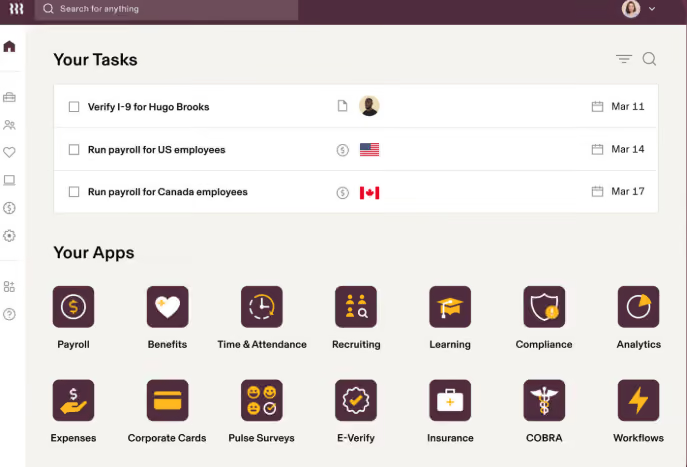
- How many features are offered within the system
- The automations that occur between different functions and departments, e.g., new hire triggers that get sent out to all departments to complete their new hire tasks.
- Errors went to almost zero within payroll due to how easy the scheduling, timekeeping, and payroll processes are within Rippling.
Our business was growing and we were looking to combine and streamline several of our functions. We had been looking into HRIS options but we really liked the idea of HR, IT, and Finance all being connected in a single system with Rippling.
We now can handle expense reports, payroll, benefit administration, travel stipends, and device management in one place. We saved time by not having to re-enter information into several different systems. We truly enjoyed how streamlined everything felt with Rippling.
- The price is very steep in order to access all of the features we truly needed
- Our salesperson promised we would have great customer service, but after we signed the contract, it was almost impossible to reach someone. Also, we never had anyone consistent to work with us.
- There was a very big learning curve and it required a lot of staff training.
It connects scheduling, timekeeping, and payroll together, which is sometimes not the case with other payroll admin systems like Gusto. Also, the user experience is much easier with Rippling compared to something like ADP or Workday, which are clunky and corporate feeling.
Think through what offerings are actually needed, because adding on categories like finance and IT makes this software very expensive. I think Rippling is best for businesses around 50-1,500 employees, and if your company is poised for growth, I suggest adopting Rippling sooner rather than later!
Over time, Rippling has really boomed into a larger company that seems to fit well with both small and larger sized businesses. Initially, it felt like it was a small to mid-sized business solution.
I think Rippling can be great for a small but growing business. It also can handle businesses with 1,500-2,000 staff very easily! It's great for a variety of industries as well.
It would be too costly for a business with less than 50 employees who do not plan on adding staff in the near future.
Companies that just need payroll administration assistance could benefit from shopping around for other solutions at a better price.
Also, any company that needs extensive help with adopting this should consider an alternative solution, as Rippling truly doesn't provide that level of attention and hand-holding.

We use Rippling as our source of truth for everything employee related. On the HR side, it handles our entire onboarding workflow: the moment an offer letter is signed, Rippling kicks off a chain reaction that handles background checks, signs I-9s, assigns handbooks, and drops them into our health insurance and 401(k) pipelines.
We run bi-weekly payroll through it for domestic W2 employees, and we use the global payroll features to pay international contractors and EOR employees across multiple countries in their local currencies.
What really changes the game for us as super admins is how we use Rippling's Unity platform to tie HR directly into IT and finance, automatically provisioning corporate Google Workspace accounts, creating Slack profiles, and granting access to specific AWS or GitHub repos based on department and seniority.
We also use Rippling Device Management to purchase, ship, and configure company laptops, and we can lock or wipe a laptop remotely if someone leaves. It's also where we track time off, manage hardware inventory, and run expense stipends.
The biggest pro for me as a super admin is the automated IT provisioning, which lets us create Slack and Google Workspace accounts and ship pre-configured laptops the second a new hire signs their offer letter.
I love that it serves as a true global single source of truth, meaning I can run US W2 payroll, manage international EOR employees, and pay global contractors all out of one dashboard.
The custom workflow builder is incredibly powerful, allowing me to set up automated triggers, like notifying IT and finance whenever an employee changes their home address or gets a promotion, without any engineering support.
We brought in Rippling about two years ago when our headcount started pacing ahead of what our fragmented tech stack could handle.
At the time, we were playing a frustrating game of telephone between three different systems: a legacy HRIS for tracking employee data, a separate standalone payroll provider, and a disconnected ticketing system just to get IT to provision a laptop or set up company email. We pulled the trigger because we were scaling fast and losing hours of manual work every time we onboarded or offboarded someone.
The promise of having global payroll, core HRIS, benefits, and device management all wired into one central identity management engine was exactly what we needed to stop the administrative bleeding.
It allowed us to manage our growing W2 team and international contractors without needing to hire two more full-time HR admins.
The modular, a la carte pricing structure can lead to severe sticker shock, because every essential feature from time tracking to basic app provisioning is gated behind an additional per user, per month fee that causes your annual bill to balloon as you scale.
Their customer support can be frustrating when a complex edge case breaks on the backend, often resulting in slow response times and tiered ticketing queues when you need a live person immediately.
The heavy reliance on automated triggers means that if a manager inputs a future-dated promotion or job title change incorrectly, it can prematurely trigger software de-provisioning or incorrect payroll calculations without warning.
The primary difference is that while competitors like Gusto or BambooHR started as payroll or HR databases and tacked on extra features later, Rippling was built from day one as an identity and access management system.
With Gusto, I was still stuck manually ordering laptops, setting up Slack accounts, and using separate platforms like Deel for international hiring, and with BambooHR, the payroll felt like a clunky, disjointed third party add-on.
As a super admin, I heavily prefer Rippling because it unifies HR, IT, and finance into a single dashboard, and being able to offboard an employee in three clicks saves my team dozens of hours of manual work every week.
When buying an all-in-one HRIS like Rippling, your primary evaluation criteria must be cross-departmental integration capabilities, specifically how seamlessly HR data flows into IT provisioning and expense management without manual workarounds.
You also need to look closely at global scalability, ensuring the vendor can natively handle both domestic W2 payroll and international EOR or contractor compliance under one interface as your team expands.
Finally, don't just look at the base price; carefully audit the vendor's modular pricing structure and contract terms, as add-on fees for features like time tracking, performance, or device management can easily double your expected budget as headcount grows.
Rippling has evolved from a basic US payroll and IT provisioning tool into a massive global operational platform. They moved aggressively into international workforce management by launching their own native EOR service and global payroll, eliminating the need for separate systems like Deel.
They have also expanded beyond core HR by launching comprehensive finance modules, including corporate cards, expense tracking, and automated accounts payable.
They have transformed from a sleek startup tool into an all-in-one ecosystem capable of handling a company's entire workforce, IT, and spend management globally.
Rippling is an absolute home run for rapidly scaling startups and mid-sized companies (roughly 20 to 500 employees) that operate with a lean HR and IT department. It's specifically built for distributed or remote-first organizations that hire a mix of domestic W2 workers, international contractors, and global EOR employees across multiple states and countries.
If your company uses a heavy amount of cloud software (like Slack, Zoom, Jira) and provisions physical corporate laptops, Rippling is the perfect fit. It excels when an organization wants to automate the administrative overlap between HR, IT, and finance to avoid hiring separate administrators just to manage passwords, hardware logistics, and multi-state payroll compliance.
Rippling is a bad fit for small, localized companies with deskless workforces, like retail shops or restaurants, where employees don't use company laptops or corporate software, making the costly IT and provisioning features useless.
It's also overkill for micro-startups under 15 employees with basic, domestic-only payroll needs, who would be better off saving money with simpler tools like Gusto.
Finally, massive enterprise organizations with deeply entrenched, highly customized legacy setups or complex union payroll requirements will find Rippling's standardized, automated workflows far too rigid compared to Workday or UKG.
.avif)
Deel

Deel

Paylocity
Paylocity
HiBob
HiBob

BambooHR
BambooHR

Gusto
Gusto
Rippling has always been about catering to the SMB market, who value having easy to use tools in a single place where the whole team can access them. Enterprises looking for a more robust platform might find it too simple. We would also argue that, since larger companies are not really their niche, the CS team might not be very used to dealing with larger teams.
Proxy, Dwell, Superhuman, Expensify, Checkr
- Manage devices: Among other things, Rippling lets you manage and protect the computers, phones, and tablets that your employees use for their work.
- App management: Another feature that's particular to Rippling is their mission control for work apps. In brief, you can manage users and their access for tools like Slack, Office, Google Workplace, and Dropbox.
Rippling also offers:
- Payroll
- Benefits
- Talent Management
- Time & Attendance
- Automated Onboarding & Offboarding
- PEO
When it comes to integrations, Rippling is one of the leaders in the HR tech space, being able to integrate with over 500 tools. Some of them are Lever, Greenhouse, and Quickbooks, for example.
Rippling starts at $8 per month per user, but the final fee you pay will vary depending on which modules you'd like to use (or if you want the whole platform) and for how many people.
Rippling is a good bet for SMBs that prioritize user experience and would appreciate having most of the HR tools in one platform. They’ve designed the product to be friendly for all the company to use and they have tried to incorporate all the HR tools a regular department would need.
Although they have always been geared towards small and medium-sized businesses, Rippling has consistently been adding new features and modules year on year. For example, their HR offering was basic at first, and now, in 2023, it features everything you’d expect from an ‘all-in-one’ HR platform, such as Benefits, Talent Management, Time & Attendance, and Payroll, making it a fully-fledged HRMS. This continual improvement means that the product is steadily catching on with companies of all sizes, even on the enterprise level.
Typically, Rippling takes around 2 weeks to implement, but times will vary depending on the scope of each project.
Rippling has a Customer Success department, a CSM toolkit, and a help center.
Rippling has an interesting origin story, in big part because they were founded by the former Zenefits CEO and one of its Co-Founders, Parker Conrad, after a somewhat dramatic exit. Conrad co-founded Zenefits in 2012. Part of what inspired him to help create the product was the launch of Barack Obama’s Affordable Care Act and his experience as a cancer patient.
Zenefits became one of the quickest-growing tech startups of its era, getting valued at $4.5 billion within two years of its inception. Since then, it has remained a constant household name in the world of HR software for American SMBs. Even after some controversy.
In 2015, it was reported by Buzzfeed News that the startup had allowed salespeople to sell health insurance that they were unlicensed to sell, since in the US the law requires insurance brokers to be licensed. The company came under heavy scrutiny for failing to enforce these legal requirements, to the point that Conrad had to step down from his role as CEO.
From the ashes, Parker Conrad teamed up with Zenefits’ former director of engineering and founded Rippling. The driving idea was to create a platform that could simplify HR in general through automated workflows. The focus was on going beyond benefits and payroll and touching upon everything that HR is traditionally supposed to do.
Founded in 2016, the product caught on somewhat slower than Conrad’s former project, but they solidly built a name for themselves by orienting their product towards companies with less than 2000 employees.
Rippling secured $1.2B in funding across five rounds, with their latest funding raised on Mar 17, 2023, through a Series E round. The company is backed by 33 investors, with Greenoaks and Empede Capital being the most recent contributors.
To this day, they continue to grow consistently and are considered one of the top players in the HRMS space for SMBs. Also, they now hold their own licenses for insurance services, PEO, and payments. You can consult the exact info on those via their website.
Company HQ
San Francisco, CA
Number of Employees
1290+
Year Founded
2016
Amount Raised
Last raised $250M via series D funding.
FAQ
About SSR

We spend hundreds of hours researching the best HR and recruiting software so you don’t have to. We never take money from vendors during our research phase and rely heavily on practitioners and experts to help us recommend the right software. However we may earn a small fee if you click on vendor links on this page.

